
Wi Fi Session 17 INST 346 Technologies Infrastructure


- Slides: 37
Wi. Fi Session 17 INST 346 Technologies, Infrastructure and Architecture
L 3 Results
Q 6 Results • 16 of 26 earned full credit • 1: CRC works well in terrestrial point to point links, where retransmission is easy; FEC might be better for high-delay links (e. g. , satellite) [also better for low signal strength settings] • 2: Dijkstra’s algorithm would not scale to Internet (flood routing, n log n computation time)
Muddiest Points (from Point-to-Point) • Ethernet • Radio links • Parity checking • Error correction
Goals for Today • Wi. Fi • Getahead: Cellular networks • L 4 preview
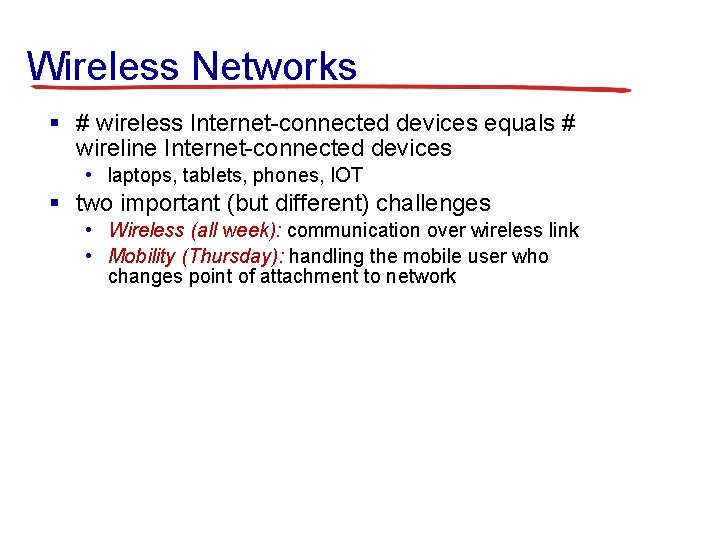
Wireless Networks § # wireless Internet-connected devices equals # wireline Internet-connected devices • laptops, tablets, phones, IOT § two important (but different) challenges • Wireless (all week): communication over wireless link • Mobility (Thursday): handling the mobile user who changes point of attachment to network
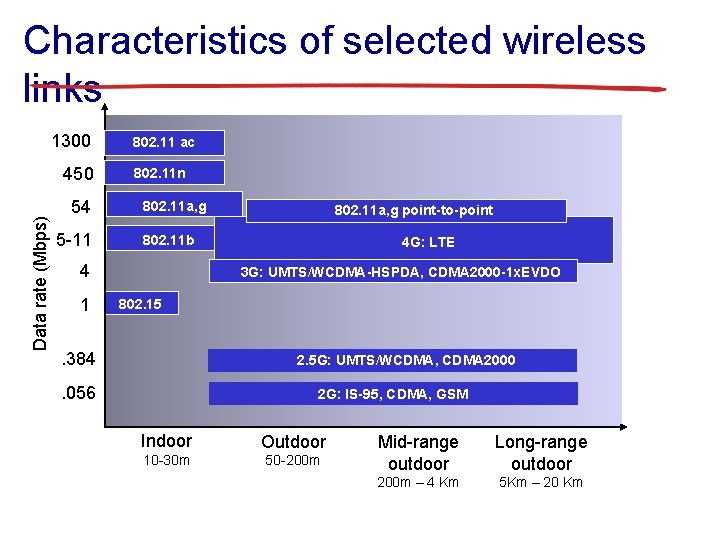
Characteristics of selected wireless links 1300 Data rate (Mbps) 450 54 5 -11 802. 11 ac 802. 11 n 802. 11 a, g 802. 11 b 4 1 802. 11 a, g point-to-point 4 G: LTE 3 G: UMTS/WCDMA-HSPDA, CDMA 2000 -1 x. EVDO 802. 15 . 384 2. 5 G: UMTS/WCDMA, CDMA 2000 . 056 2 G: IS-95, CDMA, GSM Indoor Outdoor 10 -30 m 50 -200 m Mid-range outdoor Long-range outdoor 200 m – 4 Km 5 Km – 20 Km
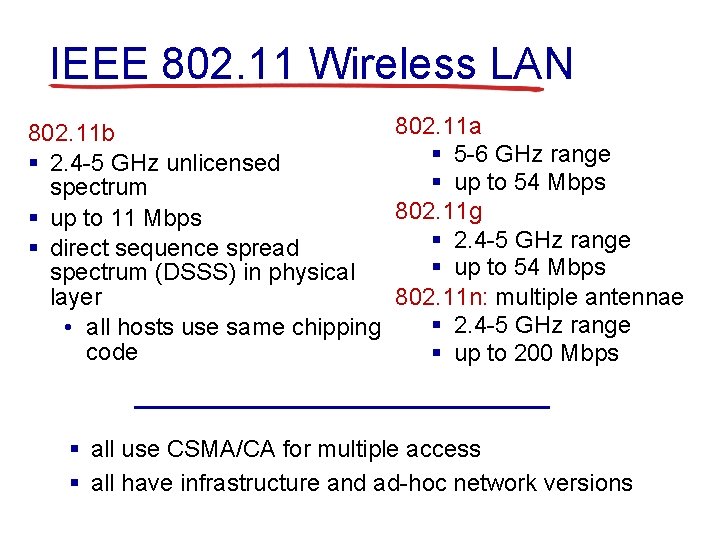
IEEE 802. 11 Wireless LAN 802. 11 a 802. 11 b § 5 -6 GHz range § 2. 4 -5 GHz unlicensed § up to 54 Mbps spectrum 802. 11 g § up to 11 Mbps § 2. 4 -5 GHz range § direct sequence spread § up to 54 Mbps spectrum (DSSS) in physical layer 802. 11 n: multiple antennae § 2. 4 -5 GHz range • all hosts use same chipping code § up to 200 Mbps § all use CSMA/CA for multiple access § all have infrastructure and ad-hoc network versions
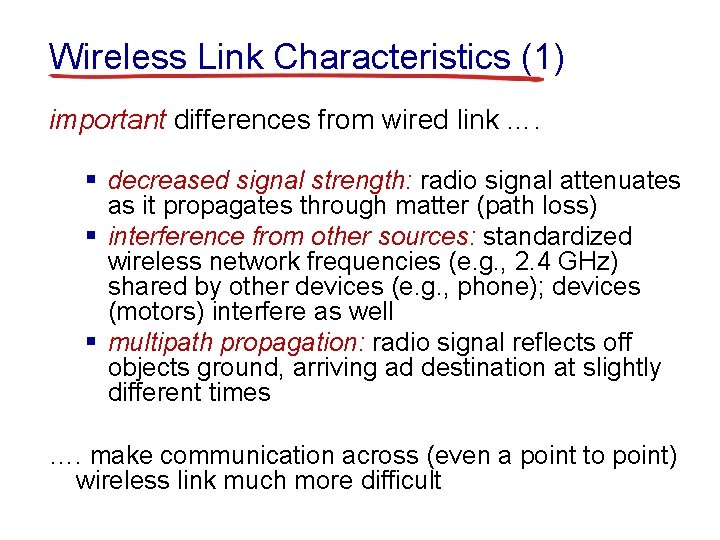
Wireless Link Characteristics (1) important differences from wired link …. § decreased signal strength: radio signal attenuates as it propagates through matter (path loss) § interference from other sources: standardized wireless network frequencies (e. g. , 2. 4 GHz) shared by other devices (e. g. , phone); devices (motors) interfere as well § multipath propagation: radio signal reflects off objects ground, arriving ad destination at slightly different times …. make communication across (even a point to point) wireless link much more difficult
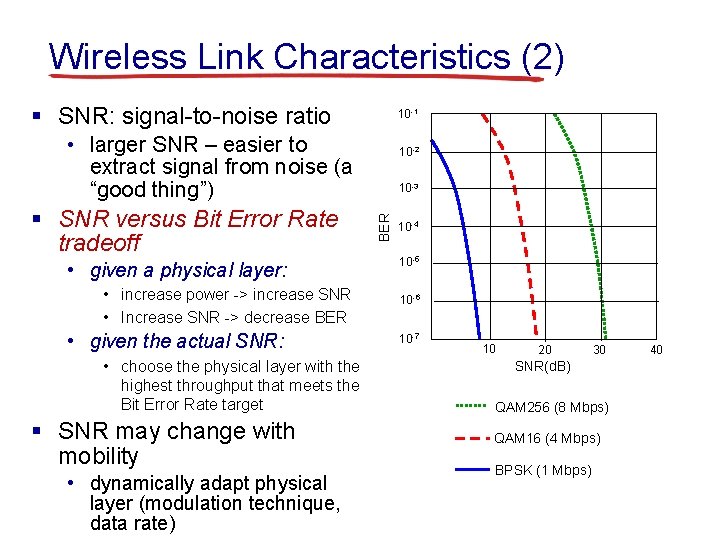
Wireless Link Characteristics (2) § SNR: signal-to-noise ratio 10 -1 • larger SNR – easier to extract signal from noise (a “good thing”) • given a physical layer: • increase power -> increase SNR • Increase SNR -> decrease BER • given the actual SNR: • choose the physical layer with the highest throughput that meets the Bit Error Rate target § SNR may change with mobility • dynamically adapt physical layer (modulation technique, data rate) 10 -3 BER § SNR versus Bit Error Rate tradeoff 10 -2 10 -4 10 -5 10 -6 10 -7 10 20 30 SNR(d. B) QAM 256 (8 Mbps) QAM 16 (4 Mbps) BPSK (1 Mbps) 40
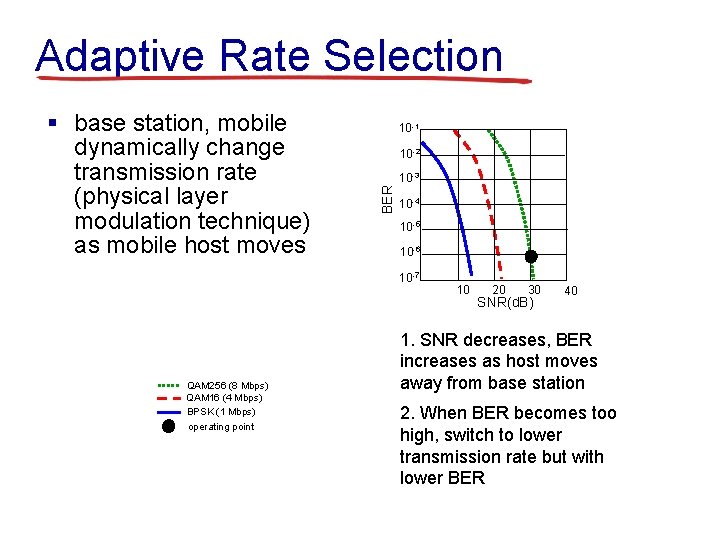
Adaptive Rate Selection 10 -1 10 -2 10 -3 BER § base station, mobile dynamically change transmission rate (physical layer modulation technique) as mobile host moves 10 -4 10 -5 10 -6 10 -7 QAM 256 (8 Mbps) QAM 16 (4 Mbps) BPSK (1 Mbps) operating point 10 20 30 SNR(d. B) 40 1. SNR decreases, BER increases as host moves away from base station 2. When BER becomes too high, switch to lower transmission rate but with lower BER
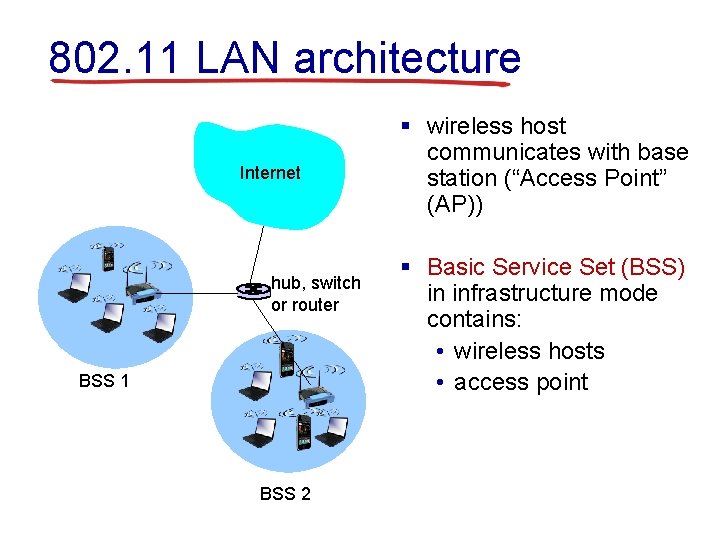
802. 11 LAN architecture Internet hub, switch or router BSS 1 BSS 2 § wireless host communicates with base station (“Access Point” (AP)) § Basic Service Set (BSS) in infrastructure mode contains: • wireless hosts • access point
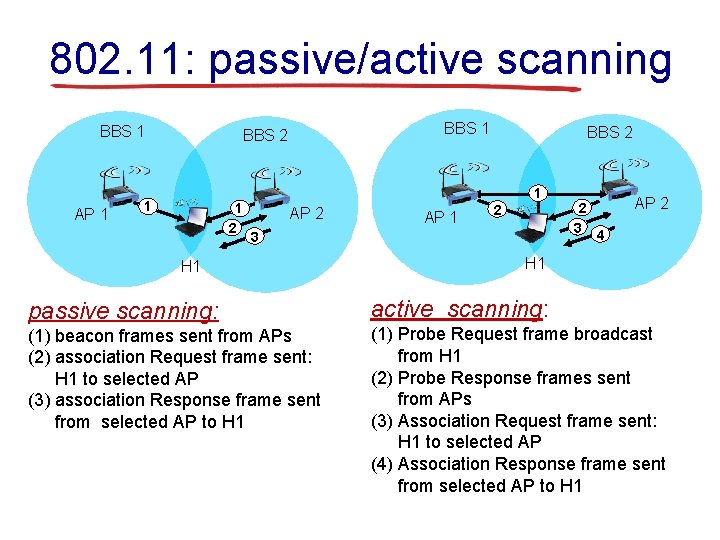
802. 11: passive/active scanning BBS 1 AP 1 BBS 2 1 1 2 BBS 2 1 AP 2 AP 1 2 3 H 1 2 3 AP 2 4 H 1 passive scanning: active scanning: (1) beacon frames sent from APs (2) association Request frame sent: H 1 to selected AP (3) association Response frame sent from selected AP to H 1 (1) Probe Request frame broadcast from H 1 (2) Probe Response frames sent from APs (3) Association Request frame sent: H 1 to selected AP (4) Association Response frame sent from selected AP to H 1
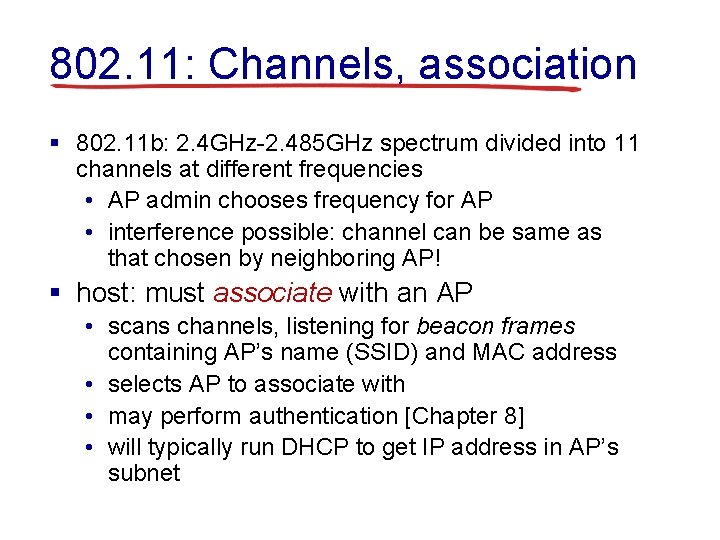
802. 11: Channels, association § 802. 11 b: 2. 4 GHz-2. 485 GHz spectrum divided into 11 channels at different frequencies • AP admin chooses frequency for AP • interference possible: channel can be same as that chosen by neighboring AP! § host: must associate with an AP • scans channels, listening for beacon frames containing AP’s name (SSID) and MAC address • selects AP to associate with • may perform authentication [Chapter 8] • will typically run DHCP to get IP address in AP’s subnet
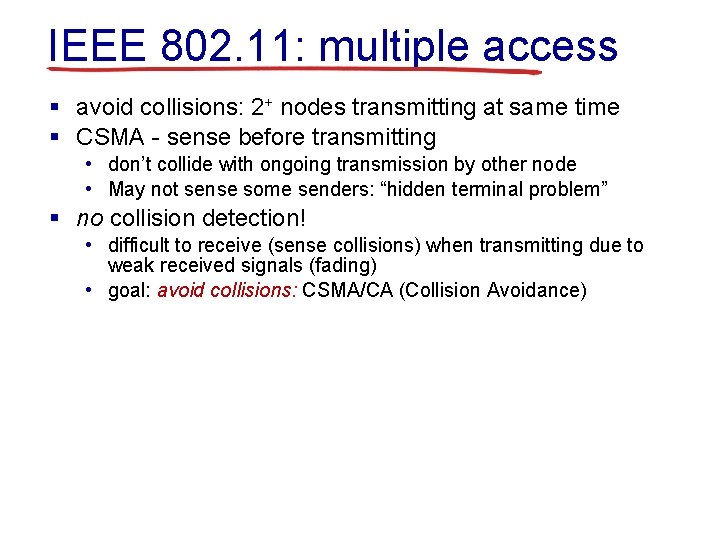
IEEE 802. 11: multiple access § avoid collisions: 2+ nodes transmitting at same time § CSMA - sense before transmitting • don’t collide with ongoing transmission by other node • May not sense some senders: “hidden terminal problem” § no collision detection! • difficult to receive (sense collisions) when transmitting due to weak received signals (fading) • goal: avoid collisions: CSMA/CA (Collision Avoidance)
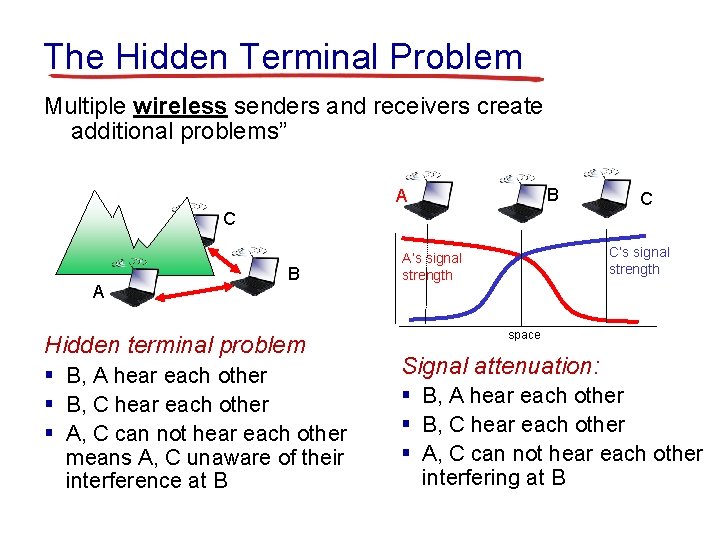
The Hidden Terminal Problem Multiple wireless senders and receivers create additional problems” B A C C A B Hidden terminal problem § B, A hear each other § B, C hear each other § A, C can not hear each other means A, C unaware of their interference at B C’s signal strength A’s signal strength space Signal attenuation: § B, A hear each other § B, C hear each other § A, C can not hear each other interfering at B
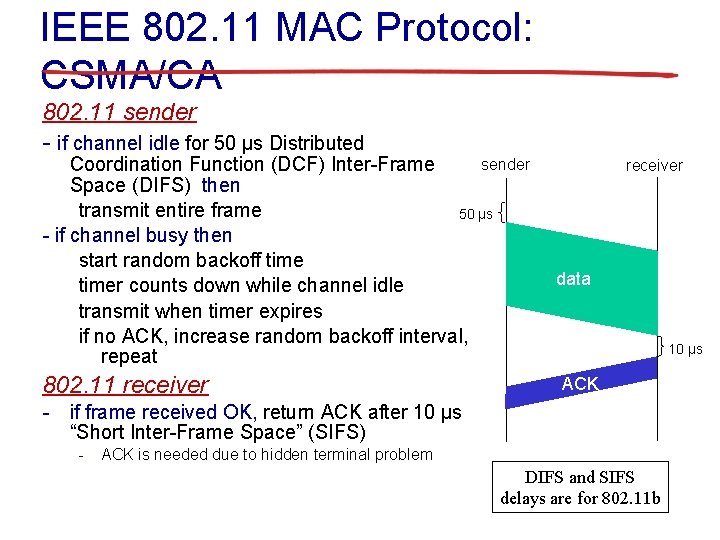
IEEE 802. 11 MAC Protocol: CSMA/CA 802. 11 sender - if channel idle for 50 μs Distributed sender Coordination Function (DCF) Inter-Frame Space (DIFS) then transmit entire frame 50 μs - if channel busy then start random backoff timer counts down while channel idle transmit when timer expires if no ACK, increase random backoff interval, repeat 802. 11 receiver data 10 μs ACK - if frame received OK, return ACK after 10 μs “Short Inter-Frame Space” (SIFS) - ACK is needed due to hidden terminal problem DIFS and SIFS delays are for 802. 11 b
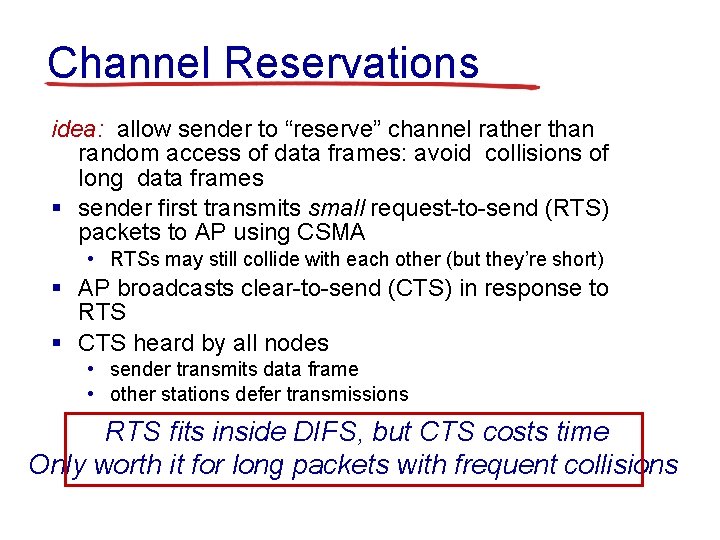
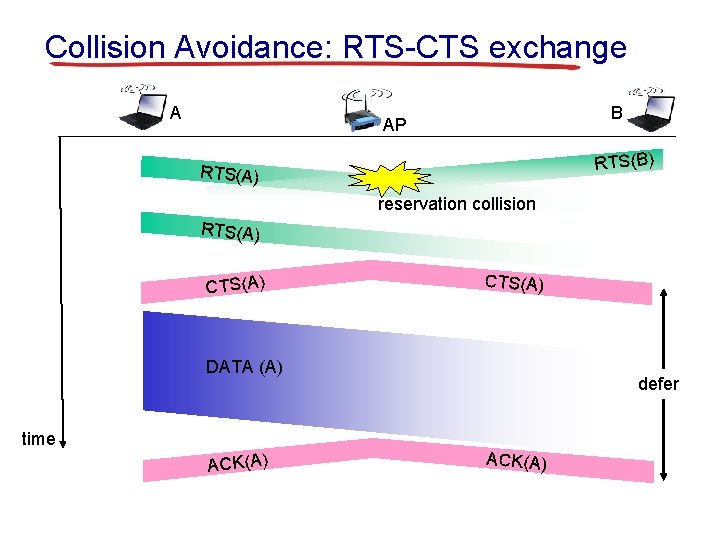
Channel Reservations idea: allow sender to “reserve” channel rather than random access of data frames: avoid collisions of long data frames § sender first transmits small request-to-send (RTS) packets to AP using CSMA • RTSs may still collide with each other (but they’re short) § AP broadcasts clear-to-send (CTS) in response to RTS § CTS heard by all nodes • sender transmits data frame • other stations defer transmissions RTS fits inside DIFS, but CTS costs time Only worth it for long packets with frequent collisions
Collision Avoidance: RTS-CTS exchange A B AP RTS(B) RTS(A) reservation collision RTS(A) CTS(A) DATA (A) defer time ACK(A)
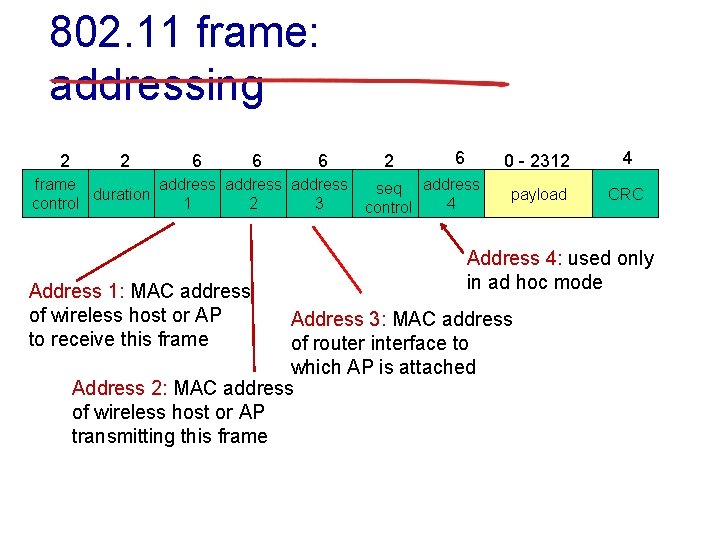
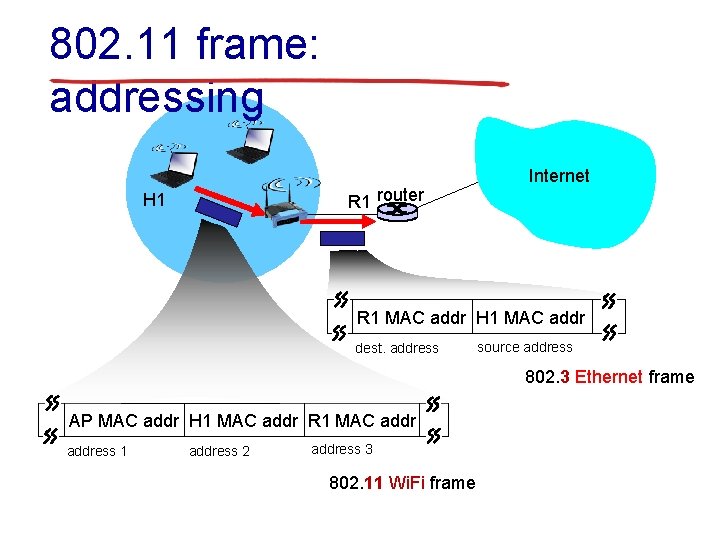
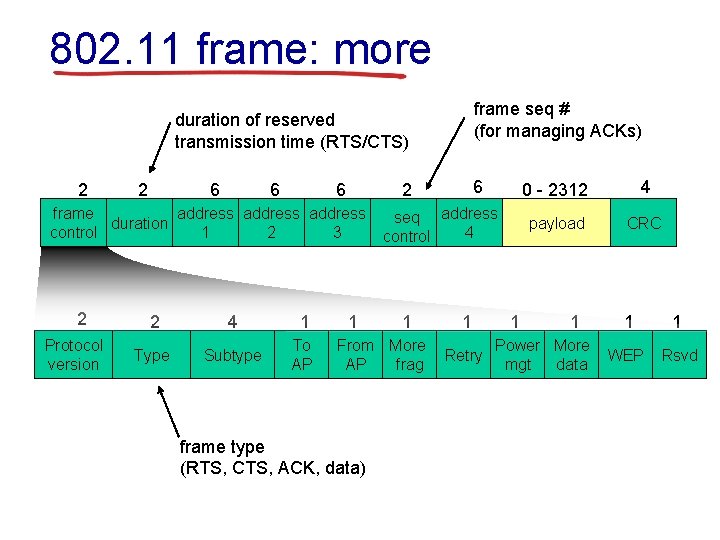
802. 11 frame: addressing 2 2 6 6 6 frame address duration control 1 2 3 Address 1: MAC address of wireless host or AP to receive this frame 2 6 seq address 4 control 0 - 2312 4 payload CRC Address 4: used only in ad hoc mode Address 3: MAC address of router interface to which AP is attached Address 2: MAC address of wireless host or AP transmitting this frame
802. 11 frame: addressing R 1 router H 1 Internet R 1 MAC addr H 1 MAC addr dest. address source address 802. 3 Ethernet frame AP MAC addr H 1 MAC addr R 1 MAC address 1 address 2 address 3 802. 11 Wi. Fi frame
802. 11 frame: more frame seq # (for managing ACKs) duration of reserved transmission time (RTS/CTS) 2 2 6 6 6 frame address duration control 1 2 3 2 Protocol version 2 4 1 Type Subtype To AP 6 2 1 seq address 4 control 1 From More AP frag frame type (RTS, CTS, ACK, data) 1 Retry 1 0 - 2312 4 payload CRC 1 Power More mgt data 1 1 WEP Rsvd
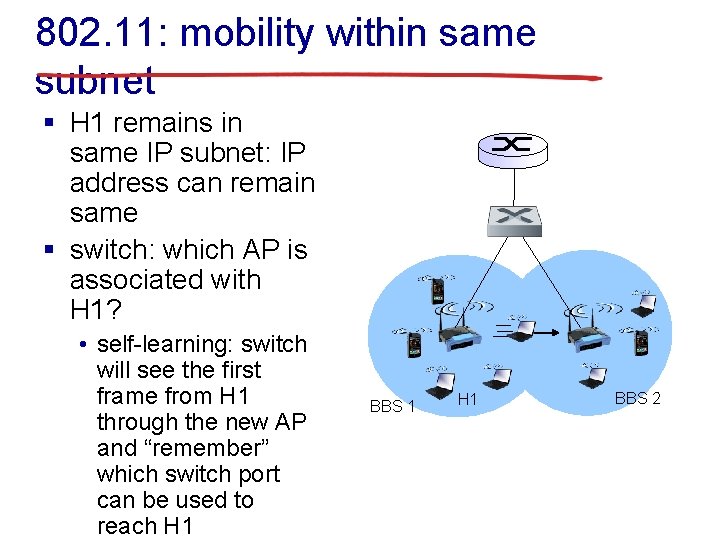
802. 11: mobility within same subnet § H 1 remains in same IP subnet: IP address can remain same § switch: which AP is associated with H 1? • self-learning: switch will see the first frame from H 1 through the new AP and “remember” which switch port can be used to reach H 1 BBS 1 H 1 BBS 2
802. 11: advanced capabilities power management § node-to-AP: “I am going to sleep until next beacon frame” • AP knows not to transmit frames to this node • node wakes up before next beacon frame § beacon frame: contains list of mobiles with AP-to-mobile frames waiting to be sent • node will stay awake if AP-to-mobile frames to be sent; otherwise sleep again until next beacon frame
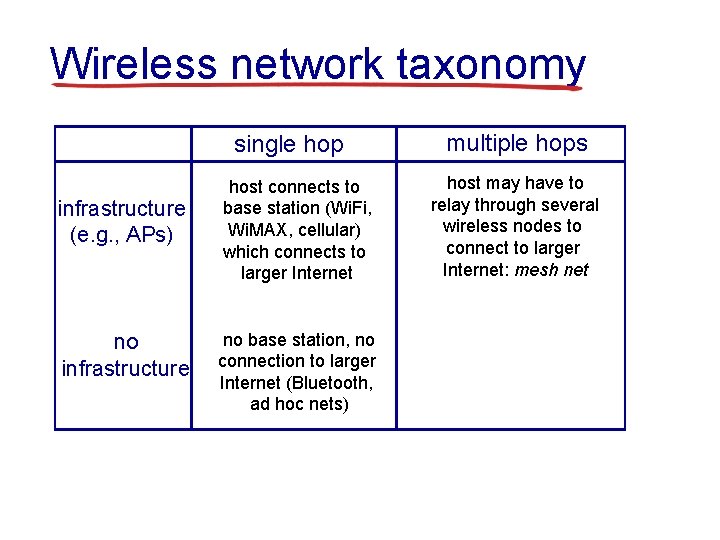
Wireless network taxonomy single hop infrastructure (e. g. , APs) no infrastructure host connects to base station (Wi. Fi, Wi. MAX, cellular) which connects to larger Internet no base station, no connection to larger Internet (Bluetooth, ad hoc nets) multiple hops host may have to relay through several wireless nodes to connect to larger Internet: mesh net
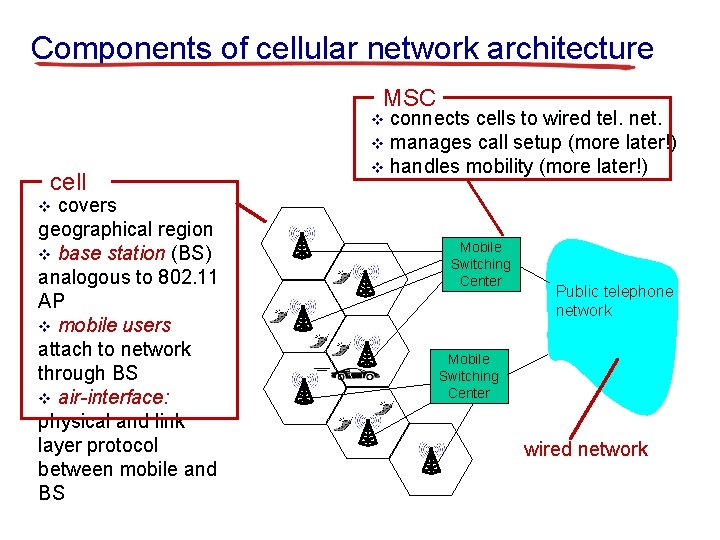
Components of cellular network architecture MSC connects cells to wired tel. net. v manages call setup (more later!) v handles mobility (more later!) v cell covers geographical region v base station (BS) analogous to 802. 11 AP v mobile users attach to network through BS v air-interface: physical and link layer protocol between mobile and BS v Mobile Switching Center Public telephone network Mobile Switching Center wired network
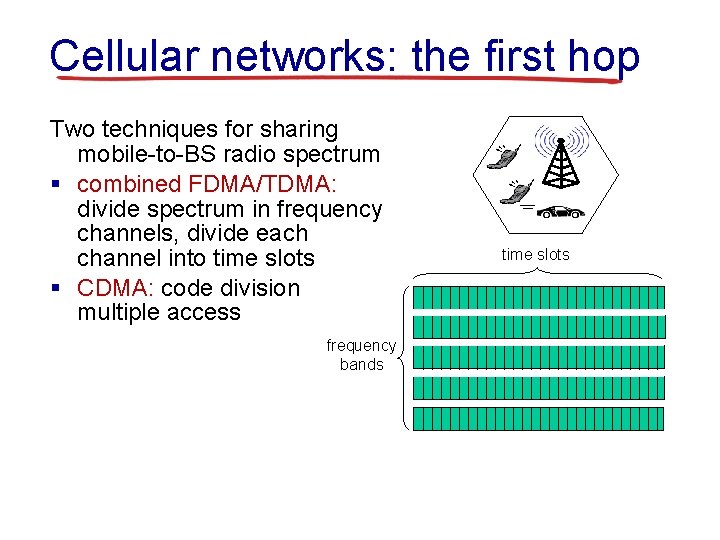
Cellular networks: the first hop Two techniques for sharing mobile-to-BS radio spectrum § combined FDMA/TDMA: divide spectrum in frequency channels, divide each channel into time slots § CDMA: code division multiple access frequency bands time slots
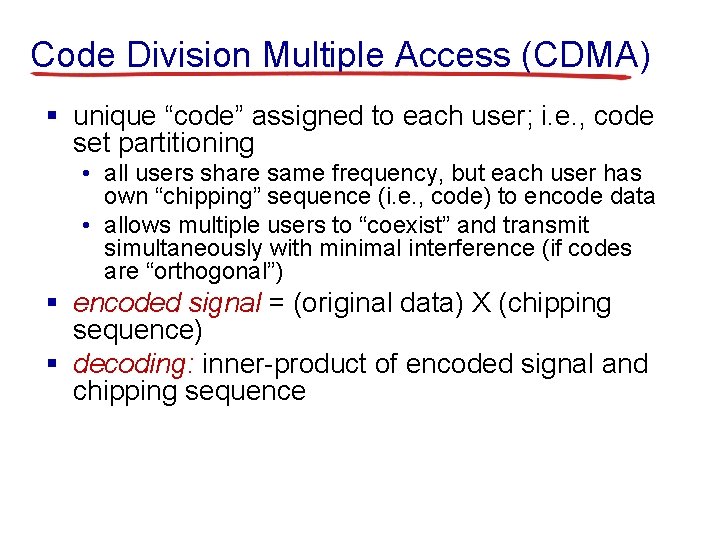
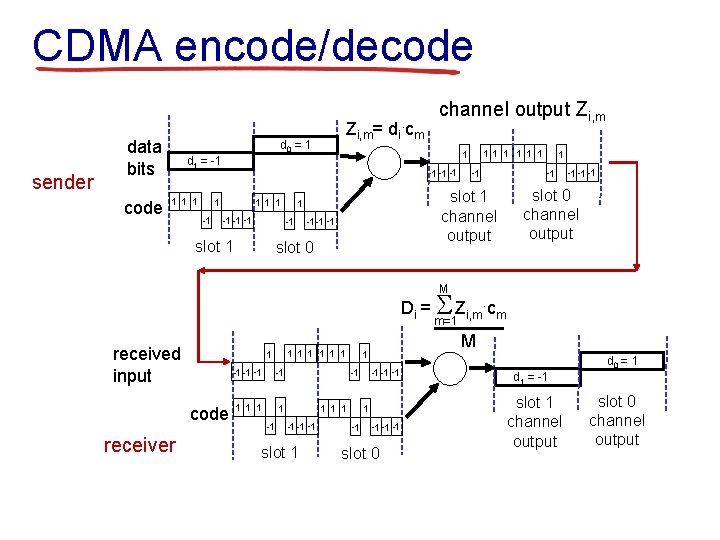
Code Division Multiple Access (CDMA) § unique “code” assigned to each user; i. e. , code set partitioning • all users share same frequency, but each user has own “chipping” sequence (i. e. , code) to encode data • allows multiple users to “coexist” and transmit simultaneously with minimal interference (if codes are “orthogonal”) § encoded signal = (original data) X (chipping sequence) § decoding: inner-product of encoded signal and chipping sequence
CDMA encode/decode sender data bits code Zi, m= di. cm d 0 = 1 -1 -1 -1 1 1 1 -1 -1 -1 slot 1 channel output 1 -1 1 1 1 d 1 = -1 1 channel output Zi, m -1 -1 -1 slot 0 channel output M Di = S Zi, m. cm m=1 received input code receiver 1 1 1 1 -1 -1 -1 1 -1 -1 -1 slot 1 M 1 1 -1 -1 slot 0 d 0 = 1 d 1 = -1 slot 1 channel output slot 0 channel output
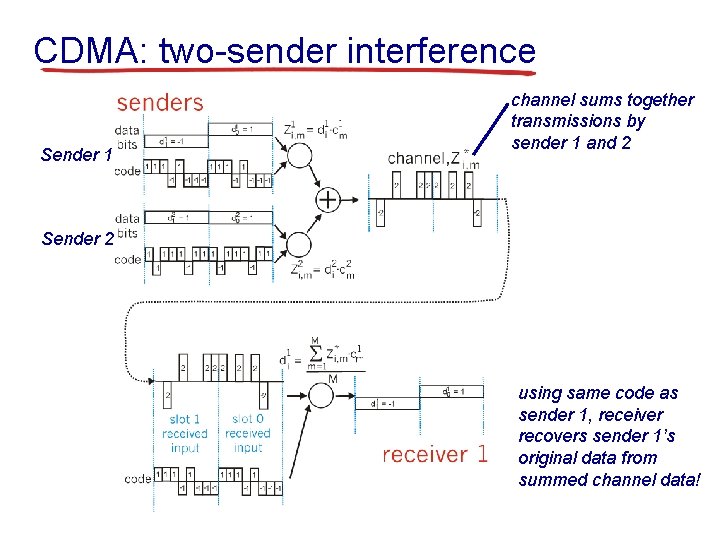
CDMA: two-sender interference Sender 1 channel sums together transmissions by sender 1 and 2 Sender 2 using same code as sender 1, receiver recovers sender 1’s original data from summed channel data!
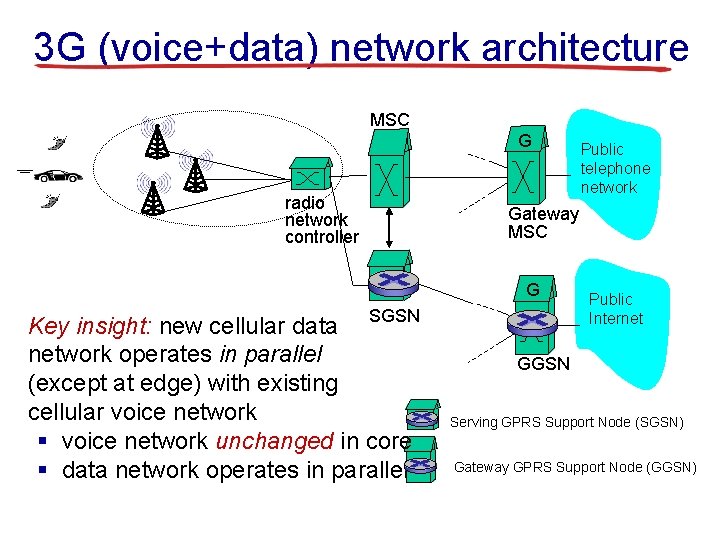
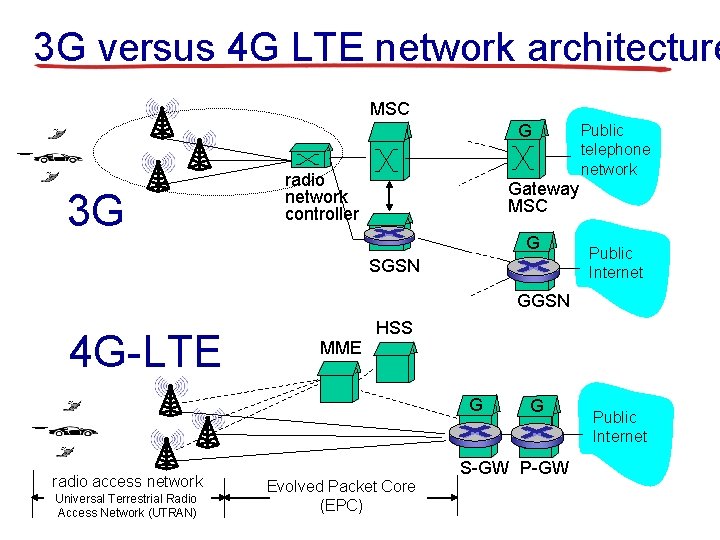
3 G (voice+data) network architecture MSC G radio network controller Gateway MSC G Key insight: new cellular data SGSN network operates in parallel (except at edge) with existing cellular voice network § voice network unchanged in core § data network operates in parallel Public telephone network Public Internet GGSN Serving GPRS Support Node (SGSN) Gateway GPRS Support Node (GGSN)
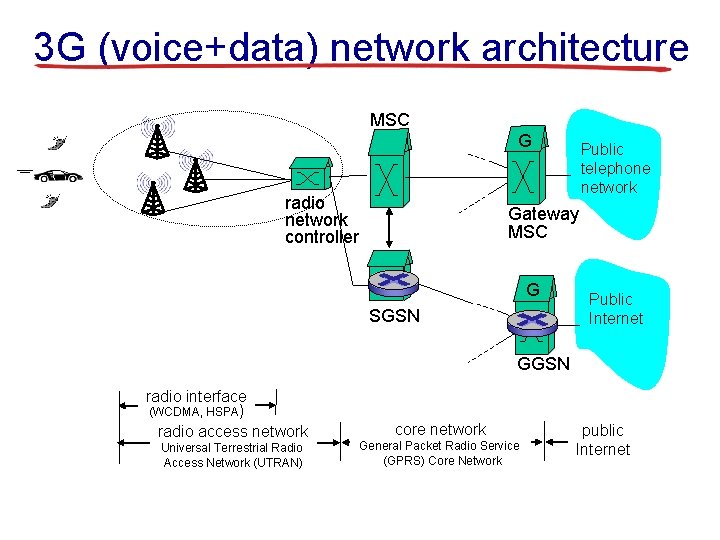
3 G (voice+data) network architecture MSC G radio network controller Public telephone network Gateway MSC G SGSN Public Internet GGSN radio interface (WCDMA, HSPA) radio access network Universal Terrestrial Radio Access Network (UTRAN) core network General Packet Radio Service (GPRS) Core Network public Internet
3 G versus 4 G LTE network architecture MSC G 3 G radio network controller Public telephone network Gateway MSC G SGSN Public Internet GGSN 4 G-LTE MME HSS G radio access network Universal Terrestrial Radio Access Network (UTRAN) Evolved Packet Core (EPC) G S-GW Public Internet
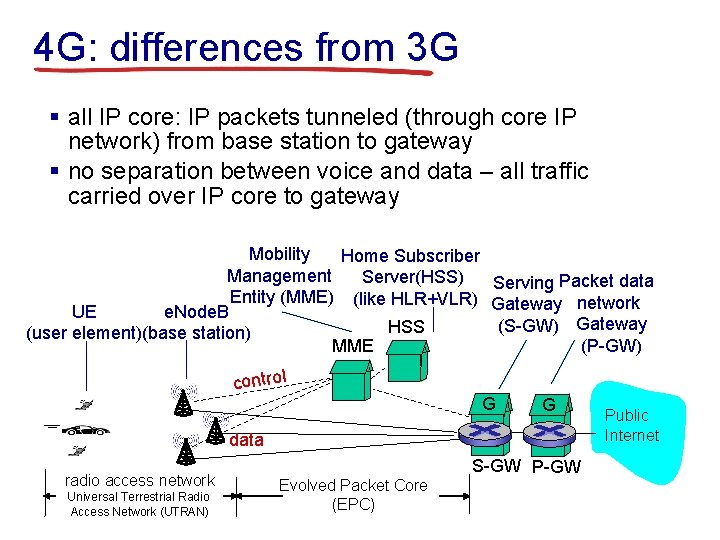
4 G: differences from 3 G § all IP core: IP packets tunneled (through core IP network) from base station to gateway § no separation between voice and data – all traffic carried over IP core to gateway Mobility Home Subscriber Management Server(HSS) Serving Packet data Entity (MME) (like HLR+VLR) Gateway network UE e. Node. B (S-GW) Gateway HSS (user element)(base station) (P-GW) MME control G G data radio access network Universal Terrestrial Radio Access Network (UTRAN) Evolved Packet Core (EPC) S-GW Public Internet
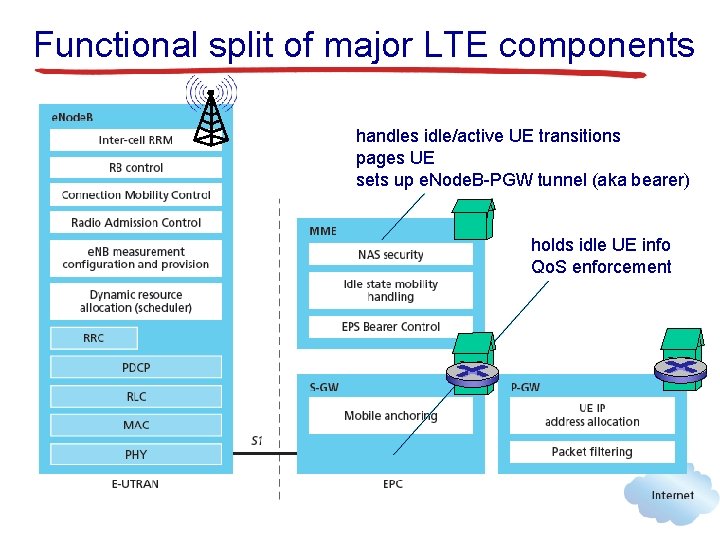
Functional split of major LTE components handles idle/active UE transitions pages UE sets up e. Node. B-PGW tunnel (aka bearer) holds idle UE info Qo. S enforcement
L 4 Preview
Before You Go On a sheet of paper, answer the following (ungraded) question (no names, please): What was the muddiest point in today’s class?