
Why modeling techniques Specific languages to describe higher
Why modeling techniques? • Specific languages to describe higher level concepts and abstractions. • Graphical representations help us in understanding, documenting and explaining a problem. • Writing down ideas in a structured way helps us to tackle complexity and multi-dimensionality of software. Þ Mastering one or several modeling techniques, one or several software development processes, and knowing the most important design patterns are prerequisites for successful (object-oriented) software development. START NOW! Dorothea Beringer, 1999 UML 1
Formal - Informal • Formal modeling techniques » e. g. Z, VDM » COOPN, Petri-Nets – allow various kinds of checks – completeness is an issue – mainly used for core parts of a system • Semi-formal modeling techniques » e. g. Booch, UML • Informal modeling techniques » e. g. RDD, CRC, Storyboarding They all have their place! Dorothea Beringer, 1999 UML 2
Business Processes Using UML for modeling business processes: • at beginning of a software project for a clear basis • for business process reengineering Þ Same diagrams for different purposes, different abstraction levels, different domains. References for business process modeling: » from amazon web-page » from rational web-page Dorothea Beringer, 1999 UML 3
Other sources. . . There exist many other modeling techniques and development methods that have influenced UML, e. g. » » » » » OOSE (Jacobson) Fusion (HP, D. Coleman) FORAM (Ian Graham) OBA (Rubin et al. ) RDD (Wirfs et al. ) BON (Nerson et al. ) various scenario modeling techniques various statechart modeling techniques and extensions various dataflow and eventflow modeling techniques. . . Dorothea Beringer, 1999 UML 4
References for UML Official documents about UML from Rational: http: //www. rational. com/uml/documentation. html » Object Constraint Language Specification (defines OCL, which is used to specify the well-formedness of the UML) » UML Notation Guide v 1. 1 » UML Semantics » UML Extension for Business Modeling » UML Quick Reference: http: //www. rational. com/uml/qr/ Books about UML: » web-pages of Rational » amazon. com UML for special applications (e. g. real-time systems): . . . Processes that use UML as modeling technique: . . . Dorothea Beringer, 1999 UML 5
Metamodel for UML Example: Metamodel for Relationships Dorothea Beringer, 1999 UML 6
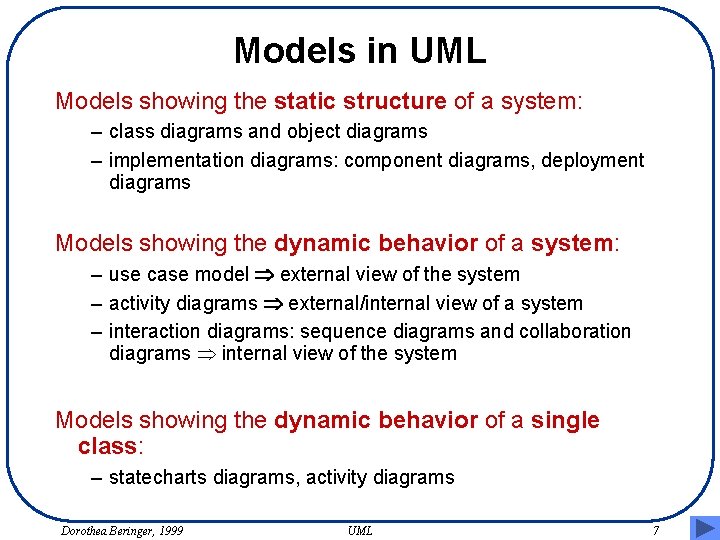
Models in UML Models showing the static structure of a system: – class diagrams and object diagrams – implementation diagrams: component diagrams, deployment diagrams Models showing the dynamic behavior of a system: – use case model Þ external view of the system – activity diagrams Þ external/internal view of a system – interaction diagrams: sequence diagrams and collaboration diagrams Þ internal view of the system Models showing the dynamic behavior of a single class: – statecharts diagrams, activity diagrams Dorothea Beringer, 1999 UML 7
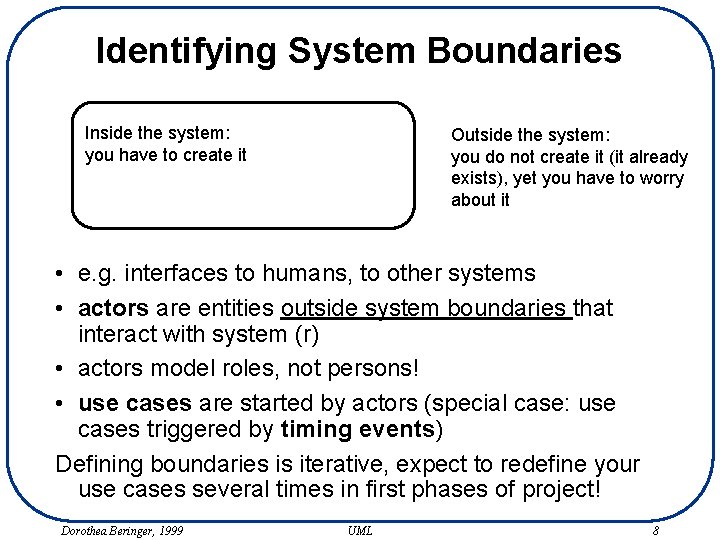
Identifying System Boundaries Inside the system: you have to create it Outside the system: you do not create it (it already exists), yet you have to worry about it • e. g. interfaces to humans, to other systems • actors are entities outside system boundaries that interact with system (r) • actors model roles, not persons! • use cases are started by actors (special case: use cases triggered by timing events) Defining boundaries is iterative, expect to redefine your use cases several times in first phases of project! Dorothea Beringer, 1999 UML 8
System Boundaries and Abstraction Levels System boundaries can be defined at several abstraction levels (b: make order): » high level with no representatives » middle level taking into account who/what actually enters the information » lower level taking into account how data is actually entered • Actors and interactions between actors and system change with abstraction level! • Starting level depends on complexity of project! Dorothea Beringer, 1999 UML 9
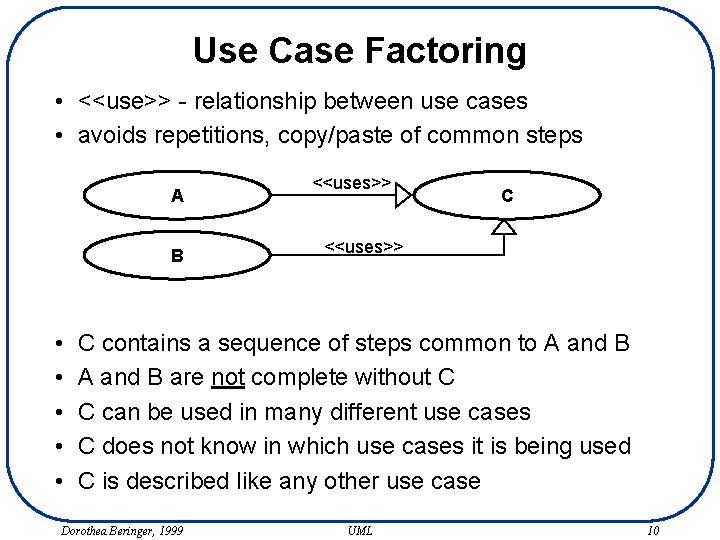
Use Case Factoring • <<use>> - relationship between use cases • avoids repetitions, copy/paste of common steps A B • • • <<uses>> C contains a sequence of steps common to A and B are not complete without C C can be used in many different use cases C does not know in which use cases it is being used C is described like any other use case Dorothea Beringer, 1999 UML 10
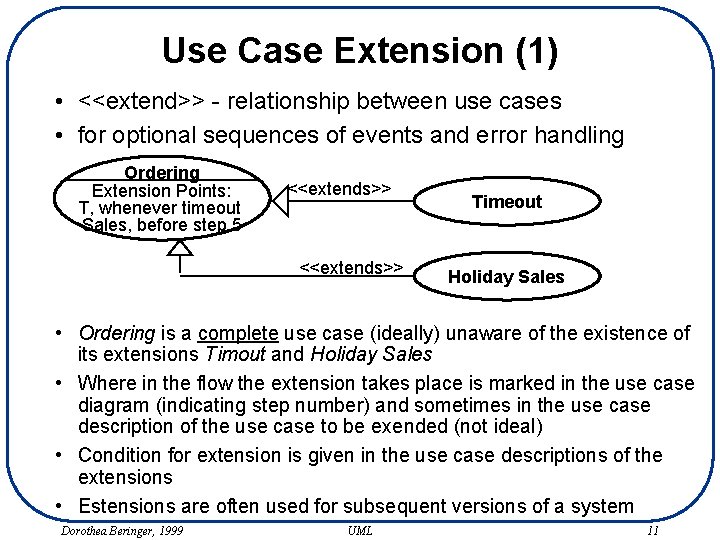
Use Case Extension (1) • <<extend>> - relationship between use cases • for optional sequences of events and error handling Ordering Extension Points: T, whenever timeout Sales, before step 5 <<extends>> Timeout Holiday Sales • Ordering is a complete use case (ideally) unaware of the existence of its extensions Timout and Holiday Sales • Where in the flow the extension takes place is marked in the use case diagram (indicating step number) and sometimes in the use case description of the use case to be exended (not ideal) • Condition for extension is given in the use case descriptions of the extensions • Estensions are often used for subsequent versions of a system Dorothea Beringer, 1999 UML 11
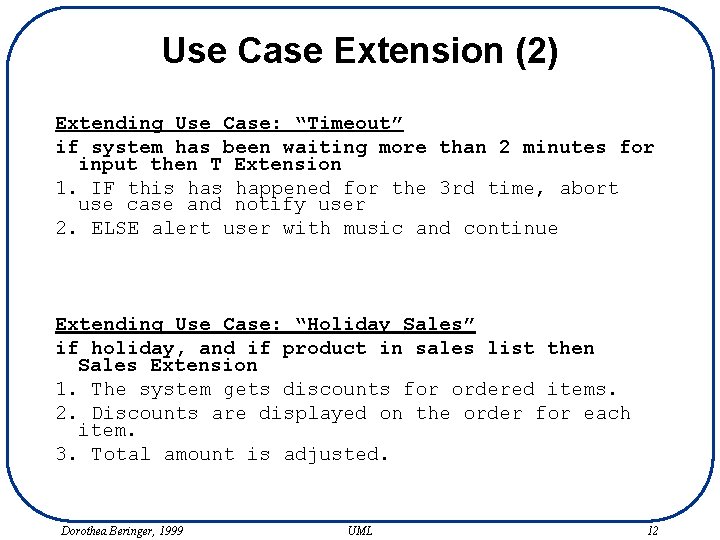
Use Case Extension (2) Extending Use Case: “Timeout” if system has been waiting more than 2 minutes for input then T Extension 1. IF this happened for the 3 rd time, abort use case and notify user 2. ELSE alert user with music and continue Extending Use Case: “Holiday Sales” if holiday, and if product in sales list then Sales Extension 1. The system gets discounts for ordered items. 2. Discounts are displayed on the order for each item. 3. Total amount is adjusted. Dorothea Beringer, 1999 UML 12
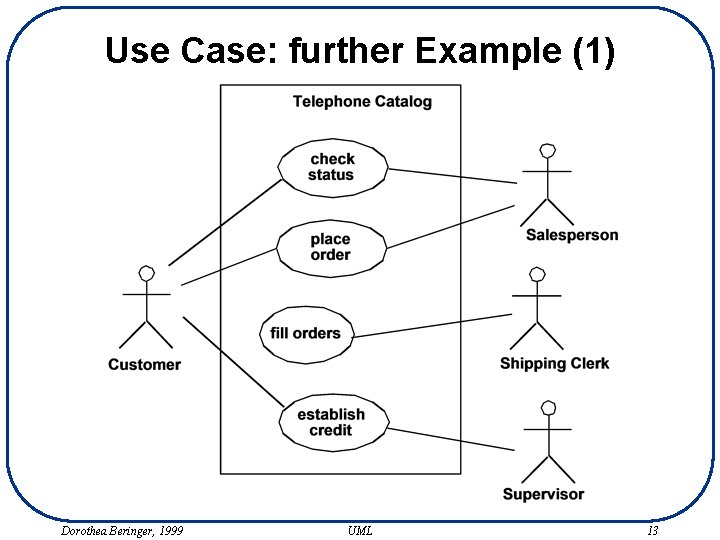
Use Case: further Example (1) Dorothea Beringer, 1999 UML 13
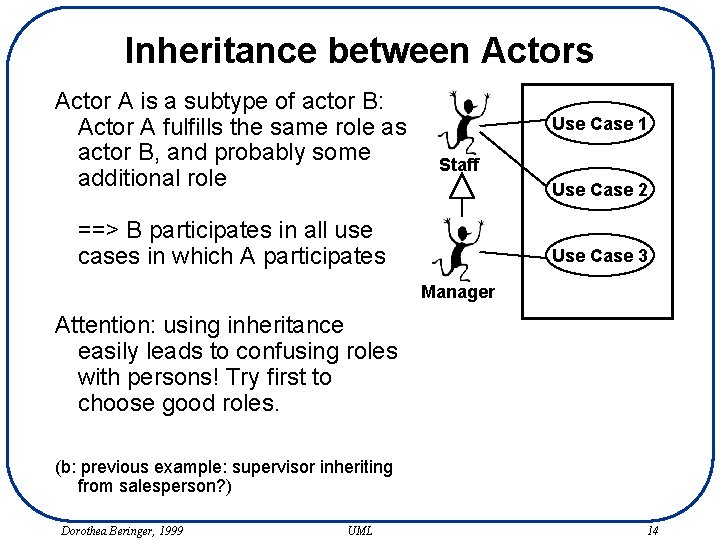
Inheritance between Actors Actor A is a subtype of actor B: Actor A fulfills the same role as actor B, and probably some additional role Use Case 1 Staff Use Case 2 ==> B participates in all use cases in which A participates Use Case 3 Manager Attention: using inheritance easily leads to confusing roles with persons! Try first to choose good roles. (b: previous example: supervisor inheriting from salesperson? ) Dorothea Beringer, 1999 UML 14
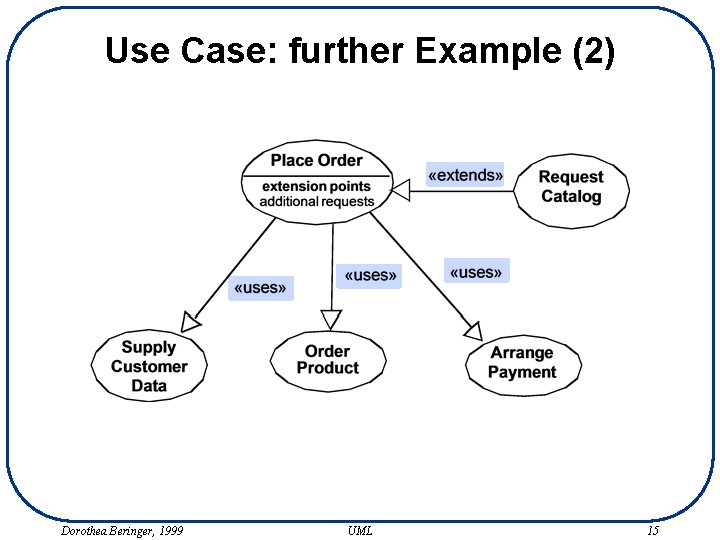
Use Case: further Example (2) Dorothea Beringer, 1999 UML 15
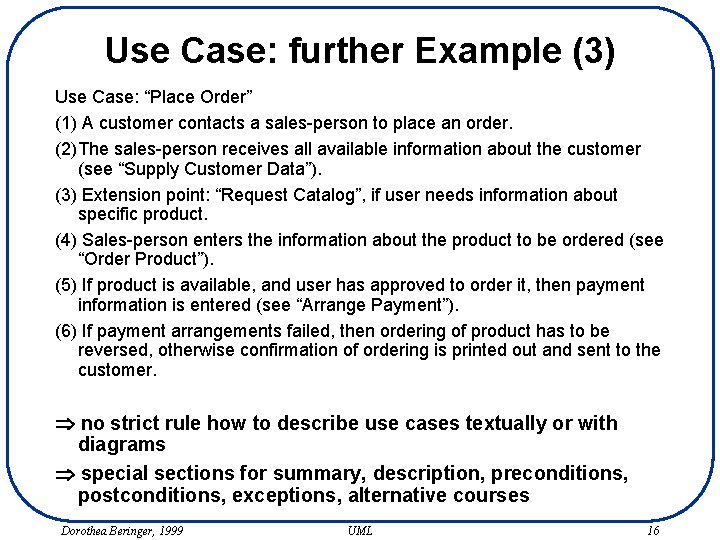
Use Case: further Example (3) Use Case: “Place Order” (1) A customer contacts a sales-person to place an order. (2)The sales-person receives all available information about the customer (see “Supply Customer Data”). (3) Extension point: “Request Catalog”, if user needs information about specific product. (4) Sales-person enters the information about the product to be ordered (see “Order Product”). (5) If product is available, and user has approved to order it, then payment information is entered (see “Arrange Payment”). (6) If payment arrangements failed, then ordering of product has to be reversed, otherwise confirmation of ordering is printed out and sent to the customer. Þ no strict rule how to describe use cases textually or with diagrams Þ special sections for summary, description, preconditions, postconditions, exceptions, alternative courses Dorothea Beringer, 1999 UML 16
Documenting Use Cases (1) Includes: – Preconditions – Postconditions – Flow of events or interactions (with conditionals, branching or loops) for basic functionality – and for alternatives and exceptions – Error conditions – Special (non-functional) requirement, e. g. time restrictions – Priority and development status In a use case we describe the behavior of the system as perceived from the outside, from the actor’s point of view. We describe how the system interacts with the outside world, not what it does internally! (d: improve previous use case, add alternative for cancel and for incorrect inputs) Dorothea Beringer, 1999 UML 17
Primary and Secondary Scenarios • Scenario: one particular path through the use case (one instance of the use case) • Primary Scenario: normal path where all goes well, or most likely path • Secondary Scenarios: other paths – alternative scenarios: other regular paths (b) – exceptional scenarios: for handling errors (b) Questions for finding secondary scenarios: » other actions that can be taken at this point? » something that could go wrong at this point? » some behavior that can happen any time during the primary scenario, e. g. cancel or restart? Dorothea Beringer, 1999 UML 18
Documenting Use Cases (2) Structuring the description: » one complete description/diagram per scenario » complete description of the primary scenario, separate descriptions for seconday scenarios (e. g. in alternative path and exception path sections) only containing deltas to basic description » all in one text or diagram inclusive alternatives and exceptions How to describe the flow of events in a use case: » plain text (b) » numbered steps » pseudo code (good for some special cases, normally gets too detailed and too unreadable) (b) » activity diagrams » interaction diagrams (showing interactions between system and actors) with pseudo code, bracket code or text to the left hand side Dorothea Beringer, 1999 UML 19
Documenting Use Cases (3) How detailed? » depends on phase in project (inception, elaboration, construction) » depends on importance and complexity of scenario (compromise: primary scenario detailed with steps and/or diagrams, secondary scenarios only plain text description) » not too detailed: capturing requirements means not constructing the system in plain text! » define and remember the goal for which you make use cases: who creates them or uses them for what? Reader of the use cases » determine modeling technique, level of detail » who could they be? (b, r) » they determine if use case descriptions are well done, not you! Correctness, completeness » walk-throughs, reviews, observation, . . . Dorothea Beringer, 1999 UML 20
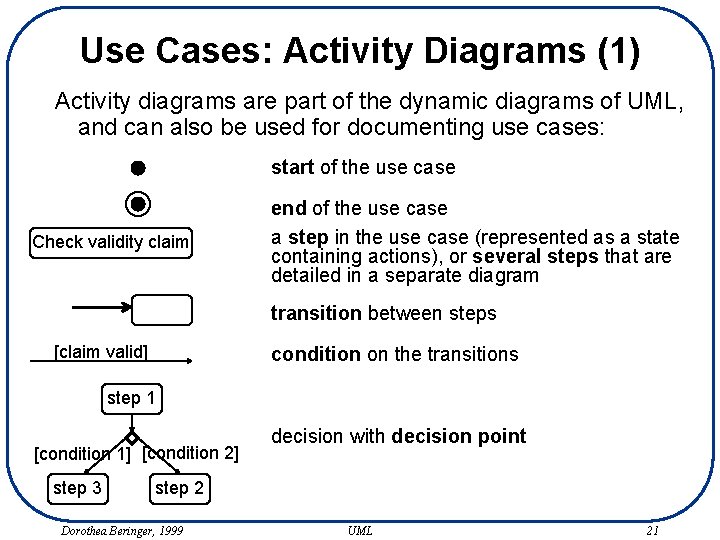
Use Cases: Activity Diagrams (1) Activity diagrams are part of the dynamic diagrams of UML, and can also be used for documenting use cases: start of the use case Check validity claim end of the use case a step in the use case (represented as a state containing actions), or several steps that are detailed in a separate diagram transition between steps [claim valid] condition on the transitions step 1 [condition 1] [condition 2] step 3 decision with decision point step 2 Dorothea Beringer, 1999 UML 21
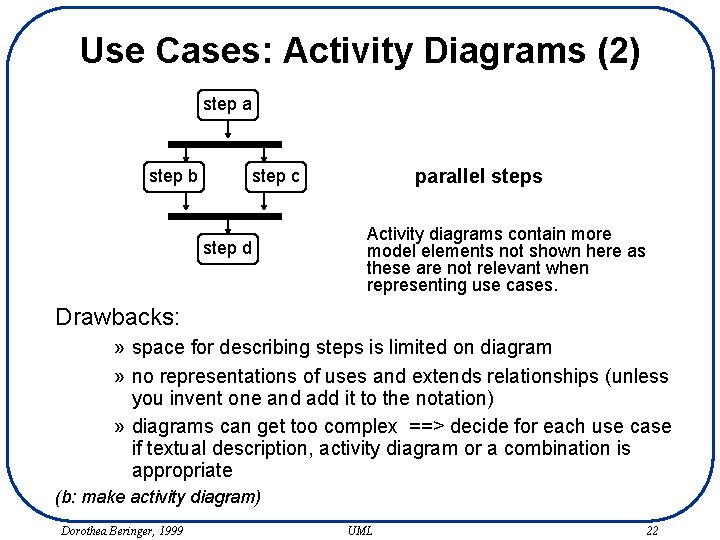
Use Cases: Activity Diagrams (2) step a step b parallel steps step c step d Activity diagrams contain more model elements not shown here as these are not relevant when representing use cases. Drawbacks: » space for describing steps is limited on diagram » no representations of uses and extends relationships (unless you invent one and add it to the notation) » diagrams can get too complex ==> decide for each use case if textual description, activity diagram or a combination is appropriate (b: make activity diagram) Dorothea Beringer, 1999 UML 22
Interfaces at System Boundary It may be helpful to further document the interfaces at the system boundaries given by the use cases, e. g, by: • Storyboarding (for graphical user interfaces) » just handwritten pictures showing the different screens (b) » maybe diagram showing the sequence of the screens » or user interface prototype (check motivation!!!) • Protocol definition (for system interfaces) » e. g. when exchanging XML messages, define these messages • Interaction diagrams on different abstraction levels (b) » » between actors and system, use asynchronous events description to the left with structured English or brackets for different paths ATTENTION: different abstraction levels! Dorothea Beringer, 1999 UML 23
Use Cases are good for. . . • • • figuring out problem statement (iterative process!) figuring out system boundaries discussing requirements with end users specifying external behavior of system, functional requirements for system developers (tension with previous point!) starting point for design(class diagrams, interaction diagrams) splitting up more detailed analysis of requirements along use cases splitting up construction iterations along use cases derive test cases, derive user documentation reuse, architecture (see books) project size and cost estimation (see book of G. Schneider) …… ==> many similar techniques are known and have been used for a long time in many successful software development projects! Dorothea Beringer, 1999 UML 24
Books on Use Cases • Many books, often showing application of use cases for a specific domain, e. g. telecommunication, process control systems, information systems, …. • Good general books on use cases: » Applying Use Cases, by G. Schneider: short, easy to read in one evening, guide about creating and documenting use cases, also contains how to define architecture based on use cases and do cost estimation based on use cases; get that book before you start your next software project! » Software Reuse, by Jacobson, Griss and Jonsson: good book about how to create complex and reusable software systems and architectures, shows how use cases are used for that; get that book after you have used use cases for the first time so you get more needed in-depth knowledge Dorothea Beringer, 1999 UML 25
Persistent and Transient Documentation Persistent Documentation » is maintained, often done in a CASE- or Diagramming. Tool » lives as long as system lives » versions, need to be managed properly, keep as few as possible ==> helps to document your system, for other people too Transient Documentation » is thrown away, often just hand-written diagrams, valuable to keep sometimes as memo for past ideas » lives for one hour, a whole phase of the project, for as long as the system lives » becomes out-of-date, many documents representing many views and abstraction levels ==> helps to figure out your system, for yourself only Do not decide too early if a diagram is transient or persisent! Dorothea Beringer, 1999 UML 26
Use Cases A use case is a coherent unit of functionality provided by a system or class as manifested by sequences of messages exchanged among the system and one or more outside interactors (called actors) together with actions performed by the system. Relationships in a use case diagram: – communicates: an actor participates in a use case – uses (from use case A to use case B): any instance of A includes the behavior of B Þ factoring out common parts, reuse – extends (from use case B to use case A): instance of A may (under specific conditions specified in B) include the behavior from B at the extension point specified in A Þ exceptional cases Dorothea Beringer, 1999 UML 27
CASE-Tools Characteristics of CASE-Tools: » one repository with one metamodel that contains whole model » navigation in various views, suppression of elements for specific views, selecting certain kinds of relationships for presentation, double-click to additional windows with full information. . . » versioning, access protections » prioritization (use cases), status (done, planned, …. ) » documentation support » integration with code-files (integrity checks, support for updates), code generation Examples: » Rational Rose, http: //www. rational. com/products/rose/ » Paradigm Plus, http: //www. platinum. com/products/appdev/pplus_ps. htm » Visio (just a diagramming tool) Dorothea Beringer, 1999 UML 28
Class and Object diagrams A class diagram is a graphic view of the static structure. » models classifiers like classes (or interfaces etc. ) and their relationships » having several diagrams has no semantic meaning An object diagram is an instance of a class diagram. » shows snapshot of system at a point in time Type - Instance: » class - object » association - link » parameter - value » operation - call Notation for operation signatures and attribute types: » not predefined, target language, familiar notation One model, various views, various diagrams » different abstraction levels » only some kind of relationships, subset of classes Dorothea Beringer, 1999 UML 29
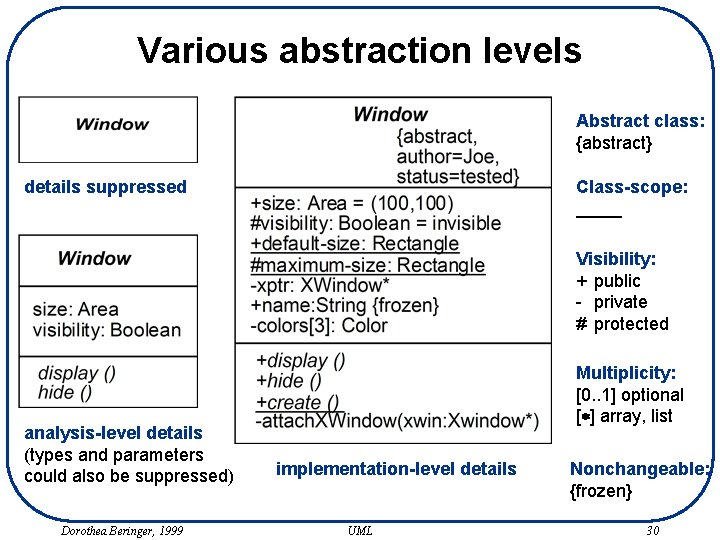
Various abstraction levels Abstract class: {abstract} details suppressed Class-scope: Visibility: + public - private # protected analysis-level details (types and parameters could also be suppressed) Dorothea Beringer, 1999 Multiplicity: [0. . 1] optional [*] array, list implementation-level details UML Nonchangeable: {frozen} 30
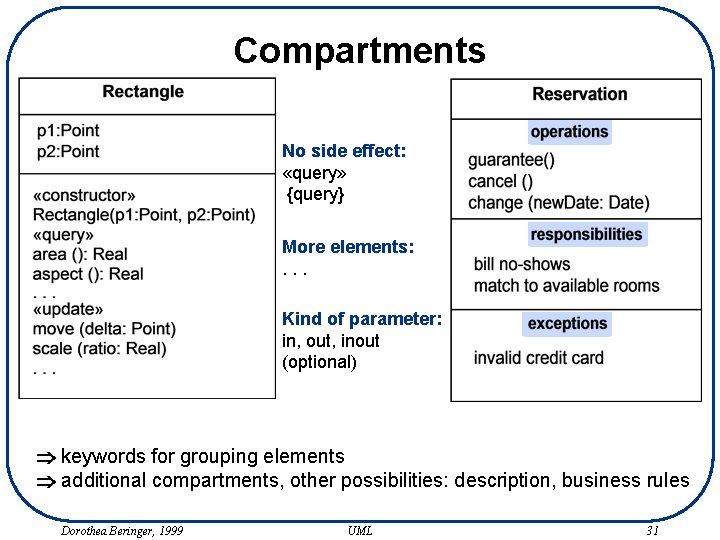
Compartments No side effect: «query» {query} More elements: . . . Kind of parameter: in, out, inout (optional) Þ keywords for grouping elements Þ additional compartments, other possibilities: description, business rules Dorothea Beringer, 1999 UML 31
Constraints and Comments (1) A constraint specifies conditions and propositions that must be maintained as true. » placed directly after the element it applies to (e. g. attribute), with a dashed arrow connecting elements concerned, or in a comment box » always in {} A comment can attach arbitrary textual information to any model element. » in comment box » e. g. additional explanations, open questions, status of review, to-do list Dorothea Beringer, 1999 UML 32
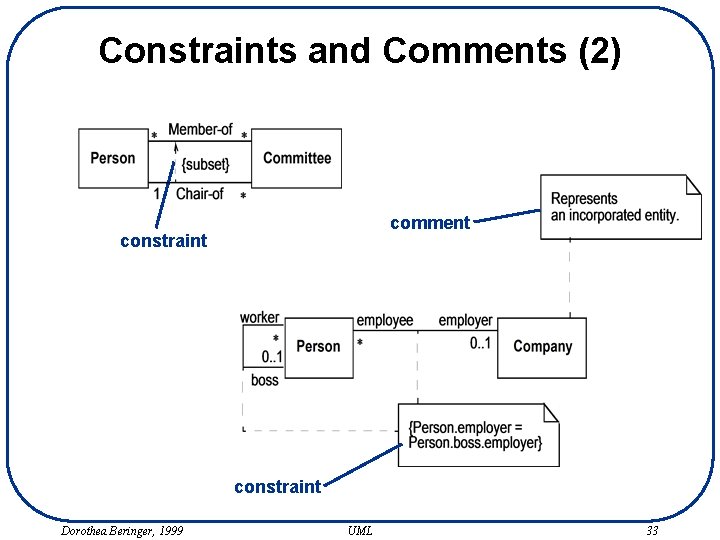
Constraints and Comments (2) comment constraint Dorothea Beringer, 1999 UML 33
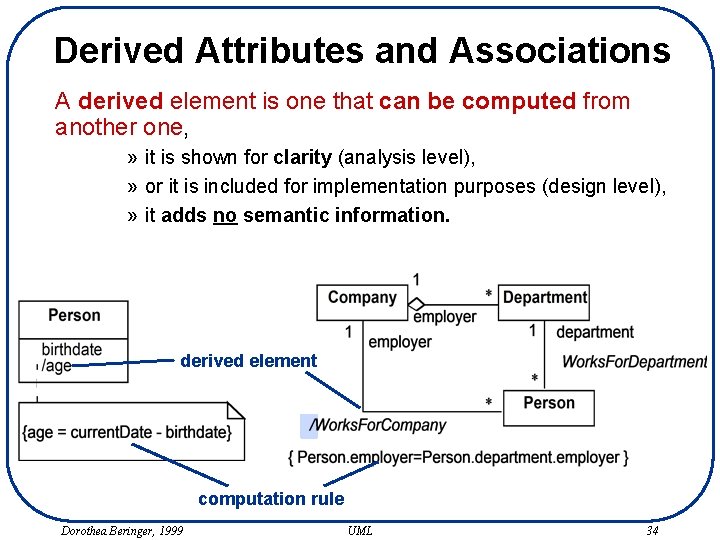
Derived Attributes and Associations A derived element is one that can be computed from another one, » it is shown for clarity (analysis level), » or it is included for implementation purposes (design level), » it adds no semantic information. derived element computation rule Dorothea Beringer, 1999 UML 34
Interfaces (1) There exist various classifiers: classes, interfaces, … An interface is a specifier for the externally-visible operations of an entity like a class without specification of internal structure (attributes, states, associations). » interface often describes only part and not all of the behavior of an actual class » generalization relationships among interfaces possible » are realized e. g. by classes Þ Realizes relationship Dorothea Beringer, 1999 UML 35
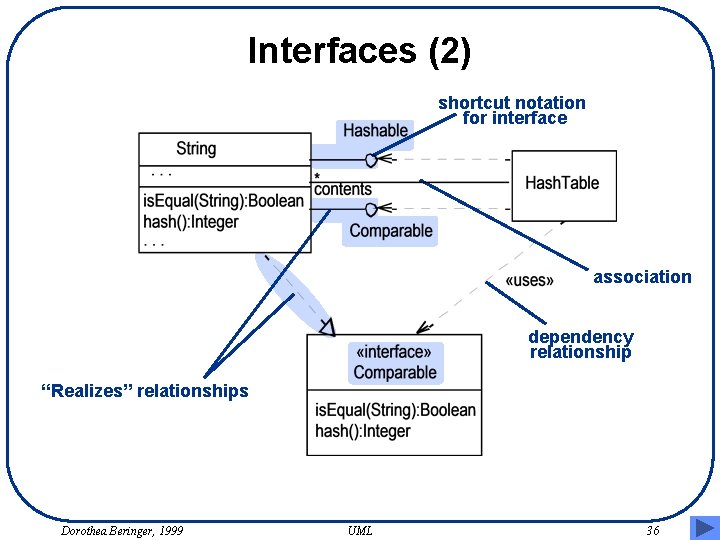
Interfaces (2) shortcut notation for interface association dependency relationship “Realizes” relationships Dorothea Beringer, 1999 UML 36
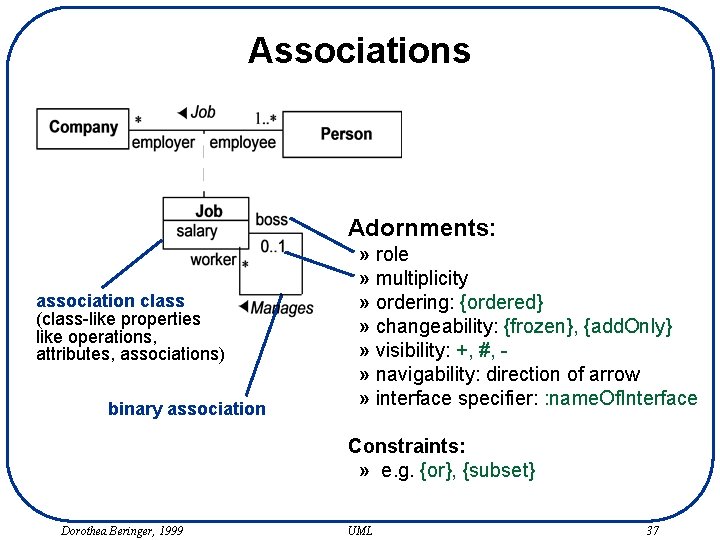
Associations Adornments: association class (class-like properties like operations, attributes, associations) binary association » role » multiplicity » ordering: {ordered} » changeability: {frozen}, {add. Only} » visibility: +, #, » navigability: direction of arrow » interface specifier: : name. Of. Interface Constraints: » e. g. {or}, {subset} Dorothea Beringer, 1999 UML 37
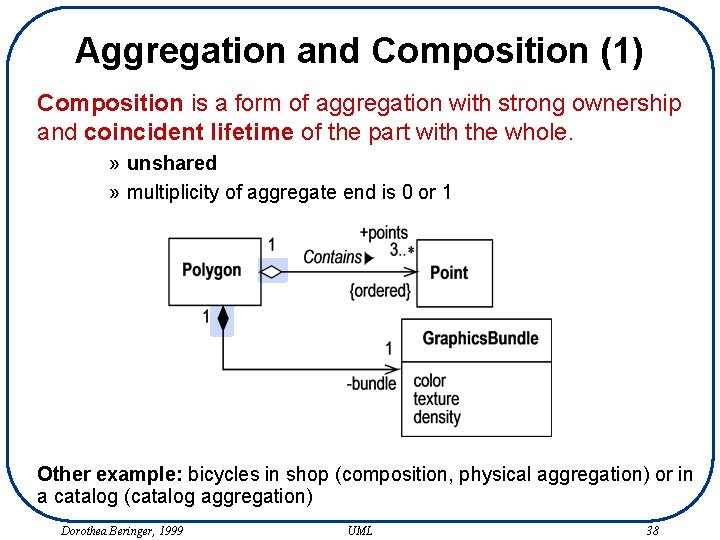
Aggregation and Composition (1) Composition is a form of aggregation with strong ownership and coincident lifetime of the part with the whole. » unshared » multiplicity of aggregate end is 0 or 1 Other example: bicycles in shop (composition, physical aggregation) or in a catalog (catalog aggregation) Dorothea Beringer, 1999 UML 38
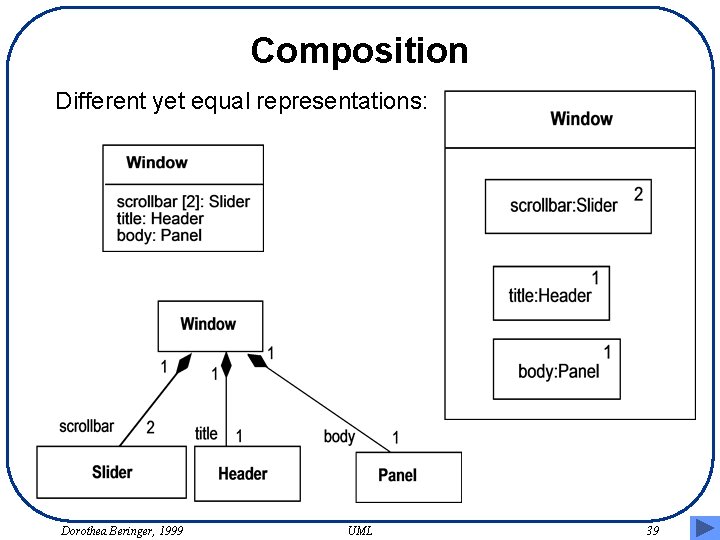
Composition Different yet equal representations: Dorothea Beringer, 1999 UML 39
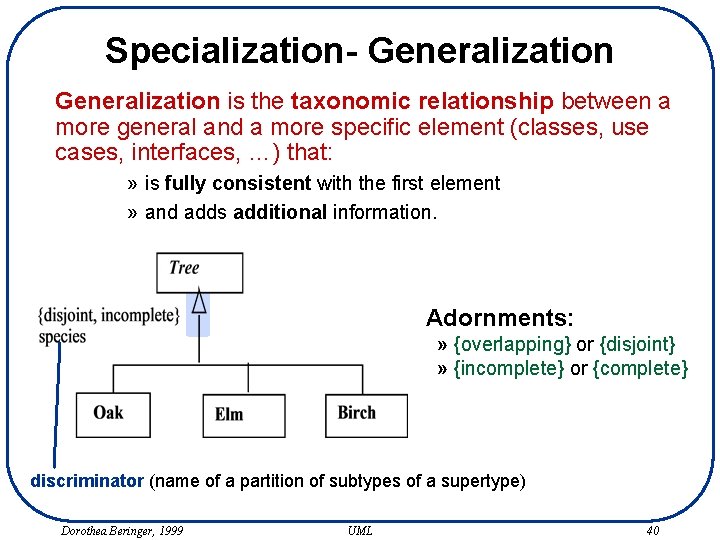
Specialization- Generalization is the taxonomic relationship between a more general and a more specific element (classes, use cases, interfaces, …) that: » is fully consistent with the first element » and adds additional information. Adornments: » {overlapping} or {disjoint} » {incomplete} or {complete} discriminator (name of a partition of subtypes of a supertype) Dorothea Beringer, 1999 UML 40
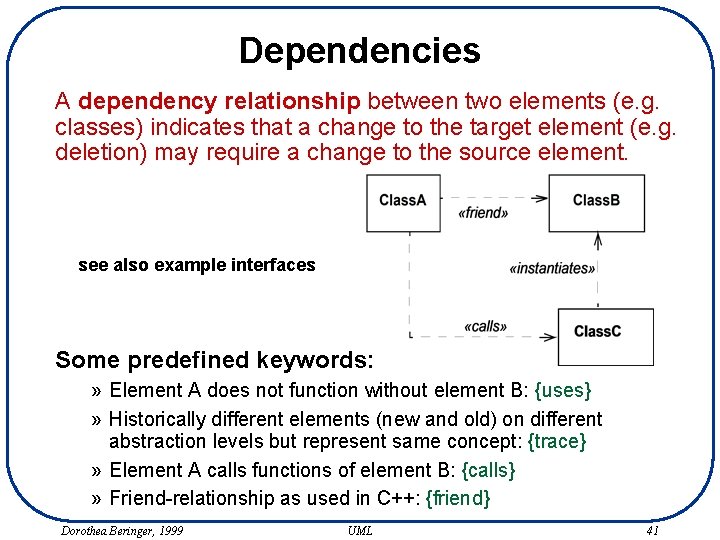
Dependencies A dependency relationship between two elements (e. g. classes) indicates that a change to the target element (e. g. deletion) may require a change to the source element. see also example interfaces Some predefined keywords: » Element A does not function without element B: {uses} » Historically different elements (new and old) on different abstraction levels but represent same concept: {trace} » Element A calls functions of element B: {calls} » Friend-relationship as used in C++: {friend} Dorothea Beringer, 1999 UML 41
Dependency Graphs • Dependency graphs just show all dependencies between classes, often without keywords. • Usage graphs only show all the “use” dependencies. • How do you derive dependency graphs? ==> rather for quality analysis of existing models and software than for documentation Goals: – minimize dependency on too many classes to improve maintenance – maximize cohesion within and minimize coupling between classes (use dependencies) to decrease complexity Dorothea Beringer, 1999 UML 42
CRC CRC: Class - Responsibility - Collaboration • CRC-Cards are (together with some diagrams) cornerstone of RDD (responsibility driven design), an alternative to UML • classes are found by looking for responsibilities • classes are documented on cards by stating class name, responsibility and collaborators (attributes and operations are added later on in design) • class diagrams are refactored (changing the structure of the diagram without changing its overall behavior) based on responsibilities and various quality criteria ==> add a compartment “responsibility” or put the responsibility into the class description and think in responsibilities ==> no good class diagram without at least one or two (major) refactoring (==> iterative process!) Dorothea Beringer, 1999 UML 43
Whole Values and Quantities Distinguish between atomic types, whole values, and quantities: » » » » social security number (d: possible operations? ) your height number of CD’s you have phone number purchase price of a book (d: possible operations? ) name of authors of a book number of authors of a book credit card number ==> whole values and quantities belong are classes, operations on them belong into these classes and not into some containing class ==> do not mix concepts together into one object! ==> make small objects and group them into packages! Dorothea Beringer, 1999 UML 44
Goals of Modeling Different goals: » Goals determine the content ==> you better know your goal » Examples for goals? (b: make list) Different abstraction levels » The same system/problem can be modeled on different abstraction levels, resulting in several models » Example abstraction levels for specific goals? » How do models on different abstraction levels relate to each other? (d) just adding more details, refinement, attributes become operations, no 1: 1 mapping Different views: » The same model can be represented by various diagrams » Possible views for specific goals? (d) Dorothea Beringer, 1999 UML 45
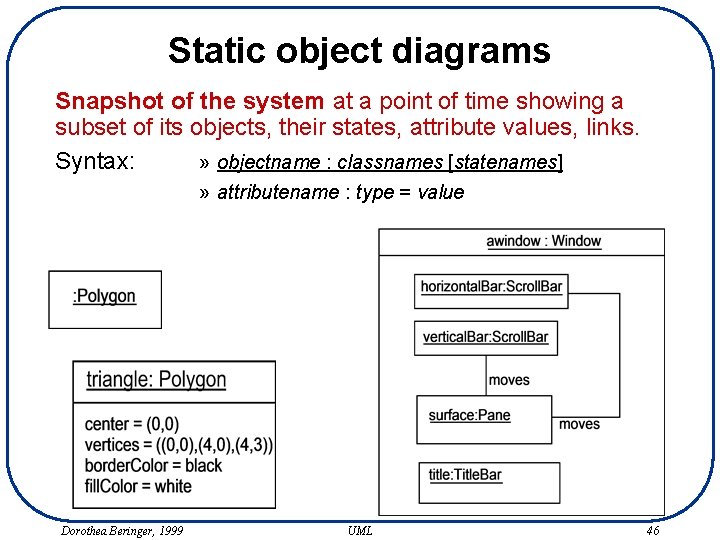
Static object diagrams Snapshot of the system at a point of time showing a subset of its objects, their states, attribute values, links. Syntax: » objectname : classnames [statenames] » attributename : type = value Dorothea Beringer, 1999 UML 46
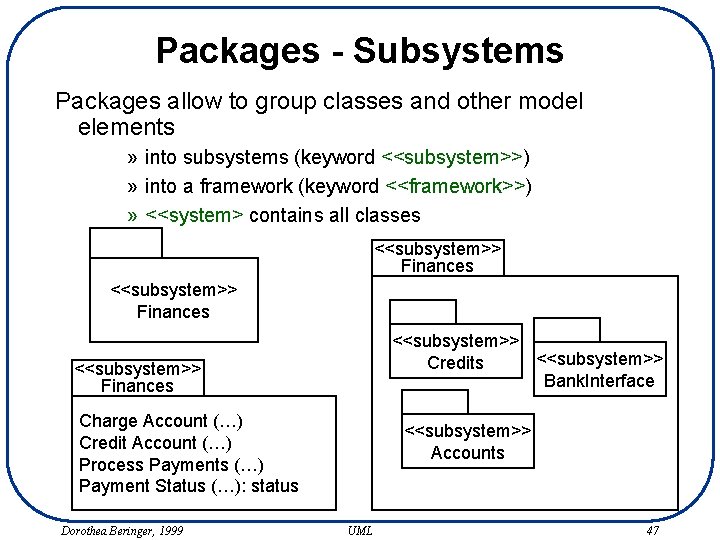
Packages - Subsystems Packages allow to group classes and other model elements » into subsystems (keyword <<subsystem>>) » into a framework (keyword <<framework>>) » <<system> contains all classes <<subsystem>> Finances <<subsystem>> Credits Bank. Interface <<subsystem>> Finances Charge Account (…) Credit Account (…) Process Payments (…) Payment Status (…): status Dorothea Beringer, 1999 <<subsystem>> Accounts UML 47
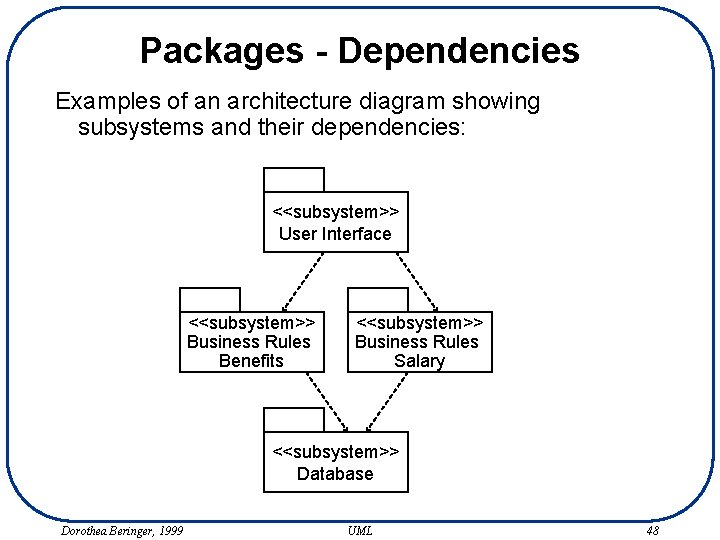
Packages - Dependencies Examples of an architecture diagram showing subsystems and their dependencies: <<subsystem>> User Interface <<subsystem>> Business Rules Benefits <<subsystem>> Business Rules Salary <<subsystem>> Database Dorothea Beringer, 1999 UML 48
Subsystems - Design Criteria Each subsystem should have: » a single functionality » strong cohesion: strong relationships between classes within subsystem » loose (external) coupling: minimize dependencies among subsystems » minimal communication to other subsystems » reusability (d: what are the criteria here? ) Also: consider architecture of systems you are integrating with and architecture preferences of COTS subsystems. See also architectural patterns (lecture on architecture). Dorothea Beringer, 1999 UML 49
Breaking down Use Cases (1) • Assign steps of a use case to the various subsystems (taking into account responsibility of subsystem). • One (or part of or several) step(s) of the system-wide use case becomes one use case of a subsystem. ==> superordinate use case, its subordinate use cases • The other subsystems (only those with which interaction is necessary for carrying out the step) become actors of this subsystem. Who is the trigger of this new use case? • A new, more detailed description of the subsystem use case is created, containing again several steps. If use case is still to high-level and complex, iterate! Dorothea Beringer, 1999 UML 50
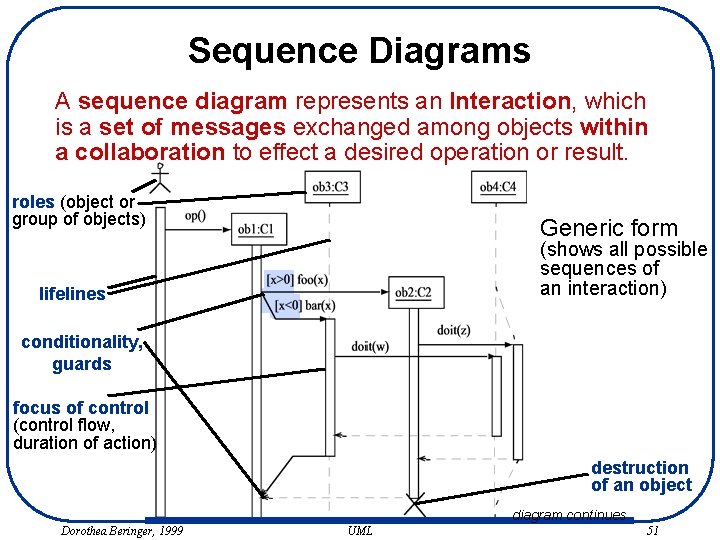
Sequence Diagrams A sequence diagram represents an Interaction, which is a set of messages exchanged among objects within a collaboration to effect a desired operation or result. roles (object or group of objects) Generic form (shows all possible sequences of an interaction) lifelines conditionality, guards focus of control (control flow, duration of action) destruction of an object diagram continues Dorothea Beringer, 1999 UML 51
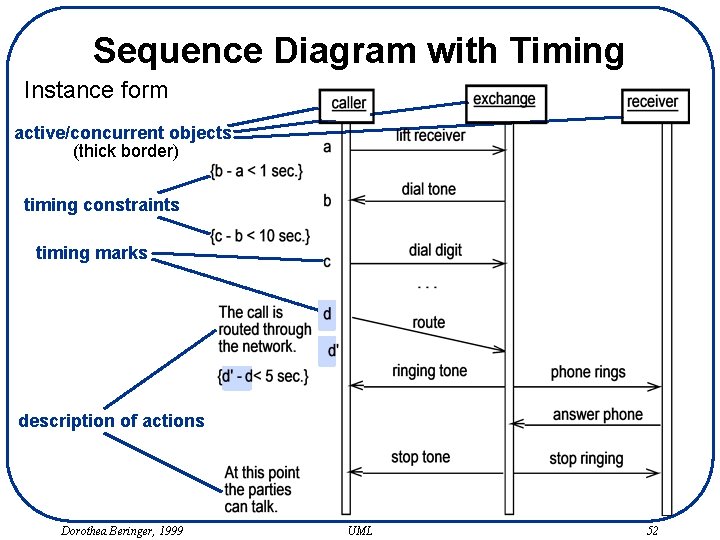
Sequence Diagram with Timing Instance form active/concurrent objects (thick border) timing constraints timing marks description of actions Dorothea Beringer, 1999 UML 52
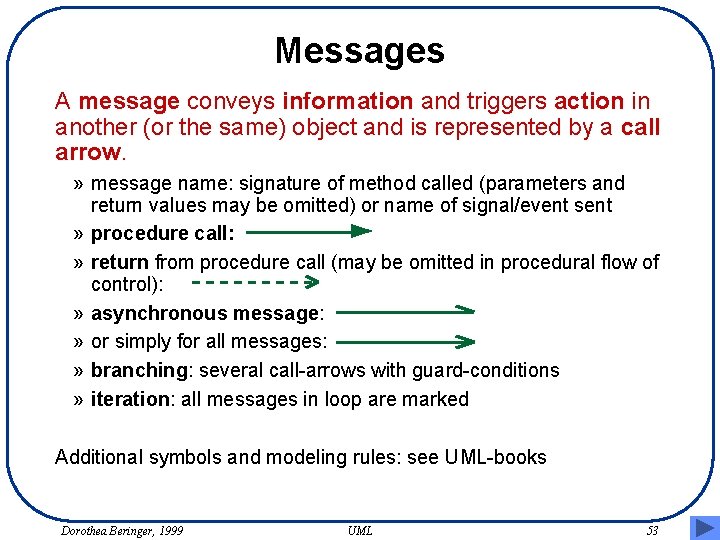
Messages A message conveys information and triggers action in another (or the same) object and is represented by a call arrow. » message name: signature of method called (parameters and return values may be omitted) or name of signal/event sent » procedure call: » return from procedure call (may be omitted in procedural flow of control): » asynchronous message: » or simply for all messages: » branching: several call-arrows with guard-conditions » iteration: all messages in loop are marked Additional symbols and modeling rules: see UML-books Dorothea Beringer, 1999 UML 53
Collaboration Diagrams A collaboration diagram shows an interaction organized around the objects in the interaction, and their links to each other. » shows relationships among objects roles » time is no separate dimension No time axis Þ sequence numbers are used for showing ordering of messages. » procedural flow of control: nested numbering according to call nesting » non-procedural flow: non-nested numbering with predecessors to indicate order of messages and synchronisation among threads, details see UML-books Dorothea Beringer, 1999 UML 54
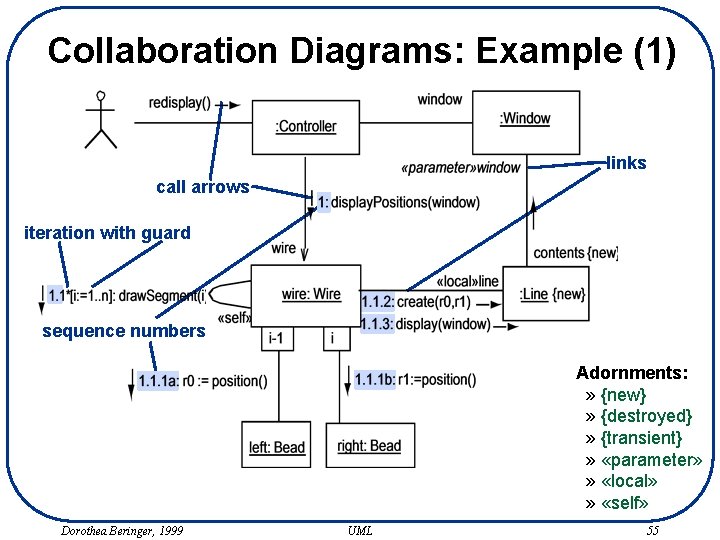
Collaboration Diagrams: Example (1) links call arrows iteration with guard sequence numbers Adornments: » {new} » {destroyed} » {transient} » «parameter» » «local» » «self» Dorothea Beringer, 1999 UML 55
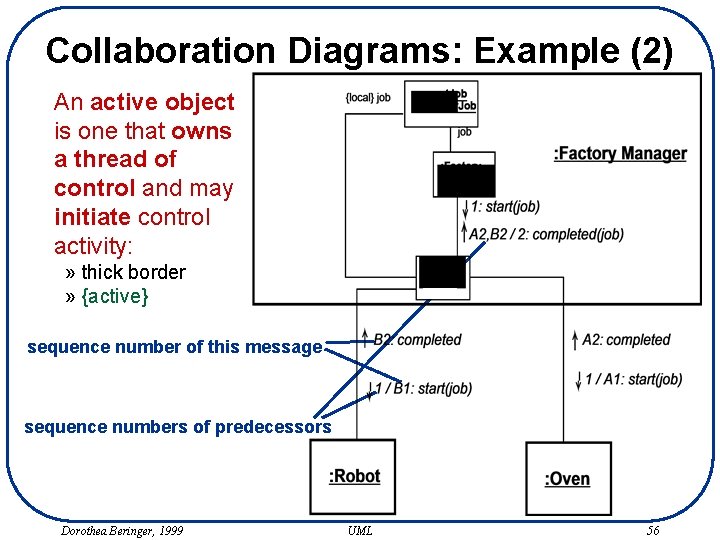
Collaboration Diagrams: Example (2) An active object is one that owns a thread of control and may initiate control activity: » thick border » {active} sequence number of this message sequence numbers of predecessors Dorothea Beringer, 1999 UML 56
Collaboration, Interaction, Role • Collaboration: A collaboration is a set of participants and relationships that are meaningful for a given set of purposes. Participants in a collaboration are objects-roles, i. e. objects having a collaboration-specific role. The same objects can play different roles in different collaborations. • Interaction: A specific pattern of message exchanges to accomplish a specific purpose is called an interaction. The interaction may be specified either by a single description containing conditionals (e. g. generic sequence diagram), or multiple descriptions each describing a particular path through the possible execution paths. • Context: Most often we model the interaction of the objects of a collaboration; the collaboration then shows the context in which the interaction occurs. Dorothea Beringer, 1999 UML 57
Using Interaction Diagrams Interaction diagrams are used for many things, e. g. » documenting the internal message flow for a use case » documenting which classes collaborate for a specific use case (with or without details concerning message flows) Alternative: just list all classes involved in a use case » documenting architecture decisions » documenting reoccurring design patterns » finding classes and operations » explaining and demonstrating certain operations » showing all collaborators for a specific class » showing different roles of an object Interaction diagrams can be on different levels of granularity, yet UML does not provide any modeling concepts to link the various diagrams. Dorothea Beringer, 1999 UML 58
Completeness Maintained documentation: • Description or pseudo-code at the left-hand side? • Operations with parameters and return-value? • Also types in parameter list? • For which scenarios of a use case? • For which use cases? Verification of analysis/design models: • What is needed for verifying the models? Validation of models with customers and end-users: • Which models or views would you like for validation that you are developing the right system? Dorothea Beringer, 1999 UML 59
Statechart Diagrams A statechart diagram represents a state machine which is a graph of states and transitions that describes the response of an object of a given class to the receipt of outside stimuli. » statecharts of David Harel with various extensions, e. g. from Petri Nets, OMT… » powerful and well accepted notation Elements of statecharts: » composite states, concurrent states » actions and activities, entry-actions, exit-actions, transitionactions, sending messages » events, Change. Event, Signal. Event, Call. Event, Time. Event » simple transitions, complex transitions Dorothea Beringer, 1999 UML 60
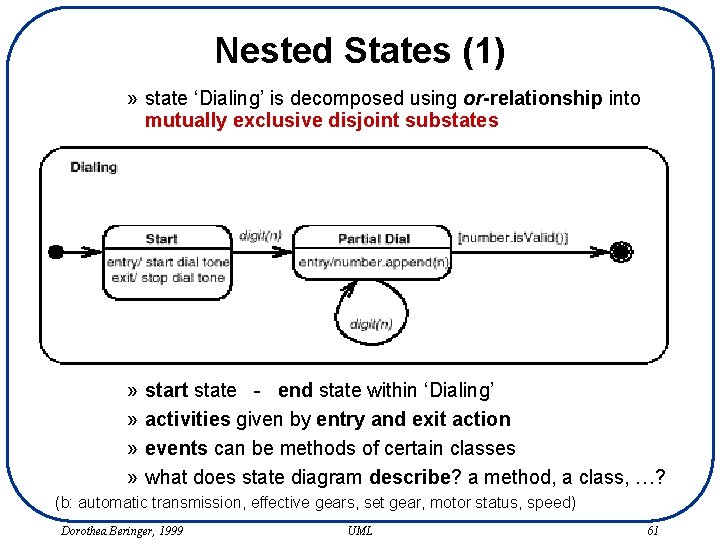
Nested States (1) » state ‘Dialing’ is decomposed using or-relationship into mutually exclusive disjoint substates » » start state - end state within ‘Dialing’ activities given by entry and exit action events can be methods of certain classes what does state diagram describe? a method, a class, …? (b: automatic transmission, effective gears, set gear, motor status, speed) Dorothea Beringer, 1999 UML 61
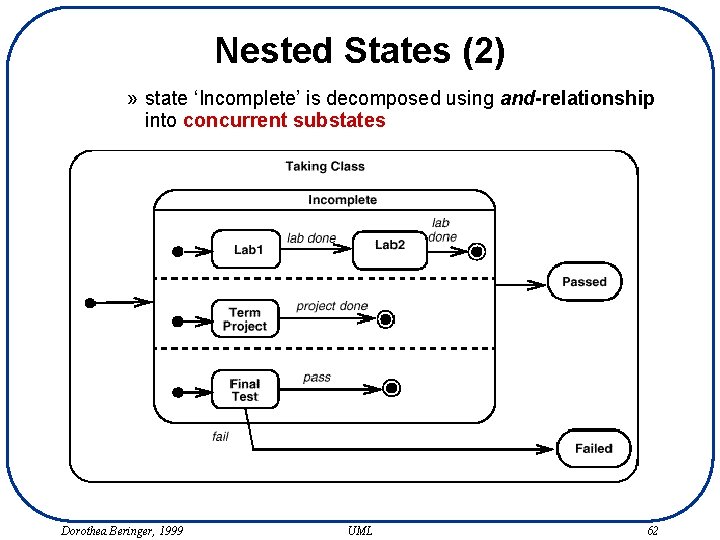
Nested States (2) » state ‘Incomplete’ is decomposed using and-relationship into concurrent substates Dorothea Beringer, 1999 UML 62
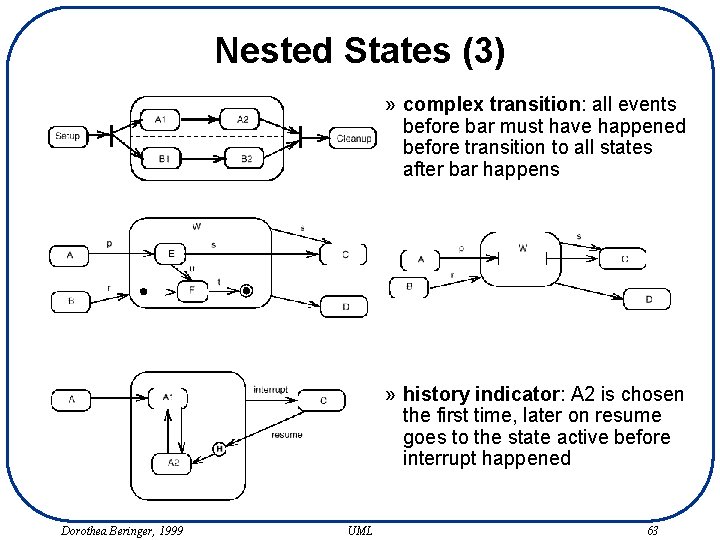
Nested States (3) » complex transition: all events before bar must have happened before transition to all states after bar happens » history indicator: A 2 is chosen the first time, later on resume goes to the state active before interrupt happened Dorothea Beringer, 1999 UML 63
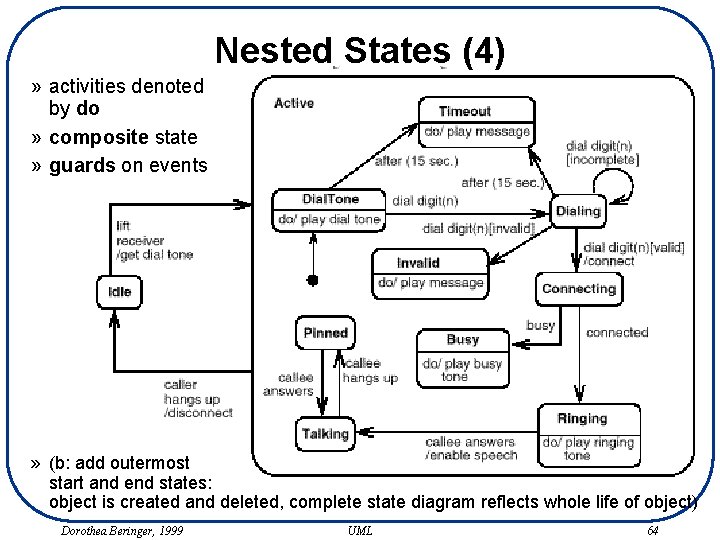
Nested States (4) » activities denoted by do » composite state » guards on events » (b: add outermost start and end states: object is created and deleted, complete state diagram reflects whole life of object) Dorothea Beringer, 1999 UML 64
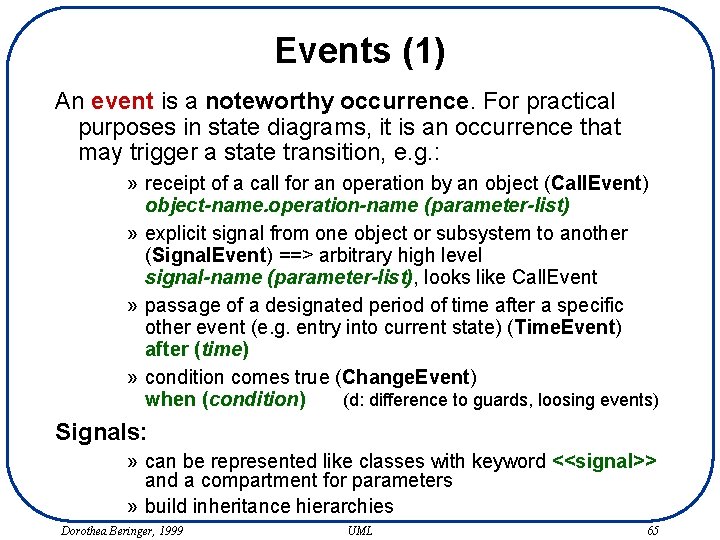
Events (1) An event is a noteworthy occurrence. For practical purposes in state diagrams, it is an occurrence that may trigger a state transition, e. g. : » receipt of a call for an operation by an object (Call. Event) object-name. operation-name (parameter-list) » explicit signal from one object or subsystem to another (Signal. Event) ==> arbitrary high level signal-name (parameter-list), looks like Call. Event » passage of a designated period of time after a specific other event (e. g. entry into current state) (Time. Event) after (time) » condition comes true (Change. Event) when (condition) (d: difference to guards, loosing events) Signals: » can be represented like classes with keyword <<signal>> and a compartment for parameters » build inheritance hierarchies Dorothea Beringer, 1999 UML 65
![Events (2) Actions: » event-name (argument-list ) [ guard-condition ] / action-expressions ^ send-clauses](http://slidetodoc.com/presentation_image_h2/d2c059d4d1e2c466ff855dc82732a61d/image-66.jpg "Events (2) Actions: » event-name (argument-list ) [ guard-condition ] / action-expressions ^ send-clauses")
Events (2) Actions: » event-name (argument-list ) [ guard-condition ] / action-expressions ^ send-clauses » any event names allowed, apart from keywords ‘entry’, ‘exit’, ‘do’ » guard-condition: boolean expression using parameters of the triggering event and attributes, links or states of object owning state diagram or of reachable (via links) object » action-expression: atomic uninterruptible operation, operations are executed sequentially » send-clause: destination-expression. operation-or-signal-name ( argument-list ) Example: right-mouse-down(location) [location in window] / object : = pick-object(location) ^ object. highlight() (d: how much to write down about a transition? ) Dorothea Beringer, 1999 UML 66
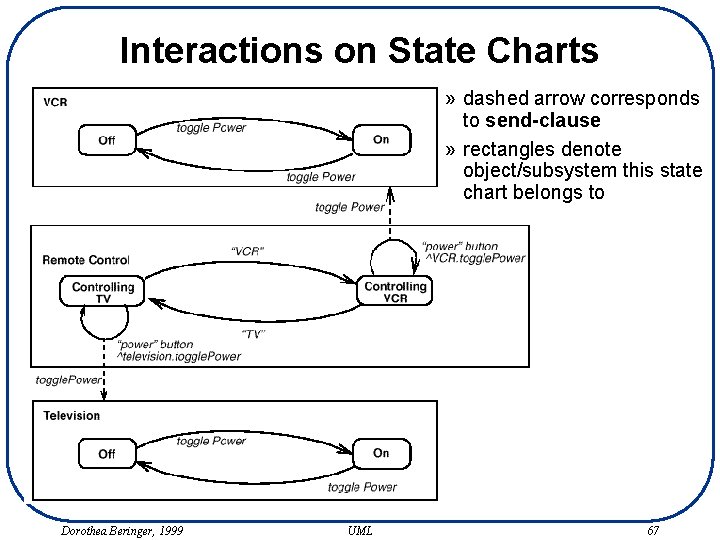
Interactions on State Charts » dashed arrow corresponds to send-clause » rectangles denote object/subsystem this state chart belongs to Dorothea Beringer, 1999 UML 67
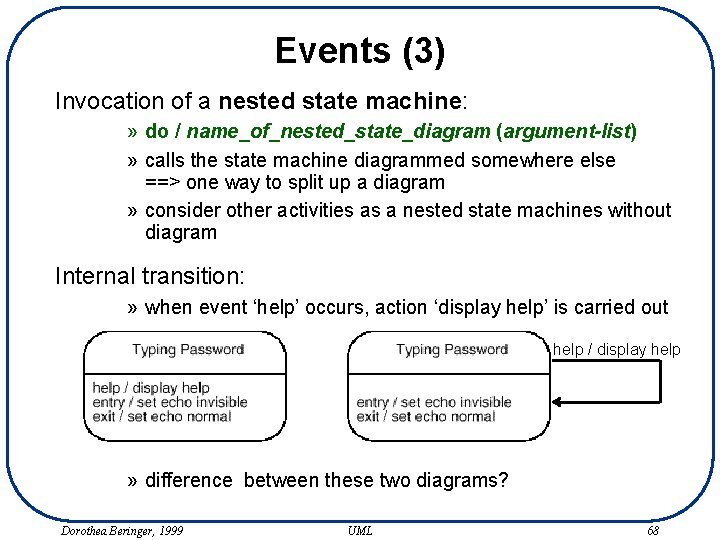
Events (3) Invocation of a nested state machine: » do / name_of_nested_state_diagram (argument-list) » calls the state machine diagrammed somewhere else ==> one way to split up a diagram » consider other activities as a nested state machines without diagram Internal transition: » when event ‘help’ occurs, action ‘display help’ is carried out help / display help » difference between these two diagrams? Dorothea Beringer, 1999 UML 68
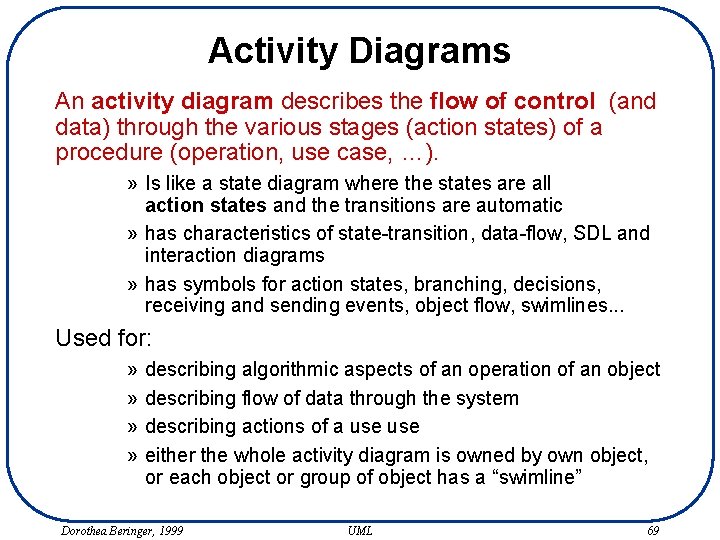
Activity Diagrams An activity diagram describes the flow of control (and data) through the various stages (action states) of a procedure (operation, use case, …). » Is like a state diagram where the states are all action states and the transitions are automatic » has characteristics of state-transition, data-flow, SDL and interaction diagrams » has symbols for action states, branching, decisions, receiving and sending events, object flow, swimlines. . . Used for: » » describing algorithmic aspects of an operation of an object describing flow of data through the system describing actions of a use either the whole activity diagram is owned by own object, or each object or group of object has a “swimline” Dorothea Beringer, 1999 UML 69
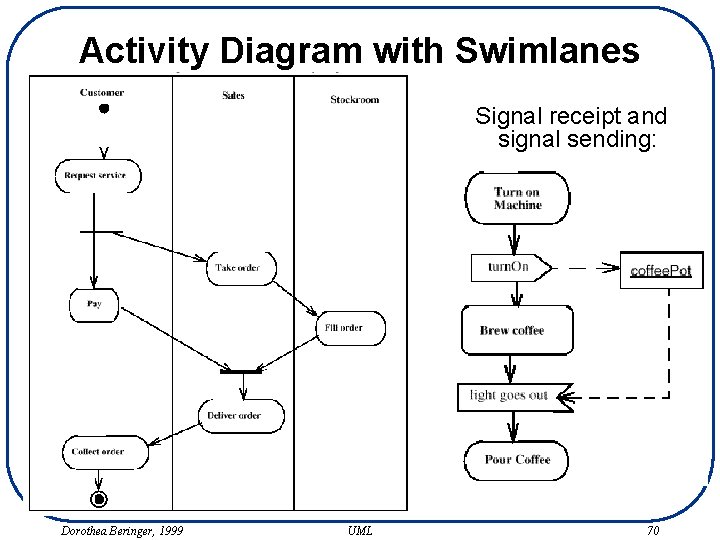
Activity Diagram with Swimlanes Signal receipt and signal sending: Dorothea Beringer, 1999 UML 70
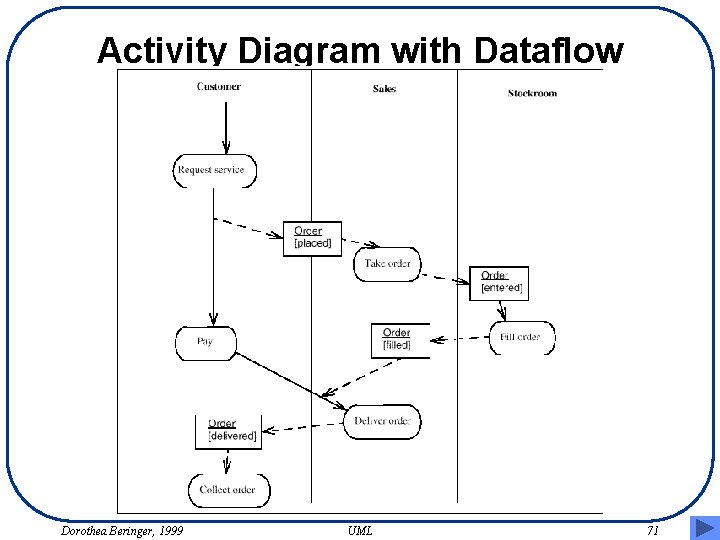
Activity Diagram with Dataflow Dorothea Beringer, 1999 UML 71
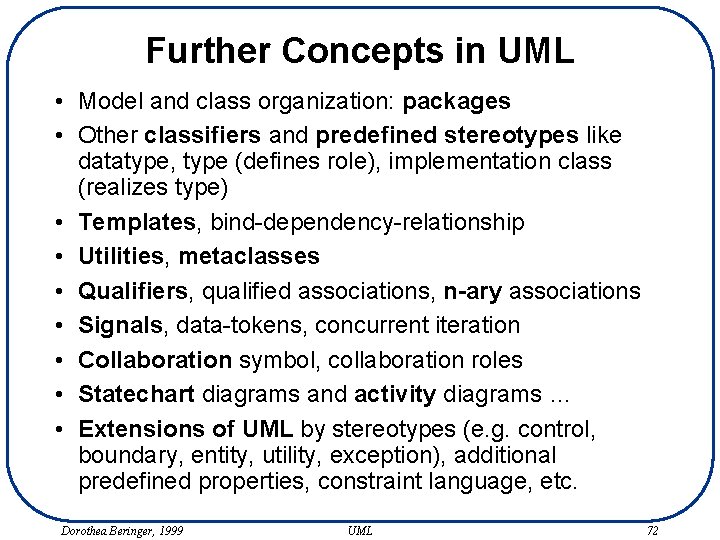
Further Concepts in UML • Model and class organization: packages • Other classifiers and predefined stereotypes like datatype, type (defines role), implementation class (realizes type) • Templates, bind-dependency-relationship • Utilities, metaclasses • Qualifiers, qualified associations, n-ary associations • Signals, data-tokens, concurrent iteration • Collaboration symbol, collaboration roles • Statechart diagrams and activity diagrams … • Extensions of UML by stereotypes (e. g. control, boundary, entity, utility, exception), additional predefined properties, constraint language, etc. Dorothea Beringer, 1999 UML 72
- Slides: 72