
Why Latency Lags Bandwidth and What it Means
Why Latency Lags Bandwidth, and What it Means to Computing David Patterson U. C. Berkeley patterson@cs. berkeley. edu October 2004 Bandwidth Rocks (1)
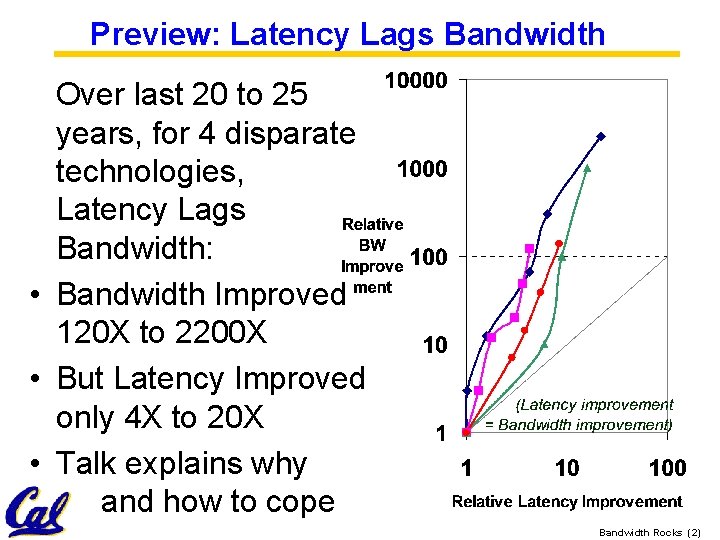
Preview: Latency Lags Bandwidth Over last 20 to 25 years, for 4 disparate technologies, Latency Lags Bandwidth: • Bandwidth Improved 120 X to 2200 X • But Latency Improved only 4 X to 20 X • Talk explains why and how to cope Bandwidth Rocks (2)
Outline • Drill down into 4 technologies: ~1980 Archaic (Nostalgic) vs. ~2000 Modern (Newfangled) – Performance Milestones in each technology • • • Rule of Thumb for BW vs. Latency 6 Reasons it Occurs 3 Ways to Cope 2 Examples BW-oriented system design Is this too Optimistic (its even Worse)? FYI: “Latency Labs Bandwidth” appears in October, 2004 Communications of ACM Bandwidth Rocks (3)
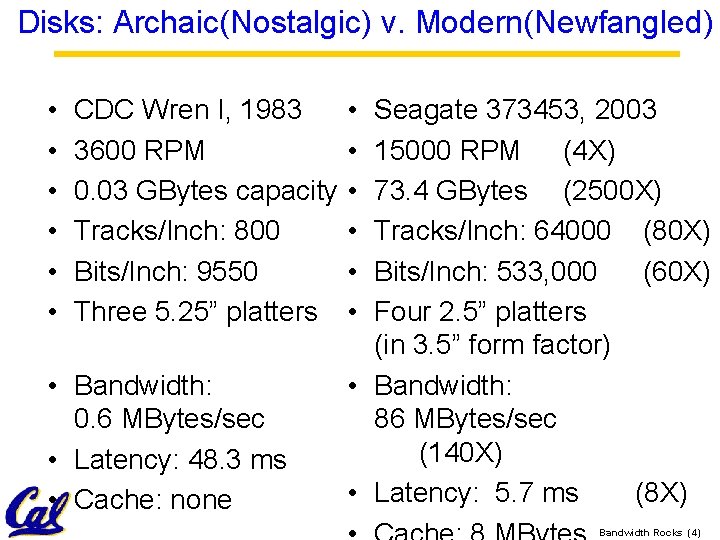
Disks: Archaic(Nostalgic) v. Modern(Newfangled) • • • CDC Wren I, 1983 3600 RPM 0. 03 GBytes capacity Tracks/Inch: 800 Bits/Inch: 9550 Three 5. 25” platters • Bandwidth: 0. 6 MBytes/sec • Latency: 48. 3 ms • Cache: none • • • Seagate 373453, 2003 15000 RPM (4 X) 73. 4 GBytes (2500 X) Tracks/Inch: 64000 (80 X) Bits/Inch: 533, 000 (60 X) Four 2. 5” platters (in 3. 5” form factor) • Bandwidth: 86 MBytes/sec (140 X) • Latency: 5. 7 ms (8 X) Bandwidth Rocks (4)
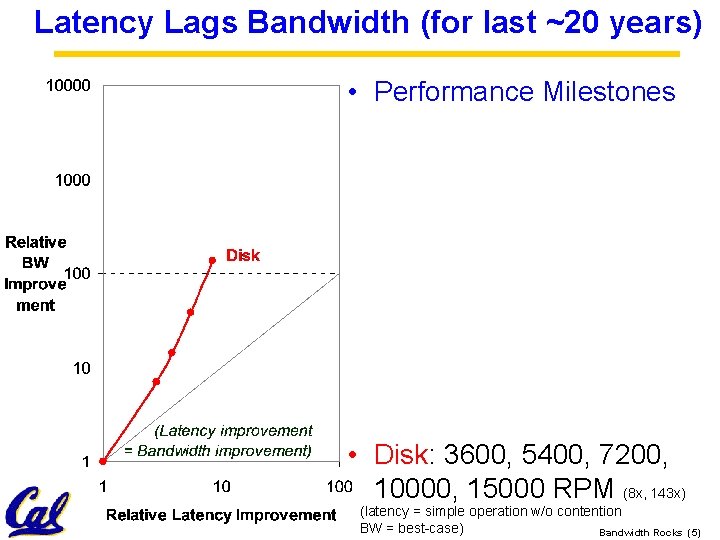
Latency Lags Bandwidth (for last ~20 years) • Performance Milestones • Disk: 3600, 5400, 7200, 10000, 15000 RPM (8 x, 143 x) (latency = simple operation w/o contention BW = best-case) Bandwidth Rocks (5)
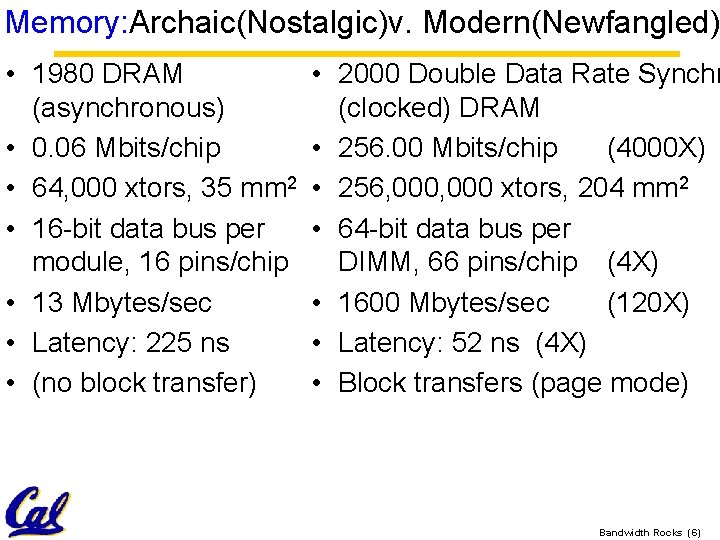
Memory: Archaic(Nostalgic)v. Modern(Newfangled) • 1980 DRAM (asynchronous) • 0. 06 Mbits/chip • 64, 000 xtors, 35 mm 2 • 16 -bit data bus per module, 16 pins/chip • 13 Mbytes/sec • Latency: 225 ns • (no block transfer) • 2000 Double Data Rate Synchr (clocked) DRAM • 256. 00 Mbits/chip (4000 X) • 256, 000 xtors, 204 mm 2 • 64 -bit data bus per DIMM, 66 pins/chip (4 X) • 1600 Mbytes/sec (120 X) • Latency: 52 ns (4 X) • Block transfers (page mode) Bandwidth Rocks (6)
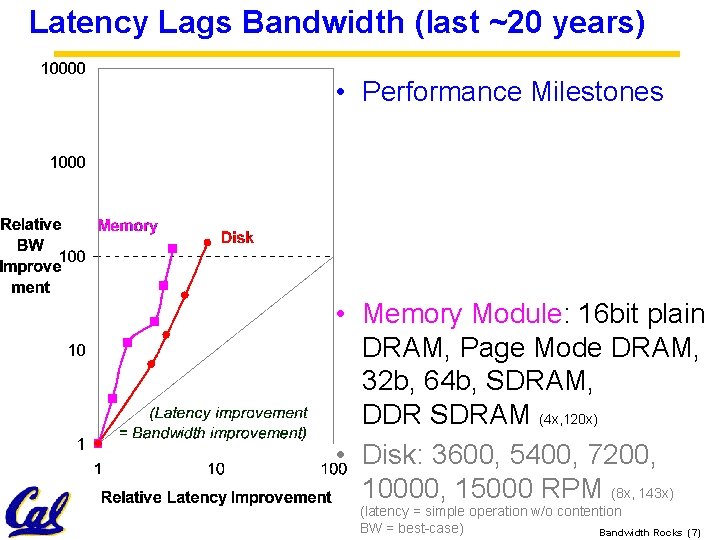
Latency Lags Bandwidth (last ~20 years) • Performance Milestones • Memory Module: 16 bit plain DRAM, Page Mode DRAM, 32 b, 64 b, SDRAM, DDR SDRAM (4 x, 120 x) • Disk: 3600, 5400, 7200, 10000, 15000 RPM (8 x, 143 x) (latency = simple operation w/o contention BW = best-case) Bandwidth Rocks (7)
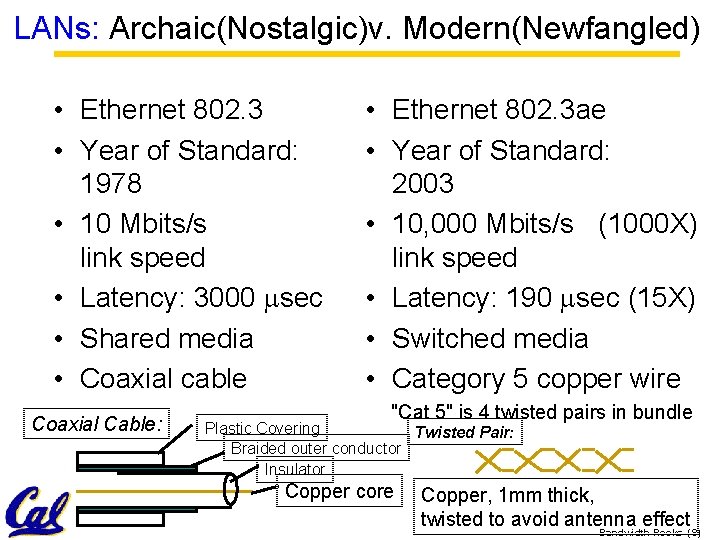
LANs: Archaic(Nostalgic)v. Modern(Newfangled) • Ethernet 802. 3 • Year of Standard: 1978 • 10 Mbits/s link speed • Latency: 3000 msec • Shared media • Coaxial cable Coaxial Cable: • Ethernet 802. 3 ae • Year of Standard: 2003 • 10, 000 Mbits/s (1000 X) link speed • Latency: 190 msec (15 X) • Switched media • Category 5 copper wire "Cat 5" is 4 twisted pairs in bundle Plastic Covering Twisted Pair: Braided outer conductor Insulator Copper core Copper, 1 mm thick, twisted to avoid antenna effect Bandwidth Rocks (8)
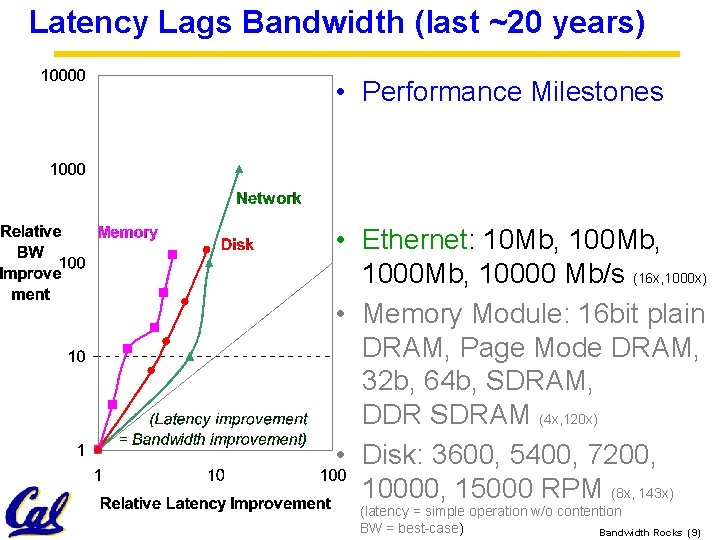
Latency Lags Bandwidth (last ~20 years) • Performance Milestones • Ethernet: 10 Mb, 1000 Mb, 10000 Mb/s (16 x, 1000 x) • Memory Module: 16 bit plain DRAM, Page Mode DRAM, 32 b, 64 b, SDRAM, DDR SDRAM (4 x, 120 x) • Disk: 3600, 5400, 7200, 10000, 15000 RPM (8 x, 143 x) (latency = simple operation w/o contention BW = best-case) Bandwidth Rocks (9)

CPUs: Archaic(Nostalgic) v. Modern(Newfangled) • • 1982 Intel 80286 12. 5 MHz 2 MIPS (peak) Latency 320 ns 134, 000 xtors, 47 mm 2 16 -bit data bus, 68 pins Microcode interpreter, separate FPU chip • (no caches) • • 2001 Intel Pentium 4 1500 MHz (120 X) 4500 MIPS (peak) (2250 X) Latency 15 ns (20 X) 42, 000 xtors, 217 mm 2 64 -bit data bus, 423 pins 3 -way superscalar, Dynamic translate to RISC, Superpipelined (22 stage), Out-of-Order execution • On-chip 8 KB Data caches, 96 KB Instr. Trace cache, 256 KB L 2 cache Bandwidth Rocks (10)
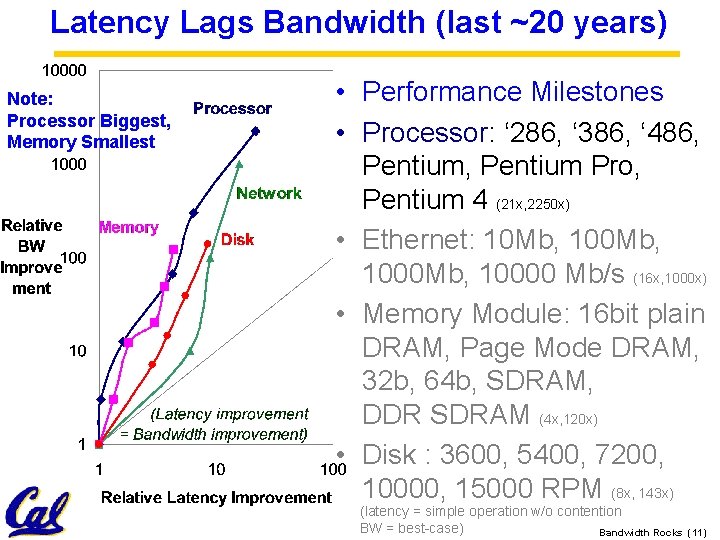
Latency Lags Bandwidth (last ~20 years) Note: Processor Biggest, Memory Smallest • Performance Milestones • Processor: ‘ 286, ‘ 386, ‘ 486, Pentium Pro, Pentium 4 (21 x, 2250 x) • Ethernet: 10 Mb, 1000 Mb, 10000 Mb/s (16 x, 1000 x) • Memory Module: 16 bit plain DRAM, Page Mode DRAM, 32 b, 64 b, SDRAM, DDR SDRAM (4 x, 120 x) • Disk : 3600, 5400, 7200, 10000, 15000 RPM (8 x, 143 x) (latency = simple operation w/o contention BW = best-case) Bandwidth Rocks (11)
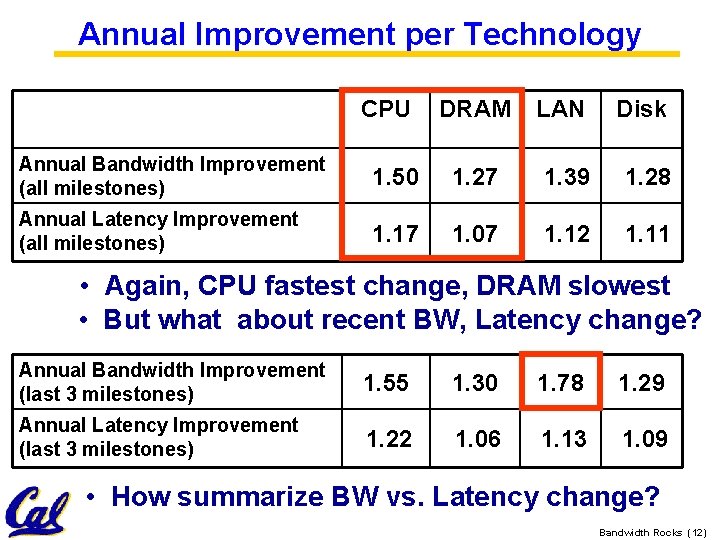
Annual Improvement per Technology CPU DRAM LAN Disk Annual Bandwidth Improvement (all milestones) 1. 50 1. 27 1. 39 1. 28 Annual Latency Improvement (all milestones) 1. 17 1. 07 1. 12 1. 11 • Again, CPU fastest change, DRAM slowest • But what about recent BW, Latency change? Annual Bandwidth Improvement (last 3 milestones) 1. 55 1. 30 1. 78 1. 29 Annual Latency Improvement (last 3 milestones) 1. 22 1. 06 1. 13 1. 09 • How summarize BW vs. Latency change? Bandwidth Rocks (12)
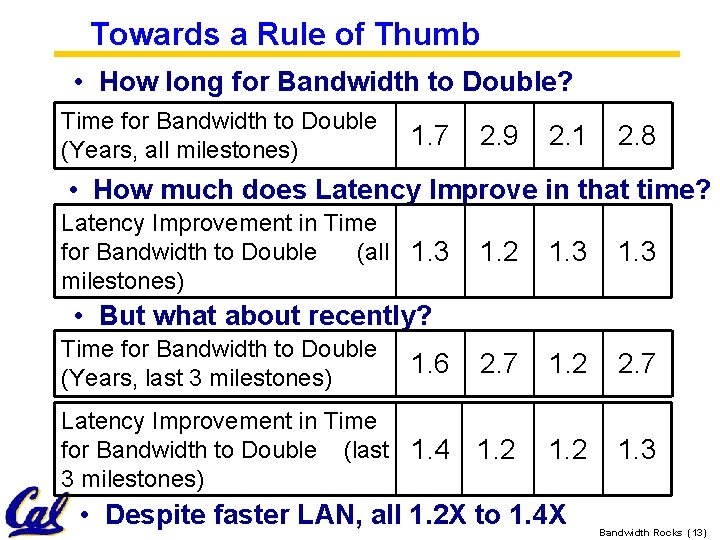
Towards a Rule of Thumb • How long for Bandwidth to Double? Time for Bandwidth to Double (Years, all milestones) 1. 7 2. 9 2. 1 2. 8 • How much does Latency Improve in that time? Latency Improvement in Time for Bandwidth to Double (all 1. 3 milestones) 1. 2 1. 3 1. 6 2. 7 1. 2 2. 7 Latency Improvement in Time for Bandwidth to Double (last 1. 4 3 milestones) 1. 2 1. 3 • But what about recently? Time for Bandwidth to Double (Years, last 3 milestones) • Despite faster LAN, all 1. 2 X to 1. 4 X Bandwidth Rocks (13)
Rule of Thumb for Latency Lagging BW • In the time that bandwidth doubles, latency improves by no more than a factor of 1. 2 to 1. 4 (and capacity improves faster than bandwidth) • Stated alternatively: Bandwidth improves by more than the square of the improvement in Latency Bandwidth Rocks (14)
What if Latency Didn’t Lag BW? • Life would have been simpler for designers if Latency had kept up with Bandwidth – E. g. , 0. 1 nanosecond latency processor, 2 nanosecond latency memory, 3 microsecond latency LANs, 0. 3 millisecond latency disks • Why does it Lag? Bandwidth Rocks (15)
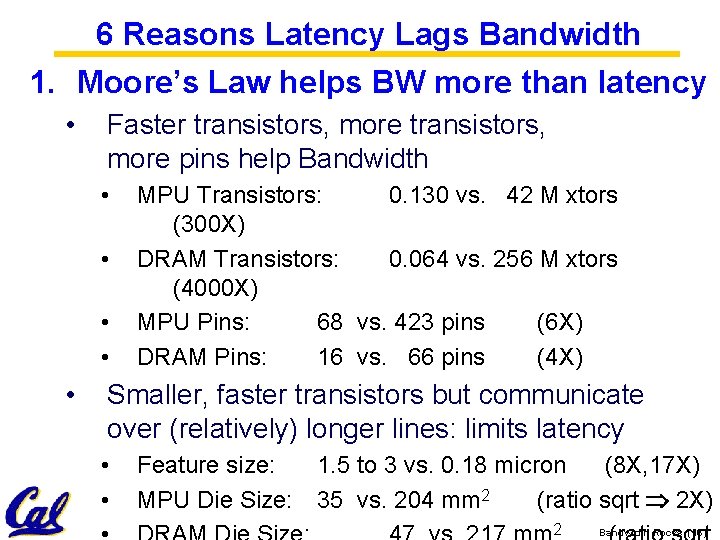
6 Reasons Latency Lags Bandwidth 1. Moore’s Law helps BW more than latency • Faster transistors, more pins help Bandwidth • • • MPU Transistors: 0. 130 vs. 42 M xtors (300 X) DRAM Transistors: 0. 064 vs. 256 M xtors (4000 X) MPU Pins: 68 vs. 423 pins (6 X) DRAM Pins: 16 vs. 66 pins (4 X) Smaller, faster transistors but communicate over (relatively) longer lines: limits latency • • Feature size: MPU Die Size: 1. 5 to 3 vs. 0. 18 micron (8 X, 17 X) 35 vs. 204 mm 2 (ratio sqrt 2 X) 2 Bandwidth Rocks (16)
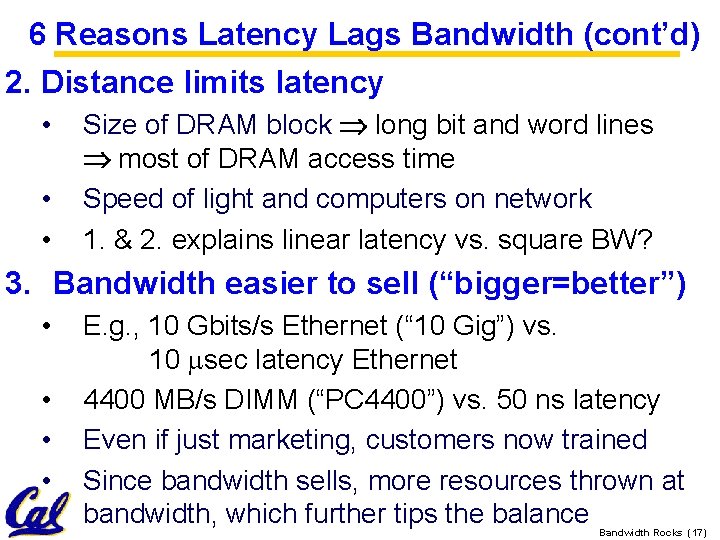
6 Reasons Latency Lags Bandwidth (cont’d) 2. Distance limits latency • • • Size of DRAM block long bit and word lines most of DRAM access time Speed of light and computers on network 1. & 2. explains linear latency vs. square BW? 3. Bandwidth easier to sell (“bigger=better”) • • E. g. , 10 Gbits/s Ethernet (“ 10 Gig”) vs. 10 msec latency Ethernet 4400 MB/s DIMM (“PC 4400”) vs. 50 ns latency Even if just marketing, customers now trained Since bandwidth sells, more resources thrown at bandwidth, which further tips the balance Bandwidth Rocks (17)
6 Reasons Latency Lags Bandwidth (cont’d) 4. Latency helps BW, but not vice versa • Spinning disk faster improves both bandwidth and rotational latency • • • 3600 RPM 15000 RPM = 4. 2 X Average rotational latency: 8. 3 ms 2. 0 ms Things being equal, also helps BW by 4. 2 X Lower DRAM latency More access/second (higher bandwidth) Higher linear density helps disk BW (and capacity), but not disk Latency • 9, 550 BPI 533, 000 BPI 60 X in BW Bandwidth Rocks (18)
6 Reasons Latency Lags Bandwidth (cont’d) 5. Bandwidth hurts latency • • Queues help Bandwidth, hurt Latency (Queuing Theory) Adding chips to widen a memory module increases Bandwidth but higher fan-out on address lines may increase Latency 6. Operating System overhead hurts Latency more than Bandwidth • Long messages amortize overhead; overhead bigger part of short messages Bandwidth Rocks (19)
3 Ways to Cope with Latency Lags Bandwidth “If a problem has no solution, it may not be a problem, but a fact--not to be solved, but to be coped with over time” — Shimon Peres (“Peres’s Law”) 1. Caching (Leveraging Capacity) • Processor caches, file cache, disk cache 2. Replication (Leveraging Capacity) • Read from nearest head in RAID, from nearest site in content distribution 3. Prediction (Leveraging Bandwidth) • Branches + Prefetching: disk, caches Bandwidth Rocks (20)
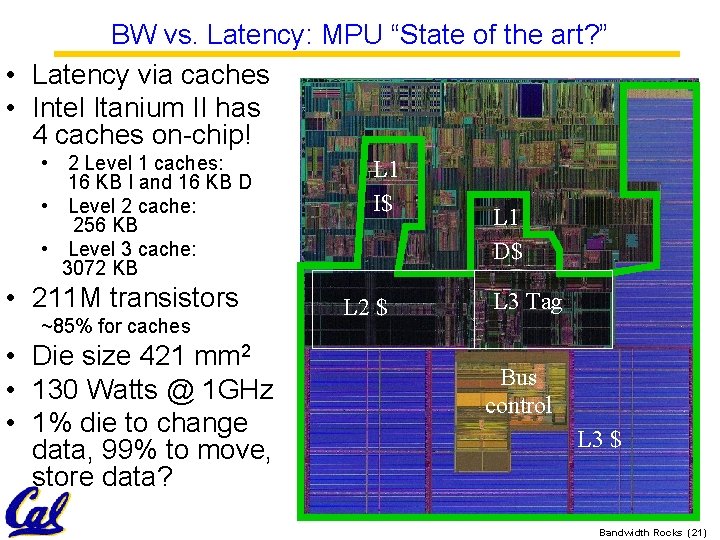
BW vs. Latency: MPU “State of the art? ” • Latency via caches • Intel Itanium II has 4 caches on-chip! • 2 Level 1 caches: 16 KB I and 16 KB D • Level 2 cache: 256 KB • Level 3 cache: 3072 KB • 211 M transistors ~85% for caches • Die size 421 mm 2 • 130 Watts @ 1 GHz • 1% die to change data, 99% to move, store data? L 1 I$ L 2 $ L 1 D$ L 3 Tag Bus control L 3 $ Bandwidth Rocks (21)

HW BW Example: Micro Massively Parallel Processor (m. MMP) • Intel 4004 (1971): 4 -bit processor, 2312 transistors, 0. 4 MHz, 10 micron PMOS, 11 mm 2 chip • RISC II (1983): 32 -bit, 5 stage pipeline, 40, 760 transistors, 3 MHz, 3 micron NMOS, 60 mm 2 chip – 4004 shrinks to ~ 1 mm 2 at 3 micron • 250 mm 2 chip, 0. 090 micron CMOS = 2312 RISC IIs + Icache + Dcache – RISC II shrinks to ~ 0. 05 mm 2 at 0. 09 mi. – Caches via DRAM or 1 transistor SRAM (www. t-ram. com) – Proximity Communication via capacitive coupling at > 1 TB/s (Ivan Sutherland@Sun) • Processor = new transistor? Cost of Ownership, Dependability, Security v. Cost/Perf. Bandwidth => m. MPP Rocks (22)
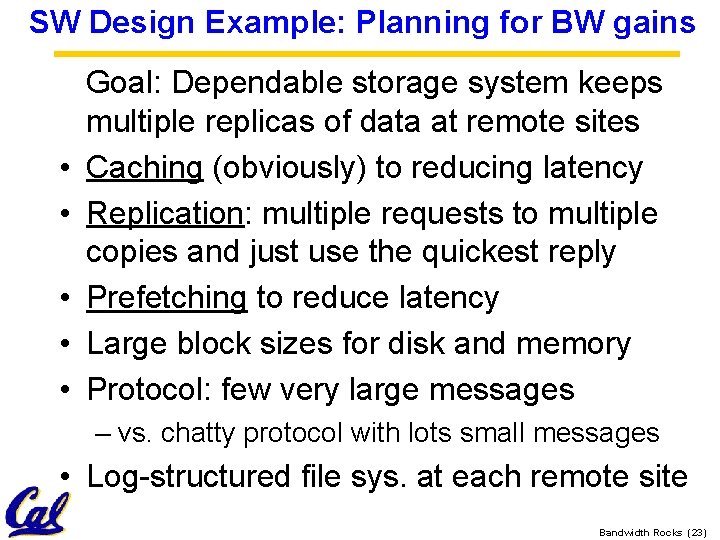
SW Design Example: Planning for BW gains • • • Goal: Dependable storage system keeps multiple replicas of data at remote sites Caching (obviously) to reducing latency Replication: multiple requests to multiple copies and just use the quickest reply Prefetching to reduce latency Large block sizes for disk and memory Protocol: few very large messages – vs. chatty protocol with lots small messages • Log-structured file sys. at each remote site Bandwidth Rocks (23)
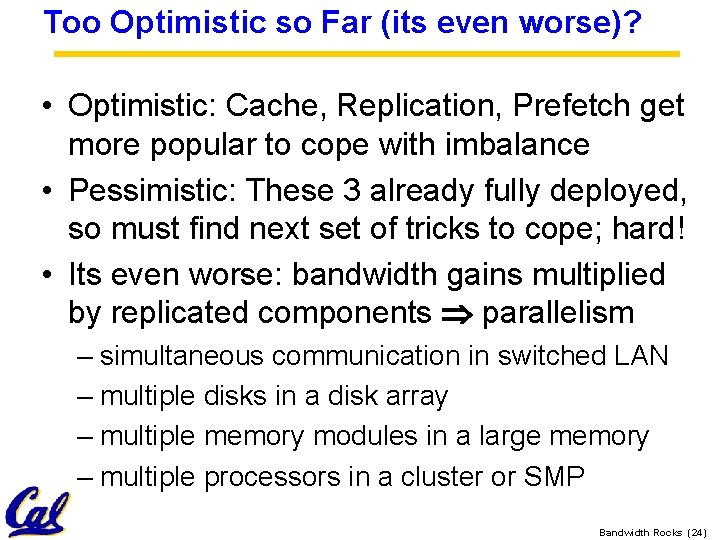
Too Optimistic so Far (its even worse)? • Optimistic: Cache, Replication, Prefetch get more popular to cope with imbalance • Pessimistic: These 3 already fully deployed, so must find next set of tricks to cope; hard! • Its even worse: bandwidth gains multiplied by replicated components parallelism – simultaneous communication in switched LAN – multiple disks in a disk array – multiple memory modules in a large memory – multiple processors in a cluster or SMP Bandwidth Rocks (24)
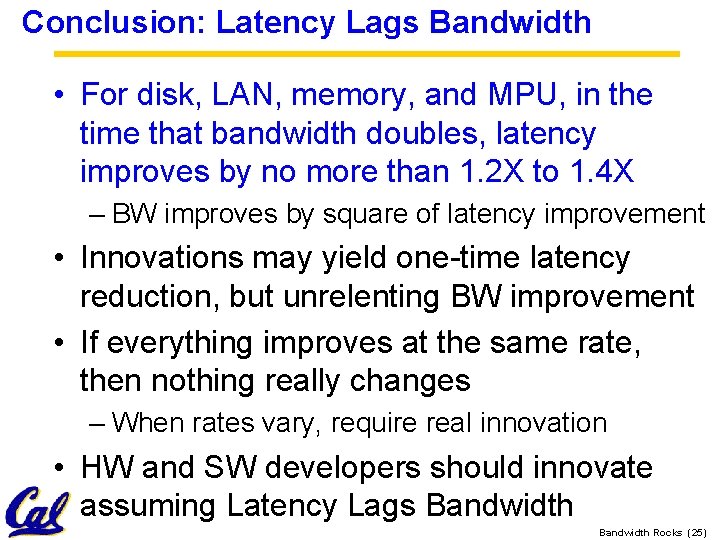
Conclusion: Latency Lags Bandwidth • For disk, LAN, memory, and MPU, in the time that bandwidth doubles, latency improves by no more than 1. 2 X to 1. 4 X – BW improves by square of latency improvement • Innovations may yield one-time latency reduction, but unrelenting BW improvement • If everything improves at the same rate, then nothing really changes – When rates vary, require real innovation • HW and SW developers should innovate assuming Latency Lags Bandwidth Rocks (25)
- Slides: 25