
WHAT SHOULD YOU HAVE IN YOUR ALTERNATE FORMAT


- Slides: 20
WHAT SHOULD YOU HAVE IN YOUR ALTERNATE FORMAT TOOLBOX?
INTRODUCTION Susan Kelmer Alternate Format Access Coordinator University of Colorado Boulder
INTRODUCTION, CONTINUED… • We produce electronic files and tactile graphics/Braille for students with all types of needs • We produce approximately 700 pieces each semester – some are textbooks, some are handouts, some are test and testing materials • We track requests via a spreadsheet and hard copy system
ACQUISITION OF MATERIALS • Hard copy handouts • Hard copy textbooks • Electronic files from faculty/staff • Electronic files from publishers • Electronic files from Braille
ACQUISITION OF MATERIALS, CONTINUED… • Access. Text Network • Bibliovault • Publisher. Lookup. org • Bookshare • Maintained list of publishers • List. Servs – DSSHE, ATHEN, Alternate Media (California CC System but can be used by anyone)
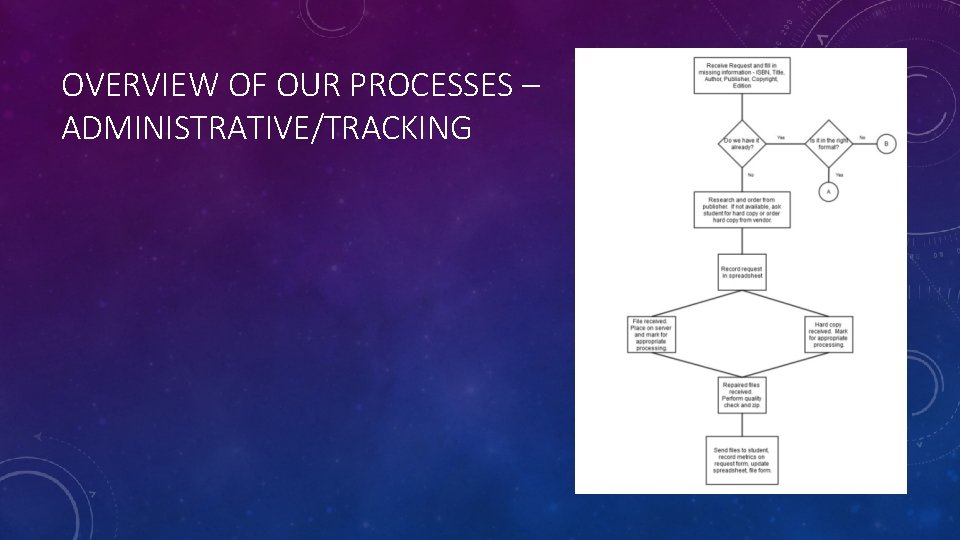
OVERVIEW OF OUR PROCESSES – ADMINISTRATIVE/TRACKING
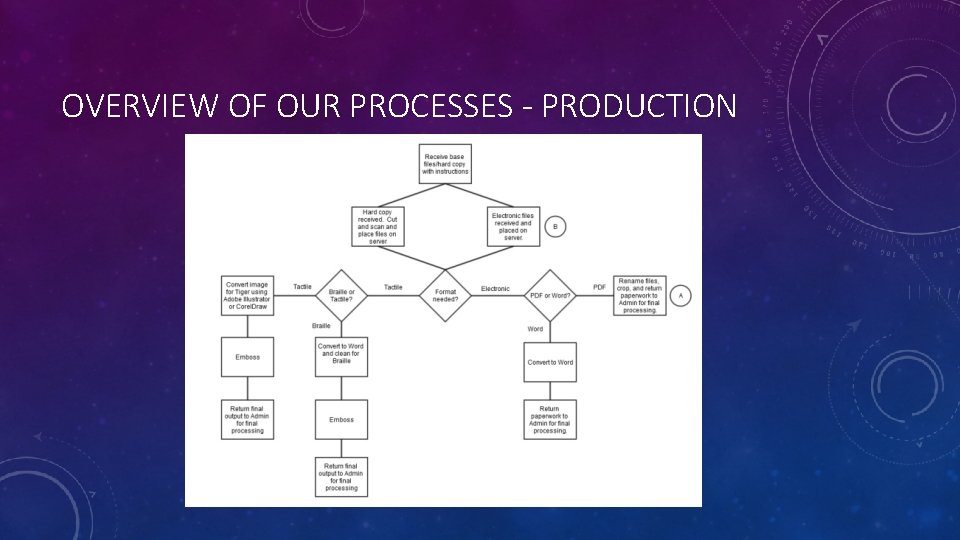
OVERVIEW OF OUR PROCESSES - PRODUCTION
HARDWARE • High-Speed Duplexing Scanner • Copy Machine with Scan function • Flatbed Scanner (not recommended) • Network-based Storage Space • Production PC • Braille Embosser • Tactile Embosser
THINGS THAT CAN MAKE A SCANNER (AND YOU) GO CRAZY • Heavily textured paper • Strange or stylistic fonts • Paper cut unevenly • Poorly copied documents
SOFTWARE – ADOBE ACROBAT PRO • For breaking up files into smaller pieces for production – by chapter or just number of pages • Run basic OCR • Setting reading order • Fixing text
WHEN PDF FILES ARE LOCKED OR WATERMARKED Are we legally allowed to crack PDFS? • Authors Guild, Inc. v. Hathi. Trust • Various OCR cases country-wide Civil rights trump copyrights, every single time. PDF Unlock Tools (password removal) • Small PDF (http: //smallpdf. com/unlock-pdf) • Free My PDF (http: //www. freemypdf. com Watermark Removal • Watermarks can usually be removed (Tools, Pages, Watermark) after the password has been removed.
WHEN PDF FILES HAVE OTHER DIFFICULTIES • PDF won’t scan in OCR • PDF won’t extract to Word • PDF won’t print
OPTICAL CHARACTER RECOGNITION - OMNIPAGE • Runs basic and complex OCR • Allows you to set zones and re-use for later documents • Allows you to cut out certain places, or add text recognition to certain places in the document • Exports to text or other formats for further editing • I like it best because it’s the one I’ve used for the last 10 years or so, i. e. it is a personal preference
OPTICAL CHARACTER RECOGNITION - ABBYY FINEREADER • Seems to work best with foreign language or mixed language documents • Allows selection of editing fields and a re-scan • Saves as a text-based document for further editing • Does very well with tables
SOFTWARE – TEXT EDITING Microsoft Word (standard) Open. Office • Edit out or in graphics • Add alternate text to graphics as needed • Recreate or reformat tables for readability • Add in or remove page breaks, page numbering, and header information • Add styles/headings as appropriate • Spell check • Recreate footnotes
SOFTWARE – MATH • Math. Type • Enter/correct math equations • Output to html, • Output to Word with Equations • Lean • Creates easily-readable equations for all screen readers (Jaws, Window. Eyes, NVDA)
SOFTWARE – BRAILLE TRANSLATION SOFTWARE • Duxbury Braille Translator (DBT) • Turns Word (doc, docx) files into Braille • Turns La. Tex files (when coded properly) into Braille • Turns html files (when coded properly) into Braille • Save as. brf (Braille Ready File) for use with refreshable displays or Jaws • Emboss to hard-copy Braille
SOFTWARE - TACTILES • Adobe Illustrator
DISTRIBUTION OF FILES • On-campus solution (if possible) • Dropbox • High. Tail (formerly You. Send. It) • Google Drive • In-person • Flash drive • CD • External hard drive
HOW YOU CAN CONTACT ME Susan Kelmer Alternate Format Access Coordinator University of Colorado Boulder Susan. Kelmer@Colorado. edu 303 -735 -4836