
What is a Podcast Audio recordings called podcasts
- Slides: 10
What is a Podcast? Audio recordings, called podcasts, are a new teaching/learning strategy of providing audio files to students that can be automatically downloaded to an i. Pod or other mp 3 player.
What is an Enhanced Podcast? Enhanced Podcast can mean different things to different people, but in general, it is a podcast that can include photos, text, audio narration and music. These enhanced podcasts can be made with a variety of products, in different formats and styles, and for many different purposes.
Examples Audacity tutorial (created with Camtasia) n Narrated Lecture (created with Windows Movie n Maker and Power. Point) Patriot Act (created with Flash) n Knowing Refugees (created with Windows Movie n Maker and Power. Point)
Steps to creating an enhanced podcast Develop Concept n Plan n Create Script n Create Content n
Collecting the content Organize n Collect Content n Photos from websites n Create text slides in Power. Point n Create Music file n
Using Windows Movie Maker Open Windows Movie Maker n Save your project n Import your content n Edit Movie n Add Content to Storyboard n Make a Title n Make a Credits page n Edit Clips n Finish Movie (export)
Convert file format n Download converter n n Im. Too Ipod Movie Converter Convert file (wmv – mpeg)
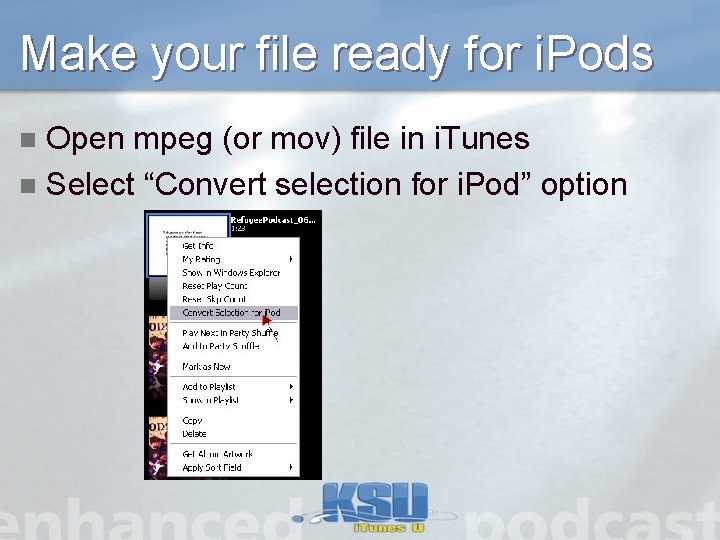
Make your file ready for i. Pods Open mpeg (or mov) file in i. Tunes n Select “Convert selection for i. Pod” option n
Congratulations Your video is now in a format that can be submitted to i. Tunes University