
What are the key features of knowledgerich assessment
- Slides: 5
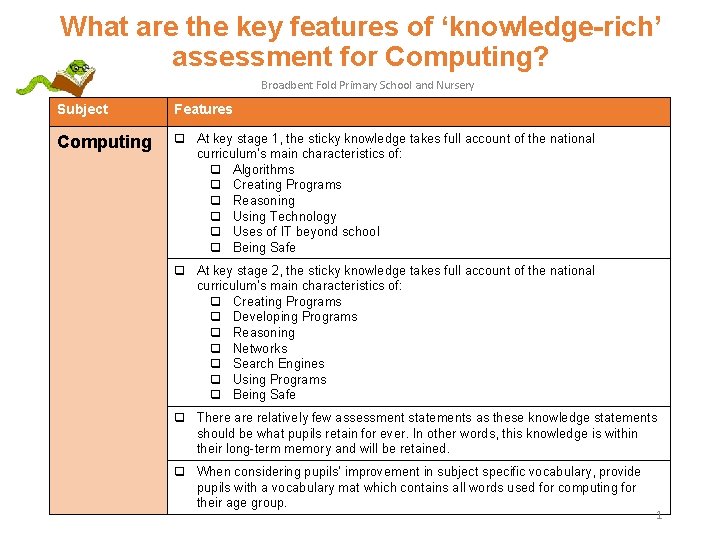
What are the key features of ‘knowledge-rich’ assessment for Computing? Broadbent Fold Primary School and Nursery Subject Features Computing q At key stage 1, the sticky knowledge takes full account of the national curriculum’s main characteristics of: q Algorithms q Creating Programs q Reasoning q Using Technology q Uses of IT beyond school q Being Safe q At key stage 2, the sticky knowledge takes full account of the national curriculum’s main characteristics of: q Creating Programs q Developing Programs q Reasoning q Networks q Search Engines q Using Programs q Being Safe q There are relatively few assessment statements as these knowledge statements should be what pupils retain for ever. In other words, this knowledge is within their long-term memory and will be retained. q When considering pupils’ improvement in subject specific vocabulary, provide pupils with a vocabulary mat which contains all words used for computing for their age group. 1
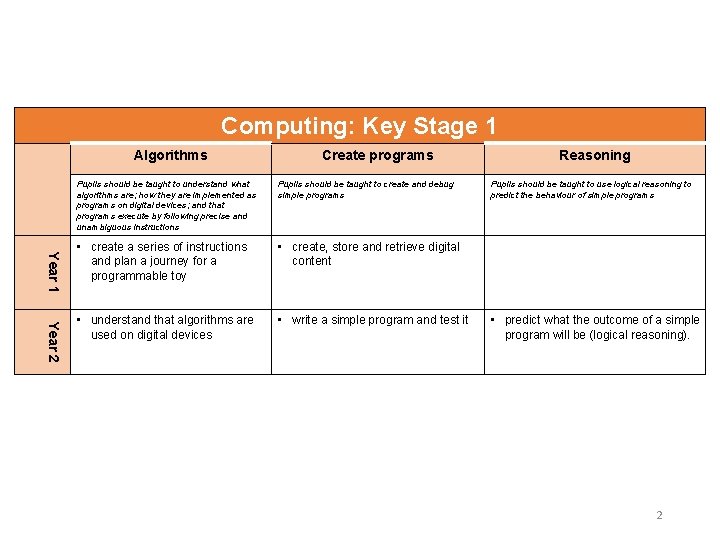
Computing: Key Stage 1 Algorithms Create programs Year 1 Year 2 Pupils should be taught to understand what algorithms are; how they are implemented as programs on digital devices; and that programs execute by following precise and unambiguous instructions Pupils should be taught to create and debug simple programs • create a series of instructions and plan a journey for a programmable toy • create, store and retrieve digital content • understand that algorithms are used on digital devices • write a simple program and test it Reasoning Pupils should be taught to use logical reasoning to predict the behaviour of simple programs • predict what the outcome of a simple program will be (logical reasoning). 2
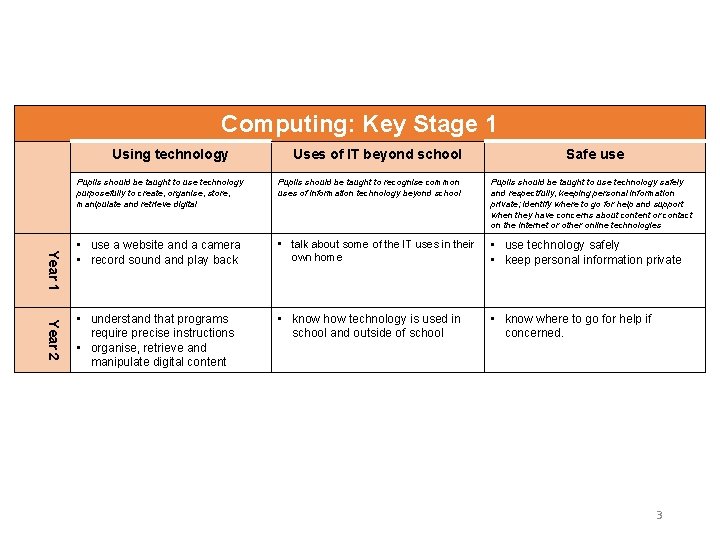
Computing: Key Stage 1 Using technology Uses of IT beyond school Safe use Year 1 Year 2 Pupils should be taught to use technology purposefully to create, organise, store, manipulate and retrieve digital Pupils should be taught to recognise common uses of information technology beyond school Pupils should be taught to use technology safely and respectfully, keeping personal information private; identify where to go for help and support when they have concerns about content or contact on the internet or other online technologies • use a website and a camera • record sound and play back • talk about some of the IT uses in their own home • use technology safely • keep personal information private • understand that programs require precise instructions • organise, retrieve and manipulate digital content • know how technology is used in school and outside of school • know where to go for help if concerned. 3
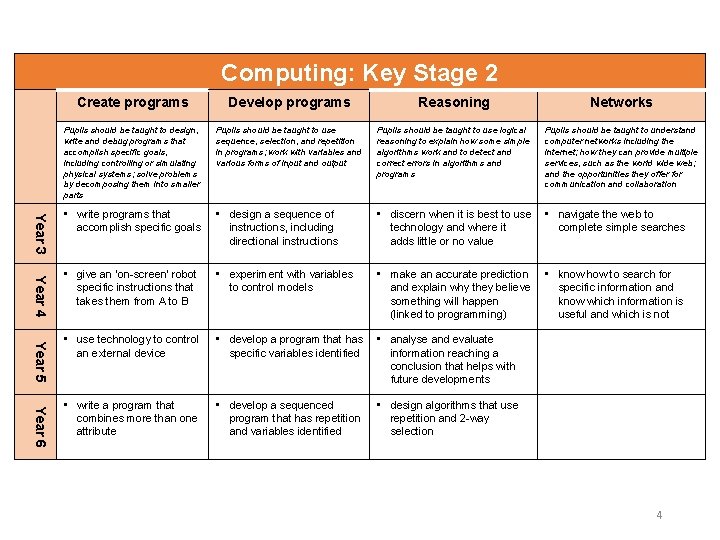
Computing: Key Stage 2 Year 3 Year 4 Year 5 Year 6 Create programs Develop programs Reasoning Networks Pupils should be taught to design, write and debug programs that accomplish specific goals, including controlling or simulating physical systems; solve problems by decomposing them into smaller parts Pupils should be taught to use sequence, selection, and repetition in programs; work with variables and various forms of input and output Pupils should be taught to use logical reasoning to explain how some simple algorithms work and to detect and correct errors in algorithms and programs Pupils should be taught to understand computer networks including the internet; how they can provide multiple services, such as the world wide web; and the opportunities they offer for communication and collaboration • write programs that accomplish specific goals • design a sequence of instructions, including directional instructions • discern when it is best to use technology and where it adds little or no value • navigate the web to complete simple searches • give an ‘on-screen’ robot specific instructions that takes them from A to B • experiment with variables to control models • make an accurate prediction and explain why they believe something will happen (linked to programming) • know how to search for specific information and know which information is useful and which is not • use technology to control an external device • develop a program that has specific variables identified • analyse and evaluate information reaching a conclusion that helps with future developments • write a program that combines more than one attribute • develop a sequenced program that has repetition and variables identified • design algorithms that use repetition and 2 -way selection 4
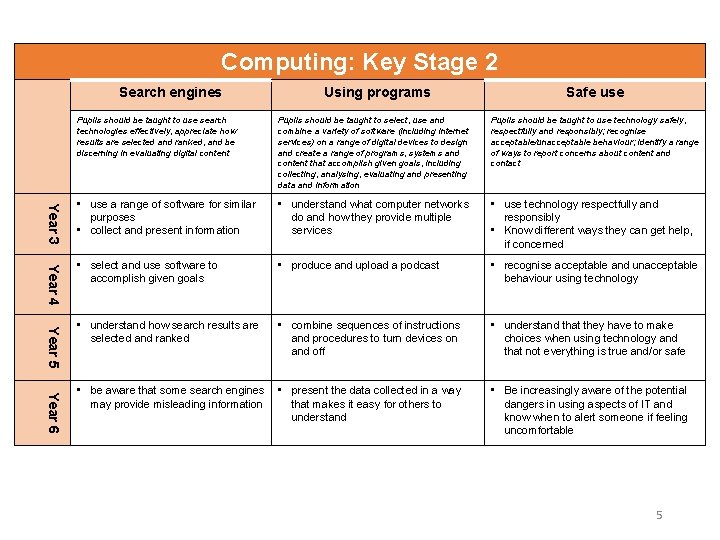
Computing: Key Stage 2 Search engines Using programs Safe use Pupils should be taught to select, use and combine a variety of software (including internet services) on a range of digital devices to design and create a range of programs, systems and content that accomplish given goals, including collecting, analysing, evaluating and presenting data and information Pupils should be taught to use technology safely, respectfully and responsibly; recognise acceptable/unacceptable behaviour; identify a range of ways to report concerns about content and contact Year 3 • use a range of software for similar purposes • collect and present information • understand what computer networks do and how they provide multiple services • use technology respectfully and responsibly • Know different ways they can get help, if concerned Year 4 • select and use software to accomplish given goals • produce and upload a podcast • recognise acceptable and unacceptable behaviour using technology • understand how search results are selected and ranked • combine sequences of instructions and procedures to turn devices on and off • understand that they have to make choices when using technology and that not everything is true and/or safe • be aware that some search engines may provide misleading information • present the data collected in a way that makes it easy for others to understand • Be increasingly aware of the potential dangers in using aspects of IT and know when to alert someone if feeling uncomfortable Year 5 Pupils should be taught to use search technologies effectively, appreciate how results are selected and ranked, and be discerning in evaluating digital content Year 6 5