
West Essex CCG Programme Management Office Project Management
- Slides: 60
West Essex CCG Programme Management Office Project Management Manual Version 2. 0 June 2018
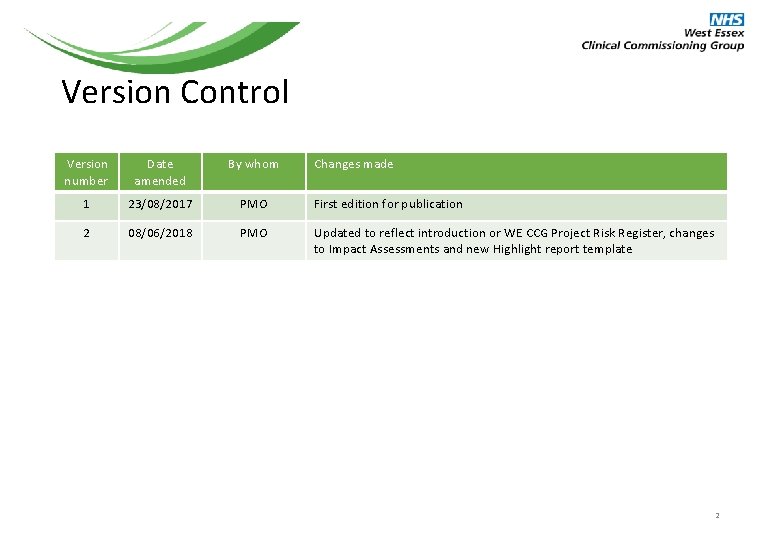
Version Control Version number Date amended By whom Changes made 1 23/08/2017 PMO First edition for publication 2 08/06/2018 PMO Updated to reflect introduction or WE CCG Project Risk Register, changes to Impact Assessments and new Highlight report template 2
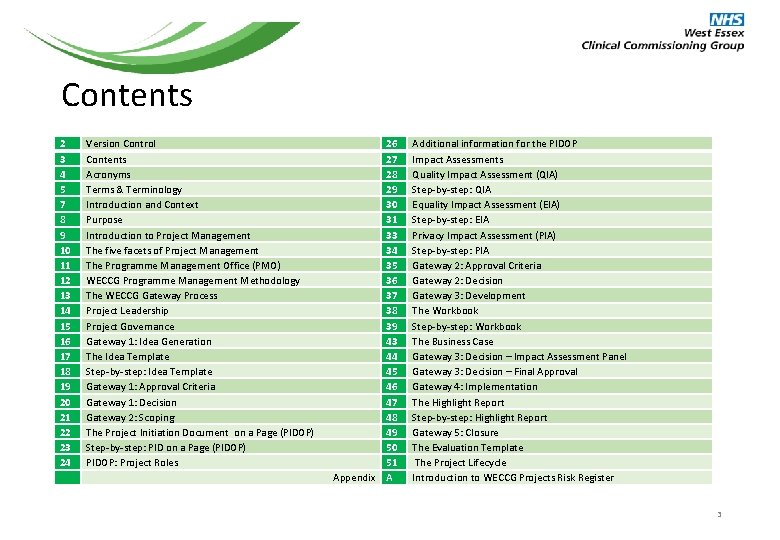
Contents 2 3 4 5 7 8 9 10 11 12 13 14 15 16 17 18 19 20 21 22 23 24 Version Control Contents Acronyms Terms & Terminology Introduction and Context Purpose Introduction to Project Management The five facets of Project Management The Programme Management Office (PMO) WECCG Programme Management Methodology The WECCG Gateway Process Project Leadership Project Governance Gateway 1: Idea Generation The Idea Template Step-by-step: Idea Template Gateway 1: Approval Criteria Gateway 1: Decision Gateway 2: Scoping The Project Initiation Document on a Page (PIDOP) Step-by-step: PID on a Page (PIDOP) PIDOP: Project Roles 26 27 28 29 30 31 33 34 35 36 37 38 39 43 44 45 46 47 48 49 50 51 Appendix A Additional information for the PIDOP Impact Assessments Quality Impact Assessment (QIA) Step-by-step: QIA Equality Impact Assessment (EIA) Step-by-step: EIA Privacy Impact Assessment (PIA) Step-by-step: PIA Gateway 2: Approval Criteria Gateway 2: Decision Gateway 3: Development The Workbook Step-by-step: Workbook The Business Case Gateway 3: Decision – Impact Assessment Panel Gateway 3: Decision – Final Approval Gateway 4: Implementation The Highlight Report Step-by-step: Highlight Report Gateway 5: Closure The Evaluation Template The Project Lifecycle Introduction to WECCG Projects Risk Register 3
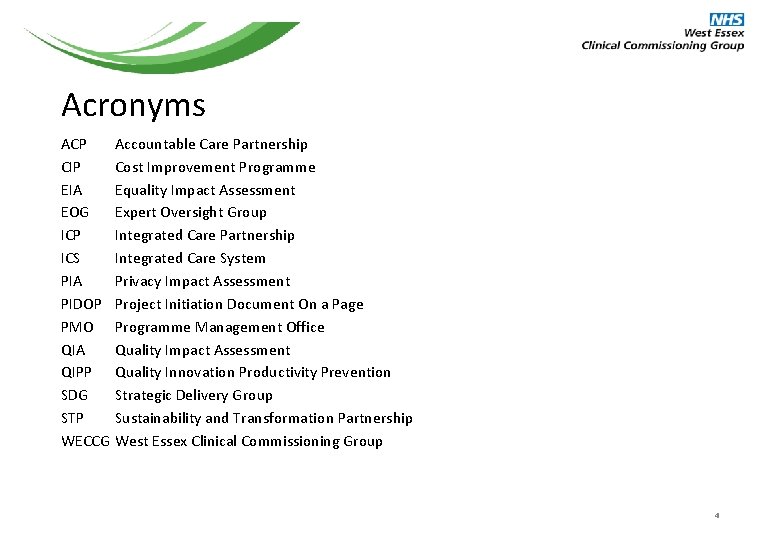
Acronyms ACP CIP EIA EOG ICP ICS PIA PIDOP PMO QIA QIPP SDG STP WECCG Accountable Care Partnership Cost Improvement Programme Equality Impact Assessment Expert Oversight Group Integrated Care Partnership Integrated Care System Privacy Impact Assessment Project Initiation Document On a Page Programme Management Office Quality Impact Assessment Quality Innovation Productivity Prevention Strategic Delivery Group Sustainability and Transformation Partnership West Essex Clinical Commissioning Group 4
Terms & Terminology The Risk and Issue Register All projects are associated with five constraints: • Time • Quality • Cost • Scope • Benefit Risks and Issues are events which may impact on one of these constraints. They may threaten to: • Increase the time required to complete the project • Reduce the quality of the projects outcomes • Increase the costs of the project • Reduce the scope of the project – or increase it thereby threatening the other constraints • Reduce or nullify the benefits of carrying out the project A risk is usually a threat. A threat is an event which may occur in the future which might be deleterious to the project and must be prevented from occurring through the taking of mitigating actions. However, a risk may also be an opportunity. An opportunity is an event which may occur in the future which could be exploited in order to improve the project outcomes. Risks are measured against two criteria: the likelihood of the occurrence and the impact should it occur. The higher the score, the greater the risk, and the more the effort that should be deployed to mitigate it. The key characteristic of a risk is that it hasn’t happened yet, and can be avoided through good management and mitigating actions, or exploited. An issue is anything that is happening now and adversely affecting one or more of the projects constraints. An issue may be a risk that has materialised, but is characterised by the fact that it has already happened or is occurring now, and needs to be 5 addressed now if the planned outcomes for the project are to be achieved.
Project Plans Project plans comprise lists of activities, and the products of those activities, necessary to the delivery of the desired outcomes / objectives of the project. These activities are described as tasks. Tasks are activities which are undertaken by project resources. When a task is completed it usually results in a deliverable. Tasks have three characteristics: duration, effort and resource. The duration is the period of time over which resource will be expended to complete the task. Tasks will usually have a start date and an end date. The effort is the number of hours / days that resources will need to apply themselves to the task in order to complete it. The resource is usually the people who will carry out the work. Resources are usually constrained by the amount of their time they are able to devote to the project task and this is often indicated by the percentage of their working week that they are able to commit to. If a resource is unable to commit the planned time to the task, the end date will start to move into the future Deliverables are the tangible results of tasks. They may be concrete (e. g. a report, a documented process, a documented pathway) or more abstract (a committee decision, a manager’s sign-off). Milestones A milestone is a significant step in a plan. It usually coincides with a deliverable, and hence with the end date of the task that produced that deliverable. Milestones usually have no duration and occur on a single date. Milestones are often used to indicate progress in the project timeline. Common criteria – best practice It is important to ensure that all these elements of a project are described using SMART criteria. Thus each Risk, Issue, Task, Deliverable and Milestone should be: Specific – Measurable – Achievable – Relevant - Time Constrained 6
Introduction & Context The NHS is undergoing significant change in the way services are provided and delivered. All organisations have to make efficiency plans and deliver savings every year as part of the Department of Health's Quality, Innovation, Productivity and Prevention (QIPP) programme which aims to improve the quality of care the NHS delivers, while making efficiency savings. West Essex CCG has successfully delivered the required QIPP savings year on year, fully meeting the NHS business rules. However, the year-on-year QIPP/CIP requirement gets harder each year as the level of opportunity for transactional savings and improvements has been eroded by the changes already delivered. This means the scale and complexity of projects is increasing and programmes are being established with local partners across the West Essex health economy as part of the ACP and across the larger Hertfordshire and West Essex STP area. The challenges are significant: • Balancing quality & cost so that financial savings are delivered without compromising quality of care • The year–on–year QIPP targets get more challenging each year • Maintaining a quality and safety focus despite the need for cost reduction • Balancing viability of providers with viability of services • Balancing QIPP & CIP programmes across a care economy so they reduce cost at a system level • Capacity and capability for programme and project management at this scale • Tough commissioning / contracting decisions • Matrix working across different teams – across multiple geographies and / or organisations • Maintaining day-to-day service levels along with multiple strategic and operational challenges 7
Purpose Best practice for management of complex and interrelated projects is to use a standard programme management framework, supported by a Programme Management Office. This manual outlines the methodology, systems and processes that West Essex CCG have agreed to ensure a standard and “best practice” approach is taken to project management within the business to make best use of the skills, resources and expertise available. The first section outlines the programme management methodology that will be used by the CCG, and the associated governance arrangements. The second section works through each stage in detail with step by step guides for each of the tools and templates. For more information about any of these tools, or advice on programme and project management please contact the PMO team within the CCG. 8
Introduction to Project Management A project has a defined beginning and end in time with defined scope and resources, and is unique in that it is not a routine operation, but a specific set of operations designed to accomplish a singular and time-limited goal. Unfortunately many projects fail to deliver the anticipated benefits and end up costing more money, or dragging on with no defined outcomes. Project failure is usually caused by disparate project documentation, informal processes, lack of defined outcomes, and poor organisation of tasks, resources and milestones. When organisations allow these behaviours it leads to an uncoordinated approach to project management that blinds leaders to what is actually happening until it is too late to rectify the situation. In order to achieve project goals, tasks must be expertly defined and managed to deliver the outcomes that leaders expect. Project management is the application of knowledge, skills, tools, and techniques to project activities through the whole project life cycle to deliver a defined goal. 9
The Five Facets of Project Management Project management requires expert leadership on five levels: 1. Project design and control – setting up a governance structure for the project and ensuring everybody understands their roles and responsibilities 2. Planning and reporting – preparation of plans and timelines, co-ordinating tasks and activities, and ensuring progress is monitored and reported 3. Risk and issue management – tracking and monitoring risks and issues as they crop up, and ensuring timely escalation and appropriate mitigation and controls 4. Benefits realisation – ensuring the benefits are defined and measured, and that the project activities achieve the goals set out at the start 5. Project support – making it easy for project teams to do their jobs by reducing bureaucracy, providing training and project management coaching All management is concerned with these, of course. But expert project management brings a unique focus shaped by the goals, resources and schedules of each project in a highly controlled environment. 10
The Programme Management Office (PMO) A PMO is a group or department that underpins project delivery mechanisms by ensuring projects are managed and reported in a standardised and controlled way. The PMO establishes a co-ordinated, standard and repeatable project management methodology for all projects from start to finish, in a way that fits with the organisational values and culture. The PMO is not responsible for delivery of projects, but supports project managers and organisational leaders by: • Establishing a standard approach to project management that is to be used by all project managers, SROs and clinical leads involved in project delivery • Reporting progress to the organisational leadership team, ensuring they have early warnings of any significant emerging or apparent risks or issues relating to projects, and the mitigating actions being established to address them • Providing documents and templates for project teams so that all projects follow the same high quality methodology, making it easier to track and monitor project delivery in a consistent way • Offering guidance and training in the standard project management methodology as agreed by the organisation • A PMO provides superior project and programme oversight, allowing business-critical information such as performance, risks / issues and benefits realisation to be collated accurately and viewed in near real time. 11
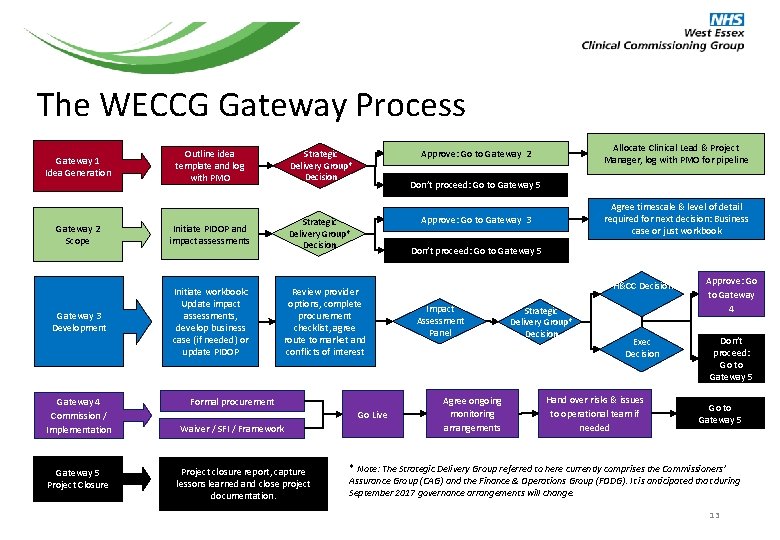
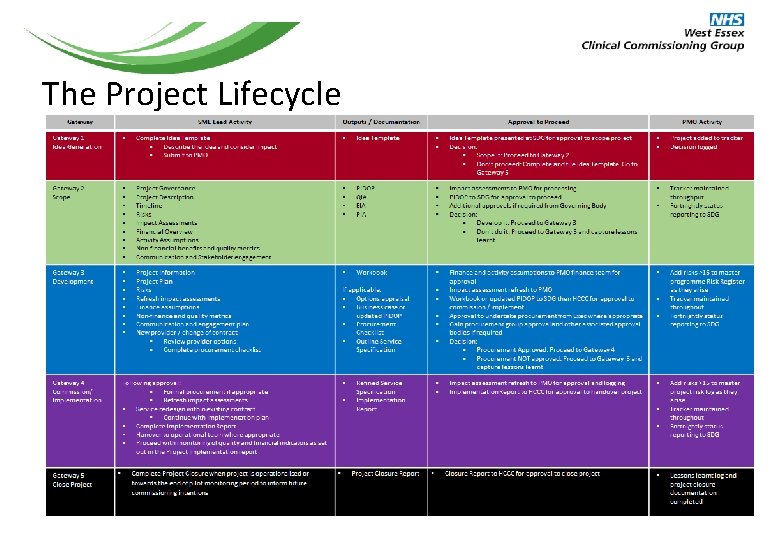
WECCG Programme Management Methodology West Essex CCG (WECCG) have agreed a formal programme management methodology in the form of a “Gateway” process that tracks projects through the whole project lifecycle. It is important that all projects are managed according to this framework to ensure consistent monitoring, tracking, approvals and reporting, which will increase the chance of success, and give leaders full visibility of progress. The WECCG Gateway process provides a framework from the initial idea through to scoping, development, implementation and finally project closure. Projects must complete certain tasks before being approved to progress to the next Gateway which provides assurance that the correct controls are in place at each stage of the project lifecycle. The next page shows the full Gateway Process. Page 51 of this manual is a diagram showing the project lifecycle with lists of activities and outputs for each stage. 12
The WECCG Gateway Process Gateway 1 Idea Generation Outline idea template and log with PMO Gateway 2 Scope Initiate PIDOP and impact assessments Gateway 3 Development Initiate workbook: Update impact assessments, develop business case (if needed) or update PIDOP Gateway 4 Commission / Implementation Gateway 5 Project Closure Don’t proceed: Go to Gateway 5 Review provider options, complete procurement checklist, agree route to market and conflicts of interest Formal procurement Go Live Project closure report, capture lessons learned and close project documentation. Agree timescale & level of detail required for next decision: Business case or just workbook Approve: Go to Gateway 3 Strategic Delivery Group* Decision Waiver / SFI / Framework Allocate Clinical Lead & Project Manager, log with PMO for pipeline Approve: Go to Gateway 2 Strategic Delivery Group* Decision H&CC Decision Impact Assessment Panel Agree ongoing monitoring arrangements Strategic Delivery Group* Decision Exec Decision Hand over risks & issues to operational team if needed Approve: Go to Gateway 4 Don’t proceed: Go to Gateway 5 * Note: The Strategic Delivery Group referred to here currently comprises the Commissioners’ Assurance Group (CAG) and the Finance & Operations Group (FODG). It is anticipated that during September 2017 governance arrangements will change. 13
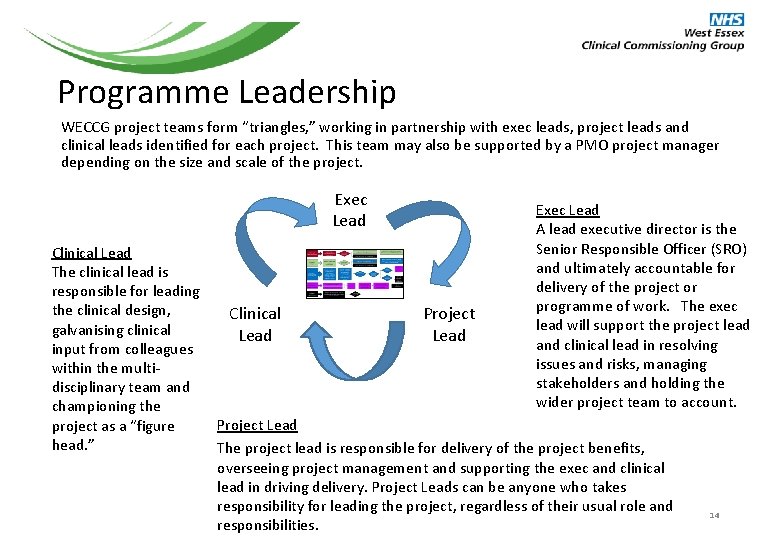
Programme Leadership WECCG project teams form “triangles, ” working in partnership with exec leads, project leads and clinical leads identified for each project. This team may also be supported by a PMO project manager depending on the size and scale of the project. Exec Lead A lead executive director is the Senior Responsible Officer (SRO) and ultimately accountable for delivery of the project or programme of work. The exec lead will support the project lead and clinical lead in resolving issues and risks, managing stakeholders and holding the wider project team to account. Clinical Lead The clinical lead is responsible for leading the clinical design, Clinical Project galvanising clinical Lead input from colleagues within the multidisciplinary team and championing the Project Lead project as a “figure head. ” The project lead is responsible for delivery of the project benefits, overseeing project management and supporting the exec and clinical lead in driving delivery. Project Leads can be anyone who takes responsibility for leading the project, regardless of their usual role and responsibilities. 14
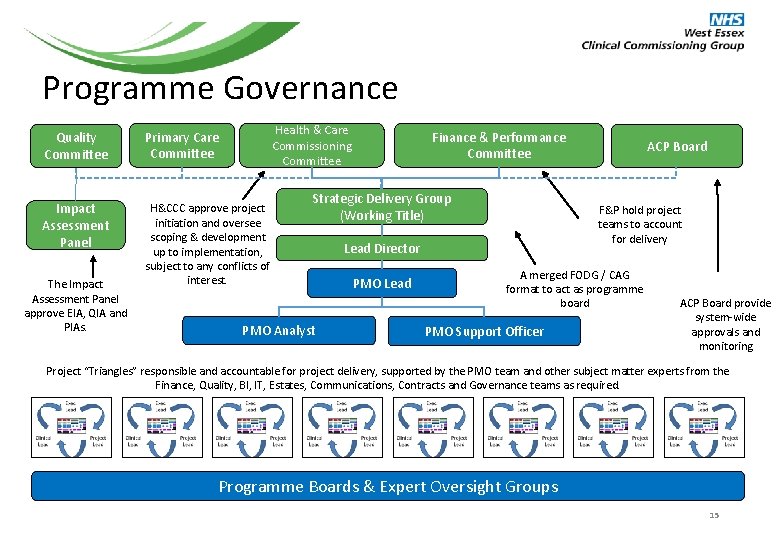
Programme Governance Health & Care Commissioning Committee Quality Committee Primary Care Committee Impact Assessment Panel H&CCC approve project initiation and oversee scoping & development up to implementation, subject to any conflicts of interest. The Impact Assessment Panel approve EIA, QIA and PIAs. Finance & Performance Committee Strategic Delivery Group (Working Title) PMO Analyst F&P hold project teams to account for delivery Lead Director PMO Lead ACP Board A merged FODG / CAG format to act as programme board PMO Support Officer ACP Board provide system-wide approvals and monitoring Project “Triangles” responsible and accountable for project delivery, supported by the PMO team and other subject matter experts from the Finance, Quality, BI, IT, Estates, Communications, Contracts and Governance teams as required. Programme Boards & Expert Oversight Groups 15
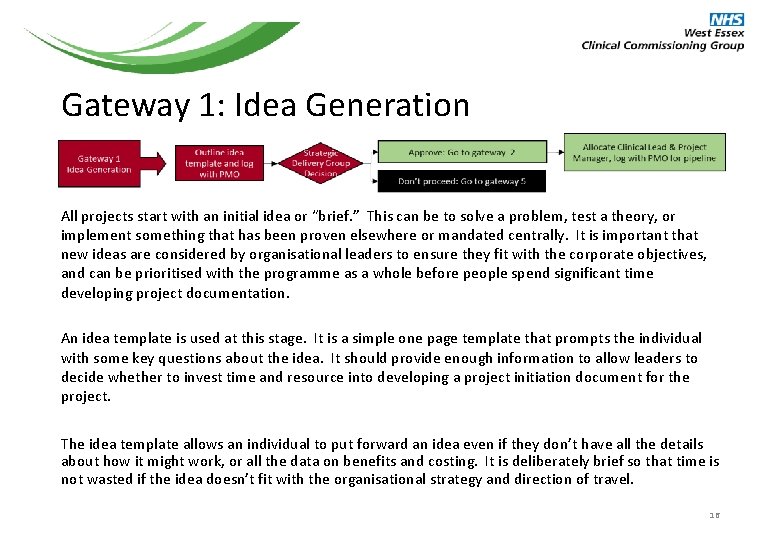
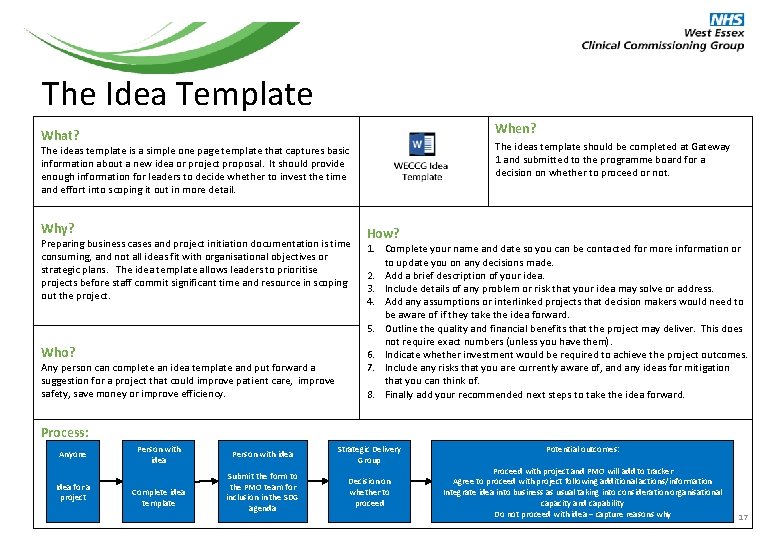
Gateway 1: Idea Generation All projects start with an initial idea or “brief. ” This can be to solve a problem, test a theory, or implement something that has been proven elsewhere or mandated centrally. It is important that new ideas are considered by organisational leaders to ensure they fit with the corporate objectives, and can be prioritised with the programme as a whole before people spend significant time developing project documentation. An idea template is used at this stage. It is a simple one page template that prompts the individual with some key questions about the idea. It should provide enough information to allow leaders to decide whether to invest time and resource into developing a project initiation document for the project. The idea template allows an individual to put forward an idea even if they don’t have all the details about how it might work, or all the data on benefits and costing. It is deliberately brief so that time is not wasted if the idea doesn’t fit with the organisational strategy and direction of travel. 16
The Idea Template When? What? The ideas template should be completed at Gateway 1 and submitted to the programme board for a decision on whether to proceed or not. The ideas template is a simple one page template that captures basic information about a new idea or project proposal. It should provide enough information for leaders to decide whether to invest the time and effort into scoping it out in more detail. Why? Preparing business cases and project initiation documentation is time consuming, and not all ideas fit with organisational objectives or strategic plans. The idea template allows leaders to prioritise projects before staff commit significant time and resource in scoping out the project. Who? Any person can complete an idea template and put forward a suggestion for a project that could improve patient care, improve safety, save money or improve efficiency. How? 1. Complete your name and date so you can be contacted for more information or to update you on any decisions made. 2. Add a brief description of your idea. 3. Include details of any problem or risk that your idea may solve or address. 4. Add any assumptions or interlinked projects that decision makers would need to be aware of if they take the idea forward. 5. Outline the quality and financial benefits that the project may deliver. This does not require exact numbers (unless you have them). 6. Indicate whether investment would be required to achieve the project outcomes. 7. Include any risks that you are currently aware of, and any ideas for mitigation that you can think of. 8. Finally add your recommended next steps to take the idea forward. Process: Anyone Idea for a project Person with idea Complete idea template Person with idea Strategic Delivery Group Submit the form to the PMO team for inclusion in the SDG agenda Decision on whether to proceed Potential outcomes: Proceed with project and PMO will add to tracker Agree to proceed with project following additional actions/information Integrate idea into business as usual taking into consideration organisational capacity and capability Do not proceed with idea – capture reasons why 17
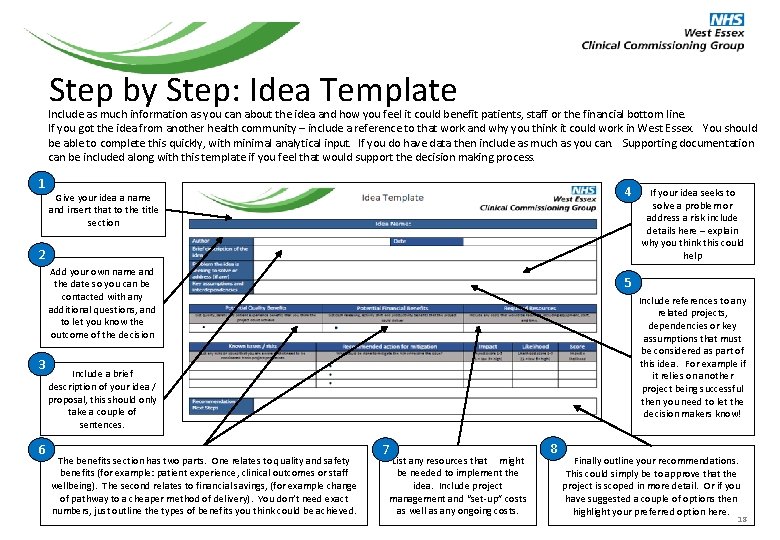
Step by Step: Idea Template Include as much information as you can about the idea and how you feel it could benefit patients, staff or the financial bottom line. If you got the idea from another health community – include a reference to that work and why you think it could work in West Essex. You should be able to complete this quickly, with minimal analytical input. If you do have data then include as much as you can. Supporting documentation can be included along with this template if you feel that would support the decision making process. 1 4 Give your idea a name and insert that to the title section 2 Add your own name and the date so you can be contacted with any additional questions, and to let you know the outcome of the decision 3 6 5 Include references to any related projects, dependencies or key assumptions that must be considered as part of this idea. For example if it relies on another project being successful then you need to let the decision makers know! Include a brief description of your idea / proposal, this should only take a couple of sentences. The benefits section has two parts. One relates to quality and safety benefits (for example: patient experience, clinical outcomes or staff wellbeing). The second relates to financial savings, (for example change of pathway to a cheaper method of delivery). You don’t need exact numbers, just outline the types of benefits you think could be achieved. If your idea seeks to solve a problem or address a risk include details here – explain why you think this could help 7 List any resources that might be needed to implement the idea. Include project management and “set-up” costs as well as any ongoing costs. 8 Finally outline your recommendations. This could simply be to approve that the project is scoped in more detail. Or if you have suggested a couple of options then highlight your preferred option here. 18
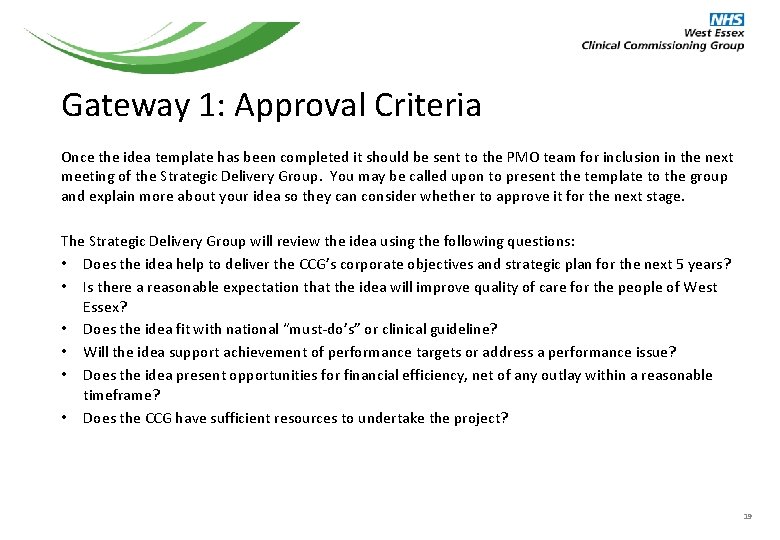
Gateway 1: Approval Criteria Once the idea template has been completed it should be sent to the PMO team for inclusion in the next meeting of the Strategic Delivery Group. You may be called upon to present the template to the group and explain more about your idea so they can consider whether to approve it for the next stage. The Strategic Delivery Group will review the idea using the following questions: • Does the idea help to deliver the CCG’s corporate objectives and strategic plan for the next 5 years? • Is there a reasonable expectation that the idea will improve quality of care for the people of West Essex? • Does the idea fit with national “must-do’s” or clinical guideline? • Will the idea support achievement of performance targets or address a performance issue? • Does the idea present opportunities for financial efficiency, net of any outlay within a reasonable timeframe? • Does the CCG have sufficient resources to undertake the project? 19
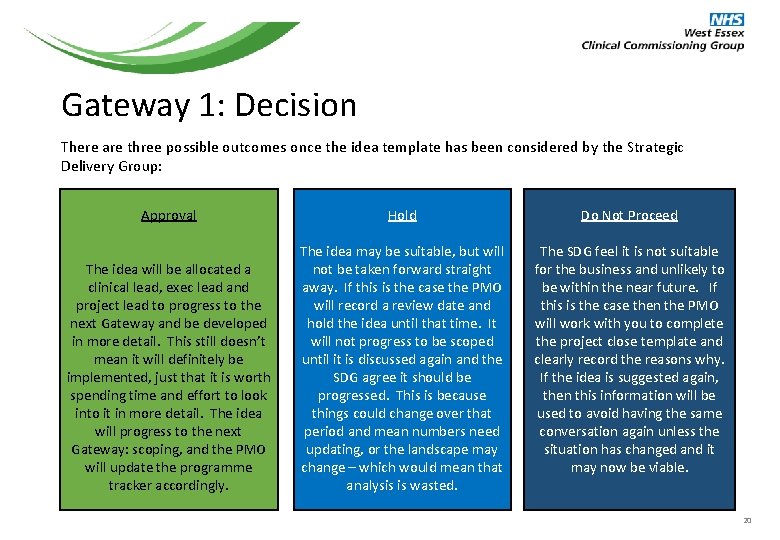
Gateway 1: Decision There are three possible outcomes once the idea template has been considered by the Strategic Delivery Group: Approval Hold Do Not Proceed The idea will be allocated a clinical lead, exec lead and project lead to progress to the next Gateway and be developed in more detail. This still doesn’t mean it will definitely be implemented, just that it is worth spending time and effort to look into it in more detail. The idea will progress to the next Gateway: scoping, and the PMO will update the programme tracker accordingly. The idea may be suitable, but will not be taken forward straight away. If this is the case the PMO will record a review date and hold the idea until that time. It will not progress to be scoped until it is discussed again and the SDG agree it should be progressed. This is because things could change over that period and mean numbers need updating, or the landscape may change – which would mean that analysis is wasted. The SDG feel it is not suitable for the business and unlikely to be within the near future. If this is the case then the PMO will work with you to complete the project close template and clearly record the reasons why. If the idea is suggested again, then this information will be used to avoid having the same conversation again unless the situation has changed and it may now be viable. 20
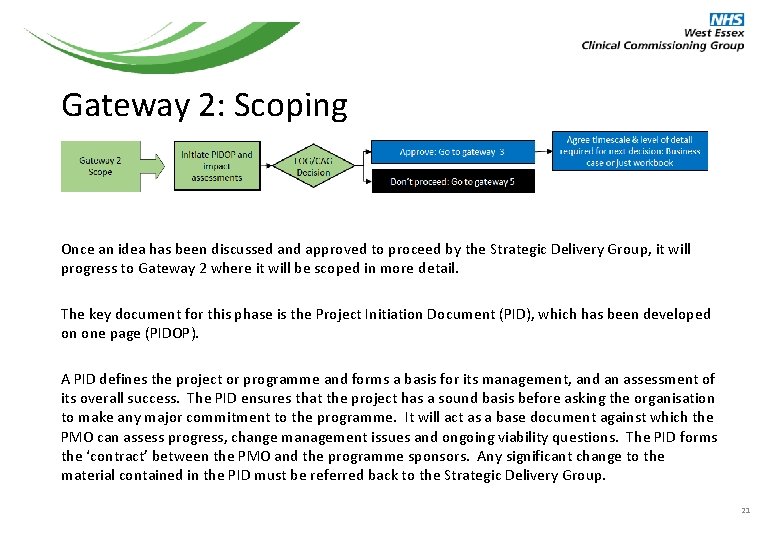
Gateway 2: Scoping Once an idea has been discussed and approved to proceed by the Strategic Delivery Group, it will progress to Gateway 2 where it will be scoped in more detail. The key document for this phase is the Project Initiation Document (PID), which has been developed on one page (PIDOP). A PID defines the project or programme and forms a basis for its management, and an assessment of its overall success. The PID ensures that the project has a sound basis before asking the organisation to make any major commitment to the programme. It will act as a base document against which the PMO can assess progress, change management issues and ongoing viability questions. The PID forms the ‘contract’ between the PMO and the programme sponsors. Any significant change to the material contained in the PID must be referred back to the Strategic Delivery Group. 21
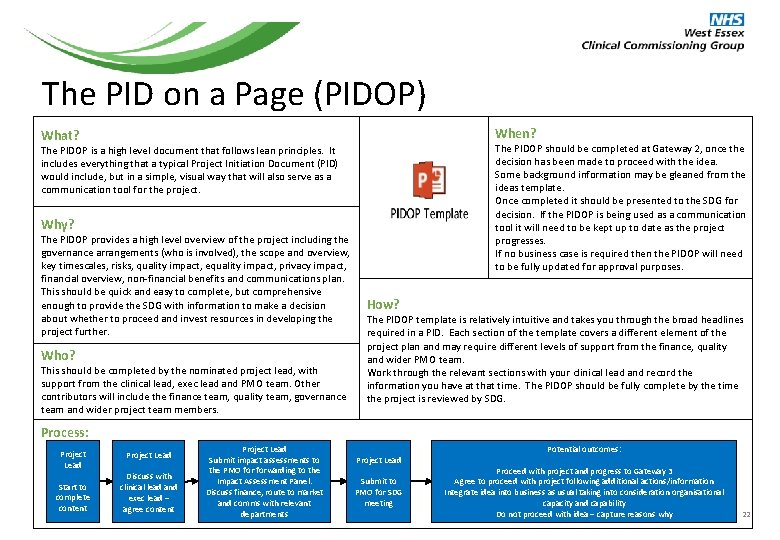
The PID on a Page (PIDOP) When? What? The PIDOP should be completed at Gateway 2, once the decision has been made to proceed with the idea. Some background information may be gleaned from the ideas template. Once completed it should be presented to the SDG for decision. If the PIDOP is being used as a communication tool it will need to be kept up to date as the project progresses. If no business case is required then the PIDOP will need to be fully updated for approval purposes. The PIDOP is a high level document that follows lean principles. It includes everything that a typical Project Initiation Document (PID) would include, but in a simple, visual way that will also serve as a communication tool for the project. Why? The PIDOP provides a high level overview of the project including the governance arrangements (who is involved), the scope and overview, key timescales, risks, quality impact, equality impact, privacy impact, financial overview, non-financial benefits and communications plan. This should be quick and easy to complete, but comprehensive enough to provide the SDG with information to make a decision about whether to proceed and invest resources in developing the project further. Who? This should be completed by the nominated project lead, with support from the clinical lead, exec lead and PMO team. Other contributors will include the finance team, quality team, governance team and wider project team members. How? The PIDOP template is relatively intuitive and takes you through the broad headlines required in a PID. Each section of the template covers a different element of the project plan and may require different levels of support from the finance, quality and wider PMO team. Work through the relevant sections with your clinical lead and record the information you have at that time. The PIDOP should be fully complete by the time the project is reviewed by SDG. Process: Project Lead Start to complete content Project Lead Discuss with clinical lead and exec lead – agree content Project Lead Submit impact assessments to the PMO forwarding to the Impact Assessment Panel. Discuss finance, route to market and comms with relevant departments Project Lead Submit to PMO for SDG meeting Potential outcomes: Proceed with project and progress to Gateway 3 Agree to proceed with project following additional actions/information Integrate idea into business as usual taking into consideration organisational capacity and capability Do not proceed with idea – capture reasons why 22
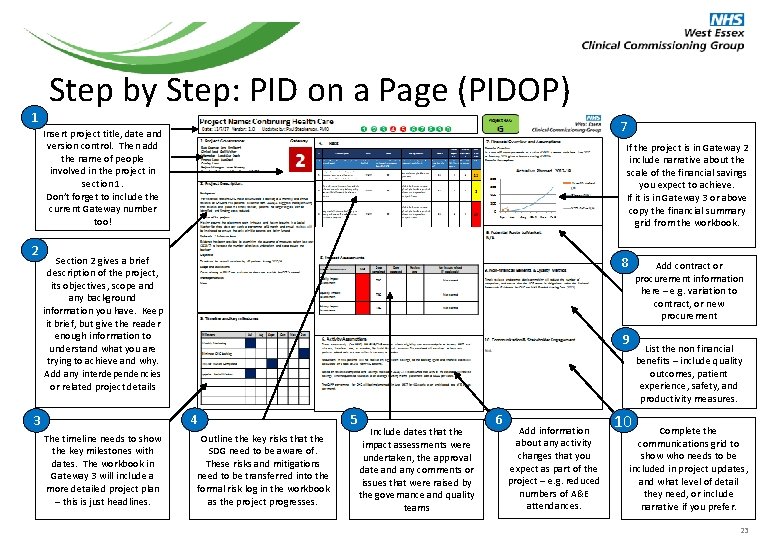
1 Step by Step: PID on a Page (PIDOP) 7 Insert project title, date and version control. Then add the name of people involved in the project in section 1. Don’t forget to include the current Gateway number too! 2 If the project is in Gateway 2 include narrative about the scale of the financial savings you expect to achieve. If it is in Gateway 3 or above copy the financial summary grid from the workbook. 8 Section 2 gives a brief description of the project, its objectives, scope and any background information you have. Keep it brief, but give the reader enough information to understand what you are trying to achieve and why. Add any interdependencies or related project details 9 4 3 The timeline needs to show the key milestones with dates. The workbook in Gateway 3 will include a more detailed project plan – this is just headlines. Add contract or procurement information here – e. g. variation to contract, or new procurement Outline the key risks that the SDG need to be aware of. These risks and mitigations need to be transferred into the formal risk log in the workbook as the project progresses. 5 Include dates that the impact assessments were undertaken, the approval date and any comments or issues that were raised by the governance and quality teams 6 Add information about any activity changes that you expect as part of the project – e. g. reduced numbers of A&E attendances. List the non financial benefits – include quality outcomes, patient experience, safety, and productivity measures. 10 Complete the communications grid to show who needs to be included in project updates, and what level of detail they need, or include narrative if you prefer. 23
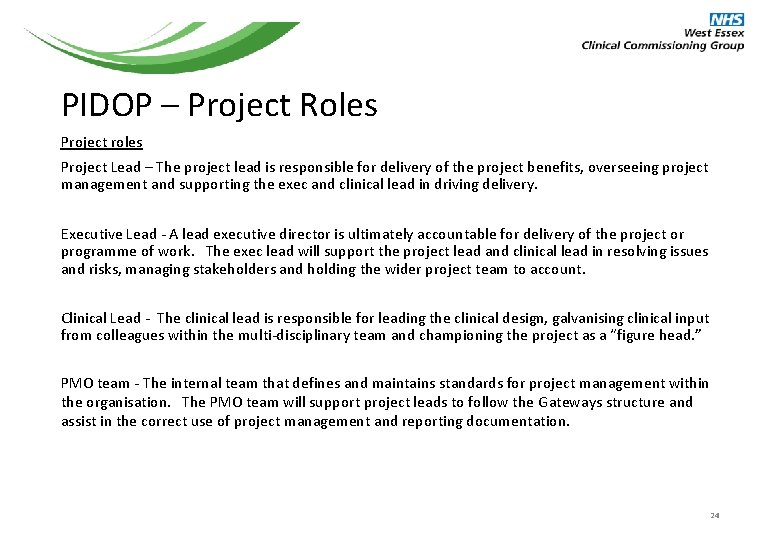
PIDOP – Project Roles Project roles Project Lead – The project lead is responsible for delivery of the project benefits, overseeing project management and supporting the exec and clinical lead in driving delivery. Executive Lead - A lead executive director is ultimately accountable for delivery of the project or programme of work. The exec lead will support the project lead and clinical lead in resolving issues and risks, managing stakeholders and holding the wider project team to account. Clinical Lead - The clinical lead is responsible for leading the clinical design, galvanising clinical input from colleagues within the multi-disciplinary team and championing the project as a “figure head. ” PMO team - The internal team that defines and maintains standards for project management within the organisation. The PMO team will support project leads to follow the Gateways structure and assist in the correct use of project management and reporting documentation. 24
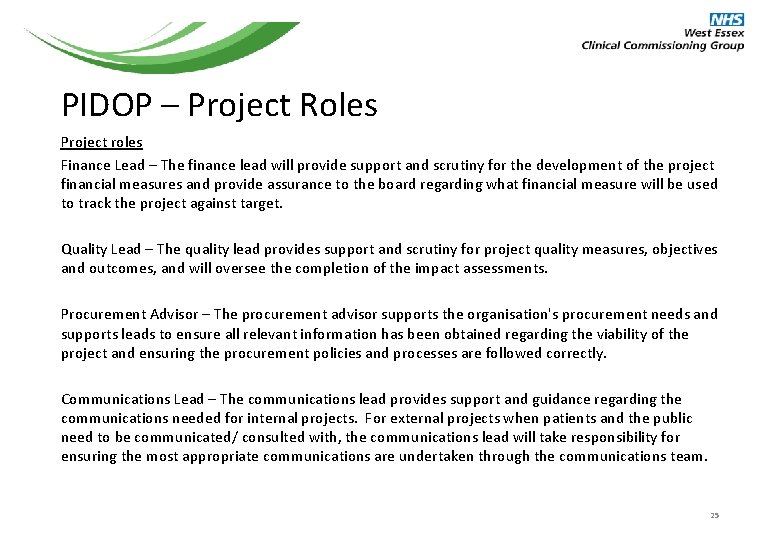
PIDOP – Project Roles Project roles Finance Lead – The finance lead will provide support and scrutiny for the development of the project financial measures and provide assurance to the board regarding what financial measure will be used to track the project against target. Quality Lead – The quality lead provides support and scrutiny for project quality measures, objectives and outcomes, and will oversee the completion of the impact assessments. Procurement Advisor – The procurement advisor supports the organisation's procurement needs and supports leads to ensure all relevant information has been obtained regarding the viability of the project and ensuring the procurement policies and processes are followed correctly. Communications Lead – The communications lead provides support and guidance regarding the communications needed for internal projects. For external projects when patients and the public need to be communicated/ consulted with, the communications lead will take responsibility for ensuring the most appropriate communications are undertaken through the communications team. 25
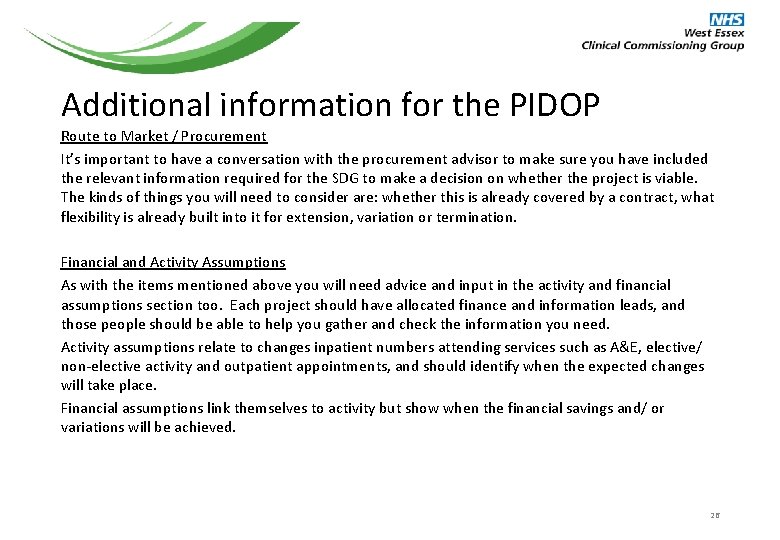
Additional information for the PIDOP Route to Market / Procurement It’s important to have a conversation with the procurement advisor to make sure you have included the relevant information required for the SDG to make a decision on whether the project is viable. The kinds of things you will need to consider are: whether this is already covered by a contract, what flexibility is already built into it for extension, variation or termination. Financial and Activity Assumptions As with the items mentioned above you will need advice and input in the activity and financial assumptions section too. Each project should have allocated finance and information leads, and those people should be able to help you gather and check the information you need. Activity assumptions relate to changes inpatient numbers attending services such as A&E, elective/ non-elective activity and outpatient appointments, and should identify when the expected changes will take place. Financial assumptions link themselves to activity but show when the financial savings and/ or variations will be achieved. 26
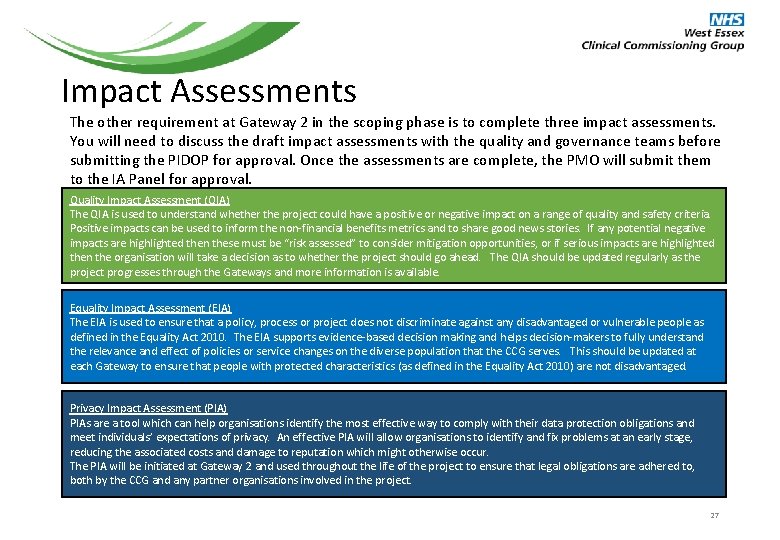
Impact Assessments The other requirement at Gateway 2 in the scoping phase is to complete three impact assessments. You will need to discuss the draft impact assessments with the quality and governance teams before submitting the PIDOP for approval. Once the assessments are complete, the PMO will submit them to the IA Panel for approval. Quality Impact Assessment (QIA) The QIA is used to understand whether the project could have a positive or negative impact on a range of quality and safety criteria. Positive impacts can be used to inform the non-financial benefits metrics and to share good news stories. If any potential negative impacts are highlighted then these must be “risk assessed” to consider mitigation opportunities, or if serious impacts are highlighted then the organisation will take a decision as to whether the project should go ahead. The QIA should be updated regularly as the project progresses through the Gateways and more information is available. Equality Impact Assessment (EIA) The EIA is used to ensure that a policy, process or project does not discriminate against any disadvantaged or vulnerable people as defined in the Equality Act 2010. The EIA supports evidence-based decision making and helps decision-makers to fully understand the relevance and effect of policies or service changes on the diverse population that the CCG serves. This should be updated at each Gateway to ensure that people with protected characteristics (as defined in the Equality Act 2010) are not disadvantaged. Privacy Impact Assessment (PIA) PIAs are a tool which can help organisations identify the most effective way to comply with their data protection obligations and meet individuals’ expectations of privacy. An effective PIA will allow organisations to identify and fix problems at an early stage, reducing the associated costs and damage to reputation which might otherwise occur. The PIA will be initiated at Gateway 2 and used throughout the life of the project to ensure that legal obligations are adhered to, both by the CCG and any partner organisations involved in the project. 27
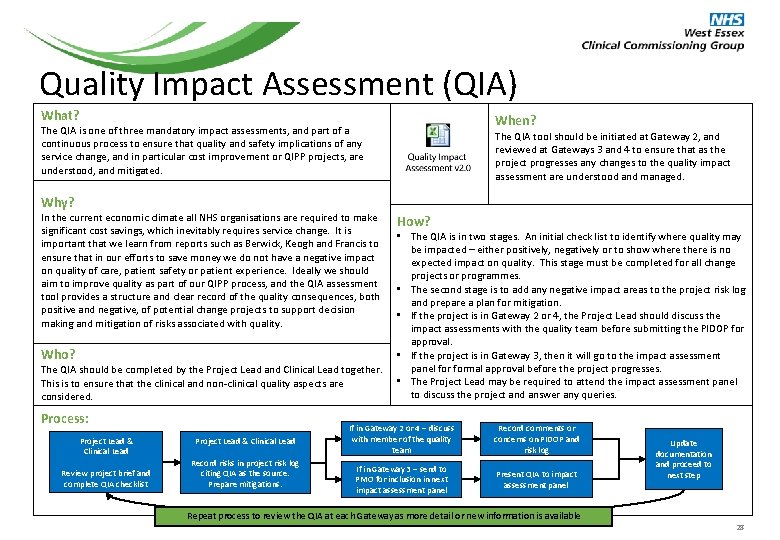
Quality Impact Assessment (QIA) What? When? The QIA is one of three mandatory impact assessments, and part of a continuous process to ensure that quality and safety implications of any service change, and in particular cost improvement or QIPP projects, are understood, and mitigated. The QIA tool should be initiated at Gateway 2, and reviewed at Gateways 3 and 4 to ensure that as the project progresses any changes to the quality impact assessment are understood and managed. Why? In the current economic climate all NHS organisations are required to make significant cost savings, which inevitably requires service change. It is important that we learn from reports such as Berwick, Keogh and Francis to ensure that in our efforts to save money we do not have a negative impact on quality of care, patient safety or patient experience. Ideally we should aim to improve quality as part of our QIPP process, and the QIA assessment tool provides a structure and clear record of the quality consequences, both positive and negative, of potential change projects to support decision making and mitigation of risks associated with quality. How? • The QIA is in two stages. An initial check list to identify where quality may be impacted – either positively, negatively or to show where there is no expected impact on quality. This stage must be completed for all change projects or programmes. • The second stage is to add any negative impact areas to the project risk log and prepare a plan for mitigation. • If the project is in Gateway 2 or 4, the Project Lead should discuss the impact assessments with the quality team before submitting the PIDOP for approval. • If the project is in Gateway 3, then it will go to the impact assessment Who? panel formal approval before the project progresses. The QIA should be completed by the Project Lead and Clinical Lead together. • The Project Lead may be required to attend the impact assessment panel This is to ensure that the clinical and non-clinical quality aspects are to discuss the project and answer any queries. considered. Process: Project Lead & Clinical Lead Review project brief and complete QIA checklist Project Lead & Clinical Lead Record risks in project risk log citing QIA as the source. Prepare mitigations. If in Gateway 2 or 4 – discuss with member of the quality team Record comments or concerns on PIDOP and risk log If in Gateway 3 – send to PMO for inclusion in next impact assessment panel Present QIA to impact assessment panel Repeat process to review the QIA at each Gateway as more detail or new information is available Update documentation and proceed to next step 28
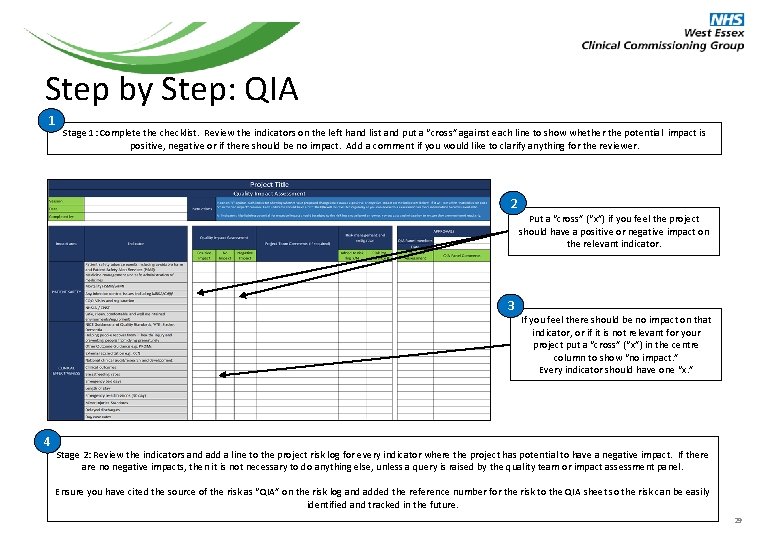
Step by Step: QIA 1 Stage 1: Complete the checklist. Review the indicators on the left hand list and put a “cross” against each line to show whether the potential impact is positive, negative or if there should be no impact. Add a comment if you would like to clarify anything for the reviewer. 2 Put a “cross” (“x”) if you feel the project should have a positive or negative impact on the relevant indicator. 3 4 If you feel there should be no impact on that indicator, or if it is not relevant for your project put a “cross” (“x”) in the centre column to show “no impact. ” Every indicator should have one “x. ” Stage 2: Review the indicators and add a line to the project risk log for every indicator where the project has potential to have a negative impact. If there are no negative impacts, then it is not necessary to do anything else, unless a query is raised by the quality team or impact assessment panel. Ensure you have cited the source of the risk as “QIA” on the risk log and added the reference number for the risk to the QIA sheet so the risk can be easily identified and tracked in the future. 29
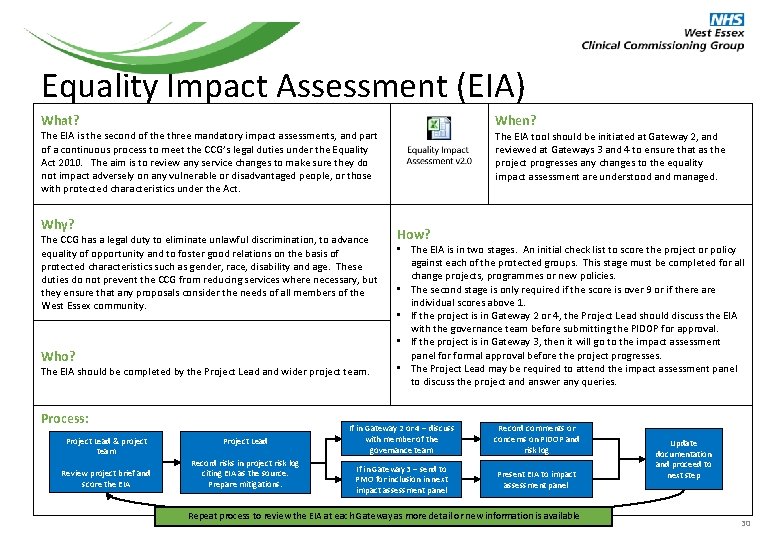
Equality Impact Assessment (EIA) When? What? The EIA is the second of the three mandatory impact assessments, and part of a continuous process to meet the CCG’s legal duties under the Equality Act 2010. The aim is to review any service changes to make sure they do not impact adversely on any vulnerable or disadvantaged people, or those with protected characteristics under the Act. Why? The CCG has a legal duty to eliminate unlawful discrimination, to advance equality of opportunity and to foster good relations on the basis of protected characteristics such as gender, race, disability and age. These duties do not prevent the CCG from reducing services where necessary, but they ensure that any proposals consider the needs of all members of the West Essex community. Who? The EIA should be completed by the Project Lead and wider project team. Process: Project Lead & project team Review project brief and score the EIA Project Lead Record risks in project risk log citing EIA as the source. Prepare mitigations. The EIA tool should be initiated at Gateway 2, and reviewed at Gateways 3 and 4 to ensure that as the project progresses any changes to the equality impact assessment are understood and managed. How? • The EIA is in two stages. An initial check list to score the project or policy against each of the protected groups. This stage must be completed for all change projects, programmes or new policies. • The second stage is only required if the score is over 9 or if there are individual scores above 1. • If the project is in Gateway 2 or 4, the Project Lead should discuss the EIA with the governance team before submitting the PIDOP for approval. • If the project is in Gateway 3, then it will go to the impact assessment panel formal approval before the project progresses. • The Project Lead may be required to attend the impact assessment panel to discuss the project and answer any queries. If in Gateway 2 or 4 – discuss with member of the governance team Record comments or concerns on PIDOP and risk log If in Gateway 3 – send to PMO for inclusion in next impact assessment panel Present EIA to impact assessment panel Repeat process to review the EIA at each Gateway as more detail or new information is available Update documentation and proceed to next step 30
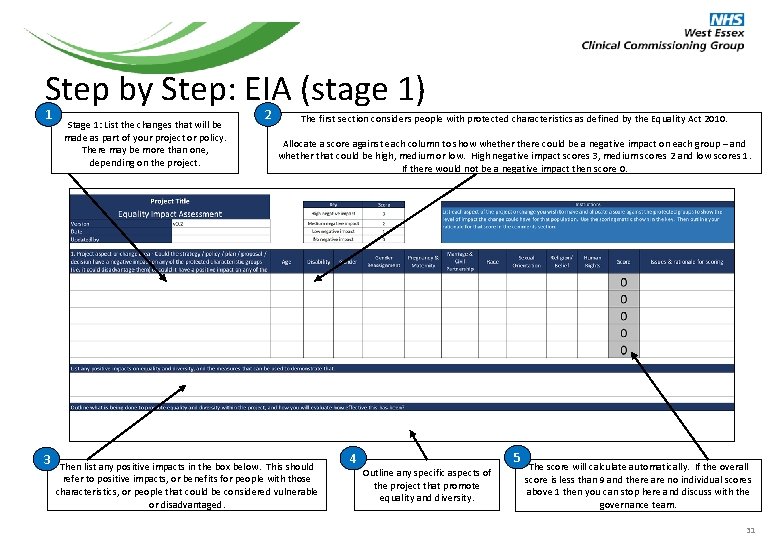
Step by Step: EIA (stage 1) 1 Stage 1: List the changes that will be made as part of your project or policy. There may be more than one, depending on the project. 2 The first section considers people with protected characteristics as defined by the Equality Act 2010. Allocate a score against each column to show whethere could be a negative impact on each group – and whether that could be high, medium or low. High negative impact scores 3, medium scores 2 and low scores 1. If there would not be a negative impact then score 0. 3 3 Then list any positive impacts in the box below. This should refer to positive impacts, or benefits for people with those characteristics, or people that could be considered vulnerable or disadvantaged. 4 5 Outline any specific aspects of the project that promote equality and diversity. The score will calculate automatically. If the overall score is less than 9 and there are no individual scores above 1 then you can stop here and discuss with the governance team. 31
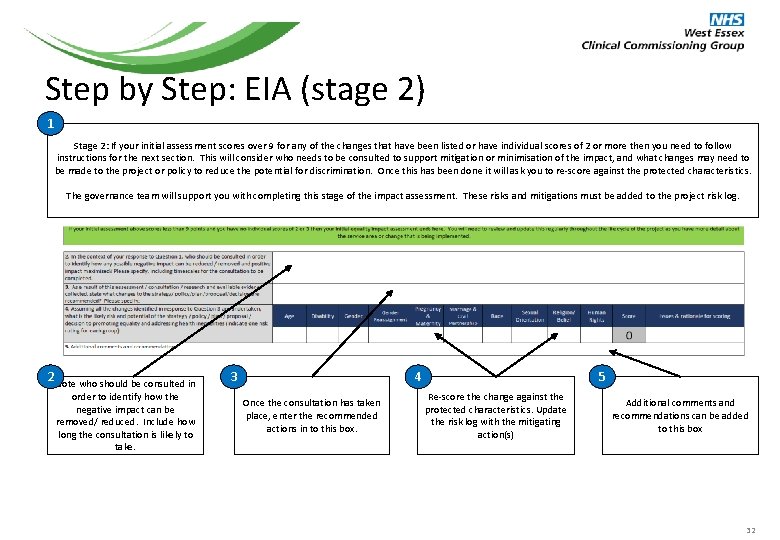
Step by Step: EIA (stage 2) 1 Stage 2: If your initial assessment scores over 9 for any of the changes that have been listed or have individual scores of 2 or more then you need to follow instructions for the next section. This will consider who needs to be consulted to support mitigation or minimisation of the impact, and what changes may need to be made to the project or policy to reduce the potential for discrimination. Once this has been done it will ask you to re-score against the protected characteristics. The governance team will support you with completing this stage of the impact assessment. These risks and mitigations must be added to the project risk log. 2 Note who should be consulted in order to identify how the negative impact can be removed/ reduced. Include how long the consultation is likely to take. 3 4 Once the consultation has taken place, enter the recommended actions in to this box. 5 Re-score the change against the protected characteristics. Update the risk log with the mitigating action(s) Additional comments and recommendations can be added to this box 32
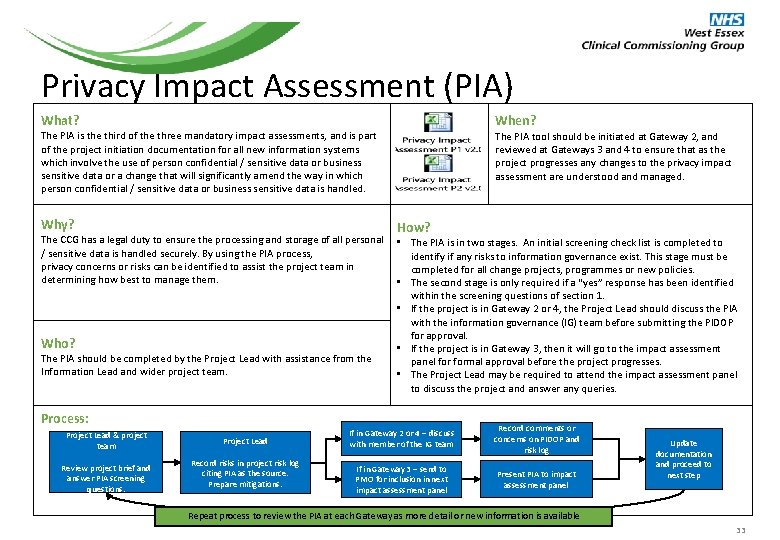
Privacy Impact Assessment (PIA) When? What? The PIA is the third of the three mandatory impact assessments, and is part of the project initiation documentation for all new information systems which involve the use of person confidential / sensitive data or business sensitive data or a change that will significantly amend the way in which person confidential / sensitive data or business sensitive data is handled. Why? The PIA tool should be initiated at Gateway 2, and reviewed at Gateways 3 and 4 to ensure that as the project progresses any changes to the privacy impact assessment are understood and managed. How? The CCG has a legal duty to ensure the processing and storage of all personal • The PIA is in two stages. An initial screening check list is completed to / sensitive data is handled securely. By using the PIA process, identify if any risks to information governance exist. This stage must be privacy concerns or risks can be identified to assist the project team in completed for all change projects, programmes or new policies. determining how best to manage them. • The second stage is only required if a “yes” response has been identified within the screening questions of section 1. • If the project is in Gateway 2 or 4, the Project Lead should discuss the PIA with the information governance (IG) team before submitting the PIDOP for approval. Who? • If the project is in Gateway 3, then it will go to the impact assessment The PIA should be completed by the Project Lead with assistance from the panel formal approval before the project progresses. Information Lead and wider project team. • The Project Lead may be required to attend the impact assessment panel to discuss the project and answer any queries. Process: Project Lead & project team Review project brief and answer PIA screening questions. Project Lead Record risks in project risk log citing PIA as the source. Prepare mitigations. If in Gateway 2 or 4 – discuss with member of the IG team Record comments or concerns on PIDOP and risk log If in Gateway 3 – send to PMO for inclusion in next impact assessment panel Present PIA to impact assessment panel Update documentation and proceed to next step Repeat process to review the PIA at each Gateway as more detail or new information is available 33
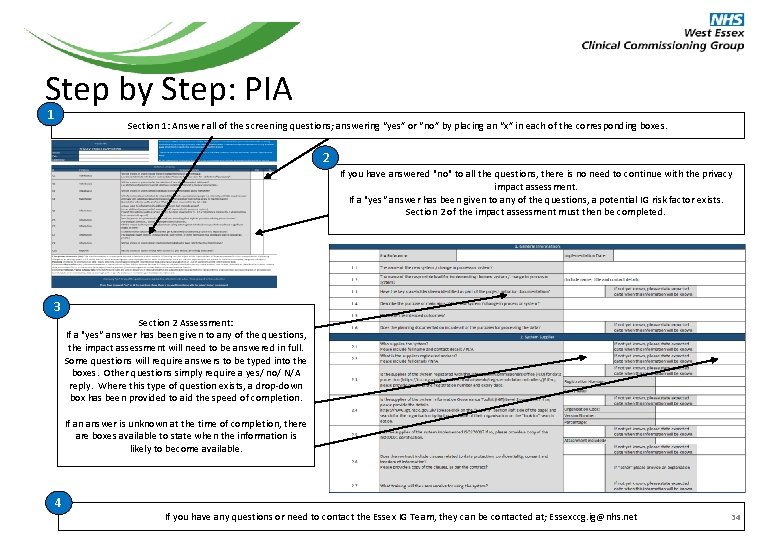
Step by Step: PIA 1 Section 1: Answer all of the screening questions; answering “yes” or “no” by placing an “x” in each of the corresponding boxes. 2 If you have answered "no" to all the questions, there is no need to continue with the privacy impact assessment. If a "yes“ answer has been given to any of the questions, a potential IG risk factor exists. Section 2 of the impact assessment must then be completed. 3 Section 2 Assessment: If a "yes“ answer has been given to any of the questions, the impact assessment will need to be answered in full. Some questions will require answers to be typed into the boxes. Other questions simply require a yes/ no/ N/A reply. Where this type of question exists, a drop-down box has been provided to aid the speed of completion. If an answer is unknown at the time of completion, there are boxes available to state when the information is likely to become available. 4 If you have any questions or need to contact the Essex IG Team, they can be contacted at; Essexccg. ig@nhs. net 34
Gateway 2: Approval Criteria Once the PIDOP has been completed it should be sent to the PMO team for inclusion in the next meeting of the Strategic Delivery Group. You will be called upon to present the PIDOP to the group and explain more about the project so the group can agree whether it should progress to the next stage. The Strategic Delivery Group will review the PIDOP using the following questions: • Is the project in line with the CCG’s corporate strategy for the next 5 years? • Are the non-financial benefits SMART and comprehensive enough to justify the project? • Are the proposed mitigations appropriate to cover the level of risk identified? • Does the financial overview indicate that the project will provide an adequate return on any investment required (including time and effort as well as financial outlay)? • Does the CCG still have the resources to carry this out? If the SDG agree to progress the project then a decision will be made, on a case by case basis, as to whether a full business case is required. If the project has comprehensive options for consideration, or may result in a public consultation then a business case will definitely be required. If a business case is not required then the Project Lead should update the PIDOP for consideration by the H&CCC or the Exec at the next Gateway. 35
Gateway 2: Decision There are three possible outcomes once the PIDOP has been considered by the Strategic Delivery Group, and these are the same outcomes as listed in Gateway 1: Approval The PIDOP will progress to the next stage. A decision will be made as to whether the project requires a full options appraisal / business case, or if an updated PIDOP and the workbook will be sufficient. The PIDOP will progress to Gateway 3: Development, and the PMO will update the programme tracker accordingly. Hold Do Not Proceed The idea may be suitable, but will not be taken forward straight away. If this is the case the PMO will record a review date and hold the idea until that time. It will not progress to be developed until it is discussed again and the SDG agree it should be progressed. This is because things could change over that period and mean numbers need updating, or the landscape may change – which would mean that analysis is wasted. The SDG feel it is not suitable for the business and unlikely to be within the near future. If this is the case then the PMO will work with you to complete the project close template and clearly record the reasons why. If the idea is suggested again, then this information will be used to avoid having the same conversation again unless the situation has changed and it may now be viable. 36
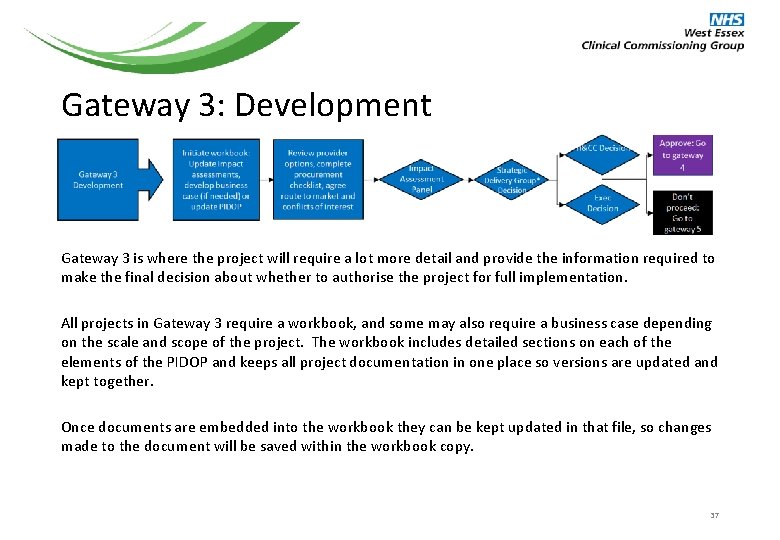
Gateway 3: Development Gateway 3 is where the project will require a lot more detail and provide the information required to make the final decision about whether to authorise the project for full implementation. All projects in Gateway 3 require a workbook, and some may also require a business case depending on the scale and scope of the project. The workbook includes detailed sections on each of the elements of the PIDOP and keeps all project documentation in one place so versions are updated and kept together. Once documents are embedded into the workbook they can be kept updated in that file, so changes made to the document will be saved within the workbook copy. 37
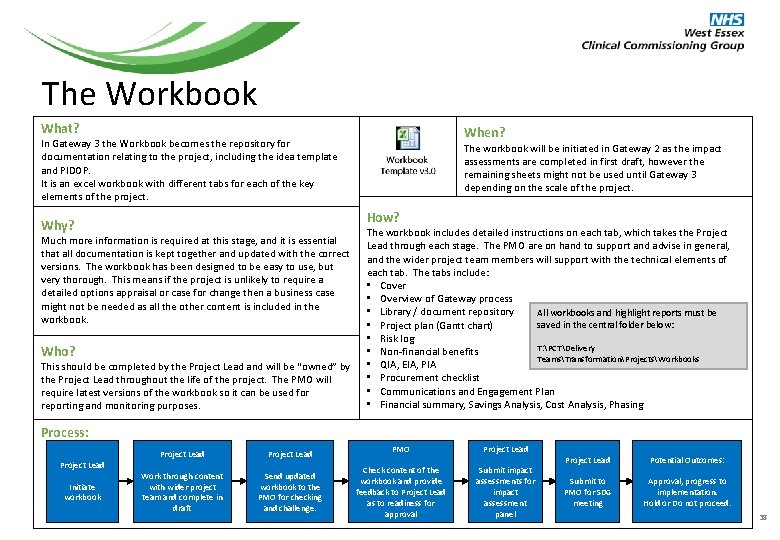
The Workbook What? When? In Gateway 3 the Workbook becomes the repository for documentation relating to the project, including the idea template and PIDOP. It is an excel workbook with different tabs for each of the key elements of the project. The workbook will be initiated in Gateway 2 as the impact assessments are completed in first draft, however the remaining sheets might not be used until Gateway 3 depending on the scale of the project. How? Why? Much more information is required at this stage, and it is essential that all documentation is kept together and updated with the correct versions. The workbook has been designed to be easy to use, but very thorough. This means if the project is unlikely to require a detailed options appraisal or case for change then a business case might not be needed as all the other content is included in the workbook. Who? This should be completed by the Project Lead and will be “owned” by the Project Lead throughout the life of the project. The PMO will require latest versions of the workbook so it can be used for reporting and monitoring purposes. The workbook includes detailed instructions on each tab, which takes the Project Lead through each stage. The PMO are on hand to support and advise in general, and the wider project team members will support with the technical elements of each tab. The tabs include: • Cover • Overview of Gateway process • Library / document repository All workbooks and highlight reports must be saved in the central folder below: • Project plan (Gantt chart) • Risk log T: PCTDelivery • Non-financial benefits TeamsTransformationProjectsWorkbooks • QIA, EIA, PIA • Procurement checklist • Communications and Engagement Plan • Financial summary, Savings Analysis, Cost Analysis, Phasing Process: Project Lead Initiate workbook Project Lead Work through content with wider project team and complete in draft Project Lead Send updated workbook to the PMO for checking and challenge. PMO Project Lead Check content of the workbook and provide feedback to Project Lead as to readiness for approval Submit impact assessments for impact assessment panel Project Lead Potential Outcomes: Submit to PMO for SDG meeting Approval, progress to implementation. Hold or Do not proceed. 38
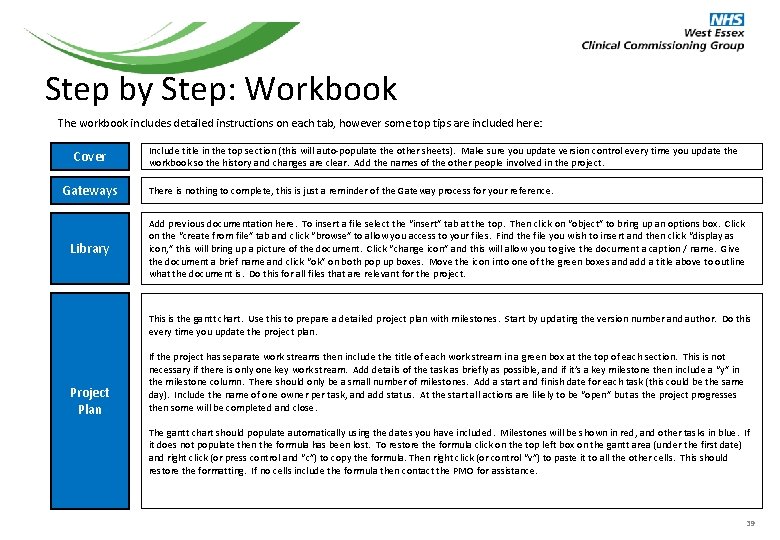
Step by Step: Workbook The workbook includes detailed instructions on each tab, however some top tips are included here: Cover Gateways Library Include title in the top section (this will auto-populate the other sheets). Make sure you update version control every time you update the workbook so the history and changes are clear. Add the names of the other people involved in the project. There is nothing to complete, this is just a reminder of the Gateway process for your reference. Add previous documentation here. To insert a file select the “insert” tab at the top. Then click on “object” to bring up an options box. Click on the “create from file” tab and click “browse” to allow you access to your files. Find the file you wish to insert and then click “display as icon, ” this will bring up a picture of the document. Click “change icon” and this will allow you to give the document a caption / name. Give the document a brief name and click “ok” on both pop up boxes. Move the icon into one of the green boxes and add a title above to outline what the document is. Do this for all files that are relevant for the project. This is the gantt chart. Use this to prepare a detailed project plan with milestones. Start by updating the version number and author. Do this every time you update the project plan. Project Plan If the project has separate work streams then include the title of each work stream in a green box at the top of each section. This is not necessary if there is only one key work stream. Add details of the task as briefly as possible, and if it’s a key milestone then include a “y” in the milestone column. There should only be a small number of milestones. Add a start and finish date for each task (this could be the same day). Include the name of one owner per task, and add status. At the start all actions are likely to be “open” but as the project progresses then some will be completed and close. The gantt chart should populate automatically using the dates you have included. Milestones will be shown in red, and other tasks in blue. If it does not populate then the formula has been lost. To restore the formula click on the top left box on the gantt area (under the first date) and right click (or press control and “c”) to copy the formula. Then right click (or control “v”) to paste it to all the other cells. This should restore the formatting. If no cells include the formula then contact the PMO for assistance. 39
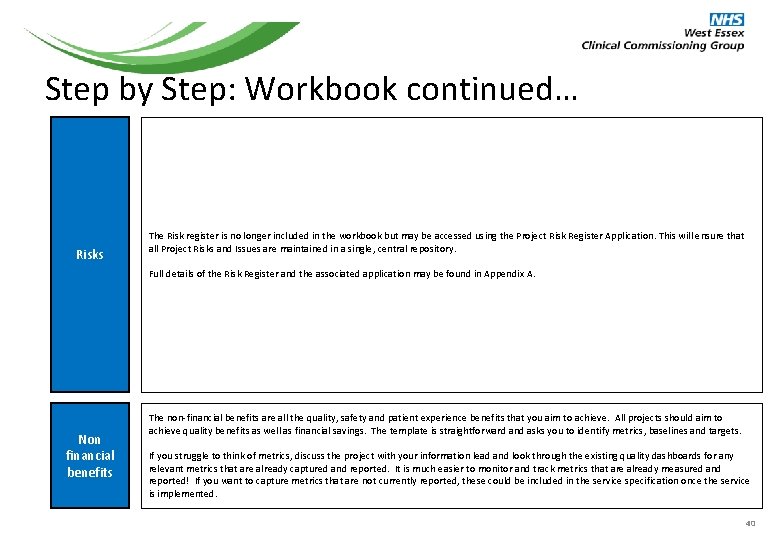
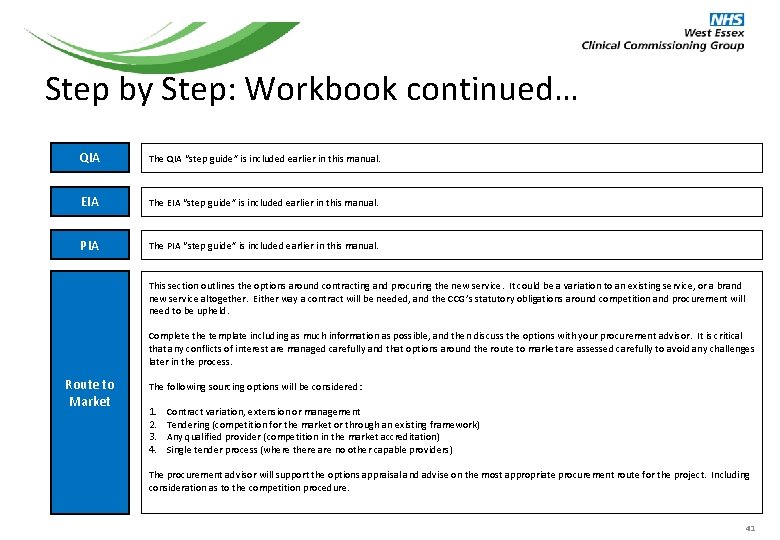
Step by Step: Workbook continued… Risks The Risk register is no longer included in the workbook but may be accessed using the Project Risk Register Application. This will ensure that all Project Risks and Issues are maintained in a single, central repository. Full details of the Risk Register and the associated application may be found in Appendix A. Non financial benefits The non-financial benefits are all the quality, safety and patient experience benefits that you aim to achieve. All projects should aim to achieve quality benefits as well as financial savings. The template is straightforward and asks you to identify metrics, baselines and targets. If you struggle to think of metrics, discuss the project with your information lead and look through the existing quality dashboards for any relevant metrics that are already captured and reported. It is much easier to monitor and track metrics that are already measured and reported! If you want to capture metrics that are not currently reported, these could be included in the service specification once the service is implemented. 40
Step by Step: Workbook continued… QIA The QIA “step guide” is included earlier in this manual. EIA The EIA “step guide” is included earlier in this manual. PIA The PIA “step guide” is included earlier in this manual. This section outlines the options around contracting and procuring the new service. It could be a variation to an existing service, or a brand new service altogether. Either way a contract will be needed, and the CCG’s statutory obligations around competition and procurement will need to be upheld. Complete the template including as much information as possible, and then discuss the options with your procurement advisor. It is critical that any conflicts of interest are managed carefully and that options around the route to market are assessed carefully to avoid any challenges later in the process. Route to Market The following sourcing options will be considered: 1. 2. 3. 4. Contract variation, extension or management Tendering (competition for the market or through an existing framework) Any qualified provider (competition in the market accreditation) Single tender process (where there are no other capable providers) The procurement advisor will support the options appraisal and advise on the most appropriate procurement route for the project. Including consideration as to the competition procedure. 41
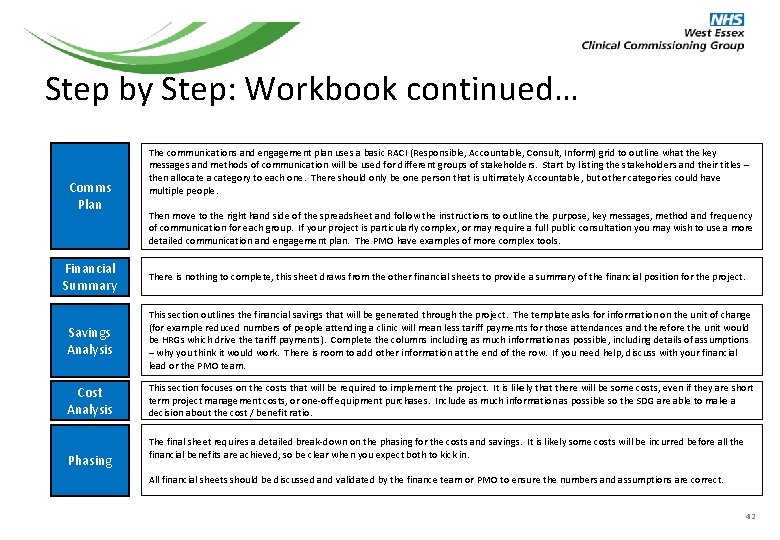
Step by Step: Workbook continued… Comms Plan Financial Summary The communications and engagement plan uses a basic RACI (Responsible, Accountable, Consult, Inform) grid to outline what the key messages and methods of communication will be used for different groups of stakeholders. Start by listing the stakeholders and their titles – then allocate a category to each one. There should only be one person that is ultimately Accountable, but other categories could have multiple people. Then move to the right hand side of the spreadsheet and follow the instructions to outline the purpose, key messages, method and frequency of communication for each group. If your project is particularly complex, or may require a full public consultation you may wish to use a more detailed communication and engagement plan. The PMO have examples of more complex tools. There is nothing to complete, this sheet draws from the other financial sheets to provide a summary of the financial position for the project. Savings Analysis This section outlines the financial savings that will be generated through the project. The template asks for information on the unit of change (for example reduced numbers of people attending a clinic will mean less tariff payments for those attendances and therefore the unit would be HRGs which drive the tariff payments). Complete the columns including as much information as possible, including details of assumptions – why you think it would work. There is room to add other information at the end of the row. If you need help, discuss with your financial lead or the PMO team. Cost Analysis This section focuses on the costs that will be required to implement the project. It is likely that there will be some costs, even if they are short term project management costs, or one-off equipment purchases. Include as much information as possible so the SDG are able to make a decision about the cost / benefit ratio. Phasing The final sheet requires a detailed break-down on the phasing for the costs and savings. It is likely some costs will be incurred before all the financial benefits are achieved, so be clear when you expect both to kick in. All financial sheets should be discussed and validated by the finance team or PMO to ensure the numbers and assumptions are correct. 42
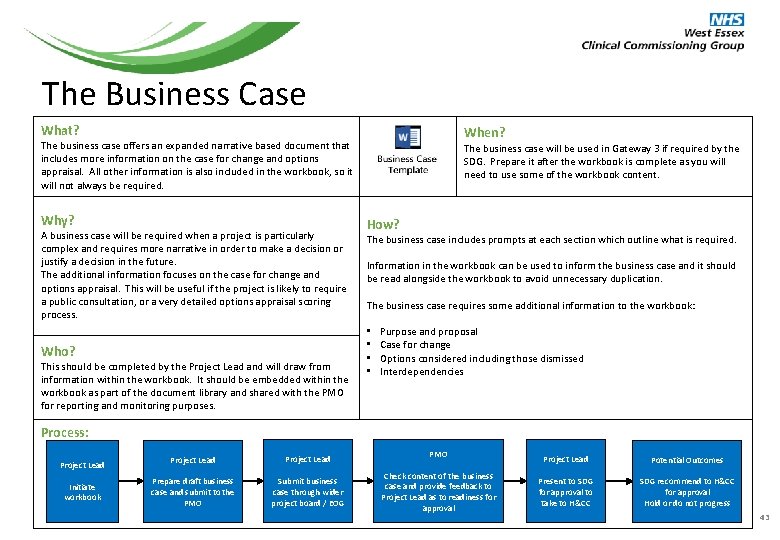
The Business Case What? When? The business case offers an expanded narrative based document that includes more information on the case for change and options appraisal. All other information is also included in the workbook, so it will not always be required. Why? A business case will be required when a project is particularly complex and requires more narrative in order to make a decision or justify a decision in the future. The additional information focuses on the case for change and options appraisal. This will be useful if the project is likely to require a public consultation, or a very detailed options appraisal scoring process. Who? This should be completed by the Project Lead and will draw from information within the workbook. It should be embedded within the workbook as part of the document library and shared with the PMO for reporting and monitoring purposes. The business case will be used in Gateway 3 if required by the SDG. Prepare it after the workbook is complete as you will need to use some of the workbook content. How? The business case includes prompts at each section which outline what is required. Information in the workbook can be used to inform the business case and it should be read alongside the workbook to avoid unnecessary duplication. The business case requires some additional information to the workbook: • • Purpose and proposal Case for change Options considered including those dismissed Interdependencies Process: Project Lead Initiate workbook Project Lead Prepare draft business case and submit to the PMO Submit business case through wider project board / EOG PMO Check content of the business case and provide feedback to Project Lead as to readiness for approval Project Lead Potential Outcomes Present to SDG for approval to take to H&CC SDG recommend to H&CC for approval Hold or do not progress 43
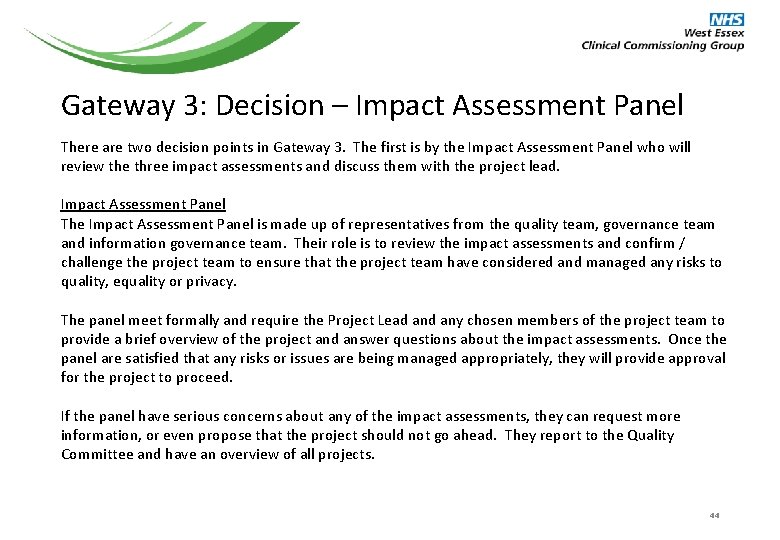
Gateway 3: Decision – Impact Assessment Panel There are two decision points in Gateway 3. The first is by the Impact Assessment Panel who will review the three impact assessments and discuss them with the project lead. Impact Assessment Panel The Impact Assessment Panel is made up of representatives from the quality team, governance team and information governance team. Their role is to review the impact assessments and confirm / challenge the project team to ensure that the project team have considered and managed any risks to quality, equality or privacy. The panel meet formally and require the Project Lead any chosen members of the project team to provide a brief overview of the project and answer questions about the impact assessments. Once the panel are satisfied that any risks or issues are being managed appropriately, they will provide approval for the project to proceed. If the panel have serious concerns about any of the impact assessments, they can request more information, or even propose that the project should not go ahead. They report to the Quality Committee and have an overview of all projects. 44
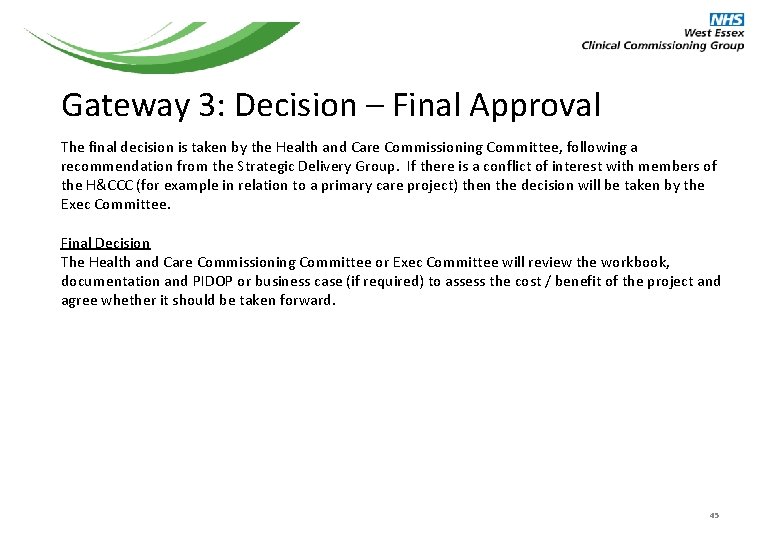
Gateway 3: Decision – Final Approval The final decision is taken by the Health and Care Commissioning Committee, following a recommendation from the Strategic Delivery Group. If there is a conflict of interest with members of the H&CCC (for example in relation to a primary care project) then the decision will be taken by the Exec Committee. Final Decision The Health and Care Commissioning Committee or Exec Committee will review the workbook, documentation and PIDOP or business case (if required) to assess the cost / benefit of the project and agree whether it should be taken forward. 45
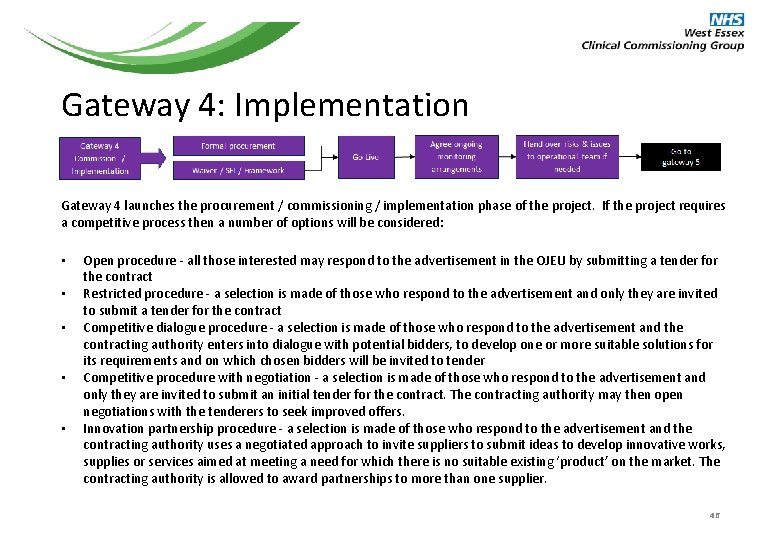
Gateway 4: Implementation Gateway 4 launches the procurement / commissioning / implementation phase of the project. If the project requires a competitive process then a number of options will be considered: • • • Open procedure - all those interested may respond to the advertisement in the OJEU by submitting a tender for the contract Restricted procedure - a selection is made of those who respond to the advertisement and only they are invited to submit a tender for the contract Competitive dialogue procedure - a selection is made of those who respond to the advertisement and the contracting authority enters into dialogue with potential bidders, to develop one or more suitable solutions for its requirements and on which chosen bidders will be invited to tender Competitive procedure with negotiation - a selection is made of those who respond to the advertisement and only they are invited to submit an initial tender for the contract. The contracting authority may then open negotiations with the tenderers to seek improved offers. Innovation partnership procedure - a selection is made of those who respond to the advertisement and the contracting authority uses a negotiated approach to invite suppliers to submit ideas to develop innovative works, supplies or services aimed at meeting a need for which there is no suitable existing ‘product’ on the market. The contracting authority is allowed to award partnerships to more than one supplier. 46
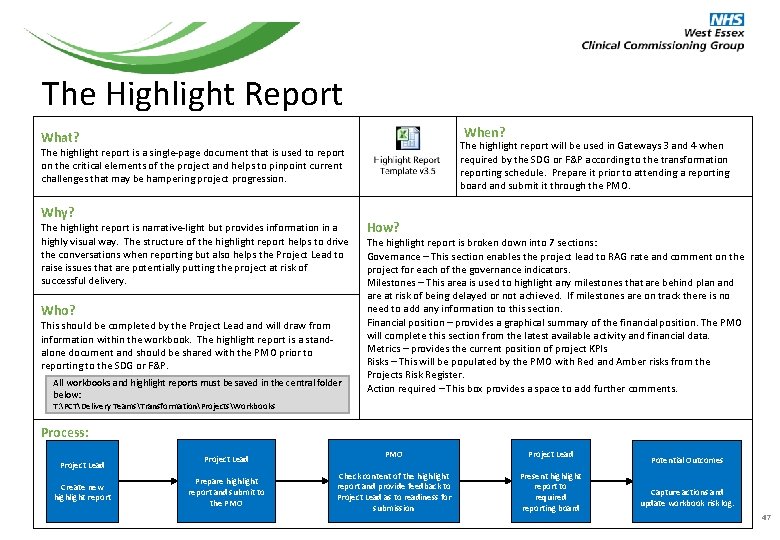
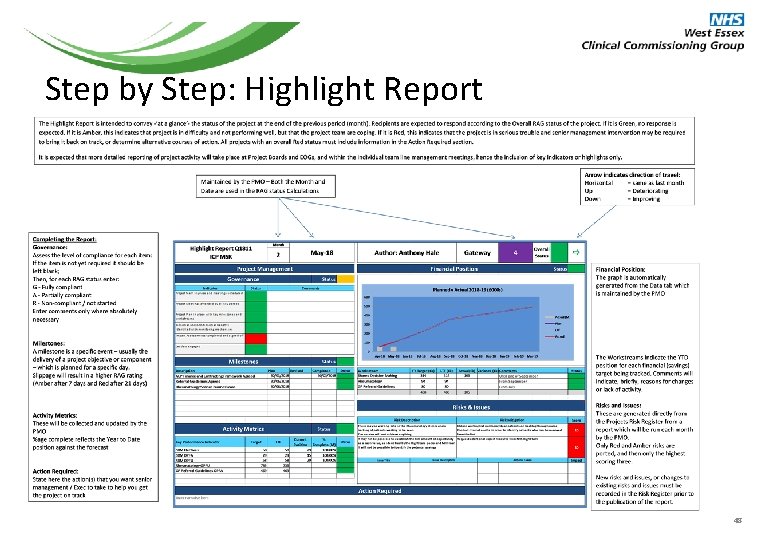
The Highlight Report When? What? The highlight report will be used in Gateways 3 and 4 when required by the SDG or F&P according to the transformation reporting schedule. Prepare it prior to attending a reporting board and submit it through the PMO. The highlight report is a single-page document that is used to report on the critical elements of the project and helps to pinpoint current challenges that may be hampering project progression. Why? The highlight report is narrative-light but provides information in a highly visual way. The structure of the highlight report helps to drive the conversations when reporting but also helps the Project Lead to raise issues that are potentially putting the project at risk of successful delivery. Who? This should be completed by the Project Lead and will draw from information within the workbook. The highlight report is a standalone document and should be shared with the PMO prior to reporting to the SDG or F&P. All workbooks and highlight reports must be saved in the central folder below: How? The highlight report is broken down into 7 sections: Governance – This section enables the project lead to RAG rate and comment on the project for each of the governance indicators. Milestones – This area is used to highlight any milestones that are behind plan and are at risk of being delayed or not achieved. If milestones are on track there is no need to add any information to this section. Financial position – provides a graphical summary of the financial position. The PMO will complete this section from the latest available activity and financial data. Metrics – provides the current position of project KPIs Risks – This will be populated by the PMO with Red and Amber risks from the Projects Risk Register. Action required – This box provides a space to add further comments. T: PCTDelivery TeamsTransformationProjectsWorkbooks Process: Project Lead Create new highlight report Project Lead Prepare highlight report and submit to the PMO Project Lead Check content of the highlight report and provide feedback to Project Lead as to readiness for submission Present highlight report to required reporting board Potential Outcomes Capture actions and update workbook risk log. 47
Step by Step: Highlight Report 48
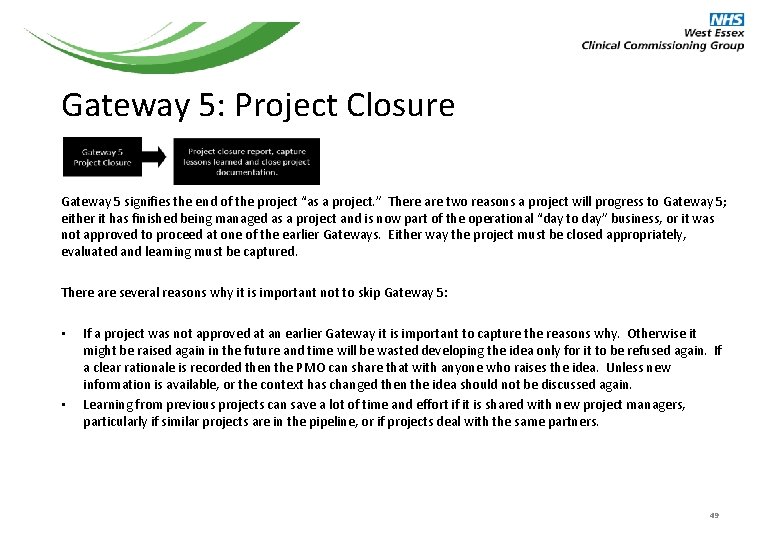
Gateway 5: Project Closure Gateway 5 signifies the end of the project “as a project. ” There are two reasons a project will progress to Gateway 5; either it has finished being managed as a project and is now part of the operational “day to day” business, or it was not approved to proceed at one of the earlier Gateways. Either way the project must be closed appropriately, evaluated and learning must be captured. There are several reasons why it is important not to skip Gateway 5: • • If a project was not approved at an earlier Gateway it is important to capture the reasons why. Otherwise it might be raised again in the future and time will be wasted developing the idea only for it to be refused again. If a clear rationale is recorded then the PMO can share that with anyone who raises the idea. Unless new information is available, or the context has changed then the idea should not be discussed again. Learning from previous projects can save a lot of time and effort if it is shared with new project managers, particularly if similar projects are in the pipeline, or if projects deal with the same partners. 49
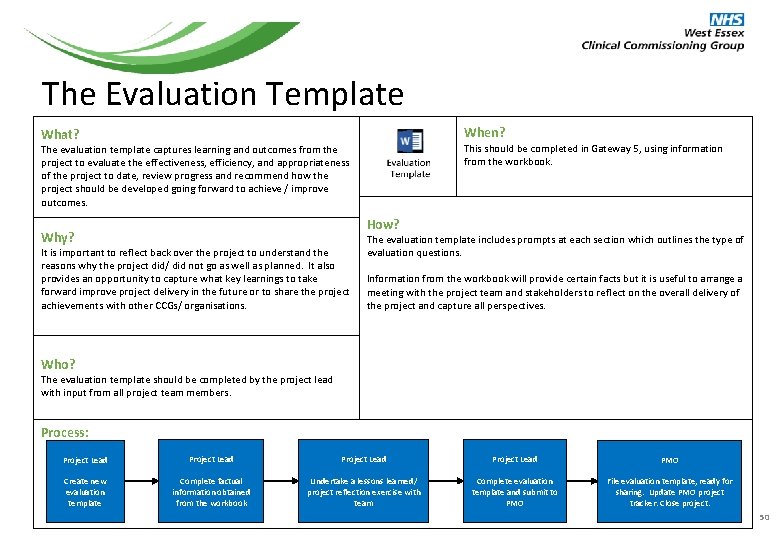
The Evaluation Template When? What? This should be completed in Gateway 5, using information from the workbook. The evaluation template captures learning and outcomes from the project to evaluate the effectiveness, efficiency, and appropriateness of the project to date, review progress and recommend how the project should be developed going forward to achieve / improve outcomes. How? Why? It is important to reflect back over the project to understand the reasons why the project did/ did not go as well as planned. It also provides an opportunity to capture what key learnings to take forward improve project delivery in the future or to share the project achievements with other CCGs/ organisations. The evaluation template includes prompts at each section which outlines the type of evaluation questions. Information from the workbook will provide certain facts but it is useful to arrange a meeting with the project team and stakeholders to reflect on the overall delivery of the project and capture all perspectives. Who? The evaluation template should be completed by the project lead with input from all project team members. Process: Project Lead PMO Create new evaluation template Complete factual information obtained from the workbook Undertake a lessons learned/ project reflection exercise with team Complete evaluation template and submit to PMO File evaluation template, ready for sharing. Update PMO project tracker. Close project. 50
The Project Lifecycle 51
This page intentionally left blank 52
Appendix A WE CCG Projects Risk Register An Introduction Programme Management Office January 2018 Rev. February 2018 53
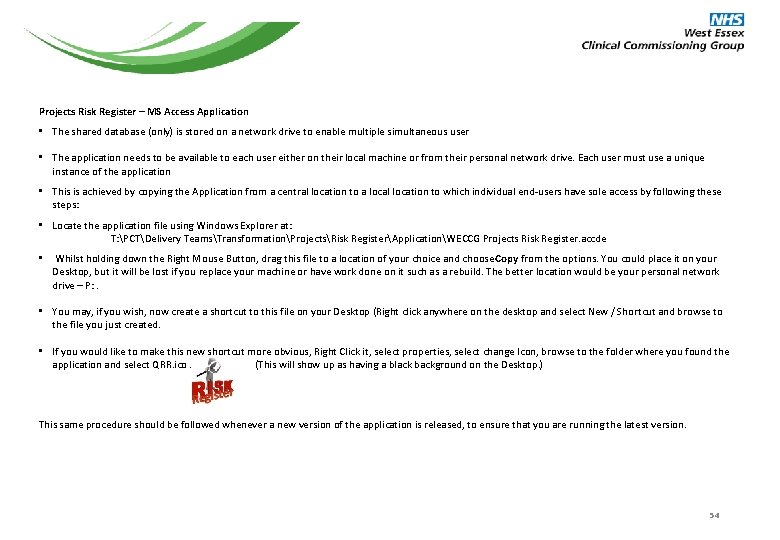
Projects Risk Register – MS Access Application • The shared database (only) is stored on a network drive to enable multiple simultaneous user • The application needs to be available to each user either on their local machine or from their personal network drive. Each user must use a unique instance of the application • This is achieved by copying the Application from a central location to a local location to which individual end-users have sole access by following these steps: • Locate the application file using Windows Explorer at: T: PCTDelivery TeamsTransformationProjectsRisk RegisterApplicationWECCG Projects Risk Register. accde • Whilst holding down the Right Mouse Button, drag this file to a location of your choice and choose Copy from the options. You could place it on your Desktop, but it will be lost if you replace your machine or have work done on it such as a rebuild. The better location would be your personal network drive – P: . • You may, if you wish, now create a shortcut to this file on your Desktop (Right click anywhere on the desktop and select New / Shortcut and browse to the file you just created. • If you would like to make this new shortcut more obvious, Right Click it, select properties, select change Icon, browse to the folder where you found the application and select QRR. ico. (This will show up as having a black background on the Desktop. ) This same procedure should be followed whenever a new version of the application is released, to ensure that you are running the latest version. 54
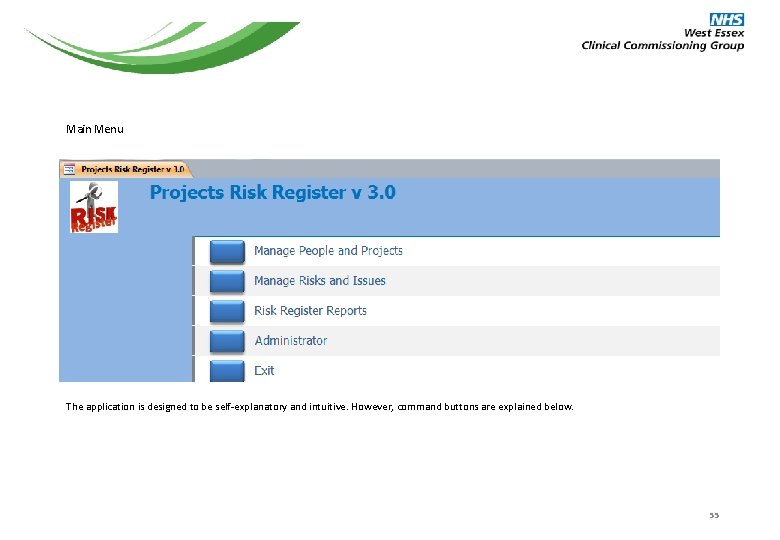
Main Menu The application is designed to be self-explanatory and intuitive. However, command buttons are explained below. 55
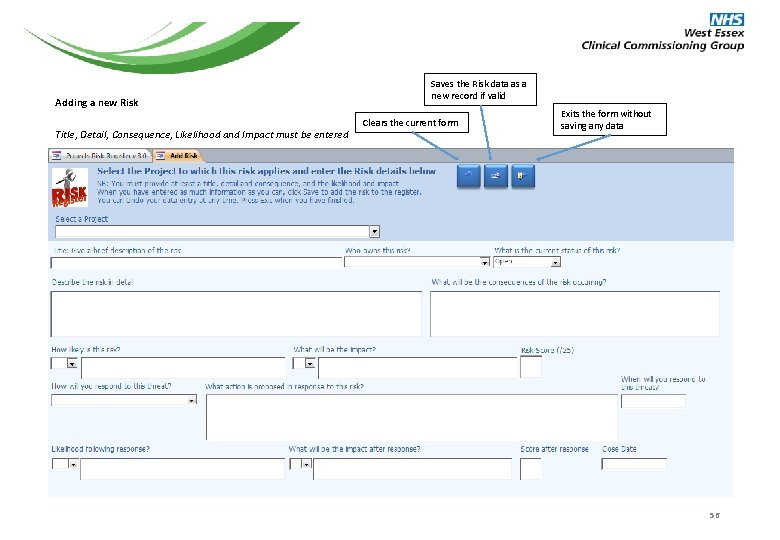
Adding a new Risk Title, Detail, Consequence, Likelihood and Impact must be entered Saves the Risk data as a new record if valid Clears the current form Exits the form without saving any data 56
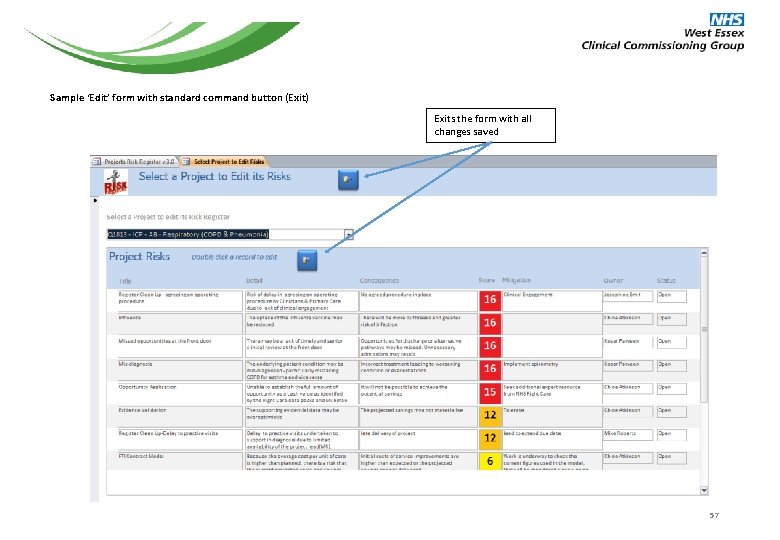
Sample ‘Edit’ form with standard command button (Exit) Exits the form with all changes saved 57
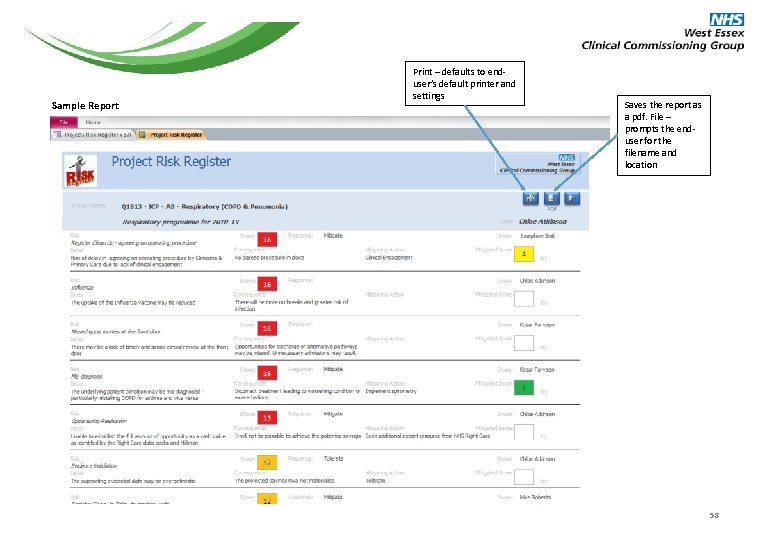
Sample Report Print – defaults to enduser’s default printer and settings Saves the report as a pdf. File – prompts the enduser for the filename and location 58
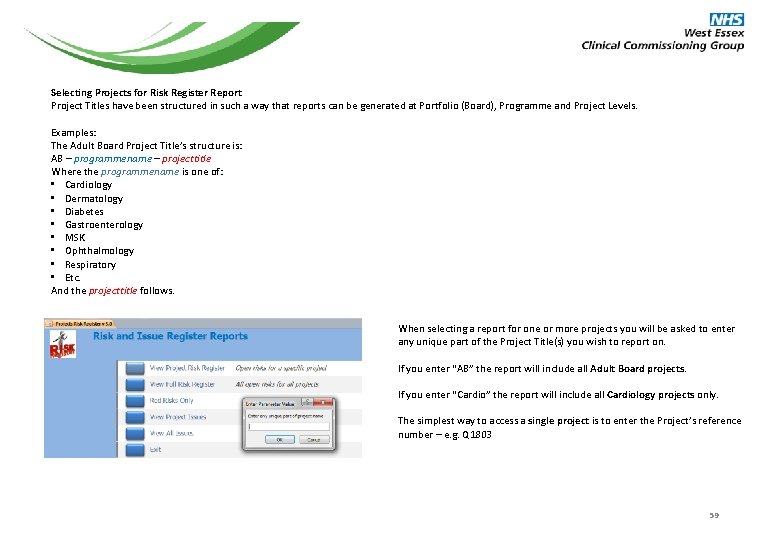
Selecting Projects for Risk Register Report Project Titles have been structured in such a way that reports can be generated at Portfolio (Board), Programme and Project Levels. Examples: The Adult Board Project Title’s structure is: AB – programmename – projecttitle Where the programmename is one of: • Cardiology • Dermatology • Diabetes • Gastroenterology • MSK • Ophthalmology • Respiratory • Etc. And the projecttitle follows. When selecting a report for one or more projects you will be asked to enter any unique part of the Project Title(s) you wish to report on. If you enter “AB” the report will include all Adult Board projects. If you enter “Cardio” the report will include all Cardiology projects only. The simplest way to access a single project is to enter the Project’s reference number – e. g. Q 1803 59
Published by West Essex Clinical Commissioning Group Programme Management Office Building 4, Spencer Close, St Margaret’s Hospital, The Plain, Epping CM 16 6 TN – T: 01992 566140 www. westessexccg. nhs. uk 60