
WELCOME TODAYS WEBINAR is How to Scan other
WELCOME TODAY’S WEBINAR is: How to Scan other Paper Documents My name is Sherrie Email: Sbeek@etfile. com Training Specialist and Client Advocate Phone: (508) 475 -4502 Technical Support: 1 -888 -672 -7737 option 3 www. etfile. com
Administration Training for Auto Dealers Section 1: Getting Started Webinar Objectives: At the completion of this Webinar, you will be able to: Ø Decide how to configure your etfile workflow Ø Create Cabinets and set permissions Ø Describe the ways to import files Ø Create Document Descriptions Ø Add Contacts or send us a file to upload www. etfile. com
Administration Training for Auto Dealers Section 1: Getting Started How to get documents into etfile • Drag and Drop to the inbox or Folder in Cabinet • Send to From Outlook (Dec. 2 Webinar) • Right Click Send to etfile • Print to etfile • Scan to etfile www. etfile. com
Administration Training for Auto Dealers Section 1: Getting Started Items to consider before you file your Documents • Who can see the documents? • Create the Cabinets and set permissions • How do you want to find the documents, search by contact or keywords, folder structure (best for documents you may not need to access often or have many of) • Add Contacts Manually or have us import list • Create Descriptions based on your type of documents and how you want to search www. etfile. com
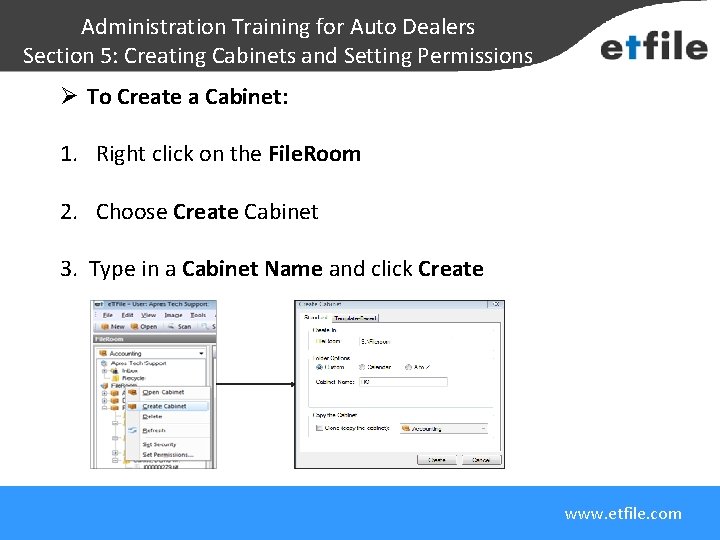
Administration Training for Auto Dealers Section 5: Creating Cabinets and Setting Permissions Ø To Create a Cabinet: 1. Right click on the File. Room 2. Choose Create Cabinet Each customer has one FILEROOM 3. Type in a Cabinet Name and click Create www. etfile. com
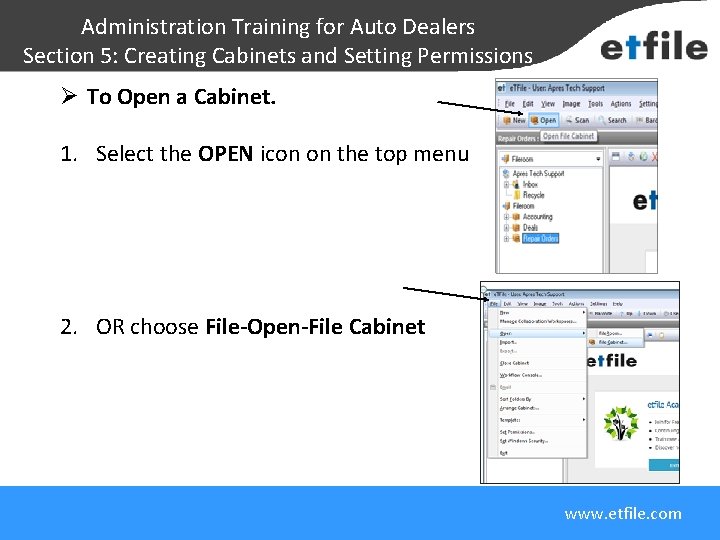
Administration Training for Auto Dealers Section 5: Creating Cabinets and Setting Permissions Ø To Open a Cabinet. 1. Select the OPEN icon on the top menu Each customer has one FILEROOM 2. OR choose File-Open-File Cabinet www. etfile. com
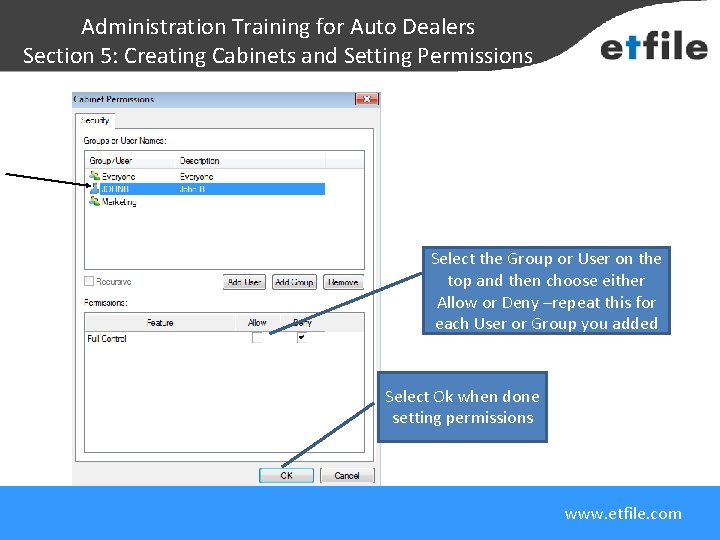
Administration Training for Auto Dealers Section 5: Creating Cabinets and Setting Permissions Each customer has one FILEROOM Select the Group or User on the top and then choose either Allow or Deny –repeat this for each User or Group you added Select Ok when done setting permissions www. etfile. com

Administration Training for Auto Dealers Section 1: Getting Started How to File • Select the Inbox • Click Scan on the Menu bar to scan your paper document • Review scanned document • Attach and Move the document www. etfile. com
- Slides: 8