
Welcome to the Protein Database Tutorial This tutorial
Welcome to the Protein Database Tutorial This tutorial will describe how to navigate the section of Gramene that provides collective information on proteins from grasses (family Poaceae/Gramineae). The protein entries are annotated by associating the following ontology concepts if known: – Gene Ontology (GO) • Molecular function of the gene product. • Biological process in which the gene product is involved. • Cellular component where the gene product is localized. – Plant Ontology • Plant structure where the gene is expressed (PO) • Plant growth stage at which the gene is expressed (GRO) * Only rice (Oryza) protein entries are manually curated. 2/23/2021 1
Tutorial Tips Note! Although we continually work to make Gramene compatible with all browsers, there are problems with some browser versions. If you're having difficulty viewing Gramene, try using a different browser. Please report any problems with browsers through Gramene Feedback. Images shown may not be up to date, so results on your searches may be different, or the data may be displayed in a different order. 2/23/2021 2
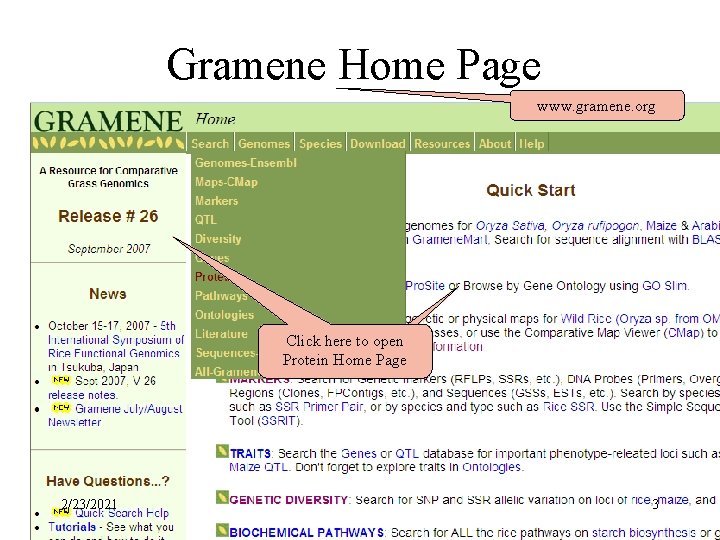
Gramene Home Page www. gramene. org Click here to open Protein Home Page 2/23/2021 3
Module Home-Page layout Module home pages provide the following information: • Searching/Browsing – links to different types of searches. • Other Tools – if applicable, links to different tools used in this module. • Help – links to help pages, tutorials, release notes, FAQ and other helpful documentation. • Download – information on where to download the database. • Feedback – How to contact Gramene • Acknowledgements – Other programs that contribute to this data. • Quicklinks and external links – when appropriate these links are provided. 2/23/2021 4
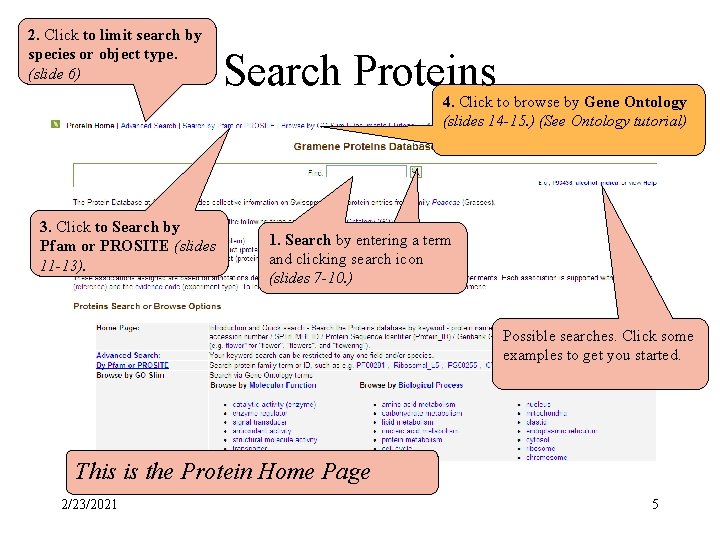
2. Click to limit search by species or object type. (slide 6) Search Proteins 4. Click to browse by Gene Ontology (slides 14 -15. ) (See Ontology tutorial) 3. Click to Search by Pfam or PROSITE (slides 11 -13). 1. Search by entering a term and clicking search icon (slides. D 7 -10. ) Possible searches. Click some examples to get you started. This is the Protein Home Page 2/23/2021 5
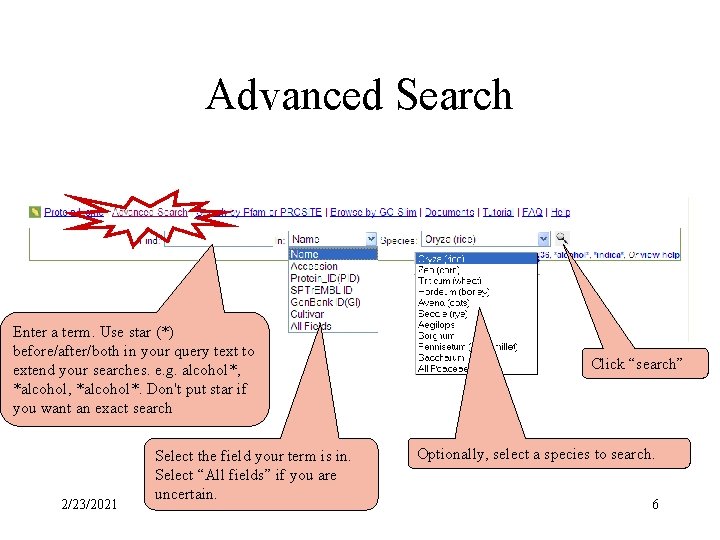
Advanced Search Enter a term. Use star (*) before/after/both in your query text to extend your searches. e. g. alcohol*, *alcohol*. Don't put star if you want an exact search 2/23/2021 Select the field your term is in. Select “All fields” if you are uncertain. Click “search” Optionally, select a species to search. 6
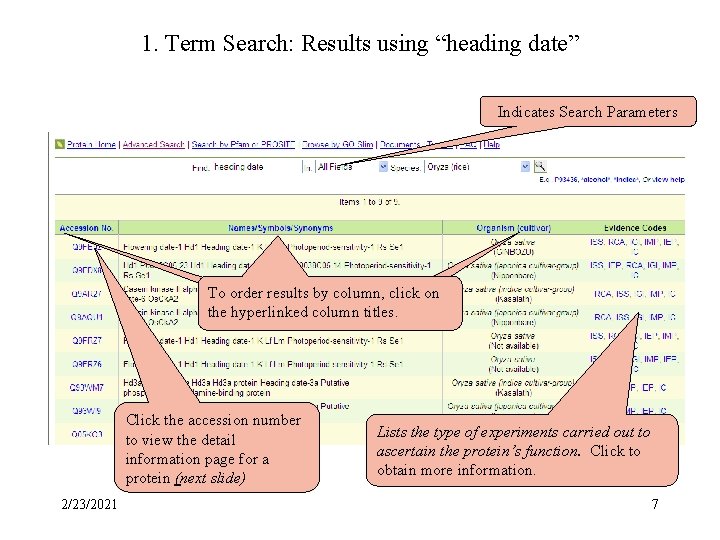
1. Term Search: Results using “heading date” Results for Search by Term or keyword Indicates Search Parameters To order results by column, click on the hyperlinked column titles. Click the accession number to view the detail information page for a protein (next slide) 2/23/2021 Lists the type of experiments carried out to ascertain the protein’s function. Click to obtain more information. 7
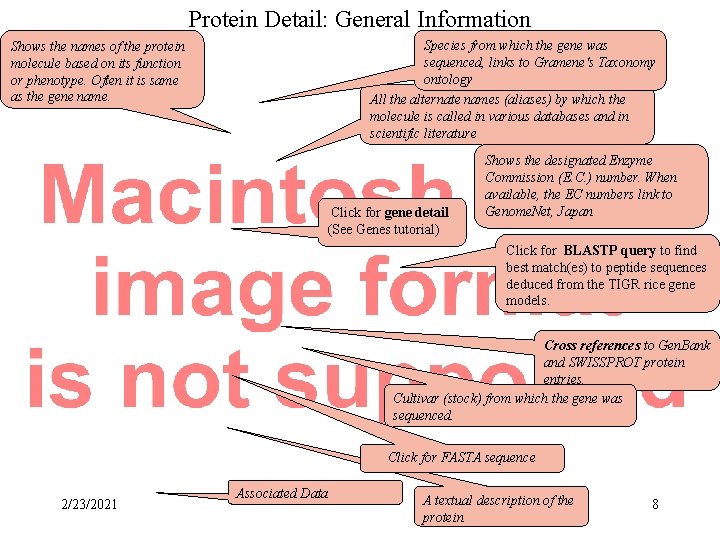
Protein Detail: General Information Shows the names of the protein molecule based on its function or phenotype. Often it is same as the gene name. General Protein Info Species from which the gene was sequenced, links to Gramene's Taxonomy ontology All the alternate names (aliases) by which the molecule is called in various databases and in scientific literature Click for gene detail (See Genes tutorial) Shows the designated Enzyme Commission (E. C. ) number. When available, the EC numbers link to Genome. Net, Japan Click for BLASTP query to find best match(es) to peptide sequences deduced from the TIGR rice gene models. Cross references to Gen. Bank and SWISSPROT protein entries. Cultivar (stock) from which the gene was sequenced. Click for FASTA sequence 2/23/2021 Associated Data A textual description of the protein 8
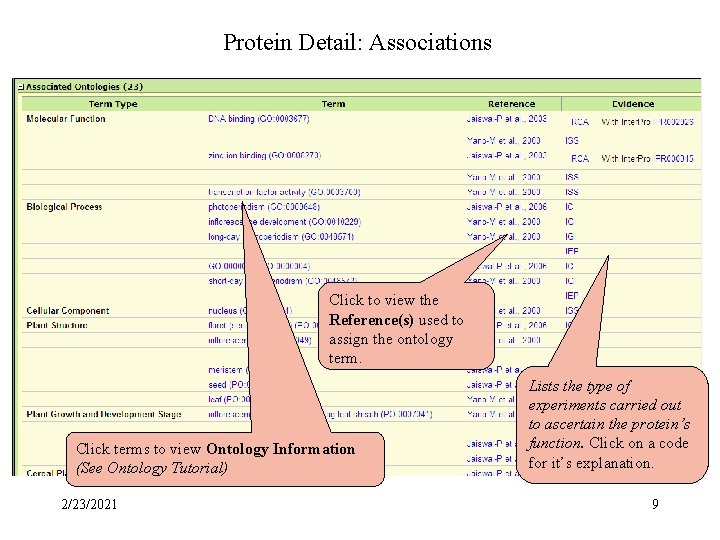
Protein Detail: Associations Protein Associations Click to view the Reference(s) used to assign the ontology term. Click terms to view Ontology Information (See Ontology Tutorial) 2/23/2021 Lists the type of experiments carried out to ascertain the protein’s function. Click on a code for it’s explanation. 9
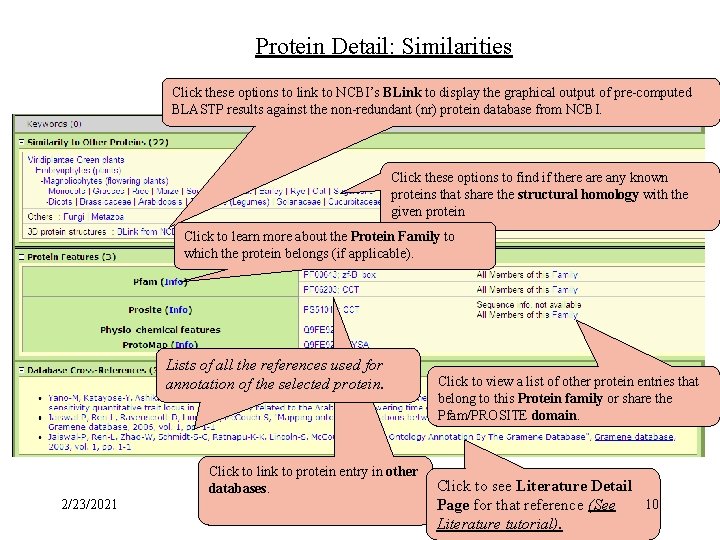
Protein Detail: Similarities Click these options to link to NCBI’s BLink to display the graphical output of pre-computed BLASTP results against the non-redundant (nr) protein database from NCBI. Click these options to find if there any known proteins that share the structural homology with the given protein Click to learn more about the Protein Family to which the protein belongs (if applicable). Lists of all the references used for annotation of the selected protein. Click to link to protein entry in other databases. 2/23/2021 Click to view a list of other protein entries that belong to this Protein family or share the Pfam/PROSITE domain. Click to see Literature Detail 10 Page for that reference (See Literature tutorial).
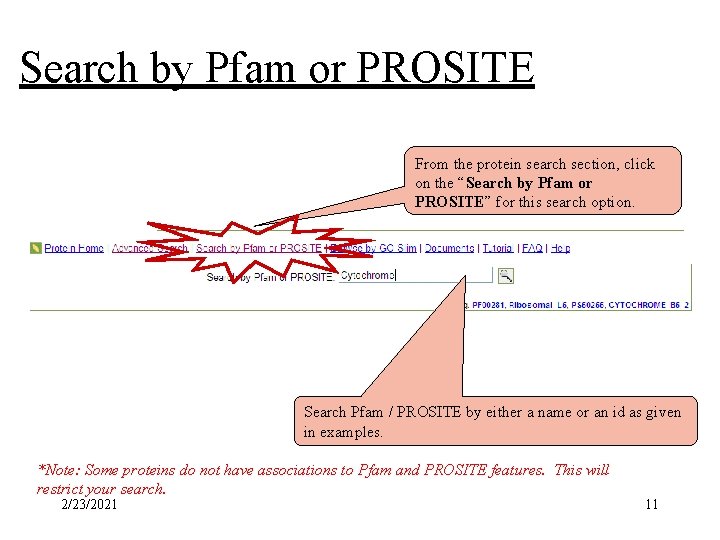
Search by Pfam or PROSITE Search by Pfam or Prosite From the protein search section, click on the “Search by Pfam or PROSITE” for this search option. Search Pfam / PROSITE by either a name or an id as given in examples. *Note: Some proteins do not have associations to Pfam and PROSITE features. This will restrict your search. 2/23/2021 11
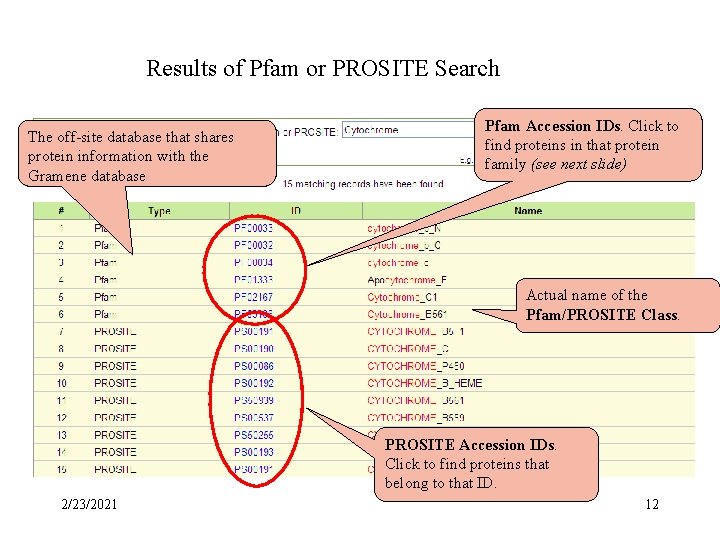
Results of Pfam or PROSITE Searchsearch Results Pfam/Prosite The off-site database that shares protein information with the Gramene database Pfam Accession IDs. Click to find proteins in that protein family (see next slide) Actual name of the Pfam/PROSITE Class. PROSITE Accession IDs. Click to find proteins that belong to that ID. 2/23/2021 12
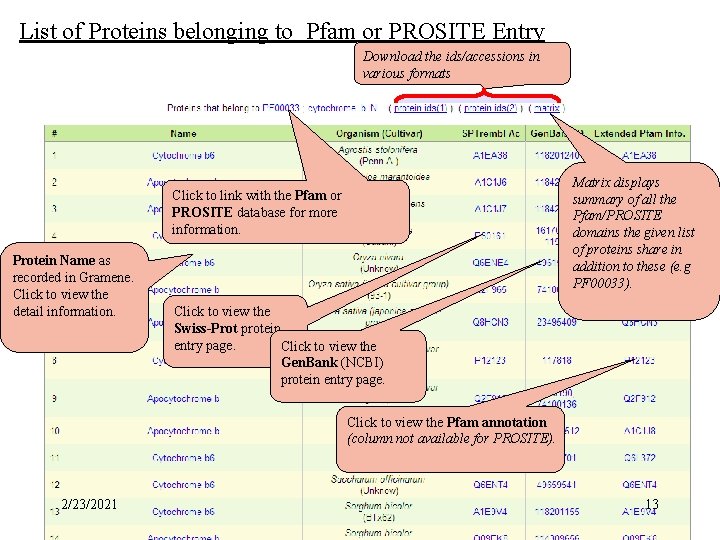
Pfam/PROSITE ID List of Proteins belonging to Pfam or PROSITE Entry Download the ids/accessions in various formats Matrix displays summary of all the Pfam/PROSITE domains the given list of proteins share in addition to these (e. g PF 00033). Click to link with the Pfam or PROSITE database for more information. Protein Name as recorded in Gramene. Click to view the detail information. Click to view the Swiss-Prot protein entry page. Click to view the Gen. Bank (NCBI) protein entry page. Click to view the Pfam annotation (column not available for PROSITE). 2/23/2021 13
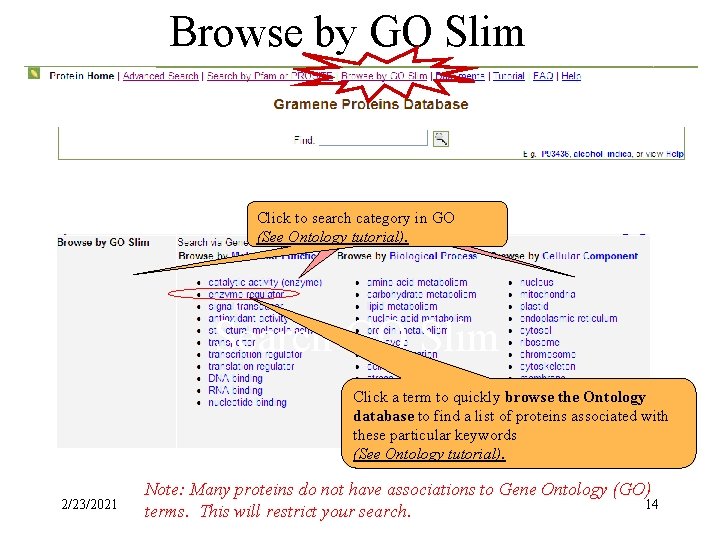
Browse by GO Slim Click to search category in GO (See Ontology tutorial). Search GO Slim Click a term to quickly browse the Ontology database to find a list of proteins associated with these particular keywords (See Ontology tutorial). 2/23/2021 Note: Many proteins do not have associations to Gene Ontology (GO) 14 terms. This will restrict your search.
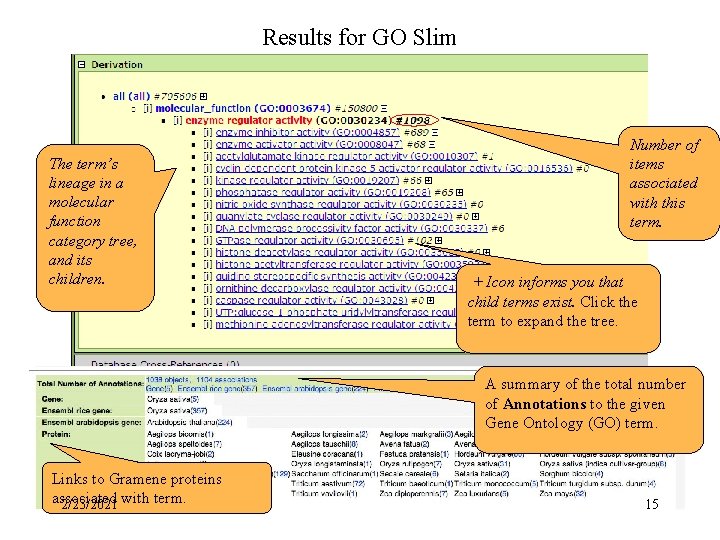
Results for GO Slim The term’s lineage in a molecular function category tree, and its children. Number of items associated with this term. Results for GO + Icon informs you that child terms exist. Click the term to expand the tree. A summary of the total number of Annotations to the given Gene Ontology (GO) term. Links to Gramene proteins associated 2/23/2021 with term. 15
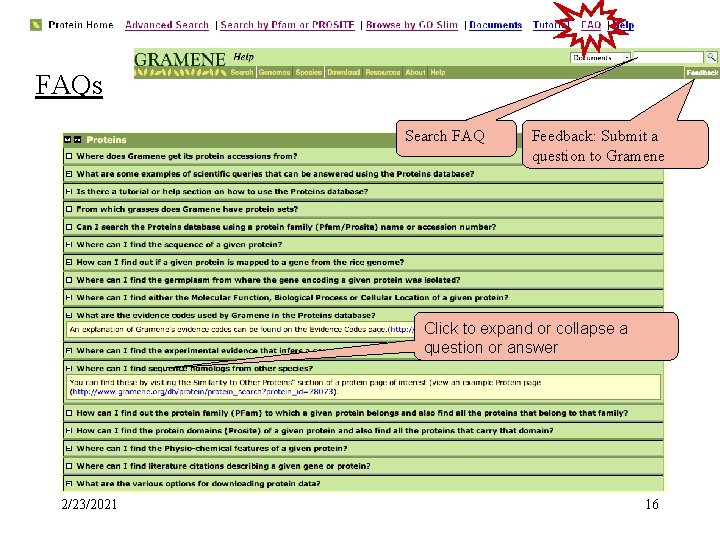
FAQs Search FAQ Feedback: Submit a question to Gramene Click to expand or collapse a question or answer 2/23/2021 16
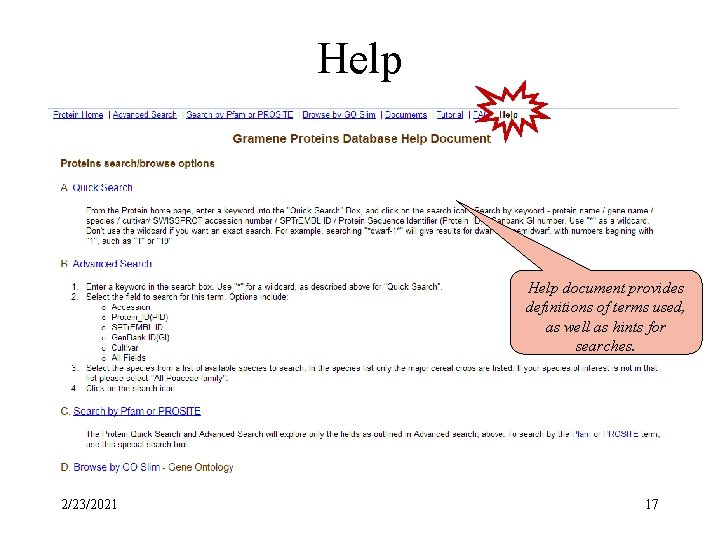
Help document provides definitions of terms used, as well as hints for searches. 2/23/2021 17
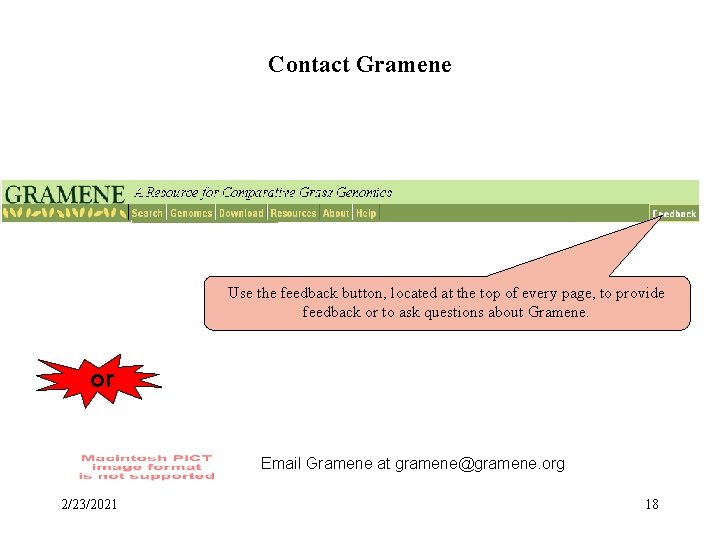
Contact Gramene Use the feedback button, located at the top of every page, to provide feedback or to ask questions about Gramene. or Email Gramene at gramene@gramene. org 2/23/2021 18
- Slides: 18