
Welcome to Microsoft Office Word 2007 Vocabulary Word
Welcome to Microsoft Office Word 2007
Vocabulary �Word Processing typing, editing and formatting letters, reports, fax cover sheets, and so on is perhaps the most common activity performed with computers. �Templates- a template is a starter document that supplies the document design, text formatting, and, often, placeholder text or suggested text. Add your own text and your document is finished!
Vocabulary �Styles- If you like a particular combination of formatting settings that you’ve applied to text, you can save the combination as a style that you can easily apply to other text �Tables- Add a table grid to organize text in a grid of rows and columns to which you can apply any type of text.
Vocabulary �Graphics- You can add all types of pictures into your documents and even create diagrams �Mail Merge- Create your own, customized “form letter” documents, for which each copy is automatically customized for a particular recipient (or last entry). Words merge feature even enables you to create matching envelope labels.
Vocabulary �Document Security Review Word enables you to protect a document against unwanted changes, as well as to track changes made by other users. In this way, you can control the document content through a collaboration process.
How did Microsoft look before compared to now? �http: //Before and After
What is the ribbon? • The Ribbon is set of contextual tools and features to users of Word. • When you click one of the major tabs on the Ribbon, the tools you need for specific tasks should mostly be right where you need them. The ideal result is that you don’t need to go looking for what you want. • Ribbon is organized into tabs and groups. • The result is that more of the tools are exposed to you, making it more likely that you’ll discover what you need. • Over the 13 years, the interface slowly morphed from menus and toolbars into the Ribbon.
What is the office button? • The office button is located in the upper left hand corner of the screen. • You can create a new document, open, save as, print, prepare, send, publish, close and view recent documents.

Where is the ribbon located?
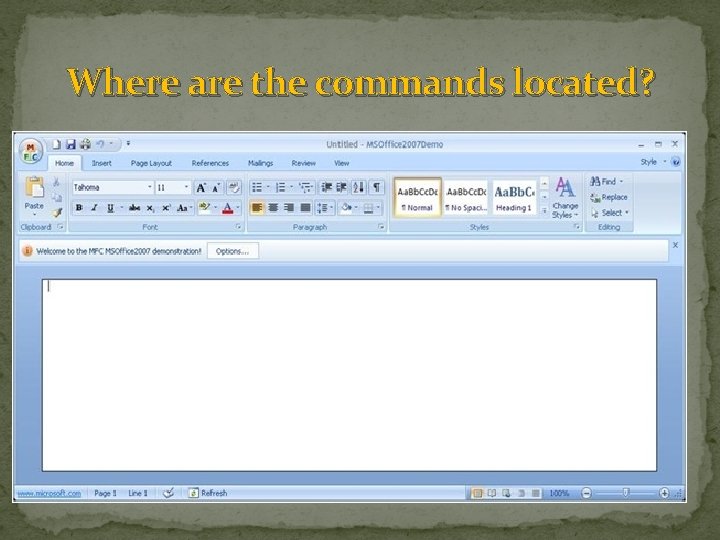
Where are the commands located?
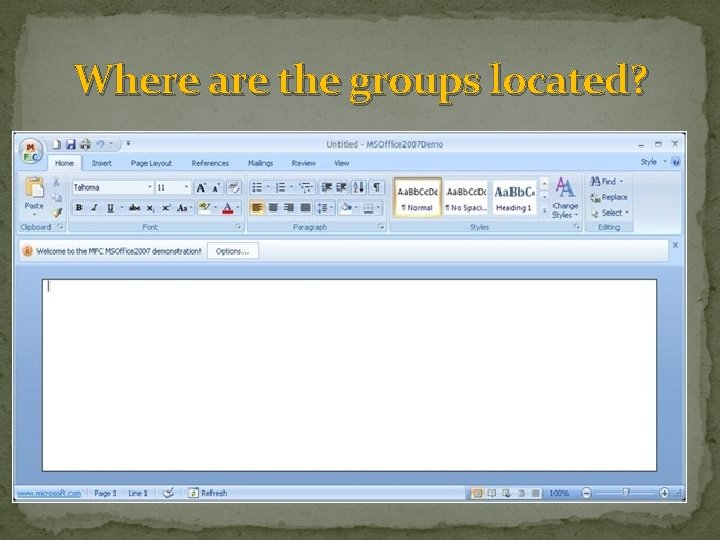
Where are the groups located?
What are the names of the tabs? 1. 2. 3. 4. 5. 6. 7. Home Insert Page Layout References Mailings Review View
What are the names of some of the commands ? 1. 2. 3. Paste Cut copy Format painter Font 5. Font Size 6. Grow Font 7. Shrink Font 8. Clear formatting 9. Bold Italic 4. (many more)
What are the names of some of the groups ? � Each of the commands are separated into groups � Some of the group names are: 1. 2. 3. 4. 5. Clipboard Font Paragraph Styles Editing
Draw your answer: What is a command? How can we tell what some of the commands are without even knowing the name?
Draw your answer: What is a group? Where do you find the group name?
Draw your answer: What does the ribbon hold? What is inside of the ribbon?
- Slides: 17