
Welcome to Induction This induction Power Point covers


- Slides: 28
Welcome to Induction! This induction Power. Point covers some of the key information from your Induction Handbook (Green), on our website & Student Handbook. Don’t forget to… Complete your Induction Forms (printed or online) https: //www. surveymonkey. com/r/TEASPinductionform Create your USI (Unique Student Identifier) http: //usi. gov. au/create-your-USI/Pages/default. aspx Apply for your Tertiary Pass (Student Rates on Public Transport) http: //translink. com. au/tickets-and-fares/concessions/tertiary us on Facebook! http: //www. facebook. com/The. Eagle. Academy. Australia Follow us on Instagram @The. Eagle. Academy
Emergencies / Unpredictable Incidents In case of an emergency or unpredictable incidents, you may be dismissed due to Health and Safety reasons. Storms Blackout or Power shortages Fire Flooding caused by heavy rain etc. Please stay with your trainer during evacuation. A roll call will be completed to ensure you are safe. Do not leave until your trainer or an Academy staff member advises you to leave. You will find evacuation plans at the entrance to the campus.
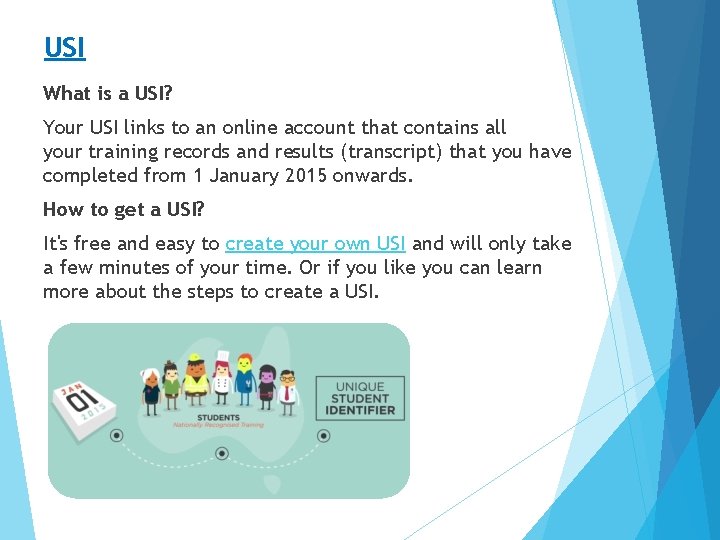
USI What is a USI? Your USI links to an online account that contains all your training records and results (transcript) that you have completed from 1 January 2015 onwards. How to get a USI? It's free and easy to create your own USI and will only take a few minutes of your time. Or if you like you can learn more about the steps to create a USI.
Tertiary Pass for Public Transport A 50% concession fare is available for QLD residing tertiary and post-secondary students on all Trans. Link public transport services, regional qconnectbus services and approved regional ferry services. Apply for Tertiary Concession Fares: https: //gocard. translink. com. au/webtix/
Academy Staff During your course you will need to see or contact staff for various reasons. ADMINISTRATION Meet and Greet – Signing In, Enrolments, Collecting Folders, Student Id Cards or OSHC, Asking for a copy of your Payment Schedules TRAINERS Progress – Tuition, Progress, Workbook Questions, Class Information, Training Assistance CAMPUS MANAGER & SENIOR STAFF All other matters or concerns – Late Payment Arrangements, Deferral Or Suspension Of Study, Appeals, Course Cancellations, Personal Matters Staff contact details can be found in your Induction Book.
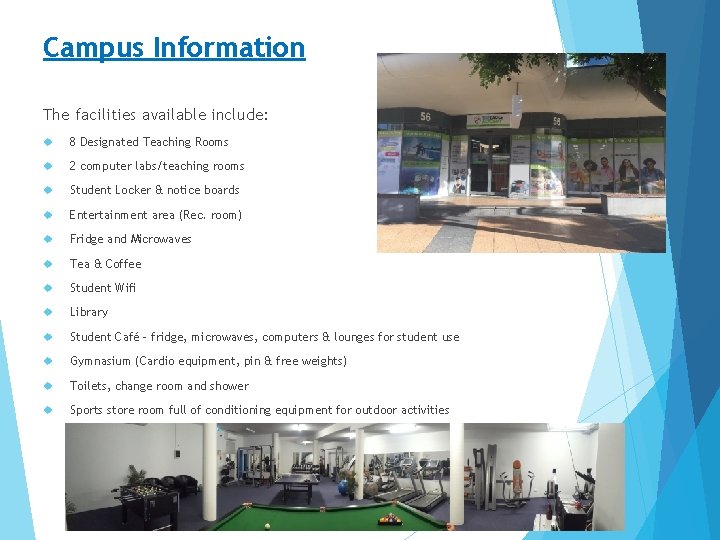
Campus Information The facilities available include: 8 Designated Teaching Rooms 2 computer labs/teaching rooms Student Locker & notice boards Entertainment area (Rec. room) Fridge and Microwaves Tea & Coffee Student Wifi Library Student Café - fridge, microwaves, computers & lounges for student use Gymnasium (Cardio equipment, pin & free weights) Toilets, change room and shower Sports store room full of conditioning equipment for outdoor activities
What to bring: Ø Pens Ø Books (Distance Education Books only to leave campus without permission. ) Ø A smile, a willingness to learn and a positive attitude Sport/Fitness/Outdoor Recreation Ø Gym Shoes & Gym Clothes (required for gym use) Ø Towel (required for gym use) Ø Swimmers/Togs Ø Clean clothes Ø Deodorant Ø Gym Membership Card (Carina Campus & Fortitude Valley Fitness Students)
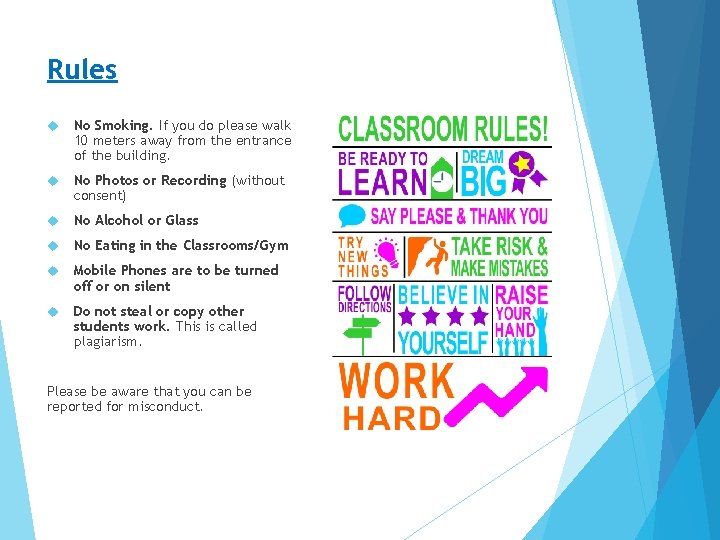
Rules No Smoking. If you do please walk 10 meters away from the entrance of the building. No Photos or Recording (without consent) No Alcohol or Glass No Eating in the Classrooms/Gym Mobile Phones are to be turned off or on silent Do not steal or copy other students work. This is called plagiarism. Please be aware that you can be reported for misconduct.
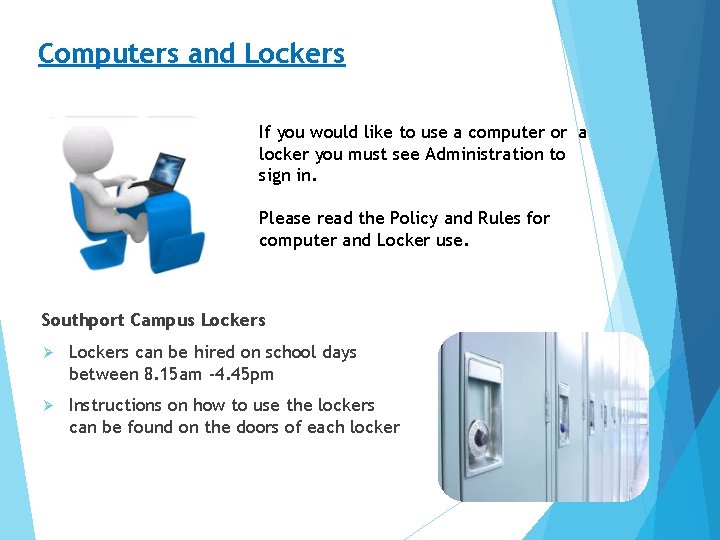
Computers and Lockers If you would like to use a computer or a locker you must see Administration to sign in. Please read the Policy and Rules for computer and Locker use. Southport Campus Lockers Ø Lockers can be hired on school days between 8. 15 am -4. 45 pm Ø Instructions on how to use the lockers can be found on the doors of each locker
Food & Drink Facilities All campuses have tea/coffee making facilities as well as a fridge & microwave for student use. Please be aware that any food stored in the student fridge or cupboard is left at your own risk. Food left in the Fridge past 3 pm on Fridays will be thrown out. clean up after yourself and advise staff it items need to be restocked. cover your food when heating it in the Microwave. do not put foil, polystyrene, cling wrap or aluminium in the microwave.
Gym Induction Trainers are available to conduct a gym Induction with all new students. Please contact the administration team to book in at a suitable time. Gym induction: General walk through of the gym, explanation of the rules, instructions for the most commonly used machines and weights.
Full Time Course Hours VET: 13. 5 hours: Class/lecture contact time + 6. 5 hours: Distance Education/Work at home. You are responsible for monitoring your own attendance requirements. ELICOS: 20 hours on campus per week. Your course is subject to attendance & progress monitoring. You will be contacted when you are at risk of not being able to meet an 80% attendance rate. If you fail to attend classes you will miss observations and activities. Catching up on assessment may cost you. Please make sure you go to a doctor and receive a medical certificate if you are unable to come to classes due to illness.
Lecture Day Information Arrive on time 8. 15 am – 4. 45 pm (campus hours) 9. 30 am – 3. 30 pm (lecture hours) Tuesday and Thursday 8. 30 am – 4. 00 pm, Friday 8. 30 am – 3. 00 pm (ELICOS) Excursions may require 9 am arrival If you are more than 15 minutes late for a class you may miss assessment Sign in & out VET: please sign in with your trainer at the beginning of each day. ELICOS: please sign in and out on the ELICOS roll in your classroom. If you have one, collect your Clip Folder in the morning and return it at the end of the day
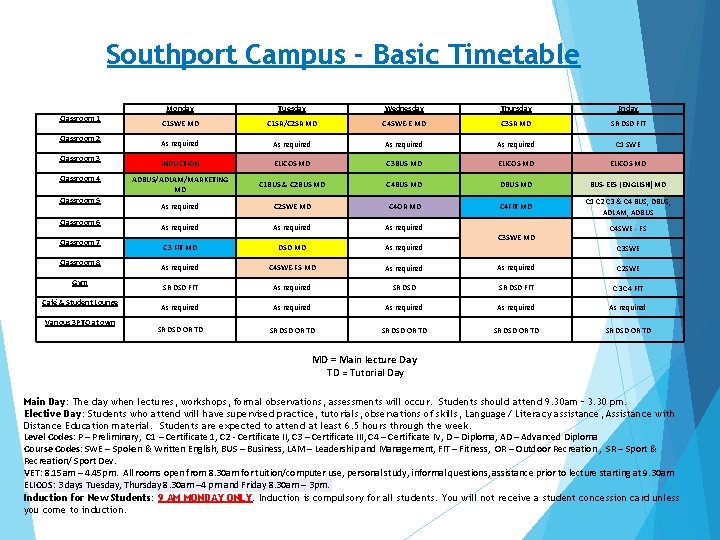
Southport Campus - Basic Timetable Classroom 1 Classroom 2 Classroom 3 Classroom 4 Classroom 5 Classroom 6 Classroom 7 Classroom 8 Gym Café & Student Lounge Various 3 PTO at own Monday Tuesday Wednesday Thursday Friday C 1 SWE MD C 1 SR/C 2 SR MD C 4 SWE-E MD C 3 SR MD SR DSD FIT As required C 1 SWE INDUCTION ELICOS MD C 3 BUS MD ELICOS MD ADBUS/ADLAM/MARKETING MD C 1 BUS & C 2 BUS MD C 4 BUS MD DBUS MD BUS-EES (ENGLISH) MD As required C 2 SWE MD C 4 OR MD C 4 FIT MD C 1 C 2 C 3 & C 4 BUS, DBUS, ADLAM, ADBUS As required C 3 SWE MD C 4 SWE - FS C 3 FIT MD DSD MD As required C 4 SWE-FS MD As required C 2 SWE SR DSD FIT As required SR DSD FIT C 3 C 4 FIT As required As required SR DSD OR TD SR DSD OR TD C 3 SWE MD = Main lecture Day TD = Tutorial Day Main Day: The day when lectures, workshops, formal observations, assessments will occur. Students should attend 9. 30 am – 3. 30 pm. Elective Day: Students who attend will have supervised practice, tutorials, observations of skills, Language/ Literacy assistance, Assistance with Distance Education material. Students are expected to attend at least 6. 5 hours through the week. Level Codes: P – Preliminary, C 1 – Certificate 1, C 2 - Certificate II, C 3 – Certificate III, C 4 – Certificate IV, D – Diploma, AD – Advanced Diploma Course Codes: SWE – Spoken & Written English, BUS – Business, LAM – Leadership and Management, FIT – Fitness, OR – Outdoor Recreation , SR – Sport & Recreation/ Sport Dev. VET: 8. 15 am – 4. 45 pm. All rooms open from 8. 30 am for tuition/computer use, personal study, informal questions, assistance prior to lecture starting at 9. 30 am ELICOS: 3 days Tuesday, Thursday 8. 30 am – 4 pm and Friday 8. 30 am – 3 pm. Induction for New Students: 9 AM MONDAY ONLY. Induction is compulsory for all students. You will not receive a student concession card unless you come to induction.
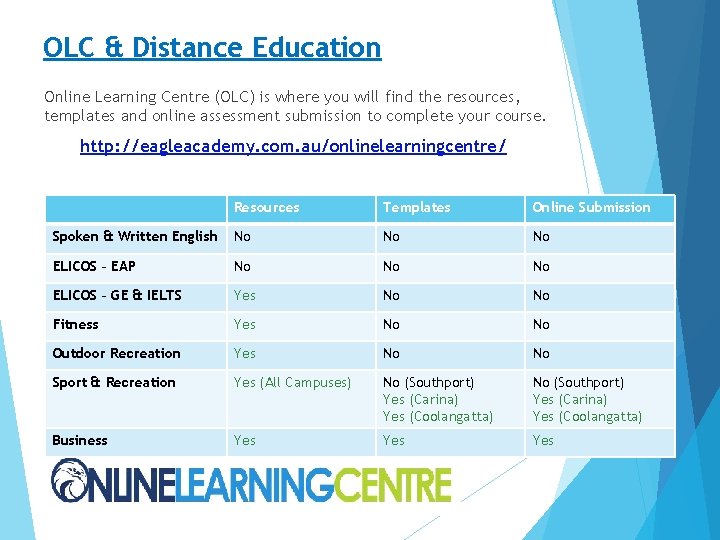
OLC & Distance Education Online Learning Centre (OLC) is where you will find the resources, templates and online assessment submission to complete your course. http: //eagleacademy. com. au/onlinelearningcentre/ Resources Templates Online Submission Spoken & Written English No No No ELICOS – EAP No No No ELICOS – GE & IELTS Yes No No Fitness Yes No No Outdoor Recreation Yes No No Sport & Recreation Yes (All Campuses) No (Southport) Yes (Carina) Yes (Coolangatta) Business Yes Yes
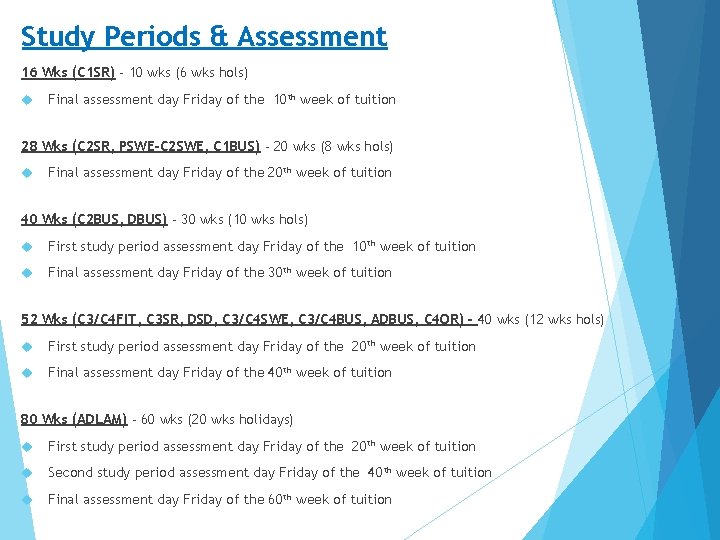
Study Periods & Assessment 16 Wks (C 1 SR) - 10 wks (6 wks hols) Final assessment day Friday of the 10 th week of tuition 28 Wks (C 2 SR, PSWE-C 2 SWE, C 1 BUS) - 20 wks (8 wks hols) Final assessment day Friday of the 20 th week of tuition 40 Wks (C 2 BUS, DBUS) - 30 wks (10 wks hols) First study period assessment day Friday of the 10 th week of tuition Final assessment day Friday of the 30 th week of tuition 52 Wks (C 3/C 4 FIT, C 3 SR, DSD, C 3/C 4 SWE, C 3/C 4 BUS, ADBUS, C 4 OR) - 40 wks (12 wks hols) First study period assessment day Friday of the 20 th week of tuition Final assessment day Friday of the 40 th week of tuition 80 Wks (ADLAM) - 60 wks (20 wks holidays) First study period assessment day Friday of the 20 th week of tuition Second study period assessment day Friday of the 40 th week of tuition Final assessment day Friday of the 60 th week of tuition
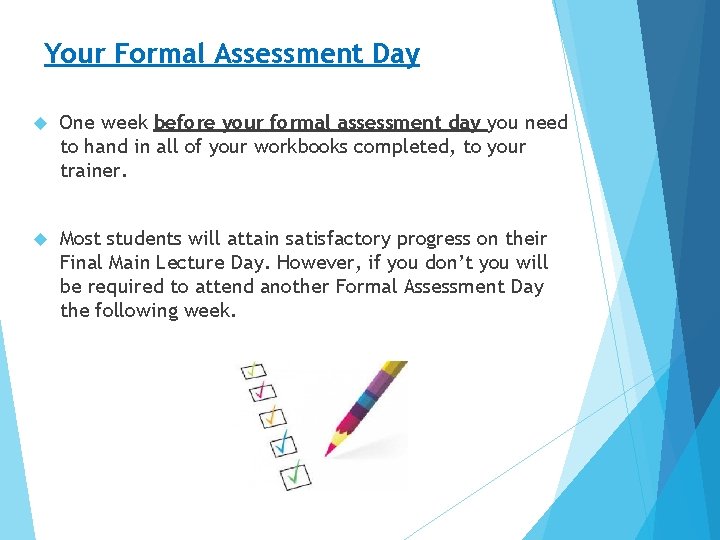
Your Formal Assessment Day One week before your formal assessment day you need to hand in all of your workbooks completed, to your trainer. Most students will attain satisfactory progress on their Final Main Lecture Day. However, if you don’t you will be required to attend another Formal Assessment Day the following week.
Progress To show competency in a unit, you need to complete a combination of the below assessments: ü Participate in class activities & complete all books ü Show skills to your trainer in class as required for each unit Satisfactory progress is deemed as being competent in at least 50% of your units in each study period. 50% - 99% Statement of Attainment 100% Full Certificate International Students: Attaining unsatisfactory progress may lead to you being reported to Immigration. If you have unsatisfactory progress, you will be sent reminders. If you have not spoken to staff about your plans to gain satisfactory progress please contact us immediately.
End of Course Survey We are legally required to send you a government survey at the end of your course. Therefore, prior to the completion of your course, you will be required to complete the on-line feedback survey via the following link: https: //www. surveymonkey. com/r/End. Of. Course. Q Once the survey is complete your course results will be issued.
Suspension of Studies If you cannot come to classes due to compassionate or compelling reasons you can suspend your studies. Examples of compassionate or compelling reasons are: Severe illness (you or immediate family member) death in the immediate family wedding in the immediate family Suspending your studies puts your tuition & payments “on hold” during the suspension period. To apply for a suspension you must complete the relevant form as well as supply acceptable evidence of your reason. E. g. medical certificate, wedding certificate, death certificate, etc.
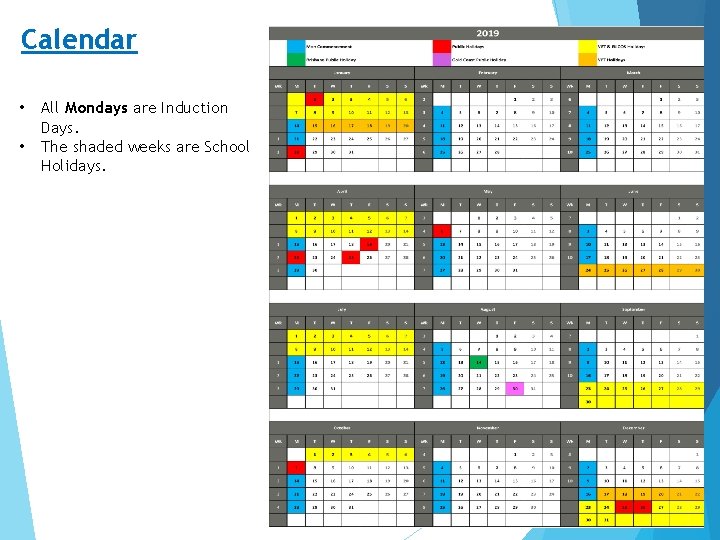
Calendar • • All Mondays are Induction Days. The shaded weeks are School Holidays.
How to Make a Payment You can make a payment via: Agent Internet banking Bank/Direct Deposit Cash on campus Debit or credit card on campus Please use your ID number as the reference number and send us a copy of your payment receipt as proof of payment. Late Payment If you have a compassionate/compelling reason for not being able make payment please advise administration immediately. If you do not have a copy of your “Payment Schedule” please ask the administration staff to send you one. If fees are paid late there may be a penalty fee of $50 added to the amount owing every week it is late. For example, if the payment is due on the 1 st the payment will increase on the 8 th. Students’ enrolments will be cancelled or suspended for non-payment of fees if the fees have not been paid within 20 working days of the due date.
Other Fees The cost of re-conducting assessments, changing enrolment details or replacing course resources are significant. Rather than put up course costs for all students, it was felt more appropriate to fund these costs in a user pays manner. You will find more information on other fees in your induction book. If you have a compassionate/compelling reason for missing assessment, needing to change your enrolment or for losing resources please speak to the administration team.
Check your emails Please check your email account once a week and let us know if you change your email address. We may email you regarding: Progress – Unsatisfactory or Satisfactory Fees – Upcoming or Overdue Missed Classes – Your progress may be suffering VISA changes – You may have changed your VISA or it may have been refused. Newsletters – Keeping you up to date on what’s happening Class changes – Any changes to class times or days (e. g. public holidays) Upcoming events – Sausage Sizzles, Sports Days, etc.
Useful Information Transport Services Go to this website “Translink Journey Planner: http: //jp. translink. com. au/” and enter your address and ours, translink will then show you the easiest/quickest way of getting here using public transport. The Library The Eagle Academy have a range of Books and DVD available to hire. If you are interested in this please see the administration staff. National Emergency Services The national telephone number for all emergency services in Australia including AMBULANCE, FIRE, and POLICE is “ 000". 000 or 112 - Calls from Mobile Phones
Student Handbook & Website The Academy website and Student Handbook has information about Refunds, Cancellations, Deferral, Welfare, Services and more. Students can access support by contacting the administration team who will endeavour to assist in finding the appropriate staff member or service. The “Student Handbook” can be found attached to your New Student Information email and on our website. www. eagleacademy. com. au
Questions Please do not hesitate to ask questions about your enrolment, progress or life in Australia. We are here to support you.
We’re Finished For those of you who are on campus and will be studying on campus please: Wait to have your ID photo taken. ID Cards will be ready for your next class. Take these books home: Distance Education (Pink) Induction Book (Green) Leave these items in your clip folder on campus: Class Books (Purple, Blue, White, Orange) Text Book Completed Induction and/or Gym Membership Forms Business EES – Please stay for a short explanation of your class timetable