
Welcome ETS Aggregate Application submission Training This module
Welcome! ETS – Aggregate Application submission Training This module offers an overview on how to submit an application for designation of an aggregate facility under the Technology Innovation and Emissions Reduction Regulation in ETS. Last update: November, 2019
Introduction In this module, you will learn: 1. Background 2. Logging into ETS A. Web Browser Compatibility B. ETS Support 3. TIERR Data Navigation Tree A. Submit Application for Aggregate Facility B. Work In Progress 4. Resubmissions and Help 2
1. Background The Technology Innovation and Emissions Reduction Regulation is Alberta’s new industrial emission reduction system, replacing the Carbon Competitiveness Incentive Regulation January 1, 2020. The Technology Innovation and Emissions Reduction Regulation allows conventional oil and gas facilities to apply to be designated as an aggregate facility. These applications are to be submitted through the ETS system as almost all interested parties will have accounts through ETS and ETS is well equipped to handle the anticipated volume of submissions. Additional information on the program as well as access to the application form is available here https: //www. alberta. ca/conventional-oil-and-gas. aspx 3
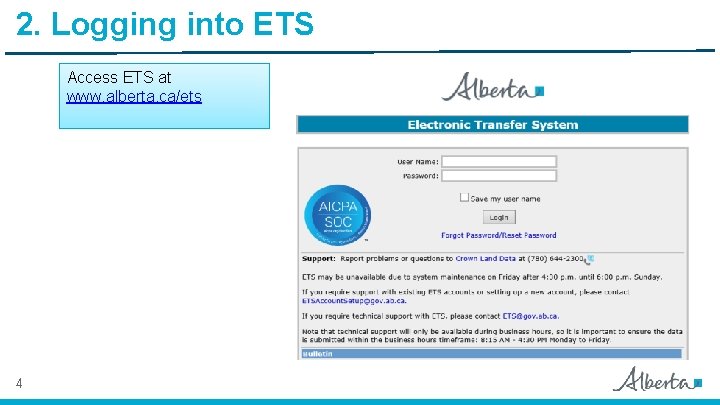
2. Logging into ETS Access ETS at www. alberta. ca/ets 4
A. Web Browser Compatibility ETS supports Internet Explorer 11. 0 or higher and Firefox 50. 0 or higher. ETS will soon support Chrome and Microsoft Edge. Pop-ups must be enabled in your web browser to access reports (i. e. submission or error reports).
B. ETS Support: Report problems or questions to Crown Land Data at (780) 6442300 ETS may be unavailable due to system maintenance on Friday after 4: 30 p. m. until 6: 00 pm Sunday If you require support with existing ETS accounts or setting up a new account, please contact ETSAccount. Setup@gov. ab. ca. If you require technical support with ETS, please contact ETS@gov. ab. ca or 780 -908 -4969. Note that technical support will only be available during business hours, so it is important to ensure the data is submitted within the business hours timeframe: 8: 15 AM - 4: 30 PM Monday to Friday.
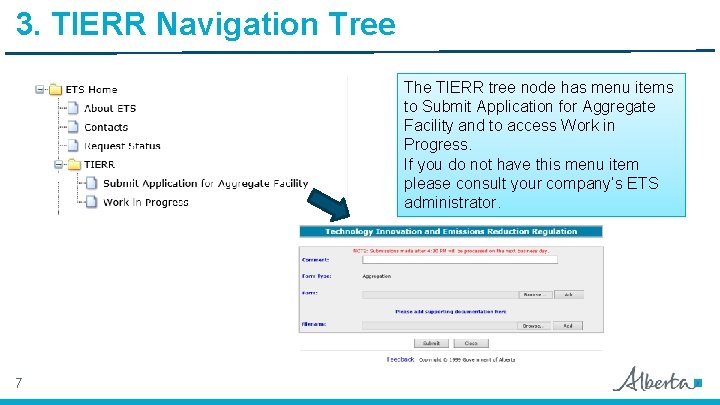
3. TIERR Navigation Tree The TIERR tree node has menu items to Submit Application for Aggregate Facility and to access Work in Progress. If you do not have this menu item please consult your company’s ETS administrator. 7
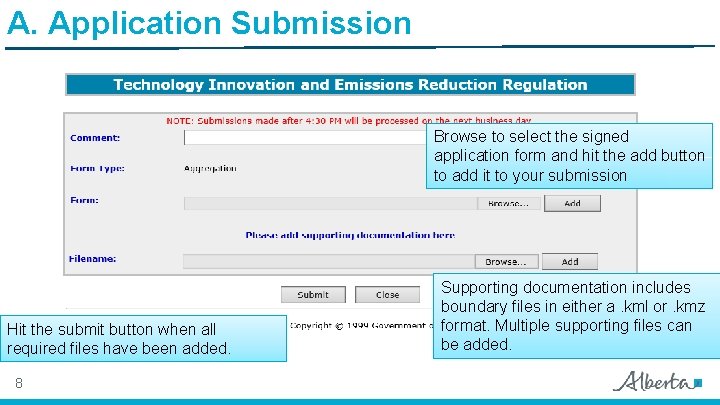
A. Application Submission Browse to select the signed application form and hit the add button to add it to your submission Hit the submit button when all required files have been added. 8 Supporting documentation includes boundary files in either a. kml or. kmz format. Multiple supporting files can be added.
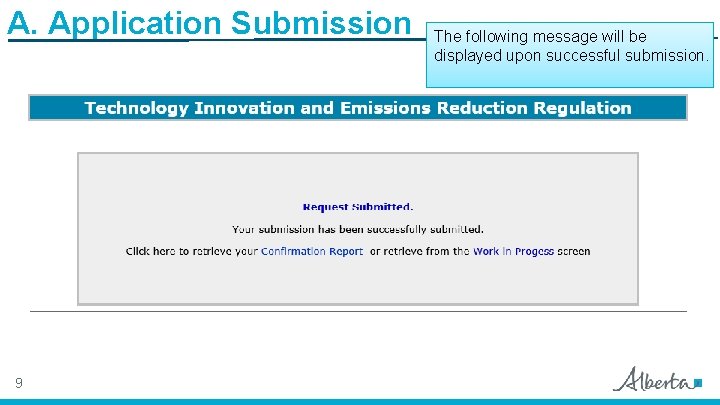
A. Application Submission 9 The following message will be displayed upon successful submission.
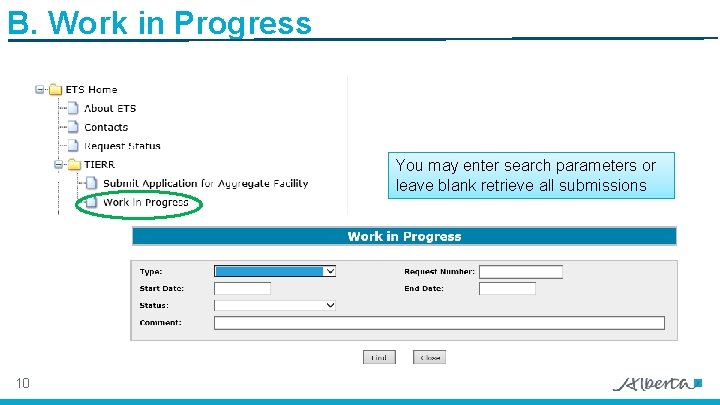
B. Work in Progress You may enter search parameters or leave blank retrieve all submissions 10
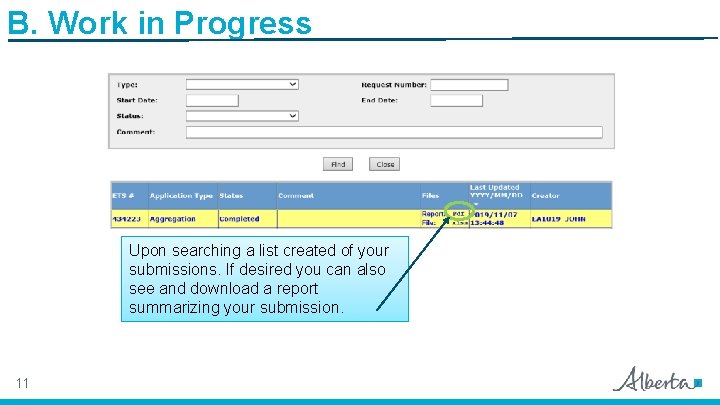
B. Work in Progress Upon searching a list created of your submissions. If desired you can also see and download a report summarizing your submission. 11
4. Resubmissions and Help Upon the review of your submission you may be asked to update and resubmit your application. Please follow the same steps outlined in this training as for your original submission. If you encounter problems with the application form, with submission that are not related to ETS, or you need additional information about the TIER regulation please contact AEP. GHG@gov. ab. ca 12
You have completed the TIER Aggregate Submission Online Training Course Congratulations ! If you have any comments or questions on this training course, please forward them to AEP. GHG@gov. ab. ca and indicate Online Training Feedback in the subject line.
- Slides: 13