
WEEK 12 LESSON LOGIC CONTINUED IF ELSE STATEMENT
- Slides: 21
WEEK 12 LESSON LOGIC CONTINUED: IF – ELSE STATEMENT LOOPS CONTINUED: FOR LOOP / WHILE LOOP EXIT & BREAK STATEMENTS / ERROR-CHECKING / EXPORT COMMAND START-UP FILES / FURTHER STUDY PHOTOS AND ICONS USED IN THIS SLIDE SHOW ARE LICENSED UNDER CC BYSA
LESSON TOPICS Additional Control Flow Statements • if-else • for loop (continued) • while loop • exit and break statements / Error Checking / export Command • Demonstration Start-up Files • Definition / Purpose • /etc/profile , ~/. bash_profile , ~/. bashrc , ~/. bash_logout / Demonstration Further Studies in Linux Perform Week 12 Tutorial • Investigations 1, 2 & 3 • Review Questions (Questions 1 - 8) Complete Assignment #3
ADDITIONAL CONTROL FLOW STATEMENTS As discussed in a previous lesson, we can use control flow statements that will control the sequence of a running script based on various situations or conditions. Control Flow Statement are used to make your shell scripts more flexible and can adapt to changing situations. We are going to learn more types of control flow statements (both logical and loops) to give more flexibility and power to your shell scripts.
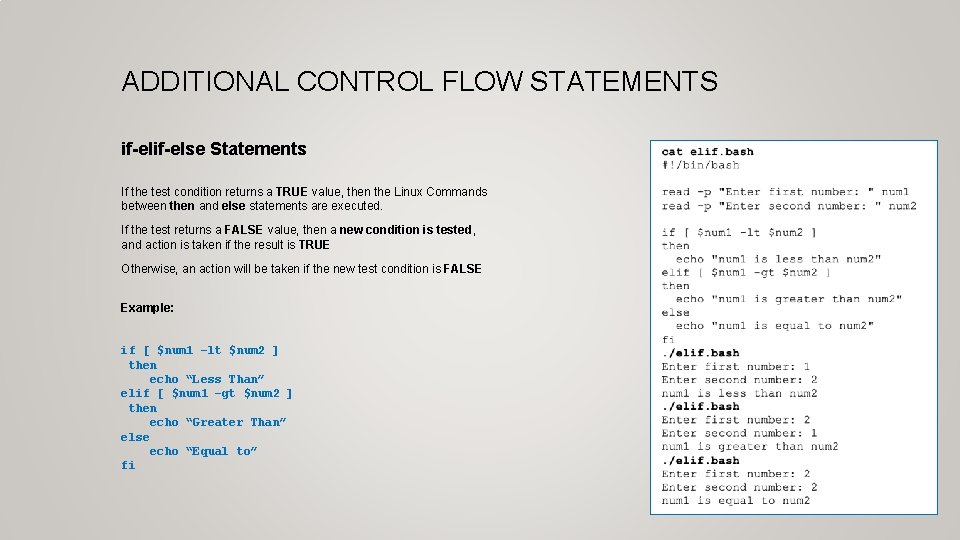
ADDITIONAL CONTROL FLOW STATEMENTS if-else Statements If the test condition returns a TRUE value, then the Linux Commands between then and else statements are executed. If the test returns a FALSE value, then a new condition is tested, and action is taken if the result is TRUE Otherwise, an action will be taken if the new test condition is FALSE Example: if [ $num 1 –lt $num 2 ] then echo “Less Than” elif [ $num 1 –gt $num 2 ] then echo “Greater Than” else echo “Equal to” fi
ADDITIONAL CONTROL FLOW STATEMENTS Instructor Demonstration Task: Create a Bash Shell script to prompt the user for a percentage grade. The shell script will then assign a letter grade based on the percentage grade.
ADDITIONAL CONTROL FLOW STATEMENTS for Loop In a previous lesson, you learned how to use the for loop using a list. A list consists of arguments that are used for each iteration of the loop. Example: for item in list do command(s) Done NOTE: There are other ways we can use the for loop (including command substitution) to allow our shell scripts to be more effective.
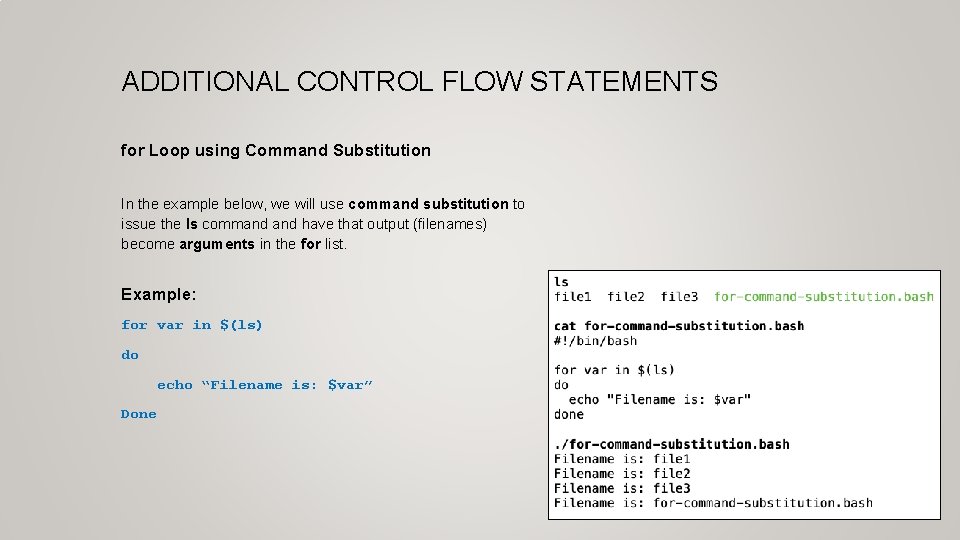
ADDITIONAL CONTROL FLOW STATEMENTS for Loop using Command Substitution In the example below, we will use command substitution to issue the ls command have that output (filenames) become arguments in the for list. Example: for var in $(ls) do echo “Filename is: $var” Done
ADDITIONAL CONTROL FLOW STATEMENTS Instructor Demonstration Task: Create a Bash Shell script to clear the screen and then display all files (non-hidden) in your home directory. The output should show files on each line and number: For Example: File 1: abc. txt File 2: def. txt File 3: ghi. txt etc…
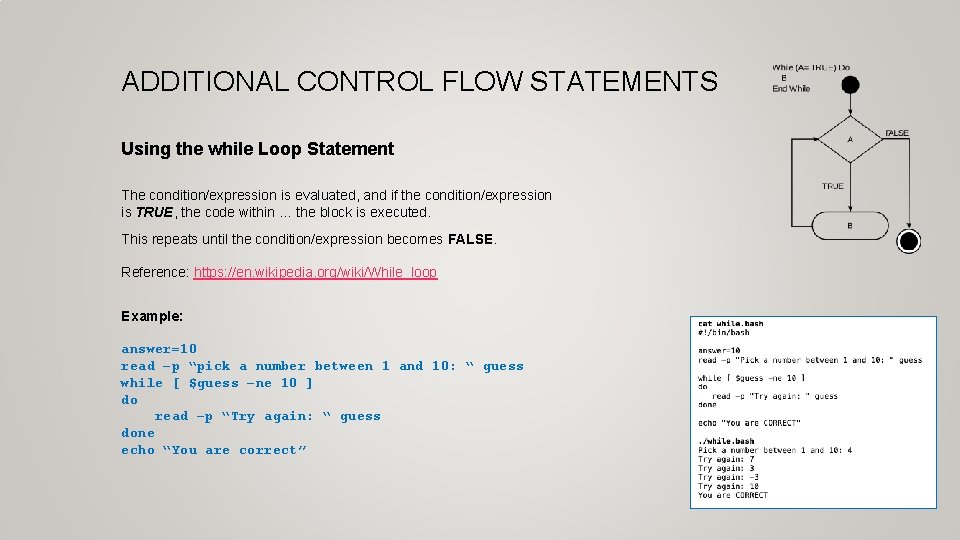
ADDITIONAL CONTROL FLOW STATEMENTS Using the while Loop Statement The condition/expression is evaluated, and if the condition/expression is TRUE, the code within … the block is executed. This repeats until the condition/expression becomes FALSE. Reference: https: //en. wikipedia. org/wiki/While_loop Example: answer=10 read –p “pick a number between 1 and 10: “ guess while [ $guess –ne 10 ] do read –p “Try again: “ guess done echo “You are correct”
ADDITIONAL CONTROL FLOW STATEMENTS Instructor Demonstration Task: Create a Bash Shell script to prompt the user for a number (error check for an unsigned integer). Once the user enters a VALID unsigned integer, count-down the numbers on a separate line by a value of 1 until you reach the value 1, then print on the last line: Blast Off!
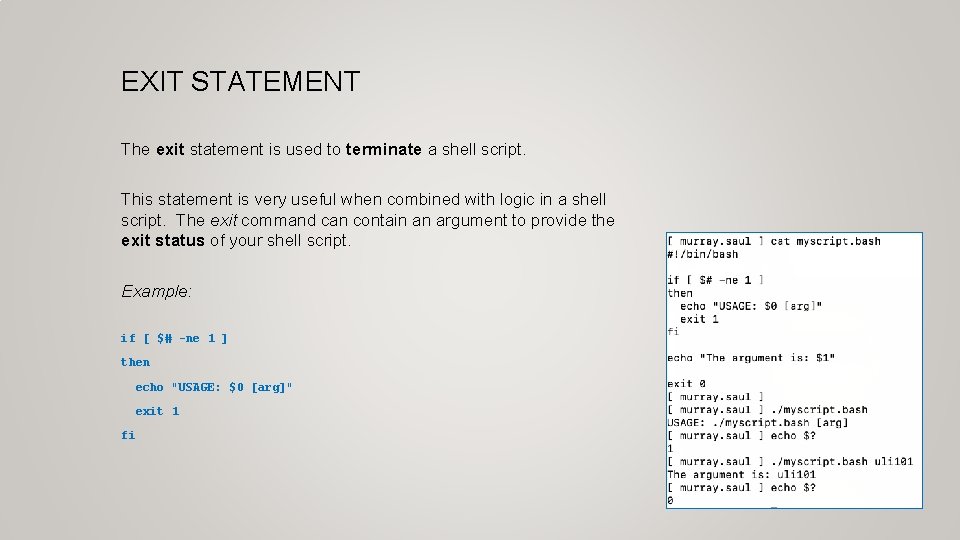
EXIT STATEMENT The exit statement is used to terminate a shell script. This statement is very useful when combined with logic in a shell script. The exit command can contain an argument to provide the exit status of your shell script. Example: if [ $# -ne 1 ] then echo "USAGE: $0 [arg]" exit 1 fi
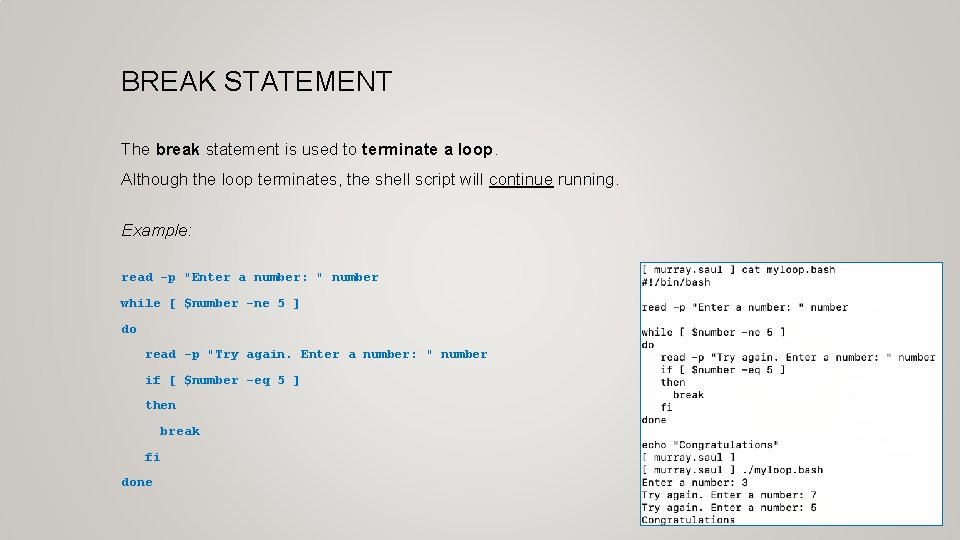
BREAK STATEMENT The break statement is used to terminate a loop. Although the loop terminates, the shell script will continue running. Example: read -p "Enter a number: " number while [ $number -ne 5 ] do read -p "Try again. Enter a number: " number if [ $number -eq 5 ] then break fi done
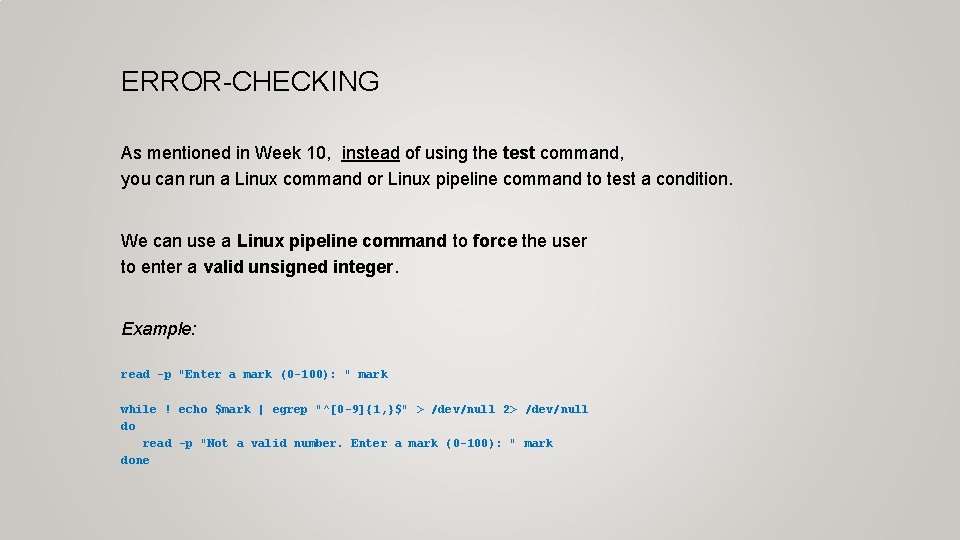
ERROR-CHECKING As mentioned in Week 10, instead of using the test command, you can run a Linux command or Linux pipeline command to test a condition. We can use a Linux pipeline command to force the user to enter a valid unsigned integer. Example: read -p "Enter a mark (0 -100): " mark while ! echo $mark | egrep "^[0 -9]{1, }$" > /dev/null 2> /dev/null do read -p "Not a valid number. Enter a mark (0 -100): " mark done
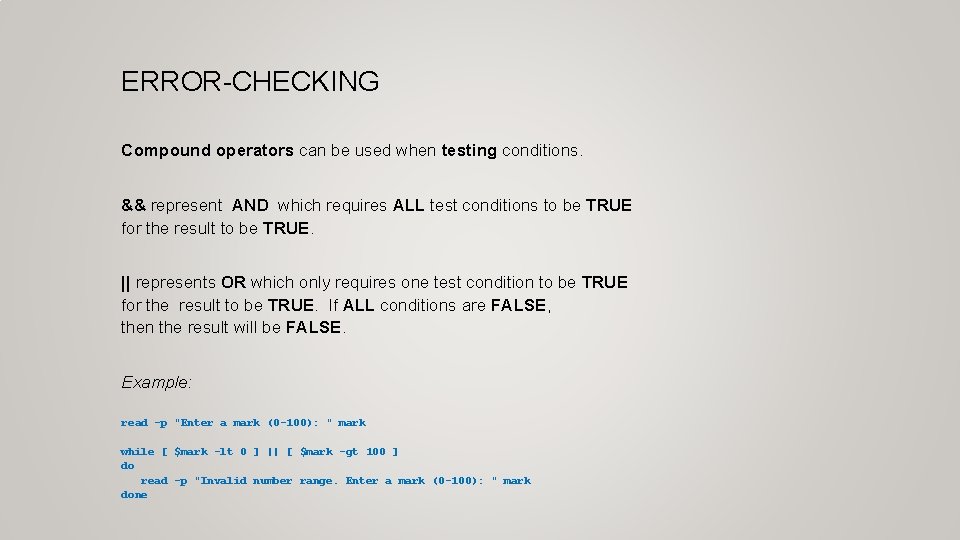
ERROR-CHECKING Compound operators can be used when testing conditions. && represent AND which requires ALL test conditions to be TRUE for the result to be TRUE. || represents OR which only requires one test condition to be TRUE for the result to be TRUE. If ALL conditions are FALSE, then the result will be FALSE. Example: read -p "Enter a mark (0 -100): " mark while [ $mark -lt 0 ] || [ $mark -gt 100 ] do read -p "Invalid number range. Enter a mark (0 -100): " mark done
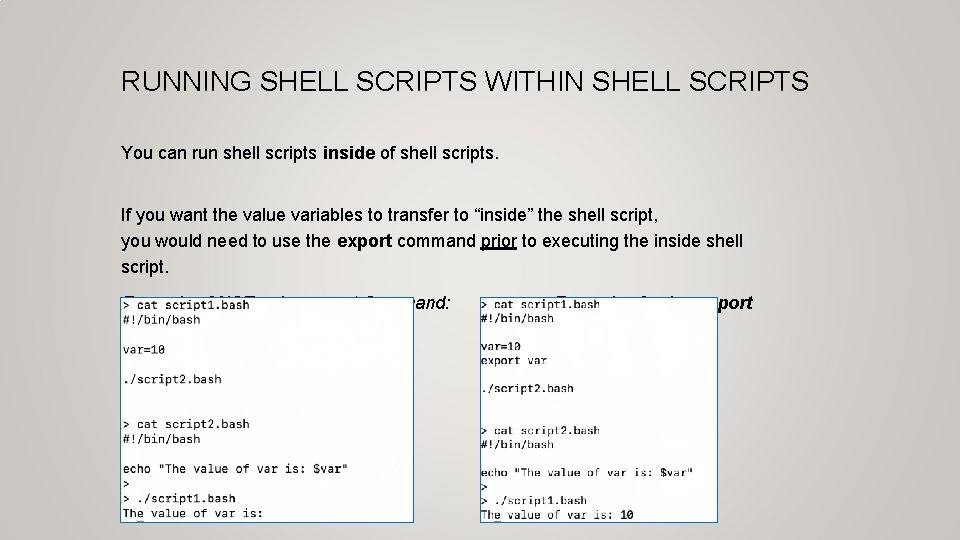
RUNNING SHELL SCRIPTS WITHIN SHELL SCRIPTS You can run shell scripts inside of shell scripts. If you want the value variables to transfer to “inside” the shell script, you would need to use the export command prior to executing the inside shell script. Example of NOT using export Command: Example of using export
ADDITIONAL CONTROL FLOW STATEMENTS Instructor Demonstration Your instructor will demonstrate the use of the exit and break statements as well as the export command.
STARTUP FILES Start-up Files Shell configuration (start-up) files are scripts that are run when you log in, log out, or start a new shell. Start-up files can be used, for example, to set the prompt and screen display, create local variables, or create temporary Linux commands (aliases). The file pathname /etc/profile belongs to the root user and is the first start-up file that executes when you log in, regardless of shell. The /etc/bashrc file is used for setting the default Bash shell environments for users. It is generally NOT used to generate output from commands. User-specific config start-up files are in the user's home directory: ~/. bash_profile runs when you log in ~/. bashrc runs when you start an interactive subshell. You can use ~/. bash_profile to issue commands that produce output (eg. date, echo “hello”)
STARTUP FILES Logout Files There are files that reset or restore the environment or properly shut-down running programs when the user logs out of their shell. User-specific logout start-up files are in the user's home directory: ~/. bash_logout
STARTUP FILES Instructor Demonstration Your instructor will demonstrate examples of using start-up files.
FURTHER STUDY In order to get efficient in working in the Linux environment requires practice and applying what you have learned to administering Linux operating systems including: user management, installing and removing applications, network services and network security. Although you are NOT required to perform Linux administration for this course, there are useful course notes and TUTORIALS for advanced Linux server administration that have been created for the Networking / Computer Support Specialist stream: • OPS 245: Basic Linux Server Administration • OPS 335: Advanced Linux Server Administration Take care and good luck in your future endeavours : )
ADDITIONAL CONTROL FLOW STATEMENTS / FEATURES Getting Practice To get practice to help perform assignment #3, perform Week 12 Tutorial: • INVESTIGATION 1: ADDITIONAL LOGIC STATEMENTS • INVESTIGATION 2: ADDITIONAL LOOPING STATEMENTS • INVESTIGATION 3: USING STARTUP FILES • LINUX PRACTICE QUESTIONS (Questions 1 - 8) Complete Assignment #3