
Week 11 Database Management System READING Chapter 12
Week 11: Database Management System • READING: Chapter 12. 3 1
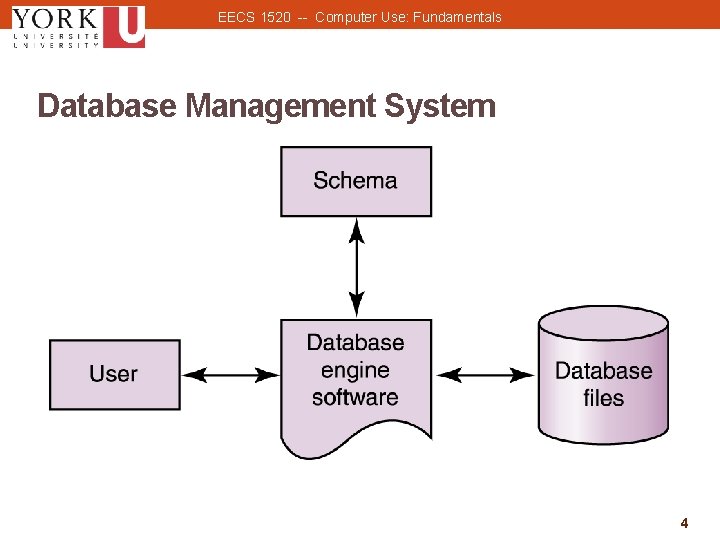
EECS 1520 -- Computer Use: Fundamentals Database Management System • Database: A structured set of data • Database Management System (DBMS): A combination of software and data, including: • Physical database: A collection of files that contain the data • Database engine: software that supports access to and modification of the database contents • Database schema: a specification of the logical structure of the data stored in the database 2 2
EECS 1520 -- Computer Use: Fundamentals Database Management System • Specialized database languages allow the user to: • specify the structure of data • add, modify, and delete data; • query the database to retrieve specific stored data 3 3
EECS 1520 -- Computer Use: Fundamentals Database Management System 4 4
EECS 1520 -- Computer Use: Fundamentals Database Management System • A schema is a description of the entire database structure used by the database software to maintain the database • A subschema is a description of only that part of the database that is particular to a user’s needs 5 5
EECS 1520 -- Computer Use: Fundamentals Database Management System • A layered approach hides the complexities of database implementation: • User sees data in terms of the applications • The application sees data in terms of the database model • The “DBMS” sees data as it is organized 6 6
EECS 1520 -- Computer Use: Fundamentals Database Management System • Advantages of the layered approach include : ü Simplification of the design process ü Better control of access ü Data independence ü Applications can be written in terms of simple, conceptual views of the data – the database model 7 7
EECS 1520 -- Computer Use: Fundamentals Database Models • A database model is a conceptual view of how to organize and manipulate data • The most popular one is the Relational Model 8 8
EECS 1520 -- Computer Use: Fundamentals Relational Model • In a “Relational DBMS”, the data items, and the relationships among them, are organized into rectangular tables: As with spreadsheets, these tables consist of rows and columns. • Each table is called a relation • The rows are called tuples or records • The columns are called attributes 9 9
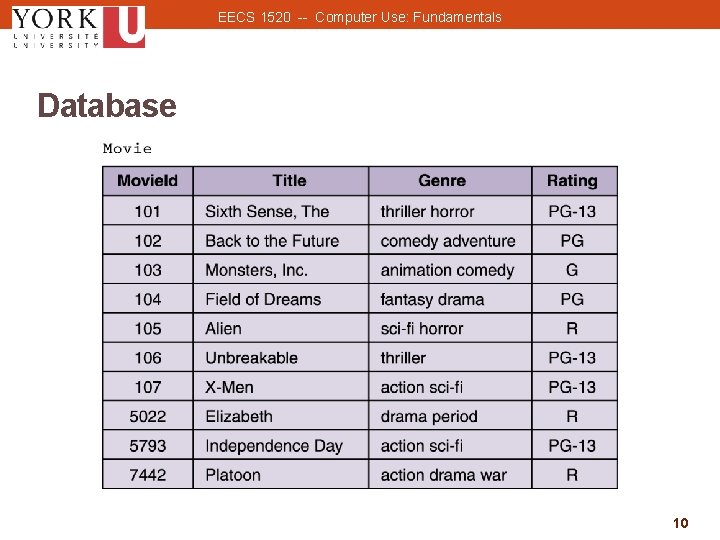
EECS 1520 -- Computer Use: Fundamentals Database 10 10
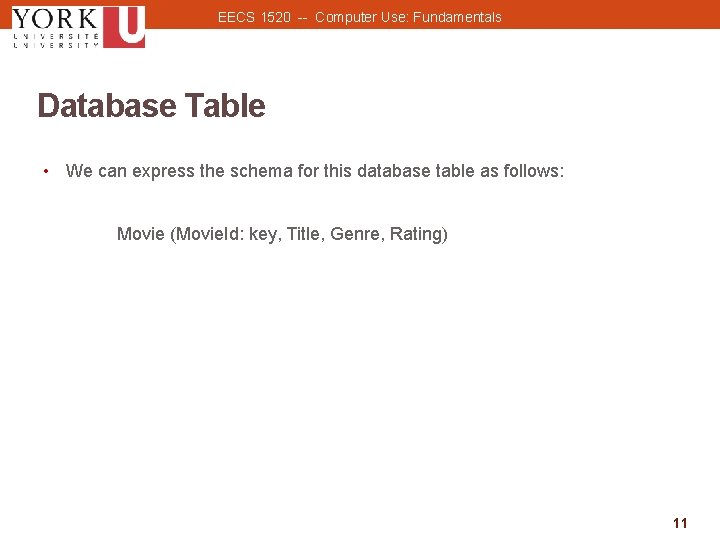
EECS 1520 -- Computer Use: Fundamentals Database Table • We can express the schema for this database table as follows: Movie (Movie. Id: key, Title, Genre, Rating) 11 11

EECS 1520 -- Computer Use: Fundamentals Database Table • A partial CUSTOMER table: 12 12
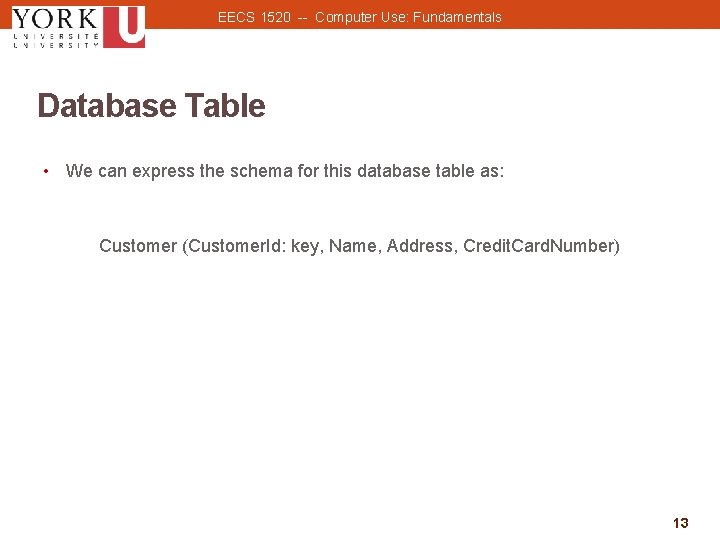
EECS 1520 -- Computer Use: Fundamentals Database Table • We can express the schema for this database table as: Customer (Customer. Id: key, Name, Address, Credit. Card. Number) 13 13
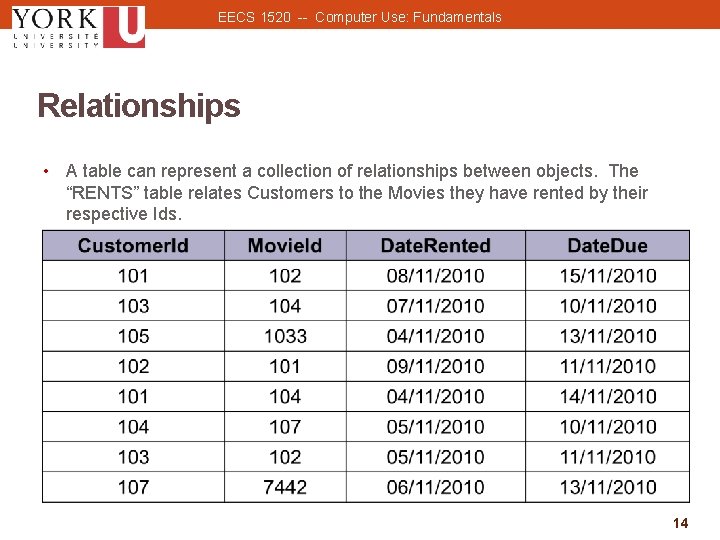
EECS 1520 -- Computer Use: Fundamentals Relationships • A table can represent a collection of relationships between objects. The “RENTS” table relates Customers to the Movies they have rented by their respective Ids. 14 14
EECS 1520 -- Computer Use: Fundamentals Database Table • We can express the schema for a relationship: Rents (Customer. Id, Movie. Id, Date. Rented, Date. Due) • Note: the absence of a key field 15 15
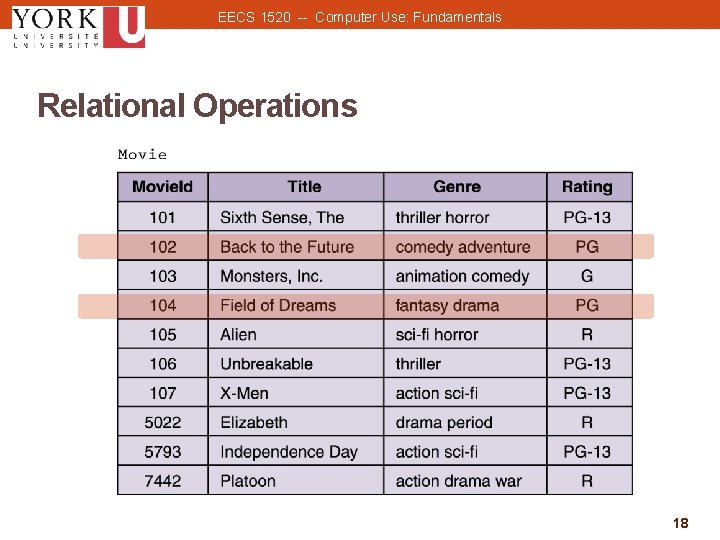
EECS 1520 -- Computer Use: Fundamentals Relational Operations • There are 3 fundamental operations that can be used to manipulate the tables in a database: • SELECT Extracts rows (tuples) from a table (relation) • PROJECT Extracts columns (attributes) from a table (relation) • JOIN Combines 2 tables (relations) into 1 16 16
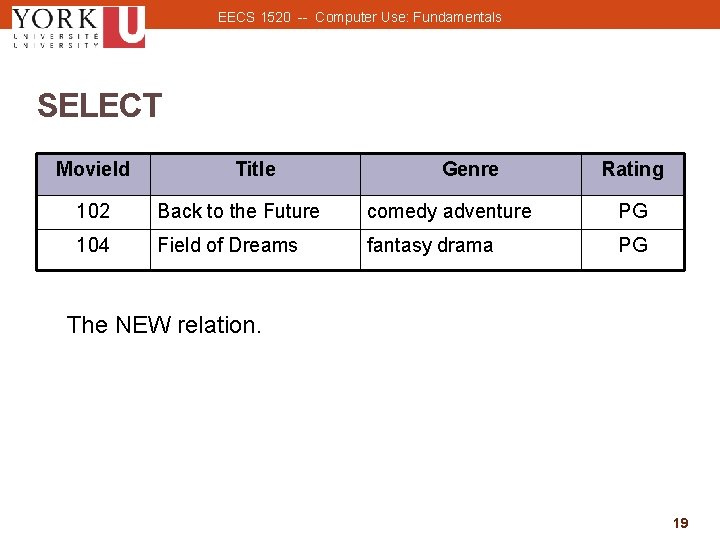
EECS 1520 -- Computer Use: Fundamentals Relational Operations • We can express these operations with a simple syntax. NEW ← SELECT from MOVIE where RATING = “PG” • This operation creates a new relation (named NEW) by extracting all rows from the MOVIE table that have a RATING of PG. 17 17
EECS 1520 -- Computer Use: Fundamentals Relational Operations 18 18
EECS 1520 -- Computer Use: Fundamentals SELECT Movie. Id Title Genre Rating 102 Back to the Future comedy adventure PG 104 Field of Dreams fantasy drama PG The NEW relation. 19 19
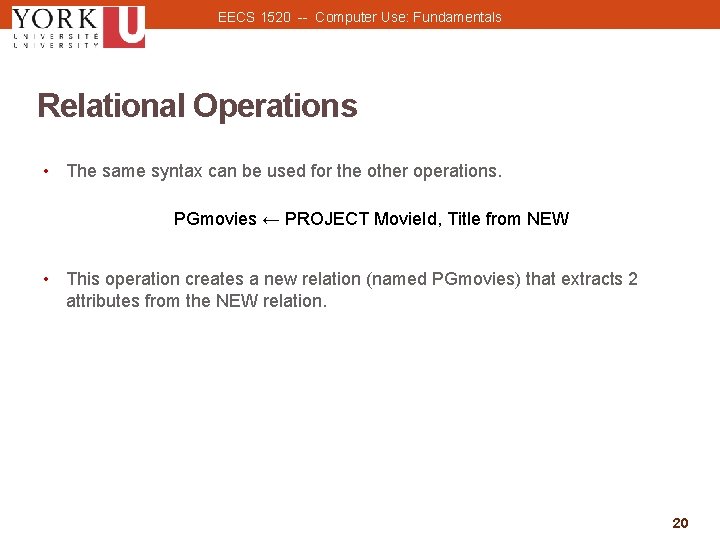
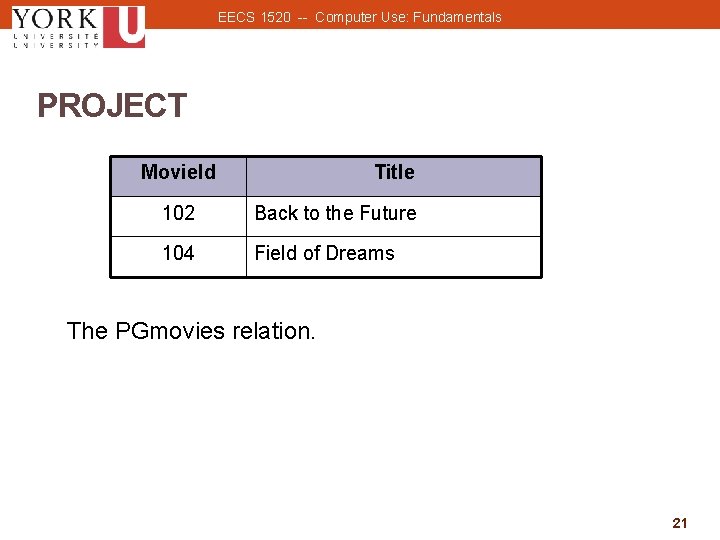
EECS 1520 -- Computer Use: Fundamentals Relational Operations • The same syntax can be used for the other operations. PGmovies ← PROJECT Movie. Id, Title from NEW • This operation creates a new relation (named PGmovies) that extracts 2 attributes from the NEW relation. 20 20
EECS 1520 -- Computer Use: Fundamentals PROJECT Movie. Id Title 102 Back to the Future 104 Field of Dreams The PGmovies relation. 21 21
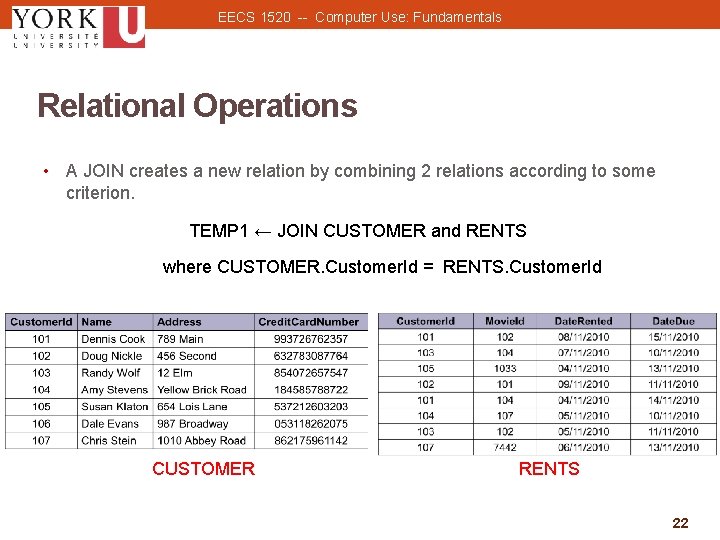
EECS 1520 -- Computer Use: Fundamentals Relational Operations • A JOIN creates a new relation by combining 2 relations according to some criterion. TEMP 1 ← JOIN CUSTOMER and RENTS where CUSTOMER. Customer. Id = RENTS. Customer. Id CUSTOMER RENTS 22 22
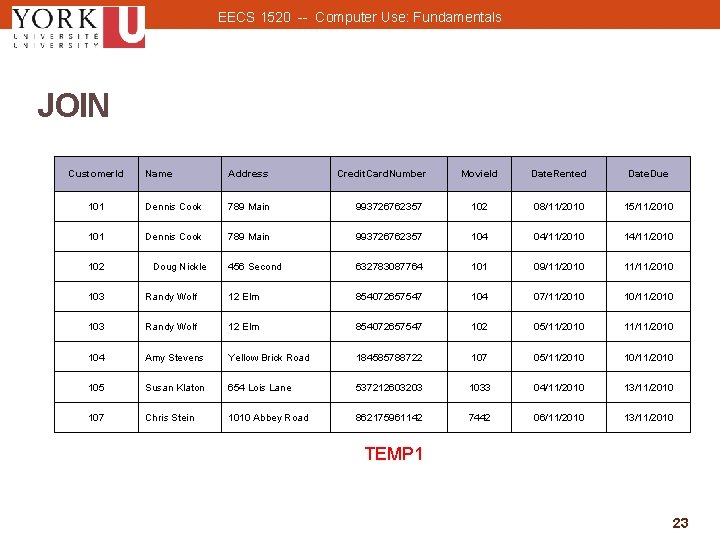
EECS 1520 -- Computer Use: Fundamentals JOIN Customer. Id Name Address 101 Dennis Cook 789 Main 101 Dennis Cook 102 Doug Nickle Credit. Card. Number Movie. Id Date. Rented Date. Due 993726762357 102 08/11/2010 15/11/2010 789 Main 993726762357 104 04/11/2010 14/11/2010 456 Second 632783087764 101 09/11/2010 11/11/2010 103 Randy Wolf 12 Elm 854072657547 104 07/11/2010 103 Randy Wolf 12 Elm 854072657547 102 05/11/2010 11/11/2010 104 Amy Stevens Yellow Brick Road 184585788722 107 05/11/2010 105 Susan Klaton 654 Lois Lane 537212603203 1033 04/11/2010 13/11/2010 107 Chris Stein 1010 Abbey Road 862175961142 7442 06/11/2010 13/11/2010 TEMP 1 23 23
EECS 1520 -- Computer Use: Fundamentals Relational Operations • The PROJECT operation can be used to remove the attributes we don’t want… RENTALS ← PROJECT Name, Address, Movie. Id from TEMP 1 24 24
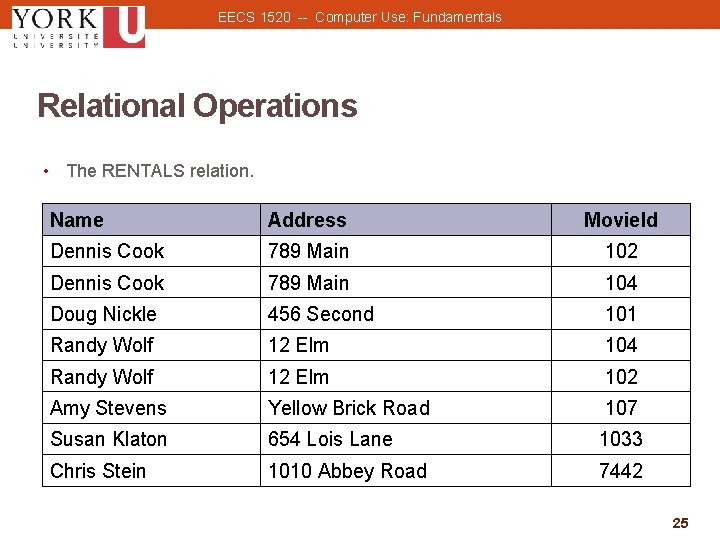
EECS 1520 -- Computer Use: Fundamentals Relational Operations • The RENTALS relation. Name Address Movie. Id Dennis Cook 789 Main 102 Dennis Cook 789 Main 104 Doug Nickle 456 Second 101 Randy Wolf 12 Elm 104 Randy Wolf 12 Elm 102 Amy Stevens Yellow Brick Road 107 Susan Klaton 654 Lois Lane 1033 Chris Stein 1010 Abbey Road 7442 25 25
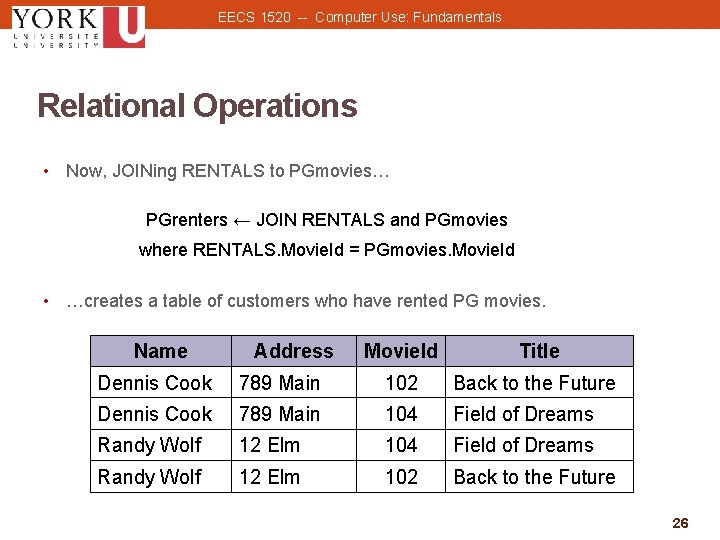
EECS 1520 -- Computer Use: Fundamentals Relational Operations • Now, JOINing RENTALS to PGmovies… PGrenters ← JOIN RENTALS and PGmovies where RENTALS. Movie. Id = PGmovies. Movie. Id • …creates a table of customers who have rented PG movies. Name Address Movie. Id Title Dennis Cook 789 Main 102 Back to the Future Dennis Cook 789 Main 104 Field of Dreams Randy Wolf 12 Elm 102 Back to the Future 26 26
EECS 1520 -- Computer Use: Fundamentals Structured Query Language • Structured Query Language (SQL) A comprehensive database language for managing relational databases. 27 27
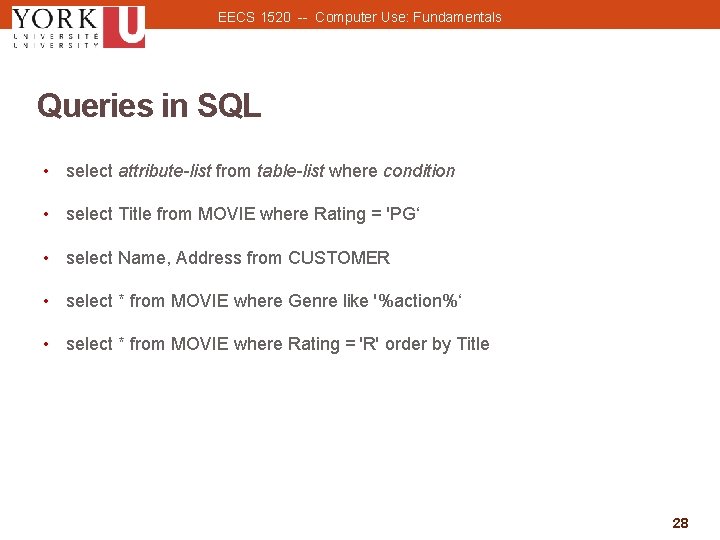
EECS 1520 -- Computer Use: Fundamentals Queries in SQL • select attribute-list from table-list where condition • select Title from MOVIE where Rating = 'PG‘ • select Name, Address from CUSTOMER • select * from MOVIE where Genre like '%action%‘ • select * from MOVIE where Rating = 'R' order by Title 28 28
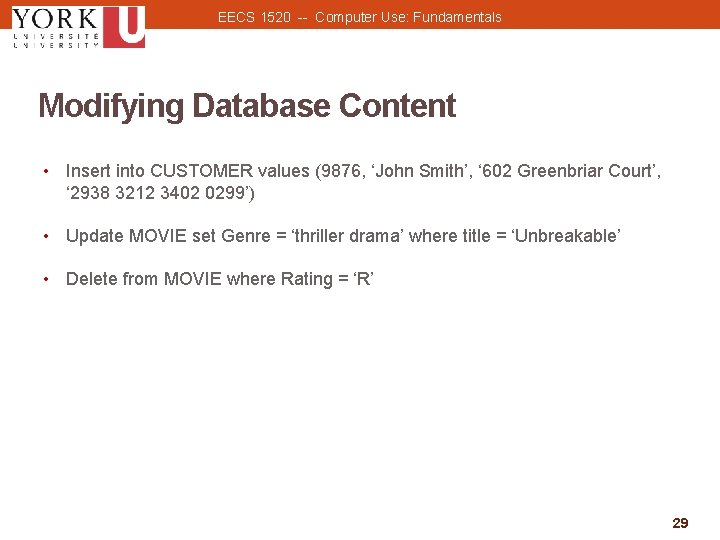
EECS 1520 -- Computer Use: Fundamentals Modifying Database Content • Insert into CUSTOMER values (9876, ‘John Smith’, ‘ 602 Greenbriar Court’, ‘ 2938 3212 3402 0299’) • Update MOVIE set Genre = ‘thriller drama’ where title = ‘Unbreakable’ • Delete from MOVIE where Rating = ‘R’ 29 29
EECS 1520 -- Computer Use: Fundamentals Database Design • Entity-relationship (ER) modeling • A popular technique for designing relational databases. ER Diagram Chief tool used for ER modeling. Captures the important record types, attributes, and relationships in a graphical form. 30 30
EECS 1520 -- Computer Use: Fundamentals Database Design • These designations show the cardinality constraint of the relationship: 31 31
- Slides: 31