
WEBPROG MIDTERM Lecture 1 BUILTIN JAVASCRIPT OBJECTS String
WEBPROG MIDTERM Lecture 1

BUILT-IN JAVASCRIPT OBJECTS
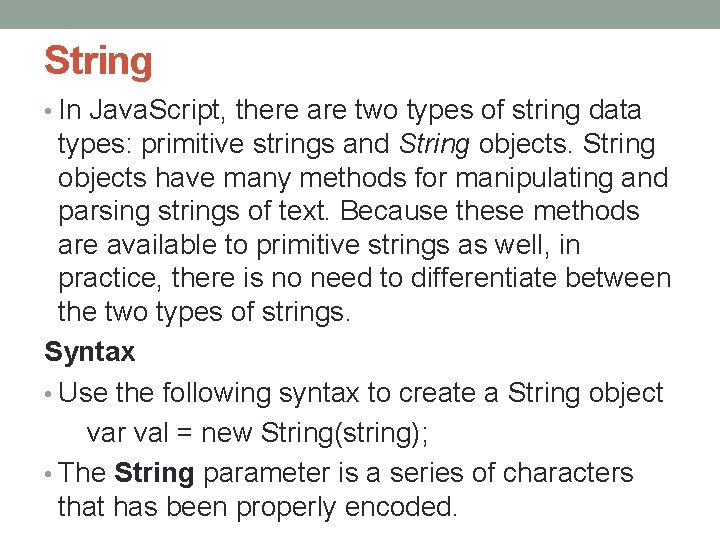
String • In Java. Script, there are two types of string data types: primitive strings and String objects have many methods for manipulating and parsing strings of text. Because these methods are available to primitive strings as well, in practice, there is no need to differentiate between the two types of strings. Syntax • Use the following syntax to create a String object var val = new String(string); • The String parameter is a series of characters that has been properly encoded.
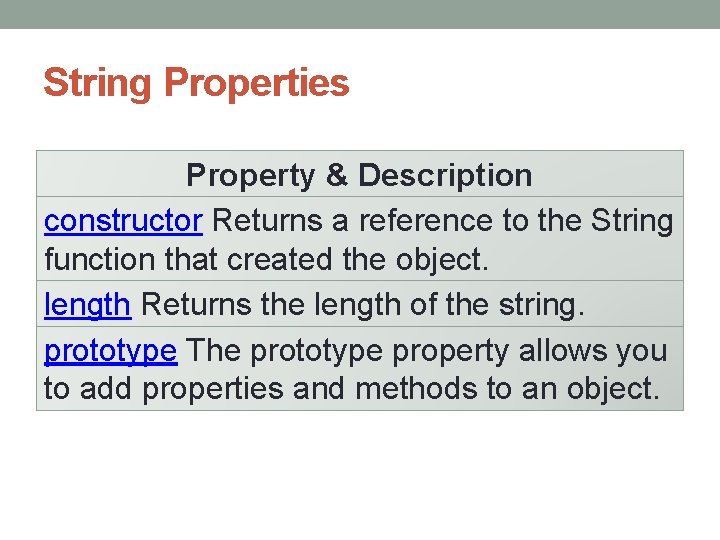
String Properties Property & Description constructor Returns a reference to the String function that created the object. length Returns the length of the string. prototype The prototype property allows you to add properties and methods to an object.
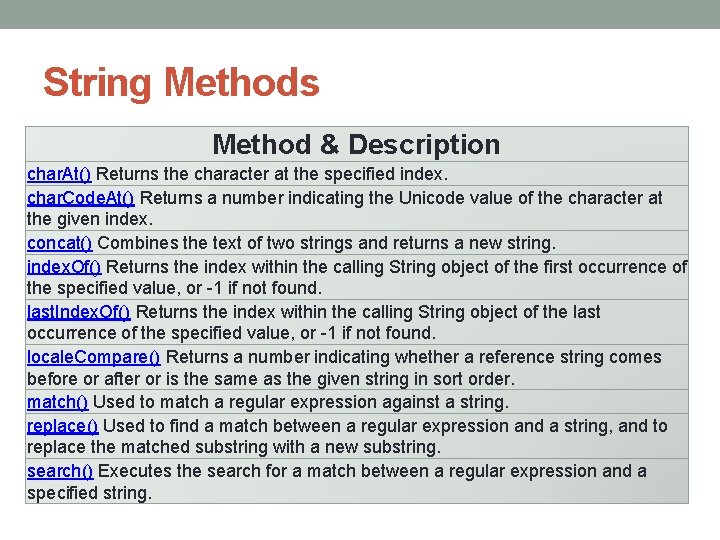
String Methods Method & Description char. At() Returns the character at the specified index. char. Code. At() Returns a number indicating the Unicode value of the character at the given index. concat() Combines the text of two strings and returns a new string. index. Of() Returns the index within the calling String object of the first occurrence of the specified value, or -1 if not found. last. Index. Of() Returns the index within the calling String object of the last occurrence of the specified value, or -1 if not found. locale. Compare() Returns a number indicating whether a reference string comes before or after or is the same as the given string in sort order. match() Used to match a regular expression against a string. replace() Used to find a match between a regular expression and a string, and to replace the matched substring with a new substring. search() Executes the search for a match between a regular expression and a specified string.
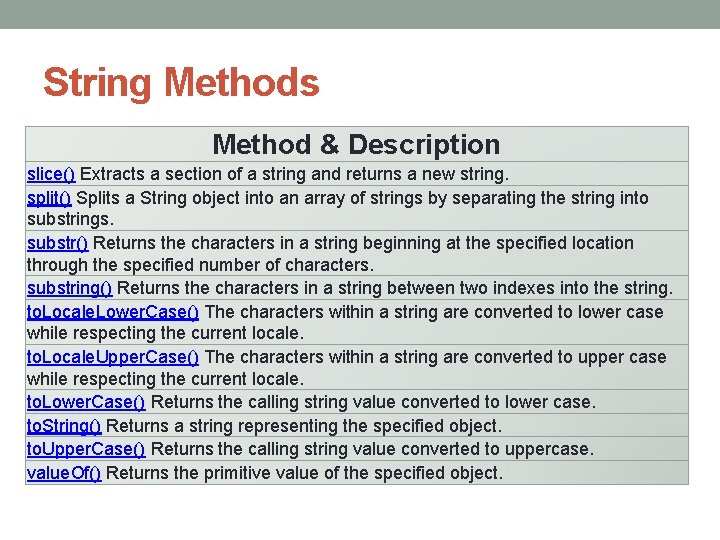
String Methods Method & Description slice() Extracts a section of a string and returns a new string. split() Splits a String object into an array of strings by separating the string into substrings. substr() Returns the characters in a string beginning at the specified location through the specified number of characters. substring() Returns the characters in a string between two indexes into the string. to. Locale. Lower. Case() The characters within a string are converted to lower case while respecting the current locale. to. Locale. Upper. Case() The characters within a string are converted to upper case while respecting the current locale. to. Lower. Case() Returns the calling string value converted to lower case. to. String() Returns a string representing the specified object. to. Upper. Case() Returns the calling string value converted to uppercase. value. Of() Returns the primitive value of the specified object.
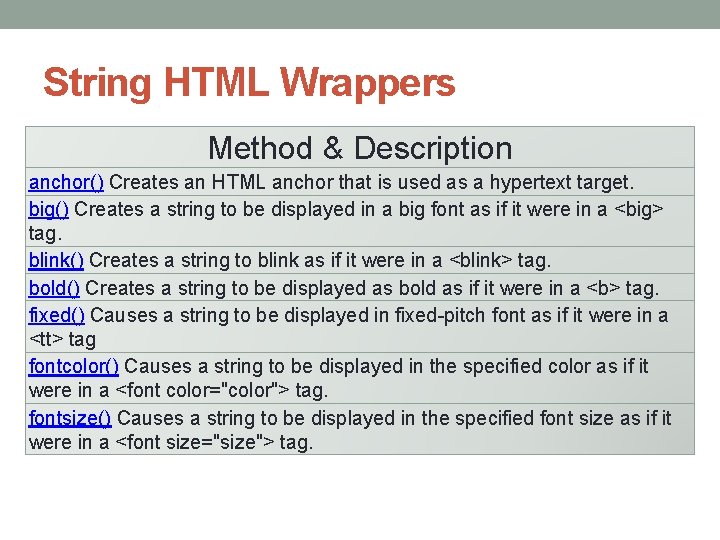
String HTML Wrappers Method & Description anchor() Creates an HTML anchor that is used as a hypertext target. big() Creates a string to be displayed in a big font as if it were in a <big> tag. blink() Creates a string to blink as if it were in a <blink> tag. bold() Creates a string to be displayed as bold as if it were in a <b> tag. fixed() Causes a string to be displayed in fixed-pitch font as if it were in a <tt> tag fontcolor() Causes a string to be displayed in the specified color as if it were in a <font color="color"> tag. fontsize() Causes a string to be displayed in the specified font size as if it were in a <font size="size"> tag.
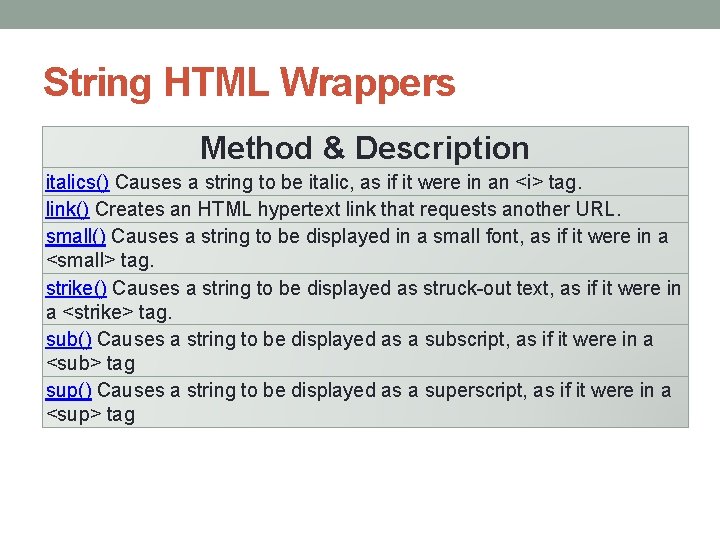
String HTML Wrappers Method & Description italics() Causes a string to be italic, as if it were in an <i> tag. link() Creates an HTML hypertext link that requests another URL. small() Causes a string to be displayed in a small font, as if it were in a <small> tag. strike() Causes a string to be displayed as struck-out text, as if it were in a <strike> tag. sub() Causes a string to be displayed as a subscript, as if it were in a <sub> tag sup() Causes a string to be displayed as a superscript, as if it were in a <sup> tag
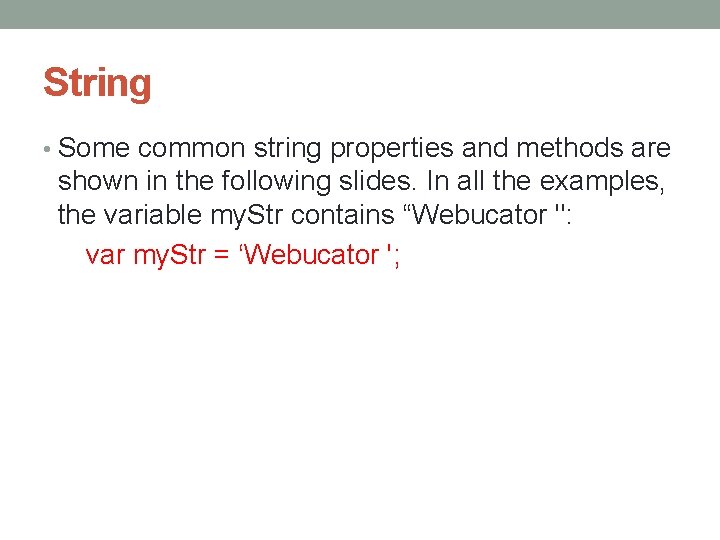
String • Some common string properties and methods are shown in the following slides. In all the examples, the variable my. Str contains “Webucator ": var my. Str = ‘Webucator ';
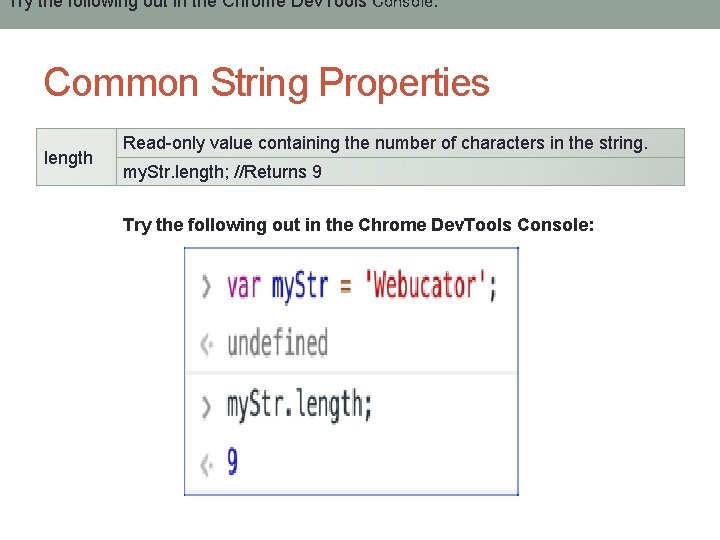
Try the following out in the Chrome Dev. Tools Console: Common String Properties length Read-only value containing the number of characters in the string. my. Str. length; //Returns 9 Try the following out in the Chrome Dev. Tools Console:
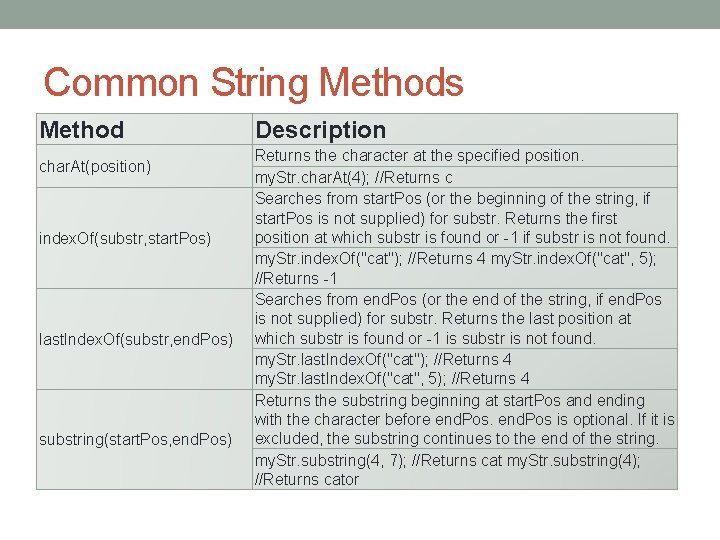
Common String Methods Method char. At(position) index. Of(substr, start. Pos) last. Index. Of(substr, end. Pos) substring(start. Pos, end. Pos) Description Returns the character at the specified position. my. Str. char. At(4); //Returns c Searches from start. Pos (or the beginning of the string, if start. Pos is not supplied) for substr. Returns the first position at which substr is found or -1 if substr is not found. my. Str. index. Of("cat"); //Returns 4 my. Str. index. Of("cat", 5); //Returns -1 Searches from end. Pos (or the end of the string, if end. Pos is not supplied) for substr. Returns the last position at which substr is found or -1 is substr is not found. my. Str. last. Index. Of("cat"); //Returns 4 my. Str. last. Index. Of("cat", 5); //Returns 4 Returns the substring beginning at start. Pos and ending with the character before end. Pos is optional. If it is excluded, the substring continues to the end of the string. my. Str. substring(4, 7); //Returns cat my. Str. substring(4); //Returns cator
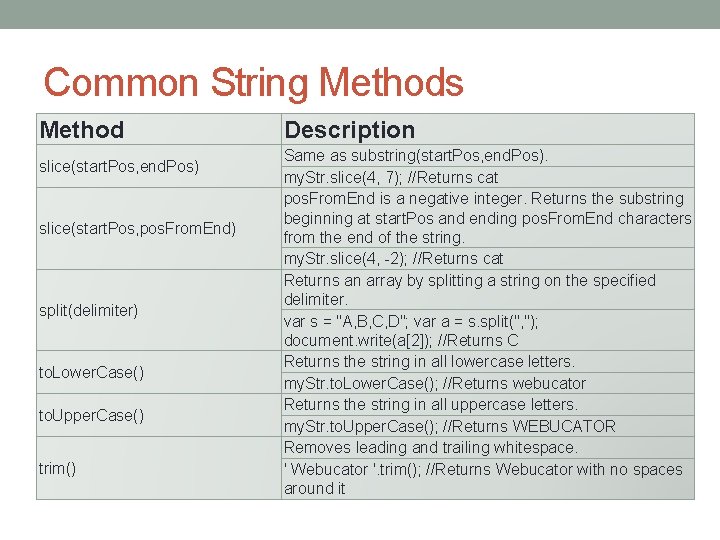
Common String Methods Method slice(start. Pos, end. Pos) slice(start. Pos, pos. From. End) split(delimiter) to. Lower. Case() to. Upper. Case() trim() Description Same as substring(start. Pos, end. Pos). my. Str. slice(4, 7); //Returns cat pos. From. End is a negative integer. Returns the substring beginning at start. Pos and ending pos. From. End characters from the end of the string. my. Str. slice(4, -2); //Returns cat Returns an array by splitting a string on the specified delimiter. var s = "A, B, C, D"; var a = s. split(", "); document. write(a[2]); //Returns C Returns the string in all lowercase letters. my. Str. to. Lower. Case(); //Returns webucator Returns the string in all uppercase letters. my. Str. to. Upper. Case(); //Returns WEBUCATOR Removes leading and trailing whitespace. ' Webucator '. trim(); //Returns Webucator with no spaces around it
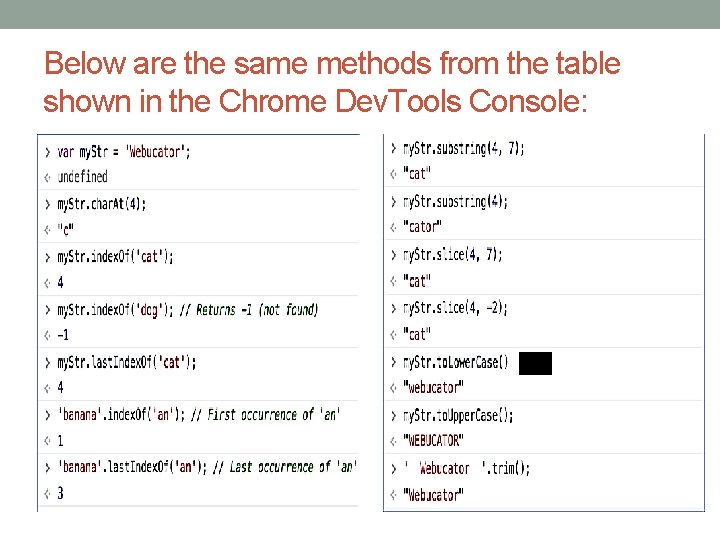
Below are the same methods from the table shown in the Chrome Dev. Tools Console:
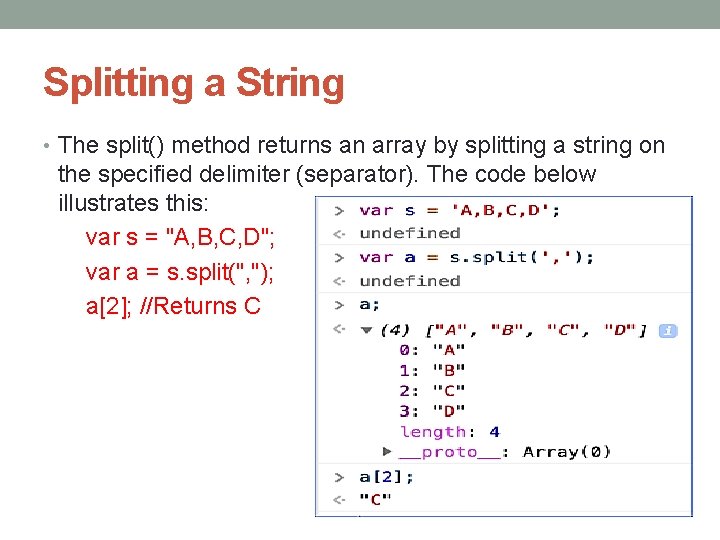
Splitting a String • The split() method returns an array by splitting a string on the specified delimiter (separator). The code below illustrates this: var s = "A, B, C, D"; var a = s. split(", "); a[2]; //Returns C
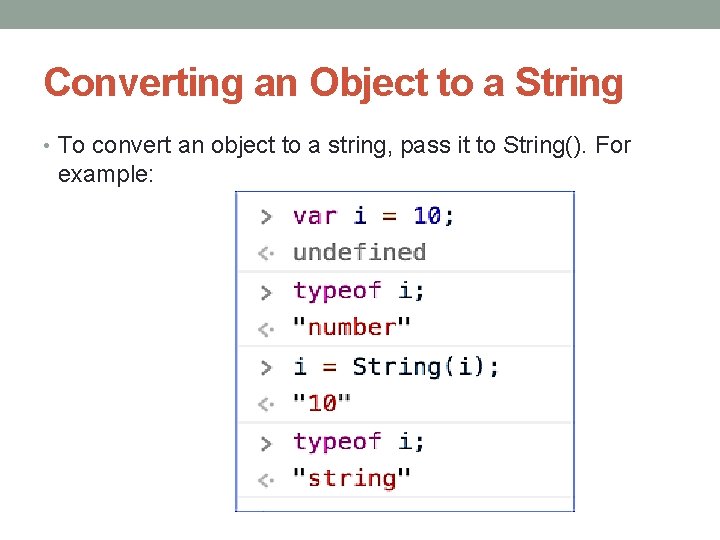
Converting an Object to a String • To convert an object to a string, pass it to String(). For example:
String Documentation • See https: //developer. mozilla. org/en- US/docs/Web/Java. Script/Reference/Global _Objects/String for full documentation on Strings.
The Math Object • The math object provides properties and methods for mathematical constants and functions. Unlike other global objects, Math is not a constructor. All the properties and methods of Math are static and can be called by using Math as an object without creating it. • Thus, you refer to the constant pi as Math. PI and you call the sine function as Math. sin(x), where x is the method's argument. Syntax • The syntax to call the properties and methods of Math are as follows var pi_val = Math. PI; var sine_val = Math. sin(30);
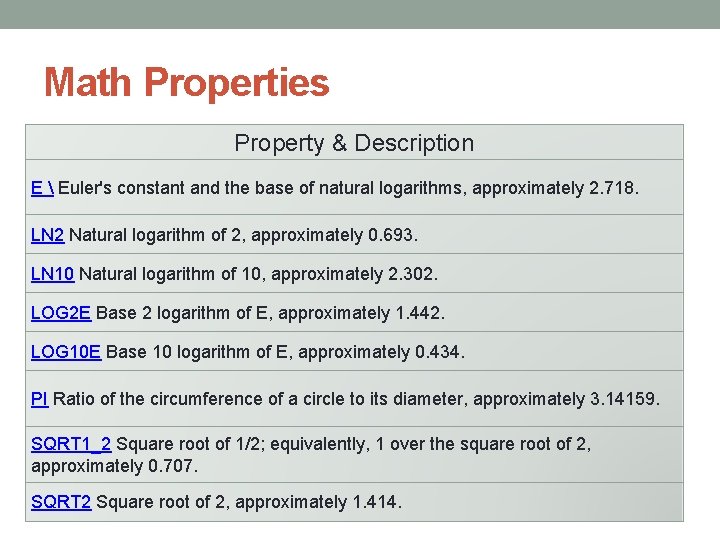
Math Properties Property & Description E Euler's constant and the base of natural logarithms, approximately 2. 718. LN 2 Natural logarithm of 2, approximately 0. 693. LN 10 Natural logarithm of 10, approximately 2. 302. LOG 2 E Base 2 logarithm of E, approximately 1. 442. LOG 10 E Base 10 logarithm of E, approximately 0. 434. PI Ratio of the circumference of a circle to its diameter, approximately 3. 14159. SQRT 1_2 Square root of 1/2; equivalently, 1 over the square root of 2, approximately 0. 707. SQRT 2 Square root of 2, approximately 1. 414.
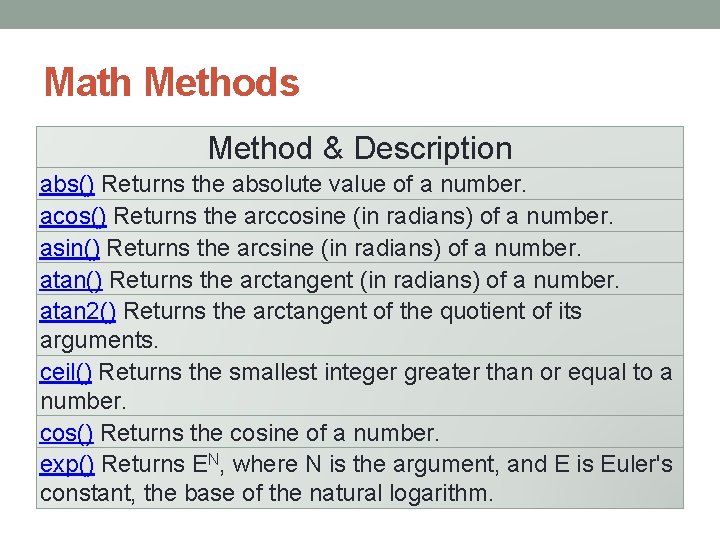
Math Methods Method & Description abs() Returns the absolute value of a number. acos() Returns the arccosine (in radians) of a number. asin() Returns the arcsine (in radians) of a number. atan() Returns the arctangent (in radians) of a number. atan 2() Returns the arctangent of the quotient of its arguments. ceil() Returns the smallest integer greater than or equal to a number. cos() Returns the cosine of a number. exp() Returns EN, where N is the argument, and E is Euler's constant, the base of the natural logarithm.
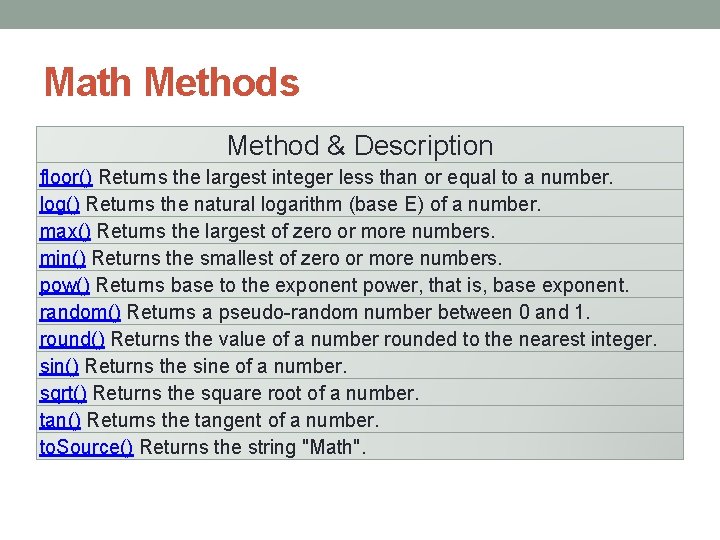
Math Methods Method & Description floor() Returns the largest integer less than or equal to a number. log() Returns the natural logarithm (base E) of a number. max() Returns the largest of zero or more numbers. min() Returns the smallest of zero or more numbers. pow() Returns base to the exponent power, that is, base exponent. random() Returns a pseudo-random number between 0 and 1. round() Returns the value of a number rounded to the nearest integer. sin() Returns the sine of a number. sqrt() Returns the square root of a number. tan() Returns the tangent of a number. to. Source() Returns the string "Math".
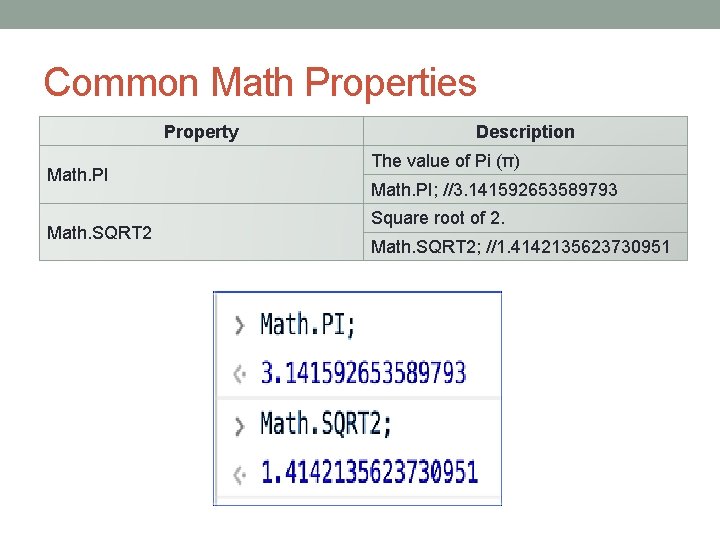
Common Math Properties Property Math. PI Math. SQRT 2 Description The value of Pi (π) Math. PI; //3. 141592653589793 Square root of 2. Math. SQRT 2; //1. 4142135623730951
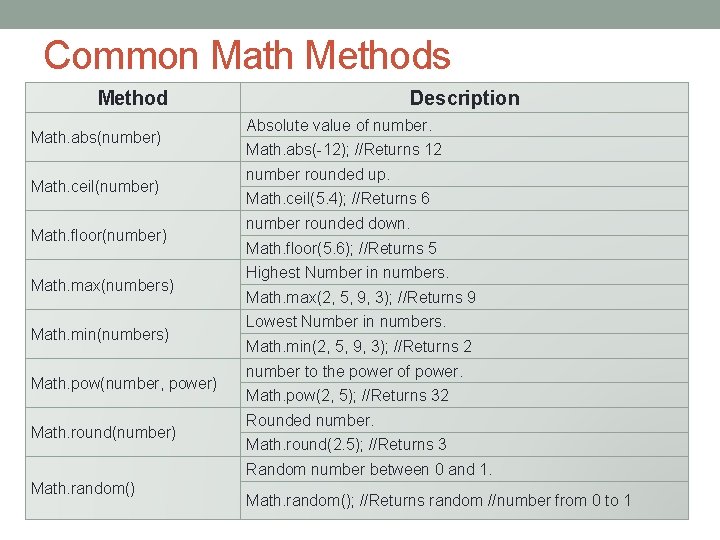
Common Math Methods Method Math. abs(number) Math. ceil(number) Math. floor(number) Math. max(numbers) Math. min(numbers) Math. pow(number, power) Math. round(number) Description Absolute value of number. Math. abs(-12); //Returns 12 number rounded up. Math. ceil(5. 4); //Returns 6 number rounded down. Math. floor(5. 6); //Returns 5 Highest Number in numbers. Math. max(2, 5, 9, 3); //Returns 9 Lowest Number in numbers. Math. min(2, 5, 9, 3); //Returns 2 number to the power of power. Math. pow(2, 5); //Returns 32 Rounded number. Math. round(2. 5); //Returns 3 Random number between 0 and 1. Math. random(); //Returns random //number from 0 to 1
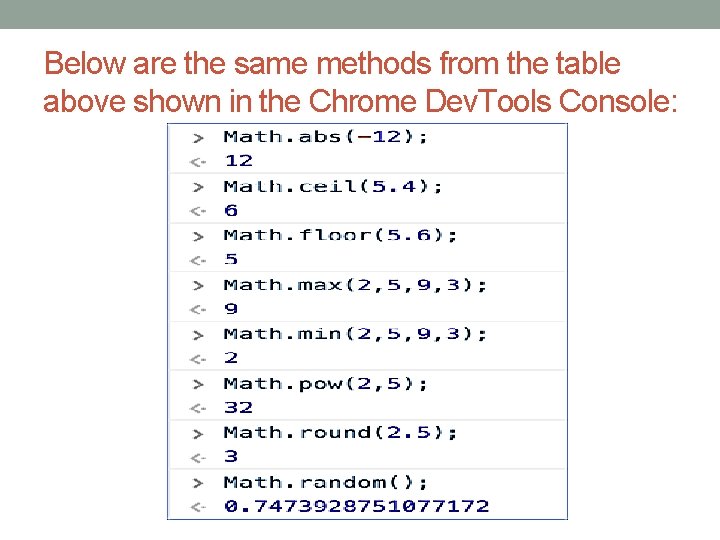
Below are the same methods from the table above shown in the Chrome Dev. Tools Console:
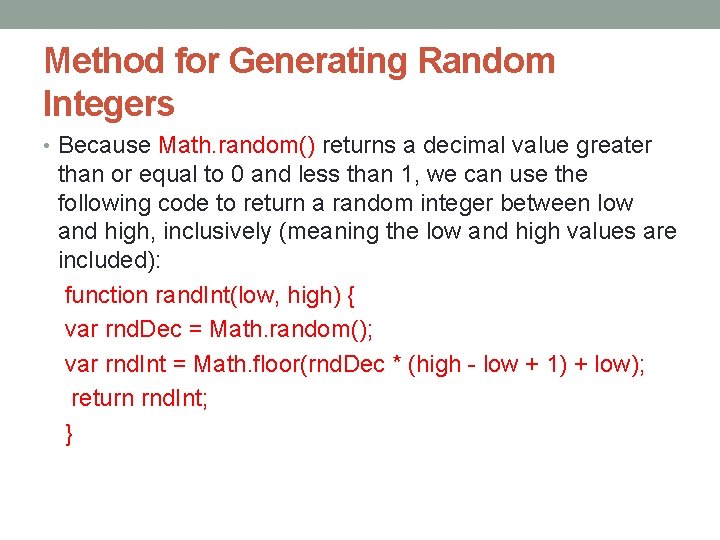
Method for Generating Random Integers • Because Math. random() returns a decimal value greater than or equal to 0 and less than 1, we can use the following code to return a random integer between low and high, inclusively (meaning the low and high values are included): function rand. Int(low, high) { var rnd. Dec = Math. random(); var rnd. Int = Math. floor(rnd. Dec * (high - low + 1) + low); return rnd. Int; }
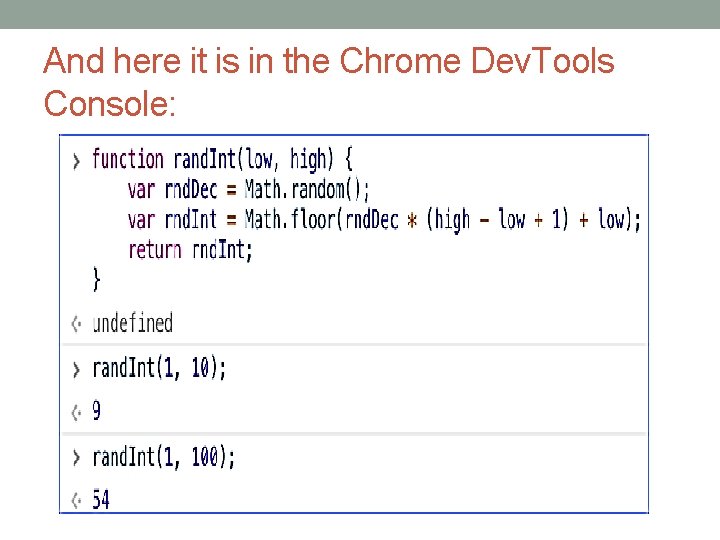
And here it is in the Chrome Dev. Tools Console:
Math Documentation • See https: //developer. mozilla. org/en- US/docs/Web/Java. Script/Reference/Global _Objects/Math for full documentation on Math.
The Date Object • The Date object is a datatype built into the Java. Script language. Date objects are created with the new Date( ) as shown on the next slide. • Once a Date object is created, a number of methods allow you to operate on it. Most methods simply allow you to get and set the year, month, day, hour, minute, second, and millisecond fields of the object, using either local time or UTC (universal, or GMT) time. • The ECMAScript standard requires the Date object to be able to represent any date and time, to millisecond precision, within 100 million days before or after 1/1/1970. This is a range of plus or minus 273, 785 years, so Java. Script can represent date and time till the year 275755.
Date Object Syntax • You can use any of the following syntaxes to create a Date object using Date() constructor. new Date( ) new Date(milliseconds) new Date(datestring) new Date (year, month, date[, hour, minute, second, millisecond ]) • Note − Parameters in the brackets are always optional.
Date Object Parameters Description • No Argument − With no arguments, the Date() constructor creates a Date object set to the current date and time. • milliseconds − When one numeric argument is passed, it is taken as the internal numeric representation of the date in milliseconds, as returned by the get. Time() method. For example, passing the argument 5000 creates a date that represents five seconds past midnight on 1/1/70. • datestring − When one string argument is passed, it is a string representation of a date, in the format accepted by the Date. parse() method.
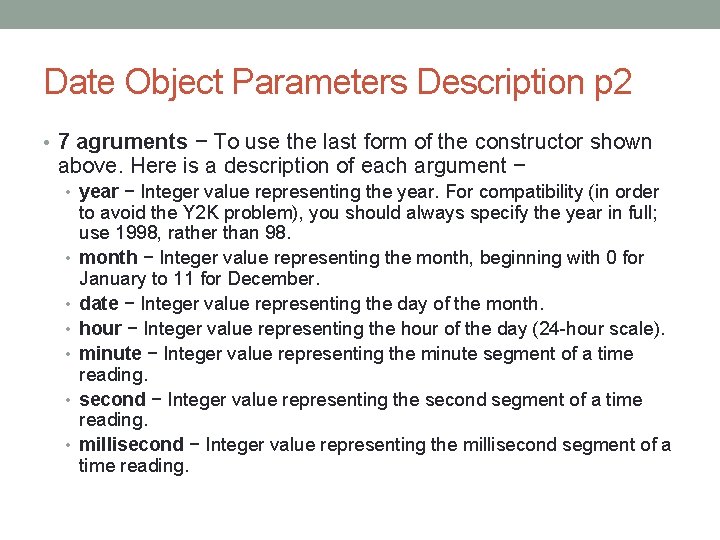
Date Object Parameters Description p 2 • 7 agruments − To use the last form of the constructor shown above. Here is a description of each argument − • year − Integer value representing the year. For compatibility (in order • • • to avoid the Y 2 K problem), you should always specify the year in full; use 1998, rather than 98. month − Integer value representing the month, beginning with 0 for January to 11 for December. date − Integer value representing the day of the month. hour − Integer value representing the hour of the day (24 -hour scale). minute − Integer value representing the minute segment of a time reading. second − Integer value representing the second segment of a time reading. millisecond − Integer value representing the millisecond segment of a time reading.
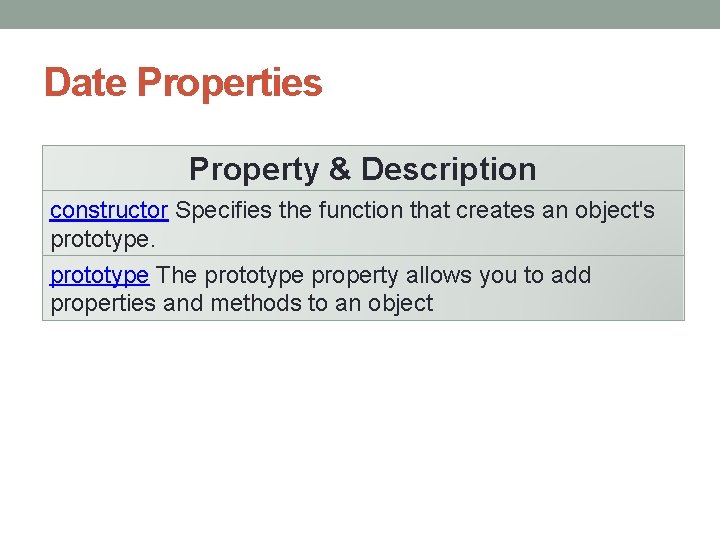
Date Properties Property & Description constructor Specifies the function that creates an object's prototype The prototype property allows you to add properties and methods to an object
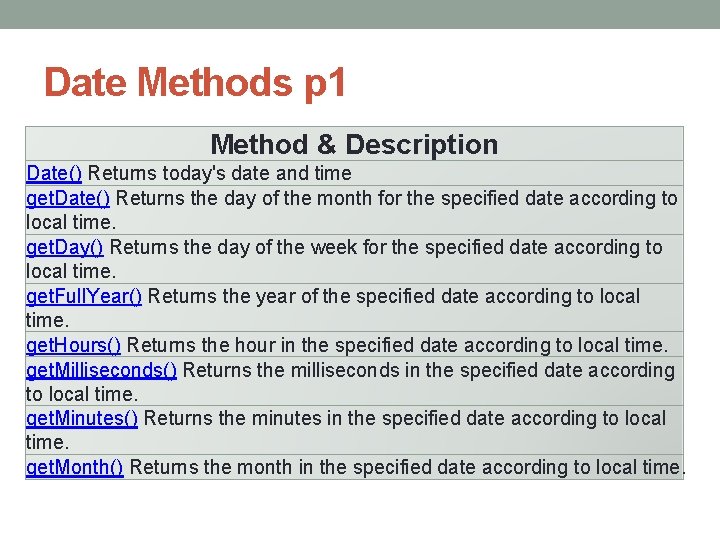
Date Methods p 1 Method & Description Date() Returns today's date and time get. Date() Returns the day of the month for the specified date according to local time. get. Day() Returns the day of the week for the specified date according to local time. get. Full. Year() Returns the year of the specified date according to local time. get. Hours() Returns the hour in the specified date according to local time. get. Milliseconds() Returns the milliseconds in the specified date according to local time. get. Minutes() Returns the minutes in the specified date according to local time. get. Month() Returns the month in the specified date according to local time.
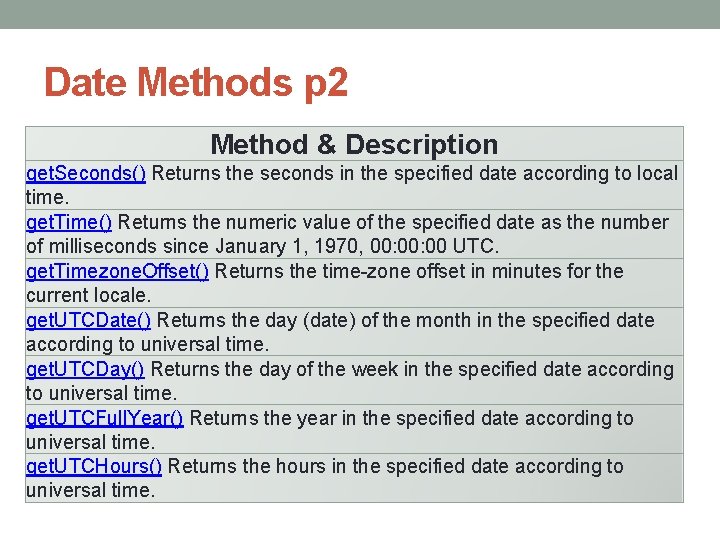
Date Methods p 2 Method & Description get. Seconds() Returns the seconds in the specified date according to local time. get. Time() Returns the numeric value of the specified date as the number of milliseconds since January 1, 1970, 00: 00 UTC. get. Timezone. Offset() Returns the time-zone offset in minutes for the current locale. get. UTCDate() Returns the day (date) of the month in the specified date according to universal time. get. UTCDay() Returns the day of the week in the specified date according to universal time. get. UTCFull. Year() Returns the year in the specified date according to universal time. get. UTCHours() Returns the hours in the specified date according to universal time.
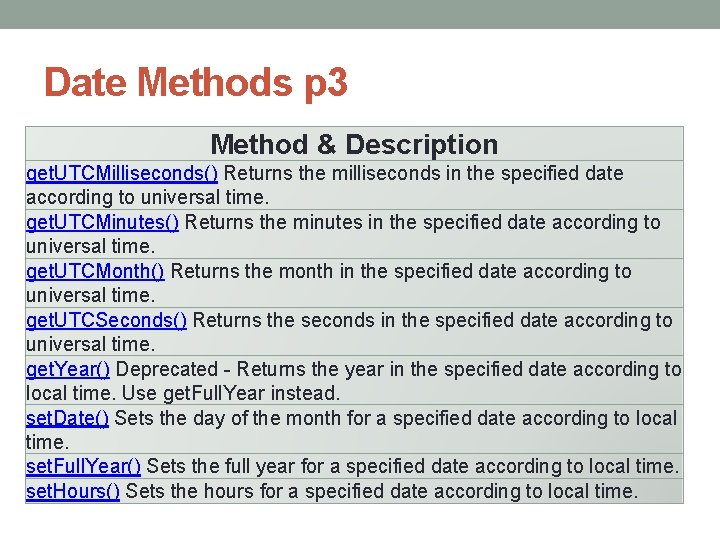
Date Methods p 3 Method & Description get. UTCMilliseconds() Returns the milliseconds in the specified date according to universal time. get. UTCMinutes() Returns the minutes in the specified date according to universal time. get. UTCMonth() Returns the month in the specified date according to universal time. get. UTCSeconds() Returns the seconds in the specified date according to universal time. get. Year() Deprecated - Returns the year in the specified date according to local time. Use get. Full. Year instead. set. Date() Sets the day of the month for a specified date according to local time. set. Full. Year() Sets the full year for a specified date according to local time. set. Hours() Sets the hours for a specified date according to local time.
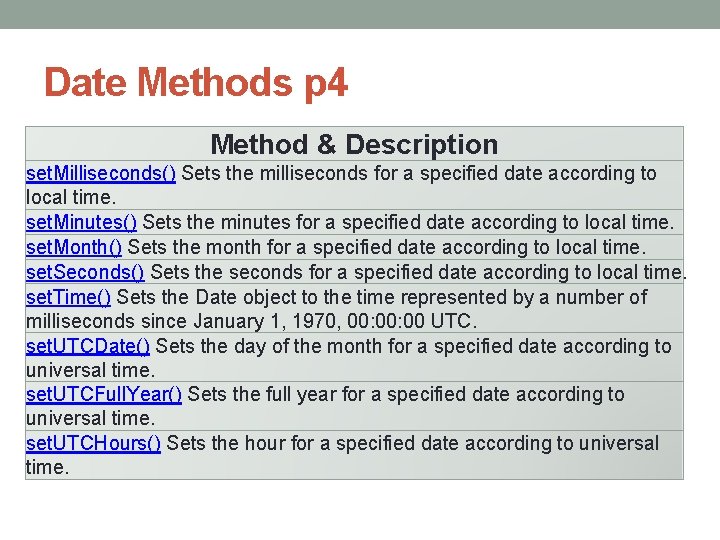
Date Methods p 4 Method & Description set. Milliseconds() Sets the milliseconds for a specified date according to local time. set. Minutes() Sets the minutes for a specified date according to local time. set. Month() Sets the month for a specified date according to local time. set. Seconds() Sets the seconds for a specified date according to local time. set. Time() Sets the Date object to the time represented by a number of milliseconds since January 1, 1970, 00: 00 UTC. set. UTCDate() Sets the day of the month for a specified date according to universal time. set. UTCFull. Year() Sets the full year for a specified date according to universal time. set. UTCHours() Sets the hour for a specified date according to universal time.
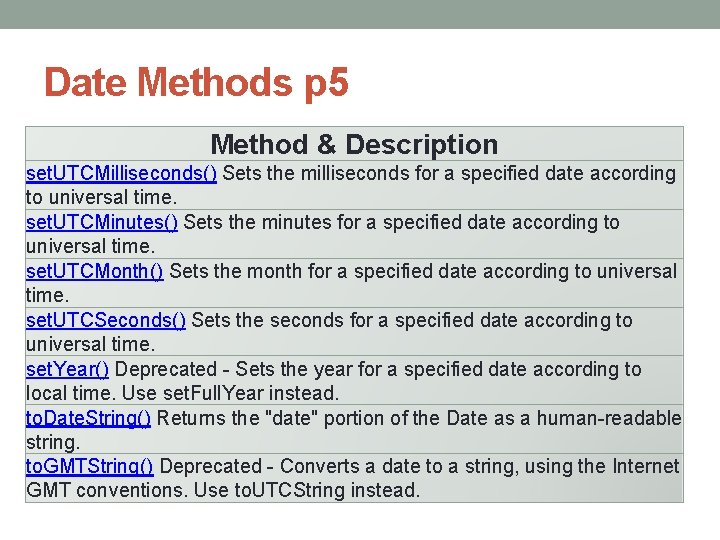
Date Methods p 5 Method & Description set. UTCMilliseconds() Sets the milliseconds for a specified date according to universal time. set. UTCMinutes() Sets the minutes for a specified date according to universal time. set. UTCMonth() Sets the month for a specified date according to universal time. set. UTCSeconds() Sets the seconds for a specified date according to universal time. set. Year() Deprecated - Sets the year for a specified date according to local time. Use set. Full. Year instead. to. Date. String() Returns the "date" portion of the Date as a human-readable string. to. GMTString() Deprecated - Converts a date to a string, using the Internet GMT conventions. Use to. UTCString instead.
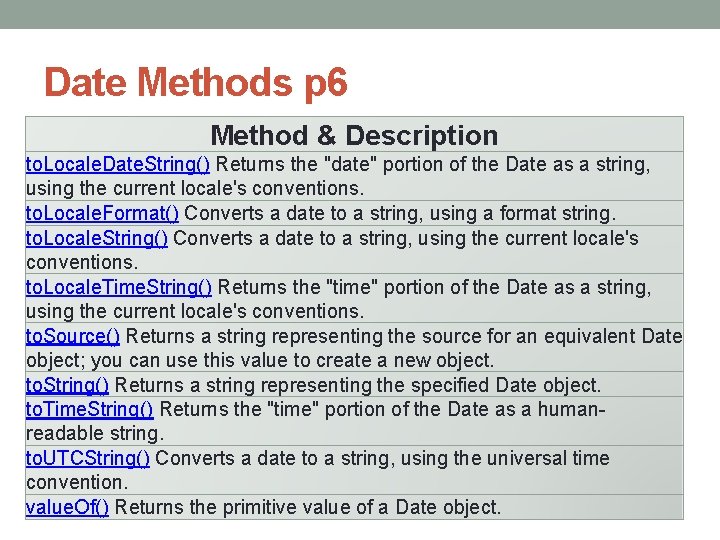
Date Methods p 6 Method & Description to. Locale. Date. String() Returns the "date" portion of the Date as a string, using the current locale's conventions. to. Locale. Format() Converts a date to a string, using a format string. to. Locale. String() Converts a date to a string, using the current locale's conventions. to. Locale. Time. String() Returns the "time" portion of the Date as a string, using the current locale's conventions. to. Source() Returns a string representing the source for an equivalent Date object; you can use this value to create a new object. to. String() Returns a string representing the specified Date object. to. Time. String() Returns the "time" portion of the Date as a humanreadable string. to. UTCString() Converts a date to a string, using the universal time convention. value. Of() Returns the primitive value of a Date object.
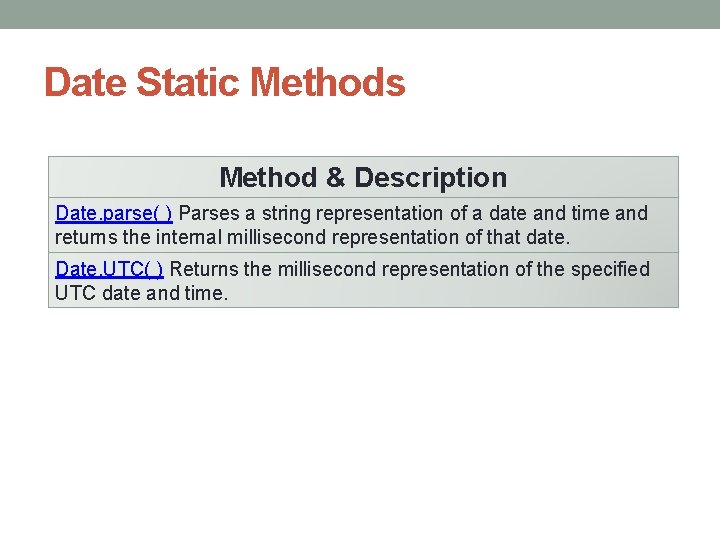
Date Static Methods Method & Description Date. parse( ) Parses a string representation of a date and time and returns the internal millisecond representation of that date. Date. UTC( ) Returns the millisecond representation of the specified UTC date and time.
The Epoch • The epoch is the moment that a computer or computer language considers time to have started. Java. Script considers the epoch to be January 1, 1970 at midnight (1970 -01 -01 00: 00) • Dates are created using the Date() constructor (a special function for creating objects). • Here are some examples of code that creates dates shown in the Chrome Dev. Tools Console:
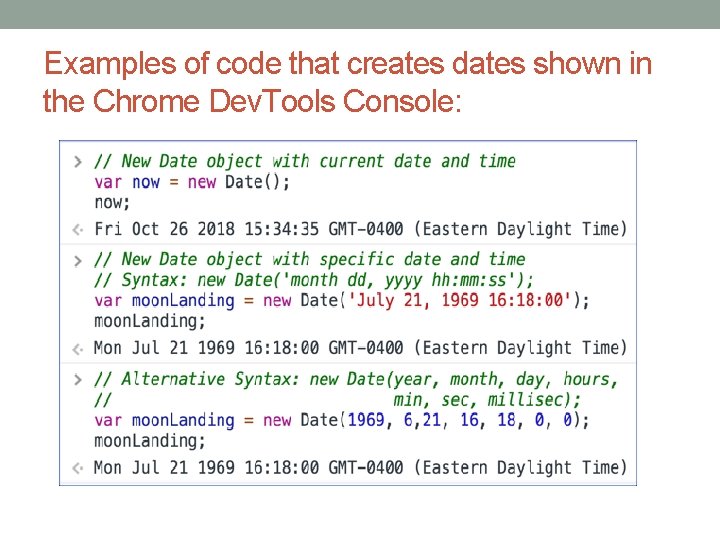
Examples of code that creates dates shown in the Chrome Dev. Tools Console:
A few things to note: 1. 2. 3. 4. 5. To create a Date object containing the current date and time, the Date() constructor takes no arguments. When passing the date as a string to the Date() constructor, the time portion is optional. If it is not included, it defaults to 00: 00. Also, other date formats are acceptable (e. g. , "3/2/2017" and "03 -02 -2017"). When passing date parts to the Date() constructor, dd, hh, mm, ss, and ms are all optional. The default for dd is 1; the other parameters default to 0. Months are numbered from 0 (January) to 11 (December). In the example above, 6 represents July. Some common date methods are shown below. In all the examples, the variable now contains the date "Wed Aug 08 2018 13: 34: 50 GMT-0400 (Eastern Daylight Time)".
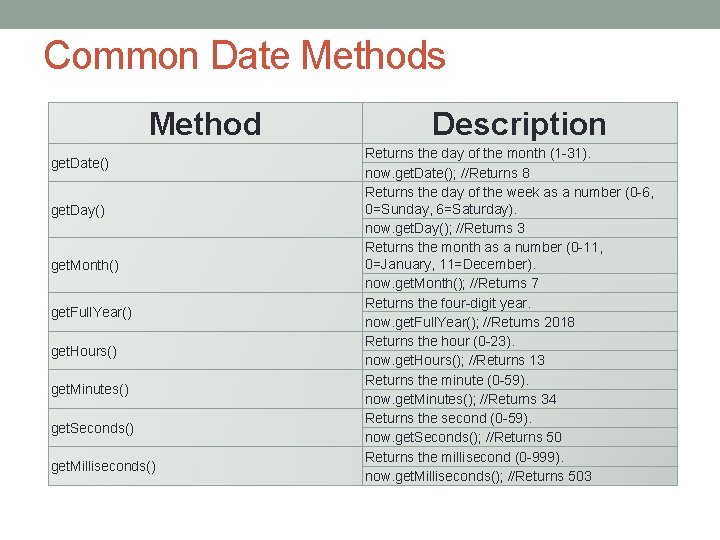
Common Date Methods Method get. Date() get. Day() get. Month() get. Full. Year() get. Hours() get. Minutes() get. Seconds() get. Milliseconds() Description Returns the day of the month (1 -31). now. get. Date(); //Returns 8 Returns the day of the week as a number (0 -6, 0=Sunday, 6=Saturday). now. get. Day(); //Returns 3 Returns the month as a number (0 -11, 0=January, 11=December). now. get. Month(); //Returns 7 Returns the four-digit year. now. get. Full. Year(); //Returns 2018 Returns the hour (0 -23). now. get. Hours(); //Returns 13 Returns the minute (0 -59). now. get. Minutes(); //Returns 34 Returns the second (0 -59). now. get. Seconds(); //Returns 50 Returns the millisecond (0 -999). now. get. Milliseconds(); //Returns 503
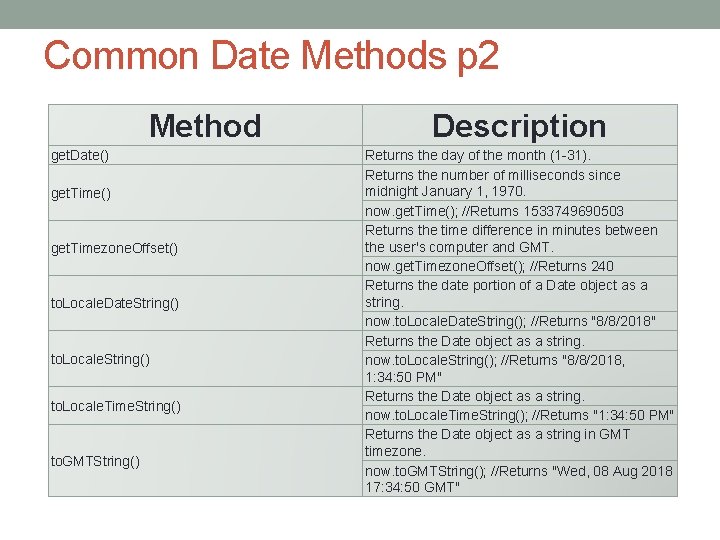
Common Date Methods p 2 Method get. Date() get. Timezone. Offset() to. Locale. Date. String() to. Locale. Time. String() to. GMTString() Description Returns the day of the month (1 -31). Returns the number of milliseconds since midnight January 1, 1970. now. get. Time(); //Returns 1533749690503 Returns the time difference in minutes between the user's computer and GMT. now. get. Timezone. Offset(); //Returns 240 Returns the date portion of a Date object as a string. now. to. Locale. Date. String(); //Returns "8/8/2018" Returns the Date object as a string. now. to. Locale. String(); //Returns "8/8/2018, 1: 34: 50 PM" Returns the Date object as a string. now. to. Locale. Time. String(); //Returns "1: 34: 50 PM" Returns the Date object as a string in GMT timezone. now. to. GMTString(); //Returns "Wed, 08 Aug 2018 17: 34: 50 GMT"
Date Documentation • See https: //developer. mozilla. org/en- US/docs/Web/Java. Script/Reference/Global_Objects/Date for full documentation on Date.
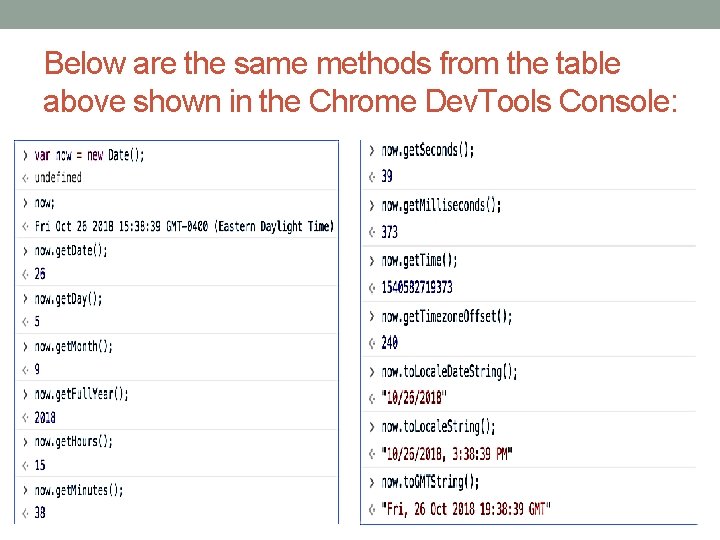
Below are the same methods from the table above shown in the Chrome Dev. Tools Console:
Helper Functions • Some languages have functions that return the month as a string. Java. Script doesn't have such a built-in function. The sample below shows a user-defined "helper" function that handles this and how the get. Month() method of a Date object can be used to get the month.
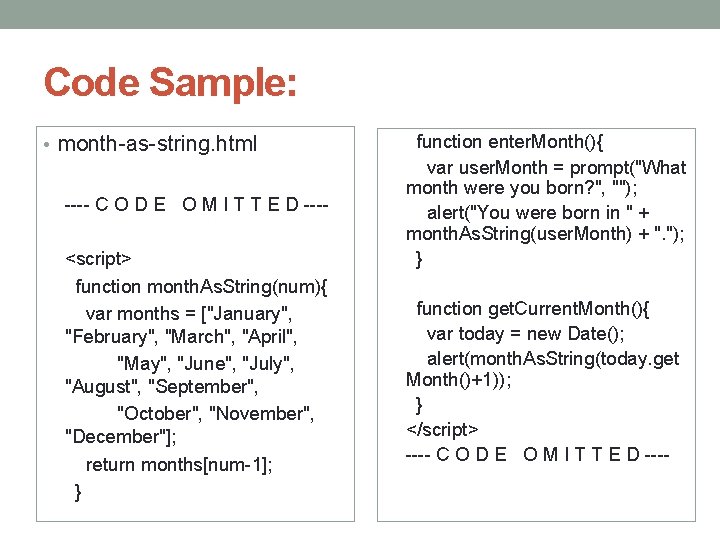
Code Sample: • month-as-string. html ---- C O D E O M I T T E D ---<script> function month. As. String(num){ var months = ["January", "February", "March", "April", "May", "June", "July", "August", "September", "October", "November", "December"]; return months[num-1]; } function enter. Month(){ var user. Month = prompt("What month were you born? ", ""); alert("You were born in " + month. As. String(user. Month) + ". "); } function get. Current. Month(){ var today = new Date(); alert(month. As. String(today. get Month()+1)); } </script> ---- C O D E O M I T T E D ----
Activity 1 Returning the Day of the Week as a String 1. Create a function that returns the day of the week as a string. 2. Create a file named activity 1_date-udfs. html. 3. Write a day. As. String() function that returns the day of the week as a string, with "1" returning "Sunday", "2" returning "Monday", etc. 4. Write an enter. Day() function that prompts the user for the day of the week (as a number) and then alerts the string value of that day by calling the day. As. String() function. 5. Write a get. Current. Day() function that alerts today's actual day of the week according to the user's machine. 6. Add a "CHOOSE DAY" button that calls the enter. Day() function. 7. Add a "GET CURRENT DAY" button that calls the get. Current. Day() function. 8. Test your solution in a browser.
- Slides: 48