
Web Intelligence The Basics To begin please click

Web Intelligence – The Basics To begin, please click the Slide Show icon Please ensure that you are currently sitting at a computer that has sound playing capabilities and that the speakers are turned up to below an acceptable volume. . The following lesson contains screenshots of the actual Business. Objects 4. 1 application, with text and narration explaining how to use Business. Objects to perform certain functions. When the narration has finished on a page, please press the [spacebar] to continue. If you would like to review a page, press the [backspace] key. Note: If you prefer a PDF version of this tutorial please follow the link below. View PDF Version

Web Intelligence View the Properties of a Document In Web Intelligence you can display and modify properties that are assigned by default to the Web Intelligence document. In this tutorial, you will view and modify the document properties. 2
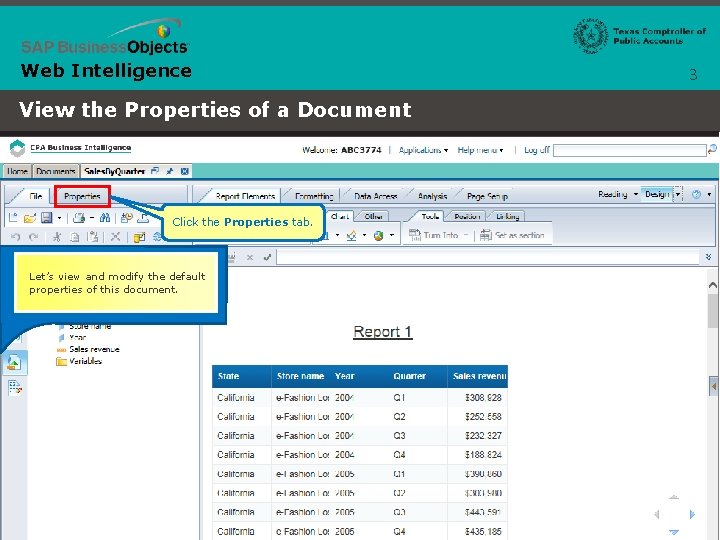
Web Intelligence View the Properties of a Document Click the Properties tab. Let’s view and modify the default properties of this document. 3
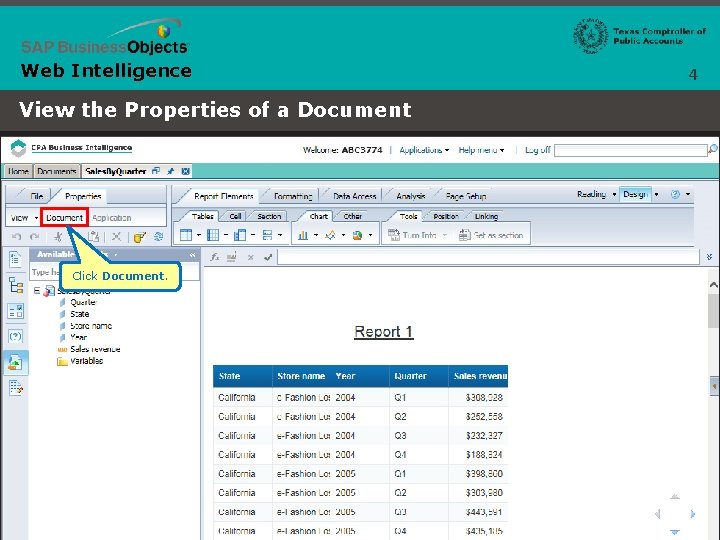
Web Intelligence View the Properties of a Document Click Document. 4

Web Intelligence 5 The document summary includes the document type, size, author, creation date, description and keywords. There also a number of options available: View the Properties of a Document • The Refresh on open option ensures that the latest data is displayed each time the report opens. • The Permanent regional formatting option permanently applies the current date, time and accuracy locale to the report. • The Use query drill option enables drilling into the data. • The Enable query stripping option removes unused options from the query when the query is refreshed. • The Hide warning icons in chart option prevents warning icons from showing in your chart. • The Auto-merge dimensions option synchronizes dimensions that have the same name but are derived from separate queries. • The Extend merged dimension values option affects the way dimensions are joined when they are merged. • The Merge prompts (BEx Variables) option merges all of your BEx variables. Let’s set the document to refresh on open. Select the Refresh on open check box. Click OK.
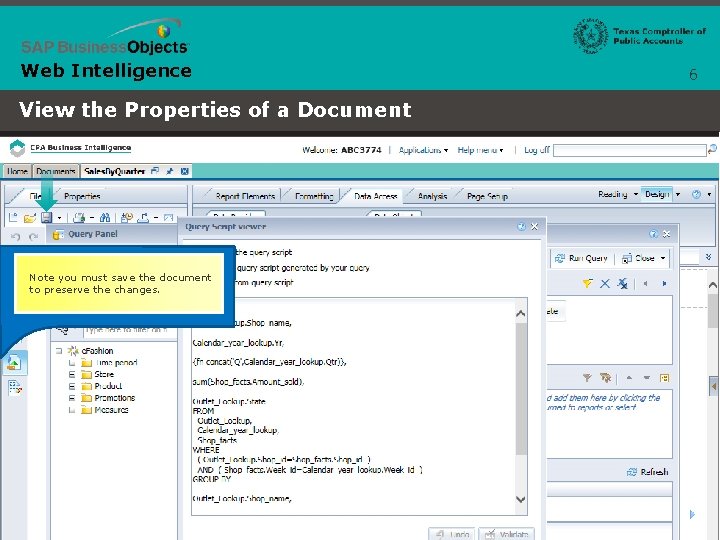
Web Intelligence View the Properties of a Document Note you must save the document to preserve the changes. 6

Web Intelligence 7 View the Properties of a Document This concludes this lesson. Additional Tutorials
- Slides: 7