
Web Design HTML 5 CSS 3 and Java
Web Design: HTML 5, CSS 3 and Java. Script 小朱 MS MVP on Windows azure
Agenda HTML Execution Concepts Java. Script Fundamentals HTML DOM HTML 5 layout and features CSS and CSS 3
HTML Execution Concepts
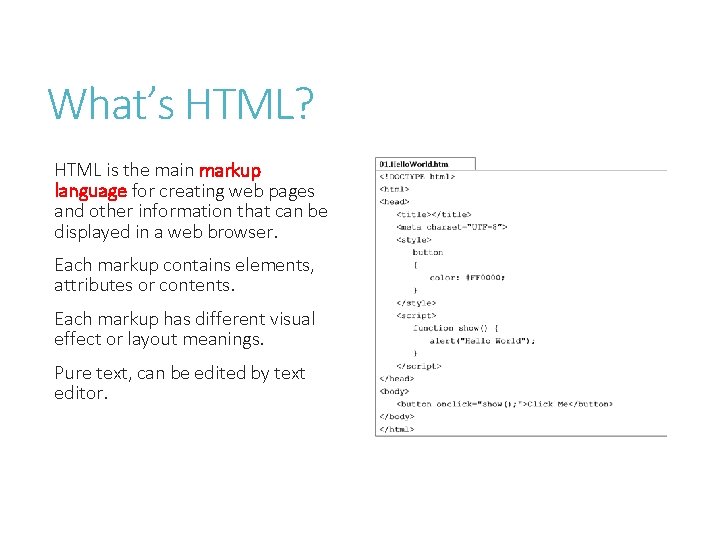
What’s HTML? HTML is the main markup language for creating web pages and other information that can be displayed in a web browser. Each markup contains elements, attributes or contents. Each markup has different visual effect or layout meanings. Pure text, can be edited by text editor.
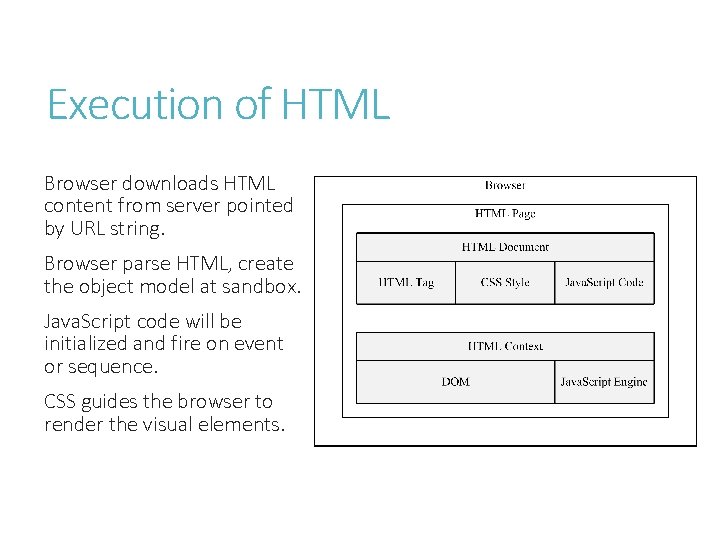
Execution of HTML Browser downloads HTML content from server pointed by URL string. Browser parse HTML, create the object model at sandbox. Java. Script code will be initialized and fire on event or sequence. CSS guides the browser to render the visual elements.

HTML Context A HTML sandbox and scope of Java. Script execution. Rendered DOM tree, can be controlled by browser service. Notification (event firing) Represents all HTML elements to object.
HTML API is a set of interface can interact to HTML “object”. HTML object represents a set of property and method for public access. Browser hosts objects and works with Java. Script.
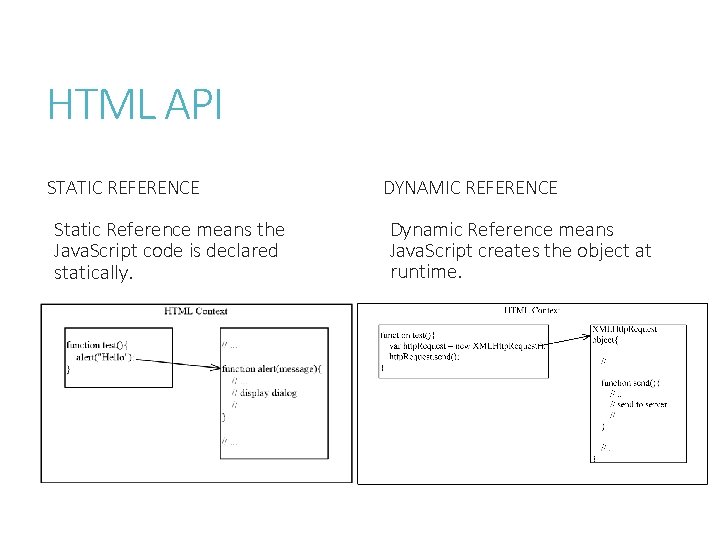
HTML API STATIC REFERENCE Static Reference means the Java. Script code is declared statically. DYNAMIC REFERENCE Dynamic Reference means Java. Script creates the object at runtime.
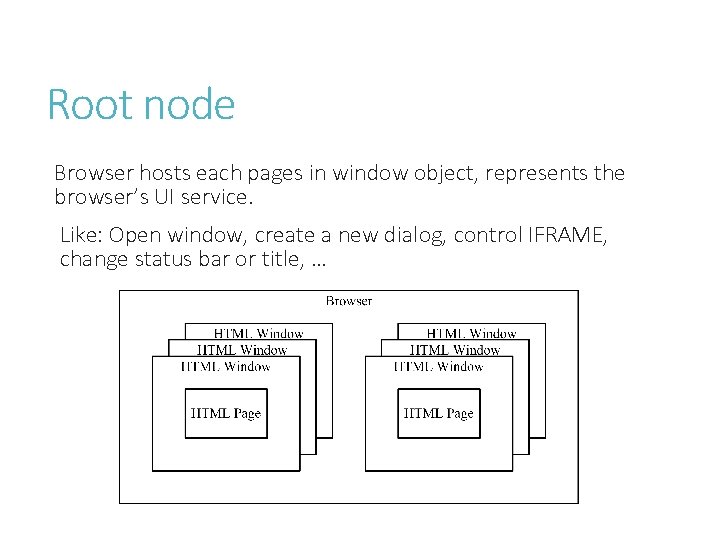
Root node Browser hosts each pages in window object, represents the browser’s UI service. Like: Open window, create a new dialog, control IFRAME, change status bar or title, …
Java. Script Fundamentals
Java. Script History Created by Netscape (Live Script) in 1994. Renamed to Java. Script in 1995. ECMA standard begins 1996, named ECMAScript. Supported by all mainstream browsers.
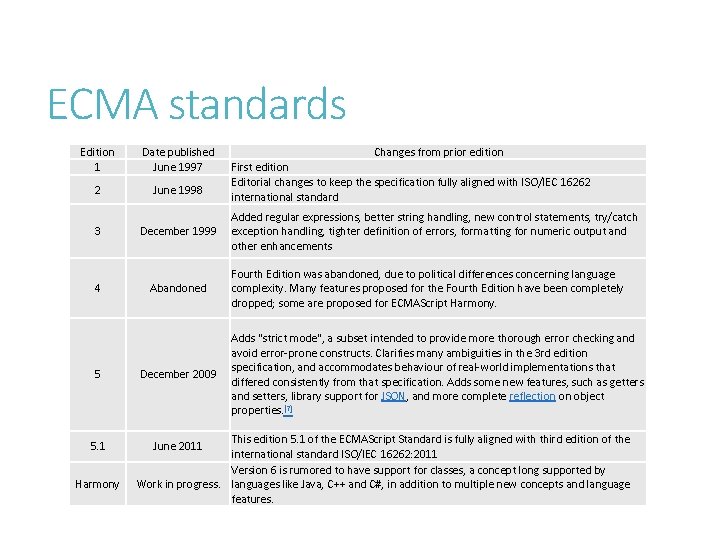
ECMA standards Edition 1 Date published June 1997 2 June 1998 3 December 1999 4 5 5. 1 Harmony Abandoned December 2009 Changes from prior edition First edition Editorial changes to keep the specification fully aligned with ISO/IEC 16262 international standard Added regular expressions, better string handling, new control statements, try/catch exception handling, tighter definition of errors, formatting for numeric output and other enhancements Fourth Edition was abandoned, due to political differences concerning language complexity. Many features proposed for the Fourth Edition have been completely dropped; some are proposed for ECMAScript Harmony. Adds "strict mode", a subset intended to provide more thorough error checking and avoid error-prone constructs. Clarifies many ambiguities in the 3 rd edition specification, and accommodates behaviour of real-world implementations that differed consistently from that specification. Adds some new features, such as getters and setters, library support for JSON, and more complete reflection on object properties. [7] This edition 5. 1 of the ECMAScript Standard is fully aligned with third edition of the international standard ISO/IEC 16262: 2011 Version 6 is rumored to have support for classes, a concept long supported by Work in progress. languages like Java, C++ and C#, in addition to multiple new concepts and language features. June 2011
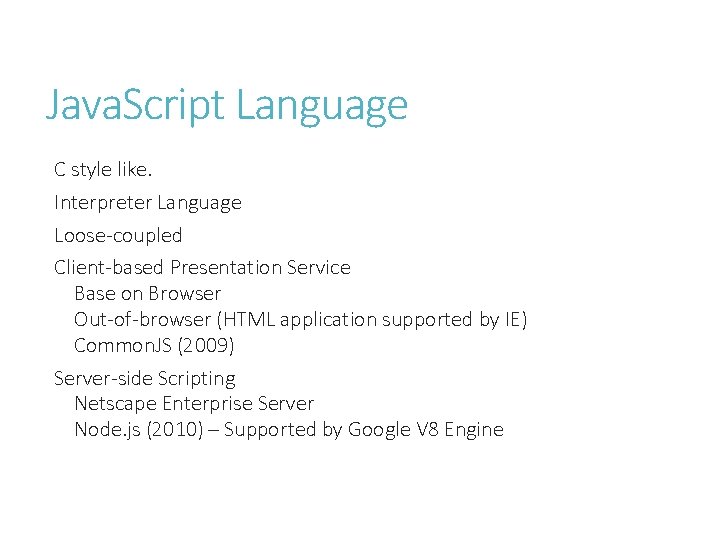
Java. Script Language C style like. Interpreter Language Loose-coupled Client-based Presentation Service Base on Browser Out-of-browser (HTML application supported by IE) Common. JS (2009) Server-side Scripting Netscape Enterprise Server Node. js (2010) – Supported by Google V 8 Engine
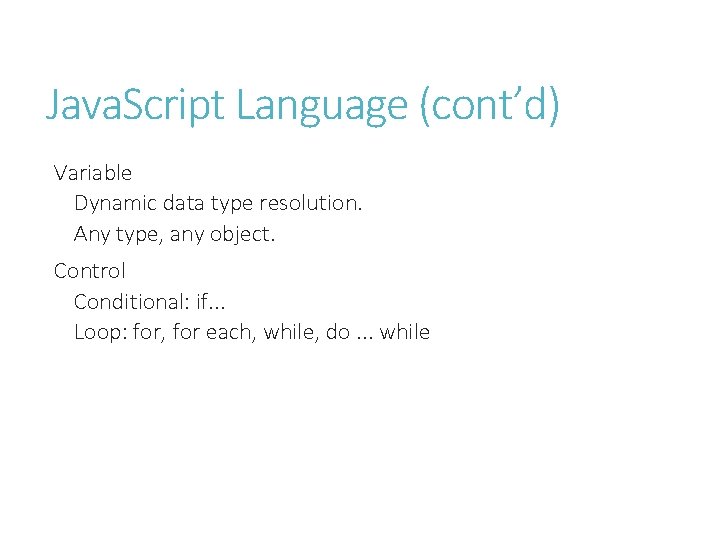
Java. Script Language (cont’d) Variable Dynamic data type resolution. Any type, any object. Control Conditional: if. . . Loop: for, for each, while, do. . . while
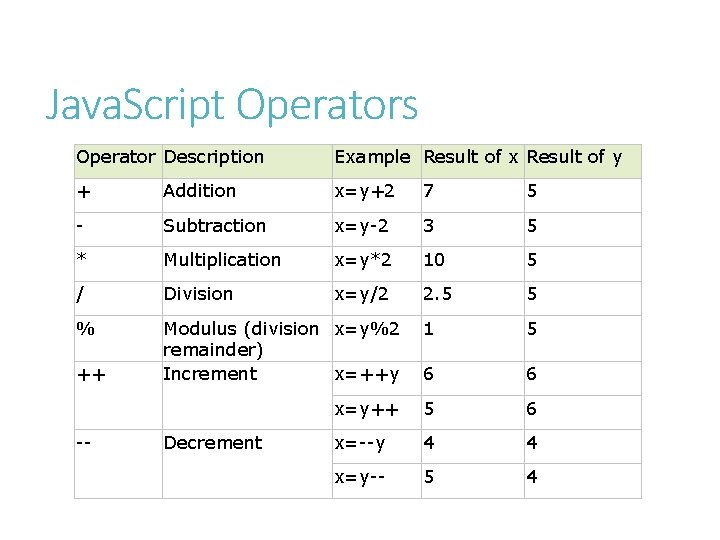
Java. Script Operators Operator Description Example Result of x Result of y + Addition x=y+2 7 5 - Subtraction x=y-2 3 5 * Multiplication x=y*2 10 5 / Division x=y/2 2. 5 5 % Modulus (division x=y%2 remainder) Increment x=++y 1 5 6 6 x=y++ 5 6 x=--y 4 4 x=y-- 5 4 ++ -- Decrement
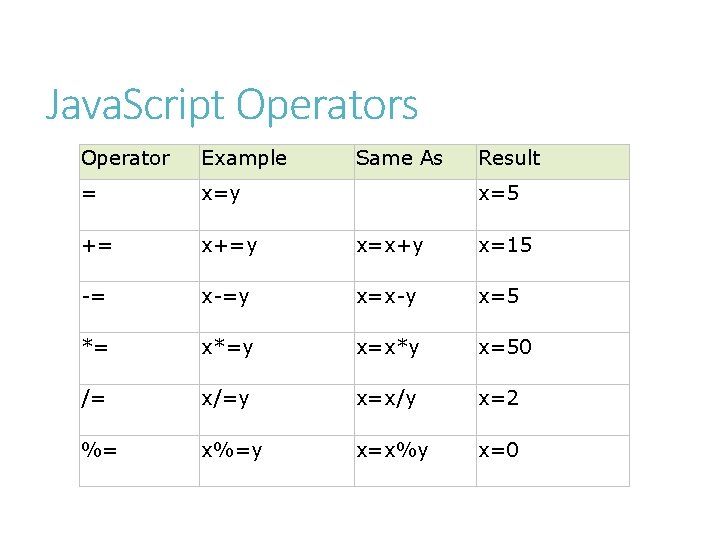
Java. Script Operators Operator Example Same As Result = x=y += x+=y x=x+y x=15 -= x-=y x=x-y x=5 *= x*=y x=x*y x=50 /= x/=y x=x/y x=2 %= x%=y x=x%y x=0 x=5
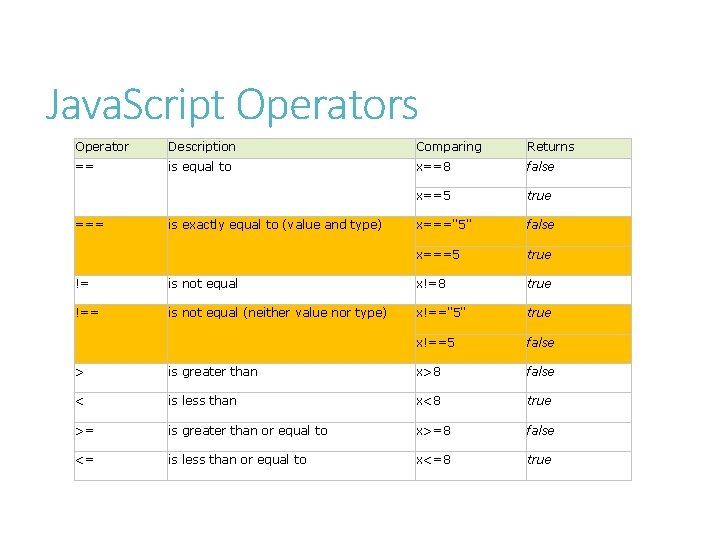
Java. Script Operators Operator Description Comparing Returns == is equal to x==8 false x==5 true x==="5" false x===5 true === is exactly equal to (value and type) != is not equal x!=8 true !== is not equal (neither value nor type) x!=="5" true x!==5 false > is greater than x>8 false < is less than x<8 true >= is greater than or equal to x>=8 false <= is less than or equal to x<=8 true
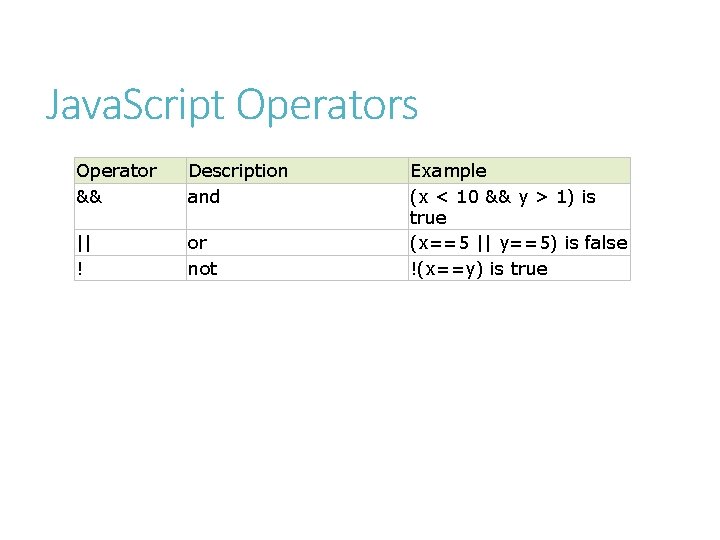
Java. Script Operators Operator && Description and || ! or not Example (x < 10 && y > 1) is true (x==5 || y==5) is false !(x==y) is true
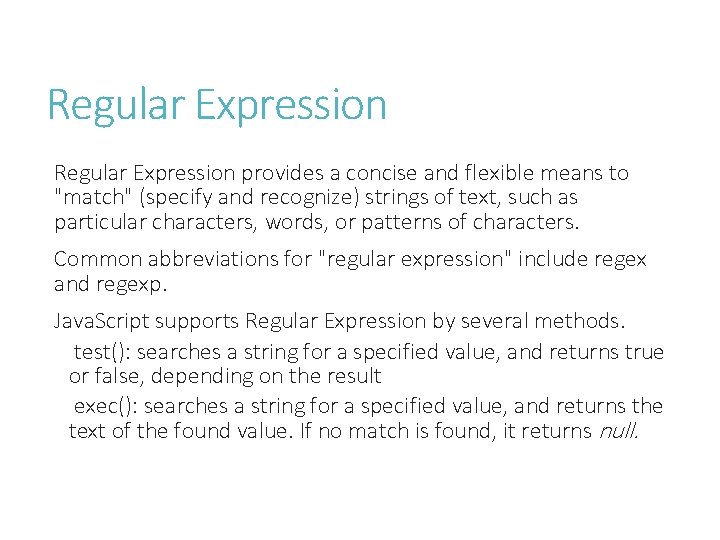
Regular Expression provides a concise and flexible means to "match" (specify and recognize) strings of text, such as particular characters, words, or patterns of characters. Common abbreviations for "regular expression" include regex and regexp. Java. Script supports Regular Expression by several methods. test(): searches a string for a specified value, and returns true or false, depending on the result exec(): searches a string for a specified value, and returns the text of the found value. If no match is found, it returns null.
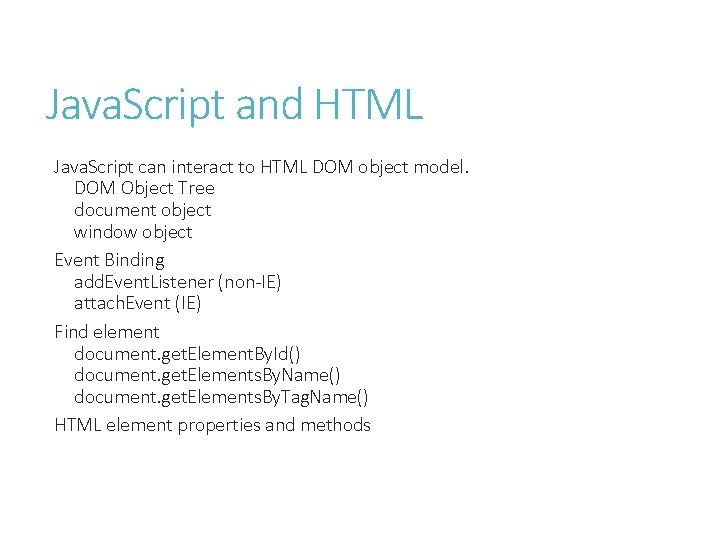
Java. Script and HTML Java. Script can interact to HTML DOM object model. DOM Object Tree document object window object Event Binding add. Event. Listener (non-IE) attach. Event (IE) Find element document. get. Element. By. Id() document. get. Elements. By. Name() document. get. Elements. By. Tag. Name() HTML element properties and methods
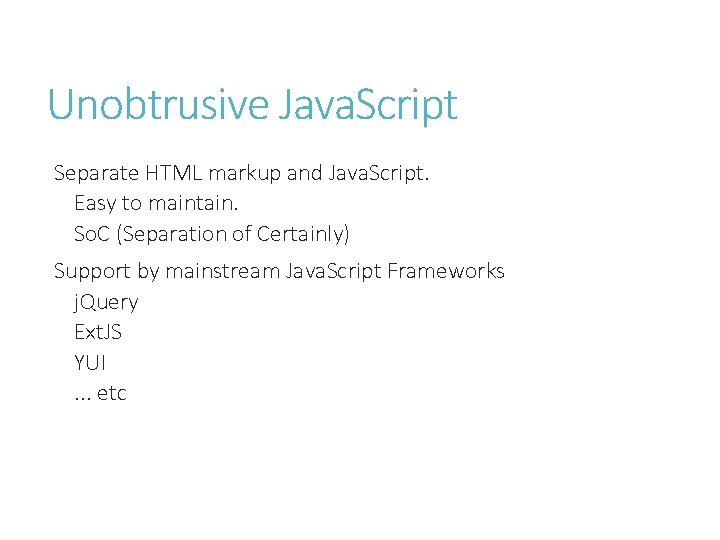
Unobtrusive Java. Script Separate HTML markup and Java. Script. Easy to maintain. So. C (Separation of Certainly) Support by mainstream Java. Script Frameworks j. Query Ext. JS YUI. . . etc
HTML DOM
Java. Script’s OO Object Oriented Programming for Java. Script can implement inheritance, encapsulation and polymorphism, but can’t use contract-based restrictions (implement interface). Declare your object. Extend object with “prototype” object. Constructor initialization.
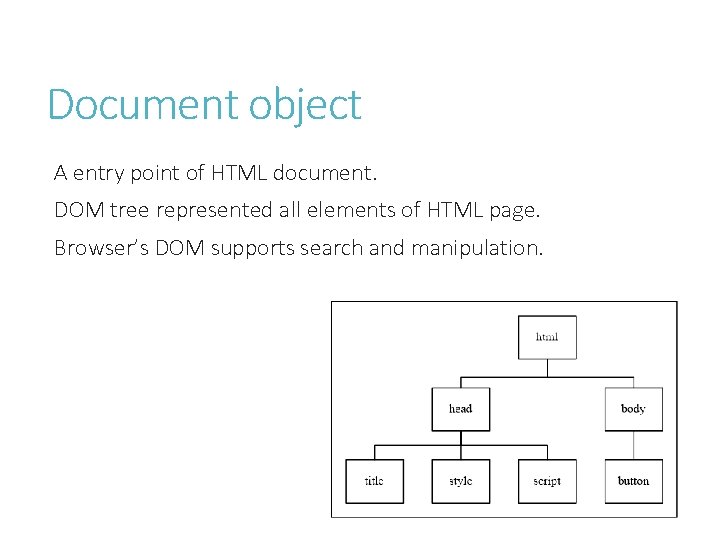
Document object A entry point of HTML document. DOM tree represented all elements of HTML page. Browser’s DOM supports search and manipulation.
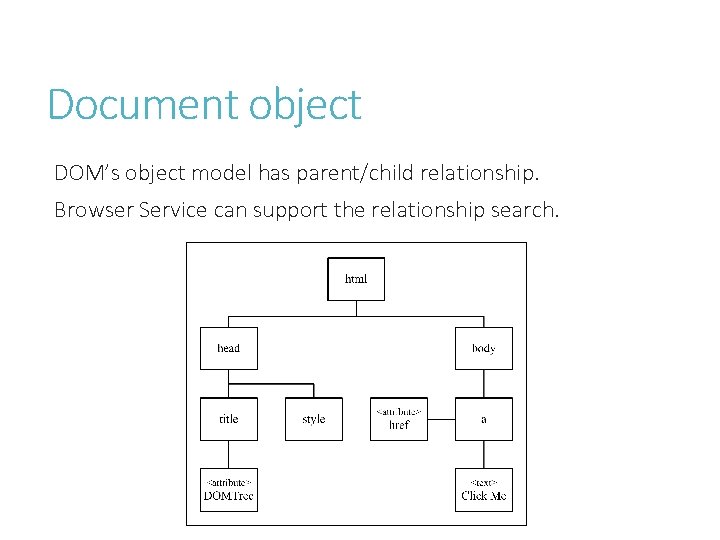
Document object DOM’s object model has parent/child relationship. Browser Service can support the relationship search.
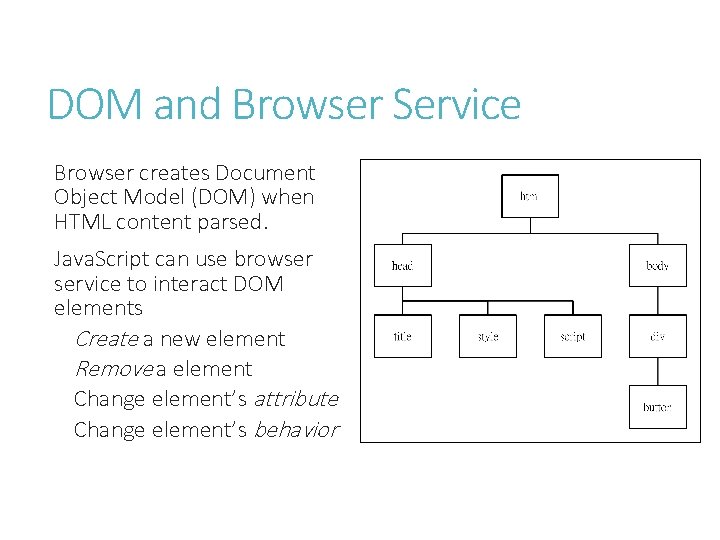
DOM and Browser Service Browser creates Document Object Model (DOM) when HTML content parsed. Java. Script can use browser service to interact DOM elements Create a new element Remove a element Change element’s attribute Change element’s behavior
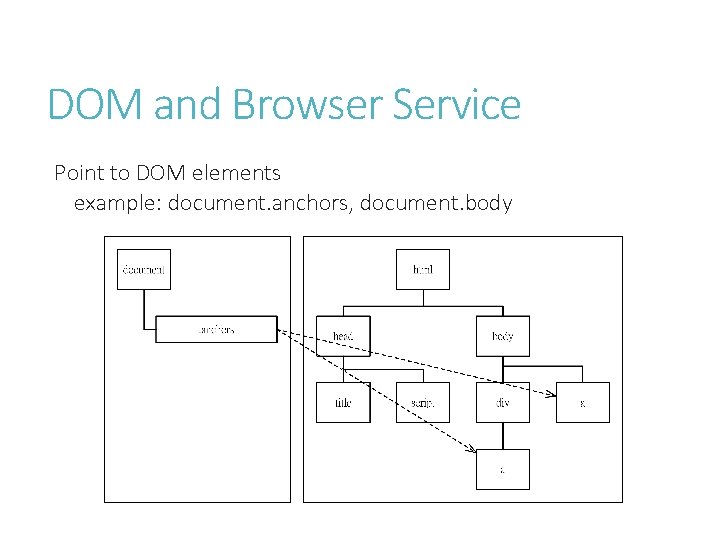
DOM and Browser Service Point to DOM elements example: document. anchors, document. body
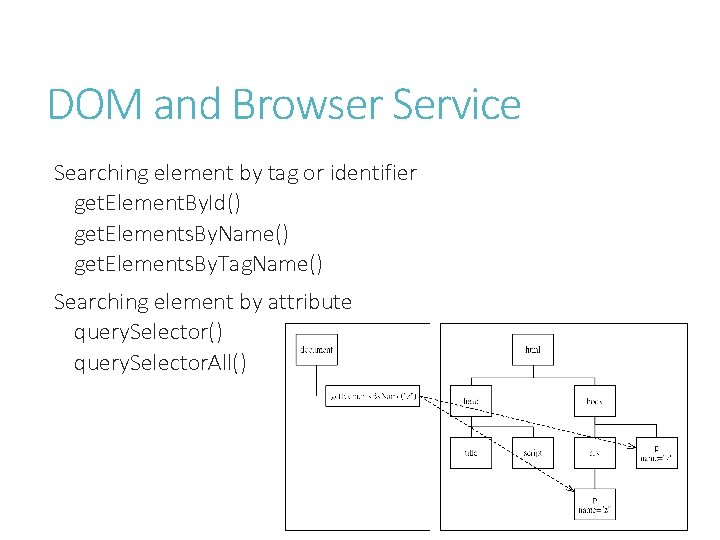
DOM and Browser Service Searching element by tag or identifier get. Element. By. Id() get. Elements. By. Name() get. Elements. By. Tag. Name() Searching element by attribute query. Selector() query. Selector. All()
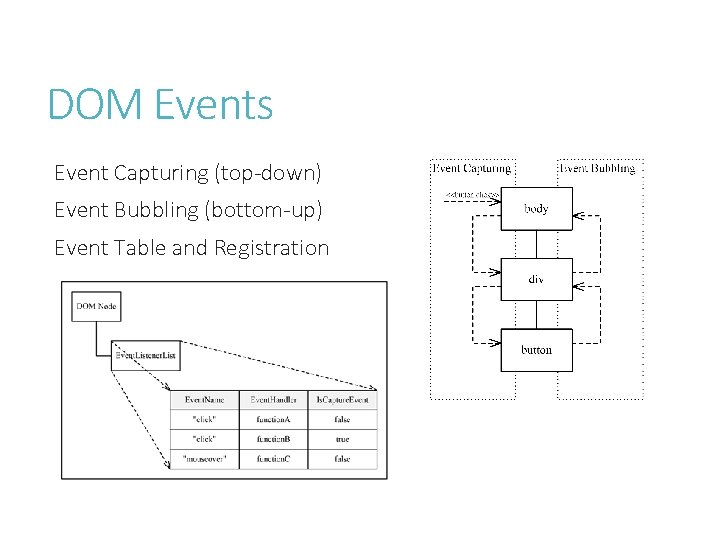
DOM Events Event Capturing (top-down) Event Bubbling (bottom-up) Event Table and Registration
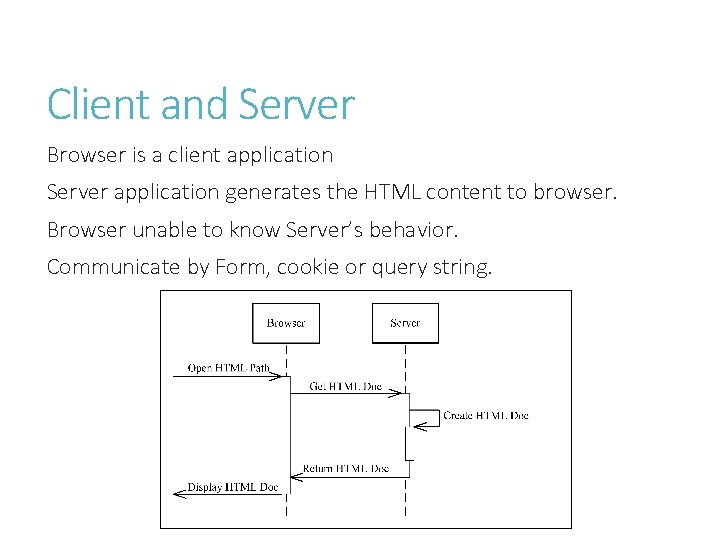
Client and Server Browser is a client application Server application generates the HTML content to browser. Browser unable to know Server’s behavior. Communicate by Form, cookie or query string.
j. Query introduction j. Query is a powerful Java. Script Framework to handle HTML and Java. Script interactions. Selector-based search (CSS like). Easy to learn and use. Unobtrusive Java. Script Pattern. More plug-ins and UI services (j. Query UI) Support to mobile application (j. Query Mobile)
Running j. Query Basic syntax is: $(selector). action() A $ sign to define/access j. Query A (selector) to "query (or find)" HTML elements A j. Query action() to be performed on the element(s) Running on Page loaded. $(document). ready(function() {. . . }); $(function() {. . . }); Event binding $(selector). eventname(handler) $(selector). bind(“eventname”, handler) $(selector). on()/off() $(selector). one(“eventname”, handler) Callbacks
AJAX Asynchronous Java. Script and XML Communication between Server and Client Founded by Microsoft (Outlook Web Access) MSXML. XMLHTTP object XMLHttp. Request native object send() method async property readystate property onreadystatechange event j. Query AJAX $. ajax(), $. post(), $. get. JSON(), . . .
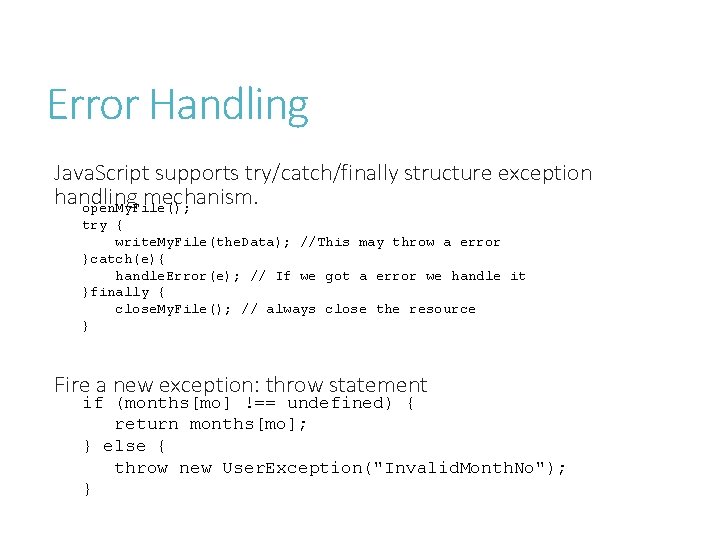
Error Handling Java. Script supports try/catch/finally structure exception handling mechanism. open. My. File(); try { write. My. File(the. Data); //This may throw a error }catch(e){ handle. Error(e); // If we got a error we handle it }finally { close. My. File(); // always close the resource } Fire a new exception: throw statement if (months[mo] !== undefined) { return months[mo]; } else { throw new User. Exception("Invalid. Month. No"); }
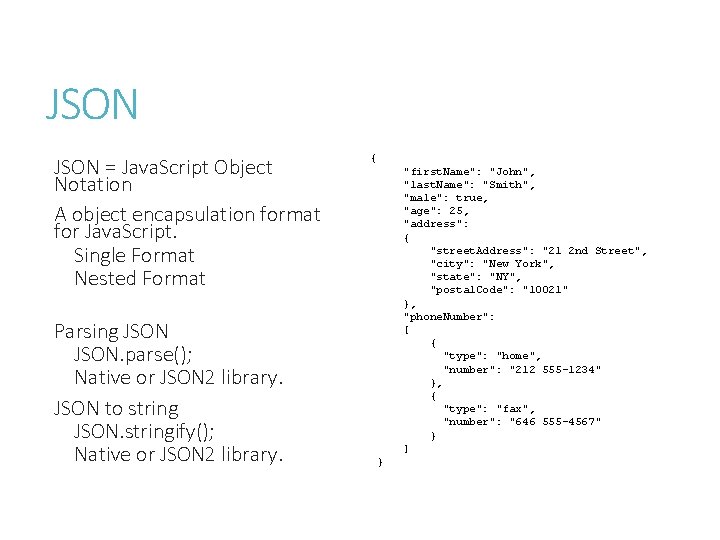
JSON = Java. Script Object Notation A object encapsulation format for Java. Script. Single Format Nested Format Parsing JSON. parse(); Native or JSON 2 library. JSON to string JSON. stringify(); Native or JSON 2 library. { "first. Name": "John", "last. Name": "Smith", "male": true, "age": 25, "address": { "street. Address": "21 2 nd Street", "city": "New York", "state": "NY", "postal. Code": "10021" }, "phone. Number": [ { "type": "home", "number": "212 555 -1234" }, { "type": "fax", "number": "646 555 -4567" } ] }
HTML 5
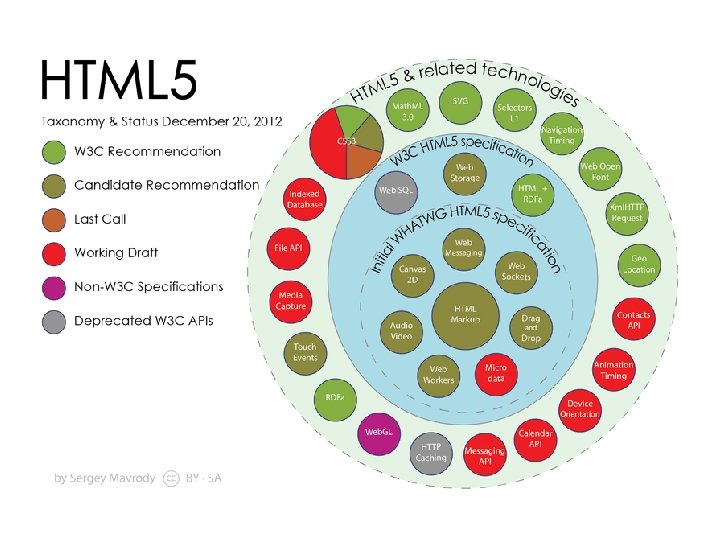
What’s HTML 5? HTML 5 is: The next version of HTML. More multimedia features (Canvas, Audio, Video) More semantic markup (article, nav, aside, . . . ) More programming interfaces (APIs) More browser capabilities (Web Worker, Local Storage, . . . ) More Rendering effects (supported by CSS 3) Geo-aware (Geolocation, Location-based Service) Created by: W 3 C WHATWG (Web Hypertext Application Technology Working Group)
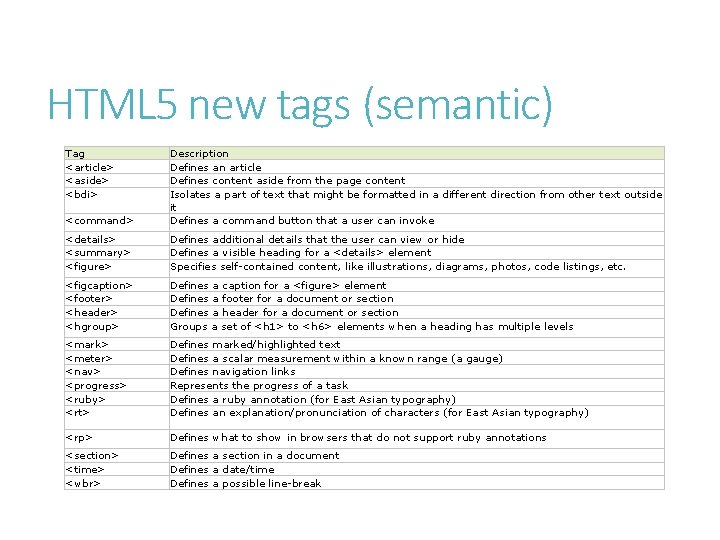
HTML 5 new tags (semantic) Tag <article> <aside> <bdi> <command> Description Defines an article Defines content aside from the page content Isolates a part of text that might be formatted in a different direction from other text outside it Defines a command button that a user can invoke <details> <summary> <figure> Defines additional details that the user can view or hide Defines a visible heading for a <details> element Specifies self-contained content, like illustrations, diagrams, photos, code listings, etc. <figcaption> <footer> <header> <hgroup> Defines a caption for a <figure> element Defines a footer for a document or section Defines a header for a document or section Groups a set of <h 1> to <h 6> elements when a heading has multiple levels <mark> <meter> <nav> <progress> <ruby> <rt> Defines marked/highlighted text Defines a scalar measurement within a known range (a gauge) Defines navigation links Represents the progress of a task Defines a ruby annotation (for East Asian typography) Defines an explanation/pronunciation of characters (for East Asian typography) <rp> Defines what to show in browsers that do not support ruby annotations <section> <time> <wbr> Defines a section in a document Defines a date/time Defines a possible line-break
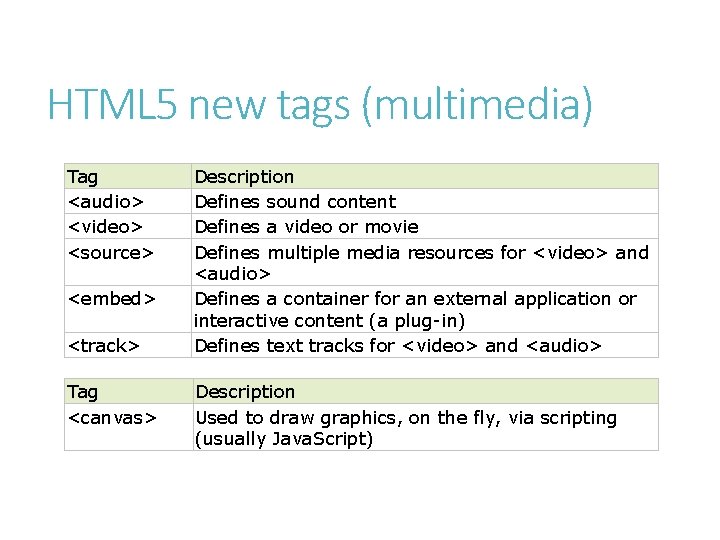
HTML 5 new tags (multimedia) Tag <audio> <video> <source> <embed> <track> Tag <canvas> Description Defines sound content Defines a video or movie Defines multiple media resources for <video> and <audio> Defines a container for an external application or interactive content (a plug-in) Defines text tracks for <video> and <audio> Description Used to draw graphics, on the fly, via scripting (usually Java. Script)
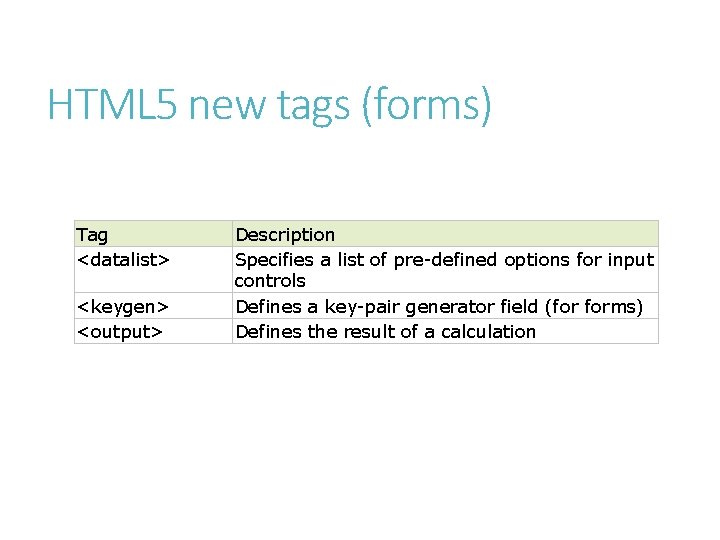
HTML 5 new tags (forms) Tag <datalist> <keygen> <output> Description Specifies a list of pre-defined options for input controls Defines a key-pair generator field (for forms) Defines the result of a calculation
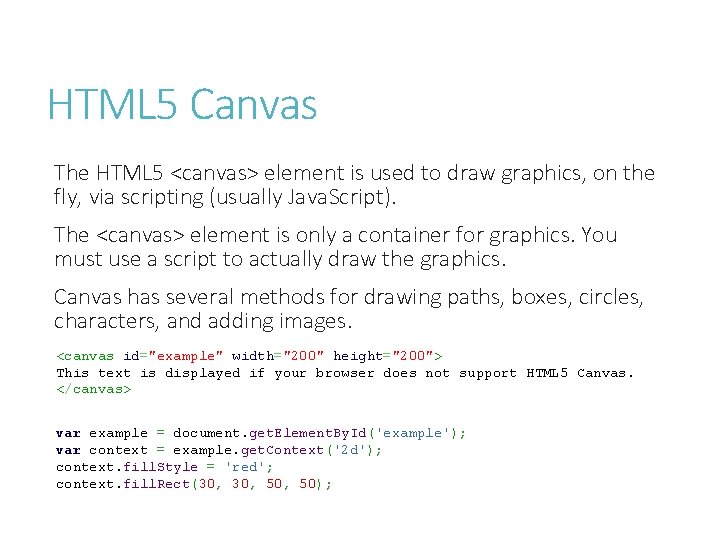
HTML 5 Canvas The HTML 5 <canvas> element is used to draw graphics, on the fly, via scripting (usually Java. Script). The <canvas> element is only a container for graphics. You must use a script to actually draw the graphics. Canvas has several methods for drawing paths, boxes, circles, characters, and adding images. <canvas id="example" width="200" height="200"> This text is displayed if your browser does not support HTML 5 Canvas. </canvas> var example = document. get. Element. By. Id('example'); var context = example. get. Context('2 d'); context. fill. Style = 'red'; context. fill. Rect(30, 50, 50);
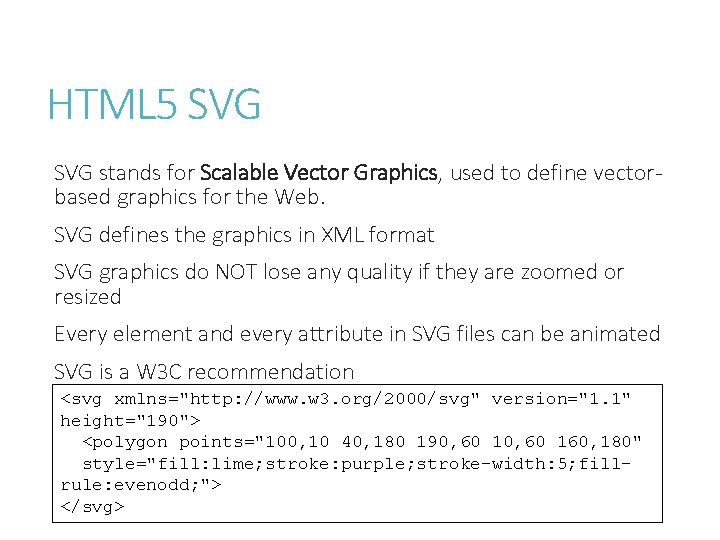
HTML 5 SVG stands for Scalable Vector Graphics, used to define vectorbased graphics for the Web. SVG defines the graphics in XML format SVG graphics do NOT lose any quality if they are zoomed or resized Every element and every attribute in SVG files can be animated SVG is a W 3 C recommendation <svg xmlns="http: //www. w 3. org/2000/svg" version="1. 1" height="190"> <polygon points="100, 10 40, 180 190, 60 160, 180" style="fill: lime; stroke: purple; stroke-width: 5; fillrule: evenodd; "> </svg>
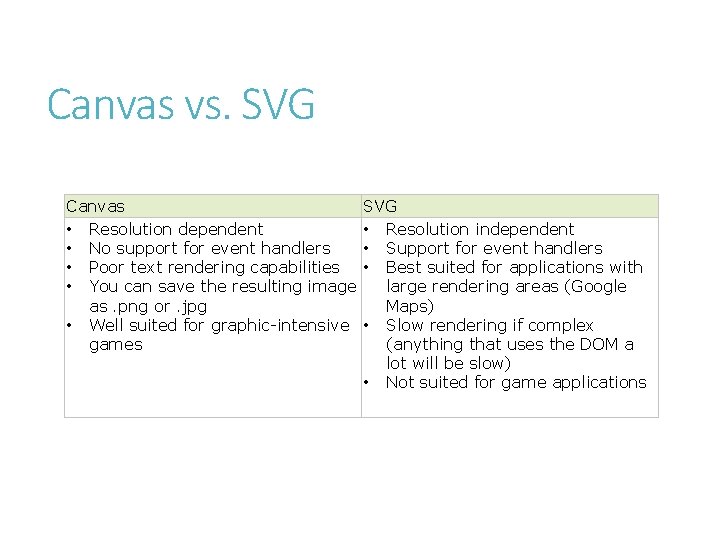
Canvas vs. SVG Canvas • Resolution dependent • No support for event handlers • Poor text rendering capabilities • You can save the resulting image as. png or. jpg • Well suited for graphic-intensive games SVG • Resolution independent • Support for event handlers • Best suited for applications with large rendering areas (Google Maps) • Slow rendering if complex (anything that uses the DOM a lot will be slow) • Not suited for game applications
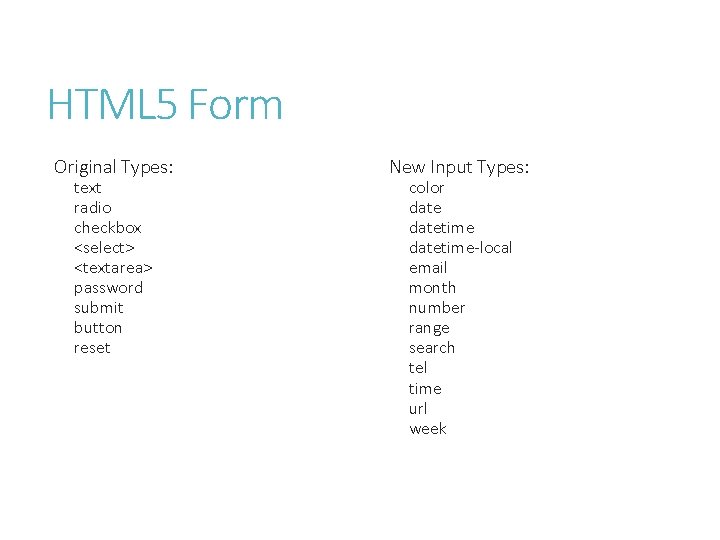
HTML 5 Form Original Types: text radio checkbox <select> <textarea> password submit button reset New Input Types: color datetime-local email month number range search tel time url week
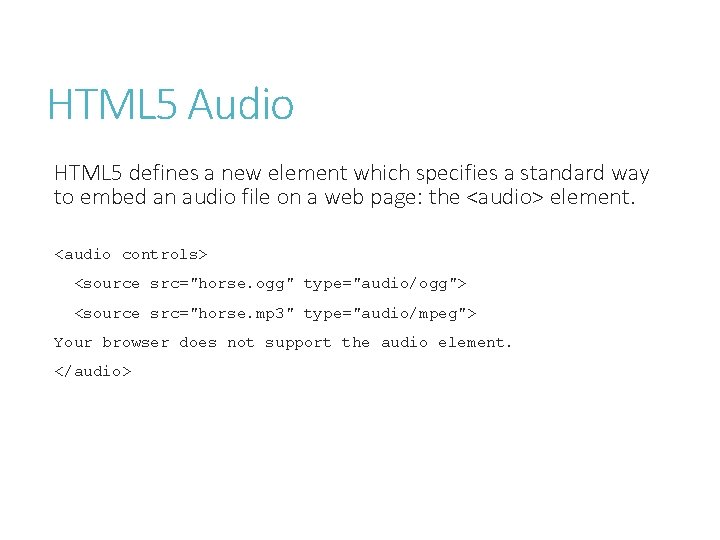
HTML 5 Audio HTML 5 defines a new element which specifies a standard way to embed an audio file on a web page: the <audio> element. <audio controls> <source src="horse. ogg" type="audio/ogg"> <source src="horse. mp 3" type="audio/mpeg"> Your browser does not support the audio element. </audio>
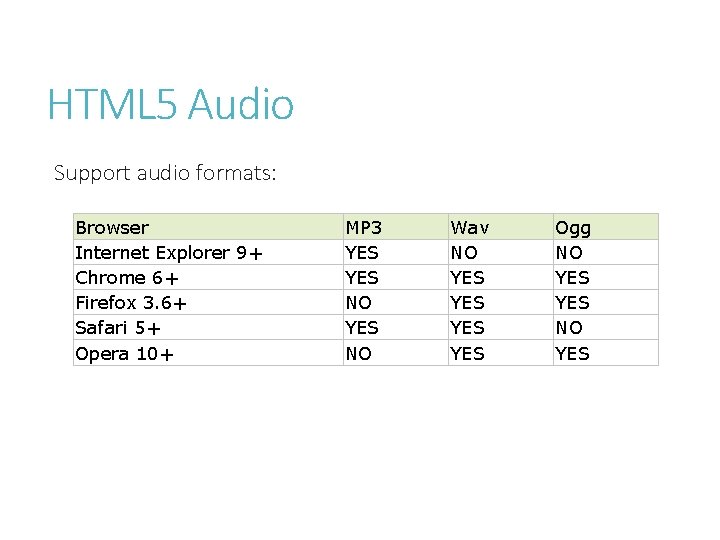
HTML 5 Audio Support audio formats: Browser Internet Explorer 9+ Chrome 6+ Firefox 3. 6+ Safari 5+ Opera 10+ MP 3 YES NO Wav NO YES YES Ogg NO YES
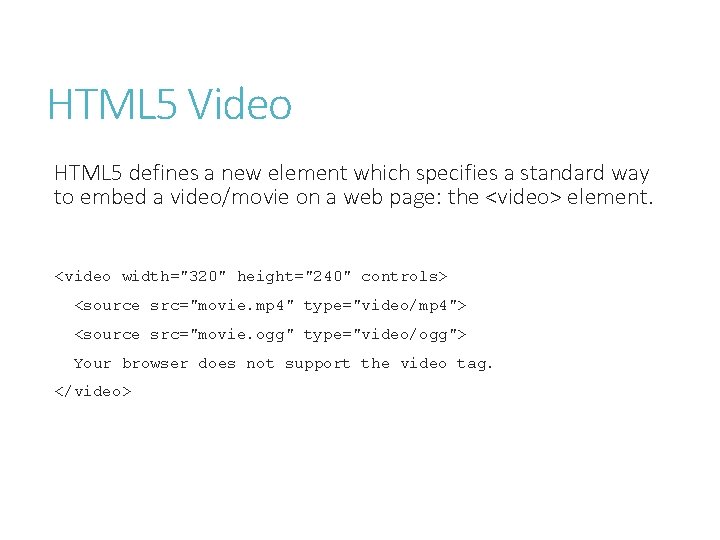
HTML 5 Video HTML 5 defines a new element which specifies a standard way to embed a video/movie on a web page: the <video> element. <video width="320" height="240" controls> <source src="movie. mp 4" type="video/mp 4"> <source src="movie. ogg" type="video/ogg"> Your browser does not support the video tag. </video>
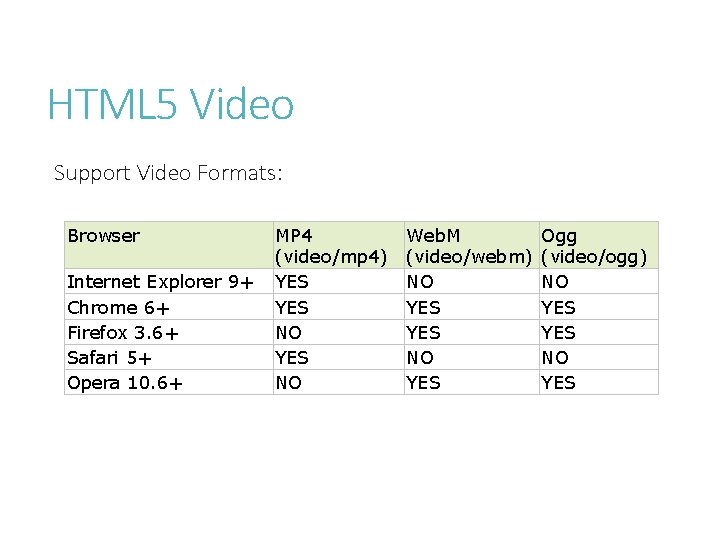
HTML 5 Video Support Video Formats: Browser Internet Explorer 9+ Chrome 6+ Firefox 3. 6+ Safari 5+ Opera 10. 6+ MP 4 (video/mp 4) YES NO Web. M (video/webm) NO YES Ogg (video/ogg) NO YES
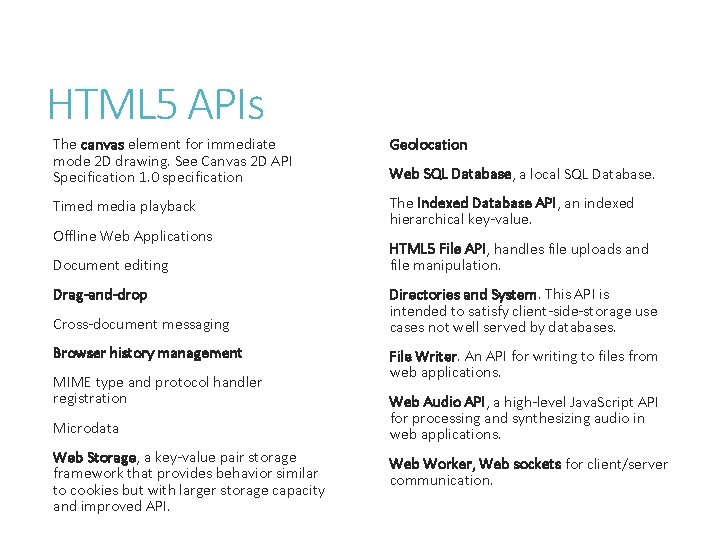
HTML 5 APIs The canvas element for immediate mode 2 D drawing. See Canvas 2 D API Specification 1. 0 specification Geolocation Timed media playback The Indexed Database API, an indexed hierarchical key-value. Offline Web Applications Document editing Drag-and-drop Cross-document messaging Browser history management MIME type and protocol handler registration Microdata Web Storage, a key-value pair storage framework that provides behavior similar to cookies but with larger storage capacity and improved API. Web SQL Database, a local SQL Database. HTML 5 File API, handles file uploads and file manipulation. Directories and System. This API is intended to satisfy client-side-storage use cases not well served by databases. File Writer. An API for writing to files from web applications. Web Audio API, a high-level Java. Script API for processing and synthesizing audio in web applications. Web Worker, Web sockets for client/server communication.
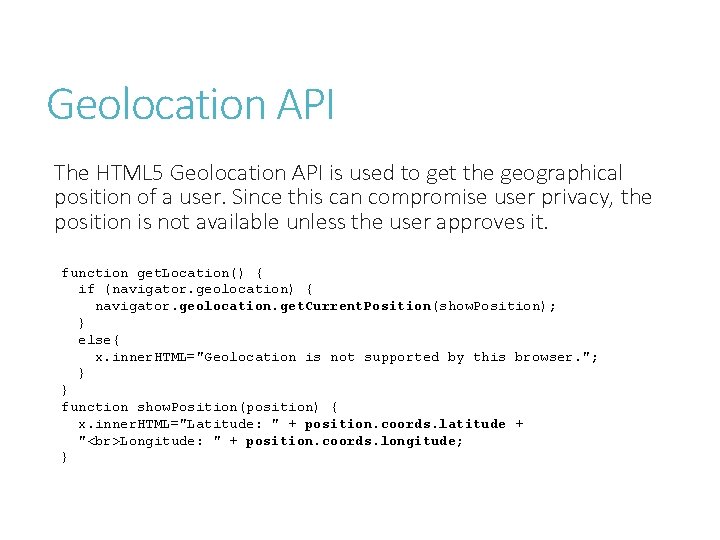
Geolocation API The HTML 5 Geolocation API is used to get the geographical position of a user. Since this can compromise user privacy, the position is not available unless the user approves it. function get. Location() { if (navigator. geolocation) { navigator. geolocation. get. Current. Position(show. Position); } else{ x. inner. HTML="Geolocation is not supported by this browser. "; } } function show. Position(position) { x. inner. HTML="Latitude: " + position. coords. latitude + " Longitude: " + position. coords. longitude; }
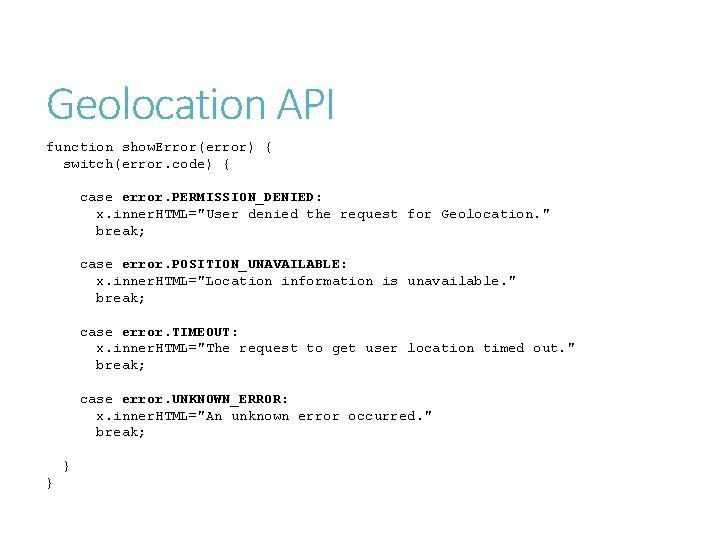
Geolocation API function show. Error(error) { switch(error. code) { case error. PERMISSION_DENIED: x. inner. HTML="User denied the request for Geolocation. " break; case error. POSITION_UNAVAILABLE: x. inner. HTML="Location information is unavailable. " break; case error. TIMEOUT: x. inner. HTML="The request to get user location timed out. " break; case error. UNKNOWN_ERROR: x. inner. HTML="An unknown error occurred. " break; } }
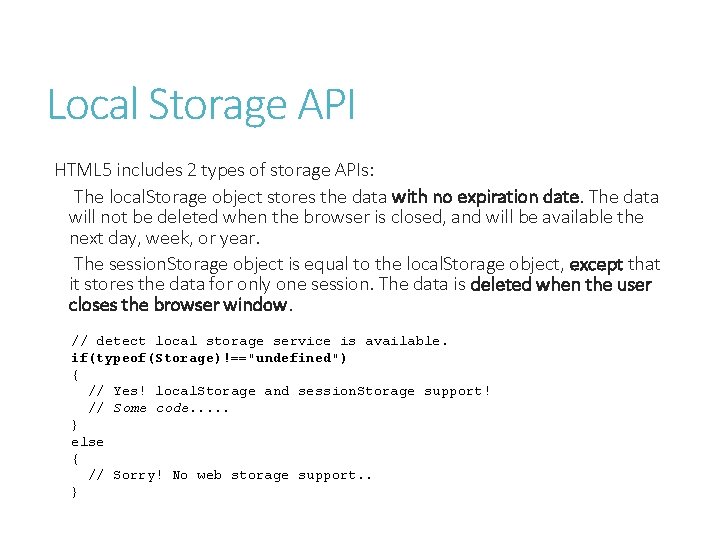
Local Storage API HTML 5 includes 2 types of storage APIs: The local. Storage object stores the data with no expiration date. The data will not be deleted when the browser is closed, and will be available the next day, week, or year. The session. Storage object is equal to the local. Storage object, except that it stores the data for only one session. The data is deleted when the user closes the browser window. // detect local storage service is available. if(typeof(Storage)!=="undefined") { // Yes! local. Storage and session. Storage support! // Some code. . . } else { // Sorry! No web storage support. . }
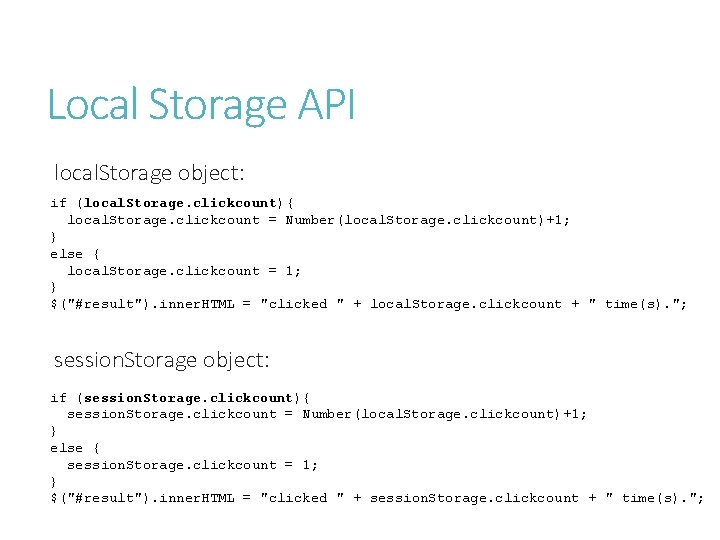
Local Storage API local. Storage object: if (local. Storage. clickcount){ local. Storage. clickcount = Number(local. Storage. clickcount)+1; } else { local. Storage. clickcount = 1; } $("#result"). inner. HTML = "clicked " + local. Storage. clickcount + " time(s). "; session. Storage object: if (session. Storage. clickcount){ session. Storage. clickcount = Number(local. Storage. clickcount)+1; } else { session. Storage. clickcount = 1; } $("#result"). inner. HTML = "clicked " + session. Storage. clickcount + " time(s). ";
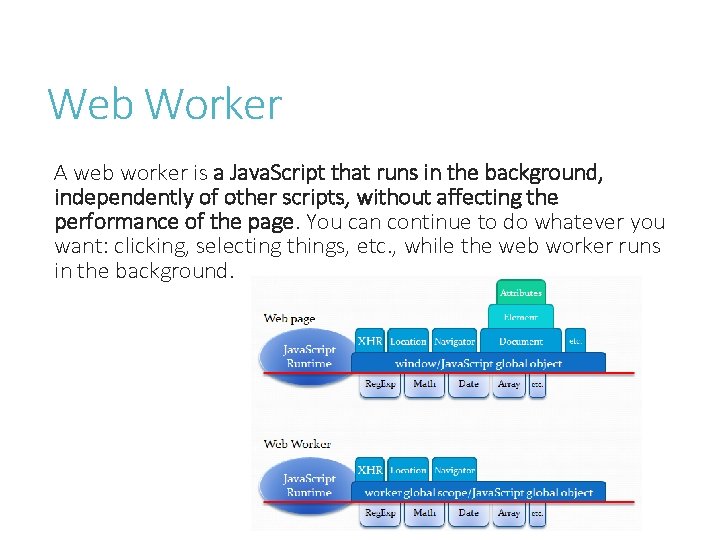
Web Worker A web worker is a Java. Script that runs in the background, independently of other scripts, without affecting the performance of the page. You can continue to do whatever you want: clicking, selecting things, etc. , while the web worker runs in the background.
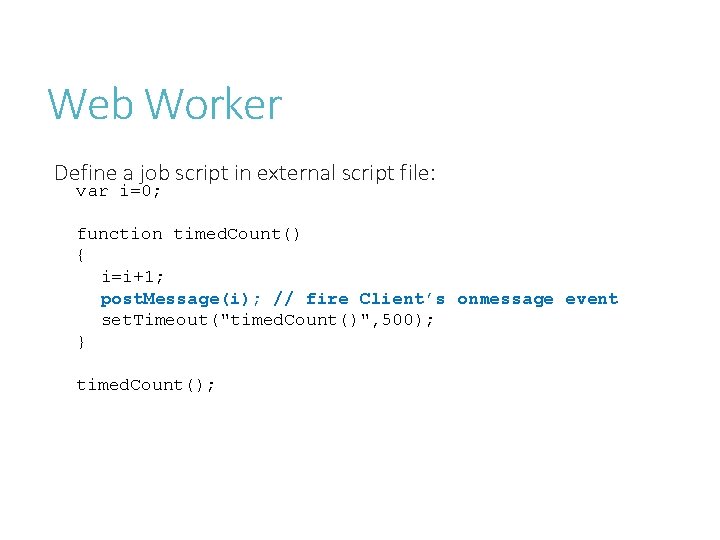
Web Worker Define a job script in external script file: var i=0; function timed. Count() { i=i+1; post. Message(i); // fire Client’s onmessage event set. Timeout("timed. Count()", 500); } timed. Count();
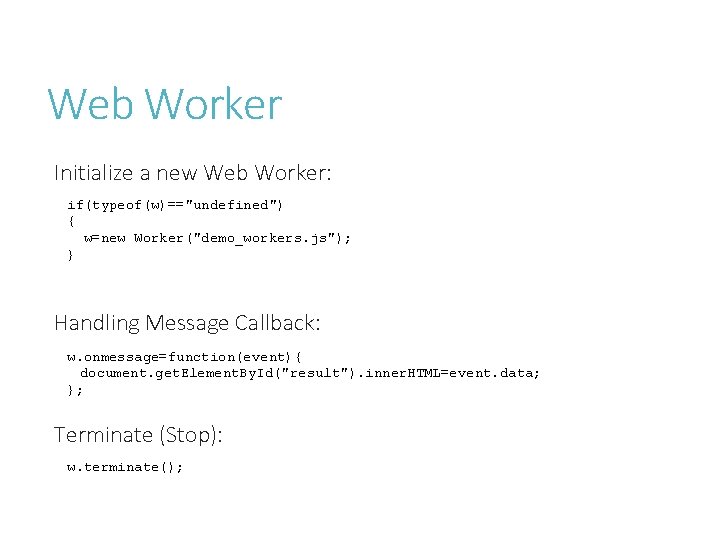
Web Worker Initialize a new Web Worker: if(typeof(w)=="undefined") { w=new Worker("demo_workers. js"); } Handling Message Callback: w. onmessage=function(event){ document. get. Element. By. Id("result"). inner. HTML=event. data; }; Terminate (Stop): w. terminate();
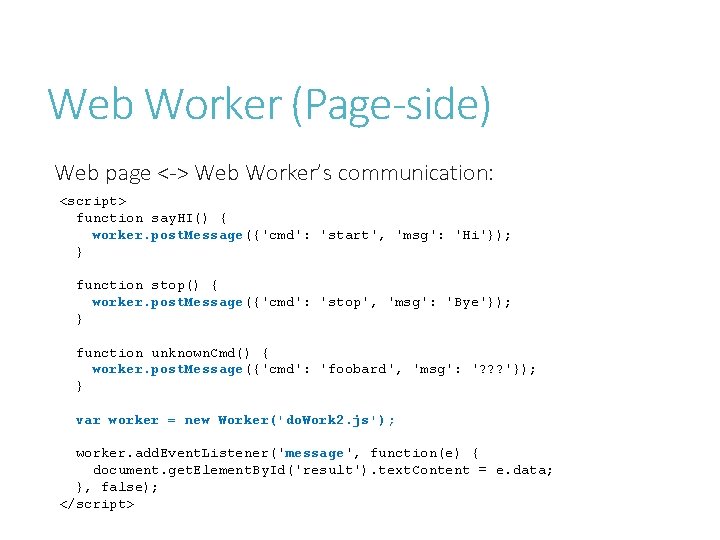
Web Worker (Page-side) Web page <-> Web Worker’s communication: <script> function say. HI() { worker. post. Message({'cmd': 'start', 'msg': 'Hi'}); } function stop() { worker. post. Message({'cmd': 'stop', 'msg': 'Bye'}); } function unknown. Cmd() { worker. post. Message({'cmd': 'foobard', 'msg': '? ? ? '}); } var worker = new Worker('do. Work 2. js'); worker. add. Event. Listener('message', function(e) { document. get. Element. By. Id('result'). text. Content = e. data; }, false); </script>
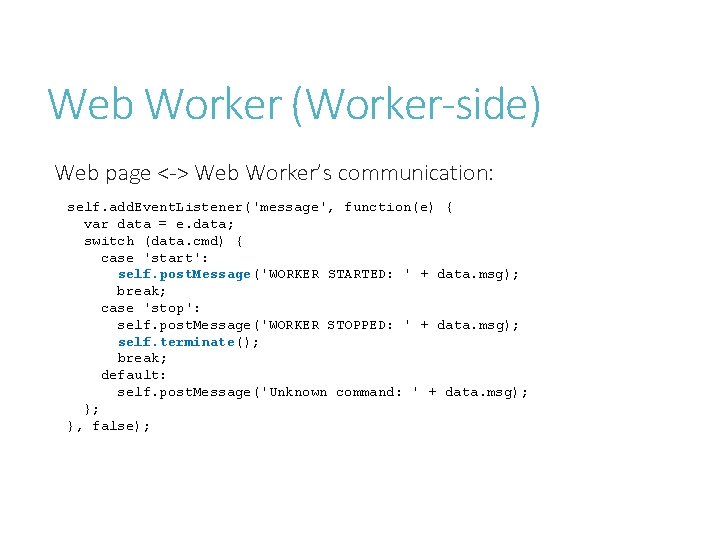
Web Worker (Worker-side) Web page <-> Web Worker’s communication: self. add. Event. Listener('message', function(e) { var data = e. data; switch (data. cmd) { case 'start': self. post. Message('WORKER STARTED: ' + data. msg); break; case 'stop': self. post. Message('WORKER STOPPED: ' + data. msg); self. terminate(); break; default: self. post. Message('Unknown command: ' + data. msg); }; }, false);
CSS 3
What’s CSS 3 is split up into "modules". The old specification has been split into smaller pieces, and new ones are also added. Some of the most important CSS 3 modules are: Selectors Box Model Backgrounds and Borders Text Effects 2 D/3 D Transformations Animations Multiple Column Layout User Interface
![CSS 3 selectors element 1~element 2 [attribute^=value] p~ul a[src^="https"] Selects every <ul> element that](http://slidetodoc.com/presentation_image_h2/e778f766e7fe06000b57eda3d4049caf/image-62.jpg "CSS 3 selectors element 1~element 2 [attribute^=value] p~ul a[src^=\"https\"] Selects every <ul> element that")
CSS 3 selectors element 1~element 2 [attribute^=value] p~ul a[src^="https"] Selects every <ul> element that are preceded by a <p> element Selects every <a> element whose src attribute value begins with "https" Selects every <a> element whose src attribute value ends with ". pdf" [attribute$=value] a[src$=". pdf"] [attribute*=value] a[src*="w 3 schools"] : first-of-type p: first-of-type Selects every <a> element whose src attribute value contains the substring "w 3 schools" Selects every <p> element that is the first <p> element of its parent : last-of-type p: last-of-type Selects every <p> element that is the last <p> element of its parent : only-of-type p: only-of-type Selects every <p> element that is the only <p> element of its parent : only-child : nth-child(n) p: only-child p: nth-child(2) Selects every <p> element that is the only child of its parent Selects every <p> element that is the second child of its parent : nth-last-child(n) p: nth-last-child(2) : last-child : root : empty Selects every <p> element that is the second child of its parent, counting from the last child p: nth-of-type(2) Selects every <p> element that is the second <p> element of its parent p: nth-last-of-type(2) Selects every <p> element that is the second <p> element of its parent, counting from the last child p: last-child Selects every <p> element that is the last child of its parent : root Selects the document’s root element p: empty Selects every <p> element that has no children (including text nodes) : target #news: target : enabled : disabled : checked : not(selector) : : selection input: enabled input: disabled input: checked : not(p) : : selection : nth-of-type(n) : nth-last-of-type(n) Selects the current active #news element (clicked on a URL containing that anchor name) Selects every enabled <input> element Selects every disabled <input> element Selects every checked <input> element Selects every element that is not a <p> element Selects the portion of an element that is selected by a user
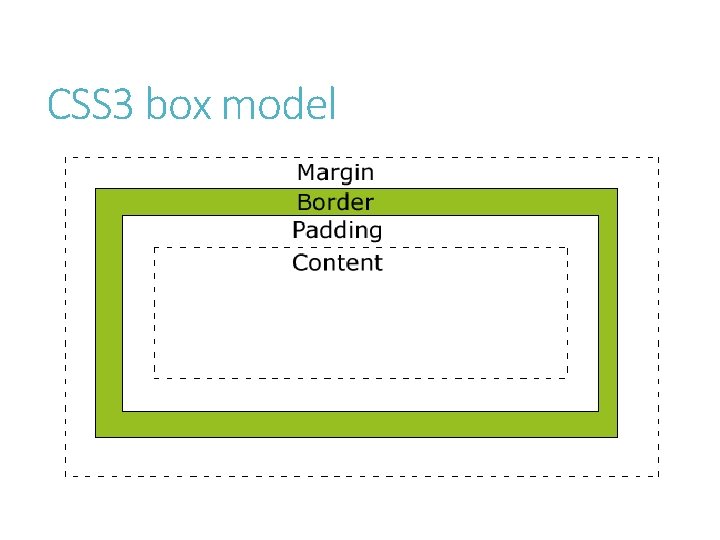
CSS 3 box model
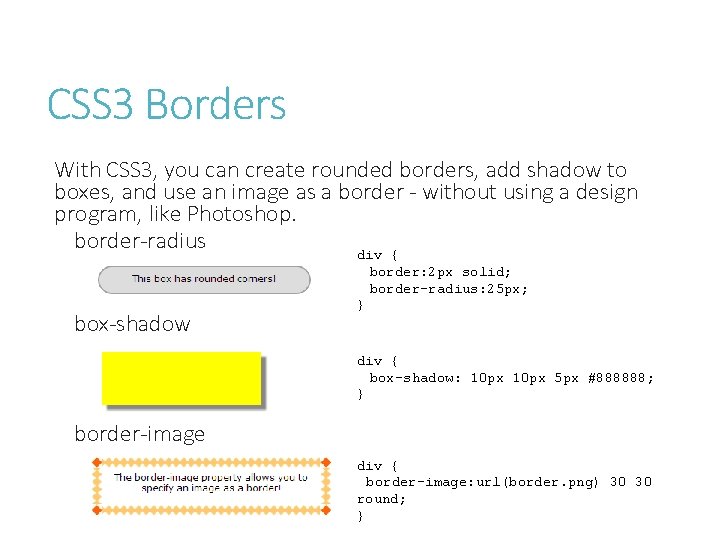
CSS 3 Borders With CSS 3, you can create rounded borders, add shadow to boxes, and use an image as a border - without using a design program, like Photoshop. border-radius div { border: 2 px solid; border-radius: 25 px; box-shadow } div { box-shadow: 10 px 5 px #888888; } border-image div { border-image: url(border. png) 30 30 round; }
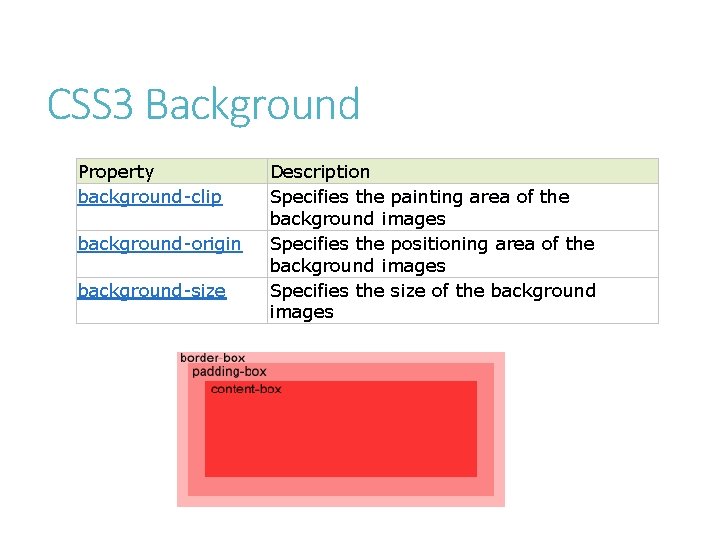
CSS 3 Background Property background-clip background-origin background-size Description Specifies the painting area of the background images Specifies the positioning area of the background images Specifies the size of the background images
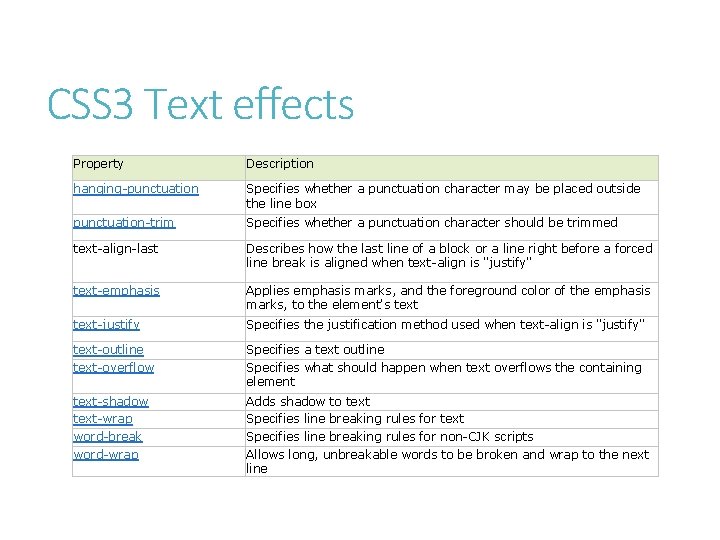
CSS 3 Text effects Property Description hanging-punctuation Specifies whether a punctuation character may be placed outside the line box punctuation-trim Specifies whether a punctuation character should be trimmed text-align-last Describes how the last line of a block or a line right before a forced line break is aligned when text-align is "justify" text-emphasis Applies emphasis marks, and the foreground color of the emphasis marks, to the element's text-justify Specifies the justification method used when text-align is "justify" text-outline text-overflow Specifies a text outline Specifies what should happen when text overflows the containing element text-shadow text-wrap word-break word-wrap Adds shadow to text Specifies line breaking rules for non-CJK scripts Allows long, unbreakable words to be broken and wrap to the next line
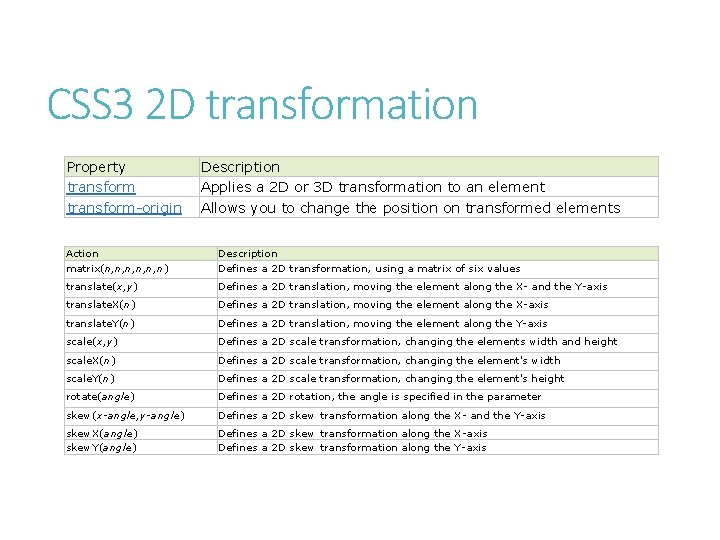
CSS 3 2 D transformation Property transform-origin Description Applies a 2 D or 3 D transformation to an element Allows you to change the position on transformed elements Action matrix(n, n, n, n) Description Defines a 2 D transformation, using a matrix of six values translate(x, y) Defines a 2 D translation, moving the element along the X- and the Y-axis translate. X(n) Defines a 2 D translation, moving the element along the X-axis translate. Y(n) Defines a 2 D translation, moving the element along the Y-axis scale(x, y) Defines a 2 D scale transformation, changing the elements width and height scale. X(n) Defines a 2 D scale transformation, changing the element's width scale. Y(n) Defines a 2 D scale transformation, changing the element's height rotate(angle) Defines a 2 D rotation, the angle is specified in the parameter skew(x-angle, y-angle) Defines a 2 D skew transformation along the X- and the Y-axis skew. X(angle) skew. Y(angle) Defines a 2 D skew transformation along the X-axis Defines a 2 D skew transformation along the Y-axis
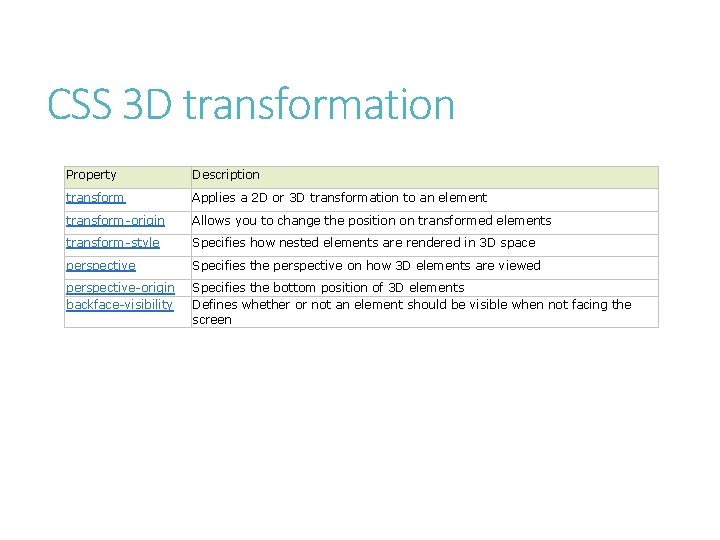
CSS 3 D transformation Property Description transform Applies a 2 D or 3 D transformation to an element transform-origin Allows you to change the position on transformed elements transform-style Specifies how nested elements are rendered in 3 D space perspective Specifies the perspective on how 3 D elements are viewed perspective-origin backface-visibility Specifies the bottom position of 3 D elements Defines whether or not an element should be visible when not facing the screen
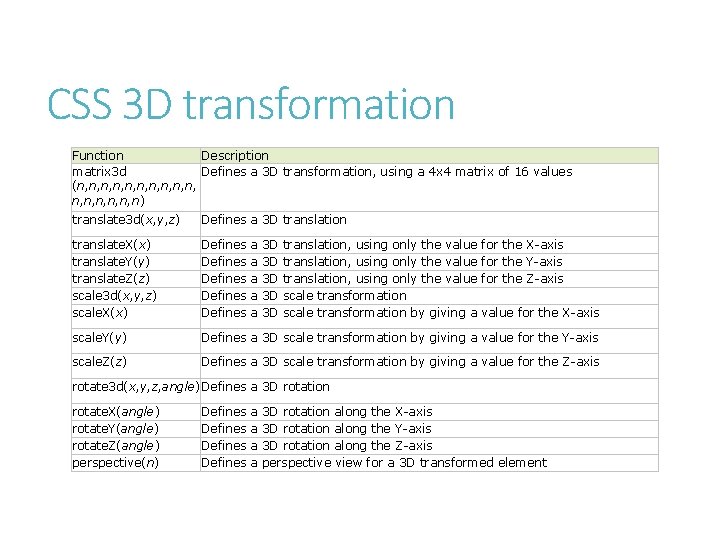
CSS 3 D transformation Function Description matrix 3 d Defines a 3 D transformation, using a 4 x 4 matrix of 16 values (n, n, n, n, n) translate 3 d(x, y, z) Defines a 3 D translation translate. X(x) translate. Y(y) translate. Z(z) scale 3 d(x, y, z) scale. X(x) Defines Defines scale. Y(y) Defines a 3 D scale transformation by giving a value for the Y-axis scale. Z(z) Defines a 3 D scale transformation by giving a value for the Z-axis a a a 3 D 3 D 3 D translation, using only the value scale transformation by giving a for the X-axis for the Y-axis for the Z-axis value for the X-axis rotate 3 d(x, y, z, angle)Defines a 3 D rotation rotate. X(angle) rotate. Y(angle) rotate. Z(angle) perspective(n) Defines a a 3 D rotation along the X-axis 3 D rotation along the Y-axis 3 D rotation along the Z-axis perspective view for a 3 D transformed element
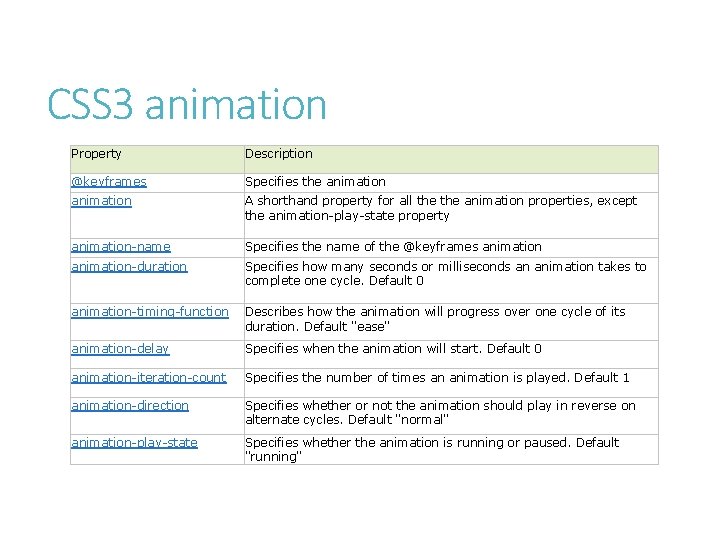
CSS 3 animation Property Description @keyframes Specifies the animation A shorthand property for all the animation properties, except the animation-play-state property animation-name Specifies the name of the @keyframes animation-duration Specifies how many seconds or milliseconds an animation takes to complete one cycle. Default 0 animation-timing-function Describes how the animation will progress over one cycle of its duration. Default "ease" animation-delay Specifies when the animation will start. Default 0 animation-iteration-count Specifies the number of times an animation is played. Default 1 animation-direction Specifies whether or not the animation should play in reverse on alternate cycles. Default "normal" animation-play-state Specifies whether the animation is running or paused. Default "running"
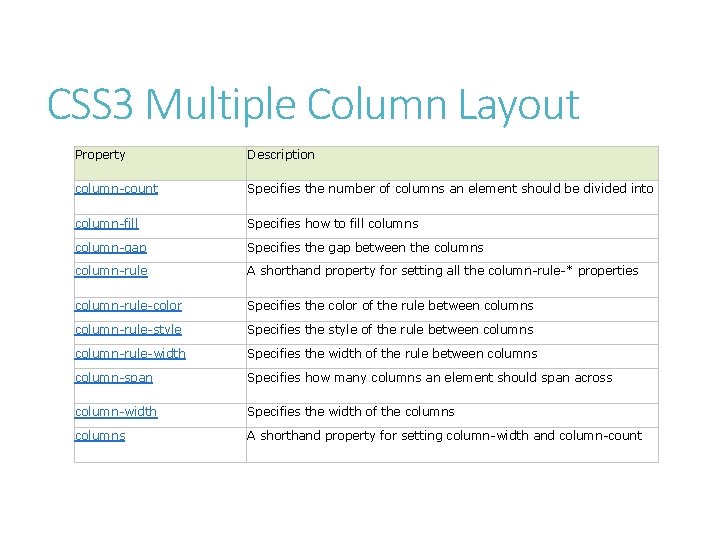
CSS 3 Multiple Column Layout Property Description column-count Specifies the number of columns an element should be divided into column-fill Specifies how to fill columns column-gap Specifies the gap between the columns column-rule A shorthand property for setting all the column-rule-* properties column-rule-color Specifies the color of the rule between columns column-rule-style Specifies the style of the rule between columns column-rule-width Specifies the width of the rule between columns column-span Specifies how many columns an element should span across column-width Specifies the width of the columns A shorthand property for setting column-width and column-count
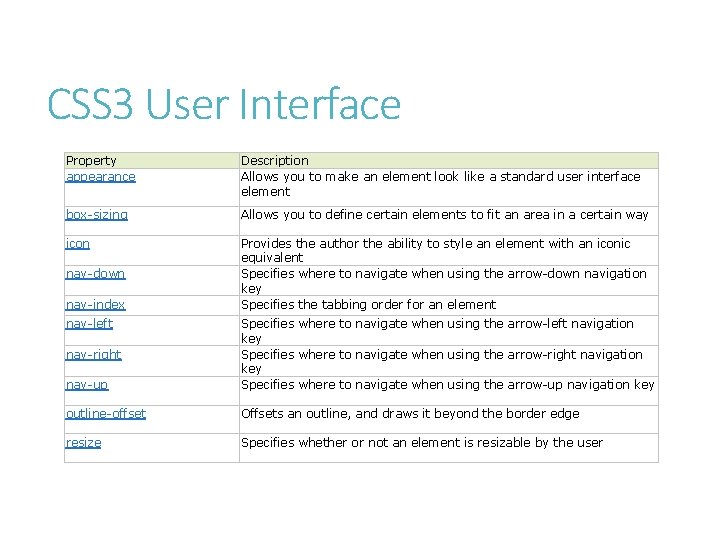
CSS 3 User Interface Property appearance Description Allows you to make an element look like a standard user interface element box-sizing Allows you to define certain elements to fit an area in a certain way icon Provides the author the ability to style an element with an iconic equivalent Specifies where to navigate when using the arrow-down navigation key Specifies the tabbing order for an element nav-down nav-index nav-left nav-up Specifies where to navigate when using the arrow-left navigation key Specifies where to navigate when using the arrow-right navigation key Specifies where to navigate when using the arrow-up navigation key outline-offset Offsets an outline, and draws it beyond the border edge resize Specifies whether or not an element is resizable by the user nav-right
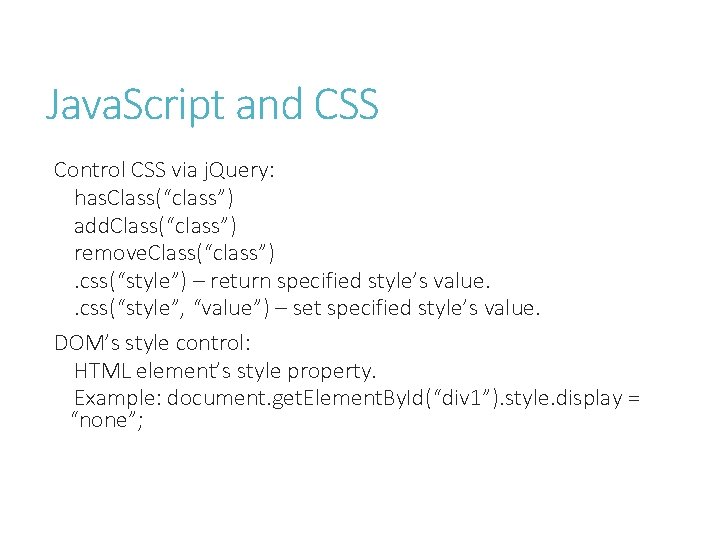
Java. Script and CSS Control CSS via j. Query: has. Class(“class”) add. Class(“class”) remove. Class(“class”). css(“style”) – return specified style’s value. . css(“style”, “value”) – set specified style’s value. DOM’s style control: HTML element’s style property. Example: document. get. Element. By. Id(“div 1”). style. display = “none”;
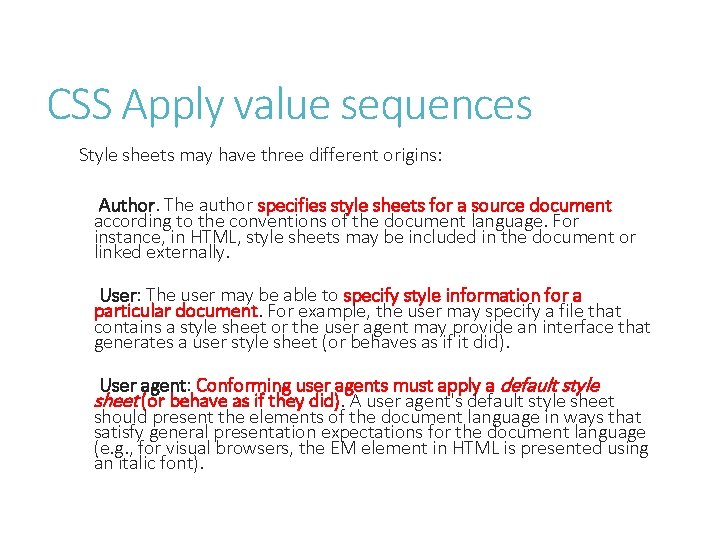
CSS Apply value sequences Style sheets may have three different origins: Author. The author specifies style sheets for a source document according to the conventions of the document language. For instance, in HTML, style sheets may be included in the document or linked externally. User: The user may be able to specify style information for a particular document. For example, the user may specify a file that contains a style sheet or the user agent may provide an interface that generates a user style sheet (or behaves as if it did). User agent: Conforming user agents must apply a default style sheet (or behave as if they did). A user agent's default style sheet should present the elements of the document language in ways that satisfy general presentation expectations for the document language (e. g. , for visual browsers, the EM element in HTML is presented using an italic font).
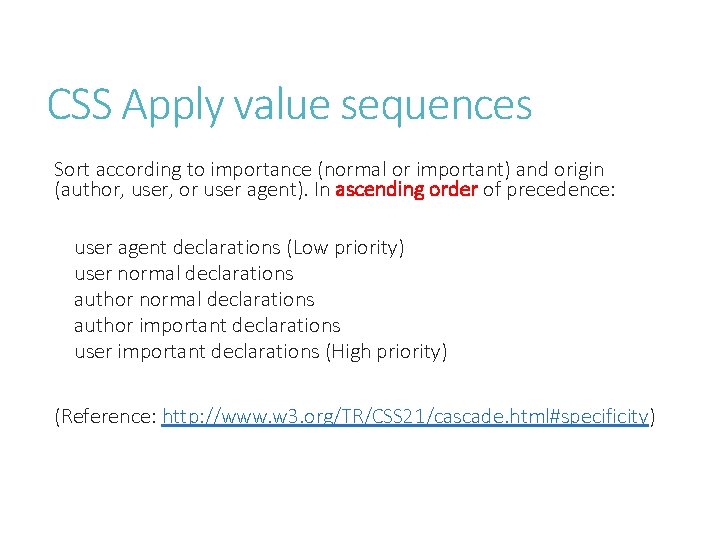
CSS Apply value sequences Sort according to importance (normal or important) and origin (author, user, or user agent). In ascending order of precedence: user agent declarations (Low priority) user normal declarations author important declarations user important declarations (High priority) (Reference: http: //www. w 3. org/TR/CSS 21/cascade. html#specificity)
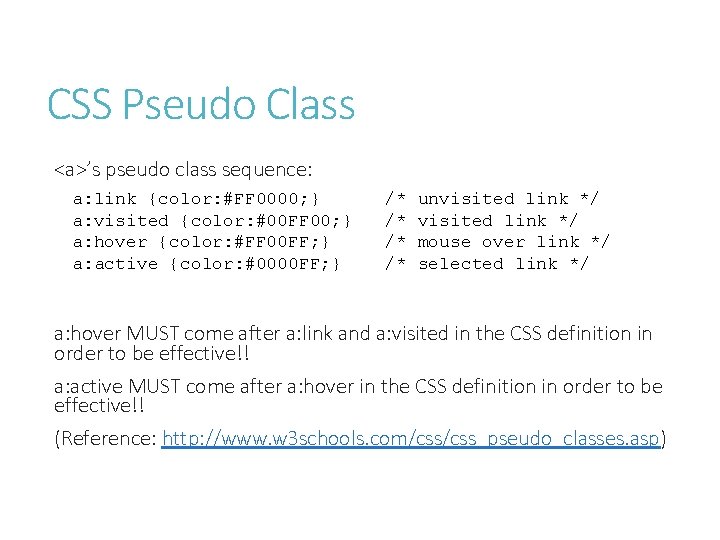
CSS Pseudo Class <a>’s pseudo class sequence: a: link {color: #FF 0000; } a: visited {color: #00 FF 00; } a: hover {color: #FF 00 FF; } a: active {color: #0000 FF; } /* /* unvisited link */ mouse over link */ selected link */ a: hover MUST come after a: link and a: visited in the CSS definition in order to be effective!! a: active MUST come after a: hover in the CSS definition in order to be effective!! (Reference: http: //www. w 3 schools. com/css_pseudo_classes. asp)

Recommend Readings (Web Application Development Study Path) 網頁用戶端應 用程式開發 (HTML 5, JS, CSS 3) 伺服器端應用 程式開發 (ASP. NET) 雲端應用程式 開發 (Windows Azure)
References W 3 School. com Java. Script Subject: http: //www. w 3 schools. com/js/default. asp j. Query Official site: http: //jquery. com Mozilla Developer Center: https: //developer. mozilla. org/en. US/docs/Java. Script Wikipedia. org: Java. Script, HTML 5, CSS 3, Web Worker, Web Storage article. W 3 School. com Java. Script Subject: http: //www. w 3 schools. com/js/default. asp j. Query Official site: http: //jquery. com Mozilla Developer Center: https: //developer. mozilla. org/en. US/docs/Java. Script
- Slides: 78