
Web 2 0 Cool Tools for Teachers and
Web 2. 0: Cool Tools for Teachers and the Classroom Staci Trekles Clinical Asst. Professor Purdue University Calumet
Workshop Outline By the end of the workshop, participants will be able to: Describe the concept of “Web 2. 0” List the different categories of Web 2. 0 applications and describe the basic functions of each one Access and utilize at least one popular and “classroom-friendly” application/site currently available in each Web 2. 0 category Describe some of the safety considerations to keep in mind when introducing students to online environments, as well as ways to minimize potential dangers
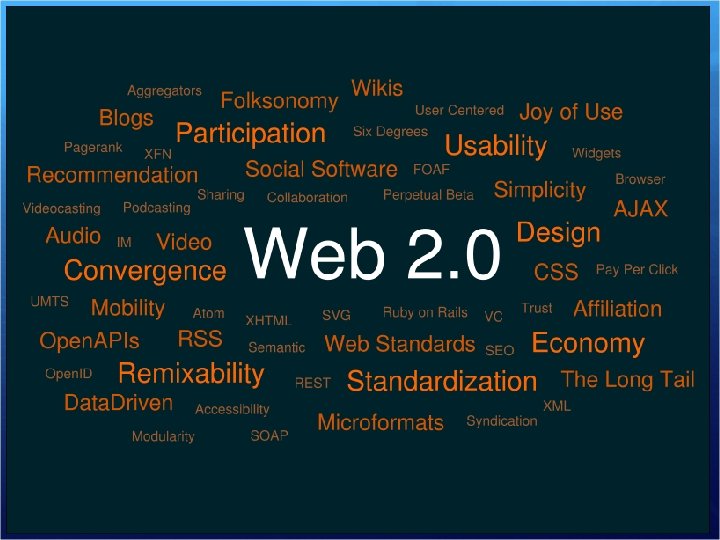
So What is “Web 2. 0” Anyhow? A movement on the Web toward more creative, social, user-driven sites In Web 2. 0 websites, communities of like-minded people shape the content of the site Being “for the people” means that many services are free of cost to the users Examples: Face. Book and Linked. In allow users to post personal profiles, send messages, and share media Wikipedia is a Web-based compendium of knowledge created by people from all over the world Moodle could be considered a complete Web 2. 0 package of products, as it can use many tools to allow you to create an entire online course
Blogs A site that works like a public, online diary, allowing the author to post stories that others can read and comment on Excellent for diaries, question- and-answer dialogue between students and teachers or content experts Recommended Sites: http: //www. wordpress. com http: //www. edublogs. org http: //www. weebly. com (includes extras like file sharing and discussion) http: //www. twitter. com (micro-blog) Ideas for the Classroom: http: //oedb. org/library/featur es/top-100 -education-blogs http: //myecoach. com/online/webresou rcelist. php? rlid=4992
Wikis A site created by its users; anyone who is allowed to do so may edit the content of the wiki site at will Excellent for project planning and group-writing/groupcreation activities Recommended Sites: http: //www. wikispaces. com http: //www. wetpaint. com Ideas for the Classroom: http: //educationalwikis. wiki spaces. com/Classroom+Wik is http: //wik. ed. uiuc. edu/inde x. php/Wiki_in_a_K 12_classroom
Podcasting Media files that can be posted for users to “subscribe” to, allowing automatic downloads of new episodes to be replayed on the computer or an MP 3 player Can be audio or video, or a combination of both, and can be produced by teachers or students, or downloaded from 1000’s of free educational content providers Recommended Sites: http: //www. apple. com/edu cation/digitalauthoring/pod casting. html Ideas for the Classroom: http: //learninginhand. com/ http: //www. evscicats. com/p odacademy/ http: //www. apple. com/edu cation/resources/podcastin gvideos/
Social Bookmarking An online list of bookmarks, categorized by keywords (“tags”) and available to other members Social bookmarking allows different people to create and post customized resource lists of sites related to any number of topics Recommended Sites: http: //www. delicious. com http: //earth. google. com (bookmarks are of places in the world, with linked information) Ideas for the Classroom: http: //www. educationworld. com/a_tech/sites/sit es 080. shtml http: //weblogged. com/2005/08/02/
Social Networking Multi-feature environments where people can post pictures, personal profiles, blog, send messages to one another, play games, and more Profiles are generally restricted only to members within the user’s “network” of friends, allowing friends to connect semiprivately When a new friend is added to someone’s network, that friend is also part of all of his/her networked friends’ networks Can also allow for organization of information – sort of a mix of a discussion forum and a learning management system Recommended Sites: http: //education. ning. com http: //www. imbee. com http: //www. classroom 20. com http: //todaysmeet. com/ (realtime networking) http: //www. edmodo. com Ideas for the Classroom: http: //socialnetworksined. wikis paces. com/ http: //www. slideshare. net/brai nopera/facebook-strategies-for -the-classroom/
Media Sharing Allows for the posting, sharing, categorization, and commenting of media on the web (primarily photos and videos) Searches can be performed on keywords assigned to media to put them into categories (known as “tagging”) Media sharing is different from podcasting in that everything is shared directly on the Web Recommended Sites: http: //www. flickr. com http: //www. teachertube. com http: //www. screencast. com http: //www. atomiclearning. c om (tutorials for technology apps) Ideas for the Classroom: http: //digitalstorytelling. coe. uh. edu http: //www. kn. pacbell. com/ wired/fil/pages/listdigitalpa. h tml
Presenting and Media Creation Allows for participation in the Web 2. 0 movement in a creative, expressive way Students love to express themselves and use the cultural messages they care about to do so Remixing and presentation through the Web allows this to happen Try NML’s Learning Library with student challenges and lessons! Recommended Sites: http: //www. jaycut. com http: //www. prezi. com http: //edu. glogster. com http: //www. wix. com Ideas for the Classroom: http: //newmedialiteracies. or g/library/ http: //projectnml. ning. com http: //transformativeworks. o rg/ http: //delicious. com/ebreilly
Quizzing and Surveys Allows for informal and even formal assessment Teachers can customize surveys and quizzes, or even find practice quizzes in different subjects for selfassessment Most sites provide extra services, like more questions or better data tracking, with a paid subscription Recommended Sites: http: //www. thatquiz. org http: //www. jotform. com http: //www. surveymonkey. co m Ideas for the Classroom: http: //vickiwiki. pbworks. com/A ssessment-Using-Web-2 -0 Tools http: //web 20 teach. blogspot. co m/2008/05/top-5 -quizgenerators-for-online. html http: //www. feedmyapp. com/w eb_20_survey_applications_sit es
Document Sharing Allows for sharing information such as presentation slides, documents, spreadsheets, forms, and more Google in particular has a wealth of free tools available, including an entire Web 2. 0 based office suite! Advantage in online document sharing is that you can share and collaboratively edit documents with anyone you choose Recommended Sites: http: //www. slideshare. net http: //docs. google. com http: //www. issuu. com Ideas for the Classroom: http: //www. google. com/educa tors/p_apps. html http: //chronicle. com/blog. Post/ Revisiting-Google-Docsfor/23721/ http: //www. slideshare. net/aca ntone/google-presentation 4835223
Virtual Worlds An immersive online environment, much like a cross between a video game and a social network Not like a game in that there is no fixed goal; users merely interact with each other, and build and share virtual items and content Popular in businesses and colleges as a way for people to “meet” without being face to face, but still retaining a more social aspect than email Recommended Sites: http: //www. opensimulator. or g http: //www. clubpenguin. com http: //www. leadingvirtually. c om Ideas for the Classroom: http: //secondclassroom. ning. c om http: //connect. educause. edu/Li brary/EDUCAUSE+Review/Edu cational. Frontiers. Learn/47221
“Mashups” Mashups let you create cool combinations of online services, including other Web 2. 0 tools like media sharing In other words, you can create, for example, a tool that lets students search for images of historical places that also gives them a Google Earth view of the place, and a Wikipedia article about it Mashups also include “widgets” or micro-mashups that you can insert onto other sites Recommended Sites: http: //pipes. yahoo. com http: //www. programmablew eb. com/ http: //widgetbox. com Ideas for the Classroom: http: //connect. educause. edu/ Library/EDUCAUSE+Review/ Dr. Mashupor. Why. Educators. S ho/44592
Issues of Safety in the Web 2. 0 World Web 2. 0 services are typically free and open-access, meaning that anyone with a computer and Internet access can log in It also means that whatever one posts is available for EVERYONE else to see For this reason, it is important for our students to understand responsible and smart Internet use now more than ever before! Recommended Sites: http: //www. isafe. org http: //www. ikeepsafe. org http: //www. wiredsafety. org http: //kidshealth. org/parent/po sitive/family/net_safety. html Use these sites with students, parents, and other educators ASAP! For example, go through the i. Safe certification program (it’s free) and lead others through the training as well
So, what are your favorites? My personal favorites: Google Apps for Education Moodle Wix. com Atomic. Learning Weebly. com Prezi. com Edu. Glogster. com Screencast. com Slideshare. net Thatquiz. org Podcasting
Resources and References Staci’s contact info: Email: atrekles@purdue. edu Website: http: //education. calumet. purdue. edu/Faculty/Trekles Blog: http: //zelda 23 publishing. com/blog Slideshare: http: //www. slideshare. net
Resources and References More Tutorials: Edu. Blogs videos tutorials: http: //edublogs. org/videos/ Wikispaces Help Index: http: //www. wikispaces. com/help+index Subscribing to podcasts (and more) with Apple i. Tunes: http: //www. apple. com/itunes/tutorials/ Creating your own podcast: http: //images. apple. com/education/solutions/podcasting/pdf/Podc ast. Creation. Guide. pdf Google Docs tutorial: http: //edutech. msu. edu/online/Google. Docs. html
Resources and References More Tutorials: Moodle for Teachers: http: //issuu. com/muppetmasteruk/docs/moodlebook Facebook in Education: http: //www. facebook. com/education Imbee Help and Insights for Teachers: http: //www. imbee. com/teacher Del. icio. us Help and Tutorials: http: //delicious. com/help Teacher Tube Frequently Asked Questions: http: //www. teachertube. com/help. php Understanding Flickr Features: http: //flickr. com/tour/
Resources and References More Tutorials: Prezi tutorial: http: //prezi. com/learn/ Glogster tutorial: http: //drop. io/4 denpdx/asset/glogster-wtih-de- ppt Jing screencasting and sharing: http: //www. jingproject. com Second Life and Teen Second Life support: http: //teen. secondlife. com/community/support Club Penguin Tutorials: http: //support. clubpenguin. com/help/index. htm Using Yahoo! Pipes: http: //www. squidoo. com/yahoo-pipes-guide
Thank you! Website for this workshop: http: //www. slideshare. net/andella/web-20 -workshoppresentation-683167 Presented by Staci Trekles atrekles@purdue. edu Purdue University Calumet http: //www. calumet. purdue. edu/education
- Slides: 22