
Wavetrix Changing the Paradigm Remote Access Using Outbound
Wavetrix Changing the Paradigm: Remote Access Using Outbound Connections Remote Monitoring, Control & Automation Orlando, FL October 6, 2005 Proprietary and Confidential
Agenda • Goal • Inbound Connection Oriented Architecture • Outbound Connection Systems • Summary/Questions l Wavetrix
Goal • Objective: – Enable remote access regardless of location • Issues – Firewall(s)/Router(s) reconfiguration is very challenging when remote access is needed via the Internet • Especially true for third party deployments – Centralized administration of user access and privileges – Security is of paramount importance l Wavetrix
Remote Access Applications • • • Status and Maintenance Checks Diagnostics Configuration and Administration Software Upgrade Log File Retrieval All these applications are originated by the end user l Wavetrix
Remote Access Methodologies • Inbound Connection via the Internet – Definition: Client originates a connection to the serial server – Requires Firewall(s)/Router(s) reconfiguration – Port Forwarding is the most common implementation • Outbound Connection via the Internet – Definition: Serial server originates connection to a known point – Gateway provides connection point l Wavetrix

Inbound Connection Architecture • Client (i. e. PC) originates connection to the serial server – Telnet or Virtual Serial Port • Serial Server • Requires firewall to be configured to route connection to serial server – Static IP address − – Authenticates user (username/password) – Port Forwarding is the most common technology l Wavetrix
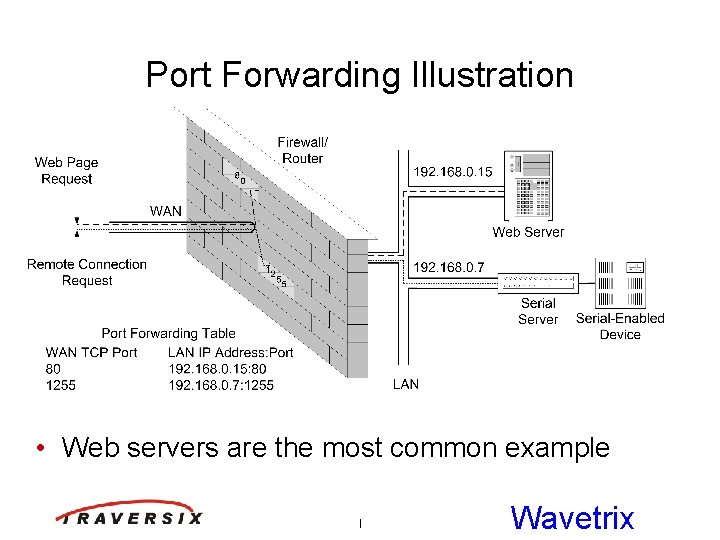
Port Forwarding Illustration • Web servers are the most common example l Wavetrix
Installation Issues • Provisioning IP address routing is resource intensive – – Static IP address for the serial server They must be setup and tested Maintained through upgrades/replacements At a third party, time and politics drive the process • Username/password is in serial server • Must know IP address (and port number) of serial server – Multiple serial servers within a single facility require each to have their own port number l Wavetrix
Administrative Issues • Serial servers are individually managed – To reduce complexity, a single username/password is often used for all users • Serial server configuration information (IP address, port number) must be disseminated – Users must keep track of this information – Updates must sent whenever the information changes • Complexity grows dramatically as the size of deployment grows l Wavetrix
Outbound Connection Motivation • Outbound connections are generally permitted – Examples: Requesting a web page, retrieving email • Requires no changes to the firewall or router – Mimics existing network processes – Traverses the firewall like other processes • Faster, simpler deployment • Reduces technician skill level requirements – Requires minimal “Networking” training l Wavetrix
Architectural Changes • Serial server needs a connection point – Client isn’t always there and is usually not visible from the Internet • Solution: Add a connectivity gateway – Moves the client connection from locally at the serial server, to the gateway on the Internet – Provides a central point for access control and privilege administration l Wavetrix
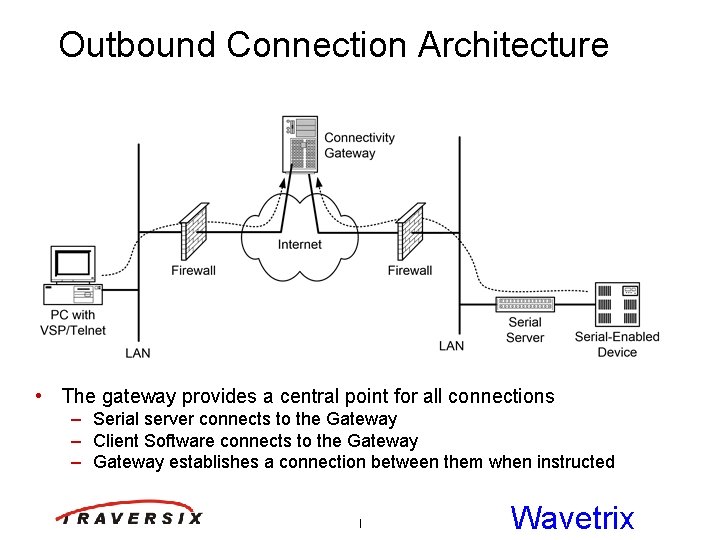
Outbound Connection Architecture • The gateway provides a central point for all connections – Serial server connects to the Gateway – Client Software connects to the Gateway – Gateway establishes a connection between them when instructed l Wavetrix
Outbound Connection Elements • Connectivity Server – Originates and maintains a constant connection to the connectivity gateway – Serial server can have a DHCP or Static IP address • Connectivity Gateway – Specific purpose appliance that resides on the Internet • Connectivity Client – Creates a connection with connectivity gateway – Connectivity gateway authenticates and connects the client to the requested connectivity server l Wavetrix
Enhanced Security • Bi-lateral Authentication – Connectivity Client • Individual username/password – Connectivity Server • Can use very strong machine-to-machine techniques • Data Transfer – Encryption • Pre-shared or dynamic key exchange • Administration – Privileges/Access controlled individually – Centrally managed l Wavetrix
Centralized Administration • Single point to control access to all connectivity servers • User privileges are individually defined and controlled • Enables a connectivity server to be shared across organizational boundaries • Inherently disseminates any changes to a connectivity server’s configuration information l Wavetrix
Deployment Examples • PBX – Remotely administer PBX • Sensor Gateway – Connect a sensor network (deployed at a third party) to it application • HVAC Management – Remotely manage/diagnose HVAC systems l Wavetrix
Summary • Outbound connections simplify remote access especially at third party facilities – Firewall traversal eliminates the need for reconfiguration – Central administration improves security and control • Enables large scale deployments l Wavetrix
Thank You Questions? Virtual Connectivity Network www, traversix. com l Wavetrix
- Slides: 18