
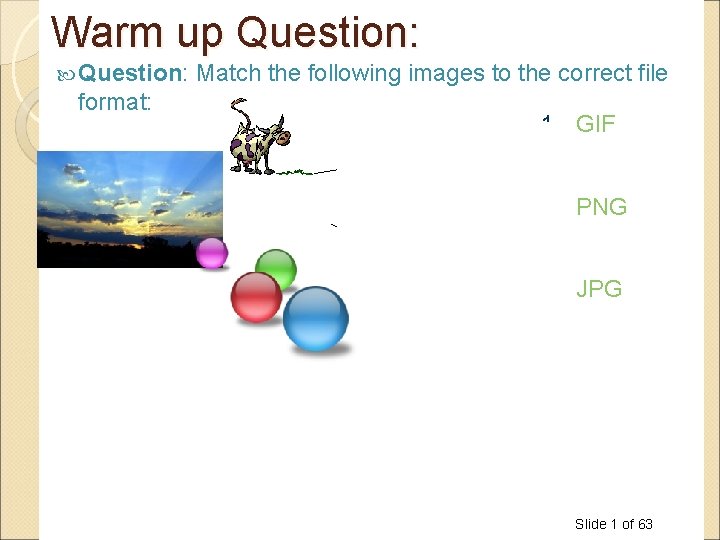
Warm up Question format Match the following images









- Slides: 63
Warm up Question: format: Match the following images to the correct file 1. GIF 2. PNG 3. JPG Slide 1 of 63
Computer Science 1033 – Week 6 HOW THE WEB WORKS https: //www. youtube. com/watch? v=u. Qpa. FN 93 Uy. U “The Internet: where men are men, women are men, and children are FBI agents. ” Anonymous
Overview of Today’s Topics Announcements The Internet IP addresses and Domain Names Preparing to build a website Good Website Design What is a webpage Introduction to html How to organize you files within your website, file extensions, types of web pages Slide 3 of 63
Announcements Final Exam is Saturday, Dec 14 at 7 pm You will lose 15% if you did not submit correctly in OWL. MAKE SURE YOU SAVE THE EMAIL TO PROVE YOU SUBMITTED, we will NOT give you this mark back without the email even if your assignment was up on Panther BEFORE the due date. Poster Assignments will be marked by Oct 22 nd. Web assignment due Friday, Nov 15 th Please leave the labs when your lab finishes. We only have a enough seats for the people taking the course. If you want to work on your assignments: ◦ MC 230 Lab is open from 8: 30 pm-8: 30 am from M – Thu ◦ MC 230 Lab is open from 4: 30 pm till 8: 30 am from F - M morning Slide 4 of 63
Textbook Readings for this Week Understanding Computers ◦ Communications on the Internet Websites ◦ Putting the Website Online Slide 5 of 63
REQUIRED Homework You MUST watch these 4 videos about Copyright Rules and Creative Commons on your OWN time: ◦ Creative Common Vimeo: https: //creativecommons. org/about/videos/creative-commonskiwi/ Go to linkedin. com/learning and log in with your Western credentials In linkedin. com/learning search for this course: Copyright for Creatives: Protecting Your Work. Then watch the following videos: Defining copyright What can you copyright Copyright myths Copyright reality Slide 6 of 63
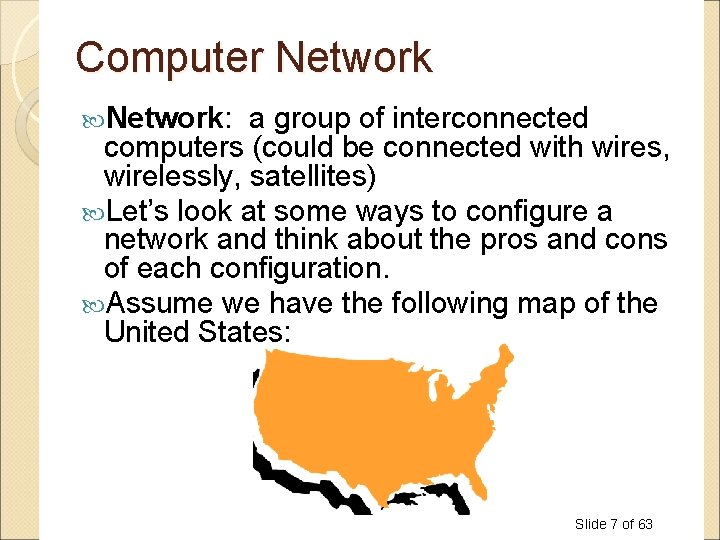
Computer Network: a group of interconnected computers (could be connected with wires, wirelessly, satellites) Let’s look at some ways to configure a network and think about the pros and cons of each configuration. Assume we have the following map of the United States: Slide 7 of 63
What is good and bad about this layout? Washington, DC Slide 8 of 63
How about this layout? Washington, DC Slide 9 of 63
How about this layout? Washington, DC Slide 10 of 63
The Internet: a global system of interconnected computer networks that use the standardized Internet Protocol Suite (TCP/IP) to serve billions of users worldwide. A network of networks The Internet is hardware, not software! The World Wide Web is software that runs on the Internet! Slide 11 of 63
How does the Internet work? Uses TCP/IP A standard protocol (way of communicating), The ideas behind this protocol were funded by the Advanced Research Projects Agency (ARPA) of the US Department of Defence (Do. D) (around 1969). Thus the Internet was originally call the ARPANET Opposite of your home telephone where you get a direct line that only you and the person you are talking to can use. TCP/IP has no direct line at the outset of the message! If a communication line is broken, another line is tried. Slide 12 of 63
How does the Internet work? Image that I had a written a manuscript, printed it but I had NOT stapled it together. I have to get it from our classroom to my publisher in Toronto at Bloor and Yonge. I could: ◦ Idea 1: Give the whole manuscript to one of you and tell you at the beginning to take the whole manuscript, drive down Western Road South, till it meets the 401, go east till you get to the cut off for Yonge Street, go south and stop at Bloor. AND I WILL STOP ALL TRAFFIC ON THESE ROADS WHILE YOU DO THIS. This is how a phone line work! (Like when Barak comes to town ) Slide 13 of 63
How does the Internet work? Idea 2: How else could I do it? Slide 14 of 63
How does the Internet work Each page in the manuscript is similar to a packet Packet: a small group of bytes consisting of a header (tells where it is going: destination and where it came from: source) and the body. (Often 64 bytes for header and 512 bytes for body) Protocol: rules for the format and transmission of data Slide 15 of 63
TCP Does a few things: ◦ At the sending end: Take a large chunk of data (such as a webpage, email message, etc) and breaks it into small packets Sends the packets out on to the Internet ◦ At the receiving end: Detects lost packets, packets with errors because of network congestion, traffic load balancing, or other unpredictable network behaviour, and requests the packet to be resent from the source Rearranges and reassembles the packets back into the webpage, email message, etc on the receivers machine Slide 16 of 63
IP Like a GPS Picks a route for a packet, stopping at routers which pick the next best machine/network to send the package to. If a communication line is down or broken, sends the package back to TCP and TCP sends it again to try a different route. Needs to be able to identify all the machines on the Internet, thus each machine has it’s own unique address Uses IP Addresses Slide 17 of 63
Datagram in this example is another word for packet:
IP Address Just like your home address Each machine has its own address, called an IP Address Consists of 4 numbers with dots between them. Each number ranges from 0 to 255 Sample IP Address: Slide 19 of 63
Home Address Phone Number IP Address 1151 1 129. 100. 23. 2 Richmond Street, London, Ontario, Canada (519) 6792117 47 1 129 London 519 100 1151 679 23 2117 247 Ontario Richmond Street EXCEPT IP addresses are NOT geographical so just think of this as an analogy not exactly done like this! IP Addresses
IP Address Ways to Represent It Is always 32 bits IP address can be expressed as: Type Example Dotted Quad 129. 100. 23. 247 (most common) Binary 10000001 01100100 00010111 11110111 Hexadecimal 81 64 17 F 7 Decimal 2, 170, 820, 599 Newer ones are 128 bits (2128 different possible addresses) IPv 6. We wont be looking at them! Slide 21 of 63
How to send the message, for example a webpage. TCP breaks webpage into packets of bytes figures out IP address of where it wants to send the packets (destination) TCP figures out IP address of where the packet is coming from (source) Sends off each packet to first machine (IP Address) on the route (DOES NOT PREPLAN ROUTE!) Packet stops at first machine, likely a router, then the router sends it to the next machine on the journey (IP Address) and so on until it gets to the final IP Address (destination) Called Packet Switching Slide 22 of 63
Let’s see an actual route: at the Command Prompt, type: tracert 74. 125. 99 http: //www. youtube. com/watch? v=t. Av_e. Lm 7 DMk
Some Experiments with IP Addresses If you have a laptop, type the following IP address into the address bar of your web browser: 98. 158. 91. 201 and hit enter: Give me 4 random numbers between 0 and 255 and I will try them on my machine Slide 24 of 63
Another experiment In Windows, go to Start>All Programs>Accessories>Command Prompt Type the command: ping gate. csd. uwo. ca then type ping 123 then type ping 129. 100. 22. 120 Go to: http: //www. hcidata. info/host 2 ip. htm Go to: http: //www. whatismyip. com/ Watch this movie: http: //www. youtube. com/watch? v=Rb. Y 8 Hb 6 a Slide 25 of 63
Why is the first time you are hearing about IP Addresses? Question: How come you don’t just use IP addresses in your web browser? What do you use in your web browser? Slide 26 of 63
IP Addresses and Domain Names Numbers are hard for us to remember! Phone numbers are 7 digits for a reason! Slide 27 of 63
Domain Names to the Rescue In 1973, IP Address became the standardized way to identify machines on the Internet. In 1984, University of Wisconsin came up with a name server, that maps a name to an IP address. In 1985, Domain Name System is established and the initial top level domain names are introduced. Slide 28 of 63
Domain Name History In 1990, the Internet moves beyond of the world of the government and universities and into the commercial society. Up until 1995, you didn’t have to pay for your domain name, 1995 to 1998 you paid the NSF (National Science Foundation) $100 US dollars for a 2 year registration for a domain name. In 1998 the assignment of domain name is opened up to private companies to Slide 29 of 63 encourage competition.
Break https: //twitter. com/i/status/10965562502 40876544 https: //twitter. com/i/status/11842523171 74030338 Slide 30 of 63
How does a Domain Name work? Every machine on the internet gets an IP Address A DNS (Domain Name System) maps the domain name to the correct IP address. In most cases there is a one to one mapping between an IP Address and a Domain Name: ◦ 129. 100. 23. 247 maps to www. csd. uwo. ca Sometimes one IP Address might maps to more than one domain name: ◦ 155. 12. 12 might map to www. chapters. ca and www. indigo. ca Sometimes one domain name might map to more than one IP Address: ◦ 155. 12. 1 and 155. 12. 2 and … 155. 12. 77 might all be web server machines for www. msn. com ◦ http: //www. hcidata. info/host 2 ip. htm Slide 32 of 63
Domain Names identify machines on the Internet, for example a web server machine. A Web server contains all the web pages for a company or individual. Web pages are stored on the web server machine (sometimes the machine is called a host) in folders or directories(web site) A web site is really a folder Web pages are just files, usually with the extension. html, for example: Slide 33 of 63
Question Web Page Web Site Web Server Machine/Host (usually called www) File Folder/directory Slide 34 of 63
URL A URL (established by Tim Berners Lee in 1990) points at a web page on the internet. For example: http: //www. uwo. ca/its/courses/spring. html Hypertext Transfer Protocol (http) Rules on data is exchanged between servers and browsers Other examples: ftp: //, news: // World Wide Web Indicates we are referring to the world wide web Domain Name The name of the site, points to the web server machine Folder its is a folder on the web server machine File spring. html is a webpage file Folder courses is a folder inside the its folder Slide 35 of 63
Domain Names Systems (DNS) A Domain Name System/Server (DNS) maps the domain name to the IP Address. Like a big phone book of Domain Names and IP Addresses http: //www. youtube. com/watc h? v=d. E 4 rs. Nu. G 0 aw Slide 36 of 63
Let’s break down the Domain Name! http: //www. csd. uwo. ca World Wide Web Not a part of the domain name, usually it is just the machine/host name that is the webserver Third Level Domain Also a Sub domain csd is a subdomain of the domain uwo. ca Second Level Domain Top Level Domain (TLD) Rules exist for what you can pick, only certain combinations of letters have been established as allowable top level domains Things to note: • the domain is uwo. ca • csd is a sub domain of uwo. ca • www is not part of the actual domain name but it will be stored in the DNS Slide 37 of 63
Sub Domains Used to organize your web server (just like folders and directories organize your computer) Example: ◦ http: //www. uwo. ca ◦ http: //www. csd. uwo. ca ◦ http: //www. brescia. uwo. ca • csd is a sub domain of uwo. ca • brescia is also a sub domain of uwo. ca Slide 38 of 63
Rules for Domain Names Each item between a dot is called a level. You can have a maximum of 127 levels (thus the top level domain is 1 level and the second level is 1 level, that leaves room for 125 sub domains). Each level can be up to 63 characters long The entire domain name (including sub domains) can not be more than 255 characters. http: //www. abc. def. hij. com Question: How many levels does the above domain name have? Question: How many sub domains does the above domain name have? Slide 39 of 63
Rules for Domain Names Must use one of the approved TLDs. Each level must consist of letters, digits and hyphens. Each level cannot start with a hyphen or end with a hyphen. Each level must not contain a space. Domain names are case insensitive. Can cause confusion! Question: Do these domain names represent the same domain? dogsrus. com Dogs. RUs. com Question: Fill in the following Domain Name A we are the world. org B We-Are-The-World. org C We_Are_The_World. org D We. Are 99%Of. The. World. or g E We. Are. The. World. org F -weare. theworld-. org G Wearetheworld. werock Slide 40 of 63 Valid or Inval d
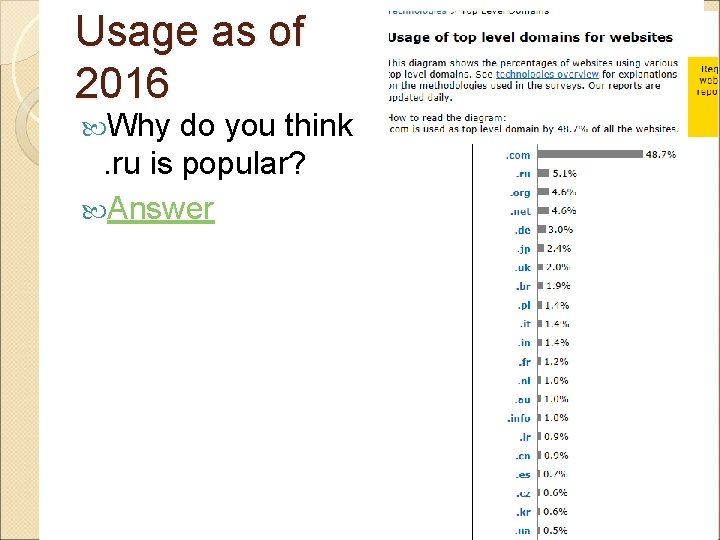
Top Level Domain Names An International Internet committee has established the allowable top level domains: Question: Can you name at least 5 other top level domains? (E. G. . realty) http: //data. iana. org/TLD/tldsalpha-by-domain. txt http: //www. dotanything. co/New. TLDs. aspx https: //www. apple. com/ca/legal/ intellectualproperty/tld/registration-policy/ ◦ Question: after. com what do you think is the most popular TLD was in 2007? Slide 41 of 63
Usage as of 2016 Why do you think. ru is popular? Answer Slide 42 of 63
Top Level Domain names Original ones were: ◦. com, . org, . net, . int, . edu, . gov, . mil Then country ones appeared (all 2 letters) ◦. ca, . ae, . uk, . de Then geographical ones: ◦. asia, . berlin, . vegas And now…Brand ones: ◦. Bloomberg, . Barclays, . youtube ICANN has now approved ones like: ◦. adult, . apartments, . flowers, … Slide 43 of 63
Tracing Routes Using Domain Names Review: https: //www. youtube. com/watch? v=5 o 8 C waf. Cxn. U Slide 44 of 63
Why should you care about Domain Names? Let’s assume you are about to start a new business: Do you need a website? ◦ YES, YES Essential for competition! Nowadays your customers don’t just want a website from you, THEY EXPECT A WEBSITE! Slide 45 of 63
Successful businesses take full advantage of the Internet: Google Fact: as of 2007, Google passes Microsoft as the most visited website in the world. ◦ Question: Name some other sites that have now passed Microsoft https: //en. wikipedia. org/wiki/List_of_most_pop ular_websites Slide 46 of 63
Starting to think about your business Perhaps you will need flyers/advertisements You may need business cards You might design a logo in Photoshop You SHOULD have a website You will legally need a company name. Question: Why is the company name important in terms of your website? Slide 47 of 63
Picking a domain name: SOME SUGGESTIONS: 1. Keywords, Keywords- Since our goal is to drive highly targeted traffic to our site; we need to pick a domain name with our keywords in it. Search engines give a lot of weight to domain names. If your domain name matches a keyword phrase that has traffic, you will get higher rankings. For example, if your site is called www. marketingcompany. com, this phrase gets tons of searches a day, so we will get free traffic coming to our site. 2. Be Memorable- Your domain name should be descriptive, memorable, and easy to spell and pronounce. For example, www. myspace. com 3. Avoid Hyphens- Most people won’t remember the hyphen. However if you want to get www. joshfuller. com and it is taken, only then should you try www. josh-fuller. com. 4. . Com First- Buy a. com extension because it’s the default extension in most people’s mind. Many times a. com extension is going to be taken so you will need to try. net, . biz, . org, etc. Always try to get. com first. Slide 48 of 63
More Suggestions 5. Keep it Short- Keep in mind that people need to be able to remember it, and type it. Focus on the shortest name that your customers and visitors will associate with your website. For example, www. pcworld. com, is much more effective than www. powercomputingworld. com 6. Kill Procrastination- Don’t wait to register your domain name. If you are thinking about registering a domain name and it’s available, what are you waiting for? Just like offline real estate, online real estate is being bought up fast. Register before you loose the opportunity to get the name you really want. 7. Get Creative- If your first choice is already taken. Add “e” or “i” or a number in front of a name, for example www. isurfing. com. Another secret is adding “web” or “net” in front or at the end of a name. Combine short, meaningful, catchy phrases or words that describe your business or site. For example if www. cheaptrips. com is taken, try www. webcheaptrips. com or www. cheaptrips 4 u. com Slide 49 of 63
More Suggestions 8. Know the Rules- Remember that domain names can only use letters, numbers, and dashes. Spaces and symbols are not allowed. Also, domain names are not case sensitive. 9. Testing, 123 - Before you purchase your domain name, spend a couple minutes testing them. See what your friends and family think of your choices. You may have a name you think is perfect, however it may be difficult for people to remember and/or hard to spell. 10. Learn from Monopoly- In the board game Monopoly, the person who usually wins, is the person who buys up the most real estate. Online real estate is no different. Purchase domain names similar in spelling to yours. The truth is, most people can’t spell. Every day millions of people misspell domain names. Inevitably, they will still land on someone’s web page. I have typed in www. utube. com, instead of www. youtube, a couple times and landed on some sort of tube manufacturing website. Utube is getting thousands of free hits to their site, just because they are similar in spelling to Youtube. If your website is www. cheaptrips. com, consider buying www. cheeptrips. com and www. cheeptrip. com. 11. Which Online Realtor to Use? - Go to www. Go. Daddy. com. Start with The Domain Search Box and search for a name that is available. Once you find a name that works, go ahead and start the check out process. Your new domain name will only cost you $8 - $10. Skip all of the extra services they will try and sell you. No need for them. You From: http: //billionairebythirty. com/2009/05/how-to-pick-a-domain-name-to-drive-traffic/comment-Slide 50 of 63
How do you find out if the Domain Name you want is available? Find out from a website that lets you purchase domain names such as: ◦ www. godaddy. com ◦ www. mydomain. com ◦ https: //www. 101 domain. com/ ◦ www. register. com Pay per year, must reregister every year or every few years Slide 51 of 63
To Host or Not To Host That is the Question! You have: ◦ Picked a domain name ◦ Registered it and paid for it Now you want to find a company that will hold/host your website (keep the files that make up your website) OR perhaps you can set up your own webserver in at your company or home? Slide 52 of 63
Don’t Host That is the answer! 4 Reasons NOT to Host Your Own Website: Expensive: Server and server software (web server, mail server, firewall, virus protection etc. ) can be expensive. Continual Connection: The server needs a 24/7 high speed connection to the internet, which is relatively costly. Technical: Setting up all the configurations including mail server, FTP server and DNS server can be complicated. Support: Server maintenance requires 24 hour support, special skills and knowledge. Slide 53 of 63
Find an ISP Internet Service Provider ISP A company that provides access to the Internet Maintains one or more machines that are permanently connected to the Internet Offers connections via telephone lines, cable, satellite dishes. Slide 54 of 63
ISP Provide user with: ◦ User account for accessing the Internet ◦ Email access ◦ Web Space to host/hold your website Some ISPs are: ◦ Rogers ◦ Bell ◦ Execulink ◦ Western (at least while you are a student here ) Slide 55 of 63
What to look for in an ISP Top 10 Reasons to pick an ISP Disk Space Always get more, Standard 5 GB – 10 GB Bandwidth bandwidth is the amount of traffic that is allowed to occur between your web site and the rest of the internet in a given time period (static pages go with low; need for downloads go with high) Web Site Speed Web site speed is a given… slow. . Poor service (ask for some websites and try it out yourself) Database/Programming Language Support Needs for dynamic website – interact with customers. Perl, Java, PHP etc… Technical Support Test by sending them an e-mail and see response time, Contact names, e-mails, phone numbers, hotlines Up. Time Look for 99% plus guaranteed FTP Access Unlimited and unrestricted FTP access for easy maintenance Web Statistics Summary: Traffic on your website- Easy access to your information… control Scripts availability counters, forms support. Web Provider Reliability? How long? Popular? Slide 56 of 63
Newer Data http: //www. comparemyrates. ca/internet-plans/
Okay, I have the Domain Name, what is next? Stage 1: Planning and Design Define the Business Requirements ◦ Meet with the client: Be prepared Ask questions LISTEN TO THE ANSWERS Learn as much as you can about their business Ask for all the reports they generate, the forms they fill in, their printed brochures, etc… Slide 58 of 63
What questions should you ask your clients? Who will their primary audience be? What is the company’s image? Do they have a company logo (this will help you with colours and a theme)? How about some other graphics/images? Will the company’s focus change over the next year or so? What content will be on the page? This might help you figure out how to organize the material! Slide 59 of 63
Questions: Think of some of your favourite websites, what is it about those websites that you like? Think of some websites you avoid, why do you avoid them? Slide 60 of 63
What is the best thing you can do when designing a new website? Look at other websites! ◦ Look at the competitors websites What are some of the great ideas they have? ◦ Look at websites that you think are: Beautiful Easy to Use Effective in getting the message across Using a great colour scheme Hideous Hard to Use Annoying Slide 61 of 63
Review https: //www. youtube. com/watch? v=AYd. F 7 b 3 n. Mto Slide 62 of 63
Next Week A bit of Blue. Griffon Tables to layout your pages How to upload your web site How to attract search engines How Google works A little bit more Internet History Slide 63 of 63
Review Question: True or false: www. csd. uwo. ca/courses is a domain name? Question: Give 3 valid TLDs Question: www. homer. simpson. com is a valid domain name. TRUE or FALSE Question: Zack&Cody. Love. You. 2. com is a valid domain name. TRUE or FALSE Question: What is a message (a webpage or an email message or a file) on the Internet broken down into before it is sent over the net? Question: Are the following valid IP addresses? ◦ 1. 1 ◦ 126. 265. 13. 10 ◦ 129 Slide 64 of 63