
WAPPLES HAPLS Technical Document Penta Security Systems Inc

- Slides: 40
WAPPLES HA&PLS Technical Document Penta Security Systems, Inc
Table of contents q q WAPPLES High Availability WAPPLES Policy Log Synchronization(PLS) HA Configuration Guide 2
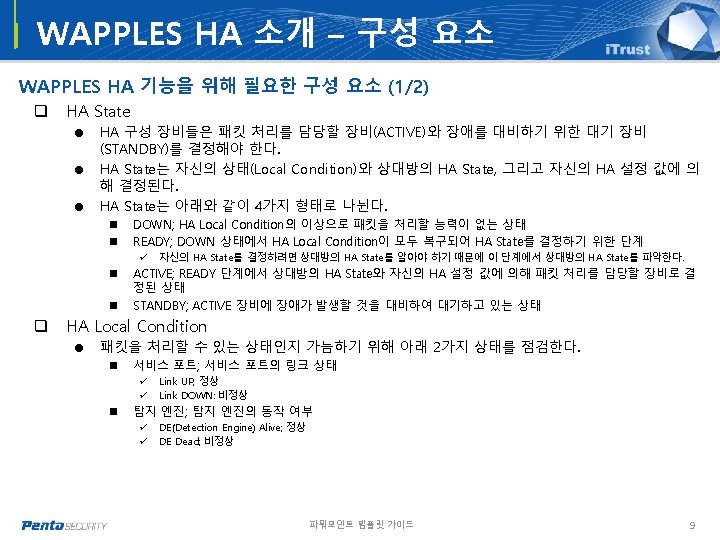
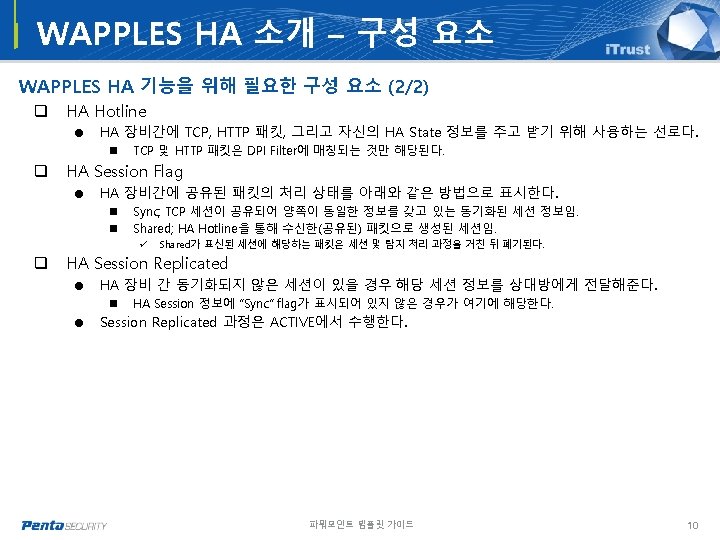
Table of contents – WAPPLES HA q q q q WAPPLES HA 소개 Big Picture 사전 준비 WAPPLES HA 설정 WAPPLES HA Test Trouble Shooting Help HA Configuration Guide 3
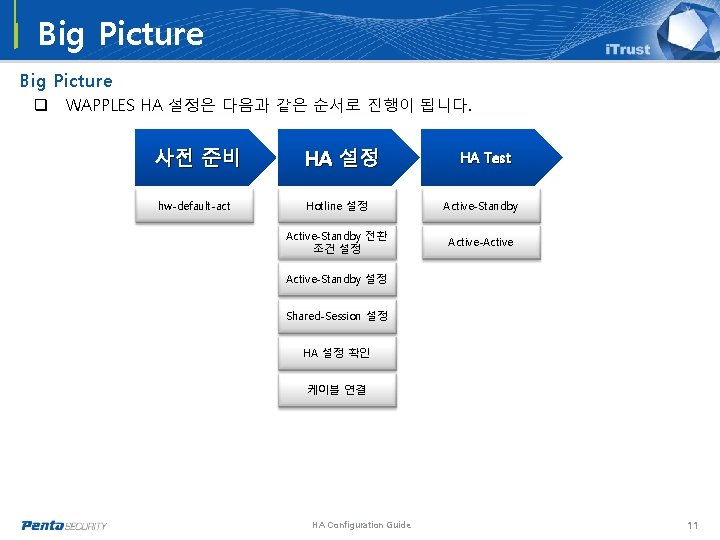
Big Picture q WAPPLES HA 설정은 다음과 같은 순서로 진행이 됩니다. 사전 준비 HA 설정 hw-default-act Hotline 설정 Active-Standby 전환 조건 설정 Active-Active HA Test Active-Standby 설정 Shared-Session 설정 HA 설정 확인 케이블 연결 HA Configuration Guide 11
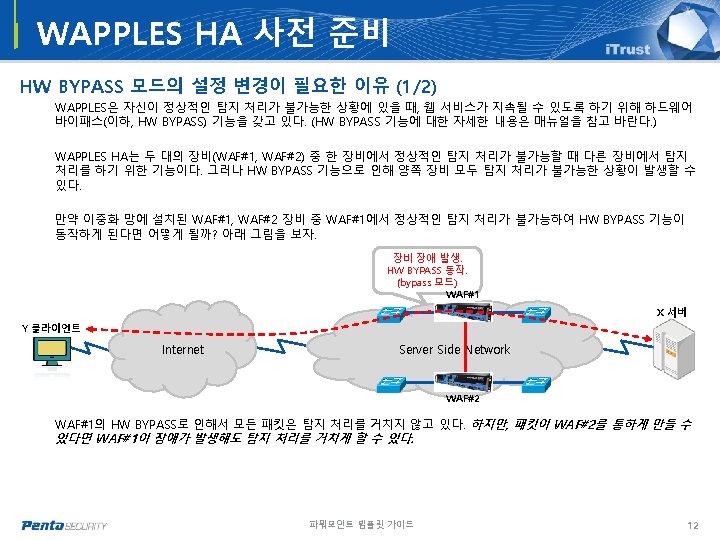
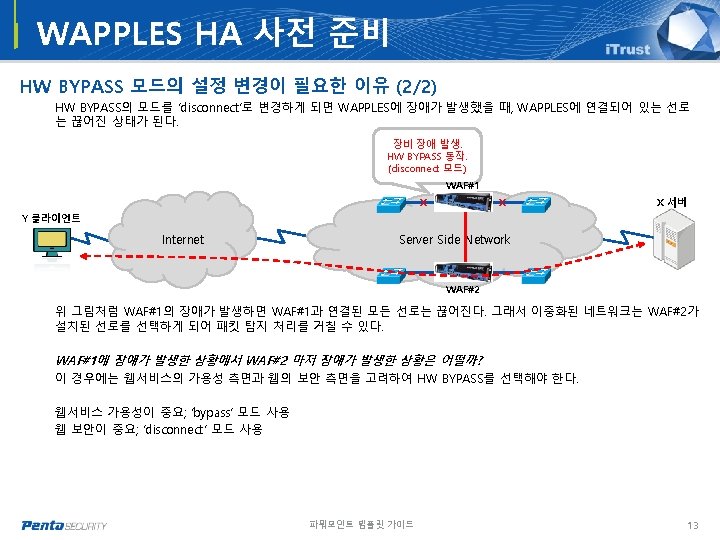
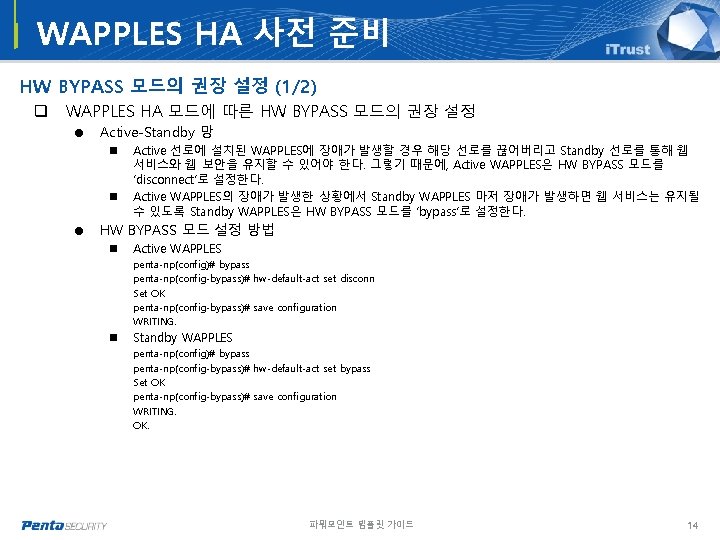
WAPPLES HA 사전 준비 HW BYPASS 모드의 권장 설정 (1/2) q WAPPLES HA 모드에 따른 HW BYPASS 모드의 권장 설정 = Active-Standby 망 n n Active 선로에 설치된 WAPPLES에 장애가 발생할 경우 해당 선로를 끊어버리고 Standby 선로를 통해 웹 서비스와 웹 보안을 유지할 수 있어야 한다. 그렇기 때문에, Active WAPPLES은 HW BYPASS 모드를 ‘disconnect’로 설정한다. Active WAPPLES의 장애가 발생한 상황에서 Standby WAPPLES 마저 장애가 발생하면 웹 서비스는 유지될 수 있도록 Standby WAPPLES은 HW BYPASS 모드를 ‘bypass’로 설정한다. = HW BYPASS 모드 설정 방법 n Active WAPPLES penta-np(config)# bypass penta-np(config-bypass)# hw-default-act set disconn Set OK penta-np(config-bypass)# save configuration WRITING. n Standby WAPPLES penta-np(config)# bypass penta-np(config-bypass)# hw-default-act set bypass Set OK penta-np(config-bypass)# save configuration WRITING. OK. 파워포인트 템플릿 가이드 14
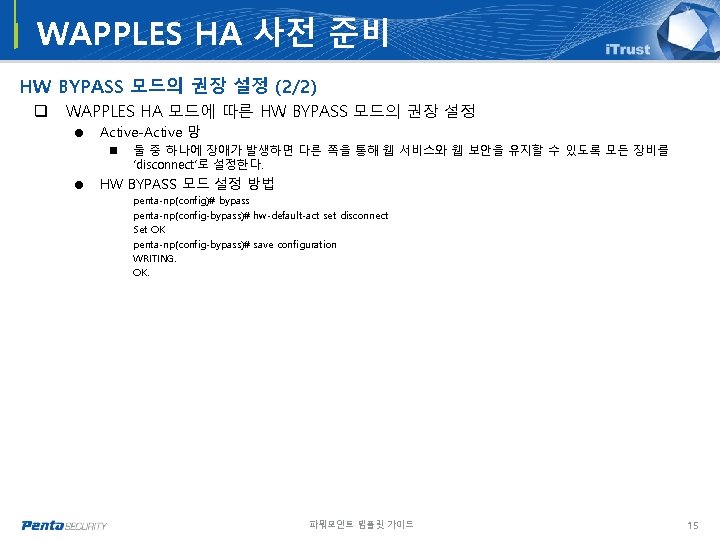
WAPPLES HA 사전 준비 HW BYPASS 모드의 권장 설정 (2/2) q WAPPLES HA 모드에 따른 HW BYPASS 모드의 권장 설정 = Active-Active 망 n 둘 중 하나에 장애가 발생하면 다른 쪽을 통해 웹 서비스와 웹 보안을 유지할 수 있도록 모든 장비를 ‘disconnect’로 설정한다. = HW BYPASS 모드 설정 방법 penta-np(config)# bypass penta-np(config-bypass)# hw-default-act set disconnect Set OK penta-np(config-bypass)# save configuration WRITING. OK. 파워포인트 템플릿 가이드 15
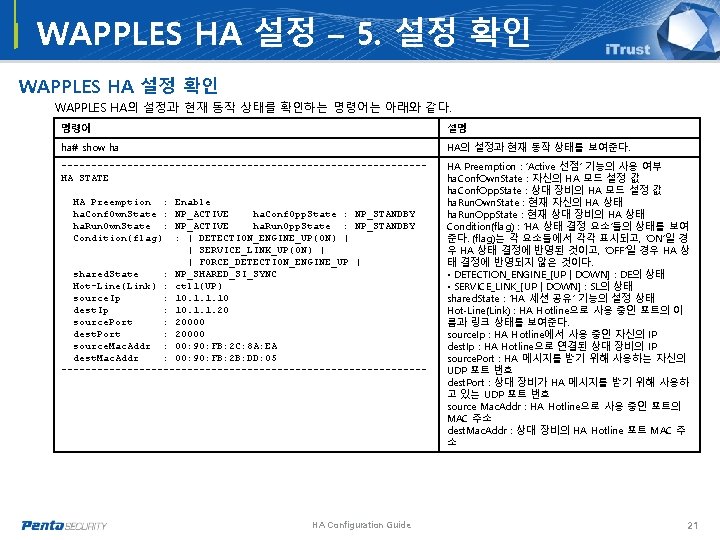
WAPPLES HA 설정 – 5. 설정 확인 WAPPLES HA의 설정과 현재 동작 상태를 확인하는 명령어는 아래와 같다. 명령어 설명 ha# show ha HA의 설정과 현재 동작 상태를 보여준다. ------------------------------HA STATE HA Preemption : ‘Active 선점’ 기능의 사용 여부 ha. Conf. Own. State : 자신의 HA 모드 설정 값 ha. Conf. Opp. State : 상대 장비의 HA 모드 설정 값 ha. Run. Own. State : 현재 자신의 HA 상태 ha. Run. Opp. State : 현재 상대 장비의 HA 상태 Condition(flag) : ‘HA 상태 결정 요소’들의 상태를 보여 준다. (flag)는 각 요소들에서 각각 표시되고, ‘ON’일 경 우 HA 상태 결정에 반영된 것이고, ‘OFF’일 경우 HA 상 태 결정에 반영되지 않은 것이다. • DETECTION_ENGINE_[UP | DOWN] : DE의 상태 • SERVICE_LINK_[UP | DOWN] : SL의 상태 shared. State : ‘HA 세션 공유’ 기능의 설정 상태 Hot-Line(Link) : HA Hotline으로 사용 중인 포트의 이 름과 링크 상태를 보여준다. source. Ip : HA Hotline에서 사용 중인 자신의 IP dest. Ip : HA Hotline으로 연결된 상대 장비의 IP source. Port : HA 메시지를 받기 위해 사용하는 자신의 UDP 포트 번호 dest. Port : 상대 장비가 HA 메시지를 받기 위해 사용하 고 있는 UDP 포트 번호 source Mac. Addr : HA Hotline으로 사용 중인 포트의 MAC 주소 dest. Mac. Addr : 상대 장비의 HA Hotline 포트 MAC 주 소 HA Preemption : ha. Conf. Own. State : ha. Run. Own. State : Condition(flag) Enable NP_ACTIVE ha. Conf. Opp. State : NP_STANDBY NP_ACTIVE ha. Run. Opp. State : NP_STANDBY : | DETECTION_ENGINE_UP(ON) | | SERVICE_LINK_UP(ON) | | FORCE_DETECTION_ENGINE_UP | shared. State : NP_SHARED_SI_SYNC Hot-Line(Link) : ctl 1(UP) source. Ip : 10. 1. 1. 10 dest. Ip : 10. 1. 1. 20 source. Port : 20000 dest. Port : 20000 source. Mac. Addr : 00: 90: FB: 2 C: 8 A: EA dest. Mac. Addr : 00: 90: FB: 2 B: DD: 05 ------------------------------- HA Configuration Guide 21
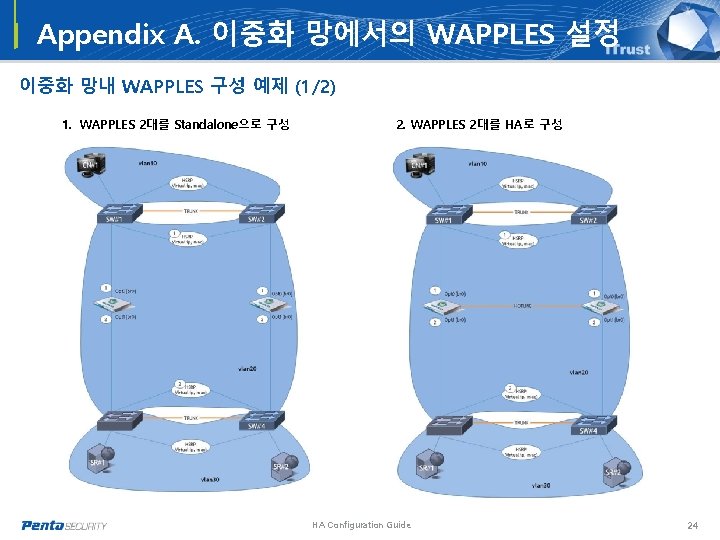
Appendix A. 이중화 망에서의 WAPPLES 설정 이중화 망내 WAPPLES 구성 예제 (1/2) 1. WAPPLES 2대를 Standalone으로 구성 2. WAPPLES 2대를 HA로 구성 HA Configuration Guide 24
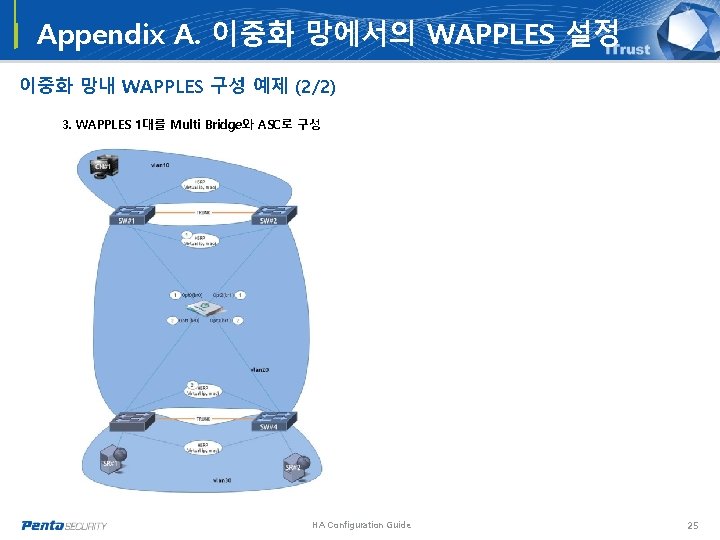
Appendix A. 이중화 망에서의 WAPPLES 설정 이중화 망내 WAPPLES 구성 예제 (2/2) 3. WAPPLES 1대를 Multi Bridge와 ASC로 구성 HA Configuration Guide 25
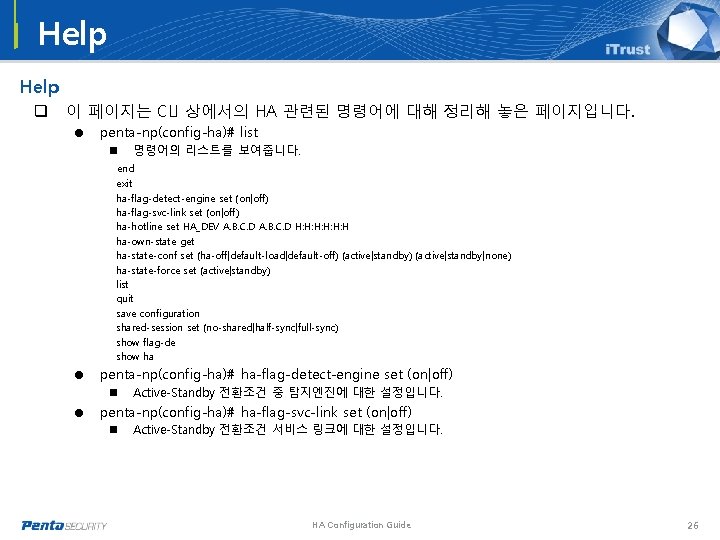
Help q 이 페이지는 CLI 상에서의 HA 관련된 명령어에 대해 정리해 놓은 페이지입니다. = penta-np(config-ha)# list n 명령어의 리스트를 보여줍니다. end exit ha-flag-detect-engine set (on|off) ha-flag-svc-link set (on|off) ha-hotline set HA_DEV A. B. C. D H: H: H: H ha-own-state get ha-state-conf set (ha-off|default-load|default-off) (active|standby|none) ha-state-force set (active|standby) list quit save configuration shared-session set (no-shared|half-sync|full-sync) show flag-de show ha = penta-np(config-ha)# ha-flag-detect-engine set (on|off) n Active-Standby 전환조건 중 탐지엔진에 대한 설정입니다. = penta-np(config-ha)# ha-flag-svc-link set (on|off) n Active-Standby 전환조건 서비스 링크에 대한 설정입니다. HA Configuration Guide 26
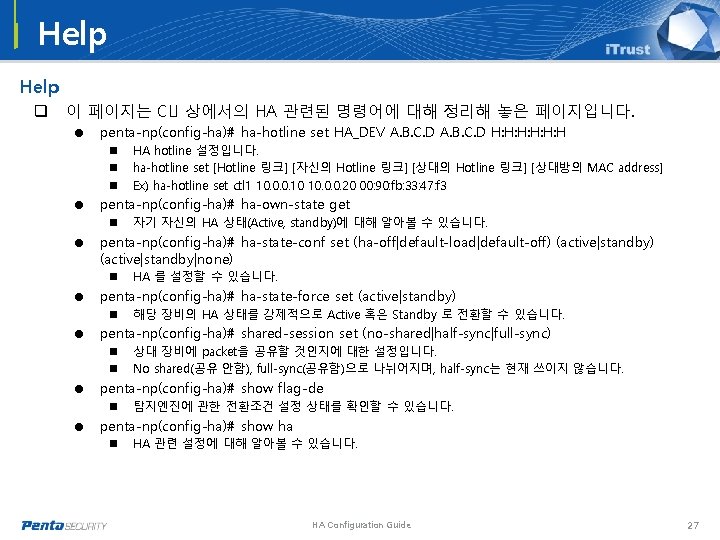
Help q 이 페이지는 CLI 상에서의 HA 관련된 명령어에 대해 정리해 놓은 페이지입니다. = penta-np(config-ha)# ha-hotline set HA_DEV A. B. C. D H: H: H: H n n n HA hotline 설정입니다. ha-hotline set [Hotline 링크] [자신의 Hotline 링크] [상대방의 MAC address] Ex) ha-hotline set ctl 1 10. 0. 0. 10 10. 0. 0. 20 00: 90: fb: 33: 47: f 3 = penta-np(config-ha)# ha-own-state get n 자기 자신의 HA 상태(Active, standby)에 대해 알아볼 수 있습니다. = penta-np(config-ha)# ha-state-conf set (ha-off|default-load|default-off) (active|standby|none) n HA 를 설정할 수 있습니다. = penta-np(config-ha)# ha-state-force set (active|standby) n 해당 장비의 HA 상태를 강제적으로 Active 혹은 Standby 로 전환할 수 있습니다. = penta-np(config-ha)# shared-session set (no-shared|half-sync|full-sync) n n 상대 장비에 packet을 공유할 것인지에 대한 설정입니다. No shared(공유 안함), full-sync(공유함)으로 나뉘어지며, half-sync는 현재 쓰이지 않습니다. = penta-np(config-ha)# show flag-de n 탐지엔진에 관한 전환조건 설정 상태를 확인할 수 있습니다. = penta-np(config-ha)# show ha n HA 관련 설정에 대해 알아볼 수 있습니다. HA Configuration Guide 27
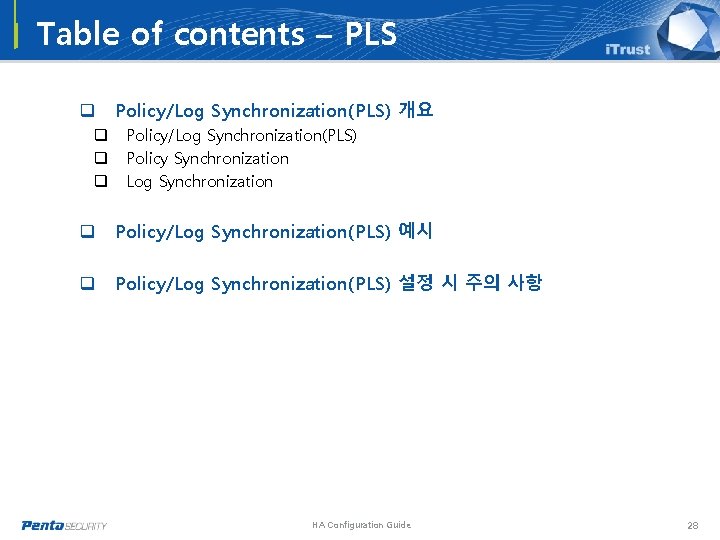
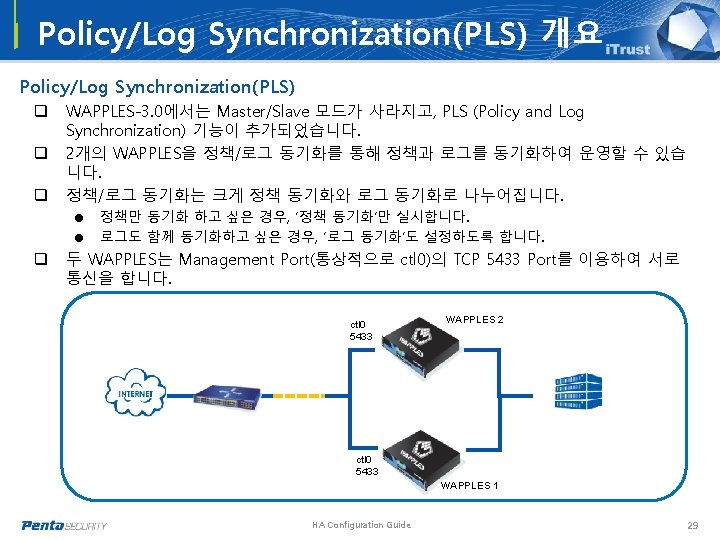
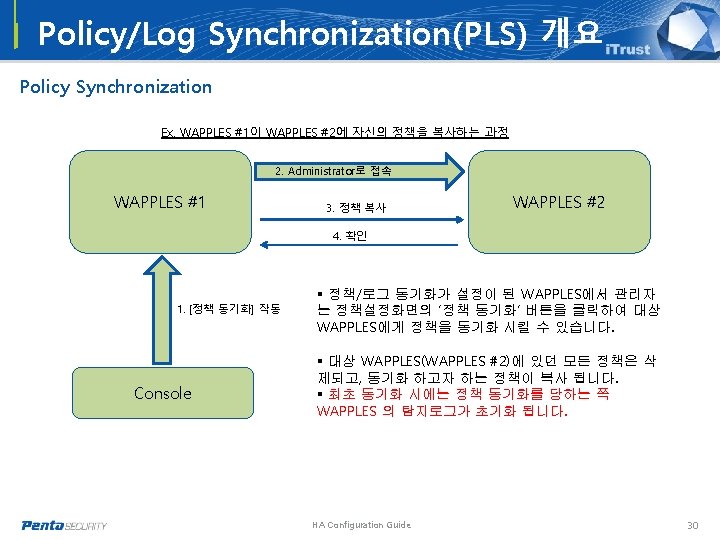
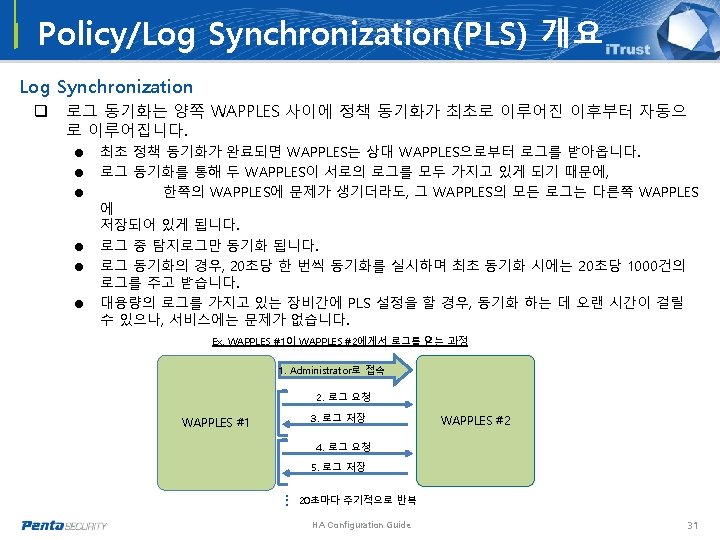
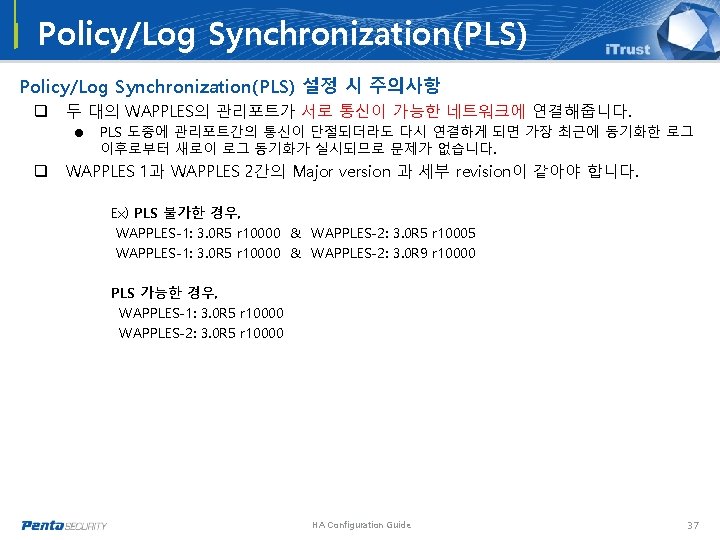
Table of contents – PLS q q Policy/Log Synchronization(PLS) 개요 Policy/Log Synchronization(PLS) Policy Synchronization Log Synchronization q Policy/Log Synchronization(PLS) 예시 q Policy/Log Synchronization(PLS) 설정 시 주의 사항 HA Configuration Guide 28
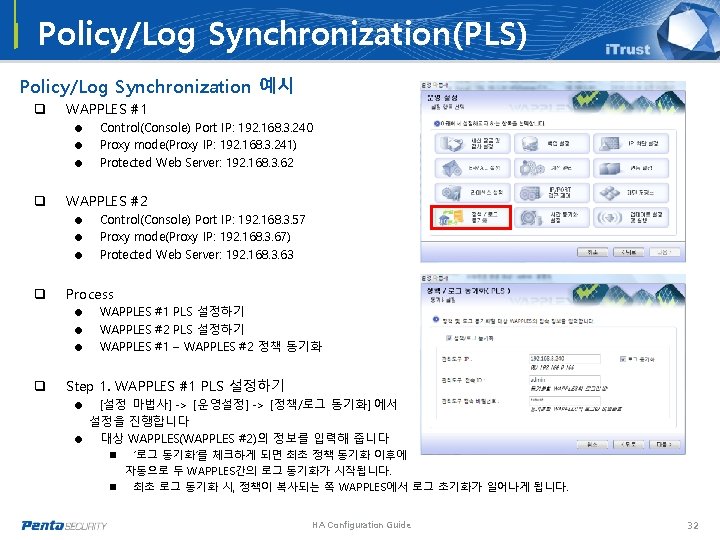
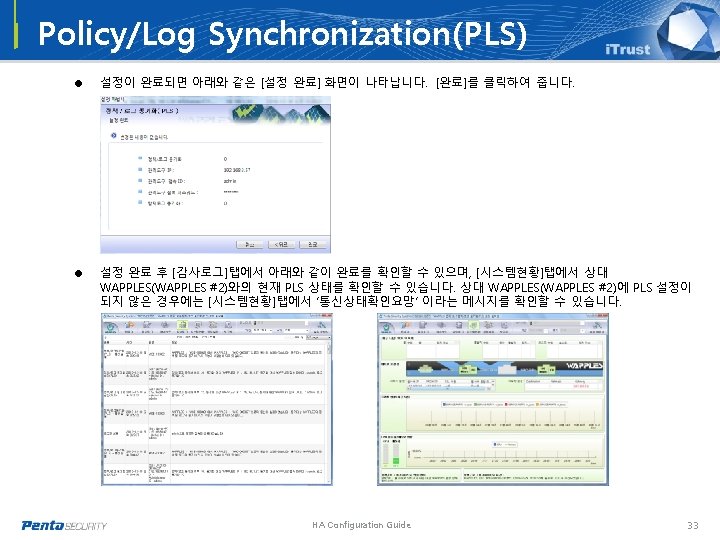
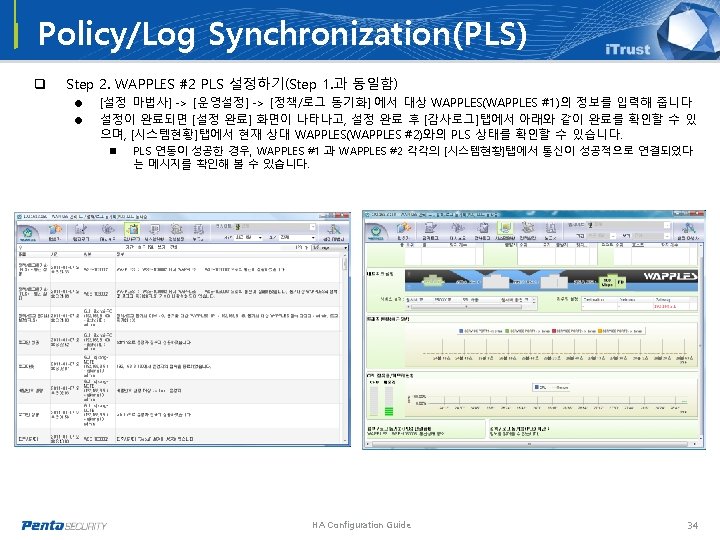
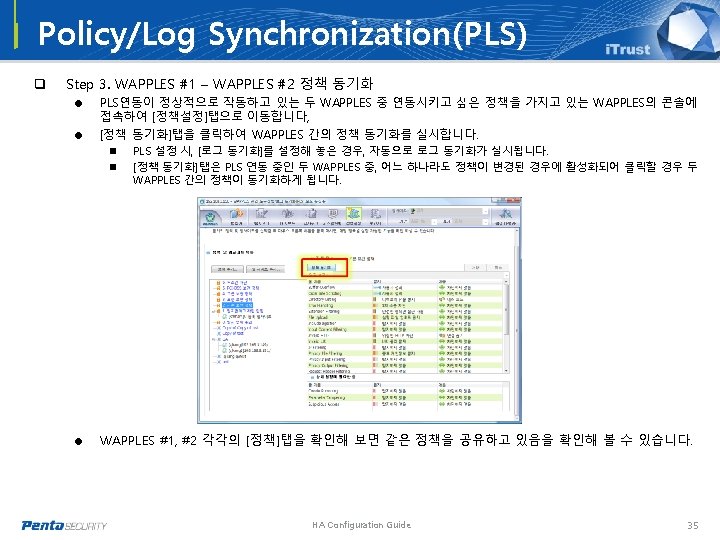
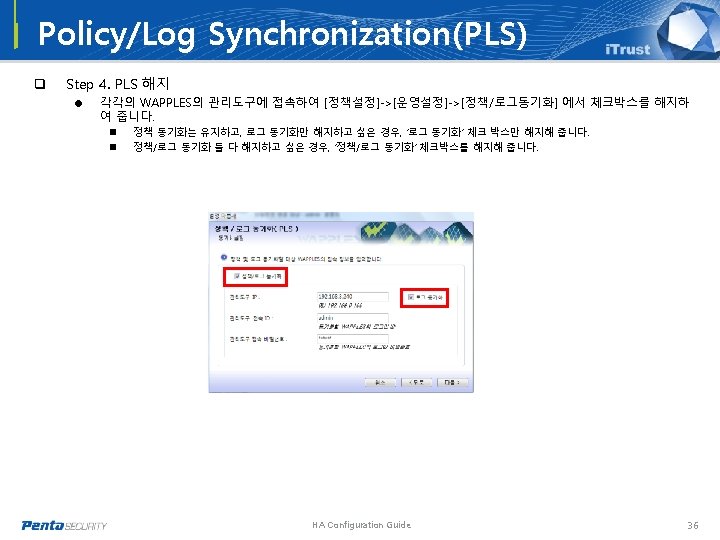
Policy/Log Synchronization(PLS) Policy/Log Synchronization 예시 q WAPPLES #1 = = = q WAPPLES #2 = = = q Control(Console) Port IP: 192. 168. 3. 57 Proxy mode(Proxy IP: 192. 168. 3. 67) Protected Web Server: 192. 168. 3. 63 Process = = = q Control(Console) Port IP: 192. 168. 3. 240 Proxy mode(Proxy IP: 192. 168. 3. 241) Protected Web Server: 192. 168. 3. 62 WAPPLES #1 PLS 설정하기 WAPPLES #2 PLS 설정하기 WAPPLES #1 – WAPPLES #2 정책 동기화 Step 1. WAPPLES #1 PLS 설정하기 [설정 마법사] -> [운영설정] -> [정책/로그 동기화] 에서 설정을 진행합니다 = 대상 WAPPLES(WAPPLES #2)의 정보를 입력해 줍니다 n ‘로그 동기화’를 체크하게 되면 최초 정책 동기화 이후에 = 자동으로 두 WAPPLES간의 로그 동기화가 시작됩니다. n 최초 로그 동기화 시, 정책이 복사되는 쪽 WAPPLES에서 로그 초기화가 일어나게 됩니다. HA Configuration Guide 32
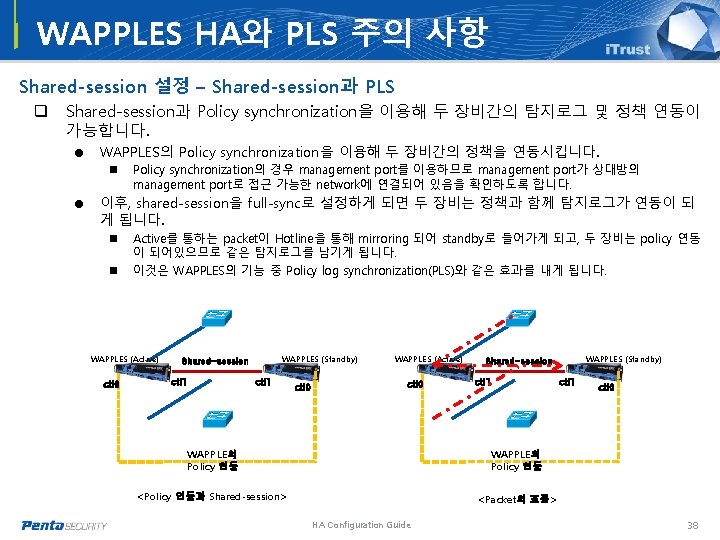
WAPPLES HA와 PLS 주의 사항 Shared-session 설정 – Shared-session과 PLS q Shared-session과 Policy synchronization을 이용해 두 장비간의 탐지로그 및 정책 연동이 가능합니다. = WAPPLES의 Policy synchronization을 이용해 두 장비간의 정책을 연동시킵니다. n Policy synchronization의 경우 management port를 이용하므로 management port가 상대방의 management port로 접근 가능한 network에 연결되어 있음을 확인하도록 합니다. = 이후, shared-session을 full-sync로 설정하게 되면 두 장비는 정책과 함께 탐지로그가 연동이 되 게 됩니다. n n Active를 통하는 packet이 Hotline을 통해 mirroring 되어 standby로 들어가게 되고, 두 장비는 policy 연동 이 되어있으므로 같은 탐지로그를 남기게 됩니다. 이것은 WAPPLES의 기능 중 Policy log synchronization(PLS)와 같은 효과를 내게 됩니다. WAPPLES (Active) ctl 0 WAPPLES (Standby) Shared-session ctl 1 ctl 0 WAPPLES (Active) ctl 0 ctl 1 WAPPLE의 Policy 연동 <Policy 연동과 Shared-session> <Packet의 흐름> HA Configuration Guide WAPPLES (Standby) Shared-session ctl 1 ctl 0 38
韓国本社 韓国ソウル市永登浦区汝矣島 25 -11 韓進海運ビル 20階 TEL : 82 -2 -780 -7728 FAX : 82 -2 -786 -5281 www. pentasecurity. com Penta Security Systems Inc. 日本本社 東京都港区赤坂3 -2 -8アセンド赤坂3階 TEL: 81 -3 -5573 -8191 FAX: 81 -3 -5573 -8193 www. pentasecurity. co. jp Penta Security Systems K. K. Copyright 1997 -2010 Penta Security Systems, Inc. All rights reserved