
WALK THRU Kite Diagram When To visually display
- Slides: 5
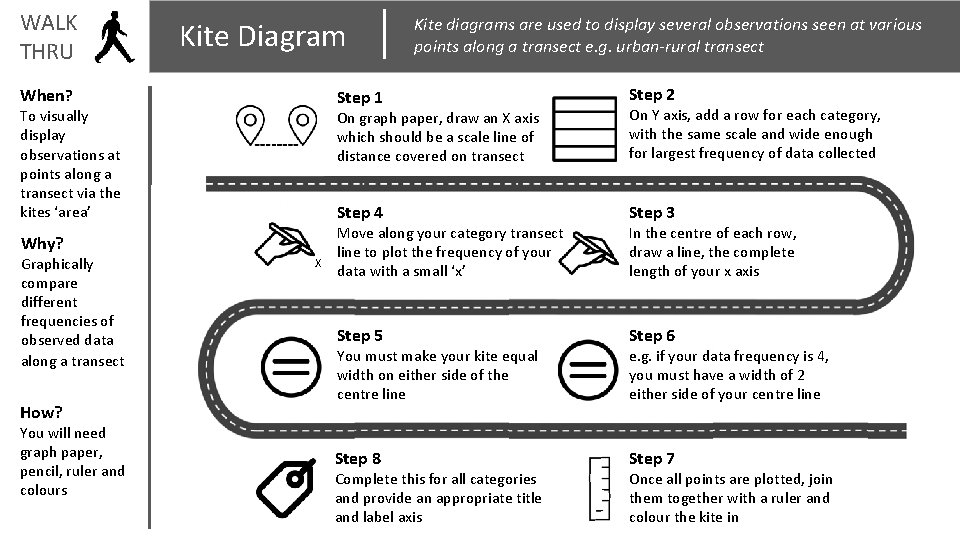
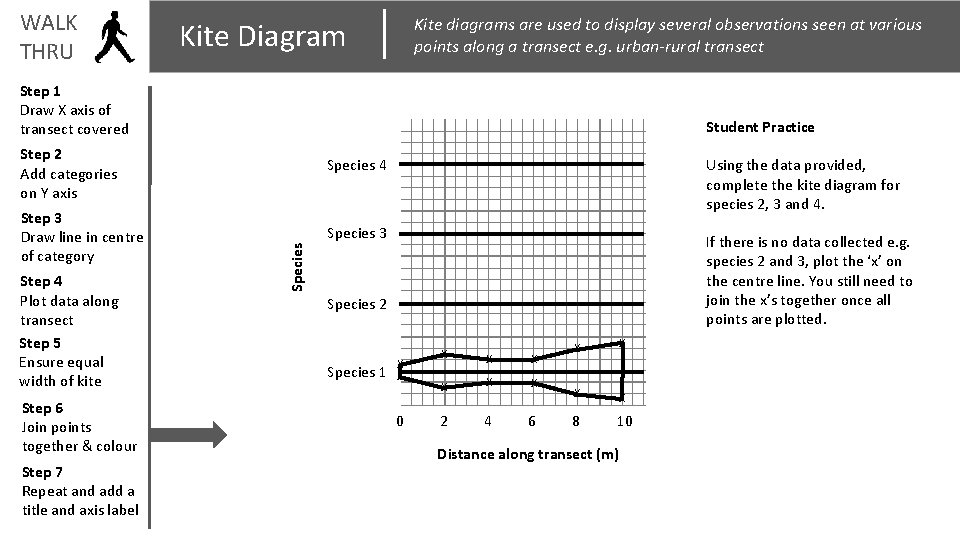
WALK THRU Kite Diagram When? To visually display observations at points along a transect via the kites ‘area’ Why? Graphically compare different frequencies of observed data along a transect How? You will need graph paper, pencil, ruler and colours X Kite diagrams are used to display several observations seen at various points along a transect e. g. urban-rural transect Step 1 Step 2 On graph paper, draw an X axis which should be a scale line of distance covered on transect On Y axis, add a row for each category, with the same scale and wide enough for largest frequency of data collected Step 4 Step 3 Step 5 Step 6 Step 8 Step 7 Move along your category transect line to plot the frequency of your data with a small ‘x’ You must make your kite equal width on either side of the centre line Complete this for all categories and provide an appropriate title and label axis In the centre of each row, draw a line, the complete length of your x axis e. g. if your data frequency is 4, you must have a width of 2 either side of your centre line Once all points are plotted, join them together with a ruler and colour the kite in
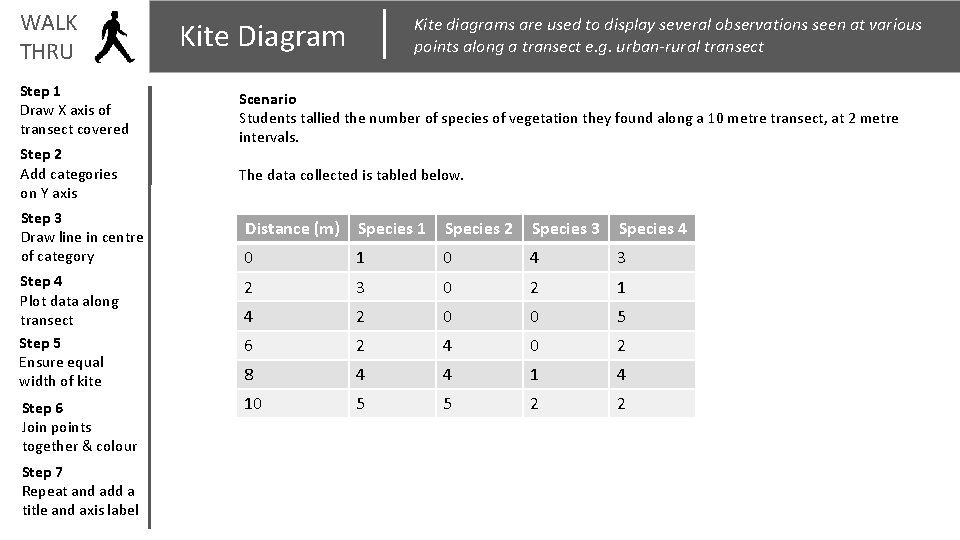
WALK THRU Step 1 Draw X axis of transect covered Step 2 Add categories on Y axis Step 3 Draw line in centre of category Kite diagrams are used to display several observations seen at various points along a transect e. g. urban-rural transect Kite Diagram Scenario Students tallied the number of species of vegetation they found along a 10 metre transect, at 2 metre intervals. The data collected is tabled below. Distance (m) Species 1 Species 2 Species 3 Species 4 0 1 0 4 3 Step 4 Plot data along transect Step 5 Ensure equal width of kite 2 3 0 2 1 4 2 0 0 5 6 2 4 0 2 8 4 4 1 4 Step 6 Join points together & colour 10 5 5 2 2 Step 7 Repeat and add a title and axis label
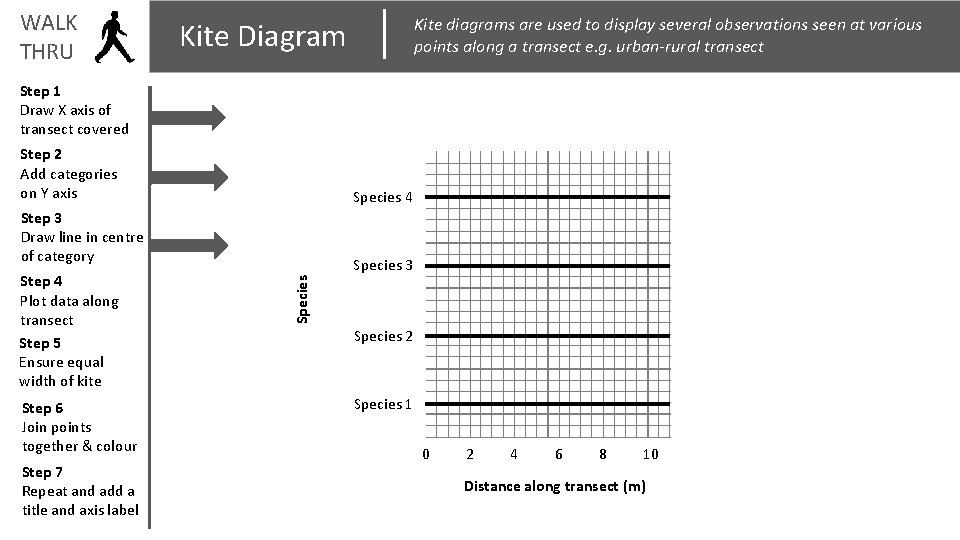
WALK THRU Kite diagrams are used to display several observations seen at various points along a transect e. g. urban-rural transect Kite Diagram Step 1 Draw X axis of transect covered Step 2 Add categories on Y axis Species 4 Step 3 Draw line in centre of category Step 6 Join points together & colour Step 7 Repeat and add a title and axis label Species Step 4 Plot data along transect Step 5 Ensure equal width of kite Species 3 Species 2 Species 1 0 2 4 6 8 10 Distance along transect (m)
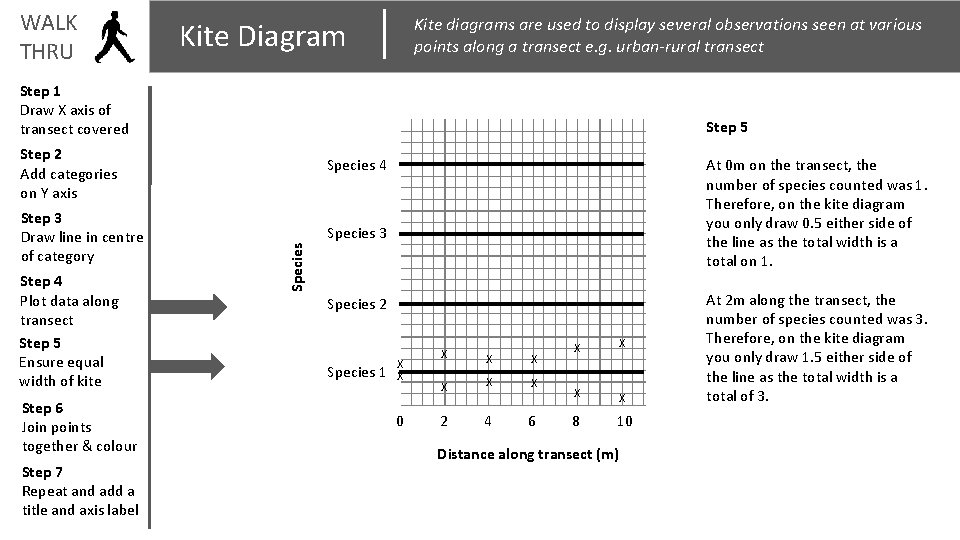
WALK THRU Kite diagrams are used to display several observations seen at various points along a transect e. g. urban-rural transect Kite Diagram Step 1 Draw X axis of transect covered Step 5 Step 2 Add categories on Y axis Step 4 Plot data along transect Step 5 Ensure equal width of kite Step 6 Join points together & colour Step 7 Repeat and add a title and axis label At 0 m on the transect, the number of species counted was 1. Therefore, on the kite diagram you only draw 0. 5 either side of the line as the total width is a total on 1. Species 3 Species Step 3 Draw line in centre of category Species 4 Species 2 Species 1 X X 0 X X X 2 4 6 X X 8 10 Distance along transect (m) At 2 m along the transect, the number of species counted was 3. Therefore, on the kite diagram you only draw 1. 5 either side of the line as the total width is a total of 3.
WALK THRU Kite diagrams are used to display several observations seen at various points along a transect e. g. urban-rural transect Kite Diagram Step 1 Draw X axis of transect covered Student Practice Step 2 Add categories on Y axis Step 4 Plot data along transect Step 5 Ensure equal width of kite Step 6 Join points together & colour Step 7 Repeat and add a title and axis label Using the data provided, complete the kite diagram for species 2, 3 and 4. Species 3 If there is no data collected e. g. species 2 and 3, plot the ‘x’ on the centre line. You still need to join the x’s together once all points are plotted. Species Step 3 Draw line in centre of category Species 4 Species 2 Species 1 X X 0 X X X 2 4 6 X X 8 10 Distance along transect (m)