
VSPERF Deep Dive Virtual Switch performance In OPNFV
![BMWG and IPPM specs referenced by VSPERF – [RFC 2544] Benchmarking Methodology for Network](https://slidetodoc.com/presentation_image/7f8b9814dec2ce087132902f9d7728c7/image-8.jpg "BMWG and IPPM specs referenced by VSPERF – [RFC 2544] Benchmarking Methodology for Network")




- Slides: 60
VSPERF Deep Dive: Virtual Switch performance In OPNFV Maryam Tahhan, Al Morton, Jack Morgan. 1
Why are v. Switches important and do we need to characterize their performance? • Virtual switches are a key component of Network Function virtualization (NFV) based telecoms networks and Software Defined Networking (SDN) based data centres. – They provide similar functionality to their physical counterparts. – One key difference between a virtual switch and a physical switch is that the v. Switch runs on the same server/platform where the VNFs are running – Its performance can directly affect the number of subscribers/VNFs that can be supported on a single blade. 2
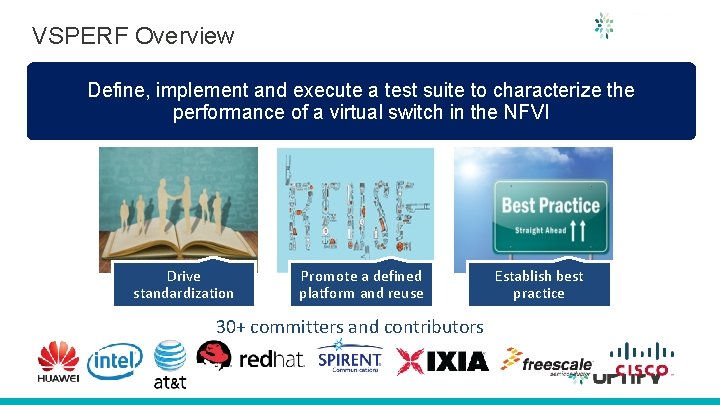
VSPERF Overview Define, implement and execute a test suite to characterize the performance of a virtual switch in the NFVI Drive standardization Promote a defined platform and reuse 30+ committers and contributors Establish best practice
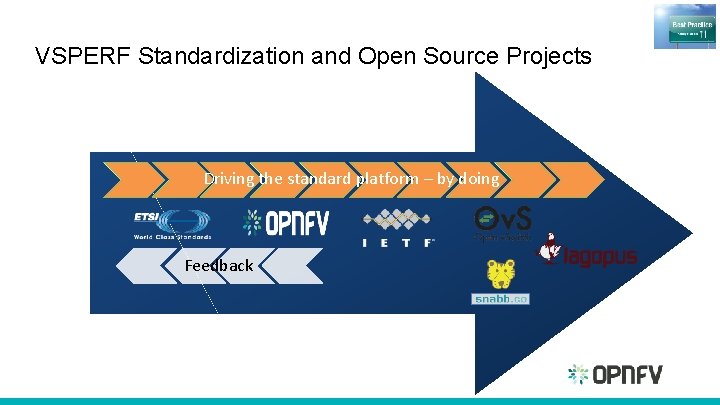
VSPERF Standardization and Open Source Projects Driving the standard platform – by doing Feedback
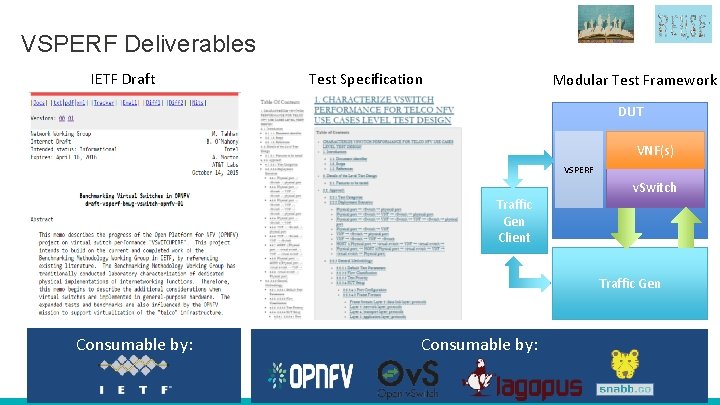
VSPERF Deliverables IETF Draft Test Specification Modular Test Framework DUT VNF(s) VSPERF Traffic Gen Client v. Switch Traffic Gen Consumable by:
Test specification approach and Test coverage
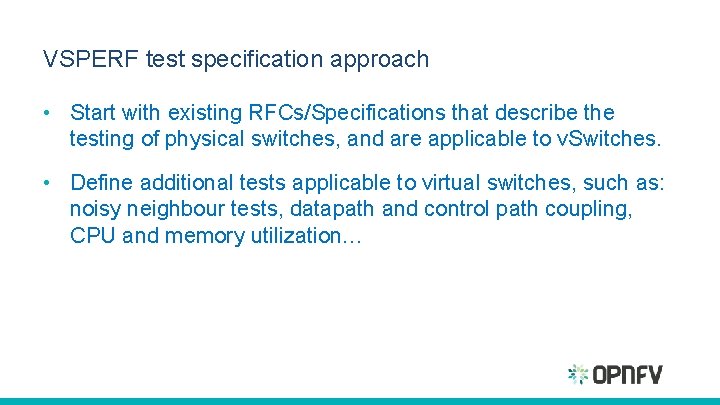
VSPERF test specification approach • Start with existing RFCs/Specifications that describe the testing of physical switches, and are applicable to v. Switches. • Define additional tests applicable to virtual switches, such as: noisy neighbour tests, datapath and control path coupling, CPU and memory utilization…
BMWG and IPPM specs referenced by VSPERF – [RFC 2544] Benchmarking Methodology for Network Interconnect Devices. – [RFC 2889] Benchmarking Methodology for LAN Switching – [RFC 6201] Device Reset Characterization – [RFC 3393] IP Packet Delay Variation Metric for IPPM – [RFC 5481] Packet Delay Variation Applicability Statement – [RFC 2285] Benchmarking Terminology for LAN Switching Devices – [RFC 1242] Benchmarking Terminology for Network Interconnection Devices.
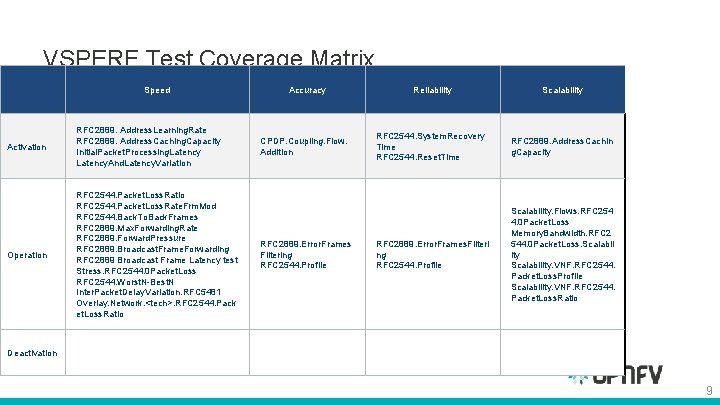
VSPERF Test Coverage Matrix Speed Activation RFC 2889. Address. Learning. Rate RFC 2889. Address. Caching. Capacity Initial. Packet. Processing. Latency. And. Latency. Variation Operation RFC 2544. Packet. Loss. Ratio RFC 2544. Packet. Loss. Rate. Frm. Mod RFC 2544. Back. To. Back. Frames RFC 2889. Max. Forwarding. Rate RFC 2889. Forward. Pressure RFC 2889. Broadcast. Frame. Forwarding RFC 2889 Broadcast Frame Latency test Stress. RFC 2544. 0 Packet. Loss RFC 2544. Worst. N-Best. N Inter. Packet. Delay. Variation. RFC 5481 Overlay. Network. <tech>. RFC 2544. Pack et. Loss. Ratio Accuracy Reliability Scalability CPDP. Coupling. Flow. Addition RFC 2544. System. Recovery Time RFC 2544. Reset. Time RFC 2889. Address. Cachin g. Capacity RFC 2889. Error. Frames. Filteri ng RFC 2544. Profile Scalability. Flows. RFC 254 4. 0 Packet. Loss Memory. Bandwidth. RFC 2 544. 0 Packet. Loss. Scalabil ity Scalability. VNF. RFC 2544. Packet. Loss. Profile Scalability. VNF. RFC 2544. Packet. Loss. Ratio RFC 2889. Error. Frames Filtering RFC 2544. Profile Deactivation 9
Key considerations when benchmarking v. Switches
Key considerations when benchmarking v. Switch performance • Three fundamental considerations: – v. Switches should be benchmarked in a similar way to physical switches – when possible – to allow for a direct comparison. – Try to ensure accuracy, consistency, stability and repeatability of the results between test runs. – It’s essential to limit and if possible eliminate any noise that may interfere with the accuracy of the metrics collected by the test. 11
Consistency and Stability of Test Results • Can be achieved through appropriate configuration of: – – BIOS The OS/Kernel. The system hardware. The system software. 12
Consistency and Stability Configuration Parameters BIOS Configuration – – – BIOS should be configured for performance where an explicit option exists sleep states should be disabled any virtualization optimization technologies should be enabled hyper threading should also be disabled turbo boost and overclocking should also be disabled. 13
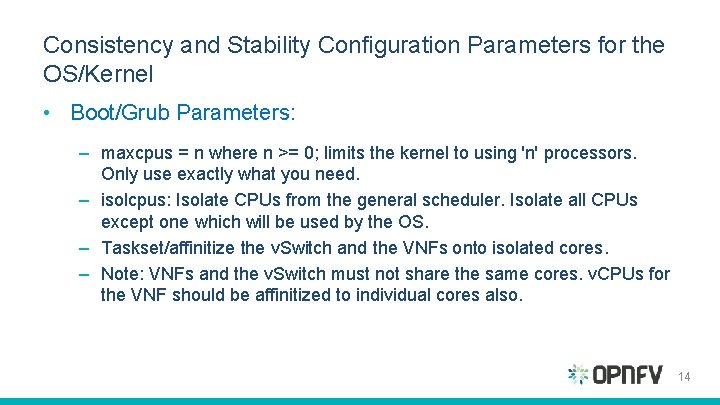
Consistency and Stability Configuration Parameters for the OS/Kernel • Boot/Grub Parameters: – maxcpus = n where n >= 0; limits the kernel to using 'n' processors. Only use exactly what you need. – isolcpus: Isolate CPUs from the general scheduler. Isolate all CPUs except one which will be used by the OS. – Taskset/affinitize the v. Switch and the VNFs onto isolated cores. – Note: VNFs and the v. Switch must not share the same cores. v. CPUs for the VNF should be affinitized to individual cores also. 14
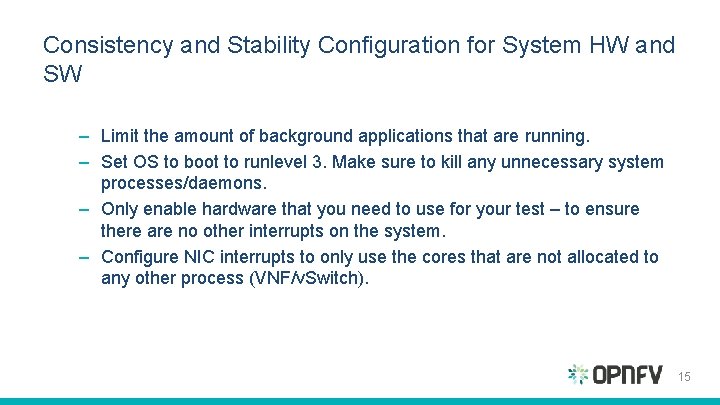
Consistency and Stability Configuration for System HW and SW – Limit the amount of background applications that are running. – Set OS to boot to runlevel 3. Make sure to kill any unnecessary system processes/daemons. – Only enable hardware that you need to use for your test – to ensure there are no other interrupts on the system. – Configure NIC interrupts to only use the cores that are not allocated to any other process (VNF/v. Switch). 15
Repeatability of Test Results • In addition to the previous system configuration recommendations it is critical to document all aspects of the SUT to foster repeatability, including: – Hardware parameters – Software parameters – Traffic profile/parameters • 16
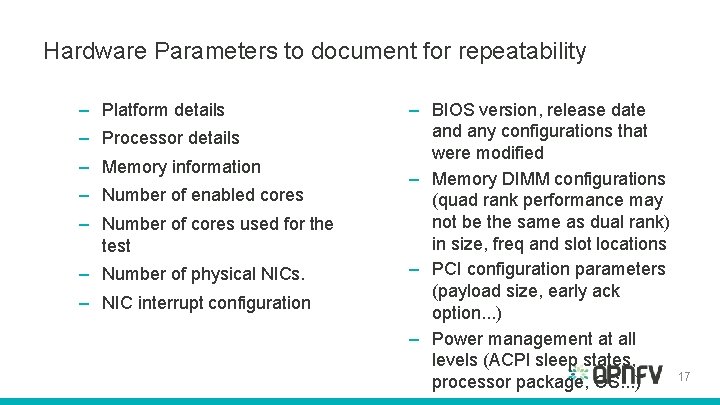
Hardware Parameters to document for repeatability – Platform details – Processor details – Memory information – Number of enabled cores – Number of cores used for the test – Number of physical NICs. – NIC interrupt configuration – BIOS version, release date and any configurations that were modified – Memory DIMM configurations (quad rank performance may not be the same as dual rank) in size, freq and slot locations – PCI configuration parameters (payload size, early ack option. . . ) – Power management at all levels (ACPI sleep states, 17 processor package, OS. . . )
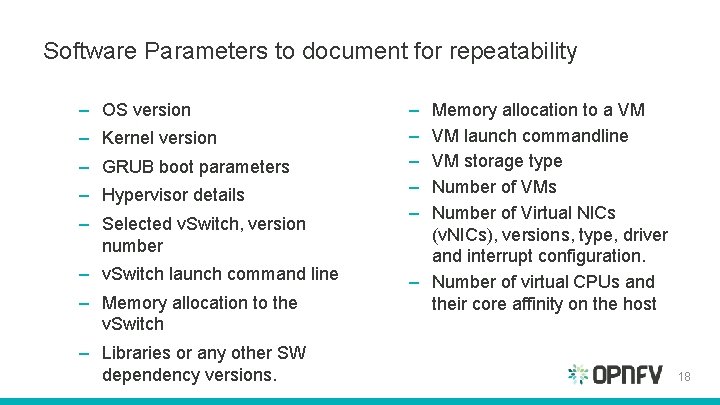
Software Parameters to document for repeatability – OS version – Kernel version – GRUB boot parameters – Hypervisor details – Selected v. Switch, version number – v. Switch launch command line – Memory allocation to the v. Switch – Libraries or any other SW dependency versions. – – – Memory allocation to a VM VM launch commandline VM storage type Number of VMs Number of Virtual NICs (v. NICs), versions, type, driver and interrupt configuration. – Number of virtual CPUs and their core affinity on the host 18
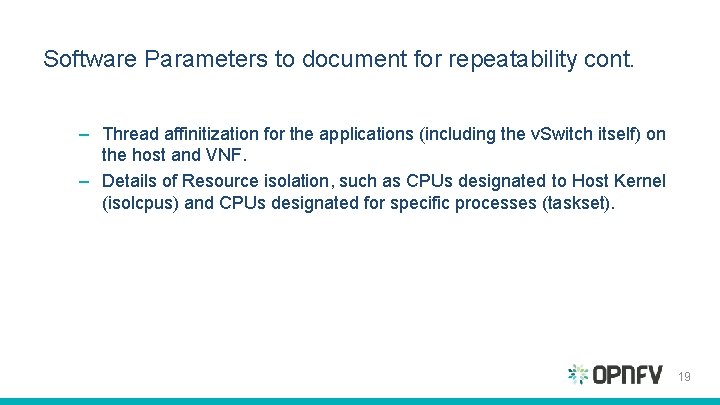
Software Parameters to document for repeatability cont. – Thread affinitization for the applications (including the v. Switch itself) on the host and VNF. – Details of Resource isolation, such as CPUs designated to Host Kernel (isolcpus) and CPUs designated for specific processes (taskset). 19
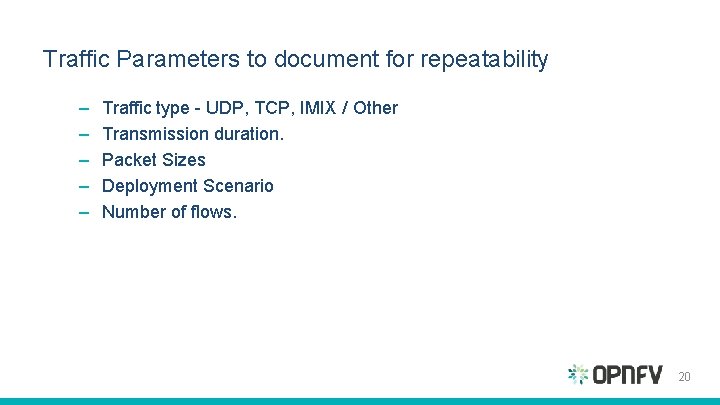
Traffic Parameters to document for repeatability – – – Traffic type - UDP, TCP, IMIX / Other Transmission duration. Packet Sizes Deployment Scenario Number of flows. 20
Benchmarking Methodology
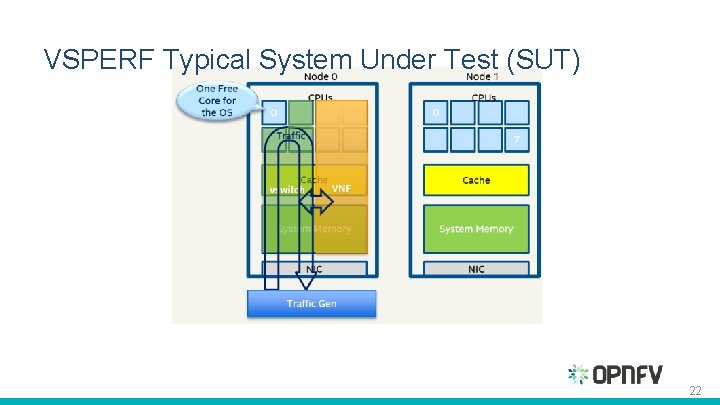
VSPERF Typical System Under Test (SUT) 22
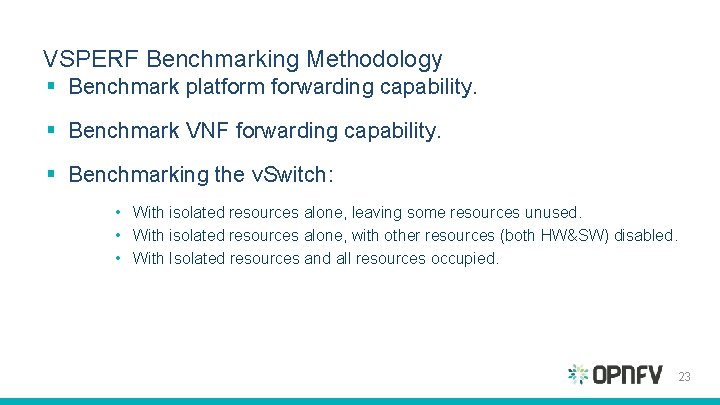
VSPERF Benchmarking Methodology § Benchmark platform forwarding capability. § Benchmark VNF forwarding capability. § Benchmarking the v. Switch: • With isolated resources alone, leaving some resources unused. • With isolated resources alone, with other resources (both HW&SW) disabled. • With Isolated resources and all resources occupied. 23
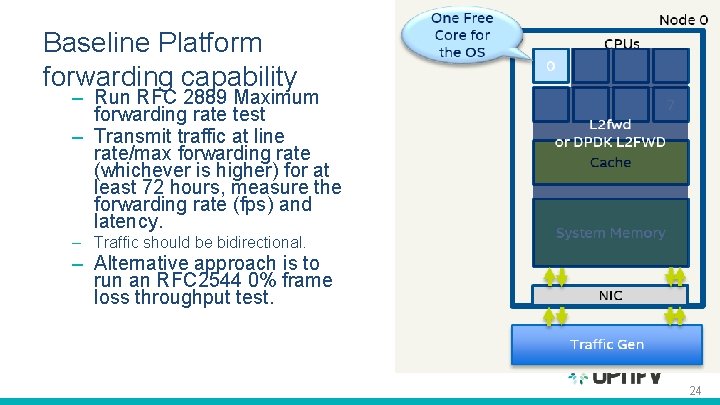
Baseline Platform forwarding capability – Run RFC 2889 Maximum forwarding rate test – Transmit traffic at line rate/max forwarding rate (whichever is higher) for at least 72 hours, measure the forwarding rate (fps) and latency. – Traffic should be bidirectional. – Alternative approach is to run an RFC 2544 0% frame loss throughput test. 24
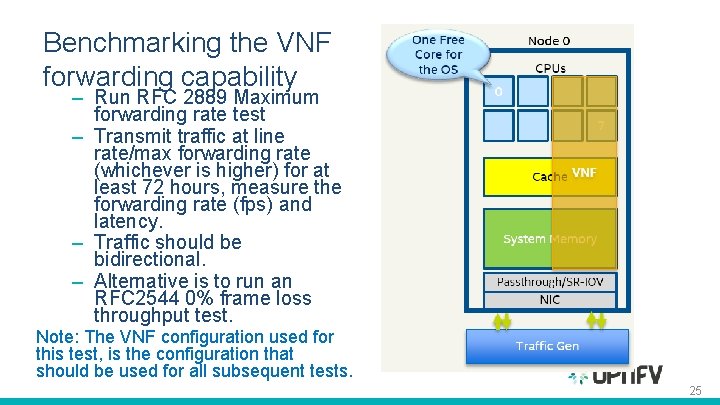
Benchmarking the VNF forwarding capability – Run RFC 2889 Maximum forwarding rate test – Transmit traffic at line rate/max forwarding rate (whichever is higher) for at least 72 hours, measure the forwarding rate (fps) and latency. – Traffic should be bidirectional. – Alternative is to run an RFC 2544 0% frame loss throughput test. Note: The VNF configuration used for this test, is the configuration that should be used for all subsequent tests. 25
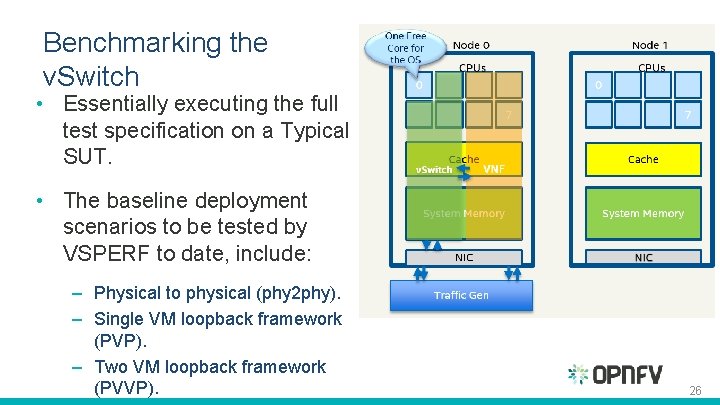
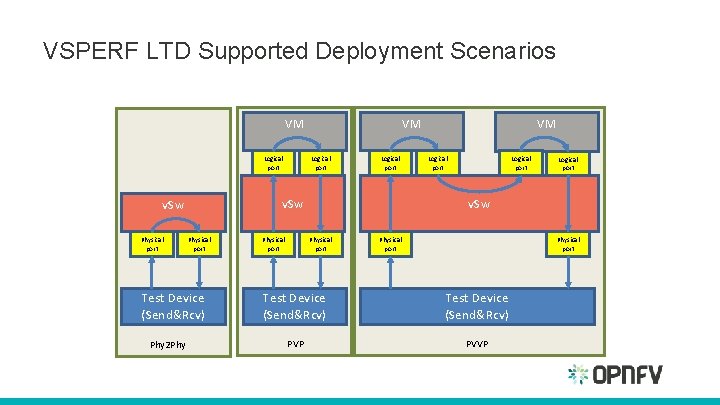
Benchmarking the v. Switch • Essentially executing the full test specification on a Typical SUT. • The baseline deployment scenarios to be tested by VSPERF to date, include: – Physical to physical (phy 2 phy). – Single VM loopback framework (PVP). – Two VM loopback framework (PVVP). 26
VSPERF LTD Supported Deployment Scenarios VM Logical port Physical port Test Device (Send&Rcv) Phy 2 Phy Logical port v. Sw Physical port VM Logical port v. Sw Physical port Test Device (Send&Rcv) PVP PVVP
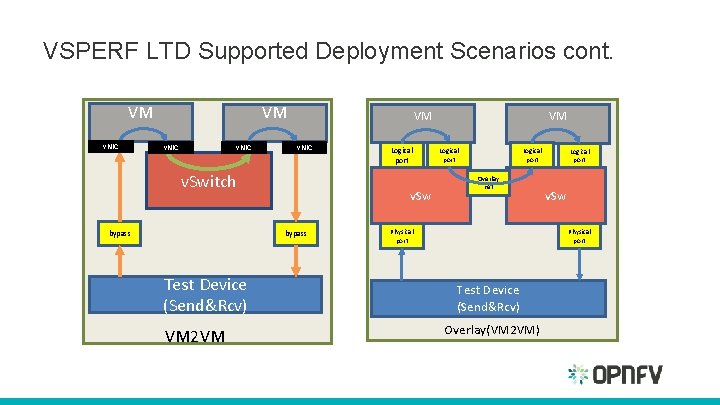
VSPERF LTD Supported Deployment Scenarios cont. VM v. NIC VM v. NIC v. Switch bypass v. Sw bypass Test Device (Send&Rcv) VM 2 VM Logical port Overlay net Physical port Logical port v. Sw Physical port Test Device (Send&Rcv) Overlay(VM 2 VM)
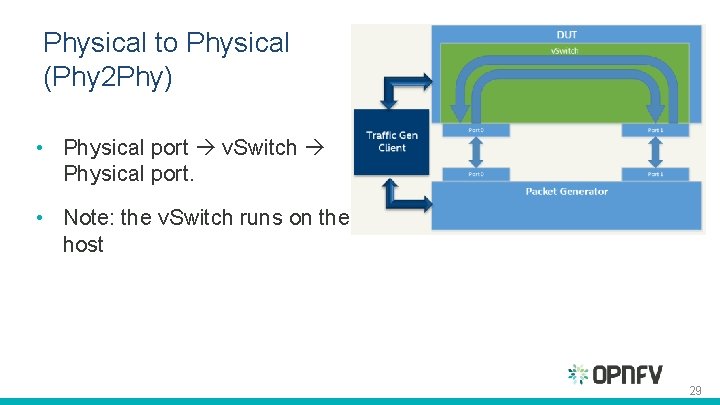
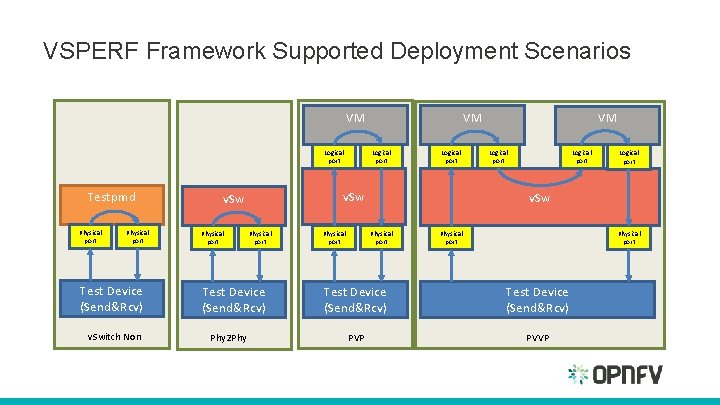
Physical to Physical (Phy 2 Phy) • Physical port v. Switch Physical port. • Note: the v. Switch runs on the host 29
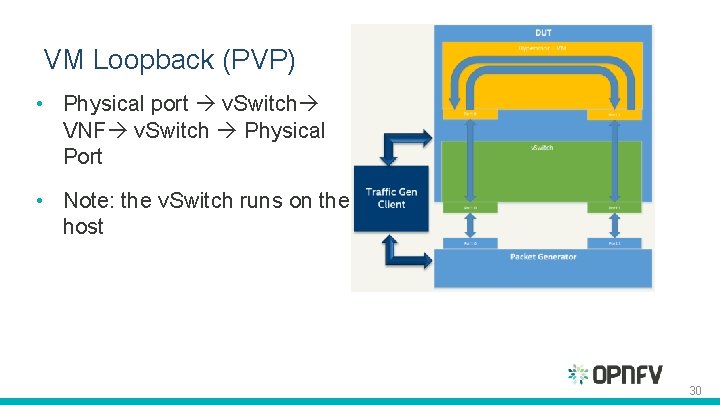
VM Loopback (PVP) • Physical port v. Switch VNF v. Switch Physical Port • Note: the v. Switch runs on the host 30
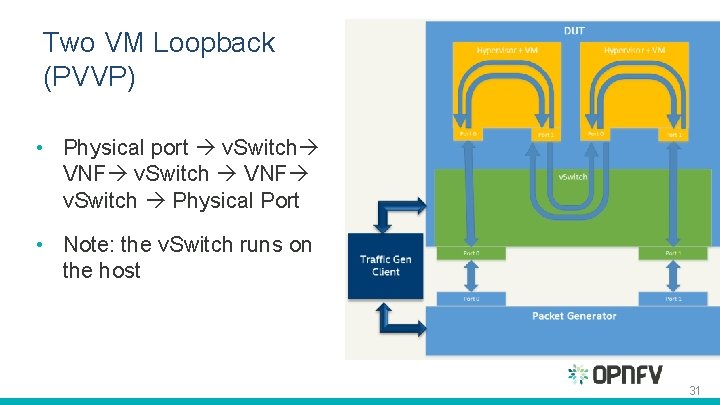
Two VM Loopback (PVVP) • Physical port v. Switch VNF v. Switch Physical Port • Note: the v. Switch runs on the host 31
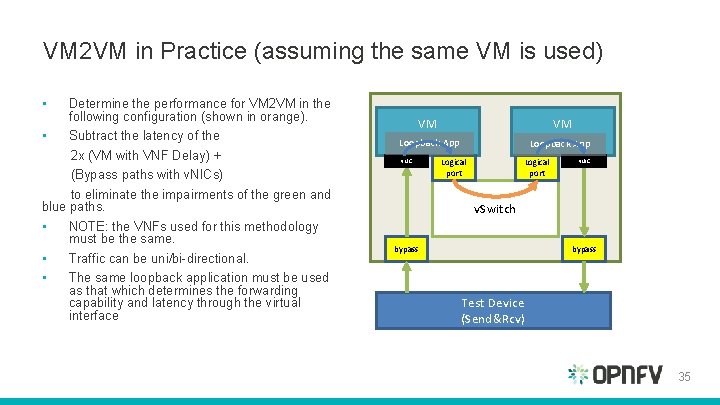
VM 2 VM in Practice • Hasn’t been implemented yet • Concerns around time synchronization between VMs and clock accuracy. • Recommendation under consideration: Test must include an external HW traffic generator to act as the tester/traffic source and sink. 32
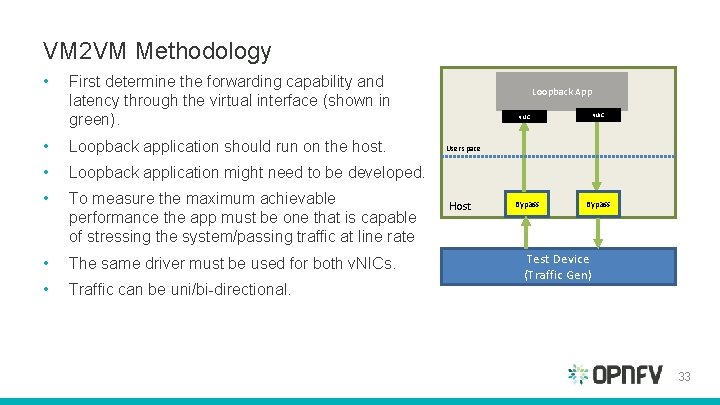
VM 2 VM Methodology • First determine the forwarding capability and latency through the virtual interface (shown in green). • Loopback application should run on the host. • Loopback application might need to be developed. • To measure the maximum achievable performance the app must be one that is capable of stressing the system/passing traffic at line rate • The same driver must be used for both v. NICs. • Traffic can be uni/bi-directional. Loopback App v. NIC User space Host Bypass Test Device (Traffic Gen) 33
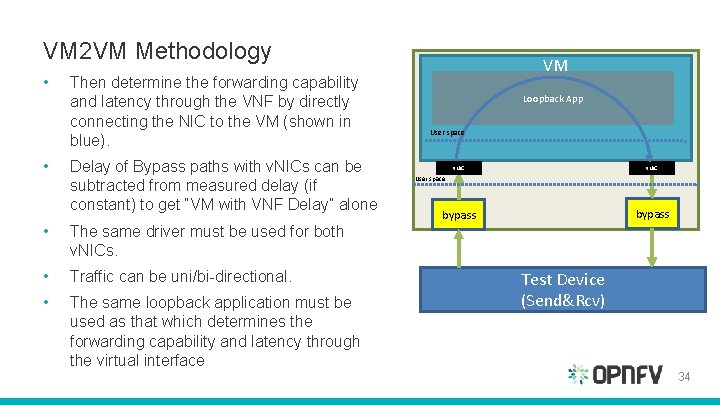
VM 2 VM Methodology • • Then determine the forwarding capability and latency through the VNF by directly connecting the NIC to the VM (shown in blue). Delay of Bypass paths with v. NICs can be subtracted from measured delay (if constant) to get “VM with VNF Delay” alone • The same driver must be used for both v. NICs. • Traffic can be uni/bi-directional. • The same loopback application must be used as that which determines the forwarding capability and latency through the virtual interface VM Loopback App User space v. NIC bypass User space Test Device (Send&Rcv) 34
VM 2 VM in Practice (assuming the same VM is used) • Determine the performance for VM 2 VM in the following configuration (shown in orange). • Subtract the latency of the 2 x (VM with VNF Delay) + (Bypass paths with v. NICs) to eliminate the impairments of the green and blue paths. • NOTE: the VNFs used for this methodology must be the same. • Traffic can be uni/bi-directional. • The same loopback application must be used as that which determines the forwarding capability and latency through the virtual interface VM VM Loopback App v. NIC Logical port v. NIC v. Switch bypass Test Device (Send&Rcv) 35
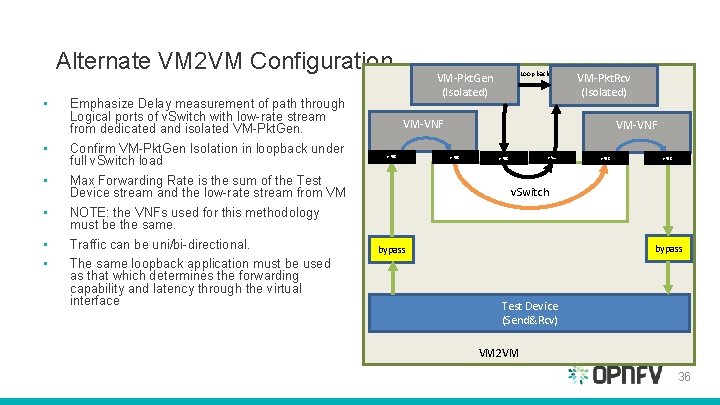
Alternate VM 2 VM Configuration • • • Emphasize Delay measurement of path through Logical ports of v. Switch with low-rate stream from dedicated and isolated VM-Pkt. Gen. Confirm VM-Pkt. Gen Isolation in loopback under full v. Switch load Max Forwarding Rate is the sum of the Test Device stream and the low-rate stream from VM NOTE: the VNFs used for this methodology must be the same. Traffic can be uni/bi-directional. The same loopback application must be used as that which determines the forwarding capability and latency through the virtual interface Loop back VM-Pkt. Gen (Isolated) VM-Pkt. Rcv (Isolated) VM-VNF v. NIC v. Switch bypass Test Device (Send&Rcv) VM 2 VM 36
VSPERF Test Framework
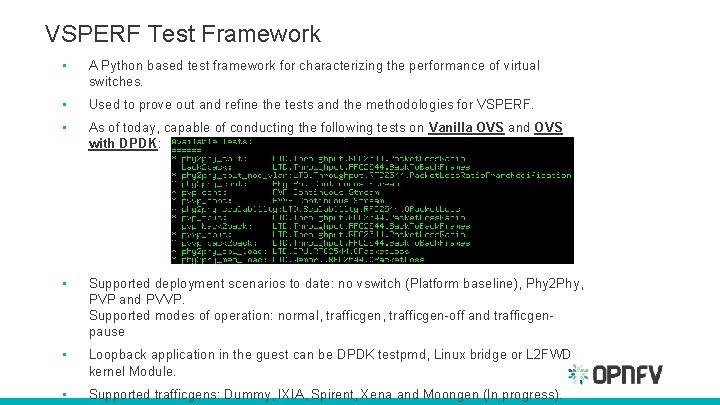
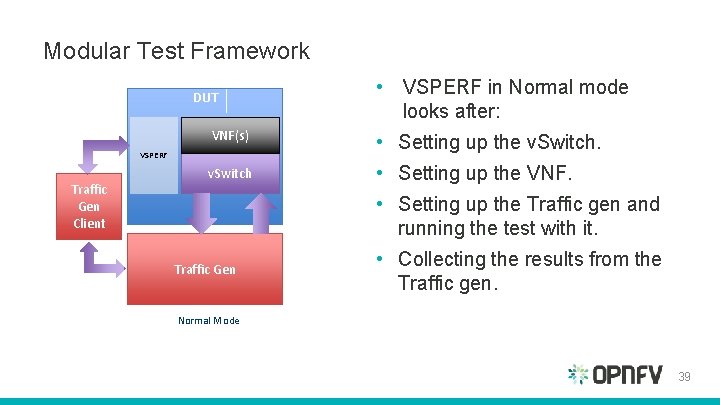
VSPERF Test Framework • A Python based test framework for characterizing the performance of virtual switches. • Used to prove out and refine the tests and the methodologies for VSPERF. • As of today, capable of conducting the following tests on Vanilla OVS and OVS with DPDK: • Supported deployment scenarios to date: no vswitch (Platform baseline), Phy 2 Phy, PVP and PVVP. Supported modes of operation: normal, trafficgen-off and trafficgenpause • Loopback application in the guest can be DPDK testpmd, Linux bridge or L 2 FWD kernel Module. • Supported trafficgens: Dummy, IXIA, Spirent, Xena and Moongen (In progress).
Modular Test Framework DUT VNF(s) • Setting up the v. Switch • Setting up the VNF. VSPERF Traffic Gen Client • VSPERF in Normal mode looks after: • Setting up the Traffic gen and running the test with it. Traffic Gen • Collecting the results from the Traffic gen. Normal Mode 39
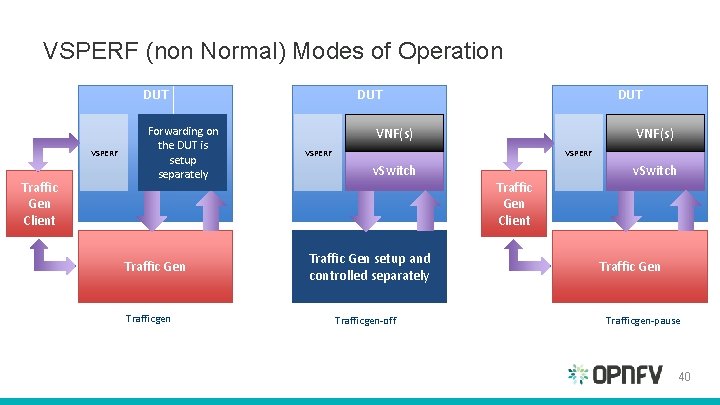
VSPERF (non Normal) Modes of Operation DUT VSPERF Traffic Gen Client Forwarding on the DUT is setup separately Traffic Gen Trafficgen DUT VNF(s) VSPERF v. Switch Traffic Gen setup and controlled separately Trafficgen-off Traffic Gen Client v. Switch Traffic Gen Trafficgen-pause 40
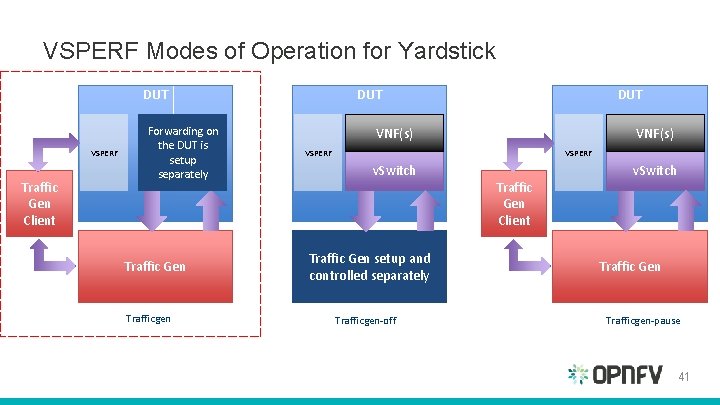
VSPERF Modes of Operation for Yardstick DUT VSPERF Traffic Gen Client Forwarding on the DUT is setup separately Traffic Gen Trafficgen DUT VNF(s) VSPERF v. Switch Traffic Gen setup and controlled separately Trafficgen-off Traffic Gen Client v. Switch Traffic Gen Trafficgen-pause 41
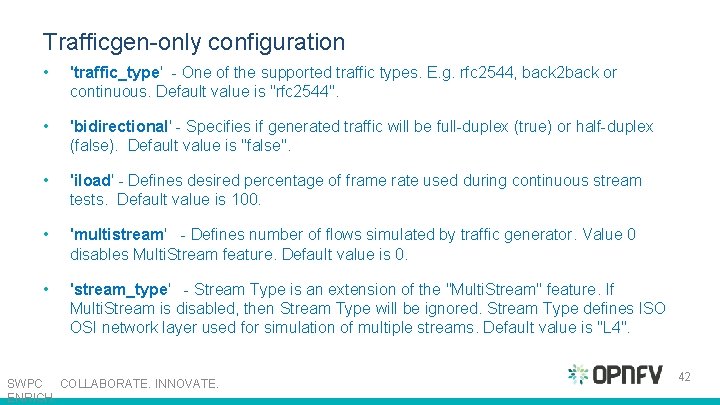
Trafficgen-only configuration • 'traffic_type' - One of the supported traffic types. E. g. rfc 2544, back 2 back or continuous. Default value is "rfc 2544". • 'bidirectional' - Specifies if generated traffic will be full-duplex (true) or half-duplex (false). Default value is "false". • 'iload' - Defines desired percentage of frame rate used during continuous stream tests. Default value is 100. • 'multistream' - Defines number of flows simulated by traffic generator. Value 0 disables Multi. Stream feature. Default value is 0. • 'stream_type' - Stream Type is an extension of the "Multi. Stream" feature. If Multi. Stream is disabled, then Stream Type will be ignored. Stream Type defines ISO OSI network layer used for simulation of multiple streams. Default value is "L 4". SWPC COLLABORATE. INNOVATE. ENRICH. 42
VSPERF Framework Supported Deployment Scenarios VM Logical port Testpmd Physical port Test Device (Send&Rcv) v. Switch Non Physical port Test Device (Send&Rcv) Phy 2 Phy Logical port v. Sw Physical port VM Logical port v. Sw Physical port Test Device (Send&Rcv) PVP PVVP
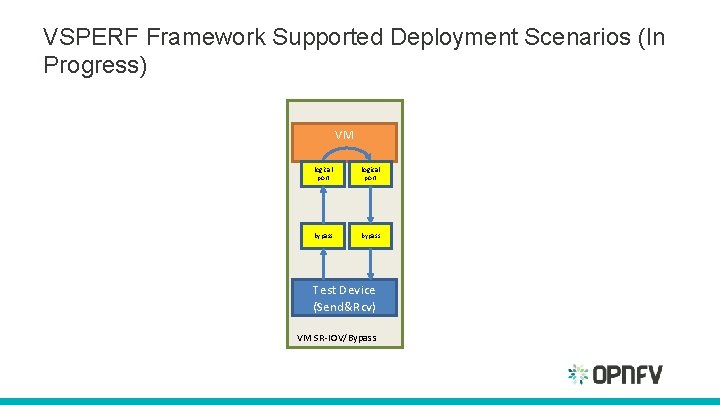
VSPERF Framework Supported Deployment Scenarios (In Progress) VM logical port bypass Test Device (Send&Rcv) VM SR-IOV/Bypass
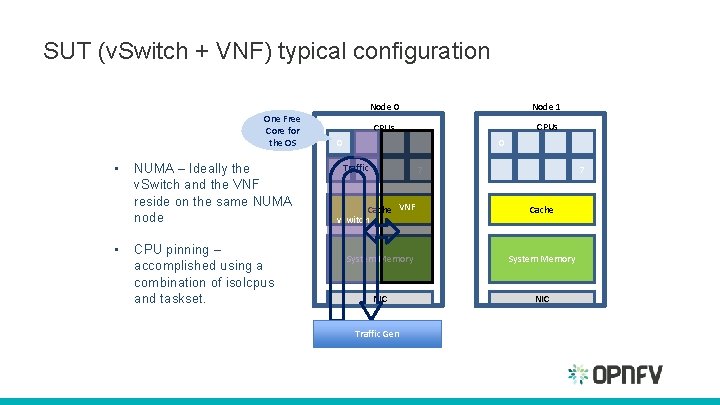
SUT (v. Switch + VNF) typical configuration One Free Core for the OS • • NUMA – Ideally the v. Switch and the VNF reside on the same NUMA node CPU pinning – accomplished using a combination of isolcpus and taskset. Node 0 Node 1 CPUs 0 0 Traffic 7 Cache VNF vswitch 7 Cache System Memory NIC Traffic Gen
Selection of Loopback applications in the Guest • DPDK testpmd: set to forward traffic. • L 2 FWD: A Kernel Module that provides OSI Layer 2 Ipv 4 termination or forwarding with support for Destination Network Address Translation (DNAT) for both the MAC and IP addresses. • Linux Bridge
VNF • VSPERF uses a VM called vloop_vnf for looping traffic in the PVP and PVVP deployment scenarios. – The image can be found @ http: //artifacts. opnfv. org/vswitchperf/vloop-vnf-ubuntu 14. 04_20151216. qcow 2 – Alternatively you can use your own QEMU image.
Directories and Documentation Overview
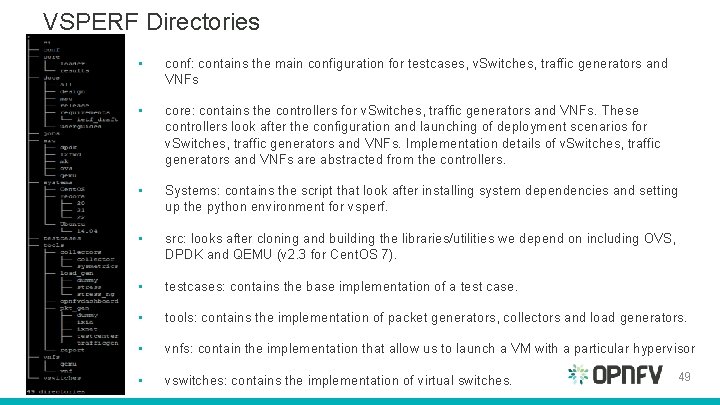
VSPERF Directories • conf: contains the main configuration for testcases, v. Switches, traffic generators and VNFs • core: contains the controllers for v. Switches, traffic generators and VNFs. These controllers look after the configuration and launching of deployment scenarios for v. Switches, traffic generators and VNFs. Implementation details of v. Switches, traffic generators and VNFs are abstracted from the controllers. • Systems: contains the script that look after installing system dependencies and setting up the python environment for vsperf. • src: looks after cloning and building the libraries/utilities we depend on including OVS, DPDK and QEMU (v 2. 3 for Cent. OS 7). • testcases: contains the base implementation of a test case. • tools: contains the implementation of packet generators, collectors and load generators. • vnfs: contain the implementation that allow us to launch a VM with a particular hypervisor • vswitches: contains the implementation of virtual switches. 49
VSPERF Documentation • • • http: //artifacts. opnfv. org/vswitchperf/docs/index. html Includes: User guides Design guides Test Specification Release Information
Running Tests • Most of the instructions to run a test can be found in the documentation and an example @ https: //wiki. opnfv. org/get_started/pod_3__characterize_vswitch_performance#running_tests • A summary of steps: – Clone vswitchperf – cd systems and run build_base_machine. sh to install dependencies – cd. . /conf, copy and modify the 10_custom. conf with appropriate settings. – cd. . and. /vsperf –list –. /vsperf –conf-file=$HOME/10_custom. conf phy 2 phy_cont
Continuous Integration
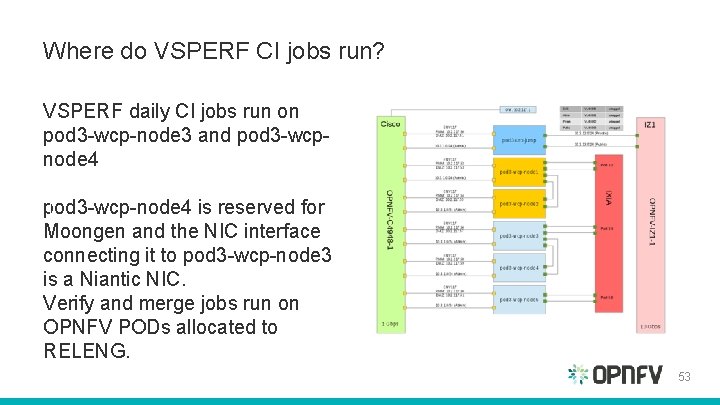
Where do VSPERF CI jobs run? VSPERF daily CI jobs run on pod 3 -wcp-node 3 and pod 3 -wcpnode 4 pod 3 -wcp-node 4 is reserved for Moongen and the NIC interface connecting it to pod 3 -wcp-node 3 is a Niantic NIC. Verify and merge jobs run on OPNFV PODs allocated to RELENG. 53
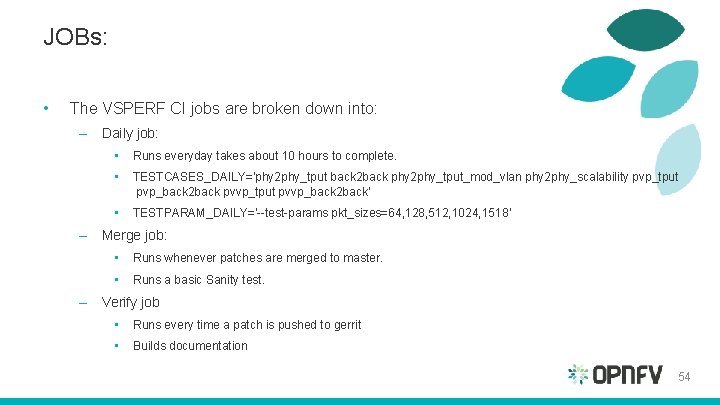
JOBs: • The VSPERF CI jobs are broken down into: – Daily job: • Runs everyday takes about 10 hours to complete. • TESTCASES_DAILY='phy 2 phy_tput back 2 back phy 2 phy_tput_mod_vlan phy 2 phy_scalability pvp_tput pvp_back 2 back pvvp_tput pvvp_back 2 back' • TESTPARAM_DAILY='--test-params pkt_sizes=64, 128, 512, 1024, 1518' – Merge job: • Runs whenever patches are merged to master. • Runs a basic Sanity test. – Verify job • Runs every time a patch is pushed to gerrit • Builds documentation 54
VSPERF CI – Scripts and Jenkins Build Results • Uses ci/build-vsperf. sh (vsperf) and Jenkins Job builder (jjb) + job description vswitchperf. yml file (releng) • For more info on writing and using jjbs: https: //wiki. opnfv. org/octopus/jenkins_wow? s[]=jjb • Jenkins Build Results: https: //build. opnfv. org/ci/view/vswitchperf/
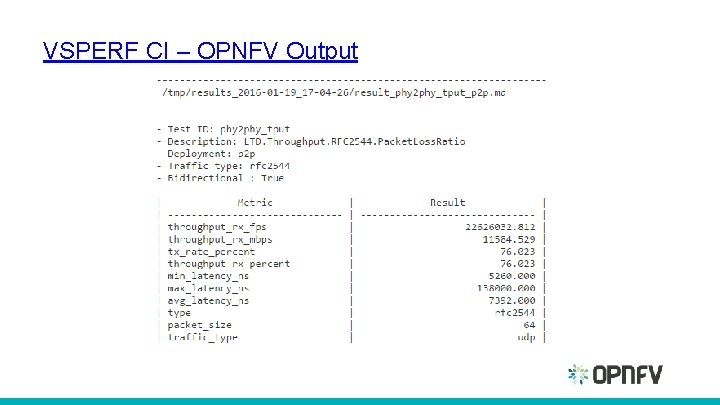
VSPERF CI – OPNFV Output
Additional Info • Gerrit : https: //gerrit. opnfv. org/gerrit/#/q/vswitchperf • List of Candidate Work Items – List of candidate work items for "v. Switch Performance" – v. Switch. Perf New Test Etherpad • Demo: https: //prezi. com/tlriipoafn 5_/vsperf-demo
SUMMARY 58
Summary § It’s important to understand the performance of v. Switches as they are a key component in the NFV infrastructure. § v. Switches should be benchmarked in a similar way to physical switches – when possible § Consistency, stability and repeatability can be achieved through appropriate configuration and documentation of the SUT. § Today, VSPERF describes the baseline scenarios to test the maximum achievable performance of the v. Switch. More realistic scenarios are WIP. § VSPERF provides a python framework that implements a subset of the VSPERF test specification. 59
VSPERF Project Future Work § Integrating multiple traffic gens with the Test Framework: Moongen and Xena § VM Baseline performance using PCI Passthrough/SR-IOV § Methodology extensions: Iterations for the short trial tests § Prove out and refine methodology and tests through the framework § Add more tests to the Test Spec and the framework, an initial list: • • Scalability Tests Overlay Networking Tests Match action performance testing Classifying L 2, L 3 and L 4 traffic Profile Tests. 60