
VOICEMAN SCREENTOVOICE GLOBAL ARCHITECTURE Voiteq Screen To Voices
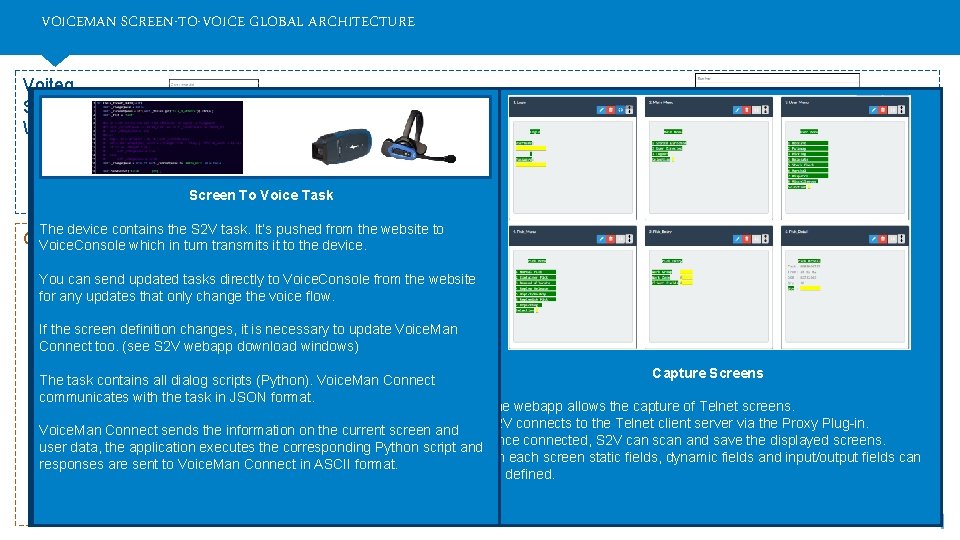
VOICEMAN SCREEN-TO-VOICE GLOBAL ARCHITECTURE Voiteq Screen To Voices Webapp Configure the project Capture screens Screen To Voice Task Code Vocal script Download screens & scripts & project configuration Telnet Proxy Plug-in The device contains the S 2 V task. It’s pushed from the website to Client Network Voice. Console which in turn. Client transmits it to the device. In the Screen window, you can download the telnet Proxy which is Computer downloaded and run in the clients local network. You can send updated tasks directly to Voice. Console from the website. The purpose of this Proxy HTTP is to allow communication between the S 2 V Telnet HTTP Voice. Console for any updates that only change the voice flow. webapp and the local network (the Telnet server, Voice. Man Connect and the devices). is used. Connect to manage Talkman devices and voice tasks. If. Voice. Console the screen definition changes, it the is necessary to update Voice. Man Windows Service Voice. Man Connect IP Socket Connection Telnet Proxydownload Plug-In Within Voice. Console it webapp is Download possible to: Screens Connect too. (see S 2 V windows) Normally, a website can’t access to a Telnet server or anything else on (WAN, LAN & Wi-Fi) For each instance configured in Voice. Man Connect, a Windows the client network for security reasons. The Proxys allow 3 operations Client Voice. Man Connect sitsof between the Vocollect devices and the Telnet Capture Screens • Check the condition the devices. The task dialog scriptsthe (Python). Voice. Man Connect Service iscontains created and installed. from the website: Server Inserver. this window youall can download different elements of S 2 V: Once the screens and the configuration of the project Dialog script screen • Define the organization of the devices within the site. communicates with the in JSON format. Installed software : S 2 V Server • downloaded The. vm. Connect filetask for it: the Voice. Man Connect application. This and installed, The webapp allows the capture of Telnet screens. • Update the Task all dialog scripts). S 2 Vcapture Voice Task One instance is device required for (with each for Telnet server process. If there are Communication to the Telnet server for • the of screens. contains all the configuration the project and the definition of • S 2 V connects to the Telnet client server via the Proxy Plug-in. Configure Project Screen the creation of of thethe Python which converts the screen into Voice. Catalyst • Allows Update the processes profile (keyword, user voice profiles etc). • Communication to Voice. Man Connect • to. Honeywell Voice. Man Connect sends thedevices information onwill the current screen and Several Telnet then an code instance be required for each. run the S 2 V emulator for the captured Telnet screens. Telnet • Receives and sends instructions to the Vocollect devices (JSON). Once connected, S 2 V can scan and save the displayed screens. voice instructions. • Manage users. user data, the application executes the. Vocollect corresponding Python script and debugging purposes. • • The Voice. Application. This is the Taskserver containing the Receives and sends instructions to the Telnet in the Telnet On Installed software : fields, screen static fields input/output Thiseach window allows the user dynamic to configure theand project. This fields can A basic script is generated automatically when the screen is captured. • Manage sites. responses are sent to Voice. Man Connect in ASCII format. • Communication to Voice Console to push updated tasks to devices. dialog scripts corresponding to the captured screens. Installed software : • Voiteq Voice. Man Connect be defined. is used to connect the client Telnet server to the server configuration You Standard. have contextual help (right click) that helps you to use prompt • Telnet server • • The MDM option also allows you to push the Voice. Application to Connects and queries • Voice. Man Connect Windows Service hosting Connect. command, translations etc. an external SQL database. • WMS Voice. Console to update Vocollect devices. • Runs C# code (. Net Framework). 1 VOITEQ CONFIDENTIAL • Honeywell Voice. Console
- Slides: 1