
Visual C Programming Concepts and Projects Chapter 5

- Slides: 63
Visual C++ Programming: Concepts and Projects Chapter 5 A: Repetition (Concepts)
Objectives In this chapter, you will: • Learn the strengths and weaknesses of usercontrolled repetition • Study the various forms of repetition control structures • Learn how pre- and post-test loops work • Use for loops, while loops, and do. . . while loops Programming with Visual C++ 2
Objectives (continued) • Generate random numbers • Learn how the loop process relates to summation, counting, and other common tasks • Use a loop to construct an extended string of characters Programming with Visual C++ 3
User-Controlled Repetition • Forms of repetition • The user can be required to repeat tasks (usercontrolled repetition) • The program can repeat tasks automatically • User-controlled repetition relies on the user to perform repeated actions • Entering data into text boxes • Clicking buttons Programming with Visual C++ 4
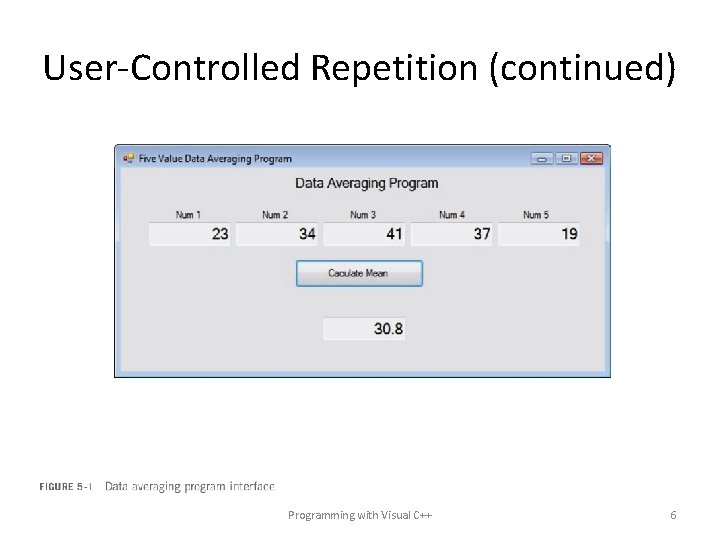
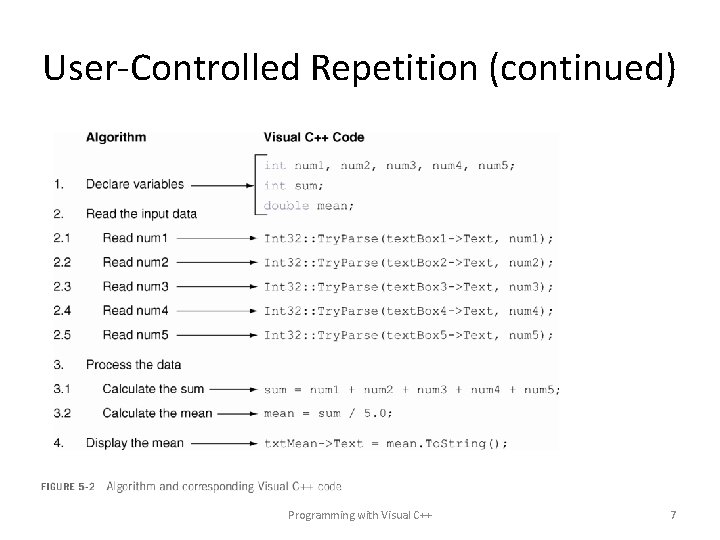
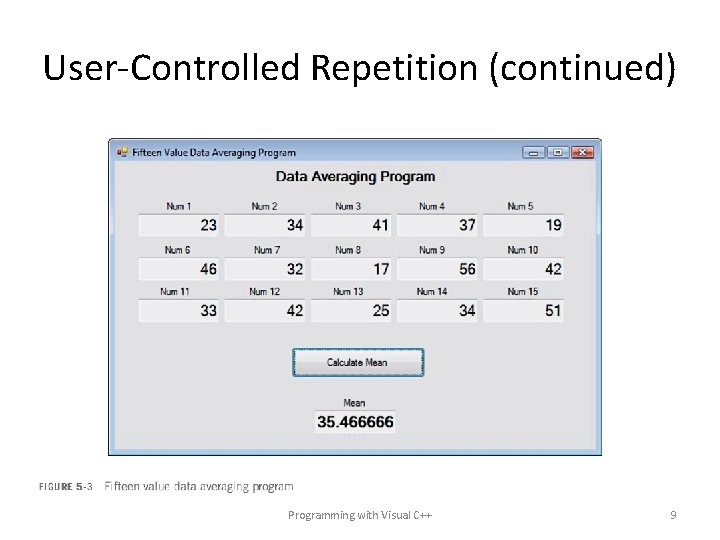
User-Controlled Repetition (continued) • The need for user-controlled repetition • Consider a program that requires the user to enter five numbers into five Text. Boxes • This program is difficult to revise to accommodate more or fewer values • For example: Revising it to accommodate 15 data values requires 15 Text. Boxes • How can the program be redesigned so that the user can enter any number of values? Programming with Visual C++ 5
User-Controlled Repetition (continued) Programming with Visual C++ 6
User-Controlled Repetition (continued) Programming with Visual C++ 7
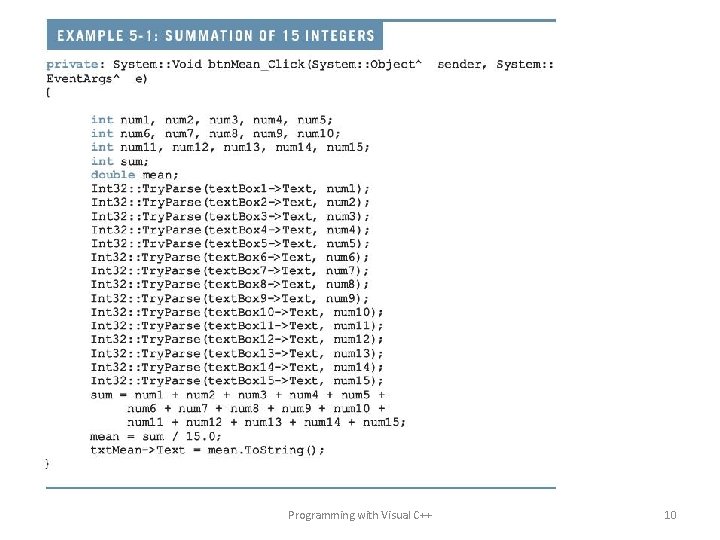
User-Controlled Repetition (continued) • This program is difficult to revise to accommodate more or fewer values • For example: Revising it to accommodate 15 data values requires 15 Text. Boxes and lots of additional code Programming with Visual C++ 8
User-Controlled Repetition (continued) Programming with Visual C++ 9
Programming with Visual C++ 10
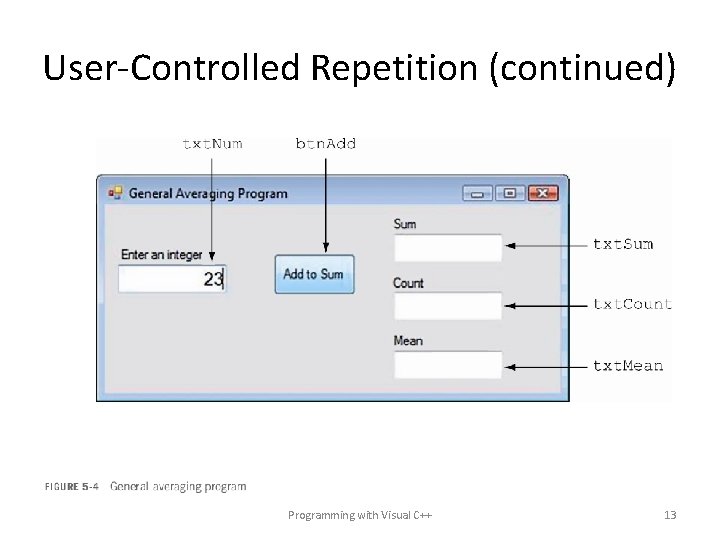
User-Controlled Repetition (continued) • The problem with the previous approach was that each program was a single-purpose solution • Designed to solve specific instances of a problem • Single-purpose solution • Works only with one set of input values • Must undergo extensive revision whenever the terms of the problem change (more input values) • What is needed is a general-purpose solution • Works with any number of input values • General averaging program • • Uses user-controlled repetition Handles any amount of input Very few variables and interface controls No need to change it to accommodate more data Programming with Visual C++ 11
User-Controlled Repetition (continued) • A general averaging program • • Uses user-controlled repetition Handles any amount of input Very few variables and interface controls No need to change it to accommodate more data • Users enter one data value at a time • Clicking the “Add To Sum” button adds the value to the sum and calculates and displays additional statistics Programming with Visual C++ 12
User-Controlled Repetition (continued) Programming with Visual C++ 13
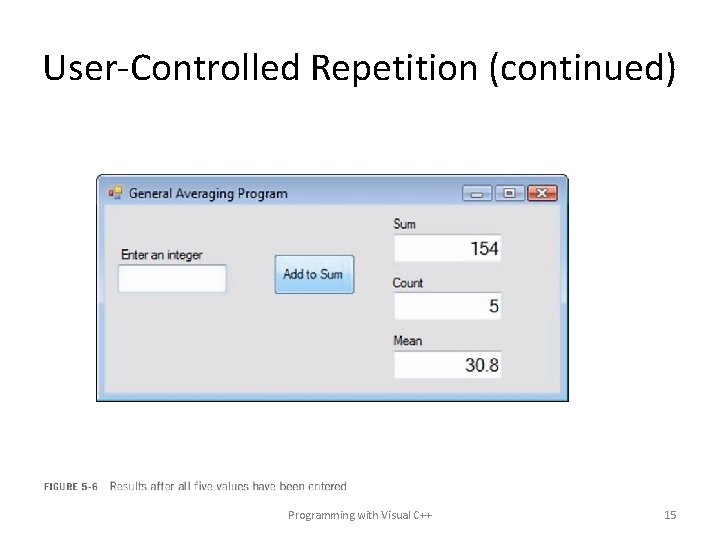
User-Controlled Repetition (continued) • The program accommodates five, 15, or any number of data values without modification • After entering multiple data values, the results are displayed • For example: The next slide indicates the result after the values 23, 34, 41, 37, and 19 have been entered Programming with Visual C++ 14
User-Controlled Repetition (continued) Programming with Visual C++ 15
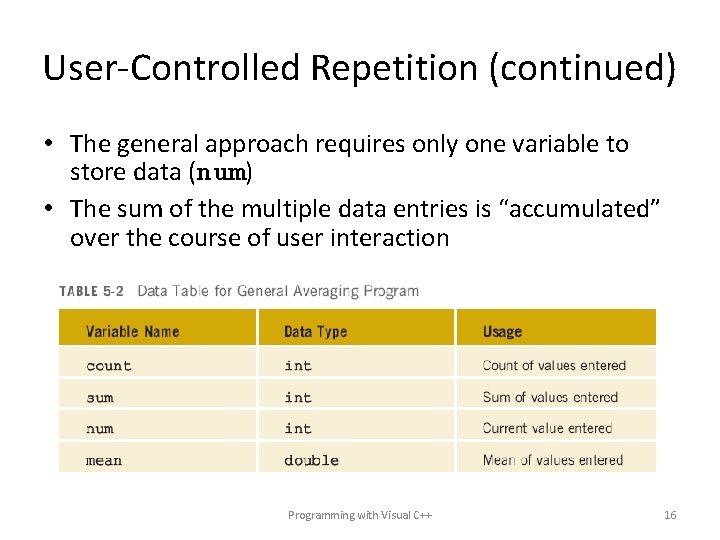
User-Controlled Repetition (continued) • The general approach requires only one variable to store data (num) • The sum of the multiple data entries is “accumulated” over the course of user interaction Programming with Visual C++ 16
Accumulating a Sum and Counting • Summation is the process of adding values to arrive at a sum • Accumulating a sum – A sum can be accumulated one addition at a time in a repetitive process • Counting – A process in which the value 1 is added to a counter in a repetitive process Programming with Visual C++ 17
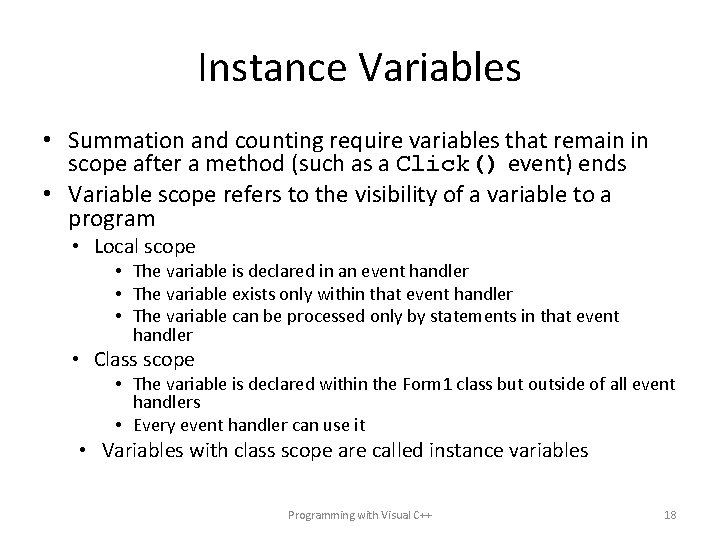
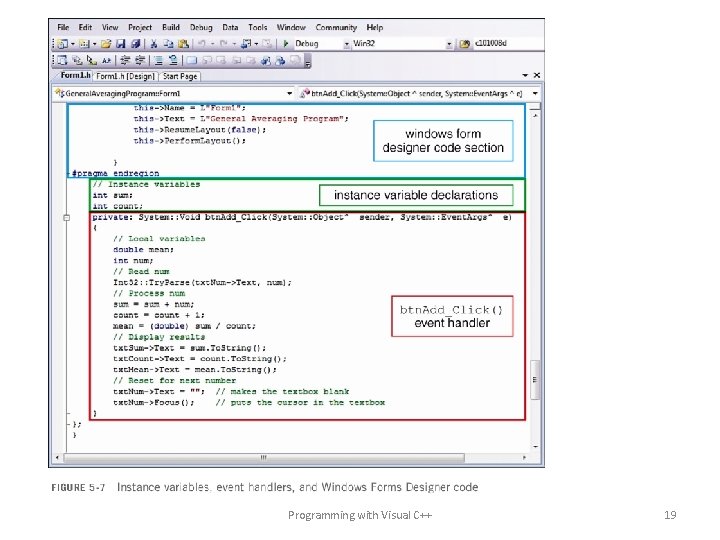
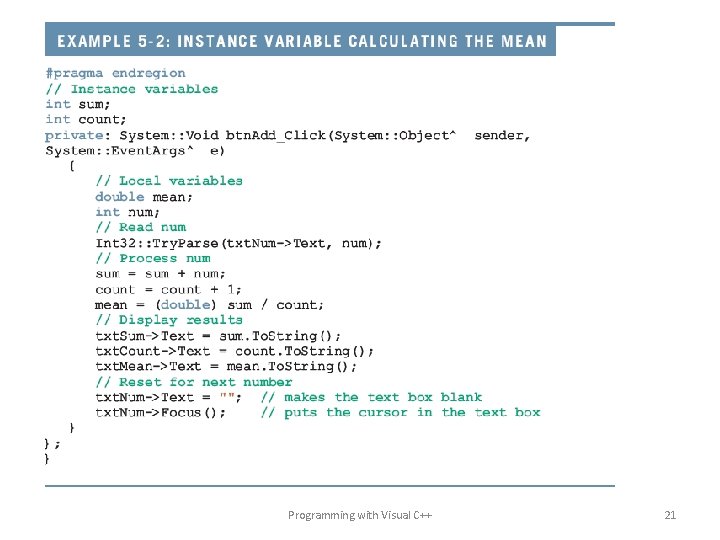
Instance Variables • Summation and counting require variables that remain in scope after a method (such as a Click() event) ends • Variable scope refers to the visibility of a variable to a program • Local scope • The variable is declared in an event handler • The variable exists only within that event handler • The variable can be processed only by statements in that event handler • Class scope • The variable is declared within the Form 1 class but outside of all event handlers • Every event handler can use it • Variables with class scope are called instance variables Programming with Visual C++ 18
Programming with Visual C++ 19
Instance Variables (continued) • Instance variables are declared • Immediately after the line #pragma endregion • Outside of all event handlers • Instance variables are required for summation or counting – They are initialized to 0 by default when declared – Example: sum, count – Each time the user clicks the button, a value is added to the sum and 1 is added to the count Programming with Visual C++ 20
Programming with Visual C++ 21
Instance Variables (continued) • Instance variables make a general solution to the summation program possible • The sum retains its value from one Click() event call to the next • The users are in control – As long as they repeat the process of entering data and clicking the button, their data value will be added to the sum Programming with Visual C++ 22
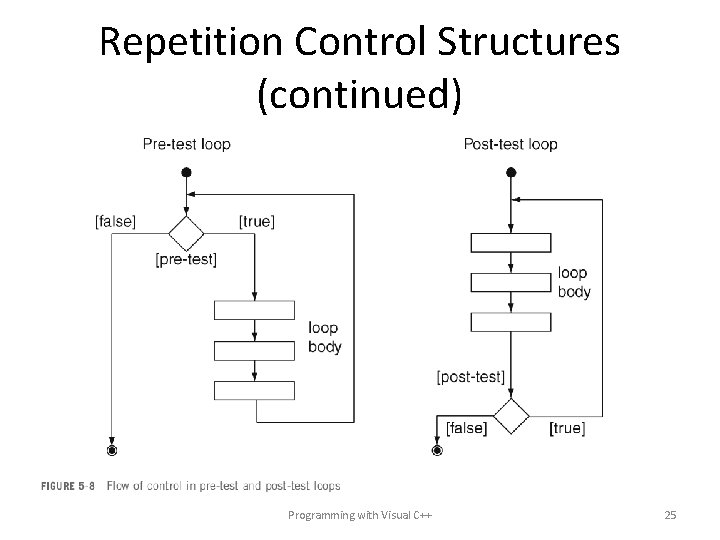
Repetition Control Structures • Repetition may also be performed automatically, without the user’s participation • Repetition control structures (loops) allow your program to automatically repeat one or more statements • Characteristics of all loops • Loop condition • Boolean expression that must be true for the loop to continue • Loop control variable • A variable evaluated by the loop condition • Loop body • The statements in a loop • Iteration • A complete pass through the loop body statements Programming with Visual C++ 23
Repetition Control Structures (continued) • Types of loops • Pre-test loop • Loop condition comes before loop body • Post-test loop • Loop condition comes after the loop body Programming with Visual C++ 24
Repetition Control Structures (continued) Programming with Visual C++ 25
The while Loop • A pre-test loop • Repetition of the loop body continues as long as the pre-test evaluates to true • Repetition stops when the pre-test evaluates to false – Control transfers to the next statement after the loop Programming with Visual C++ 26
The while Loop (continued) Programming with Visual C++ 27
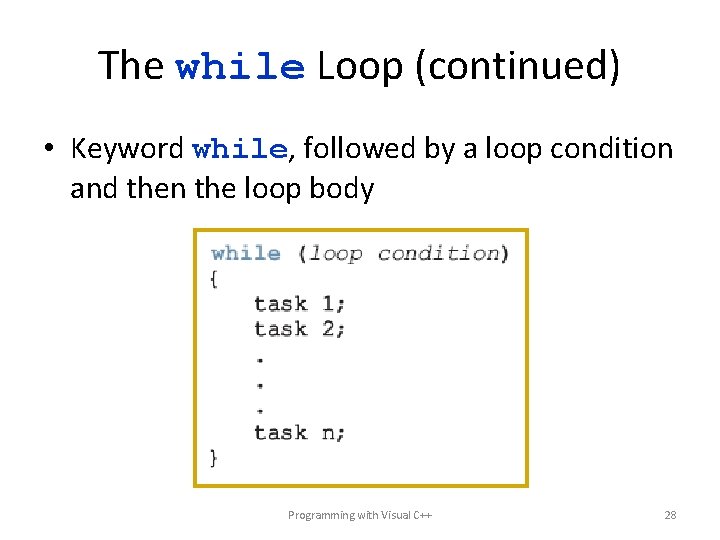
The while Loop (continued) • Keyword while, followed by a loop condition and then the loop body Programming with Visual C++ 28
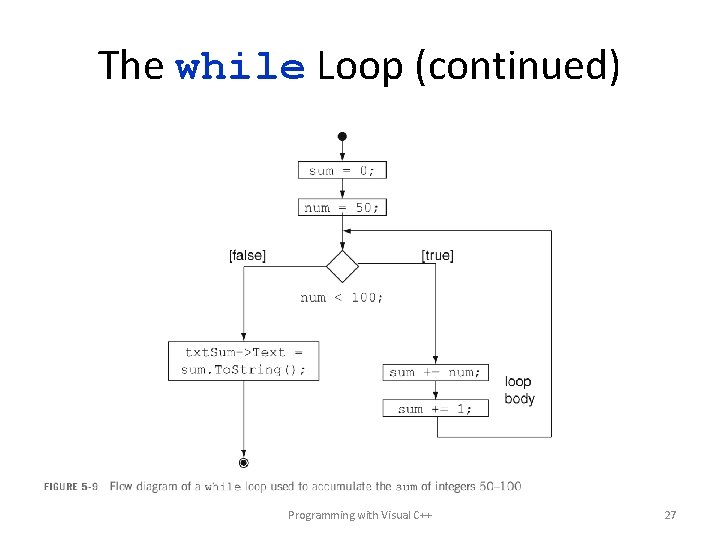
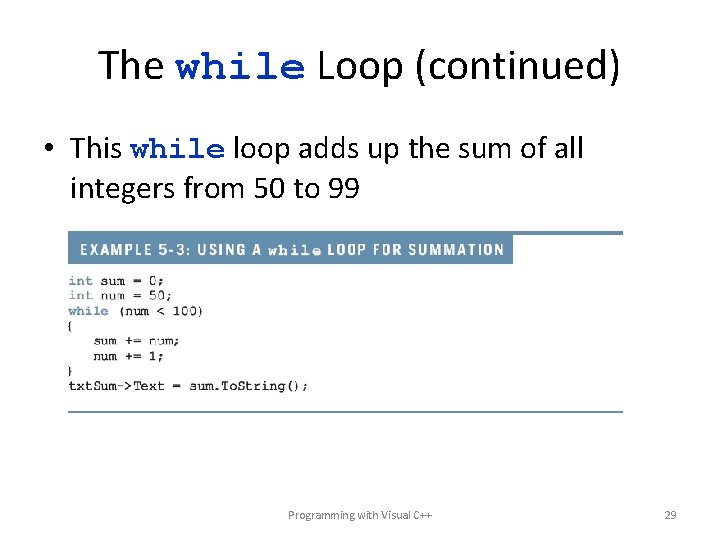
The while Loop (continued) • This while loop adds up the sum of all integers from 50 to 99 Programming with Visual C++ 29
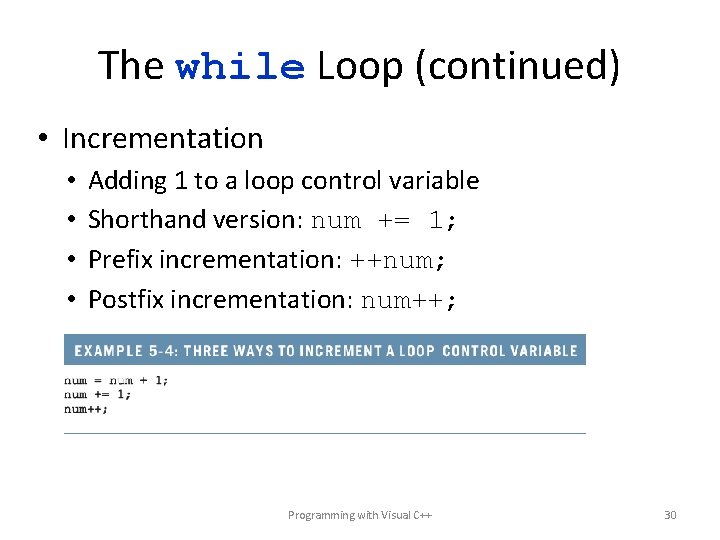
The while Loop (continued) • Incrementation • • Adding 1 to a loop control variable Shorthand version: num += 1; Prefix incrementation: ++num; Postfix incrementation: num++; Programming with Visual C++ 30
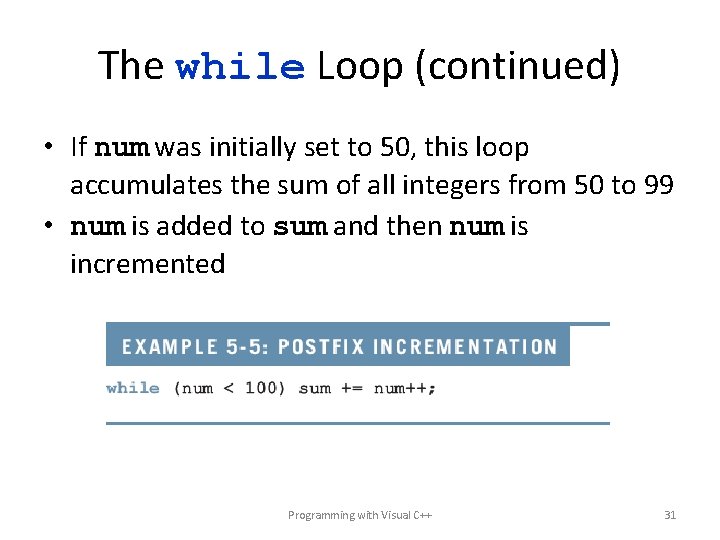
The while Loop (continued) • If num was initially set to 50, this loop accumulates the sum of all integers from 50 to 99 • num is added to sum and then num is incremented Programming with Visual C++ 31
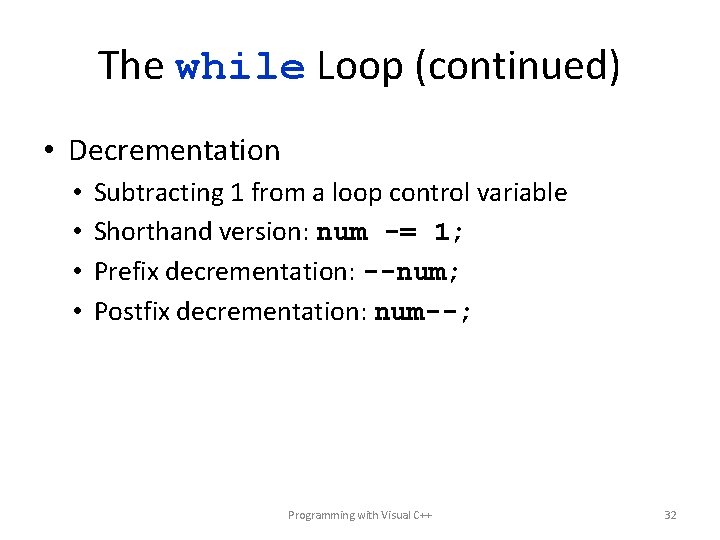
The while Loop (continued) • Decrementation • • Subtracting 1 from a loop control variable Shorthand version: num -= 1; Prefix decrementation: --num; Postfix decrementation: num--; Programming with Visual C++ 32
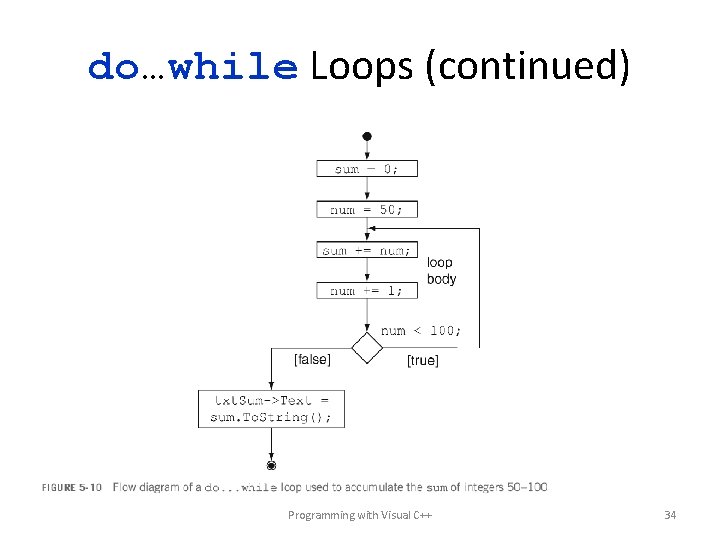
do…while Loops • Post-test loop condition • Repetition of the loop body continues as long as the post-test evaluates to true • Repetition stops and control is transferred to the first statement after the loop when the post-test evaluates to false Programming with Visual C++ 33
do…while Loops (continued) Programming with Visual C++ 34
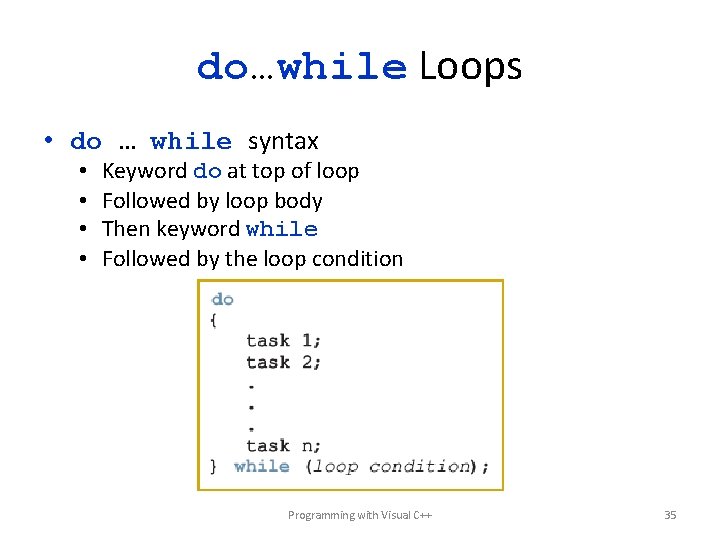
do…while Loops • do … while syntax • • Keyword do at top of loop Followed by loop body Then keyword while Followed by the loop condition Programming with Visual C++ 35
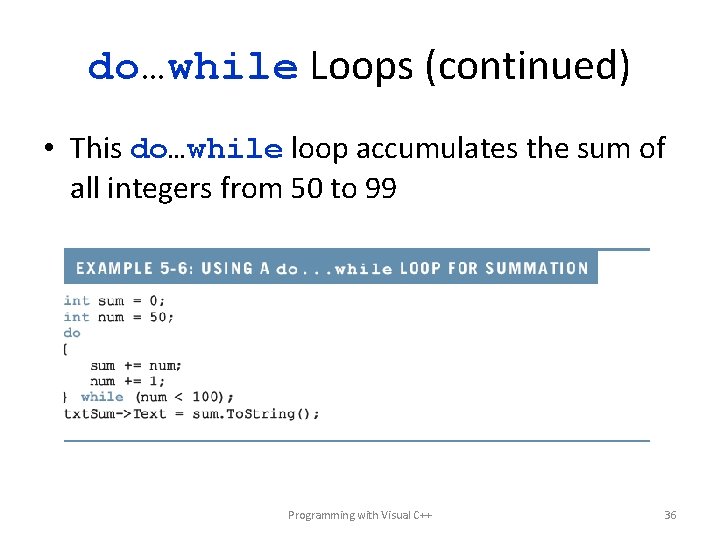
do…while Loops (continued) • This do…while loop accumulates the sum of all integers from 50 to 99 Programming with Visual C++ 36
The for Loop • Pre-test loop • Built-in loop control variable that often serves as a counter • Often called “counter-controlled” loops Programming with Visual C++ 37
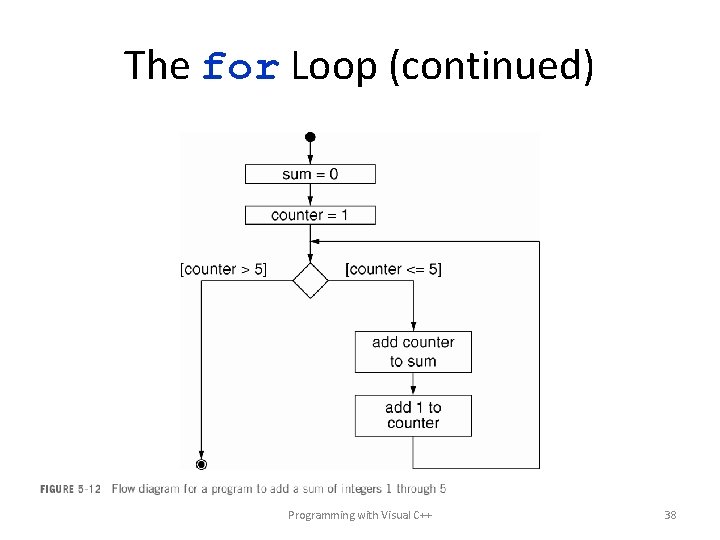
The for Loop (continued) Programming with Visual C++ 38
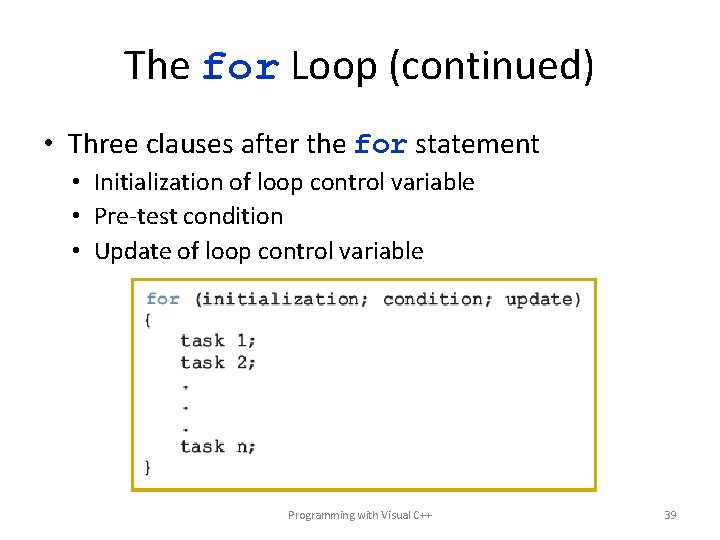
The for Loop (continued) • Three clauses after the for statement • Initialization of loop control variable • Pre-test condition • Update of loop control variable Programming with Visual C++ 39
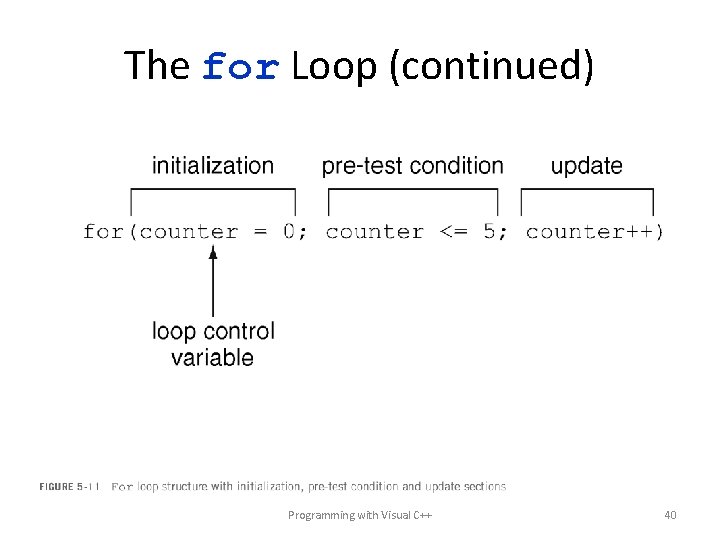
The for Loop (continued) Programming with Visual C++ 40
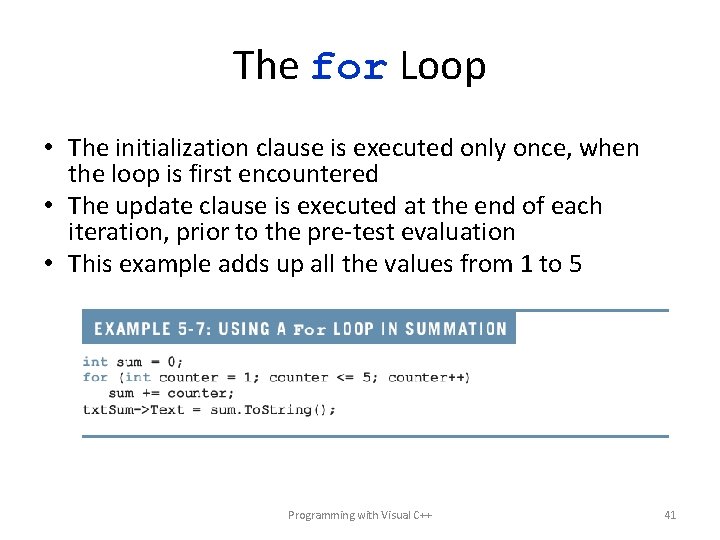
The for Loop • The initialization clause is executed only once, when the loop is first encountered • The update clause is executed at the end of each iteration, prior to the pre-test evaluation • This example adds up all the values from 1 to 5 Programming with Visual C++ 41
Common Loop Tasks • • Formula translation Accumulating a product Building a string Generating random numbers Finding the largest/smallest value Counting specific values Nested loops Programming with Visual C++ 42
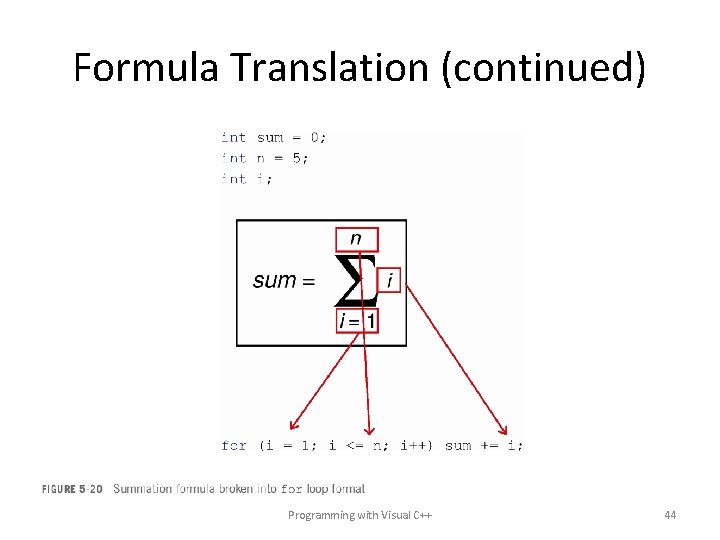
Formula Translation • Summation – Initial value – Terminal value – Summation process • Can easily be translated from mathematical symbols into C++ code Programming with Visual C++ 43
Formula Translation (continued) Programming with Visual C++ 44
Formula Translation (continued) Programming with Visual C++ 45
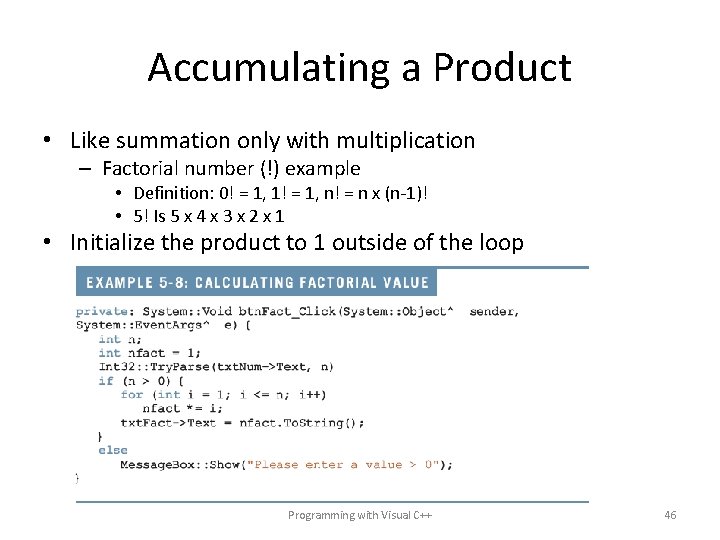
Accumulating a Product • Like summation only with multiplication – Factorial number (!) example • Definition: 0! = 1, 1! = 1, n! = n x (n-1)! • 5! Is 5 x 4 x 3 x 2 x 1 • Initialize the product to 1 outside of the loop Programming with Visual C++ 46
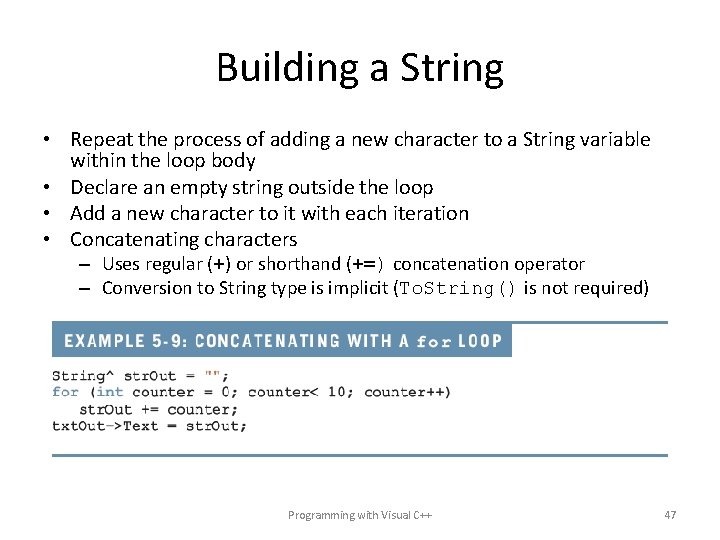
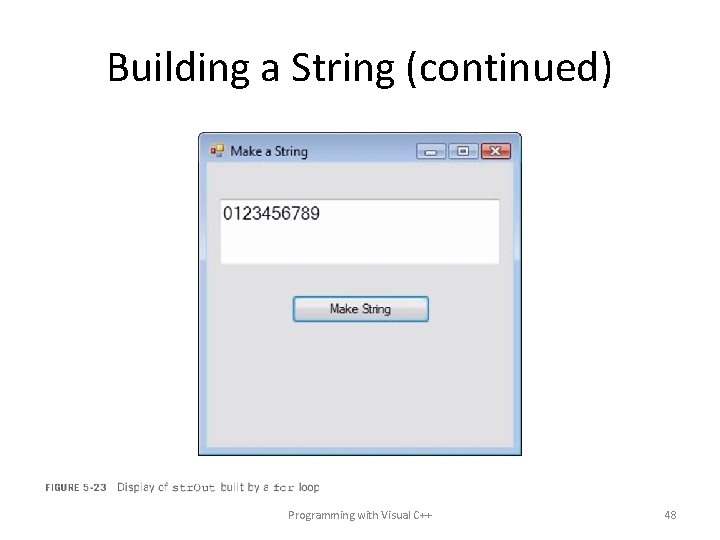
Building a String • Repeat the process of adding a new character to a String variable within the loop body • Declare an empty string outside the loop • Add a new character to it with each iteration • Concatenating characters – Uses regular (+) or shorthand (+=) concatenation operator – Conversion to String type is implicit (To. String() is not required) Programming with Visual C++ 47
Building a String (continued) Programming with Visual C++ 48
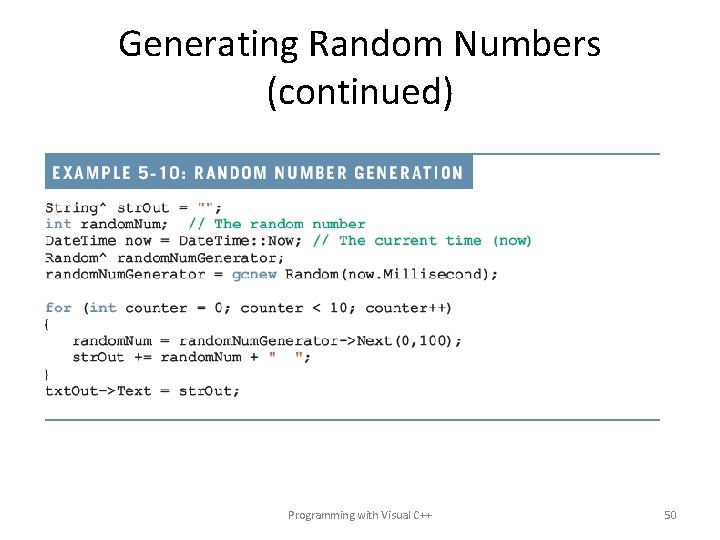
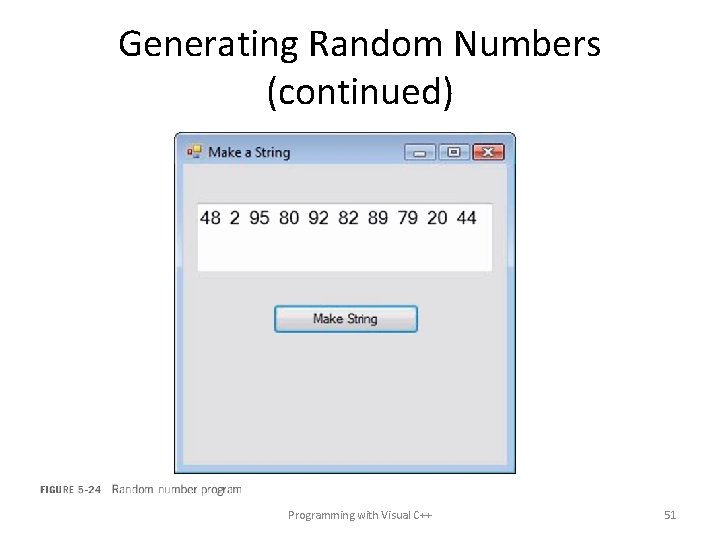
Generating Random Numbers • A random number • Is selected from a range of values • Each value has the same likelihood of selection • Requires random number object derived from the system-defined Random class • Random number generation should start from a unique value each time the program runs • Use Date. Time variable now. Milliseconds to capture milliseconds since midnight (a unique value) • Next() method generates an integer within a specified range • Two parameters (first, last) • The value will be any integer from first up to (but not including) last Programming with Visual C++ 49
Generating Random Numbers (continued) Programming with Visual C++ 50
Generating Random Numbers (continued) Programming with Visual C++ 51
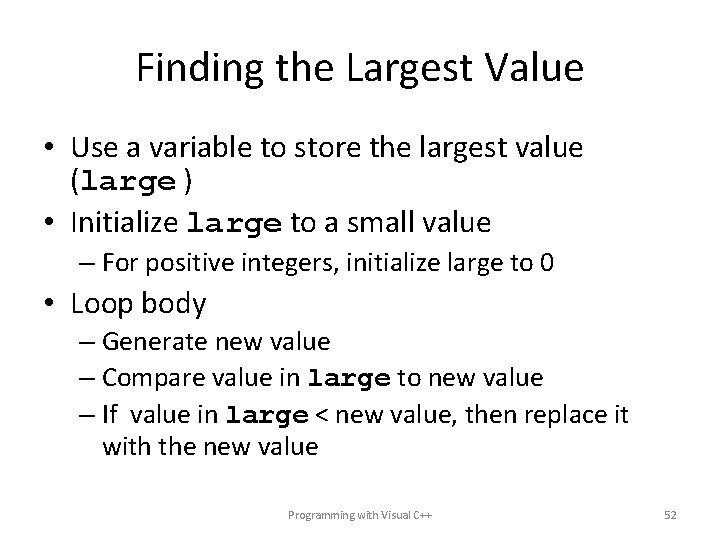
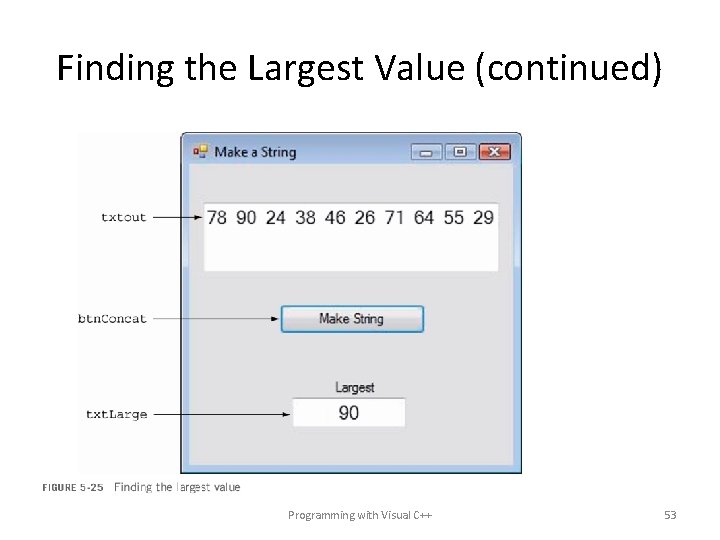
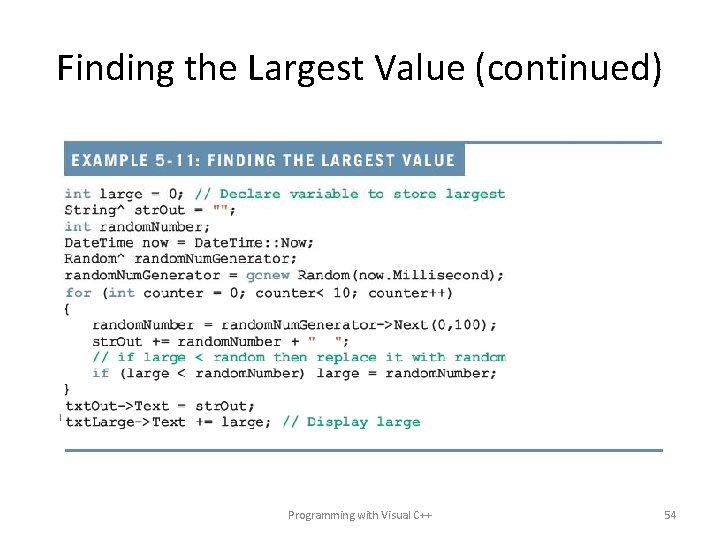
Finding the Largest Value • Use a variable to store the largest value (large ) • Initialize large to a small value – For positive integers, initialize large to 0 • Loop body – Generate new value – Compare value in large to new value – If value in large < new value, then replace it with the new value Programming with Visual C++ 52
Finding the Largest Value (continued) Programming with Visual C++ 53
Finding the Largest Value (continued) Programming with Visual C++ 54
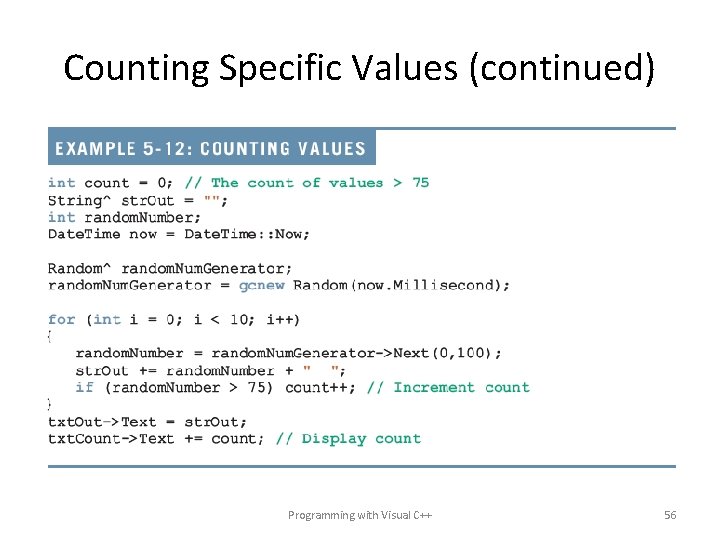
Counting Specific Values • Initialize a counter to 0 before the loop • Loop body – Produce a new value – If the value is countable, then increment the counter • The following example counts the number of random values > 75 Programming with Visual C++ 55
Counting Specific Values (continued) Programming with Visual C++ 56
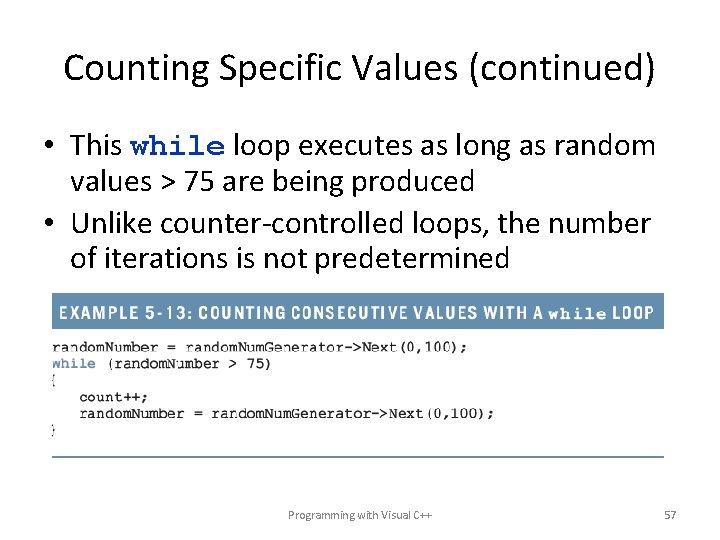
Counting Specific Values (continued) • This while loop executes as long as random values > 75 are being produced • Unlike counter-controlled loops, the number of iterations is not predetermined Programming with Visual C++ 57
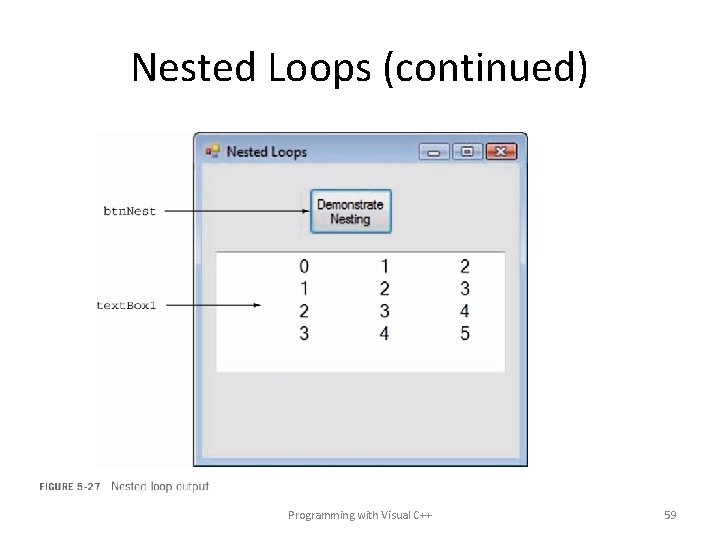
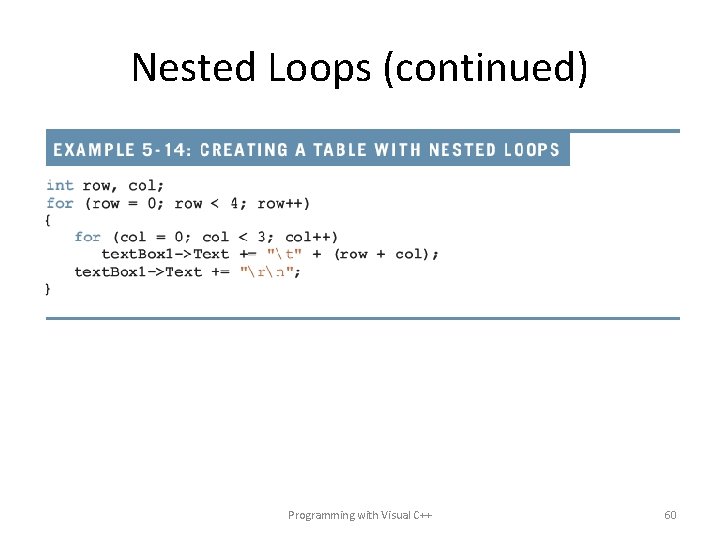
Nested Loops • One loop within the loop body of another • Outer loop – Inner loop • The inner loop executes many times, each time starting anew • Example: – Producing a table (rows and columns) – After completion of the inner loop, a “rn” is used (newline character) Programming with Visual C++ 58
Nested Loops (continued) Programming with Visual C++ 59
Nested Loops (continued) Programming with Visual C++ 60
Summary • User-controlled repetition • Used in general solutions involving user interaction • Repetition control structures • Used to automate the repetition process • Types of loops • Pre-test loops, entrance condition • Post-test loops, exit condition Programming with Visual C++ 61
Summary (continued) • while loop • Pre-test • Processing continues indefinitely until the pre-test evaluates to false • do…while loop • Post-test • Processing continues indefinitely until the post-test evaluates to false • for loop • Built-in loop control variable • Processing is usually counter controlled • Update is automatic, at the end of each iteration Programming with Visual C++ 62
Summary (continued) • Common uses for loops • • Formula translation: accumulating a sum Accumulating a product Building a string Generating random numbers Finding the largest/smallest value Counting specific values Nested loops Programming with Visual C++ 63