
VISI 21 1 Quick Keys Menu Items File


- Slides: 51
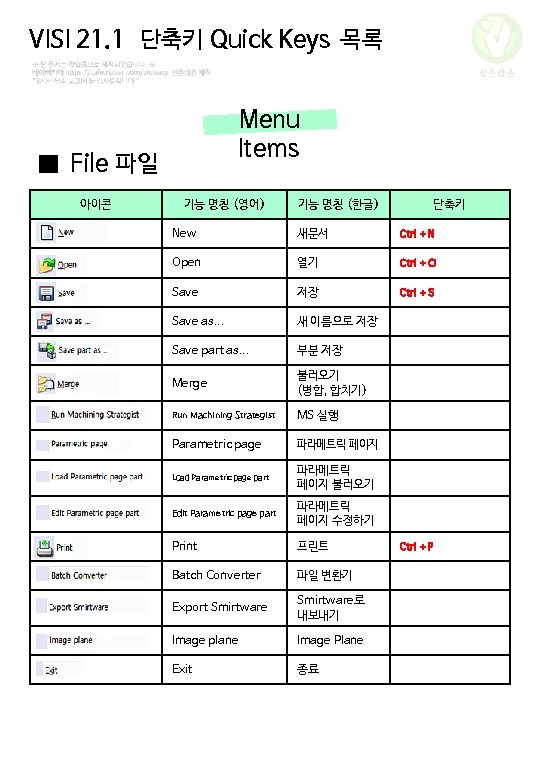
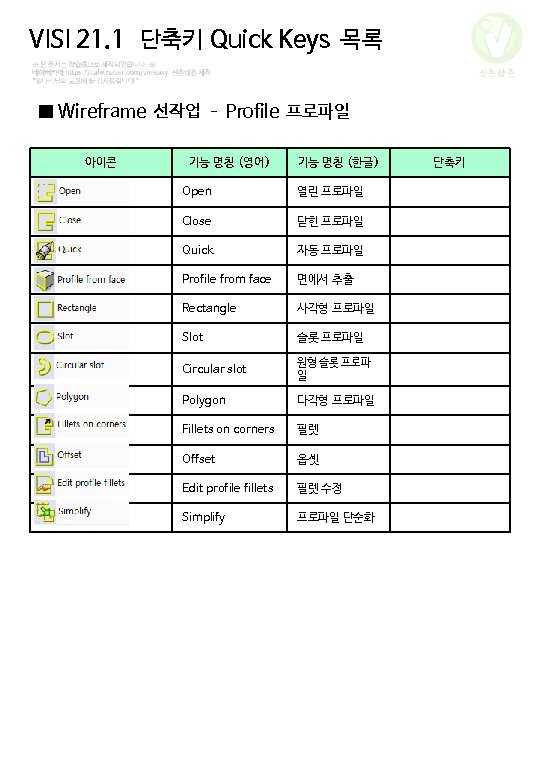
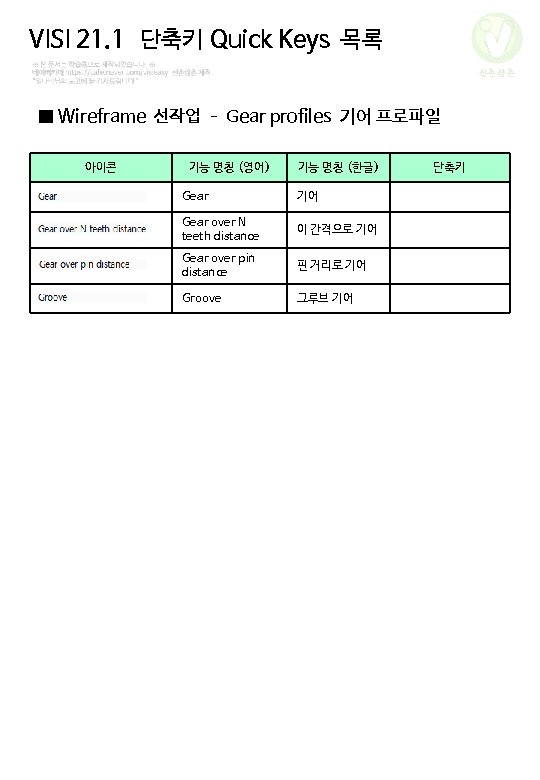
VISI 21. 1 단축키 Quick Keys 목록 신촌삼촌 Menu Items ■ File 파일 아이콘 기능 명칭 (영어) 기능 명칭 (한글) 단축키 New 새문서 Ctrl + N Open 열기 Ctrl + O Save 저장 Ctrl + S Save as. . . 새 이름으로 저장 Save part as. . . 부분 저장 Merge 불러오기 (병합, 합치기) Run Machining Strategist MS 실행 Parametric page 파라메트릭 페이지 Load Parametric page part 파라메트릭 페이지 불러오기 Edit Parametric page part 파라메트릭 페이지 수정하기 Print 프린트 Batch Converter 파일 변환기 Export Smirtware로 내보내기 Image plane Image Plane Exit 종료 Ctrl + P
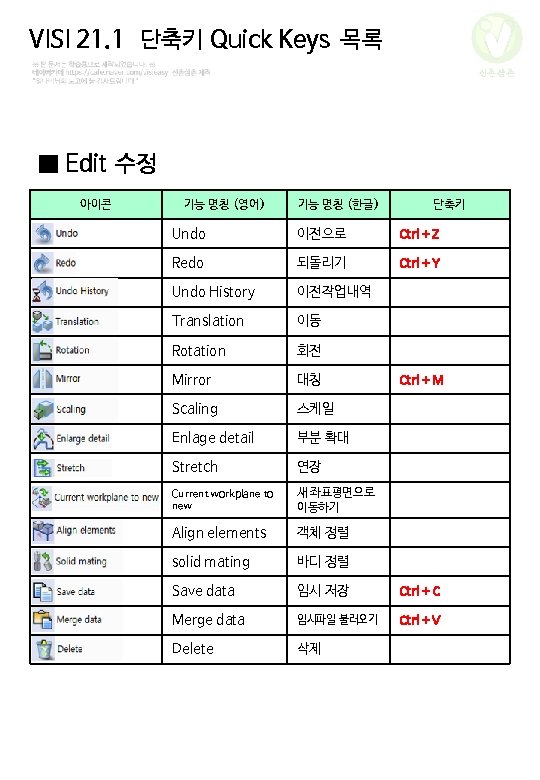
VISI 21. 1 단축키 Quick Keys 목록 신촌삼촌 ■ Edit 수정 아이콘 기능 명칭 (영어) 기능 명칭 (한글) 단축키 Undo 이전으로 Ctrl + Z Redo 되돌리기 Ctrl + Y Undo History 이전작업내역 Translation 이동 Rotation 회전 Mirror 대칭 Scaling 스케일 Enlage detail 부분 확대 Stretch 연장 Current workplane to new 새 좌표평면으로 이동하기 Align elements 객체 정렬 solid mating 바디 정렬 Save data 임시 저장 Ctrl + C Merge data 임시파일 불러오기 Ctrl + V Delete 삭제 Ctrl + M
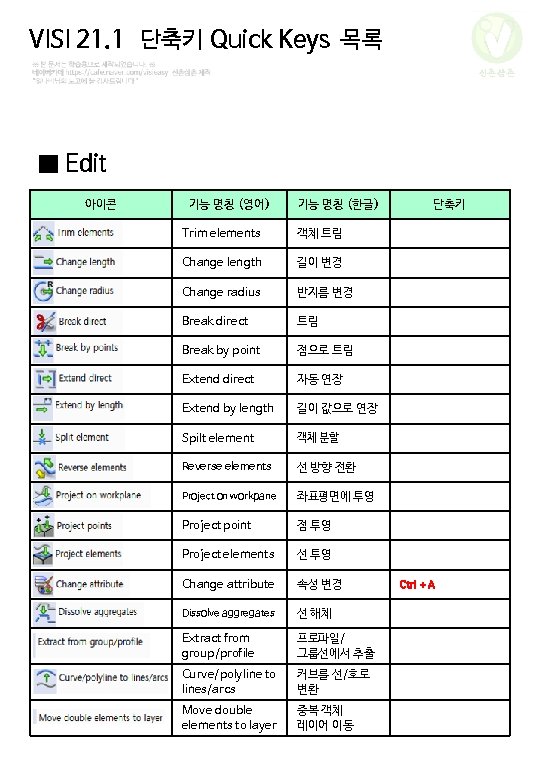
VISI 21. 1 단축키 Quick Keys 목록 신촌삼촌 ■ Edit 아이콘 기능 명칭 (영어) 기능 명칭 (한글) Trim elements 객체 트림 Change length 길이 변경 Change radius 반지름 변경 Break direct 트림 Break by point 점으로 트림 Extend direct 자동 연장 Extend by length 길이 값으로 연장 Spilt element 객체 분할 Reverse elements 선 방향 전환 Project on workpane 좌표평면에 투영 Project point 점 투영 Project elements 선 투영 Change attribute 속성 변경 Dissolve aggregates 선 해체 Extract from group/profile 프로파일/ 그룹선에서 추출 Curve/polyline to lines/arcs 커브를 선/호로 변환 Move double elements to layer 중복 객체 레이어 이동 단축키 Ctrl + A
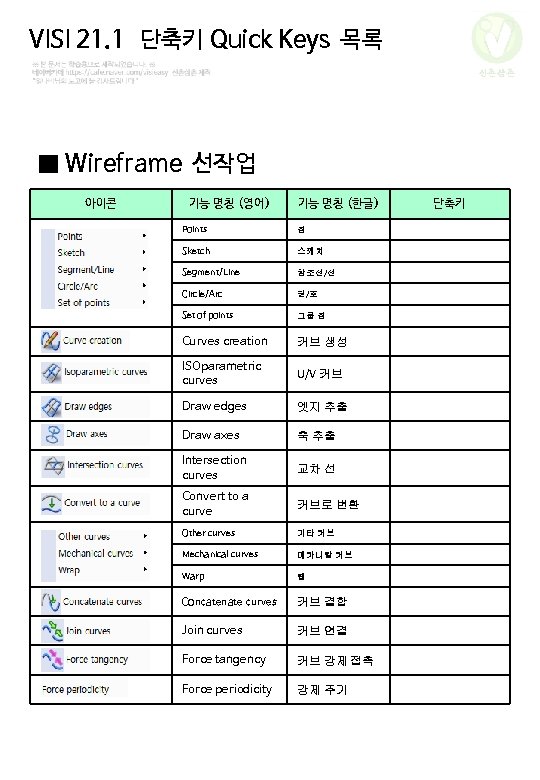
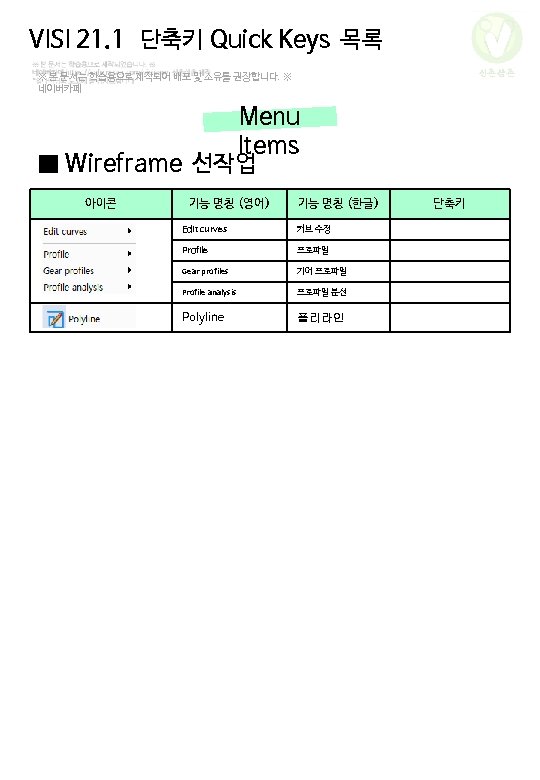
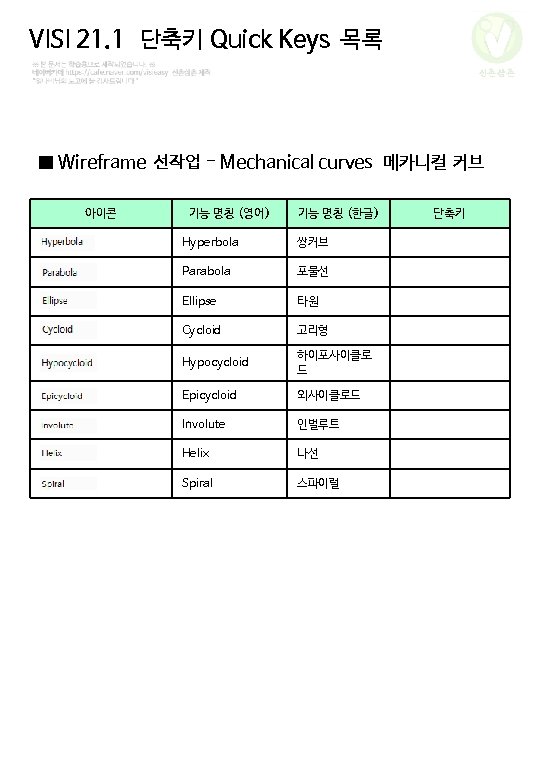
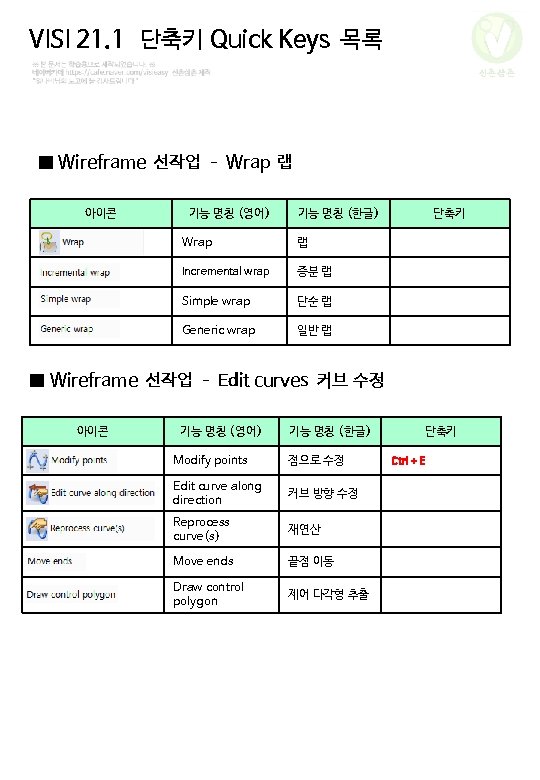
VISI 21. 1 단축키 Quick Keys 목록 신촌삼촌 ■ Wireframe 선작업 아이콘 기능 명칭 (영어) 기능 명칭 (한글) Points 점 Sketch 스케치 Segment/Line 참조선/선 Circle/Arc 원/호 Set of points 그룹 점 Curves creation 커브 생성 ISOparametric curves U/V 커브 Draw edges 엣지 추출 Draw axes 축 추출 Intersection curves 교차 선 Convert to a curve 커브로 변환 Other curves 기타 커브 Mechanical curves 메카니칼 커브 Warp 랩 Concatenate curves 커브 결합 Join curves 커브 연결 Force tangency 커브 강제 접촉 Force periodicity 강제 주기 단축키
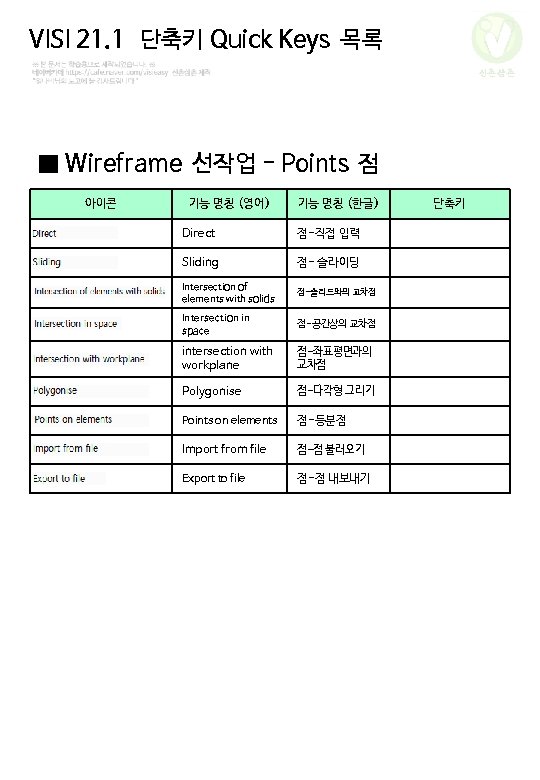
VISI 21. 1 단축키 Quick Keys 목록 신촌삼촌 ■ Wireframe 선작업 - Points 점 아이콘 기능 명칭 (영어) 기능 명칭 (한글) Direct 점-직접 입력 Sliding 점- 슬라이딩 Intersection of elements with solids 점-솔리드와의 교차점 Intersection in space 점-공간상의 교차점 intersection with workplane 점-좌표평면과의 교차점 Polygonise 점-다각형 그리기 Points on elements 점-등분점 Import from file 점-점 불러오기 Export to file 점-점 내보내기 단축키
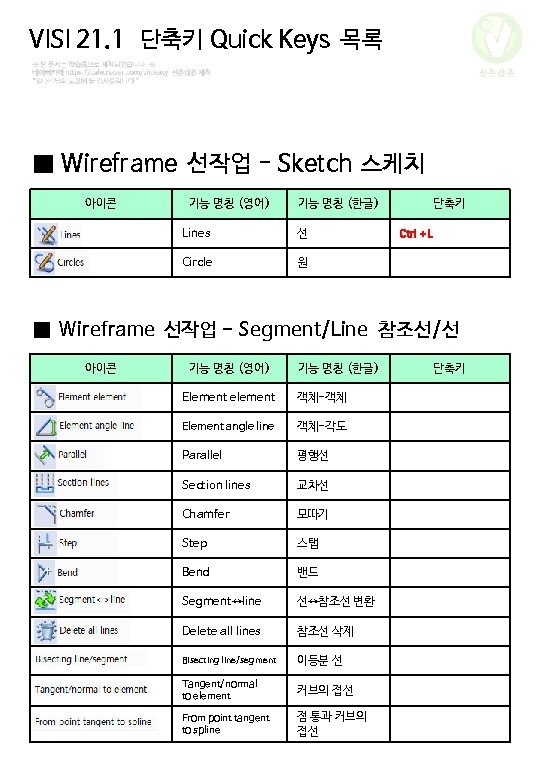
VISI 21. 1 단축키 Quick Keys 목록 신촌삼촌 ■ Wireframe 선작업 - Sketch 스케치 아이콘 기능 명칭 (영어) 기능 명칭 (한글) Lines 선 Circle 원 단축키 Ctrl + L ■ Wireframe 선작업 - Segment/Line 참조선/선 아이콘 기능 명칭 (영어) 기능 명칭 (한글) Element element 객체-객체 Element angle line 객체-각도 Parallel 평행선 Section lines 교차선 Chamfer 모따기 Step 스탭 Bend 밴드 Segment↔line 선↔참조선 변환 Delete all lines 참조선 삭제 Bisecting line/segment 이등분 선 Tangent/normal to element 커브의 접선 From point tangent to spline 점 통과 커브의 접선 단축키
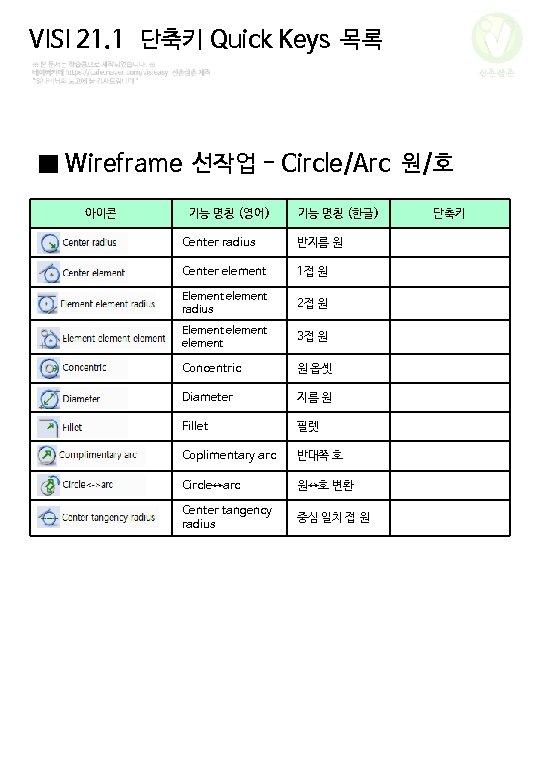
VISI 21. 1 단축키 Quick Keys 목록 신촌삼촌 ■ Wireframe 선작업 - Circle/Arc 원/호 아이콘 기능 명칭 (영어) 기능 명칭 (한글) Center radius 반지름 원 Center element 1접 원 Element element radius 2접 원 Element element 3접 원 Concentric 원 옵셋 Diameter 지름 원 Fillet 필렛 Coplimentary arc 반대쪽 호 Circle↔arc 원↔호 변환 Center tangency radius 중심 일치 접 원 단축키
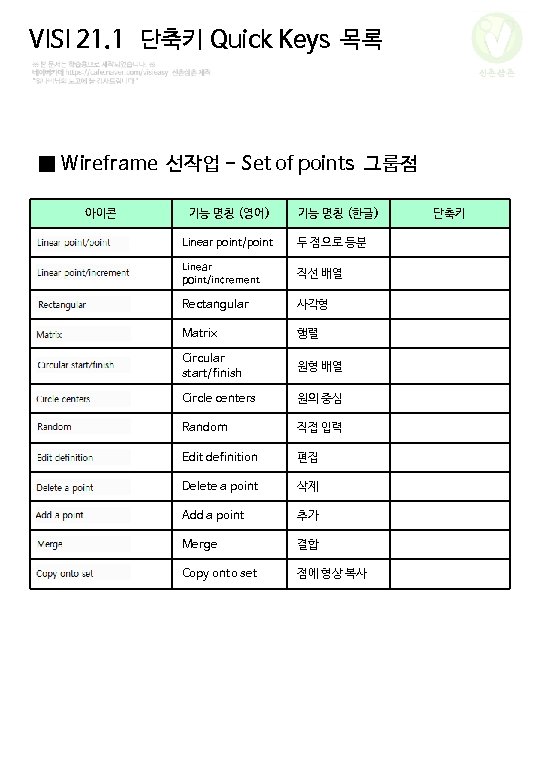
VISI 21. 1 단축키 Quick Keys 목록 신촌삼촌 ■ Wireframe 선작업 - Set of points 그룹점 아이콘 기능 명칭 (영어) 기능 명칭 (한글) Linear point/point 두 점으로 등분 Linear point/increment 직선 배열 Rectangular 사각형 Matrix 행렬 Circular start/finish 원형 배열 Circle centers 원의 중심 Random 직접 입력 Edit definition 편집 Delete a point 삭제 Add a point 추가 Merge 결합 Copy onto set 점에 형상 복사 단축키
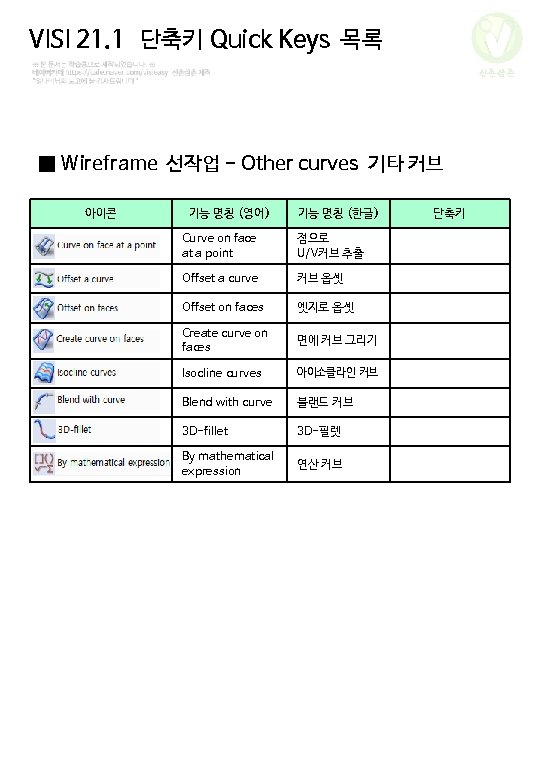
VISI 21. 1 단축키 Quick Keys 목록 신촌삼촌 ■ Wireframe 선작업 - Other curves 기타 커브 아이콘 기능 명칭 (영어) 기능 명칭 (한글) Curve on face at a point 점으로 U/V커브 추출 Offset a curve 커브 옵셋 Offset on faces 엣지로 옵셋 Create curve on faces 면에 커브 그리기 Isocline curves 아이소클라인 커브 Blend with curve 블랜드 커브 3 D-fillet 3 D-필렛 By mathematical expression 연산 커브 단축키
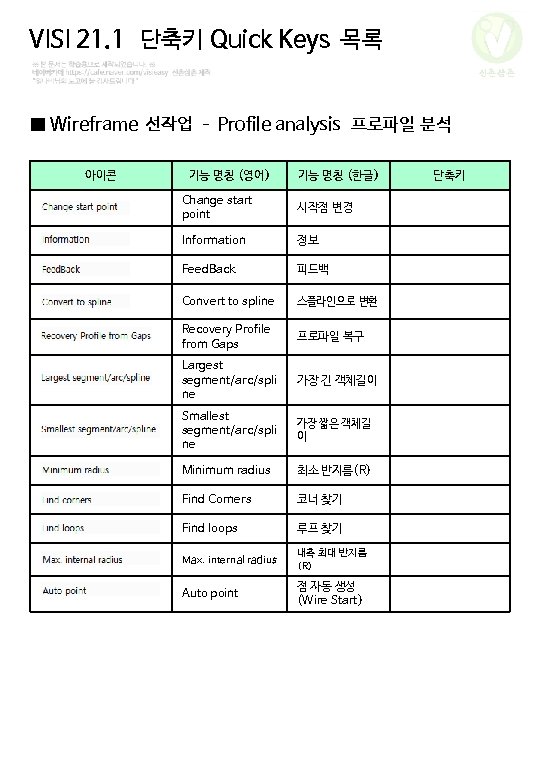
VISI 21. 1 단축키 Quick Keys 목록 신촌삼촌 ■ Wireframe 선작업 – Profile analysis 프로파일 분석 아이콘 기능 명칭 (영어) 기능 명칭 (한글) Change start point 시작점 변경 Information 정보 Feed. Back 피드백 Convert to spline 스플라인으로 변환 Recovery Profile from Gaps 프로파일 복구 Largest segment/arc/spli ne 가장 긴 객체길이 Smallest segment/arc/spli ne 가장 짧은 객체길 이 Minimum radius 최소 반지름(R) Find Corners 코너 찾기 Find loops 루프 찾기 Max. internal radius 내측 최대 반지름 (R) Auto point 점 자동 생성 (Wire Start) 단축키
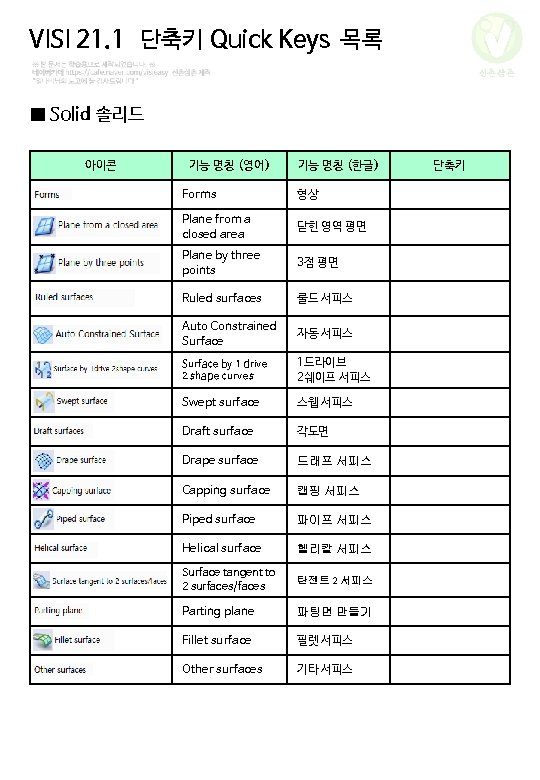
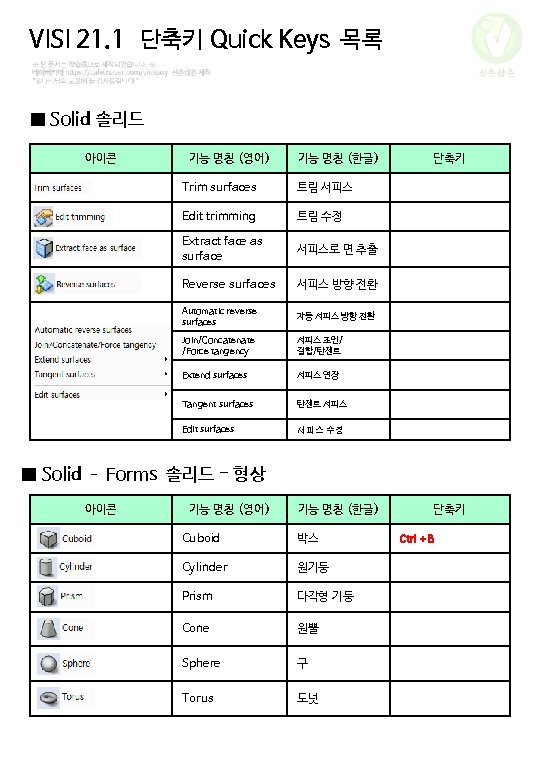
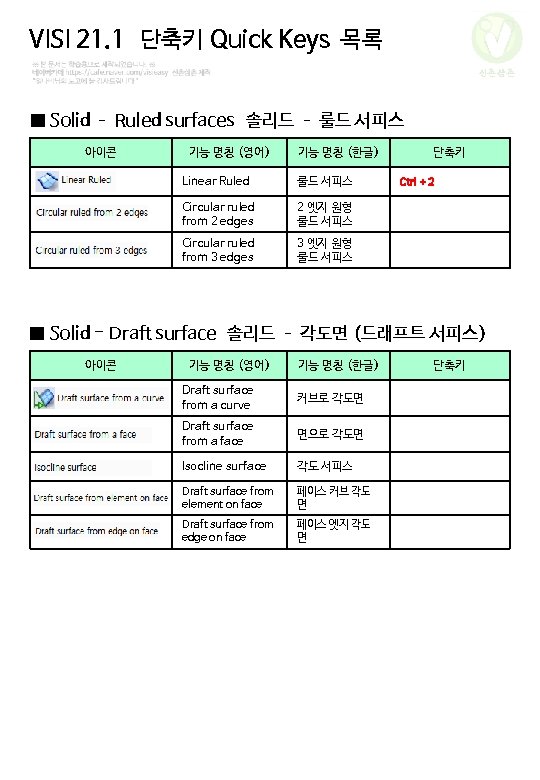
VISI 21. 1 단축키 Quick Keys 목록 신촌삼촌 ■ Solid 솔리드 아이콘 기능 명칭 (영어) 기능 명칭 (한글) Forms 형상 Plane from a closed area 닫힌 영역 평면 Plane by three points 3점 평면 Ruled surfaces 룰드 서피스 Auto Constrained Surface 자동 서피스 Surface by 1 drive 2 shape curves 1드라이브 2쉐이프 서피스 Swept surface 스웹 서피스 Draft surface 각도면 Drape surface 드래프 서피스 Capping surface 캡핑 서피스 Piped surface 파이프 서피스 Helical surface 헬리칼 서피스 Surface tangent to 2 surfaces/faces 탄젠트 2 서피스 Parting plane 파팅면 만들기 Fillet surface 필렛 서피스 Other surfaces 기타 서피스 단축키
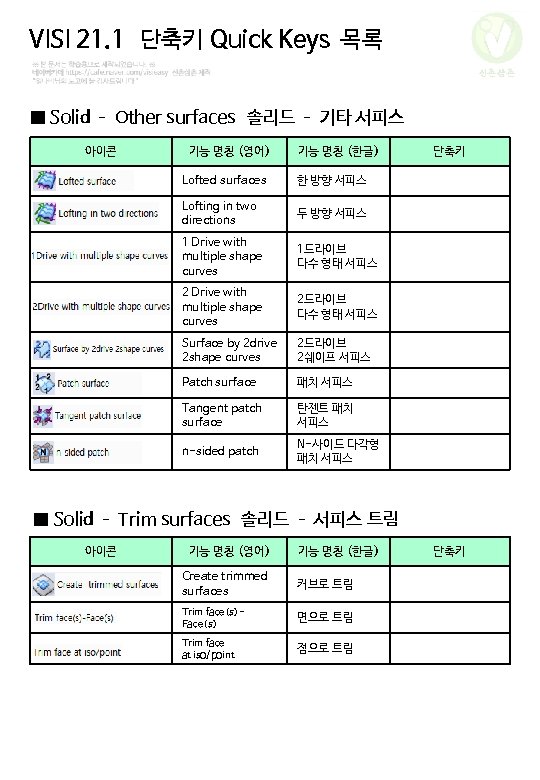
VISI 21. 1 단축키 Quick Keys 목록 신촌삼촌 ■ Solid – Other surfaces 솔리드 – 기타 서피스 아이콘 기능 명칭 (영어) 기능 명칭 (한글) Lofted surfaces 한 방향 서피스 Lofting in two directions 두 방향 서피스 1 Drive with multiple shape curves 1드라이브 다수 형태 서피스 2 Drive with multiple shape curves 2드라이브 다수 형태 서피스 Surface by 2 drive 2 shape curves 2드라이브 2쉐이프 서피스 Patch surface 패치 서피스 Tangent patch surface 탄젠트 패치 서피스 n-sided patch N-사이드 다각형 패치 서피스 단축키 ■ Solid – Trim surfaces 솔리드 – 서피스 트림 아이콘 기능 명칭 (영어) 기능 명칭 (한글) Create trimmed surfaces 커브로 트림 Trim face(s)Face(s) 면으로 트림 Trim face at iso/point 점으로 트림 단축키
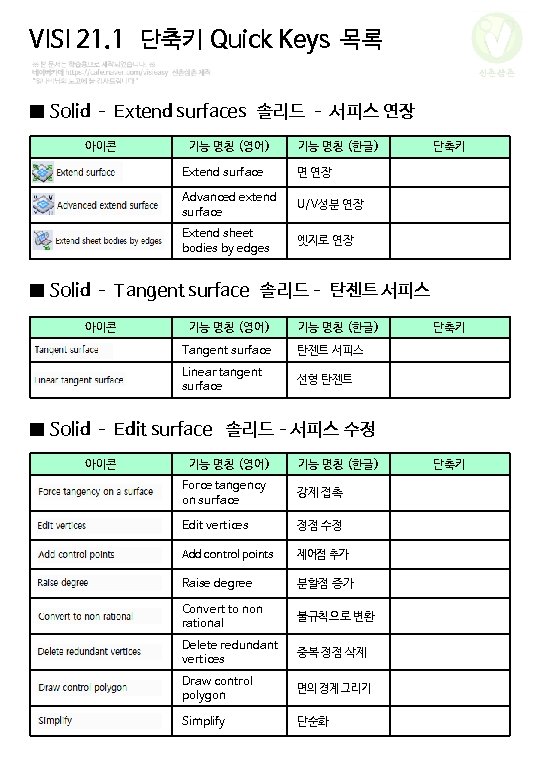
VISI 21. 1 단축키 Quick Keys 목록 신촌삼촌 ■ Solid – Extend surfaces 솔리드 – 서피스 연장 아이콘 기능 명칭 (영어) 기능 명칭 (한글) Extend surface 면 연장 Advanced extend surface U/V성분 연장 Extend sheet bodies by edges 엣지로 연장 단축키 ■ Solid – Tangent surface 솔리드– 탄젠트 서피스 아이콘 기능 명칭 (영어) 기능 명칭 (한글) Tangent surface 탄젠트 서피스 Linear tangent surface 선형 탄젠트 단축키 ■ Solid – Edit surface 솔리드–서피스 수정 아이콘 기능 명칭 (영어) 기능 명칭 (한글) Force tangency on surface 강제 접촉 Edit vertices 정점 수정 Add control points 제어점 추가 Raise degree 분할점 증가 Convert to non rational 불규칙으로 변환 Delete redundant vertices 중복 정점 삭제 Draw control polygon 면의 경계 그리기 Simplify 단순화 단축키
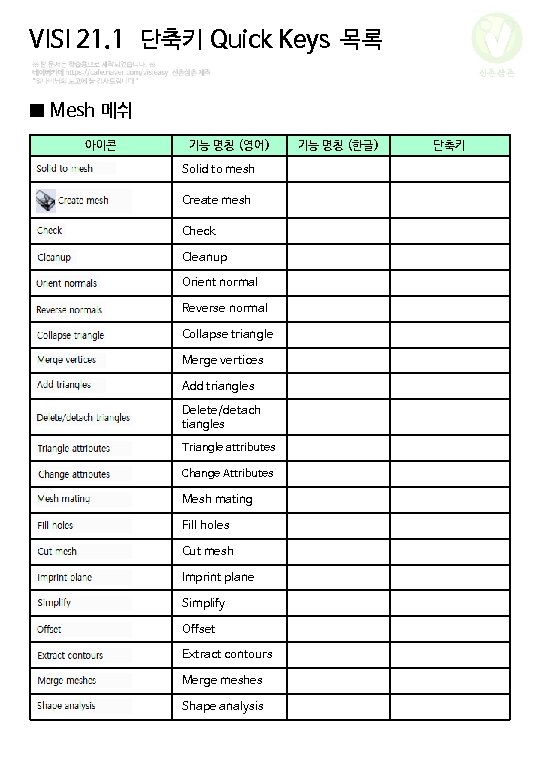
VISI 21. 1 단축키 Quick Keys 목록 신촌삼촌 ■ Mesh 메쉬 아이콘 기능 명칭 (영어) Solid to mesh Create mesh Check Cleanup Orient normal Reverse normal Collapse triangle Merge vertices Add triangles Delete/detach tiangles Triangle attributes Change Attributes Mesh mating Fill holes Cut mesh Imprint plane Simplify Offset Extract contours Merge meshes Shape analysis 기능 명칭 (한글) 단축키
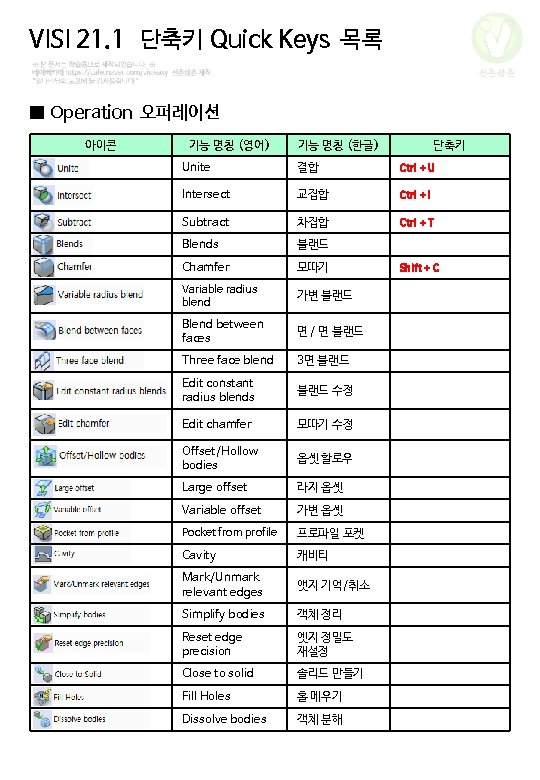
VISI 21. 1 단축키 Quick Keys 목록 신촌삼촌 ■ Operation 오퍼레이션 아이콘 기능 명칭 (영어) 기능 명칭 (한글) 단축키 Unite 결합 Ctrl + U Intersect 교집합 Ctrl + I Subtract 차집합 Ctrl + T Blends 블랜드 Chamfer 모따기 Variable radius blend 가변 블랜드 Blend between faces 면 / 면 블랜드 Three face blend 3면 블랜드 Edit constant radius blends 블랜드 수정 Edit chamfer 모따기 수정 Offset/Hollow bodies 옵셋 할로우 Large offset 라지 옵셋 Variable offset 가변 옵셋 Pocket from profile 프로파일 포켓 Cavity 캐비티 Mark/Unmark relevant edges 앳지 기억/취소 Simplify bodies 객체 정리 Reset edge precision 엣지 정밀도 재설정 Close to solid 솔리드 만들기 Fill Holes 홀 메우기 Dissolve bodies 객체 분해 Shift + C
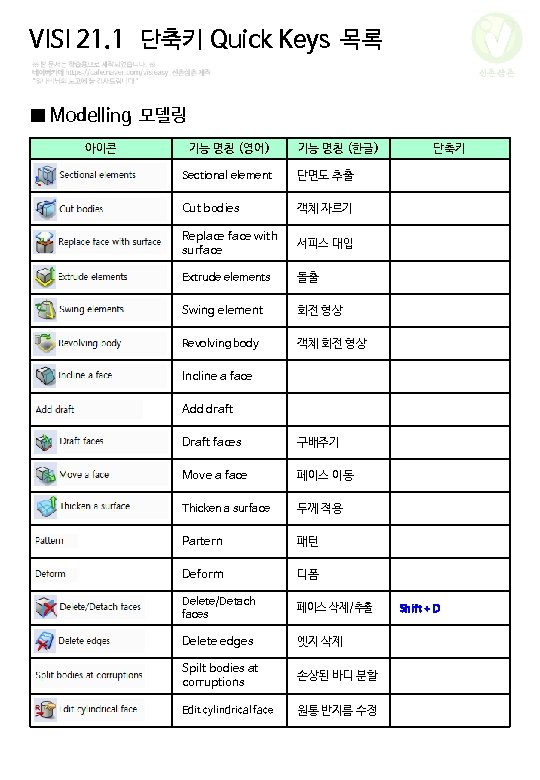
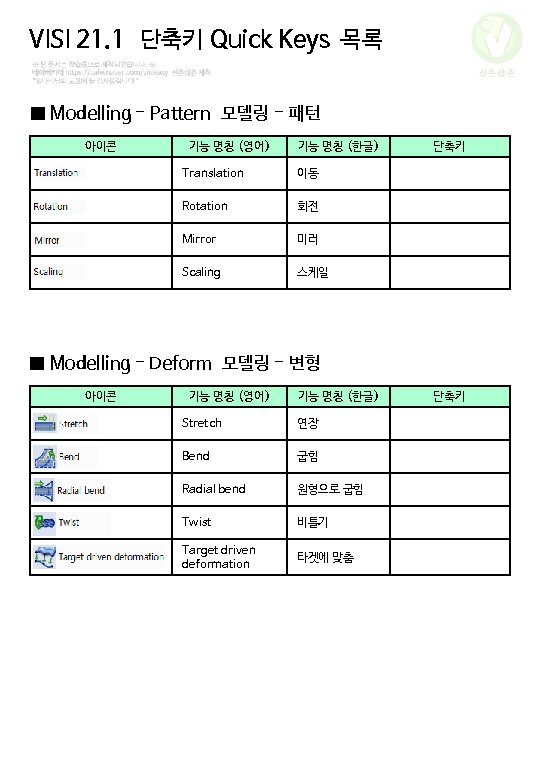
VISI 21. 1 단축키 Quick Keys 목록 신촌삼촌 ■ Modelling 모델링 아이콘 기능 명칭 (영어) 기능 명칭 (한글) Sectional element 단면도 추출 Cut bodies 객체 자르기 Replace face with surface 서피스 대입 Extrude elements 돌출 Swing element 회전 형상 Revolving body 객체 회전 형상 단축키 Incline a face Add draft Draft faces 구배주기 Move a face 페이스 이동 Thicken a surface 두께 적용 Partern 패턴 Deform 디폼 Delete/Detach faces 페이스 삭제/추출 Delete edges 엣지 삭제 Spilt bodies at corruptions 손상된 바디 분할 Edit cylindrical face 원통 반지름 수정 Shift + D
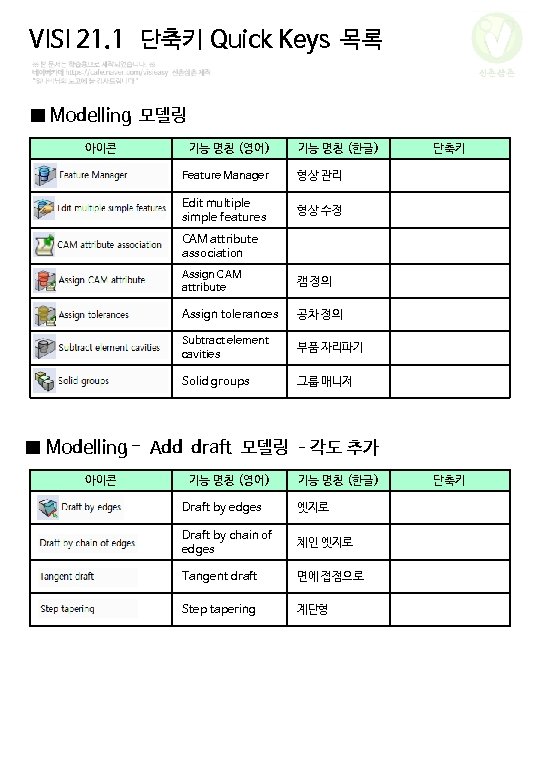
VISI 21. 1 단축키 Quick Keys 목록 신촌삼촌 ■ Modelling 모델링 아이콘 기능 명칭 (영어) 기능 명칭 (한글) Feature Manager 형상 관리 Edit multiple simple features 형상 수정 단축키 CAM attribute association Assign CAM attribute 캠 정의 Assign tolerances 공차 정의 Subtract element cavities 부품 자리파기 Solid groups 그룹 매니저 ■ Modelling - Add draft 모델링 –각도 추가 아이콘 기능 명칭 (영어) 기능 명칭 (한글) Draft by edges 엣지로 Draft by chain of edges 체인 엣지로 Tangent draft 면에 접점으로 Step tapering 계단형 단축키
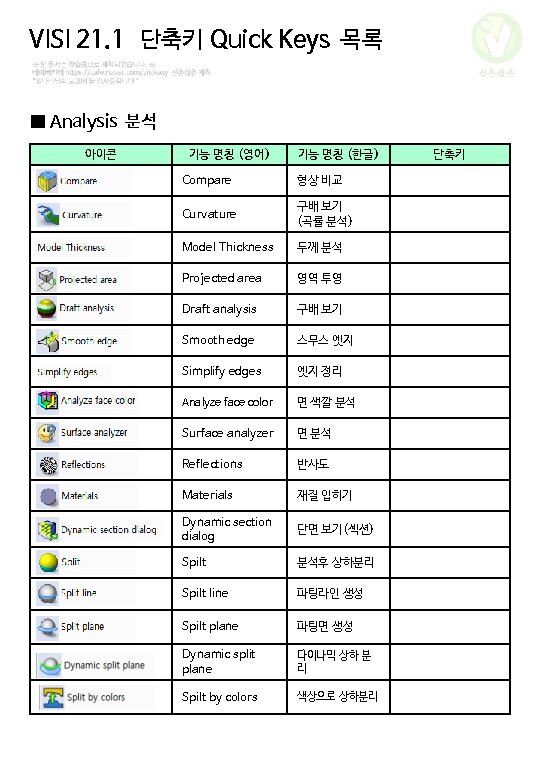
VISI 21. 1 단축키 Quick Keys 목록 신촌삼촌 ■ Analysis 분석 아이콘 기능 명칭 (영어) 기능 명칭 (한글) Compare 형상 비교 Curvature 구배 보기 (곡률 분석) Model Thickness 두께 분석 Projected area 영역 투영 Draft analysis 구배 보기 Smooth edge 스무스 엣지 Simplify edges 엣지 정리 Analyze face color 면 색깔 분석 Surface analyzer 면 분석 Reflections 반사도 Materials 재질 입히기 Dynamic section dialog 단면 보기(섹션) Spilt 분석후 상하분리 Spilt line 파팅라인 생성 Spilt plane 파팅면 생성 Dynamic split plane 다이나믹 상하 분 리 Spilt by colors 색상으로 상하분리 단축키
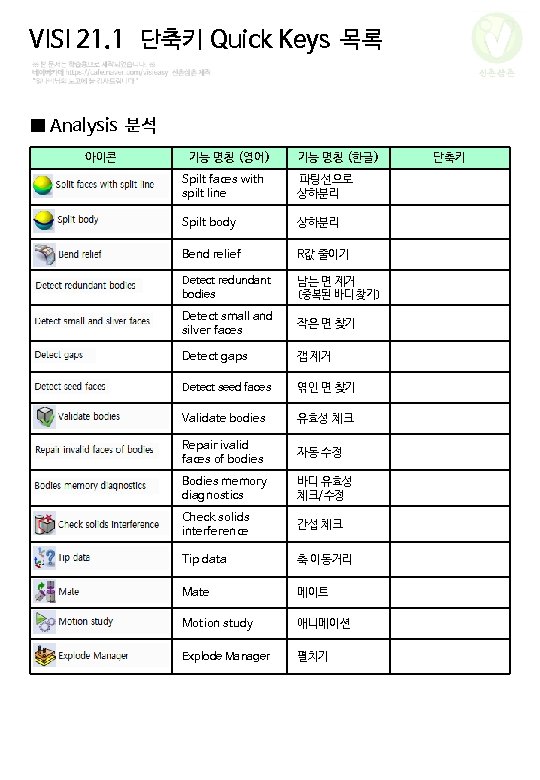
VISI 21. 1 단축키 Quick Keys 목록 신촌삼촌 ■ Analysis 분석 아이콘 기능 명칭 (영어) 기능 명칭 (한글) Spilt faces with spilt line 파팅선으로 상하분리 Spilt body 상하분리 Bend relief R값 줄이기 Detect redundant bodies 남는 면 제거 (중복된 바디 찾기) Detect small and silver faces 작은 면 찾기 Detect gaps 갭 제거 Detect seed faces 엮인 면 찾기 Validate bodies 유효성 체크 Repair ivalid faces of bodies 자동 수정 Bodies memory diagnostics 바디 유효성 체크/수정 Check solids interference 간섭 체크 Tip data 축 이동거리 Mate 메이트 Motion study 애니메이션 Explode Manager 펼치기 단축키
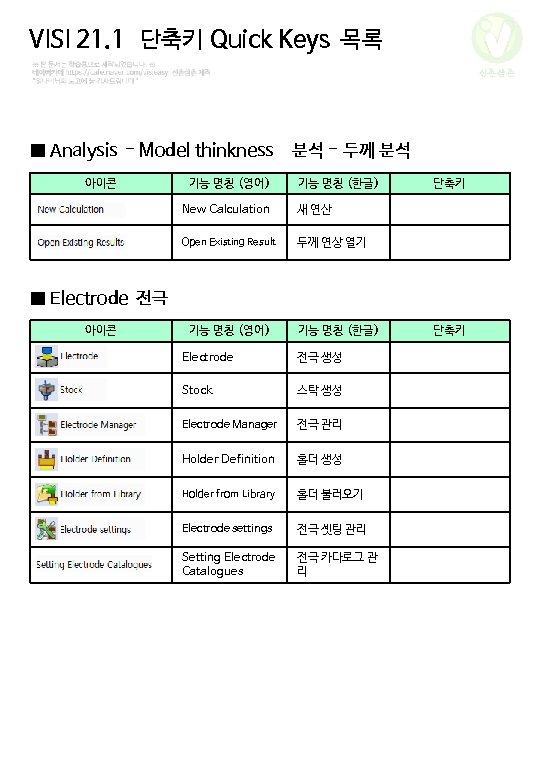
VISI 21. 1 단축키 Quick Keys 목록 신촌삼촌 ■ Analysis - Model thinkness 분석 - 두께 분석 아이콘 기능 명칭 (영어) 기능 명칭 (한글) New Calculation 새 연산 Open Existing Result 두께 연상 열기 단축키 ■ Electrode 전극 아이콘 기능 명칭 (영어) 기능 명칭 (한글) Electrode 전극 생성 Stock 스탁 생성 Electrode Manager 전극 관리 Holder Definition 홀더 생성 Holder from Library 홀더 불러오기 Electrode settings 전극 셋팅 관리 Setting Electrode Catalogues 전극 카다로그 관 리 단축키
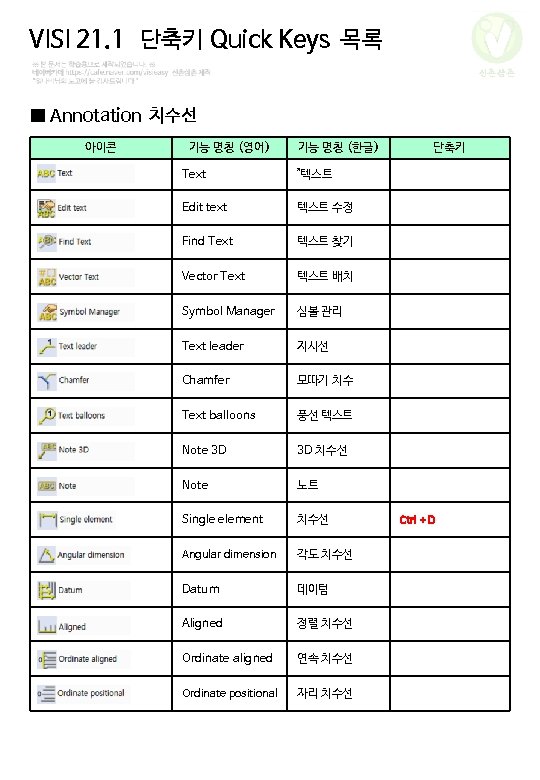
VISI 21. 1 단축키 Quick Keys 목록 신촌삼촌 ■ Annotation 치수선 아이콘 기능 명칭 (영어) 기능 명칭 (한글) Text "텍스트 Edit text 텍스트 수정 Find Text 텍스트 찾기 Vector Text 텍스트 배치 Symbol Manager 심볼 관리 Text leader 지시선 Chamfer 모따기 치수 Text balloons 풍선 텍스트 Note 3 D 3 D 치수선 Note 노트 Single element 치수선 Angular dimension 각도 치수선 Datum 데이텀 Aligned 정렬 치수선 Ordinate aligned 연속 치수선 Ordinate positional 자리 치수선 단축키 Ctrl + D
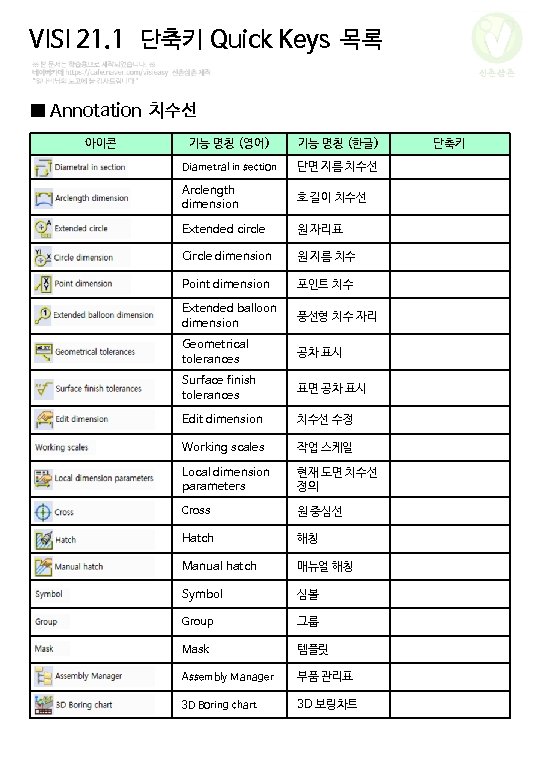
VISI 21. 1 단축키 Quick Keys 목록 신촌삼촌 ■ Annotation 치수선 아이콘 기능 명칭 (영어) 기능 명칭 (한글) Diametral in section 단면 지름 치수선 Arclength dimension 호 길이 치수선 Extended circle 원 자리표 Circle dimension 원 지름 치수 Point dimension 포인트 치수 Extended balloon dimension 풍선형 치수 자리 Geometrical tolerances 공차 표시 Surface finish tolerances 표면 공차 표시 Edit dimension 치수선 수정 Working scales 작업 스케일 Local dimension parameters 현재 도면 치수선 정의 Cross 원 중심선 Hatch 해칭 Manual hatch 매뉴얼 해칭 Symbol 심볼 Group 그룹 Mask 템플릿 Assembly Manager 부품 관리표 3 D Boring chart 3 D 보링차트 단축키
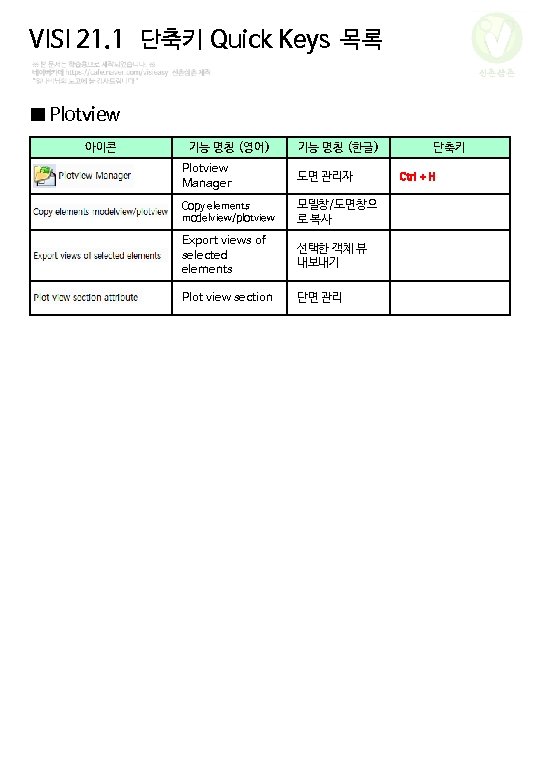
VISI 21. 1 단축키 Quick Keys 목록 신촌삼촌 ■ Plotview 아이콘 기능 명칭 (영어) 기능 명칭 (한글) Plotview Manager 도면 관리자 Copy elements modelview/plotview 모델창/도면창으 로 복사 Export views of selected elements 선택한 객체 뷰 내보내기 Plot view section 단면 관리 단축키 Ctrl + H
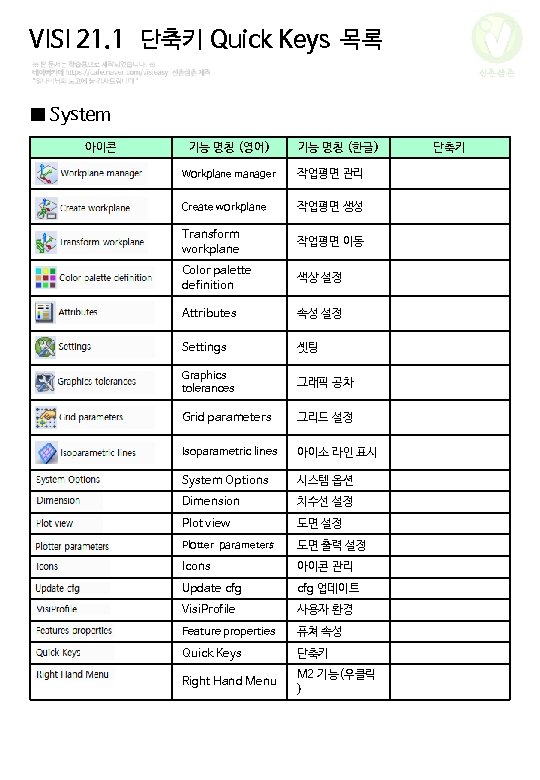
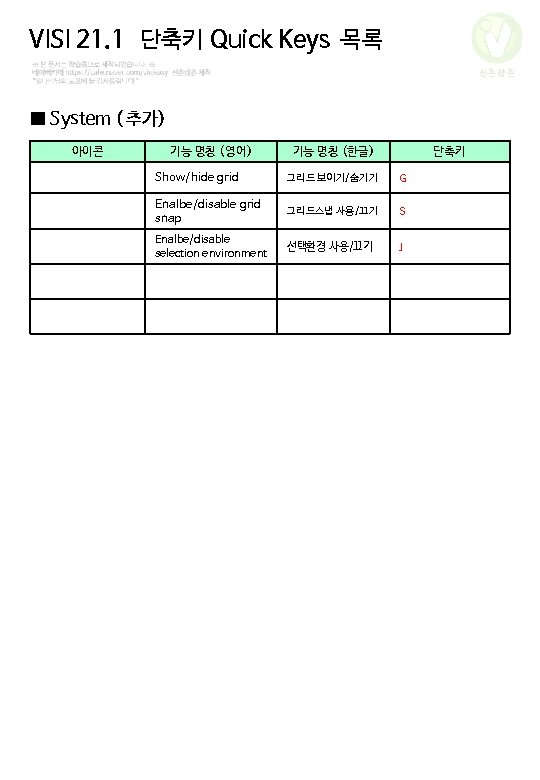
VISI 21. 1 단축키 Quick Keys 목록 신촌삼촌 ■ System 아이콘 기능 명칭 (영어) 기능 명칭 (한글) Workplane manager 작업평면 관리 Create workplane 작업평면 생성 Transform workplane 작업평면 이동 Color palette definition 색상 설정 Attributes 속성 설정 Settings 셋팅 Graphics tolerances 그래픽 공차 Grid parameters 그리드 설정 Isoparametric lines 아이소 라인 표시 System Options 시스템 옵션 Dimension 치수선 설정 Plot view 도면 설정 Plotter parameters 도면 출력 설정 Icons 아이콘 관리 Update cfg 업데이트 Visi. Profile 사용자 환경 Feature properties 퓨쳐 속성 Quick Keys 단축키 Right Hand Menu M 2 기능(우클릭 ) 단축키
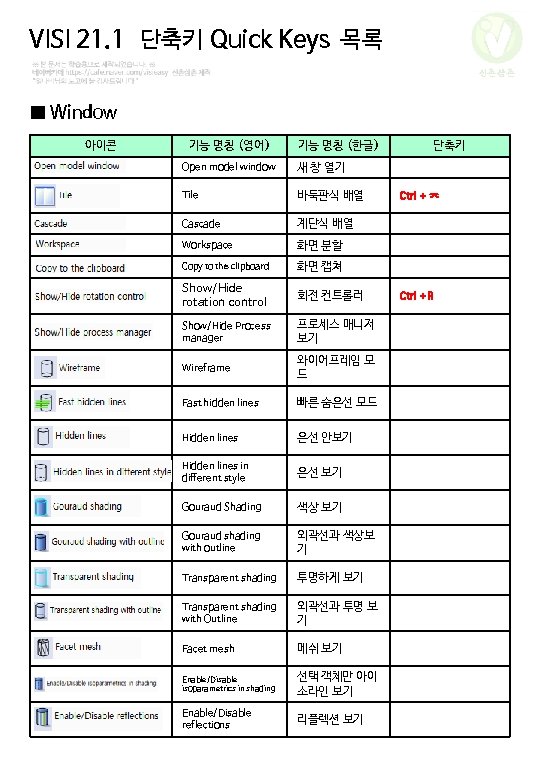
VISI 21. 1 단축키 Quick Keys 목록 신촌삼촌 ■ Window 아이콘 기능 명칭 (영어) 기능 명칭 (한글) Open model window 새 창 열기 Tile 바둑판식 배열 Cascade 계단식 배열 Workspace 화면 분할 Copy to the clipboard 화면 캡쳐 Show/Hide rotation control 회전 컨트롤러 Show/Hide Process manager 프로세스 매니저 보기 Wireframe 와이어프레임 모 드 Fast hidden lines 빠른 숨은선 모드 Hidden lines 은선 안보기 Hidden lines in different style 은선 보기 Gouraud Shading 색상 보기 Gouraud shading with outline 외곽선과 색상보 기 Transparent shading 투명하게 보기 Transparent shading with Outline 외곽선과 투명 보 기 Facet mesh 메쉬 보기 Enable/Disable isoparametrics in shading 선택 객체만 아이 소라인 보기 Enable/Disable reflections 리플렉션 보기 단축키 Ctrl + ㅈ Ctrl + R
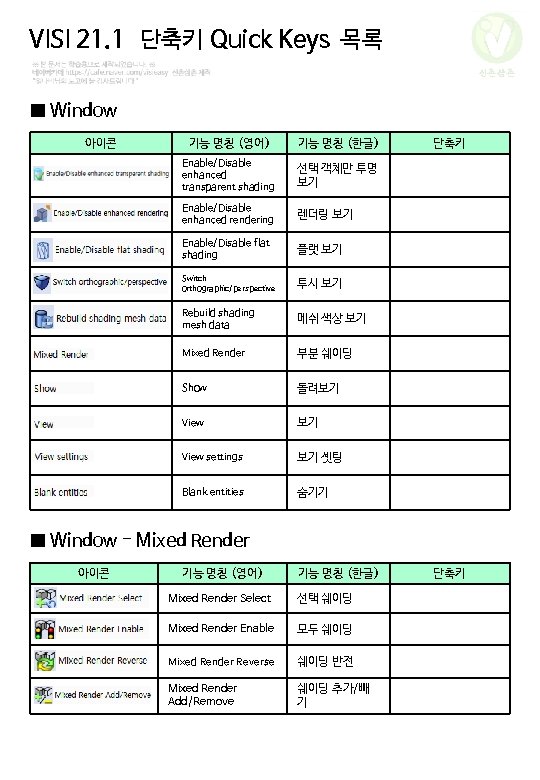
VISI 21. 1 단축키 Quick Keys 목록 신촌삼촌 ■ Window 아이콘 기능 명칭 (영어) 기능 명칭 (한글) Enable/Disable enhanced transparent shading 선택 객체만 투명 보기 Enable/Disable enhanced rendering 렌더링 보기 Enable/Disable flat shading 플랫 보기 Switch orthographic/perspective 투시 보기 Rebuild shading mesh data 메쉬 색상 보기 Mixed Render 부분 쉐이딩 Show 돌려보기 View settings 보기 셋팅 Blank entities 숨기기 단축키 ■ Window - Mixed Render 아이콘 기능 명칭 (영어) 기능 명칭 (한글) Mixed Render Select 선택 쉐이딩 Mixed Render Enable 모두 쉐이딩 Mixed Render Reverse 쉐이딩 반전 Mixed Render Add/Remove 쉐이딩 추가/빼 기 단축키
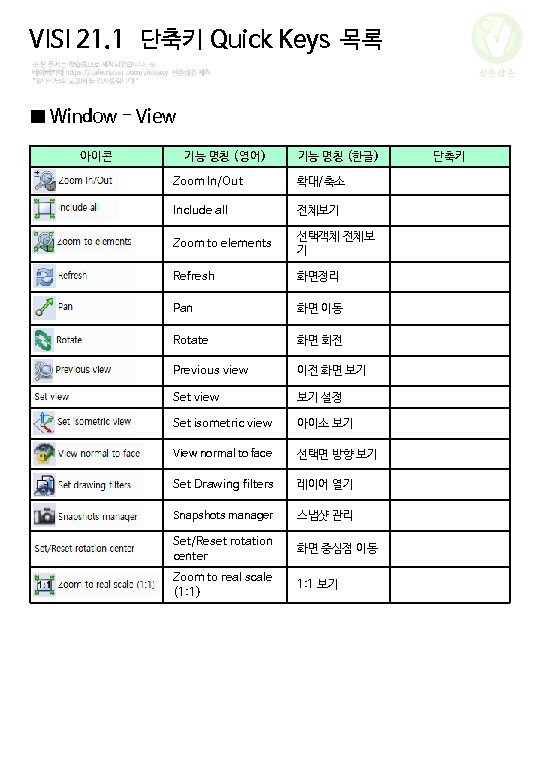
VISI 21. 1 단축키 Quick Keys 목록 신촌삼촌 ■ Window - View 아이콘 기능 명칭 (영어) 기능 명칭 (한글) Zoom In/Out 확대/축소 Include all 전체보기 Zoom to elements 선택객체 전체보 기 Refresh 화면정리 Pan 화면 이동 Rotate 화면 회전 Previous view 이전 화면 보기 Set view 보기 설정 Set isometric view 아이소 보기 View normal to face 선택면 방향 보기 Set Drawing filters 레이어 열기 Snapshots manager 스냅샷 관리 Set/Reset rotation center 화면 중심점 이동 Zoom to real scale (1: 1) 1: 1 보기 단축키
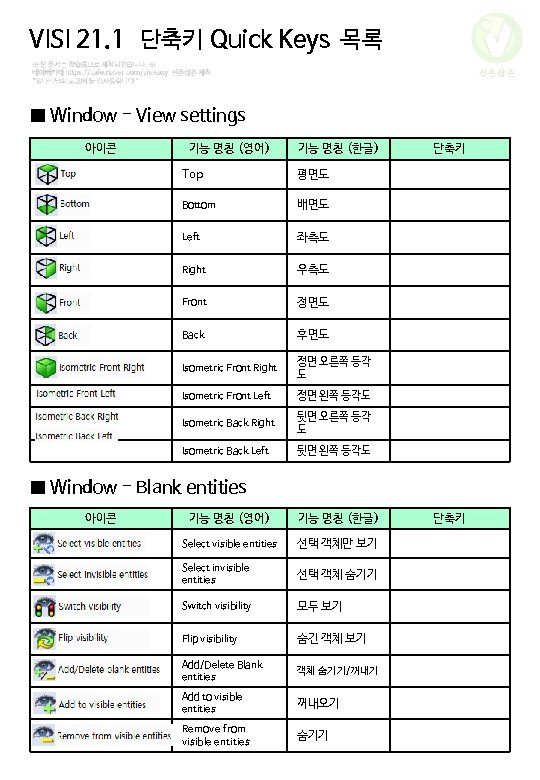
VISI 21. 1 단축키 Quick Keys 목록 신촌삼촌 ■ Window - View settings 아이콘 기능 명칭 (영어) 기능 명칭 (한글) Top 평면도 Bottom 배면도 Left 좌측도 Right 우측도 Front 정면도 Back 후면도 Isometric Front Right 정면 오른쪽 등각 도 Isometric Front Left 정면 왼쪽 등각도 Isometric Back Right 뒷면 오른쪽 등각 도 Isometric Back Left 뒷면 왼쪽 등각도 단축키 ■ Window - Blank entities 아이콘 기능 명칭 (영어) 기능 명칭 (한글) Select visible entities 선택 객체만 보기 Select invisible entities 선택 객체 숨기기 Switch visibility 모두 보기 Flip visibility 숨긴 객체 보기 Add/Delete Blank entities 객체 숨기기/꺼내기 Add to visible entities 꺼내오기 Remove from visible entities 숨기기 단축키
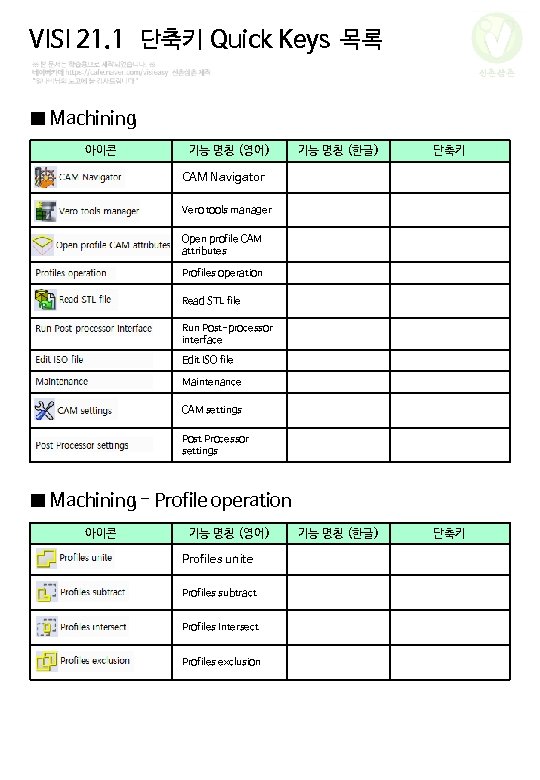
VISI 21. 1 단축키 Quick Keys 목록 신촌삼촌 ■ Machining 아이콘 기능 명칭 (영어) 기능 명칭 (한글) 단축키 CAM Navigator Vero tools manager Open profile CAM attributes Profiles operation Read STL file Run Post-processor interface Edit ISO file Maintenance CAM settings Post Processor settings ■ Machining - Profile operation 아이콘 기능 명칭 (영어) Profiles unite Profiles subtract Profiles Intersect Profiles exclusion
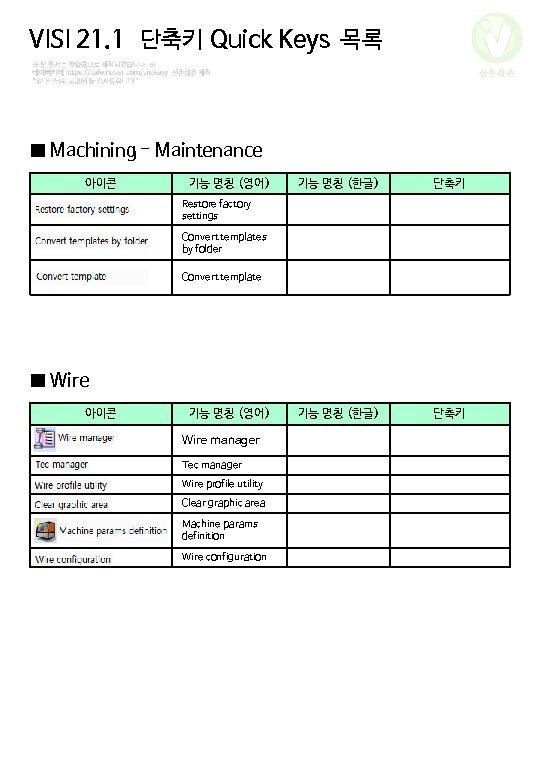
VISI 21. 1 단축키 Quick Keys 목록 신촌삼촌 ■ Machining - Maintenance 아이콘 기능 명칭 (영어) 기능 명칭 (한글) 단축키 Restore factory settings Convert templates by folder Convert template ■ Wire 아이콘 기능 명칭 (영어) Wire manager Tec manager Wire profile utility Clear graphic area Machine params definition Wire configuration
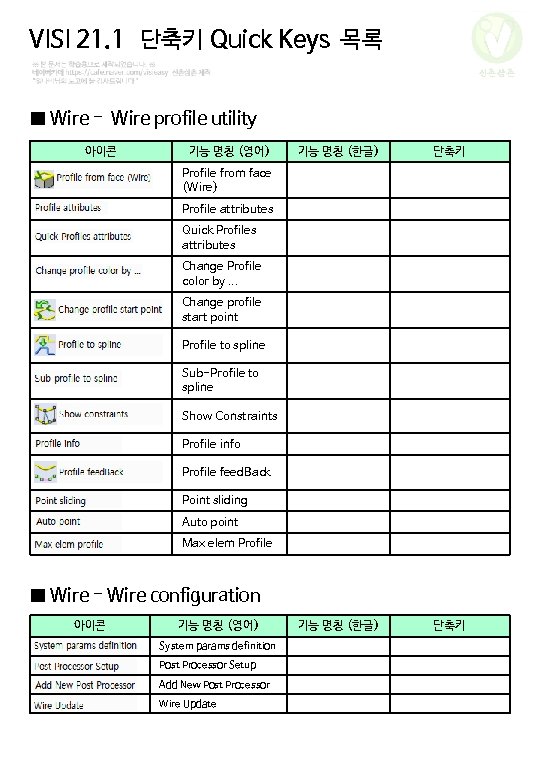
VISI 21. 1 단축키 Quick Keys 목록 신촌삼촌 ■ Wire - Wire profile utility 아이콘 기능 명칭 (영어) 기능 명칭 (한글) 단축키 Profile from face (Wire) Profile attributes Quick Profiles attributes Change Profile color by. . . Change profile start point Profile to spline Sub-Profile to spline Show Constraints Profile info Profile feed. Back Point sliding Auto point Max elem Profile ■ Wire - Wire configuration 아이콘 기능 명칭 (영어) System params definition Post Processor Setup Add New Post Processor Wire Update
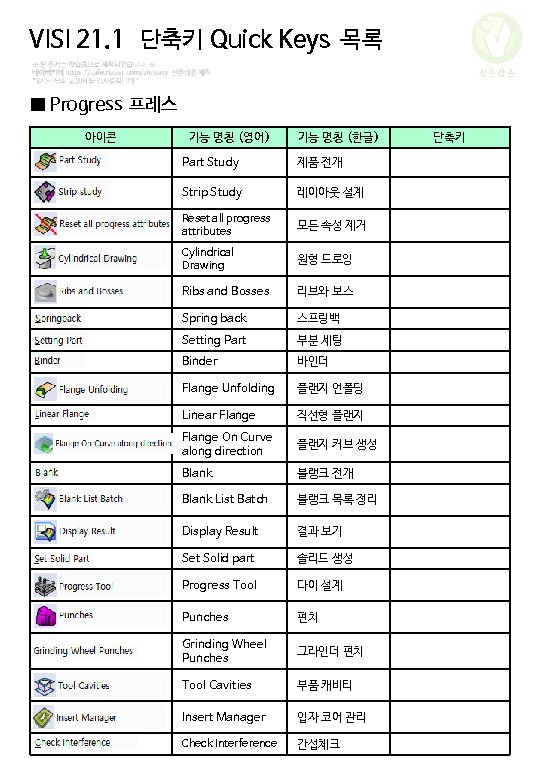
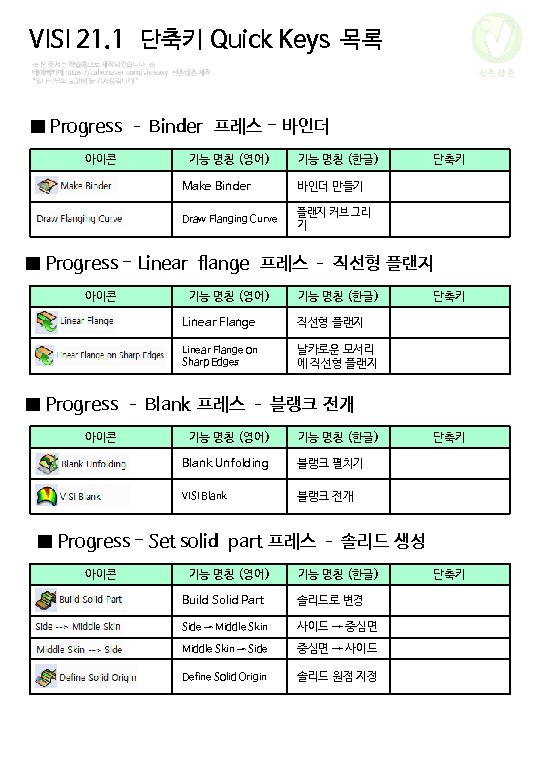
VISI 21. 1 단축키 Quick Keys 목록 신촌삼촌 ■ Progress 프레스 아이콘 기능 명칭 (영어) 기능 명칭 (한글) Part Study 제품 전개 Strip Study 레이아웃 설계 Reset all progress attributes 모든 속성 제거 Cylindrical Drawing 원형 드로잉 Ribs and Bosses 리브와 보스 Spring back 스프링백 Setting Part 부분 세팅 Binder 바인더 Flange Unfolding 플랜지 언폴딩 Linear Flange 직선형 플랜지 Flange On Curve along direction 플랜지 커브 생성 Blank 블랭크 전개 Blank List Batch 블랭크 목록 정리 Display Result 결과 보기 Set Solid part 솔리드 생성 Progress Tool 다이 설계 Punches 펀치 Grinding Wheel Punches 그라인더 펀치 Tool Cavities 부품 캐비티 Insert Manager 입자 코어 관리 Check Interference 간섭체크 단축키
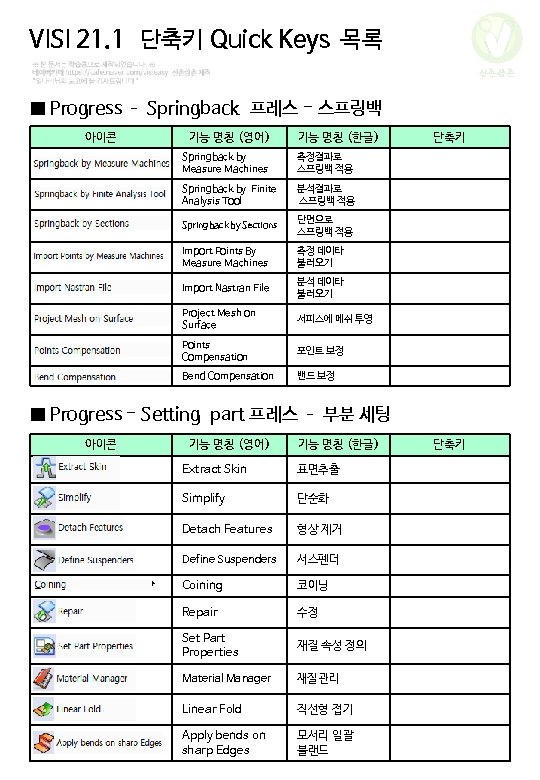
VISI 21. 1 단축키 Quick Keys 목록 신촌삼촌 ■ Progress – Springback 프레스 - 스프링백 아이콘 기능 명칭 (영어) 기능 명칭 (한글) Springback by Measure Machines 측정결과로 스프링백 적용 Springback by Finite Analysis Tool 분석결과로 스프링백 적용 Springback by Sections 단면으로 스프링백 적용 Import Points By Measure Machines 측정 데이타 불러오기 Import Nastran File 분석 데이타 불러오기 Project Mesh on Surface 서피스에 메쉬 투영 Points Compensation 포인트 보정 Bend Compensation 밴드 보정 단축키 ■ Progress - Setting part 프레스 – 부분 세팅 아이콘 기능 명칭 (영어) 기능 명칭 (한글) Extract Skin 표면추출 Simplify 단순화 Detach Features 형상 제거 Define Suspenders 서스펜더 Coining 코이닝 Repair 수정 Set Part Properties 재질 속성 정의 Material Manager 재질 관리 Linear Fold 직선형 접기 Apply bends on sharp Edges 모서리 일괄 블랜드 단축키
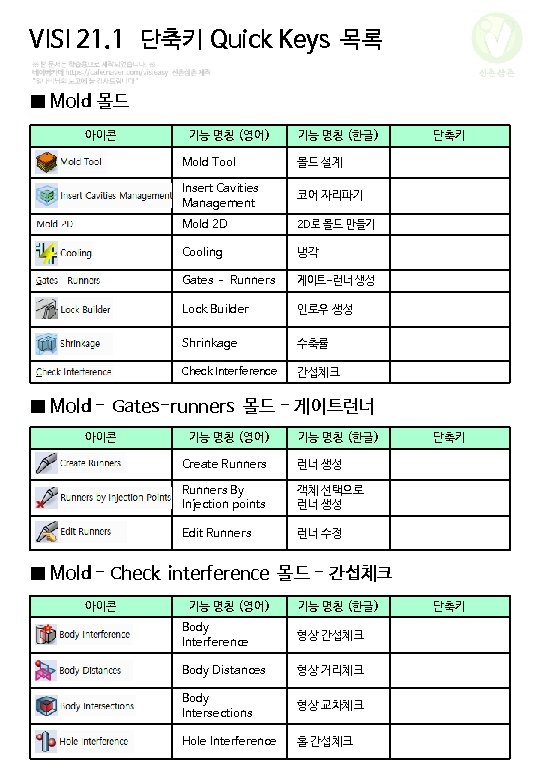
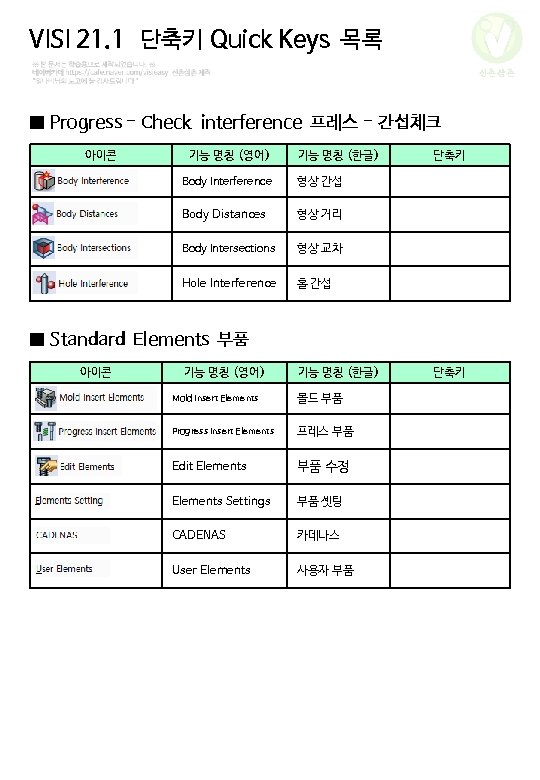
VISI 21. 1 단축키 Quick Keys 목록 신촌삼촌 ■ Progress - Check interference 프레스 - 간섭체크 아이콘 기능 명칭 (영어) 기능 명칭 (한글) Body Interference 형상 간섭 Body Distances 형상 거리 Body Intersections 형상 교차 Hole Interference 홀 간섭 단축키 ■ Standard Elements 부품 아이콘 기능 명칭 (영어) 기능 명칭 (한글) Mold Insert Elements 몰드 부품 Progress Insert Elements 프레스 부품 Edit Elements 부품 수정 Elements Settings 부품 셋팅 CADENAS 카데나스 User Elements 사용자 부품 단축키
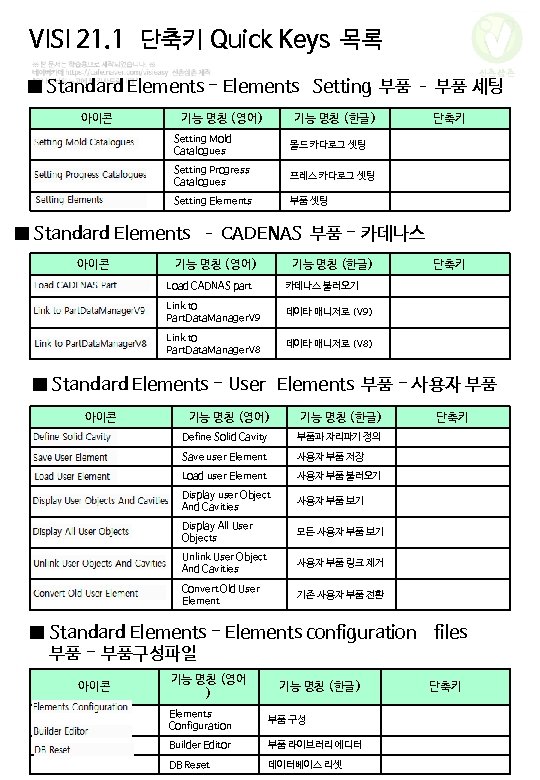
VISI 21. 1 단축키 Quick Keys 목록 신촌삼촌 ■ Standard Elements - Elements Setting 부품 – 부품 세팅 아이콘 기능 명칭 (영어) 기능 명칭 (한글) Setting Mold Catalogues 몰드 카다로그 셋팅 Setting Progress Catalogues 프레스 카다로그 셋팅 Setting Elements 부품 셋팅 단축키 ■ Standard Elements – CADENAS 부품 - 카데나스 아이콘 기능 명칭 (영어) 기능 명칭 (한글) Load CADNAS part 카데나스 불러오기 Link to Part. Data. Manager. V 9 데이타 매니저로 (V 9) Link to Part. Data. Manager. V 8 데이타 매니저로 (V 8) 단축키 ■ Standard Elements - User Elements 부품 - 사용자 부품 아이콘 기능 명칭 (영어) 기능 명칭 (한글) Define Solid Cavity 부품과 자리파기 정의 Save user Element 사용자 부품 저장 Load user Element 사용자 부품 불러오기 Display user Object And Cavities 사용자 부품 보기 Display All User Objects 모든 사용자 부품 보기 Unlink User Object And Cavities 사용자 부품 링크 제거 Convert Old User Element 기존 사용자 부품 전환 단축키 ■ Standard Elements - Elements configuration files 부품 - 부품구성파일 아이콘 기능 명칭 (영어 ) 기능 명칭 (한글) Elements Configuration 부품 구성 Builder Editor 부품 라이브러리 에디터 DB Reset 데이터베이스 리셋 단축키
VISI 21. 1 단축키 Quick Keys 목록 신촌삼촌 ■ ? Query 측정 아이콘 기능 명칭 (영어) 기능 명칭 (한글) Status 상태 (특성) Layer Status 레이어 특성 Query 측정 Query Point 포인트 측정 Distance point 두 점 측정 Distance pointelement 점-객체 측정 Distance element 객체-객체 측정 Distance face-Face 면-면 측정 Distance element -face 객체-면 측정 Angle direction 각도 측정 Bounding Box 바운딩박스 Weight 무게 Calculator 계산기 Wireframe properties 와이어프레임 속성 Minimum distance 최소 거리 Minimum face-point distance 면-점 최소 거리 Validate database 데이터베이스 확인 VISI on the WEB 비지 사이트방문 Books online 온라인 도움말 Update license. . . 라이선스 업데이트 Download license. . . 라이선스 다운로드 단축키 Ctrl + Q Shift + F
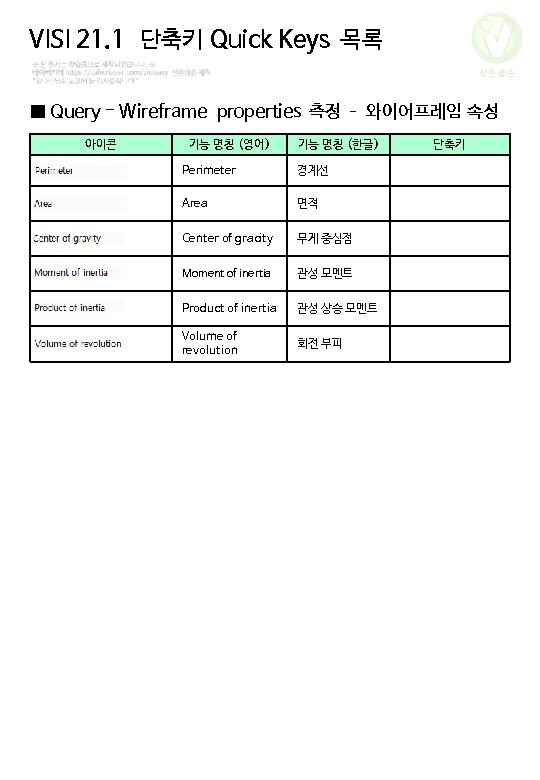
VISI 21. 1 단축키 Quick Keys 목록 신촌삼촌 ■ Query - Wireframe properties 측정 – 와이어프레임 속성 아이콘 기능 명칭 (영어) 기능 명칭 (한글) Perimeter 경계선 Area 면적 Center of gracity 무게 중심점 Moment of inertia 관성 모멘트 Product of inertia 관성 상승 모멘트 Volume of revolution 회전 부피 단축키