
Virtualization Virtualize hardware resources through abstraction CPU Abstraction
Virtualization • Virtualize hardware resources through abstraction • CPU • Abstraction: Process • Mechanism: Limited direct execution • Efficient – process runs directly on the CPU • Hardware support for traps, context switching • Control – User mode vs. kernel mode • Timer interrupts to regain control from a process • Policies: Scheduling • MLFQ • Minimize turnaround time and response time 1
Memory Virtualization • What is memory virtualization? – OS virtualizes its physical memory. – OS provides an illusion of a unique memory space per process. – It seems to the process that it can use the whole memory. – Transparent to the process 2
Benefits of Memory Virtualization • Ease of use in programming • Memory efficiency in terms of time and space • The guarantee of isolation for processes as well as OS – Protection from errant accesses of other processes 3
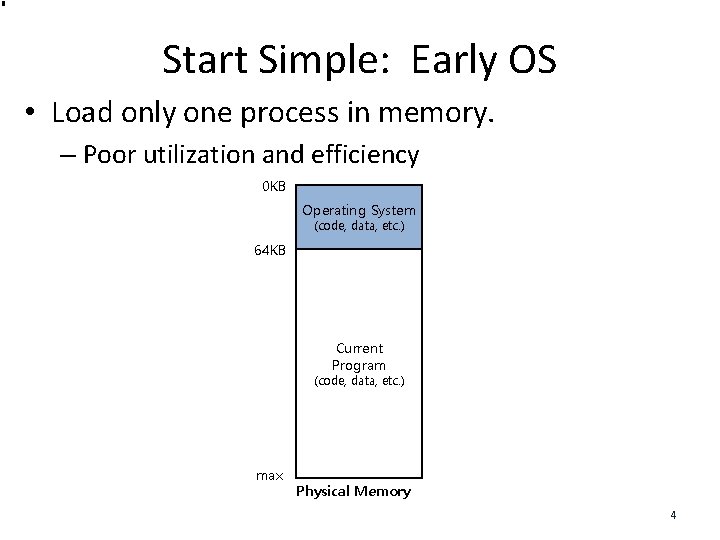
Start Simple: Early OS • Load only one process in memory. – Poor utilization and efficiency 0 KB Operating System (code, data, etc. ) 64 KB Current Program (code, data, etc. ) max Physical Memory 4

Multiprogramming and Time Sharing 0 KB • Load multiple processes in memory. – Execute one for a short time. – Next process to execute is already in memory – Increase utilization and efficiency. 64 KB – Errant memory accesses from other processes (code, data, etc. ) Free 128 KB 192 KB 256 KB Process C (code, data, etc. ) Process B (code, data, etc. ) Free 320 KB 384 KB • Protection issues Operating System Process A (code, data, etc. ) Free 448 KB 512 KB Free Physical Memory 5
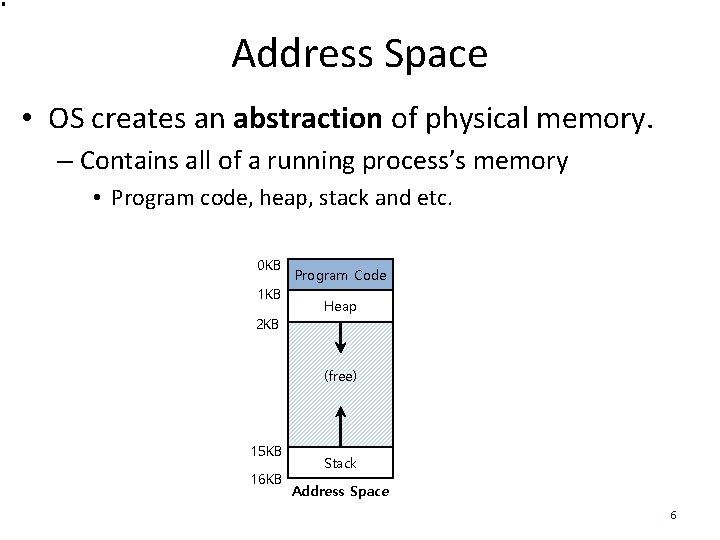
Address Space • OS creates an abstraction of physical memory. – Contains all of a running process’s memory • Program code, heap, stack and etc. 0 KB 1 KB 2 KB Program Code Heap (free) 15 KB 16 KB Stack Address Space 6
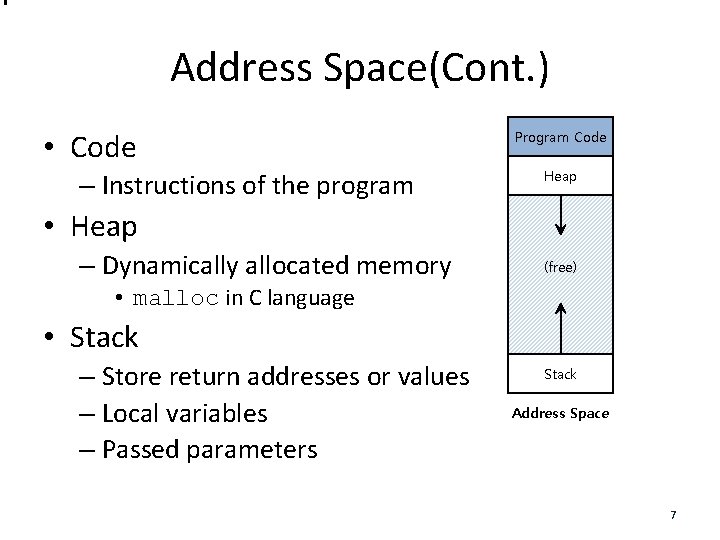
Address Space(Cont. ) • Code – Instructions of the program Program Code Heap • Heap – Dynamically allocated memory (free) • malloc in C language • Stack – Store return addresses or values – Local variables – Passed parameters Stack Address Space 7
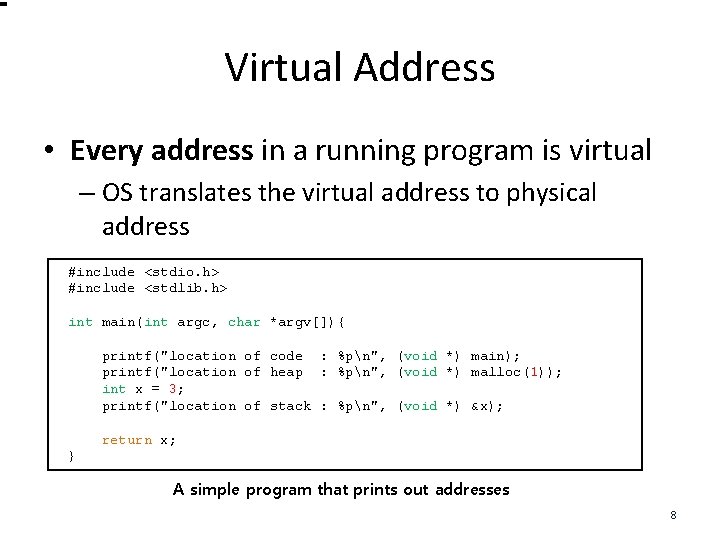
Virtual Address • Every address in a running program is virtual – OS translates the virtual address to physical address #include <stdio. h> #include <stdlib. h> int main(int argc, char *argv[]){ printf("location of code : %pn", (void *) main); printf("location of heap : %pn", (void *) malloc(1)); int x = 3; printf("location of stack : %pn", (void *) &x); return x; } A simple program that prints out addresses 8
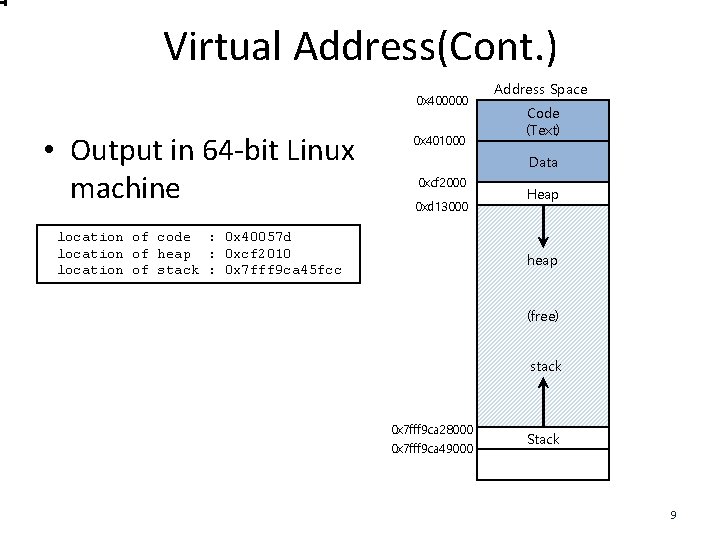
Virtual Address(Cont. ) 0 x 400000 • Output in 64 -bit Linux machine 0 x 401000 Address Space Code (Text) Data 0 xcf 2000 0 xd 13000 location of code : 0 x 40057 d location of heap : 0 xcf 2010 location of stack : 0 x 7 fff 9 ca 45 fcc Heap heap (free) stack 0 x 7 fff 9 ca 28000 0 x 7 fff 9 ca 49000 Stack 9
Address Translation Memory virtualization goals: – Efficiency – fast address translation – Control – process isolation Attained via hardware support – Registers – TLBs – Page-table 10
Address Translation • Hardware translates a virtual address to a physical address. – The desired information is actually stored in a physical address. • The OS must manage hardware 11
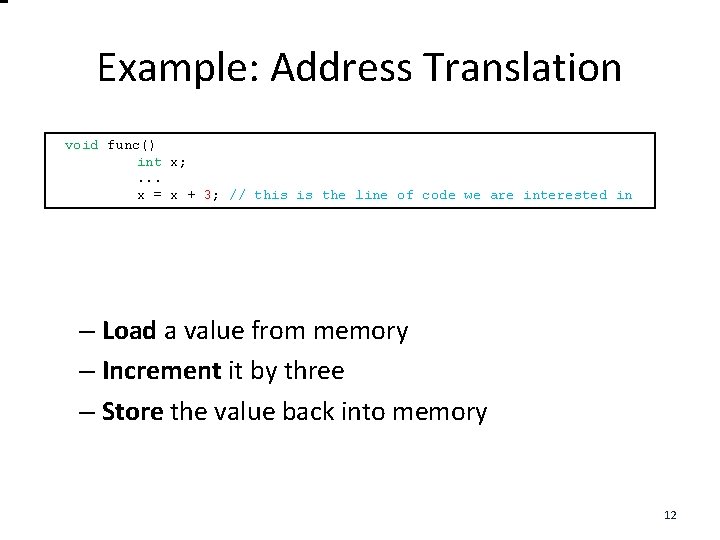
Example: Address Translation • void C - func() Language code int x; . . . x = x + 3; // this is the line of code we are interested in – Load a value from memory – Increment it by three – Store the value back into memory 12
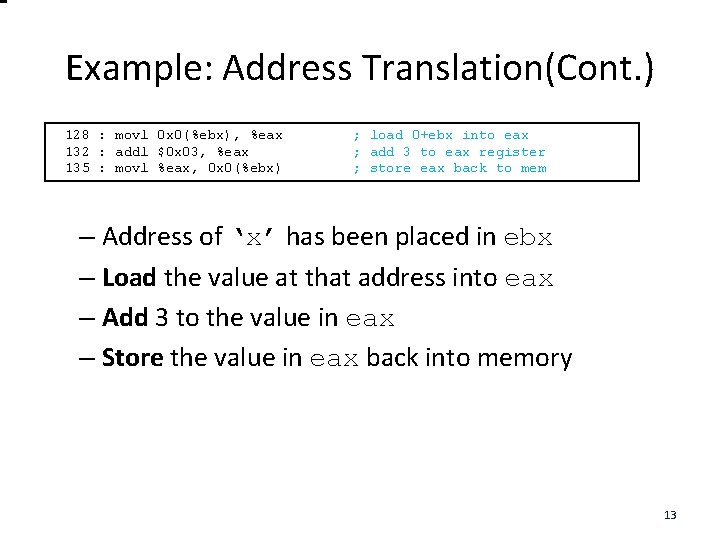
Example: Address Translation(Cont. ) 128 : movl 0 x 0(%ebx), %eax 132 : addl $0 x 03, %eax 135 : movl %eax, 0 x 0(%ebx) • Assembly ; load 0+ebx into eax ; add 3 to eax register ; store eax back to mem – Address of ‘x’ has been placed in ebx – Load the value at that address into eax – Add 3 to the value in eax – Store the value in eax back into memory 13
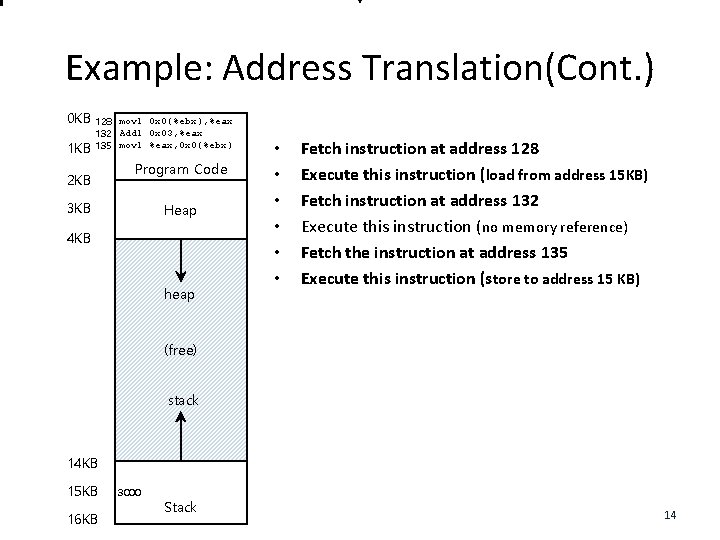
Example: Address Translation(Cont. ) 0 KB 128 movl 0 x 0(%ebx), %eax 132 Addl 0 x 03, %eax 135 movl %eax, 0 x 0(%ebx) 2 KB Program Code 3 KB Heap 4 KB heap • • • Fetch instruction at address 128 Execute this instruction (load from address 15 KB) Fetch instruction at address 132 Execute this instruction (no memory reference) Fetch the instruction at address 135 Execute this instruction (store to address 15 KB) (free) stack 14 KB 15 KB 16 KB 3000 Stack 14
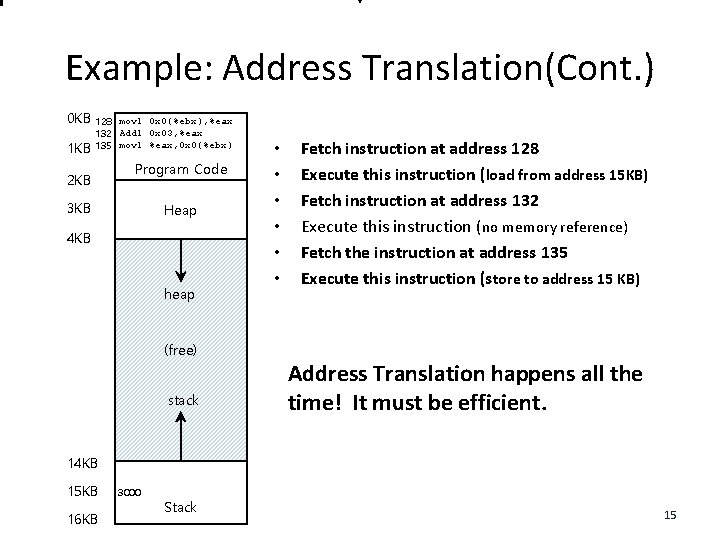
Example: Address Translation(Cont. ) 0 KB 128 movl 0 x 0(%ebx), %eax 132 Addl 0 x 03, %eax 135 movl %eax, 0 x 0(%ebx) 2 KB Program Code 3 KB Heap 4 KB heap (free) stack • • • Fetch instruction at address 128 Execute this instruction (load from address 15 KB) Fetch instruction at address 132 Execute this instruction (no memory reference) Fetch the instruction at address 135 Execute this instruction (store to address 15 KB) Address Translation happens all the time! It must be efficient. 14 KB 15 KB 16 KB 3000 Stack 15
Location of Address Spaces in Physical Memory • Each process’s address space starts at 0 • Physical memory starting at 0 is generally reserved for the OS • So…A process’s address space must be located somewhere else in physical memory 16
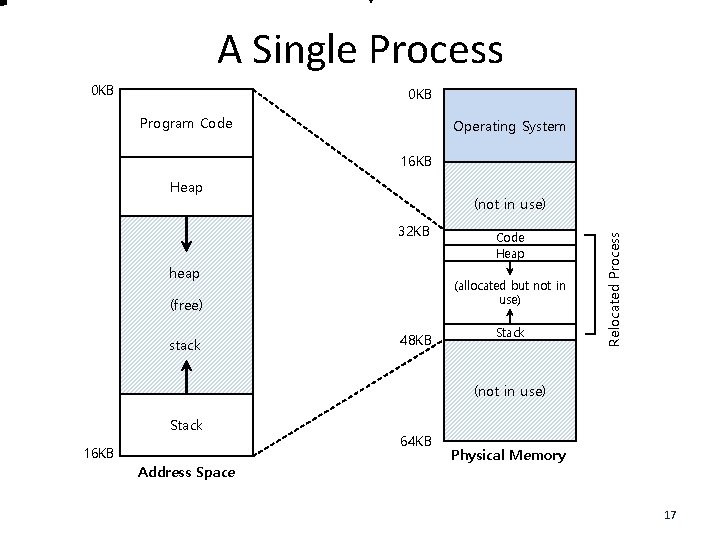
A Single Process 0 KB Program Code Operating System 16 KB Heap 32 KB heap (allocated but not in use) (free) stack Code Heap 48 KB Stack Relocated Process (not in use) Stack 16 KB Address Space 64 KB Physical Memory 17
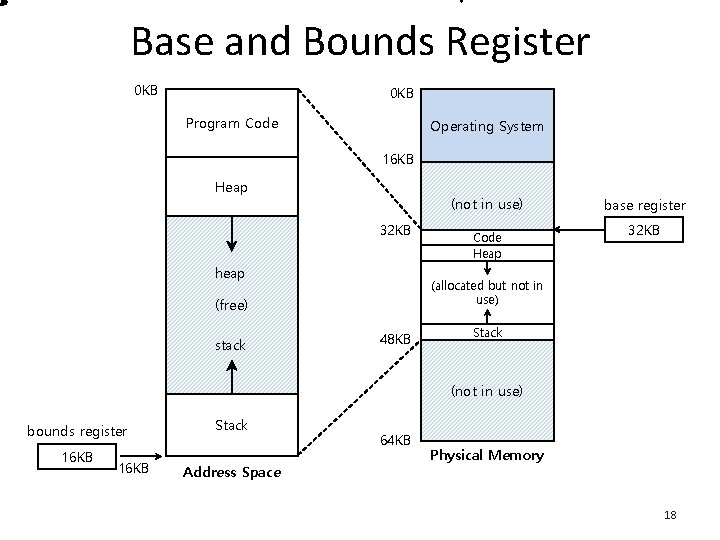
Base and Bounds Register 0 KB Program Code Operating System 16 KB Heap (not in use) 32 KB heap 32 KB (allocated but not in use) (free) stack Code Heap base register 48 KB Stack (not in use) bounds register 16 KB Stack Address Space 64 KB Physical Memory 18
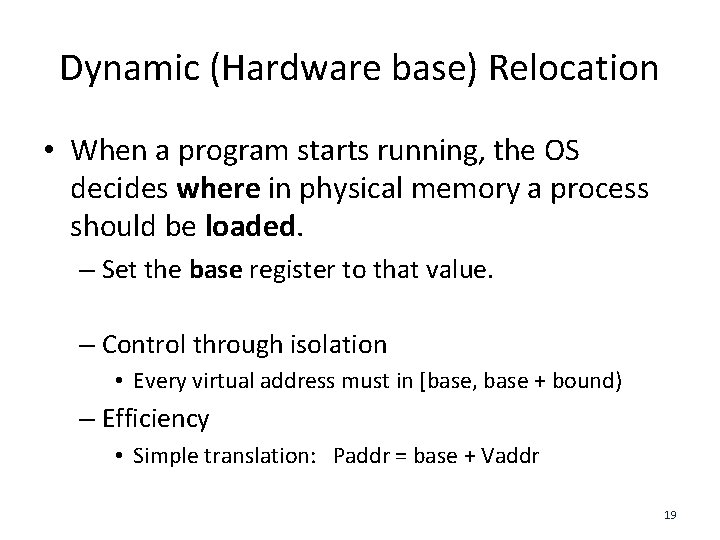
Dynamic (Hardware base) Relocation • When a program starts running, the OS decides where in physical memory a process should be loaded. – Set the base register to that value. – Control through isolation • Every virtual address must in [base, base + bound) – Efficiency • Simple translation: Paddr = base + Vaddr 19
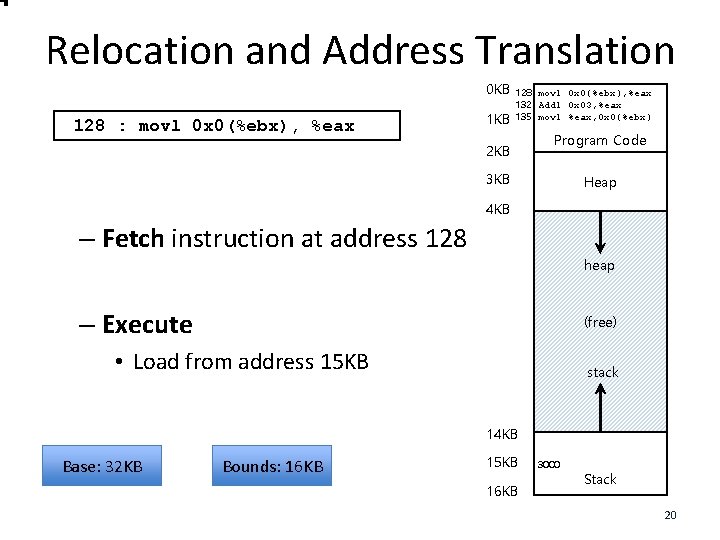
Relocation and Address Translation 0 KB 128 : movl 0 x 0(%ebx), %eax 1 KB 128 movl 0 x 0(%ebx), %eax 132 Addl 0 x 03, %eax 135 movl %eax, 0 x 0(%ebx) 2 KB Program Code 3 KB Heap 4 KB – Fetch instruction at address 128 heap – Execute (free) • Load from address 15 KB stack 14 KB Base: 32 KB Bounds: 16 KB 15 KB 16 KB 3000 Stack 20
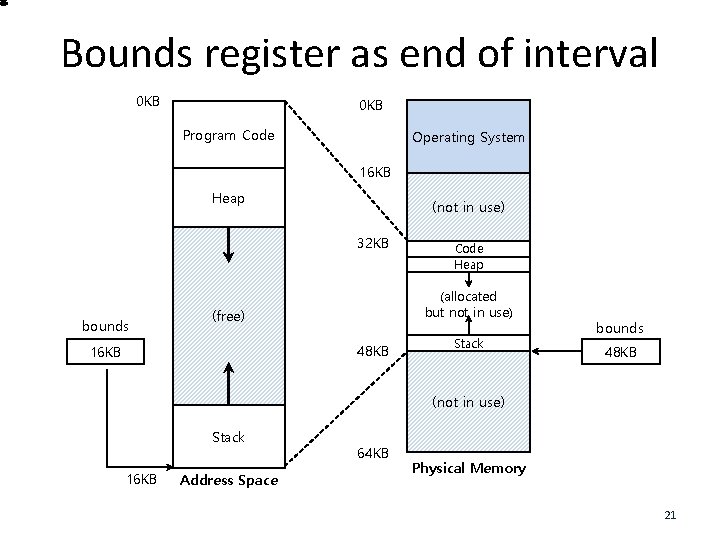
Bounds register as end of interval 0 KB Program Code Operating System 16 KB Heap (not in use) 32 KB bounds (allocated but not in use) (free) 48 KB 16 KB Code Heap Stack bounds 48 KB (not in use) Stack 16 KB Address Space 64 KB Physical Memory 21
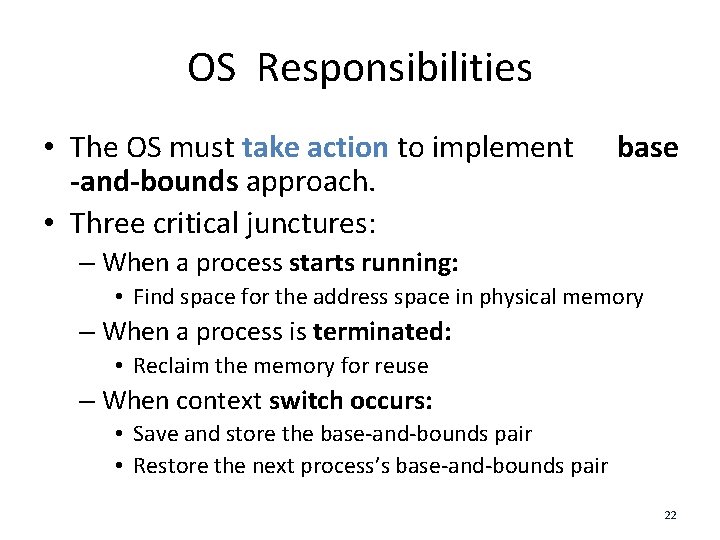
OS Responsibilities • The OS must take action to implement -and-bounds approach. • Three critical junctures: base – When a process starts running: • Find space for the address space in physical memory – When a process is terminated: • Reclaim the memory for reuse – When context switch occurs: • Save and store the base-and-bounds pair • Restore the next process’s base-and-bounds pair 22
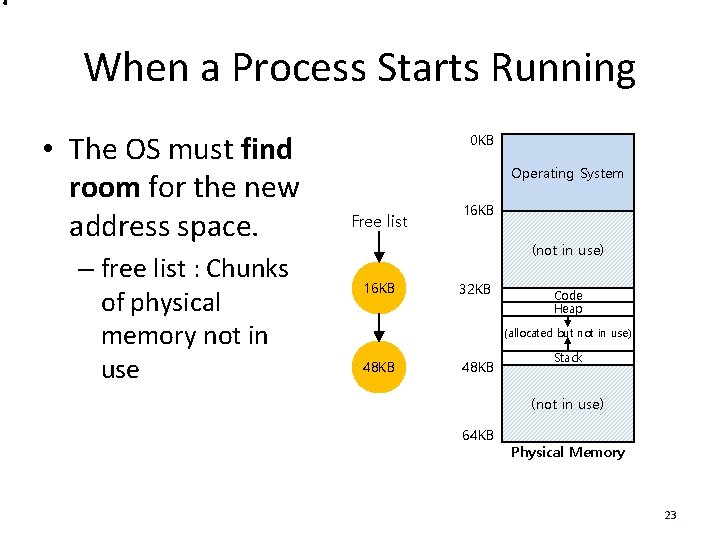
When a Process Starts Running • The OS must find room for the new address space. – free list : Chunks of physical memory not in use 0 KB Operating System Free list 16 KB (not in use) 16 KB 32 KB Code Heap (allocated but not in use) 48 KB Stack (not in use) 64 KB Physical Memory 23
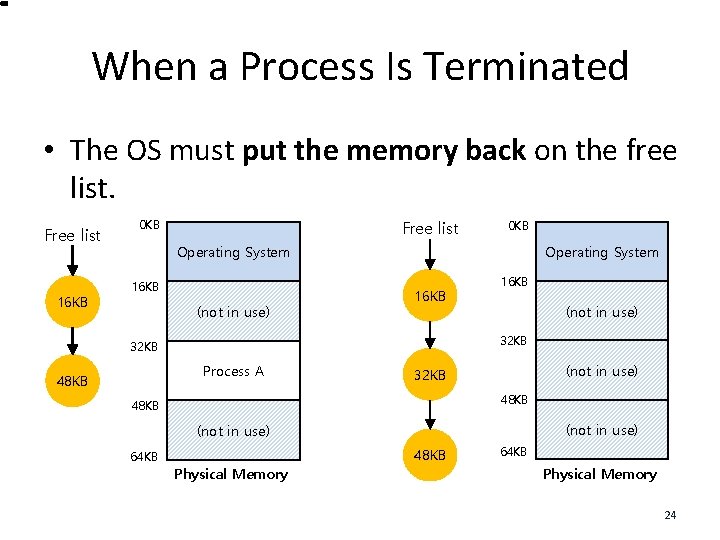
When a Process Is Terminated • The OS must put the memory back on the free list. Free list 16 KB 0 KB Free list 0 KB Operating System 16 KB (not in use) 32 KB Process A 48 KB 16 KB (not in use) 32 KB 48 KB (not in use) 64 KB 48 KB Physical Memory 64 KB Physical Memory 24
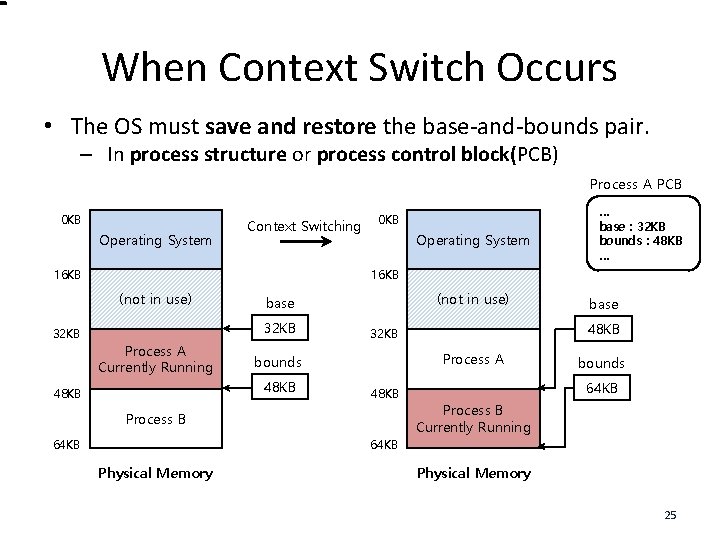
When Context Switch Occurs • The OS must save and restore the base-and-bounds pair. – In process structure or process control block(PCB) Process A PCB 0 KB Operating System Context Switching 16 KB Operating System … base : 32 KB bounds : 48 KB … 16 KB (not in use) 32 KB 0 KB 32 KB Process A Currently Running Process A 48 KB Process B 64 KB base 48 KB 32 KB bounds 48 KB (not in use) base bounds 64 KB Process B Currently Running 64 KB Physical Memory 25
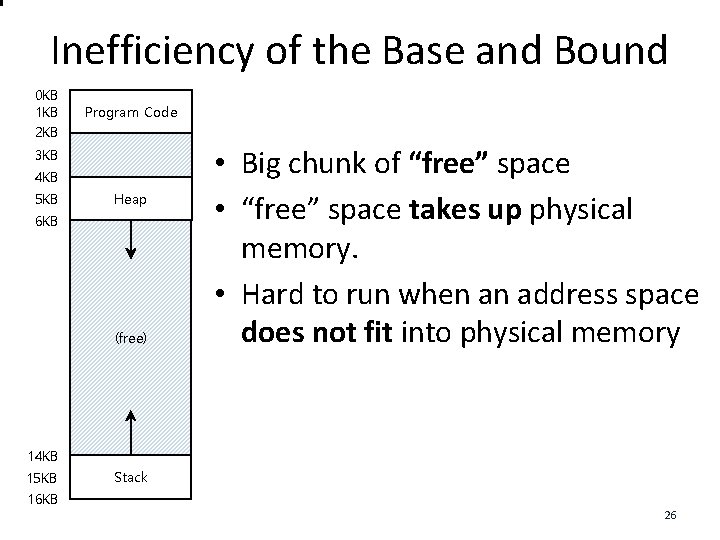
Inefficiency of the Base and Bound 0 KB 1 KB 2 KB Program Code 3 KB 4 KB 5 KB Heap 6 KB (free) • Big chunk of “free” space • “free” space takes up physical memory. • Hard to run when an address space does not fit into physical memory 14 KB 15 KB 16 KB Stack 26
Segmentation • Segment is a contiguous portion of the address space – Logically-different segments: code, stack, heap • Each segment can be placed in a different part of physical memory – Base and bounds exist per segment. 27
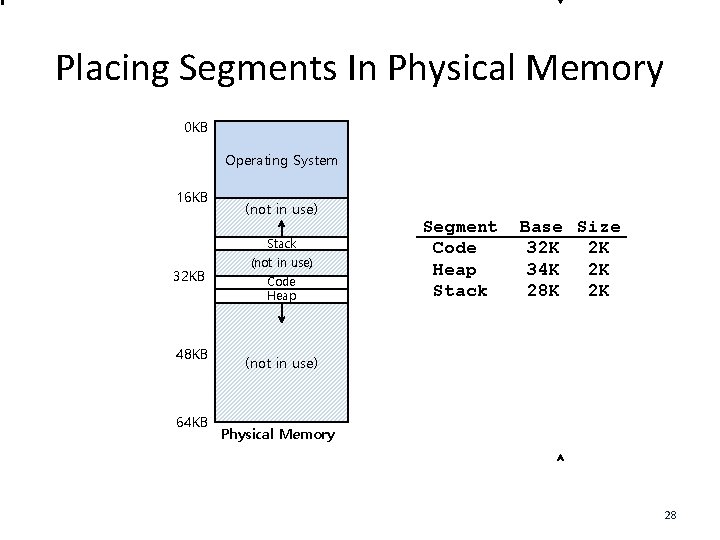
Placing Segments In Physical Memory 0 KB Operating System 16 KB (not in use) Stack 32 KB 48 KB 64 KB (not in use) Code Heap Segment Code Heap Stack Base Size 32 K 2 K 34 K 2 K 28 K 2 K (not in use) Physical Memory 28
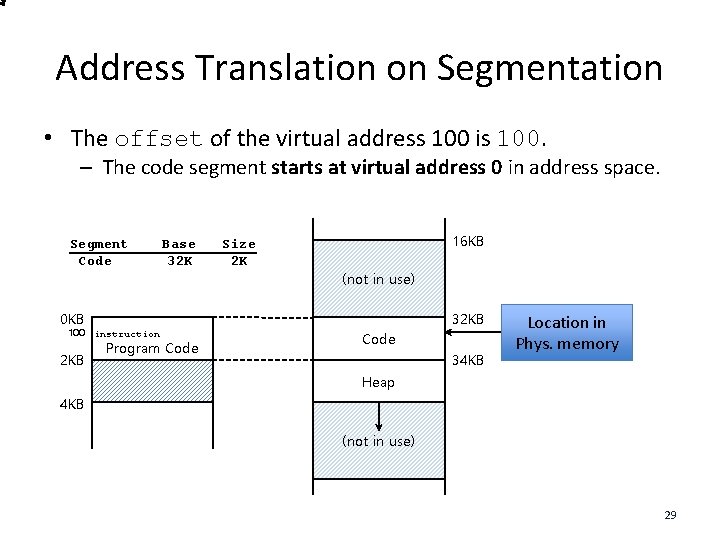
Address Translation on Segmentation • The offset of the virtual address 100 is 100. – The code segment starts at virtual address 0 in address space. Segment Code Base 32 K Size 2 K 16 KB (not in use) 0 KB 100 instruction 2 KB Program Code 32 KB Code 34 KB Location in Phys. memory Heap 4 KB (not in use) 29
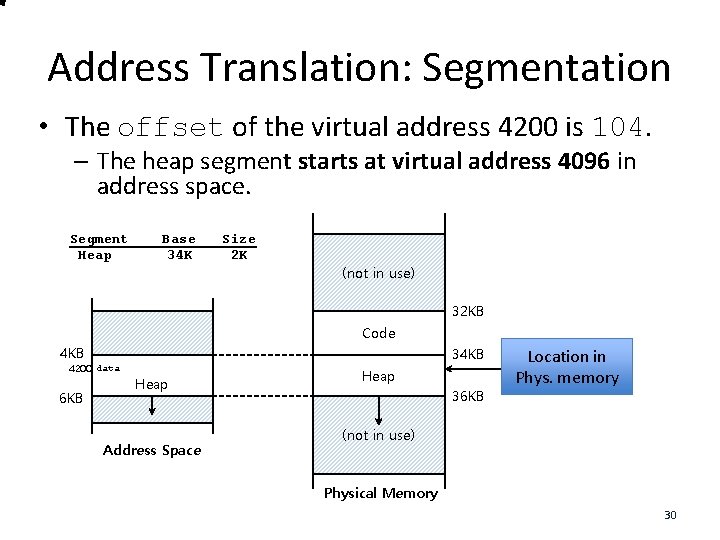
Address Translation: Segmentation • The offset of the virtual address 4200 is 104. – The heap segment starts at virtual address 4096 in address space. Segment Heap Base 34 K Size 2 K (not in use) 32 KB Code 4 KB 4200 data 6 KB 34 KB Heap Address Space Heap 36 KB Location in Phys. memory (not in use) Physical Memory 30
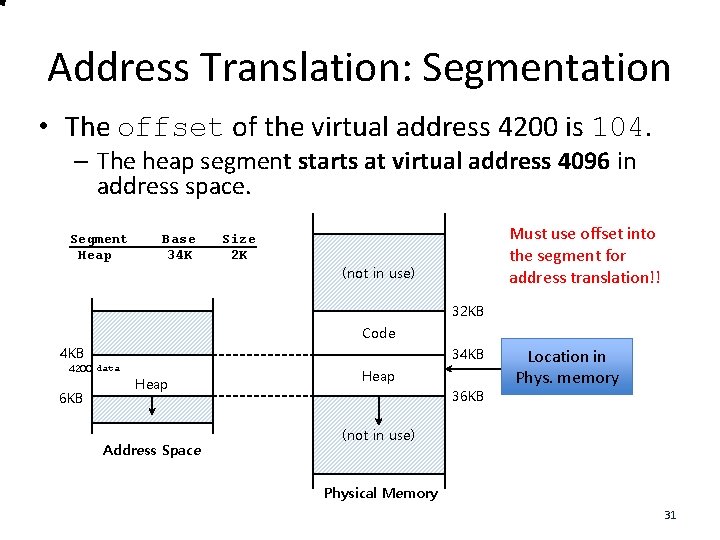
Address Translation: Segmentation • The offset of the virtual address 4200 is 104. – The heap segment starts at virtual address 4096 in address space. Segment Heap Base 34 K Size 2 K Must use offset into the segment for address translation!! (not in use) 32 KB Code 4 KB 4200 data 6 KB 34 KB Heap Address Space Heap 36 KB Location in Phys. memory (not in use) Physical Memory 31
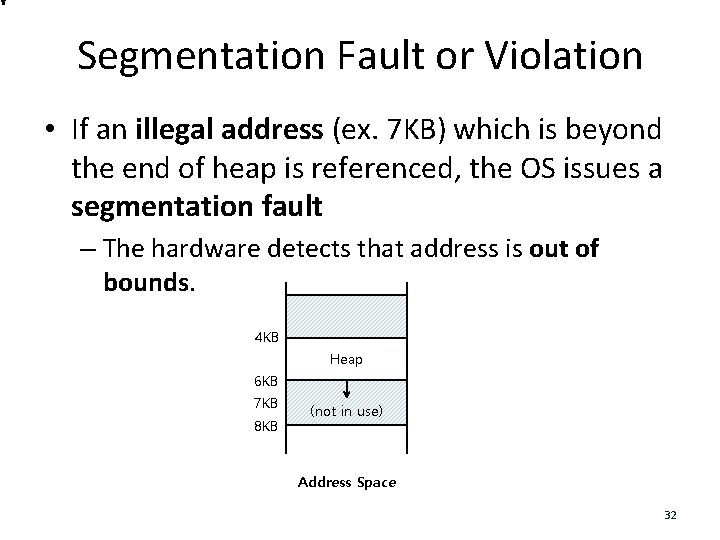
Segmentation Fault or Violation • If an illegal address (ex. 7 KB) which is beyond the end of heap is referenced, the OS issues a segmentation fault – The hardware detects that address is out of bounds. 4 KB Heap 6 KB 7 KB 8 KB (not in use) Address Space 32
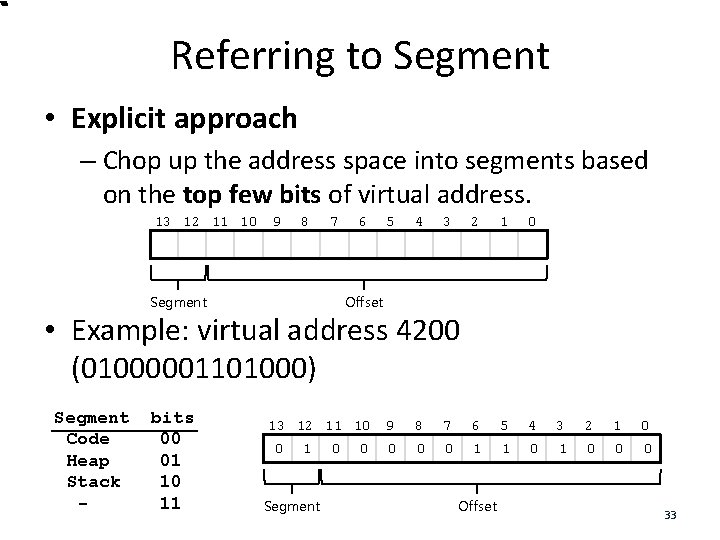
Referring to Segment • Explicit approach – Chop up the address space into segments based on the top few bits of virtual address. 13 12 11 10 9 8 7 Segment 6 5 4 3 2 1 0 Offset • Example: virtual address 4200 (01000001101000) Segment Code Heap Stack - bits 00 01 10 11 13 12 11 10 0 1 Segment 0 0 9 8 7 6 5 4 3 2 1 0 0 1 1 0 0 0 Offset 33
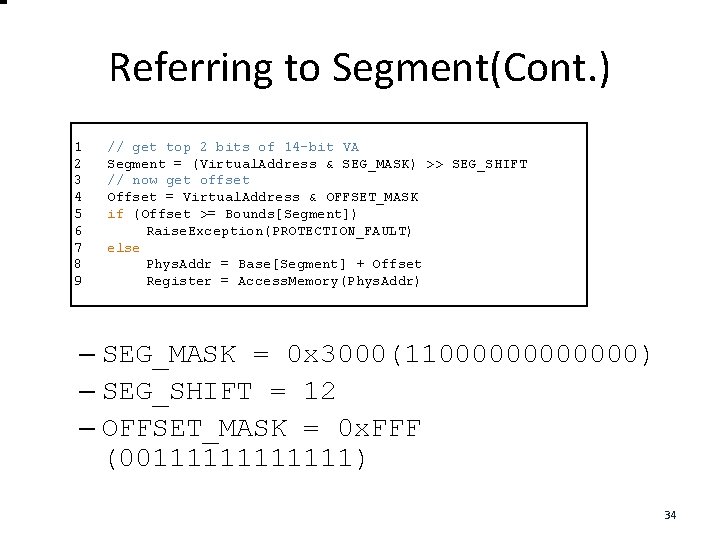
Referring to Segment(Cont. ) 1 2 3 4 5 6 7 8 9 // get top 2 bits of 14 -bit VA Segment = (Virtual. Address & SEG_MASK) >> SEG_SHIFT // now get offset Offset = Virtual. Address & OFFSET_MASK if (Offset >= Bounds[Segment]) Raise. Exception(PROTECTION_FAULT) else Phys. Addr = Base[Segment] + Offset Register = Access. Memory(Phys. Addr) – SEG_MASK = 0 x 3000(11000000) – SEG_SHIFT = 12 – OFFSET_MASK = 0 x. FFF (00111111) 34
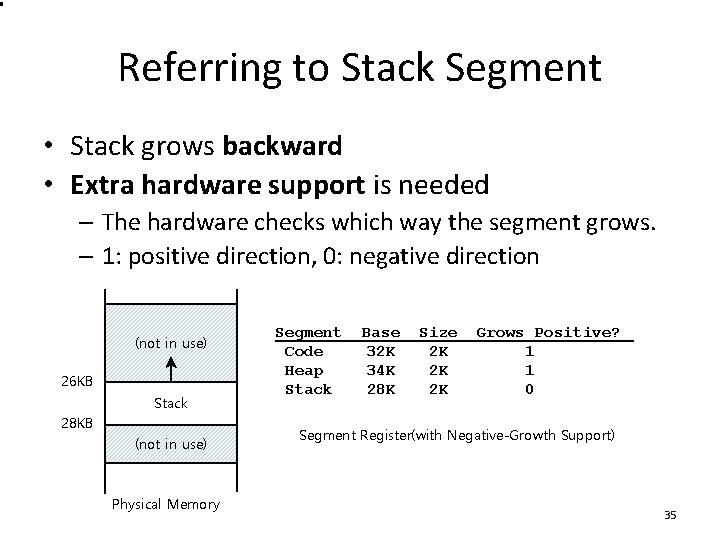
Referring to Stack Segment • Stack grows backward • Extra hardware support is needed – The hardware checks which way the segment grows. – 1: positive direction, 0: negative direction (not in use) 26 KB Stack 28 KB (not in use) Physical Memory Segment Code Heap Stack Base 32 K 34 K 28 K Size 2 K 2 K 2 K Grows Positive? 1 1 0 Segment Register(with Negative-Growth Support) 35
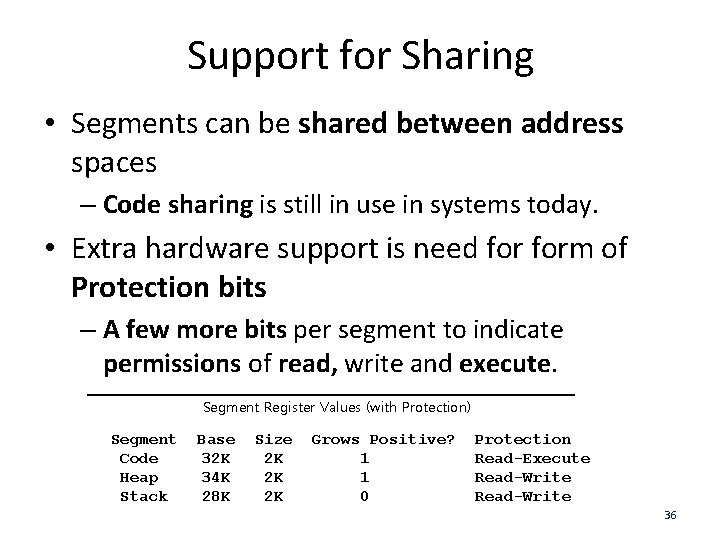
Support for Sharing • Segments can be shared between address spaces – Code sharing is still in use in systems today. • Extra hardware support is need form of Protection bits – A few more bits per segment to indicate permissions of read, write and execute. Segment Register Values (with Protection) Segment Code Heap Stack Base 32 K 34 K 28 K Size 2 K 2 K 2 K Grows Positive? 1 1 0 Protection Read-Execute Read-Write 36
Fine-Grained and Coarse-Grained Segmentation • Coarse-Grained – small number of segments – e. g. , code, heap, stack. • Fine-Grained – many different segments – To support fine-grained segmentation, hardware support is required 37
OS support: Fragmentation • External Fragmentation: little holes of free space in physical memory – There is 24 KB free, but not in one contiguous segment – The OS cannot satisfy a 24 KB request • Compaction: rearranging the existing segments in physical memory – Compaction is costly • Stop running process • Copy data somewhere else • Change segment register values 38
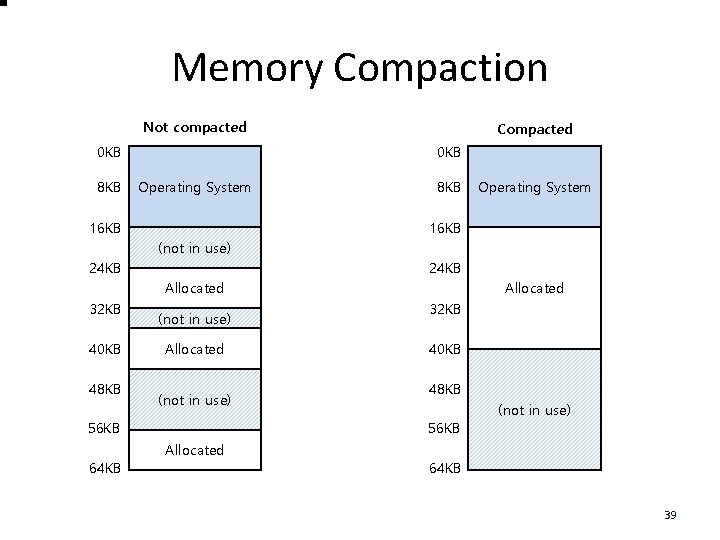
Memory Compaction Not compacted 0 KB 8 KB Compacted 0 KB Operating System 16 KB 8 KB Operating System 16 KB (not in use) 24 KB Allocated 32 KB 40 KB 48 KB (not in use) Allocated (not in use) 56 KB 64 KB Allocated 32 KB 40 KB 48 KB 56 KB Allocated (not in use) 64 KB 39
Next: Paging 40
- Slides: 40