
Virtual University HumanComputer Interaction Lecture 43 Information Retrieval
- Slides: 25
Virtual University Human-Computer Interaction Lecture 43 Information Retrieval Imran Hussain University of Management and Technology (UMT) 1 Virtual University - Human Computer Interaction © Imran Hussain | UMT
In the Last Lecture Various ways in which computer communicate with users – Error messages – Notifier and conformation dialog boxes 2 Virtual University - Human Computer Interaction © Imran Hussain | UMT
In the Today Lecture Various methods of provided audio feedback – Negative – Positive Ways in which software application communicates and conveys information to the user Information retrieval in desktop environment Discipline of information architecture within the web environment 3 Virtual University - Human Computer Interaction © Imran Hussain | UMT
Negative audible feedback: Announcing user failure • Negative audible feedback – noise is emitted when something bad happens 4 Virtual University - Human Computer Interaction © Imran Hussain | UMT
Positive audible feedback • Examples – Closing a door – Pressing light switch – Turning key in car ignition 5 Virtual University - Human Computer Interaction © Imran Hussain | UMT
Available Choices No noise vs. noise for negative feedback No noise vs. unpleasant noise for negative feedback No noise vs. soft and pleasant noises for positive feedback 6 Virtual University - Human Computer Interaction © Imran Hussain | UMT
One of the objective with software application is to communicate brand identity of the software application 7 Virtual University - Human Computer Interaction © Imran Hussain | UMT
Your identity on the desktop • ways of asserting identity – Program’s icon – Program’s name 8 Virtual University - Human Computer Interaction © Imran Hussain | UMT
Your program’s icon • Should readily visible • 2 different sizes icons in windows – 32 x 32 pixels (desktop) – 16 x 16 pixels (title bar) • Icon should be – High quality – Visibly distinct at distance from other icons 9 Virtual University - Human Computer Interaction © Imran Hussain | UMT
Your program’s name • Appears in 2 places – Title bar (of program’s main window) – Taskbar 10 Virtual University - Human Computer Interaction © Imran Hussain | UMT
Ancillary application windows • These are windows that are not really part of the application’s functionality – Available on request – E. g. , credit screens 11 Virtual University - Human Computer Interaction © Imran Hussain | UMT
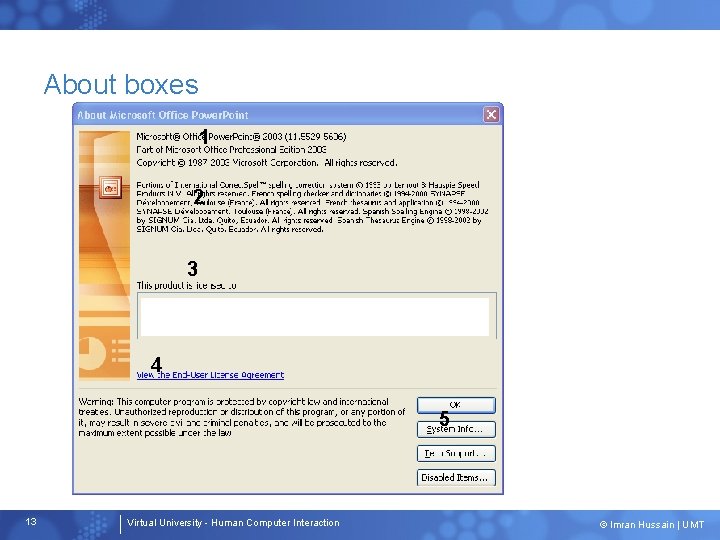
About boxes • 12 A simple dialog box that identifies the program to user Virtual University - Human Computer Interaction © Imran Hussain | UMT
About boxes 1 2 3 4 5 13 Virtual University - Human Computer Interaction © Imran Hussain | UMT
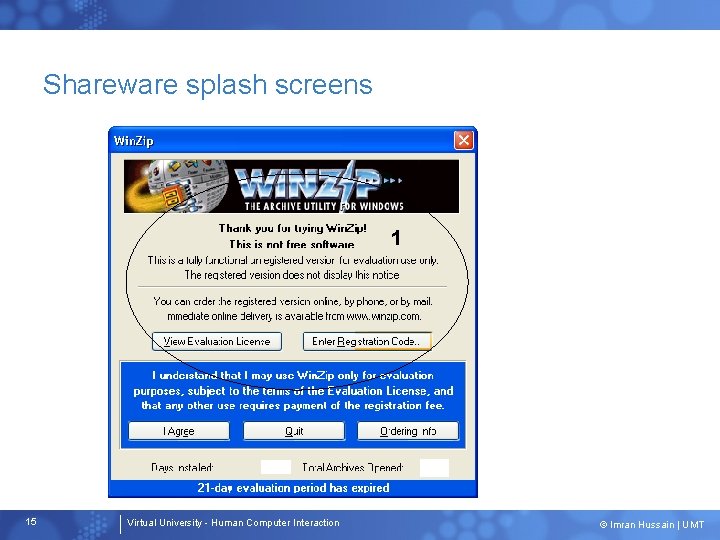
Splash screens • Screens that appear in first instance • Used for branding and marketing 14 Virtual University - Human Computer Interaction © Imran Hussain | UMT
Shareware splash screens 1 15 Virtual University - Human Computer Interaction © Imran Hussain | UMT
Online help • Online help should be provided but should not be substitute for good design 16 Virtual University - Human Computer Interaction © Imran Hussain | UMT
The index • Users don’t read manuals like book, so index is useful • Indexes should be created carefully and it is recommended that it should be done by professional indexer – List of index entries is more important that text itself – provide synonyms • Example – User want to black the cell in the table in word processor – “how can I set shading of this cell to 100%” 17 Virtual University - Human Computer Interaction © Imran Hussain | UMT
Storage and Retrieval Systems • Storage system – A method for safekeeping goods in a repository – A physical system composed of a container and the tools necessary to put objects in and take them back out again • Retrieval system – A method for finding goods in a repository – A logical system that allows goods to be located according to some abstract value (e. g. , like name, position, etc. ) 18 Virtual University - Human Computer Interaction © Imran Hussain | UMT
Storage and Retrieval in the Physical World • Storage and retrieval by location • Indexed retrieval 19 Virtual University - Human Computer Interaction © Imran Hussain | UMT
Storage and retrieval by location • In physical world, remembering where we put an item – its address, or location – helps us to find it • Book – We go to where we left book, or where others books are found – We don’t find books by association. 20 Virtual University - Human Computer Interaction © Imran Hussain | UMT
Indexed retrieval • For large volumes, storage and retrieval by location is not possible • Libraries … Dewey Decimal system – Give every book an index number based on its title and subject matter – The books are shelved in this numerical order – If you know number, you can find book 21 Virtual University - Human Computer Interaction © Imran Hussain | UMT
Indexed retrieval How to find number? Use index – A collection of records that allows you to find location of an item by looking up an attribute of the item – 3 copies of cards created for each book – Each card placed in a separate index – You physically retrieve book by participating in a system of storage (shelves and numbers), but logically find the book by participating in a system of retrieval (card indices) 22 Virtual University - Human Computer Interaction © Imran Hussain | UMT
Retrieval methods • 3 ways to find a document on a computer – Positional retrieval (remember location) – Identity retrieval (remember name) – Associative or attributed-based retrieval 23 Virtual University - Human Computer Interaction © Imran Hussain | UMT
An attribute-based retrieval system • Today’s desktops cannot adopt an attribute-based retrieval system • Attribute-based system could allow user find documents by – Synonyms – Related topics – Attributes 24 Virtual University - Human Computer Interaction © Imran Hussain | UMT
Information architecture system for web site • • 25 Organizational systems Labeling systems Navigational systems Searching systems Virtual University - Human Computer Interaction © Imran Hussain | UMT