
Virtual Reality Modeling The VR physical modeling from
- Slides: 61
Virtual Reality Modeling
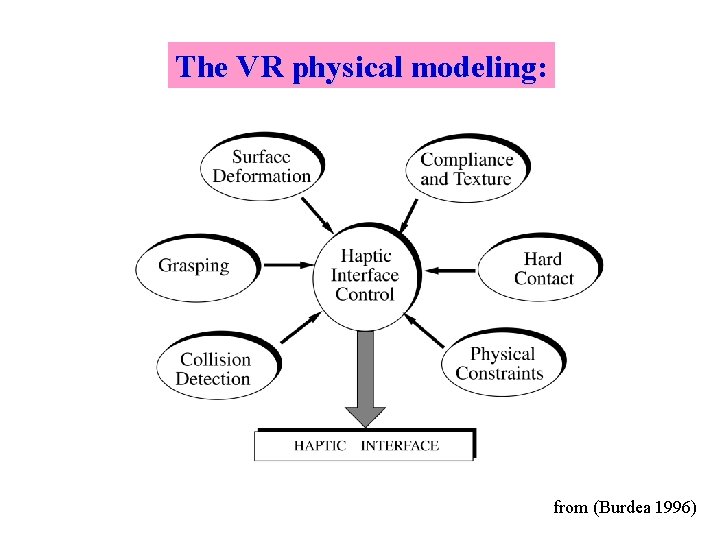
The VR physical modeling: from (Burdea 1996)
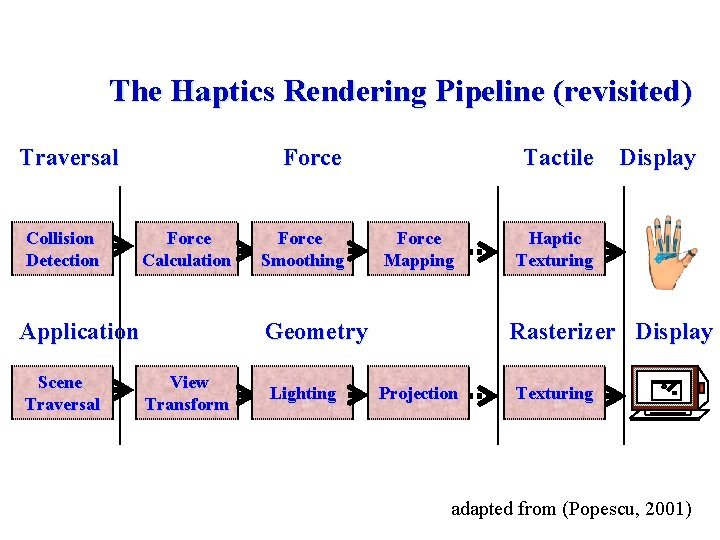
The Haptics Rendering Pipeline (revisited) Traversal Collision Detection Force Calculation Application Scene Traversal Force Smoothing Tactile Force Mapping Geometry View Transform Lighting Display Haptic Texturing Rasterizer Display Projection Texturing adapted from (Popescu, 2001)
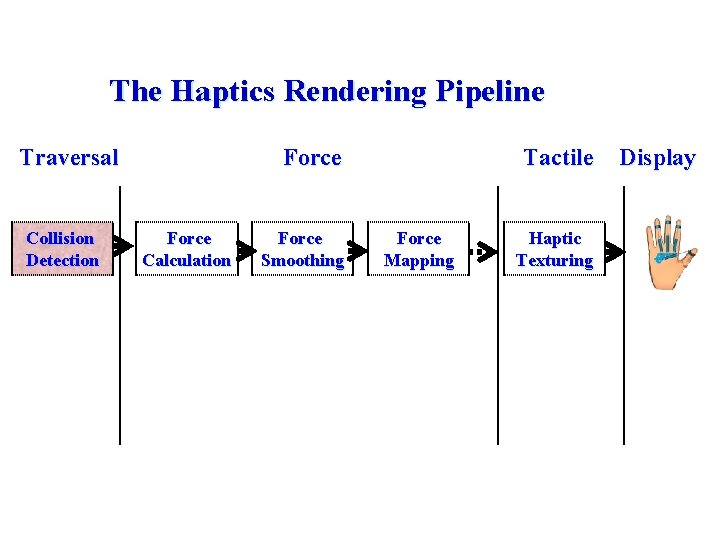
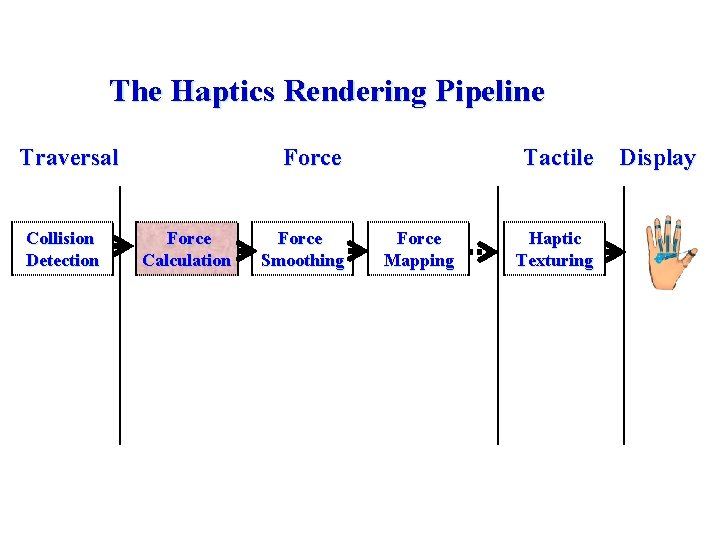
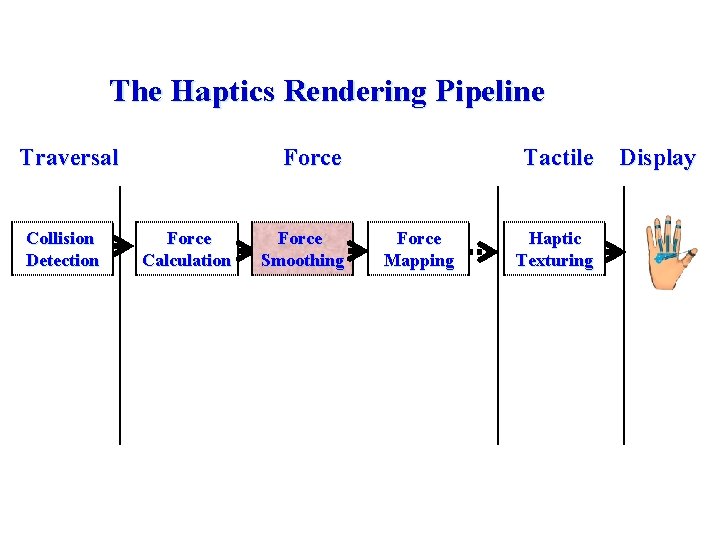
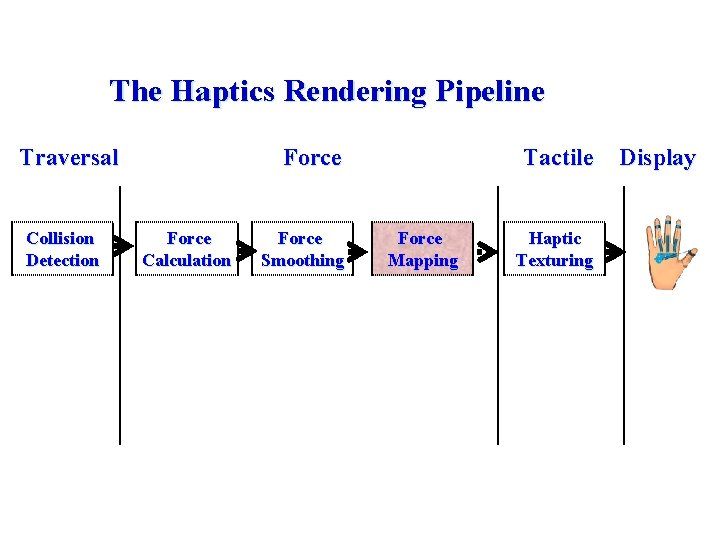
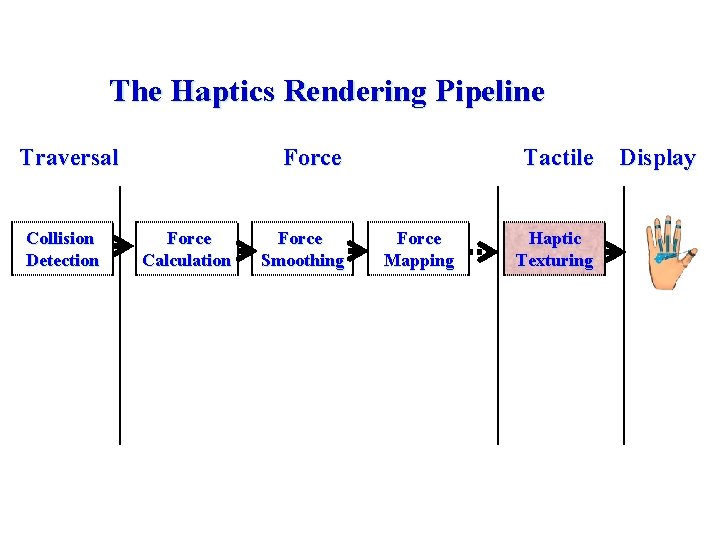
The Haptics Rendering Pipeline Traversal Collision Detection Force Calculation Force Smoothing Tactile Force Mapping Haptic Texturing Display
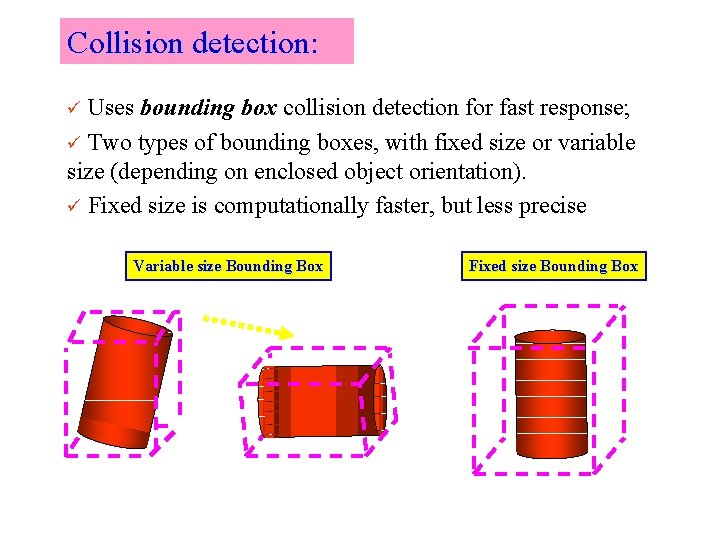
Collision detection: Uses bounding box collision detection for fast response; ü Two types of bounding boxes, with fixed size or variable size (depending on enclosed object orientation). ü Fixed size is computationally faster, but less precise ü Variable size Bounding Box Fixed size Bounding Box
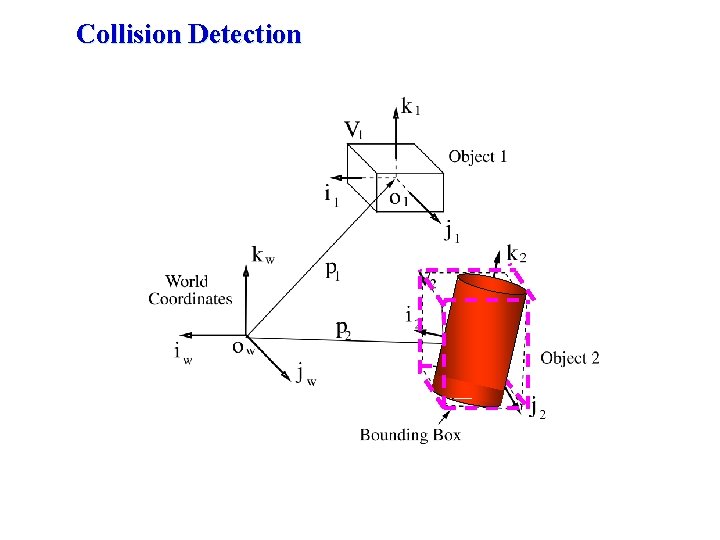
Collision Detection
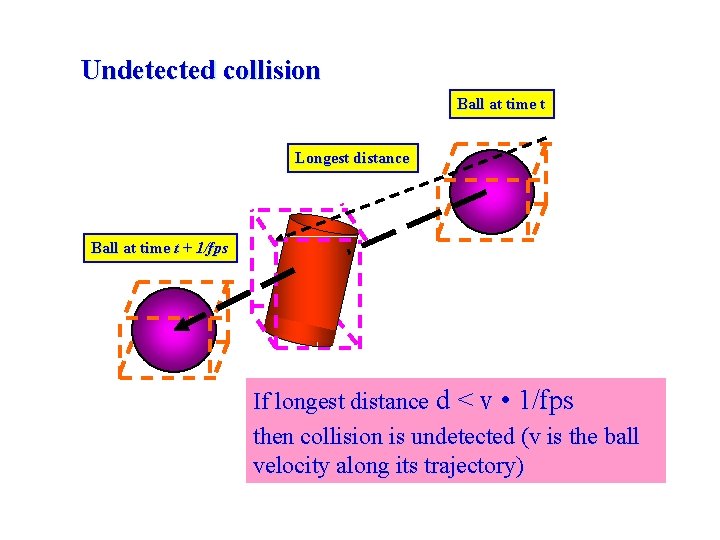
Undetected collision Ball at time t Longest distance Ball at time t + 1/fps If longest distance d < v • 1/fps then collision is undetected (v is the ball velocity along its trajectory)
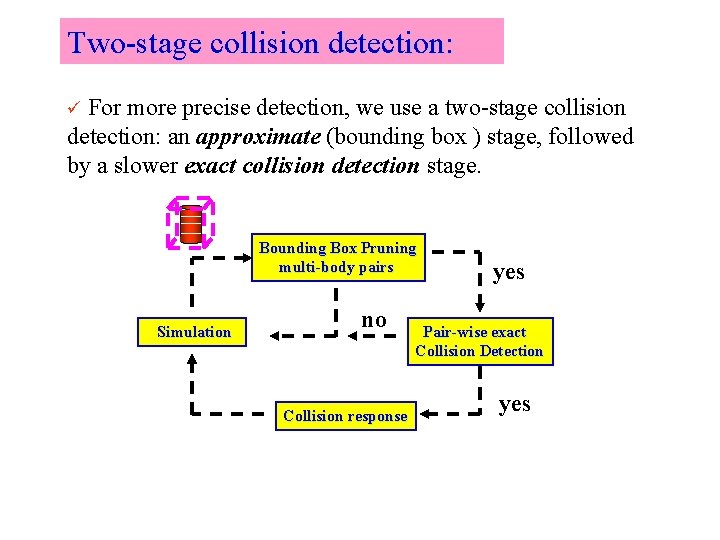
Two-stage collision detection: For more precise detection, we use a two-stage collision detection: an approximate (bounding box ) stage, followed by a slower exact collision detection stage. ü Bounding Box Pruning multi-body pairs Simulation no Collision response yes Pair-wise exact Collision Detection yes
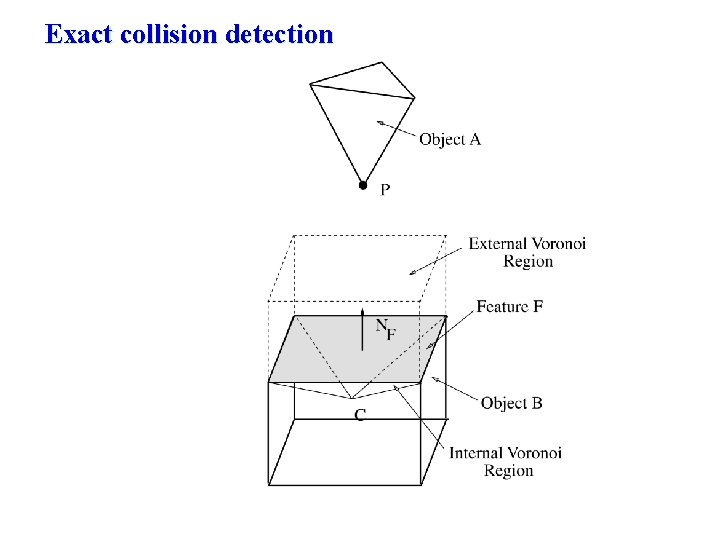
Exact collision detection
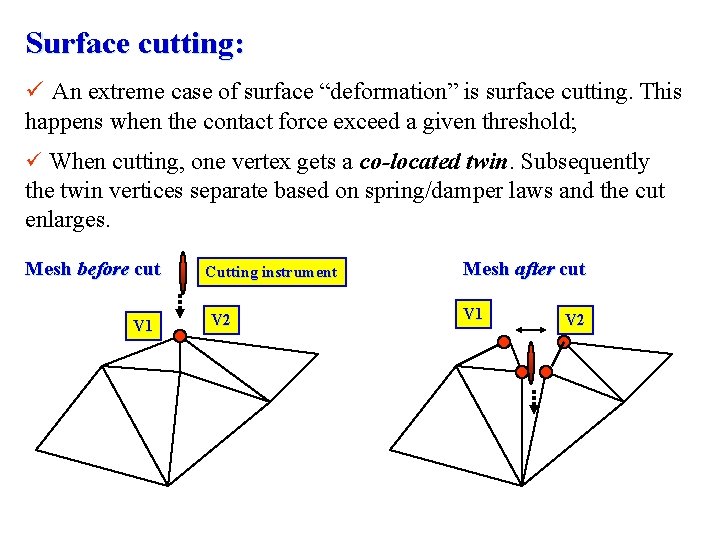
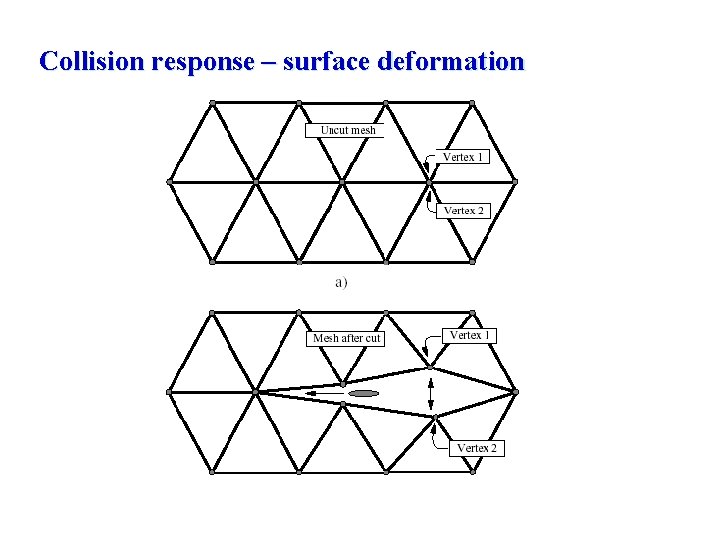
Surface cutting: ü An extreme case of surface “deformation” is surface cutting. This happens when the contact force exceed a given threshold; ü When cutting, one vertex gets a co-located twin. Subsequently the twin vertices separate based on spring/damper laws and the cut enlarges. Mesh before cut V 1 Cutting instrument V 2 Mesh after cut V 1 V 2
Collision response – surface deformation
The Haptics Rendering Pipeline Traversal Collision Detection Force Calculation Force Smoothing Tactile Force Mapping Haptic Texturing Display
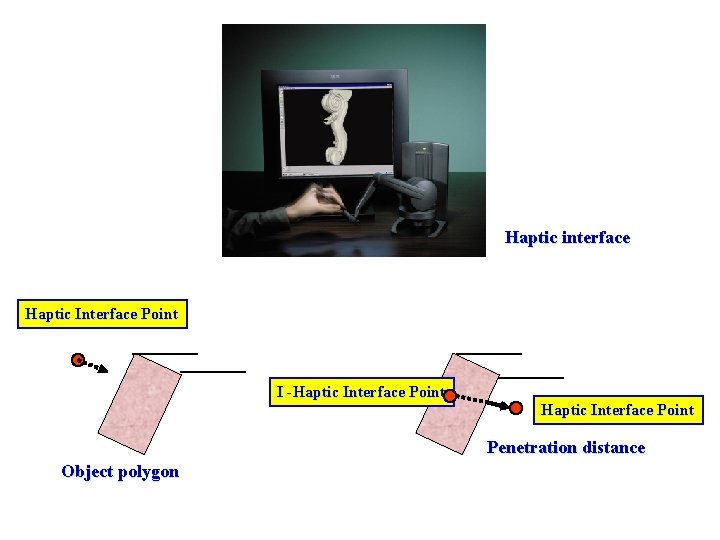
Haptic interface Haptic Interface Point I -Haptic Interface Point Penetration distance Object polygon
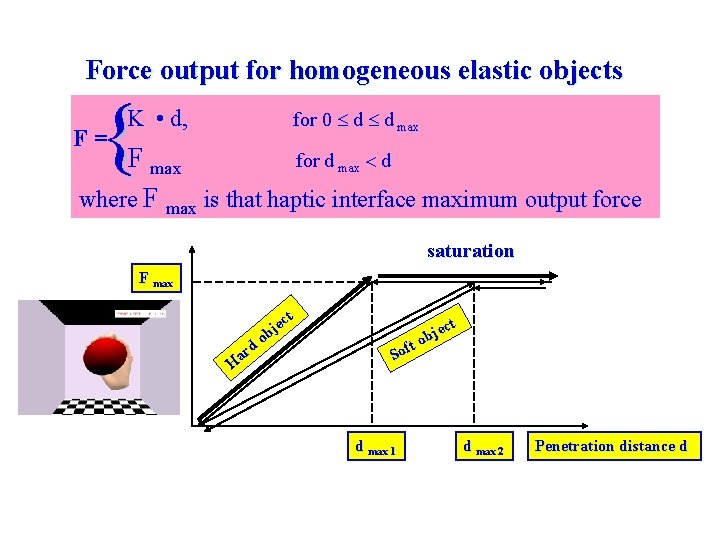
Force output for homogeneous elastic objects { F= K • d, for 0 d d max F max for d max d where F max is that haptic interface maximum output force saturation F max rd a H t ec j ob t jec b ft o o S d max 1 d max 2 Penetration distance d
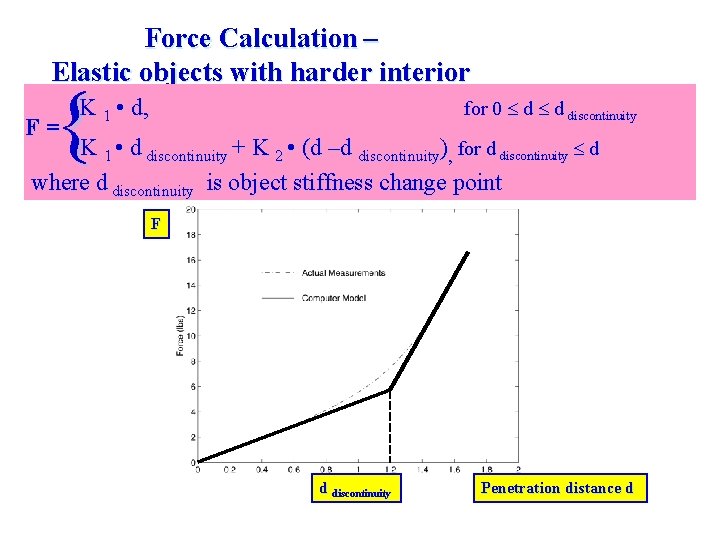
Force Calculation – Elastic objects with harder interior { F= K 1 • d, for 0 d d discontinuity K 1 • d discontinuity + K 2 • (d –d discontinuity), for d discontinuity d where d discontinuity is object stiffness change point F d discontinuity Penetration distance d
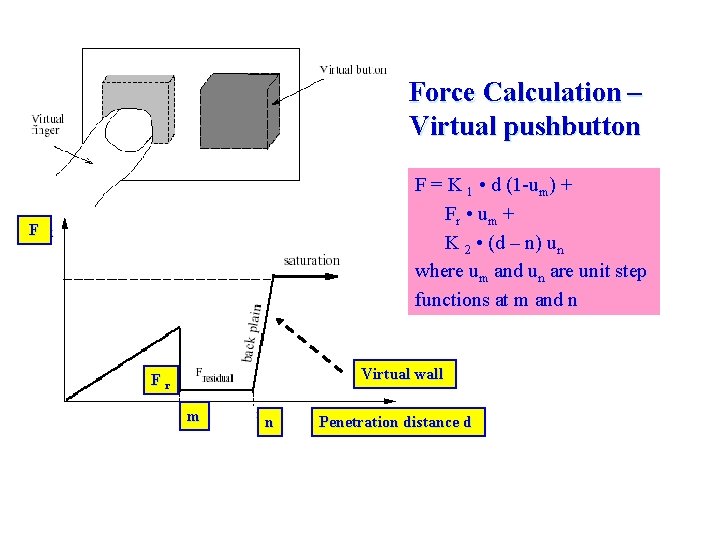
Force Calculation – Virtual pushbutton F = K 1 • d (1 -um) + Fr • um + K 2 • (d – n) un where um and un are unit step functions at m and n F Virtual wall Fr m n Penetration distance d
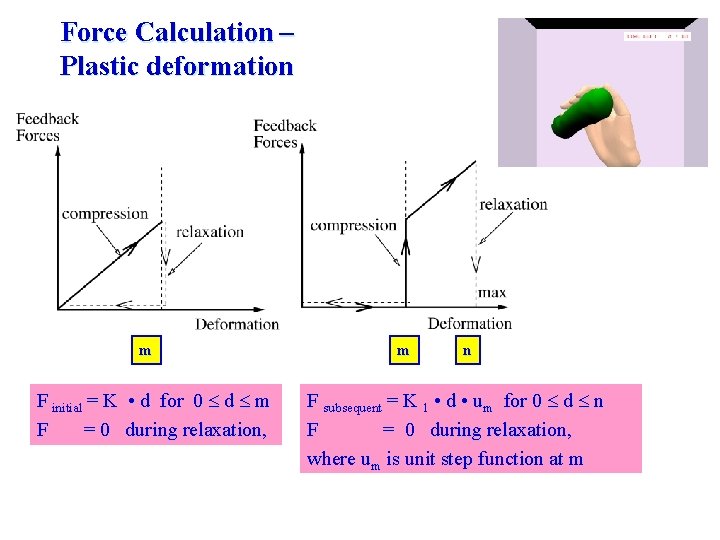
Force Calculation – Plastic deformation m F initial = K • d for 0 d m F = 0 during relaxation, m n F subsequent = K 1 • d • um for 0 d n F = 0 during relaxation, where um is unit step function at m
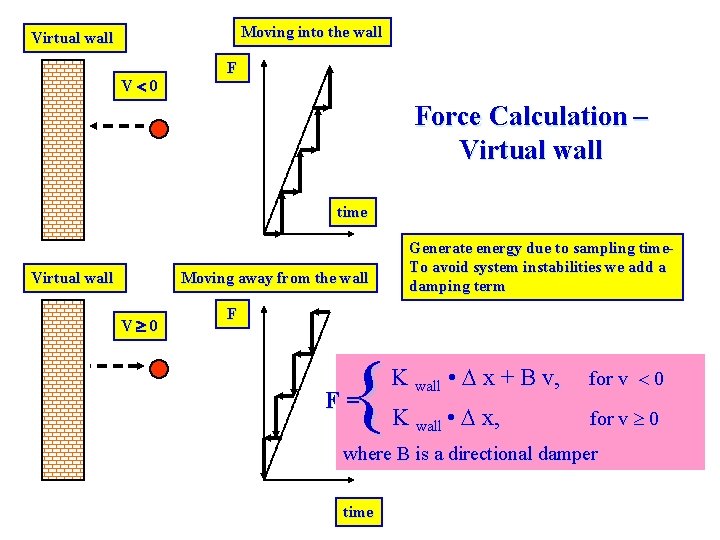
Moving into the wall Virtual wall V 0 F Force Calculation – Virtual wall time Virtual wall Moving away from the wall V 0 Generate energy due to sampling time. To avoid system instabilities we add a damping term F { F= K wall • x + B v, for v 0 K wall • x, for v 0 where B is a directional damper time
The Haptics Rendering Pipeline Traversal Collision Detection Force Calculation Force Smoothing Tactile Force Mapping Haptic Texturing Display
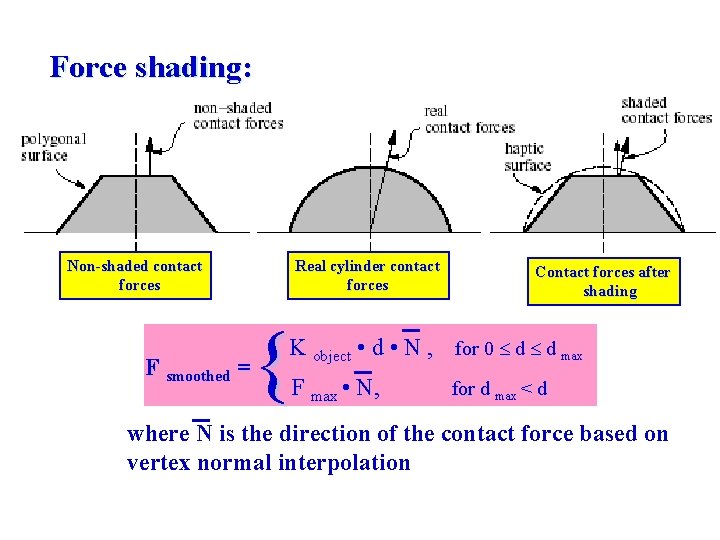
Force shading: Non-shaded contact forces F smoothed = Real cylinder contact forces { Contact forces after shading K object • d • N , for 0 d d max F max • N, for d max < d where N is the direction of the contact force based on vertex normal interpolation
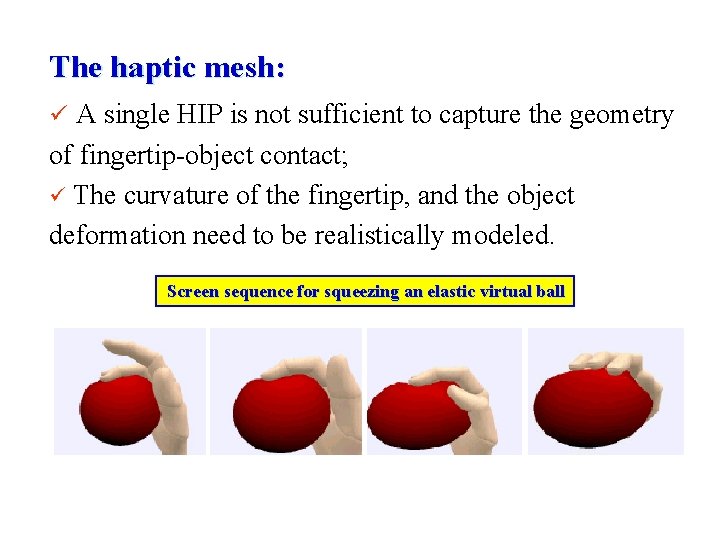
The haptic mesh: ü A single HIP is not sufficient to capture the geometry of fingertip-object contact; ü The curvature of the fingertip, and the object deformation need to be realistically modeled. Screen sequence for squeezing an elastic virtual ball
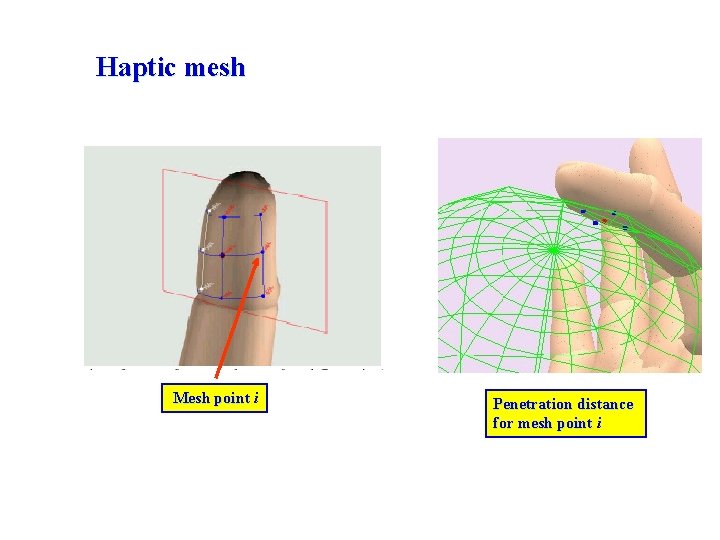
Haptic mesh Mesh point i Penetration distance for mesh point i
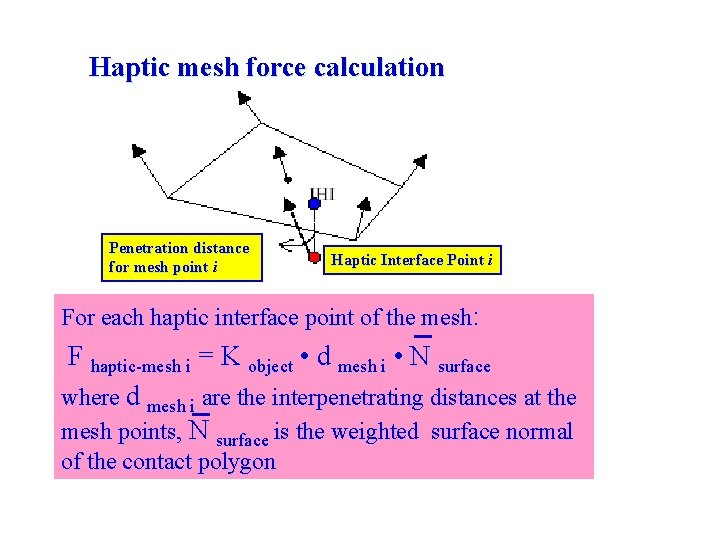
Haptic mesh force calculation Penetration distance for mesh point i Haptic Interface Point i For each haptic interface point of the mesh: F haptic-mesh i = K object • d mesh i • N surface where d mesh i are the interpenetrating distances at the mesh points, N surface is the weighted surface normal of the contact polygon
The Haptics Rendering Pipeline Traversal Collision Detection Force Calculation Force Smoothing Tactile Force Mapping Haptic Texturing Display
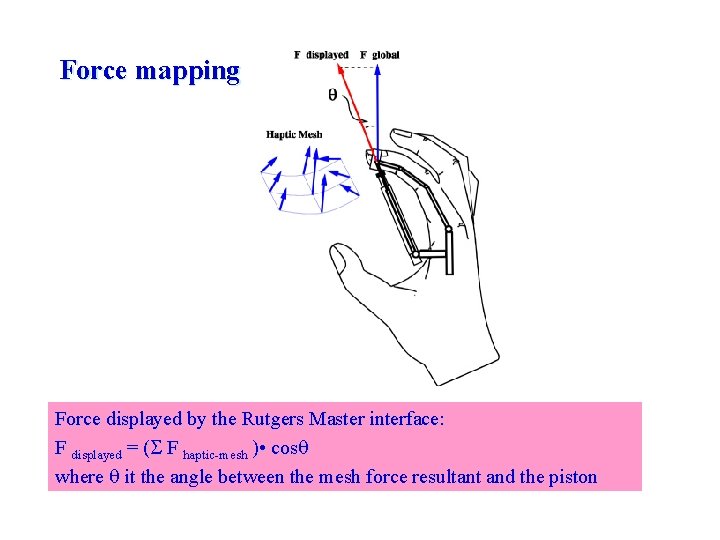
Force mapping Force displayed by the Rutgers Master interface: F displayed = ( F haptic-mesh ) • cos where it the angle between the mesh force resultant and the piston
The Haptics Rendering Pipeline Traversal Collision Detection Force Calculation Force Smoothing Tactile Force Mapping Haptic Texturing Display
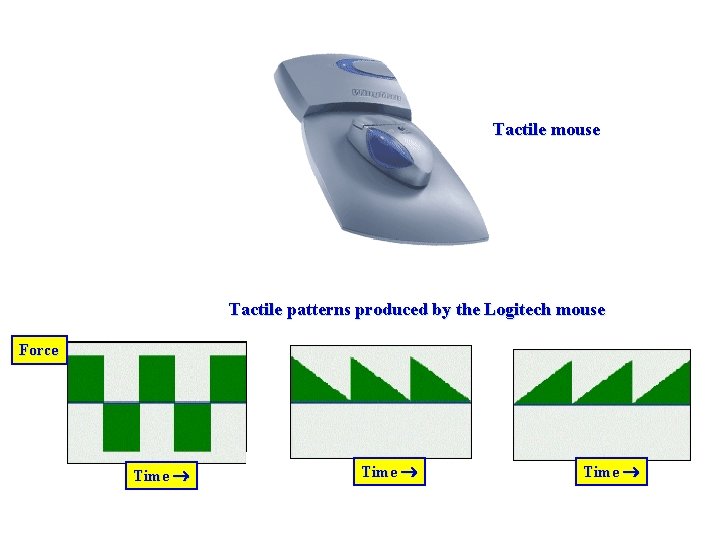
Tactile mouse Tactile patterns produced by the Logitech mouse Force Time
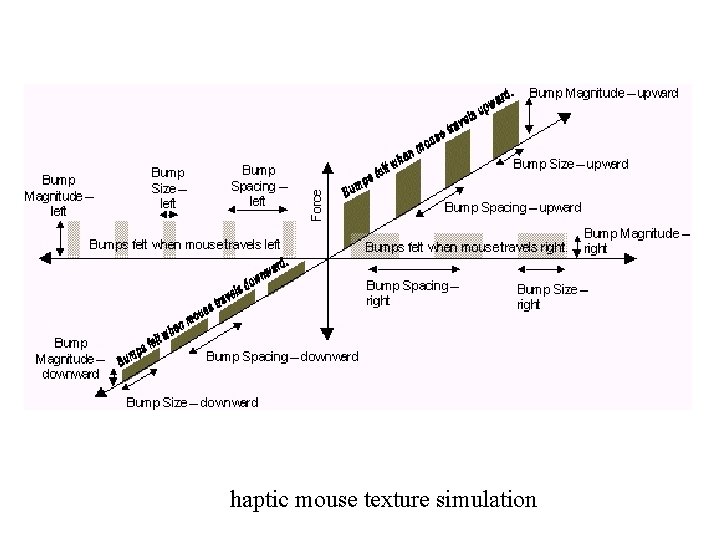
haptic mouse texture simulation
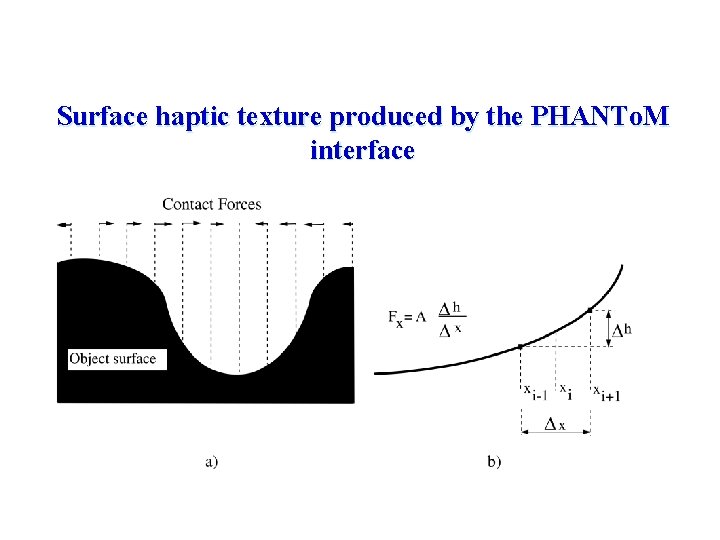
Surface haptic texture produced by the PHANTo. M interface
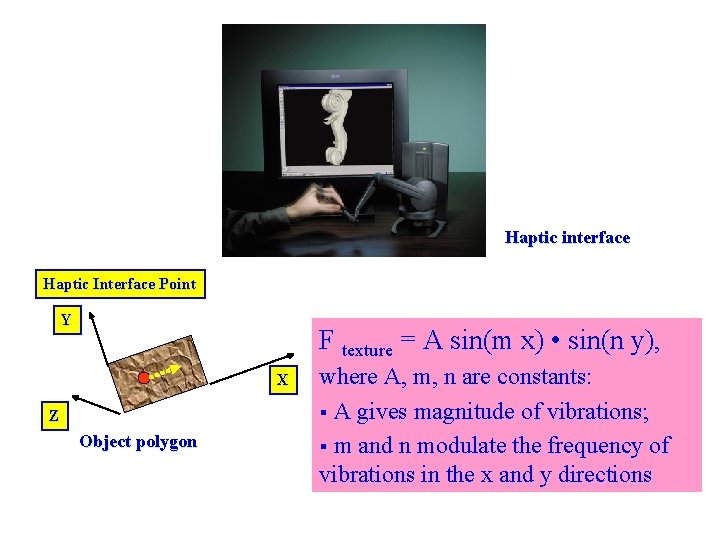
Haptic interface Haptic Interface Point Y F texture = A sin(m x) • sin(n y), X Z Object polygon where A, m, n are constants: § A gives magnitude of vibrations; § m and n modulate the frequency of vibrations in the x and y directions
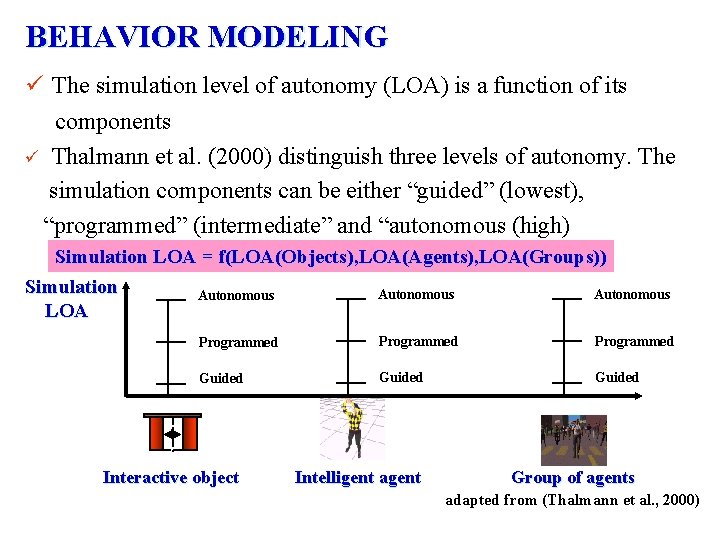
BEHAVIOR MODELING ü The simulation level of autonomy (LOA) is a function of its components ü Thalmann et al. (2000) distinguish three levels of autonomy. The simulation components can be either “guided” (lowest), “programmed” (intermediate” and “autonomous (high) Simulation LOA = f(LOA(Objects), LOA(Agents), LOA(Groups)) Simulation Autonomous LOA Programmed Guided Intelligent agent Group of agents Interactive object adapted from (Thalmann et al. , 2000)
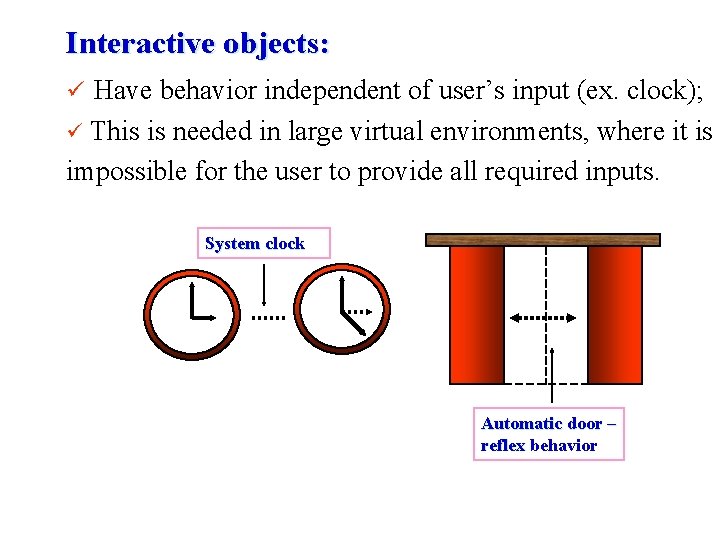
Interactive objects: ü Have behavior independent of user’s input (ex. clock); This is needed in large virtual environments, where it is impossible for the user to provide all required inputs. ü System clock Automatic door – reflex behavior
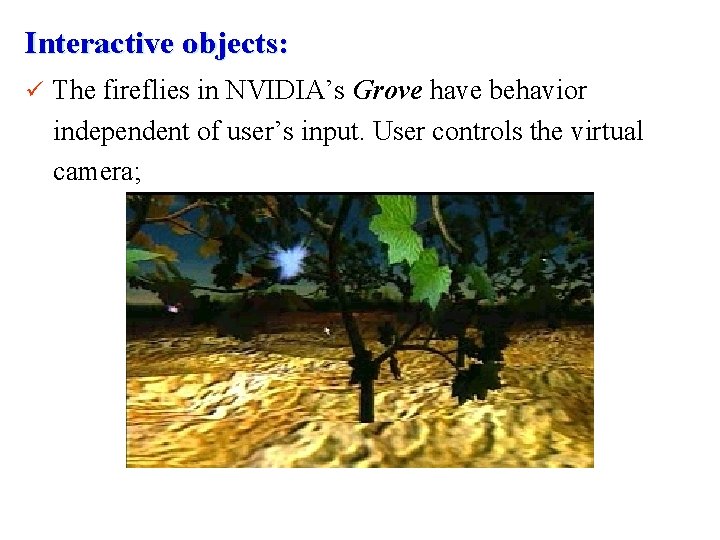
Interactive objects: ü The fireflies in NVIDIA’s Grove have behavior independent of user’s input. User controls the virtual camera;
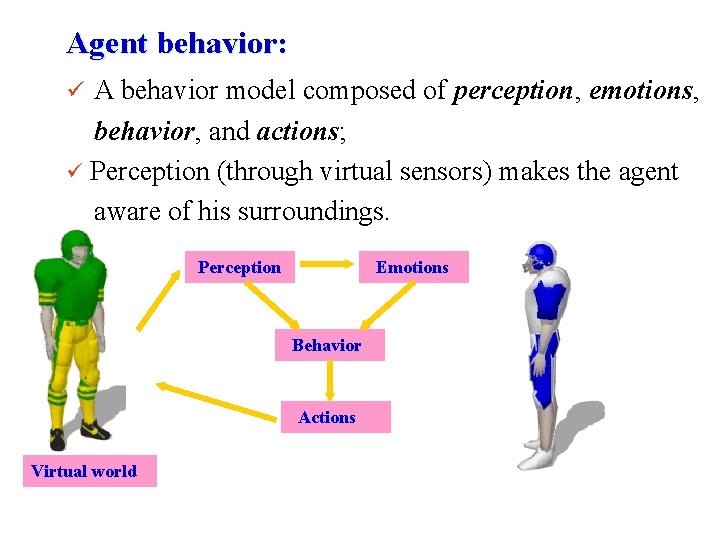
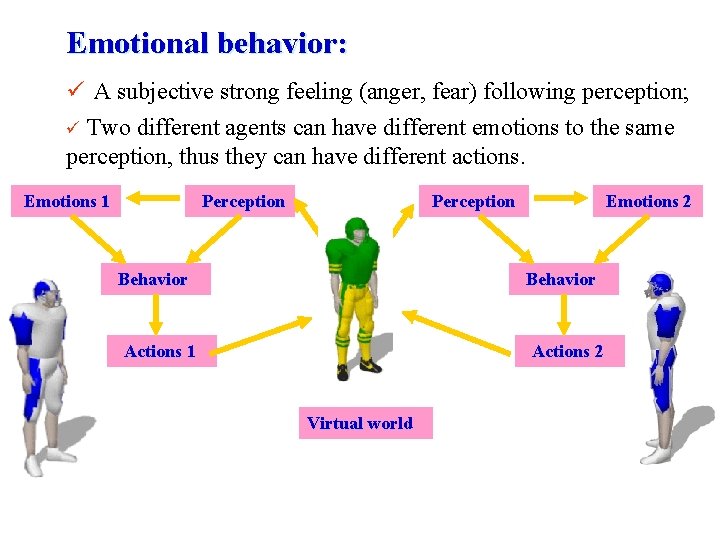
Agent behavior: ü A behavior model composed of perception, emotions, behavior, and actions; ü Perception (through virtual sensors) makes the agent aware of his surroundings. Perception Emotions Behavior Actions Virtual world
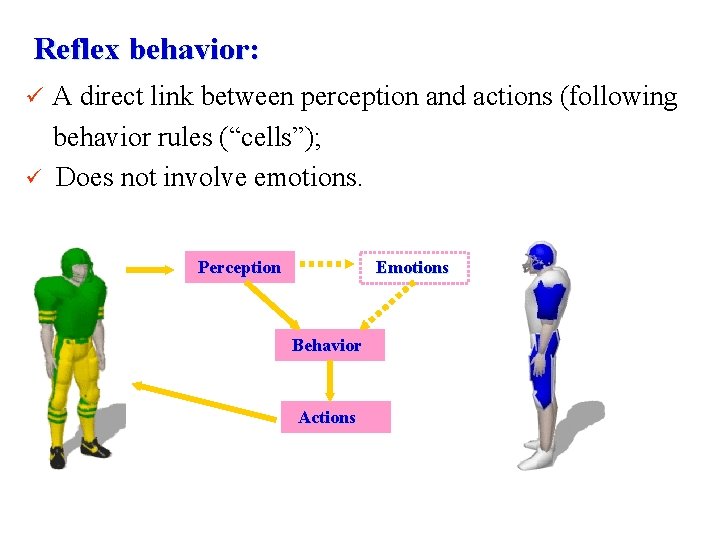
Reflex behavior: ü A direct link between perception and actions (following ü behavior rules (“cells”); Does not involve emotions. Perception Emotions Behavior Actions
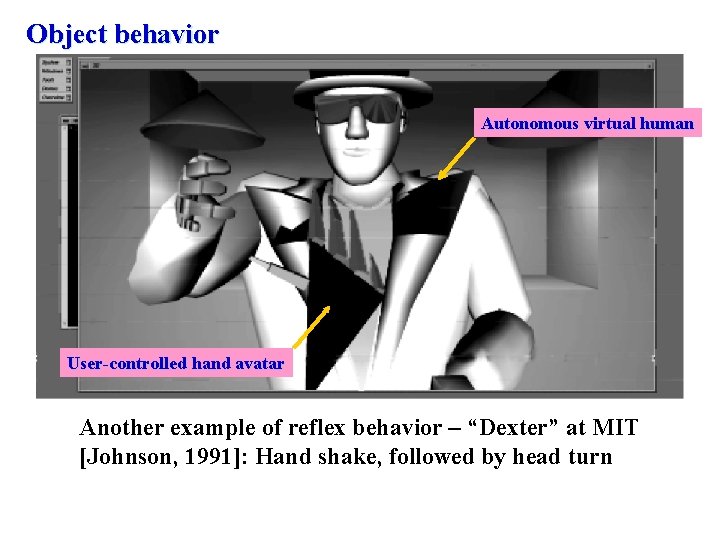
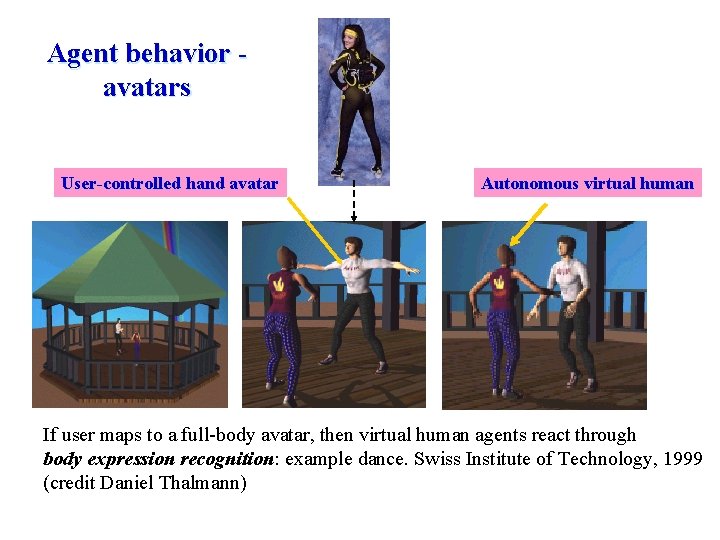
Object behavior Autonomous virtual human User-controlled hand avatar Another example of reflex behavior – “Dexter” at MIT [Johnson, 1991]: Hand shake, followed by head turn
Agent behavior avatars User-controlled hand avatar Autonomous virtual human If user maps to a full-body avatar, then virtual human agents react through body expression recognition: example dance. Swiss Institute of Technology, 1999 (credit Daniel Thalmann)
Emotional behavior: ü A subjective strong feeling (anger, fear) following perception; ü Two different agents can have different emotions to the same perception, thus they can have different actions. Emotions 1 Perception Behavior Emotions 2 Behavior Actions 1 Actions 2 Virtual world
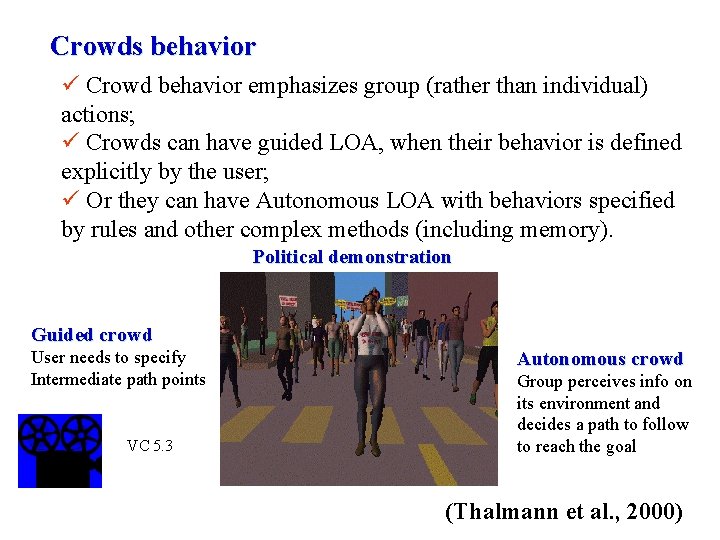
Crowds behavior ü Crowd behavior emphasizes group (rather than individual) actions; ü Crowds can have guided LOA, when their behavior is defined explicitly by the user; ü Or they can have Autonomous LOA with behaviors specified by rules and other complex methods (including memory). Political demonstration Guided crowd User needs to specify Intermediate path points VC 5. 3 Autonomous crowd Group perceives info on its environment and decides a path to follow to reach the goal (Thalmann et al. , 2000)
MODEL MANAGEMENT ü It is necessary to maintain interactivity and constant frame rates when rendering complex models. Several techniques exist: § Level of detail segmentation; § Cell segmentation; § Off-line computations; § Lighting and bump mapping at rendering stage; § Portals.
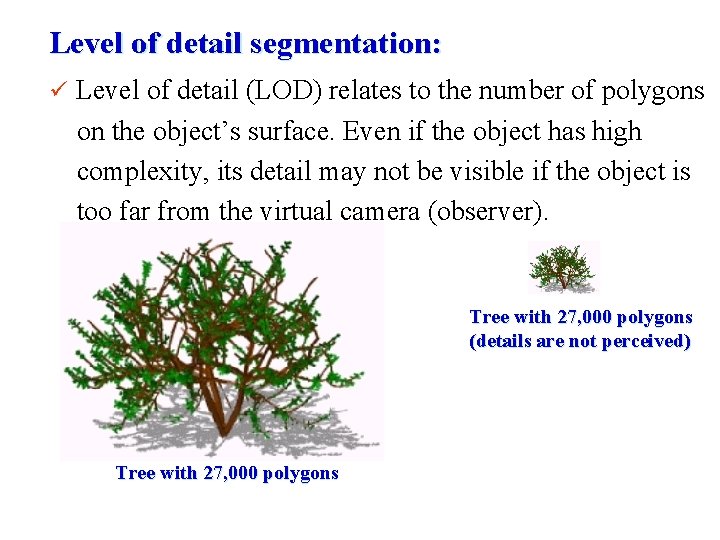
Level of detail segmentation: ü Level of detail (LOD) relates to the number of polygons on the object’s surface. Even if the object has high complexity, its detail may not be visible if the object is too far from the virtual camera (observer). Tree with 27, 000 polygons (details are not perceived) Tree with 27, 000 polygons
Static level of detail management: ü Then we should use a simplified version of the object (fewer polygons), when it is far from the camera. ü There are several approaches: § Discrete geometry LOD; § Alpha LOD; § Geometric morphing (“geo-morph”) LOD.
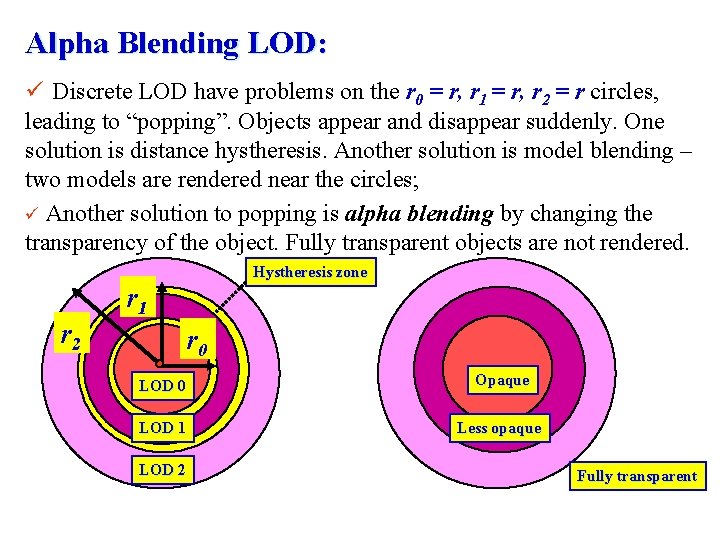
Discrete Geometry LOD: ü Uses several discrete models of the same virtual object; ü Models are switched based on their distance from the camera (r r 0; r 0 r r 1; r 1 r r 2; r 2 r) r 1 r 2 r 0 LOD 1 LOD 2
Alpha Blending LOD: ü Discrete LOD have problems on the r 0 = r, r 1 = r, r 2 = r circles, leading to “popping”. Objects appear and disappear suddenly. One solution is distance hystheresis. Another solution is model blending – two models are rendered near the circles; ü Another solution to popping is alpha blending by changing the transparency of the object. Fully transparent objects are not rendered. Hystheresis zone r 1 r 2 r 0 LOD 0 Opaque LOD 1 Less opaque LOD 2 Fully transparent
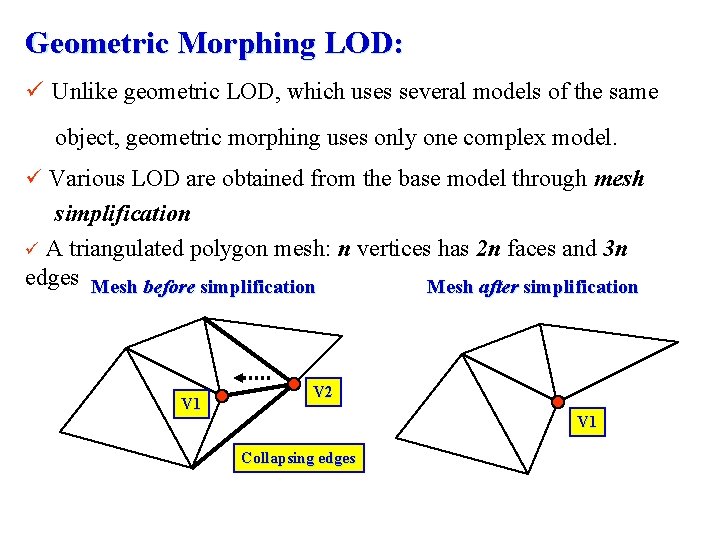
Geometric Morphing LOD: ü Unlike geometric LOD, which uses several models of the same object, geometric morphing uses only one complex model. ü Various LOD are obtained from the base model through mesh simplification ü A triangulated polygon mesh: n vertices has 2 n faces and 3 n edges Mesh before simplification Mesh after simplification V 1 V 2 V 1 Collapsing edges
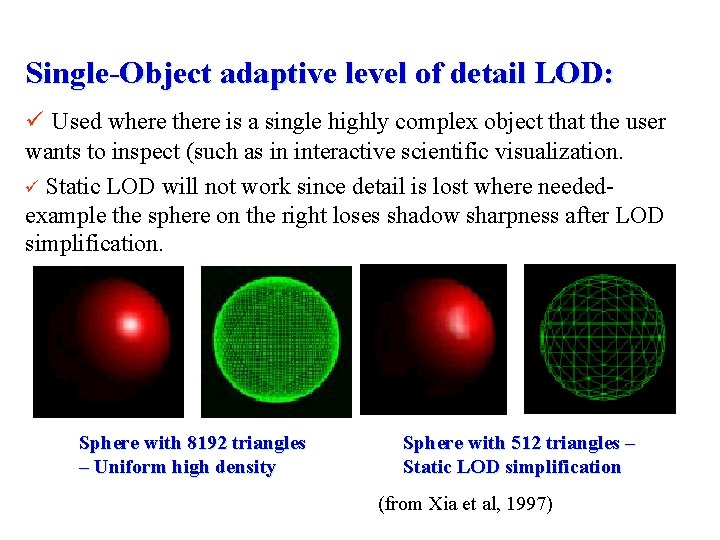
Single-Object adaptive level of detail LOD: ü Used where there is a single highly complex object that the user wants to inspect (such as in interactive scientific visualization. ü Static LOD will not work since detail is lost where neededexample the sphere on the right loses shadow sharpness after LOD simplification. Sphere with 8192 triangles – Uniform high density Sphere with 512 triangles – Static LOD simplification (from Xia et al, 1997)
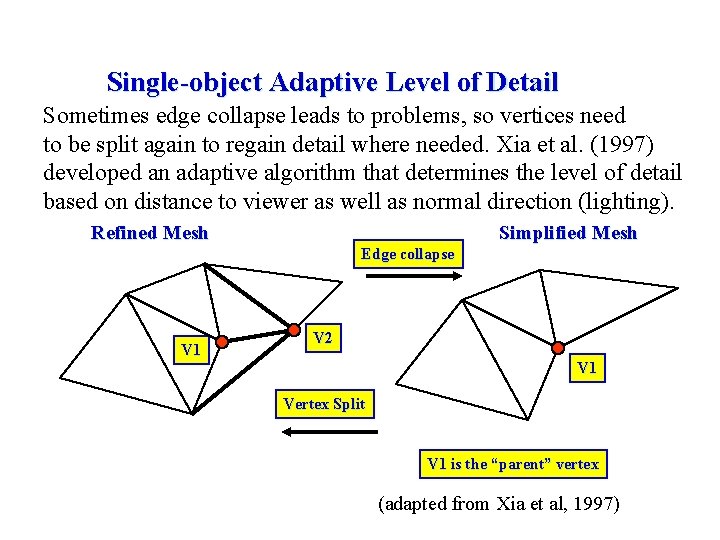
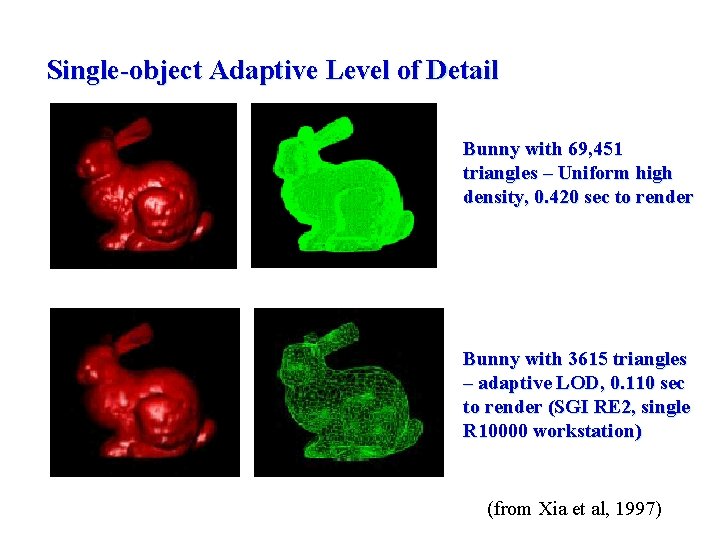
Single-object Adaptive Level of Detail Sometimes edge collapse leads to problems, so vertices need to be split again to regain detail where needed. Xia et al. (1997) developed an adaptive algorithm that determines the level of detail based on distance to viewer as well as normal direction (lighting). Refined Mesh Simplified Mesh Edge collapse V 1 V 2 V 1 Vertex Split V 1 is the “parent” vertex (adapted from Xia et al, 1997)
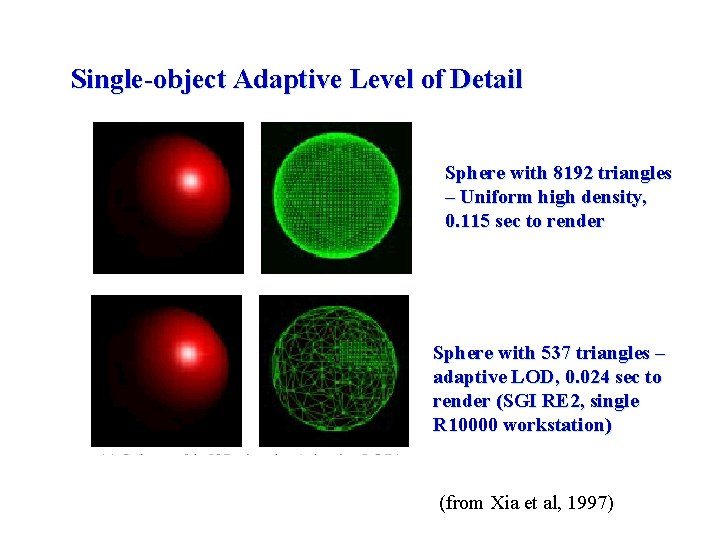
Single-object Adaptive Level of Detail Sphere with 8192 triangles – Uniform high density, 0. 115 sec to render Sphere with 537 triangles – adaptive LOD, 0. 024 sec to render (SGI RE 2, single R 10000 workstation) (from Xia et al, 1997)
Single-object Adaptive Level of Detail Bunny with 69, 451 triangles – Uniform high density, 0. 420 sec to render Bunny with 3615 triangles – adaptive LOD, 0. 110 sec to render (SGI RE 2, single R 10000 workstation) (from Xia et al, 1997)
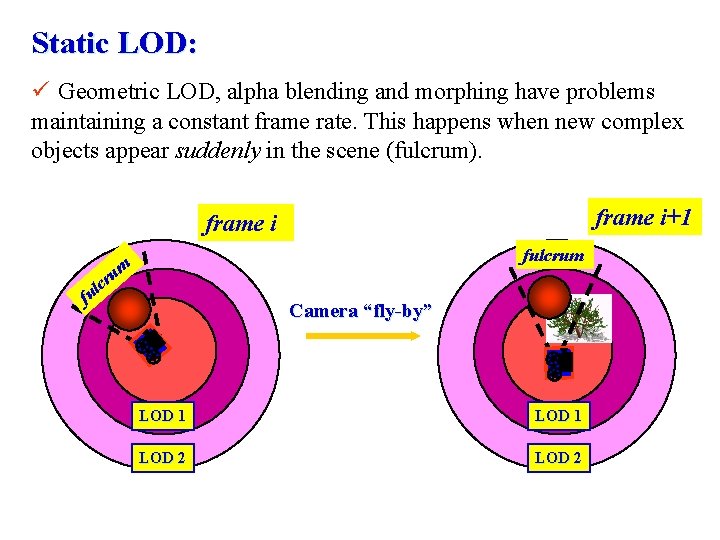
Static LOD: ü Geometric LOD, alpha blending and morphing have problems maintaining a constant frame rate. This happens when new complex objects appear suddenly in the scene (fulcrum). frame i+1 frame i fulcrum um cr l u f Camera “fly-by” LOD 1 LOD 2
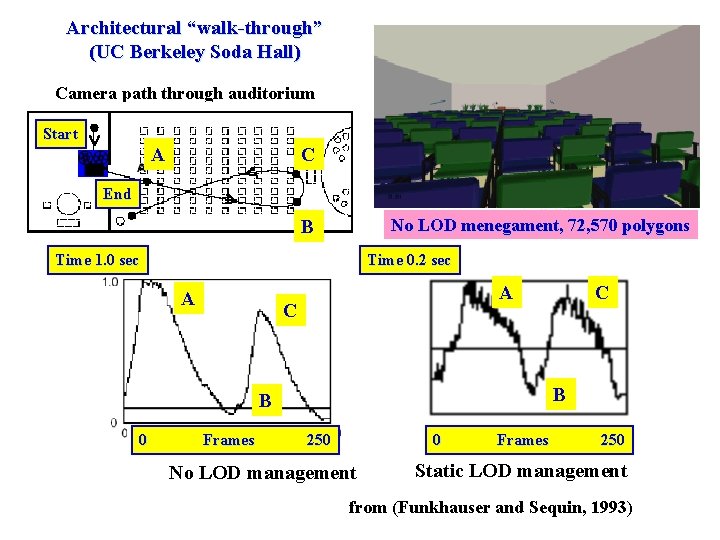
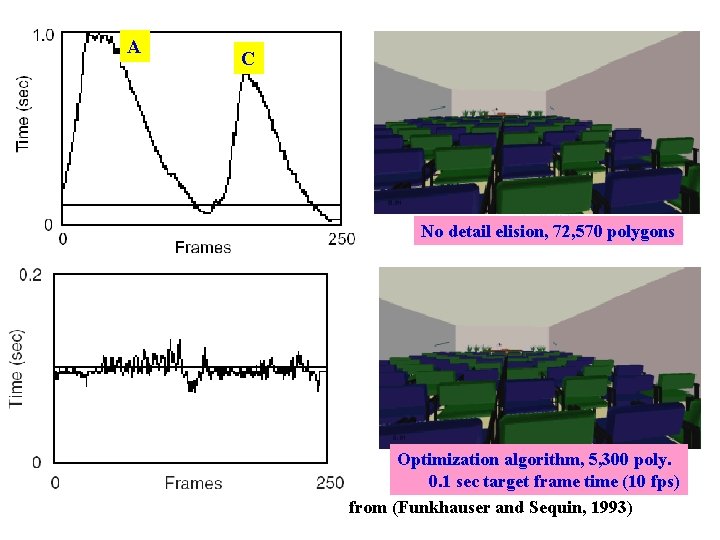
Architectural “walk-through” (UC Berkeley Soda Hall) Camera path through auditorium Start A C End No LOD menegament, 72, 570 polygons B Time 1. 0 sec Time 0. 2 sec A A C B B 0 Frames C 250 0 No LOD management Frames 250 Static LOD management from (Funkhauser and Sequin, 1993)
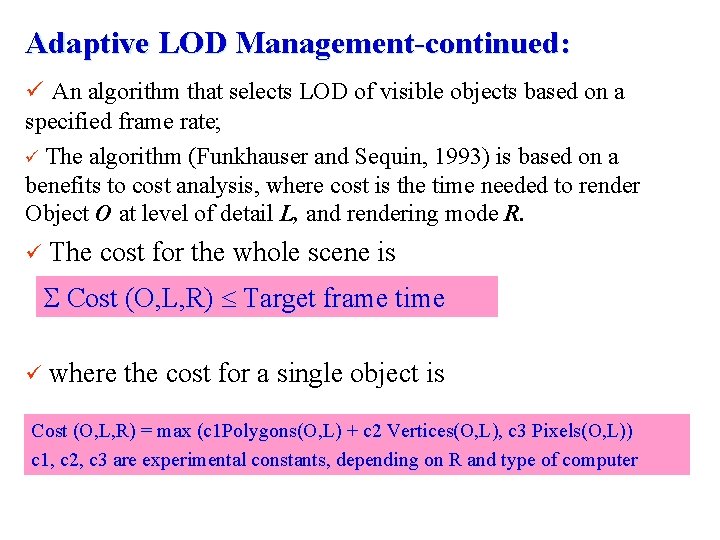
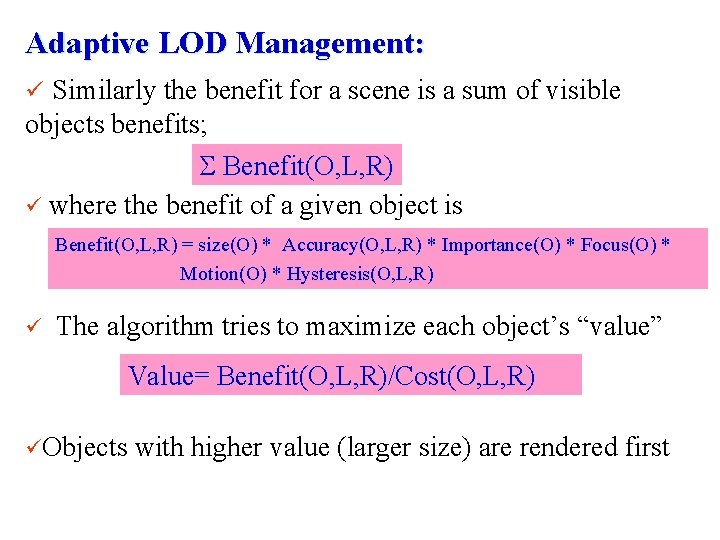
Adaptive LOD Management-continued: ü An algorithm that selects LOD of visible objects based on a specified frame rate; ü The algorithm (Funkhauser and Sequin, 1993) is based on a benefits to cost analysis, where cost is the time needed to render Object O at level of detail L, and rendering mode R. ü The cost for the whole scene is Cost (O, L, R) Target frame time ü where the cost for a single object is Cost (O, L, R) = max (c 1 Polygons(O, L) + c 2 Vertices(O, L), c 3 Pixels(O, L)) c 1, c 2, c 3 are experimental constants, depending on R and type of computer
Adaptive LOD Management: ü Similarly the benefit for a scene is a sum of visible objects benefits; Benefit(O, L, R) ü where the benefit of a given object is Benefit(O, L, R) = size(O) * Accuracy(O, L, R) * Importance(O) * Focus(O) * Motion(O) * Hysteresis(O, L, R) ü The algorithm tries to maximize each object’s “value” Value= Benefit(O, L, R)/Cost(O, L, R) üObjects with higher value (larger size) are rendered first
A C No detail elision, 72, 570 polygons Optimization algorithm, 5, 300 poly. 0. 1 sec target frame time (10 fps) from (Funkhauser and Sequin, 1993)
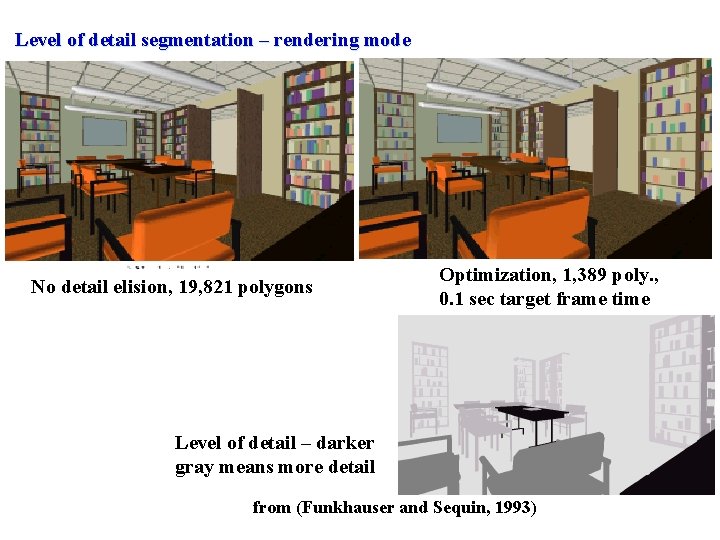
Level of detail segmentation – rendering mode No detail elision, 19, 821 polygons Optimization, 1, 389 poly. , 0. 1 sec target frame time Level of detail – darker gray means more detail from (Funkhauser and Sequin, 1993)
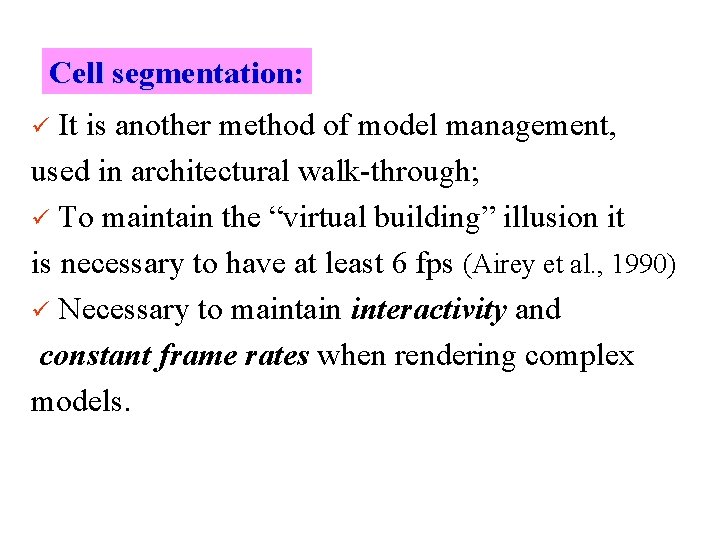
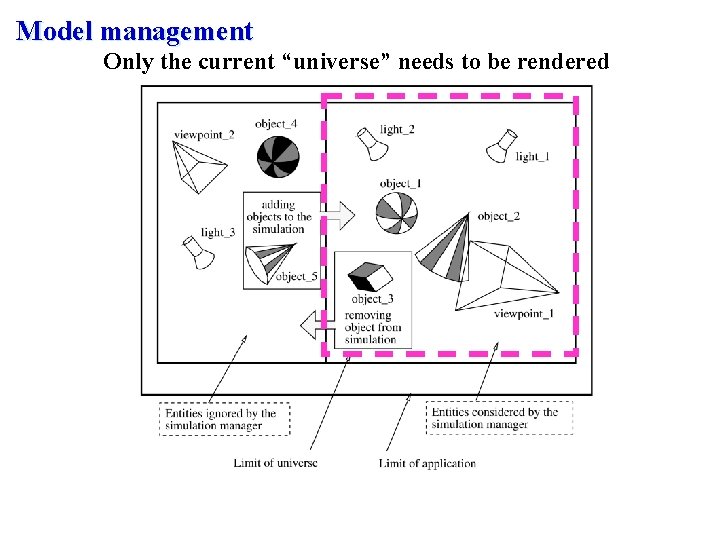
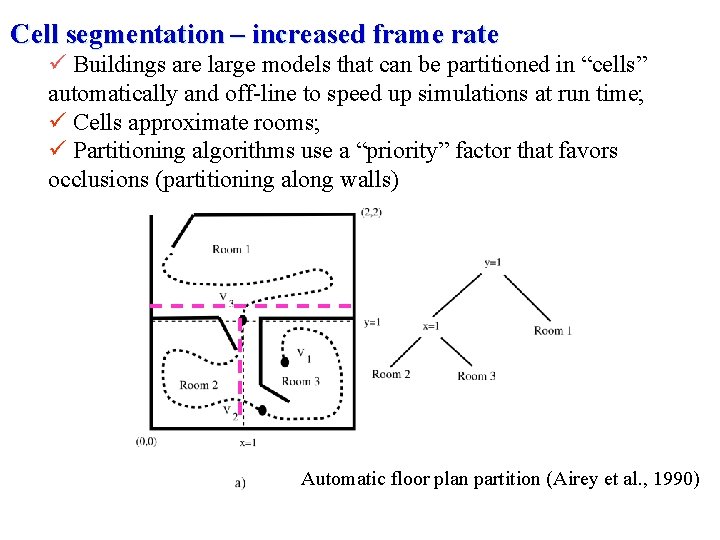
Cell segmentation: It is another method of model management, used in architectural walk-through; ü To maintain the “virtual building” illusion it is necessary to have at least 6 fps (Airey et al. , 1990) ü Necessary to maintain interactivity and constant frame rates when rendering complex models. ü
Model management Only the current “universe” needs to be rendered
Cell segmentation – increased frame rate ü Buildings are large models that can be partitioned in “cells” automatically and off-line to speed up simulations at run time; ü Cells approximate rooms; ü Partitioning algorithms use a “priority” factor that favors occlusions (partitioning along walls) Automatic floor plan partition (Airey et al. , 1990)
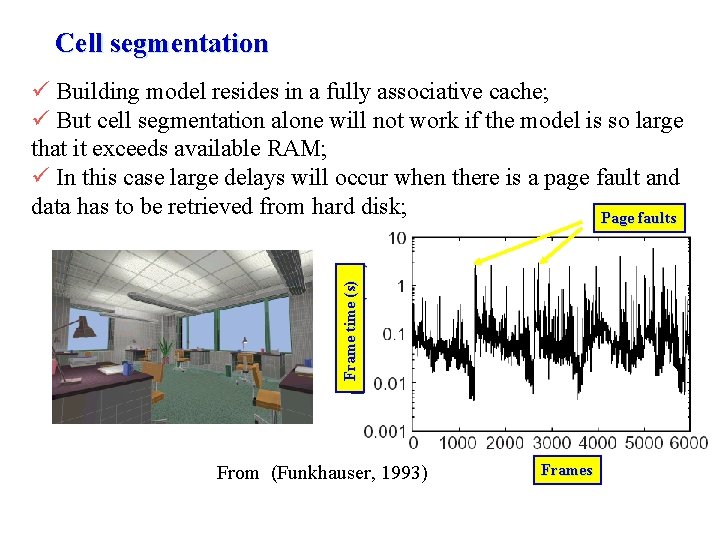
Cell segmentation Frame time (s) ü Building model resides in a fully associative cache; ü But cell segmentation alone will not work if the model is so large that it exceeds available RAM; ü In this case large delays will occur when there is a page fault and data has to be retrieved from hard disk; Page faults From (Funkhauser, 1993) Frames
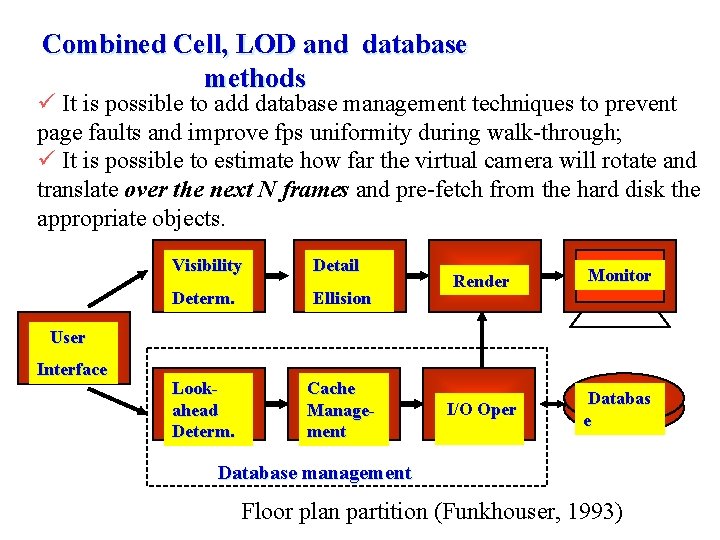
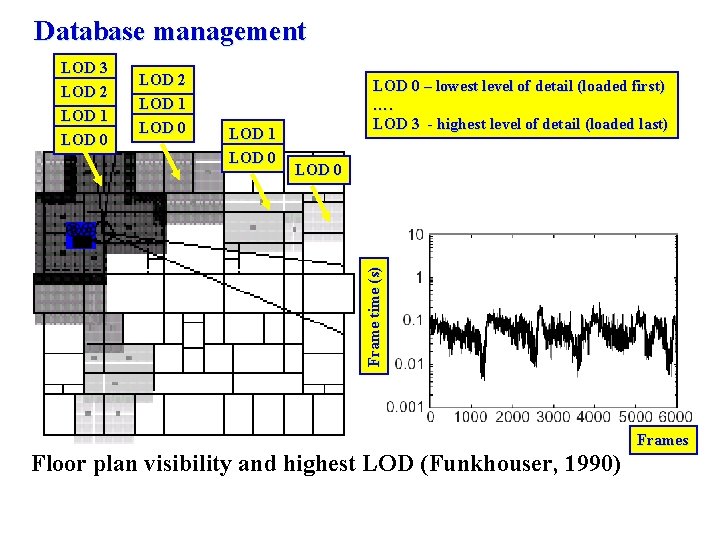
Combined Cell, LOD and database methods ü It is possible to add database management techniques to prevent page faults and improve fps uniformity during walk-through; ü It is possible to estimate how far the virtual camera will rotate and translate over the next N frames and pre-fetch from the hard disk the appropriate objects. Visibility Detail Determ. Ellision Lookahead Determ. Cache Management Render Monitor I/O Oper Databas e User Interface Database management Floor plan partition (Funkhouser, 1993)
Database management LOD 3 LOD 2 LOD 1 LOD 0 – lowest level of detail (loaded first) …. LOD 3 - highest level of detail (loaded last) LOD 0 Frame time (s) LOD 0 LOD 2 LOD 1 Frames Floor plan visibility and highest LOD (Funkhouser, 1990)