
Virtual Private Networks Using Crypto IP Encapsulation Mark

- Slides: 13
Virtual Private Networks Using Crypto IP Encapsulation Mark Kamichoff <prox@prolixium. com> These slides are available from http: //prolixium. com/files/siglinux. [pdf/ppt]
What is a VPN? (from whatis. com) n A VPN (virtual private network) is a way to use a public telecommunication infrastructure, such as the Internet, to provide remote offices or individual users with secure access to their organization's network.
Why do we need a VPN? Useful for accessing machines behind firewalls from other networks Provides a secure way of extending a network without buying leased lines or connecting via other physical medium …it’s cool!
Some Other VPN Implementations IPIP n For Linux, real old (no IPv 6 support, etc) GRE n Made by Cisco, modern IPSec PPTP/L 2 TP n n PPTP Developed by Microsoft L 2 TP now an IETF standard, extending/fixing features in PPTP
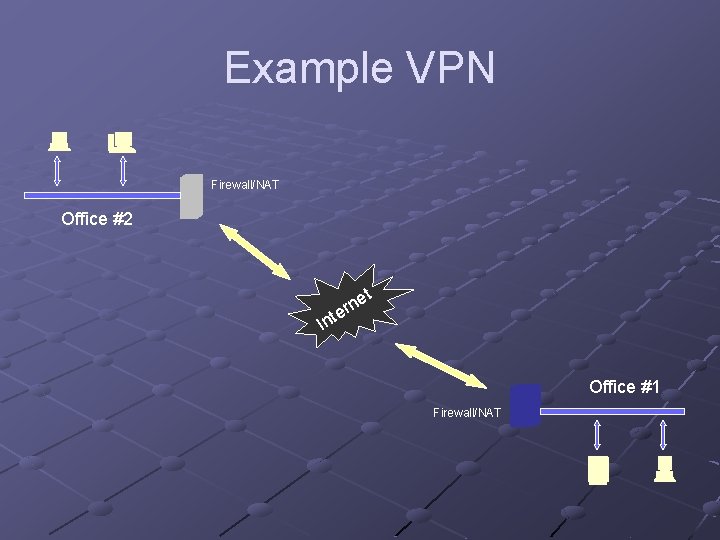
Example VPN Firewall/NAT Office #2 I et n r nte Office #1 Firewall/NAT
Why CIPE? Free! n Distributed under the GNU General Public License Encrypted, provides worry-free encapsulation Uses UDP, rather than TCP n n Useful for passing through some firewalls No TCP-in-TCP retransmit issues http: //sites. inka. de/sites/bigred/devel/tcp-tcp. html
Getting started… Download CIPE n http: //sites. inka. de/sites/bigred/devel/cipe. html Configure and Install n n n Needs Open. SSL libraries/headers and Linux kernel source, among other things Will build cipcb. o module Might complain about a tex error during `make install` (ignore; you just won’t get docs)
Configuring CIPE Install CIPE on hosts that will route packets on the VPN Configure options files n Back to our diagram!
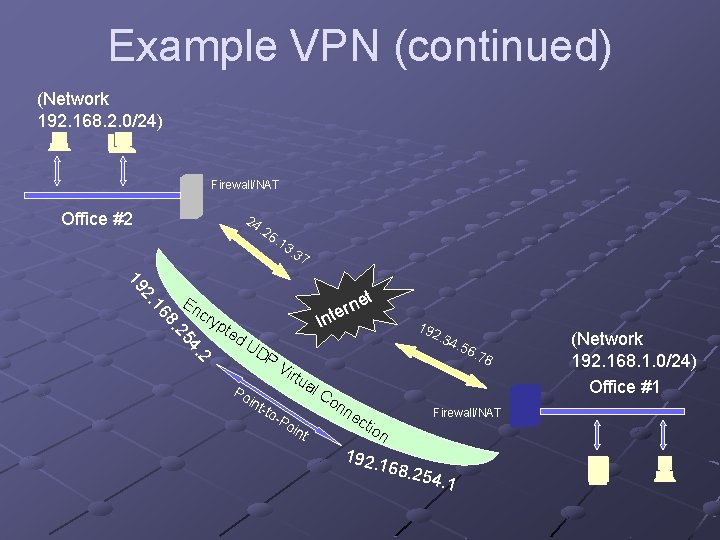
Example VPN (continued) (Network 192. 168. 2. 0/24) Firewall/NAT Office #2 24 . 26 . 13 . 37 t cry ne r e nt I pte d. U DP 2 4. 25 8. 16 2. 19 En 192. 34 . 56 Vir . 78 tua Po int -to -P oin t l. C on ne cti o 192. Firewall/NAT n 168. 254. 1 (Network 192. 168. 1. 0/24) Office #1
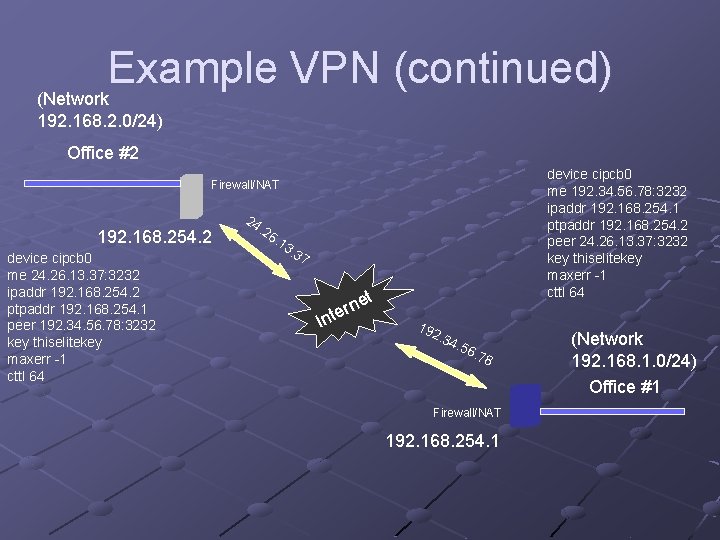
Example VPN (continued) (Network 192. 168. 2. 0/24) Office #2 device cipcb 0 me 192. 34. 56. 78: 3232 ipaddr 192. 168. 254. 1 ptpaddr 192. 168. 254. 2 peer 24. 26. 13. 37: 3232 key thiselitekey maxerr -1 cttl 64 Firewall/NAT 192. 168. 254. 2 device cipcb 0 me 24. 26. 13. 37: 3232 ipaddr 192. 168. 254. 2 ptpaddr 192. 168. 254. 1 peer 192. 34. 56. 78: 3232 key thiselitekey maxerr -1 cttl 64 24 . 26 . 13 . 37 t I ne r e nt 192. 34 . 56 . 78 Firewall/NAT 192. 168. 254. 1 (Network 192. 168. 1. 0/24) Office #1
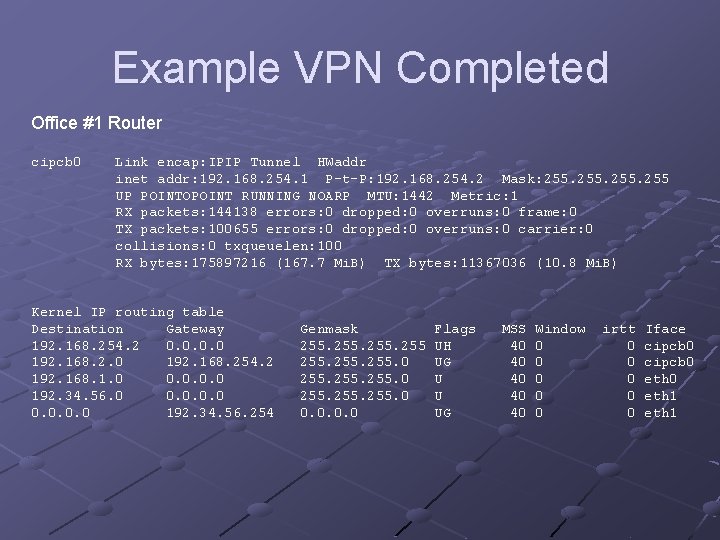
Example VPN Completed Office #1 Router cipcb 0 Link encap: IPIP Tunnel HWaddr inet addr: 192. 168. 254. 1 P-t-P: 192. 168. 254. 2 Mask: 255 UP POINTOPOINT RUNNING NOARP MTU: 1442 Metric: 1 RX packets: 144138 errors: 0 dropped: 0 overruns: 0 frame: 0 TX packets: 100655 errors: 0 dropped: 0 overruns: 0 carrier: 0 collisions: 0 txqueuelen: 100 RX bytes: 175897216 (167. 7 Mi. B) TX bytes: 11367036 (10. 8 Mi. B) Kernel IP routing table Destination Gateway 192. 168. 254. 2 0. 0 192. 168. 254. 2 192. 168. 1. 0 0. 0 192. 34. 56. 254 Genmask 255. 0 255. 0 0. 0 Flags UH UG U U UG MSS 40 40 40 Window 0 0 0 irtt 0 0 0 Iface cipcb 0 eth 1
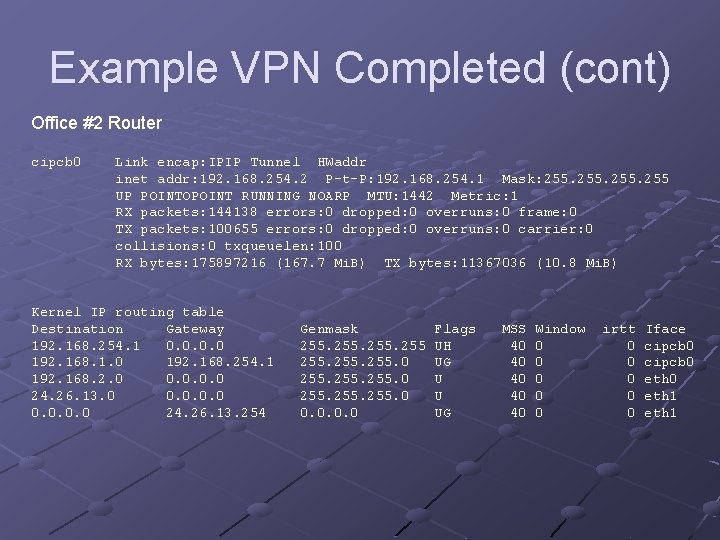
Example VPN Completed (cont) Office #2 Router cipcb 0 Link encap: IPIP Tunnel HWaddr inet addr: 192. 168. 254. 2 P-t-P: 192. 168. 254. 1 Mask: 255 UP POINTOPOINT RUNNING NOARP MTU: 1442 Metric: 1 RX packets: 144138 errors: 0 dropped: 0 overruns: 0 frame: 0 TX packets: 100655 errors: 0 dropped: 0 overruns: 0 carrier: 0 collisions: 0 txqueuelen: 100 RX bytes: 175897216 (167. 7 Mi. B) TX bytes: 11367036 (10. 8 Mi. B) Kernel IP routing table Destination Gateway 192. 168. 254. 1 0. 0 192. 168. 1. 0 192. 168. 254. 1 192. 168. 2. 0 0. 0 24. 26. 13. 254 Genmask 255. 0 255. 0 0. 0 Flags UH UG U U UG MSS 40 40 40 Window 0 0 0 irtt 0 0 0 Iface cipcb 0 eth 1
Misc. Links http: //www. tldp. org/HOWTO/Adv-Routing-HOWTO/ n Linux Advanced Routing & Traffic Control HOWTO http: //www. seattlewireless. net/index. cgi/Ip. Tunnel n Generic IP Tunnel HOWTO