
Virtual Memory 1 Outline Multilevel page tables Different
Virtual Memory 1

Outline • Multilevel page tables • Different points of view • Pentium/Linux Memory System • Memory Mapping • Suggested reading: 10. 6, 10. 3, 10. 7, 10. 8 2
10. 6 Address Translation 10. 6. 3 Multi Level Page Tables 3
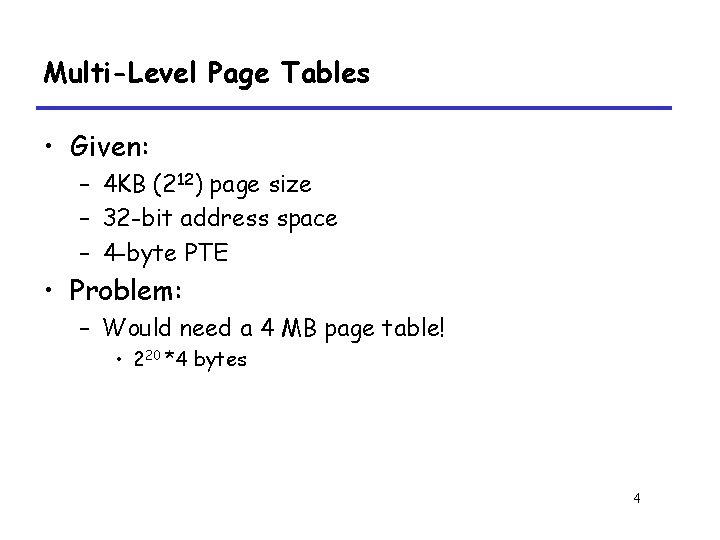
Multi-Level Page Tables • Given: – 4 KB (212) page size – 32 -bit address space – 4 -byte PTE • Problem: – Would need a 4 MB page table! • 220 *4 bytes 4
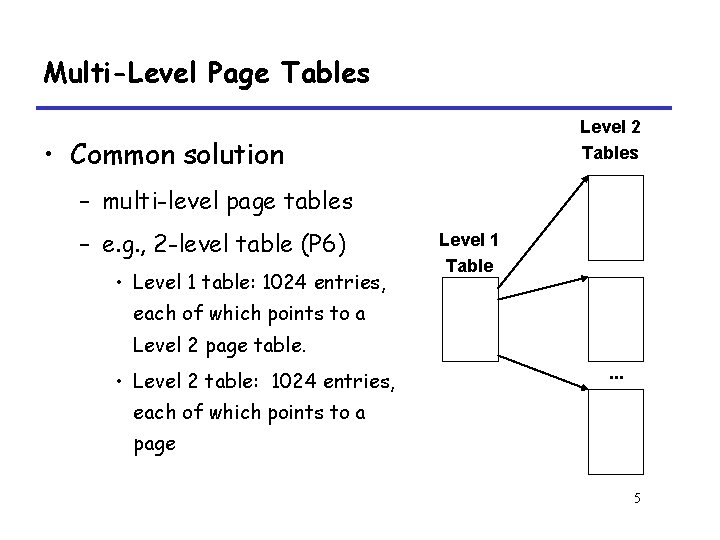
Multi-Level Page Tables Level 2 Tables • Common solution – multi-level page tables – e. g. , 2 -level table (P 6) • Level 1 table: 1024 entries, Level 1 Table each of which points to a Level 2 page table. • Level 2 table: 1024 entries, . . . each of which points to a page 5
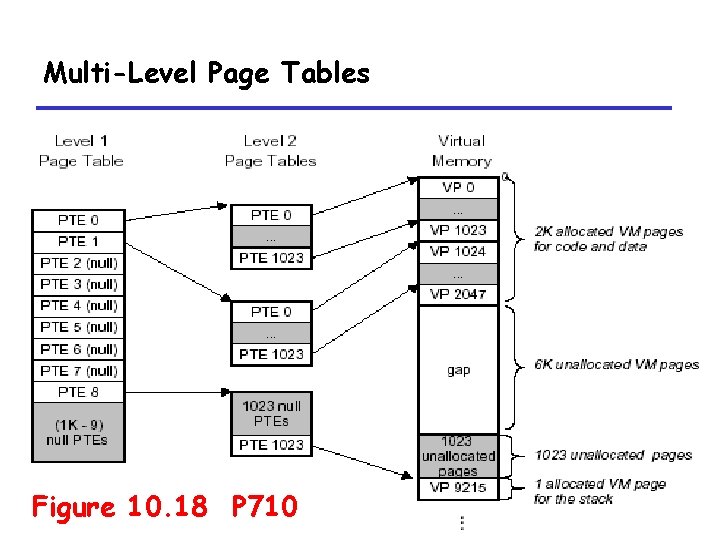
Multi-Level Page Tables Figure 10. 18 P 710 6
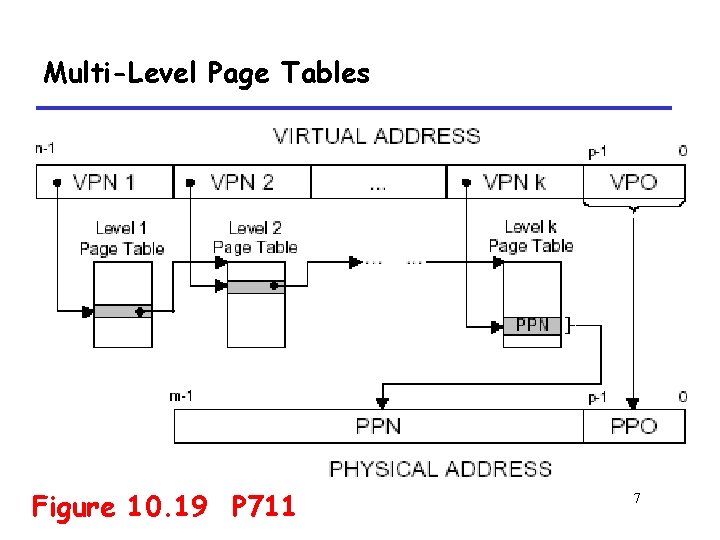
Multi-Level Page Tables Figure 10. 19 P 711 7
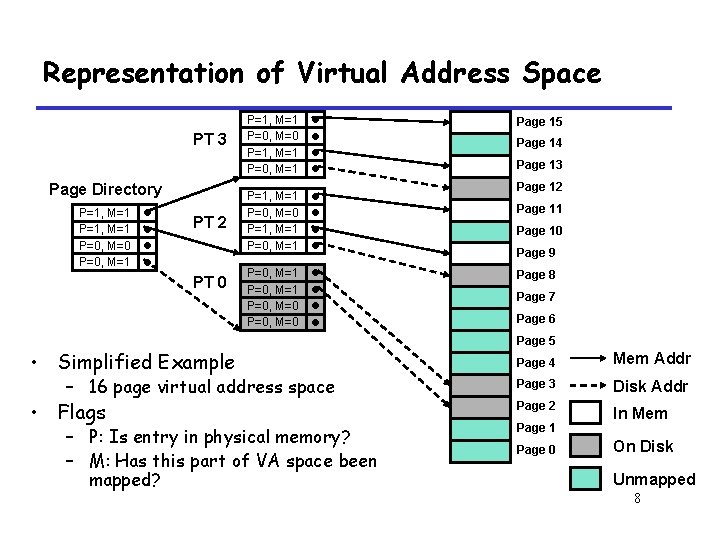
Representation of Virtual Address Space PT 3 Page Directory P=1, M=1 P=0, M=0 P=0, M=1 • • PT 2 PT 0 P=1, M=1 P=0, M=1 P=1, M=1 P=0, M=0 P=1, M=1 P=0, M=0 P=0, M=0 • • • • Simplified Example – 16 page virtual address space • Flags – P: Is entry in physical memory? – M: Has this part of VA space been mapped? Page 15 Page 14 Page 13 Page 12 Page 11 Page 10 Page 9 Page 8 Page 7 Page 6 Page 5 Page 4 Mem Addr Page 3 Disk Addr Page 2 In Mem Page 1 Page 0 On Disk Unmapped 8
10. 4 VM as a Tool for Memory Management 9
A Tool for Memory Management • Separate virtual address space – Each process has its own virtual address space • Simplify linking, sharing, loading, and memory allocation 10
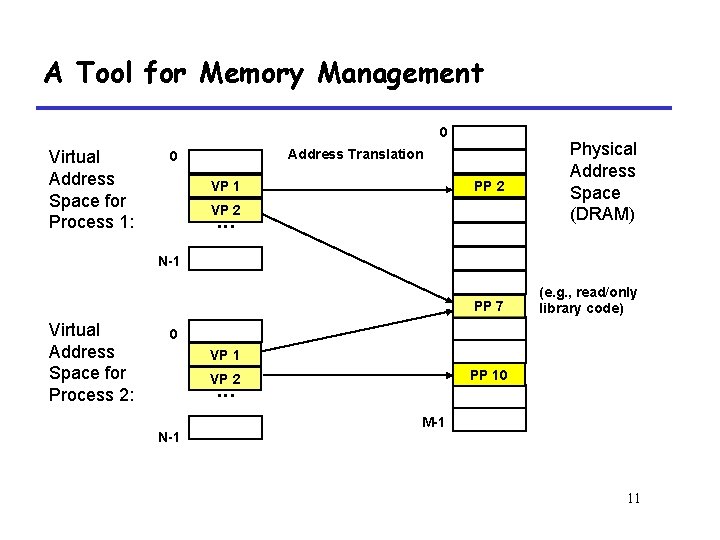
A Tool for Memory Management 0 Virtual Address Space for Process 1: PP 2 Physical Address Space (DRAM) PP 7 (e. g. , read/only library code) Address Translation 0 VP 1 VP 2 . . . N-1 Virtual Address Space for Process 2: 0 VP 1 PP 10 VP 2 . . . N-1 M-1 11

A Tool for Memory Management kernel virtual memory %esp Linux/x 86 process memory image memory invisible to user code stack Memory mapped region forshared libraries the “brk” ptr runtime heap (via malloc) uninitialized data (. bss) initialized data (. data) program text (. text) forbidden Figure 10. 10 P 702 12
10. 5 VM as a Tool for Memory Protection 13
A Tool for Memory Protection • Page table entry contains access rights information – hardware enforces this protection (trap into OS if violation occurs) 14
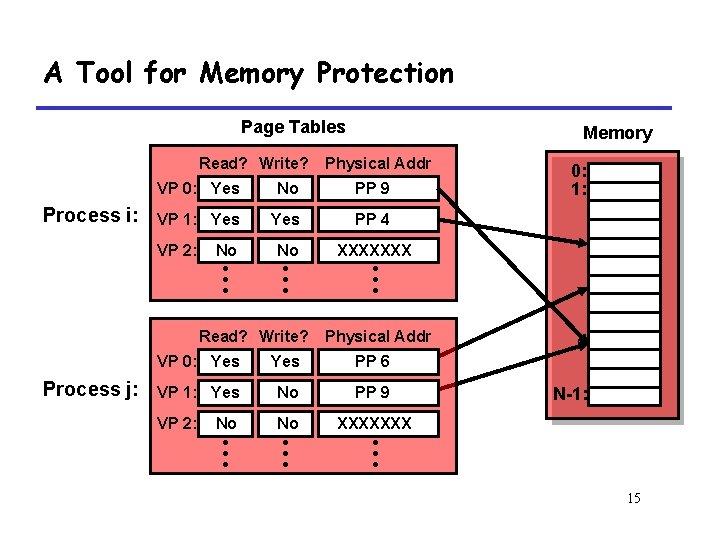
A Tool for Memory Protection Page Tables Read? Write? Process i: Physical Addr VP 0: Yes No PP 9 VP 1: Yes PP 4 No No XXXXXXX • • • VP 2: Read? Write? Process j: Memory 0: 1: Physical Addr VP 0: Yes PP 6 VP 1: Yes No PP 9 VP 2: No No XXXXXXX • • • N-1: 15
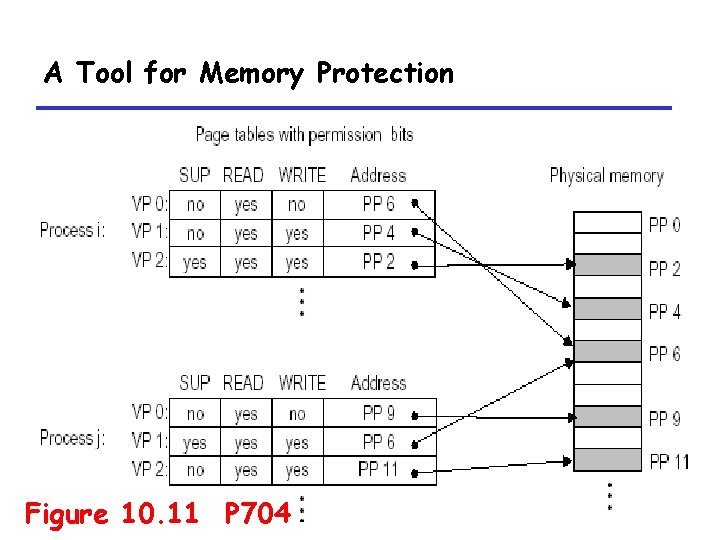
A Tool for Memory Protection Figure 10. 11 P 704 16
10. 7 Case Study: The Pentium/Linux Memory System 17
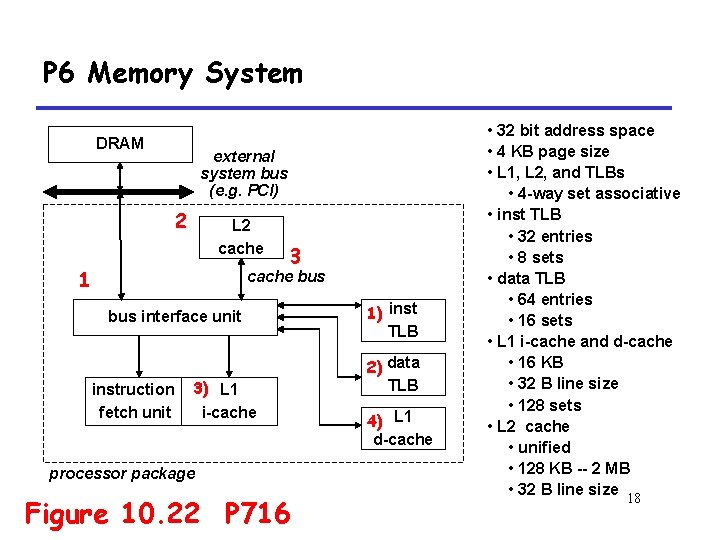
P 6 Memory System DRAM external system bus (e. g. PCI) 2 L 2 cache 1 3 cache bus interface unit instruction fetch unit 3) L 1 i-cache processor package Figure 10. 22 P 716 1) inst TLB 2) data TLB 4) L 1 d-cache • 32 bit address space • 4 KB page size • L 1, L 2, and TLBs • 4 -way set associative • inst TLB • 32 entries • 8 sets • data TLB • 64 entries • 16 sets • L 1 i-cache and d-cache • 16 KB • 32 B line size • 128 sets • L 2 cache • unified • 128 KB -- 2 MB • 32 B line size 18
10. 7. 1 Pentium Address Translation 19
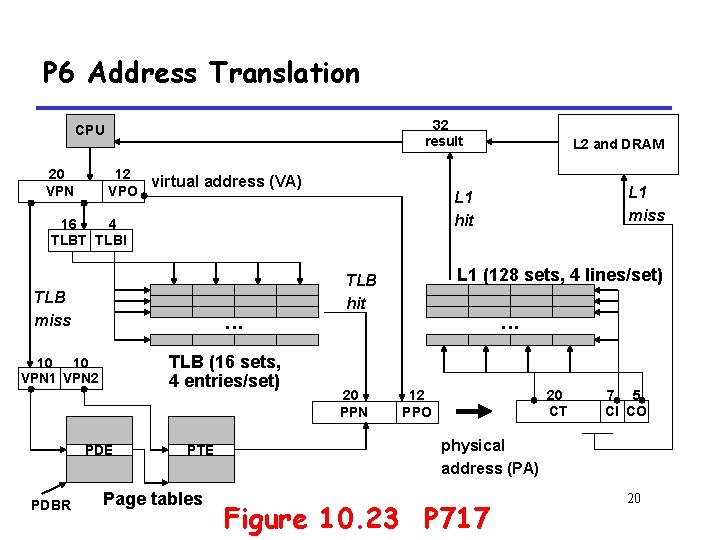
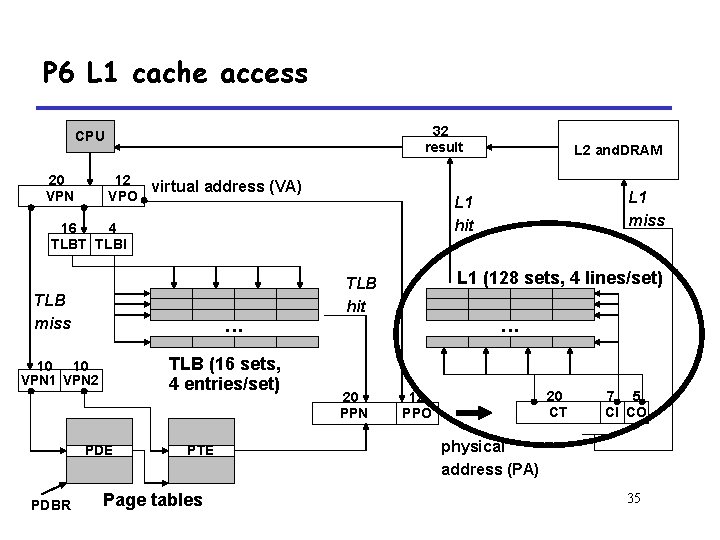
P 6 Address Translation 32 result CPU 20 VPN 12 virtual address (VA) VPO . . . TLB (16 sets, 4 entries/set) 10 10 VPN 1 VPN 2 PDE PDBR PTE Page tables L 1 miss L 1 hit 16 4 TLBT TLBI TLB miss L 2 and DRAM L 1 (128 sets, 4 lines/set) TLB hit 20 PPN . . . 20 CT 12 PPO 7 5 CI CO physical address (PA) Figure 10. 23 P 717 20
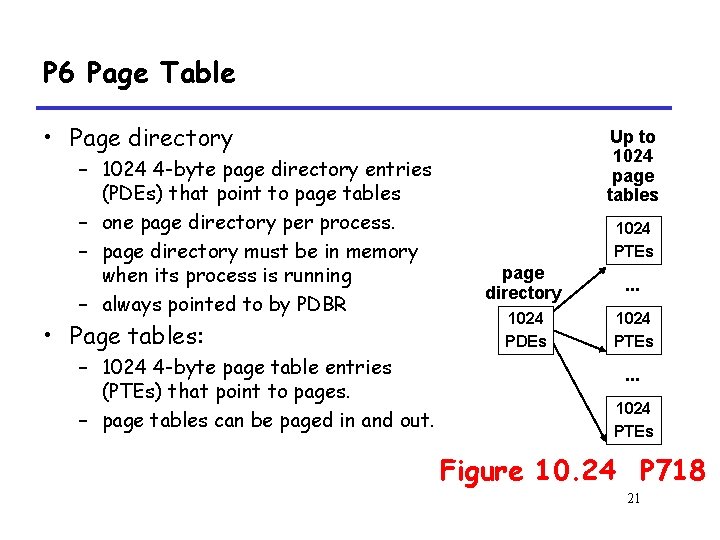
P 6 Page Table • Page directory – 1024 4 -byte page directory entries (PDEs) that point to page tables – one page directory per process. – page directory must be in memory when its process is running – always pointed to by PDBR • Page tables: – 1024 4 -byte page table entries (PTEs) that point to pages. – page tables can be paged in and out. Up to 1024 page tables 1024 PTEs page directory . . . 1024 PDEs 1024 PTEs . . . 1024 PTEs Figure 10. 24 P 718 21
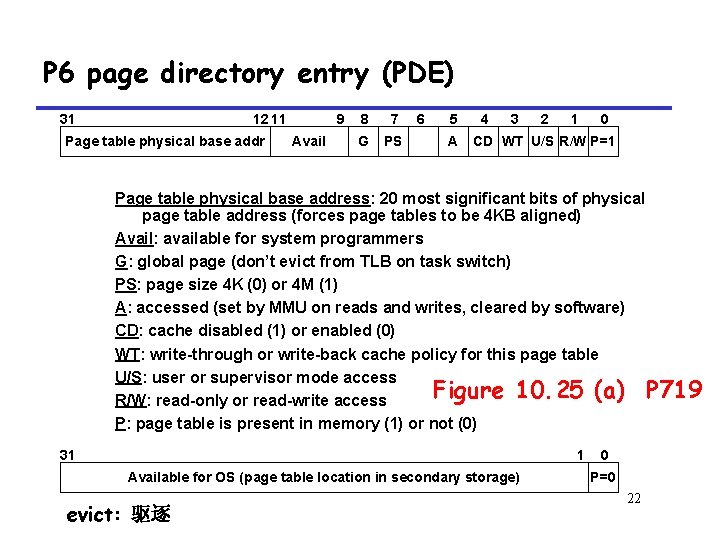
P 6 page directory entry (PDE) 31 12 11 Page table physical base addr 9 Avail 8 7 G PS 6 5 A 4 3 2 1 0 CD WT U/S R/W P=1 Page table physical base address: 20 most significant bits of physical page table address (forces page tables to be 4 KB aligned) Avail: available for system programmers G: global page (don’t evict from TLB on task switch) PS: page size 4 K (0) or 4 M (1) A: accessed (set by MMU on reads and writes, cleared by software) CD: cache disabled (1) or enabled (0) WT: write-through or write-back cache policy for this page table U/S: user or supervisor mode access Figure 10. 25 (a) P 719 R/W: read-only or read-write access P: page table is present in memory (1) or not (0) 31 1 Available for OS (page table location in secondary storage) evict: 驱逐 0 P=0 22
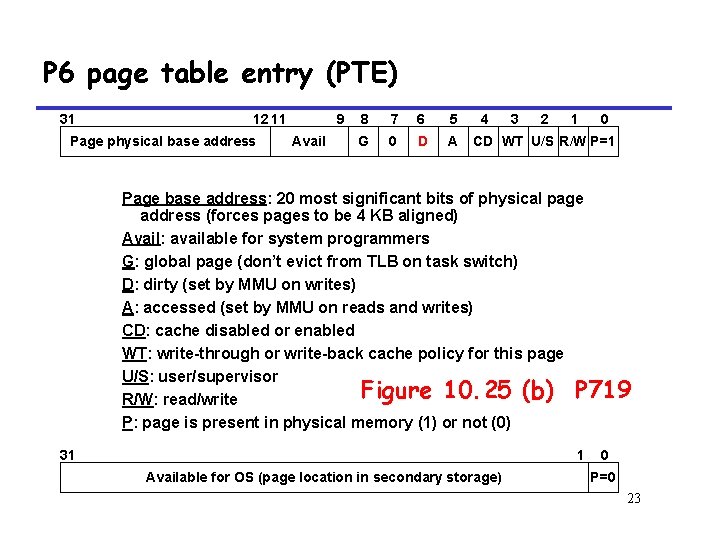
P 6 page table entry (PTE) 31 12 11 Page physical base address 9 Avail 8 7 6 5 G 0 D A 4 3 2 1 0 CD WT U/S R/W P=1 Page base address: 20 most significant bits of physical page address (forces pages to be 4 KB aligned) Avail: available for system programmers G: global page (don’t evict from TLB on task switch) D: dirty (set by MMU on writes) A: accessed (set by MMU on reads and writes) CD: cache disabled or enabled WT: write-through or write-back cache policy for this page U/S: user/supervisor Figure 10. 25 (b) P 719 R/W: read/write P: page is present in physical memory (1) or not (0) 31 1 Available for OS (page location in secondary storage) 0 P=0 23
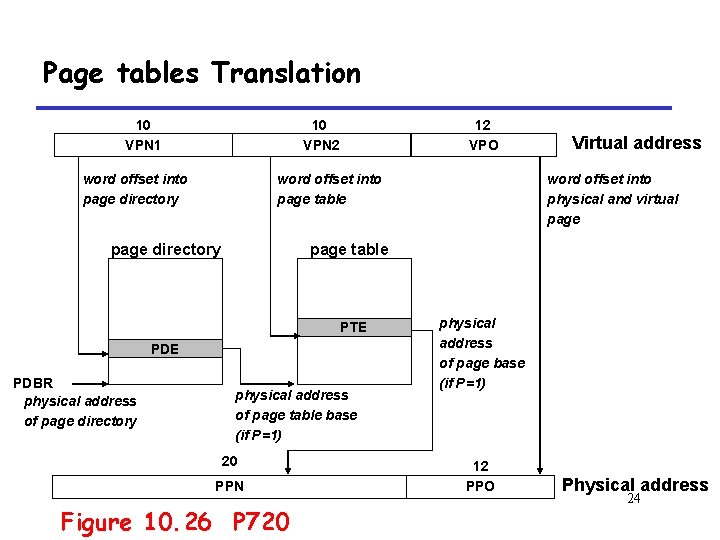
Page tables Translation 10 VPN 1 10 VPN 2 word offset into page directory 12 VPO word offset into page table page directory word offset into physical and virtual page table PTE PDBR physical address of page directory Virtual address physical address of page table base (if P=1) 20 PPN Figure 10. 26 P 720 physical address of page base (if P=1) 12 PPO Physical address 24
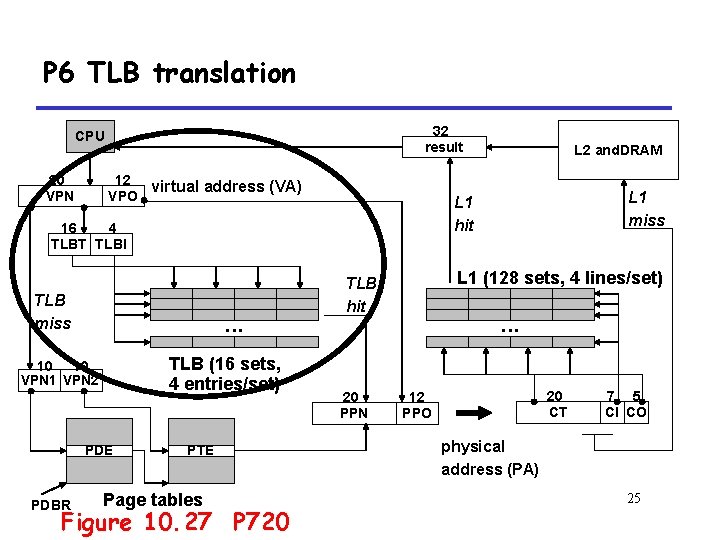
P 6 TLB translation 32 result CPU 20 VPN 12 virtual address (VA) VPO . . . TLB (16 sets, 4 entries/set) 10 10 VPN 1 VPN 2 PDE PDBR PTE Page tables Figure 10. 27 P 720 L 1 miss L 1 hit 16 4 TLBT TLBI TLB miss L 2 and. DRAM L 1 (128 sets, 4 lines/set) TLB hit 20 PPN . . . 20 CT 12 PPO 7 5 CI CO physical address (PA) 25
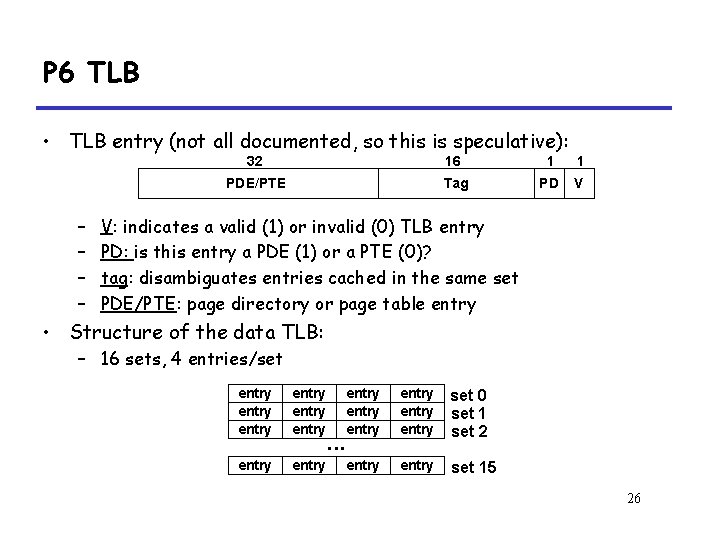
P 6 TLB • TLB entry (not all documented, so this is speculative): – – 32 16 1 1 PDE/PTE Tag PD V V: indicates a valid (1) or invalid (0) TLB entry PD: is this entry a PDE (1) or a PTE (0)? tag: disambiguates entries cached in the same set PDE/PTE: page directory or page table entry • Structure of the data TLB: – 16 sets, 4 entries/set entry entry entry entry set 0 set 1 set 2 entry set 15 . . . 26
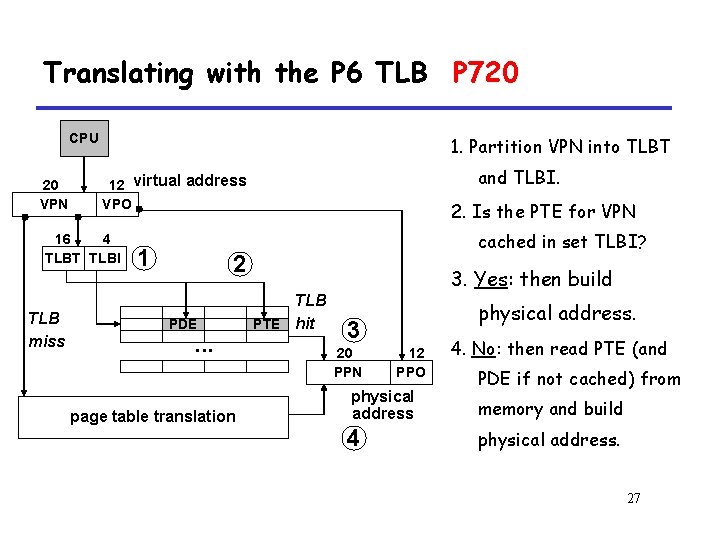
Translating with the P 6 TLB P 720 CPU 20 VPN 1. Partition VPN into TLBT 16 4 TLBT TLBI TLB miss and TLBI. 12 virtual address VPO 1 2. Is the PTE for VPN cached in set TLBI? 2 PDE . . . page table translation TLB PTE hit 3. Yes: then build physical address. 3 20 PPN 12 PPO physical address 4 4. No: then read PTE (and PDE if not cached) from memory and build physical address. 27
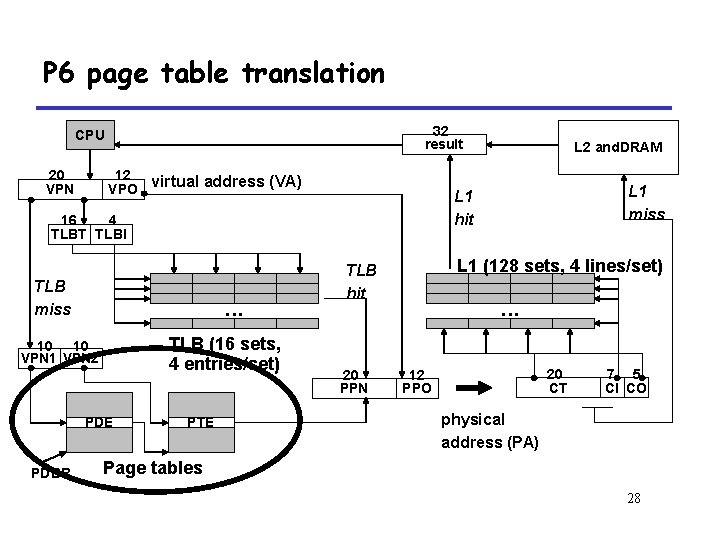
P 6 page table translation 32 result CPU 20 VPN 12 virtual address (VA) VPO . . . TLB (16 sets, 4 entries/set) 10 10 VPN 1 VPN 2 PDE PDBR PTE L 1 miss L 1 hit 16 4 TLBT TLBI TLB miss L 2 and. DRAM L 1 (128 sets, 4 lines/set) TLB hit 20 PPN . . . 20 CT 12 PPO 7 5 CI CO physical address (PA) Page tables 28
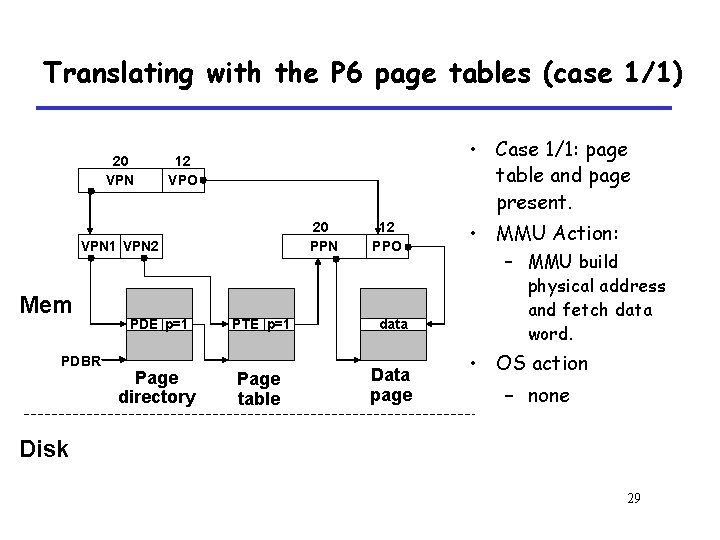
Translating with the P 6 page tables (case 1/1) 20 VPN • Case 1/1: page table and page present. 12 VPO 20 PPN VPN 1 VPN 2 Mem PDBR PDE p=1 Page directory 12 PPO PTE p=1 data Page table Data page • MMU Action: – MMU build physical address and fetch data word. • OS action – none Disk 29
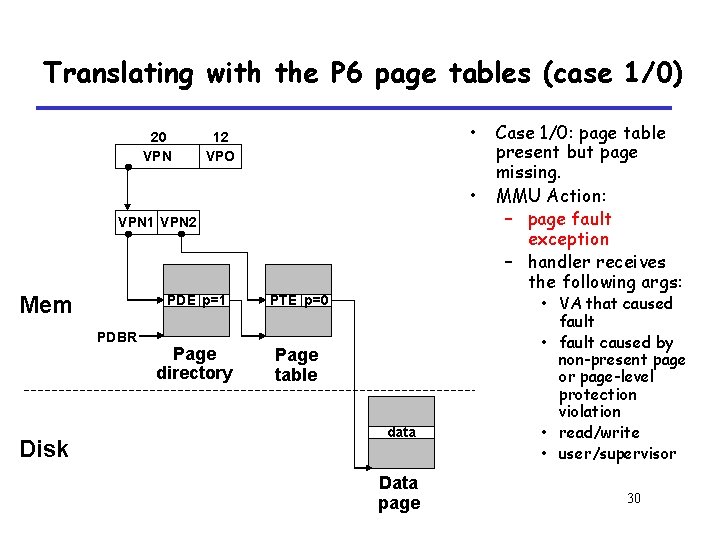
Translating with the P 6 page tables (case 1/0) 20 VPN • 12 VPO • VPN 1 VPN 2 Mem PDBR Disk PDE p=1 PTE p=0 Page directory Page table data Data page Case 1/0: page table present but page missing. MMU Action: – page fault exception – handler receives the following args: • VA that caused fault • fault caused by non-present page or page-level protection violation • read/write • user/supervisor 30
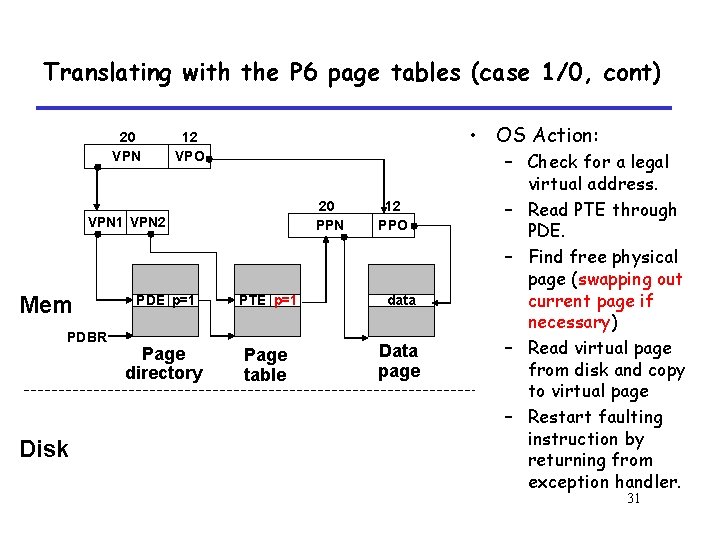
Translating with the P 6 page tables (case 1/0, cont) 20 VPN • OS Action: 12 VPO 20 PPN VPN 1 VPN 2 Mem PDBR Disk 12 PPO PDE p=1 PTE p=1 data Page directory Page table Data page – Check for a legal virtual address. – Read PTE through PDE. – Find free physical page (swapping out current page if necessary) – Read virtual page from disk and copy to virtual page – Restart faulting instruction by returning from exception handler. 31
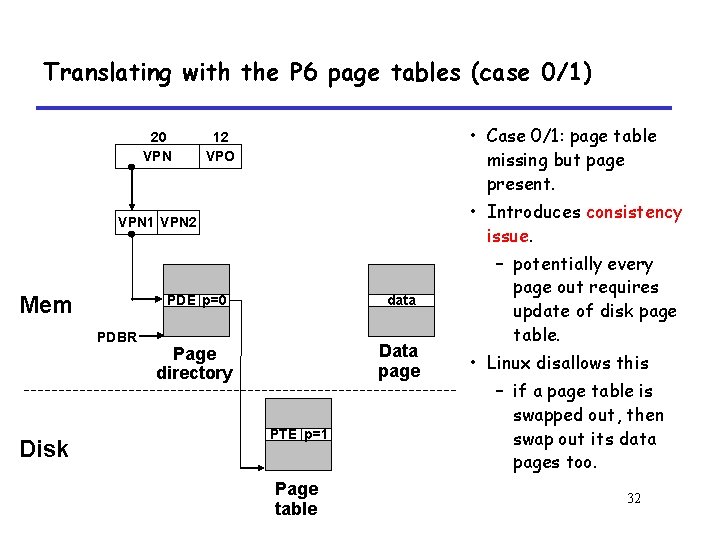
Translating with the P 6 page tables (case 0/1) 20 VPN • Case 0/1: page table missing but page present. 12 VPO • Introduces consistency issue. VPN 1 VPN 2 Mem PDBR Disk PDE p=0 data Page directory Data page PTE p=1 Page table – potentially every page out requires update of disk page table. • Linux disallows this – if a page table is swapped out, then swap out its data pages too. 32
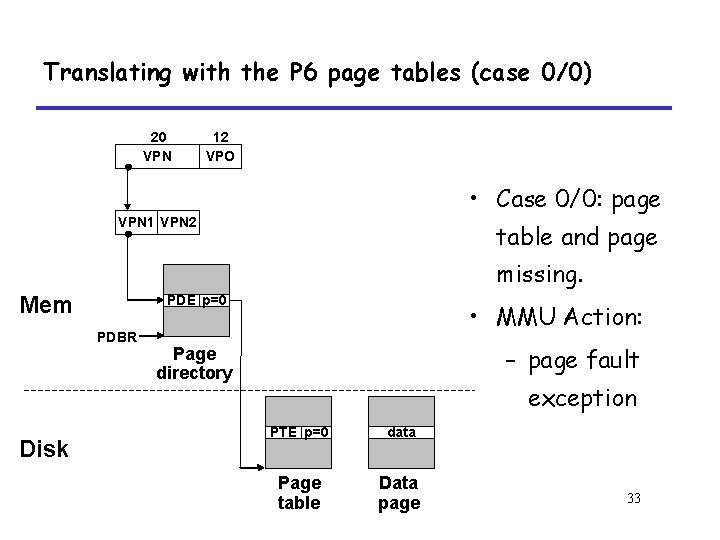
Translating with the P 6 page tables (case 0/0) 20 VPN 12 VPO • Case 0/0: page VPN 1 VPN 2 table and page missing. Mem PDE p=0 PDBR Disk • MMU Action: – page fault Page directory exception PTE p=0 data Page table Data page 33
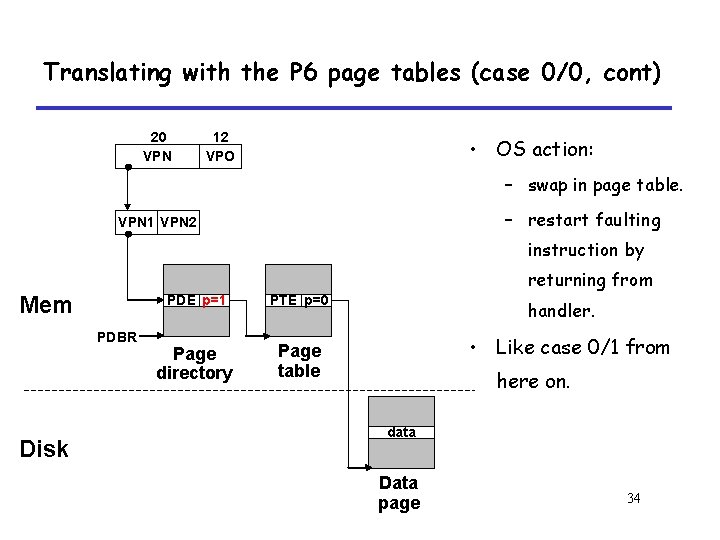
Translating with the P 6 page tables (case 0/0, cont) 20 VPN 12 VPO • OS action: – swap in page table. – restart faulting VPN 1 VPN 2 instruction by returning from Mem PDBR Disk PDE p=1 PTE p=0 Page directory Page table handler. • Like case 0/1 from here on. data Data page 34
P 6 L 1 cache access 32 result CPU 20 VPN 12 virtual address (VA) VPO . . . TLB (16 sets, 4 entries/set) 10 10 VPN 1 VPN 2 PDE PDBR PTE Page tables L 1 miss L 1 hit 16 4 TLBT TLBI TLB miss L 2 and. DRAM L 1 (128 sets, 4 lines/set) TLB hit 20 PPN . . . 20 CT 12 PPO 7 5 CI CO physical address (PA) 35
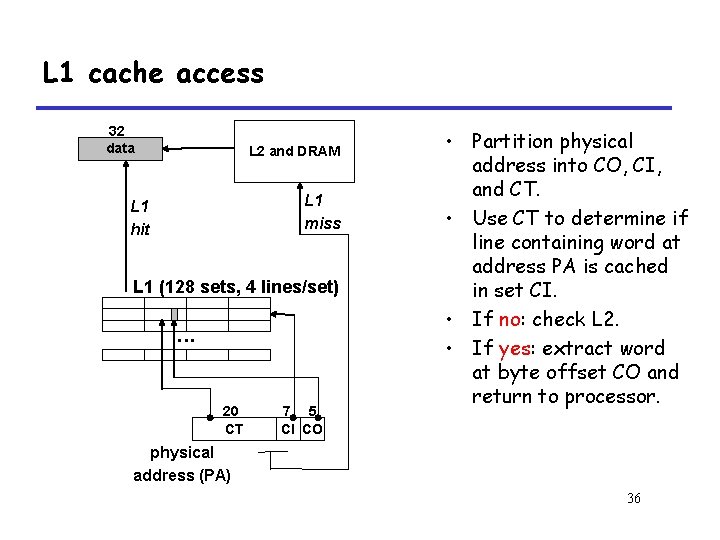
L 1 cache access 32 data L 2 and DRAM L 1 miss L 1 hit L 1 (128 sets, 4 lines/set) . . . 20 CT 7 5 CI CO • Partition physical address into CO, CI, and CT. • Use CT to determine if line containing word at address PA is cached in set CI. • If no: check L 2. • If yes: extract word at byte offset CO and return to processor. physical address (PA) 36
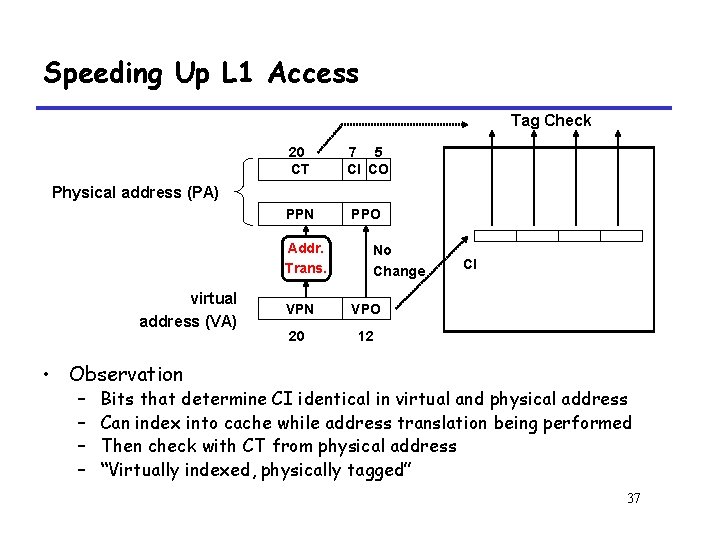
Speeding Up L 1 Access Tag Check 20 CT 7 5 CI CO PPN PPO Physical address (PA) Addr. Trans. virtual address (VA) No Change VPN VPO 20 12 CI • Observation – – Bits that determine CI identical in virtual and physical address Can index into cache while address translation being performed Then check with CT from physical address “Virtually indexed, physically tagged” 37
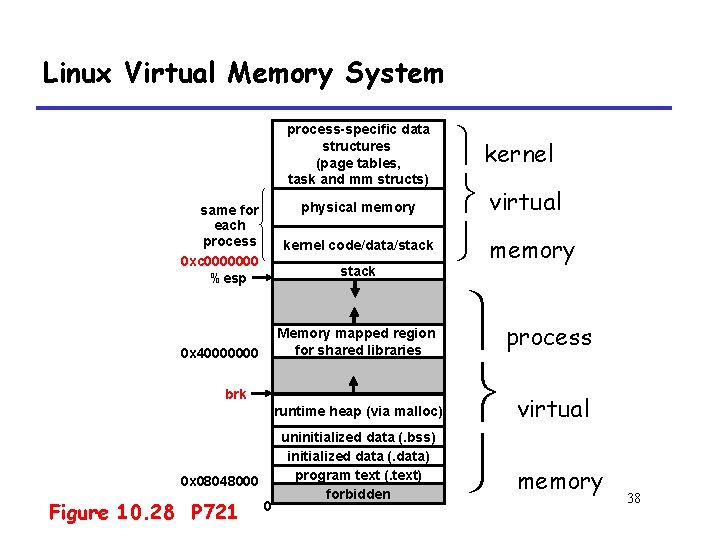
Linux Virtual Memory System process-specific data structures (page tables, task and mm structs) physical memory same for each process 0 xc 0000000 %esp kernel code/data/stack Memory mapped region for shared libraries 0 x 40000000 brk runtime heap (via malloc) 0 x 08048000 Figure 10. 28 P 721 0 uninitialized data (. bss) initialized data (. data) program text (. text) forbidden kernel virtual memory process virtual memory 38
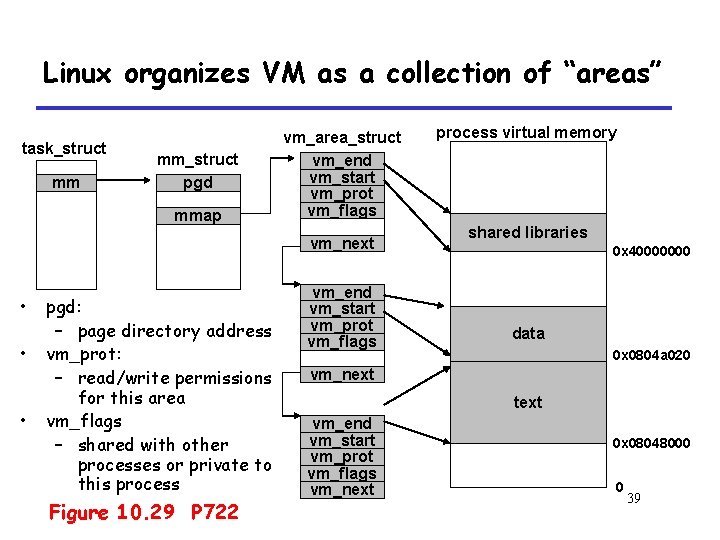
Linux organizes VM as a collection of “areas” task_struct mm mm_struct pgd mmap vm_area_struct vm_end vm_start vm_prot vm_flags vm_next • • • pgd: – page directory address vm_prot: – read/write permissions for this area vm_flags – shared with other processes or private to this process Figure 10. 29 P 722 vm_end vm_start vm_prot vm_flags process virtual memory shared libraries 0 x 40000000 data 0 x 0804 a 020 vm_next text vm_end vm_start vm_prot vm_flags vm_next 0 x 08048000 0 39
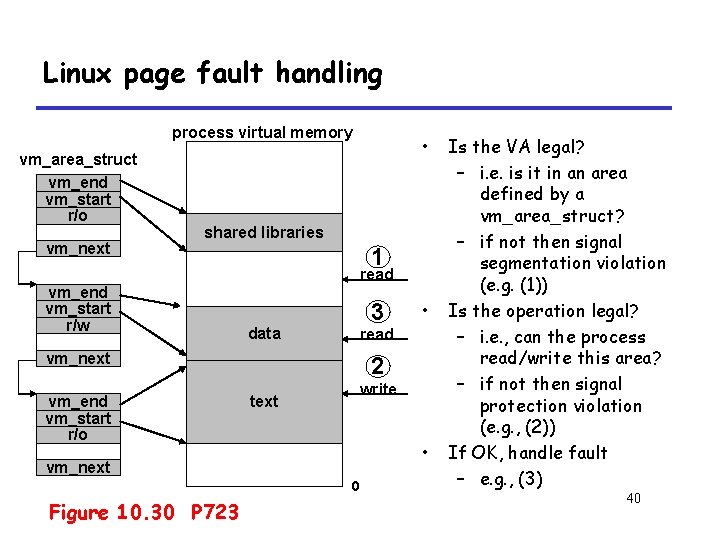
Linux page fault handling process virtual memory vm_area_struct vm_end vm_start r/o vm_next • shared libraries 1 read vm_end vm_start r/w 3 data read vm_next vm_end vm_start r/o 2 write text • vm_next 0 Figure 10. 30 P 723 • Is the VA legal? – i. e. is it in an area defined by a vm_area_struct? – if not then signal segmentation violation (e. g. (1)) Is the operation legal? – i. e. , can the process read/write this area? – if not then signal protection violation (e. g. , (2)) If OK, handle fault – e. g. , (3) 40
10. 8 Memory Mapping 41
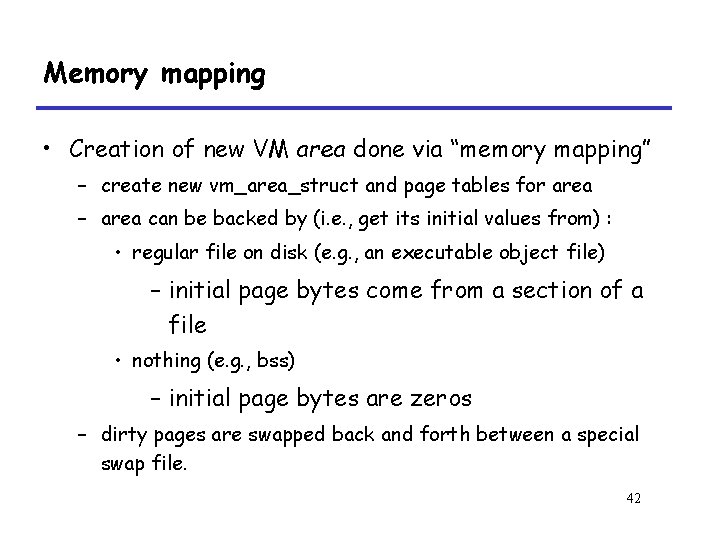
Memory mapping • Creation of new VM area done via “memory mapping” – create new vm_area_struct and page tables for area – area can be backed by (i. e. , get its initial values from) : • regular file on disk (e. g. , an executable object file) – initial page bytes come from a section of a file • nothing (e. g. , bss) – initial page bytes are zeros – dirty pages are swapped back and forth between a special swap file. 42
Memory mapping • Key point: no virtual pages are copied into physical memory until they are referenced! – known as “demand paging” – crucial for time and space efficiency Crucial: 至关重要的 43
10. 8. 1 Shared Objects Revisited 44
Shared Object P 725 • shared object – An object which is mapped into an area of virtual memory of a process – Any writes that the process makes to that area are visible to any other processes that have also mapped the shared object into their virtual memory – The changes are also reflected in the original object on disk. • shared area – A virtual memory area that a shared object is mapped 45
Private object • private object – As oppose to shared object – Changes made to an area mapped to a private object are not visible to other processes – Any writes that the process makes to the area are not reflected back to the object on disk. • private area – Similar to shared area 46
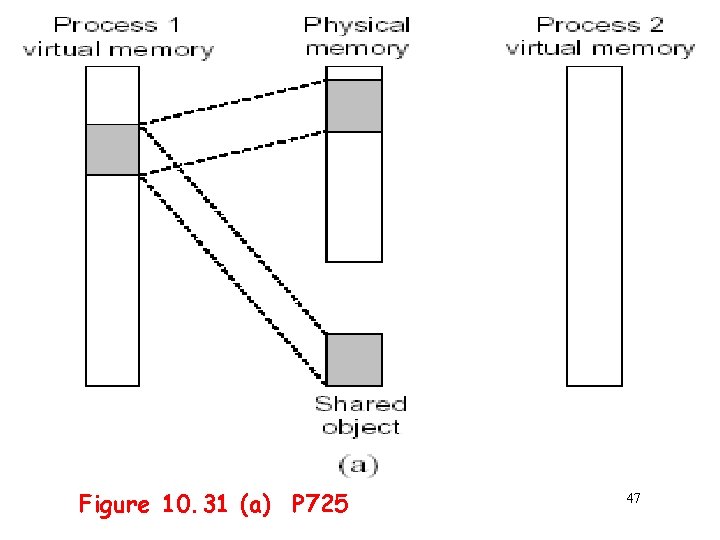
Figure 10. 31 (a) P 725 47
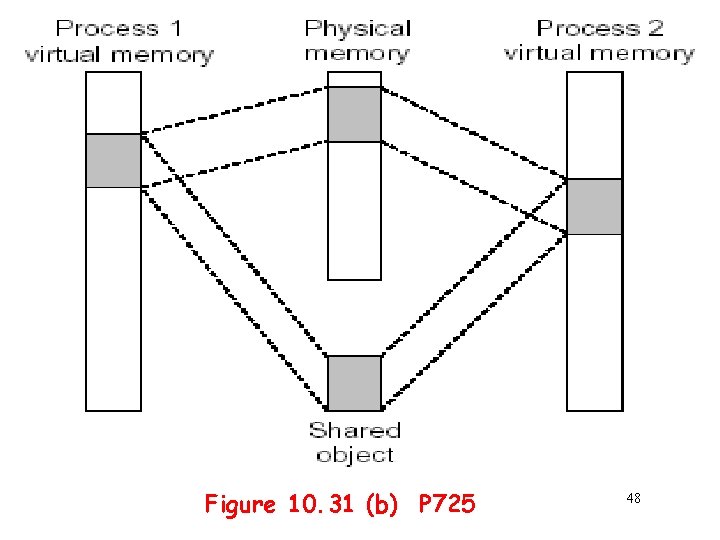
Figure 10. 31 (b) P 725 48
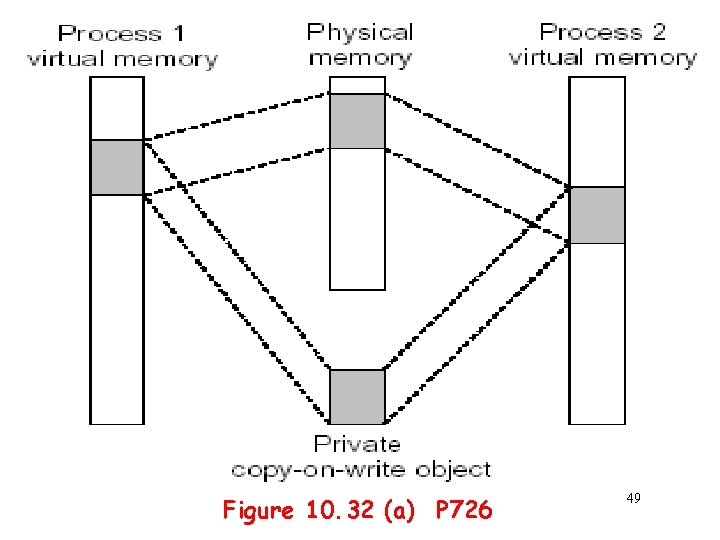
Figure 10. 32 (a) P 726 49
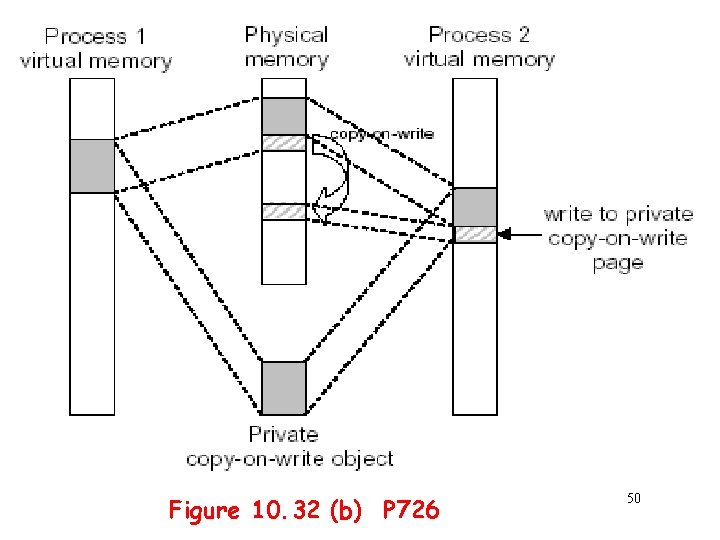
Figure 10. 32 (b) P 726 50
Copy-on-Write • A private object begins life in exactly the same way as a shared object, with only one copy of the private object stored in physical memory. 51
Copy-on-Write • For each process that maps the private object – The page table entries for the corresponding private area are flagged as read-only – The area struct is flagged as private copy-on-write – So long as neither process attempts to write to its respective private area, they continue to share a single copy of the object in physical memory. 52
Copy-on-Write • For each process that maps the private object – As soon as a process attempts to write to some page in the private area, the write triggers a protection fault – The fault handler notices that the protection exception was caused by the process trying to write to a page in a private copy-on-write area 53
Copy-on-Write • For each process that maps the private object – The fault handler • Creates a new copy of the page in physical memory • Updates the page table entry to point to the new copy • Restores write permissions to the page 54
10. 8. 2 The fork Function Revisited 55
Fork() revisted • To create a new process using fork: – make copies of the old process’s mm_struct, vm_area_struct’s, and page tables. • at this point the two processes are sharing all of their pages. • How to get separate spaces without copying all the virtual pages from one space to another? – “copy on write” technique. 56
Fork() revisted • To create a new process using fork: – copy-on-write • make pages of writeable areas read-only • flag vm_area_struct’s for these areas as private “copy-onwrite”. • writes by either process to these pages will cause page faults. – fault handler recognizes copy-on-write, makes a copy of the page, and restores write permissions. 57
Fork() revisted --- Summary • To create a new process using fork: – Net result: – copies are deferred until absolutely necessary (i. e. , when one of the processes tries to modify a shared page). 58
10. 8. 3 The execve Function Revisited 59
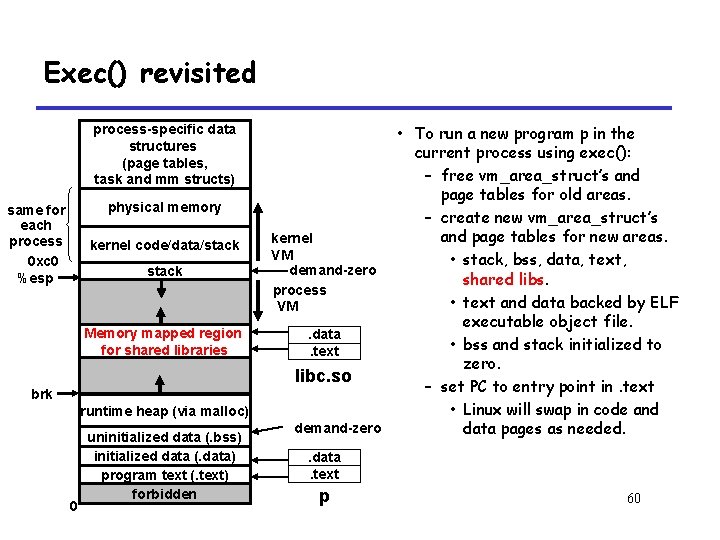
Exec() revisited process-specific data structures (page tables, task and mm structs) physical memory same for each process 0 xc 0 %esp kernel code/data/stack Memory mapped region for shared libraries brk runtime heap (via malloc) 0 uninitialized data (. bss) initialized data (. data) program text (. text) forbidden • To run a new program p in the current process using exec(): – free vm_area_struct’s and page tables for old areas. – create new vm_area_struct’s and page tables for new areas. kernel VM • stack, bss, data, text, demand-zero shared libs. process • text and data backed by ELF VM executable object file. . data • bss and stack initialized to. text zero. libc. so – set PC to entry point in. text • Linux will swap in code and demand-zero data pages as needed. . data. text p 60
10. 8. 4 User-Level Memory Mapping with the mmap Function 61
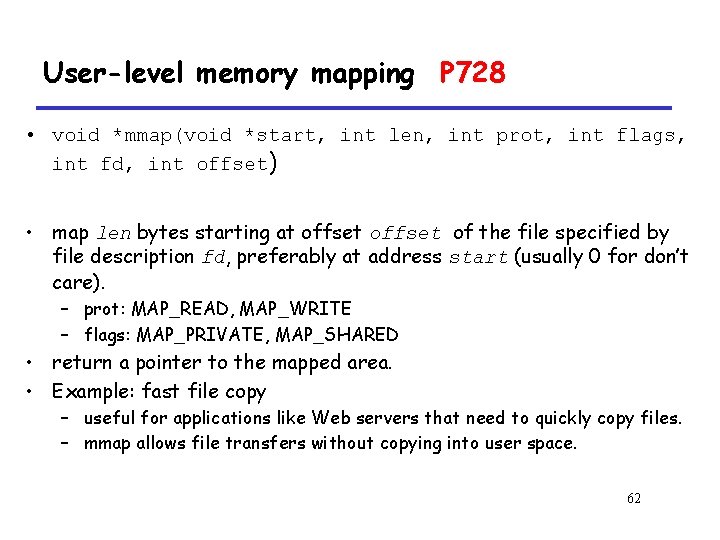
User-level memory mapping P 728 • void *mmap(void *start, int len, int prot, int flags, int fd, int offset) • map len bytes starting at offset of the file specified by file description fd, preferably at address start (usually 0 for don’t care). – prot: MAP_READ, MAP_WRITE – flags: MAP_PRIVATE, MAP_SHARED • return a pointer to the mapped area. • Example: fast file copy – useful for applications like Web servers that need to quickly copy files. – mmap allows file transfers without copying into user space. 62
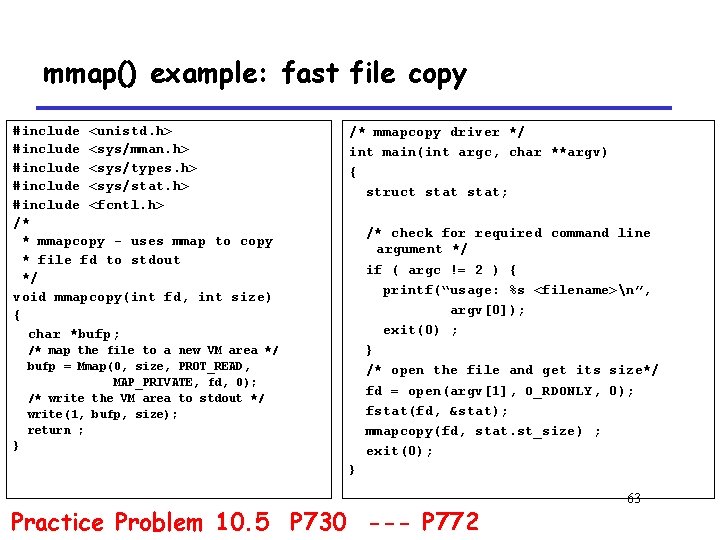
mmap() example: fast file copy #include <unistd. h> #include <sys/mman. h> #include <sys/types. h> #include <sys/stat. h> #include <fcntl. h> /* * mmapcopy - uses mmap to copy * file fd to stdout */ void mmapcopy(int fd, int size) { char *bufp; /* mmapcopy driver */ int main(int argc, char **argv) { struct stat; /* check for required command line argument */ if ( argc != 2 ) { printf(“usage: %s <filename>n”, argv[0]); exit(0) ; } /* open the file and get its size*/ fd = open(argv[1], O_RDONLY, 0); fstat(fd, &stat); mmapcopy(fd, stat. st_size) ; exit(0); /* map the file to a new VM area */ bufp = Mmap(0, size, PROT_READ, MAP_PRIVATE, fd, 0); /* write the VM area to stdout */ write(1, bufp, size); return ; } } Practice Problem 10. 5 P 730 --- P 772 63
- Slides: 63