
Virtual Machines Practical Issues in Software Engineering Lecture

- Slides: 16
Virtual Machines Practical Issues in Software Engineering Lecture Series
Online Materials Includes: • These lecture slides. • Screencast of this lecture. • Screencast of installing Debian Stable 6. 0 in a virtual environment.
Overview • What is a virtual machine? • How can I use a virtual machine? • What are some examples of virtual machine software? • What are some limitations? • Focus on Parallel Computing
What is a Virtual Machine Wikipedia Says: A virtual machine (VM) is a software implementation of a machine (i. e. computer) that executes programs like a physical machine. Source: http: //en. wikipedia. org/wiki/Virtual_machine
What is a Virtual Machine So, said another way: A virtual machine implements a full computer complete with virtual hardware. It ‘tricks’ software running within the virtual environment into thinking it is running on actual hardware.
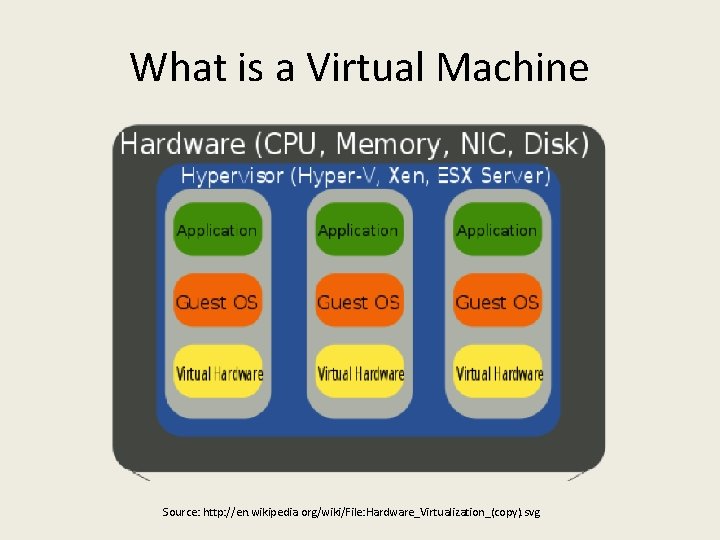
What is a Virtual Machine Source: http: //en. wikipedia. org/wiki/File: Hardware_Virtualization_(copy). svg
How can I use a Virtual Machine Use Case 1: Software Testing Virtual Machines make easily sharable testing platforms.
How can I use a Virtual Machine Use Case 2: Education Virtual machines are great for experimenting with new software, operating systems, and networked systems
How can I use a Virtual Machine Use Case 3: Datacenter Allows software services to be consolidated onto less actual hardware.
Virtual Machine Software Workstation Virtualization Virtual. Box OSE is a well made, open-source solution. This is the software used in the example materials.
Limitations of Virtual Machines Virtual machines need a powerful computer. Powerful means: • Multiple Processors • Lots of memory (RAM)
Focus on Parallel Computing Virtual machines are also great for testing software that who’s function is distributed across several computers.
Focus on Parallel Computing How? Create a virtual machine to use as a computing node, then just copy the virtual machine several times.
Conclusion • Virtual Machines create a sandbox where we can test operating systems and other software on our computers. • Virtual Machines are extremely useful testing and development tools.
Conclusion • In developing and testing, Virtual Machines can emulate diverse operating environments for software systems. • In enterprise, Virtual Machines can save money by consolidating server hardware.
Questions?