
Virtual Machines Operating System Concepts 9 th Edition
- Slides: 93
Virtual Machines Operating System Concepts – 9 th Edition Silberschatz, Galvin and Gagne © 2013
Objectives n To explore the history and benefits of virtual machines n To discuss the various virtual machine technologies n To describe the methods used to implement virtualization n To show the most common hardware features that support virtualization and explain how they are used by operating-system modules Operating System Concepts – 9 th Edition 16. 2 Silberschatz, Galvin and Gagne © 2013
Virtualization 1 n Computer systems exist due to their hierarchies with well-defined interfaces that separate levels of abstraction. n A virtual machine (VM) can support individual processes or a complete system depending on the abstraction level where virtualization occurs. l Some VMs support flexible HW usage and SW isolation, while others translate from one instruction set to another. 1 Courtesy: “The Architecture of VMs” by J. E Smith and R. Nair Operating System Concepts – 9 th Edition 16. 3 Silberschatz, Galvin and Gagne © 2013
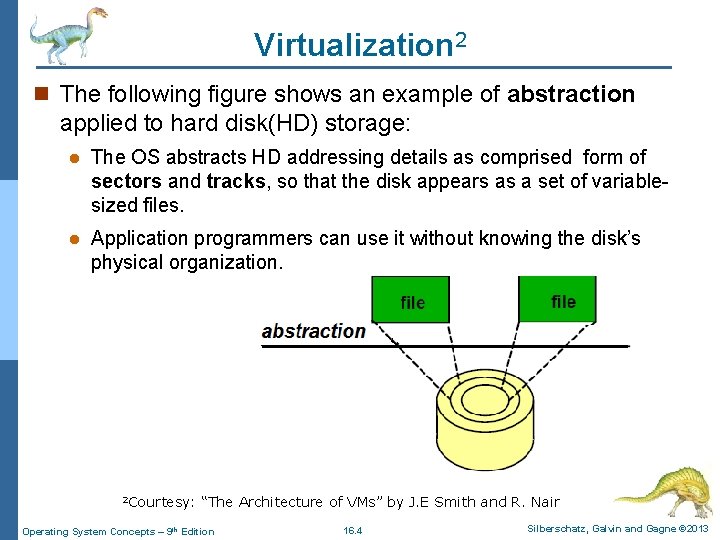
Virtualization 2 n The following figure shows an example of abstraction applied to hard disk(HD) storage: l The OS abstracts HD addressing details as comprised form of sectors and tracks, so that the disk appears as a set of variablesized files. l Application programmers can use it without knowing the disk’s physical organization. 2 Courtesy: “The Architecture of VMs” by J. E Smith and R. Nair Operating System Concepts – 9 th Edition 16. 4 Silberschatz, Galvin and Gagne © 2013
Virtualization in General n Virtual machines (VM) l “Virtual" means no such machine exists as a HW: 4 It exists as a SW emulation of a real machine. 4 A VM is a level of abstraction creates logical structures that seem to operate just like the physical machine. l A VM that behaves like a separate computer system, complete with virtual hardware devices. 4 Virtual machines allow you to run any OS in an app window on your desktop that behaves like a full, separate computer. 5 Courtesy: “The Architecture of VMs” by J. E Smith and R. Nair Operating System Concepts – 9 th Edition 16. 5 Silberschatz, Galvin and Gagne © 2013
Virtualization in General n A VM is to abstract the HW (the CPU, memory, disk drives, network interface cards, and so forth) of a single computer into several different execution environments, l Creating the illusion that each separate environment is running on its own private computer. n In virtualization, there is a layer that creates a virtual machine system on which guest OSs or applications can run as running on a real system. n The Virtual Machine Manager or Monitor (VMM) (also called Hypervisor) creates and runs VMs by providing an interface that is identical to the host system. Operating System Concepts – 9 th Edition 16. 6 Silberschatz, Galvin and Gagne © 2013
Machine Organization 3 n A computer’s instruction set architecture (ISA) clearly exemplifies the advantages of well-defined interfaces. l Intel and AMD designers develop microprocessors that implement the Intel IA-32 (x 86) ISA. n This well-defined ISA interfaces have their limitations: l For example, application programs distributed as compiled binaries are tied to system specific ISA and supports specific OS interface only. n This lack of interoperability lead to the world of networked computers to move software as freely as data: l That is, virtualization provides a way of getting around. 3 Courtesy: “The Architecture of VMs” by J. E Smith and R. Nair Operating System Concepts – 9 th Edition 16. 7 Silberschatz, Galvin and Gagne © 2013
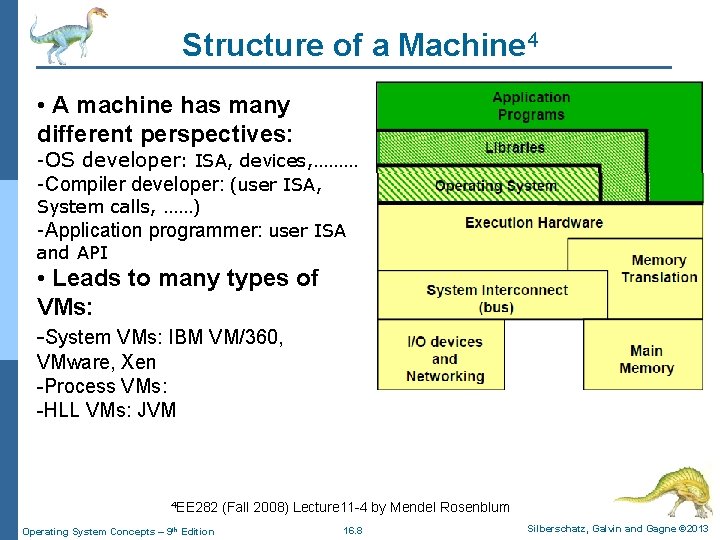
Structure of a Machine 4 • A machine has many different perspectives: -OS developer: ISA, devices, ……… -Compiler developer: (user ISA, System calls, ……) -Application programmer: user ISA and API • Leads to many types of VMs: -System VMs: IBM VM/360, VMware, Xen -Process VMs: -HLL VMs: JVM 4 EE 282 (Fall 2008) Lecture 11 -4 by Mendel Rosenblum Operating System Concepts – 9 th Edition 16. 8 Silberschatz, Galvin and Gagne © 2013
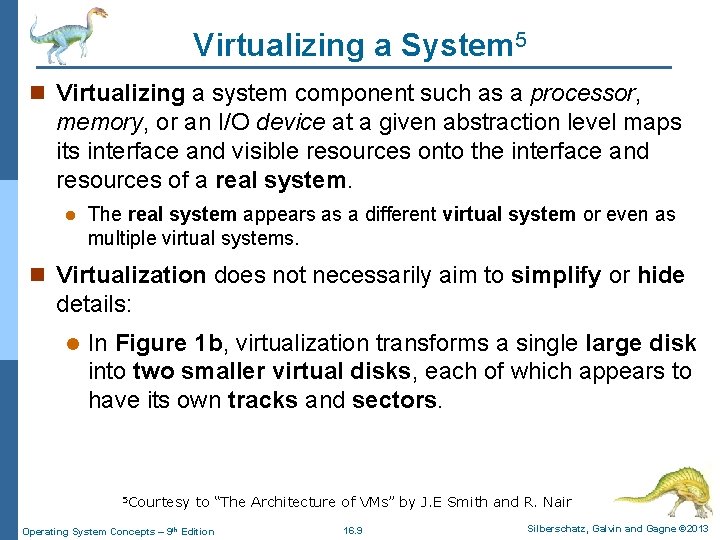
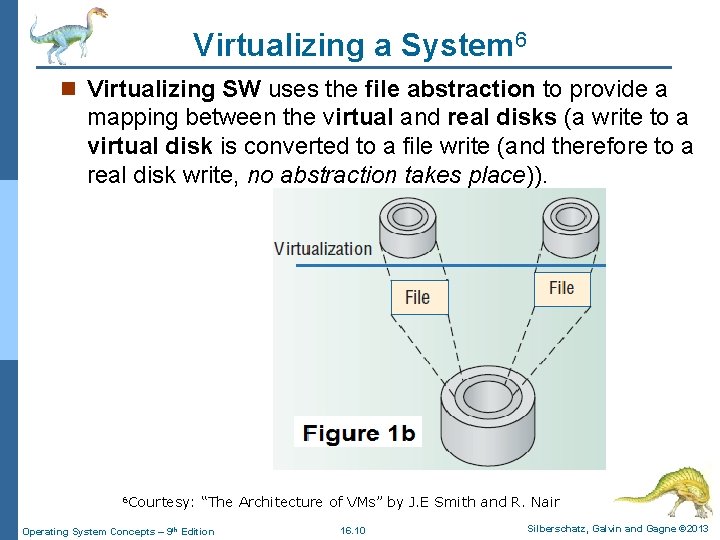
Virtualizing a System 5 n Virtualizing a system component such as a processor, memory, or an I/O device at a given abstraction level maps its interface and visible resources onto the interface and resources of a real system. l The real system appears as a different virtual system or even as multiple virtual systems. n Virtualization does not necessarily aim to simplify or hide details: l In Figure 1 b, virtualization transforms a single large disk into two smaller virtual disks, each of which appears to have its own tracks and sectors. 5 Courtesy to “The Architecture of VMs” by J. E Smith and R. Nair Operating System Concepts – 9 th Edition 16. 9 Silberschatz, Galvin and Gagne © 2013
Virtualizing a System 6 n Virtualizing SW uses the file abstraction to provide a mapping between the virtual and real disks (a write to a virtual disk is converted to a file write (and therefore to a real disk write, no abstraction takes place)). 6 Courtesy: “The Architecture of VMs” by J. E Smith and R. Nair Operating System Concepts – 9 th Edition 16. 10 Silberschatz, Galvin and Gagne © 2013
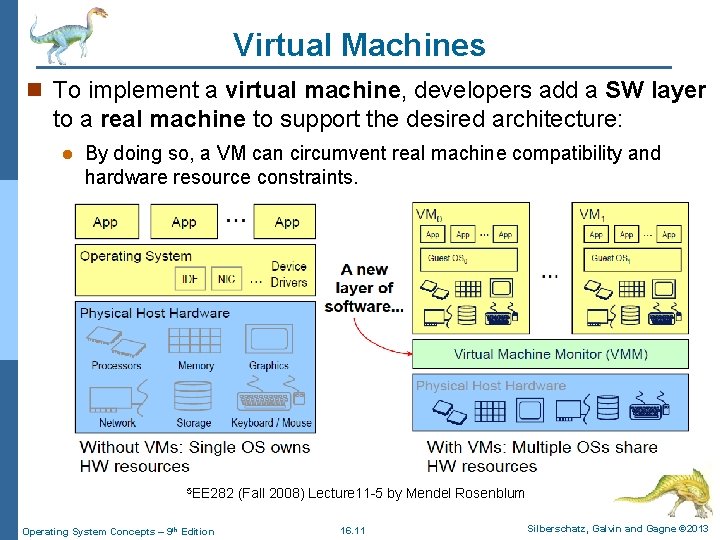
Virtual Machines n To implement a virtual machine, developers add a SW layer to a real machine to support the desired architecture: l By doing so, a VM can circumvent real machine compatibility and hardware resource constraints. 5 EE 282 (Fall 2008) Lecture 11 -5 by Mendel Rosenblum Operating System Concepts – 9 th Edition 16. 11 Silberschatz, Galvin and Gagne © 2013
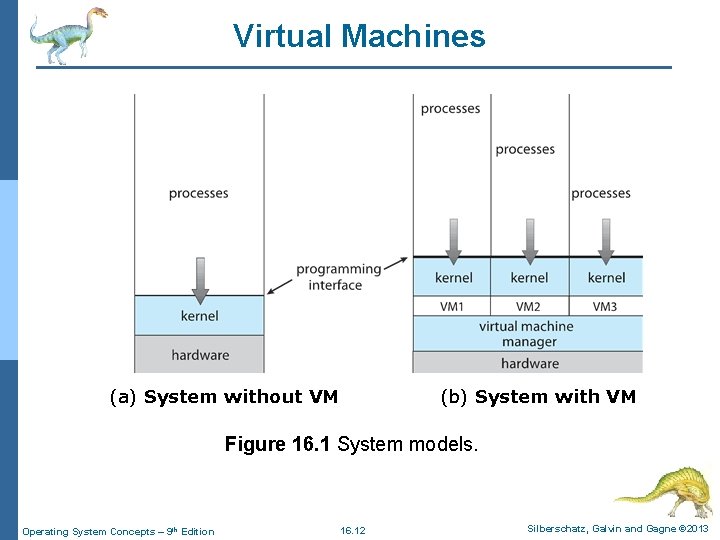
Virtual Machines (a) System without VM (b) System with VM Figure 16. 1 System models. Operating System Concepts – 9 th Edition 16. 12 Silberschatz, Galvin and Gagne © 2013
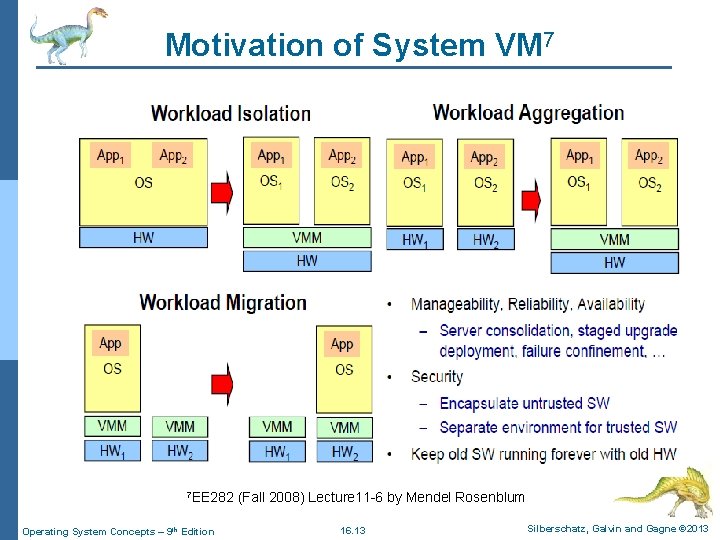
Motivation of System VM 7 7 EE 282 (Fall 2008) Lecture 11 -6 by Mendel Rosenblum Operating System Concepts – 9 th Edition 16. 13 Silberschatz, Galvin and Gagne © 2013
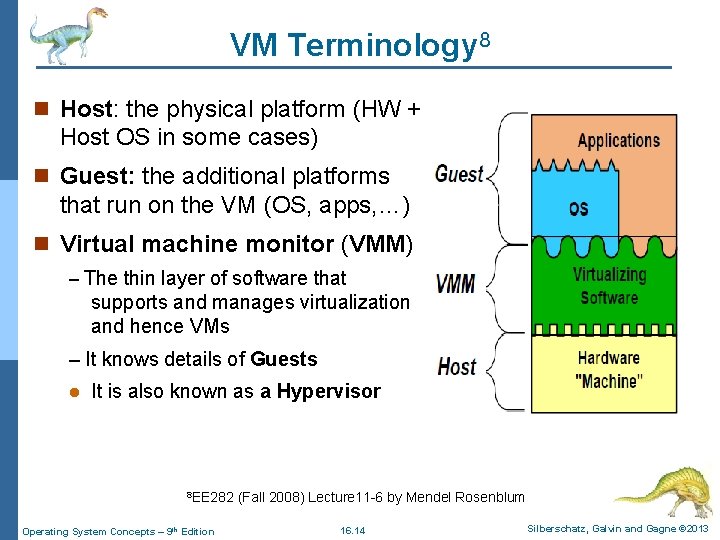
VM Terminology 8 n Host: the physical platform (HW + Host OS in some cases) n Guest: the additional platforms that run on the VM (OS, apps, …) n Virtual machine monitor (VMM) – The thin layer of software that supports and manages virtualization and hence VMs – It knows details of Guests l It is also known as a Hypervisor 8 EE 282 (Fall 2008) Lecture 11 -6 by Mendel Rosenblum Operating System Concepts – 9 th Edition 16. 14 Silberschatz, Galvin and Gagne © 2013
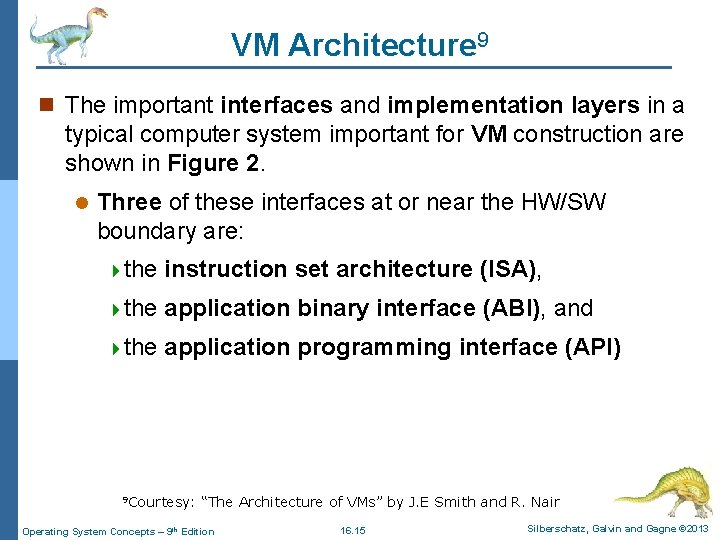
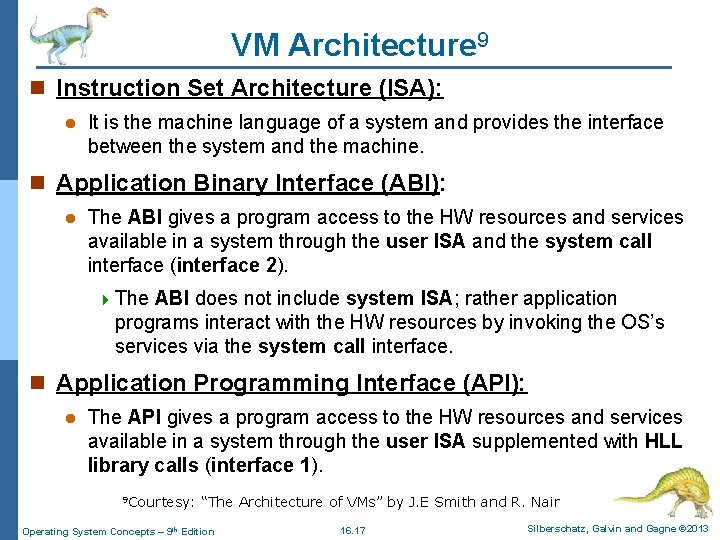
VM Architecture 9 n The important interfaces and implementation layers in a typical computer system important for VM construction are shown in Figure 2. l Three of these interfaces at or near the HW/SW boundary are: 4 the instruction set architecture (ISA), 4 the application binary interface (ABI), and 4 the application programming interface (API) 9 Courtesy: “The Architecture of VMs” by J. E Smith and R. Nair Operating System Concepts – 9 th Edition 16. 15 Silberschatz, Galvin and Gagne © 2013
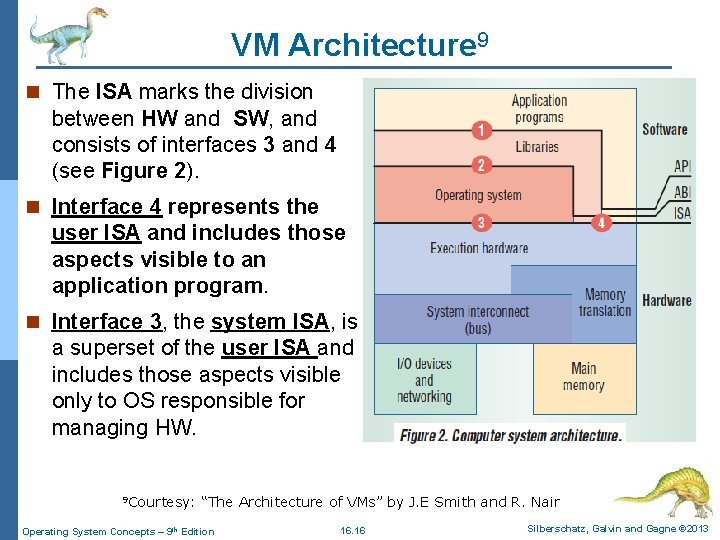
VM Architecture 9 n The ISA marks the division between HW and SW, and consists of interfaces 3 and 4 (see Figure 2). n Interface 4 represents the user ISA and includes those aspects visible to an application program. n Interface 3, the system ISA, is a superset of the user ISA and includes those aspects visible only to OS responsible for managing HW. 9 Courtesy: “The Architecture of VMs” by J. E Smith and R. Nair Operating System Concepts – 9 th Edition 16. 16 Silberschatz, Galvin and Gagne © 2013
VM Architecture 9 n Instruction Set Architecture (ISA): l It is the machine language of a system and provides the interface between the system and the machine. n Application Binary Interface (ABI): l The ABI gives a program access to the HW resources and services available in a system through the user ISA and the system call interface (interface 2). 4 The ABI does not include system ISA; rather application programs interact with the HW resources by invoking the OS’s services via the system call interface. n Application Programming Interface (API): l The API gives a program access to the HW resources and services available in a system through the user ISA supplemented with HLL library calls (interface 1). 9 Courtesy: “The Architecture of VMs” by J. E Smith and R. Nair Operating System Concepts – 9 th Edition 16. 17 Silberschatz, Galvin and Gagne © 2013
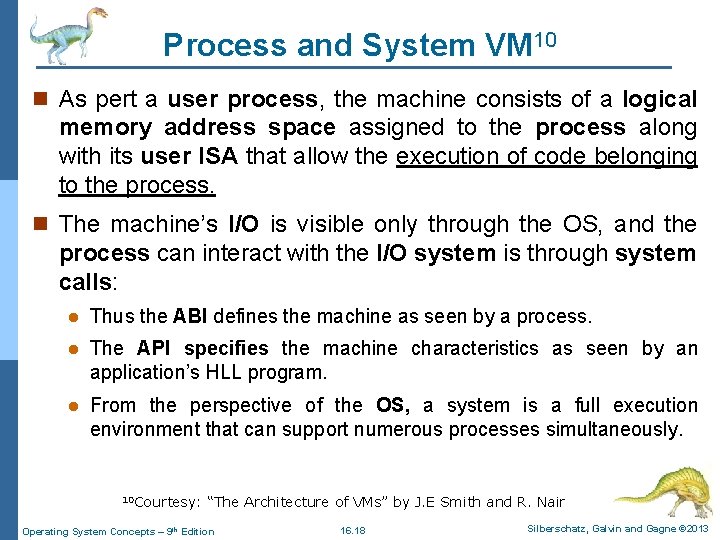
Process and System VM 10 n As pert a user process, the machine consists of a logical memory address space assigned to the process along with its user ISA that allow the execution of code belonging to the process. n The machine’s I/O is visible only through the OS, and the process can interact with the I/O system is through system calls: l Thus the ABI defines the machine as seen by a process. l The API specifies the machine characteristics as seen by an application’s HLL program. l From the perspective of the OS, a system is a full execution environment that can support numerous processes simultaneously. 10 Courtesy: “The Architecture of VMs” by J. E Smith and R. Nair Operating System Concepts – 9 th Edition 16. 18 Silberschatz, Galvin and Gagne © 2013
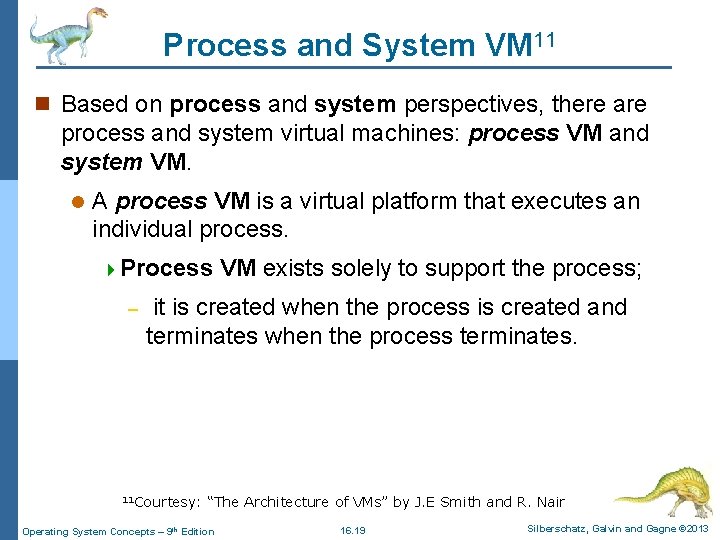
Process and System VM 11 n Based on process and system perspectives, there are process and system virtual machines: process VM and system VM. l A process VM is a virtual platform that executes an individual process. 4 Process – VM exists solely to support the process; it is created when the process is created and terminates when the process terminates. 11 Courtesy: “The Architecture of VMs” by J. E Smith and R. Nair Operating System Concepts – 9 th Edition 16. 19 Silberschatz, Galvin and Gagne © 2013
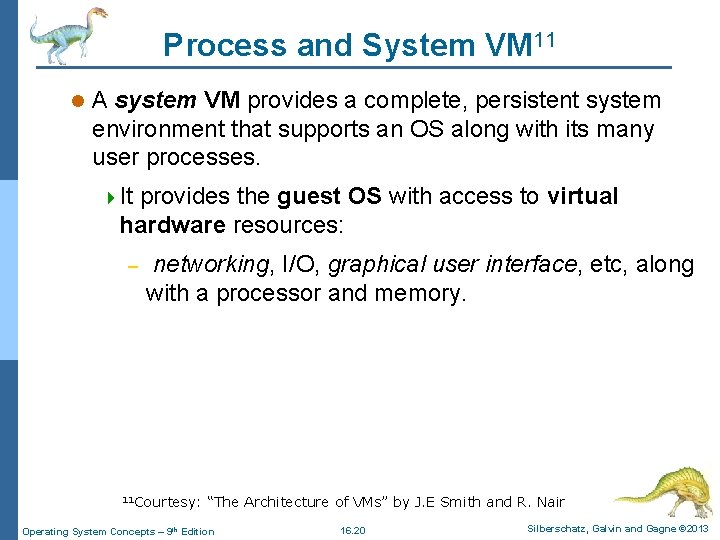
Process and System VM 11 l A system VM provides a complete, persistent system environment that supports an OS along with its many user processes. 4 It provides the guest OS with access to virtual hardware resources: – networking, I/O, graphical user interface, etc, along with a processor and memory. 11 Courtesy: “The Architecture of VMs” by J. E Smith and R. Nair Operating System Concepts – 9 th Edition 16. 20 Silberschatz, Galvin and Gagne © 2013
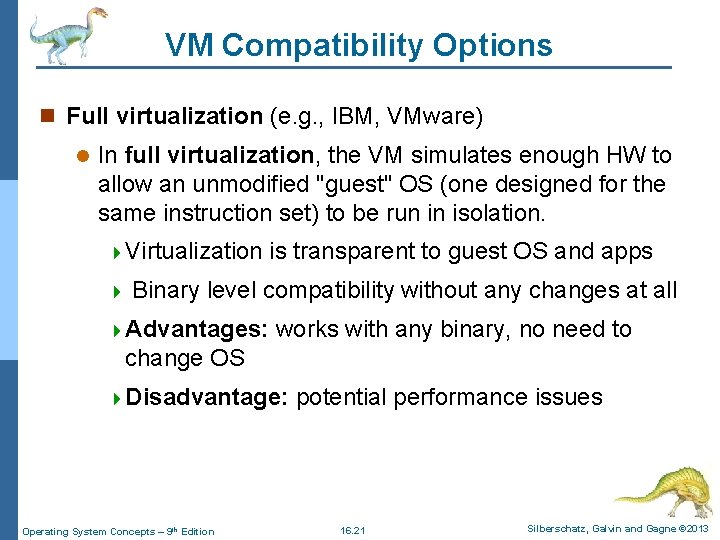
VM Compatibility Options n Full virtualization (e. g. , IBM, VMware) l In full virtualization, the VM simulates enough HW to allow an unmodified "guest" OS (one designed for the same instruction set) to be run in isolation. 4 Virtualization is transparent to guest OS and apps 4 Binary level compatibility without any changes at all 4 Advantages: works with any binary, no need to change OS 4 Disadvantage: Operating System Concepts – 9 th Edition potential performance issues 16. 21 Silberschatz, Galvin and Gagne © 2013
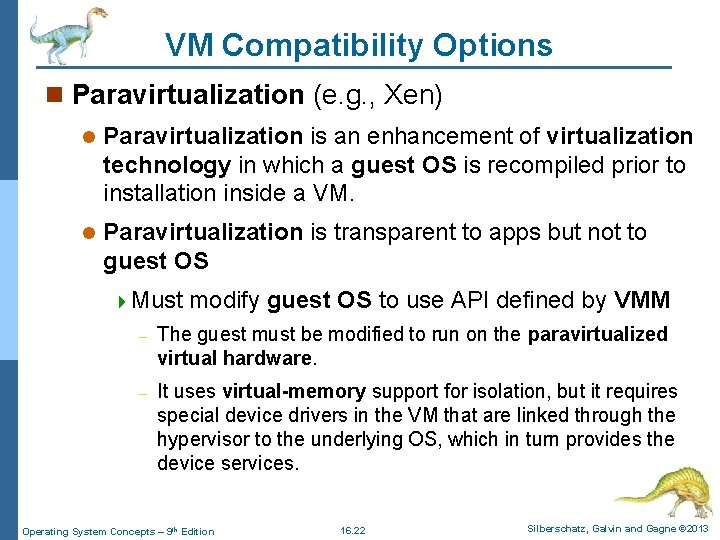
VM Compatibility Options n Paravirtualization (e. g. , Xen) l Paravirtualization is an enhancement of virtualization technology in which a guest OS is recompiled prior to installation inside a VM. l Paravirtualization is transparent to apps but not to guest OS 4 Must modify guest OS to use API defined by VMM – The guest must be modified to run on the paravirtualized virtual hardware. – It uses virtual-memory support for isolation, but it requires special device drivers in the VM that are linked through the hypervisor to the underlying OS, which in turn provides the device services. Operating System Concepts – 9 th Edition 16. 22 Silberschatz, Galvin and Gagne © 2013
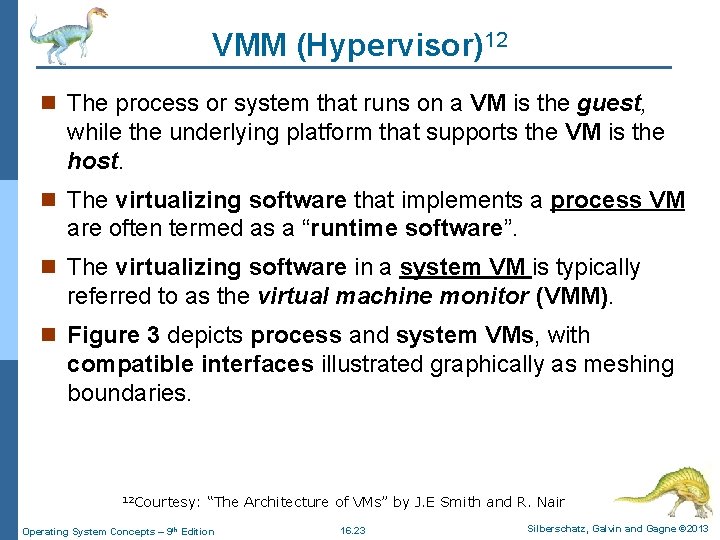
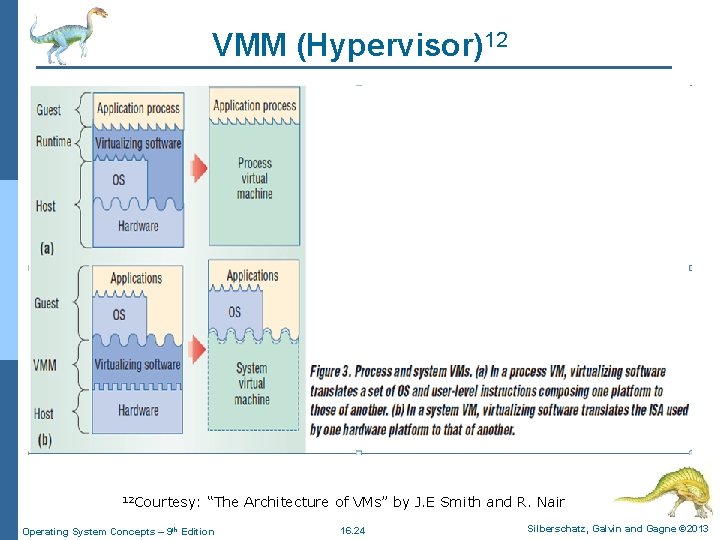
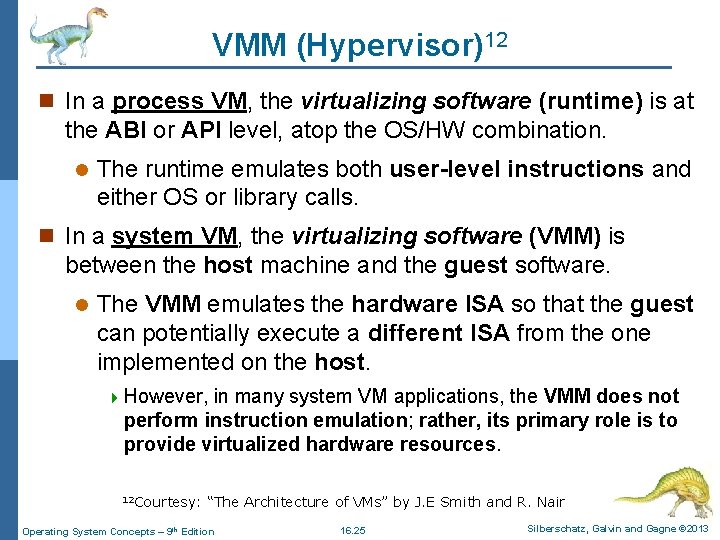
VMM (Hypervisor)12 n The process or system that runs on a VM is the guest, while the underlying platform that supports the VM is the host. n The virtualizing software that implements a process VM are often termed as a “runtime software”. n The virtualizing software in a system VM is typically referred to as the virtual machine monitor (VMM). n Figure 3 depicts process and system VMs, with compatible interfaces illustrated graphically as meshing boundaries. 12 Courtesy: “The Architecture of VMs” by J. E Smith and R. Nair Operating System Concepts – 9 th Edition 16. 23 Silberschatz, Galvin and Gagne © 2013
VMM (Hypervisor)12 12 Courtesy: “The Architecture of VMs” by J. E Smith and R. Nair Operating System Concepts – 9 th Edition 16. 24 Silberschatz, Galvin and Gagne © 2013
VMM (Hypervisor)12 n In a process VM, the virtualizing software (runtime) is at the ABI or API level, atop the OS/HW combination. l The runtime emulates both user-level instructions and either OS or library calls. n In a system VM, the virtualizing software (VMM) is between the host machine and the guest software. l The VMM emulates the hardware ISA so that the guest can potentially execute a different ISA from the one implemented on the host. 4 However, in many system VM applications, the VMM does not perform instruction emulation; rather, its primary role is to provide virtualized hardware resources. 12 Courtesy: “The Architecture of VMs” by J. E Smith and R. Nair Operating System Concepts – 9 th Edition 16. 25 Silberschatz, Galvin and Gagne © 2013
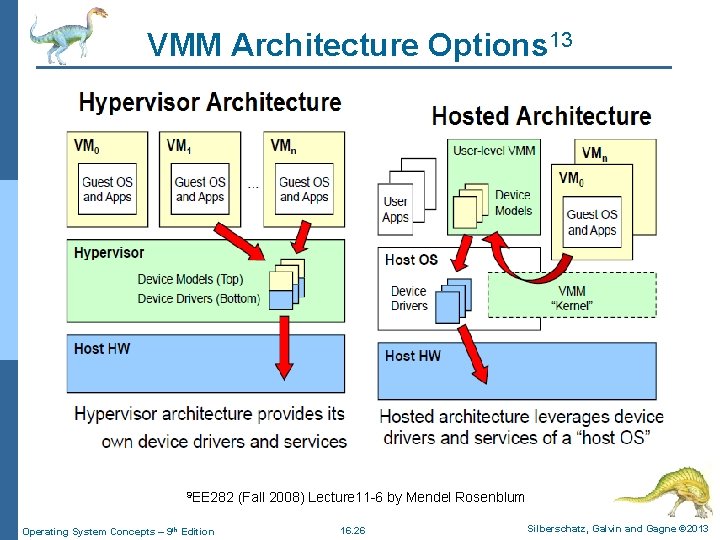
VMM Architecture Options 13 9 EE 282 (Fall 2008) Lecture 11 -6 by Mendel Rosenblum Operating System Concepts – 9 th Edition 16. 26 Silberschatz, Galvin and Gagne © 2013
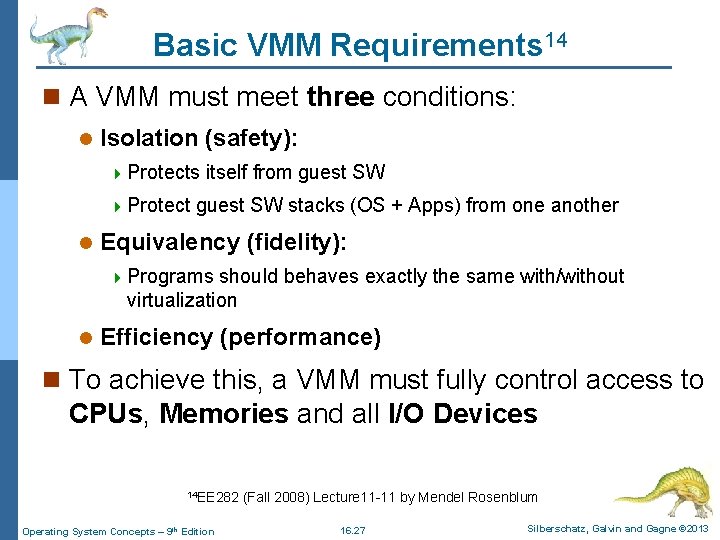
Basic VMM Requirements 14 n A VMM must meet three conditions: l Isolation (safety): 4 Protects itself from guest SW 4 Protect guest SW stacks (OS + Apps) from one another l Equivalency (fidelity): 4 Programs should behaves exactly the same with/without virtualization l Efficiency (performance) n To achieve this, a VMM must fully control access to CPUs, Memories and all I/O Devices 14 EE 282 (Fall 2008) Lecture 11 -11 by Mendel Rosenblum Operating System Concepts – 9 th Edition 16. 27 Silberschatz, Galvin and Gagne © 2013
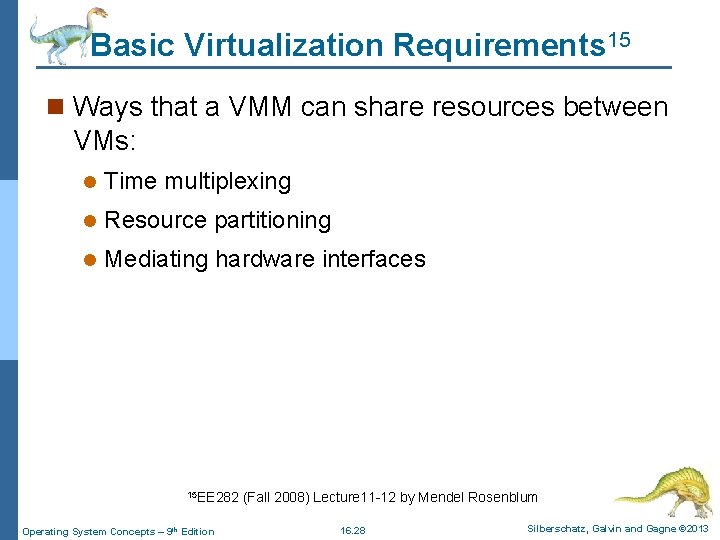
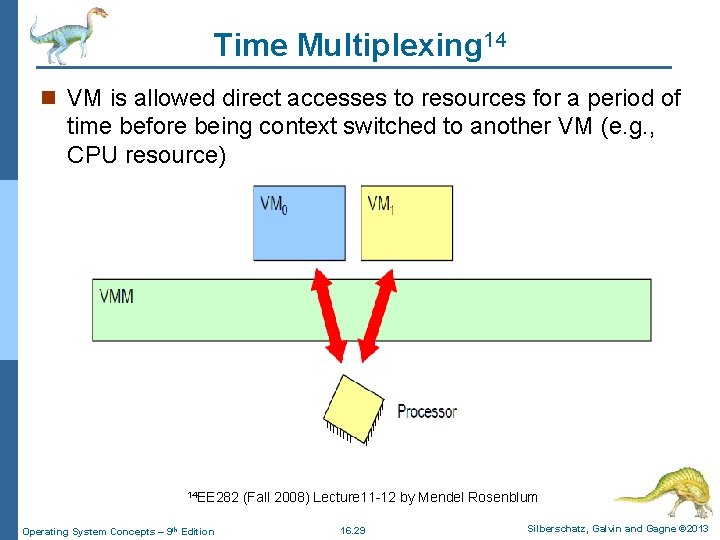
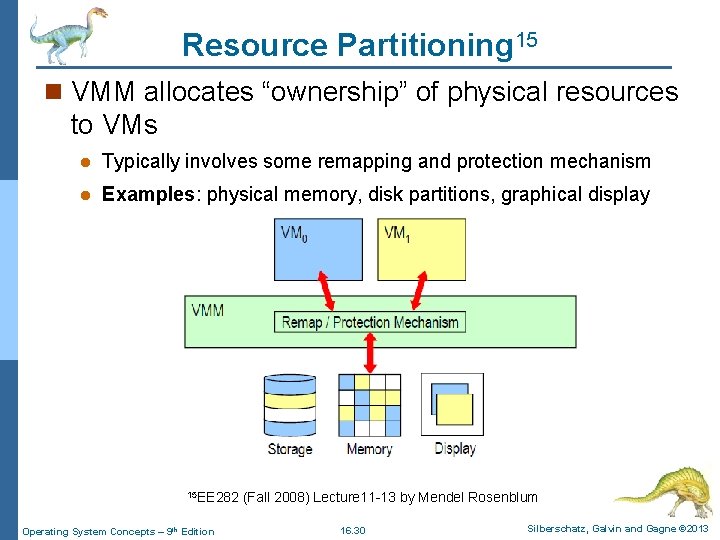
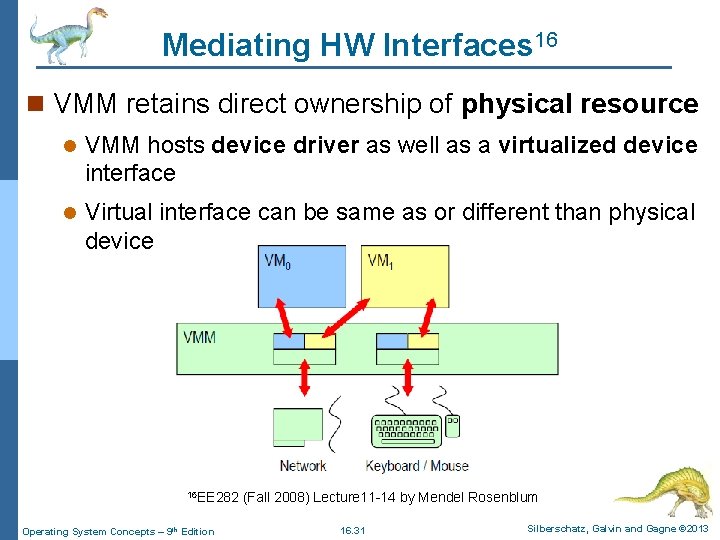
Basic Virtualization Requirements 15 n Ways that a VMM can share resources between VMs: l Time multiplexing l Resource partitioning l Mediating hardware interfaces 15 EE 282 (Fall 2008) Lecture 11 -12 by Mendel Rosenblum Operating System Concepts – 9 th Edition 16. 28 Silberschatz, Galvin and Gagne © 2013
Time Multiplexing 14 n VM is allowed direct accesses to resources for a period of time before being context switched to another VM (e. g. , CPU resource) 14 EE 282 (Fall 2008) Lecture 11 -12 by Mendel Rosenblum Operating System Concepts – 9 th Edition 16. 29 Silberschatz, Galvin and Gagne © 2013
Resource Partitioning 15 n VMM allocates “ownership” of physical resources to VMs l Typically involves some remapping and protection mechanism l Examples: physical memory, disk partitions, graphical display 15 EE 282 (Fall 2008) Lecture 11 -13 by Mendel Rosenblum Operating System Concepts – 9 th Edition 16. 30 Silberschatz, Galvin and Gagne © 2013
Mediating HW Interfaces 16 n VMM retains direct ownership of physical resource l VMM hosts device driver as well as a virtualized device interface l Virtual interface can be same as or different than physical device 16 EE 282 (Fall 2008) Lecture 11 -14 by Mendel Rosenblum Operating System Concepts – 9 th Edition 16. 31 Silberschatz, Galvin and Gagne © 2013
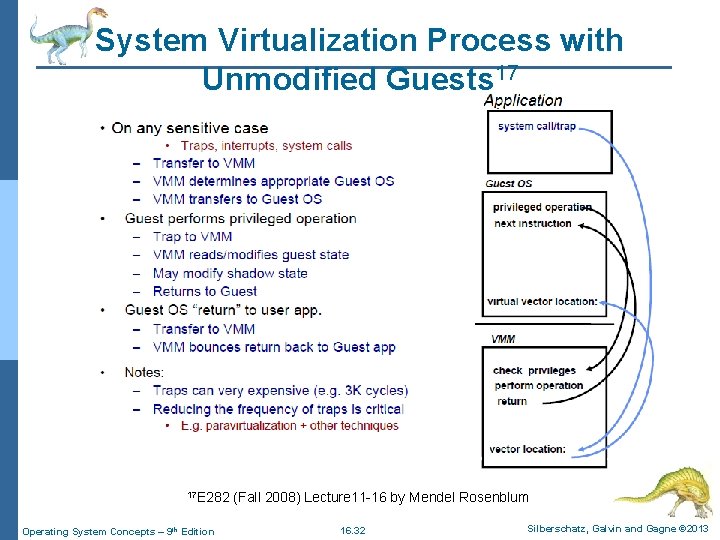
System Virtualization Process with Unmodified Guests 17 17 E 282 (Fall 2008) Lecture 11 -16 by Mendel Rosenblum Operating System Concepts – 9 th Edition 16. 32 Silberschatz, Galvin and Gagne © 2013
Emulators and Dynamic Binary Translators 18 n A more challenging problem for process-level VMs is that of supporting program binaries (system ISA) compiled to different host ISA. l A recent example of a process VM is the Intel IA 32 (x 86), which allows only Intel IA-32 application binaries to run. l The issue can be solved with an interpreter program which fetches, decodes, and emulates the execution of individual guest instructions. 4 This can be a relatively slow process, requiring tens of host instructions for each source instruction interpreted. 18 Courtesy: “The Architecture of VMs” by J. E Smith and R. Nair Operating System Concepts – 9 th Edition 16. 33 Silberschatz, Galvin and Gagne © 2013
Emulators and Dynamic Binary Translators 18 n Through dynamic binary translation, converts the guest instructions to host instructions in blocks rather than instruction by instruction (faster process): l No need to do anything for user code l Extensively used in original VMware VMM l Translation sequences can be faster l Avoid privilege instruction traps n To reduce performance losses, dynamic binary translators sometimes perform code optimizations during translation. 18 Courtesy: “The Architecture of VMs” by J. E Smith and R. Nair Operating System Concepts – 9 th Edition 16. 34 Silberschatz, Galvin and Gagne © 2013
System VMs 19 n A system VM provides a complete environment in which an OS and many processes, possibly belonging to multiple users, can coexist. n By using system VMs, a single-host hardware platform can support multiple, isolated guest OS environments simultaneously. n In a system VM, the VMM primarily provides platform replication. l The central issue is dividing a set of HW resources among multiple guest OS environments (disk virtualization, as in Figure 1 b). 4 The VMM has access to, and manages, all the hardware resources. 19 Courtesy: “The Architecture of VMs” by J. E Smith and R. Nair Operating System Concepts – 9 th Edition 16. 35 Silberschatz, Galvin and Gagne © 2013
System VMs 19 n A guest OS and its application processes are managed under (hidden) control of the VMM. n When a guest OS performs a privileged instruction or interacts with shared HW resources, the VMM intercepts the operation, checks it for correctness, and performs it on behalf of the guest. n The VMM runs in the most highly privileged mode, while all guest systems run with reduced privileges so that the VMM can intercept and emulate all guest OS actions that would normally access or manipulate critical HW resources. 19 Courtesy: “The Architecture of VMs” by J. E Smith and R. Nair Operating System Concepts – 9 th Edition 16. 36 Silberschatz, Galvin and Gagne © 2013
Hosted VMs 20 n An alternative system VM implementation builds virtualizing SW on top of an existing host OS, resulting in a hosted VM. n An advantage of a hosted VM is that a user installs it just like a typical application program. n Virtualizing software can rely on the host OS to provide device drivers and other lower-level services rather than on the VMM. n An example of a hosted VM implementation is the VMware GSX server, which runs on IA-32 hardware platforms. . 20 Courtesy: “The Architecture of VMs” by J. E Smith and R. Nair Operating System Concepts – 9 th Edition 16. 37 Silberschatz, Galvin and Gagne © 2013
Whole-system VMs 21 n In conventional system VMs, all guests and host system software as well as application software uses the same ISA as the underlying hardware. n In some situations, however, the host and guest systems do not have a common ISA. l For example, Windows PCs and Apple Power. PC-based systems, use different ISAs (and different operating systems). n The whole-system VMs deal with this situation by virtualizing all software, including the OS and applications: Because the ISAs differ, the VM must emulate both the guest and host OS code. l An example of this type of VM is the Virtual PC, in which a Windows system runs on a Macintosh platform. 21 Courtesy: “The Architecture of VMs” by J. E Smith and R. Nair Operating System Concepts – 9 th Edition 16. 38 Silberschatz, Galvin and Gagne © 2013
Benefits and Features of Virtualization n Multiple versions of a program can run, each in its own isolated OS, within one system. n A major advantage of VMs in production data-center use is system consolidation, which involves taking two or more separate systems and running them in virtual machines on one system. n Such physical-to-virtual conversions result in resource optimization, l since many lightly used systems can be combined to create one more heavily used system. Operating System Concepts – 9 th Edition 16. 39 Silberschatz, Galvin and Gagne © 2013
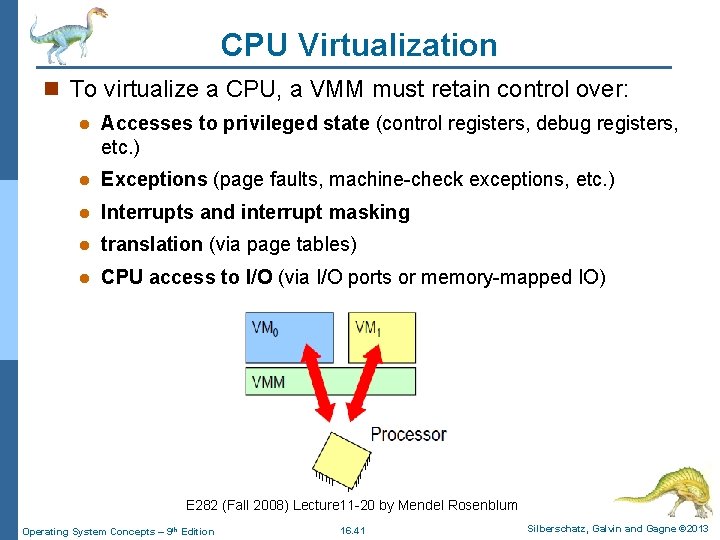
CPU Virtualization n One important concept found in most virtualization options is the implementation of a virtual CPU (VCPU). n The VCPU does not execute code, rather, it represents the state of the CPU as the guest machine believes it to be. l For each guest, the VMM maintains a VCPU representing that guest’s current CPU state. n When the guest is context-switched onto a CPU by the VMM, information from the VCPU is used to load the right context, much as a general-purpose OS would use the PCB. Operating System Concepts – 9 th Edition 16. 40 Silberschatz, Galvin and Gagne © 2013
CPU Virtualization n To virtualize a CPU, a VMM must retain control over: l Accesses to privileged state (control registers, debug registers, etc. ) l Exceptions (page faults, machine-check exceptions, etc. ) l Interrupts and interrupt masking l translation (via page tables) l CPU access to I/O (via I/O ports or memory-mapped IO) E 282 (Fall 2008) Lecture 11 -20 by Mendel Rosenblum Operating System Concepts – 9 th Edition 16. 41 Silberschatz, Galvin and Gagne © 2013
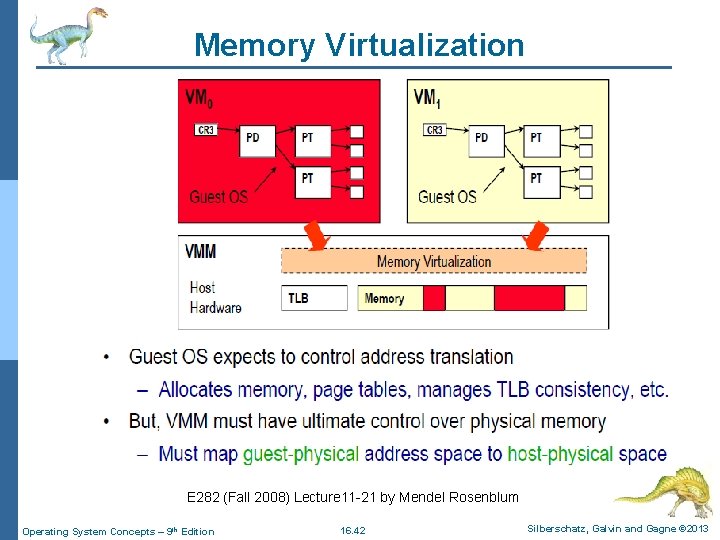
Memory Virtualization E 282 (Fall 2008) Lecture 11 -21 by Mendel Rosenblum Operating System Concepts – 9 th Edition 16. 42 Silberschatz, Galvin and Gagne © 2013
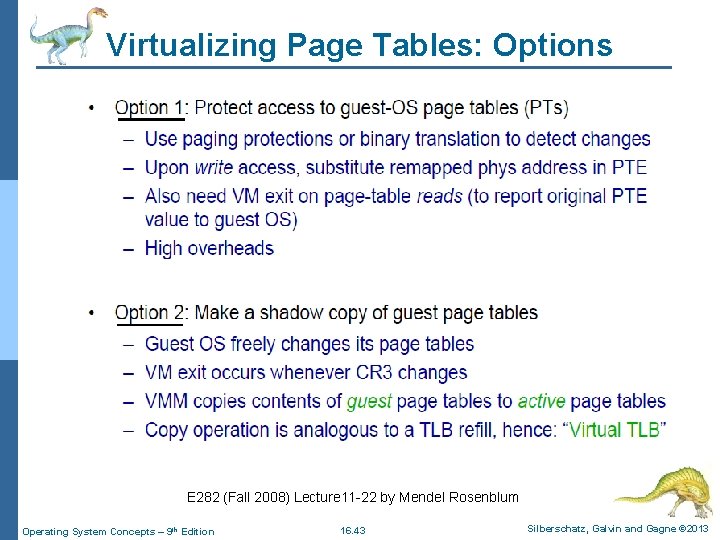
Virtualizing Page Tables: Options E 282 (Fall 2008) Lecture 11 -22 by Mendel Rosenblum Operating System Concepts – 9 th Edition 16. 43 Silberschatz, Galvin and Gagne © 2013
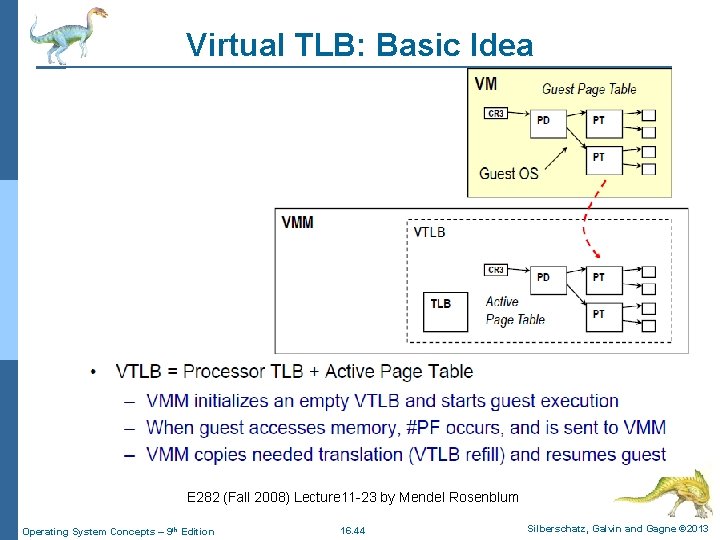
Virtual TLB: Basic Idea E 282 (Fall 2008) Lecture 11 -23 by Mendel Rosenblum Operating System Concepts – 9 th Edition 16. 44 Silberschatz, Galvin and Gagne © 2013
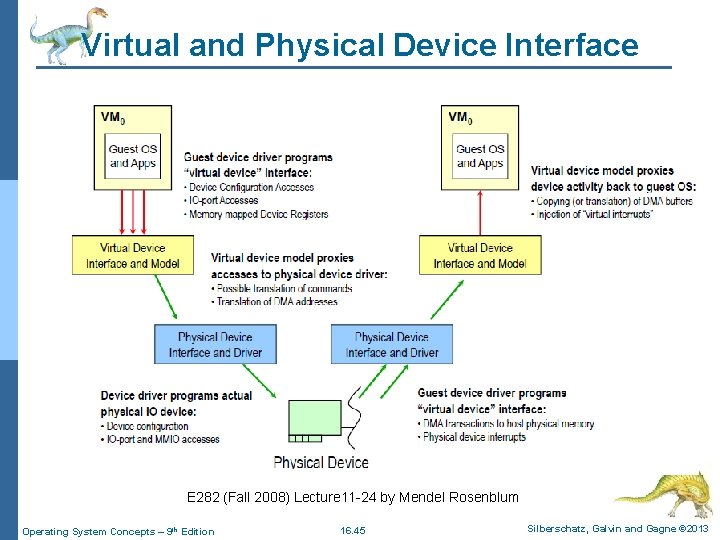
Virtual and Physical Device Interface E 282 (Fall 2008) Lecture 11 -24 by Mendel Rosenblum Operating System Concepts – 9 th Edition 16. 45 Silberschatz, Galvin and Gagne © 2013
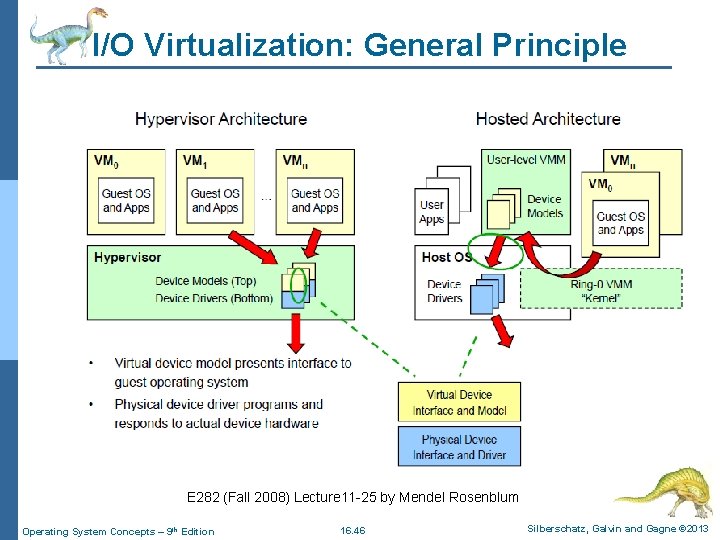
I/O Virtualization: General Principle E 282 (Fall 2008) Lecture 11 -25 by Mendel Rosenblum Operating System Concepts – 9 th Edition 16. 46 Silberschatz, Galvin and Gagne © 2013
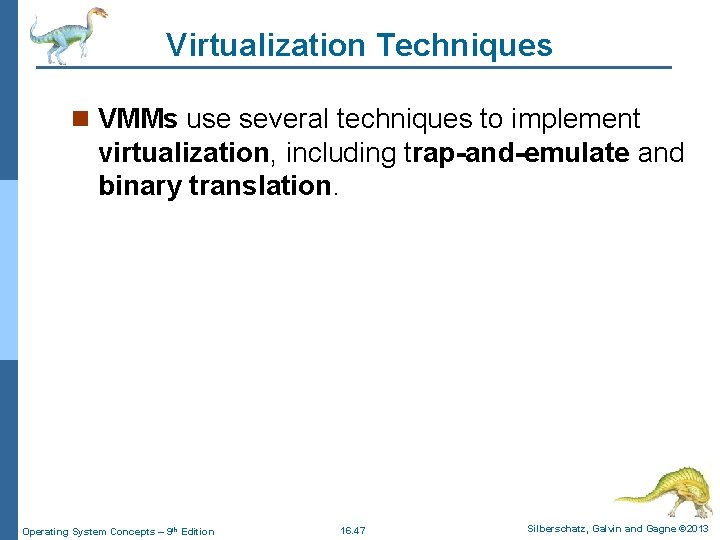
Virtualization Techniques n VMMs use several techniques to implement virtualization, including trap-and-emulate and binary translation. Operating System Concepts – 9 th Edition 16. 47 Silberschatz, Galvin and Gagne © 2013
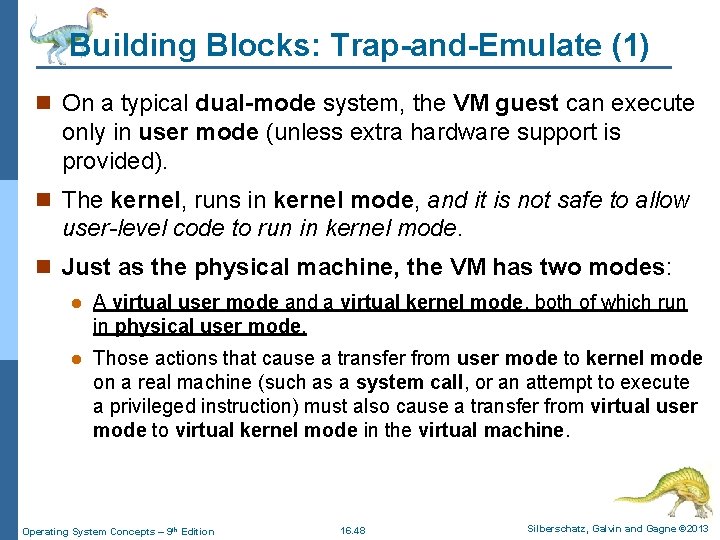
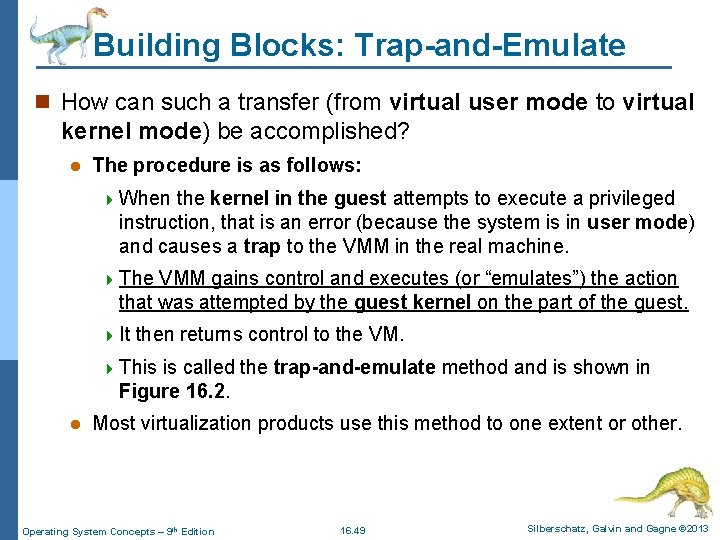
Building Blocks: Trap-and-Emulate (1) n On a typical dual-mode system, the VM guest can execute only in user mode (unless extra hardware support is provided). n The kernel, runs in kernel mode, and it is not safe to allow user-level code to run in kernel mode. n Just as the physical machine, the VM has two modes: l A virtual user mode and a virtual kernel mode, both of which run in physical user mode. l Those actions that cause a transfer from user mode to kernel mode on a real machine (such as a system call, or an attempt to execute a privileged instruction) must also cause a transfer from virtual user mode to virtual kernel mode in the virtual machine. Operating System Concepts – 9 th Edition 16. 48 Silberschatz, Galvin and Gagne © 2013
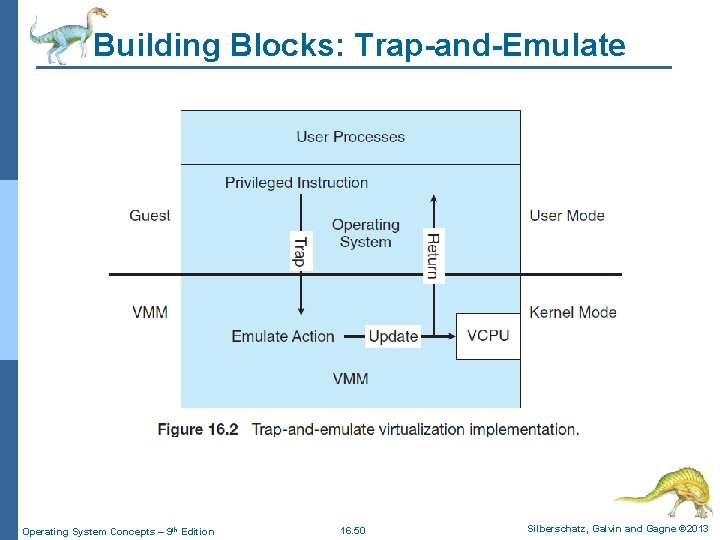
Building Blocks: Trap-and-Emulate n How can such a transfer (from virtual user mode to virtual kernel mode) be accomplished? l The procedure is as follows: 4 When the kernel in the guest attempts to execute a privileged instruction, that is an error (because the system is in user mode) and causes a trap to the VMM in the real machine. 4 The VMM gains control and executes (or “emulates”) the action that was attempted by the guest kernel on the part of the guest. 4 It then returns control to the VM. 4 This is called the trap-and-emulate method and is shown in Figure 16. 2. l Most virtualization products use this method to one extent or other. Operating System Concepts – 9 th Edition 16. 49 Silberschatz, Galvin and Gagne © 2013
Building Blocks: Trap-and-Emulate Operating System Concepts – 9 th Edition 16. 50 Silberschatz, Galvin and Gagne © 2013
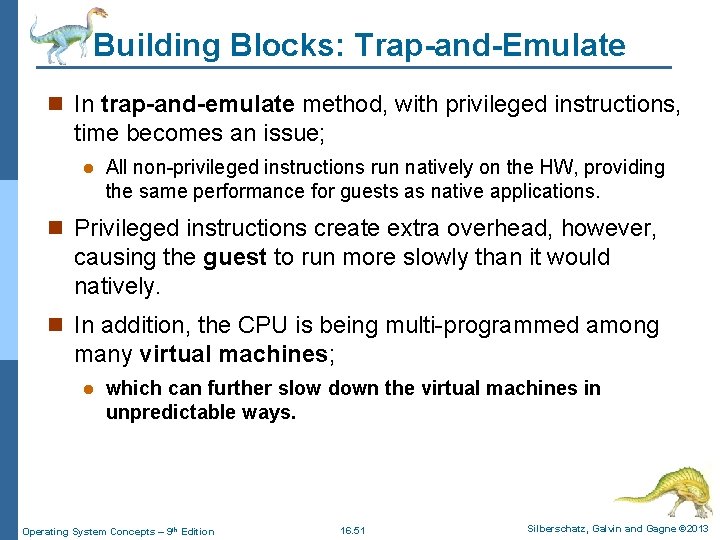
Building Blocks: Trap-and-Emulate n In trap-and-emulate method, with privileged instructions, time becomes an issue; l All non-privileged instructions run natively on the HW, providing the same performance for guests as native applications. n Privileged instructions create extra overhead, however, causing the guest to run more slowly than it would natively. n In addition, the CPU is being multi-programmed among many virtual machines; l which can further slow down the virtual machines in unpredictable ways. Operating System Concepts – 9 th Edition 16. 51 Silberschatz, Galvin and Gagne © 2013
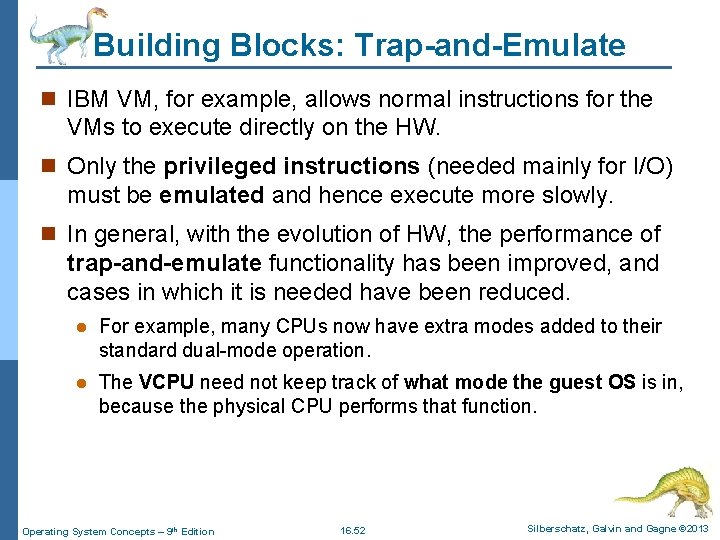
Building Blocks: Trap-and-Emulate n IBM VM, for example, allows normal instructions for the VMs to execute directly on the HW. n Only the privileged instructions (needed mainly for I/O) must be emulated and hence execute more slowly. n In general, with the evolution of HW, the performance of trap-and-emulate functionality has been improved, and cases in which it is needed have been reduced. l For example, many CPUs now have extra modes added to their standard dual-mode operation. l The VCPU need not keep track of what mode the guest OS is in, because the physical CPU performs that function. Operating System Concepts – 9 th Edition 16. 52 Silberschatz, Galvin and Gagne © 2013
Building Blocks: Binary Translation n Some CPUs do not have a clean separation of privileged and non-privileged instructions. l Unfortunately for virtualization implementers, the Intel x 86 CPU line is one of them. l No thought was given to running virtualization on the x 86 when it was designed. n This problem was solved with the implementation of the binary translation technique. n Binary translation is fairly simple in concept but complex in implementation. Operating System Concepts – 9 th Edition 16. 53 Silberschatz, Galvin and Gagne © 2013
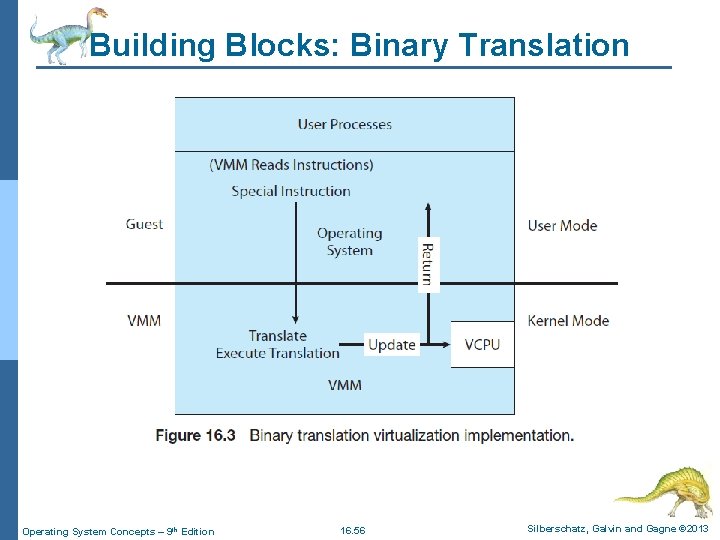
Building Blocks: Binary Translation n Binary translation is fairly simple in concept but complex in implementation. The basic steps are as follows: l If the guest VCPU is in user mode, the guest can run its instructions natively on a host physical CPU. l If the guest VCPU is in kernel mode, then the guest believes that it is running in kernel mode. The VMM examines every instruction the guest executes in virtual kernel mode by reading the next few instructions that the guest is going to execute, based on the guest’s program counter. l Instructions other than special instructions are run natively. l Special instructions are translated into a new set of instructions that perform the equivalent task—for example changing the flags in the VCPU. Operating System Concepts – 9 th Edition 16. 54 Silberschatz, Galvin and Gagne © 2013
Building Blocks: Binary Translation n Binary translation is shown in Figure 16. 3. l It is implemented by translation code within the VMM. l The translation code reads native binary instructions dynamically from the guest, and generates native binary code that executes in place of the original code. l The basic method of binary translation just described would execute correctly but perform poorly. l Fortunately, the vast majority of instructions would execute natively. Operating System Concepts – 9 th Edition 16. 55 Silberschatz, Galvin and Gagne © 2013
Building Blocks: Binary Translation Operating System Concepts – 9 th Edition 16. 56 Silberschatz, Galvin and Gagne © 2013
Building Blocks: Binary Translation n The basic method of binary translation just described would execute correctly but perform poorly. l But how could performance be improved for the other instructions? We can turn to a specific implementation of binary translation, the VMware method, to see one way of improving performance. l Here, caching provides the solution. The replacement code for each instruction that needs to be translated is cached. l All later executions of that instruction run from the translation cache and need not be translated again. l If the cache is large enough, this method can greatly improve performance. Operating System Concepts – 9 th Edition 16. 57 Silberschatz, Galvin and Gagne © 2013
Issue in Virtualization: Memory Management n Consider memory management issue in virtualization; specifically the page tables. n How can the VMM keep page-table state both for guests that believe they are managing the page tables and for the VMM itself? l A common method, used with both trap-and-emulate and binary translation, is to use nested page tables (NPTs) and each guest OS maintains one or more page tables to translate from virtual to physical memory. l The VMM maintains NPTs to represent the guest’s page-table state, just as it creates a VCPU to represent the guest’s CPU state. l The VMM knows when the guest tries to change its page table, and it makes the equivalent change in the NPT. Operating System Concepts – 9 th Edition 16. 58 Silberschatz, Galvin and Gagne © 2013
Issue in Virtualization: Memory Management n When the guest is on the CPU, the VMM puts the pointer to the appropriate NPT into the appropriate CPU register to make that table the active page table. l If the guest needs to modify the page table (for example, fulfilling a page fault), then that operation must be intercepted by the VMM and appropriate changes made to the nested and system page tables. l Unfortunately, the use of NPTs can cause TLB misses, and many other complexities need to be addressed to achieve a reasonable performance. l Although it might seem that the binary translation method creates a large amounts of overhead, Operating System Concepts – 9 th Edition 16. 59 Silberschatz, Galvin and Gagne © 2013
Virtualization: Hardware Assistance n All major general-purpose CPUs are providing extended amounts of HW support for virtualization. l For example, AMD virtualization technology (AMD-V) has appeared in several AMD processors since 2006. n It defines two new modes of operation—host and guest —thus moving from a dual-mode to a multimode processor. n The VMM can enable host mode, define the characteristics of each guest VM, and then switch the system to guest mode, passing control of the system to a OS that is running in the VM. Operating System Concepts – 9 th Edition 16. 60 Silberschatz, Galvin and Gagne © 2013
Virtualization: Hardware Assistance n In guest mode, the virtualized OS thinks it is running on native HW and sees whatever devices are included in the host’s definition of the guest. n If the guest tries to access a virtualized resource, then control is passed to the VMM to manage that interaction. n Both provide guest VCPU state data structures to load and save guest CPU state automatically during guest context switches. Operating System Concepts – 9 th Edition 16. 61 Silberschatz, Galvin and Gagne © 2013
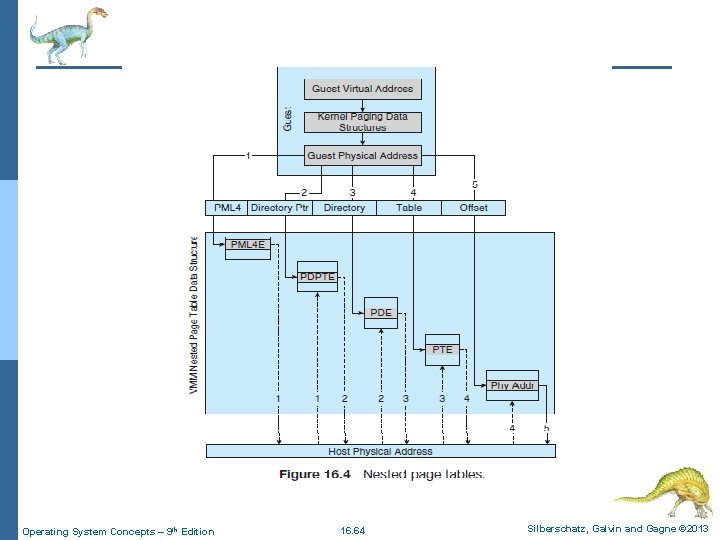
Virtualization: Hardware Assistance n In addition, virtual machine control structures (VMCSs) are provided to manage guest and host states, as well as the various guest execution controls, exit controls, and information about why guests exit back to the host. n AMD and Intel have also addressed memory management in the virtual environment. l With AMD’s RVI and Intel’s EPT memory management enhancements, VMMs no longer need to implement software NPTs. n In essence, these CPUs implement NPTs in HW to allow the VMM to fully control paging while the CPUs accelerate the translation from virtual to physical addresses. Operating System Concepts – 9 th Edition 16. 62 Silberschatz, Galvin and Gagne © 2013
Virtualization: Hardware Assistance n The NPTs add a new layer, representing the guest’s view of logical-to-physical address translation. l The CPU page-table’s walking function includes this new layer as necessary, walking through the guest table to the VMM table to find the physical address desired. n A TLB miss results in a performance penalty, because more tables must be traversed (the guest and host page tables) to complete the lookup. n Figure 16. 4 shows the extra translation work performed by the HW to translate from a guest virtual address (GVA) to a final physical address (FPA). Operating System Concepts – 9 th Edition 16. 63 Silberschatz, Galvin and Gagne © 2013
Operating System Concepts – 9 th Edition 16. 64 Silberschatz, Galvin and Gagne © 2013
Virtualization: Hardware Assistance n Similarly, interrupts must be delivered to the appropriate guest and must not be visible to other guests. n By providing an interrupt remapping feature, CPUs with virtualization HW assistance automatically deliver an interrupt destined for a guest to a core that is currently running a thread of that guest. n That way, the guest receives interrupts without the VMM’s needing to intercede (arbitrate) in their delivery. n Without interrupt remapping, malicious guests can generate interrupts that can be used to gain control of the host system. Operating System Concepts – 9 th Edition 16. 65 Silberschatz, Galvin and Gagne © 2013
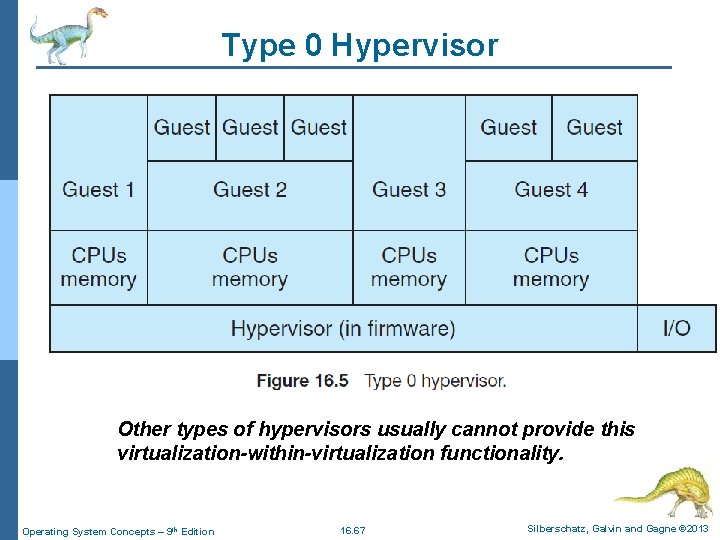
Type 0 Hypervisor n Type 0 hypervisors have existed for many years under many names, including “partitions” and “domains”. l They are a HW feature, and that brings its own positives and negatives. l Operating systems need do nothing special to take advantage of their features. l The VMM itself is encoded in the firmware and loaded at boot time. l In turn, it loads the guest images to run in each partition. l The feature set of a type 0 hypervisor tends to be smaller than those of the other types because it is implemented in HW. l For example, a system might be split into four virtual systems, each with dedicated CPUs, memory, and I/O devices. Each guest believes that it has dedicated HW because it does, simplifying many implementation details. Operating System Concepts – 9 th Edition 16. 66 Silberschatz, Galvin and Gagne © 2013
Type 0 Hypervisor Other types of hypervisors usually cannot provide this virtualization-within-virtualization functionality. Operating System Concepts – 9 th Edition 16. 67 Silberschatz, Galvin and Gagne © 2013
Type 1 Hypervisor n Type 1 hypervisors are commonly found in company data centers and are in a sense becoming “the datacenter operating system. ” n They are special-purpose OSs that run natively on the HW, but rather than providing system calls and other interfaces for running programs, they create, run, and manage guest operating systems. n Whatever the platform, guests generally do not know they are running on anything but the native HW. Operating System Concepts – 9 th Edition 16. 68 Silberschatz, Galvin and Gagne © 2013
Type 1 Hypervisor n Type 1 hypervisors run in kernel mode, taking advantage of HW protection. n Where the host CPU allows, they use multiple modes to give guest operating systems their own control and improved performance. n They implement device drivers for the HW they run on, because no other component could do so. n Because they are operating systems, they must also provide CPU scheduling, memory management, I/O management, protection, and even security. l Frequently, they provide APIs, but those APIs support applications in guests or external applications that supply features like backups, monitoring, and security. Operating System Concepts – 9 th Edition 16. 69 Silberschatz, Galvin and Gagne © 2013
Type 2 Hypervisor n Type 2 hypervisors are less interesting to us as operating- system explorers, because there is very little operatingsystem involvement in these application level virtual machine managers. n This type of VMM is simply another process run and managed by the host, and even the host does not know virtualization is happening within the VMM. Operating System Concepts – 9 th Edition 16. 70 Silberschatz, Galvin and Gagne © 2013
Type 2 Hypervisor n Type 2 hypervisors have limits not associated with some of the other types. l For example, a user needs administrative privileges to access many of the HW assistance features of modern CPUs. n If the VMM is being run by a standard user without additional privileges, the VMM cannot take advantage of these features. n Due to this limitation, as well as the extra overhead of running a general-purpose OS as well as guest OSs, type 2 hypervisors tend to have poorer overall performance than type 0 or 1. Operating System Concepts – 9 th Edition 16. 71 Silberschatz, Galvin and Gagne © 2013
Application Containment n The goal of virtualization in some instances is to provide a method to segregate (separate) applications, manage their performance and resource use, and create an easy way to start, stop, move, and manage them. l In such cases, perhaps full-fledged virtualization is not needed. n If the applications are all compiled for the same OS, then we do not need complete virtualization to provide these features and instead we can use application containment. Operating System Concepts – 9 th Edition 16. 72 Silberschatz, Galvin and Gagne © 2013
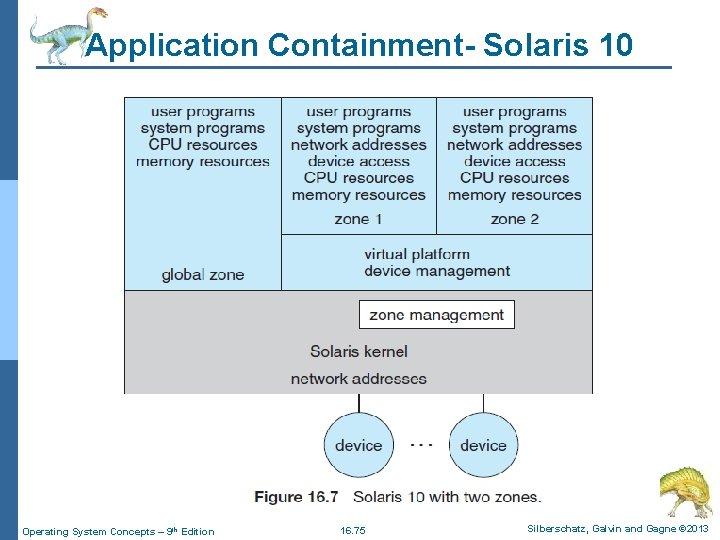
Application Containment - Solaris 10 n Consider one example of application containment. n Starting with version 10 of Oracle Solaris has included containers, or zones, that create a virtual layer between the OS and the applications. l In this system, only one kernel is installed, and the HW is not virtualized. n Rather, the OS and its devices are virtualized, providing processes within a zone with the impression that they are the only processes on the system. Operating System Concepts – 9 th Edition 16. 73 Silberschatz, Galvin and Gagne © 2013
Application Containment- Solaris 10 l One or more containers can be created, and each can have its own applications, network stacks, network address and ports, user accounts, and so on. l CPU and memory resources can be divided among the zones and the system-wide processes. l Each zone in fact can run its own scheduler to optimize the performance of its applications on the allotted resources. l Figure 16. 7 shows a Solaris 10 system with two containers and the standard “global” user space. Operating System Concepts – 9 th Edition 16. 74 Silberschatz, Galvin and Gagne © 2013
Application Containment- Solaris 10 Operating System Concepts – 9 th Edition 16. 75 Silberschatz, Galvin and Gagne © 2013
Container and Hypervisor n Two main differences exist between a container and a hypervisor system: l The container’s system requires an underlying OS that provides the basic services to all of the containerized applications using virtualmemory support for isolation. l A hypervisor, on the other hand, runs VMs that have their own OS using hardware VM support. n Container systems usually provide service isolation between containers. l As a result, container services such as file systems or network support can have limited resource access. l Applications running in a container environment share an underlying operating system, while VM systems can run different operating systems. Operating System Concepts – 9 th Edition 16. 76 Silberschatz, Galvin and Gagne © 2013
CPU Scheduling n With virtualization, even a single-CPU system, acts like a multiprocessor system. n The virtualization SW presents one or more virtual CPUs to each of the virtual machines running on the system and then schedules the use of the physical CPUs among the virtual machines. l The significant variations among virtualization technologies make it difficult to summarize the effect of virtualization on scheduling. Operating System Concepts – 9 th Edition 16. 77 Silberschatz, Galvin and Gagne © 2013
CPU Scheduling n First, let’s consider the general case of VMM scheduling: l The VMM has a number of physical CPUs available and a number of threads to run on those CPUs. l The threads can be VMM threads (host threads) or guest threads. l Guests are configured with a certain number of virtual CPUs at creation time, and that number can be adjusted throughout the life of the VM. l When there are enough CPUs to allocate the requested number to each guest, the VMM can treat the CPUs as dedicated and schedule only a given guest’s threads on that guest’s CPUs. l In this situation, the guests act much like native operating systems running on native CPUs. Operating System Concepts – 9 th Edition 16. 78 Silberschatz, Galvin and Gagne © 2013
CPU Scheduling n The VMM itself needs some CPU cycles for guest management and I/O management and can steal cycles from the guests by scheduling its threads across all of the system CPUs. l More difficult is the case of over commitment, in which the guests are configured for more CPUs than exist in the system. n Here, a VMM can use standard scheduling algorithms to make progress on each thread but can also add a fairness aspect to those algorithms. l For example, if there are six physical CPUs and 12 guest-allocated CPUs, the VMM could allocate CPU resources proportionally, giving each guest half of the CPU resources it believes it has. l The VMM can still present all 12 virtual CPUs to the guests, but in mapping them onto physical CPUs, the VMM can use its scheduler to share them appropriately. Operating System Concepts – 9 th Edition 16. 79 Silberschatz, Galvin and Gagne © 2013
I/O n VMMs vary greatly in how they provide I/O to their guests. l I/O devices may be dedicated to guests, for example, the VMM may have device drivers onto which it maps guest I/O. l The VMM may also provide idealized device drivers to guests, which allows easy provision and management of guest I/O. 4 In this case, the guest sees an easy-to-control device, but in reality that simple device driver communicates to the VMM which sends those requests to real devices through real device drivers. n I/O in virtual environments is complicated and requires careful VMM design and implementation. Operating System Concepts – 9 th Edition 16. 80 Silberschatz, Galvin and Gagne © 2013
I/O n Consider the case of a hypervisor and HW combination that allows devices to be dedicated to a guest and allows the guest to access those devices directly. l Of course, a device dedicated to one guest is not available to any other guests, but this direct access can still be useful in some circumstances. l The reason to allow direct access is to improve I/O performance. l The less the hypervisor has to do to enable I/O for its guests, the faster the I/O can occur. n With Type 0 hypervisors that provide direct device access, guests can often run at the same speed as native operating systems. Operating System Concepts – 9 th Edition 16. 81 Silberschatz, Galvin and Gagne © 2013
I/O n With direct device access in type 1 and 2 hypervisors, performance can be similar to that of native operating systems if certain HW support is present. l The HW needs to provide DMA pass-through with facilities like VT-d, as well as direct interrupt delivery to specific guests. n Given how frequently interrupts occur, the guests on HW without these features have worse performance than if they were running natively. Operating System Concepts – 9 th Edition 16. 82 Silberschatz, Galvin and Gagne © 2013
I/O n In addition to direct access, VMMs provide shared access to devices: l Consider a disk drive to which multiple guests have access. l The VMM must provide protection while sharing the device, assuring that a guest can access only the blocks specified in the guest’s configuration. 4 In such instances, the VMM must be part of every I/O, checking it for correctness as well as routing the data to and from the appropriate devices and guests. Operating System Concepts – 9 th Edition 16. 83 Silberschatz, Galvin and Gagne © 2013
Live Migration n One feature not found in general-purpose operating systems but found in type 0 and type 1 hypervisors is the live migration of a running guest from one system to another. n Here, we explore the details of how live migration works and why VMMs have a relatively easy time implementing it while general-purpose operating systems, in spite of some research attempts, do not. n First, consider how live migration works. A running guest on one system is copied to another system running the same VMM. Operating System Concepts – 9 th Edition 16. 84 Silberschatz, Galvin and Gagne © 2013
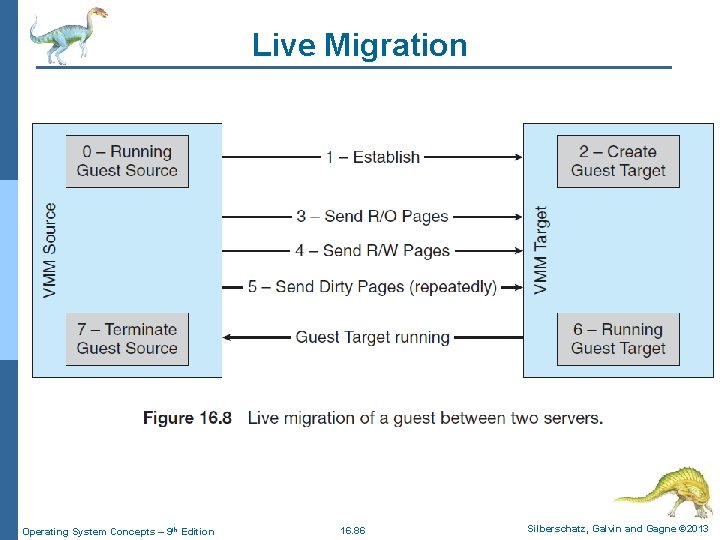
Live Migration n The VMM migrates a guest via the following steps: l The source VMM establishes a connection with the target VMM and confirms that it is allowed to send a guest. l The target creates a new guest by creating a new VCPU, new nested page table, and other state storage. l The source sends all read-only memory pages to the target. l The source sends all read-write pages to the target, marking them as clean. l The source repeats step 4, as during that step some pages were probably modified by the guest and are now dirty. These pages need to be sent again and marked again as clean. l 6. When the cycle of steps 4 and 5 becomes very short, the source VMM freezes the guest, sends the VCPU’s final state, sends other state details, sends the final dirty pages, and tells the target to start running the guest. Once the target acknowledges that the guest is running, the source terminates the guest. This sequence is shown in Figure 16. 8. Operating System Concepts – 9 th Edition 16. 85 Silberschatz, Galvin and Gagne © 2013
Live Migration Operating System Concepts – 9 th Edition 16. 86 Silberschatz, Galvin and Gagne © 2013
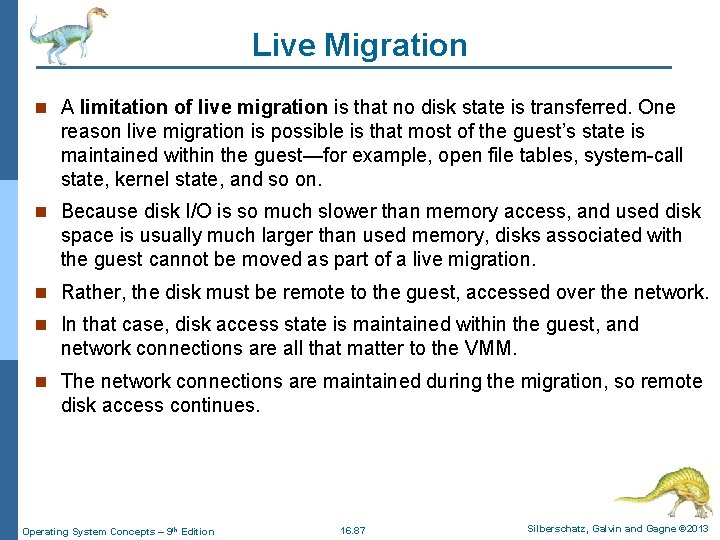
Live Migration n A limitation of live migration is that no disk state is transferred. One reason live migration is possible is that most of the guest’s state is maintained within the guest—for example, open file tables, system-call state, kernel state, and so on. n Because disk I/O is so much slower than memory access, and used disk space is usually much larger than used memory, disks associated with the guest cannot be moved as part of a live migration. n Rather, the disk must be remote to the guest, accessed over the network. n In that case, disk access state is maintained within the guest, and network connections are all that matter to the VMM. n The network connections are maintained during the migration, so remote disk access continues. Operating System Concepts – 9 th Edition 16. 87 Silberschatz, Galvin and Gagne © 2013
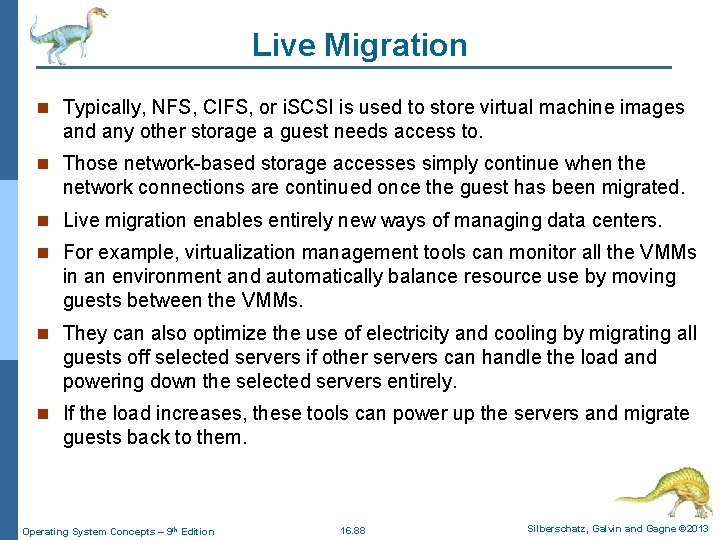
Live Migration n Typically, NFS, CIFS, or i. SCSI is used to store virtual machine images and any other storage a guest needs access to. n Those network-based storage accesses simply continue when the network connections are continued once the guest has been migrated. n Live migration enables entirely new ways of managing data centers. n For example, virtualization management tools can monitor all the VMMs in an environment and automatically balance resource use by moving guests between the VMMs. n They can also optimize the use of electricity and cooling by migrating all guests off selected servers if other servers can handle the load and powering down the selected servers entirely. n If the load increases, these tools can power up the servers and migrate guests back to them. Operating System Concepts – 9 th Edition 16. 88 Silberschatz, Galvin and Gagne © 2013
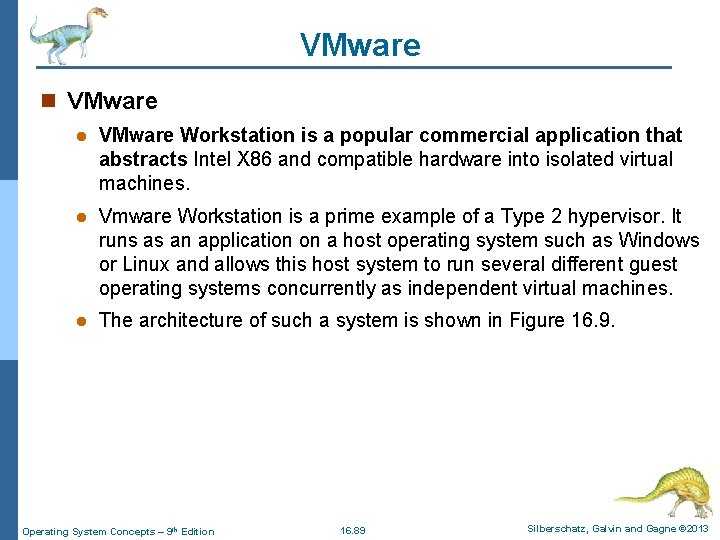
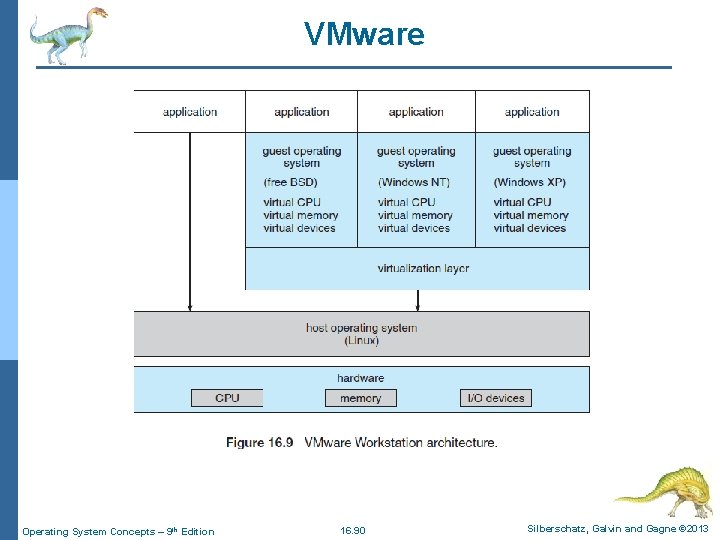
VMware n VMware l VMware Workstation is a popular commercial application that abstracts Intel X 86 and compatible hardware into isolated virtual machines. l Vmware Workstation is a prime example of a Type 2 hypervisor. It runs as an application on a host operating system such as Windows or Linux and allows this host system to run several different guest operating systems concurrently as independent virtual machines. l The architecture of such a system is shown in Figure 16. 9. Operating System Concepts – 9 th Edition 16. 89 Silberschatz, Galvin and Gagne © 2013
VMware Operating System Concepts – 9 th Edition 16. 90 Silberschatz, Galvin and Gagne © 2013
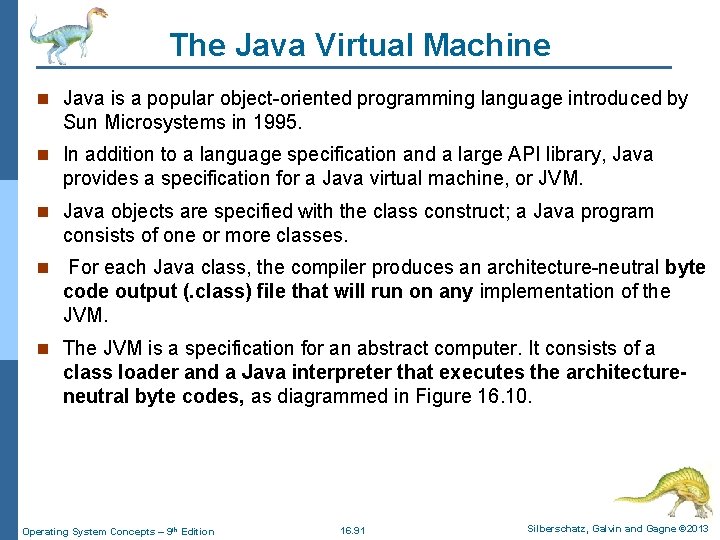
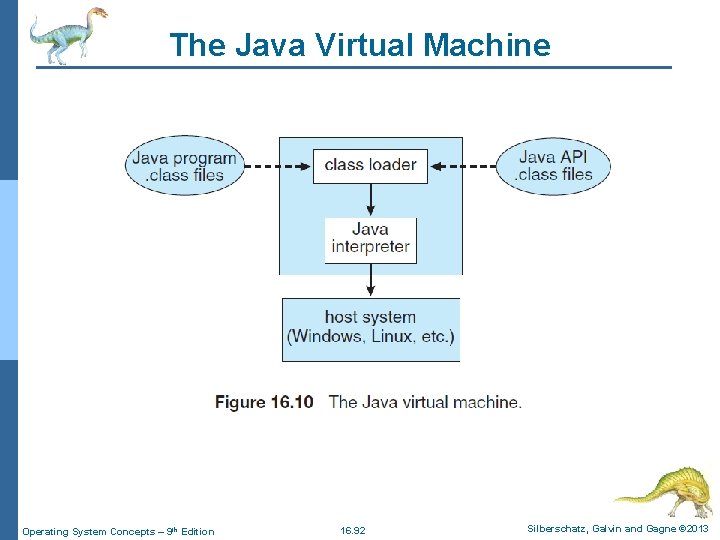
The Java Virtual Machine n Java is a popular object-oriented programming language introduced by Sun Microsystems in 1995. n In addition to a language specification and a large API library, Java provides a specification for a Java virtual machine, or JVM. n Java objects are specified with the class construct; a Java program consists of one or more classes. n For each Java class, the compiler produces an architecture-neutral byte code output (. class) file that will run on any implementation of the JVM. n The JVM is a specification for an abstract computer. It consists of a class loader and a Java interpreter that executes the architectureneutral byte codes, as diagrammed in Figure 16. 10. Operating System Concepts – 9 th Edition 16. 91 Silberschatz, Galvin and Gagne © 2013
The Java Virtual Machine Operating System Concepts – 9 th Edition 16. 92 Silberschatz, Galvin and Gagne © 2013
The Java Virtual Machine n The class loader loads the compiled. class files from both the Java program and the Java API for execution by the Java interpreter. n After a class is loaded, the verifier checks that the. class file is valid Java bytecode and that it does not overflow or underflow the stack. n It also ensures that the bytecode does not perform pointer arithmetic, which could provide illegal memory access. n If the class passes verification, it is run by the Java interpreter. The JVM also automatically manages memory by performing garbage collection —the practice of reclaiming memory from objects no longer in use and returning it to the system. n Much research focuses on garbage collection algorithms for increasing the performance of Java programs in the virtual machine. Operating System Concepts – 9 th Edition 16. 93 Silberschatz, Galvin and Gagne © 2013