
Virtual Links VLANs and Tunneling CS 4251 Computer
- Slides: 27
Virtual Links: VLANs and Tunneling CS 4251: Computer Networking II Nick Feamster Spring 2008
Why VLANs? • Layer 2: devices on one VLAN cannot communicate with users on another VLAN without the use of routers and network layer addresses • Advantages – Help control broadcasts (primarily MAC-layer broadcasts) – Switch table entry scaling – Improve network security – Help logically group network users • Key feature: Divorced from physical network topology
VLAN basics • VLAN configuration issues: – – A switch creates a broadcast domain VLANs help manage broadcast domains VLANs can be defined on port groups, users or protocols LAN switches and network management software provide a mechanism to create VLANs • VLANs help control the size of broadcast domains and localize traffic. • VLANs are associated with individual networks. • Devices in different VLANs cannot directly communicate without the intervention of a Layer 3 routing device.
VLAN Trunking Protocol • VLAN trunking: many VLANs throughout an organization by adding special tags to frames to identify the VLAN to which they belong. • This tagging allows many VLANs to be carried across a common backbone, or trunk. • IEEE 802. 1 Q trunking protocol is the standard, widely implemented trunking protocol
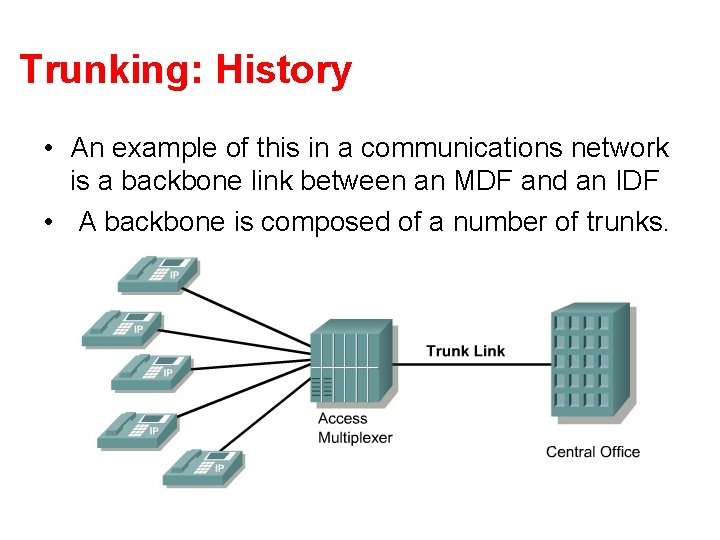
Trunking: History • An example of this in a communications network is a backbone link between an MDF and an IDF • A backbone is composed of a number of trunks.
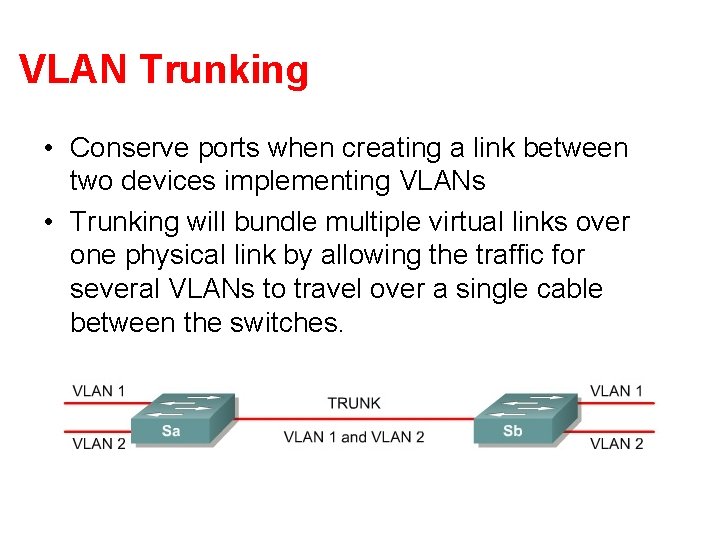
VLAN Trunking • Conserve ports when creating a link between two devices implementing VLANs • Trunking will bundle multiple virtual links over one physical link by allowing the traffic for several VLANs to travel over a single cable between the switches.
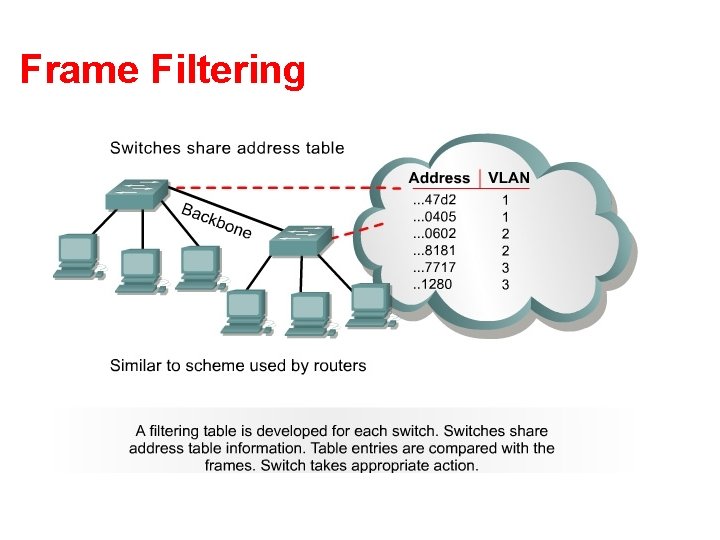
Trunking Operation • Manages the transfer of frames from different VLANs on a single physical line • Trunking protocols establish agreement for the distribution of frames to the associated ports at both ends of the trunk • Two mechanisms – frame filtering – frame tagging
Frame Filtering
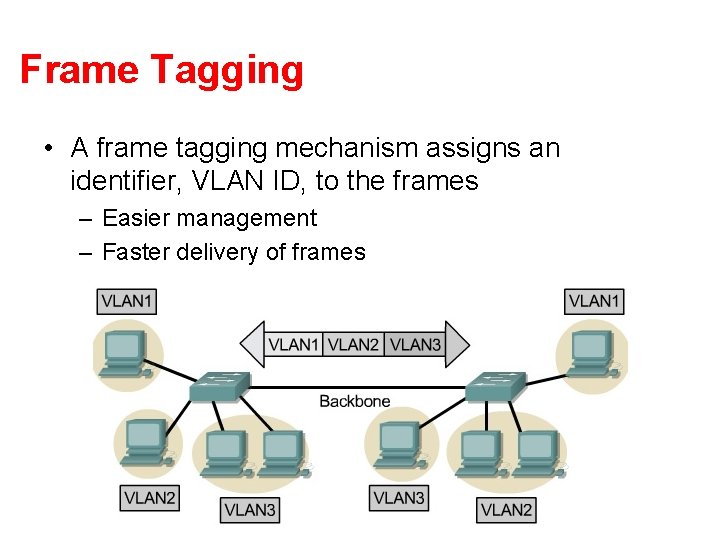
Frame Tagging • A frame tagging mechanism assigns an identifier, VLAN ID, to the frames – Easier management – Faster delivery of frames
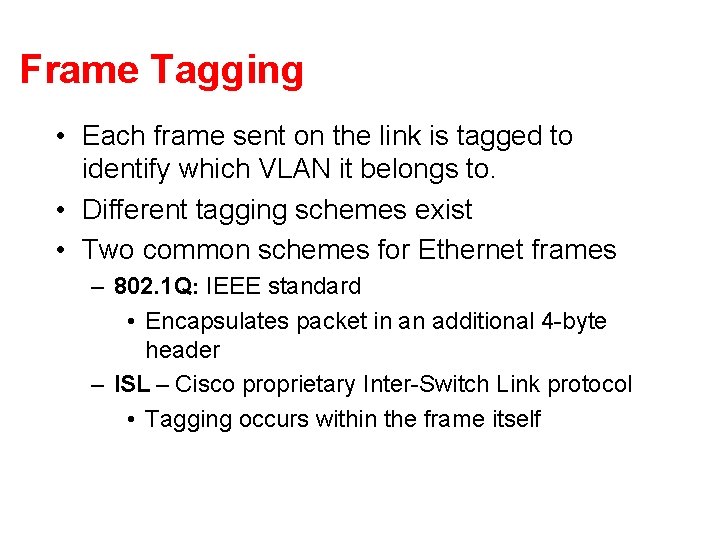
Frame Tagging • Each frame sent on the link is tagged to identify which VLAN it belongs to. • Different tagging schemes exist • Two common schemes for Ethernet frames – 802. 1 Q: IEEE standard • Encapsulates packet in an additional 4 -byte header – ISL – Cisco proprietary Inter-Switch Link protocol • Tagging occurs within the frame itself
VLANs and trunking • VLAN frame tagging is an approach that has been specifically developed for switched communications. • Frame tagging places a unique identifier in the header of each frame as it is forwarded throughout the network backbone. • The identifier is understood and examined by each switch before any broadcasts or transmissions are made to other switches, routers, or end-station devices. • When the frame exits the network backbone, the switch removes the identifier before the frame is transmitted to the target end station. • Frame tagging functions at Layer 2 and requires little processing or administrative overhead.
Inter-VLAN Routing • If a VLAN spans across multiple devices a trunk is used to interconnect the devices. • A trunk carries traffic for multiple VLANs. • For example, a trunk can connect a switch to another switch, a switch to the inter-VLAN router, or a switch to a server with a special NIC installed that supports trunking. • Remember that when a host on one VLAN wants to communicate with a host on another, a router must be involved.
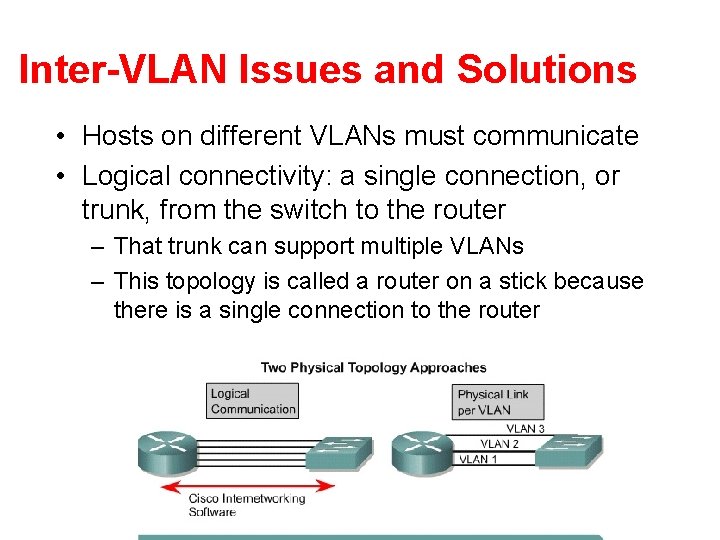
Inter-VLAN Issues and Solutions • Hosts on different VLANs must communicate • Logical connectivity: a single connection, or trunk, from the switch to the router – That trunk can support multiple VLANs – This topology is called a router on a stick because there is a single connection to the router
Physical and logical interfaces • The primary advantage of using a trunk link is a reduction in the number of router and switch ports used. • Not only can this save money, it can also reduce configuration complexity. • Consequently, the trunk-connected router approach can scale to a much larger number of VLANs than a one-link-per-VLAN design.
Why Tunnel? • Security – E. g. , VPNs • Flexibility – Topology – Protocol • Bypassing local network engineers – Oppressive regimes: China, Pakistan, TS… • Compatibility/Interoperability • Dispersion/Logical grouping/Organization • Reliability – Fast Reroute, Resilient Overlay Networks (Akamai Sure. Route) • Stability (“path pinning”) – E. g. , for performance guarantees
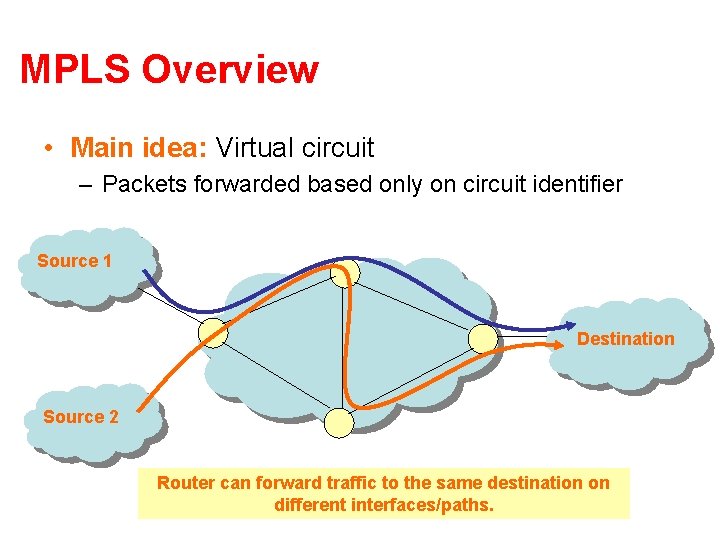
MPLS Overview • Main idea: Virtual circuit – Packets forwarded based only on circuit identifier Source 1 Destination Source 2 Router can forward traffic to the same destination on different interfaces/paths.
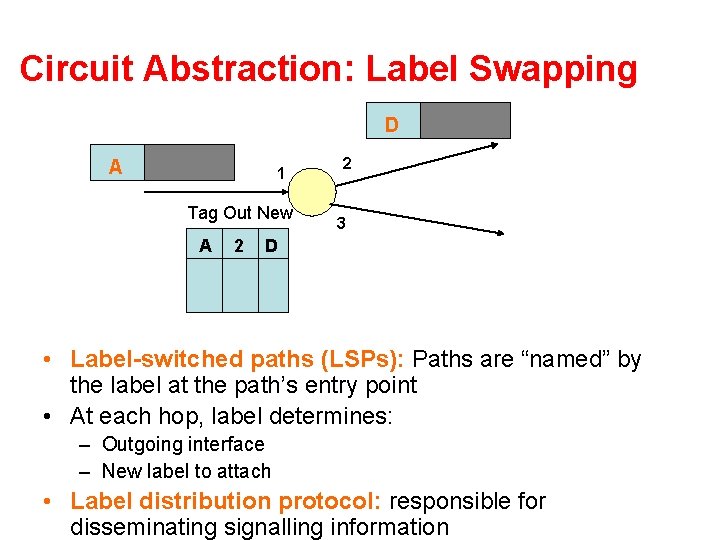
Circuit Abstraction: Label Swapping D A 1 Tag Out New A 2 2 3 D • Label-switched paths (LSPs): Paths are “named” by the label at the path’s entry point • At each hop, label determines: – Outgoing interface – New label to attach • Label distribution protocol: responsible for disseminating signalling information
Layer 3 Virtual Private Networks • Private communications over a public network • A set of sites that are allowed to communicate with each other • Defined by a set of administrative policies – determine both connectivity and Qo. S among sites – established by VPN customers – One way to implement: BGP/MPLS VPN mechanisms (RFC 2547)
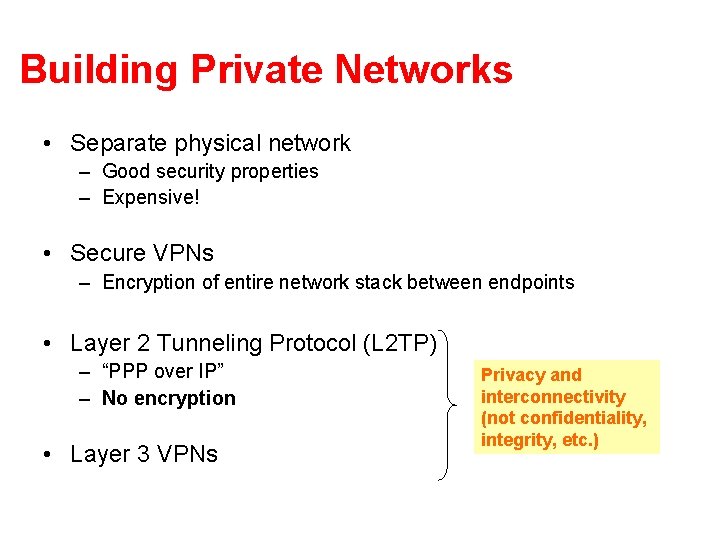
Building Private Networks • Separate physical network – Good security properties – Expensive! • Secure VPNs – Encryption of entire network stack between endpoints • Layer 2 Tunneling Protocol (L 2 TP) – “PPP over IP” – No encryption • Layer 3 VPNs Privacy and interconnectivity (not confidentiality, integrity, etc. )
Layer 2 vs. Layer 3 VPNs • Layer 2 VPNs can carry traffic for many different protocols, whereas Layer 3 is “IP only” • More complicated to provision a Layer 2 VPN • Layer 3 VPNs: potentially more flexibility, fewer configuration headaches
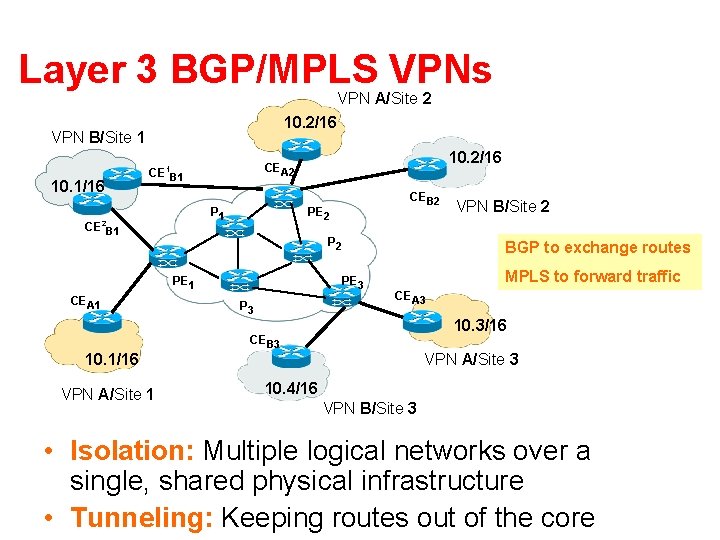
Layer 3 BGP/MPLS VPNs VPN A/Site 2 10. 2/16 VPN B/Site 1 10. 1/16 CE B 1 P 1 2 CE B 1 10. 2/16 CEA 2 1 P 2 PE 1 CEA 1 10. 1/16 VPN A/Site 1 CEB 2 PE 2 BGP to exchange routes PE 3 P 3 VPN B/Site 2 MPLS to forward traffic CEA 3 10. 3/16 CEB 3 VPN A/Site 3 10. 4/16 VPN B/Site 3 • Isolation: Multiple logical networks over a single, shared physical infrastructure • Tunneling: Keeping routes out of the core
High-Level Overview of Operation • IP packets arrive at PE • Destination IP address is looked up in forwarding table • Datagram sent to customer’s network using tunneling (i. e. , an MPLS label-switched path)
BGP/MPLS VPN key components • Forwarding in the core: MPLS • Distributing routes between PEs: BGP • Isolation: Keeping different VPNs from routing traffic over one another – Constrained distribution of routing information – Multiple “virtual” forwarding tables • Unique addresses: VPN-IP 4 Address extension
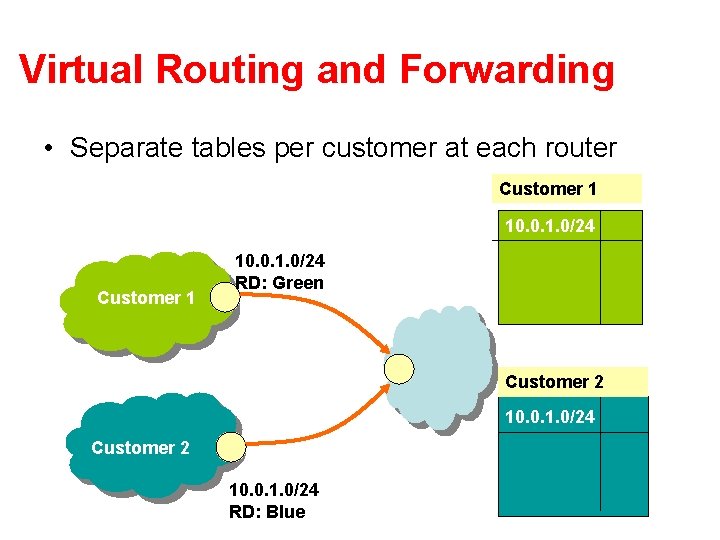
Virtual Routing and Forwarding • Separate tables per customer at each router Customer 1 10. 0. 1. 0/24 RD: Green Customer 2 10. 0. 1. 0/24 RD: Blue
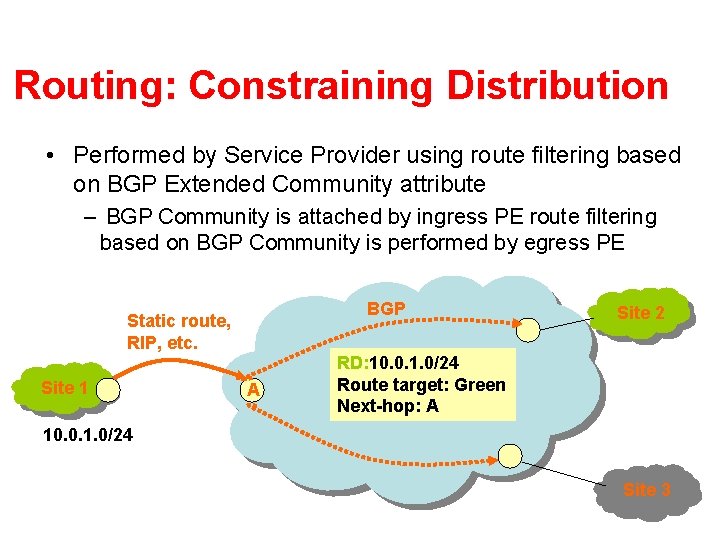
Routing: Constraining Distribution • Performed by Service Provider using route filtering based on BGP Extended Community attribute – BGP Community is attached by ingress PE route filtering based on BGP Community is performed by egress PE BGP Static route, RIP, etc. Site 1 A Site 2 RD: 10. 0. 1. 0/24 Route target: Green Next-hop: A 10. 0. 1. 0/24 Site 3
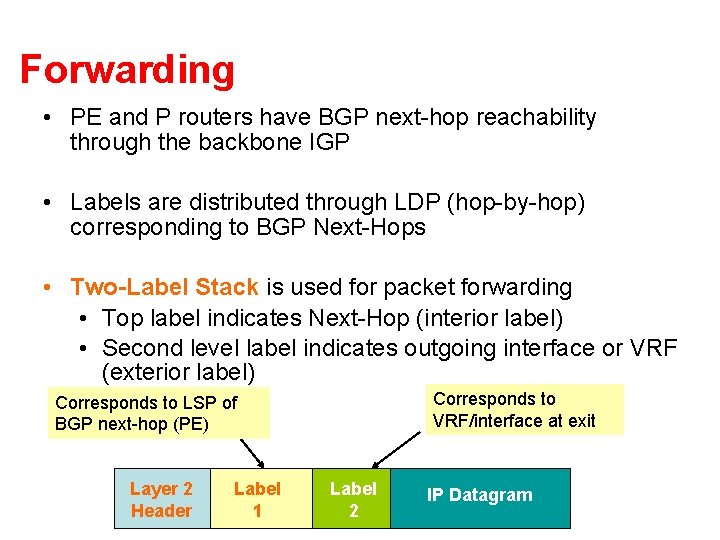
Forwarding • PE and P routers have BGP next-hop reachability through the backbone IGP • Labels are distributed through LDP (hop-by-hop) corresponding to BGP Next-Hops • Two-Label Stack is used for packet forwarding • Top label indicates Next-Hop (interior label) • Second level label indicates outgoing interface or VRF (exterior label) Corresponds to VRF/interface at exit Corresponds to LSP of BGP next-hop (PE) Layer 2 Header Label 1 Label 2 IP Datagram
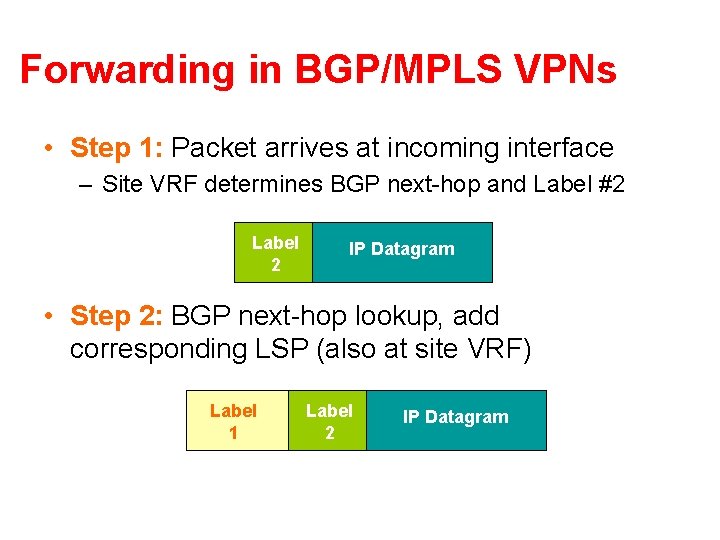
Forwarding in BGP/MPLS VPNs • Step 1: Packet arrives at incoming interface – Site VRF determines BGP next-hop and Label #2 Label 2 IP Datagram • Step 2: BGP next-hop lookup, add corresponding LSP (also at site VRF) Label 1 Label 2 IP Datagram