
VIRTUAL LEARNING EXPECTATIONS RITUALS AND ROUTINES FOR THE
- Slides: 10
VIRTUAL LEARNING EXPECTATIONS RITUALS AND ROUTINES FOR THE ONLINE CLASSROOM MR. MICHEL – ELA – ENGLISH 1, ENGLISH 2, AND ENGLISH 2 HONORS
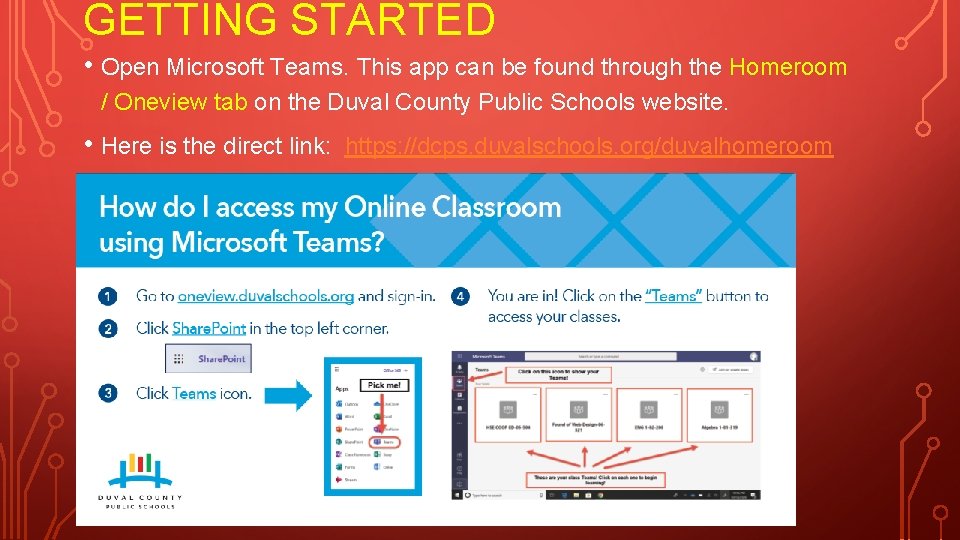
GETTING STARTED • Open Microsoft Teams. This app can be found through the Homeroom / Oneview tab on the Duval County Public Schools website. • Here is the direct link: https: //dcps. duvalschools. org/duvalhomeroom
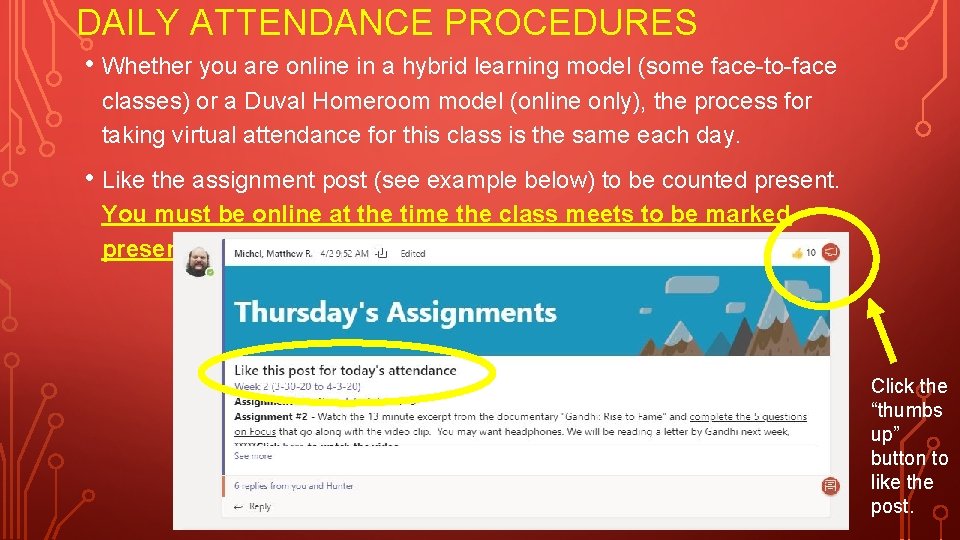
DAILY ATTENDANCE PROCEDURES • Whether you are online in a hybrid learning model (some face-to-face classes) or a Duval Homeroom model (online only), the process for taking virtual attendance for this class is the same each day. • Like the assignment post (see example below) to be counted present. You must be online at the time the class meets to be marked present. Click the “thumbs up” button to like the post.
SUBMITTING ONLINE ASSIGNMENTS • Most assignments will be uploaded through your Focus account/gradebook. The Focus portal is accessed through your Oneview page. Make sure that you are under the correct class in Focus. • To download an assignment students should find the assignment on Focus and then download the file attached to the assignment. There will usually be a prompt on the Teams page that tells you what assignment(s) are being worked on during a class period. • Some assignments may be Power. Points, notes, or other reference guides. I will tell you if you need to upload and submit an assignment. • When submitting an assignment, please use the following nomenclature so that it is easy to identify your work: First Name, Last Name_Assignment Name_FINAL use nicknames. • Examples: Matthew. Michel_Animal. Farm. Ch 3 Questions_FINAL Do NOT Sarah. Smith_RL. 1. 1 Chart. Whatof. This. Goldfish. Would. You. Wish_FINAL • The “_” symbol is called an underscore. To type it, hold shift and then press the dash key (next to the plus key on your keyboard). Putting FINAL at the end of an assignment lets me know that you are done with it and it is ready to be graded. You may save and re-upload a file multiple times. You may use DRAFT to note that you are not finished with an assignment.
NETIQUETTE • Your first assignment will be to read about netiquette, or how to practice etiquette (proper behavior online). There a few points that are not addressed in the article that you need to know. 1. Do not spam the teacher with multiple emails or questions on the Teams channel. That is considered rude. Post questions in the Help channel on the Teams page. 2. If you ask questions outside of class time/school hours, I will do my best to answer them, but it is not possible to be online 24/7. The questions may not be answered until the next class. Please be patient. 3. Any type of cyberbullying or harassment will not be tolerated. Do not use crude language or profanity on any Teams page or in any live video. The DCPS Code of Conduct and consequences will be followed at all times.
LIVE VIDEO GUIDELINES • The following guidelines are in place during a live video conference on Teams. 1. When you join a live video conference on Teams, mute yourself if you are not speaking. This reduces background noise. 2. You can use the chat log to answer questions during a live video. Both speaking and writing in the chat log count as participation (10% of your grade). 3. It is highly recommend that you show your face during a live video. This is how I will know that you are present and actively engaged. This means that you must be dressed appropriately. Duval County Public Schools dress code will be followed at all times. 4. Consequences: The teacher will mute you or remove you from the video if you cannot follow the rules. Your parent/guardian may be contacted.
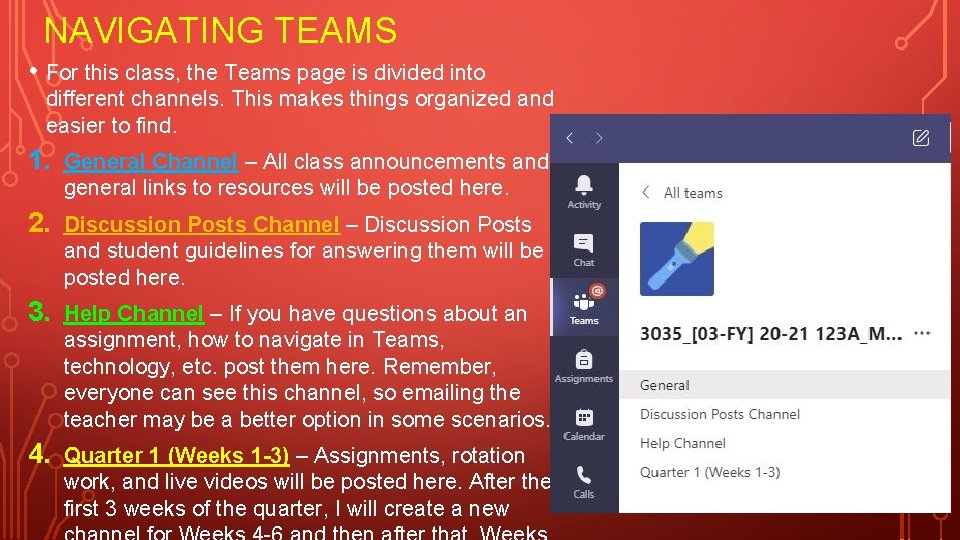
NAVIGATING TEAMS • For this class, the Teams page is divided into different channels. This makes things organized and easier to find. 1. General Channel – All class announcements and general links to resources will be posted here. 2. Discussion Posts Channel – Discussion Posts and student guidelines for answering them will be posted here. 3. Help Channel – If you have questions about an assignment, how to navigate in Teams, technology, etc. post them here. Remember, everyone can see this channel, so emailing the teacher may be a better option in some scenarios. 4. Quarter 1 (Weeks 1 -3) – Assignments, rotation work, and live videos will be posted here. After the first 3 weeks of the quarter, I will create a new
CLASS RULES 1. Show Respect. 2. Follow Directions. 3. No Cell Phones. 4. No eating or drinking on live video. 5. Practice proper netiquette.
CELL PHONES • Cell phones should be put away and out of sight during class when you are a participant of a live video. • It is considered rude if you are scrolling on your phone while the teacher or another student is talking.
CONTACT INFORMATION This will also be posted in the General Channel on Teams. • Email: michelm@duvalschools. org • Google Phone Number: 352 -363 -5142 Please attempt to use the Help channel and/or email before contacting me via phone.