
Virtual Infrastructure High Availability Upgrades and Best Practices
Virtual Infrastructure High Availability: Upgrades and Best Practices Presented by David Davis, VCP, CCIE Director of Infrastructure, Train. Signal. com
Who Is David Davis? • Director of Infrastructure Train Signal, Inc -the leader in Professional IT video training courses • Over 15 years in enterprise infrastructure management and years of real-world virtualization experience • Have obtained the following certifications: CCIE#9369, VCP, MCSE and CISSP
Who Is David Davis? • Author of six video training courses and hundreds of articles for well-known websites such as: Search. VMware. com and Virtualization. Admin. com • Best known for my Train Signal VMware ESX Server video training course • Best of VMworld 2008 Awards Judge • Company website: www. trainsignal. com • Personal website: www. vmwarevideos. com
Abstract • Worries over the availability of virtual infrastructures are being put to rest by rapid improvements in virtual high availability (HA). • It’s time for many organizations to update their virtual HA architectures and implement state of the art IT best practices.

Abstract • In this session, HA best practices for virtualization are covered, along with available tools that allow organizations to take their virtual infrastructures beyond simple failover to application level orchestration and automation. • We will cover high availability options and best practices, load balancing, localized HA, geographical HA, third-party HA applications and failover scenarios.
Abstract • The following topics are also discussed in this session: • What options are available to prevent downtime when failures occur? • Understanding virtualization load balancing and dynamic migration of virtual machines • Understanding virtualization high availability and disaster recovery
What I Assume You Already Know Assumptions… • Good understanding of server virtualization concepts • May or may not already be using virtualization • Have, or will have, an application that demands high availability
By The End Of The Session, You’ll Know The Following: • Understanding of HA components • HA options like load balancing, localized and Geo HA • What is new in HA • HA Tools in virtualization platforms • Third-party products available for HA • HA best practices for virtualization

FUD • Do you have fear, uncertainty and doubt (FUD) about your server availability? YES • Does virtualization pile more eggs in your one basket? YES • (Does that create more FUD)? YES • Can HA ease FUD? YES
FUD Virtualization is great in test and dev, but there’s no way I’m deploying virtualization in production without a high availability solution. If that virtualization server goes down and I don’t have a HA solution in place, I will lose my job.
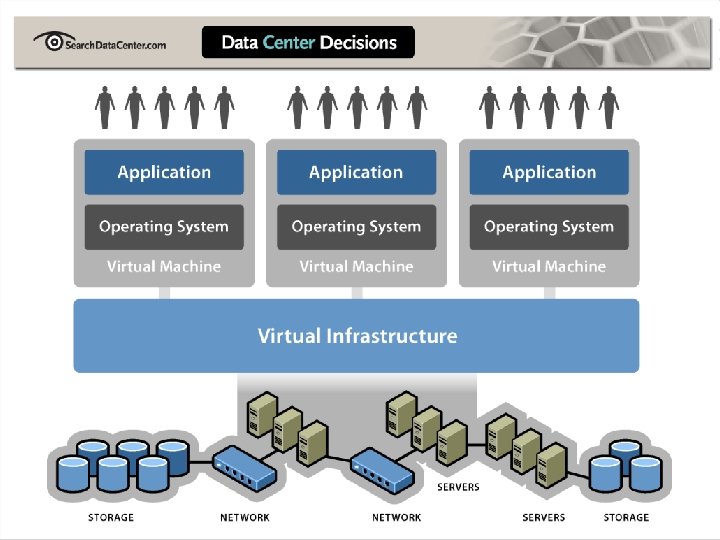
HA State Of The Union • Just about everyone is using virtualization • Most aren’t using virtualization to its full ability • That “ability” is expanding every day • HA and Load Balancing are a huge benefit -are including and work with all apps

Understanding HA: What is High Availability? Let’s define… • High availability is a system design protocol and associated implementation that ensures a certain absolute degree of operational continuity during a given measurement period. • In other words, you have low unplanned downtime.
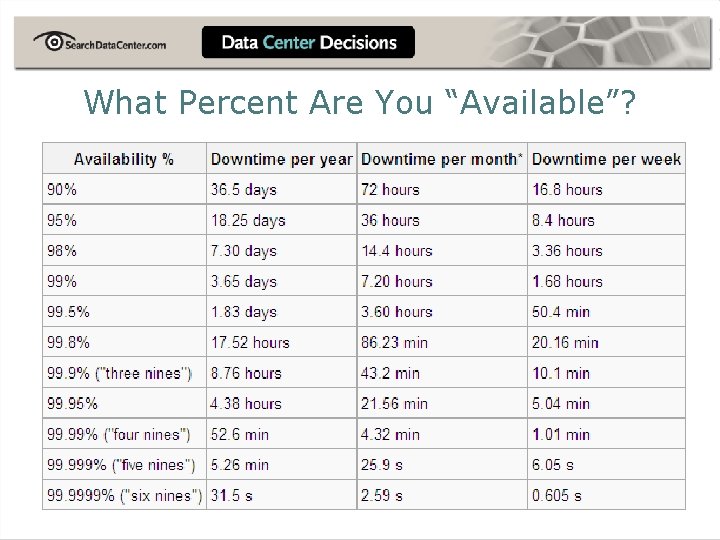
What Percent Are You “Available”?
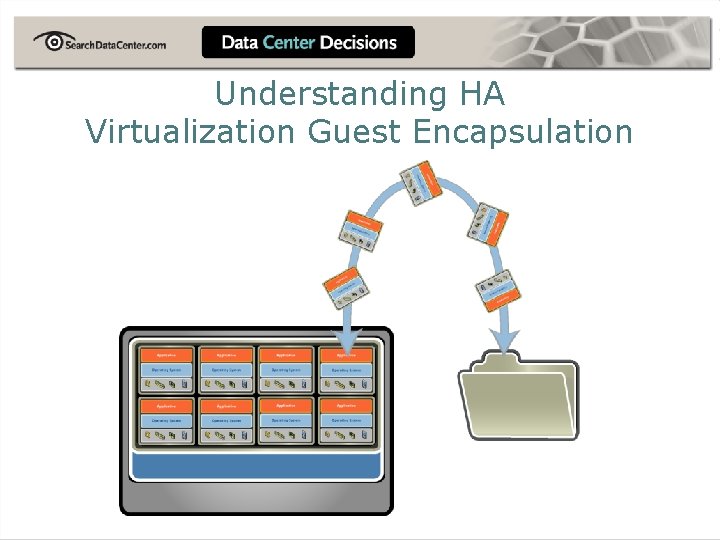
Understanding HA Virtualization Guest Encapsulation
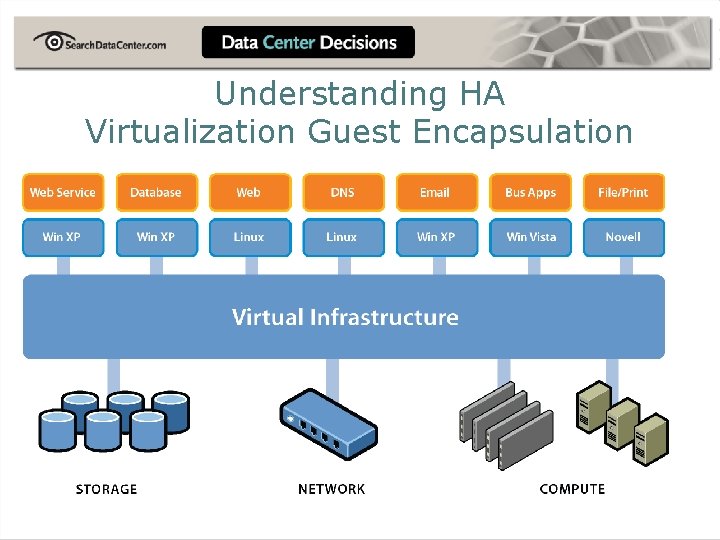
Understanding HA Virtualization Guest Encapsulation
Understanding HA -- Terminology • Localized and Geographical High Availability • Load balancing vs. resource scheduling • Application vs. Server • Clustering vs. Failover
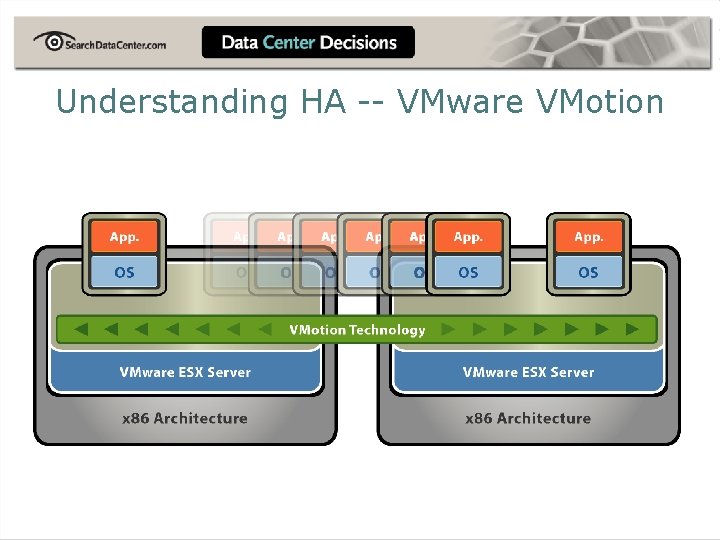
Understanding HA -- VMware VMotion
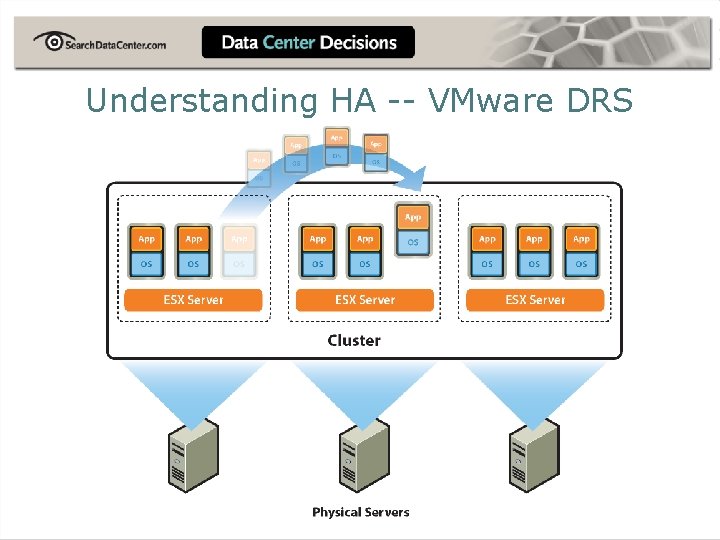
Understanding HA -- VMware DRS
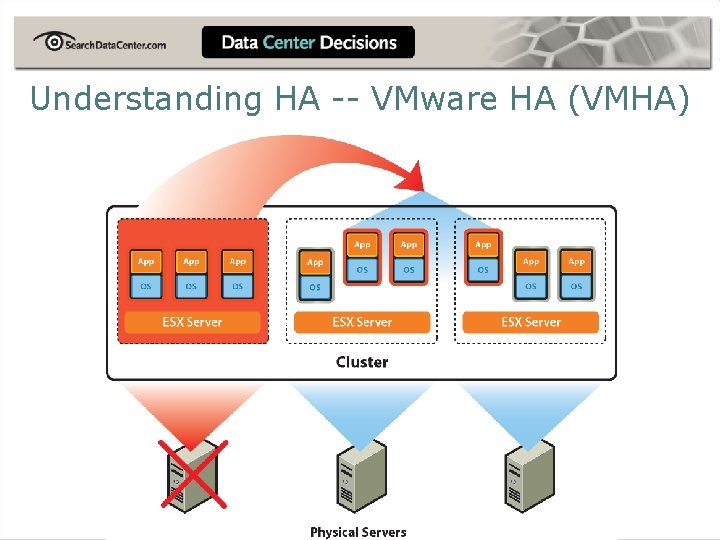
Understanding HA -- VMware HA (VMHA)
Understanding HA -- Components Of HA • Software • Examples: VMHA, v. Lock. Step, VMotion and third-party • Hardware • • Shared storage -- SAN (i. SCSI or Fibre Channel) Servers

Understanding HA -- Forms Of Clustering
Options Available To Prevent Downtime • Host clustering / load balancing • • Windows Server Clustering Third-party • Virtualization high availability • • • VMware High Availability and v. Lock. Step Microsoft Quick Migration Third-party
What’s New With Virtualization High Availability? • VMware’s v. Lock. Step • Rumors of Microsoft Live Migration (Nessie) • VMware Site Recovery Manager (SRM) • New third-party solutions • Better use of HA features that you may already have • P 2 V HA Clustering
HA Tools: Using Windows Hyper-V Quick And Live Migration • Quick Migration -- guests moved but restarted • Live Migration (coming soon) -- guests moved and not restarted (competing with VMotion? ) • QM and LM compared at: http: //www. virtualizationteam. com/microsoft/hyper-v/livemigration-vs-quick-migration. html • Today, no VMotion, SVMotion or VMHA
HA Tools: Using VMware VMotion and SVMotion • VMHA, DRS and Update Manager are dependant on VMotion • Nothing to configure but compatibility and knowing the rules are important • VMotion and SVMotion can be used manually to prevent downtime
HA Tools: Using VMware VMHA • Built into VMware and VI • Easy to configure • Can support all applications • Guest VMs must restart • Creates HA but still has downtime and potential for application issues
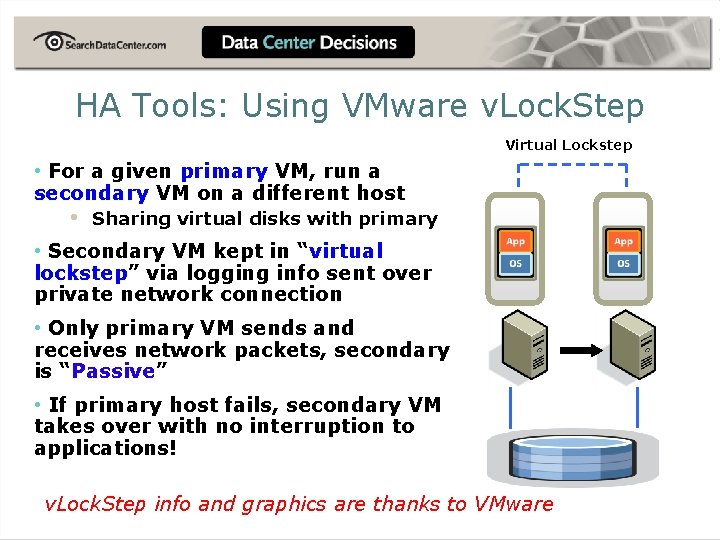
HA Tools: Using VMware v. Lock. Step Virtual Lockstep • For a given primary VM, run a secondary VM on a different host • Sharing virtual disks with primary • Secondary VM kept in “virtual lockstep” via logging info sent over private network connection • Only primary VM sends and receives network packets, secondary is “Passive” • If primary host fails, secondary VM takes over with no interruption to applications! v. Lock. Step info and graphics are thanks to VMware
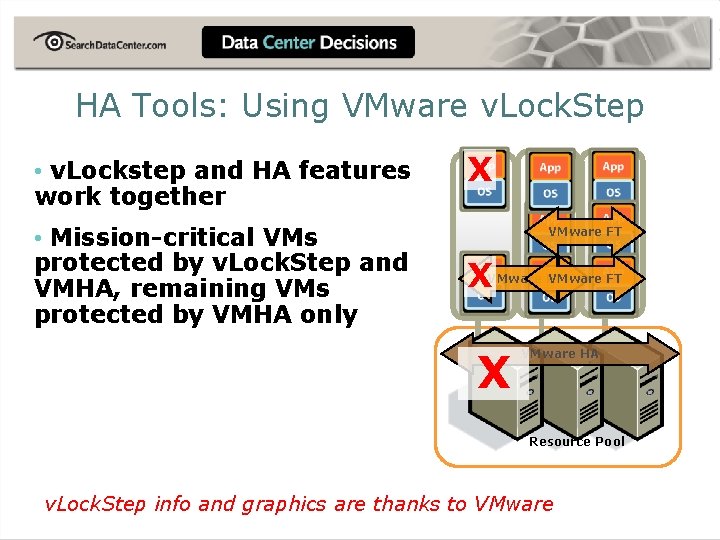
HA Tools: Using VMware v. Lock. Step • v. Lockstep and HA features work together • Mission-critical VMs protected by v. Lock. Step and VMHA, remaining VMs protected by VMHA only X VMware FT X VMware HA Resource Pool v. Lock. Step info and graphics are thanks to VMware
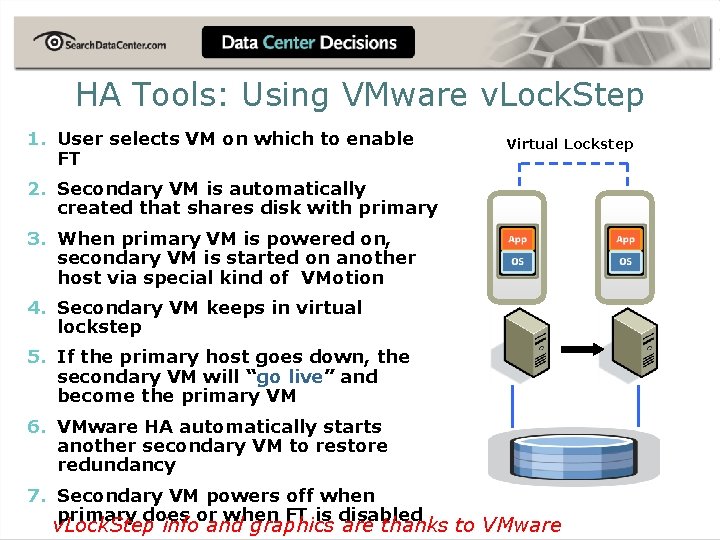
HA Tools: Using VMware v. Lock. Step 1. User selects VM on which to enable FT Virtual Lockstep 2. Secondary VM is automatically created that shares disk with primary 3. When primary VM is powered on, secondary VM is started on another host via special kind of VMotion 4. Secondary VM keeps in virtual lockstep 5. If the primary host goes down, the secondary VM will “go live” and become the primary VM 6. VMware HA automatically starts another secondary VM to restore redundancy 7. Secondary VM powers off when primary does or when FT is disabled v. Lock. Step info and graphics are thanks to VMware
Third-Party Tools For HA: Double Take for VMware Infrastructure and Virtual Systems • http: //www. doubletake. com/products/virtualizatio n/default. aspx • INSERT INFO
Third-Party Tools For HA: Marathon • http: //www. marathontechnologies. com/fault_tolera nt_servers. html • ever. Run for Server Virtualization -- Best of Vmworld 2007 -- but for Citrix Xen. Server • ever. Run for Windows Servers • ever. Run for Geographical DR • INSERT INFO
Third-Party Tools For HA: Neverfail For VMware Virtual Center And Servers • http: //www. neverfailgroup. com/products/appmodules/vmwarevcenter. aspx • INSERT INFO
Best Practices For Virtualization HA • HA best practices for virtualization • Gotchas -- for VM HA to work you must have same CPU on each host or use CPU masking ** ** • INSERT INFO
Recommendations / Summary • Virtualization + HA = Happiness • HA will further virtualization adoption • HA will provide business uptime • HA will make life of the Admin better • Recommendation = Take action to learn about and implement virtualization HA
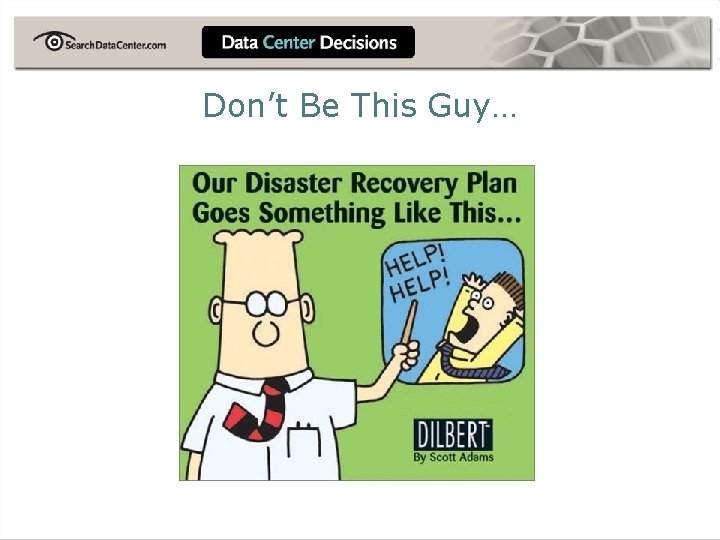
Don’t Be This Guy…
Questions? • If you think of more questions later, feel free to email me at: david@trainsignal. com • Or catch me on Twitter & Linkedin at: www. twitter. com/davidmdavis www. linkedin. com/in/davidmdavis • To download a free portion of my training video, visit www. trainsignal. com
For More Information • www. searchvmware. com • www. searchservervirtualization. com • www. virtualizationadmin. com • www. vmwarevideos. com • www. trainsignal. com -- VMHA video • I’ll be available at the Ask-the-Expert booth this afternoon
Questions? Ask away…
- Slides: 39