
Viewing With Open GL Courtesy of Drs Carol

- Slides: 41
Viewing With Open. GL Courtesy of Drs. Carol O’Sullivan / Yann Morvan Trinity College Dublin
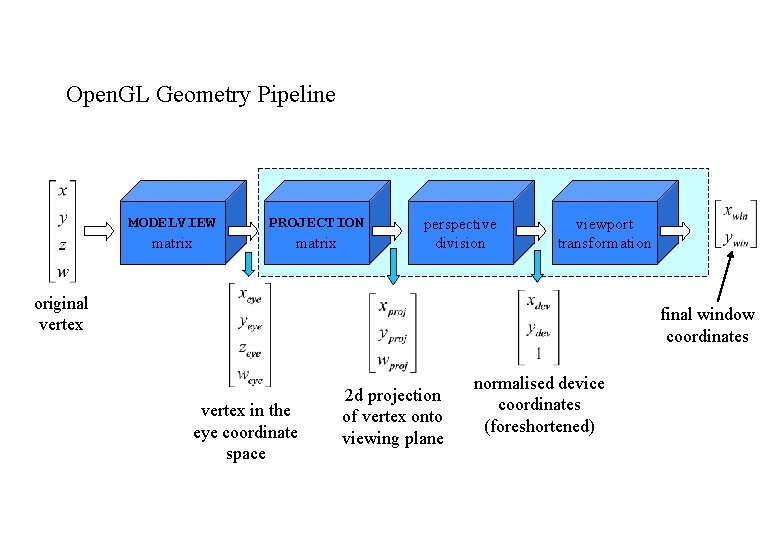
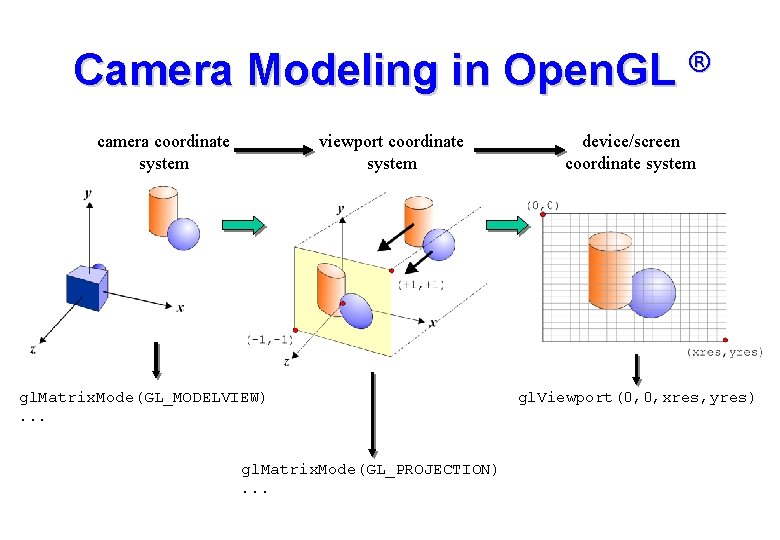
Open. GL Geometry Pipeline MODELVIEW matrix PROJECTION matrix perspective division viewport transformation original vertex final window coordinates vertex in the eye coordinate space 2 d projection of vertex onto viewing plane normalised device coordinates (foreshortened)
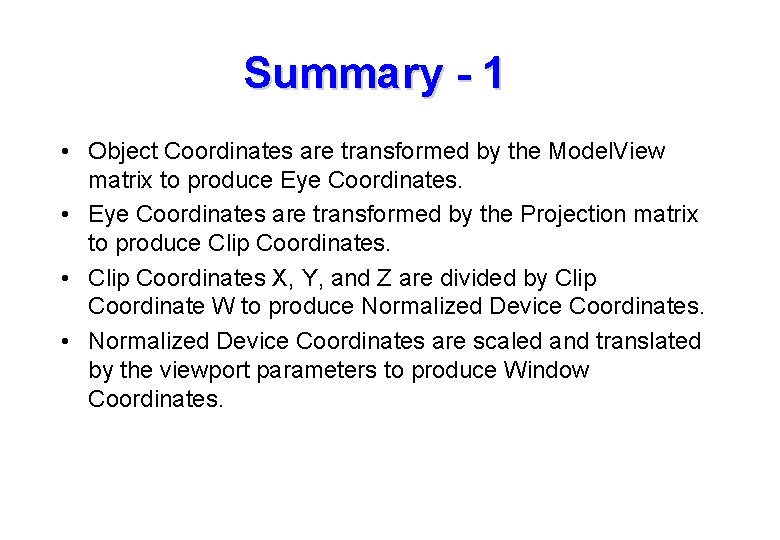
Summary - 1 • Object Coordinates are transformed by the Model. View matrix to produce Eye Coordinates. • Eye Coordinates are transformed by the Projection matrix to produce Clip Coordinates. • Clip Coordinates X, Y, and Z are divided by Clip Coordinate W to produce Normalized Device Coordinates. • Normalized Device Coordinates are scaled and translated by the viewport parameters to produce Window Coordinates.
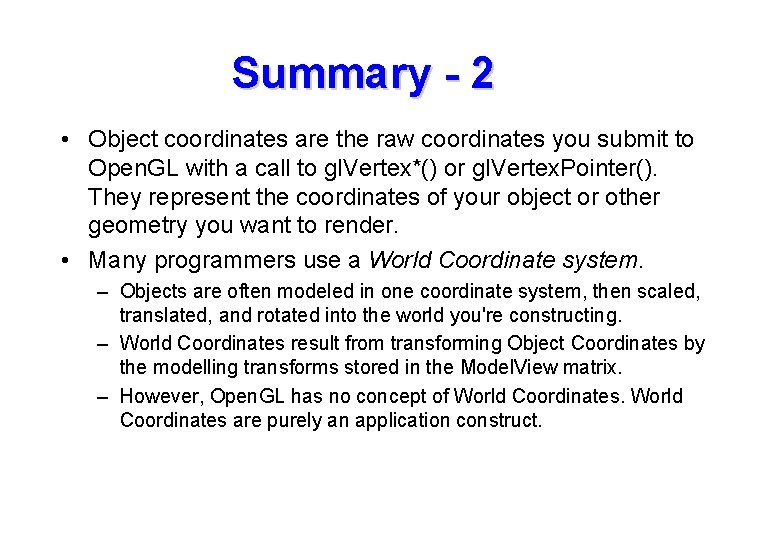
Summary - 2 • Object coordinates are the raw coordinates you submit to Open. GL with a call to gl. Vertex*() or gl. Vertex. Pointer(). They represent the coordinates of your object or other geometry you want to render. • Many programmers use a World Coordinate system. – Objects are often modeled in one coordinate system, then scaled, translated, and rotated into the world you're constructing. – World Coordinates result from transforming Object Coordinates by the modelling transforms stored in the Model. View matrix. – However, Open. GL has no concept of World Coordinates are purely an application construct.
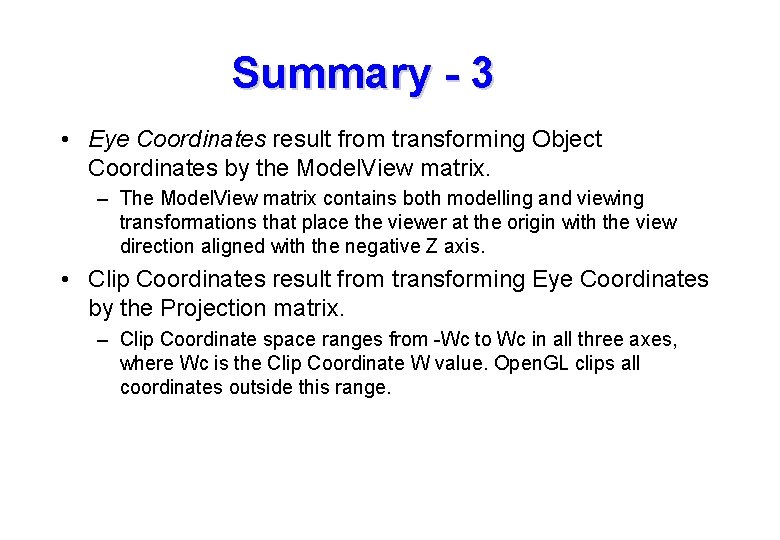
Summary - 3 • Eye Coordinates result from transforming Object Coordinates by the Model. View matrix. – The Model. View matrix contains both modelling and viewing transformations that place the viewer at the origin with the view direction aligned with the negative Z axis. • Clip Coordinates result from transforming Eye Coordinates by the Projection matrix. – Clip Coordinate space ranges from -Wc to Wc in all three axes, where Wc is the Clip Coordinate W value. Open. GL clips all coordinates outside this range.
Summary - 4 • Perspective division performed on the Clip Coordinates produces Normalized Device Coordinates, ranging from -1 to 1 in all three axes. • Window Coordinates result from scaling and translating Normalized Device Coordinates by the viewport. – The parameters to gl. Viewport() and gl. Depth. Range() control this transformation. – With the viewport, you can map the Normalized Device Coordinate cube to any location in your window and depth buffer.
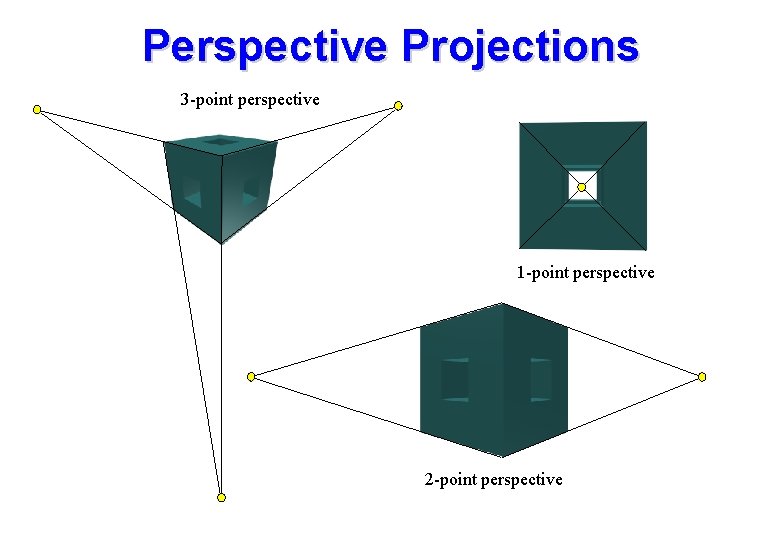
The Camera System • To create a view of a scene we need: – a description of the scene geometry – a camera or view definition • Default Open. GL camera is located at the origin looking down the -z axis. • The camera definition allows projection of the 3 D scene geometry onto a 2 D surface for display. • This projection can take a number of forms: – orthographic (parallel lines preserved) – perspective (foreshortening): 1 -point, 2 -point or 3 -point – skewed orthographic
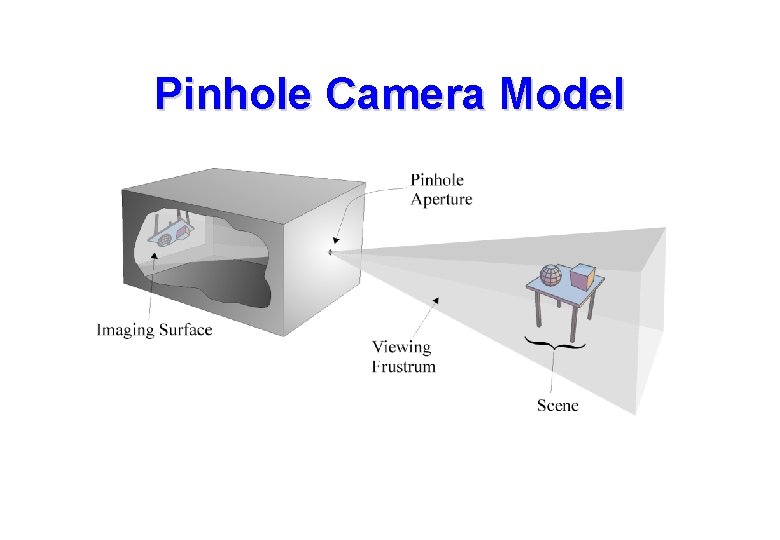
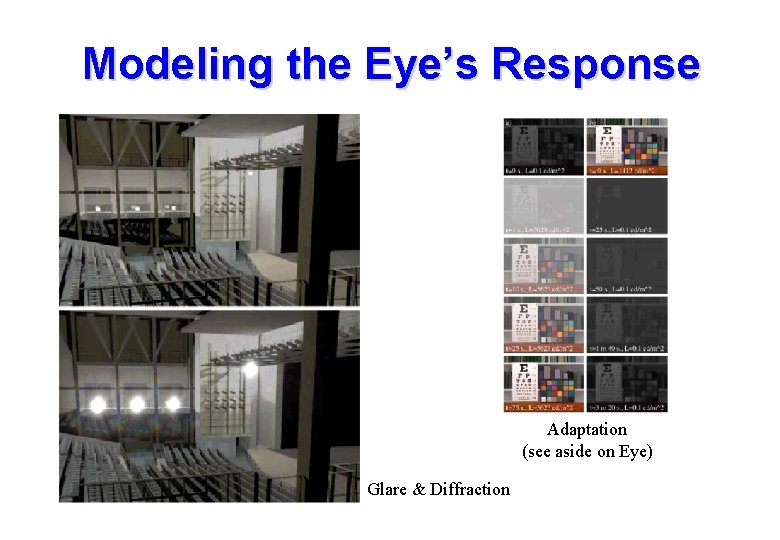
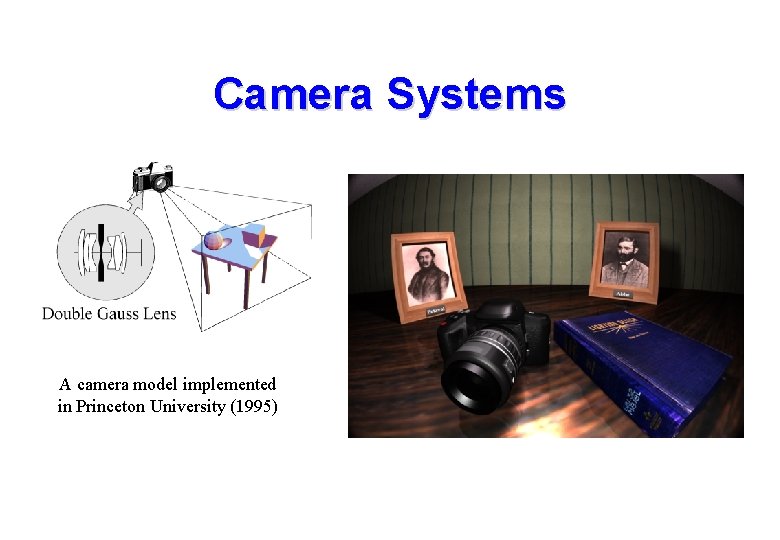
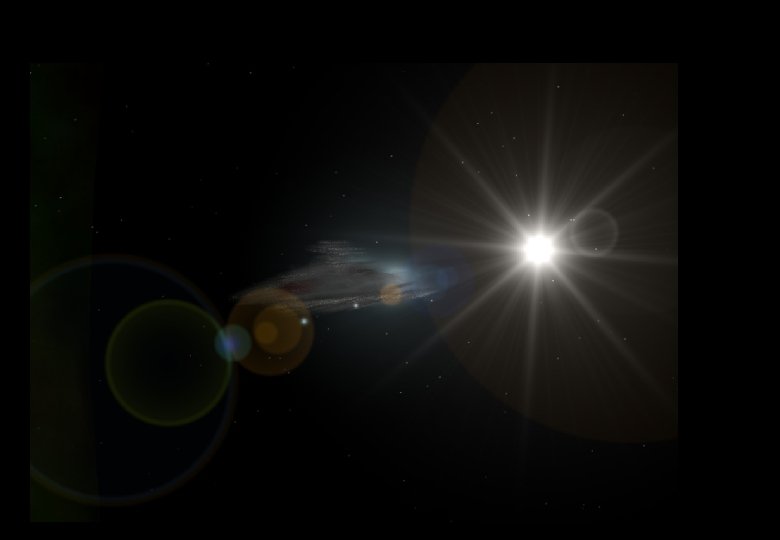
Camera Types • Before generating an image we must choose our viewer: • The pinhole camera model is most widely used: – infinite depth of field (everything is in focus) • Advanced rendering systems model the camera – double gauss lens as used in many professional cameras – model depth of field and non-linear optics (including lens flare) • Photorealistic rendering systems often employ a physical model of the eye for rendering images – model the eyes response to varying brightness and colour levels – model the internal optics of the eye itself (diffraction by lens fibres etc. )
Pinhole Camera Model
Modeling the Eye’s Response Adaptation (see aside on Eye) Glare & Diffraction
Camera Systems A camera model implemented in Princeton University (1995)
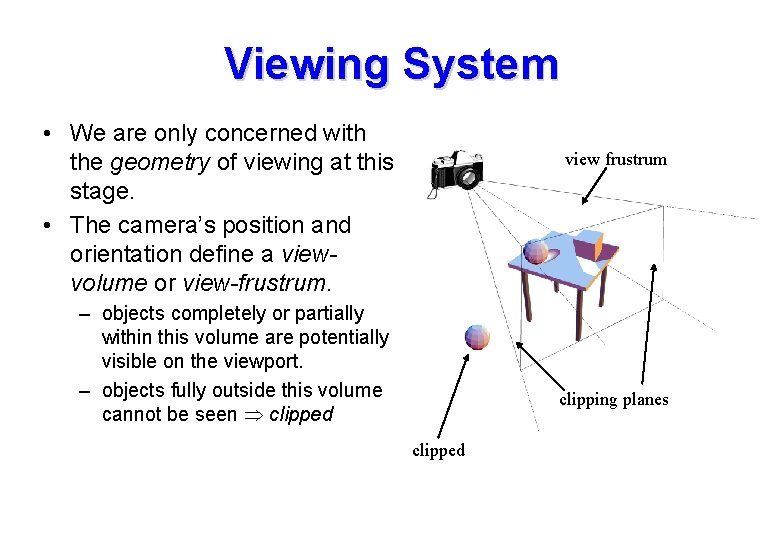
Viewing System • We are only concerned with the geometry of viewing at this stage. • The camera’s position and orientation define a viewvolume or view-frustrum. view frustrum – objects completely or partially within this volume are potentially visible on the viewport. – objects fully outside this volume cannot be seen clipped clipping planes clipped
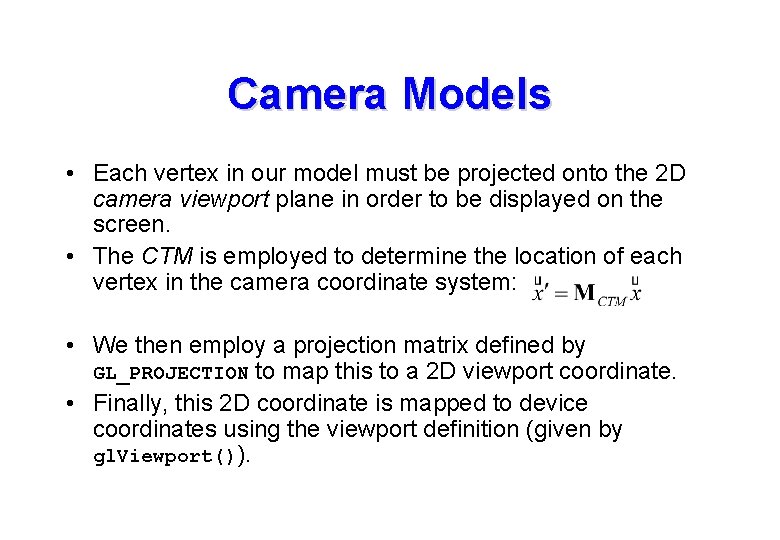
Camera Models • Each vertex in our model must be projected onto the 2 D camera viewport plane in order to be displayed on the screen. • The CTM is employed to determine the location of each vertex in the camera coordinate system: • We then employ a projection matrix defined by GL_PROJECTION to map this to a 2 D viewport coordinate. • Finally, this 2 D coordinate is mapped to device coordinates using the viewport definition (given by gl. Viewport()).
Camera Modeling in Open. GL ® camera coordinate system viewport coordinate system gl. Matrix. Mode(GL_MODELVIEW). . . gl. Matrix. Mode(GL_PROJECTION). . . device/screen coordinate system gl. Viewport(0, 0, xres, yres)
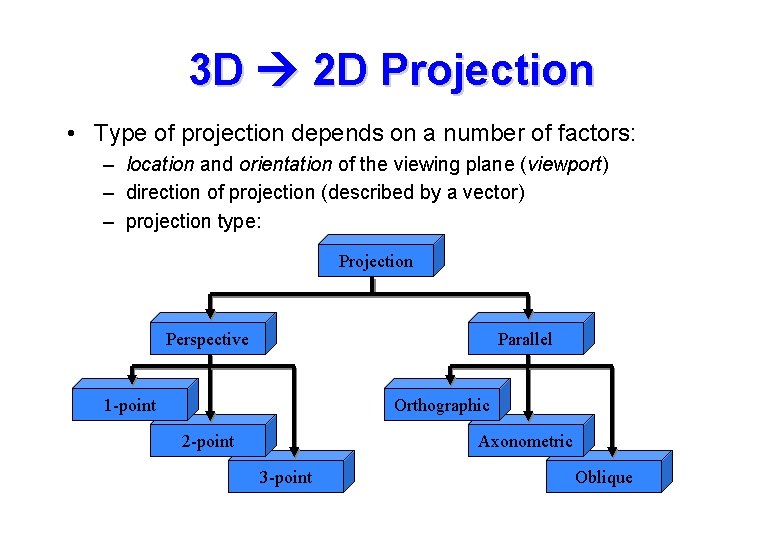
3 D 2 D Projection • Type of projection depends on a number of factors: – location and orientation of the viewing plane (viewport) – direction of projection (described by a vector) – projection type: Projection Perspective Parallel 1 -point Orthographic 2 -point Axonometric 3 -point Oblique
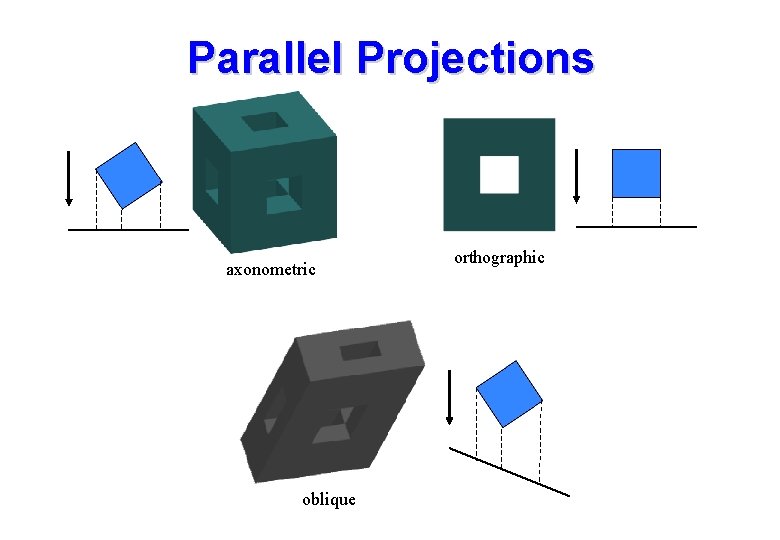
Parallel Projections axonometric oblique orthographic
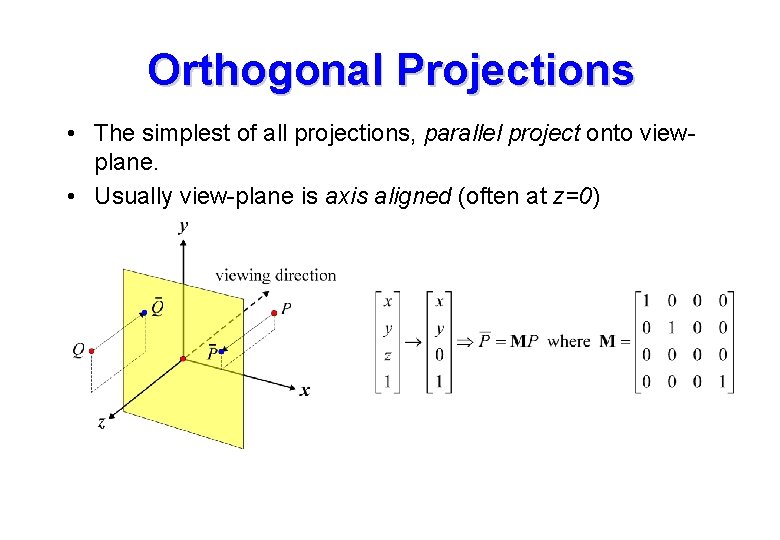
Orthogonal Projections • The simplest of all projections, parallel project onto viewplane. • Usually view-plane is axis aligned (often at z=0)
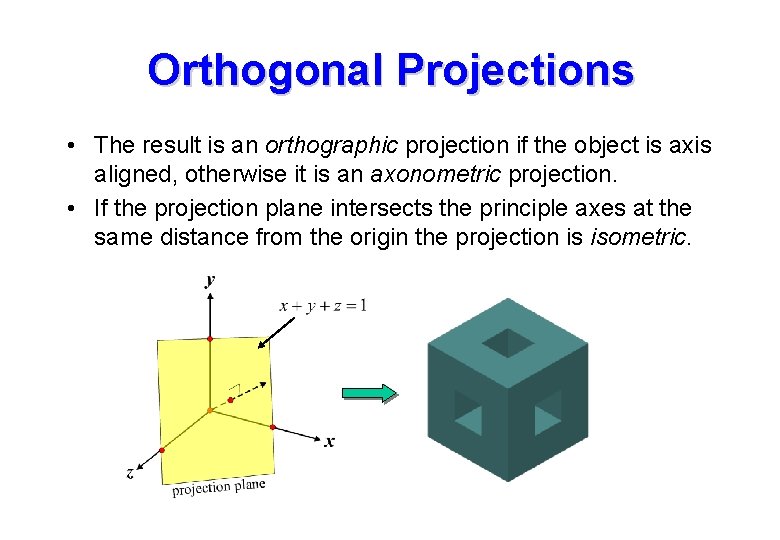
Orthogonal Projections • The result is an orthographic projection if the object is axis aligned, otherwise it is an axonometric projection. • If the projection plane intersects the principle axes at the same distance from the origin the projection is isometric.
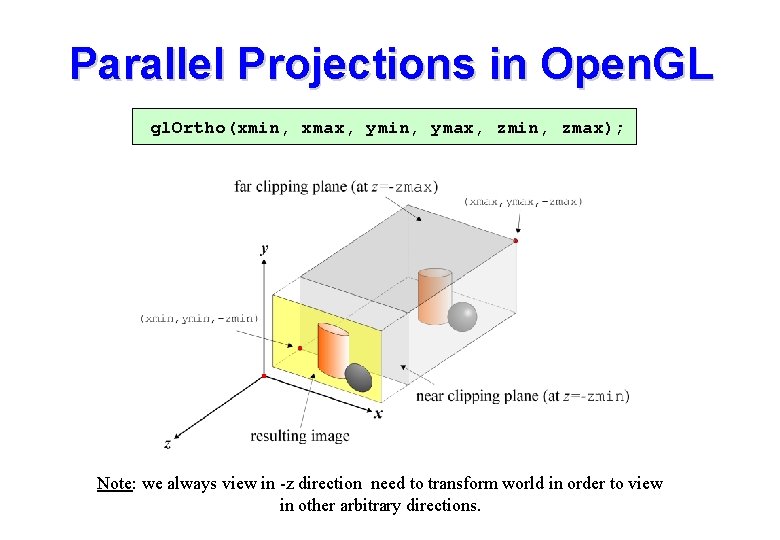
Parallel Projections in Open. GL gl. Ortho(xmin, xmax, ymin, ymax, zmin, zmax); Note: we always view in -z direction need to transform world in order to view in other arbitrary directions.
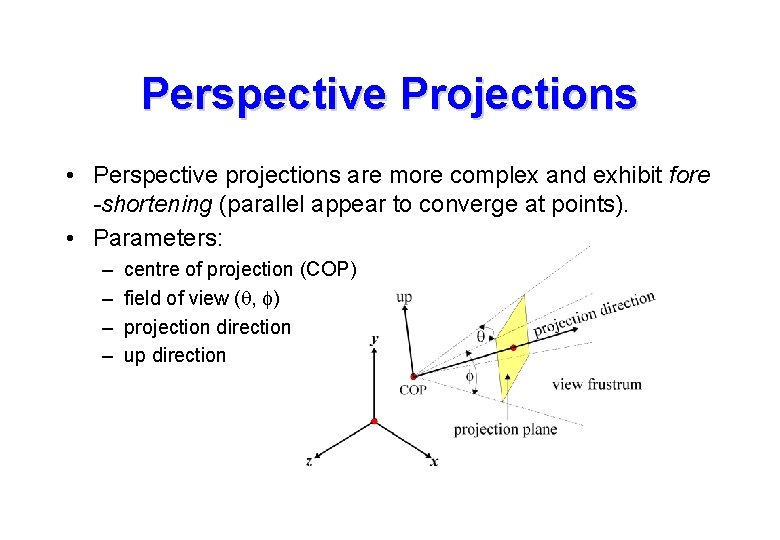
Perspective Projections • Perspective projections are more complex and exhibit fore -shortening (parallel appear to converge at points). • Parameters: – – centre of projection (COP) field of view (q, f) projection direction up direction
Perspective Projections 3 -point perspective 1 -point perspective 2 -point perspective
Perspective Projections
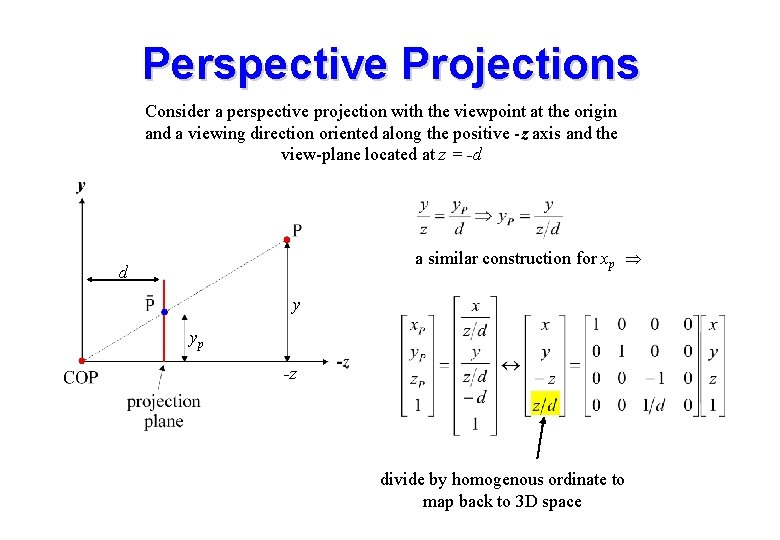
Perspective Projections Consider a perspective projection with the viewpoint at the origin and a viewing direction oriented along the positive -z axis and the view-plane located at z = -d a similar construction for xp d y yp -z divide by homogenous ordinate to map back to 3 D space
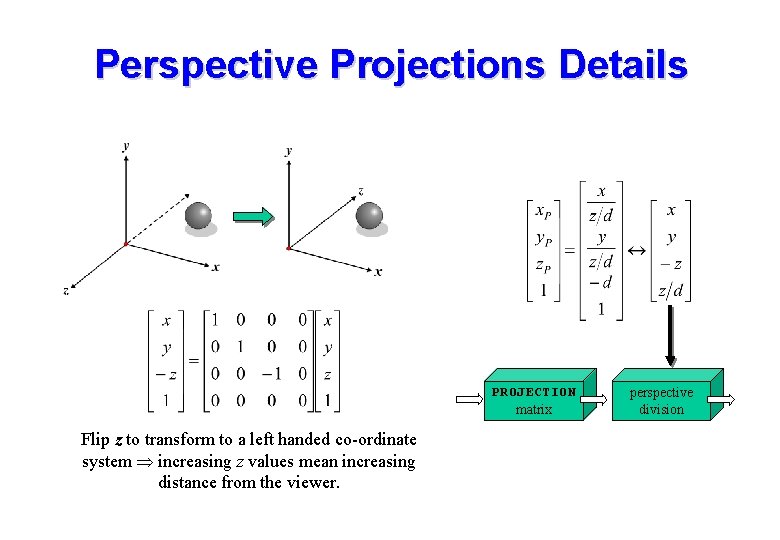
Perspective Projections Details PROJECTION matrix Flip z to transform to a left handed co-ordinate system increasing z values mean increasing distance from the viewer. perspective division
Perspective Projection • Depending on the application we can use different mechanisms to specify a perspective view. • Example: the field of view angles may be derived if the distance to the viewing plane is known. • Example: the viewing direction may be obtained if a point in the scene is identified that we wish to look at. • Open. GL supports this by providing different methods of specifying the perspective view: – glu. Look. At, gl. Frustrum and glu. Perspective
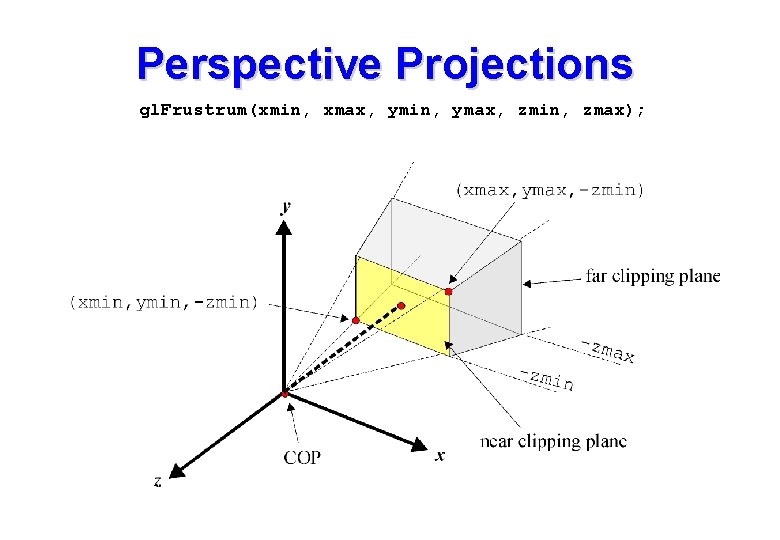
Perspective Projections gl. Frustrum(xmin, xmax, ymin, ymax, zmin, zmax);
gl. Frustrum • Note that all points on the line defined by (xmin, ymin, zmin) and COP are mapped to the lower left point on the viewport. • Also all points on the line defined by (xmax, ymax, -zmin) and COP are mapped to the upper right corner of the viewport. • The viewing direction is always parallel to -z • It is not necessary to have a symmetric frustrum like: gl. Frustrum(-1. 0, 50. 0); • Non symmetric frustrums introduce obliqueness into the projection. • zmin and zmax are specified as positive distances along -z
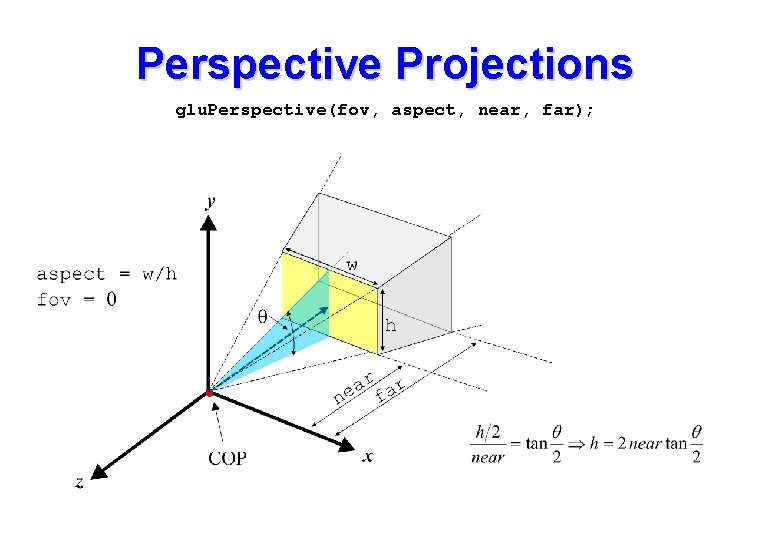
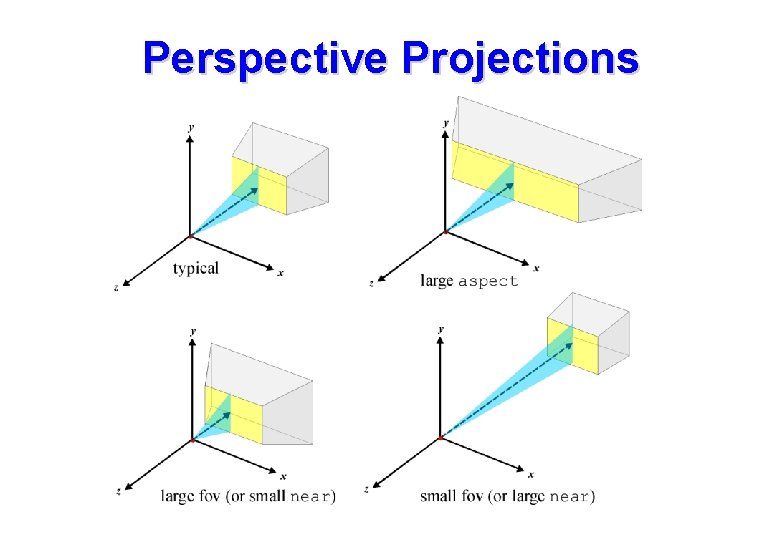
Perspective Projections glu. Perspective(fov, aspect, near, far);
glu. Perspective • A utility function to simplify the specification of perspective views. • Only allows creation of symmetric frustrums. • Viewpoint is at the origin and the viewing direction is the -z axis. • The field of view angle, fov, must be in the range [0. . 180] • apect allows the creation of a view frustrum that matches the aspect ratio of the viewport to eliminate distortion.
Perspective Projections
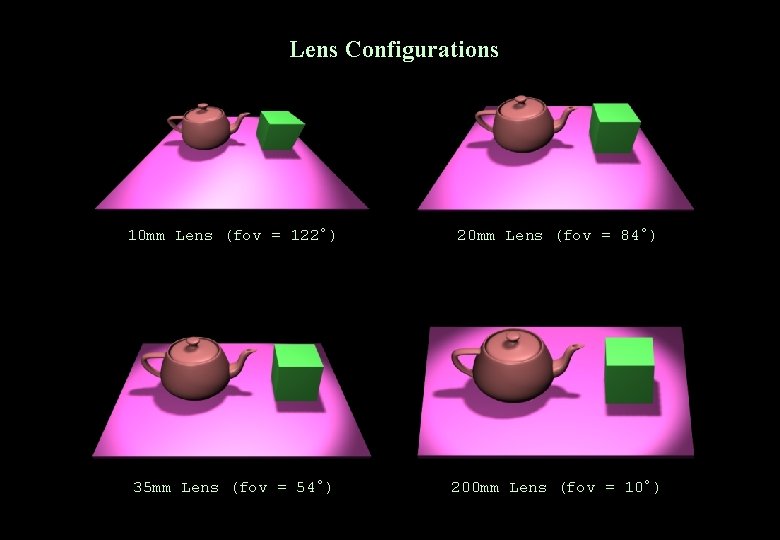
Lens Configurations 10 mm Lens (fov = 122°) 20 mm Lens (fov = 84°) 35 mm Lens (fov = 54°) 200 mm Lens (fov = 10°)
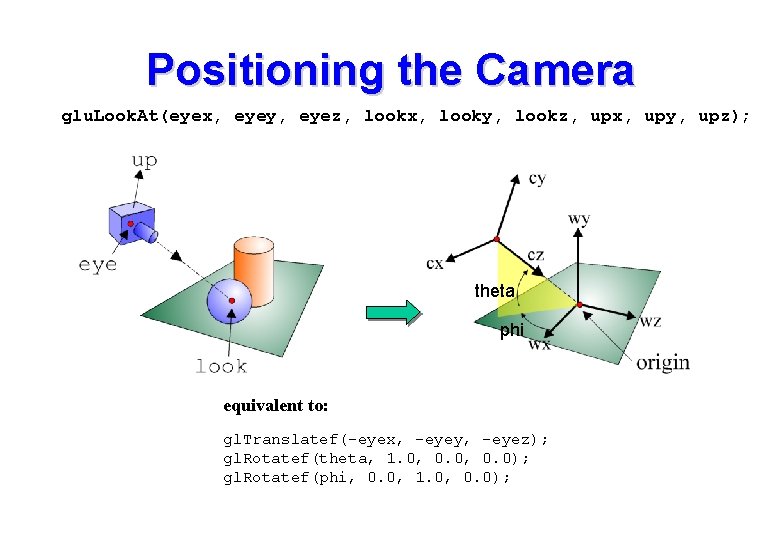
Positioning the Camera • The previous projections had limitations: – usually fixed origin and fixed projection direction • To obtain arbitrary camera orientations and positions we manipulate the MODELVIEW matrix prior to creation of the models. This positions the camera w. r. t. the model. • We wish to position the camera at (10, 2, 10) w. r. t. the world • Two possibilities: – transform the world prior to creation of objects using translatef and rotatef: gl. Translatef(-10, -2, -10); – use glu. Look. At to position the camera with respect to the world coordinate system: glu. Look. At(10, 2, 10, … ); • Both are equivalent.
Positioning the Camera glu. Look. At(eyex, eyey, eyez, lookx, looky, lookz, upx, upy, upz); theta phi equivalent to: gl. Translatef(-eyex, -eyey, -eyez); gl. Rotatef(theta, 1. 0, 0. 0); gl. Rotatef(phi, 0. 0, 1. 0, 0. 0);
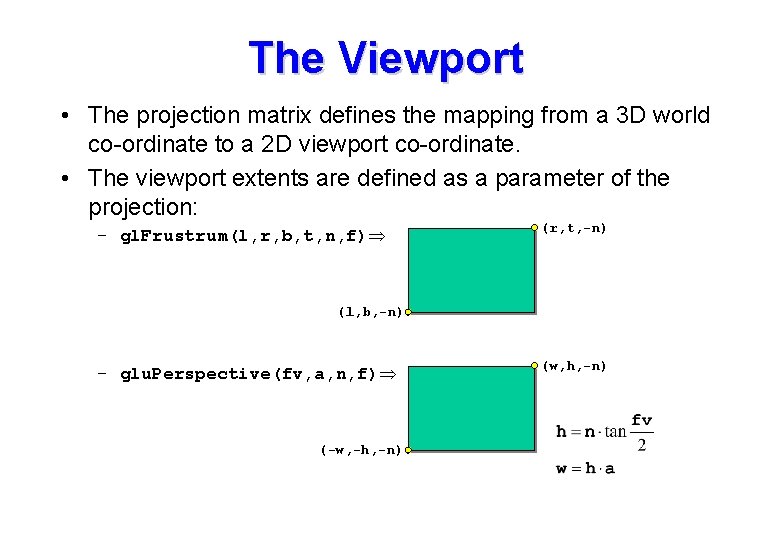
The Viewport • The projection matrix defines the mapping from a 3 D world co-ordinate to a 2 D viewport co-ordinate. • The viewport extents are defined as a parameter of the projection: – gl. Frustrum(l, r, b, t, n, f) (r, t, -n) (l, b, -n) – glu. Perspective(fv, a, n, f) (-w, -h, -n) (w, h, -n)
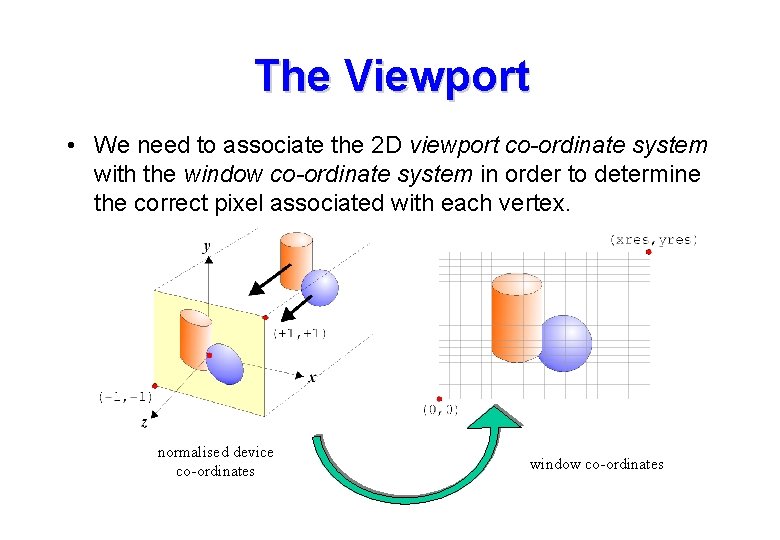
The Viewport • We need to associate the 2 D viewport co-ordinate system with the window co-ordinate system in order to determine the correct pixel associated with each vertex. normalised device co-ordinates window co-ordinates
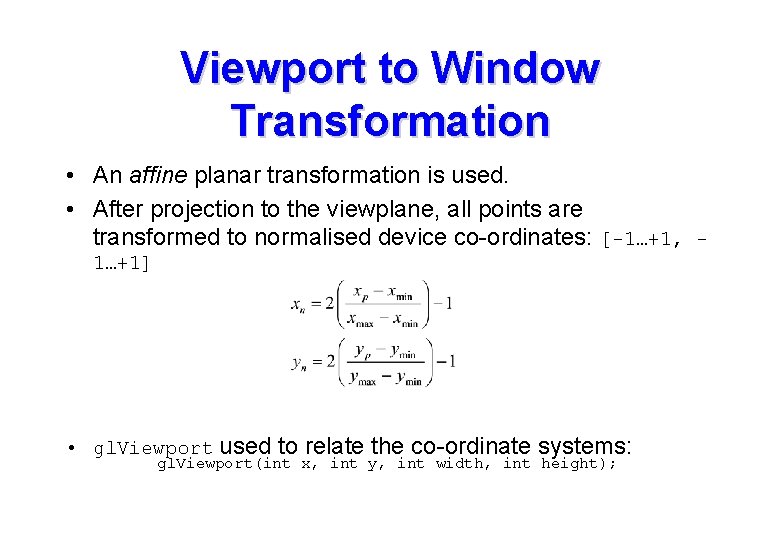
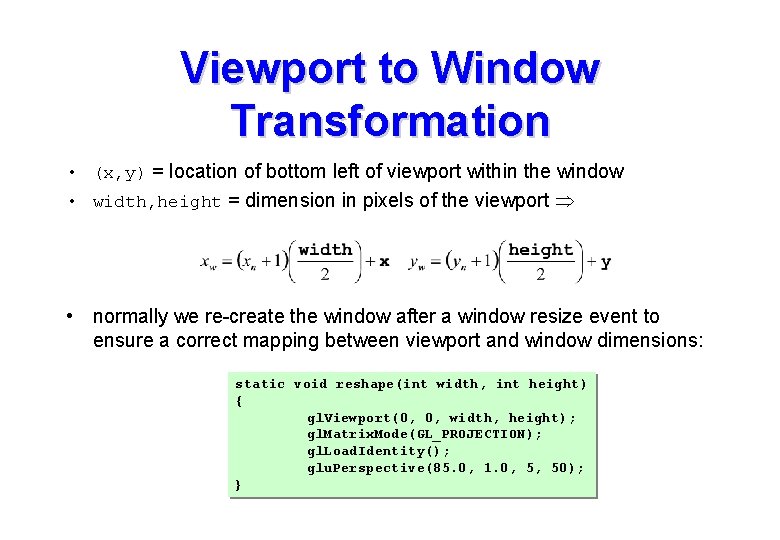
Viewport to Window Transformation • An affine planar transformation is used. • After projection to the viewplane, all points are transformed to normalised device co-ordinates: [-1…+1, 1…+1] • gl. Viewport used to relate the co-ordinate systems: gl. Viewport(int x, int y, int width, int height);
Viewport to Window Transformation • (x, y) = location of bottom left of viewport within the window • width, height = dimension in pixels of the viewport • normally we re-create the window after a window resize event to ensure a correct mapping between viewport and window dimensions: static void reshape(int width, int height) { gl. Viewport(0, 0, width, height); gl. Matrix. Mode(GL_PROJECTION); gl. Load. Identity(); glu. Perspective(85. 0, 1. 0, 5, 50); }
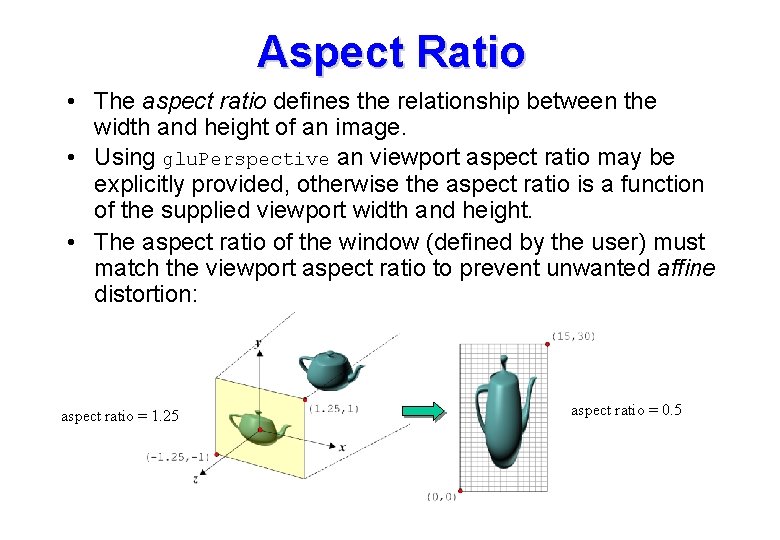
Aspect Ratio • The aspect ratio defines the relationship between the width and height of an image. • Using glu. Perspective an viewport aspect ratio may be explicitly provided, otherwise the aspect ratio is a function of the supplied viewport width and height. • The aspect ratio of the window (defined by the user) must match the viewport aspect ratio to prevent unwanted affine distortion: aspect ratio = 1. 25 aspect ratio = 0. 5
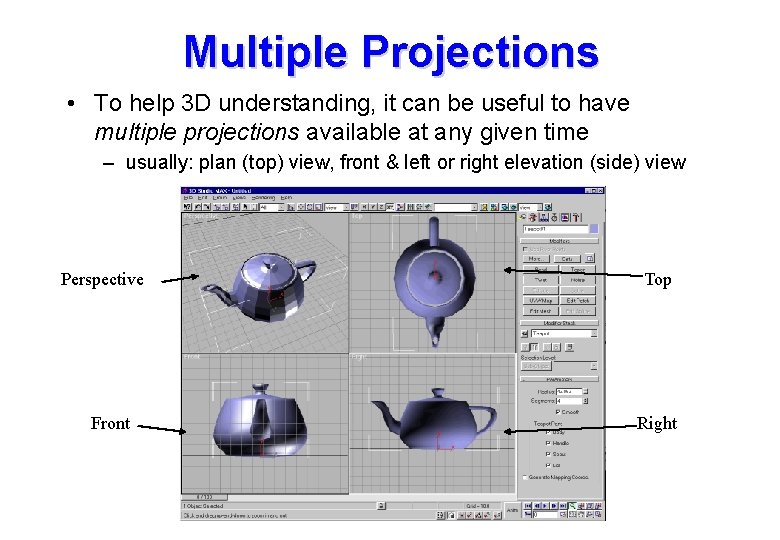
Multiple Projections • To help 3 D understanding, it can be useful to have multiple projections available at any given time – usually: plan (top) view, front & left or right elevation (side) view Perspective Front Top Right
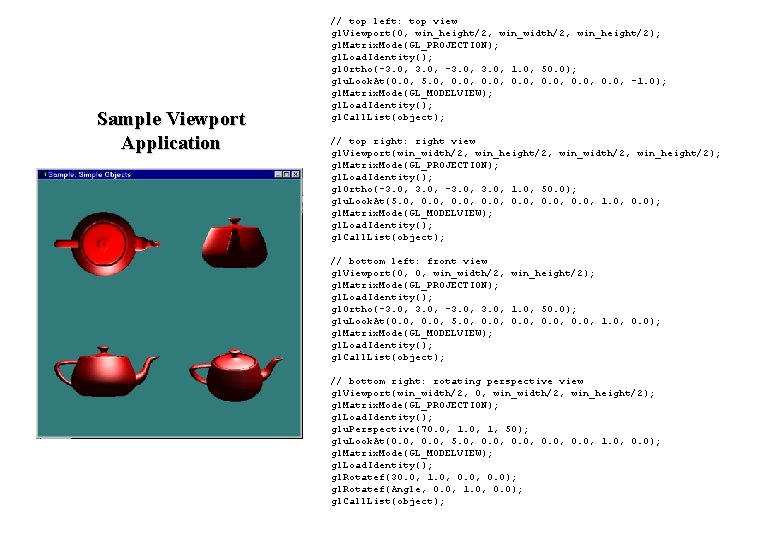
Sample Viewport Application // top left: top view gl. Viewport(0, win_height/2, win_width/2, win_height/2); gl. Matrix. Mode(GL_PROJECTION); gl. Load. Identity(); gl. Ortho(-3. 0, 1. 0, 50. 0); glu. Look. At(0. 0, 5. 0, 0. 0, -1. 0); gl. Matrix. Mode(GL_MODELVIEW); gl. Load. Identity(); gl. Call. List(object); // top right: right view gl. Viewport(win_width/2, win_height/2, win_width/2, win_height/2); gl. Matrix. Mode(GL_PROJECTION); gl. Load. Identity(); gl. Ortho(-3. 0, 1. 0, 50. 0); glu. Look. At(5. 0, 0. 0, 1. 0, 0. 0); gl. Matrix. Mode(GL_MODELVIEW); gl. Load. Identity(); gl. Call. List(object); // bottom left: front view gl. Viewport(0, 0, win_width/2, win_height/2); gl. Matrix. Mode(GL_PROJECTION); gl. Load. Identity(); gl. Ortho(-3. 0, 1. 0, 50. 0); glu. Look. At(0. 0, 5. 0, 0. 0, 1. 0, 0. 0); gl. Matrix. Mode(GL_MODELVIEW); gl. Load. Identity(); gl. Call. List(object); // bottom right: rotating perspective view gl. Viewport(win_width/2, 0, win_width/2, win_height/2); gl. Matrix. Mode(GL_PROJECTION); gl. Load. Identity(); glu. Perspective(70. 0, 1, 50); glu. Look. At(0. 0, 5. 0, 0. 0, 1. 0, 0. 0); gl. Matrix. Mode(GL_MODELVIEW); gl. Load. Identity(); gl. Rotatef(30. 0, 1. 0, 0. 0); gl. Rotatef(Angle, 0. 0, 1. 0, 0. 0); gl. Call. List(object);