
VGA Text Mode An introduction to font selection

- Slides: 22
VGA Text Mode An introduction to font selection and to reprogramming of the Character Generator ram
alphanumeric information • Most early PC programs weren’t graphical • Screen was similar to a typewriter’s output • Used only a limited set of character-images: – letters, numerals, and punctuation symbols • Hardware can efficiently render such glyphs • VGA can emulate the MDA/EGA text modes: – mode 1: emulates EGA 40 x 25 text (320 x 200 pixels) – mode 3: emulates EGA 80 x 25 text (640 x 400 pixels) – mode 7: emulates MDA 80 x 25 text (720 x 350 pixels)
Font images in ROM • • • VGA has built-in firmware (ROM-BIOS) Both code and data are provided in ROM VGA’s ROM is normally at 0 x 000 C 0000 Can be addressed by CPU in ‘real-mode’ VGA ROM includes character glyph tables – 8 x 8 character-set is used with mode 1 – 8 x 16 character-set is used with mode 3 – 8 x 14 character-set is used with mode 7
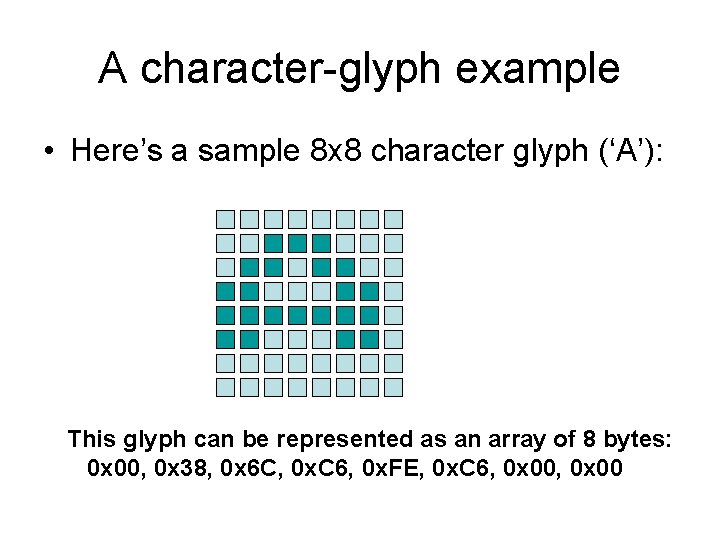
A character-glyph example • Here’s a sample 8 x 8 character glyph (‘A’): This glyph can be represented as an array of 8 bytes: 0 x 00, 0 x 38, 0 x 6 C, 0 x. C 6, 0 x. FE, 0 x. C 6, 0 x 00
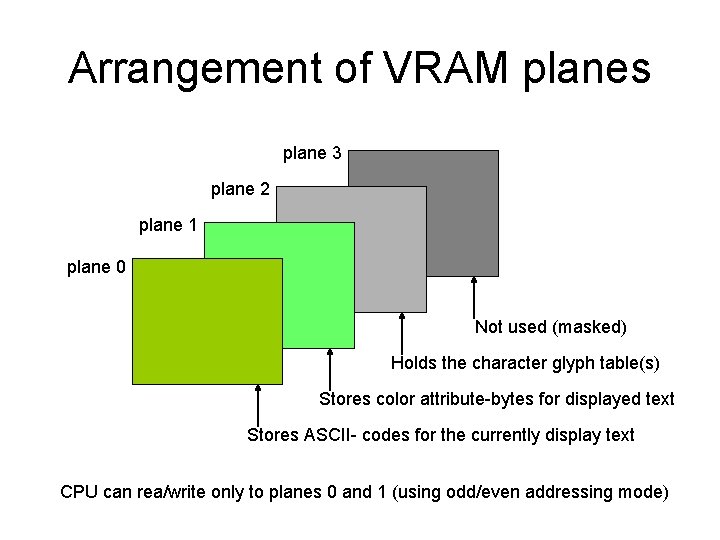
VGA Timer-Sequencer • A ‘character table’ is copied into VRAM • Glyphs organized as an array of bitmaps • Array holds 256 images (32 bytes/image) – Table-size: 256 x 32 = 8 K bytes (= 0 x 2000) • The ascii-codes serve as array-indexes: – Example: ‘A’ has ascii-code 0 x 41 (=65) • Sequencer hardware accesses these images • Dedicated area of VRAM is used (plane 2) • Planes 0 and 1 are used as a text frame-buffer
Arrangement of VRAM planes plane 3 plane 2 plane 1 plane 0 Not used (masked) Holds the character glyph table(s) Stores color attribute-bytes for displayed text Stores ASCII- codes for the currently display text CPU can rea/write only to planes 0 and 1 (using odd/even addressing mode)
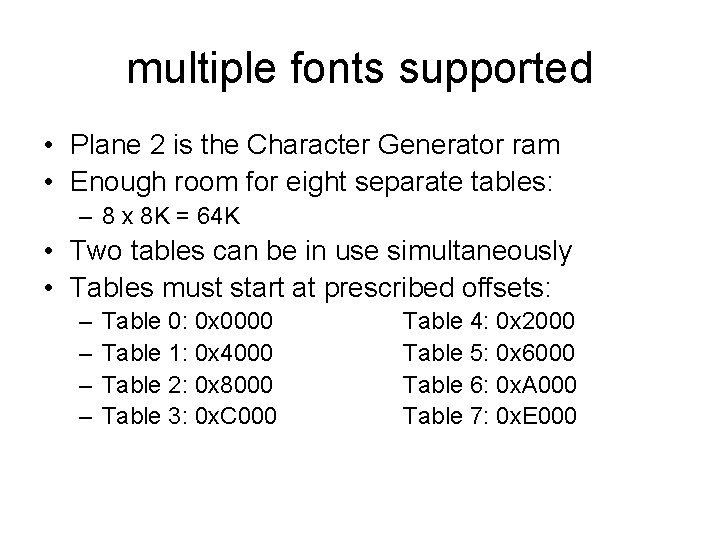
multiple fonts supported • Plane 2 is the Character Generator ram • Enough room for eight separate tables: – 8 x 8 K = 64 K • Two tables can be in use simultaneously • Tables must start at prescribed offsets: – – Table 0: 0 x 0000 Table 1: 0 x 4000 Table 2: 0 x 8000 Table 3: 0 x. C 000 Table 4: 0 x 2000 Table 5: 0 x 6000 Table 6: 0 x. A 000 Table 7: 0 x. E 000
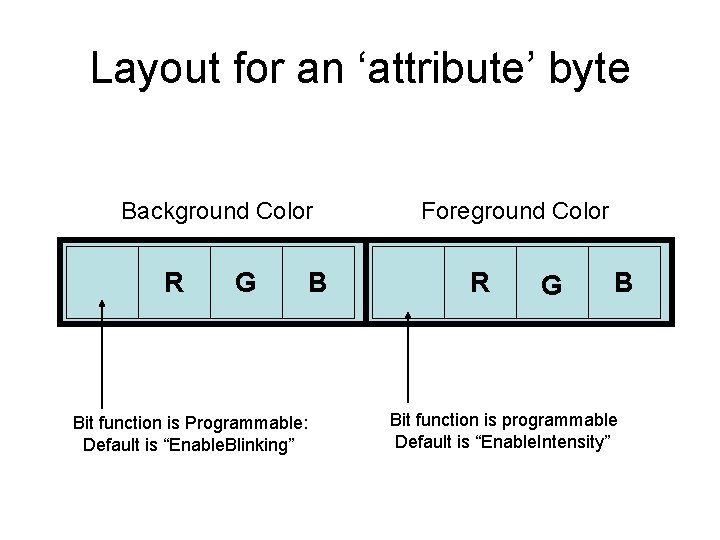
Text color ‘attributes’ • In text mode, the picture-elements consist of character images, shown in two colors: – Foreground color, and Background color • Character colors individually programmed • A byte-pair in VRAM selects the bit-image (ascii code) and color-pair (attribute byte) • All colors come from a palette of 16 • But the color palette is ‘programmable’
Layout for an ‘attribute’ byte Background Color R G B Bit function is Programmable: Default is “Enable. Blinking” Foreground Color R G B Bit function is programmable Default is “Enable. Intensity”
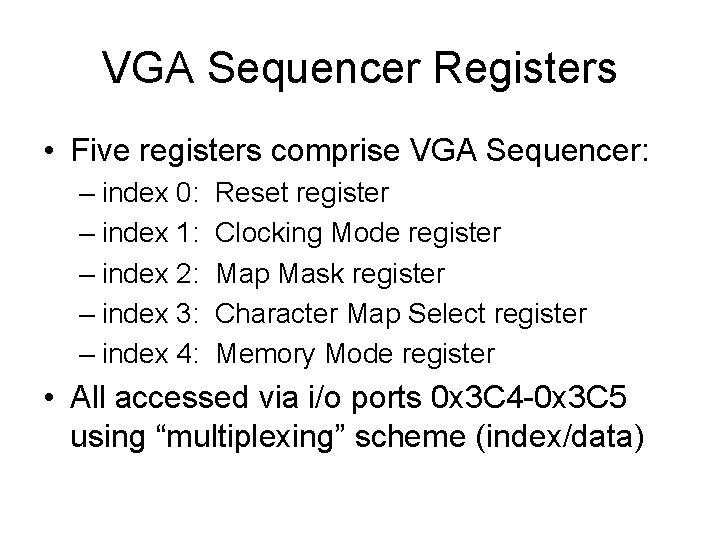
VGA Sequencer Registers • Five registers comprise VGA Sequencer: – index 0: – index 1: – index 2: – index 3: – index 4: Reset register Clocking Mode register Map Mask register Character Map Select register Memory Mode register • All accessed via i/o ports 0 x 3 C 4 -0 x 3 C 5 using “multiplexing” scheme (index/data)
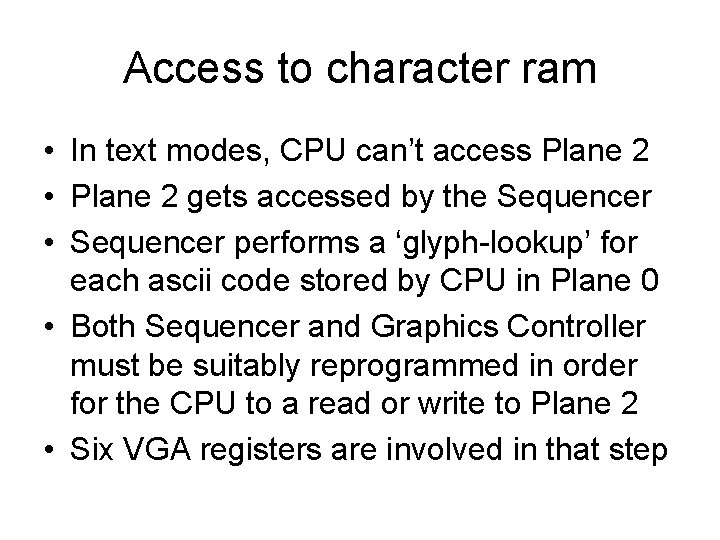
Access to character ram • In text modes, CPU can’t access Plane 2 • Plane 2 gets accessed by the Sequencer • Sequencer performs a ‘glyph-lookup’ for each ascii code stored by CPU in Plane 0 • Both Sequencer and Graphics Controller must be suitably reprogrammed in order for the CPU to a read or write to Plane 2 • Six VGA registers are involved in that step
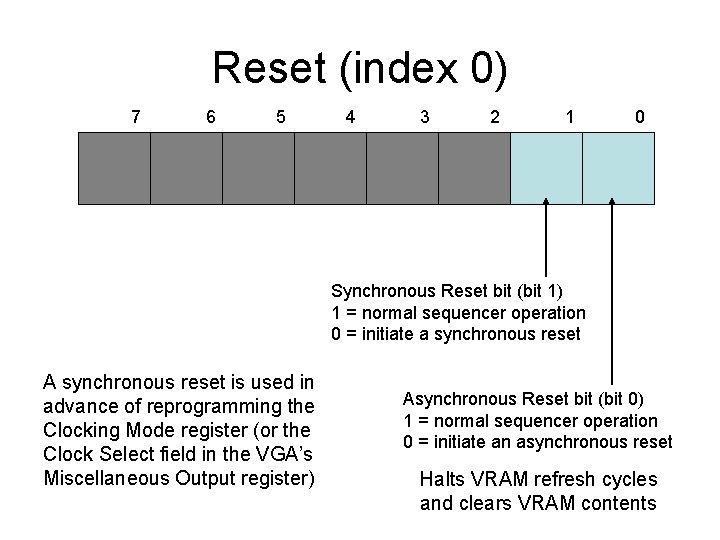
Reset (index 0) 7 6 5 4 3 2 1 0 Synchronous Reset bit (bit 1) 1 = normal sequencer operation 0 = initiate a synchronous reset A synchronous reset is used in advance of reprogramming the Clocking Mode register (or the Clock Select field in the VGA’s Miscellaneous Output register) Asynchronous Reset bit (bit 0) 1 = normal sequencer operation 0 = initiate an asynchronous reset Halts VRAM refresh cycles and clears VRAM contents
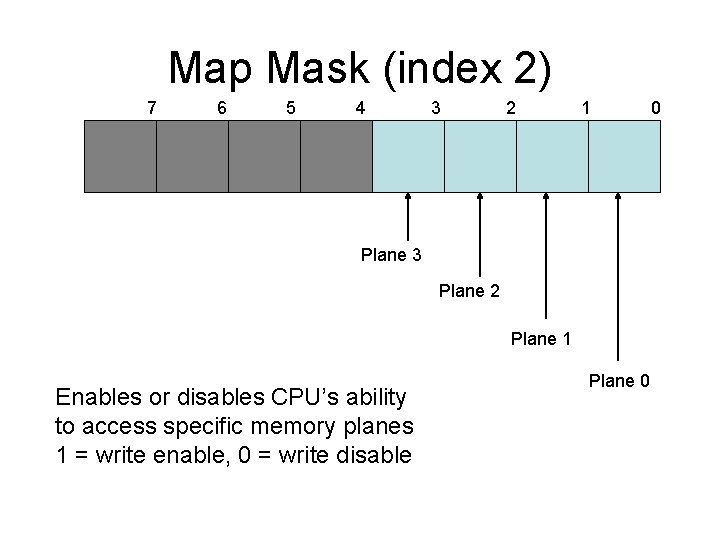
Map Mask (index 2) 7 6 5 4 3 2 1 Plane 3 Plane 2 Plane 1 Enables or disables CPU’s ability to access specific memory planes 1 = write enable, 0 = write disable Plane 0 0
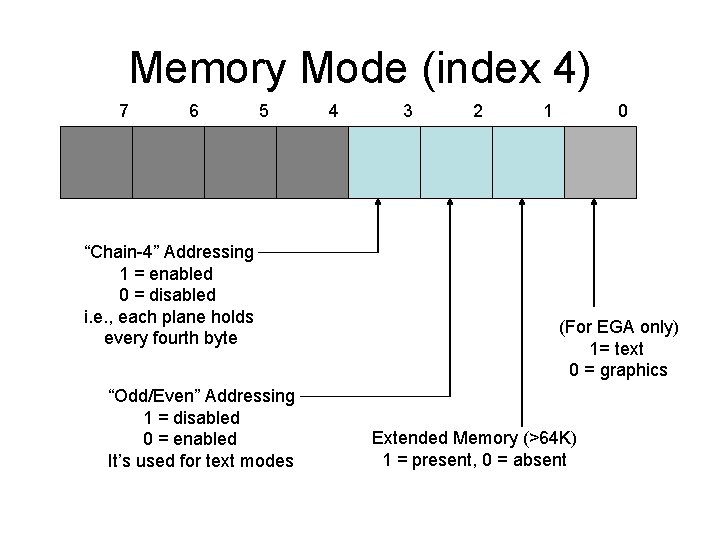
Memory Mode (index 4) 7 6 5 “Chain-4” Addressing 1 = enabled 0 = disabled i. e. , each plane holds every fourth byte “Odd/Even” Addressing 1 = disabled 0 = enabled It’s used for text modes 4 3 2 1 0 (For EGA only) 1= text 0 = graphics Extended Memory (>64 K) 1 = present, 0 = absent
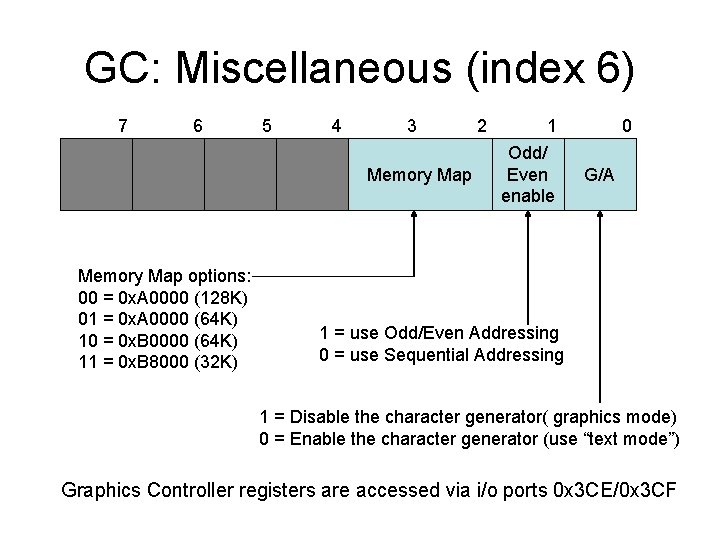
GC: Miscellaneous (index 6) 7 6 5 4 3 Memory Map options: 00 = 0 x. A 0000 (128 K) 01 = 0 x. A 0000 (64 K) 10 = 0 x. B 0000 (64 K) 11 = 0 x. B 8000 (32 K) 2 1 Odd/ Even enable 0 G/A 1 = use Odd/Even Addressing 0 = use Sequential Addressing 1 = Disable the character generator( graphics mode) 0 = Enable the character generator (use “text mode”) Graphics Controller registers are accessed via i/o ports 0 x 3 CE/0 x 3 CF
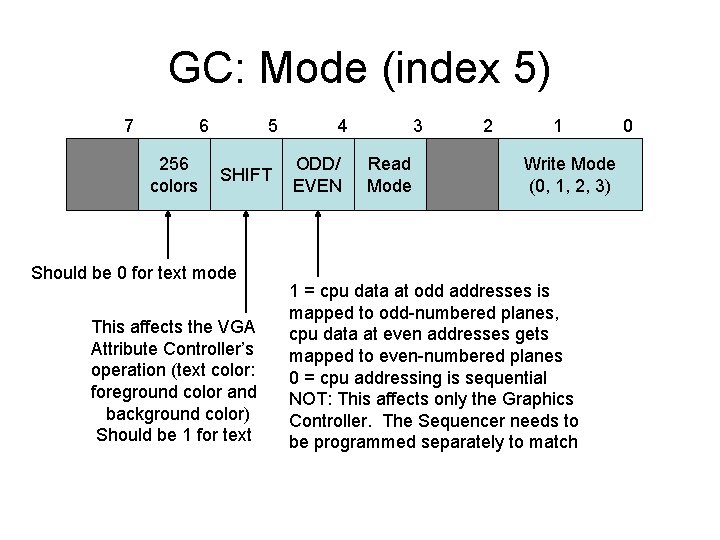
GC: Mode (index 5) 7 6 256 colors 5 SHIFT Should be 0 for text mode This affects the VGA Attribute Controller’s operation (text color: foreground color and background color) Should be 1 for text 4 ODD/ EVEN 3 Read Mode 2 1 Write Mode (0, 1, 2, 3) 1 = cpu data at odd addresses is mapped to odd-numbered planes, cpu data at even addresses gets mapped to even-numbered planes 0 = cpu addressing is sequential NOT: This affects only the Graphics Controller. The Sequencer needs to be programmed separately to match 0
How to modify character ram • Algorithm: – Reset the VGA for accessing Plane 2 – Then CPU reads or modifies Plane 2 – Reset the VGA for accessing Planes 0, 1 • Acknowledgement: – Author Richard Wilton described this process in his classic book “Programmer’s Guide to PC Video Systems (2 nd Edition)”
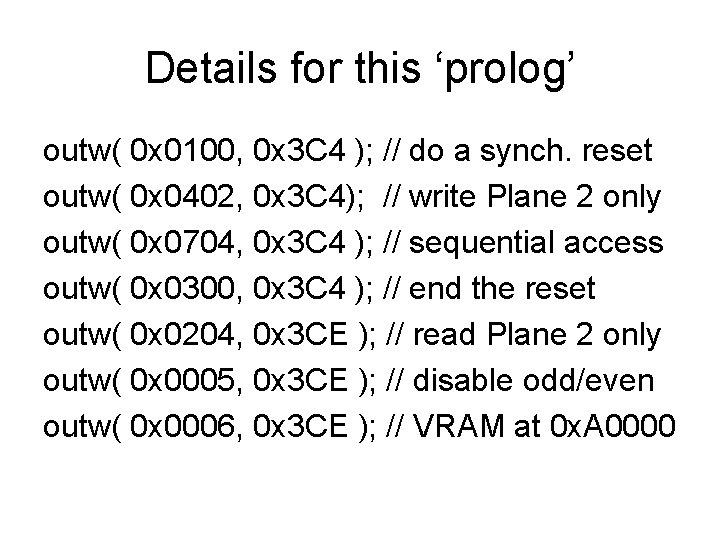
Details for this ‘prolog’ outw( 0 x 0100, 0 x 3 C 4 ); // do a synch. reset outw( 0 x 0402, 0 x 3 C 4); // write Plane 2 only outw( 0 x 0704, 0 x 3 C 4 ); // sequential access outw( 0 x 0300, 0 x 3 C 4 ); // end the reset outw( 0 x 0204, 0 x 3 CE ); // read Plane 2 only outw( 0 x 0005, 0 x 3 CE ); // disable odd/even outw( 0 x 0006, 0 x 3 CE ); // VRAM at 0 x. A 0000
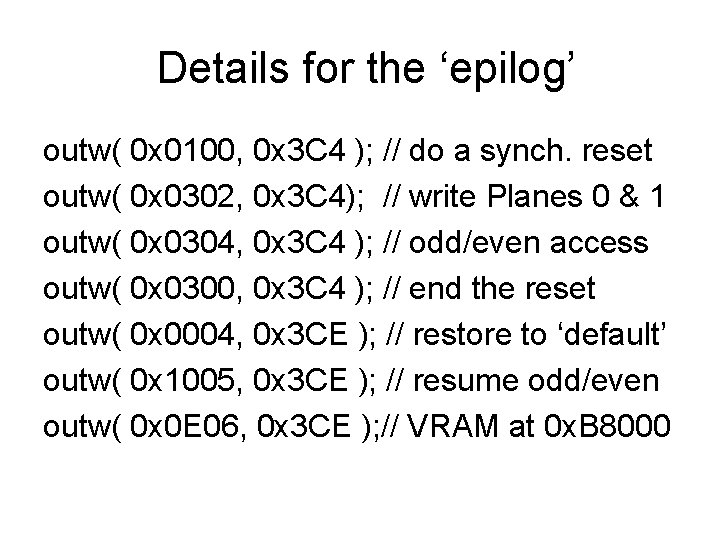
Details for the ‘epilog’ outw( 0 x 0100, 0 x 3 C 4 ); // do a synch. reset outw( 0 x 0302, 0 x 3 C 4); // write Planes 0 & 1 outw( 0 x 0304, 0 x 3 C 4 ); // odd/even access outw( 0 x 0300, 0 x 3 C 4 ); // end the reset outw( 0 x 0004, 0 x 3 CE ); // restore to ‘default’ outw( 0 x 1005, 0 x 3 CE ); // resume odd/even outw( 0 x 0 E 06, 0 x 3 CE ); // VRAM at 0 x. B 8000
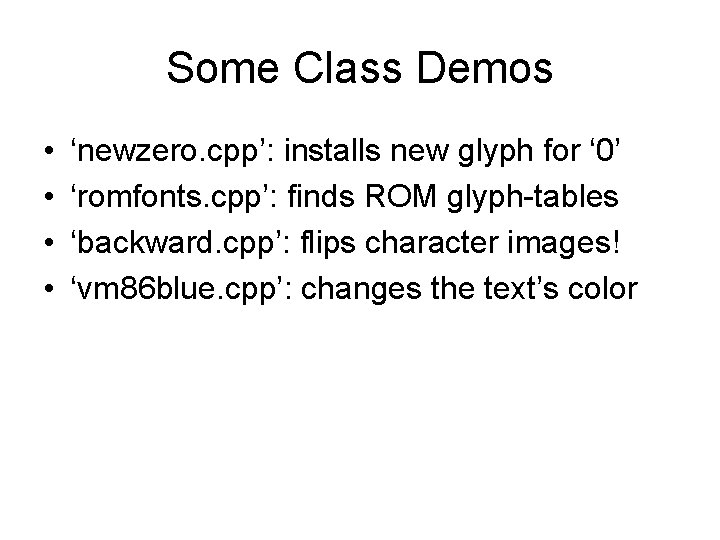
Some Class Demos • • ‘newzero. cpp’: installs new glyph for ‘ 0’ ‘romfonts. cpp’: finds ROM glyph-tables ‘backward. cpp’: flips character images! ‘vm 86 blue. cpp’: changes the text’s color
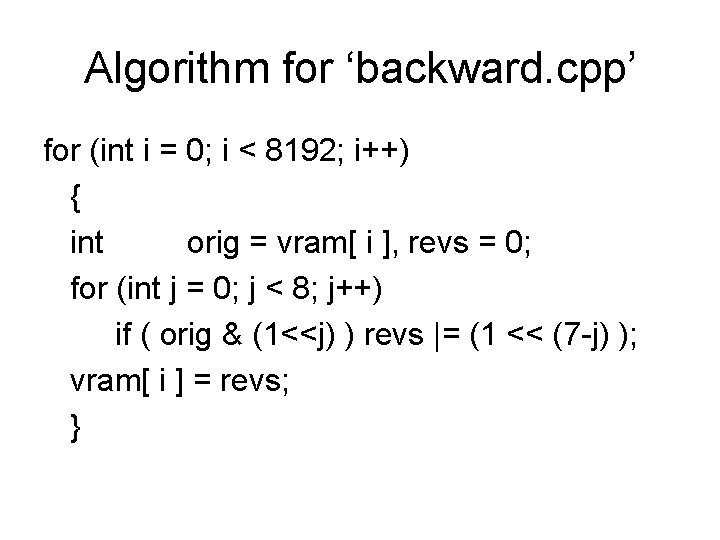
Algorithm for ‘backward. cpp’ for (int i = 0; i < 8192; i++) { int orig = vram[ i ], revs = 0; for (int j = 0; j < 8; j++) if ( orig & (1<<j) ) revs |= (1 << (7 -j) ); vram[ i ] = revs; }
In-Class Exercises • Exercise #1: Design a new image for ‘A’ • Exercise #2: Draw all text upside-down • Exercise #3: Draw ‘yellow-on-green’ text