
Vertex Buffer Objects and Shader Attributes For Further

Vertex Buffer Objects and Shader Attributes

For Further Reading • Angel 7 th Ed: – Most parts of Chapter 2. • Beginning Web. GL: – Chapter 1: vertex Buffer Objects, Attributes & Uniforms, Adding Color. – Chapter 2: Graphics Pipelines, GL Shading Language. – Chapter 9: Debugging. 2

Announcement • Homework #1 is due on 10/2. • Be on time. The late penalty is 10% per day. 3

Example of Last Week Angel and Shreiner: Interactive Computer Graphics 7 E © Addison-Wesley 2015 4

HTML File (triangle. html) <!DOCTYPE html> <head> <script id="vertex-shader" type="x-shader/x-vertex"> attribute vec 4 v. Position; void main(){ gl_Position = v. Position; } </script> precision mediump float; void main(){ gl_Frag. Color = vec 4( 1. 0, 0. 0, 1. 0 ); } </script> Angel and Shreiner: Interactive Computer Graphics 7 E © Addison-Wesley 2015 5

HTML File (cont) <script </head> type="text/javascript" src=". . /Common/webgl-utils. js"></script> src=". . /Common/init. Shaders. js"></script> src=". . /Common/MV. js"></script> src="triangle. js"></script> <body> <canvas id="gl-canvas" width="512" height="512"> Oops. . . your browser doesn't support the HTML 5 canvas element </canvas> </body> </html> Angel and Shreiner: Interactive Computer Graphics 7 E © Addison-Wesley 2015 6

triangle. js var gl; var points; window. onload = function init(){ var canvas = document. get. Element. By. Id( "gl-canvas" ); gl = Web. GLUtils. setup. Web. GL( canvas ); if ( !gl ) { alert( "Web. GL isn't available" ); } // Three Vertices var vertices = [ vec 2( -1, -1 ), vec 2( 0, 1 ), vec 2( 1, -1 ) ]; Angel and Shreiner: Interactive Computer Graphics 7 E © Addison-Wesley 2015 7

triangle. js (cont) // // Configure Web. GL gl. viewport( 0, 0, canvas. width, canvas. height ); gl. clear. Color( 1. 0, 1. 0 ); // Load shaders and initialize attribute buffers var program = init. Shaders( gl, "vertex-shader", "fragment-shader" ); gl. use. Program( program ); // Load the data into the GPU var buffer. Id = gl. create. Buffer(); gl. bind. Buffer( gl. ARRAY_BUFFER, buffer. Id ); gl. buffer. Data( gl. ARRAY_BUFFER, flatten(vertices), gl. STATIC_DRAW ); Angel and Shreiner: Interactive Computer Graphics 7 E © Addison-Wesley 2015 8

triangle. js (cont) // Associate out shader variables with our data buffer var v. Position = gl. get. Attrib. Location( program, "v. Position" ); gl. vertex. Attrib. Pointer( v. Position, 2, gl. FLOAT, false, 0, 0 ); gl. enable. Vertex. Attrib. Array( v. Position ); render(); }; function render() { gl. clear( gl. COLOR_BUFFER_BIT ); gl. draw. Arrays( gl. TRIANGLES, 0, 3 ); } Angel and Shreiner: Interactive Computer Graphics 7 E © Addison-Wesley 2015 9

Recap: Vertex Buffer and Shader Attributes Within the Javascript code, we have: var buffer. Id = gl. create. Buffer(); gl. bind. Buffer( gl. ARRAY_BUFFER, buffer. Id ); gl. buffer. Data( gl. ARRAY_BUFFER, flatten(vertices), gl. STATIC_DRAW ); . . . var v. Position = gl. get. Attrib. Location( program, "v. Position" ); gl. vertex. Attrib. Pointer( v. Position, 2, gl. FLOAT, false, 0, 0 ); Within the vertex shader (in HTML), we have: <script id="vertex-shader" type="x-shader/x-vertex"> attribute vec 4 v. Position; void main(){ gl_Position = v. Position; } 10

In Open. GL, we use vertex buffer data to define the 3 vertex positions of the triangle. The vertex shader then computes the screen positions of the vertices. And then Fragment shader fills the inside of the triangle with a lot of pixels. 11 Angel and Shreiner: Interactive Computer Graphics 7 E © Addison-

Last Week’s Exercise #2 • Run triangle. html from the class website • Load the triangle. html and triangle. js to your computer and run them from there • Edit the two files to change the color and display more than one triangle Angel and Shreiner: Interactive Computer Graphics 7 E © Addison-Wesley 2015 12

Today’s Exercise #1 • Change the shaders to display a green triangle. • Q 1: Do you need to change the Java. Script code? • Q 2: What if we want to change the color within the Java. Script code? 13

Example 1: Green & Blue Triangles
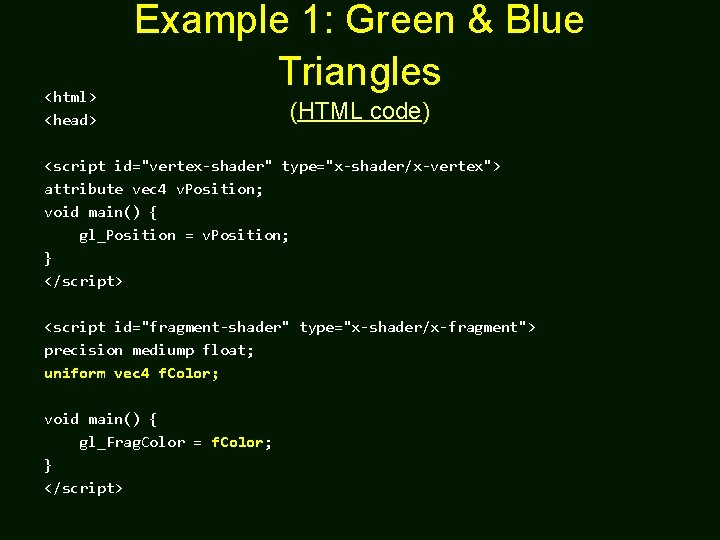
<html> <head> Example 1: Green & Blue Triangles (HTML code) <script id="vertex-shader" type="x-shader/x-vertex"> attribute vec 4 v. Position; void main() { gl_Position = v. Position; } </script> <script id="fragment-shader" type="x-shader/x-fragment"> precision mediump float; uniform vec 4 f. Color; void main() { gl_Frag. Color = f. Color; } </script>

Example 1: Green & Blue Triangles window. onload = function init() (Java. Script code) { var canvas = document. get. Element. By. Id( "gl-canvas" ); gl = Web. GLUtils. setup. Web. GL( canvas ); if ( !gl ) { alert( "Web. GL isn't available" ); } // Three Vertices var vertices = [ vec 3( -1, 0 ), vec 3( -0. 5, 1, 0 ), vec 3( 0, -1, 0 ), vec 3( 0. 5, 1, 0 ), vec 3( 1, -1, 0 ) ];

(Java. Script code) // // Configure Web. GL // gl. viewport( 0, 0, canvas. width, canvas. height ); gl. clear. Color( 1. 0, 1. 0 ); // Load shaders and initialize attribute buffers var program = init. Shaders( gl, "vertex-shader", "fragment-shader" ); gl. use. Program( program ); // Load the data into the GPU var buffer. Id = gl. create. Buffer(); gl. bind. Buffer( gl. ARRAY_BUFFER, buffer. Id ); gl. buffer. Data( gl. ARRAY_BUFFER, flatten(vertices), gl. STATIC_DRAW );

(Java. Script code) // Associate our shader variables with our data buffer var v. Position = gl. get. Attrib. Location( program, "v. Position" ); gl. vertex. Attrib. Pointer( v. Position, 3, gl. FLOAT, false, 0, 0 ); gl. enable. Vertex. Attrib. Array( v. Position ); var f. Color = gl. get. Uniform. Location( program, "f. Color" ); gl. clear( gl. COLOR_BUFFER_BIT ); gl. uniform 4 f( f. Color, 0. 0, 1. 0 ); gl. draw. Arrays( gl. TRIANGLES, 0, 3 ); gl. uniform 4 f( f. Color, 0. 0, 1. 0 ); gl. draw. Arrays( gl. TRIANGLES, 3, 3 ); };

A Quick Summary So Far • Uniform parameters offer communication between shaders and main (JS) program. • Q 1: Any other types of communication? – A: Will discuss vertex attributes later. • Q 2: I want to know more about shaders! • Q 3: I still don’t know how vertex array buffer works? • A: Our next topics (using SIGGRAPH 2014 materials) 19

Shaders and GLSL

Vertex Shaders • A shader that’s executed for each vertex – Each instantiation can generate one vertex – Outputs are passed on to rasterizer where they are interpolated and available to fragment shaders – Position output in clip coordinates • There are lots of effects we can do in vertex shaders – Changing coordinate systems – Moving vertices – Per vertex lighting: height fields

Fragment Shaders • A shader that’s executed for each “potential” pixel – fragments still need to pass several tests before making it to the framebuffer • There are lots of effects we can do in fragment shaders – Per-fragment lighting – Texture and bump Mapping – Environment (Reflection) Maps

GLSL • • Open. GL Shading Language C like language with some C++ features 2 -4 dimensional matrix and vector types Both vertex and fragment shaders are written in GLSL • Each shader has a main()

GLSL Data Types • Scalar types: float, int, bool • Vector types: vec 2, vec 3, vec 4 ivec 2, ivec 3, ivec 4 bvec 2, bvec 3, bvec 4 • Matrix types: mat 2, mat 3, mat 4 • Texture sampling: sampler 1 D, sampler 2 D, sampler 3 D, sampler. Cube • C++ Style Constructors vec 3 a = vec 3(1. 0, 2. 0, 3. 0);

Operators • Standard C/C++ arithmetic and logic operators • Overloaded operators for matrix and vector operations mat 4 m; vec 4 a, b, c; b = a*m; c = m*a;
![Components and Swizzling • Access vector components using either: – [ ] (C-style array](http://slidetodoc.com/presentation_image_h2/35dd63b0bbb6252fcf4c55da700d8689/image-26.jpg "Components and Swizzling • Access vector components using either: – [ ] (C-style array")
Components and Swizzling • Access vector components using either: – [ ] (C-style array indexing) – xyzw, rgba or strq (named components) • For example: vec 3 v; v[1], v. y, v. g, v. t - all refer to the same element • Component swizzling: • vec 3 a, b; a. xy = b. yx;

Qualifiers • attribute – vertex attributes from application • varying – copy vertex attributes and other variables from vertex shaders to fragment shaders – values are interpolated by rasterizer varying vec 2 tex. Coord; varying vec 4 color; • uniform – shader-constant variable from application uniform float time; uniform vec 4 rotation;

Functions • Built in – Arithmetic: sqrt, power, abs – Trigonometric: sin, asin – Graphical: length, reflect • User defined

Built-in Variables • gl_Position – (required) output position from vertex shader • gl_Frag. Color – (required) output color from fragment shader • gl_Frag. Coord – input fragment position • gl_Frag. Depth – input depth value in fragment shader

Simple Vertex Shader for Cube Example attribute vec 4 v. Position; attribute vec 4 v. Color; varying vec 4 f. Color; void main() { f. Color = v. Color; gl_Position = v. Position; }

Simple Fragment Shader for Cube Example precision mediump float; varying vec 4 f. Color; void main() { gl_Frag. Color = f. Color; }

Getting Your Shaders into Web. GL • Shaders need to be compiled and linked to form an executable shader program • Web. GL provides the compiler and linker • A Web. GL program must contain vertex and fragment shaders Create Program gl. create. Program() Create Shader gl. create. Shader() Load Shader Source gl. shader. Source() Compile Shader gl. compile. Shader() Attach Shader to Program gl. attach. Shader() Link Program gl. link. Program() Use Program gl. use. Program() These steps need to be repeated for each type of shader in the shader program

A Simpler Way • We’ve created a function for this course to make it easier to load your shaders – available at course website init. Shaders(v. File, f. File ); • init. Shaders takes two filenames – v. File path to the vertex shader file – f. File for the fragment shader file • Fails if shaders don’t compile, or program doesn’t link

Vertex Buffer Objects

Representing Geometric Objects • Geometric objects are represented using vertices • A vertex is a collection of generic attributes – – positional coordinates colors texture coordinates any other data associated with that point in space • Position stored in 4 dimensional homogeneous coordinates • Vertex data must be stored in vertex buffer objects (VBOs)

Open. GL Geometric Primitives All primitives are specified by vertices GL_POINTS GL_LINE_STRIP GL_TRIANGLES GL_TRIANGLE_FAN GL_TRIANGLE_STRIP

Storing Vertex Attributes • Vertex data must be stored in a Vertex Buffer Object (VBO) • To set up a VBO we must – create an empty by calling gl. create. Buffer(); () – bind a specific VBO for initialization by calling gl. bind. Buffer( gl. ARRAY_BUFFER, v. Buffer ); – load data into VBO using (for our points) gl. buffer. Data( gl. ARRAY_BUFFER, flatten(points), gl. STATIC_DRAW );

Vertex Array Code Associate shader variables with vertex arrays var c. Buffer = gl. create. Buffer(); gl. bind. Buffer( gl. ARRAY_BUFFER, c. Buffer ); gl. buffer. Data( gl. ARRAY_BUFFER, flatten(colors), gl. STATIC_DRAW ); var v. Color = gl. get. Attrib. Location( program, "v. Color" ); gl. vertex. Attrib. Pointer( v. Color, 4, gl. FLOAT, false, 0, 0 ); gl. enable. Vertex. Attrib. Array( v. Color ); var v. Buffer = gl. create. Buffer(); gl. bind. Buffer( gl. ARRAY_BUFFER, v. Buffer ); gl. buffer. Data( gl. ARRAY_BUFFER, flatten(points), gl. STATIC_DRAW ); var v. Position = gl. get. Attrib. Location( program, "v. Position" ); gl. vertex. Attrib. Pointer( v. Position, 3, gl. FLOAT, false, 0, 0 ); gl. enable. Vertex. Attrib. Array( v. Position );

A Quick Note on Buffers & Attributes • create. Buffer(), bind. Buffer(), and buffer. Data() tell Open. GL where the actual data is stored in the memory. • vertex. Attrib. Pointer() and enable. Vertex. Attrib. Array() tells Open. GL which shader attributes will use them.

vertex. Attrib. Pointer() • So far, we ignore the last three parameters of vertex. Attrib. Pointer(), e. g. , vertex. Attrib. Pointer( v. Color, 4, gl. FLOAT, false, 0, 0 ); • Exercise #1: Look up the definition of vertex. Attrib. Pointer() –https: //www. khronos. org/registry/Open. GLRefpages/gl 4/html/gl. Ver • Exercise #2: See a different use of vertex. Attrib. Pointer() at: –https: //github. com/openglredbook/examples/blob/mast er/src/04 -gouraud. cpp
![An Advanced Example of vertex. Attrib. Pointer() struct Vertex. Data { GLubyte color[4]; GLfloat](http://slidetodoc.com/presentation_image_h2/35dd63b0bbb6252fcf4c55da700d8689/image-41.jpg "An Advanced Example of vertex. Attrib. Pointer() struct Vertex. Data { GLubyte color[4]; GLfloat")
An Advanced Example of vertex. Attrib. Pointer() struct Vertex. Data { GLubyte color[4]; GLfloat position[4]; }; Vertex. Data vertices[Num. Vertices] = {. . . }; gl. Gen. Buffers(Num. Buffers, Buffers); gl. Bind. Buffer(GL_ARRAY_BUFFER, Buffers[Array. Buffer]); gl. Buffer. Data(GL_ARRAY_BUFFER, sizeof(vertices), vertices, GL_STATIC_DRAW); gl. Vertex. Attrib. Pointer(v. Color, 4, GL_UNSIGNED_BYTE, GL_TRUE, sizeof(Vertex. Data), BUFFER_OFFSET(0) ); gl. Vertex. Attrib. Pointer(v. Position, 2, GL_FLOAT, GL_FALSE, sizeof(Vertex. Data), BUFFER_OFFSET(sizeof(vertices[0]. color)) ); gl. Enable. Vertex. Attrib. Array(v. Color); gl. Enable. Vertex. Attrib. Array(v. Position)

Example 2: Per-Vertex Color

Example 2: Per-Vertex Color (HTML code) <script id="vertex-shader" type="x-shader/x-vertex"> attribute vec 4 v. Position; attribute vec 4 v. Color; varying vec 4 f. Color; void main() { f. Color = v. Color; gl_Position = v. Position; } </script> <script id="fragment-shader" type="x-shader/x-fragment"> precision mediump float; varying vec 4 f. Color; // Note that this will be interpolated. . . void main() { gl_Frag. Color = f. Color; } </script>

Example 2: Per-Vertex Color (Java. Script code) window. onload = function init() { var canvas = document. get. Element. By. Id( "gl-canvas" ); gl = Web. GLUtils. setup. Web. GL( canvas ); if ( !gl ) { alert( "Web. GL isn't available" ); } // Three Vertices var vertices = [ vec 3( -1, 0 ), vec 3( 0, 1, 0 ), vec 3( 1, -1, 0 ) ]; var colors vec 3( ]; = [ 1, 0, 0 ), 0, 1, 0 ), 0, 0, 1 )

(Nothing New Here) // // Configure Web. GL // gl. viewport( 0, 0, canvas. width, canvas. height ); gl. clear. Color( 1. 0, 1. 0 ); // Load shaders and initialize attribute buffers var program = init. Shaders( gl, "vertex-shader", "fragment-shader" ); gl. use. Program( program ); // Load the data into the GPU var buffer. Id = gl. create. Buffer(); gl. bind. Buffer( gl. ARRAY_BUFFER, buffer. Id ); gl. buffer. Data( gl. ARRAY_BUFFER, flatten(vertices), gl. STATIC_DRAW );

// Associate our shader variables with our data buffer var v. Position = gl. get. Attrib. Location( program, "v. Position" ); gl. vertex. Attrib. Pointer( v. Position, 3, gl. FLOAT, false, 0, 0 ); gl. enable. Vertex. Attrib. Array( v. Position ); // Repeat the above process for the color attributes of the vertices. var c. Buffer. Id = gl. create. Buffer(); gl. bind. Buffer( gl. ARRAY_BUFFER, c. Buffer. Id ); gl. buffer. Data( gl. ARRAY_BUFFER, flatten(colors), gl. STATIC_DRAW ); var v. Color = gl. get. Attrib. Location( program, "v. Color" ); gl. vertex. Attrib. Pointer( v. Color, 3, gl. FLOAT, false, 0, 0 ); gl. enable. Vertex. Attrib. Array( v. Color ); render(); };

Debugging Tips • Typos in Java. Script code may not produce any error message. – Try typing a wrong variable name (e. g. , v. Color f. Color) or wrong function name (e. g. , get. Attribute. Location) and see what happens. – Syntax errors like these will show up in the Console panel of the Chrome Developer Tools. 47

Homework #1 • Draw at least two triangles like Example 1, with per-vertex colors like Example 2. • Due 10/2. Late penalty is 10% each day late. 48

Backup Slides
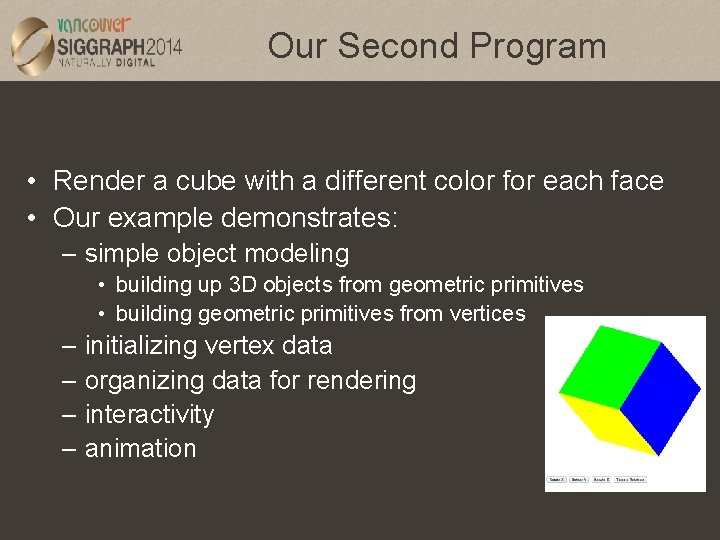
Our Second Program • Render a cube with a different color for each face • Our example demonstrates: – simple object modeling • building up 3 D objects from geometric primitives • building geometric primitives from vertices – initializing vertex data – organizing data for rendering – interactivity – animation
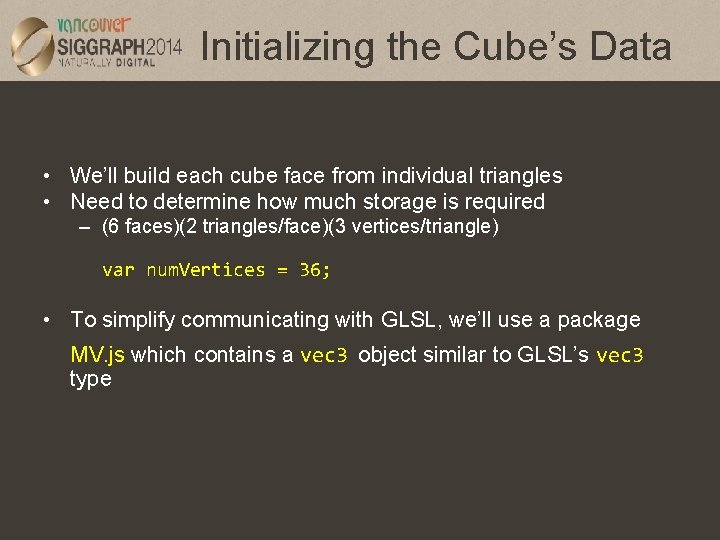
Initializing the Cube’s Data • We’ll build each cube face from individual triangles • Need to determine how much storage is required – (6 faces)(2 triangles/face)(3 vertices/triangle) var num. Vertices = 36; • To simplify communicating with GLSL, we’ll use a package MV. js which contains a vec 3 object similar to GLSL’s vec 3 type

Initializing the Cube’s Data (cont’d) • Before we can initialize our VBO, we need to stage the data • Our cube has two attributes per vertex – position – color • We create two arrays to hold the VBO data var points = []; var colors = [];

Cube Data • Vertices of a unit cube centered at origin – sides aligned with axes var vertices = [ vec 4( -0. 5, 0. 5, 1. 0 ), vec 4( 0. 5, -0. 5, 1. 0 ), vec 4( -0. 5, -0. 5, 1. 0 ), vec 4( 0. 5, -0. 5, 1. 0 ) ]; 6 7 1 2 4 0 7 3
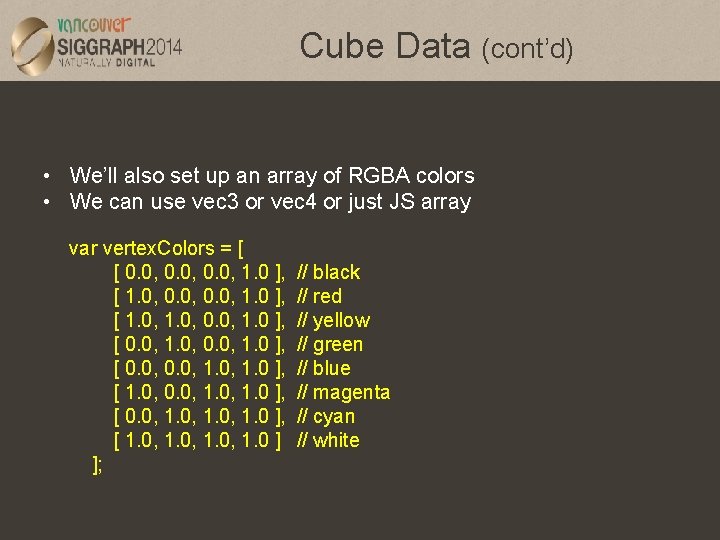
Cube Data (cont’d) • We’ll also set up an array of RGBA colors • We can use vec 3 or vec 4 or just JS array var vertex. Colors = [ [ 0. 0, 1. 0 ], [ 1. 0, 0. 0, 1. 0 ], [ 0. 0, 1. 0 ], [ 1. 0, 0. 0, 1. 0 ], [ 1. 0, 1. 0 ] ]; // black // red // yellow // green // blue // magenta // cyan // white

Arrays in JS • A JS array is an object with attributes and methods such as length, push() and pop() – fundamentally different from C-style array – cannot send directly to Web. GL functions – use flatten() function to extract data from JS array gl. buffer. Data( gl. ARRAY_BUFFER, flatten(colors), gl. STATIC_DRAW );

Generating a Cube Face from Vertices • To simplify generating the geometry, we use a convenience function quad() – create two triangles for each face and assigns colors to the vertices function quad(a, b, c, d) { var indices = [ a, b, c, a, c, d ]; for ( var i = 0; i < indices. length; ++i ) { points. push( vertices[indices[i]] ); // for vertex colors use //colors. push( vertex. Colors[indices[i]] ); // for solid colored faces use colors. push(vertex. Colors[a]); }

Generating the Cube from Faces • Generate 12 triangles for the cube – 36 vertices with 36 colors function color. Cube() { quad( 1, 0, 3, 2 ); quad( 2, 3, 7, 6 ); quad( 3, 0, 4, 7 ); quad( 6, 5, 1, 2 ); quad( 4, 5, 6, 7 ); quad( 5, 4, 0, 1 ); } 6 7 1 2 4 0 7 3
- Slides: 57