
Version Control with Subversion Speaker ChenNien Tsai Adviser
Version Control with Subversion Speaker: Chen-Nien Tsai Adviser: Kai-Wei Ke Date: 2006. 01. 17 2006/1/3
Outline • Introduction • Basic Concepts – Repository – Versioning Models • • Basic Work Cycle Branch, tag, and Merging Resources Conclusion 2006/1/3 2

Introduction • The Concurrent Versions System (CVS) has long been the tool of choice for version control. • Subversion is a relatively new version control system designed to be the successor to CVS. – an open-source system with a design (and “look and feel”) similar to CVS. – attempting to fix most of CVS's noticeable flaws. 2006/1/3 3
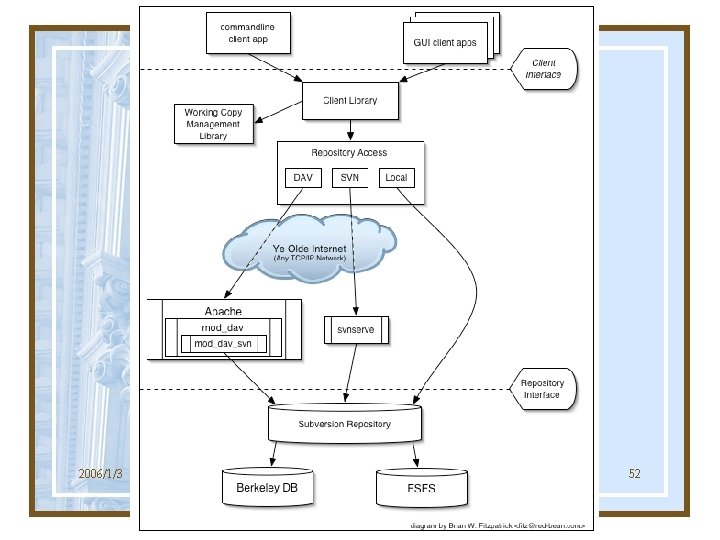
What is Subversion? • Subversion is a free/open-source version control system. – Subversion manages files and directories over time. – Files are placed into a central repository. – It allows you to recover older versions of your data, or examine the history of how your data changed (a time machine). – Subversion can access its repository across networks. 2006/1/3 4
Outline • Introduction • Basic Concepts – Repository – Versioning Models • • Basic Work Cycle Branch, tag, and Merging Resources Conclusion 2006/1/3 5

Repository (1/2) • Subversion is a centralized system for sharing information. • A repository is a central store of data. 2006/1/3 6
Repository (2/2) • The repository is a kind of file server. • The Subversion repository remembers every change ever written to it. – every change to every file. – even changes to the directory tree. • The clients can – see only the latest version of the repository. – view previous states of the repository. 2006/1/3 7
Repository Layout (a common way) • Ex. SVN repository – http: //svn. collab. net/viewcvs/svn/ • trunk – Main line of development. • tags – Contain tag copies. – Some projects name it release. • branches – Contain branch copies. 2006/1/3 8
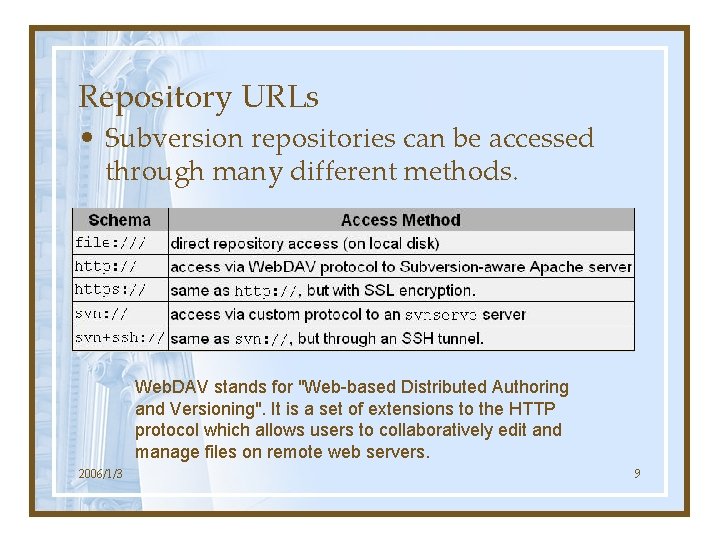
Repository URLs • Subversion repositories can be accessed through many different methods. Web. DAV stands for "Web-based Distributed Authoring and Versioning". It is a set of extensions to the HTTP protocol which allows users to collaboratively edit and manage files on remote web servers. 2006/1/3 9
Versioning Models • The core mission of a version control system is to enable collaborative editing and sharing of data. • Different systems use different strategies to achieve this. – File-sharing Model – Lock-Modify-Unlock Model – Copy-Modify-Merge Model 2006/1/3 10
The Problem of File-Sharing • Suppose we have two co-workers, Harry and Sally. (When Harry Met Sally) • Two users read the same file. • They both begin to edit their copies. • Harry publishes his version first. • Sally accidentally overwrites Harry’s version. 2006/1/3 11
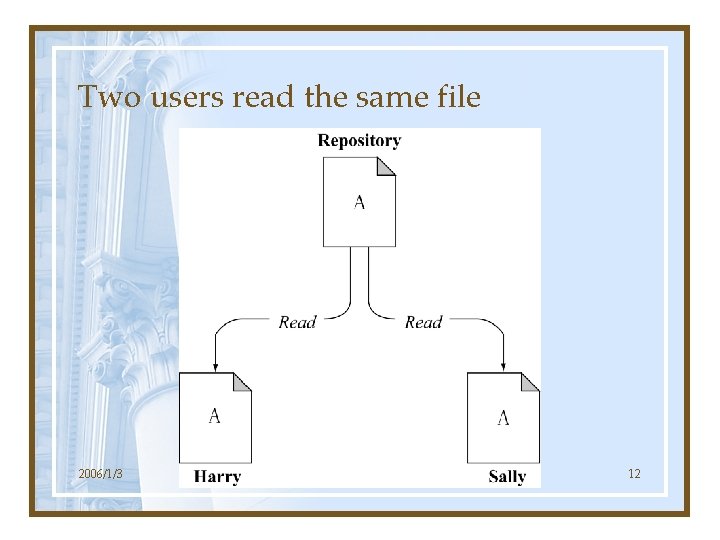
Two users read the same file 2006/1/3 12
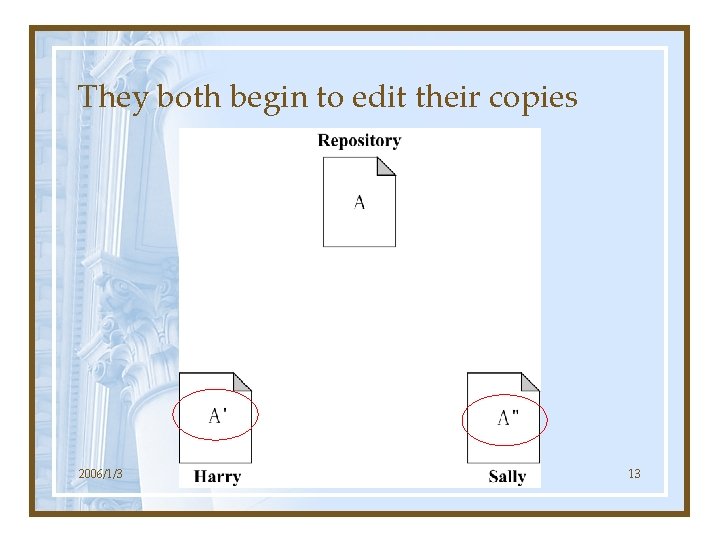
They both begin to edit their copies 2006/1/3 13
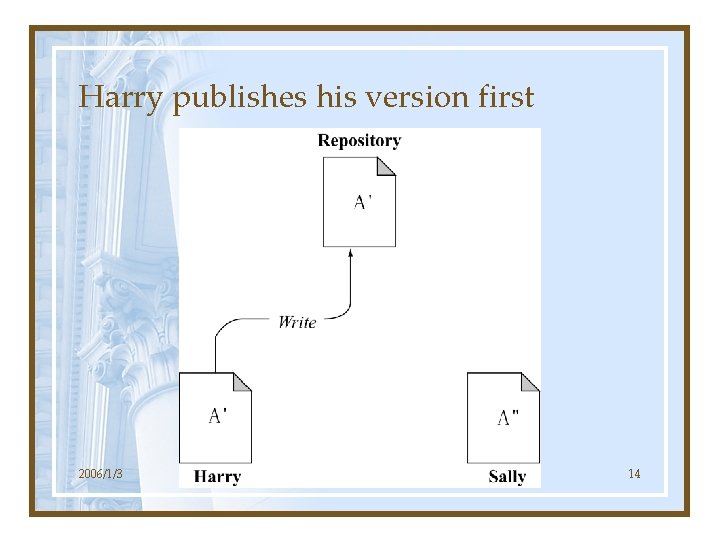
Harry publishes his version first 2006/1/3 14
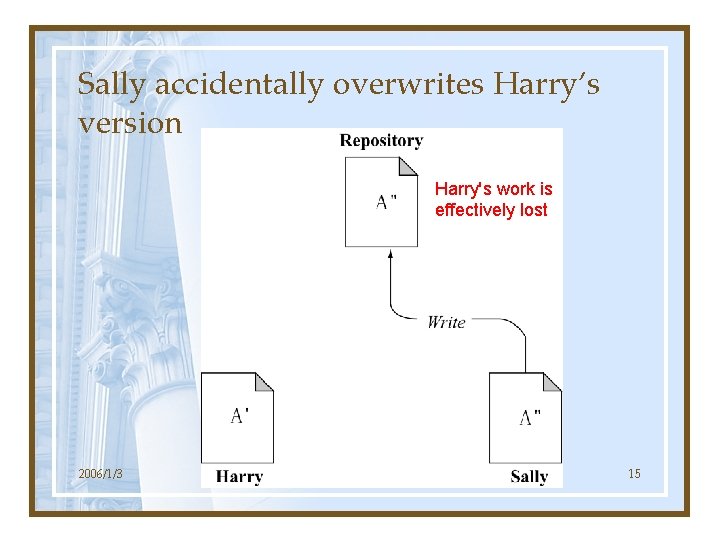
Sally accidentally overwrites Harry’s version Harry's work is effectively lost 2006/1/3 15
The Lock-Modify-Unlock Solution • Harry locks file A, then copies it for editing. • While Harry edits, Sally’s lock attempt fails. • Harry writes his version, then releases his lock. • Now Sally can lock, read, and edit the latest version. 2006/1/3 16
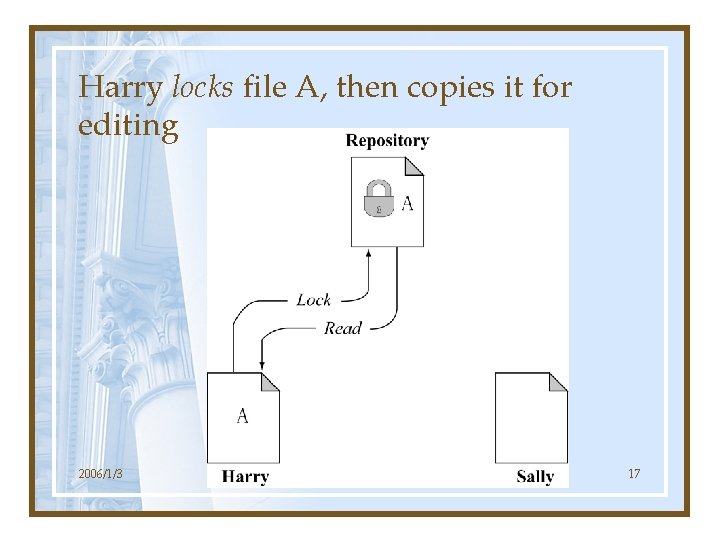
Harry locks file A, then copies it for editing 2006/1/3 17
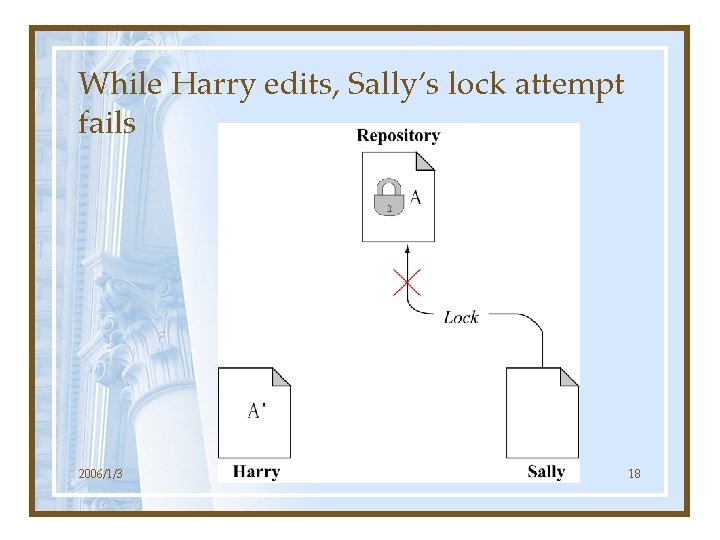
While Harry edits, Sally’s lock attempt fails 2006/1/3 18
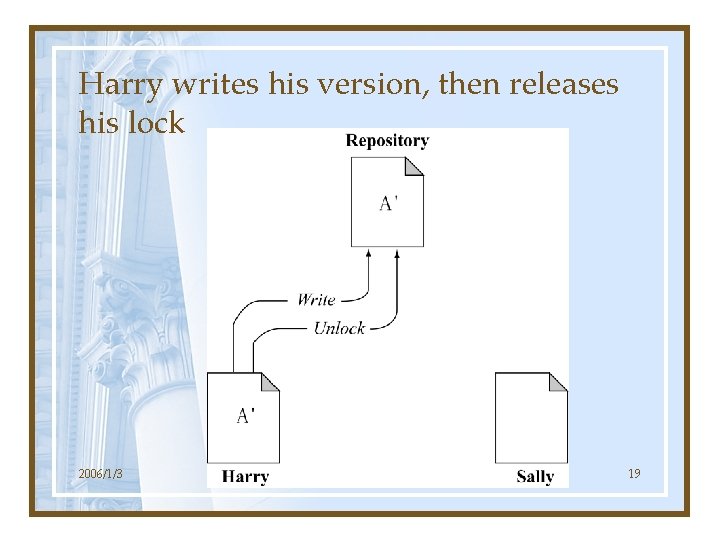
Harry writes his version, then releases his lock 2006/1/3 19
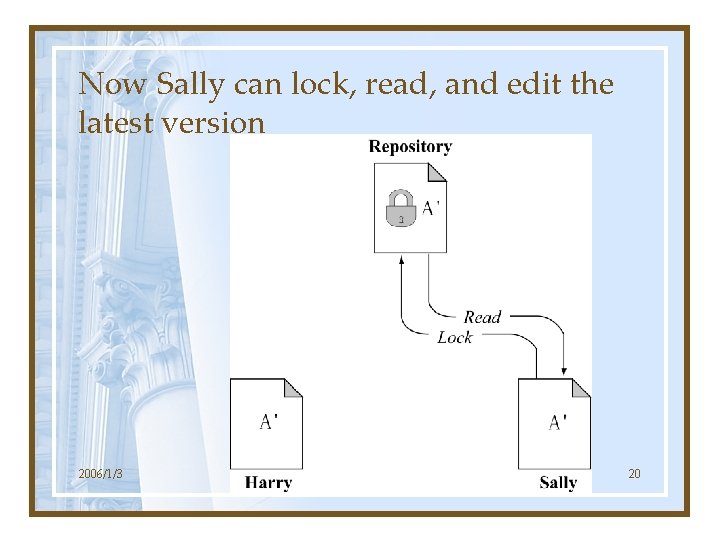
Now Sally can lock, read, and edit the latest version 2006/1/3 20
The Problem with the Lock-Modify. Unlock Model • Locking may cause administrative problems. – Sometimes Harry will lock a file and then forget about it. • Locking may cause unnecessary serialization. – What if they want to edit the different parts of the same file? • Locking may create a false sense of security. – Two files edited by different workers may incompatible. 2006/1/3 21
The Copy-Modify-Merge Solution • Subversion, CVS, and other version control systems use a copy-modify-merge model. • Each user's client creates a personal working copy. • Users then work in parallel, modifying their private copies. • The private copies are merged together into a new, final version. 2006/1/3 22
An Example • • • Two users copy the same file. They both begin to edit their copies. Sally publishes her version first. Harry gets an out-of-date error. Harry compares the latest version to his own. • A new merged version is created. • The merged version is published. • Now both users have each other’s changes. 2006/1/3 23
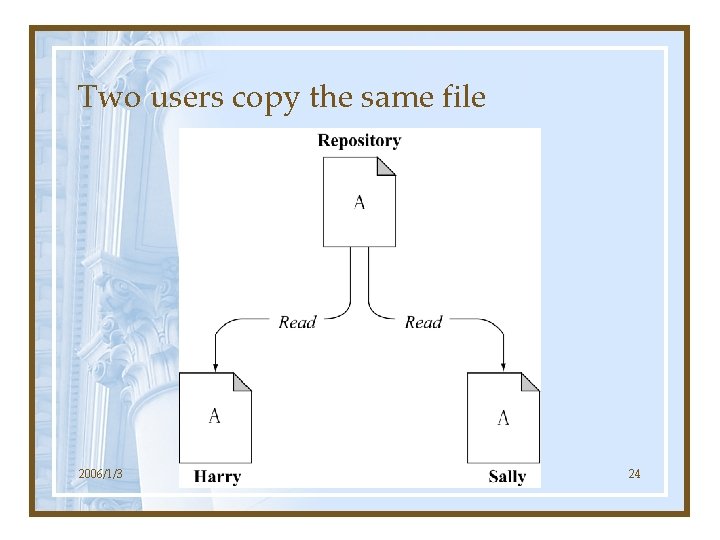
Two users copy the same file 2006/1/3 24
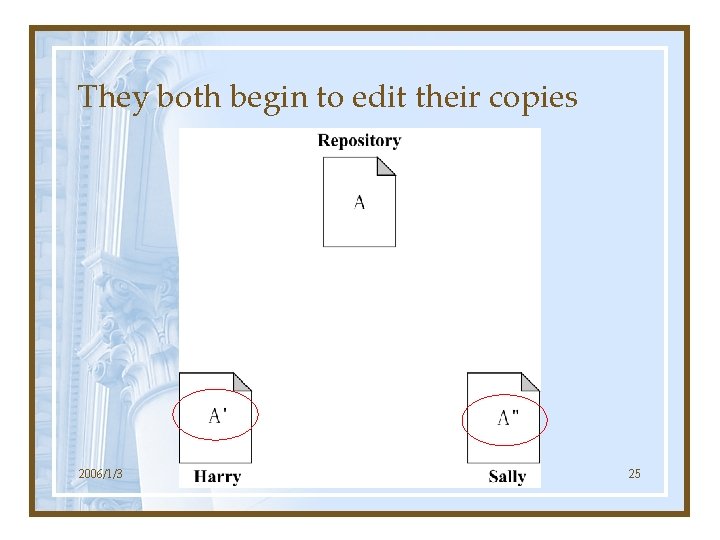
They both begin to edit their copies 2006/1/3 25
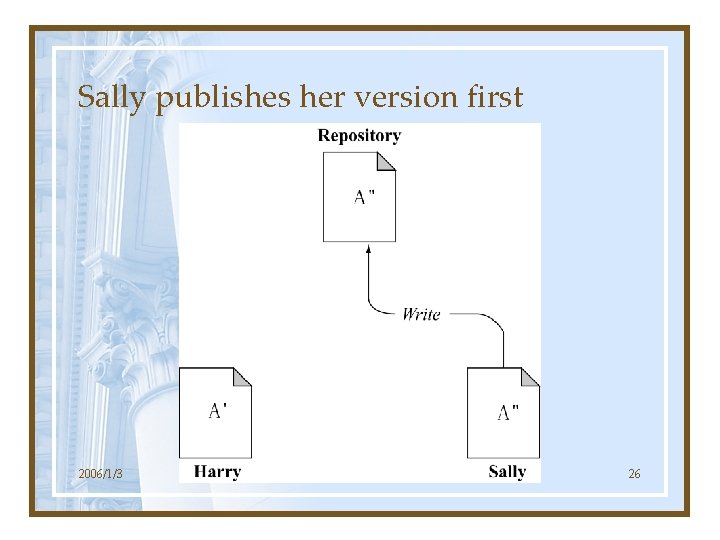
Sally publishes her version first 2006/1/3 26
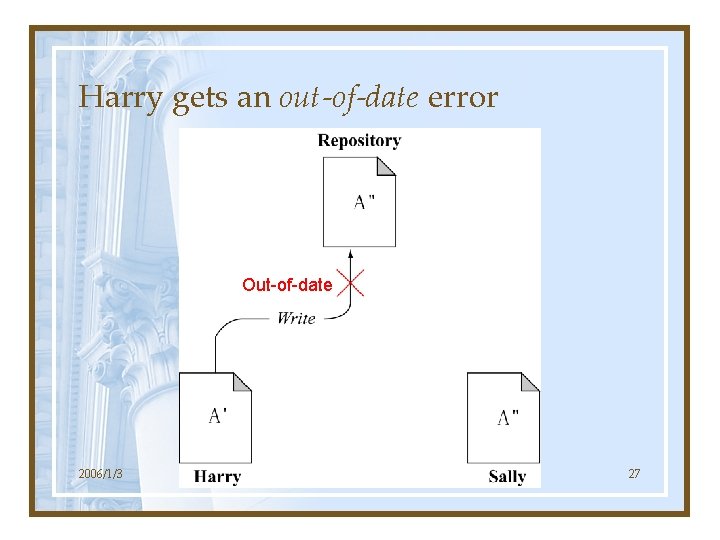
Harry gets an out-of-date error Out-of-date 2006/1/3 27
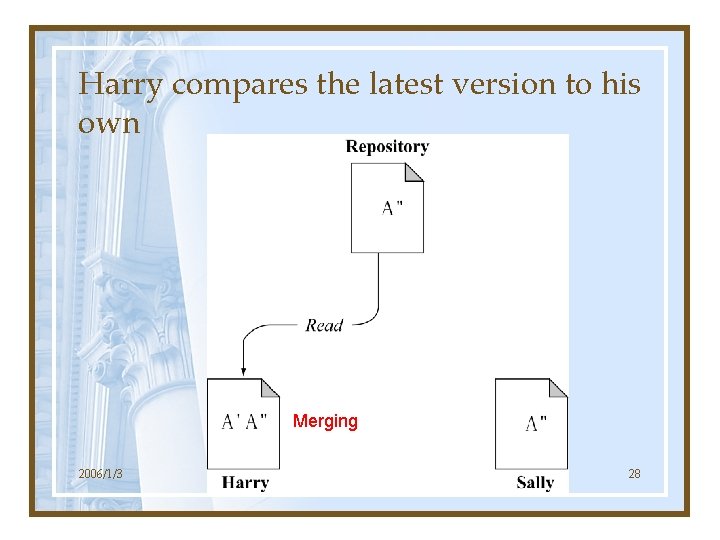
Harry compares the latest version to his own Merging 2006/1/3 28
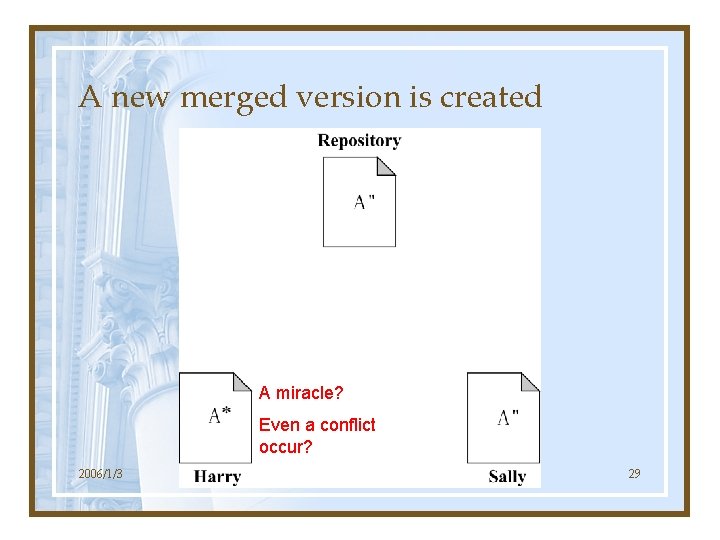
A new merged version is created A miracle? Even a conflict occur? 2006/1/3 29
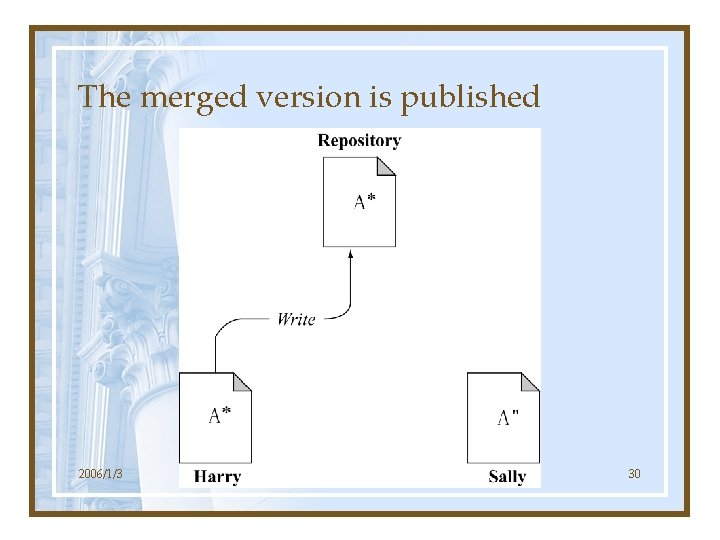
The merged version is published 2006/1/3 30
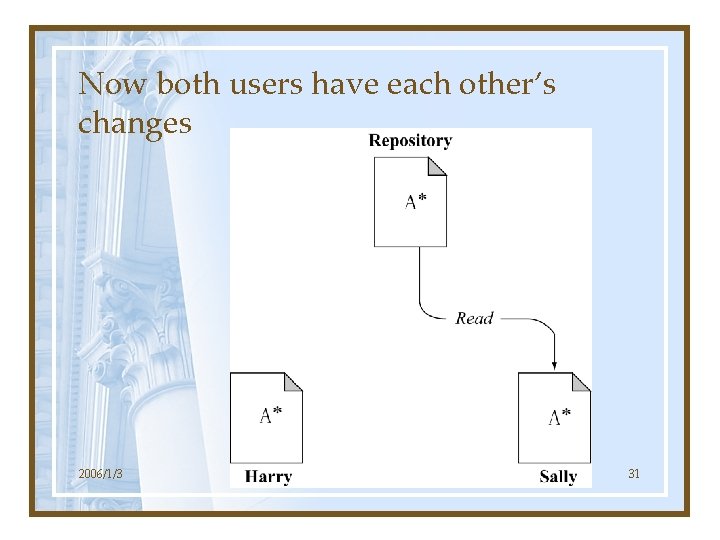
Now both users have each other’s changes 2006/1/3 31
Conflicts • What if Sally's changes do overlap with Harry's changes? • This situation is called a conflict. – The system will notify the user if it happened. – The system can’t automatically resolve conflicts. – The user has to manually resolve it. • In practice, conflicts are infrequent. 2006/1/3 32
Outline • Introduction • Basic Concepts – Repository – Versioning Models • • Basic Work Cycle Branch, tag, and Merging Resources Conclusion 2006/1/3 33
Basic Work Cycle • Initial checkout – svn checkout • Update your working copy – svn update • Commit your changes – svn commit • Make changes – svn add, svn delete, svn copy, svn move • Examine your changes – svn diff, svn status, svn revert 2006/1/3 34
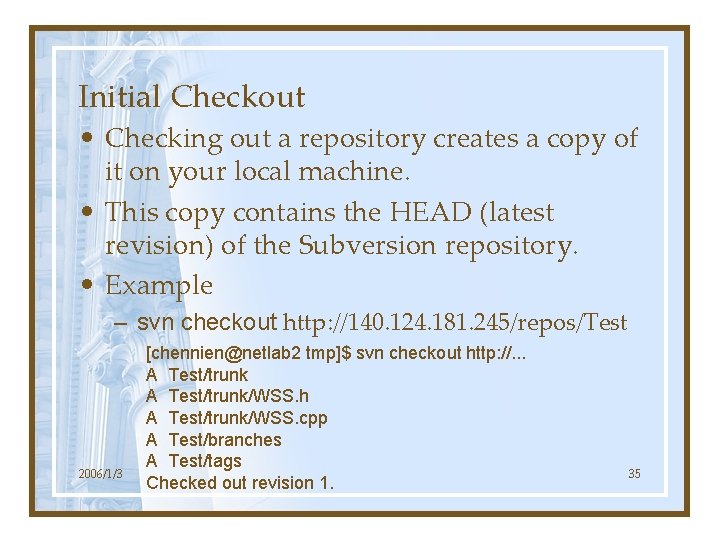
Initial Checkout • Checking out a repository creates a copy of it on your local machine. • This copy contains the HEAD (latest revision) of the Subversion repository. • Example – svn checkout http: //140. 124. 181. 245/repos/Test 2006/1/3 [chennien@netlab 2 tmp]$ svn checkout http: //. . . A Test/trunk/WSS. h A Test/trunk/WSS. cpp A Test/branches A Test/tags Checked out revision 1. 35
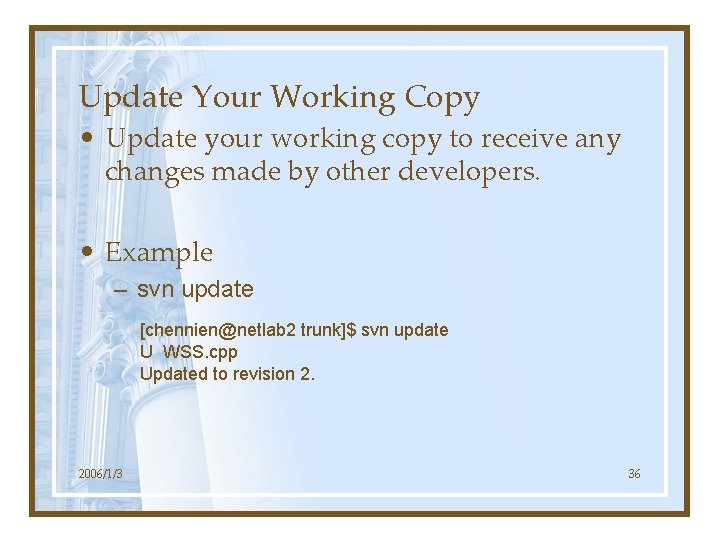
Update Your Working Copy • Update your working copy to receive any changes made by other developers. • Example – svn update [chennien@netlab 2 trunk]$ svn update U WSS. cpp Updated to revision 2. 2006/1/3 36
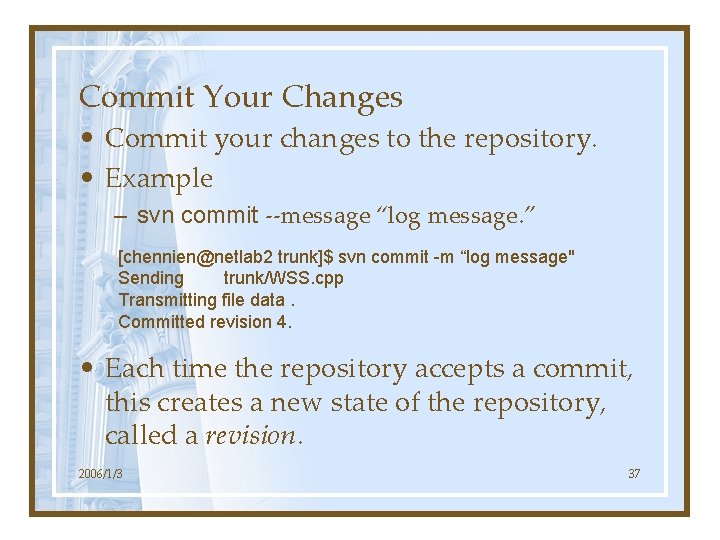
Commit Your Changes • Commit your changes to the repository. • Example – svn commit --message “log message. ” [chennien@netlab 2 trunk]$ svn commit -m “log message" Sending trunk/WSS. cpp Transmitting file data. Committed revision 4. • Each time the repository accepts a commit, this creates a new state of the repository, called a revision. 2006/1/3 37
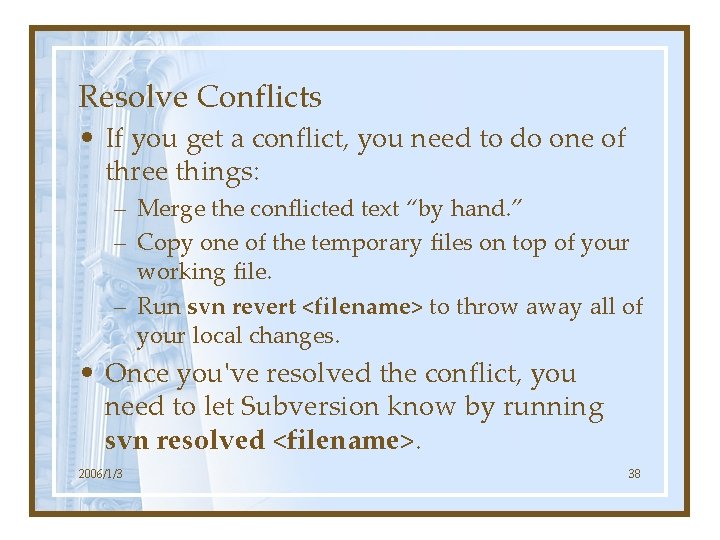
Resolve Conflicts • If you get a conflict, you need to do one of three things: – Merge the conflicted text “by hand. ” – Copy one of the temporary files on top of your working file. – Run svn revert <filename> to throw away all of your local changes. • Once you've resolved the conflict, you need to let Subversion know by running svn resolved <filename>. 2006/1/3 38
Outline • Introduction • Basic Concepts – Repository – Versioning Models • • Basic Work Cycle Branch, tag, and Merging Resources Conclusion 2006/1/3 39
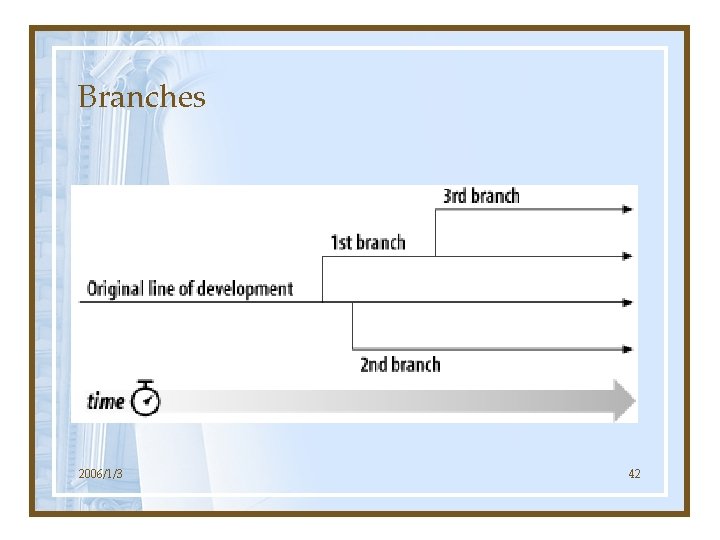
Branch, tag, and Merging • Branch, tag, and merging are concepts common to almost all version control systems. • Branch: a line of development that exists independently of another line. • Tag: just a snapshot of a project in time. • Merging: merge two revisions. 2006/1/3 40
Why Branch? • Suppose you’ve been given the task of performing a reorganization of the project. • It will take a long time to write, and will affect all the files in the project. • If you start committing your changes bitby-bit, you'll surely break things for other developers. • Solution: create your own branch, or line of development, in the repository. 2006/1/3 41
Branches 2006/1/3 42
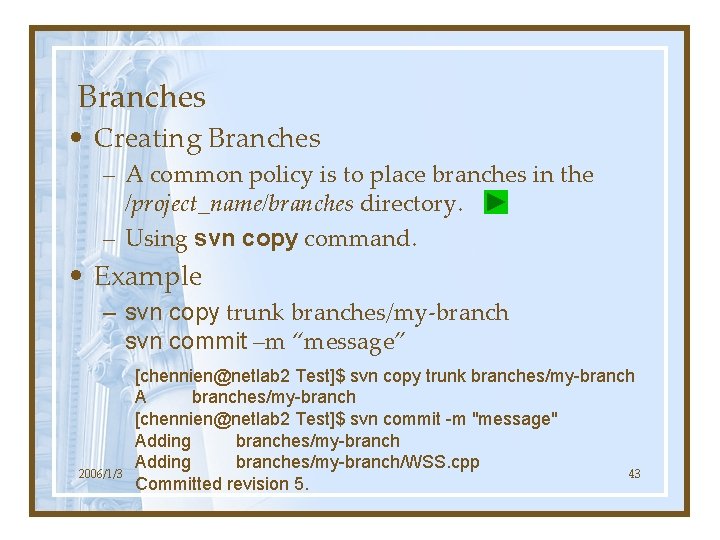
Branches • Creating Branches – A common policy is to place branches in the /project_name/branches directory. – Using svn copy command. • Example – svn copy trunk branches/my-branch svn commit –m “message” 2006/1/3 [chennien@netlab 2 Test]$ svn copy trunk branches/my-branch A branches/my-branch [chennien@netlab 2 Test]$ svn commit -m "message" Adding branches/my-branch/WSS. cpp 43 Committed revision 5.
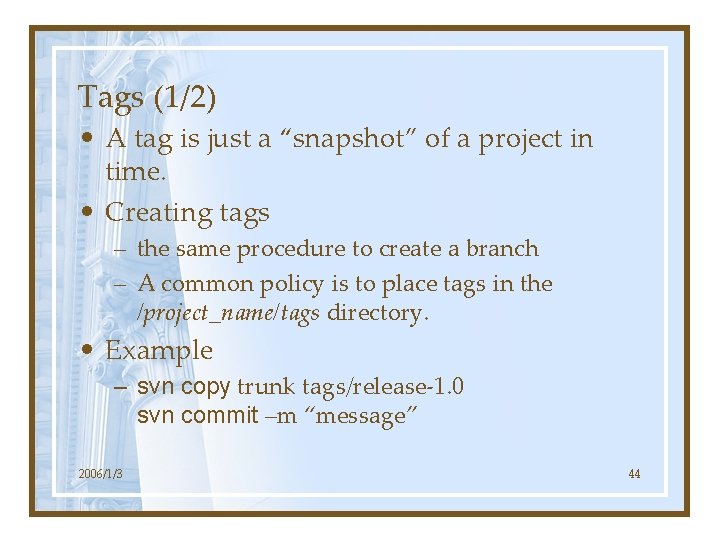
Tags (1/2) • A tag is just a “snapshot” of a project in time. • Creating tags – the same procedure to create a branch – A common policy is to place tags in the /project_name/tags directory. • Example – svn copy trunk tags/release-1. 0 svn commit –m “message” 2006/1/3 44
![Tags (2/2) [[chennien@netlab 2 Test]$ svn copy trunk tags/release-1. 0 A tags/release-1. 0 [chennien@netlab](http://slidetodoc.com/presentation_image_h2/c97c66081bf5ce368a60aa33f4903419/image-45.jpg "Tags (2/2) [[chennien@netlab 2 Test]$ svn copy trunk tags/release-1. 0 A tags/release-1. 0 [chennien@netlab")
Tags (2/2) [[chennien@netlab 2 Test]$ svn copy trunk tags/release-1. 0 A tags/release-1. 0 [chennien@netlab 2 Test]$ svn commit -m "tag" Adding tags/release-1. 0/WSS. cpp Committed revision 6. 2006/1/3 45
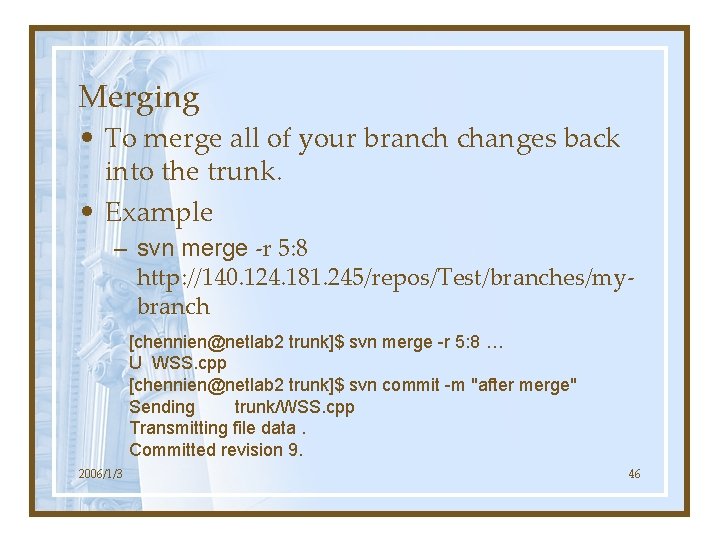
Merging • To merge all of your branch changes back into the trunk. • Example – svn merge -r 5: 8 http: //140. 124. 181. 245/repos/Test/branches/mybranch [chennien@netlab 2 trunk]$ svn merge -r 5: 8 … U WSS. cpp [chennien@netlab 2 trunk]$ svn commit -m "after merge" Sending trunk/WSS. cpp Transmitting file data. Committed revision 9. 2006/1/3 46
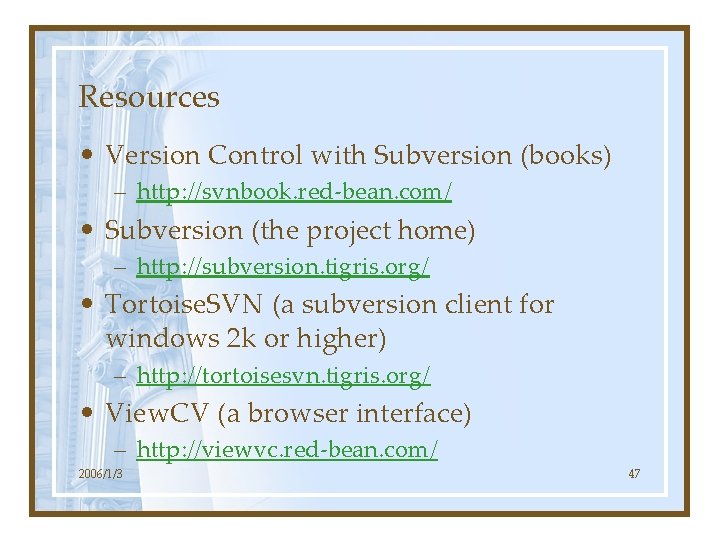
Resources • Version Control with Subversion (books) – http: //svnbook. red-bean. com/ • Subversion (the project home) – http: //subversion. tigris. org/ • Tortoise. SVN (a subversion client for windows 2 k or higher) – http: //tortoisesvn. tigris. org/ • View. CV (a browser interface) – http: //viewvc. red-bean. com/ 2006/1/3 47
View. VC • It is a browser interface for CVS and Subversion control repositories. • It provides the report-like functionality, but much more prettily than the textual command-line program output. • http: //dev. eclipse. org/viewcvs/index. cgi/ • http: //svn. collab. net/viewcvs/svn/ • http: //140. 124. 181. 245/~netlab/cgibin/viewcvs. cgi 2006/1/3 48
Conclusions • The heart of any version control system – they are designed to record and track changes to data over time. – to enable collaborative editing and sharing of data. • Subversion can manage any sort of file collection—it's not limited to helping computer programmers. 2006/1/3 49
There are more • Repository Administration – How to create a repository? • Server Configuration – svnserver and SSH tunnel. • Software Development Policy – Any guideline for committing changes? – When should the trunk become a release (tag)? 2006/1/3 50
Backup Materials 2006/1/3
2006/1/3 52
Resources • Other Browser interfaces – Easy SVN Browser – Web. SVN – SVN: : Web 2006/1/3 53
We all have our time machines. Some take us back, they're called memories. Some carry us forward, they're called dreams. 2006/1/3 54
What is the trunk? • The trunk is the central source code that is used for continuous and ongoing development. Trunk builds contain the very latest bleeding-edge changes and updates. However, the trunk can also be very unstable at times, so it's good to ask around before using trunk builds. • Mozilla. Zine – http: //forums. mozillazine. org/viewtopic. php? t=305281 2006/1/3 55
What is a branch? • Branches are "forks" in the code, split from the trunk and destined to become end-user releases. At conception, a branch contains everything that the trunk contains, but from that point onwards, only certain fixes or changes will be accepted. Therefore, over time, the branch becomes more stable. • Mozilla. Zine – http: //forums. mozillazine. org/viewtopic. php? t=305281 2006/1/3 56
Light-Weight CMMI Configuration Management • Use Free Software Tool - CVS – Defining Configuration Items – Define Access & Maintenance Rules – Define Baseline Creation, Release, & Change Rules for Version Control – Record CM activities Dr. Chaw-Kwei Hung 洪肇奎, Light-Weight CMMI. 2021/10/16 CSM 57 CH-57
- Slides: 57