
Vehicle Signal Specification September 12 2019 GENIVI and
Vehicle Signal Specification September 12, 2019 | GENIVI and W 3 C – Enabling the Connected Car through Collaboration Rudolf J Streif Invited Expert, ibeeto This work is licensed under a Creative Commons Attribution-Share Alike 4. 0 (CC BY-SA 4. 0) GENIVI is a registered trademark of the GENIVI Alliance in the USA and other countries. Copyright © GENIVI Alliance 2018.
Automotive Leadership meets Web Innovation www. w 3 c. org/auto www. genivi. org
W 3 C Automotive Working Group • Mission – develop specifications for an open web platform for developers to access vehicle data through IVI systems and vehicle data protocols • 74 Participants from Companies and 12 Invited Experts • Participating Companies – 360, Access, Alibaba Group, APTPOD, Audi, Baidu, Caruso Gmb. H, ETRI, Fraunhofer Gesellschaft, GENIVI Alliance, Geotab, HTML 5 Converged Technology Forum, Igalia, IBM, INRIX, Institut Telecom, International Forecourt Standards Forum, Jaguar Land Rover, KDDI, LG Electronics, Mitsubishi Electric, Vinli, Volvo Cars, VW • Status – Vehicle Information Service Specification (VISS) is currently in Candidate Recommendation (CR) state to become an official W 3 C standard.
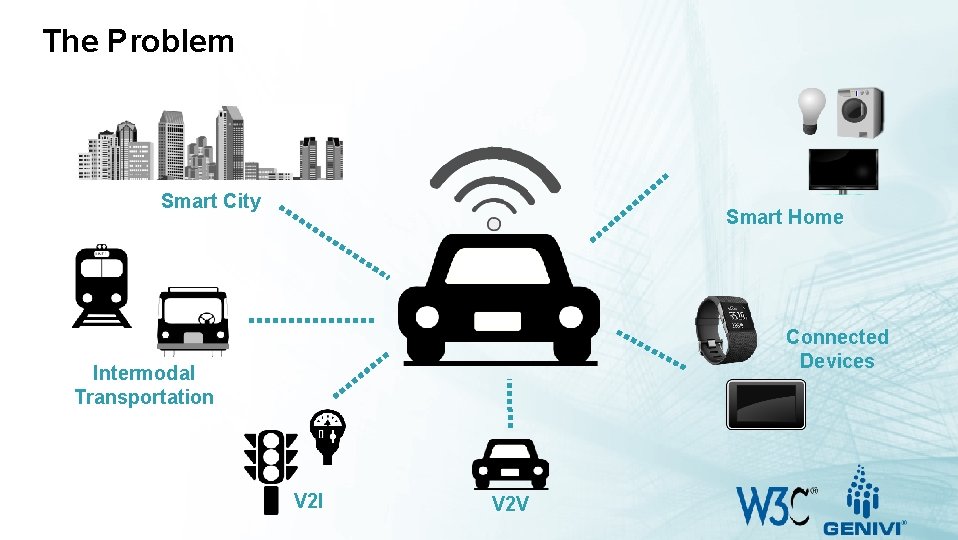
The Problem Smart City Smart Home Connected Devices Intermodal Transportation V 2 I V 2 V
The Challenge • Providing access to vehicle status information and data to cloud services, web applications, mobile devices and more. • There is no standard convention for a vehicle data API. • OEMs wish to be able to easily extend a standard API with signals and controls for their purposes. • Security mechanisms are required that provide authentication and authorization to access vehicle signals and control. • Design that decouples signal interface from the electrical architecture of the vehicle. • Application developers and Services Providers would like to have a way to rapidly deploy new applications and services in collaboration with OEMs.
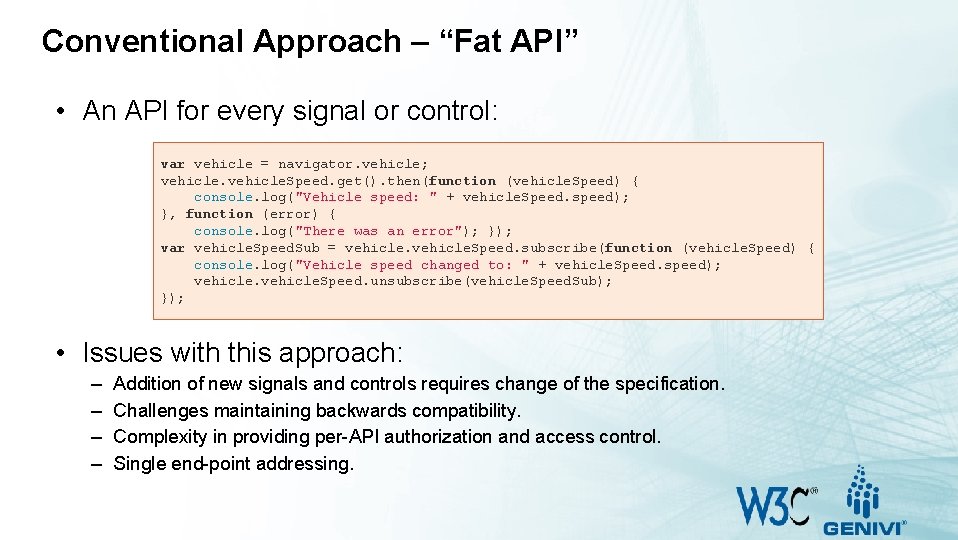
Conventional Approach – “Fat API” • An API for every signal or control: var vehicle = navigator. vehicle; vehicle. Speed. get(). then(function (vehicle. Speed) { console. log("Vehicle speed: " + vehicle. Speed. speed); }, function (error) { console. log("There was an error"); }); var vehicle. Speed. Sub = vehicle. Speed. subscribe(function (vehicle. Speed) { console. log("Vehicle speed changed to: " + vehicle. Speed. speed); vehicle. Speed. unsubscribe(vehicle. Speed. Sub); }); • Issues with this approach: – – Addition of new signals and controls requires change of the specification. Challenges maintaining backwards compatibility. Complexity in providing per-API authorization and access control. Single end-point addressing.
New Approach – Services with Signal Tree • Vehicle Signal Specification (VSS) • • • Incepted at Jaguar Land Rover’s Global Digital Development Center in Portland, OR. Published as open-source through the GENIVI Alliance. Contributors: Volvo Cars, BMW, and others • The core services get, subscribe, unsubscribe, get. VSS and authorize are provided by a network server • The services get, subscribe and unsubscribe provide access to vehicle signals and controls. • The service get. VSS allows clients to query the server for available signals. • Using the authorize service, the client presents a security token to the server for authentication and authorization. • Vehicle Signals and Controls are identified as nodes of a vehicle signal tree • A fully qualified signal name addresses a single signal node. • Wildcards for branches and node names provide for addressing of signal groups.
Vehicle Signal Tree Vehicle Signal Specification
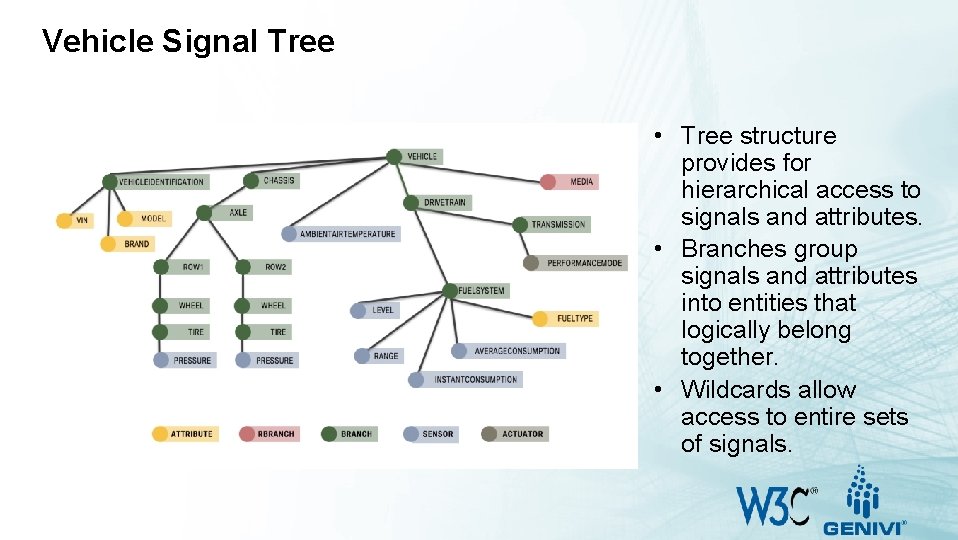
Vehicle Signal Tree • Tree structure provides for hierarchical access to signals and attributes. • Branches group signals and attributes into entities that logically belong together. • Wildcards allow access to entire sets of signals.
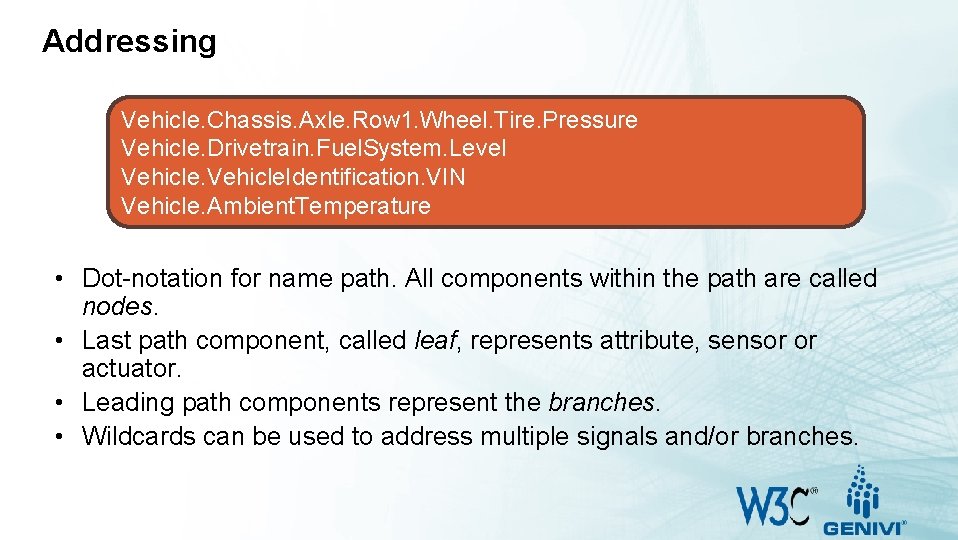
Addressing Vehicle. Chassis. Axle. Row 1. Wheel. Tire. Pressure Vehicle. Drivetrain. Fuel. System. Level Vehicle. Identification. VIN Vehicle. Ambient. Temperature • Dot-notation for name path. All components within the path are called nodes. • Last path component, called leaf, represents attribute, sensor or actuator. • Leading path components represent the branches. • Wildcards can be used to address multiple signals and/or branches.
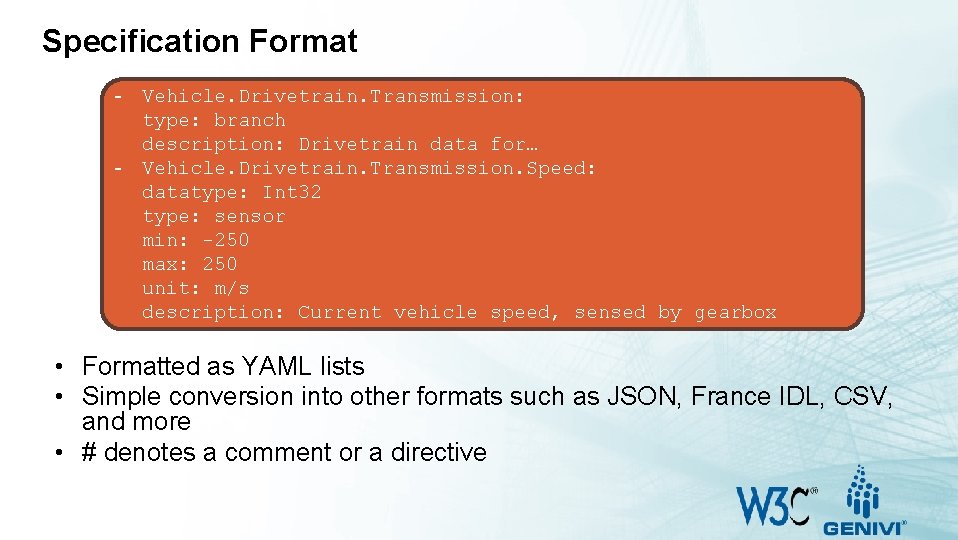
Specification Format - Vehicle. Drivetrain. Transmission: type: branch description: Drivetrain data for… - Vehicle. Drivetrain. Transmission. Speed: datatype: Int 32 type: sensor min: -250 max: 250 unit: m/s description: Current vehicle speed, sensed by gearbox • Formatted as YAML lists • Simple conversion into other formats such as JSON, France IDL, CSV, and more • # denotes a comment or a directive
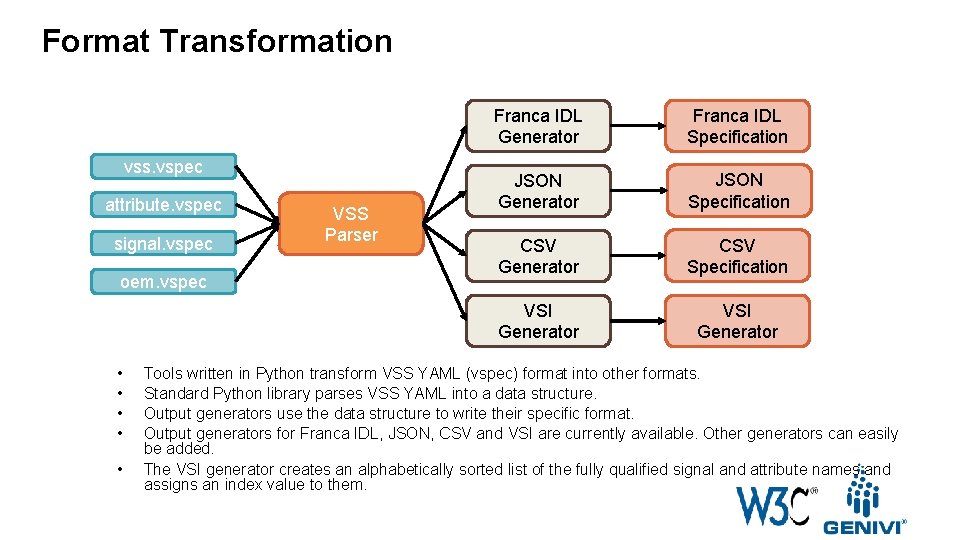
Format Transformation vss. vspec attribute. vspec signal. vspec oem. vspec • • • VSS Parser Franca IDL Generator Franca IDL Specification JSON Generator JSON Specification CSV Generator CSV Specification VSI Generator Tools written in Python transform VSS YAML (vspec) format into other formats. Standard Python library parses VSS YAML into a data structure. Output generators use the data structure to write their specific format. Output generators for Franca IDL, JSON, CSV and VSI are currently available. Other generators can easily be added. The VSI generator creates an alphabetically sorted list of the fully qualified signal and attribute names and assigns an index value to them.
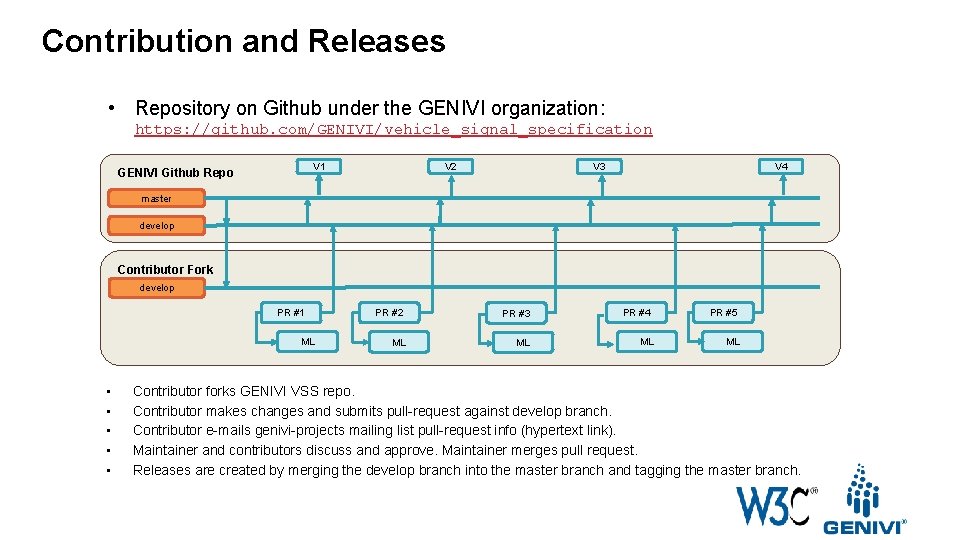
Contribution and Releases • Repository on Github under the GENIVI organization: https: //github. com/GENIVI/vehicle_signal_specification V 2 V 1 GENIVI Github Repo V 4 V 3 master develop Contributor Fork develop PR #1 ML • • • PR #2 PR #3 ML ML PR #4 ML PR #5 ML Contributor forks GENIVI VSS repo. Contributor makes changes and submits pull-request against develop branch. Contributor e-mails genivi-projects mailing list pull-request info (hypertext link). Maintainer and contributors discuss and approve. Maintainer merges pull request. Releases are created by merging the develop branch into the master branch and tagging the master branch.
Architecture
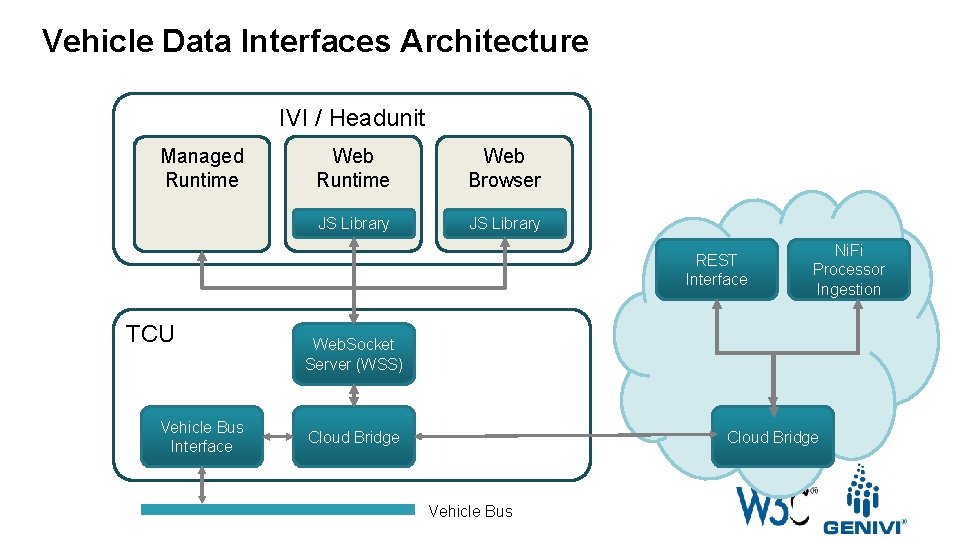
Vehicle Data Interfaces Architecture IVI / Headunit Managed Runtime Web Browser JS Library REST Interface TCU Vehicle Bus Interface Ni. Fi Processor Ingestion Web. Socket Server (WSS) Cloud Bridge Vehicle Bus
Vehicle Information Service Specification (VISS) Version 1 – Current W 3 C Automotive WG Specification
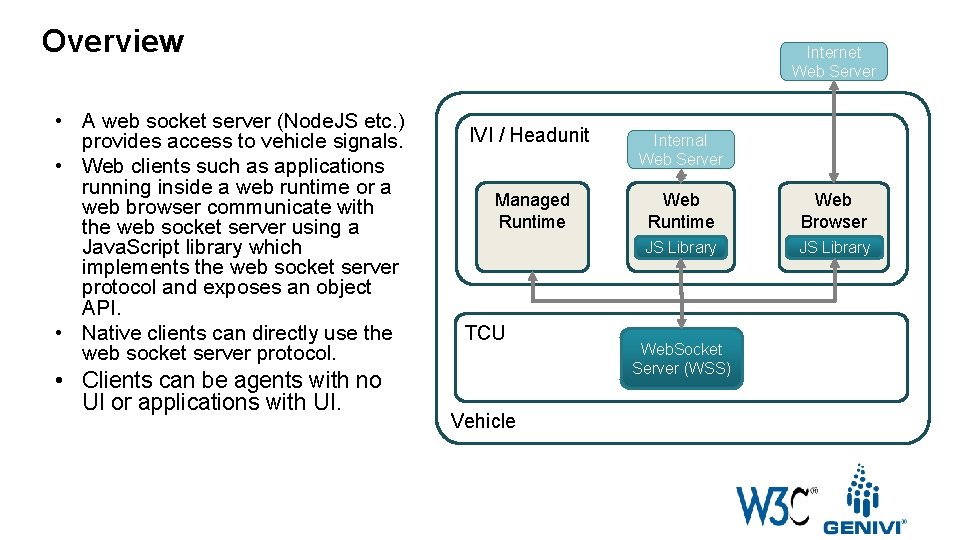
Overview • A web socket server (Node. JS etc. ) provides access to vehicle signals. • Web clients such as applications running inside a web runtime or a web browser communicate with the web socket server using a Java. Script library which implements the web socket server protocol and exposes an object API. • Native clients can directly use the web socket server protocol. • Clients can be agents with no UI or applications with UI. Internet Web Server IVI / Headunit Internal Web Server Managed Runtime Web Browser JS Library TCU Vehicle Web. Socket Server (WSS)
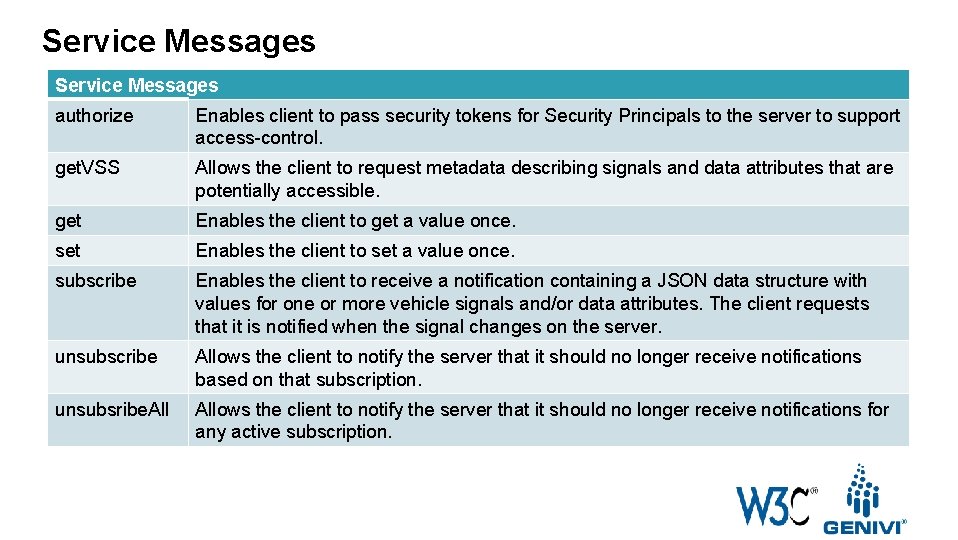
Service Messages authorize Enables client to pass security tokens for Security Principals to the server to support access-control. get. VSS Allows the client to request metadata describing signals and data attributes that are potentially accessible. get Enables the client to get a value once. set Enables the client to set a value once. subscribe Enables the client to receive a notification containing a JSON data structure with values for one or more vehicle signals and/or data attributes. The client requests that it is notified when the signal changes on the server. unsubscribe Allows the client to notify the server that it should no longer receive notifications based on that subscription. unsubsribe. Allows the client to notify the server that it should no longer receive notifications for any active subscription.
Vehicle Information Service Specification (VISS) Version 2 – Proposal
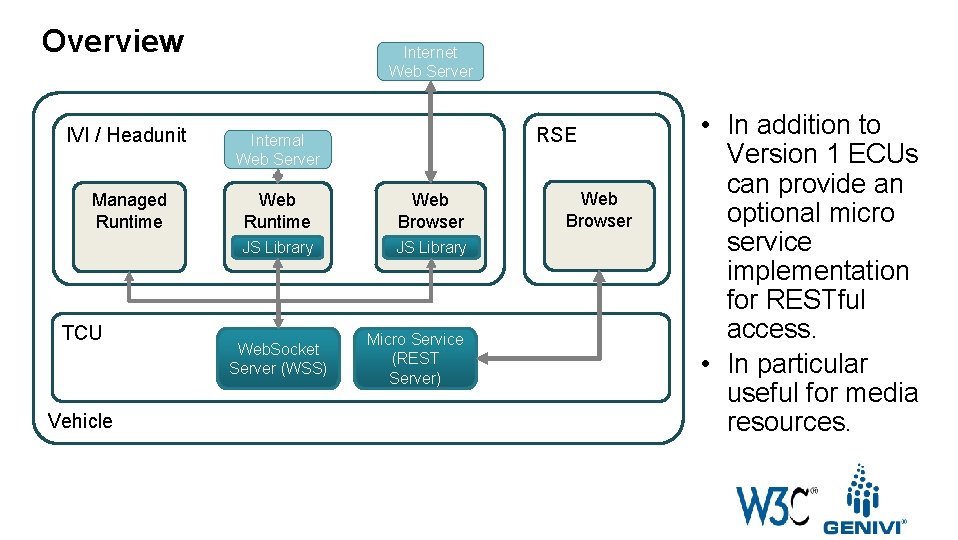
Overview Internet Web Server RSE IVI / Headunit Internal Web Server Managed Runtime Web Browser JS Library TCU Vehicle Web. Socket Server (WSS) Micro Service (REST Server) Web Browser • In addition to Version 1 ECUs can provide an optional micro service implementation for RESTful access. • In particular useful for media resources.
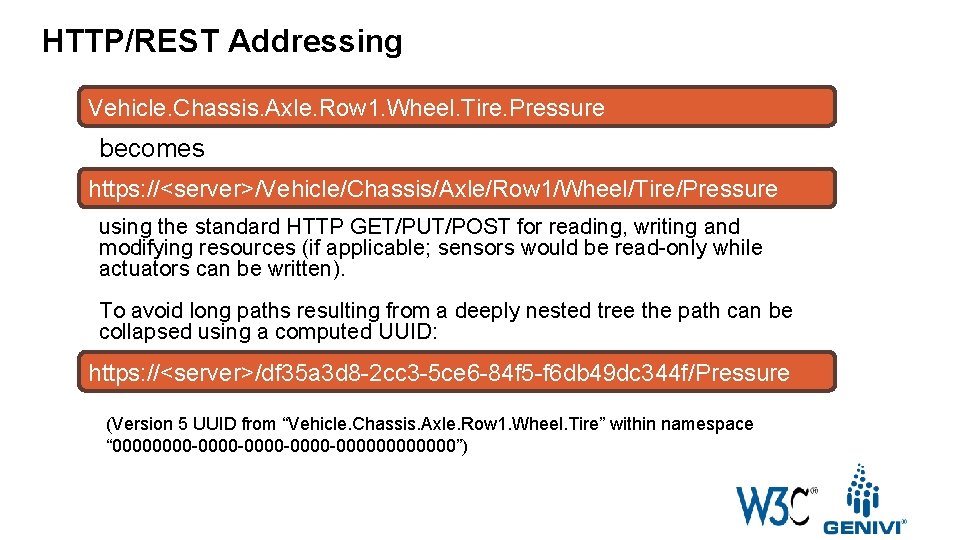
HTTP/REST Addressing Vehicle. Chassis. Axle. Row 1. Wheel. Tire. Pressure becomes https: //<server>/Vehicle/Chassis/Axle/Row 1/Wheel/Tire/Pressure using the standard HTTP GET/PUT/POST for reading, writing and modifying resources (if applicable; sensors would be read-only while actuators can be written). To avoid long paths resulting from a deeply nested tree the path can be collapsed using a computed UUID: https: //<server>/df 35 a 3 d 8 -2 cc 3 -5 ce 6 -84 f 5 -f 6 db 49 dc 344 f/Pressure (Version 5 UUID from “Vehicle. Chassis. Axle. Row 1. Wheel. Tire” within namespace “ 0000 -0000 -00000000”)
Repository and Specification https: //github. com/w 3 c/automotive https: //w 3 c. github. io/w 3 c/automotive
Thank you! Visit GENIVI at http: //www. genivi. org or http: //projects. genivi. org Contact us: help@genivi. org Visit W 3 C Automotive at http: //www. w 3 c. org/auto https: //www. w 3. org/auto/wg / https: //www. w 3. org/community/autowebplatform Contact Ted Guild: ted@w 3 c. org This work is licensed under a Creative Commons Attribution-Share Alike 4. 0 (CC BY-SA 4. 0) GENIVI is a registered trademark of the GENIVI Alliance in the USA and other countries. Copyright © GENIVI Alliance 2018.
Backup Slides
Vehicle Signal Specification (VSS) Vehicle Signal Tree Definition
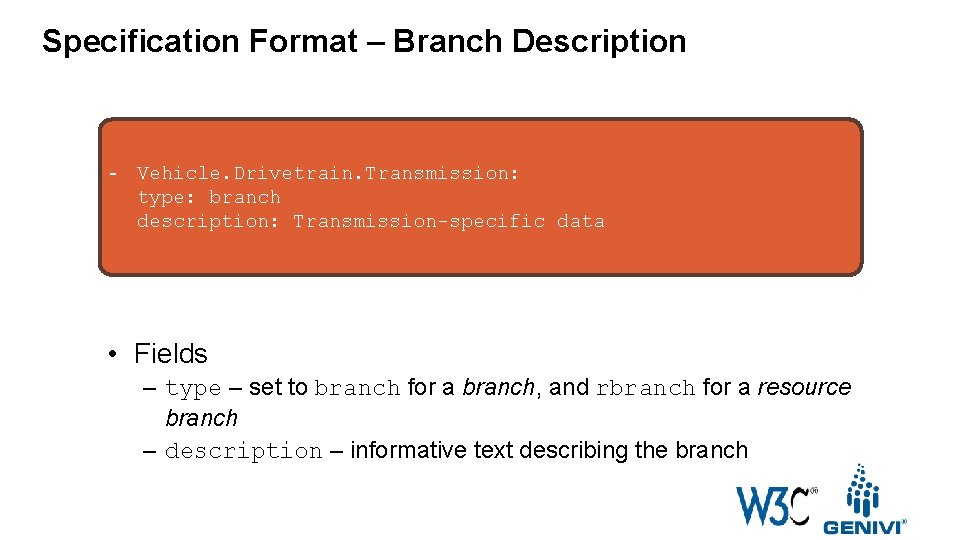
Specification Format – Branch Description - Vehicle. Drivetrain. Transmission: type: branch description: Transmission-specific data • Fields – type – set to branch for a branch, and rbranch for a resource branch – description – informative text describing the branch
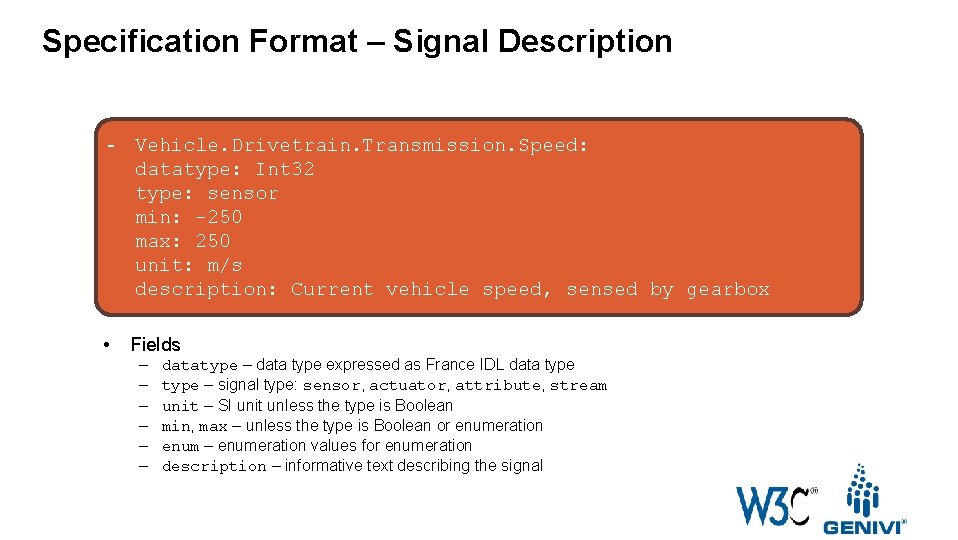
Specification Format – Signal Description - Vehicle. Drivetrain. Transmission. Speed: datatype: Int 32 type: sensor min: -250 max: 250 unit: m/s description: Current vehicle speed, sensed by gearbox • Fields – – – datatype – data type expressed as France IDL data type – signal type: sensor, actuator, attribute, stream unit – SI unit unless the type is Boolean min, max – unless the type is Boolean or enumeration enum – enumeration values for enumeration description – informative text describing the signal
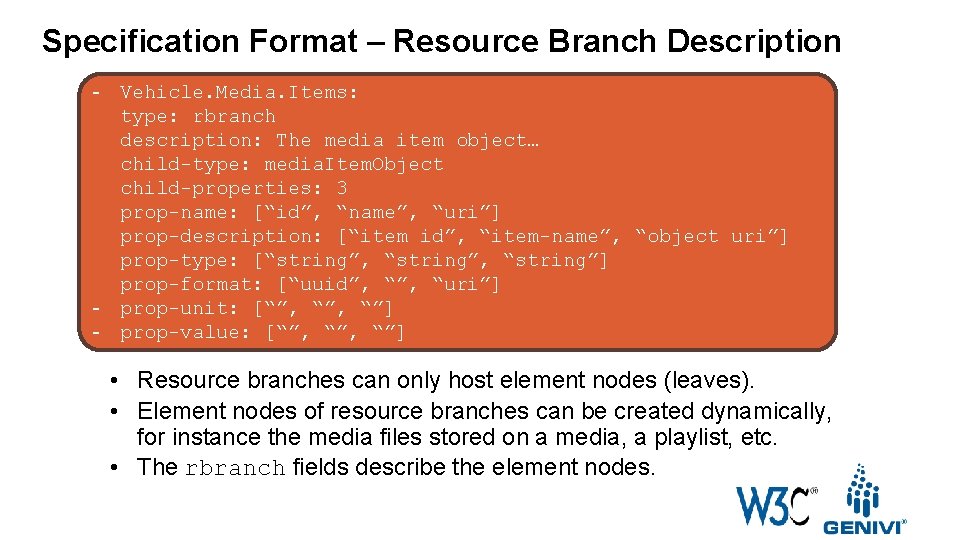
Specification Format – Resource Branch Description - Vehicle. Media. Items: type: rbranch description: The media item object… child-type: media. Item. Object child-properties: 3 prop-name: [“id”, “name”, “uri”] prop-description: [“item id”, “item-name”, “object uri”] prop-type: [“string”, “string”] prop-format: [“uuid”, “uri”] - prop-unit: [“”, “”] - prop-value: [“”, “”] • Resource branches can only host element nodes (leaves). • Element nodes of resource branches can be created dynamically, for instance the media files stored on a media, a playlist, etc. • The rbranch fields describe the element nodes.
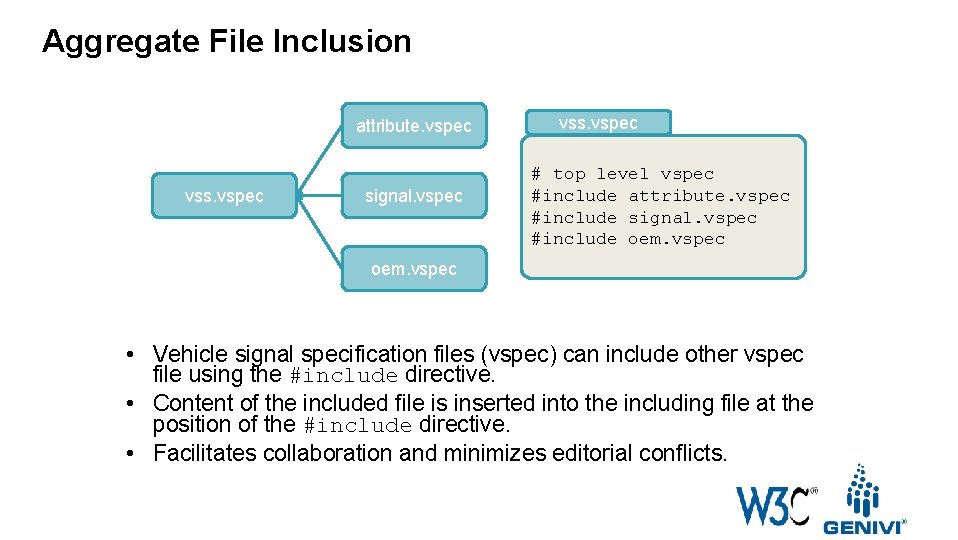
Aggregate File Inclusion attribute. vspec vss. vspec signal. vspec vss. vspec # top level vspec #include attribute. vspec #include signal. vspec #include oem. vspec • Vehicle signal specification files (vspec) can include other vspec file using the #include directive. • Content of the included file is inserted into the including file at the position of the #include directive. • Facilitates collaboration and minimizes editorial conflicts.
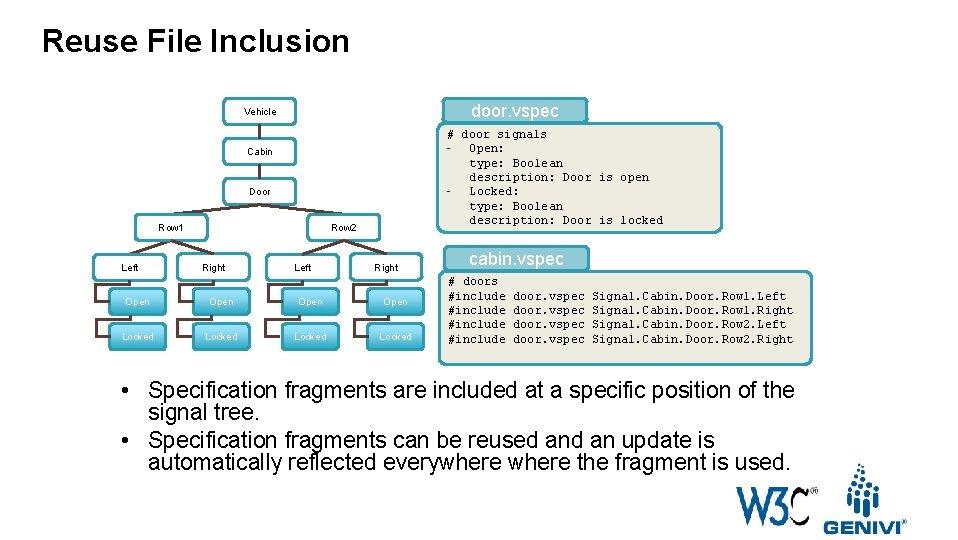
Reuse File Inclusion door. vspec Vehicle # door signals - Open: type: Boolean description: Door is open - Locked: type: Boolean description: Door is locked Cabin Door Row 1 Left Row 2 Right Left Right Open Locked cabin. vspec # doors #include door. vspec Signal. Cabin. Door. Row 1. Left Signal. Cabin. Door. Row 1. Right Signal. Cabin. Door. Row 2. Left Signal. Cabin. Door. Row 2. Right • Specification fragments are included at a specific position of the signal tree. • Specification fragments can be reused an update is automatically reflected everywhere the fragment is used.
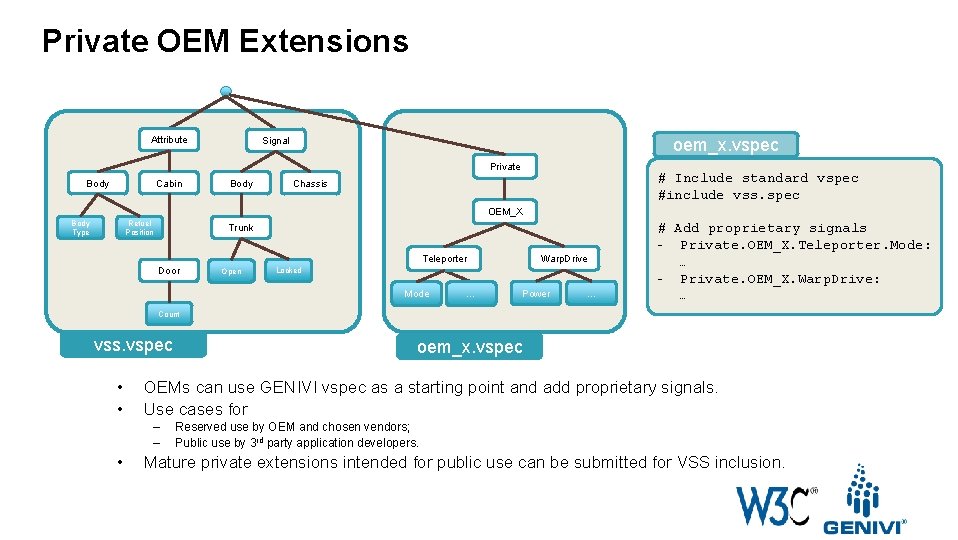
Private OEM Extensions Attribute Signal oem_x. vspec Private Body Cabin Body # Include standard vspec #include vss. spec Chassis OEM_X Body Type Refuel Position Trunk Warp. Drive Teleporter Door Open Locked Mode … Power … # Add proprietary signals - Private. OEM_X. Teleporter. Mode: … - Private. OEM_X. Warp. Drive: … Count vss. vspec • • OEMs can use GENIVI vspec as a starting point and add proprietary signals. Use cases for – – • oem_x. vspec Reserved use by OEM and chosen vendors; Public use by 3 rd party application developers. Mature private extensions intended for public use can be submitted for VSS inclusion.
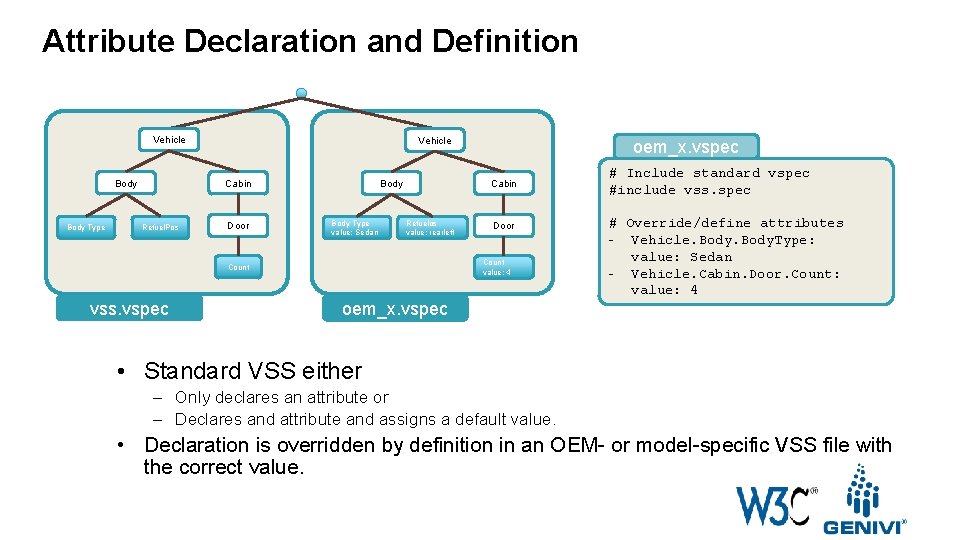
Attribute Declaration and Definition Vehicle Body Type Vehicle Cabin Refuel. Pos Door Body Type value: Sedan Cabin Refuelos value: rearleft Door Count value: 4 Count vss. vspec oem_x. vspec # Include standard vspec #include vss. spec # Override/define attributes - Vehicle. Body. Type: value: Sedan - Vehicle. Cabin. Door. Count: value: 4 • Standard VSS either – Only declares an attribute or – Declares and attribute and assigns a default value. • Declaration is overridden by definition in an OEM- or model-specific VSS file with the correct value.
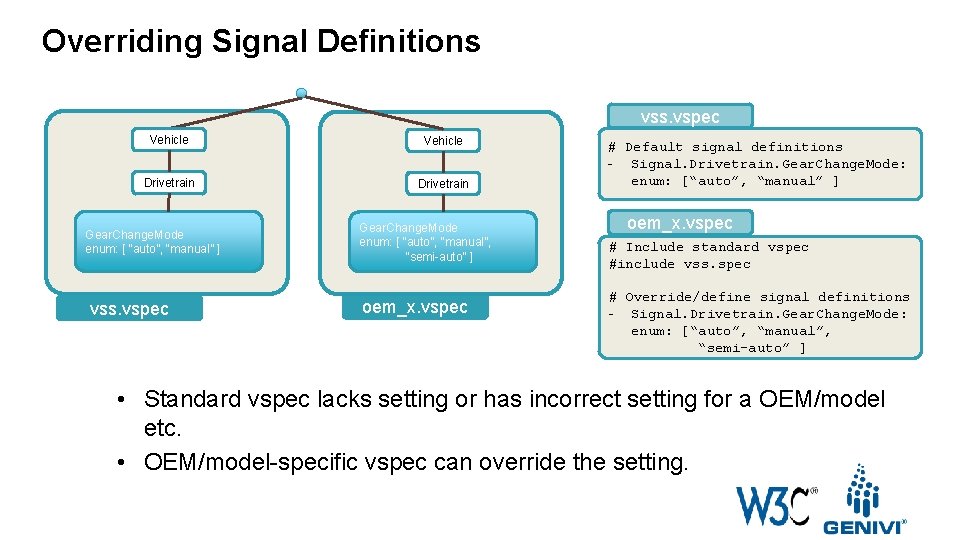
Overriding Signal Definitions vss. vspec Vehicle Drivetrain Gear. Change. Mode enum: [ “auto”, “manual” ] vss. vspec Gear. Change. Mode enum: [ “auto”, “manual”, “semi-auto” ] oem_x. vspec # Default signal definitions - Signal. Drivetrain. Gear. Change. Mode: enum: [“auto”, “manual” ] oem_x. vspec # Include standard vspec #include vss. spec # Override/define signal definitions - Signal. Drivetrain. Gear. Change. Mode: enum: [“auto”, “manual”, “semi-auto” ] • Standard vspec lacks setting or has incorrect setting for a OEM/model etc. • OEM/model-specific vspec can override the setting.
Vehicle Information Service Specification (VISS) Authorization and Access Model
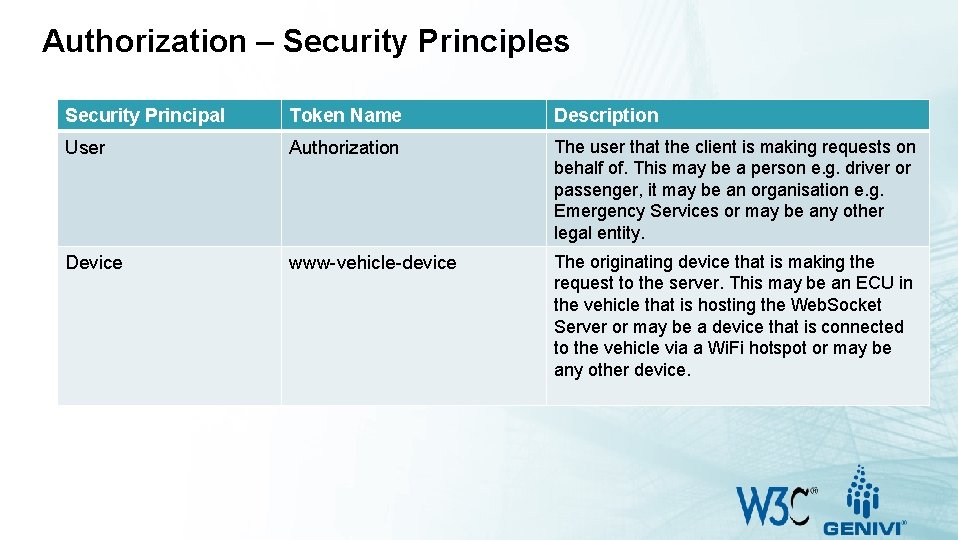
Authorization – Security Principles Security Principal Token Name Description User Authorization The user that the client is making requests on behalf of. This may be a person e. g. driver or passenger, it may be an organisation e. g. Emergency Services or may be any other legal entity. Device www-vehicle-device The originating device that is making the request to the server. This may be an ECU in the vehicle that is hosting the Web. Socket Server or may be a device that is connected to the vehicle via a Wi. Fi hotspot or may be any other device.
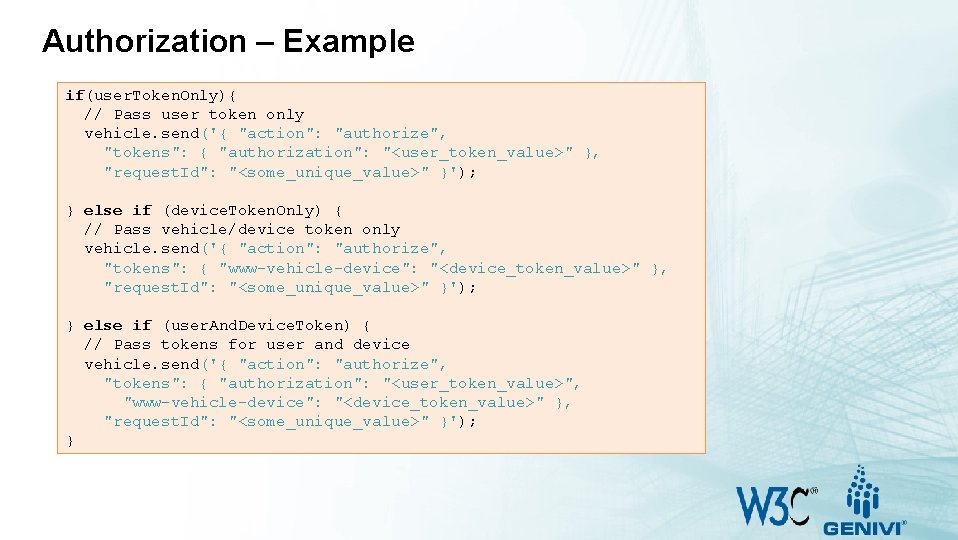
Authorization – Example if(user. Token. Only){ // Pass user token only vehicle. send('{ "action": "authorize", "tokens": { "authorization": "<user_token_value>" }, "request. Id": "<some_unique_value>" }'); } else if (device. Token. Only) { // Pass vehicle/device token only vehicle. send('{ "action": "authorize", "tokens": { "www-vehicle-device": "<device_token_value>" }, "request. Id": "<some_unique_value>" }'); } else if (user. And. Device. Token) { // Pass tokens for user and device vehicle. send('{ "action": "authorize", "tokens": { "authorization": "<user_token_value>", "www-vehicle-device": "<device_token_value>" }, "request. Id": "<some_unique_value>" }'); }
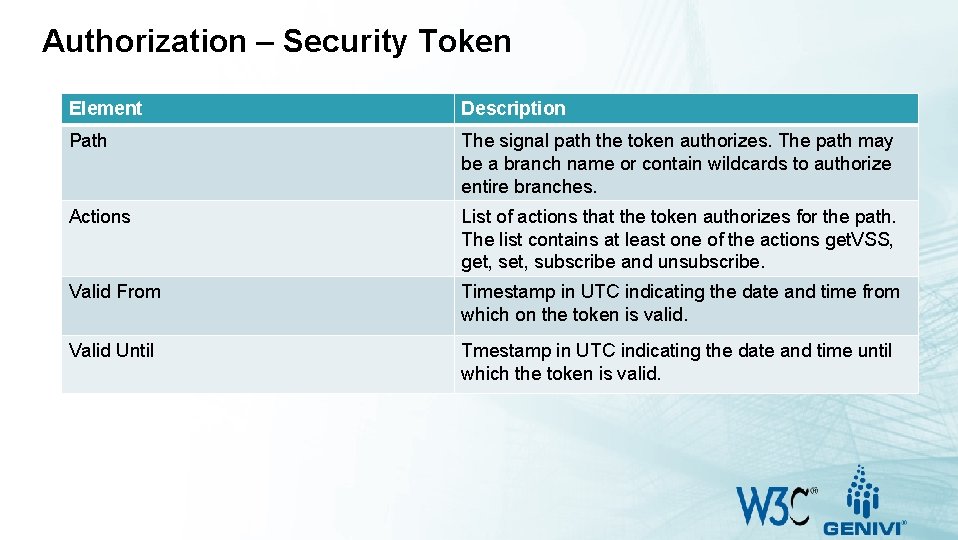
Authorization – Security Token Element Description Path The signal path the token authorizes. The path may be a branch name or contain wildcards to authorize entire branches. Actions List of actions that the token authorizes for the path. The list contains at least one of the actions get. VSS, get, subscribe and unsubscribe. Valid From Timestamp in UTC indicating the date and time from which on the token is valid. Valid Until Tmestamp in UTC indicating the date and time until which the token is valid.
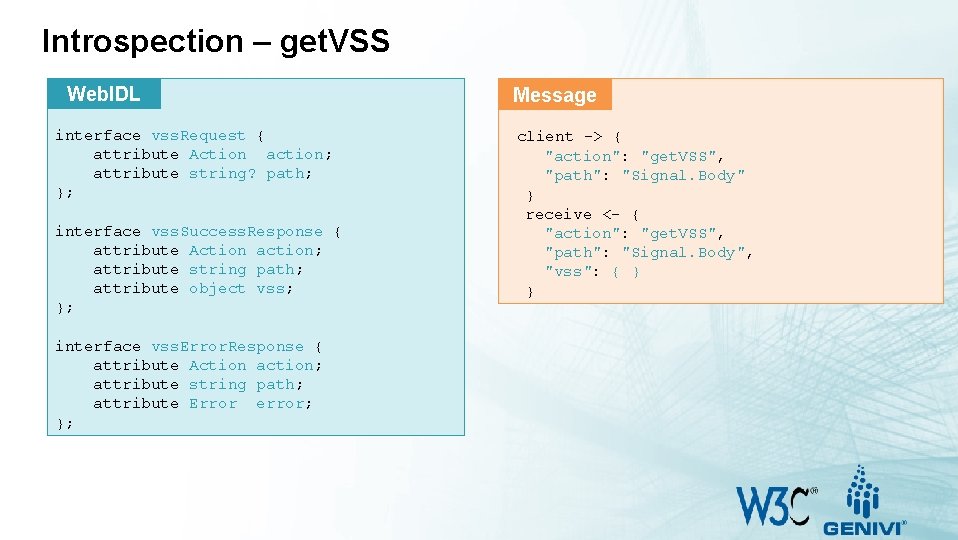
Introspection – get. VSS Web. IDL interface vss. Request { attribute Action action; attribute string? path; }; interface vss. Success. Response { attribute Action action; attribute string path; attribute object vss; }; interface vss. Error. Response { attribute Action action; attribute string path; attribute Error error; }; Message client -> { "action": "get. VSS", "path": "Signal. Body" } receive <- { "action": "get. VSS", "path": "Signal. Body", "vss": { } }
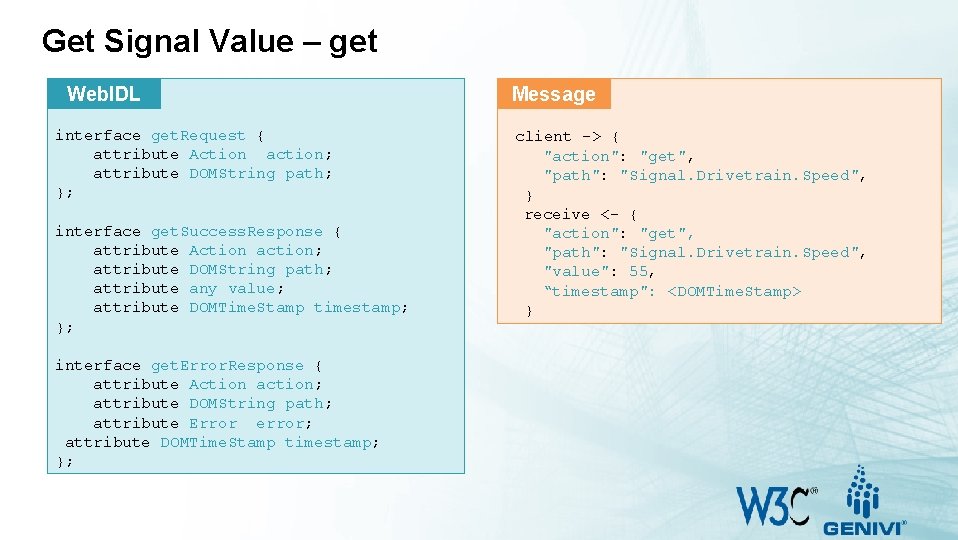
Get Signal Value – get Web. IDL interface get. Request { attribute Action action; attribute DOMString path; }; interface get. Success. Response { attribute Action action; attribute DOMString path; attribute any value; attribute DOMTime. Stamp timestamp; }; interface get. Error. Response { attribute Action action; attribute DOMString path; attribute Error error; attribute DOMTime. Stamp timestamp; }; Message client -> { "action": "get", "path": "Signal. Drivetrain. Speed", } receive <- { "action": "get", "path": "Signal. Drivetrain. Speed", "value": 55, “timestamp": <DOMTime. Stamp> }
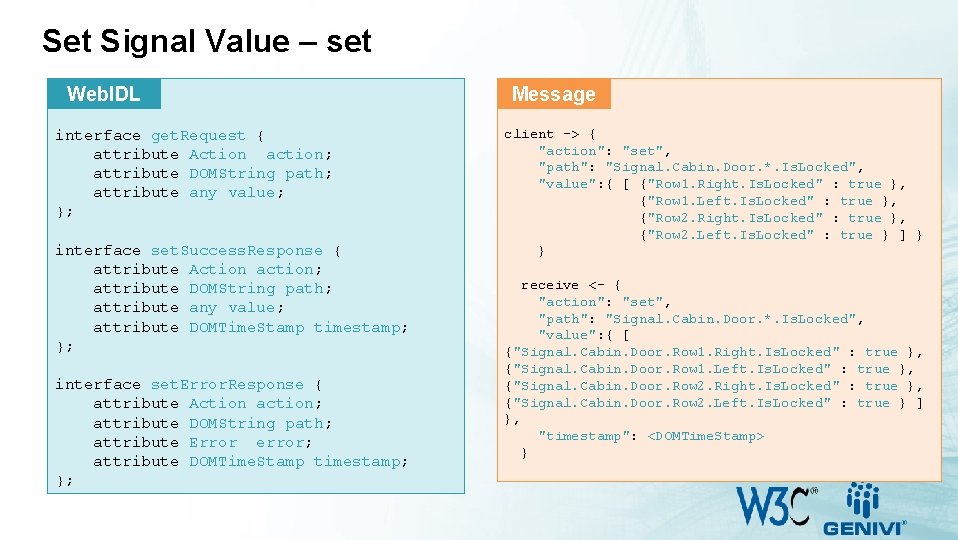
Set Signal Value – set Web. IDL interface get. Request { attribute Action action; attribute DOMString path; attribute any value; }; interface set. Success. Response { attribute Action action; attribute DOMString path; attribute any value; attribute DOMTime. Stamp timestamp; }; interface set. Error. Response { attribute Action action; attribute DOMString path; attribute Error error; attribute DOMTime. Stamp timestamp; }; Message client -> { "action": "set", "path": "Signal. Cabin. Door. *. Is. Locked", "value": { [ {"Row 1. Right. Is. Locked" : true }, {"Row 1. Left. Is. Locked" : true }, {"Row 2. Right. Is. Locked" : true }, {"Row 2. Left. Is. Locked" : true } ] } } receive <- { "action": "set", "path": "Signal. Cabin. Door. *. Is. Locked", "value": { [ {"Signal. Cabin. Door. Row 1. Right. Is. Locked" : true }, {"Signal. Cabin. Door. Row 1. Left. Is. Locked" : true }, {"Signal. Cabin. Door. Row 2. Right. Is. Locked" : true }, {"Signal. Cabin. Door. Row 2. Left. Is. Locked" : true } ] }, "timestamp": <DOMTime. Stamp> }
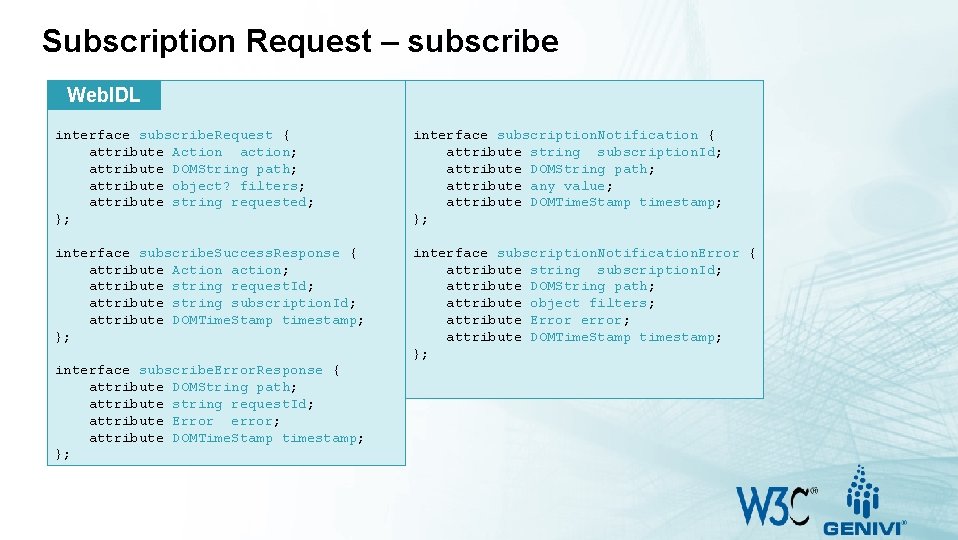
Subscription Request – subscribe Web. IDL interface subscribe. Request { attribute Action action; attribute DOMString path; attribute object? filters; attribute string requested; }; interface subscription. Notification { attribute string subscription. Id; attribute DOMString path; attribute any value; attribute DOMTime. Stamp timestamp; }; interface subscribe. Success. Response { attribute Action action; attribute string request. Id; attribute string subscription. Id; attribute DOMTime. Stamp timestamp; }; interface subscription. Notification. Error { attribute string subscription. Id; attribute DOMString path; attribute object filters; attribute Error error; attribute DOMTime. Stamp timestamp; }; interface subscribe. Error. Response { attribute DOMString path; attribute string request. Id; attribute Error error; attribute DOMTime. Stamp timestamp; };
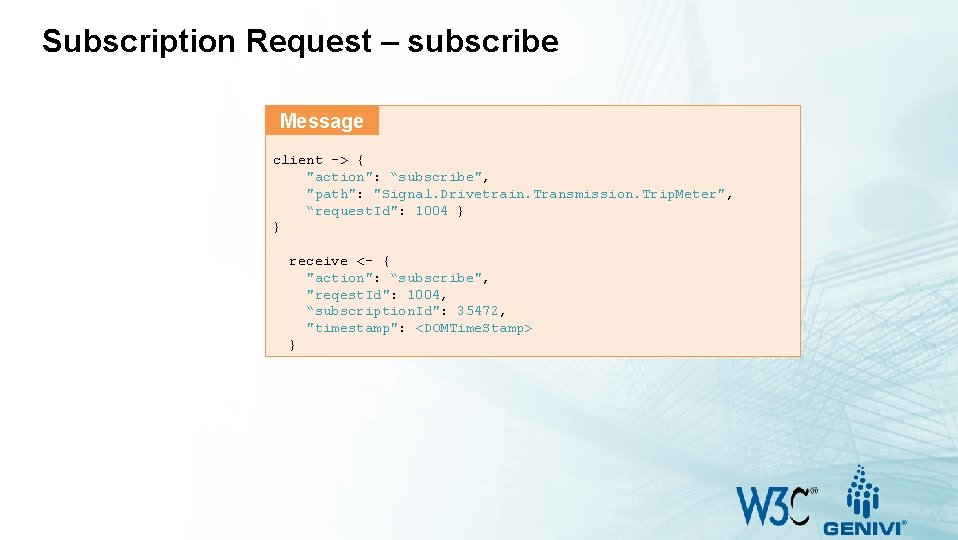
Subscription Request – subscribe Message client -> { "action": “subscribe", "path": "Signal. Drivetrain. Transmission. Trip. Meter", “request. Id": 1004 } } receive <- { "action": “subscribe", "reqest. Id": 1004, “subscription. Id": 35472, "timestamp": <DOMTime. Stamp> }
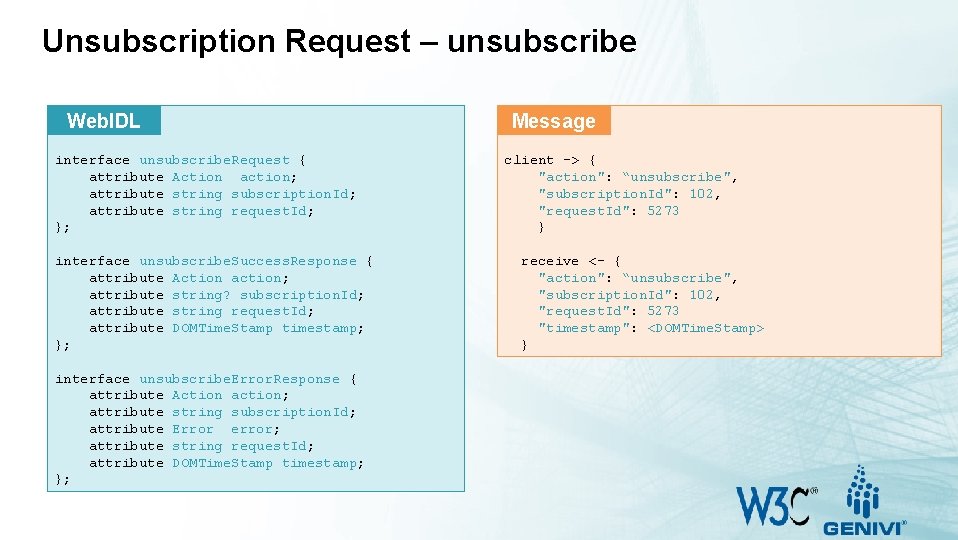
Unsubscription Request – unsubscribe Web. IDL interface unsubscribe. Request { attribute Action action; attribute string subscription. Id; attribute string request. Id; }; interface unsubscribe. Success. Response { attribute Action action; attribute string? subscription. Id; attribute string request. Id; attribute DOMTime. Stamp timestamp; }; interface unsubscribe. Error. Response { attribute Action action; attribute string subscription. Id; attribute Error error; attribute string request. Id; attribute DOMTime. Stamp timestamp; }; Message client -> { "action": “unsubscribe", "subscription. Id": 102, "request. Id": 5273 } receive <- { "action": “unsubscribe", "subscription. Id": 102, "request. Id": 5273 "timestamp": <DOMTime. Stamp> }
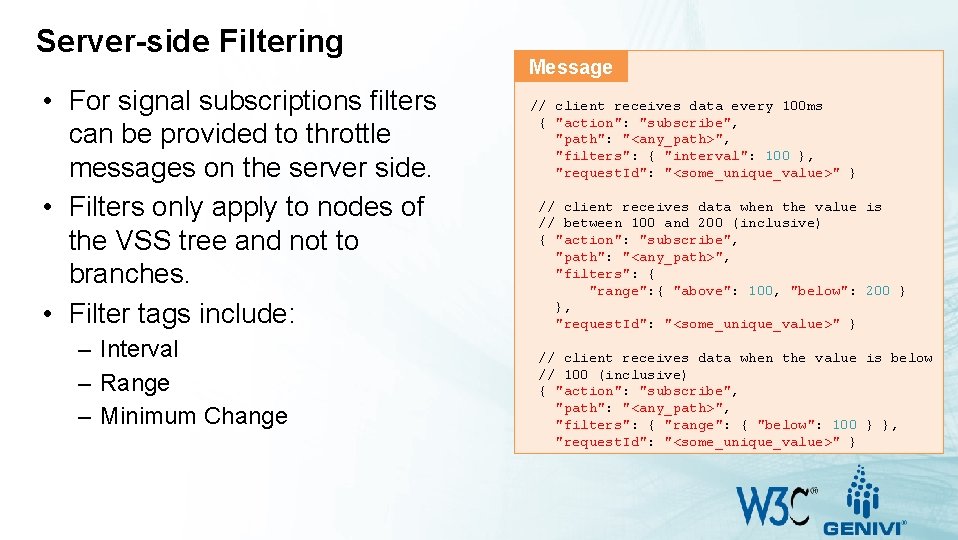
Server-side Filtering • For signal subscriptions filters can be provided to throttle messages on the server side. • Filters only apply to nodes of the VSS tree and not to branches. • Filter tags include: – Interval – Range – Minimum Change Message // client receives data every 100 ms { "action": "subscribe", "path": "<any_path>", "filters": { "interval": 100 }, "request. Id": "<some_unique_value>" } // client receives data when the value is // between 100 and 200 (inclusive) { "action": "subscribe", "path": "<any_path>", "filters": { "range": { "above": 100, "below": 200 } }, "request. Id": "<some_unique_value>" } // client receives data when the value is below // 100 (inclusive) { "action": "subscribe", "path": "<any_path>", "filters": { "range": { "below": 100 } }, "request. Id": "<some_unique_value>" }
- Slides: 44