
Using Visualization to Debug Visualization Software Robert S
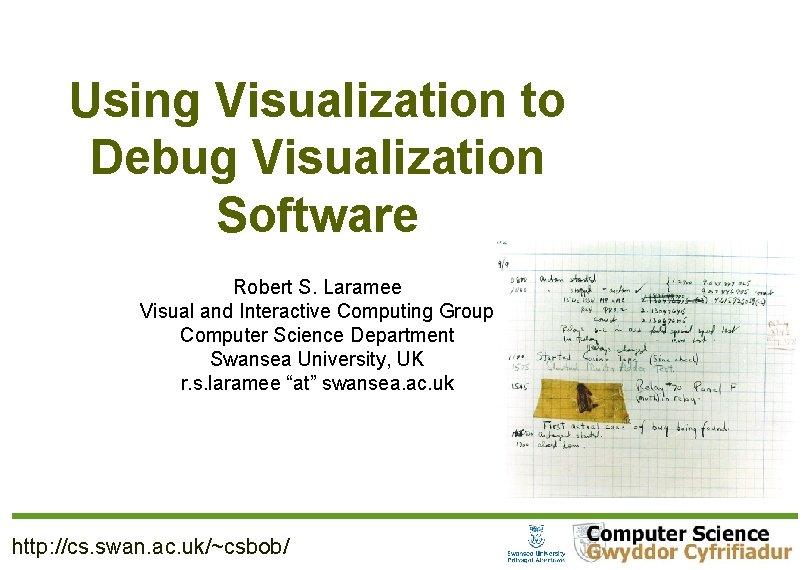
Using Visualization to Debug Visualization Software Robert S. Laramee Visual and Interactive Computing Group Computer Science Department Swansea University, UK r. s. laramee “at” swansea. ac. uk http: //cs. swan. ac. uk/~csbob/
Overview Introduction and Motivation Related Work Debugging Visualization Software Guidelines 1. Visualize Tests and Comparisons 2. Visualize Data Structure Traversal and Evolution 3. Classify and Color Map 4. Incorporate Algorithm Parameters into GUI 5. Run Simple Error Checks 6. Introduce a Step Function 7. Make Use of Still-Image Driven Animation 8. Test on a Variety of Data Sets Robert S. Laramee r. s. laramee@swansea. ac. uk 2

Overview Debugging Visualization Software Guidelines (Continued) 9. Exploit and Compare with Previous Literature 10. Make Exclusive Use of Accessor Methods 11. Follow Coding Conventions 12. Describe the Problem to Others Robert S. Laramee r. s. laramee@swansea. ac. uk 3
Introduction and Motivation Debugging visualization software is difficult! Why? Challenging algorithms Large amounts of data, iterations, comparisons etc. Complex data structures Traditional debugging tools de-couple information they report with spatio-temporal domain in which unexpected problems occur, e. g. printf(), setting breakpoints Guidelines inspired by development experience in both industry and academia Key: (1) exploit strengths of visualization itself + (2) combine with traditional good practices Robert S. Laramee r. s. laramee@swansea. ac. uk 4
Related Work Various papers offer guidelines on scientific paper writing, peer reviewing, how to get papers rejected, etc. Very little related work concerning visualization software, e. g. Crossno and Angel, Vis '99, color coding of dynamic particle systems Wong et al. [25] present interesting tool that uses visualization in order to debug mobile object-based distributed programs. Laffra and Ashok describe generic visual approach to debugging C++ programs which incorporates the use of bar charts [6]. Guidelines on debugging vertex and fragment shaders are given by Rost [20] (Chapter 8. 3 of the “Orange Book”). Robert S. Laramee r. s. laramee@swansea. ac. uk 5
1. Visualize Tests and Comparisons Vast majority of algorithms involve tests or comparisons between visualization primitives: points, line segments, polygons, voxels, tetrahedra etc. Visualize tests between two or more of these primitives by highlighting focus object, a, and another object, b, at run time. This : – (1) informs the developer if a and b are expected primitives to test and – (2) can verify results of comparison Robert S. Laramee r. s. laramee@swansea. ac. uk 6

1. Visualize Tests and Comparisons, Example, streamline tracing on unstructured grid. Involves three basic computations: (1) point location, (2) integration, (3) interpolation. Point location can be source of bugs. Test and visualize: (1) current line segment and (2) current mesh edge at run time Robert S. Laramee r. s. laramee@swansea. ac. uk 7

2. Visualize Data Structure Traversal and Evolution Almost all algorithms involve one or more data structures Visualize data structure traversal and evolution, i. e. , as it's being built Examples: binary tree for clustering, quadtree for AR height map data Robert S. Laramee r. s. laramee@swansea. ac. uk 8
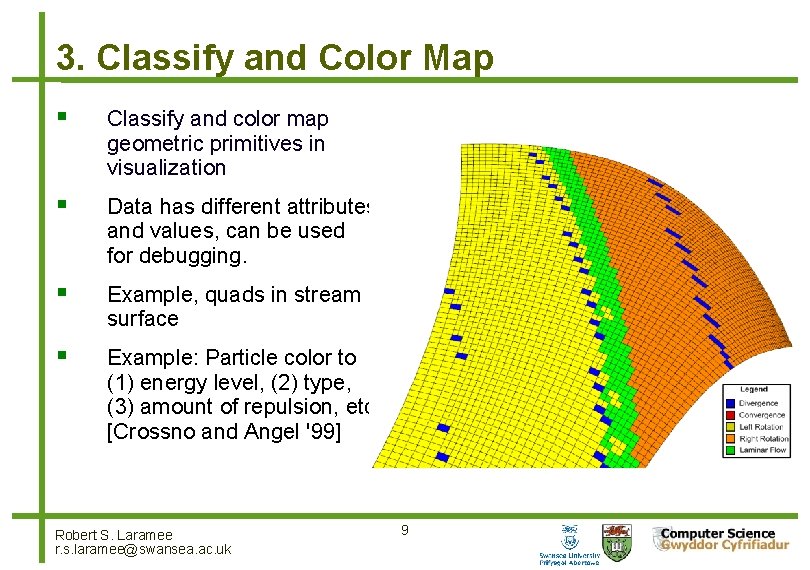
3. Classify and Color Map Classify and color map geometric primitives in visualization Data has different attributes and values, can be used for debugging. Example, quads in stream surface Example: Particle color to (1) energy level, (2) type, (3) amount of repulsion, etc. [Crossno and Angel '99] Robert S. Laramee r. s. laramee@swansea. ac. uk 9
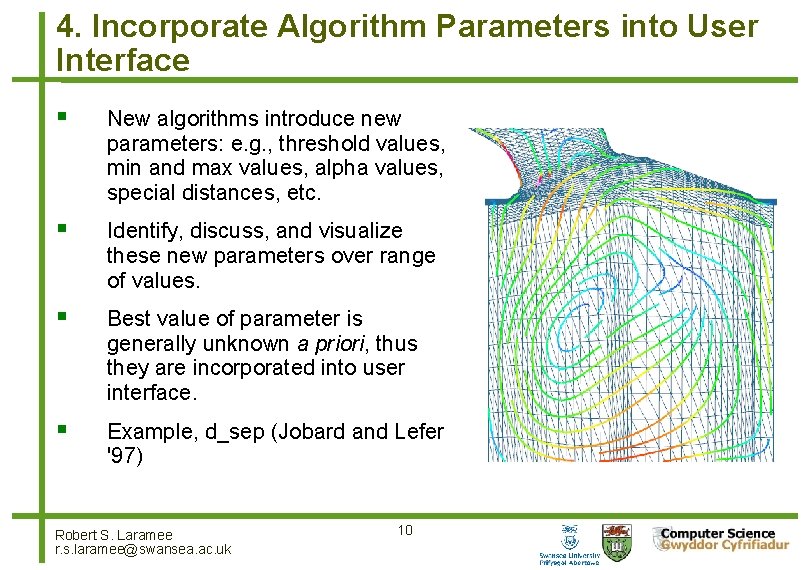
4. Incorporate Algorithm Parameters into User Interface New algorithms introduce new parameters: e. g. , threshold values, min and max values, alpha values, special distances, etc. Identify, discuss, and visualize these new parameters over range of values. Best value of parameter is generally unknown a priori, thus they are incorporated into user interface. Example, d_sep (Jobard and Lefer '97) Robert S. Laramee r. s. laramee@swansea. ac. uk 10
5. Run Simple Error Checks Don’t forget to run simple, sanity checks on visualization primitives and data structures. A simple, generic error checking procedure can run through data objects and check basic properties, e. g. , point locations, edge lengths, minimum, average, and maximum data values, and boundary conditions Testing to see if all of object’s attributes are within reasonable, expected bounds. A general error checking function can be invoked at any time throughout vis pipeline to catch updates that cause unexpected changes. Robert S. Laramee r. s. laramee@swansea. ac. uk 11
5. Run Simple Error Checks, Example 1: an isosurfacing algorithm for adaptive resolution data: Cracks appeared (only) at 128^3 resolution data or greater. To track down error, we implemented simple, generic, errorchecking procedure that examined: – (1) locations of triangle vertices–testing to see if they fell outside of their associated cube and – (2) maximum and minimum data values of each node in octree to ensure that all child values fell within this range. Values were re-computed and compared to stored values. This function traversed entire octree and could be called at any time. Example 2: Render normals, discover lighting and shading bugs Robert S. Laramee r. s. laramee@swansea. ac. uk 12
6. Introduce a Step Function Algorithms involve computation that iterates several times, perhaps over each data item, and again over each pass over data structure. Incorporate feature in user-interface that interrupts (or pause) execution between each iteration of algorithm processing. User can pause current scene and look in more detail. Pressing pause button again then executes exactly one loop of algorithm. User may then step through program execution at run time, one iteration (or loop) at a time. Example: while developing a flow visualization algorithm we introduced step function that can stop program execution after each timestep. Robert S. Laramee r. s. laramee@swansea. ac. uk 13
7. Make Use of Still-Image Driven Animation Some bugs occur very infrequently, e. g. , only after several time-steps have been processed and visualized. You may be watching an animation of your visualization in action and notice bug(s) only after several seconds (or even minutes). Point in time at which the error is recognized may come too late in order to slow down or interrupt algorithm, e. g. , by invoking step function. Stopping process and starting all over is painful and timeconsuming. Use feature that saves still images of the visualization each time frame buffer is updated. Robert S. Laramee r. s. laramee@swansea. ac. uk 14
7. Make Use of Still-Image Driven Animation, Example We recommend a user option to your software or system that automatically: (1) re-sizes the viewer to 5122 pixels and (2) saves each frame as a still image in JPEG (or PNG) format. The still images are used as input to an application which can play them back. We use Adobe Premiere or Video-Mach (http: //www. gromada. com/videomach. html). We consider this as a standard feature: also used to make movies. Robert S. Laramee r. s. laramee@swansea. ac. uk 15
8. Test Algorithms on a Variety of Data Sets Test algorithm on small, familiar data sets first If possible, create synthetic data with known characteristics Find smallest data set that creates problem Test algorithm on big, complex data sets second. Test on a variety of data sets. Obvious, but still not carried out. Robert S. Laramee r. s. laramee@swansea. ac. uk 16
9. Exploit and Compare with Previous Literature Chances are, you are not first person to visualize a given data set. Compare visualizations you create with your predecessors. Communicate with those who have already worked with a given data set. Colleagues are happy to share their experiences and share Simple and obvious, however, we witness colleagues overlook this strategy fairly regularly. important information that was not published. Robert S. Laramee r. s. laramee@swansea. ac. uk 17
10. Make Exclusive Use of Accessor Methods All class member variables are accessed through accessor methods, i. e. Get() and Set() methods, e. g. , Get. Class. Variable(), Set. Class. Variable(int new. Value). We advocate no exceptions to this rule. The use of accessor methods: Enforces encapsulation, makes implementation easy to change, Set() methods perform error and bounds tests and sanity checking on parameters passed to the procedure. If class variable assignment is performed exclusively through Set() methods, then objects are always in valid state. Following this convention leads to very robust code. Robert S. Laramee r. s. laramee@swansea. ac. uk 18
11. Follow Coding Conventions Big projects require multiple, coordinated developers over years. And, applications should not generally be started from scratch. But, we in software development start projects from scratch over and over again–repeatedly re-inventing wheel. Source code that does not follow any conventions and is not very legible. → Quickly turns into legacy code. Writing illegible code is easy and is generally default. We have encountered numerous instances of programmers who cannot read their own code. Robert S. Laramee r. s. laramee@swansea. ac. uk 19
11. Follow Coding Conventions, Example Bob's Concise Coding Conventions (available online) are: Influenced by and drawn from other coding standards and guidelines including VTK, Sun Microsystems, Meyers, and Dickheiser. Concise so they can be printed out and hung up for ease of use. Basic philosophy: code legibility should be maximized. Maximum legibility leads to minimum number of bugs. Maximizing legibility also helps maximize code re-use, good design, and flexibility. Robert S. Laramee r. s. laramee@swansea. ac. uk 20
12. Describe Problem with Others Describe the problem in enough detail such that the listener actually understands what it is. Often, speaker will realize the possible sources of problem as it’s being described. A phenomenon that every programmer has experienced. Breaking process down into smaller steps may help identify missteps. Encourages speaker to describe algorithm step-by-step to an audience. Robert S. Laramee r. s. laramee@swansea. ac. uk 21
Summary and Conclusions Debugging visualization software is difficult! Challenging algorithms, large amounts of data, iterations, comparisons etc. , complex data structures Traditional debugging tools de-couple information from spatiotemporal domain in which unexpected problems occur, e. g. printf() We discuss debugging guidelines inspired by development experience in both industry and academia Key: (1) exploit strengths of visualization itself + (2) combine with traditional good practices Robert S. Laramee r. s. laramee@swansea. ac. uk 22
Acknowledgements We thank the following people for their contributions: Eugene Zhang of Oregon State University for valuable discussions. Dan Lipsa of Armstrong Atlantic State University for valuable proof reading. Zhenmin Peng, Tony Mc. Louglin, and Edward Grundy of Swansea University for images. Research supported partly by EPSRC Grant EP/F 002335/1 Thank you for your attention. Any questions? Robert S. Laramee r. s. laramee@swansea. ac. uk 23
- Slides: 23