
Using Dates in Excel Stored as a serial
![Using Dates in Excel • WORKDAY(start_date, days, [holidays]) – Counts ahead/behind based on work-days](https://slidetodoc.com/presentation_image_h2/e8fc77606fb8d181084f517be02ceb4b/image-5.jpg "Using Dates in Excel • WORKDAY(start_date, days, [holidays]) – Counts ahead/behind based on work-days")
![Using Dates in Excel • NETWORKDAYS(start_date, end_date, [holidays]) – The number of working days](https://slidetodoc.com/presentation_image_h2/e8fc77606fb8d181084f517be02ceb4b/image-6.jpg "Using Dates in Excel • NETWORKDAYS(start_date, end_date, [holidays]) – The number of working days")
- Slides: 7
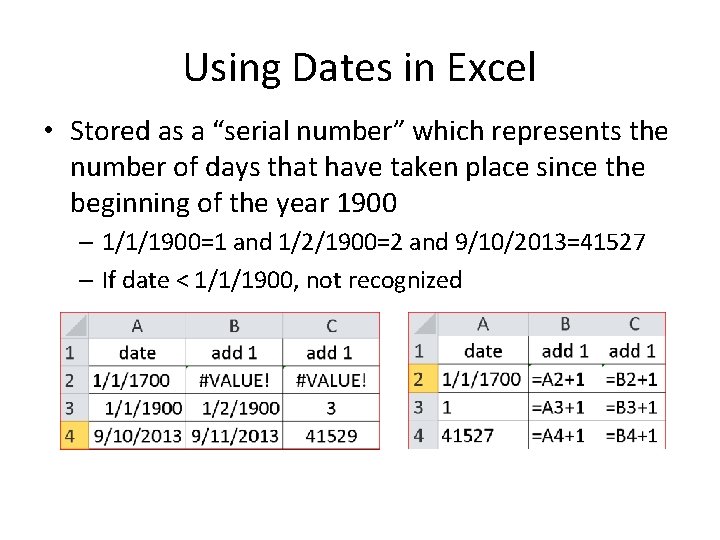
Using Dates in Excel • Stored as a “serial number” which represents the number of days that have taken place since the beginning of the year 1900 – 1/1/1900=1 and 1/2/1900=2 and 9/10/2013=41527 – If date < 1/1/1900, not recognized
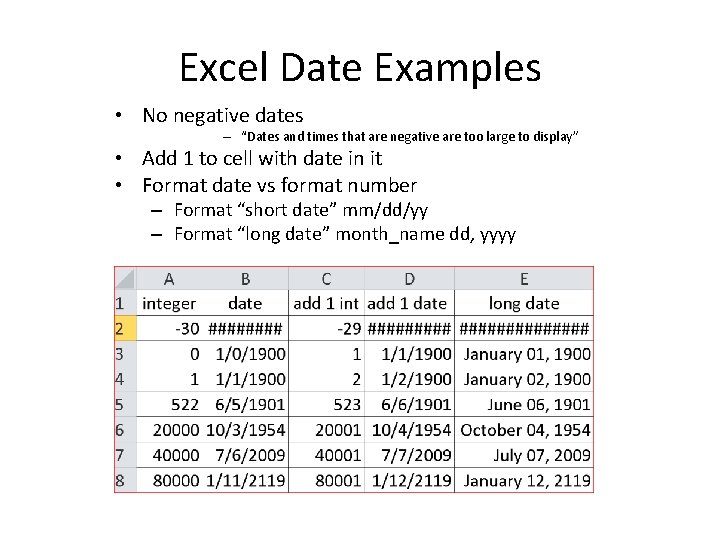
Excel Date Examples • No negative dates – “Dates and times that are negative are too large to display” • Add 1 to cell with date in it • Format date vs format number – Format “short date” mm/dd/yy – Format “long date” month_name dd, yyyy
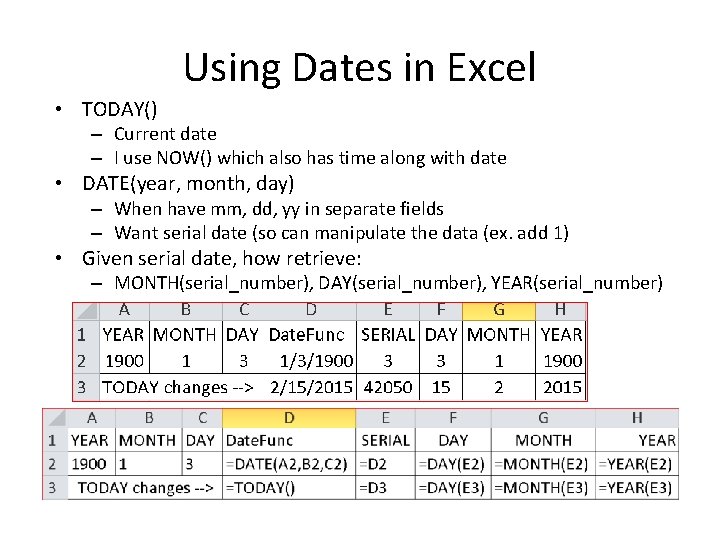
Using Dates in Excel • TODAY() – Current date – I use NOW() which also has time along with date • DATE(year, month, day) – When have mm, dd, yy in separate fields – Want serial date (so can manipulate the data (ex. add 1) • Given serial date, how retrieve: – MONTH(serial_number), DAY(serial_number), YEAR(serial_number)
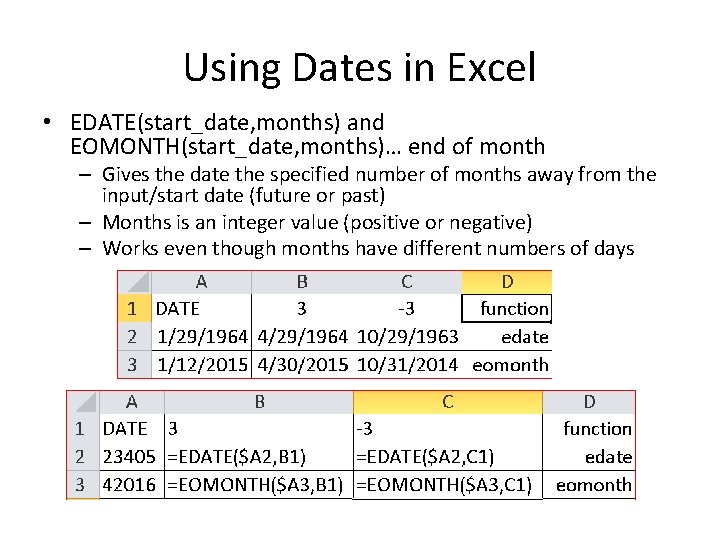
Using Dates in Excel • EDATE(start_date, months) and EOMONTH(start_date, months)… end of month – Gives the date the specified number of months away from the input/start date (future or past) – Months is an integer value (positive or negative) – Works even though months have different numbers of days
Using Dates in Excel • WORKDAY(start_date, days, [holidays]) – Counts ahead/behind based on work-days (Monday-Friday) instead of all 7 days of the week – EX. 1 Result in cell C 2 8/20/2013 – The [holidays] input is optional, but lets you disqualify specific days (like Thanksgiving or Christmas, for example), which might otherwise fall during the work week. These are date serial numbers provided in an array bounded by brackets: { }. To specify multiple holidays, the dates must be held in cells – it is not possible to put multiple DATE functions in an array. – EX. 2 cell F 2 =WORKDAY(E 2, 52*5, E 4: E 13)
Using Dates in Excel • NETWORKDAYS(start_date, end_date, [holidays]) – The number of working days between two dates plus optional holidays – Different from WORKDAYS function 2 nd argument
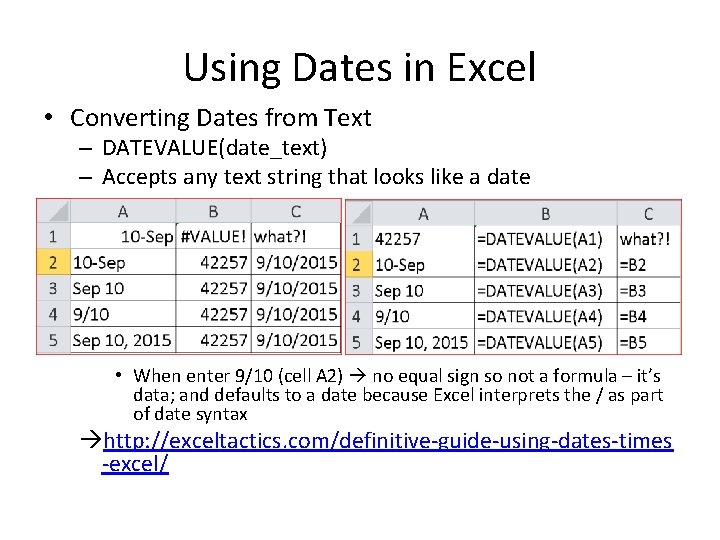
Using Dates in Excel • Converting Dates from Text – DATEVALUE(date_text) – Accepts any text string that looks like a date • When enter 9/10 (cell A 2) no equal sign so not a formula – it’s data; and defaults to a date because Excel interprets the / as part of date syntax http: //exceltactics. com/definitive-guide-using-dates-times -excel/