
Using Classes and Function Members An Introduction to
Using Classes and Function Members — An Introduction to OOP (Object-Oriented Programming) Chapter 7 The "++" in C++ 1
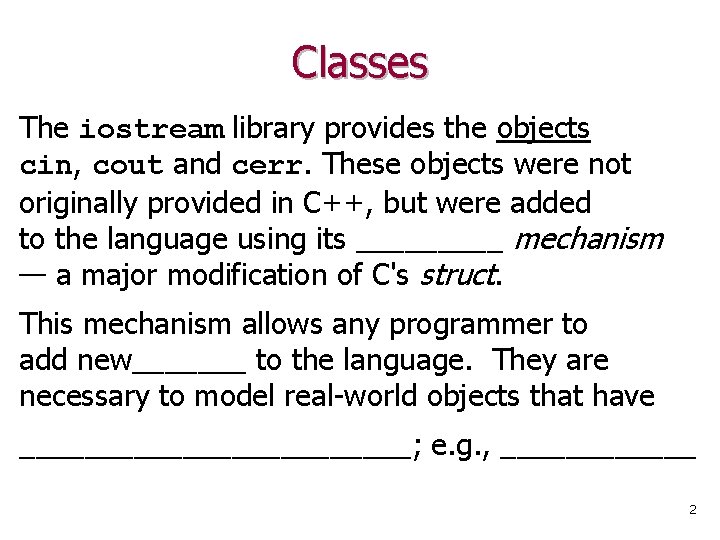
Classes The iostream library provides the objects cin, cout and cerr. These objects were not originally provided in C++, but were added to the language using its _____ mechanism — a major modification of C's struct. This mechanism allows any programmer to add new_______ to the language. They are necessary to model real-world objects that have ____________; e. g. , ______ 2
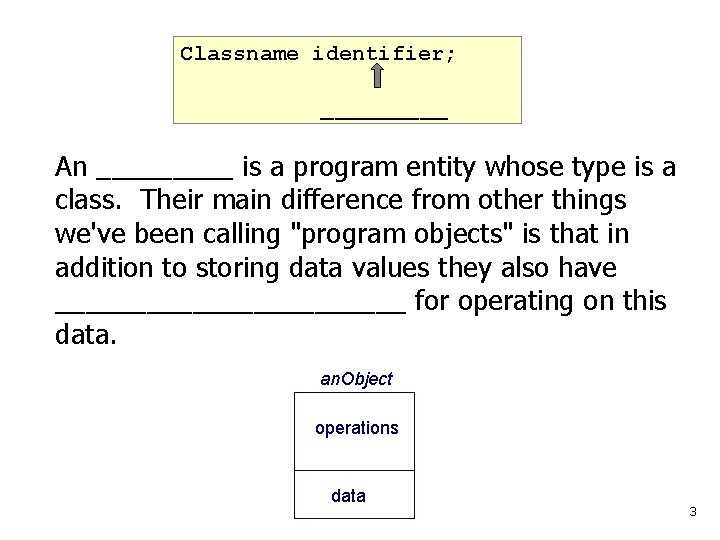
Classname identifier; _____ An _____ is a program entity whose type is a class. Their main difference from other things we've been calling "program objects" is that in addition to storing data values they also have ____________ for operating on this data. an. Object operations data 3
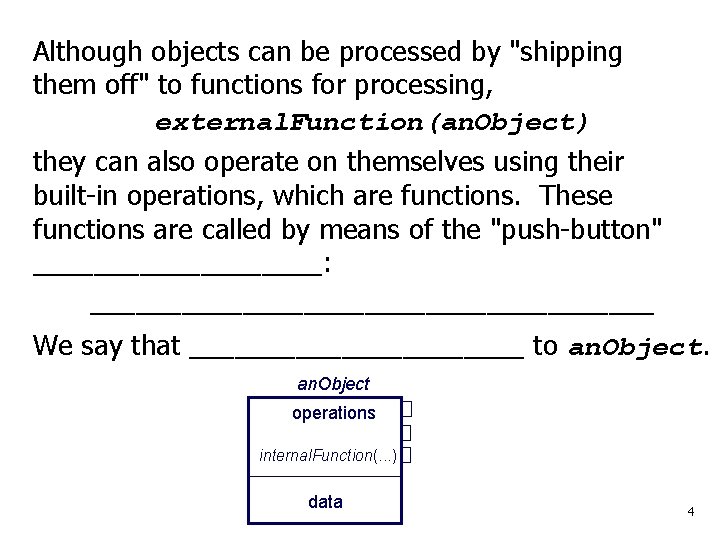
Although objects can be processed by "shipping them off" to functions for processing, external. Function(an. Object) they can also operate on themselves using their built-in operations, which are functions. These functions are called by means of the "push-button" __________: ___________________ We say that ___________ to an. Object operations internal. Function(. . . ) data 4
I/O Classes Bell Labs’ Jerry Schwarz used the class mechanism to create: • an istream class, to define the object cin; and • an ostream class, to define cout and cerr. The resulting I/O system was so powerful and yet easy to use that it was incorporated into the language. We will study these classes and the operations they provide later after we look at another class provided in C++. 5
String Class Read § 7. 4 carefully C has a library of basic functions that can be used to process strings, which are simply char arrays (see slide #9). C++ added a new _________that provides: • an easy way to store strings, and • a large assortment of useful built-in string-processing operations. Lab 7 • To use the string type, we must _____________ Warning: #include <string> NOT <cstring> #include <string. h> which is C's string-processing library 6
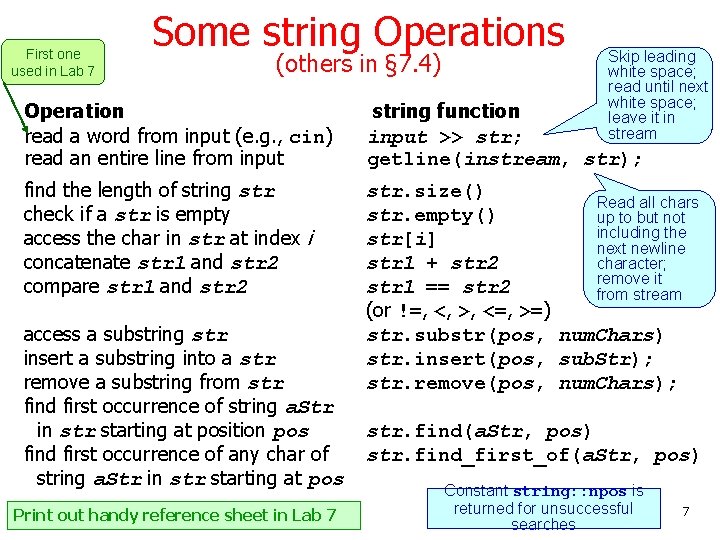
First one used in Lab 7 Some string Operations (others in § 7. 4) Skip leading white space; read until next white space; leave it in stream Operation read a word from input (e. g. , cin) read an entire line from input string function input >> str; getline(instream, str); find the length of string str check if a str is empty access the char in str at index i concatenate str 1 and str 2 compare str 1 and str 2 str. size() Read all chars str. empty() up to but not including the str[i] next newline str 1 + str 2 character; remove it str 1 == str 2 from stream (or !=, <, >, <=, >=) str. substr(pos, num. Chars) str. insert(pos, sub. Str); str. remove(pos, num. Chars); access a substring str insert a substring into a str remove a substring from str find first occurrence of string a. Str in str starting at position pos find first occurrence of any char of string a. Str in str starting at pos Print out handy reference sheet in Lab 7 str. find(a. Str, pos) str. find_first_of(a. Str, pos) Constant string: : npos is returned for unsuccessful searches 7
Note that some string operations are "normal" functions: getline(cin, a. String); They are external agents that act on objects. Other string operations are internal agents — built-in function members that determine how the object is to respond to messages they receive. These messages are sent using the ("push button") dot operator. a. String. size(); For example, a. String "knows" how big it is, so when it receives the size() message via the dot operator, it responds with the appropriate answer. In a sense, class objects are "smarter" than regular char, int, double, . . . objects because they can do things for themselves. The "I can do it myself" principle of OOP 8
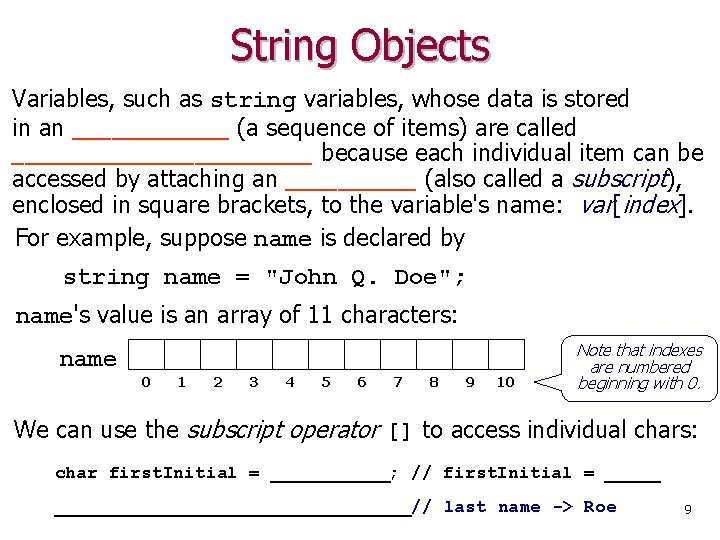
String Objects Variables, such as string variables, whose data is stored in an ______ (a sequence of items) are called ____________ because each individual item can be accessed by attaching an _____ (also called a subscript), enclosed in square brackets, to the variable's name: var[index]. For example, suppose name is declared by string name = "John Q. Doe"; name's value is an array of 11 characters: name 0 1 2 3 4 5 6 7 8 9 10 Note that indexes are numbered beginning with 0. We can use the subscript operator [] to access individual chars: char first. Initial = ______; // first. Initial = ___________________// last name -> Roe 9
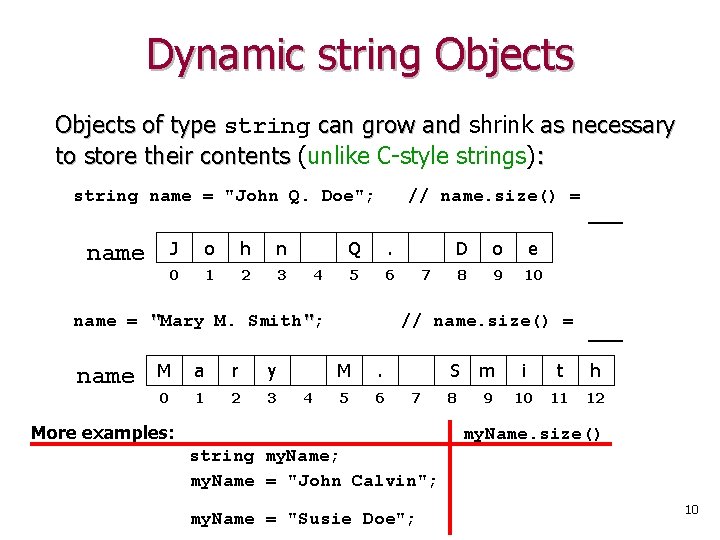
Dynamic string Objects of type string can grow and shrink as necessary to store their contents (unlike C-style strings): string name = "John Q. Doe"; name J o h n 0 1 2 3 // name. size() = Q . 5 6 4 name = "Mary M. Smith"; name M a r y 0 1 2 3 4 D o e 8 9 10 7 // name. size() = M . 5 6 7 More examples: ___ S m i t h 8 9 10 11 12 my. Name. size() string my. Name; my. Name = "John Calvin"; my. Name = "Susie Doe"; 10
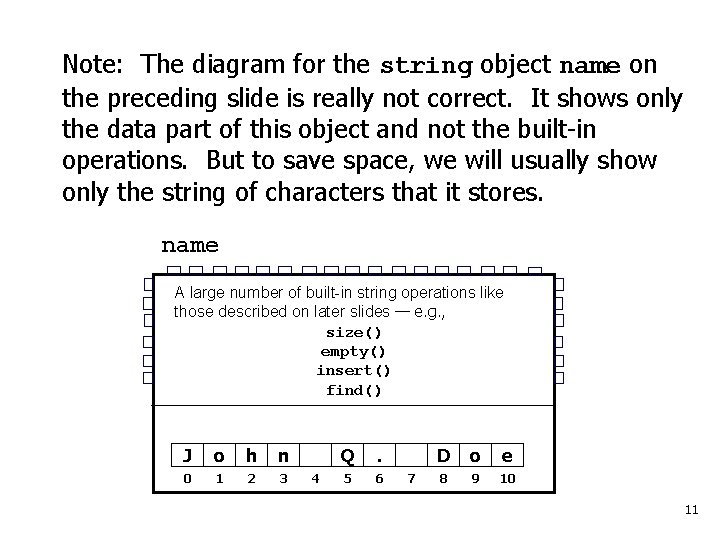
Note: The diagram for the string object name on the preceding slide is really not correct. It shows only the data part of this object and not the built-in operations. But to save space, we will usually show only the string of characters that it stores. name A large number of built-in string operations like those described on later slides — e. g. , size() empty() insert() find() J o h n 0 1 2 3 4 Q . 5 6 7 D o e 8 9 10 11
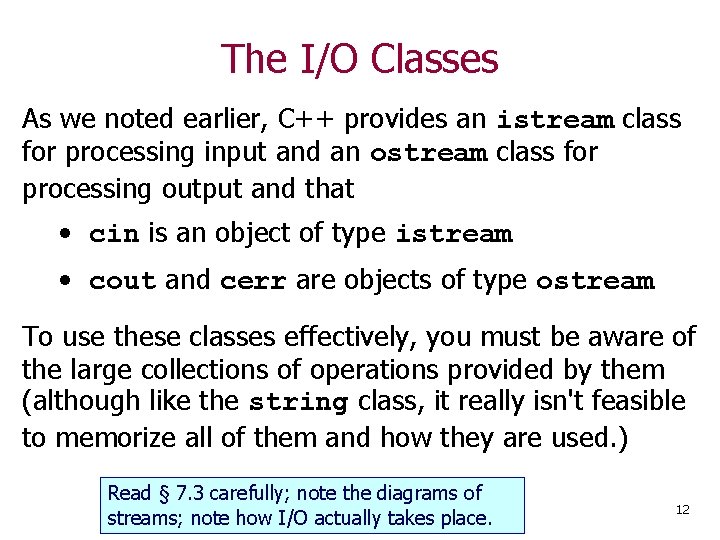
The I/O Classes As we noted earlier, C++ provides an istream class for processing input and an ostream class for processing output and that • cin is an object of type istream • cout and cerr are objects of type ostream To use these classes effectively, you must be aware of the large collections of operations provided by them (although like the string class, it really isn't feasible to memorize all of them and how they are used. ) Read § 7. 3 carefully; note the diagrams of streams; note how I/O actually takes place. 12
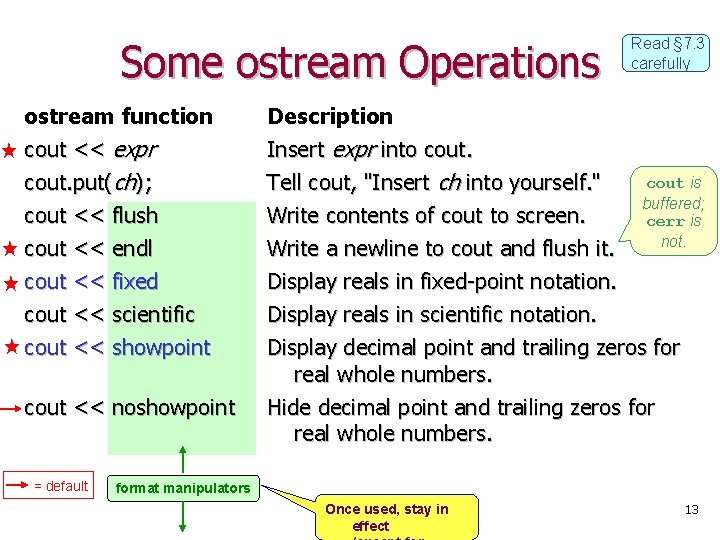
Some ostream Operations Read § 7. 3 carefully ostream function cout << expr cout. put(ch); cout << flush Description Insert expr into cout. Tell cout, "Insert ch into yourself. " Write contents of cout to screen. cout << endl cout << fixed Write a newline to cout and flush it. Display reals in fixed-point notation. Display reals in scientific notation. Display decimal point and trailing zeros for real whole numbers. Hide decimal point and trailing zeros for real whole numbers. cout << scientific cout << showpoint cout << noshowpoint = default cout is buffered; cerr is not. format manipulators Once used, stay in effect 13
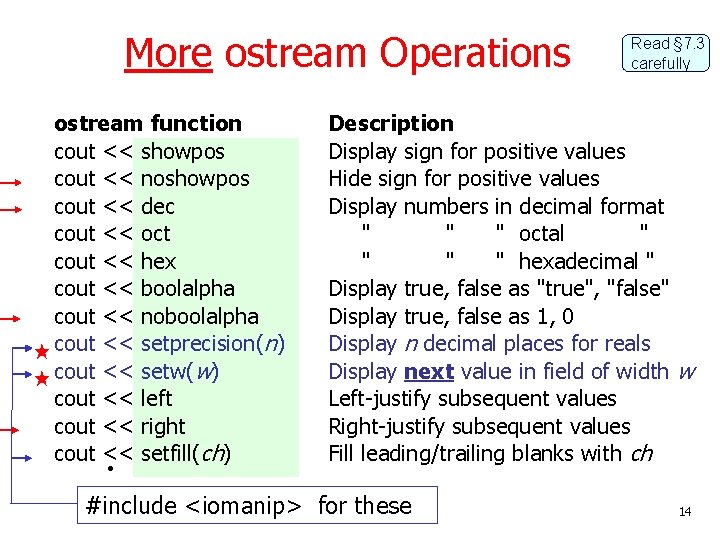
More ostream Operations ostream function cout << showpos cout << noshowpos cout << dec cout << oct cout << hex cout << boolalpha cout << noboolalpha cout << setprecision(n) cout << setw(w) cout << left cout << right cout << setfill(ch) • Read § 7. 3 carefully Description Display sign for positive values Hide sign for positive values Display numbers in decimal format " " " octal " " hexadecimal " Display true, false as "true", "false" Display true, false as 1, 0 Display n decimal places for reals Display next value in field of width w Left-justify subsequent values Right-justify subsequent values Fill leading/trailing blanks with ch #include <iomanip> for these 14
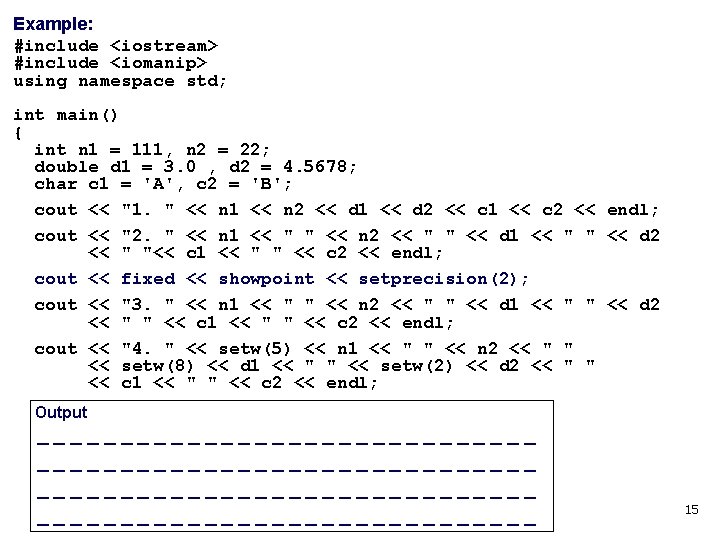
Example: #include <iostream> #include <iomanip> using namespace std; int main() { int n 1 = 111, n 2 = 22; double d 1 = 3. 0 , d 2 = 4. 5678; char c 1 = 'A', c 2 = 'B'; cout << "1. " << n 1 << n 2 << d 1 << d 2 << c 1 << c 2 << endl; cout << "2. " << n 1 << " " << n 2 << " " << d 1 << " " << d 2 << " "<< c 1 << " " << c 2 << endl; cout << fixed << showpoint << setprecision(2); cout << "3. " << n 1 << " " << n 2 << " " << d 1 << " " << d 2 << " " << c 1 << " " << c 2 << endl; cout << "4. " << setw(5) << n 1 << " " << n 2 << " " << setw(8) << d 1 << " " << setw(2) << d 2 << " " << c 1 << " " << c 2 << endl; Output ----------------------------------------------------------- 15
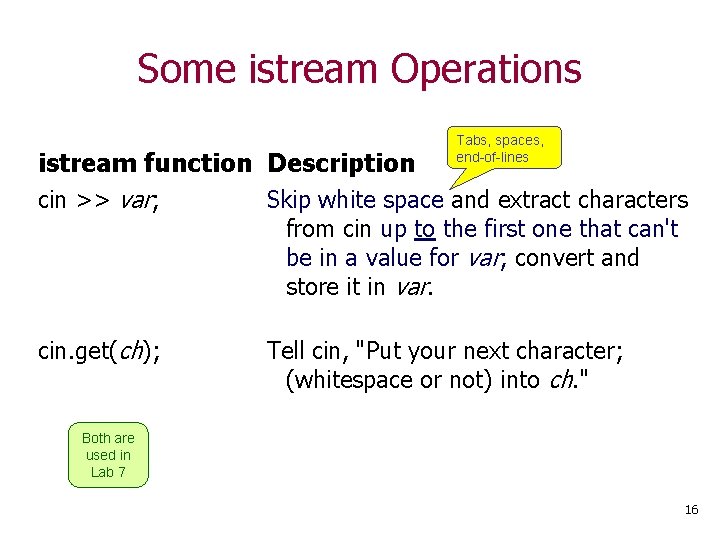
Some istream Operations Tabs, spaces, end-of-lines istream function Description cin >> var; Skip white space and extract characters from cin up to the first one that can't be in a value for var; convert and store it in var. cin. get(ch); Tell cin, "Put your next character; (whitespace or not) into ch. " Both are used in Lab 7 16
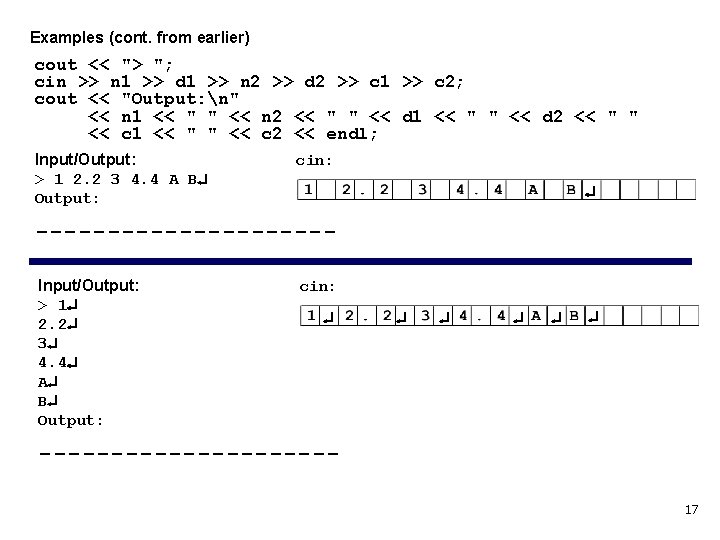
Examples (cont. from earlier) cout << "> "; cin >> n 1 >> d 1 >> n 2 >> d 2 >> c 1 >> c 2; cout << "Output: n" << n 1 << " " << n 2 << " " << d 1 << " " << d 2 << " " << c 1 << " " << c 2 << endl; Input/Output: cin: > 1 2. 2 3 4. 4 A B Output: ----------Input/Output: cin: > 1 2. 2 3 4. 4 A B Output: ----------17
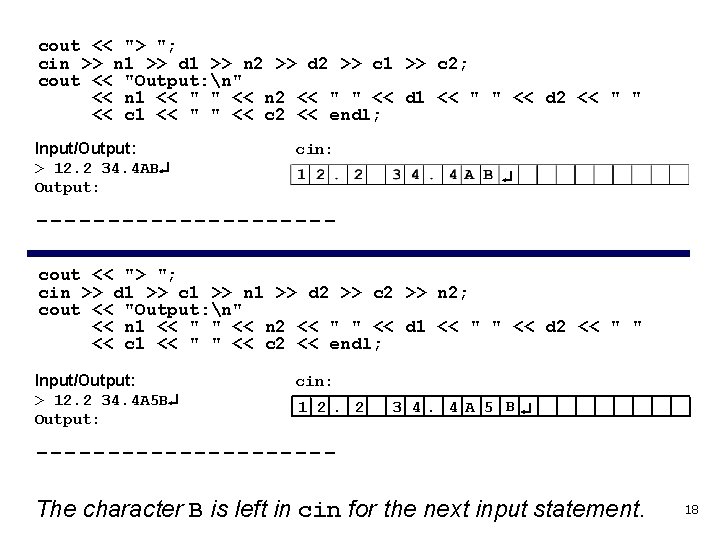
cout << "> "; cin >> n 1 >> d 1 >> n 2 >> d 2 >> c 1 >> c 2; cout << "Output: n" << n 1 << " " << n 2 << " " << d 1 << " " << d 2 << " " << c 1 << " " << c 2 << endl; Input/Output: cin: > 12. 2 34. 4 AB Output: ----------cout << "> "; cin >> d 1 >> c 1 >> n 1 >> d 2 >> c 2 >> n 2; cout << "Output: n" << n 1 << " " << n 2 << " " << d 1 << " " << d 2 << " " << c 1 << " " << c 2 << endl; Input/Output: cin: > 12. 2 34. 4 A 5 B 1 2. 2 Output: 3 4. 4 A 5 B ----------The character B is left in cin for the next input statement. 18
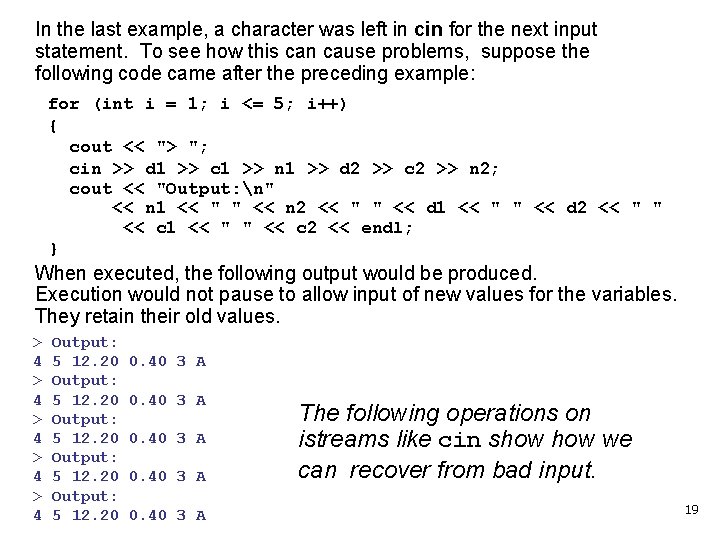
In the last example, a character was left in cin for the next input statement. To see how this can cause problems, suppose the following code came after the preceding example: for (int i = 1; i <= 5; i++) { cout << "> "; cin >> d 1 >> c 1 >> n 1 >> d 2 >> c 2 >> n 2; cout << "Output: n" << n 1 << " " << n 2 << " " << d 1 << " " << d 2 << " " << c 1 << " " << c 2 << endl; } When executed, the following output would be produced. Execution would not pause to allow input of new values for the variables. They retain their old values. > 4 > 4 > 4 Output: 5 12. 20 0. 40 3 A The following operations on istreams like cin show we can recover from bad input. 19
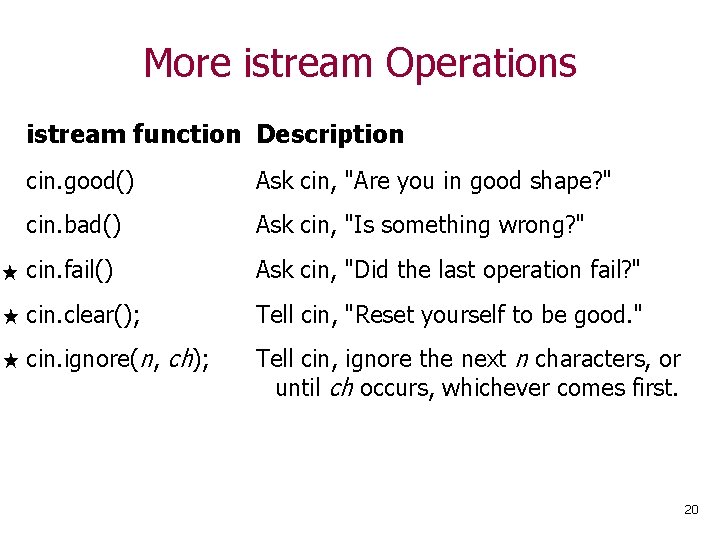
More istream Operations istream function Description cin. good() Ask cin, "Are you in good shape? " cin. bad() Ask cin, "Is something wrong? " cin. fail() Ask cin, "Did the last operation fail? " cin. clear(); Tell cin, "Reset yourself to be good. " cin. ignore(n, ch); Tell cin, ignore the next n characters, or until ch occurs, whichever comes first. 20
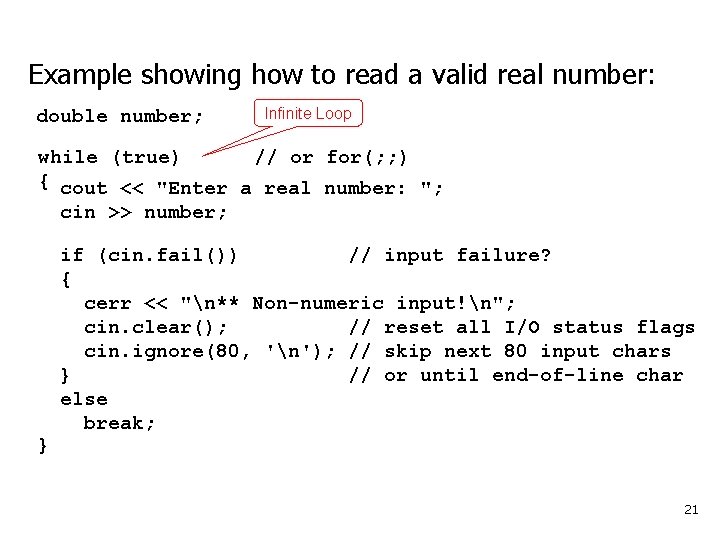
Example showing how to read a valid real number: double number; Infinite Loop while (true) // or for(; ; ) { cout << "Enter a real number: "; cin >> number; } if (cin. fail()) // input failure? { cerr << "n** Non-numeric input!n"; cin. clear(); // reset all I/O status flags cin. ignore(80, 'n'); // skip next 80 input chars } // or until end-of-line char else break; 21
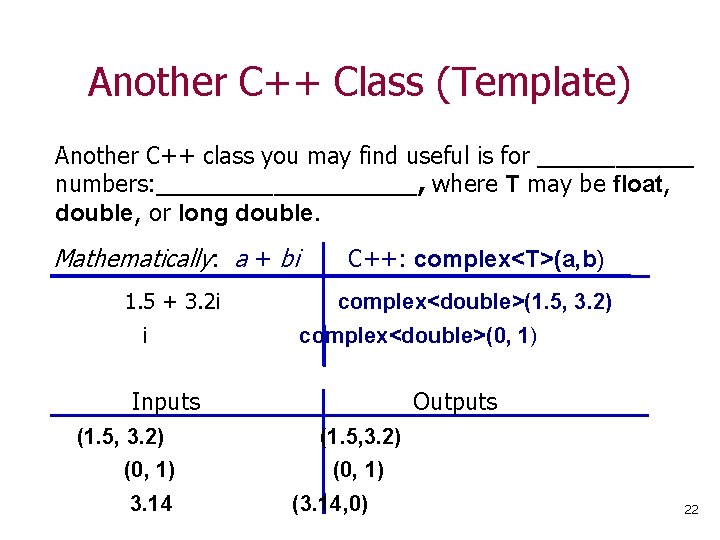
Another C++ Class (Template) Another C++ class you may find useful is for ______ numbers: __________, where T may be float, double, or long double. Mathematically: a + bi C++: complex<T>(a, b) 1. 5 + 3. 2 i i complex<double>(1. 5, 3. 2) complex<double>(0, 1) Inputs (1. 5, 3. 2) (0, 1) 3. 14 Outputs (1. 5, 3. 2) (0, 1) (3. 14, 0) 22
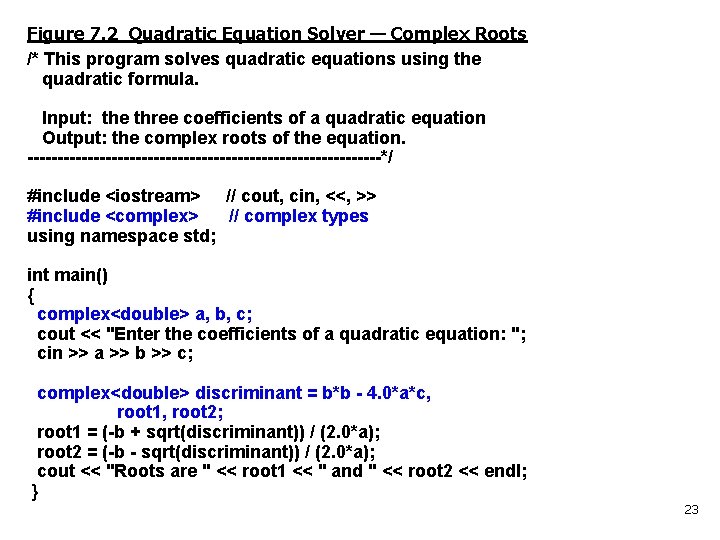
Figure 7. 2 Quadratic Equation Solver — Complex Roots /* This program solves quadratic equations using the quadratic formula. Input: the three coefficients of a quadratic equation Output: the complex roots of the equation. ------------------------------*/ #include <iostream> // cout, cin, <<, >> #include <complex> // complex types using namespace std; int main() { complex<double> a, b, c; cout << "Enter the coefficients of a quadratic equation: "; cin >> a >> b >> c; complex<double> discriminant = b*b - 4. 0*a*c, root 1, root 2; root 1 = (-b + sqrt(discriminant)) / (2. 0*a); root 2 = (-b - sqrt(discriminant)) / (2. 0*a); cout << "Roots are " << root 1 << " and " << root 2 << endl; } 23
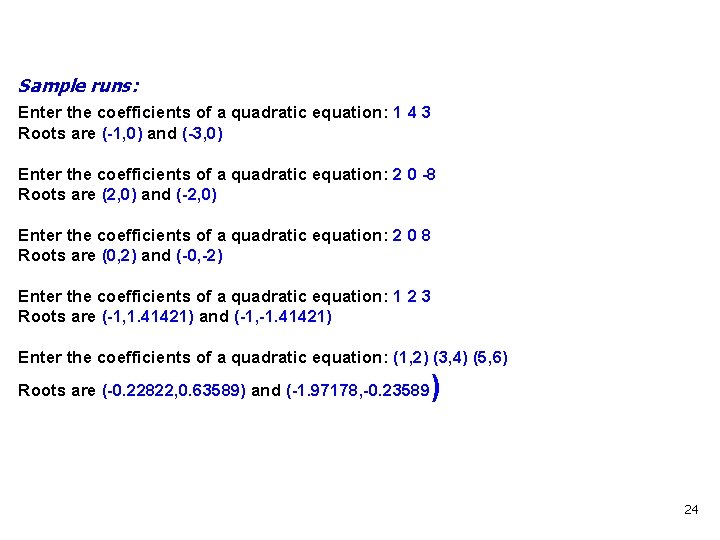
Sample runs: Enter the coefficients of a quadratic equation: 1 4 3 Roots are (-1, 0) and (-3, 0) Enter the coefficients of a quadratic equation: 2 0 -8 Roots are (2, 0) and (-2, 0) Enter the coefficients of a quadratic equation: 2 0 8 Roots are (0, 2) and (-0, -2) Enter the coefficients of a quadratic equation: 1 2 3 Roots are (-1, 1. 41421) and (-1, -1. 41421) Enter the coefficients of a quadratic equation: (1, 2) (3, 4) (5, 6) Roots are (-0. 22822, 0. 63589) and (-1. 97178, -0. 23589 ) 24
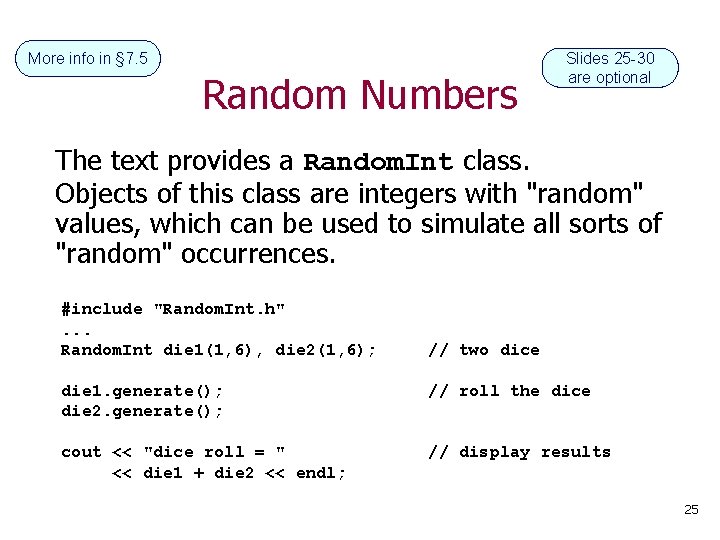
More info in § 7. 5 Random Numbers Slides 25 -30 are optional The text provides a Random. Int class. Objects of this class are integers with "random" values, which can be used to simulate all sorts of "random" occurrences. #include "Random. Int. h". . . Random. Int die 1(1, 6), die 2(1, 6); // two dice die 1. generate(); die 2. generate(); // roll the dice cout << "dice roll = " << die 1 + die 2 << endl; // display results 25
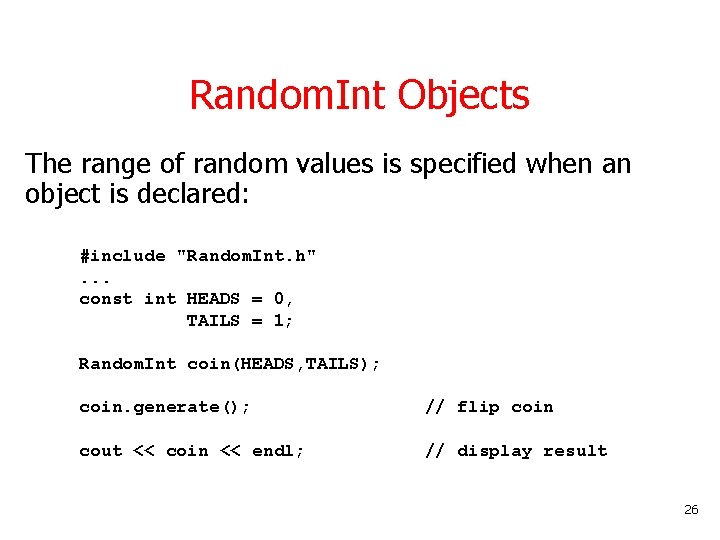
Random. Int Objects The range of random values is specified when an object is declared: #include "Random. Int. h". . . const int HEADS = 0, TAILS = 1; Random. Int coin(HEADS, TAILS); coin. generate(); // flip coin cout << coin << endl; // display result 26
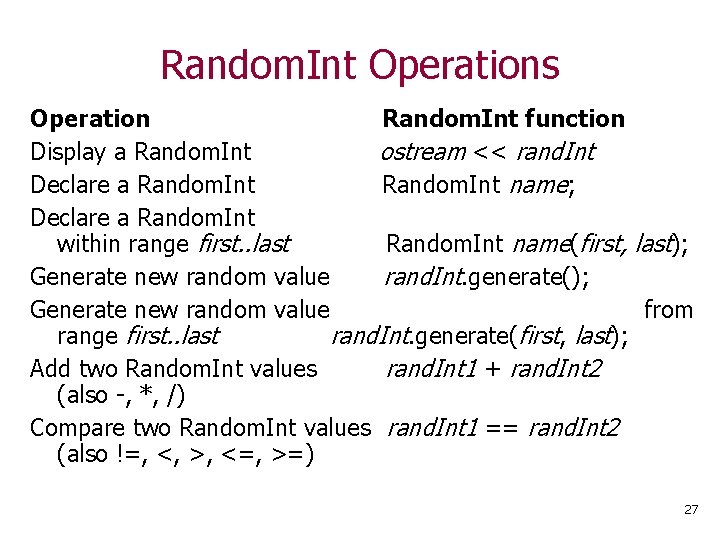
Random. Int Operations Operation Random. Int function Display a Random. Int ostream << rand. Int Declare a Random. Int name; Declare a Random. Int within range first. . last Random. Int name(first, last); Generate new random value rand. Int. generate(); Generate new random value from range first. . last rand. Int. generate(first, last); Add two Random. Int values rand. Int 1 + rand. Int 2 (also -, *, /) Compare two Random. Int values rand. Int 1 == rand. Int 2 (also !=, <, >, <=, >=) 27
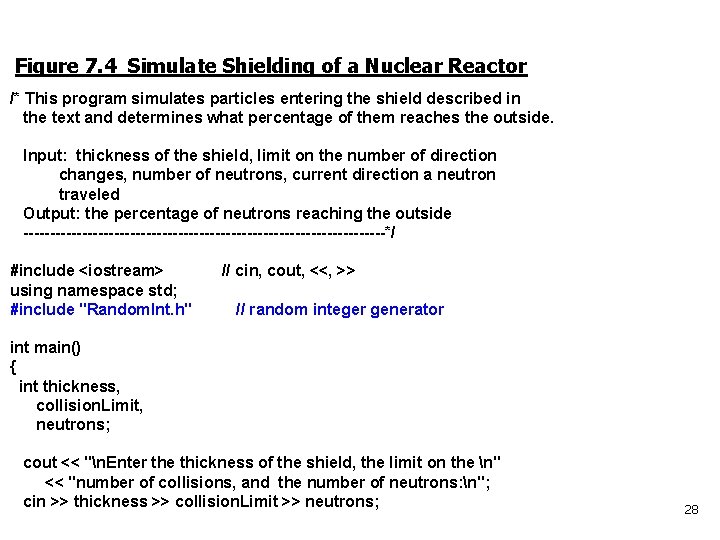
Figure 7. 4 Simulate Shielding of a Nuclear Reactor /* This program simulates particles entering the shield described in the text and determines what percentage of them reaches the outside. Input: thickness of the shield, limit on the number of direction changes, number of neutrons, current direction a neutron traveled Output: the percentage of neutrons reaching the outside ----------------------------------*/ #include <iostream> // cin, cout, <<, >> using namespace std; #include "Random. Int. h" // random integer generator int main() { int thickness, collision. Limit, neutrons; cout << "n. Enter the thickness of the shield, the limit on the n" << "number of collisions, and the number of neutrons: n"; cin >> thickness >> collision. Limit >> neutrons; 28
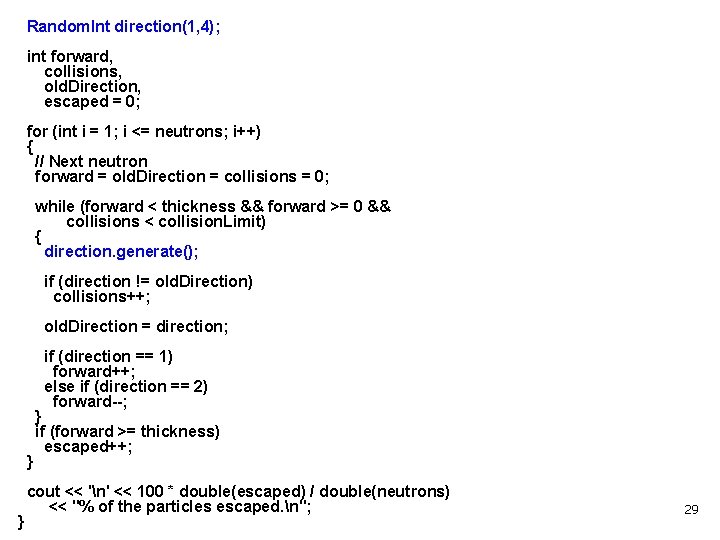
Random. Int direction(1, 4); int forward, collisions, old. Direction, escaped = 0; for (int i = 1; i <= neutrons; i++) { // Next neutron forward = old. Direction = collisions = 0; while (forward < thickness && forward >= 0 && collisions < collision. Limit) { direction. generate(); if (direction != old. Direction) collisions++; old. Direction = direction; if (direction == 1) forward++; else if (direction == 2) forward--; } if (forward >= thickness) escaped++; } cout << 'n' << 100 * double(escaped) / double(neutrons) << "% of the particles escaped. n"; } 29
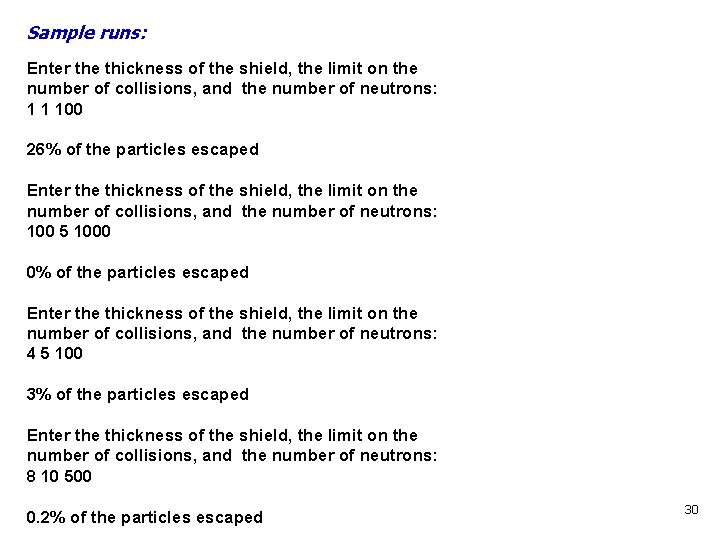
Sample runs: Enter the thickness of the shield, the limit on the number of collisions, and the number of neutrons: 1 1 100 26% of the particles escaped Enter the thickness of the shield, the limit on the number of collisions, and the number of neutrons: 100 5 1000 0% of the particles escaped Enter the thickness of the shield, the limit on the number of collisions, and the number of neutrons: 4 5 100 3% of the particles escaped Enter the thickness of the shield, the limit on the number of collisions, and the number of neutrons: 8 10 500 0. 2% of the particles escaped 30
Some Final Notes about Classes Well-designed classes provide a rich set of operations that make them useful for many problems. Operations can be external (normal) functions to which objects are passed for processing; or they may be internal function members of the class. Function members receive messages to class objects and determine the response. 31
To use a class effectively, you must know what capabilities the class provides; and how to use those capabilities. • Be aware of the functionality a class provides (but don’t memorize the nitty-gritty details). • Know where (in a reference book) to look up the operations a class supports. • Then, when a problem involves an operation on a class object, scan the list of operations looking for one that you can use — don’t reinvent the wheel! 32
- Slides: 32