
User Interface Design Computer Science Software Engineering S
- Slides: 18
User Interface Design Computer Science Software Engineering S. Sambha Murthy MCA, M. Tech Govt. Degree College , Paderu Email. Id : sivakotimurthy 45@gmail. com 1
Learning Objectives: The objectives of User Interface Design are Ø to understand the User Interface design steps Ø to understand the User Interface design issues 2
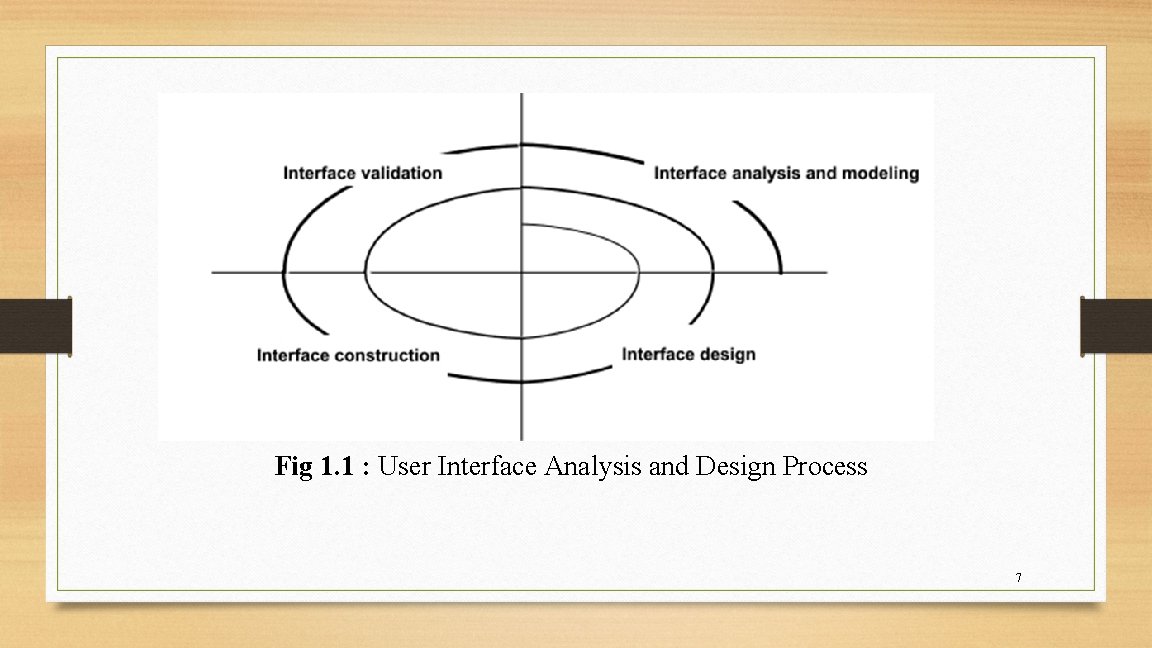
User Interface Design : Ø Once interface analysis has been completed, all tasks (or objects and actions) required by the end user have been identified in detail. Ø After analysis interface design activity begins. Ø Like all software engineering design, Interface design is an iterative process. Ø Each user interface design step occurs a number of times elaborating and refining information developed in the preceding step. 3
Many different user interface design models have been proposed. All models suggest some combination of the following steps. Ø Define interface objects and actions (operations) by using information developed during interface analysis. Ø Define events (user actions) that will cause the state of the user interface to change. Model this behavior. Ø Describe each interface state as it will actually look to the end user. Ø Indicate how the user interprets the state of the system from information provided through the interface. 4
Regardless of the sequence of design tasks the following guidelines should follow while designing user interface. Ø Always follow the golden rules Ø Model how the interface will be implemented Ø Consider the computing environment that will be used. Here computing environment may be display technology, operating system and development tools. 5
User Interface Design Patterns: Ø A design pattern is an abstraction that prescribes a design solution to a specific, well-bounded design problem. Ø There are many design patterns has emerged for Graphical User Interfaces (GUI). 6
Fig 1. 1 : User Interface Analysis and Design Process 7
Design Issues: While designing the user interface the following common design issues need to be considered. They are Ø System response time Ø User help facilities Ø Error information handling, Ø Command labeling. Ø Application accessibility Ø Internationalization 8
System response time: Ø System response time is measured from the point at which the user performs some control action until the software responds with desired output or action. System response time has two important characteristics. They are Ø length Ø variability. 9
User Help Facilities: Ø Almost every user of an interactive, computer-based system requires help now. Ø Several user manuals has provided to users while deploying the software. Ø In most cases modern software applications provide online help facilities that enable a user to get a question answered or resolve a problem without leaving the interface. 10
Error Handling: Error messages and warnings are bad news delivered to users of interactive systems when something went wrong. Every error message or warning produced by an interactive system should have the following characteristics. Ø The message should describe the problem which should understand by the user. Ø The message should provide constructive advice for recovering from the error. 11
Ø The message should indicate any negative consequences of the error so that the user can check to ensure that they have not occurred. Ø The message should be accompanied by an audible or visual cue. Ø The message should be “nonjudgmental. ” That is, the wording should never place blame on the user. 12
Menu and command labeling: The typed command was the most common mode of interaction between user and system software. Ø Typed commands were commonly used for Command Line Interface (CLI) applications. Ø Menu labels are used in Graphical User Interfaces (GUI) applications. Menu labels are very interactive rather than typed commands. 13
Application accessibility: Ø Interface design encompasses mechanisms that enable easy access for those with special needs. Ø Accessibility for users and software engineers who may be physically challenged is an imperative for ethical, legal, and business reasons. Ø A variety of accessibility guidelines provide detailed suggestions for designing interfaces that achieve varying levels of accessibility. 14
Internationalization: Ø User interfaces should be designed to accommodate a generic core of functionality that can be delivered to all who use the software. Ø Localization features enable the interface to be customized for a specific market. Ø A variety of internationalization guidelines are available to software engineers. These guidelines address broad design issues and discrete implementation issues. Ø The Unicode standard has been developed 15
Summary: In this lecture the following topics has covered Ø User Interface Design steps Ø User Interface Design issues 16
References: Ø Software Engineering, A Practitioner’s approach by Roger S. Pressman, 7 th Edition. Ø https: //www. geeksforgeeks. org/software-engineering-user-interface-design/ Ø https: //www. slideshare. net/Saqib. Raza 21/user-interface-analysis-and-design 17
Thank You S Sambha Murthy Lecturer in Computer Science GDC Paderu 18