
USER ACCEPTANCE TESTING 16 09 2013 1 WHAT
- Slides: 39
USER ACCEPTANCE TESTING 16 -09 -2013 1
WHAT IS UAT User Acceptance Test aims to ensure that the new development meets the business requirements with acceptable for the end users quality. 2
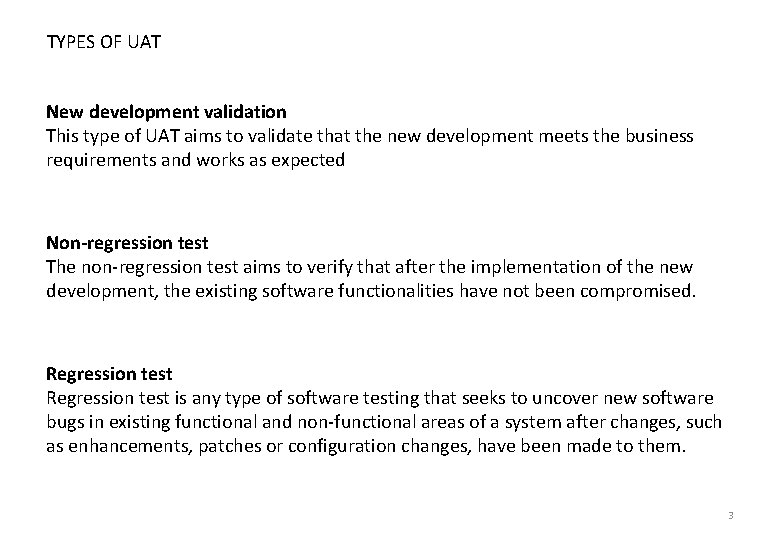
TYPES OF UAT New development validation This type of UAT aims to validate that the new development meets the business requirements and works as expected Non-regression test The non-regression test aims to verify that after the implementation of the new development, the existing software functionalities have not been compromised. Regression test is any type of software testing that seeks to uncover new software bugs in existing functional and non-functional areas of a system after changes, such as enhancements, patches or configuration changes, have been made to them. 3
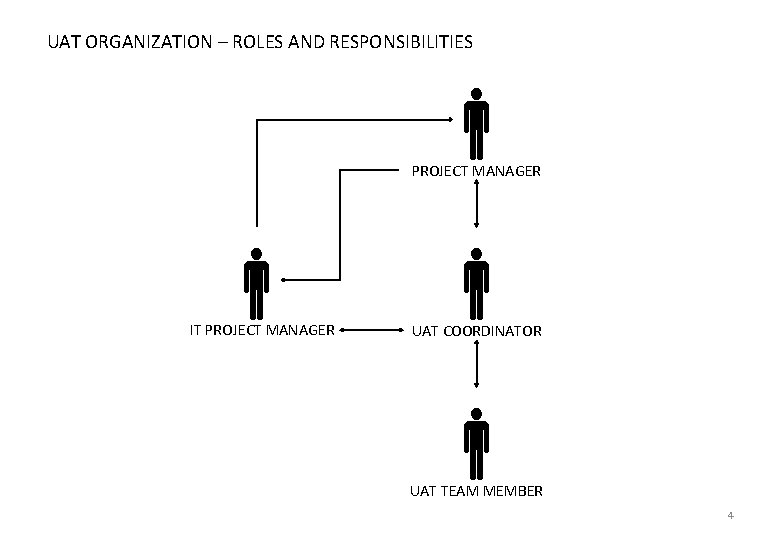
UAT ORGANIZATION – ROLES AND RESPONSIBILITIES PROJECT MANAGER IT PROJECT MANAGER UAT COORDINATOR UAT TEAM MEMBER 4
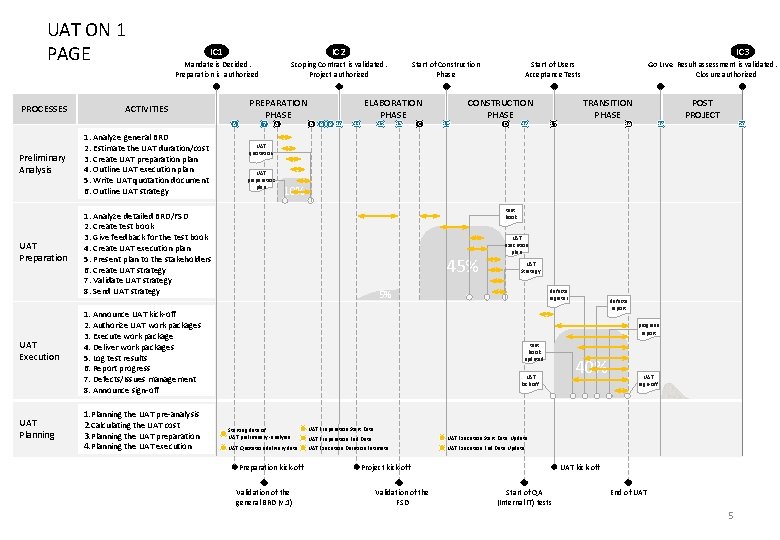
UAT ON 1 PAGE PROCESSES IC 1 IC 2 Mandate is Decided. Preparation is authorized Scoping Contract is validated. Project authorized ACTIVITIES 6 Preliminary Analysis UAT Preparation UAT Execution UAT Planning 1. Analyze general BRD 2. Estimate the UAT duration/cost 3. Create UAT preparation plan 4. Outline UAT execution plan 5. Write UAT quotation document 6. Outline UAT strategy PREPARATION PHASE 7 A B 8 9 10 IC 3 11 ELABORATION PHASE 12 13 C 15 CONSTRUCTION PHASE D 16 Go Live Result assessment is validated. Closure authorized TRANSITION PHASE 17 18 19 POST PROJECT 20 UAT quotation UAT preparation plan 10% test book 1. Analyze detailed BRD/FSD 2. Create test book 3. Give feedback for the test book 4. Create UAT execution plan 5. Present plan to the stakeholders 6. Create UAT strategy 7. Validate UAT strategy 8. Send UAT strategy 45% UAT execution plan UAT Strategy defects register 5% 1. Announce UAT kick-off 2. Authorize UAT work packages 3. Execute work package 4. Deliver work packages 5. Log test results 6. Report progress 7. Defects/Issues management 8. Announce sign-off 1. Planning the UAT pre-analysis 2. Calculating the UAT cost 3. Planning the UAT preparation 4. Planning the UAT execution Start of Users Acceptance Tests Start of Construction Phase defects report progress report test book updated UAT kick-off Starting date of UAT preliminary -analysis UAT Preparation Start Date UAT Preparation End Date UAT Execution Start Date Update UAT Quotation delivery date UAT Execution Duration Estimate UAT Execution End Date Update Preparation kick-off Validation of the general BRD (v. 1) Project kick-off Validation of the FSD 40% UAT sign-off UAT kick-off Start of QA (Internal IT) tests End of UAT 5
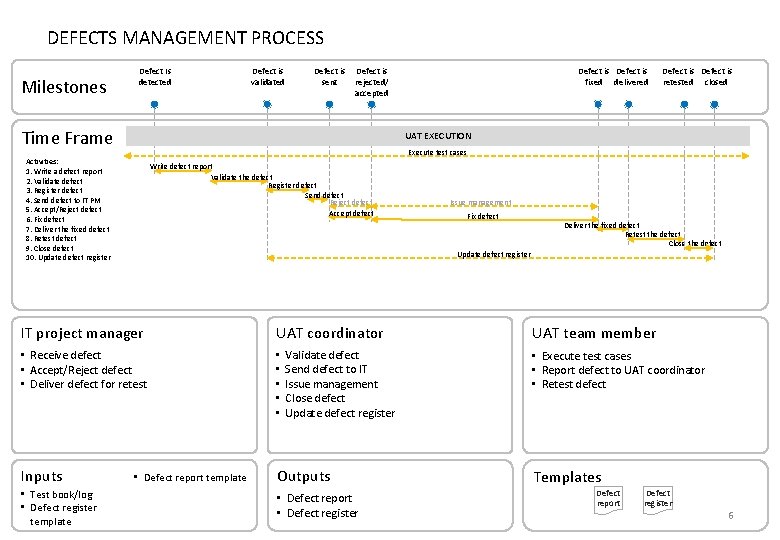
DEFECTS MANAGEMENT PROCESS Milestones Defect Is detected Defect is validated Defect is sent Defect is rejected/ accepted Time Frame Defect is retested closed UAT EXECUTION Execute test cases Activities: 1. Write a defect report 2. Validate defect 3. Register defect 4. Send defect to IT PM 5. Accept/Reject defect 6. Fix defect 7. Deliver the fixed defect 8. Retest defect 9. Close defect 10. Update defect register Write defect report Validate the defect Register defect Send defect Reject defect Accept defect Issue management Fix defect Deliver the fixed defect Retest the defect Close the defect Update defect register IT project manager UAT coordinator • Receive defect • Accept/Reject defect • Deliver defect for retest • • • Inputs Outputs • Test book/log • Defect register template Defect is fixed delivered • Defect report template Validate defect Send defect to IT Issue management Close defect Update defect register • Defect report • Defect register UAT team member • Execute test cases • Report defect to UAT coordinator • Retest defect Templates Defect report Defect register 6
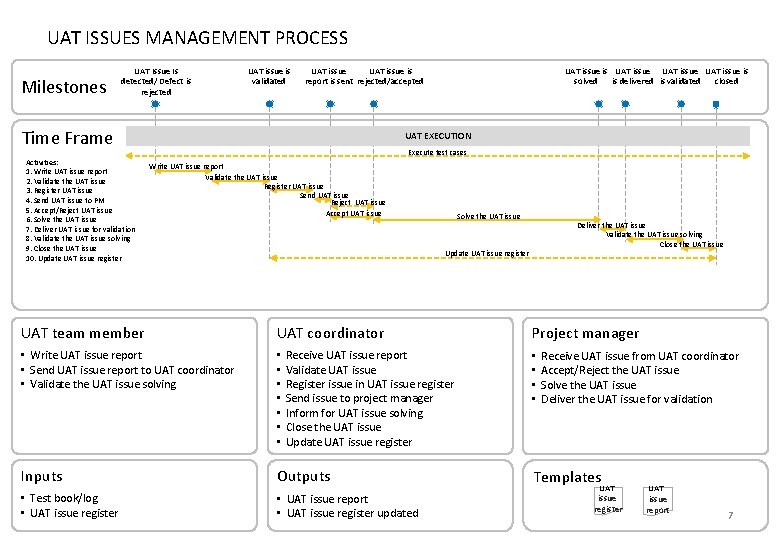
UAT ISSUES MANAGEMENT PROCESS Milestones UAT Issue Is detected/ Defect is rejected UAT issue is validated UAT issue is report is sent rejected/accepted Time Frame Activities: 1. Write UAT issue report 2. Validate the UAT issue 3. Register UAT issue 4. Send UAT issue to PM 5. Accept/Reject UAT issue 6. Solve the UAT issue 7. Deliver UAT issue for validation 8. Validate the UAT issue solving 9. Close the UAT issue 10. Update UAT issue register UAT issue is UAT issue is solved is delivered is validated closed UAT EXECUTION Execute test cases Write UAT issue report Validate the UAT issue Register UAT issue Send UAT issue Reject UAT issue Accept UAT issue Solve the UAT issue Deliver the UAT issue Validate the UAT issue solving Close the UAT issue Update UAT issue register UAT team member UAT coordinator • Write UAT issue report • Send UAT issue report to UAT coordinator • Validate the UAT issue solving • • Inputs Outputs • Test book/log • UAT issue register • UAT issue report • UAT issue register updated Receive UAT issue report Validate UAT issue Register issue in UAT issue register Send issue to project manager Inform for UAT issue solving Close the UAT issue Update UAT issue register Project manager • • Receive UAT issue from UAT coordinator Accept/Reject the UAT issue Solve the UAT issue Deliver the UAT issue for validation Templates UAT issue register UAT issue report 7
HOW TO CREATE TEST BOOK STEP BY STEP 8
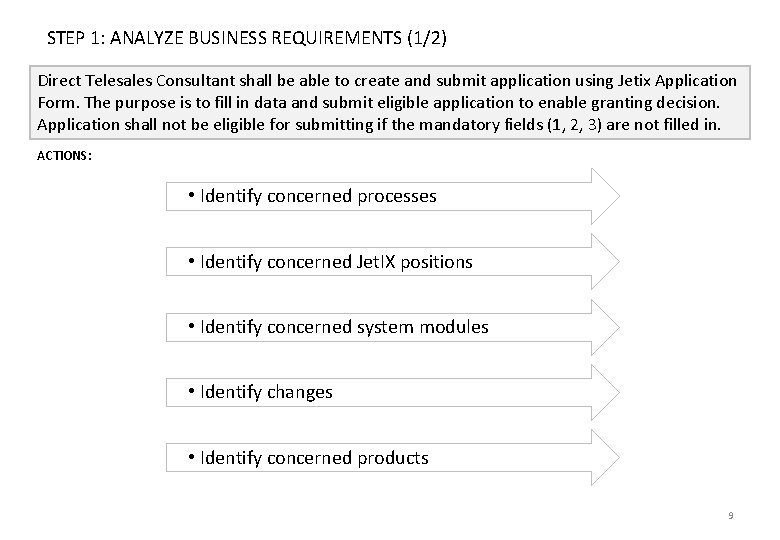
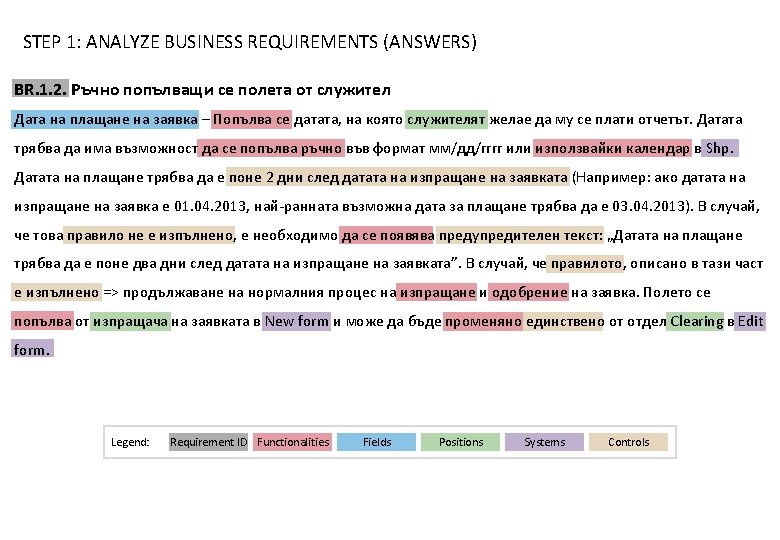
STEP 1: ANALYZE BUSINESS REQUIREMENTS (1/2) Direct Telesales Consultant shall be able to create and submit application using Jetix Application Form. The purpose is to fill in data and submit eligible application to enable granting decision. Application shall not be eligible for submitting if the mandatory fields (1, 2, 3) are not filled in. ACTIONS: • Identify concerned processes • Identify concerned Jet. IX positions • Identify concerned system modules • Identify changes • Identify concerned products 9
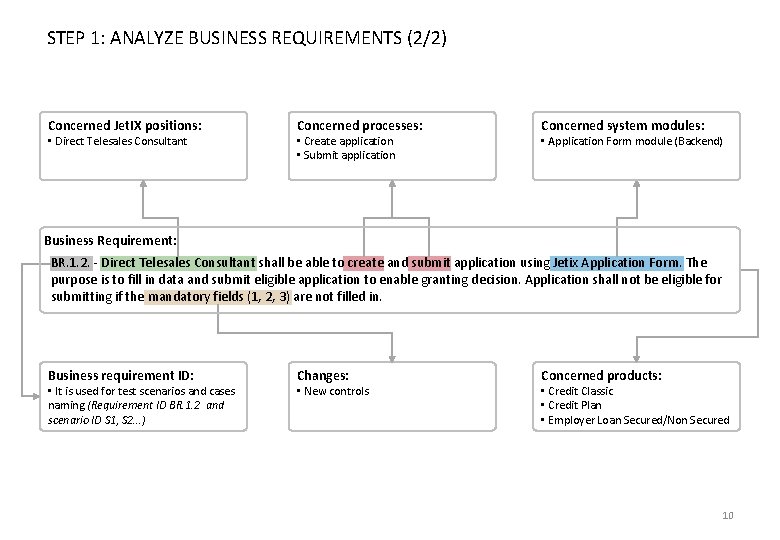
STEP 1: ANALYZE BUSINESS REQUIREMENTS (2/2) Concerned Jet. IX positions: • Direct Telesales Consultant Concerned processes: • Create application • Submit application Concerned system modules: • Application Form module (Backend) Business Requirement: BR. 1. 2. - Direct Telesales Consultant shall be able to create and submit application using Jetix Application Form. The purpose is to fill in data and submit eligible application to enable granting decision. Application shall not be eligible for submitting if the mandatory fields (1, 2, 3) are not filled in. Business requirement ID: • It is used for test scenarios and cases naming (Requirement ID BR. 1. 2 and scenario ID S 1, S 2…) Changes: • New controls Concerned products: • Credit Classic • Credit Plan • Employer Loan Secured/Non Secured 10
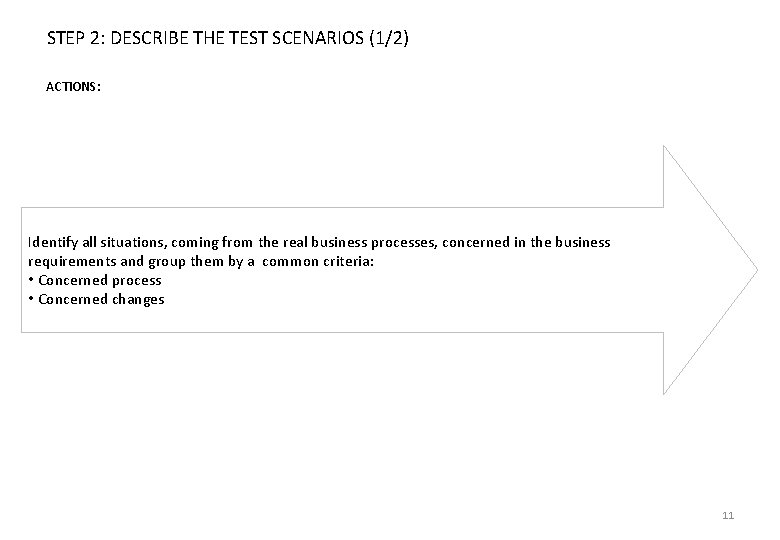
STEP 2: DESCRIBE THE TEST SCENARIOS (1/2) ACTIONS: Identify all situations, coming from the real business processes, concerned in the business requirements and group them by a common criteria: • Concerned process • Concerned changes 11
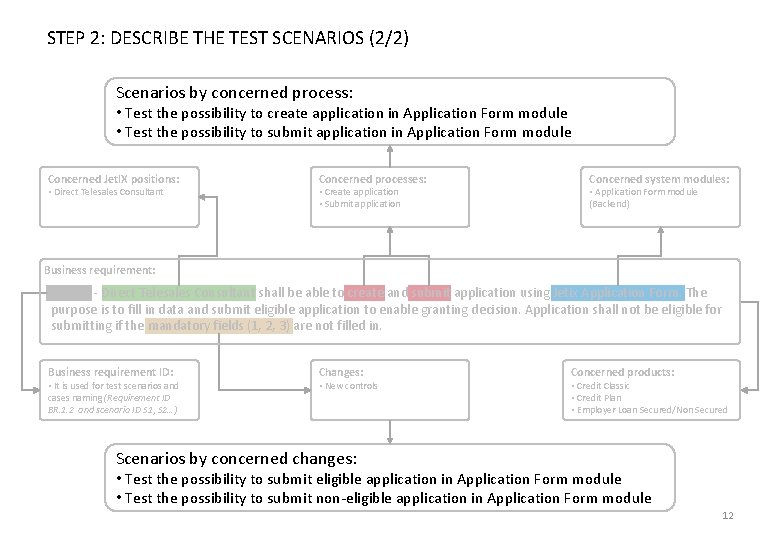
STEP 2: DESCRIBE THE TEST SCENARIOS (2/2) Scenarios by concerned process: • Test the possibility to create application in Application Form module • Test the possibility to submit application in Application Form module Concerned Jet. IX positions: • Direct Telesales Consultant Concerned processes: • Create application • Submit application Concerned system modules: • Application Form module (Backend) Business requirement: BR. 1. 2. - Direct Telesales Consultant shall be able to create and submit application using Jetix Application Form. The purpose is to fill in data and submit eligible application to enable granting decision. Application shall not be eligible for submitting if the mandatory fields (1, 2, 3) are not filled in. Business requirement ID: • It is used for test scenarios and cases naming (Requirement ID BR. 1. 2 and scenario ID S 1, S 2…) Changes: • New controls Concerned products: • Credit Classic • Credit Plan • Employer Loan Secured/Non Secured Scenarios by concerned changes: • Test the possibility to submit eligible application in Application Form module • Test the possibility to submit non-eligible application in Application Form module 12
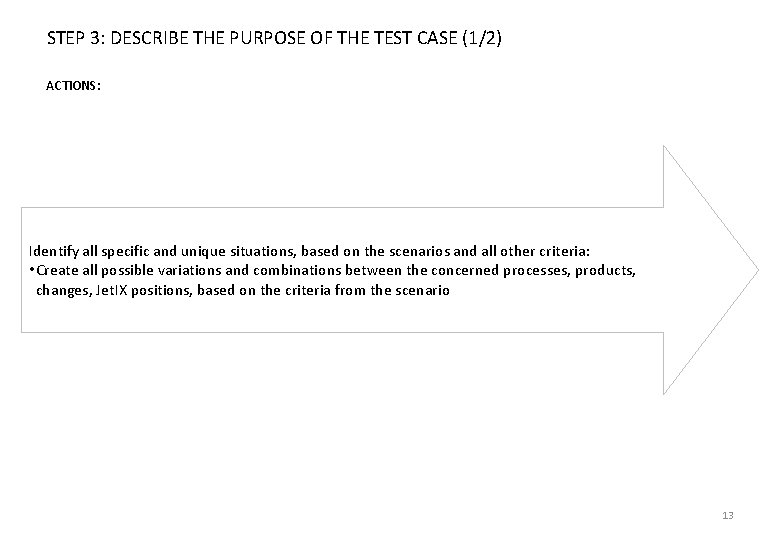
STEP 3: DESCRIBE THE PURPOSE OF THE TEST CASE (1/2) ACTIONS: Identify all specific and unique situations, based on the scenarios and all other criteria: • Create all possible variations and combinations between the concerned processes, products, changes, Jet. IX positions, based on the criteria from the scenario 13
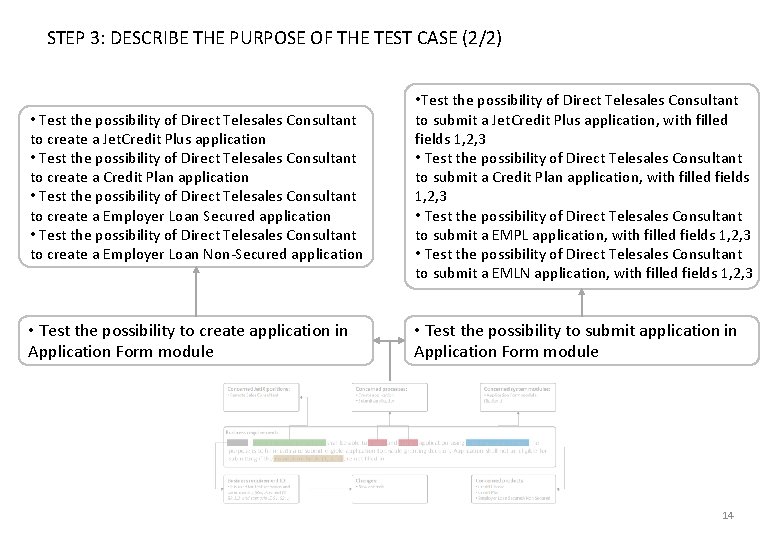
STEP 3: DESCRIBE THE PURPOSE OF THE TEST CASE (2/2) • Test the possibility of Direct Telesales Consultant to create a Jet. Credit Plus application • Test the possibility of Direct Telesales Consultant to create a Credit Plan application • Test the possibility of Direct Telesales Consultant to create a Employer Loan Secured application • Test the possibility of Direct Telesales Consultant to create a Employer Loan Non-Secured application • Test the possibility of Direct Telesales Consultant to submit a Jet. Credit Plus application, with filled fields 1, 2, 3 • Test the possibility of Direct Telesales Consultant to submit a Credit Plan application, with filled fields 1, 2, 3 • Test the possibility of Direct Telesales Consultant to submit a EMPL application, with filled fields 1, 2, 3 • Test the possibility of Direct Telesales Consultant to submit a EMLN application, with filled fields 1, 2, 3 • Test the possibility to create application in Application Form module • Test the possibility to submit application in Application Form module 14
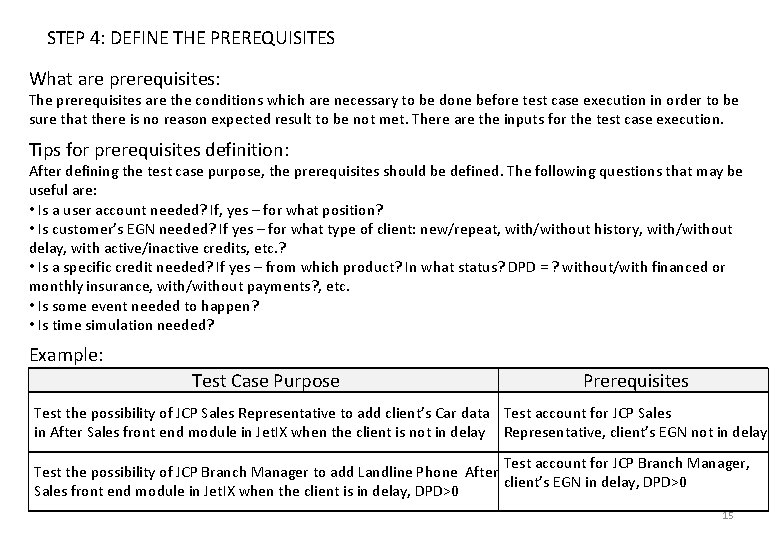
STEP 4: DEFINE THE PREREQUISITES What are prerequisites: The prerequisites are the conditions which are necessary to be done before test case execution in order to be sure that there is no reason expected result to be not met. There are the inputs for the test case execution. Tips for prerequisites definition: After defining the test case purpose, the prerequisites should be defined. The following questions that may be useful are: • Is a user account needed? If, yes – for what position? • Is customer’s EGN needed? If yes – for what type of client: new/repeat, with/without history, with/without delay, with active/inactive credits, etc. ? • Is a specific credit needed? If yes – from which product? In what status? DPD = ? without/with financed or monthly insurance, with/without payments? , etc. • Is some event needed to happen? • Is time simulation needed? Example: Test Case Purpose Prerequisites Test the possibility of JCP Sales Representative to add client’s Car data Test account for JCP Sales in After Sales front end module in Jet. IX when the client is not in delay Representative, client’s EGN not in delay Test account for JCP Branch Manager, Test the possibility of JCP Branch Manager to add Landline Phone After client’s EGN in delay, DPD>0 Sales front end module in Jet. IX when the client is in delay, DPD>0 15
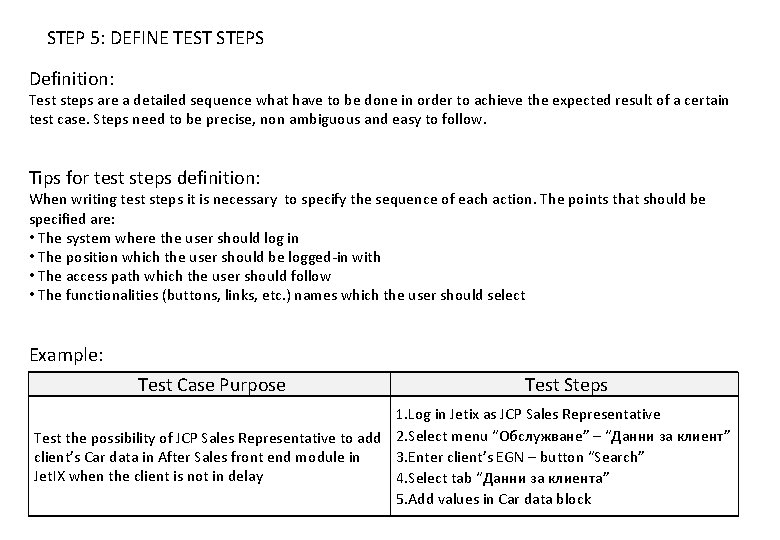
STEP 5: DEFINE TEST STEPS Definition: Test steps are a detailed sequence what have to be done in order to achieve the expected result of a certain test case. Steps need to be precise, non ambiguous and easy to follow. Tips for test steps definition: When writing test steps it is necessary to specify the sequence of each action. The points that should be specified are: • The system where the user should log in • The position which the user should be logged-in with • The access path which the user should follow • The functionalities (buttons, links, etc. ) names which the user should select Example: Test Case Purpose Test Steps 1. Log in Jetix as JCP Sales Representative Test the possibility of JCP Sales Representative to add 2. Select menu “Обслужване” – “Данни за клиент” client’s Car data in After Sales front end module in 3. Enter client’s EGN – button “Search” Jet. IX when the client is not in delay 4. Select tab “Данни за клиента” 5. Add values in Car data block 16
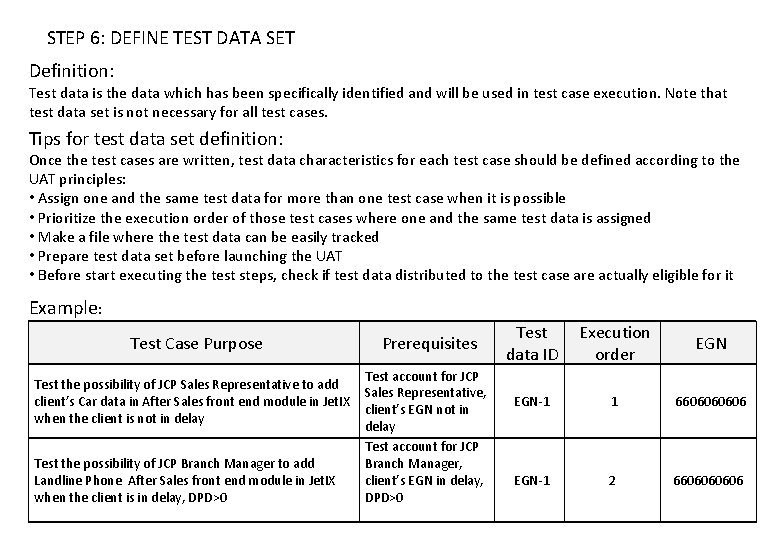
STEP 6: DEFINE TEST DATA SET Definition: Test data is the data which has been specifically identified and will be used in test case execution. Note that test data set is not necessary for all test cases. Tips for test data set definition: Once the test cases are written, test data characteristics for each test case should be defined according to the UAT principles: • Assign one and the same test data for more than one test case when it is possible • Prioritize the execution order of those test cases where one and the same test data is assigned • Make a file where the test data can be easily tracked • Prepare test data set before launching the UAT • Before start executing the test steps, check if test data distributed to the test case are actually eligible for it Example: Test Case Purpose Prerequisites Test the possibility of JCP Sales Representative to add client’s Car data in After Sales front end module in Jet. IX when the client is not in delay Test the possibility of JCP Branch Manager to add Landline Phone After Sales front end module in Jet. IX when the client is in delay, DPD>0 Test account for JCP Sales Representative, client’s EGN not in delay Test account for JCP Branch Manager, client’s EGN in delay, DPD>0 PMO@bnpparibas-pf. bg Test data ID Execution order EGN-1 1 660606 EGN-1 2 660606 17
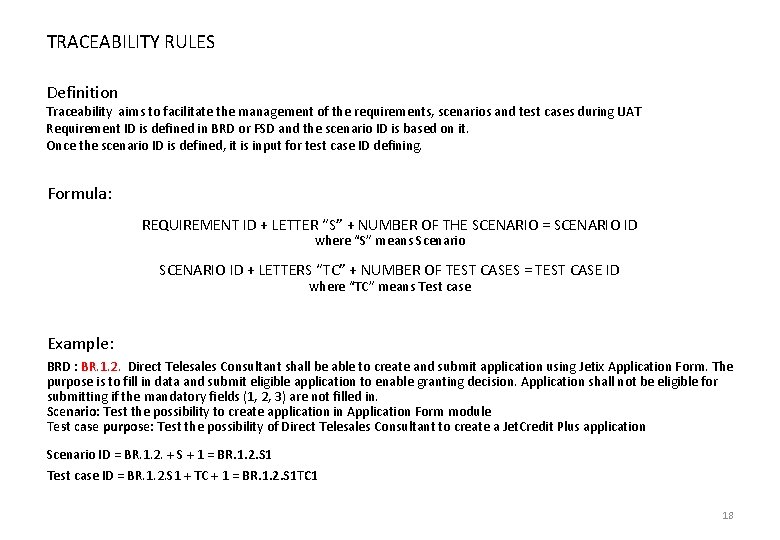
TRACEABILITY RULES Definition Traceability aims to facilitate the management of the requirements, scenarios and test cases during UAT Requirement ID is defined in BRD or FSD and the scenario ID is based on it. Once the scenario ID is defined, it is input for test case ID defining. Formula: REQUIREMENT ID + LETTER “S” + NUMBER OF THE SCENARIO = SCENARIO ID where “S” means Scenario SCENARIO ID + LETTERS “TC” + NUMBER OF TEST CASES = TEST CASE ID where “TC” means Test case Example: BRD : BR. 1. 2. Direct Telesales Consultant shall be able to create and submit application using Jetix Application Form. The purpose is to fill in data and submit eligible application to enable granting decision. Application shall not be eligible for submitting if the mandatory fields (1, 2, 3) are not filled in. Scenario: Test the possibility to create application in Application Form module Test case purpose: Test the possibility of Direct Telesales Consultant to create a Jet. Credit Plus application Scenario ID = BR. 1. 2. + S + 1 = BR. 1. 2. S 1 Test case ID = BR. 1. 2. S 1 + TC + 1 = BR. 1. 2. S 1 TC 1 18
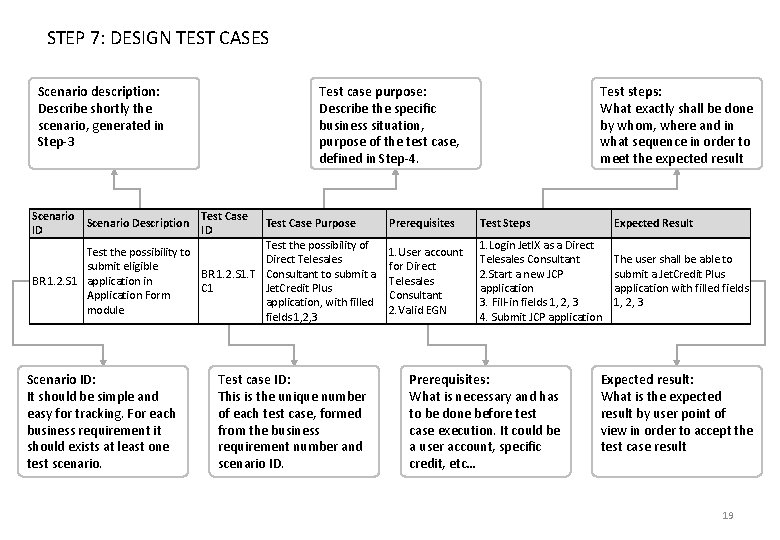
STEP 7: DESIGN TEST CASES Scenario description: Describe shortly the scenario, generated in Step-3 Scenario Description ID Test case purpose: Describe the specific business situation, purpose of the test case, defined in Step-4. Test Case ID Test Case Purpose Test the possibility of Test the possibility to Direct Telesales submit eligible BR. 1. 2. S 1. T Consultant to submit a BR. 1. 2. S 1 application in C 1 Jet. Credit Plus Application Form application, with filled module fields 1, 2, 3 Scenario ID: It should be simple and easy for tracking. For each business requirement it should exists at least one test scenario. Test case ID: This is the unique number of each test case, formed from the business requirement number and scenario ID. Test steps: What exactly shall be done by whom, where and in what sequence in order to meet the expected result Prerequisites Test Steps Expected Result 1. User account for Direct Telesales Consultant 2. Valid EGN 1. Login Jet. IX as a Direct Telesales Consultant 2. Start a new JCP application 3. Fill-in fields 1, 2, 3 4. Submit JCP application The user shall be able to submit a Jet. Credit Plus application with filled fields 1, 2, 3 Prerequisites: What is necessary and has to be done before test case execution. It could be a user account, specific credit, etc… Expected result: What is the expected result by user point of view in order to accept the test case result 19
FROM BUSINESS REQUIREMENT TO TEST CASES Practical exercise PMO@bnpparibas-pf. bg 20
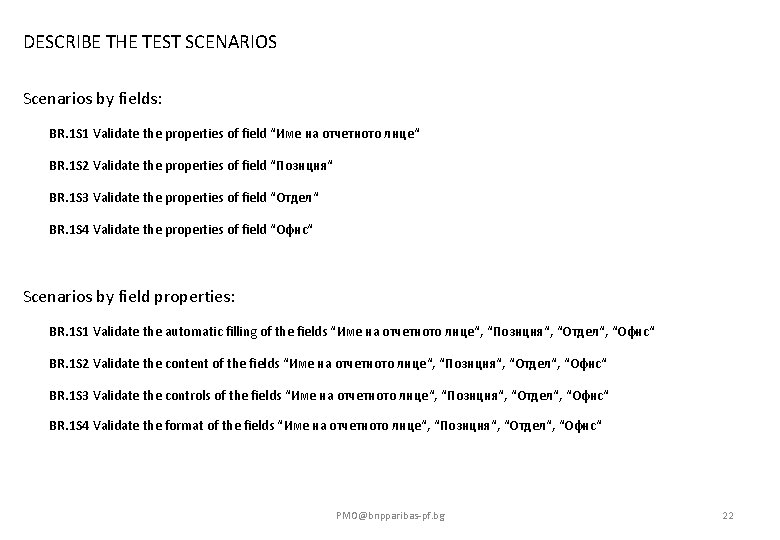
DESCRIBE THE TEST SCENARIOS Scenarios by fields: BR. 1 S 1 Validate the properties of field “Име на отчетното лице“ BR. 1 S 2 Validate the properties of field “Позиция“ BR. 1 S 3 Validate the properties of field “Отдел“ BR. 1 S 4 Validate the properties of field “Офис“ Scenarios by field properties: BR. 1 S 1 Validate the automatic filling of the fields “Име на отчетното лице“, “Позиция“, “Отдел“, “Офис“ BR. 1 S 2 Validate the content of the fields “Име на отчетното лице“, “Позиция“, “Отдел“, “Офис“ BR. 1 S 3 Validate the controls of the fields “Име на отчетното лице“, “Позиция“, “Отдел“, “Офис“ BR. 1 S 4 Validate the format of the fields “Име на отчетното лице“, “Позиция“, “Отдел“, “Офис“ PMO@bnpparibas-pf. bg 22
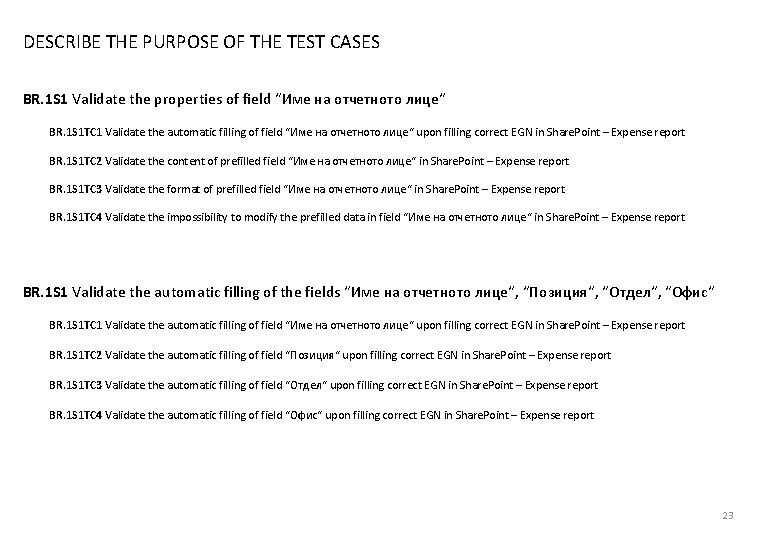
DESCRIBE THE PURPOSE OF THE TEST CASES BR. 1 S 1 Validate the properties of field “Име на отчетното лице“ BR. 1 S 1 TC 1 Validate the automatic filling of field “Име на отчетното лице“ upon filling correct EGN in Share. Point – Expense report BR. 1 S 1 TC 2 Validate the content of prefilled field “Име на отчетното лице“ in Share. Point – Expense report BR. 1 S 1 TC 3 Validate the format of prefilled field “Име на отчетното лице“ in Share. Point – Expense report BR. 1 S 1 TC 4 Validate the impossibility to modify the prefilled data in field “Име на отчетното лице“ in Share. Point – Expense report BR. 1 S 1 Validate the automatic filling of the fields “Име на отчетното лице“, “Позиция“, “Отдел“, “Офис“ BR. 1 S 1 TC 1 Validate the automatic filling of field “Име на отчетното лице“ upon filling correct EGN in Share. Point – Expense report BR. 1 S 1 TC 2 Validate the automatic filling of field “Позиция“ upon filling correct EGN in Share. Point – Expense report BR. 1 S 1 TC 3 Validate the automatic filling of field “Отдел“ upon filling correct EGN in Share. Point – Expense report BR. 1 S 1 TC 4 Validate the automatic filling of field “Офис“ upon filling correct EGN in Share. Point – Expense report 23
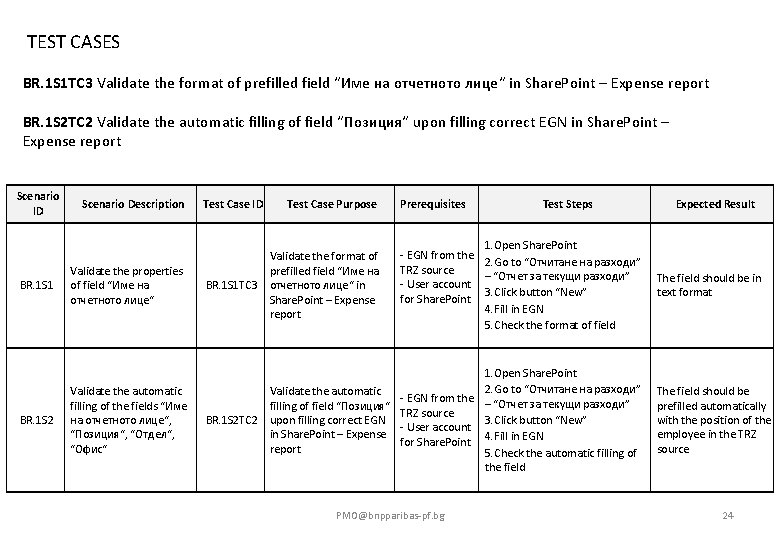
TEST CASES BR. 1 S 1 TC 3 Validate the format of prefilled field “Име на отчетното лице“ in Share. Point – Expense report BR. 1 S 2 TC 2 Validate the automatic filling of field “Позиция“ upon filling correct EGN in Share. Point – Expense report Scenario ID BR. 1 S 1 BR. 1 S 2 Scenario Description Test Case ID Test Case Purpose Prerequisites Test Steps 1. Open Share. Point - EGN from the 2. Go to “Отчитане на разходи” TRZ source – “Отчет за текущи разходи” - User account 3. Click button “New” for Share. Point 4. Fill in EGN 5. Check the format of field Validate the properties of field “Име на отчетното лице“ Validate the format of prefilled field “Име на BR. 1 S 1 TC 3 отчетното лице“ in Share. Point – Expense report Validate the automatic filling of the fields “Име на отчетното лице“, “Позиция“, “Отдел“, “Офис“ 1. Open Share. Point 2. Go to “Отчитане на разходи” Validate the automatic - EGN from the – “Отчет за текущи разходи” filling of field “Позиция“ TRZ source 3. Click button “New” BR. 1 S 2 TC 2 upon filling correct EGN - User account in Share. Point – Expense for Share. Point 4. Fill in EGN report 5. Check the automatic filling of the field PMO@bnpparibas-pf. bg Expected Result The field should be in text format The field should be prefilled automatically with the position of the employee in the TRZ source 24
PRACTICAL EXERCISE Show us what you’ve learned! 25
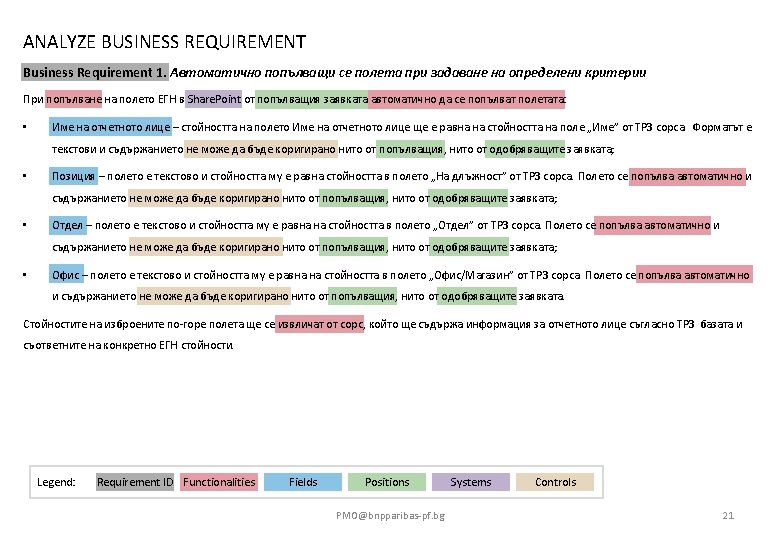
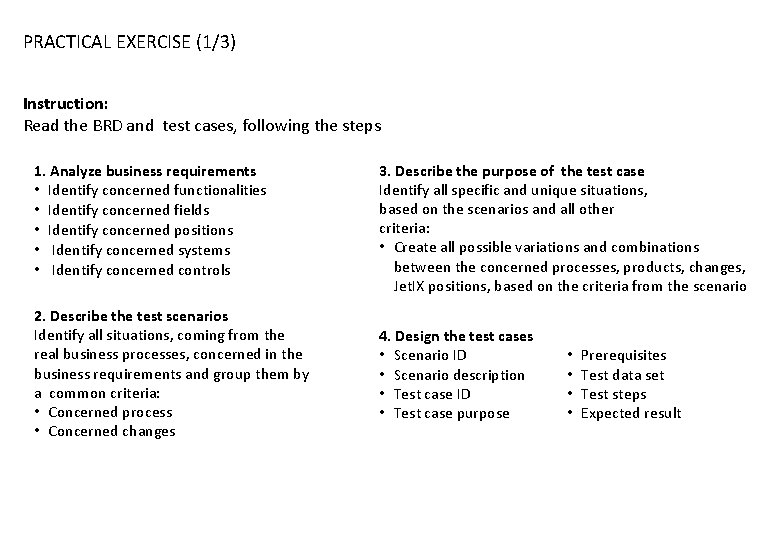
PRACTICAL EXERCISE (1/3) Instruction: Read the BRD and test cases, following the steps 1. Analyze business requirements • Identify concerned functionalities • Identify concerned fields • Identify concerned positions • Identify concerned systems • Identify concerned controls 3. Describe the purpose of the test case Identify all specific and unique situations, based on the scenarios and all other criteria: • Create all possible variations and combinations between the concerned processes, products, changes, Jet. IX positions, based on the criteria from the scenario 2. Describe the test scenarios Identify all situations, coming from the real business processes, concerned in the business requirements and group them by a common criteria: • Concerned process • Concerned changes 4. Design the test cases • Scenario ID • Scenario description • Test case ID • Test case purpose • • Prerequisites Test data set Test steps Expected result
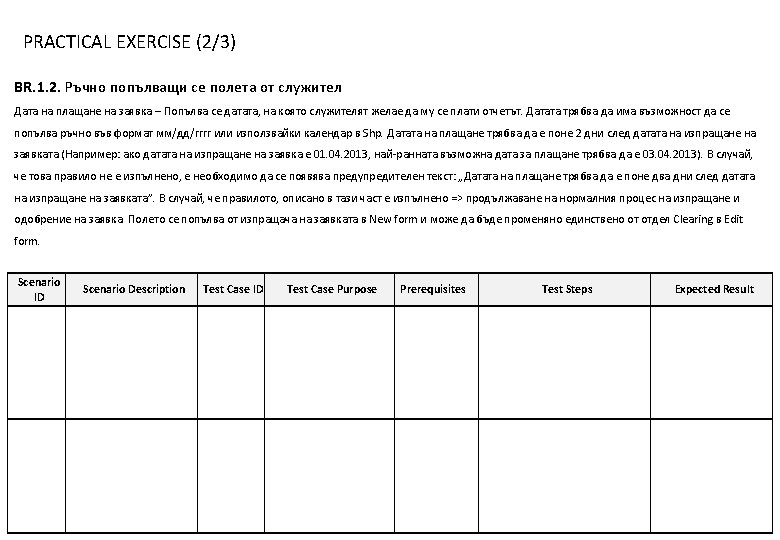
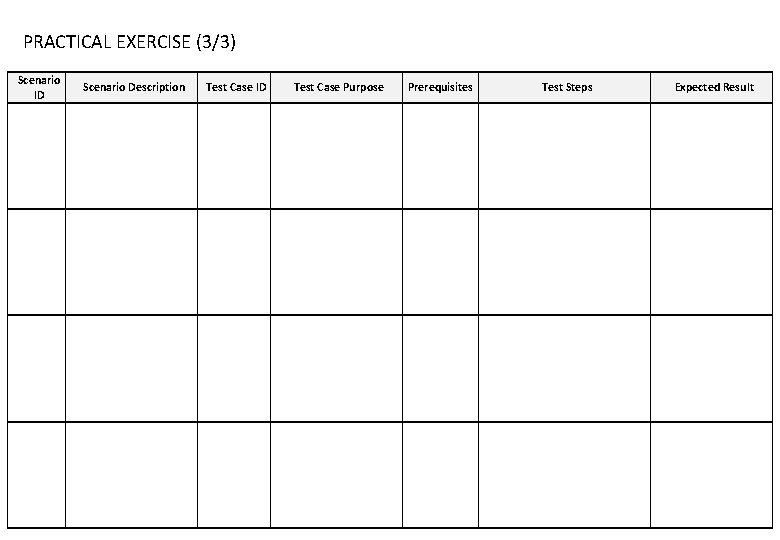
PRACTICAL EXERCISE (3/3) Scenario ID Scenario Description Test Case ID Test Case Purpose Prerequisites Test Steps Expected Result
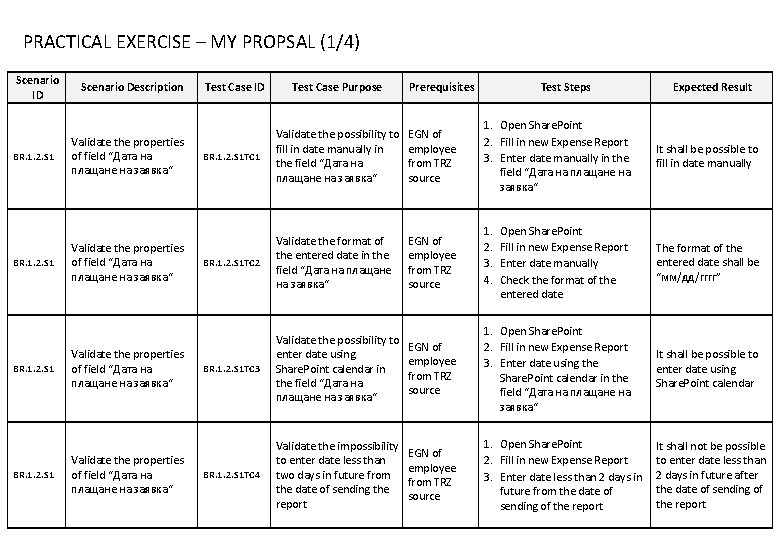
PRACTICAL EXERCISE – MY PROPSAL (1/4) Scenario ID BR. 1. 2. S 1 Scenario Description Validate the properties of field “Дата на плащане на заявка“ Test Case ID Test Case Purpose Prerequisites BR. 1. 2. S 1 TC 1 Validate the possibility to fill in date manually in the field “Дата на плащане на заявка“ EGN of employee from TRZ source BR. 1. 2. S 1 TC 2 Validate the format of the entered date in the field “Дата на плащане на заявка“ EGN of employee from TRZ source BR. 1. 2. S 1 TC 3 Validate the possibility to enter date using Share. Point calendar in the field “Дата на плащане на заявка“ BR. 1. 2. S 1 TC 4 Validate the impossibility to enter date less than two days in future from the date of sending the report Test Steps 1. Open Share. Point 2. Fill in new Expense Report 3. Enter date manually in the field “Дата на плащане на заявка“ 1. 2. 3. 4. Expected Result It shall be possible to fill in date manually Open Share. Point Fill in new Expense Report Enter date manually Check the format of the entered date The format of the entered date shall be “мм/дд/гггг” EGN of employee from TRZ source 1. Open Share. Point 2. Fill in new Expense Report 3. Enter date using the Share. Point calendar in the field “Дата на плащане на заявка“ It shall be possible to enter date using Share. Point calendar EGN of employee from TRZ source 1. Open Share. Point 2. Fill in new Expense Report 3. Enter date less than 2 days in future from the date of sending of the report It shall not be possible to enter date less than 2 days in future after the date of sending of the report
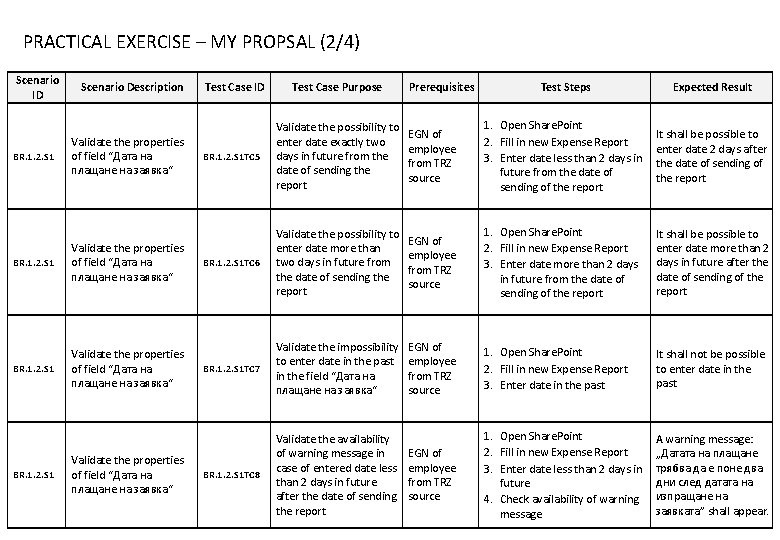
PRACTICAL EXERCISE – MY PROPSAL (2/4) Scenario ID BR. 1. 2. S 1 Scenario Description Validate the properties of field “Дата на плащане на заявка“ BR. 1. 2. S 1 Validate the properties of field “Дата на плащане на заявка“ Test Case ID Test Case Purpose Prerequisites Test Steps Expected Result BR. 1. 2. S 1 TC 5 Validate the possibility to enter date exactly two days in future from the date of sending the report EGN of employee from TRZ source 1. Open Share. Point 2. Fill in new Expense Report 3. Enter date less than 2 days in future from the date of sending of the report It shall be possible to enter date 2 days after the date of sending of the report BR. 1. 2. S 1 TC 6 Validate the possibility to enter date more than two days in future from the date of sending the report EGN of employee from TRZ source 1. Open Share. Point 2. Fill in new Expense Report 3. Enter date more than 2 days in future from the date of sending of the report It shall be possible to enter date more than 2 days in future after the date of sending of the report BR. 1. 2. S 1 TC 7 Validate the impossibility to enter date in the past in the field “Дата на плащане на заявка“ EGN of employee from TRZ source 1. Open Share. Point 2. Fill in new Expense Report 3. Enter date in the past It shall not be possible to enter date in the past BR. 1. 2. S 1 TC 8 Validate the availability of warning message in case of entered date less than 2 days in future after the date of sending the report EGN of employee from TRZ source 1. Open Share. Point 2. Fill in new Expense Report 3. Enter date less than 2 days in future 4. Check availability of warning message A warning message: „Датата на плащане трябва да е поне два дни след датата на изпращане на заявката” shall appear.
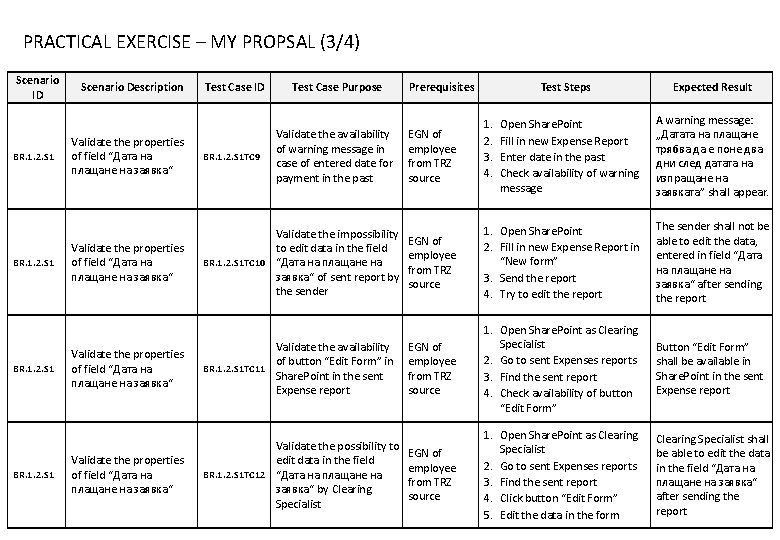
PRACTICAL EXERCISE – MY PROPSAL (3/4) Scenario ID BR. 1. 2. S 1 Scenario Description Test Case ID Test Case Purpose Validate the availability of warning message in case of entered date for payment in the past Validate the properties of field “Дата на плащане на заявка“ BR. 1. 2. S 1 TC 9 Validate the properties of field “Дата на плащане на заявка“ Validate the impossibility to edit data in the field BR. 1. 2. S 1 TC 10 “Дата на плащане на заявка“ of sent report by the sender Validate the properties of field “Дата на плащане на заявка“ Validate the availability of button “Edit Form” in BR. 1. 2. S 1 TC 11 Share. Point in the sent Expense report Validate the properties of field “Дата на плащане на заявка“ Validate the possibility to edit data in the field BR. 1. 2. S 1 TC 12 “Дата на плащане на заявка“ by Clearing Specialist Prerequisites Test Steps Expected Result Open Share. Point Fill in new Expense Report Enter date in the past Check availability of warning message A warning message: „Датата на плащане трябва да е поне два дни след датата на изпращане на заявката” shall appear. EGN of employee from TRZ source 1. Open Share. Point 2. Fill in new Expense Report in “New form” 3. Send the report 4. Try to edit the report The sender shall not be able to edit the data, entered in field “Дата на плащане на заявка“ after sending the report EGN of employee from TRZ source 1. Open Share. Point as Clearing Specialist 2. Go to sent Expenses reports 3. Find the sent report 4. Check availability of button “Edit Form” Button “Edit Form” shall be available in Share. Point in the sent Expense report EGN of employee from TRZ source 1. Open Share. Point as Clearing Specialist 2. Go to sent Expenses reports 3. Find the sent report 4. Click button “Edit Form” 5. Edit the data in the form Clearing Specialist shall be able to edit the data in the field “Дата на плащане на заявка“ after sending the report EGN of employee from TRZ source 1. 2. 3. 4.
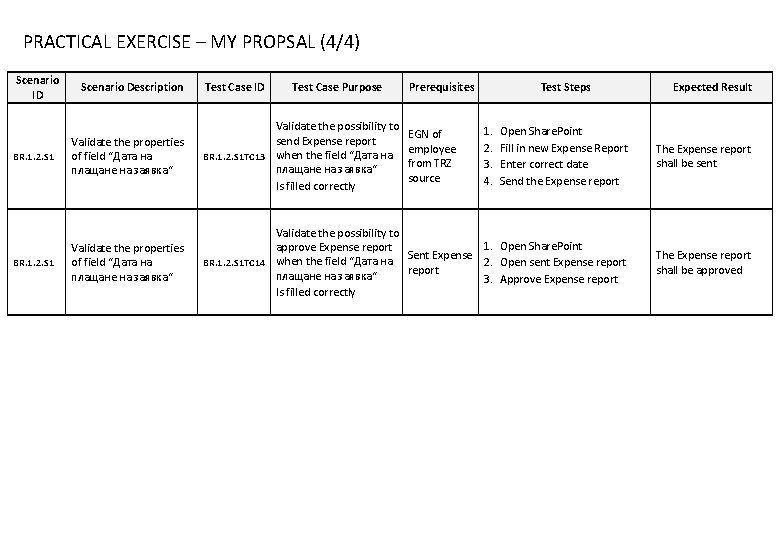
PRACTICAL EXERCISE – MY PROPSAL (4/4) Scenario ID Scenario Description Test Case ID Test Case Purpose Prerequisites Test Steps Expected Result BR. 1. 2. S 1 Validate the properties of field “Дата на плащане на заявка“ Validate the possibility to send Expense report BR. 1. 2. S 1 TC 13 when the field “Дата на плащане на заявка“ Is filled correctly Open Share. Point Fill in new Expense Report Enter correct date Send the Expense report The Expense report shall be sent BR. 1. 2. S 1 Validate the properties of field “Дата на плащане на заявка“ Validate the possibility to 1. Open Share. Point approve Expense report Sent Expense BR. 1. 2. S 1 TC 14 when the field “Дата на 2. Open sent Expense report плащане на заявка“ 3. Approve Expense report Is filled correctly The Expense report shall be approved EGN of employee from TRZ source 1. 2. 3. 4.
PRACTICAL EXERCISE – ADDITIONAL (2/2) Scenario ID Scenario Description Test Case ID Test Case Purpose Prerequisites Test Steps Expected Result
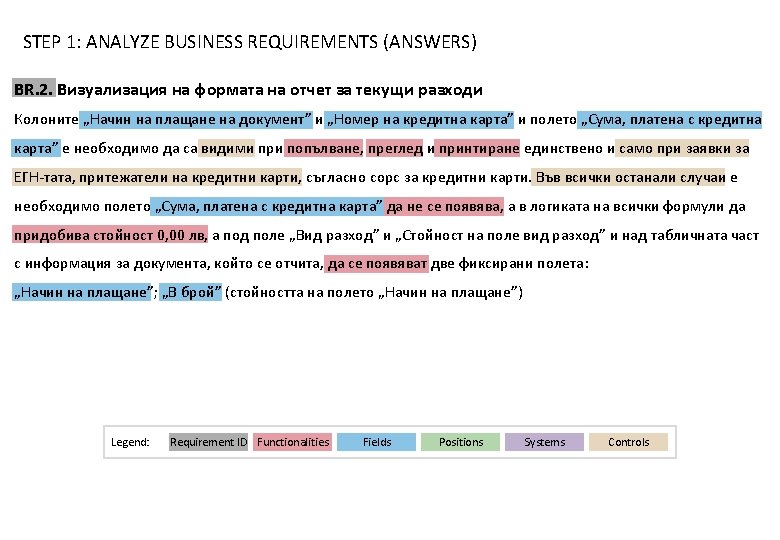
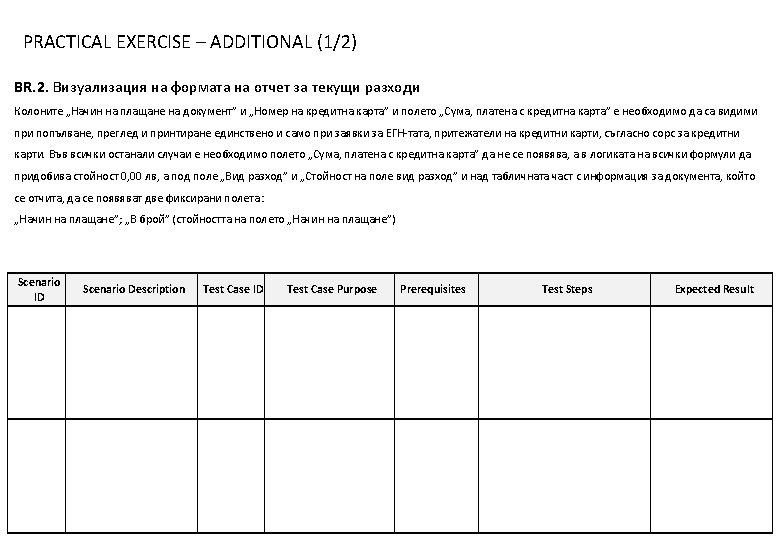
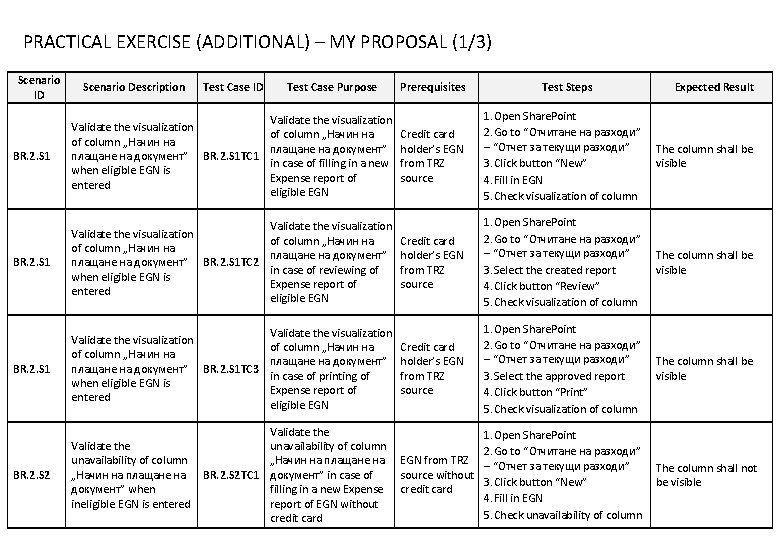
PRACTICAL EXERCISE (ADDITIONAL) – MY PROPOSAL (1/3) Scenario ID Scenario Description Test Case ID Test Case Purpose BR. 2. S 1 Validate the visualization of column „Начин на плащане на документ” BR. 2. S 1 TC 1 in case of filling in a new when eligible EGN is Expense report of entered eligible EGN BR. 2. S 1 Validate the visualization of column „Начин на плащане на документ” BR. 2. S 1 TC 2 in case of reviewing of when eligible EGN is Expense report of entered eligible EGN BR. 2. S 1 Validate the visualization of column „Начин на плащане на документ” BR. 2. S 1 TC 3 in case of printing of when eligible EGN is Expense report of entered eligible EGN BR. 2. S 2 Validate the unavailability of column „Начин на плащане на документ” when ineligible EGN is entered Validate the unavailability of column „Начин на плащане на BR. 2. S 2 TC 1 документ” in case of filling in a new Expense report of EGN without credit card Prerequisites Test Steps Expected Result Credit card holder’s EGN from TRZ source 1. Open Share. Point 2. Go to “Отчитане на разходи” – “Отчет за текущи разходи” 3. Click button “New” 4. Fill in EGN 5. Check visualization of column The column shall be visible Credit card holder’s EGN from TRZ source 1. Open Share. Point 2. Go to “Отчитане на разходи” – “Отчет за текущи разходи” 3. Select the created report 4. Click button “Review” 5. Check visualization of column The column shall be visible Credit card holder’s EGN from TRZ source 1. Open Share. Point 2. Go to “Отчитане на разходи” – “Отчет за текущи разходи” 3. Select the approved report 4. Click button “Print” 5. Check visualization of column The column shall be visible 1. Open Share. Point 2. Go to “Отчитане на разходи” EGN from TRZ – “Отчет за текущи разходи” source without 3. Click button “New” credit card 4. Fill in EGN 5. Check unavailability of column The column shall not be visible
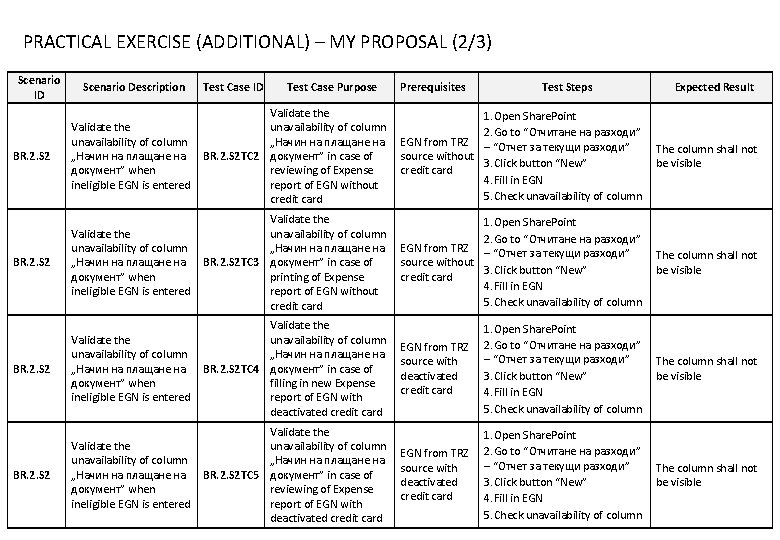
PRACTICAL EXERCISE (ADDITIONAL) – MY PROPOSAL (2/3) Scenario ID Scenario Description Test Case ID Test Case Purpose Prerequisites Test Steps Expected Result Validate the unavailability of column „Начин на плащане на документ” when ineligible EGN is entered Validate the unavailability of column „Начин на плащане на BR. 2. S 2 TC 2 документ” in case of reviewing of Expense report of EGN without credit card 1. Open Share. Point 2. Go to “Отчитане на разходи” EGN from TRZ – “Отчет за текущи разходи” source without 3. Click button “New” credit card 4. Fill in EGN 5. Check unavailability of column The column shall not be visible BR. 2. S 2 Validate the unavailability of column „Начин на плащане на документ” when ineligible EGN is entered Validate the unavailability of column „Начин на плащане на BR. 2. S 2 TC 3 документ” in case of printing of Expense report of EGN without credit card 1. Open Share. Point 2. Go to “Отчитане на разходи” EGN from TRZ – “Отчет за текущи разходи” source without 3. Click button “New” credit card 4. Fill in EGN 5. Check unavailability of column The column shall not be visible BR. 2. S 2 Validate the unavailability of column „Начин на плащане на документ” when ineligible EGN is entered Validate the unavailability of column „Начин на плащане на BR. 2. S 2 TC 4 документ” in case of filling in new Expense report of EGN with deactivated credit card EGN from TRZ source with deactivated credit card 1. Open Share. Point 2. Go to “Отчитане на разходи” – “Отчет за текущи разходи” 3. Click button “New” 4. Fill in EGN 5. Check unavailability of column The column shall not be visible Validate the unavailability of column „Начин на плащане на документ” when ineligible EGN is entered Validate the unavailability of column „Начин на плащане на BR. 2. S 2 TC 5 документ” in case of reviewing of Expense report of EGN with deactivated credit card EGN from TRZ source with deactivated credit card 1. Open Share. Point 2. Go to “Отчитане на разходи” – “Отчет за текущи разходи” 3. Click button “New” 4. Fill in EGN 5. Check unavailability of column The column shall not be visible BR. 2. S 2
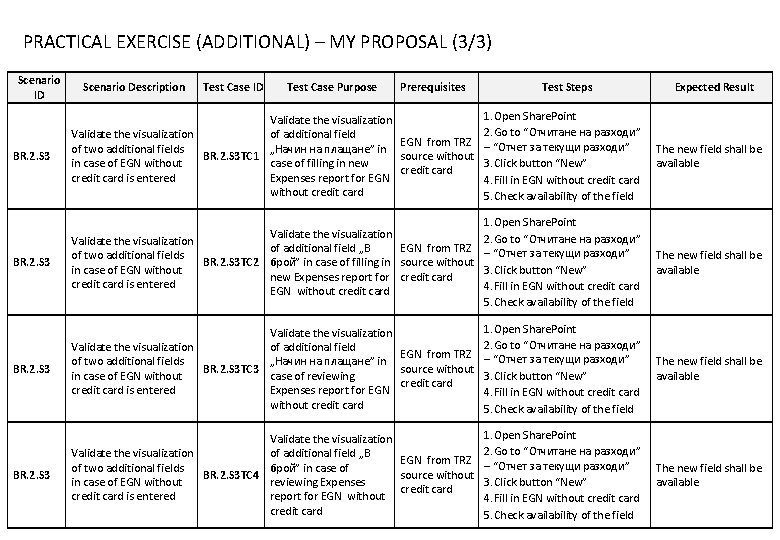
PRACTICAL EXERCISE (ADDITIONAL) – MY PROPOSAL (3/3) Scenario ID Scenario Description Test Case ID Test Case Purpose Prerequisites Test Steps Expected Result BR. 2. S 3 Validate the visualization of additional field Validate the visualization EGN from TRZ „Начин на плащане” in of two additional fields BR. 2. S 3 TC 1 source without in case of EGN without case of filling in new credit card is entered Expenses report for EGN without credit card 1. Open Share. Point 2. Go to “Отчитане на разходи” – “Отчет за текущи разходи” 3. Click button “New” 4. Fill in EGN without credit card 5. Check availability of the field The new field shall be available BR. 2. S 3 Validate the visualization of additional field „В EGN from TRZ of two additional fields BR. 2. S 3 TC 2 брой” in case of filling in source without in case of EGN without new Expenses report for credit card is entered EGN without credit card 1. Open Share. Point 2. Go to “Отчитане на разходи” – “Отчет за текущи разходи” 3. Click button “New” 4. Fill in EGN without credit card 5. Check availability of the field The new field shall be available BR. 2. S 3 Validate the visualization of additional field Validate the visualization EGN from TRZ „Начин на плащане” in of two additional fields BR. 2. S 3 TC 3 source without in case of EGN without case of reviewing credit card is entered Expenses report for EGN without credit card 1. Open Share. Point 2. Go to “Отчитане на разходи” – “Отчет за текущи разходи” 3. Click button “New” 4. Fill in EGN without credit card 5. Check availability of the field The new field shall be available BR. 2. S 3 Validate the visualization of additional field „В Validate the visualization EGN from TRZ брой” in case of of two additional fields BR. 2. S 3 TC 4 source without in case of EGN without reviewing Expenses credit card is entered report for EGN without credit card 1. Open Share. Point 2. Go to “Отчитане на разходи” – “Отчет за текущи разходи” 3. Click button “New” 4. Fill in EGN without credit card 5. Check availability of the field The new field shall be available