
USARC G1 Military Evaluations United States Army Reserve
- Slides: 17
USARC G-1 Military Evaluations United States Army Reserve Data Management Program UNCLASSIFIED / FOUO 4 December 10 JAN 2019 2018 Leadership. Energy. Execution. POC/Contact Number 11
Agenda q Navigating CSMM Evaluations Reports q Updating CSMM Evaluation Comments q Using ERS q Battle Rhythm q Personnel Cross Reference q Questions UNCLASSIFIED / FOUO 4 December 10 JAN 2019 2018 Leadership. Energy. Execution. POC/Contact Number 22
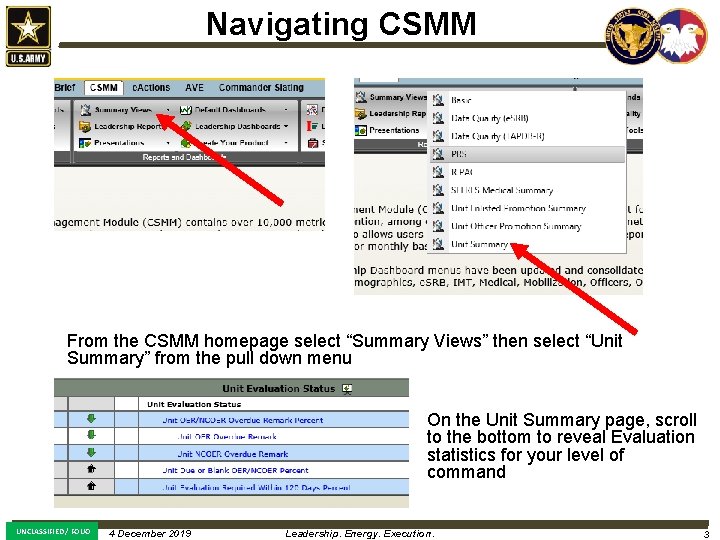
Navigating CSMM From the CSMM homepage select “Summary Views” then select “Unit Summary” from the pull down menu On the Unit Summary page, scroll to the bottom to reveal Evaluation statistics for your level of command UNCLASSIFIED / FOUO 4 December 10 JAN 2019 2018 Leadership. Energy. Execution. POC/Contact Number 33
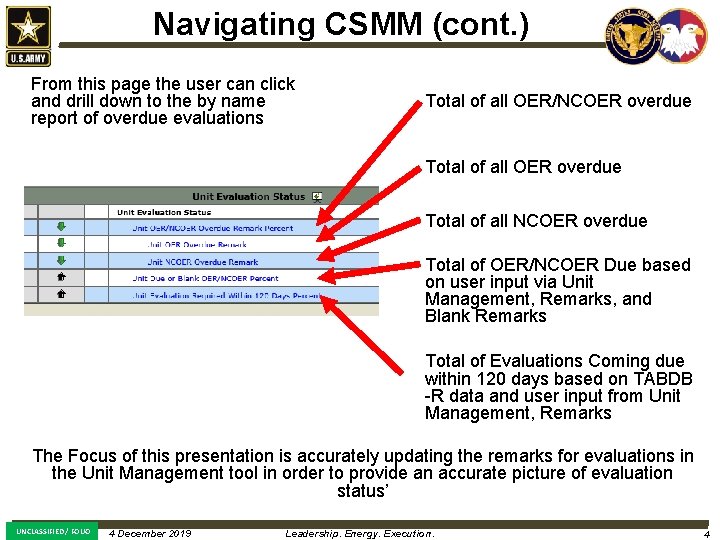
Navigating CSMM (cont. ) From this page the user can click and drill down to the by name report of overdue evaluations Total of all OER/NCOER overdue Total of all NCOER overdue Total of OER/NCOER Due based on user input via Unit Management, Remarks, and Blank Remarks Total of Evaluations Coming due within 120 days based on TABDB -R data and user input from Unit Management, Remarks The Focus of this presentation is accurately updating the remarks for evaluations in the Unit Management tool in order to provide an accurate picture of evaluation status’ UNCLASSIFIED / FOUO 4 December 10 JAN 2019 2018 Leadership. Energy. Execution. POC/Contact Number 44
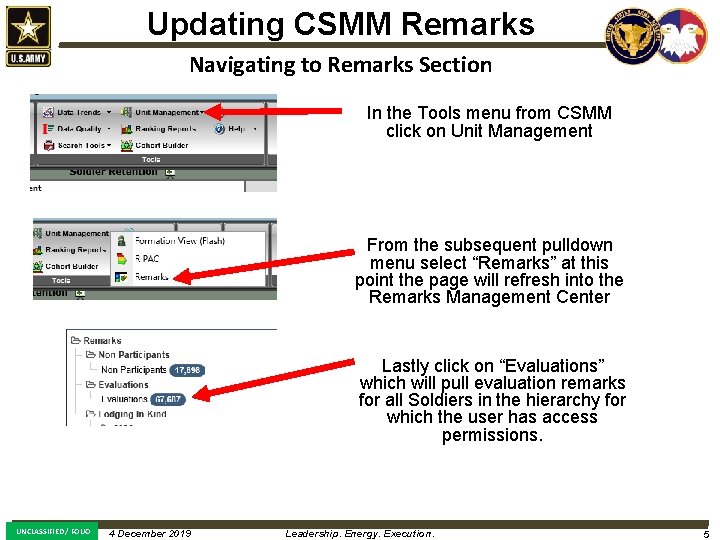
Updating CSMM Remarks Navigating to Remarks Section In the Tools menu from CSMM click on Unit Management From the subsequent pulldown menu select “Remarks” at this point the page will refresh into the Remarks Management Center Lastly click on “Evaluations” which will pull evaluation remarks for all Soldiers in the hierarchy for which the user has access permissions. UNCLASSIFIED / FOUO 4 December 10 JAN 2019 2018 Leadership. Energy. Execution. POC/Contact Number 55
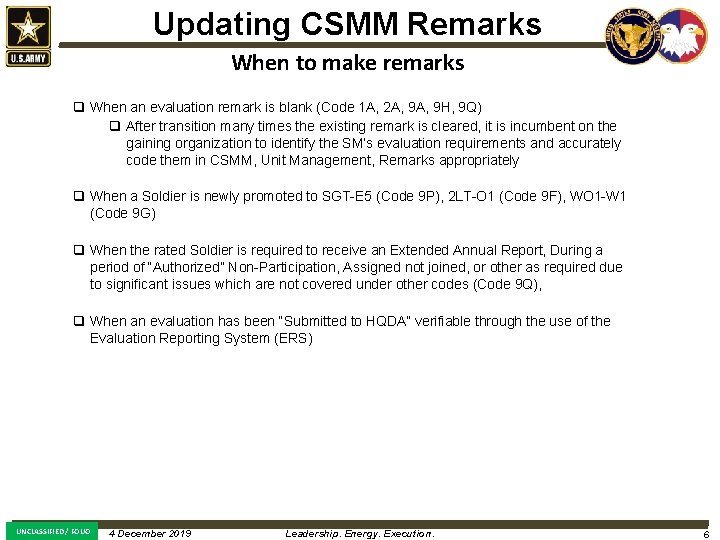
Updating CSMM Remarks When to make remarks q When an evaluation remark is blank (Code 1 A, 2 A, 9 H, 9 Q) q After transition many times the existing remark is cleared, it is incumbent on the gaining organization to identify the SM’s evaluation requirements and accurately code them in CSMM, Unit Management, Remarks appropriately q When a Soldier is newly promoted to SGT-E 5 (Code 9 P), 2 LT-O 1 (Code 9 F), WO 1 -W 1 (Code 9 G) q When the rated Soldier is required to receive an Extended Annual Report, During a period of “Authorized” Non-Participation, Assigned not joined, or other as required due to significant issues which are not covered under other codes (Code 9 Q), q When an evaluation has been “Submitted to HQDA” verifiable through the use of the Evaluation Reporting System (ERS) UNCLASSIFIED / FOUO 4 December 10 JAN 2019 2018 Leadership. Energy. Execution. POC/Contact Number 66
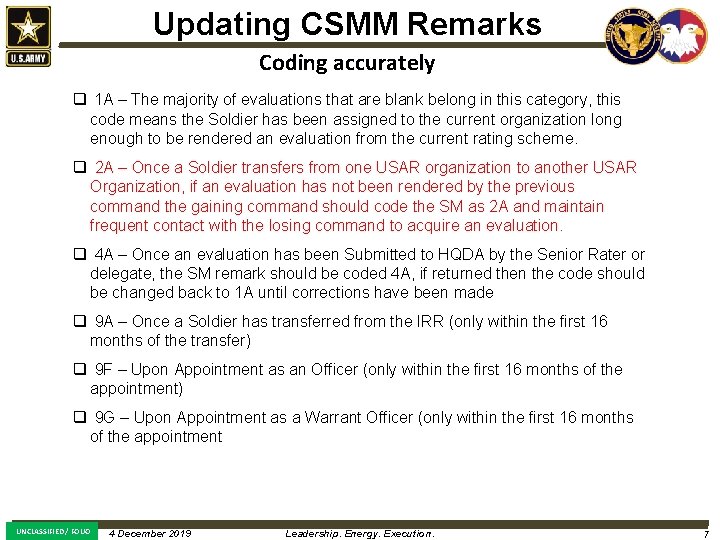
Updating CSMM Remarks Coding accurately q 1 A – The majority of evaluations that are blank belong in this category, this code means the Soldier has been assigned to the current organization long enough to be rendered an evaluation from the current rating scheme. q 2 A – Once a Soldier transfers from one USAR organization to another USAR Organization, if an evaluation has not been rendered by the previous command the gaining command should code the SM as 2 A and maintain frequent contact with the losing command to acquire an evaluation. q 4 A – Once an evaluation has been Submitted to HQDA by the Senior Rater or delegate, the SM remark should be coded 4 A, if returned then the code should be changed back to 1 A until corrections have been made q 9 A – Once a Soldier has transferred from the IRR (only within the first 16 months of the transfer) q 9 F – Upon Appointment as an Officer (only within the first 16 months of the appointment) q 9 G – Upon Appointment as a Warrant Officer (only within the first 16 months of the appointment UNCLASSIFIED / FOUO 4 December 10 JAN 2019 2018 Leadership. Energy. Execution. POC/Contact Number 77
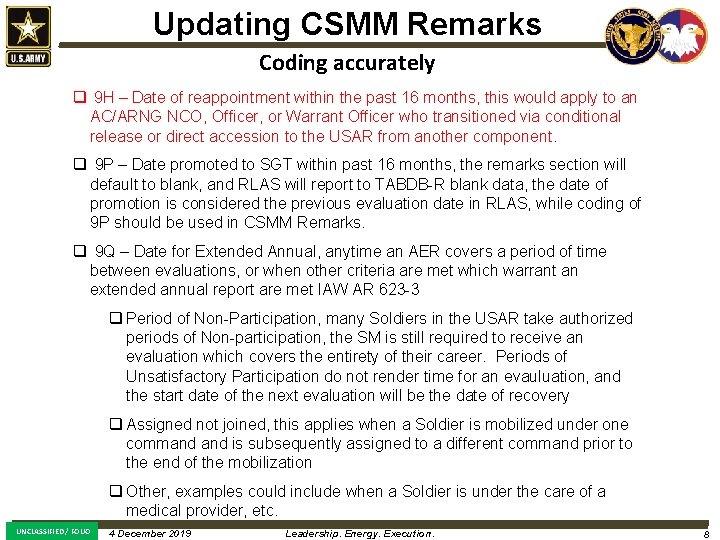
Updating CSMM Remarks Coding accurately q 9 H – Date of reappointment within the past 16 months, this would apply to an AC/ARNG NCO, Officer, or Warrant Officer who transitioned via conditional release or direct accession to the USAR from another component. q 9 P – Date promoted to SGT within past 16 months, the remarks section will default to blank, and RLAS will report to TABDB-R blank data, the date of promotion is considered the previous evaluation date in RLAS, while coding of 9 P should be used in CSMM Remarks. q 9 Q – Date for Extended Annual, anytime an AER covers a period of time between evaluations, or when other criteria are met which warrant an extended annual report are met IAW AR 623 -3 q Period of Non-Participation, many Soldiers in the USAR take authorized periods of Non-participation, the SM is still required to receive an evaluation which covers the entirety of their career. Periods of Unsatisfactory Participation do not render time for an evauluation, and the start date of the next evaluation will be the date of recovery q Assigned not joined, this applies when a Soldier is mobilized under one command is subsequently assigned to a different command prior to the end of the mobilization q Other, examples could include when a Soldier is under the care of a medical provider, etc. UNCLASSIFIED / FOUO 4 December 10 JAN 2019 2018 Leadership. Energy. Execution. POC/Contact Number 88
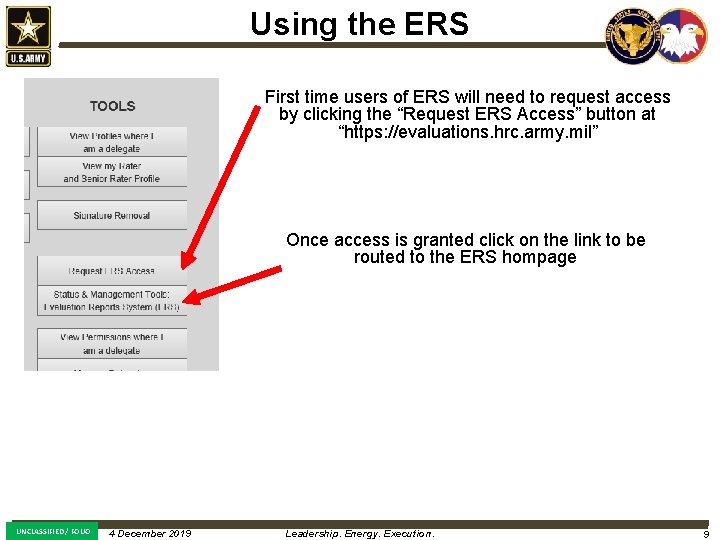
Using the ERS First time users of ERS will need to request access by clicking the “Request ERS Access” button at “https: //evaluations. hrc. army. mil” Once access is granted click on the link to be routed to the ERS hompage UNCLASSIFIED / FOUO 4 December 10 JAN 2019 2018 Leadership. Energy. Execution. POC/Contact Number 99
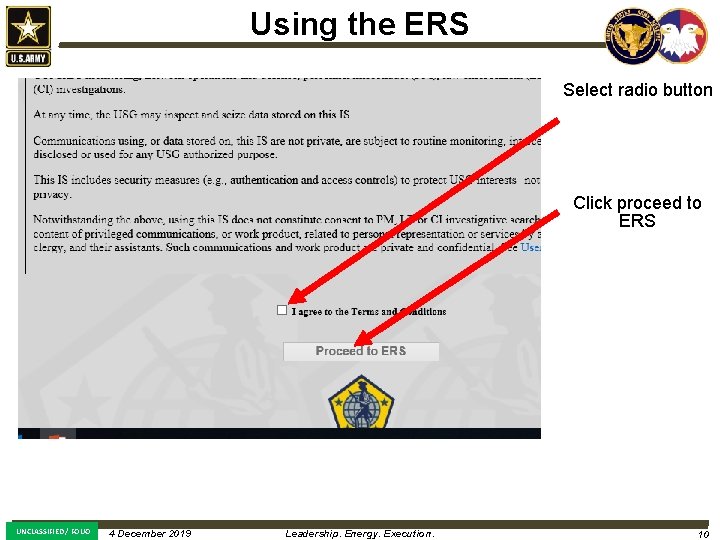
Using the ERS Select radio button Click proceed to ERS UNCLASSIFIED / FOUO 4 December 10 JAN 2019 2018 Leadership. Energy. Execution. POC/Contact Number 1010
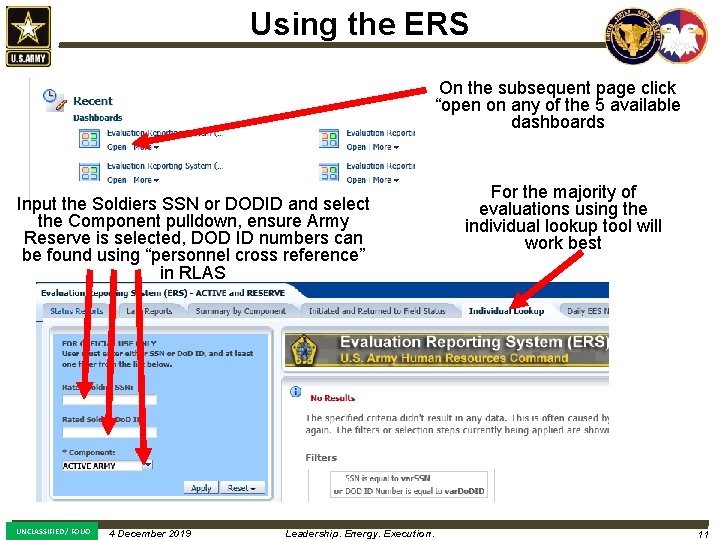
Using the ERS On the subsequent page click “open on any of the 5 available dashboards Input the Soldiers SSN or DODID and select the Component pulldown, ensure Army Reserve is selected, DOD ID numbers can be found using “personnel cross reference” in RLAS UNCLASSIFIED / FOUO 4 December 10 JAN 2019 2018 Leadership. Energy. Execution. For the majority of evaluations using the individual lookup tool will work best POC/Contact Number 1111
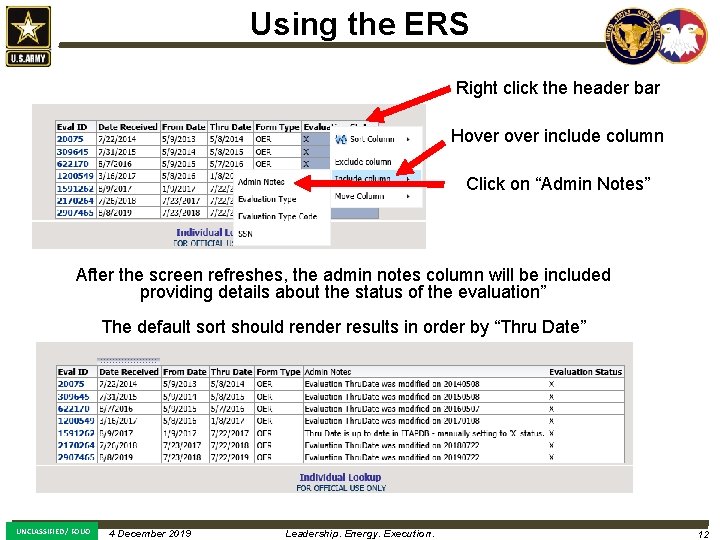
Using the ERS Right click the header bar Hover include column Click on “Admin Notes” After the screen refreshes, the admin notes column will be included providing details about the status of the evaluation” The default sort should render results in order by “Thru Date” UNCLASSIFIED / FOUO 4 December 10 JAN 2019 2018 Leadership. Energy. Execution. POC/Contact Number 1212
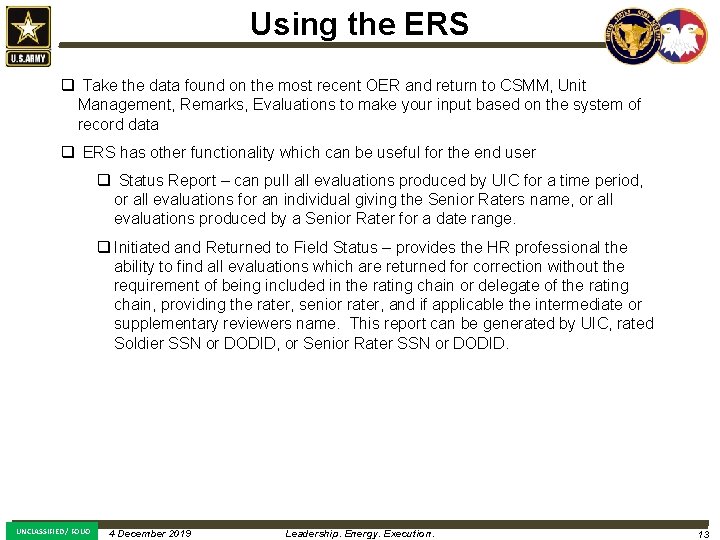
Using the ERS q Take the data found on the most recent OER and return to CSMM, Unit Management, Remarks, Evaluations to make your input based on the system of record data q ERS has other functionality which can be useful for the end user q Status Report – can pull all evaluations produced by UIC for a time period, or all evaluations for an individual giving the Senior Raters name, or all evaluations produced by a Senior Rater for a date range. q Initiated and Returned to Field Status – provides the HR professional the ability to find all evaluations which are returned for correction without the requirement of being included in the rating chain or delegate of the rating chain, providing the rater, senior rater, and if applicable the intermediate or supplementary reviewers name. This report can be generated by UIC, rated Soldier SSN or DODID, or Senior Rater SSN or DODID. UNCLASSIFIED / FOUO 4 December 10 JAN 2019 2018 Leadership. Energy. Execution. POC/Contact Number 1313
Battle Rhythm q Due to the simplicity of the report generation and input, weekly integration to the battle rhythm should provide enough oversight to maintain accuracy q Senior Raters or delegates should input coding or email their respective HR professional when an evaluation has been submitted to HQDA for update to Remarks q No blanks should exist, all evaluations regardless of circumstance are a result of one of the option codes in CSMM UNCLASSIFIED / FOUO 4 December 10 JAN 2019 2018 Leadership. Energy. Execution. POC/Contact Number 1414
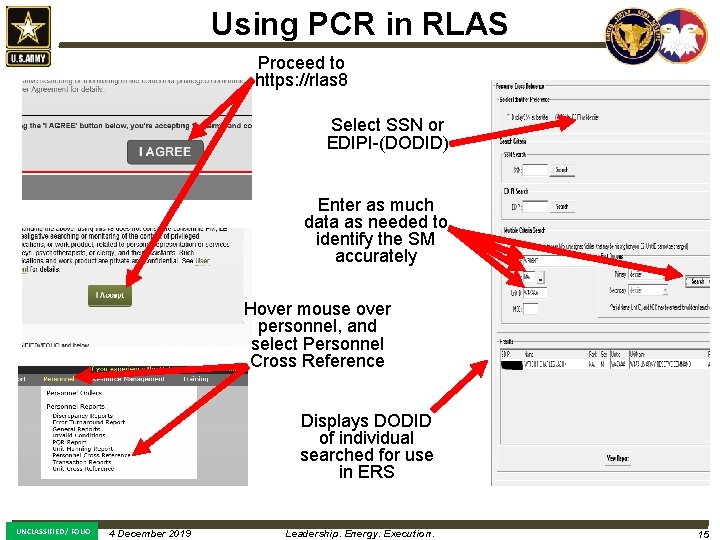
Using PCR in RLAS Proceed to https: //rlas 8 Select SSN or EDIPI-(DODID) Enter as much data as needed to identify the SM accurately Hover mouse over personnel, and select Personnel Cross Reference Displays DODID of individual searched for use in ERS UNCLASSIFIED / FOUO 4 December 10 JAN 2019 2018 Leadership. Energy. Execution. POC/Contact Number 1515
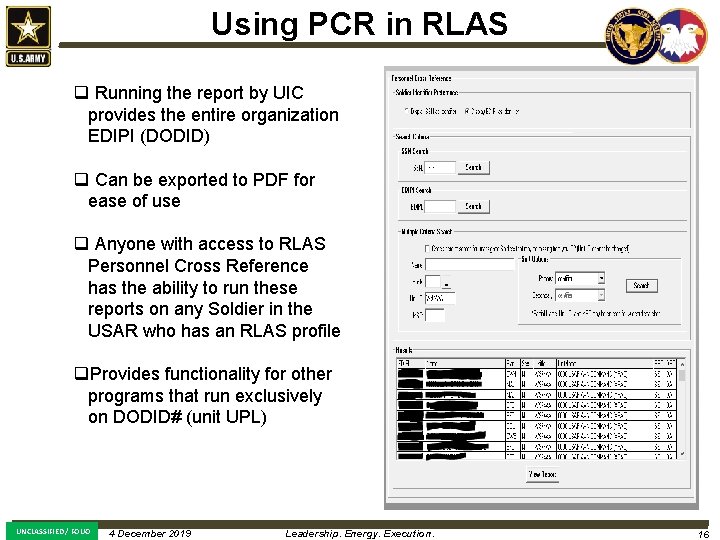
Using PCR in RLAS q Running the report by UIC provides the entire organization EDIPI (DODID) q Can be exported to PDF for ease of use q Anyone with access to RLAS Personnel Cross Reference has the ability to run these reports on any Soldier in the USAR who has an RLAS profile q. Provides functionality for other programs that run exclusively on DODID# (unit UPL) UNCLASSIFIED / FOUO 4 December 10 JAN 2019 2018 Leadership. Energy. Execution. POC/Contact Number 1616
Questions Charles. j. wright 46. mil@mail. mil UNCLASSIFIED / FOUO 4 December 10 JAN 2019 2018 Leadership. Energy. Execution. POC/Contact Number 1717