
USABILITY ENGINEERING Software Quality ISO 9126 Metrics and

USABILITY ENGINEERING
Software Quality (ISO 9126) Metrics and Evaluation Functionality Reliability Usability Efficiency Maintainability Portability PM Accessibility (sometimes relevant, not ISO 9126)
Definition of Usability (Nielsen 2003) Usability: how well users can use the system’s functionality Usability is a quality attribute that assesses how easy user interfaces are to use The word ‘usability’ also refers to methods for improving ease-of-use during the design process

Usability Components Learnability Ease of learning the system, i. e. the basic tasks Skills retained over time (also Memorability) Throughput (also Efficiency) Speed of task performance Low user error rate Flexibility Suitability for intended user expertise Can system be customised? Attitude (also Satisfaction) User subjective satisfaction with system
Usability Components (Dimensions of usability) Learnability: is it easy to learn? Memorability: is it easy to remember what you learned? Efficiency: once learned, is it fast to use? Errors: are errors few and recoverable? Satisfaction: is it enjoyable to use?
The 5 E’s to Usability Easy to learn Supports initial learning and continued learning Efficient The speed in which users complete their tasks Error tolerant The ability of the interface to prevent errors or help users recover from those that occur Effective The completeness and accuracy with which users achieve their goals Engaging How pleasant or satisfying the interface is to use?

Usability Engineering The test of usability based on measurement of user experience It demands that specific usability measures be made explicit as requirements Usability Measurements Usability attribute/principle Measuring concept Measuring method Now level/ worst case/ planned level/ best case
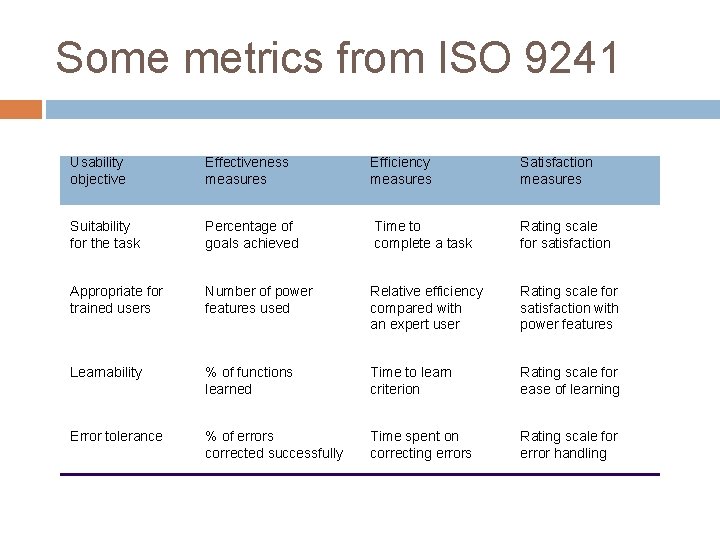
Some metrics from ISO 9241 Usability objective Effectiveness measures Efficiency measures Satisfaction measures Suitability for the task Percentage of goals achieved Time to complete a task Rating scale for satisfaction Appropriate for trained users Number of power features used Relative efficiency compared with an expert user Rating scale for satisfaction with power features Learnability % of functions learned Time to learn criterion Rating scale for ease of learning Error tolerance % of errors corrected successfully Time spent on correcting errors Rating scale for error handling
Usability Engineering (contd. ) Problems usability specification requires level of detail that may not be possible early in design satisfying a usability specification does not necessarily satisfy usability
Case Study-ATM (from L 9) Researchers + banks expected ATMs to be intuitively easy to use Testing among senior citizens found only 20% correct operation Senior citizens often put off by ATMs they find the machines Complicated Inconvenient
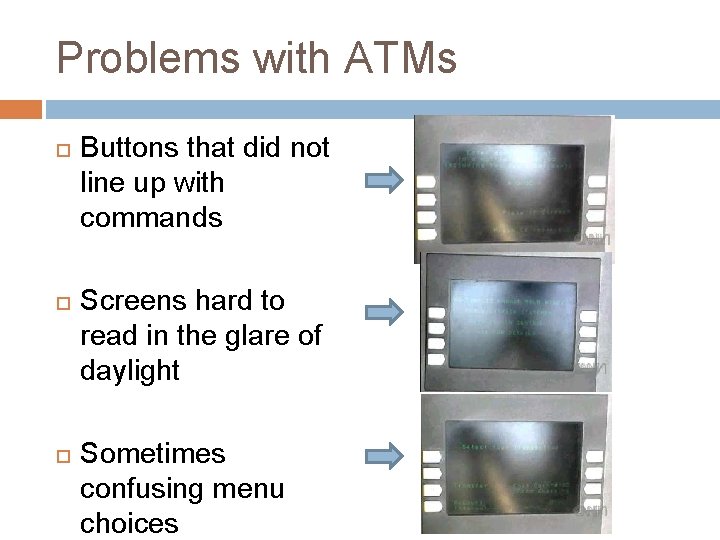
Problems with ATMs Buttons that did not line up with commands Screens hard to read in the glare of daylight Sometimes confusing menu choices
Usability suggestions Simpler on-screen instructions More “undo” buttons Bank should provide training for any customers who need it Remark: “Large percentage” of people surveyed said they would use ATMs if trained
Key concepts of HCI Usability Cognetics- locus of attention Affordance What sort of operations and manipulations can be done to an object Crucial is the perceived affordance Visibility Mapping between controls and effects should be sensible and meaningful feedback Task orientation- fit, analysis
Important principle of HCI (Usability) useful Accomplish what is required (functional, does things) usable Do it easily and naturally without error (does the right things) used Make people want to use it (be attractive, acceptable to organization)
- Slides: 14