
UR Financials Project Demo Days February 2014 Agenda
UR Financials Project Demo Days February 2014
Agenda • • • Project Update Key Process Changes Workday Financial Data Model Wrap Up Q&A UR Financials Demo Days – February 2014 2
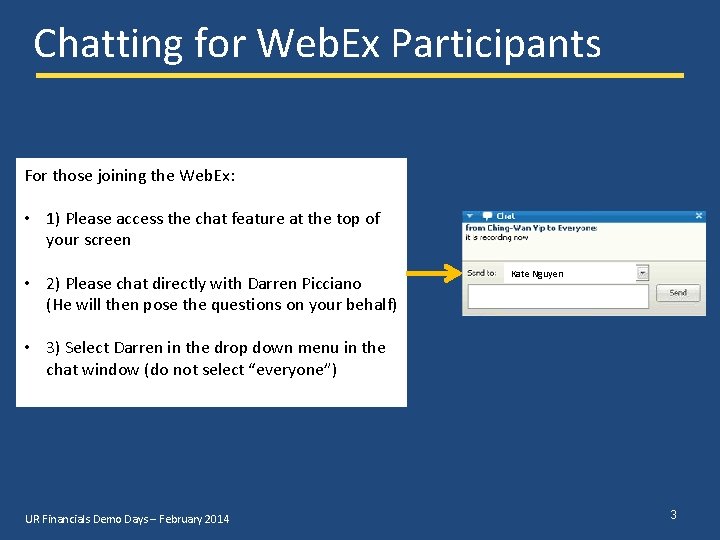
Chatting for Web. Ex Participants For those joining the Web. Ex: • 1) Please access the chat feature at the top of your screen • 2) Please chat directly with Darren Picciano (He will then pose the questions on your behalf) Kate Nguyen • 3) Select Darren in the drop down menu in the chat window (do not select “everyone”) UR Financials Demo Days – February 2014 3
Demo Disclaimer Please Note: • The material presented in this Power. Point deck is provided to introduce participants to the capabilities of Workday Financials. • As we continue to move the project work forward, there will be certain discoveries which may supersede the material presented. UR Financials Demo Days – February 2014 4
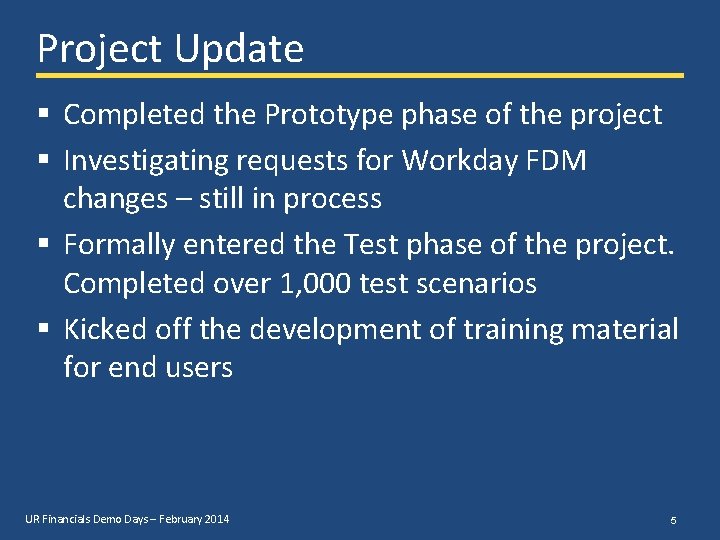
Project Update § Completed the Prototype phase of the project § Investigating requests for Workday FDM changes – still in process § Formally entered the Test phase of the project. Completed over 1, 000 test scenarios § Kicked off the development of training material for end users UR Financials Demo Days – February 2014 5
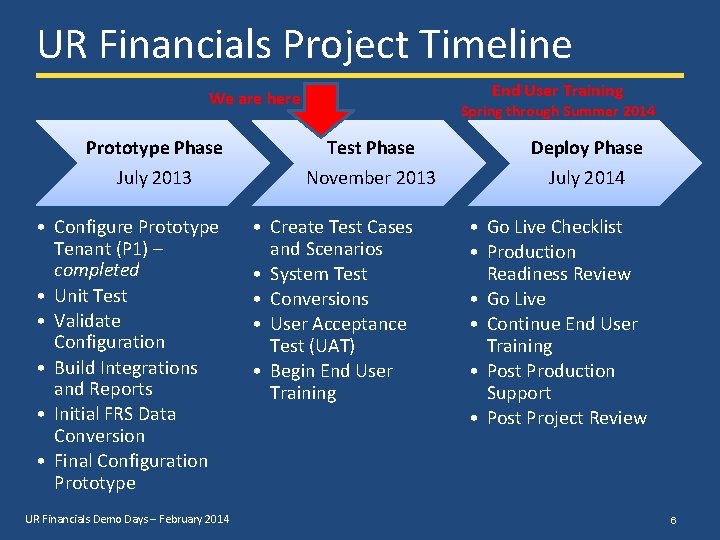
UR Financials Project Timeline End User Training We are here Spring through Summer 2014 Prototype Phase Test Phase Deploy Phase July 2013 November 2013 July 2014 • Configure Prototype Tenant (P 1) – completed • Unit Test • Validate Configuration • Build Integrations and Reports • Initial FRS Data Conversion • Final Configuration Prototype UR Financials Demo Days – February 2014 • Create Test Cases and Scenarios • System Test • Conversions • User Acceptance Test (UAT) • Begin End User Training • Go Live Checklist • Production Readiness Review • Go Live • Continue End User Training • Post Production Support • Post Project Review 6
Key Process Changes UR Financials Demo Days – February 2014 7
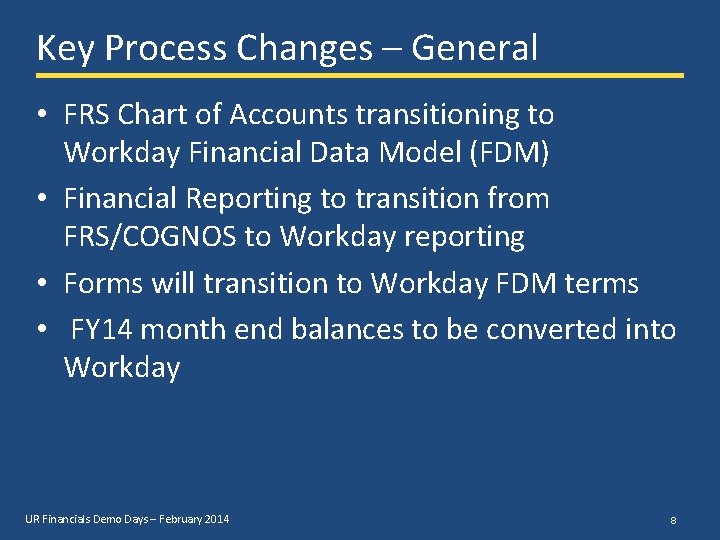
Key Process Changes – General • FRS Chart of Accounts transitioning to Workday Financial Data Model (FDM) • Financial Reporting to transition from FRS/COGNOS to Workday reporting • Forms will transition to Workday FDM terms • FY 14 month end balances to be converted into Workday UR Financials Demo Days – February 2014 8
Key Process Changes – Supplier Invoices • Forms will be updated for the Workday Financial Data Model • New Supplier Request Process - Purchasing will be reviewing new non-PMM suppliers • e. RFP processing will be discontinued in June • Capital purchases not purchased via PMM PO will trigger notification to Purchasing to follow up with department UR Financials Demo Days – February 2014 9
Key Process Changes – Banking • Remittance business process will send details to certain suppliers • Settlement – The following are acceptable reasons for checks to be mailed back to departments: • Patient-related insurance refunds • Payment must accompany notarized/official documentation • Human Resources gratuity payments • Payee has a foreign address • Prize/Award payments, only if handed to the recipient at ceremony – Requests for other mail back reasons must be accompanied by Divisional Finance approval. – Ensure that the check mail back reason is designated and that Divisional Finance approval, where applicable, is on the RFP form prior to submitting • ACH payments can be automated for suppliers UR Financials Demo Days – February 2014 10
Key Process Changes – Financial Accounting • Journal entries will be routed to Divisional or Central Finance for electronic approval in Workday • Budget adjustments / amendments for will be routed to Divisional Finance for entry into Workday (handled by Central Budget Office for division 010/080) • Move plant accounting to the front of the accounting process for capital expenditures. • All financial entries, including post-closing adjustments (top-sided JEs), will be recorded in Workday. • Workday will be the primary reporting tool for financials UR Financials Demo Days – February 2014 11
Key Process Changes – Grants Management • Grant reporting will be off one Workday FAO (GR 5 xxxxx) rather than a ledger 0 and ledger 5 • Grant budget information will be entered by ORACS rather than General Accounting • Letter of Credit (LOC) draws can be during the month rather than after month-end. • Sponsors will be billed at month end • Inactivate Award and credit/deficit recorded at Company level rather than having a deficit/surplus at affect an unrestricted account close-out UR Financials Demo Days – February 2014 12
The Workday Financial Data Model UR Financials Demo Days – February 2014 13
Workday Financial Data Model • Team is still receiving questions as to how the conversion from FRS Chart of Accounts to Workday Financial Data Model (FDM) looks like • Changes to FDM are published to website at least once a month • Multiple job aids exist on the website • FDM video published on UR Financials • Requested topic for today’s Demo Day per our survey request UR Financials Demo Days – February 2014 14
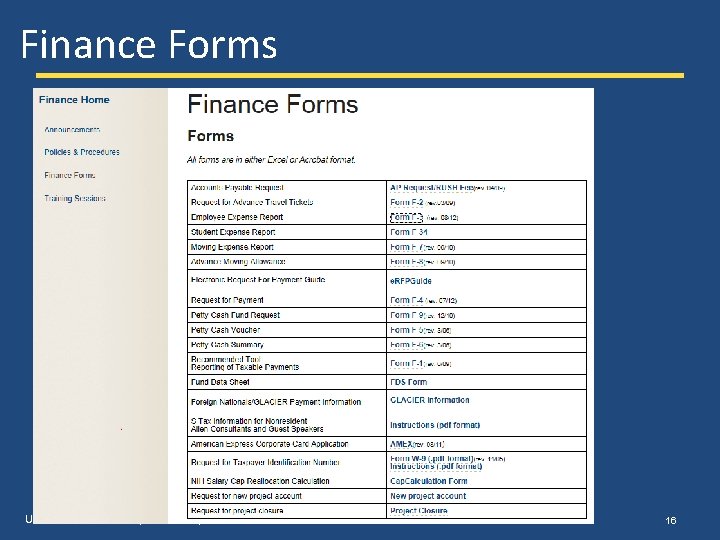
How The New Workday FDM Affects You • Forms: – If input into a system that is in Workday terms (using the FDM), forms will be changed to replace the FRS terms – If input into a system that is NOT in Workday terms (still using FRS terms), forms will remain the same – See UR Financials website for details • Reporting: – Workday will be the reporting application for financial reporting – CUMSAL and other COGNOS applications will still be available and used UR Financials Demo Days – February 2014 15
Finance Forms UR Financials Demo Days – February 2014 16
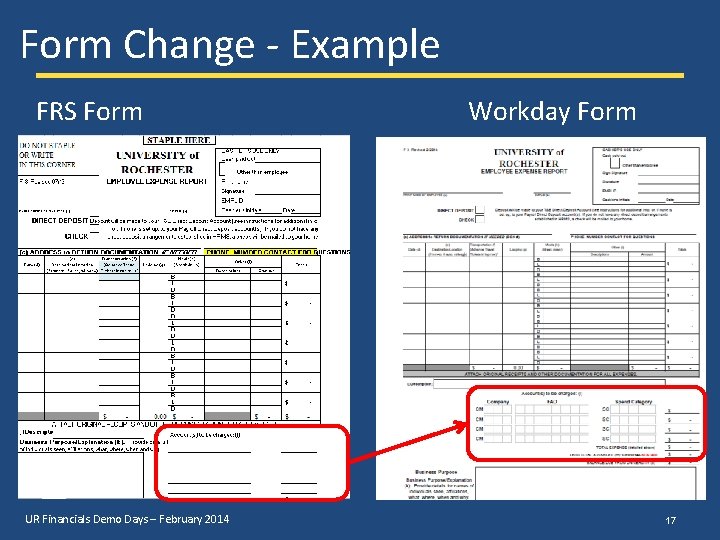
Form Change - Example FRS Form UR Financials Demo Days – February 2014 Workday Form 17
Reporting Using the Workday FDM • Frequently use COGNOS reports developed • Drill Down Capabilities • Flexible Reporting – Filtering Capabilities • Export to Excel or PDF • Utilizes the Workday FDM “worktags” UR Financials Demo Days – February 2014 18
Reporting Using the Workday FDM • Financial Statement and Manager Financial Statements – these will cover formal, highly formatted reports like Statement of Activities, Balance Sheet, and Monthly Ledger. • Summary transaction Workday Reports -- (think basic pivots) – these will cover legacy reports that summarize activity at the Cost Center, FAO, Ledger, or at the Spend / Rev Category level. • Detailed transaction Workday Reports – (think detailed transactions) – these will cover legacy reports that provide detailed transaction activity at the Journal lines level UR Financials Demo Days – February 2014 19
Workday Financial Data Model Worktags • The Financial Data Model (or FDM for short) is the Workday business information model that includes both the chart of accounts and other data elements that make up the information needed on a transaction line • The FRS account and subcode fields are broken down into separate Workday fields called “worktags” upon which flexible reporting and inquiry can be performed • Some Workday worktags are inherited or picked up based on other worktags • Worktags will identify the various dimensions of the business and form the building blocks of the new chart of accounts in Workday
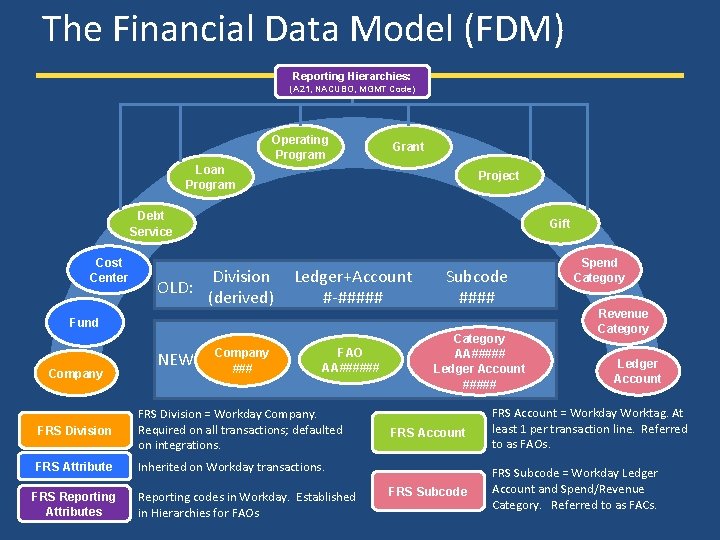
The Financial Data Model (FDM) Reporting Hierarchies: (A 21, NACUBO, MGMT Code) Operating Program Grant Loan Program Project Debt Service Cost Center OLD: Gift Division (derived) Ledger+Account #-##### Subcode #### FAO AA###### Category AA##### Ledger Account ##### Fund Company NEW: Company ### FRS Division = Workday Company. Required on all transactions; defaulted on integrations. FRS Attribute Inherited on Workday transactions. FRS Reporting Attributes Reporting codes in Workday. Established in Hierarchies for FAOs Spend Category Revenue Category Ledger Account FRS Account = Workday Worktag. At least 1 per transaction line. Referred to as FAOs. FRS Subcode = Workday Ledger Account and Spend/Revenue Category. Referred to as FACs.
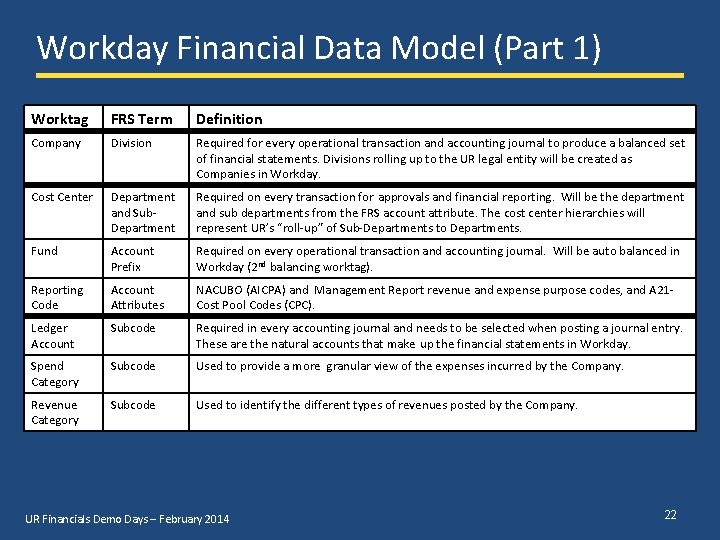
Workday Financial Data Model (Part 1) Worktag FRS Term Definition Company Division Required for every operational transaction and accounting journal to produce a balanced set of financial statements. Divisions rolling up to the UR legal entity will be created as Companies in Workday. Cost Center Department and Sub. Department Required on every transaction for approvals and financial reporting. Will be the department and sub departments from the FRS account attribute. The cost center hierarchies will represent UR’s “roll-up” of Sub-Departments to Departments. Fund Account Prefix Required on every operational transaction and accounting journal. Will be auto balanced in Workday (2 nd balancing worktag). Reporting Code Account Attributes NACUBO (AICPA) and Management Report revenue and expense purpose codes, and A 21 Cost Pool Codes (CPC). Ledger Account Subcode Required in every accounting journal and needs to be selected when posting a journal entry. These are the natural accounts that make up the financial statements in Workday. Spend Category Subcode Used to provide a more granular view of the expenses incurred by the Company. Revenue Category Subcode Used to identify the different types of revenues posted by the Company. UR Financials Demo Days – February 2014 22
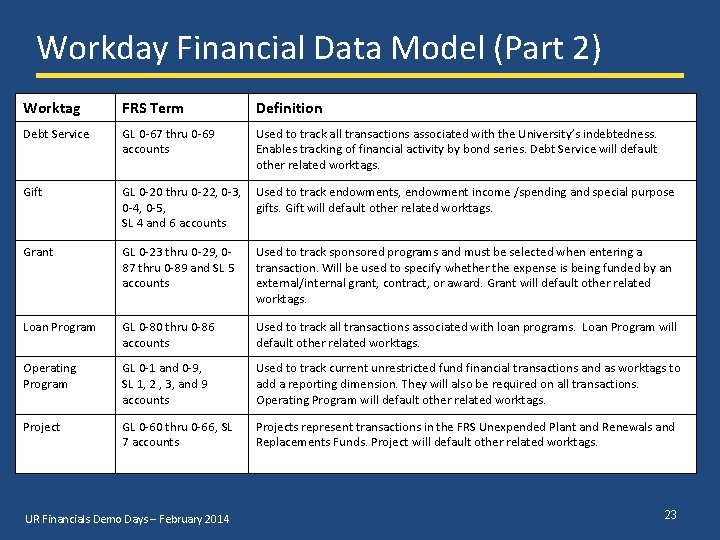
Workday Financial Data Model (Part 2) Worktag FRS Term Definition Debt Service GL 0 -67 thru 0 -69 accounts Used to track all transactions associated with the University’s indebtedness. Enables tracking of financial activity by bond series. Debt Service will default other related worktags. Gift GL 0 -20 thru 0 -22, 0 -3, 0 -4, 0 -5, SL 4 and 6 accounts Used to track endowments, endowment income /spending and special purpose gifts. Gift will default other related worktags. Grant GL 0 -23 thru 0 -29, 087 thru 0 -89 and SL 5 accounts Used to track sponsored programs and must be selected when entering a transaction. Will be used to specify whether the expense is being funded by an external/internal grant, contract, or award. Grant will default other related worktags. Loan Program GL 0 -80 thru 0 -86 accounts Used to track all transactions associated with loan programs. Loan Program will default other related worktags. Operating Program GL 0 -1 and 0 -9, SL 1, 2 , 3, and 9 accounts Used to track current unrestricted fund financial transactions and as worktags to add a reporting dimension. They will also be required on all transactions. Operating Program will default other related worktags. Project GL 0 -60 thru 0 -66, SL 7 accounts Projects represent transactions in the FRS Unexpended Plant and Renewals and Replacements Funds. Project will default other related worktags. UR Financials Demo Days – February 2014 23
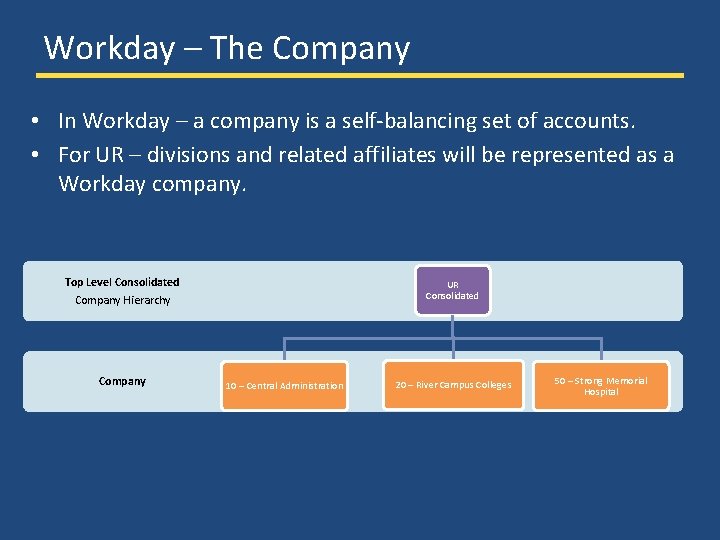
Workday – The Company • In Workday – a company is a self-balancing set of accounts. • For UR – divisions and related affiliates will be represented as a Workday company. Top Level Consolidated Company Hierarchy Company UR Consolidated 10 – Central Administration 20 – River Campus Colleges 50 – Strong Memorial Hospital
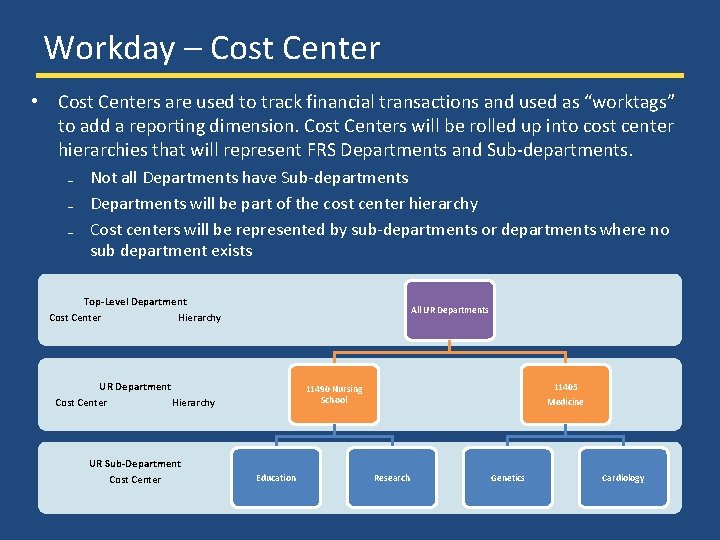
Workday – Cost Center • Cost Centers are used to track financial transactions and used as “worktags” to add a reporting dimension. Cost Centers will be rolled up into cost center hierarchies that will represent FRS Departments and Sub-departments. ₋ Not all Departments have Sub-departments ₋ Departments will be part of the cost center hierarchy ₋ Cost centers will be represented by sub-departments or departments where no sub department exists Top-Level Department Cost Center Hierarchy All UR Departments UR Department Cost Center Hierarchy UR Sub-Department Cost Center 11405 Medicine 11490 Nursing School Education Research Genetics Cardiology
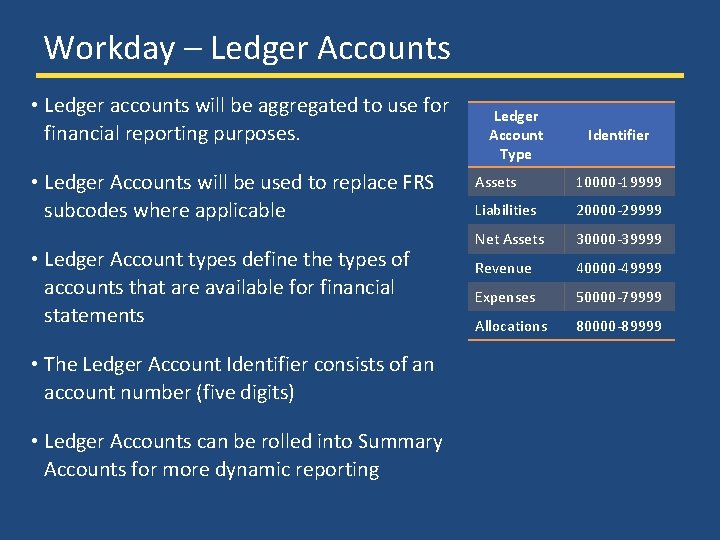
Workday – Ledger Accounts • Ledger accounts will be aggregated to use for financial reporting purposes. • Ledger Accounts will be used to replace FRS subcodes where applicable • Ledger Account types define the types of accounts that are available for financial statements • The Ledger Account Identifier consists of an account number (five digits) • Ledger Accounts can be rolled into Summary Accounts for more dynamic reporting Ledger Account Type Identifier Assets 10000 -19999 Liabilities 20000 -29999 Net Assets 30000 -39999 Revenue 40000 -49999 Expenses 50000 -79999 Allocations 80000 -89999
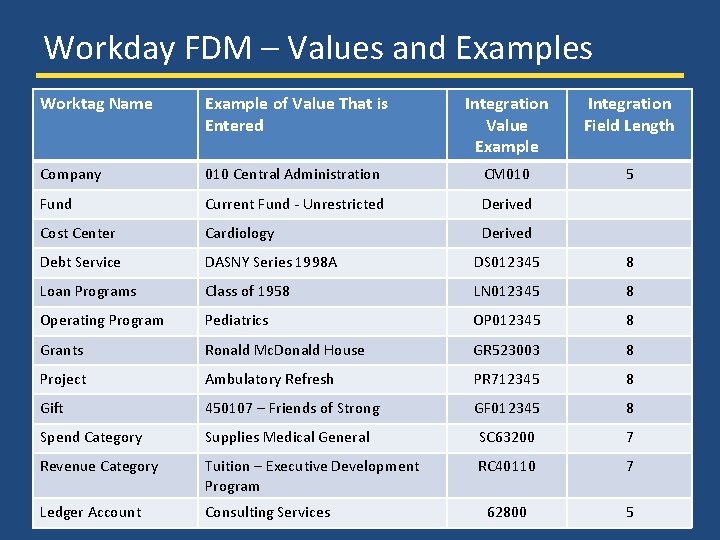
Workday FDM – Values and Examples Worktag Name Example of Value That is Entered Integration Value Example Integration Field Length Company 010 Central Administration CM 010 5 Fund Current Fund - Unrestricted Derived Cost Center Cardiology Derived Debt Service DASNY Series 1998 A DS 012345 8 Loan Programs Class of 1958 LN 012345 8 Operating Program Pediatrics OP 012345 8 Grants Ronald Mc. Donald House GR 523003 8 Project Ambulatory Refresh PR 712345 8 Gift 450107 – Friends of Strong GF 012345 8 Spend Category Supplies Medical General SC 63200 7 Revenue Category Tuition – Executive Development Program RC 40110 7 Ledger Account Consulting Services 62800 5
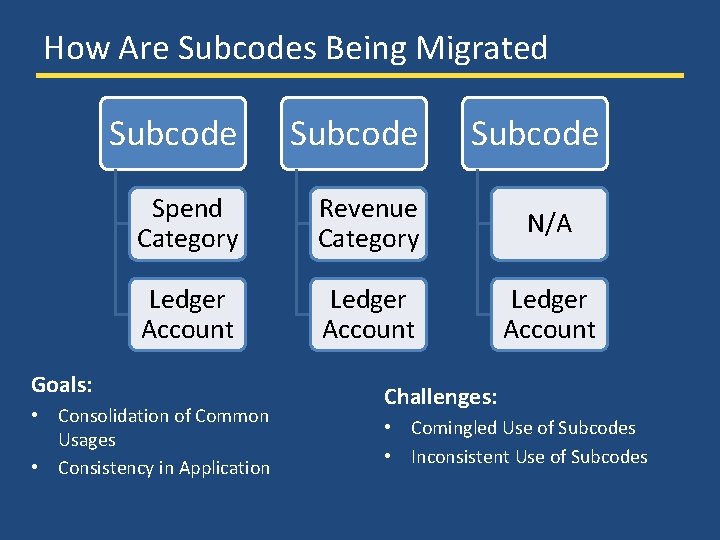
How Are Subcodes Being Migrated Subcode Spend Category Revenue Category N/A Ledger Account Goals: • Consolidation of Common Usages • Consistency in Application Subcode Challenges: • Comingled Use of Subcodes • Inconsistent Use of Subcodes
Goals for Legacy FRS Sub. Codes • Consolidation of Common Usage – Finance project team is in process consolidating into Spend / Revenue Categories and Ledger Accounts in Workday – Will be sharing values for feedback in future SIG meetings • Consistency in Application – Internal reporting and inquiry – External reporting comparisons – More meaningful budget to actual comparisons • Control – Governance in Workday – More controlled updating for new values in Workday – New values must meet thresholds
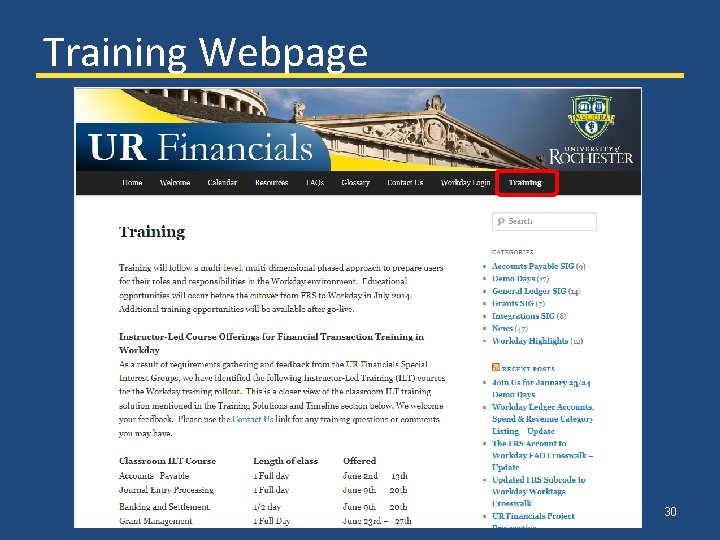
Training Webpage 30
Wrap Up: Demo Days • Please complete survey that will be sent out on Friday • Demo Days next month will be March 19 -21 • Topics for upcoming Demo Days – – – General Updates Reporting Training Data Conversion and Validation Cut-Over Plans • Please continue to reach out with questions and share project information with your Department UR Financials Demo Days – February 2014 31
Q&A 32
Appendix UR Financials Demo Days – February 2014 33
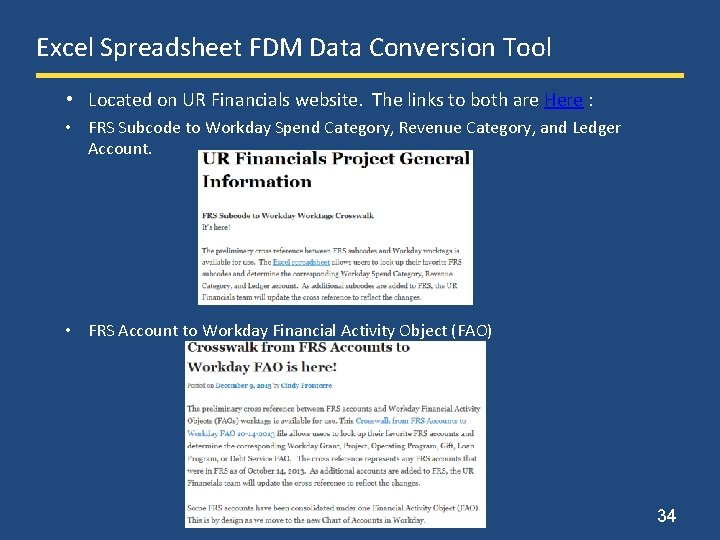
Excel Spreadsheet FDM Data Conversion Tool • Located on UR Financials website. The links to both are Here : • FRS Subcode to Workday Spend Category, Revenue Category, and Ledger Account. • FRS Account to Workday Financial Activity Object (FAO) 34

- Slides: 35